

জেমিনি এপিআই ফাইল সার্চ টুলের মাধ্যমে রিট্রিভাল অগমেন্টেড জেনারেশন ("RAG") সক্ষম করে। ফাইল সার্চ আপনার ডেটা ইম্পোর্ট, চাঙ্ক এবং ইনডেক্স করে, যা প্রদত্ত প্রম্পটের উপর ভিত্তি করে প্রাসঙ্গিক তথ্য দ্রুত খুঁজে বের করতে সাহায্য করে। এই খুঁজে পাওয়া তথ্য মডেলের জন্য কনটেক্সট হিসেবে ব্যবহৃত হয়, যা মডেলটিকে আরও নির্ভুল এবং প্রাসঙ্গিক উত্তর দিতে সক্ষম করে। ফাইল সার্চ gemini-embedding-001 দ্বারা সমর্থিত টেক্সট এমবেডিং এবং gemini-embedding-2 দ্বারা সমর্থিত ইমেজ/মাল্টিমোডাল এমবেডিং-এর মাধ্যমে মাল্টিমোডাল সক্ষমতাও প্রদান করতে পারে।
কোয়েরি করার সময় ফাইল স্টোরেজ এবং এমবেডিং তৈরি করা বিনামূল্যে, এবং আপনাকে শুধুমাত্র প্রথমবার আপনার ফাইলগুলি ইন্ডেক্স করার সময় এমবেডিং তৈরি করার জন্য এবং সাধারণ জেমিনি মডেলের ইনপুট/আউটপুট টোকেনের খরচের জন্য অর্থ প্রদান করতে হবে। এই নতুন বিলিং ব্যবস্থা ফাইল সার্চ টুল তৈরি এবং এর পরিধি বাড়ানোকে আরও সহজ ও সাশ্রয়ী করে তোলে। বিস্তারিত জানতে প্রাইসিং সেকশন দেখুন।
সরাসরি ফাইল সার্চ স্টোরে আপলোড করুন
এই উদাহরণটি দেখায় কিভাবে সরাসরি ফাইল সার্চ স্টোরে একটি ফাইল আপলোড করতে হয়:
পাইথন
from google import genai
from google.genai import types
import time

client = genai.Client()

file_search_store = client.file_search_stores.create(
    config={
        'display_name': 'your-fileSearchStore-name',
        'embedding_model': 'models/gemini-embedding-2'
    }
)

operation = client.file_search_stores.upload_to_file_search_store(
  file='sample.txt',
  file_search_store_name=file_search_store.name,
  config={
      'display_name' : 'display-file-name',
  }
)

while not operation.done:
    time.sleep(5)
    operation = client.operations.get(operation)

interaction = client.interactions.create(
    model="gemini-3.8-flash",
    input="Can you tell me about [insert question]",
    tools=[{
        "type": "file_search",
        "file_search_store_names": [file_search_store.name]
    }]
)

for step in interaction.steps:
    if step.type == "model_output":
        for content_block in step.content:
            if content_block.type == "text":
                print(content_block.text)
                if content_block.annotations:
                    print("\nSources:")
                    for annotation in content_block.annotations:
                        if annotation.type == "file_citation":
                            print(f"  - {annotation.file_name}: {annotation.source}")
জাভাস্ক্রিপ্ট
import { GoogleGenAI } from '@google/genai';

const ai = new GoogleGenAI({});

async function run() {
  const fileSearchStore = await ai.fileSearchStores.create({
    config: {
      displayName: 'your-fileSearchStore-name',
      embeddingModel: 'models/gemini-embedding-2'
    }
  });

  let operation = await ai.fileSearchStores.uploadToFileSearchStore({
    file: 'file.txt',
    fileSearchStoreName: fileSearchStore.name,
    config: {
      displayName: 'file-name',
    }
  });

  while (!operation.done) {
    await new Promise(resolve => setTimeout(resolve, 5000));
    operation = await ai.operations.get({ operation });
  }

  const interaction = await ai.interactions.create({
    model: "gemini-3.8-flash",
    input: "Can you tell me about [insert question]",
    tools: [{
      type: "file_search",
      file_search_store_names: [fileSearchStore.name]
    }]
  });

  for (const step of interaction.steps) {
    if (step.type === 'model_output') {
      for (const contentBlock of step.content) {
        if (contentBlock.type === 'text') {
          console.log(contentBlock.text);
          if (contentBlock.annotations) {
            console.log("\nSources:");
            for (const annotation of contentBlock.annotations) {
              if (annotation.type === 'file_citation') {
                console.log(`  - ${annotation.file_name}: ${annotation.source}`);
              }
            }
          }
        }
      }
    }
  }
}

run();
জাভা
import com.google.genai.Client;
import com.google.genai.gaos.models.interactions.Annotation;
import com.google.genai.gaos.models.interactions.Content;
import com.google.genai.gaos.models.interactions.CreateModelInteraction;
import com.google.genai.gaos.models.interactions.FileCitation;
import com.google.genai.gaos.models.interactions.FileSearch;
import com.google.genai.gaos.models.interactions.Interaction;
import com.google.genai.gaos.models.interactions.InteractionsInput;
import com.google.genai.gaos.models.interactions.Model;
import com.google.genai.gaos.models.interactions.ModelOutputStep;
import com.google.genai.gaos.models.interactions.Step;
import com.google.genai.gaos.models.interactions.TextContent;
import com.google.genai.gaos.models.operations.CreateInteractionRequestBody;
import com.google.genai.types.CreateFileSearchStoreConfig;
import com.google.genai.types.FileSearchStore;
import com.google.genai.types.UploadToFileSearchStoreConfig;
import com.google.genai.types.UploadToFileSearchStoreOperation;
import java.util.Arrays;

Client client = new Client();

FileSearchStore fileSearchStore =
    client.fileSearchStores.create(
        CreateFileSearchStoreConfig.builder()
            .displayName("your-fileSearchStore-name")
            .embeddingModel("models/gemini-embedding-2")
            .build());

UploadToFileSearchStoreOperation operation =
    client.fileSearchStores.uploadToFileSearchStore(
        fileSearchStore.name().get(),
        "sample.txt",
        UploadToFileSearchStoreConfig.builder().displayName("display-file-name").build());

while (!operation.done().orElse(false)) {
  Thread.sleep(5000);
  operation = client.operations.get(operation, null);
}

CreateModelInteraction params =
    CreateModelInteraction.builder()
        .model(Model.of("gemini-3.8-flash"))
        .input(InteractionsInput.of("Can you tell me about [insert question]"))
        .tools(
            Arrays.asList(
                FileSearch.builder()
                    .fileSearchStoreNames(Arrays.asList(fileSearchStore.name().get()))
                    .build()))
        .build();

Interaction interaction =
    client.interactions.create(CreateInteractionRequestBody.of(params)).interaction().get();

if (interaction.steps().isPresent()) {
  for (Step step : interaction.steps().get()) {
    if (step instanceof ModelOutputStep) {
      ModelOutputStep outputStep = (ModelOutputStep) step;
      if (outputStep.content().isPresent()) {
        for (Content contentBlock : outputStep.content().get()) {
          if (contentBlock instanceof TextContent) {
            TextContent textContent = (TextContent) contentBlock;
            System.out.println(textContent.text().orElse(""));
            if (textContent.annotations().isPresent()
                && !textContent.annotations().get().isEmpty()) {
              System.out.println("\nSources:");
              for (Annotation annotation : textContent.annotations().get()) {
                if (annotation instanceof FileCitation) {
                  FileCitation citation = (FileCitation) annotation;
                  System.out.printf(
                      "  - %s: %s%n",
                      citation.fileName().orElse(""), citation.source().orElse(""));
                }
              }
            }
          }
        }
      }
    }
  }
}
যান
package main

import (
    "context"
    "fmt"
    "log"
    "time"

    "google.golang.org/genai"
    "google.golang.org/genai/interactions/models/interactions"
    "google.golang.org/genai/interactions/models/operations"
)

func main() {
    ctx := context.Background()
    client, err := genai.NewClient(ctx, nil)
    if err != nil {
        log.Fatal(err)
    }

    fileSearchStore, err := client.FileSearchStores.Create(ctx, &genai.CreateFileSearchStoreConfig{
        DisplayName:    "your-fileSearchStore-name",
        EmbeddingModel: "models/gemini-embedding-2",
    })
    if err != nil {
        log.Fatal(err)
    }

    operation, err := client.FileSearchStores.UploadToFileSearchStoreFromPath(
        ctx,
        "sample.txt",
        fileSearchStore.Name,
        &genai.UploadToFileSearchStoreConfig{
            DisplayName: "display-file-name",
        },
    )
    if err != nil {
        log.Fatal(err)
    }

    for !operation.Done {
        time.Sleep(5 * time.Second)
        operation, err = client.Operations.GetUploadToFileSearchStoreOperation(ctx, operation, nil)
        if err != nil {
            log.Fatal(err)
        }
    }

    resp, err := client.Interactions.Create(ctx, operations.CreateInteractionRequest{
        Body: operations.NewCreateInteractionRequestBody(
            interactions.CreateModelInteraction{
                Model: interactions.Model("gemini-3.8-flash"),
                Input: interactions.NewInteractionsInput("Can you tell me about [insert question]"),
                Tools: []interactions.Tool{
                    interactions.NewTool(interactions.FileSearch{
                        FileSearchStoreNames: []string{fileSearchStore.Name},
                    }),
                },
            },
        ),
    })
    if err != nil {
        log.Fatal(err)
    }

    for _, step := range resp.Interaction.Steps {
        if step.ModelOutputStep != nil {
            for _, content := range step.ModelOutputStep.Content {
                if content.TextContent != nil {
                    fmt.Println(content.TextContent.Text)
                    if len(content.TextContent.Annotations) > 0 {
                        fmt.Println("\nSources:")
                        for _, annotation := range content.TextContent.Annotations {
                            if annotation.FileCitation != nil {
                                c := annotation.FileCitation
                                fileName := ""
                                if c.FileName != nil {
                                    fileName = *c.FileName
                                }
                                source := ""
                                if c.Source != nil {
                                    source = *c.Source
                                }
                                fmt.Printf("  - %s: %s\n", fileName, source)
                            }
                        }
                    }
                }
            }
        }
    }
}
বিশ্রাম
# 1. Create a File Search store
curl -X POST "https://generativelanguage.googleapis.com/v1beta/fileSearchStores?key=$GEMINI_API_KEY" \
    -H "Content-Type: application/json" \
    -d '{
      "displayName": "your-file-search-store-name",
      "embeddingModel": "models/gemini-embedding-2"
    }' > store_res.json

FILE_SEARCH_STORE_NAME=$(jq -r ".name" store_res.json)

# 2. Upload directly to File Search store using resumable upload
NUM_BYTES=$(wc -c < "sample.txt")
curl "https://generativelanguage.googleapis.com/upload/v1beta/fileSearchStores/$FILE_SEARCH_STORE_NAME:uploadToFileSearchStore?key=$GEMINI_API_KEY" \
    -D upload-header.tmp \
    -H "X-Goog-Upload-Protocol: resumable" \
    -H "X-Goog-Upload-Command: start" \
    -H "X-Goog-Upload-Header-Content-Length: $NUM_BYTES" \
    -H "X-Goog-Upload-Header-Content-Type: text/plain" \
    -H "Content-Type: application/json" \
    -d '{"displayName": "sample.txt"}' 2> /dev/null

upload_url=$(grep -i "x-goog-upload-url: " upload-header.tmp | cut -d" " -f2 | tr -d "\r")
rm upload-header.tmp

curl "${upload_url}" \
    -H "Content-Length: $NUM_BYTES" \
    -H "X-Goog-Upload-Offset: 0" \
    -H "X-Goog-Upload-Command: upload, finalize" \
    --data-binary "@sample.txt" 2> /dev/null > upload_response.json

cat upload_response.json

# 3. Query using the File Search store
curl -X POST "https://generativelanguage.googleapis.com/v1beta/interactions" \
    -H "x-goog-api-key: $GEMINI_API_KEY" \
    -H "Content-Type: application/json" \
    -d '{
      "model": "gemini-3.8-flash",
      "input": "Can you tell me about [insert question]",
      "tools": [{
        "type": "file_search",
        "file_search_store_names": ["'"$FILE_SEARCH_STORE_NAME"'"]
      }]
    }'
আরও তথ্যের জন্য uploadToFileSearchStore এর এপিআই রেফারেন্স দেখুন।
ফাইল আমদানি করা হচ্ছে
বিকল্পভাবে, আপনি একটি বিদ্যমান ফাইল আপলোড করে আপনার ফাইল সার্চ স্টোরে ইম্পোর্ট করতে পারেন:
পাইথন
from google import genai
from google.genai import types
import time

client = genai.Client()

sample_file = client.files.upload(file='sample.txt', config={'display_name': 'display_file_name'})

file_search_store = client.file_search_stores.create(
    config={
        'display_name': 'your-fileSearchStore-name',
        'embedding_model': 'models/gemini-embedding-2'
    }
)

operation = client.file_search_stores.import_file(
    file_search_store_name=file_search_store.name,
    file_name=sample_file.name
)

while not operation.done:
    time.sleep(5)
    operation = client.operations.get(operation)

interaction = client.interactions.create(
    model="gemini-3.8-flash",
    input="Can you tell me about [insert question]",
    tools=[{
        "type": "file_search",
        "file_search_store_names": [file_search_store.name]
    }]
)

for step in interaction.steps:
    if step.type == "model_output":
        for content_block in step.content:
            if content_block.type == "text":
                print(content_block.text)
জাভাস্ক্রিপ্ট
import { GoogleGenAI } from '@google/genai';

const ai = new GoogleGenAI({});

async function run() {
  const sampleFile = await ai.files.upload({
    file: 'sample.txt',
    config: { displayName: 'file-name' }
  });

  const fileSearchStore = await ai.fileSearchStores.create({
    config: {
      displayName: 'your-fileSearchStore-name',
      embeddingModel: 'models/gemini-embedding-2'
    }
  });

  let operation = await ai.fileSearchStores.importFile({
    fileSearchStoreName: fileSearchStore.name,
    fileName: sampleFile.name
  });

  while (!operation.done) {
    await new Promise(resolve => setTimeout(resolve, 5000));
    operation = await ai.operations.get({ operation: operation });
  }

  const interaction = await ai.interactions.create({
    model: "gemini-3.8-flash",
    input: "Can you tell me about [insert question]",
    tools: [{
      type: "file_search",
      file_search_store_names: [fileSearchStore.name]
    }]
  });

  for (const step of interaction.steps) {
    if (step.type === 'model_output') {
      for (const contentBlock of step.content) {
        if (contentBlock.type === 'text') {
          console.log(contentBlock.text);
        }
      }
    }
  }
}

run();
জাভা
import com.google.genai.Client;
import com.google.genai.gaos.models.interactions.Content;
import com.google.genai.gaos.models.interactions.CreateModelInteraction;
import com.google.genai.gaos.models.interactions.FileSearch;
import com.google.genai.gaos.models.interactions.Interaction;
import com.google.genai.gaos.models.interactions.InteractionsInput;
import com.google.genai.gaos.models.interactions.Model;
import com.google.genai.gaos.models.interactions.ModelOutputStep;
import com.google.genai.gaos.models.interactions.Step;
import com.google.genai.gaos.models.interactions.TextContent;
import com.google.genai.gaos.models.operations.CreateInteractionRequestBody;
import com.google.genai.types.CreateFileSearchStoreConfig;
import com.google.genai.types.File;
import com.google.genai.types.FileSearchStore;
import com.google.genai.types.ImportFileOperation;
import com.google.genai.types.UploadFileConfig;
import java.util.Arrays;

Client client = new Client();

File sampleFile =
    client.files.upload(
        "sample.txt", UploadFileConfig.builder().displayName("display_file_name").build());

FileSearchStore fileSearchStore =
    client.fileSearchStores.create(
        CreateFileSearchStoreConfig.builder()
            .displayName("your-fileSearchStore-name")
            .embeddingModel("models/gemini-embedding-2")
            .build());

ImportFileOperation operation =
    client.fileSearchStores.importFile(
        fileSearchStore.name().get(), sampleFile.name().get(), null);

while (!operation.done().orElse(false)) {
  Thread.sleep(5000);
  operation = client.operations.get(operation, null);
}

CreateModelInteraction params =
    CreateModelInteraction.builder()
        .model(Model.of("gemini-3.8-flash"))
        .input(InteractionsInput.of("Can you tell me about [insert question]"))
        .tools(
            Arrays.asList(
                FileSearch.builder()
                    .fileSearchStoreNames(Arrays.asList(fileSearchStore.name().get()))
                    .build()))
        .build();

Interaction interaction =
    client.interactions.create(CreateInteractionRequestBody.of(params)).interaction().get();

if (interaction.steps().isPresent()) {
  for (Step step : interaction.steps().get()) {
    if (step instanceof ModelOutputStep) {
      ModelOutputStep outputStep = (ModelOutputStep) step;
      if (outputStep.content().isPresent()) {
        for (Content contentBlock : outputStep.content().get()) {
          if (contentBlock instanceof TextContent) {
            TextContent textContent = (TextContent) contentBlock;
            System.out.println(textContent.text().orElse(""));
          }
        }
      }
    }
  }
}
যান
package main

import (
    "context"
    "fmt"
    "log"
    "time"

    "google.golang.org/genai"
    "google.golang.org/genai/interactions/models/interactions"
    "google.golang.org/genai/interactions/models/operations"
)

func main() {
    ctx := context.Background()
    client, err := genai.NewClient(ctx, nil)
    if err != nil {
        log.Fatal(err)
    }

    sampleFile, err := client.Files.UploadFromPath(ctx, "sample.txt", &genai.UploadFileConfig{
        DisplayName: "display_file_name",
    })
    if err != nil {
        log.Fatal(err)
    }

    fileSearchStore, err := client.FileSearchStores.Create(ctx, &genai.CreateFileSearchStoreConfig{
        DisplayName:    "your-fileSearchStore-name",
        EmbeddingModel: "models/gemini-embedding-2",
    })
    if err != nil {
        log.Fatal(err)
    }

    operation, err := client.FileSearchStores.ImportFile(ctx, fileSearchStore.Name, sampleFile.Name, nil)
    if err != nil {
        log.Fatal(err)
    }

    for !operation.Done {
        time.Sleep(5 * time.Second)
        operation, err = client.Operations.GetImportFileOperation(ctx, operation, nil)
        if err != nil {
            log.Fatal(err)
        }
    }

    resp, err := client.Interactions.Create(ctx, operations.CreateInteractionRequest{
        Body: operations.NewCreateInteractionRequestBody(
            interactions.CreateModelInteraction{
                Model: interactions.Model("gemini-3.8-flash"),
                Input: interactions.NewInteractionsInput("Can you tell me about [insert question]"),
                Tools: []interactions.Tool{
                    interactions.NewTool(interactions.FileSearch{
                        FileSearchStoreNames: []string{fileSearchStore.Name},
                    }),
                },
            },
        ),
    })
    if err != nil {
        log.Fatal(err)
    }

    for _, step := range resp.Interaction.Steps {
        if step.ModelOutputStep != nil {
            for _, content := range step.ModelOutputStep.Content {
                if content.TextContent != nil {
                    fmt.Println(content.TextContent.Text)
                }
            }
        }
    }
}
বিশ্রাম
# 1. Upload file using the Files API
NUM_BYTES=$(wc -c < "sample.txt")
curl "https://generativelanguage.googleapis.com/upload/v1beta/files?key=$GEMINI_API_KEY" \
    -D upload-header.tmp \
    -H "X-Goog-Upload-Protocol: resumable" \
    -H "X-Goog-Upload-Command: start" \
    -H "X-Goog-Upload-Header-Content-Length: $NUM_BYTES" \
    -H "X-Goog-Upload-Header-Content-Type: text/plain" \
    -H "Content-Type: application/json" \
    -d '{"file": {"displayName": "sample.txt"}}' 2> /dev/null

upload_url=$(grep -i "x-goog-upload-url: " upload-header.tmp | cut -d" " -f2 | tr -d "\r")
rm upload-header.tmp

curl "${upload_url}" \
    -H "Content-Length: $NUM_BYTES" \
    -H "X-Goog-Upload-Offset: 0" \
    -H "X-Goog-Upload-Command: upload, finalize" \
    --data-binary "@sample.txt" 2> /dev/null > file_info.json

FILE_NAME=$(jq -r ".file.name" file_info.json)

# 2. Create a File Search store
curl -X POST "https://generativelanguage.googleapis.com/v1beta/fileSearchStores?key=$GEMINI_API_KEY" \
    -H "Content-Type: application/json" \
    -d '{
      "displayName": "your-file-search-store-name",
      "embeddingModel": "models/gemini-embedding-2"
    }' > store_res.json

FILE_SEARCH_STORE_NAME=$(jq -r ".name" store_res.json)

# 3. Import the file into the File Search store
curl -X POST "https://generativelanguage.googleapis.com/v1beta/fileSearchStores/$FILE_SEARCH_STORE_NAME:importFile?key=$GEMINI_API_KEY" \
    -H "Content-Type: application/json" \
    -d '{"fileName": "'"$FILE_NAME"'"}'

# 4. Query using the File Search store
curl -X POST "https://generativelanguage.googleapis.com/v1beta/interactions" \
    -H "x-goog-api-key: $GEMINI_API_KEY" \
    -H "Content-Type: application/json" \
    -d '{
      "model": "gemini-3.8-flash",
      "input": "Can you tell me about [insert question]",
      "tools": [{
        "type": "file_search",
        "file_search_store_names": ["'"$FILE_SEARCH_STORE_NAME"'"]
      }]
    }'
আরও তথ্যের জন্য importFile এর এপিআই রেফারেন্স দেখুন।
খণ্ডিং কনফিগারেশন
আপনি যখন কোনো ফাইল সার্চ স্টোরে একটি ফাইল ইম্পোর্ট করেন, তখন সেটি স্বয়ংক্রিয়ভাবে খণ্ডে খণ্ডে বিভক্ত, এমবেড, ইনডেক্স এবং আপনার ফাইল সার্চ স্টোরে আপলোড হয়ে যায়। চাংকিং কৌশলের উপর যদি আপনার আরও বেশি নিয়ন্ত্রণের প্রয়োজন হয়, তবে আপনি প্রতি চাংকে টোকেনের সর্বোচ্চ সংখ্যা এবং ওভারল্যাপিং টোকেনের সর্বোচ্চ সংখ্যা নির্ধারণ করতে একটি chunking_config সেটিং নির্দিষ্ট করে দিতে পারেন।
পাইথন
from google import genai
from google.genai import types
import time

client = genai.Client()

operation = client.file_search_stores.upload_to_file_search_store(
    file_search_store_name=file_search_store.name,
    file='sample.txt',
    config={
        'chunking_config': {
          'white_space_config': {
            'max_tokens_per_chunk': 200,
            'max_overlap_tokens': 20
          }
        }
    }
)

while not operation.done:
    time.sleep(5)
    operation = client.operations.get(operation)

print("Custom chunking complete.")
জাভাস্ক্রিপ্ট
import { GoogleGenAI } from '@google/genai';

const ai = new GoogleGenAI({});

let operation = await ai.fileSearchStores.uploadToFileSearchStore({
  file: 'file.txt',
  fileSearchStoreName: fileSearchStore.name,
  config: {
    displayName: 'file-name',
    chunkingConfig: {
      whiteSpaceConfig: {
        maxTokensPerChunk: 200,
        maxOverlapTokens: 20
      }
    }
  }
});

while (!operation.done) {
  await new Promise(resolve => setTimeout(resolve, 5000));
  operation = await ai.operations.get({ operation });
}
console.log("Custom chunking complete.");
জাভা
import com.google.genai.Client;
import com.google.genai.types.ChunkingConfig;
import com.google.genai.types.UploadToFileSearchStoreConfig;
import com.google.genai.types.UploadToFileSearchStoreOperation;
import com.google.genai.types.WhiteSpaceConfig;

Client client = new Client();

UploadToFileSearchStoreOperation operation =
    client.fileSearchStores.uploadToFileSearchStore(
        "fileSearchStores/my-file-search-store",
        "sample.txt",
        UploadToFileSearchStoreConfig.builder()
            .displayName("file-name")
            .chunkingConfig(
                ChunkingConfig.builder()
                    .whiteSpaceConfig(
                        WhiteSpaceConfig.builder()
                            .maxTokensPerChunk(200)
                            .maxOverlapTokens(20)
                            .build())
                    .build())
            .build());

while (!operation.done().orElse(false)) {
  Thread.sleep(5000);
  operation = client.operations.get(operation, null);
}

System.out.println("Custom chunking complete.");
যান
package main

import (
    "context"
    "fmt"
    "log"
    "time"

    "google.golang.org/genai"
)

func main() {
    ctx := context.Background()
    client, err := genai.NewClient(ctx, nil)
    if err != nil {
        log.Fatal(err)
    }

    operation, err := client.FileSearchStores.UploadToFileSearchStoreFromPath(
        ctx,
        "sample.txt",
        "fileSearchStores/my-file-search-store",
        &genai.UploadToFileSearchStoreConfig{
            DisplayName: "file-name",
            ChunkingConfig: &genai.ChunkingConfig{
                WhiteSpaceConfig: &genai.WhiteSpaceConfig{
                    MaxTokensPerChunk: genai.Ptr(int32(200)),
                    MaxOverlapTokens:  genai.Ptr(int32(20)),
                },
            },
        },
    )
    if err != nil {
        log.Fatal(err)
    }

    for !operation.Done {
        time.Sleep(5 * time.Second)
        operation, err = client.Operations.GetUploadToFileSearchStoreOperation(ctx, operation, nil)
        if err != nil {
            log.Fatal(err)
        }
    }

    fmt.Println("Custom chunking complete.")
}
বিশ্রাম
NUM_BYTES=$(wc -c < "sample.txt")
curl "https://generativelanguage.googleapis.com/upload/v1beta/fileSearchStores/$FILE_SEARCH_STORE_NAME:uploadToFileSearchStore?key=$GEMINI_API_KEY" \
    -D upload-header.tmp \
    -H "X-Goog-Upload-Protocol: resumable" \
    -H "X-Goog-Upload-Command: start" \
    -H "X-Goog-Upload-Header-Content-Length: $NUM_BYTES" \
    -H "X-Goog-Upload-Header-Content-Type: text/plain" \
    -H "Content-Type: application/json" \
    -d '{
      "displayName": "sample.txt",
      "chunkingConfig": {
        "whiteSpaceConfig": {
          "maxTokensPerChunk": 200,
          "maxOverlapTokens": 20
        }
      }
    }' 2> /dev/null

upload_url=$(grep -i "x-goog-upload-url: " upload-header.tmp | cut -d" " -f2 | tr -d "\r")
rm upload-header.tmp

curl "${upload_url}" \
    -H "Content-Length: $NUM_BYTES" \
    -H "X-Goog-Upload-Offset: 0" \
    -H "X-Goog-Upload-Command: upload, finalize" \
    --data-binary "@sample.txt" 2> /dev/null > upload_response.json

cat upload_response.json
আপনার ফাইল সার্চ স্টোর ব্যবহার করতে, আপলোড এবং ইম্পোর্ট উদাহরণে দেখানো অনুযায়ী এটিকে interactions.create মেথডে একটি টুল হিসেবে পাস করুন।
এটি কীভাবে কাজ করে
ফাইল সার্চ ব্যবহারকারীর দেওয়া তথ্যের সাথে প্রাসঙ্গিক তথ্য খুঁজে বের করার জন্য সিমান্টিক সার্চ নামক একটি কৌশল ব্যবহার করে। সাধারণ কীওয়ার্ড-ভিত্তিক সার্চের থেকে ভিন্ন, সিমান্টিক সার্চ আপনার জিজ্ঞাসার অর্থ এবং প্রেক্ষাপট বুঝতে পারে।
যখন আপনি কোনো ফাইল ইম্পোর্ট করেন, তখন তা এমবেডিং নামক সাংখ্যিক উপস্থাপনায় রূপান্তরিত হয়, যা আপলোড করা বিষয়বস্তুর অর্থগত তাৎপর্য ধারণ করে। এই এমবেডিংগুলো একটি বিশেষায়িত ফাইল সার্চ ডেটাবেসে সংরক্ষিত থাকে। যখন আপনি কোনো কোয়েরি করেন, সেটিও একটি এমবেডিং-এ রূপান্তরিত হয়। এরপর সিস্টেমটি ফাইল সার্চ স্টোর থেকে সবচেয়ে সাদৃশ্যপূর্ণ ও প্রাসঙ্গিক ডকুমেন্ট চাঙ্কগুলো খুঁজে বের করার জন্য একটি ফাইল সার্চ সম্পাদন করে।
এমবেডিংয়ের কোনো টাইম টু লিভ (TTL) নেই; এগুলো ম্যানুয়ালি মুছে ফেলা না হওয়া পর্যন্ত, অথবা মডেলটি অপ্রচলিত না হওয়া পর্যন্ত টিকে থাকে। তবে, ফাইলগুলো ৪৮ ঘণ্টা পর মুছে ফেলা হয়।
ফাইল সার্চ ` uploadToFileSearchStore এপিআই ব্যবহারের প্রক্রিয়াটি নিচে বিস্তারিতভাবে বর্ণনা করা হলো:
একটি ফাইল সার্চ স্টোর তৈরি করুন : একটি ফাইল সার্চ স্টোরে আপনার ফাইলগুলো থেকে প্রক্রিয়াকৃত ডেটা থাকে। এটি এমবেডিংগুলোর জন্য একটি স্থায়ী ধারক, যার উপর সিমান্টিক সার্চ পরিচালিত হবে।
একটি ফাইল আপলোড করুন এবং ফাইল সার্চ স্টোরে ইম্পোর্ট করুন : একই সাথে একটি ফাইল আপলোড করুন এবং এর ফলাফল আপনার ফাইল সার্চ স্টোরে ইম্পোর্ট করুন। এটি একটি অস্থায়ী
Fileঅবজেক্ট তৈরি করে, যা আপনার মূল ডকুমেন্টের একটি রেফারেন্স। এরপর সেই ডেটা খণ্ডে খণ্ডে বিভক্ত করা হয়, ফাইল সার্চ এমবেডিং-এ রূপান্তরিত করা হয় এবং ইনডেক্স করা হয়।Fileঅবজেক্টটি ৪৮ ঘণ্টা পর মুছে ফেলা হয়, কিন্তু ফাইল সার্চ স্টোরে ইম্পোর্ট করা ডেটা অনির্দিষ্টকালের জন্য সংরক্ষিত থাকবে যতক্ষণ না আপনি তা মুছে ফেলার সিদ্ধান্ত নেন।ফাইল সার্চের মাধ্যমে কোয়েরি : সবশেষে, আপনি একটি
generateContentকলেFileSearchটুলটি ব্যবহার করেন। টুল কনফিগারেশনে, আপনি একটিFileSearchRetrievalResourceনির্দিষ্ট করেন, যা সেইFileSearchStoreনির্দেশ করে যেখানে আপনি সার্চ করতে চান। এটি মডেলকে তার প্রতিক্রিয়ার ভিত্তি হিসেবে প্রাসঙ্গিক তথ্য খুঁজে বের করার জন্য সেই নির্দিষ্ট ফাইল সার্চ স্টোরে একটি সিম্যান্টিক সার্চ সম্পাদন করতে বলে।
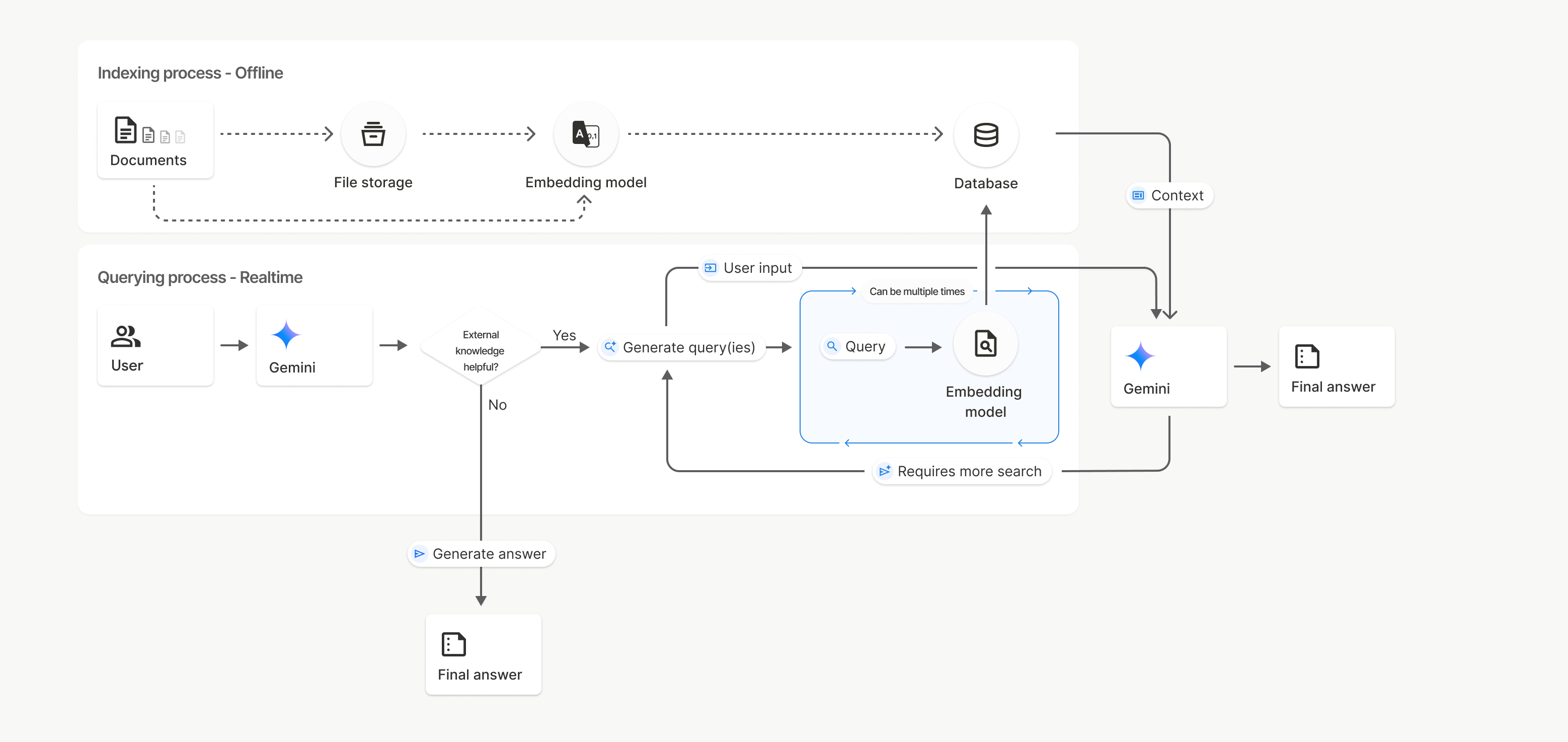
এই ডায়াগ্রামে, ডকুমেন্টস থেকে এমবেডিং মডেল পর্যন্ত ডটেড লাইনটি ( gemini-embedding-001 ব্যবহার করে) uploadToFileSearchStore API-কে নির্দেশ করে ( ফাইল স্টোরেজকে বাইপাস করে)। অন্যথায়, ফাইলস API ব্যবহার করে আলাদাভাবে ফাইল তৈরি এবং তারপর ইম্পোর্ট করলে ইন্ডেক্সিং প্রক্রিয়াটি ডকুমেন্টস থেকে ফাইল স্টোরেজে এবং তারপর এমবেডিং মডেলে স্থানান্তরিত হয়।
ফাইল অনুসন্ধান স্টোর
ফাইল সার্চ স্টোর হলো আপনার ডকুমেন্ট এমবেডিং-এর জন্য একটি ধারক। ফাইল এপিআই (File API)-এর মাধ্যমে আপলোড করা র ফাইলগুলো ৪৮ ঘণ্টা পর মুছে ফেলা হলেও, ফাইল সার্চ স্টোরে ইম্পোর্ট করা ডেটা অনির্দিষ্টকালের জন্য সংরক্ষিত থাকে, যতক্ষণ না আপনি নিজে থেকে তা মুছে ফেলেন। আপনার ডকুমেন্টগুলো গুছিয়ে রাখার জন্য আপনি একাধিক ফাইল সার্চ স্টোর তৈরি করতে পারেন। FileSearchStore API) আপনাকে আপনার ফাইল সার্চ স্টোরগুলো পরিচালনা করার জন্য তৈরি করতে, তালিকাভুক্ত করতে, পেতে এবং মুছে ফেলতে দেয়। ফাইল সার্চ স্টোরের নামগুলো বিশ্বব্যাপী প্রযোজ্য।
আপনার ফাইল সার্চ স্টোরগুলো কীভাবে পরিচালনা করবেন তার কিছু উদাহরণ নিচে দেওয়া হলো:
পাইথন
file_search_store = client.file_search_stores.create(
    config={
        'display_name': 'myfilesearchstore123',
        'embedding_model': 'models/gemini-embedding-2'
    }
)

for store in client.file_search_stores.list():
    print(store)

my_file_search_store = client.file_search_stores.get(name=file_search_store.name)

client.file_search_stores.delete(name=file_search_store.name, config={'force': True})
জাভাস্ক্রিপ্ট
const fileSearchStore = await ai.fileSearchStores.create({
  config: {
    displayName: 'myfilesearchstore123',
    embeddingModel: 'models/gemini-embedding-2'
  }
});

const fileSearchStores = await ai.fileSearchStores.list();
for await (const store of fileSearchStores) {
  console.log(store);
}

const myFileSearchStore = await ai.fileSearchStores.get({
  name: fileSearchStore.name
});

await ai.fileSearchStores.delete({
  name: fileSearchStore.name,
  config: { force: true }
});
জাভা
import com.google.genai.Client;
import com.google.genai.types.CreateFileSearchStoreConfig;
import com.google.genai.types.DeleteFileSearchStoreConfig;
import com.google.genai.types.FileSearchStore;

Client client = new Client();

FileSearchStore fileSearchStore =
    client.fileSearchStores.create(
        CreateFileSearchStoreConfig.builder()
            .displayName("myfilesearchstore123")
            .embeddingModel("models/gemini-embedding-2")
            .build());

for (FileSearchStore store : client.fileSearchStores.list(null)) {
  System.out.println(store);
}

FileSearchStore myFileSearchStore =
    client.fileSearchStores.get(fileSearchStore.name().get(), null);

client.fileSearchStores.delete(
    fileSearchStore.name().get(), DeleteFileSearchStoreConfig.builder().force(true).build());
যান
package main

import (
    "context"
    "fmt"
    "log"

    "google.golang.org/genai"
)

func main() {
    ctx := context.Background()
    client, err := genai.NewClient(ctx, nil)
    if err != nil {
        log.Fatal(err)
    }

    fileSearchStore, err := client.FileSearchStores.Create(ctx, &genai.CreateFileSearchStoreConfig{
        DisplayName:    "myfilesearchstore123",
        EmbeddingModel: "models/gemini-embedding-2",
    })
    if err != nil {
        log.Fatal(err)
    }

    for store, err := range client.FileSearchStores.All(ctx) {
        if err != nil {
            log.Fatal(err)
        }
        fmt.Println(store)
    }

    myFileSearchStore, err := client.FileSearchStores.Get(ctx, fileSearchStore.Name, nil)
    if err != nil {
        log.Fatal(err)
    }
    _ = myFileSearchStore

    err = client.FileSearchStores.Delete(ctx, fileSearchStore.Name, &genai.DeleteFileSearchStoreConfig{
        Force: genai.Ptr(true),
    })
    if err != nil {
        log.Fatal(err)
    }
}
বিশ্রাম
curl -X POST "https://generativelanguage.googleapis.com/v1beta/fileSearchStores?key=${GEMINI_API_KEY}" \
    -H "Content-Type: application/json" \
    -d '{ "displayName": "My Store", "embedding_model": "models/gemini-embedding-2" }'

curl "https://generativelanguage.googleapis.com/v1beta/fileSearchStores?key=${GEMINI_API_KEY}"

curl "https://generativelanguage.googleapis.com/v1beta/fileSearchStores/myfilesearchstore123?key=${GEMINI_API_KEY}"

curl -X DELETE "https://generativelanguage.googleapis.com/v1beta/fileSearchStores/myfilesearchstore123?key=${GEMINI_API_KEY}"
ফাইল অনুসন্ধান নথি
আপনি ফাইল সার্চ ডকুমেন্টস এপিআই (File Search Documents API) ব্যবহার করে আপনার ফাইল স্টোরের প্রতিটি ডকুমেন্টের list , কোনো ডকুমেন্ট সম্পর্কে তথ্য get এবং নাম দিয়ে ডকুমেন্ট delete পারেন।
পাইথন
for document_in_store in client.file_search_stores.documents.list(parent='fileSearchStores/myfilesearchstore123'):
  print(document_in_store)

file_search_document = client.file_search_stores.documents.get(name='fileSearchStores/myfilesearchstore123/documents/sampletxt123')
print(file_search_document)

client.file_search_stores.documents.delete(name='fileSearchStores/myfilesearchstore123/documents/sampletxt123', config={'force': True})
জাভাস্ক্রিপ্ট
const documents = await ai.fileSearchStores.documents.list({
  parent: 'fileSearchStores/myfilesearchstore123'
});
for await (const doc of documents) {
  console.log(doc);
}

const fileSearchDocument = await ai.fileSearchStores.documents.get({
  name: 'fileSearchStores/myfilesearchstore123/documents/sampletxt123'
});

await ai.fileSearchStores.documents.delete({
  name: 'fileSearchStores/myfilesearchstore123/documents/sampletxt123',
  config: { force: true }
});
জাভা
import com.google.genai.Client;
import com.google.genai.types.DeleteDocumentConfig;
import com.google.genai.types.Document;

Client client = new Client();

for (Document documentInStore :
    client.fileSearchStores.documents.list("fileSearchStores/myfilesearchstore123", null)) {
  System.out.println(documentInStore);
}

Document fileSearchDocument =
    client.fileSearchStores.documents.get(
        "fileSearchStores/myfilesearchstore123/documents/sampletxt123", null);
System.out.println(fileSearchDocument);

client.fileSearchStores.documents.delete(
    "fileSearchStores/myfilesearchstore123/documents/sampletxt123",
    DeleteDocumentConfig.builder().force(true).build());
যান
package main

import (
    "context"
    "fmt"
    "log"

    "google.golang.org/genai"
)

func main() {
    ctx := context.Background()
    client, err := genai.NewClient(ctx, nil)
    if err != nil {
        log.Fatal(err)
    }

    for documentInStore, err := range client.FileSearchStores.Documents.All(ctx, "fileSearchStores/myfilesearchstore123") {
        if err != nil {
            log.Fatal(err)
        }
        fmt.Println(documentInStore)
    }

    fileSearchDocument, err := client.FileSearchStores.Documents.Get(ctx, "fileSearchStores/myfilesearchstore123/documents/sampletxt123", nil)
    if err != nil {
        log.Fatal(err)
    }
    fmt.Println(fileSearchDocument)

    err = client.FileSearchStores.Documents.Delete(ctx, "fileSearchStores/myfilesearchstore123/documents/sampletxt123", &genai.DeleteDocumentConfig{
        Force: genai.Ptr(true),
    })
    if err != nil {
        log.Fatal(err)
    }
}
বিশ্রাম
curl "https://generativelanguage.googleapis.com/v1beta/fileSearchStores/myfilesearchstore123/documents?key=${GEMINI_API_KEY}"

curl "https://generativelanguage.googleapis.com/v1beta/fileSearchStores/myfilesearchstore123/documents/sampletxt123?key=${GEMINI_API_KEY}"

curl -X DELETE "https://generativelanguage.googleapis.com/v1beta/fileSearchStores/myfilesearchstore123/documents/sampletxt123?key=${GEMINI_API_KEY}&force=true"
ফাইল মেটাডেটা
আপনার ফাইলগুলো ফিল্টার করতে বা অতিরিক্ত প্রাসঙ্গিক তথ্য যোগ করতে আপনি সেগুলোতে নিজস্ব মেটাডেটা যোগ করতে পারেন। মেটাডেটা হলো কী-ভ্যালু জোড়ের একটি সেট।
পাইথন
op = client.file_search_stores.import_file(
    file_search_store_name=file_search_store.name,
    file_name=sample_file.name,
    config={
        'custom_metadata': [
            {"key": "author", "string_value": "Robert Graves"},
            {"key": "year", "numeric_value": 1934}
        ]
    }
)
জাভাস্ক্রিপ্ট
let operation = await ai.fileSearchStores.importFile({
  fileSearchStoreName: fileSearchStore.name,
  fileName: sampleFile.name,
  config: {
    customMetadata: [
      { key: "author", stringValue: "Robert Graves" },
      { key: "year", numericValue: 1934 }
    ]
  }
});
জাভা
import com.google.genai.Client;
import com.google.genai.types.CustomMetadata;
import com.google.genai.types.ImportFileConfig;
import com.google.genai.types.ImportFileOperation;
import java.util.Arrays;

Client client = new Client();

ImportFileOperation op =
    client.fileSearchStores.importFile(
        "fileSearchStores/myfilesearchstore123",
        "files/samplefile123",
        ImportFileConfig.builder()
            .customMetadata(
                Arrays.asList(
                    CustomMetadata.builder().key("author").stringValue("Robert Graves").build(),
                    CustomMetadata.builder().key("year").numericValue(1934f).build()))
            .build());
যান
package main

import (
    "context"
    "log"

    "google.golang.org/genai"
)

func main() {
    ctx := context.Background()
    client, err := genai.NewClient(ctx, nil)
    if err != nil {
        log.Fatal(err)
    }

    op, err := client.FileSearchStores.ImportFile(
        ctx,
        "fileSearchStores/myfilesearchstore123",
        "files/samplefile123",
        &genai.ImportFileConfig{
            CustomMetadata: []*genai.CustomMetadata{
                {Key: "author", StringValue: "Robert Graves"},
                {Key: "year", NumericValue: genai.Ptr(float32(1934))},
            },
        },
    )
    if err != nil {
        log.Fatal(err)
    }
    _ = op
}
এটি তখন কাজে আসে যখন আপনার ফাইল সার্চ স্টোরে একাধিক ডকুমেন্ট থাকে এবং আপনি সেগুলোর মধ্যে থেকে শুধু একটি নির্দিষ্ট অংশ অনুসন্ধান করতে চান।
পাইথন
interaction = client.interactions.create(
    model="gemini-3.8-flash",
    input="Tell me about the book 'I, Claudius'",
    tools=[{
        "type": "file_search",
        "file_search_store_names": [file_search_store.name],
        "metadata_filter": 'author="Robert Graves"',
    }]
)

for step in interaction.steps:
    if step.type == "model_output":
        for content_block in step.content:
            if content_block.type == "text":
                print(content_block.text)
জাভাস্ক্রিপ্ট
const interaction = await ai.interactions.create({
  model: "gemini-3.8-flash",
  input: "Tell me about the book 'I, Claudius'",
  tools: [{
    type: "file_search",
    file_search_store_names: [fileSearchStore.name],
    metadata_filter: 'author="Robert Graves"',
  }]
});

for (const step of interaction.steps) {
  if (step.type === 'model_output') {
    for (const contentBlock of step.content) {
      if (contentBlock.type === 'text') {
        console.log(contentBlock.text);
      }
    }
  }
}
জাভা
import com.google.genai.Client;
import com.google.genai.gaos.models.interactions.Content;
import com.google.genai.gaos.models.interactions.CreateModelInteraction;
import com.google.genai.gaos.models.interactions.FileSearch;
import com.google.genai.gaos.models.interactions.Interaction;
import com.google.genai.gaos.models.interactions.InteractionsInput;
import com.google.genai.gaos.models.interactions.Model;
import com.google.genai.gaos.models.interactions.ModelOutputStep;
import com.google.genai.gaos.models.interactions.Step;
import com.google.genai.gaos.models.interactions.TextContent;
import com.google.genai.gaos.models.operations.CreateInteractionRequestBody;
import java.util.Arrays;

Client client = new Client();

CreateModelInteraction params =
    CreateModelInteraction.builder()
        .model(Model.of("gemini-3.8-flash"))
        .input(InteractionsInput.of("Tell me about the book 'I, Claudius'"))
        .tools(
            Arrays.asList(
                FileSearch.builder()
                    .fileSearchStoreNames(Arrays.asList("fileSearchStores/myfilesearchstore123"))
                    .metadataFilter("author=\"Robert Graves\"")
                    .build()))
        .build();

Interaction interaction =
    client.interactions.create(CreateInteractionRequestBody.of(params)).interaction().get();

if (interaction.steps().isPresent()) {
  for (Step step : interaction.steps().get()) {
    if (step instanceof ModelOutputStep) {
      ModelOutputStep outputStep = (ModelOutputStep) step;
      if (outputStep.content().isPresent()) {
        for (Content contentBlock : outputStep.content().get()) {
          if (contentBlock instanceof TextContent) {
            TextContent textContent = (TextContent) contentBlock;
            System.out.println(textContent.text().orElse(""));
          }
        }
      }
    }
  }
}
যান
package main

import (
    "context"
    "fmt"
    "log"

    "google.golang.org/genai"
    "google.golang.org/genai/interactions/models/interactions"
    "google.golang.org/genai/interactions/models/operations"
)

func main() {
    ctx := context.Background()
    client, err := genai.NewClient(ctx, nil)
    if err != nil {
        log.Fatal(err)
    }

    resp, err := client.Interactions.Create(ctx, operations.CreateInteractionRequest{
        Body: operations.NewCreateInteractionRequestBody(
            interactions.CreateModelInteraction{
                Model: interactions.Model("gemini-3.8-flash"),
                Input: interactions.NewInteractionsInput("Tell me about the book 'I, Claudius'"),
                Tools: []interactions.Tool{
                    interactions.NewTool(interactions.FileSearch{
                        FileSearchStoreNames: []string{"fileSearchStores/myfilesearchstore123"},
                        MetadataFilter:       genai.Ptr(`author="Robert Graves"`),
                    }),
                },
            },
        ),
    })
    if err != nil {
        log.Fatal(err)
    }

    for _, step := range resp.Interaction.Steps {
        if step.ModelOutputStep != nil {
            for _, content := range step.ModelOutputStep.Content {
                if content.TextContent != nil {
                    fmt.Println(content.TextContent.Text)
                }
            }
        }
    }
}
বিশ্রাম
curl "https://generativelanguage.googleapis.com/v1beta/interactions" \
    -H "x-goog-api-key: $GEMINI_API_KEY" \
    -H 'Content-Type: application/json' \
    -X POST \
    -d '{
            "model": "gemini-3.8-flash",
            "input": [{"type": "text", "text": "Tell me about the book I, Claudius"}],
            "tools": [{
                "type": "file_search",
                "file_search_store_names": ["'$STORE_NAME'"],
                "metadata_filter": "author = \"Robert Graves\""
            }]
        }' 2> /dev/null > response.json

cat response.json
metadata_filter এর জন্য লিস্ট ফিল্টার সিনট্যাক্স প্রয়োগ করার নির্দেশিকা google.aip.dev/160- এ পাওয়া যাবে।
মাল্টিমোডাল ফাইল অনুসন্ধান
মাল্টিমোডাল ফাইল সার্চ আপনাকে সরাসরি ছবি এমবেড করতে এবং সেগুলোর মধ্যে অনুসন্ধান করতে দেয়, যা সমৃদ্ধ ও মাল্টিমোডাল RAG অ্যাপ্লিকেশন তৈরি করতে সক্ষম করে।
এম্বেডিং মডেল কনফিগার করুন
যখন আপনি একটি FileSearchStore তৈরি করেন, তখন একটি মাল্টিমোডাল মডেল ব্যবহার করার জন্য আপনাকে অবশ্যই ডিফল্ট শুধুমাত্র-টেক্সট এমবেডিং মডেলটি ওভাররাইড করতে হবে। টেক্সট এবং ছবি উভয়ই প্রসেস করার জন্য models/gemini-embedding-2 ব্যবহার করুন।
পাইথন
store = client.file_search_stores.create(
    config={
        "display_name": "Multimodal Catalog",
        "embedding_model": "models/gemini-embedding-2",
    }
)
জাভাস্ক্রিপ্ট
const fileSearchStore = await ai.fileSearchStores.create({
  config: {
    displayName: "Multimodal Catalog",
    embeddingModel: "models/gemini-embedding-2",
  },
});
জাভা
import com.google.genai.Client;
import com.google.genai.types.CreateFileSearchStoreConfig;
import com.google.genai.types.FileSearchStore;

Client client = new Client();

FileSearchStore store =
    client.fileSearchStores.create(
        CreateFileSearchStoreConfig.builder()
            .displayName("Multimodal Catalog")
            .embeddingModel("models/gemini-embedding-2")
            .build());
যান
package main

import (
    "context"
    "log"

    "google.golang.org/genai"
)

func main() {
    ctx := context.Background()
    client, err := genai.NewClient(ctx, nil)
    if err != nil {
        log.Fatal(err)
    }

    store, err := client.FileSearchStores.Create(ctx, &genai.CreateFileSearchStoreConfig{
        DisplayName:    "Multimodal Catalog",
        EmbeddingModel: "models/gemini-embedding-2",
    })
    if err != nil {
        log.Fatal(err)
    }
    _ = store
}
বিশ্রাম
curl -X POST "https://generativelanguage.googleapis.com/v1beta/fileSearchStores?key=$GEMINI_API_KEY" \
    -H "Content-Type: application/json" \
    -d '{
      "display_name": "Multimodal Catalog",
      "embedding_model": "models/gemini-embedding-2"
    }'
ছবি আপলোড করুন
মাল্টিমোডাল এমবেডিং মডেল ব্যবহার করে স্টোর তৈরি করার পরে, আপনি 'সরাসরি ফাইল সার্চ স্টোরে আপলোড' বা 'ফাইল ইম্পোর্ট করা' অংশে বর্ণিত একই আপলোড এপিআই ব্যবহার করে সরাসরি ইমেজ ফাইল আপলোড করতে পারেন।
ইমেজ ফাইলের প্রয়োজনীয়তা:
- ইমেজ ফাইলগুলোর রেজোলিউশন সর্বোচ্চ 4K x 4K পিক্সেল হতে হবে।
- সমর্থিত ফরম্যাটগুলো হলো PNG ও JPEG।
উদ্ধৃতি
আপনি যখন ফাইল সার্চ ব্যবহার করেন, তখন মডেলের উত্তরে এমন উদ্ধৃতি অন্তর্ভুক্ত থাকতে পারে যা নির্দিষ্ট করে দেয় যে আপনার আপলোড করা নথির কোন অংশগুলো উত্তরটি তৈরি করতে ব্যবহৃত হয়েছে। এটি তথ্য যাচাই ও প্রমাণীকরণে সহায়তা করে।
আপনি রেসপন্সের model_output স্টেপের content ব্লকের ভেতরে annotations অ্যাট্রিবিউটের মাধ্যমে সাইটেশন তথ্য অ্যাক্সেস করতে পারেন।
পাইথন
for step in interaction.steps:
    if step.type == 'model_output':
        for content in step.content:
            if content.type == 'text' and content.annotations:
                print(content.annotations)
জাভাস্ক্রিপ্ট
for (const step of interaction.steps) {
  if (step.type === 'model_output') {
    for (const contentBlock of step.content) {
      if (contentBlock.type === 'text' && contentBlock.annotations) {
        console.log(JSON.stringify(contentBlock.annotations, null, 2));
      }
    }
  }
}
জাভা
import com.google.genai.Client;
import com.google.genai.gaos.models.interactions.Content;
import com.google.genai.gaos.models.interactions.CreateModelInteraction;
import com.google.genai.gaos.models.interactions.FileSearch;
import com.google.genai.gaos.models.interactions.Interaction;
import com.google.genai.gaos.models.interactions.InteractionsInput;
import com.google.genai.gaos.models.interactions.Model;
import com.google.genai.gaos.models.interactions.ModelOutputStep;
import com.google.genai.gaos.models.interactions.Step;
import com.google.genai.gaos.models.interactions.TextContent;
import com.google.genai.gaos.models.operations.CreateInteractionRequestBody;
import java.util.Arrays;

Client client = new Client();

CreateModelInteraction params =
    CreateModelInteraction.builder()
        .model(Model.of("gemini-3.8-flash"))
        .input(InteractionsInput.of("Can you tell me about [insert question]"))
        .tools(
            Arrays.asList(
                FileSearch.builder()
                    .fileSearchStoreNames(Arrays.asList("fileSearchStores/myfilesearchstore123"))
                    .build()))
        .build();

Interaction interaction =
    client.interactions.create(CreateInteractionRequestBody.of(params)).interaction().get();

if (interaction.steps().isPresent()) {
  for (Step step : interaction.steps().get()) {
    if (step instanceof ModelOutputStep) {
      ModelOutputStep outputStep = (ModelOutputStep) step;
      if (outputStep.content().isPresent()) {
        for (Content content : outputStep.content().get()) {
          if (content instanceof TextContent) {
            TextContent textContent = (TextContent) content;
            if (textContent.annotations().isPresent()) {
              System.out.println(textContent.annotations().get());
            }
          }
        }
      }
    }
  }
}
যান
package main

import (
    "context"
    "fmt"
    "log"

    "google.golang.org/genai"
    "google.golang.org/genai/interactions/models/interactions"
    "google.golang.org/genai/interactions/models/operations"
)

func main() {
    ctx := context.Background()
    client, err := genai.NewClient(ctx, nil)
    if err != nil {
        log.Fatal(err)
    }

    resp, err := client.Interactions.Create(ctx, operations.CreateInteractionRequest{
        Body: operations.NewCreateInteractionRequestBody(
            interactions.CreateModelInteraction{
                Model: interactions.Model("gemini-3.8-flash"),
                Input: interactions.NewInteractionsInput("Can you tell me about [insert question]"),
                Tools: []interactions.Tool{
                    interactions.NewTool(interactions.FileSearch{
                        FileSearchStoreNames: []string{"fileSearchStores/myfilesearchstore123"},
                    }),
                },
            },
        ),
    })
    if err != nil {
        log.Fatal(err)
    }

    for _, step := range resp.Interaction.Steps {
        if step.ModelOutputStep != nil {
            for _, content := range step.ModelOutputStep.Content {
                if content.TextContent != nil && len(content.TextContent.Annotations) > 0 {
                    fmt.Println(content.TextContent.Annotations)
                }
            }
        }
    }
}
বিশ্রাম
{
  "steps": [
    {
      "type": "model_output",
      "content": [
        {
          "type": "text",
          "text": "...",
          "annotations": [
            {
              "type": "file_citation",
              "file_name": "sample.txt",
              "source": "..."
            }
          ]
        }
      ]
    }
  ]
}
সাইটেশনের গঠন সম্পর্কে বিস্তারিত তথ্যের জন্য, ইন্টারঅ্যাকশন-এর এপিআই রেফারেন্স দেখুন।
পৃষ্ঠা নম্বর
যখন আপনি পৃষ্ঠা-যুক্ত ডকুমেন্ট (যেমন পিডিএফ) নিয়ে ফাইল সার্চ ব্যবহার করেন, তখন মডেলের প্রতিক্রিয়ায় তথ্যটি যে পৃষ্ঠায় পাওয়া গেছে তার পৃষ্ঠা নম্বর অন্তর্ভুক্ত থাকতে পারে। আপনি একটি file_citation অ্যানোটেশনের page_number অ্যাট্রিবিউটের মাধ্যমে এই তথ্যটি অ্যাক্সেস করতে পারেন।
পাইথন
for step in interaction.steps:
    if step.type == "model_output":
        for content in step.content:
            if content.type == "text" and content.annotations:
                for annotation in content.annotations:
                    if annotation.type == "file_citation" and annotation.page_number:
                        print(f"Cited Page: {annotation.page_number}")
জাভাস্ক্রিপ্ট
for (const step of interaction.steps) {
  if (step.type === 'model_output') {
    for (const block of step.content) {
      if (block.type === 'text' && block.annotations) {
        for (const annotation of block.annotations) {
          if (annotation.type === 'file_citation' && annotation.pageNumber) {
            console.log(`Cited Page: ${annotation.pageNumber}`);
          }
        }
      }
    }
  }
}
জাভা
import com.google.genai.Client;
import com.google.genai.gaos.models.interactions.Annotation;
import com.google.genai.gaos.models.interactions.Content;
import com.google.genai.gaos.models.interactions.CreateModelInteraction;
import com.google.genai.gaos.models.interactions.FileCitation;
import com.google.genai.gaos.models.interactions.FileSearch;
import com.google.genai.gaos.models.interactions.Interaction;
import com.google.genai.gaos.models.interactions.InteractionsInput;
import com.google.genai.gaos.models.interactions.Model;
import com.google.genai.gaos.models.interactions.ModelOutputStep;
import com.google.genai.gaos.models.interactions.Step;
import com.google.genai.gaos.models.interactions.TextContent;
import com.google.genai.gaos.models.operations.CreateInteractionRequestBody;
import java.util.Arrays;

Client client = new Client();

CreateModelInteraction params =
    CreateModelInteraction.builder()
        .model(Model.of("gemini-3.8-flash"))
        .input(InteractionsInput.of("Can you tell me about [insert question]"))
        .tools(
            Arrays.asList(
                FileSearch.builder()
                    .fileSearchStoreNames(Arrays.asList("fileSearchStores/myfilesearchstore123"))
                    .build()))
        .build();

Interaction interaction =
    client.interactions.create(CreateInteractionRequestBody.of(params)).interaction().get();

if (interaction.steps().isPresent()) {
  for (Step step : interaction.steps().get()) {
    if (step instanceof ModelOutputStep) {
      ModelOutputStep outputStep = (ModelOutputStep) step;
      if (outputStep.content().isPresent()) {
        for (Content content : outputStep.content().get()) {
          if (content instanceof TextContent) {
            TextContent textContent = (TextContent) content;
            if (textContent.annotations().isPresent()) {
              for (Annotation annotation : textContent.annotations().get()) {
                if (annotation instanceof FileCitation) {
                  FileCitation citation = (FileCitation) annotation;
                  if (citation.pageNumber().isPresent()) {
                    System.out.println("Cited Page: " + citation.pageNumber().get());
                  }
                }
              }
            }
          }
        }
      }
    }
  }
}
যান
package main

import (
    "context"
    "fmt"
    "log"

    "google.golang.org/genai"
    "google.golang.org/genai/interactions/models/interactions"
    "google.golang.org/genai/interactions/models/operations"
)

func main() {
    ctx := context.Background()
    client, err := genai.NewClient(ctx, nil)
    if err != nil {
        log.Fatal(err)
    }

    resp, err := client.Interactions.Create(ctx, operations.CreateInteractionRequest{
        Body: operations.NewCreateInteractionRequestBody(
            interactions.CreateModelInteraction{
                Model: interactions.Model("gemini-3.8-flash"),
                Input: interactions.NewInteractionsInput("Can you tell me about [insert question]"),
                Tools: []interactions.Tool{
                    interactions.NewTool(interactions.FileSearch{
                        FileSearchStoreNames: []string{"fileSearchStores/myfilesearchstore123"},
                    }),
                },
            },
        ),
    })
    if err != nil {
        log.Fatal(err)
    }

    for _, step := range resp.Interaction.Steps {
        if step.ModelOutputStep != nil {
            for _, content := range step.ModelOutputStep.Content {
                if content.TextContent != nil {
                    for _, annotation := range content.TextContent.Annotations {
                        if annotation.FileCitation != nil && annotation.FileCitation.PageNumber != nil {
                            fmt.Println("Cited Page:", *annotation.FileCitation.PageNumber)
                        }
                    }
                }
            }
        }
    }
}
বিশ্রাম
{
  "steps": [
    {
      "type": "model_output",
      "content": [
        {
          "type": "text",
          "text": "...",
          "annotations": [
            {
              "type": "file_citation",
              "file_name": "document.pdf",
              "page_number": 1,
              "source": "..."
            }
          ]
        }
      ]
    }
  ]
}
গণমাধ্যমের উদ্ধৃতি
মডেলটি যখন জেনারেশনের সময় কোনো ইমেজ চাঙ্ক রেফারেন্স করে, তখন এপিআই অ্যানোটেশনস-এ file_citation টাইপের একটি অ্যানোটেশন রিটার্ন করে, যাতে একটি media_id অন্তর্ভুক্ত থাকে। মডেল দ্বারা রেফারেন্স করা হুবহু ইমেজ চাঙ্কটি ডাউনলোড করতে আপনি এই আইডিটি ব্যবহার করতে পারেন। এই media_id একাধিক সার্চ কলের পরেও অপরিবর্তিত থাকে, যা আপনাকে আইডিটি ব্যবহার করে নির্ভরযোগ্যভাবে একই ইমেজ পুনরুদ্ধার করতে বা ক্যাশে করতে দেয়।
নিম্নলিখিত কোড স্নিপেটটি একটি REST রেসপন্স স্টেপের উদাহরণ:
{
  "type": "model_output",
  "content": [
    {
      "type": "text",
      "text": "...",
      "annotations": [
        {
          "type": "file_citation",
          "file_name": "product_image",
          "media_id": "fileSearchStores/my-store-123/media/BlobId-456"
        }
      ]
    }
  ]
}
নিম্নলিখিত কোড স্নিপেটগুলি দেখায় কিভাবে media_id পুনরুদ্ধার করতে এবং মিডিয়া ডাউনলোড করতে হয়:
পাইথন
for step in interaction.steps:
    if step.type == "model_output":
        for content in step.content:
            if content.type == "text" and content.annotations:
                for annotation in content.annotations:
                    if annotation.type == "file_citation" and annotation.media_id:
                        print(f"Cited Media ID: {annotation.media_id}")
                        blob_content = client.file_search_stores.download_media(
                            media_id=annotation.media_id
                        )
জাভাস্ক্রিপ্ট
for (const step of interaction.steps) {
  if (step.type === 'model_output') {
    for (const block of step.content) {
      if (block.type === 'text' && block.annotations) {
        for (const annotation of block.annotations) {
          if (annotation.type === 'file_citation' && annotation.mediaId) {
            console.log(`Cited Media ID: ${annotation.mediaId}`);
            const blobContent = await ai.fileSearchStores.downloadMedia(annotation.mediaId);
          }
        }
      }
    }
  }
}
জাভা
import com.google.genai.Client;
import com.google.genai.gaos.models.interactions.Annotation;
import com.google.genai.gaos.models.interactions.Content;
import com.google.genai.gaos.models.interactions.CreateModelInteraction;
import com.google.genai.gaos.models.interactions.FileCitation;
import com.google.genai.gaos.models.interactions.FileSearch;
import com.google.genai.gaos.models.interactions.Interaction;
import com.google.genai.gaos.models.interactions.InteractionsInput;
import com.google.genai.gaos.models.interactions.Model;
import com.google.genai.gaos.models.interactions.ModelOutputStep;
import com.google.genai.gaos.models.interactions.Step;
import com.google.genai.gaos.models.interactions.TextContent;
import com.google.genai.gaos.models.operations.CreateInteractionRequestBody;
import java.util.Arrays;

Client client = new Client();

CreateModelInteraction params =
    CreateModelInteraction.builder()
        .model(Model.of("gemini-3.8-flash"))
        .input(InteractionsInput.of("Can you tell me about [insert question]"))
        .tools(
            Arrays.asList(
                FileSearch.builder()
                    .fileSearchStoreNames(Arrays.asList("fileSearchStores/myfilesearchstore123"))
                    .build()))
        .build();

Interaction interaction =
    client.interactions.create(CreateInteractionRequestBody.of(params)).interaction().get();

if (interaction.steps().isPresent()) {
  for (Step step : interaction.steps().get()) {
    if (step instanceof ModelOutputStep) {
      ModelOutputStep outputStep = (ModelOutputStep) step;
      if (outputStep.content().isPresent()) {
        for (Content content : outputStep.content().get()) {
          if (content instanceof TextContent) {
            TextContent textContent = (TextContent) content;
            if (textContent.annotations().isPresent()) {
              for (Annotation annotation : textContent.annotations().get()) {
                if (annotation instanceof FileCitation) {
                  FileCitation citation = (FileCitation) annotation;
                  if (citation.mediaId().isPresent()) {
                    System.out.println("Cited Media ID: " + citation.mediaId().get());
                    byte[] blobContent =
                        client.fileSearchStores.downloadMedia(citation.mediaId().get(), null);
                  }
                }
              }
            }
          }
        }
      }
    }
  }
}
যান
package main

import (
    "context"
    "fmt"
    "log"

    "google.golang.org/genai"
    "google.golang.org/genai/interactions/models/interactions"
    "google.golang.org/genai/interactions/models/operations"
)

func main() {
    ctx := context.Background()
    client, err := genai.NewClient(ctx, nil)
    if err != nil {
        log.Fatal(err)
    }

    resp, err := client.Interactions.Create(ctx, operations.CreateInteractionRequest{
        Body: operations.NewCreateInteractionRequestBody(
            interactions.CreateModelInteraction{
                Model: interactions.Model("gemini-3.8-flash"),
                Input: interactions.NewInteractionsInput("Can you tell me about [insert question]"),
                Tools: []interactions.Tool{
                    interactions.NewTool(interactions.FileSearch{
                        FileSearchStoreNames: []string{"fileSearchStores/myfilesearchstore123"},
                    }),
                },
            },
        ),
    })
    if err != nil {
        log.Fatal(err)
    }

    for _, step := range resp.Interaction.Steps {
        if step.ModelOutputStep != nil {
            for _, content := range step.ModelOutputStep.Content {
                if content.TextContent != nil {
                    for _, annotation := range content.TextContent.Annotations {
                        if annotation.FileCitation != nil && annotation.FileCitation.MediaID != nil {
                            fmt.Println("Cited Media ID:", *annotation.FileCitation.MediaID)
                            blobContent, err := client.FileSearchStores.DownloadMedia(ctx, *annotation.FileCitation.MediaID, nil)
                            if err != nil {
                                log.Fatal(err)
                            }
                            _ = blobContent
                        }
                    }
                }
            }
        }
    }
}
বিশ্রাম
curl -X GET "https://generativelanguage.googleapis.com/v1/fileSearchStores/my-store-123/media/BlobId-456" \
  -H "x-goog-api-key: $GEMINI_API_KEY"
কাস্টম মেটাডেটা
আপনি যদি আপনার ফাইলগুলিতে কাস্টম মেটাডেটা যোগ করে থাকেন, তাহলে মডেলের রেসপন্সের অ্যানোটেশনগুলিতে আপনি সেটি অ্যাক্সেস করতে পারবেন। আপনার সোর্স ডকুমেন্ট থেকে অ্যাপ্লিকেশন লজিকে অতিরিক্ত কনটেক্সট (যেমন ইউআরএল, পৃষ্ঠা নম্বর বা লেখক) পাঠানোর জন্য এটি উপযোগী। file_citation টাইপের প্রতিটি সাইটেশন অ্যানোটেশনে এই কাস্টম মেটাডেটা থাকে।
পাইথন
interaction = client.interactions.create(
    model="gemini-3.8-flash",
    input="Tell me about [insert question]",
    tools=[{
        "type": "file_search",
        "file_search_store_names": [file_search_store.name]
    }]
)

for step in interaction.steps:
    if step.type == "model_output":
        for content_block in step.content:
            if content_block.annotations:
                for annotation in content_block.annotations:
                    print(annotation)
জাভাস্ক্রিপ্ট
const interaction = await ai.interactions.create({
  model: "gemini-3.8-flash",
  input: "Tell me about [insert question]",
  tools: [{
    type: "file_search",
    file_search_store_names: [fileSearchStore.name]
  }]
});

for (const step of interaction.steps) {
  if (step.type === 'model_output') {
    for (const contentBlock of step.content) {
      if (contentBlock.annotations) {
        contentBlock.annotations.forEach((annotation) => {
          console.log(annotation);
        });
      }
    }
  }
}
জাভা
import com.google.genai.Client;
import com.google.genai.gaos.models.interactions.Annotation;
import com.google.genai.gaos.models.interactions.Content;
import com.google.genai.gaos.models.interactions.CreateModelInteraction;
import com.google.genai.gaos.models.interactions.FileSearch;
import com.google.genai.gaos.models.interactions.Interaction;
import com.google.genai.gaos.models.interactions.InteractionsInput;
import com.google.genai.gaos.models.interactions.Model;
import com.google.genai.gaos.models.interactions.ModelOutputStep;
import com.google.genai.gaos.models.interactions.Step;
import com.google.genai.gaos.models.interactions.TextContent;
import com.google.genai.gaos.models.operations.CreateInteractionRequestBody;
import java.util.Arrays;

Client client = new Client();

CreateModelInteraction params =
    CreateModelInteraction.builder()
        .model(Model.of("gemini-3.8-flash"))
        .input(InteractionsInput.of("Tell me about [insert question]"))
        .tools(
            Arrays.asList(
                FileSearch.builder()
                    .fileSearchStoreNames(Arrays.asList("fileSearchStores/myfilesearchstore123"))
                    .build()))
        .build();

Interaction interaction =
    client.interactions.create(CreateInteractionRequestBody.of(params)).interaction().get();

if (interaction.steps().isPresent()) {
  for (Step step : interaction.steps().get()) {
    if (step instanceof ModelOutputStep) {
      ModelOutputStep outputStep = (ModelOutputStep) step;
      if (outputStep.content().isPresent()) {
        for (Content contentBlock : outputStep.content().get()) {
          if (contentBlock instanceof TextContent) {
            TextContent textContent = (TextContent) contentBlock;
            if (textContent.annotations().isPresent()) {
              for (Annotation annotation : textContent.annotations().get()) {
                System.out.println(annotation);
              }
            }
          }
        }
      }
    }
  }
}
যান
package main

import (
    "context"
    "fmt"
    "log"

    "google.golang.org/genai"
    "google.golang.org/genai/interactions/models/interactions"
    "google.golang.org/genai/interactions/models/operations"
)

func main() {
    ctx := context.Background()
    client, err := genai.NewClient(ctx, nil)
    if err != nil {
        log.Fatal(err)
    }

    resp, err := client.Interactions.Create(ctx, operations.CreateInteractionRequest{
        Body: operations.NewCreateInteractionRequestBody(
            interactions.CreateModelInteraction{
                Model: interactions.Model("gemini-3.8-flash"),
                Input: interactions.NewInteractionsInput("Tell me about [insert question]"),
                Tools: []interactions.Tool{
                    interactions.NewTool(interactions.FileSearch{
                        FileSearchStoreNames: []string{"fileSearchStores/myfilesearchstore123"},
                    }),
                },
            },
        ),
    })
    if err != nil {
        log.Fatal(err)
    }

    for _, step := range resp.Interaction.Steps {
        if step.ModelOutputStep != nil {
            for _, content := range step.ModelOutputStep.Content {
                if content.TextContent != nil {
                    for _, annotation := range content.TextContent.Annotations {
                        fmt.Println(annotation)
                    }
                }
            }
        }
    }
}
বিশ্রাম
{
  "steps": [
    {
      "type": "model_output",
      "content": [
        {
          "type": "text",
          "text": "...",
          "annotations": [
            {
              "file_name": "...",
              "source": "...",
              "custom_metadata": [
                {
                  "key": "author",
                  "string_value": "Robert Graves"
                },
                {
                  "key": "year",
                  "numeric_value": 1934
                }
              ]
            }
          ]
        }
      ]
    }
  ]
}
কাঠামোগত আউটপুট
জেমিনি ৩ মডেল থেকে শুরু করে, আপনি ফাইল সার্চ টুলের সাথে স্ট্রাকচার্ড আউটপুট একত্রিত করতে পারবেন।
পাইথন
from pydantic import BaseModel, Field

class Money(BaseModel):
    amount: str = Field(description="The numerical part of the amount.")
    currency: str = Field(description="The currency of amount.")

interaction = client.interactions.create(
    model="gemini-3.8-flash",
    input="What is the minimum hourly wage in Tokyo right now?",
    tools=[{
        "type": "file_search",
        "file_search_store_names": [file_search_store.name]
    }],
    response_format={
        "type": "text",
        "mime_type": "application/json",
        "schema": Money.model_json_schema()
    },
)
result = Money.model_validate_json(interaction.output_text)
print(result)
জাভাস্ক্রিপ্ট
import { z } from "zod";

const moneyJsonSchema = {
  type: "object",
  properties: {
    amount: { type: "string", description: "The numerical part of the amount." },
    currency: { type: "string", description: "The currency of amount." }
  },
  required: ["amount", "currency"]
};

const moneySchema = z.fromJSONSchema(moneyJsonSchema);

async function run() {
  const interaction = await ai.interactions.create({
    model: "gemini-3.8-flash",
    input: "What is the minimum hourly wage in Tokyo right now?",
    tools: [{
      type: "file_search",
      file_search_store_names: [fileSearchStore.name],
    }],
    response_format: {
      type: 'text',
      mime_type: 'application/json',
      schema: moneyJsonSchema
    },
  });

  const result = moneySchema.parse(JSON.parse(interaction.output_text));
  console.log(result);
}

run();
জাভা
import com.google.genai.Client;
import com.google.genai.gaos.models.interactions.CreateModelInteraction;
import com.google.genai.gaos.models.interactions.CreateModelInteractionResponseFormat;
import com.google.genai.gaos.models.interactions.FileSearch;
import com.google.genai.gaos.models.interactions.Interaction;
import com.google.genai.gaos.models.interactions.InteractionsInput;
import com.google.genai.gaos.models.interactions.Model;
import com.google.genai.gaos.models.interactions.ResponseFormat;
import com.google.genai.gaos.models.interactions.TextResponseFormat;
import com.google.genai.gaos.models.interactions.TextResponseFormatMimeType;
import com.google.genai.gaos.models.operations.CreateInteractionRequestBody;
import java.util.Arrays;
import java.util.HashMap;
import java.util.Map;

Client client = new Client();

Map<String, Object> properties = new HashMap<>();

Map<String, Object> amountProp = new HashMap<>();
amountProp.put("type", "string");
amountProp.put("description", "The numerical part of the amount.");
properties.put("amount", amountProp);

Map<String, Object> currencyProp = new HashMap<>();
currencyProp.put("type", "string");
currencyProp.put("description", "The currency of amount.");
properties.put("currency", currencyProp);

Map<String, Object> moneyJsonSchema = new HashMap<>();
moneyJsonSchema.put("type", "object");
moneyJsonSchema.put("properties", properties);
moneyJsonSchema.put("required", Arrays.asList("amount", "currency"));

CreateModelInteractionResponseFormat format =
    CreateModelInteractionResponseFormat.of(
        ResponseFormat.of(
            TextResponseFormat.builder()
                .mimeType(TextResponseFormatMimeType.APPLICATION_JSON)
                .schema(moneyJsonSchema)
                .build()));

CreateModelInteraction params =
    CreateModelInteraction.builder()
        .model(Model.of("gemini-3.8-flash"))
        .input(InteractionsInput.of("What is the minimum hourly wage in Tokyo right now?"))
        .tools(
            Arrays.asList(
                FileSearch.builder()
                    .fileSearchStoreNames(Arrays.asList("fileSearchStores/myfilesearchstore123"))
                    .build()))
        .responseFormat(format)
        .build();

Interaction interaction =
    client.interactions.create(CreateInteractionRequestBody.of(params)).interaction().get();

System.out.println(interaction.outputText().orElse(""));
যান
package main

import (
    "context"
    "fmt"
    "log"

    "google.golang.org/genai"
    "google.golang.org/genai/interactions/models/interactions"
    "google.golang.org/genai/interactions/models/operations"
)

func main() {
    ctx := context.Background()
    client, err := genai.NewClient(ctx, nil)
    if err != nil {
        log.Fatal(err)
    }

    moneyJsonSchema := map[string]any{
        "type": "object",
        "properties": map[string]any{
            "amount": map[string]any{
                "type":        "string",
                "description": "The numerical part of the amount.",
            },
            "currency": map[string]any{
                "type":        "string",
                "description": "The currency of amount.",
            },
        },
        "required": []string{"amount", "currency"},
    }

    format := interactions.NewCreateModelInteractionResponseFormat(
        interactions.NewResponseFormat(interactions.TextResponseFormat{
            MimeType: interactions.TextResponseFormatMimeTypeApplicationJSON.ToPointer(),
            Schema:   moneyJsonSchema,
        }),
    )

    resp, err := client.Interactions.Create(ctx, operations.CreateInteractionRequest{
        Body: operations.NewCreateInteractionRequestBody(
            interactions.CreateModelInteraction{
                Model: interactions.Model("gemini-3.8-flash"),
                Input: interactions.NewInteractionsInput("What is the minimum hourly wage in Tokyo right now?"),
                Tools: []interactions.Tool{
                    interactions.NewTool(interactions.FileSearch{
                        FileSearchStoreNames: []string{"fileSearchStores/myfilesearchstore123"},
                    }),
                },
                ResponseFormat: &format,
            },
        ),
    })
    if err != nil {
        log.Fatal(err)
    }

    fmt.Println(resp.Interaction.GetOutputText())
}
বিশ্রাম
curl "https://generativelanguage.googleapis.com/v1beta/interactions" \
  -H "x-goog-api-key: $GEMINI_API_KEY" \
  -H 'Content-Type: application/json' \
  -X POST \
  -d '{
    "model": "gemini-3.8-flash",
    "input": "What is the minimum hourly wage in Tokyo right now?",
    "tools": [{
      "type": "file_search",
      "file_search_store_names": ["$FILE_SEARCH_STORE_NAME"]
    }],
    "response_format": {
      "type": "text",
      "mime_type": "application/json",
      "schema": {
        "type": "object",
        "properties": {
          "amount": {"type": "string", "description": "The numerical part of the amount."},
          "currency": {"type": "string", "description": "The currency of amount."}
        },
        "required": ["amount", "currency"]
      }
    }
  }'
সমর্থিত মডেল
নিম্নলিখিত মডেলগুলি ফাইল সার্চ সমর্থন করে:
| মডেল | ফাইল অনুসন্ধান |
|---|---|
| জেমিনি ৩.৮ ফ্ল্যাশ | ✔️ |
| জেমিনি ৩.৭ ফ্ল্যাশ | ✔️ |
| জেমিনি ৩.৬ ফ্ল্যাশ | ✔️ |
| জেমিনি ৩.৫ ফ্ল্যাশ-লাইট | ✔️ |
| জেমিনি ৩.৫ ফ্ল্যাশ | ✔️ |
| জেমিনি ৩.১ প্রো প্রিভিউ | ✔️ |
| জেমিনি ৩.১ ফ্ল্যাশ-লাইট | ✔️ |
| জেমিনি ৩ ফ্ল্যাশ প্রিভিউ | ✔️ |
সমর্থিত ফাইলের প্রকার
ফাইল সার্চ বিভিন্ন ধরনের ফাইল ফরম্যাট সমর্থন করে, যা নিম্নলিখিত বিভাগগুলিতে তালিকাভুক্ত করা হয়েছে।
অ্যাপ্লিকেশন ফাইলের প্রকার
-
application/dart -
application/ecmascript -
application/json -
application/ms-java -
application/msword -
application/pdf -
application/sql -
application/typescript -
application/vnd.curl -
application/vnd.dart -
application/vnd.ibm.secure-container -
application/vnd.jupyter -
application/vnd.ms-excel -
application/vnd.oasis.opendocument.text -
application/vnd.openxmlformats-officedocument.presentationml.presentation -
application/vnd.openxmlformats-officedocument.spreadsheetml.sheet -
application/vnd.openxmlformats-officedocument.wordprocessingml.document -
application/vnd.openxmlformats-officedocument.wordprocessingml.template -
application/x-csh -
application/x-hwp -
application/x-hwp-v5 -
application/x-latex -
application/x-php -
application/x-powershell -
application/x-sh -
application/x-shellscript -
application/x-tex -
application/x-zsh -
application/xml -
application/zip
টেক্সট ফাইলের প্রকার
-
text/1d-interleaved-parityfec -
text/RED -
text/SGML -
text/cache-manifest -
text/calendar -
text/cql -
text/cql-extension -
text/cql-identifier -
text/css -
text/csv -
text/csv-schema -
text/dns -
text/encaprtp -
text/enriched -
text/example -
text/fhirpath -
text/flexfec -
text/fwdred -
text/gff3 -
text/grammar-ref-list -
text/hl7v2 -
text/html -
text/javascript -
text/jcr-cnd -
text/jsx -
text/markdown -
text/mizar -
text/n3 -
text/parameters -
text/parityfec -
text/php -
text/plain -
text/provenance-notation -
text/prs.fallenstein.rst -
text/prs.lines.tag -
text/prs.prop.logic -
text/raptorfec -
text/rfc822-headers -
text/rtf -
text/rtp-enc-aescm128 -
text/rtploopback -
text/rtx -
text/sgml -
text/shaclc -
text/shex -
text/spdx -
text/strings -
text/t140 -
text/tab-separated-values -
text/texmacs -
text/troff -
text/tsv -
text/tsx -
text/turtle -
text/ulpfec -
text/uri-list -
text/vcard -
text/vnd.DMClientScript -
text/vnd.IPTC.NITF -
text/vnd.IPTC.NewsML -
text/vnd.a -
text/vnd.abc -
text/vnd.ascii-art -
text/vnd.curl -
text/vnd.debian.copyright -
text/vnd.dvb.subtitle -
text/vnd.esmertec.theme-descriptor -
text/vnd.exchangeable -
text/vnd.familysearch.gedcom -
text/vnd.ficlab.flt -
text/vnd.fly -
text/vnd.fmi.flexstor -
text/vnd.gml -
text/vnd.graphviz -
text/vnd.hans -
text/vnd.hgl -
text/vnd.in3d.3dml -
text/vnd.in3d.spot -
text/vnd.latex-z -
text/vnd.motorola.reflex -
text/vnd.ms-mediapackage -
text/vnd.net2phone.commcenter.command -
text/vnd.radisys.msml-basic-layout -
text/vnd.senx.warpscript -
text/vnd.sosi -
text/vnd.sun.j2me.app-descriptor -
text/vnd.trolltech.linguist -
text/vnd.wap.si -
text/vnd.wap.sl -
text/vnd.wap.wml -
text/vnd.wap.wmlscript -
text/vtt -
text/wgsl -
text/x-asm -
text/x-bibtex -
text/x-boo -
text/xc -
text/x-c++hdr -
text/x-c++src -
text/x-cassandra -
text/x-chdr -
text/x-coffeescript -
text/x-component -
text/x-csh -
text/x-csharp -
text/x-csrc -
text/x-cuda -
text/xd -
text/x-diff -
text/x-dsrc -
text/x-emacs-lisp -
text/x-erlang -
text/x-gff3 -
text/x-go -
text/x-haskell -
text/x-java -
text/x-java-properties -
text/x-java-source -
text/x-kotlin -
text/x-lilypond -
text/x-lisp -
text/x-literate-haskell -
text/x-lua -
text/x-moc -
text/x-objcsrc -
text/x-pascal -
text/x-pcs-gcd -
text/x-perl -
text/x-perl-script -
text/x-python -
text/x-python-script -
text/xr-markdown -
text/x-rsrc -
text/x-rst -
text/x-ruby-script -
text/x-rust -
text/x-sass -
text/x-scala -
text/x-scheme -
text/x-script.python -
text/x-scss -
text/x-setext -
text/x-sfv -
text/x-sh -
text/x-siesta -
text/x-sos -
text/x-sql -
text/x-swift -
text/x-tcl -
text/x-tex -
text/x-vbasic -
text/x-vcalendar -
text/xml -
text/xml-dtd -
text/xml-external-parsed-entity -
text/yaml
সীমাবদ্ধতা
- লাইভ এপিআই- তে ফাইল সার্চ সমর্থিত নয়।
- টুলের অসামঞ্জস্যতা: অন্তর্নির্মিত গ্রাউন্ডিং টুলগুলো একে অপরের সাথে একত্রিত করা যায় না; উদাহরণস্বরূপ, একই অনুরোধে ফাইল সার্চ , গ্রাউন্ডিং উইথ গুগল সার্চ বা ইউআরএল কনটেক্সট একসাথে ব্যবহার করা যাবে না।
হারের সীমা
পরিষেবার স্থিতিশীলতা নিশ্চিত করার জন্য ফাইল সার্চ এপিআই-এর নিম্নলিখিত সীমাবদ্ধতা রয়েছে:
- সর্বোচ্চ ফাইলের আকার / প্রতি ডকুমেন্টের সীমা : ১০০ এমবি
- প্রজেক্ট ফাইল সার্চ স্টোরের মোট আকার (ব্যবহারকারীর স্তর অনুযায়ী):
- বিনামূল্যে : ১ জিবি
- স্তর ১ : ১০ জিবি
- স্তর ২ : ১০০ জিবি
- স্তর ৩ : ১ টিবি
- সুপারিশ : সর্বোত্তম ডেটা পুনরুদ্ধার সময় নিশ্চিত করতে প্রতিটি ফাইল সার্চ স্টোরের আকার ২০ জিবি-র নিচে সীমাবদ্ধ রাখুন।
মূল্য নির্ধারণ
- বিদ্যমান এমবেডিং মূল্য অনুযায়ী ইনডেক্সিংয়ের সময়ে আপনাকে চার্জ করা হবে।
- সংরক্ষণ বিনামূল্যে।
- কোয়েরি টাইম এমবেডিং বিনামূল্যে পাওয়া যায়।
- পুনরুদ্ধার করা ডকুমেন্ট টোকেনগুলোর জন্য সাধারণ কনটেক্সট টোকেনের মতোই চার্জ করা হয়।
এরপর কী?
- ফাইল সার্চ স্টোর এবং ফাইল সার্চ ডকুমেন্ট-এর জন্য এপিআই রেফারেন্স দেখুন।