

Gemini может анализировать аудиозаписи и генерировать текстовые ответы.
Python
from google import genai

client = genai.Client()

myfile = client.files.upload(file="path/to/sample.mp3")

response = client.models.generate_content(
    model="gemini-3.8-flash", contents=["Describe this audio clip", myfile]
)

print(response.text)
JavaScript
import {
  GoogleGenAI,
  createUserContent,
  createPartFromUri,
} from "@google/genai";

const ai = new GoogleGenAI({});

async function main() {
  const myfile = await ai.files.upload({
    file: "path/to/sample.mp3",
    config: { mimeType: "audio/mp3" },
  });

  const response = await ai.models.generateContent({
    model: "gemini-3.8-flash",
    contents: createUserContent([
      createPartFromUri(myfile.uri, myfile.mimeType),
      "Describe this audio clip",
    ]),
  });
  console.log(response.text);
}

await main();
Проложить маршрут
package main

import (
    "context"
    "fmt"
    "os"
    "google.golang.org/genai"
)

func main() {
    ctx := context.Background()
    client, err := genai.NewClient(ctx, nil)
    if err != nil {
        log.Fatal(err)
    }

    localAudioPath := "/path/to/sample.mp3"
    uploadedFile, _ := client.Files.UploadFromPath(
        ctx,
        localAudioPath,
        nil,
    )

    parts := []*genai.Part{
        genai.NewPartFromText("Describe this audio clip"),
        genai.NewPartFromURI(uploadedFile.URI, uploadedFile.MIMEType),
    }
    contents := []*genai.Content{
        genai.NewContentFromParts(parts, genai.RoleUser),
    }

    result, _ := client.Models.GenerateContent(
        ctx,
        "gemini-3.8-flash",
        contents,
        nil,
    )

    fmt.Println(result.Text())
}
REST
AUDIO_PATH="path/to/sample.mp3"
MIME_TYPE=$(file -b --mime-type "${AUDIO_PATH}")
NUM_BYTES=$(wc -c < "${AUDIO_PATH}")
DISPLAY_NAME=AUDIO

tmp_header_file=upload-header.tmp

# Initial resumable request defining metadata.
# The upload url is in the response headers dump them to a file.
curl "https://generativelanguage.googleapis.com/upload/v1beta/files" \
  -H "x-goog-api-key: $GEMINI_API_KEY" \
  -D upload-header.tmp \
  -H "X-Goog-Upload-Protocol: resumable" \
  -H "X-Goog-Upload-Command: start" \
  -H "X-Goog-Upload-Header-Content-Length: ${NUM_BYTES}" \
  -H "X-Goog-Upload-Header-Content-Type: ${MIME_TYPE}" \
  -H "Content-Type: application/json" \
  -d "{'file': {'display_name': '${DISPLAY_NAME}'}}" 2> /dev/null

upload_url=$(grep -i "x-goog-upload-url: " "${tmp_header_file}" | cut -d" " -f2 | tr -d "\r")
rm "${tmp_header_file}"

# Upload the actual bytes.
curl "${upload_url}" \
  -H "Content-Length: ${NUM_BYTES}" \
  -H "X-Goog-Upload-Offset: 0" \
  -H "X-Goog-Upload-Command: upload, finalize" \
  --data-binary "@${AUDIO_PATH}" 2> /dev/null > file_info.json

file_uri=$(jq ".file.uri" file_info.json)
echo file_uri=$file_uri

# Now generate content using that file
curl "https://generativelanguage.googleapis.com/v1beta/models/gemini-3.8-flash:generateContent" \
    -H "x-goog-api-key: $GEMINI_API_KEY" \
    -H 'Content-Type: application/json' \
    -X POST \
    -d '{
      "contents": [{
        "parts":[
          {"text": "Describe this audio clip"},
          {"file_data":{"mime_type": "${MIME_TYPE}", "file_uri": '$file_uri'}}]
        }]
      }' 2> /dev/null > response.json

cat response.json
echo

jq ".candidates[].content.parts[].text" response.json
Обзор
Gemini может анализировать и понимать аудиовходные данные и генерировать текстовые ответы на них, включая следующие варианты использования:
- Описывать аудиоконтент, кратко пересказывать его или отвечать на вопросы о нем.
- Предоставьте расшифровку и перевод аудио (преобразование речи в текст).
- Распознавать эмоции в речи и музыке.
- Проанализируй определенные сегменты аудио и укажи временные метки.
В настоящее время Gemini API не поддерживает расшифровку в реальном времени. Для голосового и видеовзаимодействия в реальном времени используйте Live API. Для специальных моделей преобразования речи в текст с поддержкой расшифровки в реальном времени используйте Google Cloud Speech-to-Text API.
Преобразование речи в текст
В этом примере показано, как с помощью Gemini API расшифровать, перевести и обобщить речь, а также добавить временные метки и определить эмоции, используя структурированные выходные данные.
Python
from google import genai
from google.genai import types

client = genai.Client()

YOUTUBE_URL = "https://www.youtube.com/watch?v=ku-N-eS1lgM"

def main():
  prompt = """
    Process the audio file and generate a detailed transcription.

    Requirements:
    1. Provide accurate timestamps for each segment (Format: MM:SS).
    2. Detect the primary language of each segment.
    3. If the segment is in a language different than English, also provide the English translation.
    4. Identify the primary emotion of the speaker in this segment. You MUST choose exactly one of the following: Happy, Sad, Angry, Neutral.
    5. Provide a brief summary of the entire audio at the beginning.
  """

  response = client.models.generate_content(
    model="gemini-3.8-flash",
    contents=[
      types.Content(
        parts=[
          types.Part(
            file_data=types.FileData(
              file_uri=YOUTUBE_URL
            )
          ),
          types.Part(
            text=prompt
          )
        ]
      )
    ],
    config=types.GenerateContentConfig(
      response_mime_type="application/json",
      response_schema=types.Schema(
        type=types.Type.OBJECT,
        properties={
          "summary": types.Schema(
            type=types.Type.STRING,
            description="A concise summary of the audio content.",
          ),
          "segments": types.Schema(
            type=types.Type.ARRAY,
            description="List of transcribed segments with timestamp.",
            items=types.Schema(
              type=types.Type.OBJECT,
              properties={
                "timestamp": types.Schema(type=types.Type.STRING),
                "content": types.Schema(type=types.Type.STRING),
                "language": types.Schema(type=types.Type.STRING),
                "language_code": types.Schema(type=types.Type.STRING),
                "translation": types.Schema(type=types.Type.STRING),
                "emotion": types.Schema(
                  type=types.Type.STRING,
                  enum=["happy", "sad", "angry", "neutral"]
                ),
              },
              required=["timestamp", "content", "language", "language_code", "emotion"],
            ),
          ),
        },
        required=["summary", "segments"],
      ),
    ),
  )

  print(response.text)

if __name__ == "__main__":
  main()
JavaScript
import {
  GoogleGenAI,
  Type
} from "@google/genai";

const ai = new GoogleGenAI({});

const YOUTUBE_URL = "https://www.youtube.com/watch?v=ku-N-eS1lgM";

async function main() {
  const prompt = `
      Process the audio file and generate a detailed transcription.

      Requirements:
      1. Provide accurate timestamps for each segment (Format: MM:SS).
      2. Detect the primary language of each segment.
      3. If the segment is in a language different than English, also provide the English translation.
      4. Identify the primary emotion of the speaker in this segment. You MUST choose exactly one of the following: Happy, Sad, Angry, Neutral.
      5. Provide a brief summary of the entire audio at the beginning.
    `;

  const Emotion = {
    Happy: 'happy',
    Sad: 'sad',
    Angry: 'angry',
    Neutral: 'neutral'
  };

  const response = await ai.models.generateContent({
    model: "gemini-3.8-flash",
    contents: {
      parts: [
        {
          fileData: {
            fileUri: YOUTUBE_URL,
          },
        },
        {
          text: prompt,
        },
      ],
    },
    config: {
      responseMimeType: "application/json",
      responseSchema: {
        type: Type.OBJECT,
        properties: {
          summary: {
            type: Type.STRING,
            description: "A concise summary of the audio content.",
          },
          segments: {
            type: Type.ARRAY,
            description: "List of transcribed segments with timestamp.",
            items: {
              type: Type.OBJECT,
              properties: {
                timestamp: { type: Type.STRING },
                content: { type: Type.STRING },
                language: { type: Type.STRING },
                language_code: { type: Type.STRING },
                translation: { type: Type.STRING },
                emotion: {
                  type: Type.STRING,
                  enum: Object.values(Emotion)
                },
              },
              required: ["timestamp", "content", "language", "language_code", "emotion"],
            },
          },
        },
        required: ["summary", "segments"],
      },
    },
  });
  const json = JSON.parse(response.text);
  console.log(json);
}

await main();
REST
curl "https://generativelanguage.googleapis.com/v1beta/models/gemini-3.8-flash:generateContent" \
    -H "x-goog-api-key: $GEMINI_API_KEY" \
    -H 'Content-Type: application/json' \
    -X POST \
    -d '{
      "contents": [
        {
          "parts": [
            {
              "file_data": {
                "file_uri": "https://www.youtube.com/watch?v=ku-N-eS1lgM",
                "mime_type": "video/mp4"
              }
            },
            {
              "text": "Process the audio file and generate a detailed transcription.\n\nRequirements:\n1. Provide accurate timestamps for each segment (Format: MM:SS).\n2. Detect the primary language of each segment.\n3. If the segment is in a language different than English, also provide the English translation.\n4. Identify the primary emotion of the speaker in this segment. You MUST choose exactly one of the following: Happy, Sad, Angry, Neutral.\n5. Provide a brief summary of the entire audio at the beginning."
            }
          ]
        }
      ],
      "generation_config": {
        "response_mime_type": "application/json",
        "response_schema": {
          "type": "OBJECT",
          "properties": {
            "summary": {
              "type": "STRING",
              "description": "A concise summary of the audio content."
            },
            "segments": {
              "type": "ARRAY",
              "description": "List of transcribed segments with timestamp.",
              "items": {
                "type": "OBJECT",
                "properties": {
                  "timestamp": { "type": "STRING" },
                  "content": { "type": "STRING" },
                  "language": { "type": "STRING" },
                  "language_code": { "type": "STRING" },
                  "translation": { "type": "STRING" },
                  "emotion": {
                    "type": "STRING",
                    "enum": ["happy", "sad", "angry", "neutral"]
                  }
                },
                "required": ["timestamp", "content", "language", "language_code", "emotion"]
              }
            }
          },
          "required": ["summary", "segments"]
        }
      }
    }' 2> /dev/null > response.json

cat response.json
echo

jq ".candidates[].content.parts[].text" response.json
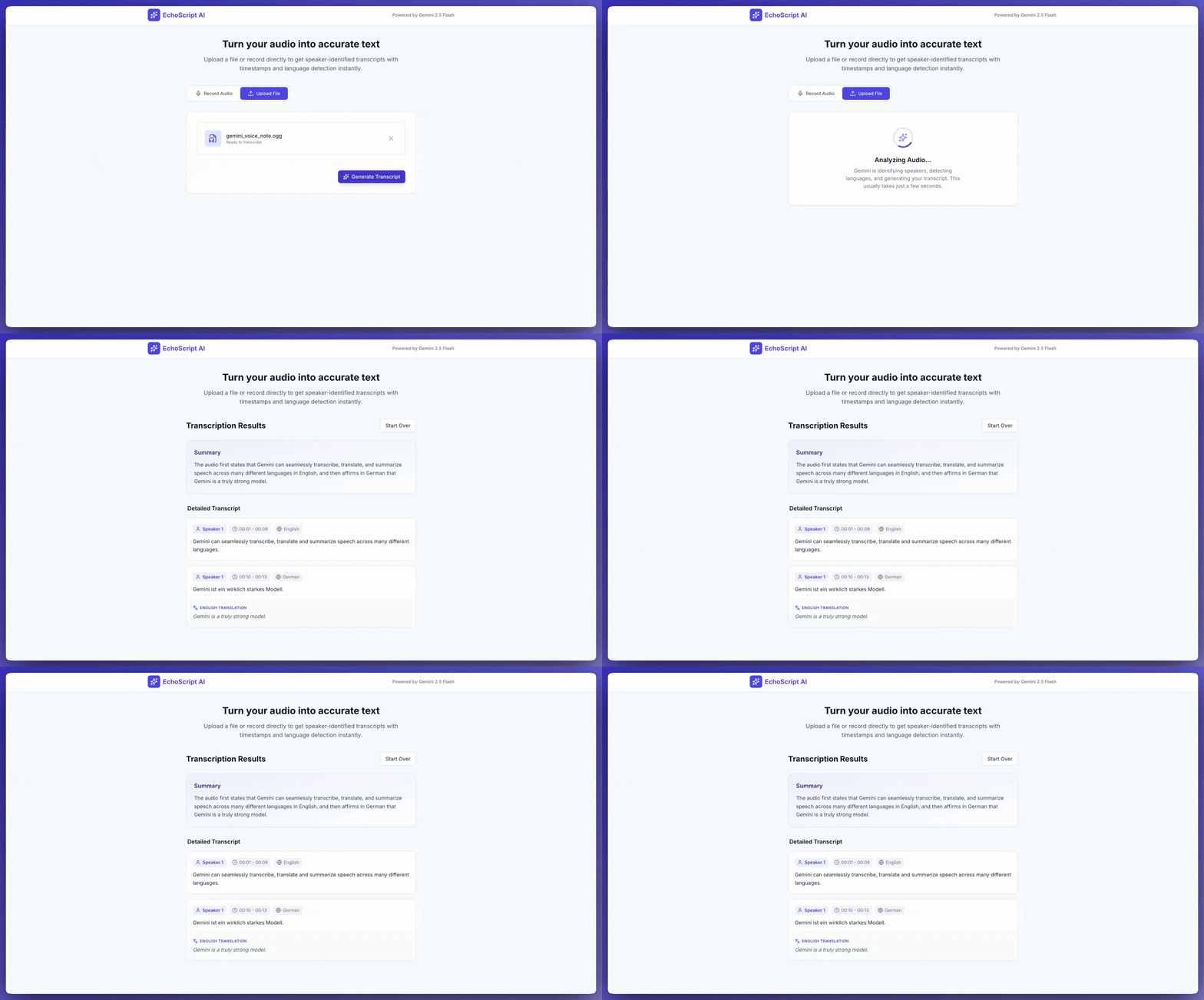
Вы можете попросить AI Studio Build создать приложение, похожее на этот пример приложения для расшифровки, одним нажатием кнопки.
Входной аудиосигнал
Вы можете предоставить Gemini аудиоданные следующими способами:
- Загрузите аудиофайл, прежде чем отправлять запрос к
generateContent. - Передайте встроенные аудиоданные с запросом к
generateContent.
Подробнее о других способах ввода файлов…
Загрузка аудиофайла
Чтобы загрузить аудиофайл, используйте Files API. Всегда используйте Files API, если общий размер запроса (включая файлы, текстовый запрос, системные инструкции и т. д.) превышает 20 МБ.
В следующем коде загружается аудиофайл, а затем используется в вызове generateContent.
Python
from google import genai

client = genai.Client()

myfile = client.files.upload(file="path/to/sample.mp3")

response = client.models.generate_content(
    model="gemini-3.8-flash", contents=["Describe this audio clip", myfile]
)

print(response.text)
JavaScript
import {
  GoogleGenAI,
  createUserContent,
  createPartFromUri,
} from "@google/genai";

const ai = new GoogleGenAI({});

async function main() {
  const myfile = await ai.files.upload({
    file: "path/to/sample.mp3",
    config: { mimeType: "audio/mp3" },
  });

  const response = await ai.models.generateContent({
    model: "gemini-3.8-flash",
    contents: createUserContent([
      createPartFromUri(myfile.uri, myfile.mimeType),
      "Describe this audio clip",
    ]),
  });
  console.log(response.text);
}

await main();
Проложить маршрут
package main

import (
  "context"
  "fmt"
  "os"
  "google.golang.org/genai"
)

func main() {
  ctx := context.Background()
  client, err := genai.NewClient(ctx, nil)
  if err != nil {
      log.Fatal(err)
  }

  localAudioPath := "/path/to/sample.mp3"
  uploadedFile, _ := client.Files.UploadFromPath(
      ctx,
      localAudioPath,
      nil,
  )

  parts := []*genai.Part{
      genai.NewPartFromText("Describe this audio clip"),
      genai.NewPartFromURI(uploadedFile.URI, uploadedFile.MIMEType),
  }
  contents := []*genai.Content{
      genai.NewContentFromParts(parts, genai.RoleUser),
  }

  result, _ := client.Models.GenerateContent(
      ctx,
      "gemini-3.8-flash",
      contents,
      nil,
  )

  fmt.Println(result.Text())
}
REST
AUDIO_PATH="path/to/sample.mp3"
MIME_TYPE=$(file -b --mime-type "${AUDIO_PATH}")
NUM_BYTES=$(wc -c < "${AUDIO_PATH}")
DISPLAY_NAME=AUDIO

tmp_header_file=upload-header.tmp

# Initial resumable request defining metadata.
# The upload url is in the response headers dump them to a file.
curl "https://generativelanguage.googleapis.com/upload/v1beta/files" \
  -H "x-goog-api-key: $GEMINI_API_KEY" \
  -D upload-header.tmp \
  -H "X-Goog-Upload-Protocol: resumable" \
  -H "X-Goog-Upload-Command: start" \
  -H "X-Goog-Upload-Header-Content-Length: ${NUM_BYTES}" \
  -H "X-Goog-Upload-Header-Content-Type: ${MIME_TYPE}" \
  -H "Content-Type: application/json" \
  -d "{'file': {'display_name': '${DISPLAY_NAME}'}}" 2> /dev/null

upload_url=$(grep -i "x-goog-upload-url: " "${tmp_header_file}" | cut -d" " -f2 | tr -d "\r")
rm "${tmp_header_file}"

# Upload the actual bytes.
curl "${upload_url}" \
  -H "Content-Length: ${NUM_BYTES}" \
  -H "X-Goog-Upload-Offset: 0" \
  -H "X-Goog-Upload-Command: upload, finalize" \
  --data-binary "@${AUDIO_PATH}" 2> /dev/null > file_info.json

file_uri=$(jq ".file.uri" file_info.json)
echo file_uri=$file_uri

# Now generate content using that file
curl "https://generativelanguage.googleapis.com/v1beta/models/gemini-3.8-flash:generateContent" \
    -H "x-goog-api-key: $GEMINI_API_KEY" \
    -H 'Content-Type: application/json' \
    -X POST \
    -d '{
      "contents": [{
        "parts":[
          {"text": "Describe this audio clip"},
          {"file_data":{"mime_type": "${MIME_TYPE}", "file_uri": '$file_uri'}}]
        }]
      }' 2> /dev/null > response.json

cat response.json
echo

jq ".candidates[].content.parts[].text" response.json
Подробнее о работе с медиафайлами рассказывается в статье Files API.
Передача аудиоданных в строке
Вместо загрузки аудиофайла вы можете передать встроенные аудиоданные в запросе к generateContent:
Python
from google import genai
from google.genai import types

with open('path/to/small-sample.mp3', 'rb') as f:
    audio_bytes = f.read()

client = genai.Client()
response = client.models.generate_content(
  model='gemini-3.8-flash',
  contents=[
    'Describe this audio clip',
    types.Part.from_bytes(
      data=audio_bytes,
      mime_type='audio/mp3',
    )
  ]
)

print(response.text)
JavaScript
import { GoogleGenAI } from "@google/genai";
import * as fs from "node:fs";

const ai = new GoogleGenAI({});
const base64AudioFile = fs.readFileSync("path/to/small-sample.mp3", {
  encoding: "base64",
});

const contents = [
  { text: "Please summarize the audio." },
  {
    inlineData: {
      mimeType: "audio/mp3",
      data: base64AudioFile,
    },
  },
];

const response = await ai.models.generateContent({
  model: "gemini-3.8-flash",
  contents: contents,
});
console.log(response.text);
Проложить маршрут
package main

import (
  "context"
  "fmt"
  "os"
  "google.golang.org/genai"
)

func main() {
  ctx := context.Background()
  client, err := genai.NewClient(ctx, nil)
  if err != nil {
      log.Fatal(err)
  }

  audioBytes, _ := os.ReadFile("/path/to/small-sample.mp3")

  parts := []*genai.Part{
      genai.NewPartFromText("Describe this audio clip"),
    &genai.Part{
      InlineData: &genai.Blob{
        MIMEType: "audio/mp3",
        Data:     audioBytes,
      },
    },
  }
  contents := []*genai.Content{
      genai.NewContentFromParts(parts, genai.RoleUser),
  }

  result, _ := client.Models.GenerateContent(
      ctx,
      "gemini-3.8-flash",
      contents,
      nil,
  )

  fmt.Println(result.Text())
}
При работе со встроенными аудиоданными следует учитывать следующее:
- Максимальный размер запроса составляет 20 МБ, включая текстовые запросы, системные инструкции и встроенные файлы. Если размер файла превышает общий размер запроса (20 МБ), используйте Files API, чтобы загрузить аудиофайл для использования в запросе.
- Если вы используете один и тот же аудиофрагмент несколько раз, лучше загрузить аудиофайл.
Как получить расшифровку
Чтобы получить расшифровку аудиоданных, просто попросите об этом в запросе:
Python
from google import genai

client = genai.Client()
myfile = client.files.upload(file='path/to/sample.mp3')
prompt = 'Generate a transcript of the speech.'

response = client.models.generate_content(
  model='gemini-3.8-flash',
  contents=[prompt, myfile]
)

print(response.text)
JavaScript
import {
  GoogleGenAI,
  createUserContent,
  createPartFromUri,
} from "@google/genai";

const ai = new GoogleGenAI({});
const myfile = await ai.files.upload({
  file: "path/to/sample.mp3",
  config: { mimeType: "audio/mpeg" },
});

const result = await ai.models.generateContent({
  model: "gemini-3.8-flash",
  contents: createUserContent([
    createPartFromUri(myfile.uri, myfile.mimeType),
    "Generate a transcript of the speech.",
  ]),
});
console.log("result.text=", result.text);
Проложить маршрут
package main

import (
  "context"
  "fmt"
  "os"
  "google.golang.org/genai"
)

func main() {
  ctx := context.Background()
  client, err := genai.NewClient(ctx, nil)
  if err != nil {
      log.Fatal(err)
  }

  localAudioPath := "/path/to/sample.mp3"
  uploadedFile, _ := client.Files.UploadFromPath(
      ctx,
      localAudioPath,
      nil,
  )

  parts := []*genai.Part{
      genai.NewPartFromText("Generate a transcript of the speech."),
      genai.NewPartFromURI(uploadedFile.URI, uploadedFile.MIMEType),
  }
  contents := []*genai.Content{
      genai.NewContentFromParts(parts, genai.RoleUser),
  }

  result, _ := client.Models.GenerateContent(
      ctx,
      "gemini-3.8-flash",
      contents,
      nil,
  )

  fmt.Println(result.Text())
}
Укажите временные метки
Вы можете ссылаться на определенные разделы аудиофайла, используя временные метки в форме MM:SS. Например, следующий запрос позволяет получить расшифровку, которая:
- Начинается через 2 минуты 30 секунд после начала файла.
Заканчивается на отметке 3 минуты 29 секунд от начала файла.
Python
# Create a prompt containing timestamps.
prompt = "Provide a transcript of the speech from 02:30 to 03:29."
JavaScript
// Create a prompt containing timestamps.
const prompt = "Provide a transcript of the speech from 02:30 to 03:29."
Проложить маршрут
package main

import (
  "context"
  "fmt"
  "os"
  "google.golang.org/genai"
)

func main() {
  ctx := context.Background()
  client, err := genai.NewClient(ctx, nil)
  if err != nil {
      log.Fatal(err)
  }

  localAudioPath := "/path/to/sample.mp3"
  uploadedFile, _ := client.Files.UploadFromPath(
      ctx,
      localAudioPath,
      nil,
  )

  parts := []*genai.Part{
      genai.NewPartFromText("Provide a transcript of the speech " +
                            "between the timestamps 02:30 and 03:29."),
      genai.NewPartFromURI(uploadedFile.URI, uploadedFile.MIMEType),
  }
  contents := []*genai.Content{
      genai.NewContentFromParts(parts, genai.RoleUser),
  }

  result, _ := client.Models.GenerateContent(
      ctx,
      "gemini-3.8-flash",
      contents,
      nil,
  )

  fmt.Println(result.Text())
}
Подсчет токенов
Вызовите метод countTokens, чтобы получить количество токенов в аудиофайле. Пример:
Python
from google import genai

client = genai.Client()
response = client.models.count_tokens(
  model='gemini-3.8-flash',
  contents=[myfile]
)

print(response)
JavaScript
import {
  GoogleGenAI,
  createUserContent,
  createPartFromUri,
} from "@google/genai";

const ai = new GoogleGenAI({});
const myfile = await ai.files.upload({
  file: "path/to/sample.mp3",
  config: { mimeType: "audio/mpeg" },
});

const countTokensResponse = await ai.models.countTokens({
  model: "gemini-3.8-flash",
  contents: createUserContent([
    createPartFromUri(myfile.uri, myfile.mimeType),
  ]),
});
console.log(countTokensResponse.totalTokens);
Проложить маршрут
package main

import (
  "context"
  "fmt"
  "os"
  "google.golang.org/genai"
)

func main() {
  ctx := context.Background()
  client, err := genai.NewClient(ctx, nil)
  if err != nil {
      log.Fatal(err)
  }

  localAudioPath := "/path/to/sample.mp3"
  uploadedFile, _ := client.Files.UploadFromPath(
      ctx,
      localAudioPath,
      nil,
  )

  parts := []*genai.Part{
      genai.NewPartFromURI(uploadedFile.URI, uploadedFile.MIMEType),
  }
  contents := []*genai.Content{
      genai.NewContentFromParts(parts, genai.RoleUser),
  }

  tokens, _ := client.Models.CountTokens(
      ctx,
      "gemini-3.8-flash",
      contents,
      nil,
  )

  fmt.Printf("File %s is %d tokens\n", localAudioPath, tokens.TotalTokens)
}
Поддерживаемые аудиоформаты
Gemini поддерживает следующие MIME-типы аудиофайлов:
- WAV –
audio/wav - MP3 –
audio/mp3 - AIFF –
audio/aiff - AAC –
audio/aac - OGG –
audio/ogg - FLAC –
audio/flac - MPEG –
audio/mpeg - M4A –
audio/m4a - L16 –
audio/l16 - Opus –
audio/opus - ALAW –
audio/alaw - MULAW –
audio/mulaw - WebM –
audio/webm
Полный список поддерживаемых MIME-типов и схем параметров можно найти в справочнике по Interactions API.
Технические сведения об аудио
- Gemini представляет каждую секунду аудио как 32 токена. Например, одна минута аудио – это 1920 токенов.
- Gemini может "понимать" неречевые компоненты, такие как пение птиц или сирены.
- Максимальная поддерживаемая продолжительность аудиоданных в одном запросе – 9,5 часа. Gemini не ограничивает количество аудиофайлов в одном запросе, но их общая продолжительность не должна превышать 9,5 часа.
- Gemini уменьшает разрешение аудиофайлов до 16 кбит/с.
- Если аудиоисточник содержит несколько каналов, Gemini объединяет их в один.
Дальнейшие действия
В этом руководстве рассказывается, как генерировать текст на основе аудиоданных. Дополнительную информацию можно найти в следующих ресурсах:
- Стратегии запросов с файлами. Gemini API поддерживает запросы с текстом, изображениями, аудио и видео. Такие запросы называются мультимодальными.
- Системные инструкции. Они позволяют управлять поведением модели в зависимости от ваших потребностей и вариантов использования.
- Рекомендации по безопасности. Иногда модели генеративного ИИ создают неожиданные результаты, например неточные, предвзятые или оскорбительные. Чтобы снизить риск вреда от таких результатов, необходимы постобработка и оценка человеком.