

Gemini, ऑडियो इनपुट का विश्लेषण करके टेक्स्ट वाले जवाब जनरेट कर सकता है.
Python
from google import genai

client = genai.Client()

myfile = client.files.upload(file="path/to/sample.mp3")

response = client.models.generate_content(
    model="gemini-3.6-flash", contents=["Describe this audio clip", myfile]
)

print(response.text)
JavaScript
import {
  GoogleGenAI,
  createUserContent,
  createPartFromUri,
} from "@google/genai";

const ai = new GoogleGenAI({});

async function main() {
  const myfile = await ai.files.upload({
    file: "path/to/sample.mp3",
    config: { mimeType: "audio/mp3" },
  });

  const response = await ai.models.generateContent({
    model: "gemini-3.6-flash",
    contents: createUserContent([
      createPartFromUri(myfile.uri, myfile.mimeType),
      "Describe this audio clip",
    ]),
  });
  console.log(response.text);
}

await main();
ऐप पर जाएं
package main

import (
    "context"
    "fmt"
    "os"
    "google.golang.org/genai"
)

func main() {
    ctx := context.Background()
    client, err := genai.NewClient(ctx, nil)
    if err != nil {
        log.Fatal(err)
    }

    localAudioPath := "/path/to/sample.mp3"
    uploadedFile, _ := client.Files.UploadFromPath(
        ctx,
        localAudioPath,
        nil,
    )

    parts := []*genai.Part{
        genai.NewPartFromText("Describe this audio clip"),
        genai.NewPartFromURI(uploadedFile.URI, uploadedFile.MIMEType),
    }
    contents := []*genai.Content{
        genai.NewContentFromParts(parts, genai.RoleUser),
    }

    result, _ := client.Models.GenerateContent(
        ctx,
        "gemini-3.6-flash",
        contents,
        nil,
    )

    fmt.Println(result.Text())
}
REST
AUDIO_PATH="path/to/sample.mp3"
MIME_TYPE=$(file -b --mime-type "${AUDIO_PATH}")
NUM_BYTES=$(wc -c < "${AUDIO_PATH}")
DISPLAY_NAME=AUDIO

tmp_header_file=upload-header.tmp

# Initial resumable request defining metadata.
# The upload url is in the response headers dump them to a file.
curl "https://generativelanguage.googleapis.com/upload/v1beta/files" \
  -H "x-goog-api-key: $GEMINI_API_KEY" \
  -D upload-header.tmp \
  -H "X-Goog-Upload-Protocol: resumable" \
  -H "X-Goog-Upload-Command: start" \
  -H "X-Goog-Upload-Header-Content-Length: ${NUM_BYTES}" \
  -H "X-Goog-Upload-Header-Content-Type: ${MIME_TYPE}" \
  -H "Content-Type: application/json" \
  -d "{'file': {'display_name': '${DISPLAY_NAME}'}}" 2> /dev/null

upload_url=$(grep -i "x-goog-upload-url: " "${tmp_header_file}" | cut -d" " -f2 | tr -d "\r")
rm "${tmp_header_file}"

# Upload the actual bytes.
curl "${upload_url}" \
  -H "Content-Length: ${NUM_BYTES}" \
  -H "X-Goog-Upload-Offset: 0" \
  -H "X-Goog-Upload-Command: upload, finalize" \
  --data-binary "@${AUDIO_PATH}" 2> /dev/null > file_info.json

file_uri=$(jq ".file.uri" file_info.json)
echo file_uri=$file_uri

# Now generate content using that file
curl "https://generativelanguage.googleapis.com/v1beta/models/gemini-3.6-flash:generateContent" \
    -H "x-goog-api-key: $GEMINI_API_KEY" \
    -H 'Content-Type: application/json' \
    -X POST \
    -d '{
      "contents": [{
        "parts":[
          {"text": "Describe this audio clip"},
          {"file_data":{"mime_type": "${MIME_TYPE}", "file_uri": '$file_uri'}}]
        }]
      }' 2> /dev/null > response.json

cat response.json
echo

jq ".candidates[].content.parts[].text" response.json
खास जानकारी
Gemini, ऑडियो इनपुट का विश्लेषण कर सकता है और उसे समझ सकता है. साथ ही, इसके जवाब में टेक्स्ट जनरेट कर सकता है. इससे इन जैसे इस्तेमाल के उदाहरणों को लागू किया जा सकता है:
- ऑडियो कॉन्टेंट के बारे में जानकारी देना, उसकी खास जानकारी देना या उससे जुड़े सवालों के जवाब देना.
- ऑडियो (स्पीच टू टेक्स्ट) की ट्रांसक्रिप्शन और अनुवाद की सुविधा उपलब्ध कराएं.
- इससे, बोली और संगीत में मौजूद भावना का पता लगाया जा सकता है.
- ऑडियो के खास सेगमेंट का विश्लेषण करना और टाइमस्टैंप देना.
फ़िलहाल, Gemini API, रीयल-टाइम में ट्रांसक्रिप्ट बनाने की सुविधा के साथ काम नहीं करता. रीयल-टाइम में आवाज़ और वीडियो से इंटरैक्ट करने के लिए, Live API का इस्तेमाल करें. रीयल-टाइम ट्रांसक्रिप्शन की सुविधा के साथ काम करने वाले, बोली को लिखाई में बदलने वाले मॉडल के लिए, Google Cloud Speech-to-Text API का इस्तेमाल करें.
बोले जा रहे शब्दों को टेक्स्ट में बदलना
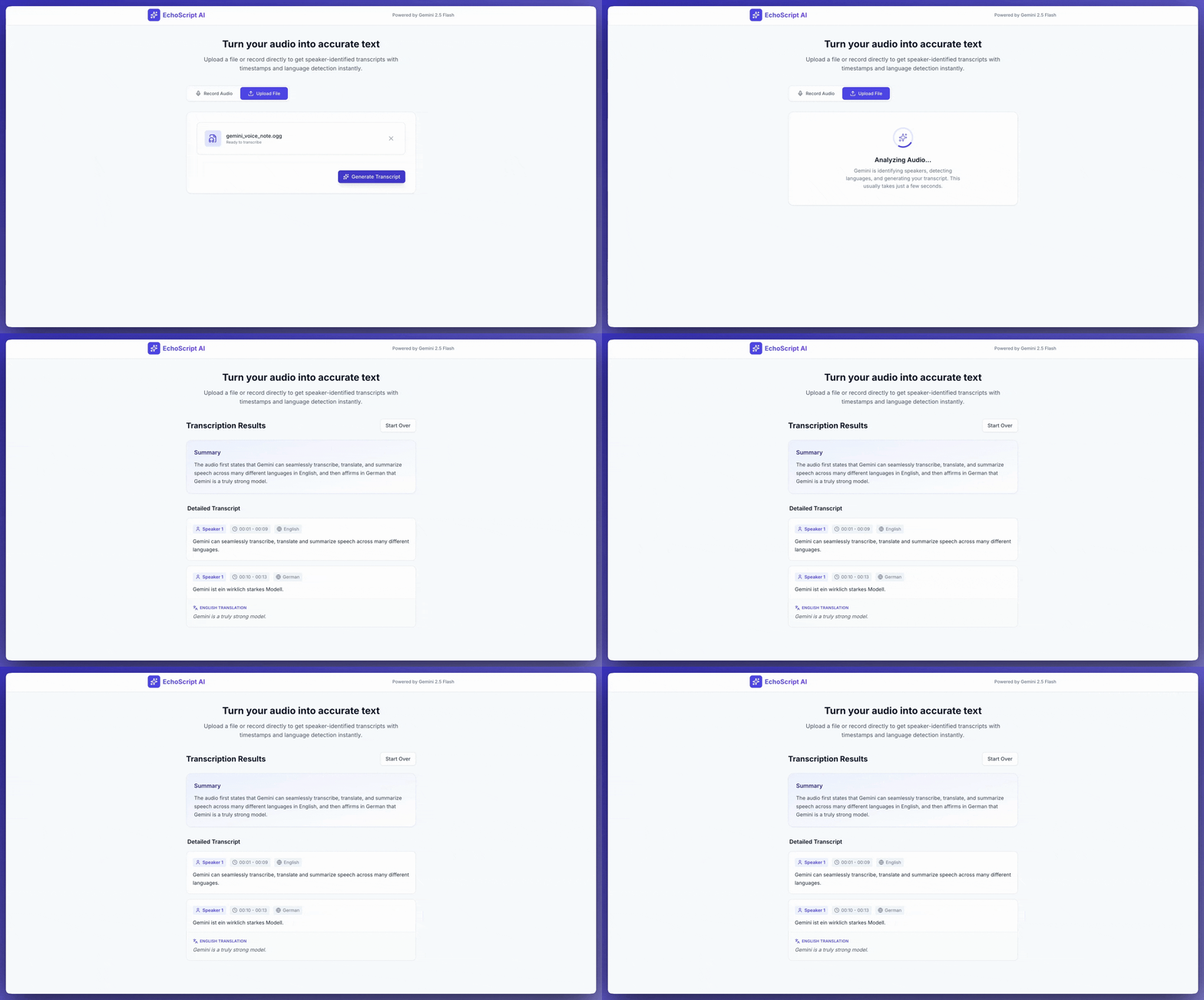
इस उदाहरण ऐप्लिकेशन में, Gemini API को बोलकर दिए गए निर्देश को टेक्स्ट में बदलने, उसका अनुवाद करने, और उसकी खास जानकारी तैयार करने के लिए प्रॉम्प्ट करने का तरीका दिखाया गया है. इसमें स्ट्रक्चर्ड आउटपुट का इस्तेमाल करके, टाइमस्टैंप और भावनाओं का पता लगाने की सुविधा भी शामिल है.
Python
from google import genai
from google.genai import types

client = genai.Client()

YOUTUBE_URL = "https://www.youtube.com/watch?v=ku-N-eS1lgM"

def main():
  prompt = """
    Process the audio file and generate a detailed transcription.

    Requirements:
    1. Provide accurate timestamps for each segment (Format: MM:SS).
    2. Detect the primary language of each segment.
    3. If the segment is in a language different than English, also provide the English translation.
    4. Identify the primary emotion of the speaker in this segment. You MUST choose exactly one of the following: Happy, Sad, Angry, Neutral.
    5. Provide a brief summary of the entire audio at the beginning.
  """

  response = client.models.generate_content(
    model="gemini-3.6-flash",
    contents=[
      types.Content(
        parts=[
          types.Part(
            file_data=types.FileData(
              file_uri=YOUTUBE_URL
            )
          ),
          types.Part(
            text=prompt
          )
        ]
      )
    ],
    config=types.GenerateContentConfig(
      response_format={"text": {"mime_type": "application/json"}},
      response_schema=types.Schema(
        type=types.Type.OBJECT,
        properties={
          "summary": types.Schema(
            type=types.Type.STRING,
            description="A concise summary of the audio content.",
          ),
          "segments": types.Schema(
            type=types.Type.ARRAY,
            description="List of transcribed segments with timestamp.",
            items=types.Schema(
              type=types.Type.OBJECT,
              properties={
                "timestamp": types.Schema(type=types.Type.STRING),
                "content": types.Schema(type=types.Type.STRING),
                "language": types.Schema(type=types.Type.STRING),
                "language_code": types.Schema(type=types.Type.STRING),
                "translation": types.Schema(type=types.Type.STRING),
                "emotion": types.Schema(
                  type=types.Type.STRING,
                  enum=["happy", "sad", "angry", "neutral"]
                ),
              },
              required=["timestamp", "content", "language", "language_code", "emotion"],
            ),
          ),
        },
        required=["summary", "segments"],
      ),
    ),
  )

  print(response.text)

if __name__ == "__main__":
  main()
JavaScript
import {
  GoogleGenAI,
  Type
} from "@google/genai";

const ai = new GoogleGenAI({});

const YOUTUBE_URL = "https://www.youtube.com/watch?v=ku-N-eS1lgM";

async function main() {
  const prompt = `
      Process the audio file and generate a detailed transcription.

      Requirements:
      1. Provide accurate timestamps for each segment (Format: MM:SS).
      2. Detect the primary language of each segment.
      3. If the segment is in a language different than English, also provide the English translation.
      4. Identify the primary emotion of the speaker in this segment. You MUST choose exactly one of the following: Happy, Sad, Angry, Neutral.
      5. Provide a brief summary of the entire audio at the beginning.
    `;

  const Emotion = {
    Happy: 'happy',
    Sad: 'sad',
    Angry: 'angry',
    Neutral: 'neutral'
  };

  const response = await ai.models.generateContent({
    model: "gemini-3.6-flash",
    contents: {
      parts: [
        {
          fileData: {
            fileUri: YOUTUBE_URL,
          },
        },
        {
          text: prompt,
        },
      ],
    },
    config: {
      responseFormat: { text: { mimeType: "application/json" } },
      responseSchema: {
        type: Type.OBJECT,
        properties: {
          summary: {
            type: Type.STRING,
            description: "A concise summary of the audio content.",
          },
          segments: {
            type: Type.ARRAY,
            description: "List of transcribed segments with timestamp.",
            items: {
              type: Type.OBJECT,
              properties: {
                timestamp: { type: Type.STRING },
                content: { type: Type.STRING },
                language: { type: Type.STRING },
                language_code: { type: Type.STRING },
                translation: { type: Type.STRING },
                emotion: {
                  type: Type.STRING,
                  enum: Object.values(Emotion)
                },
              },
              required: ["timestamp", "content", "language", "language_code", "emotion"],
            },
          },
        },
        required: ["summary", "segments"],
      },
    },
  });
  const json = JSON.parse(response.text);
  console.log(json);
}

await main();
REST
curl "https://generativelanguage.googleapis.com/v1beta/models/gemini-3.6-flash:generateContent" \
    -H "x-goog-api-key: $GEMINI_API_KEY" \
    -H 'Content-Type: application/json' \
    -X POST \
    -d '{
      "contents": [
        {
          "parts": [
            {
              "file_data": {
                "file_uri": "https://www.youtube.com/watch?v=ku-N-eS1lgM",
                "mime_type": "video/mp4"
              }
            },
            {
              "text": "Process the audio file and generate a detailed transcription.\n\nRequirements:\n1. Provide accurate timestamps for each segment (Format: MM:SS).\n2. Detect the primary language of each segment.\n3. If the segment is in a language different than English, also provide the English translation.\n4. Identify the primary emotion of the speaker in this segment. You MUST choose exactly one of the following: Happy, Sad, Angry, Neutral.\n5. Provide a brief summary of the entire audio at the beginning."
            }
          ]
        }
      ],
      "generation_config": {
        "response_format": {"text": {"mime_type": "application/json"}},
        "response_schema": {
          "type": "OBJECT",
          "properties": {
            "summary": {
              "type": "STRING",
              "description": "A concise summary of the audio content."
            },
            "segments": {
              "type": "ARRAY",
              "description": "List of transcribed segments with timestamp.",
              "items": {
                "type": "OBJECT",
                "properties": {
                  "timestamp": { "type": "STRING" },
                  "content": { "type": "STRING" },
                  "language": { "type": "STRING" },
                  "language_code": { "type": "STRING" },
                  "translation": { "type": "STRING" },
                  "emotion": {
                    "type": "STRING",
                    "enum": ["happy", "sad", "angry", "neutral"]
                  }
                },
                "required": ["timestamp", "content", "language", "language_code", "emotion"]
              }
            }
          },
          "required": ["summary", "segments"]
        }
      }
    }' 2> /dev/null > response.json

cat response.json
echo

jq ".candidates[].content.parts[].text" response.json
AI Studio Build को प्रॉम्प्ट देकर, सिर्फ़ एक बटन पर क्लिक करके इस उदाहरण में दिए गए ट्रांसक्रिप्शन ऐप्लिकेशन जैसा ऐप्लिकेशन बनाया जा सकता है.
ऑडियो इनपुट करना
Gemini को ऑडियो डेटा देने के लिए, इन तरीकों का इस्तेमाल किया जा सकता है:
generateContentसे अनुरोध करने से पहले, ऑडियो फ़ाइल अपलोड करें.generateContentको किए गए अनुरोध के साथ, इनलाइन ऑडियो डेटा पास करें.
फ़ाइल इनपुट करने के अन्य तरीकों के बारे में जानने के लिए, फ़ाइल इनपुट करने के तरीके गाइड देखें.
ऑडियो फ़ाइल अपलोड करना
ऑडियो फ़ाइल अपलोड करने के लिए, Files API का इस्तेमाल किया जा सकता है. जब अनुरोध का कुल साइज़ (इसमें फ़ाइलें, टेक्स्ट प्रॉम्प्ट, सिस्टम के निर्देश वगैरह शामिल हैं) 20 एमबी से ज़्यादा हो, तब हमेशा Files API का इस्तेमाल करें.
यहां दिया गया कोड, एक ऑडियो फ़ाइल अपलोड करता है. इसके बाद, generateContent को कॉल करने के लिए इस फ़ाइल का इस्तेमाल करता है.
Python
from google import genai

client = genai.Client()

myfile = client.files.upload(file="path/to/sample.mp3")

response = client.models.generate_content(
    model="gemini-3.6-flash", contents=["Describe this audio clip", myfile]
)

print(response.text)
JavaScript
import {
  GoogleGenAI,
  createUserContent,
  createPartFromUri,
} from "@google/genai";

const ai = new GoogleGenAI({});

async function main() {
  const myfile = await ai.files.upload({
    file: "path/to/sample.mp3",
    config: { mimeType: "audio/mp3" },
  });

  const response = await ai.models.generateContent({
    model: "gemini-3.6-flash",
    contents: createUserContent([
      createPartFromUri(myfile.uri, myfile.mimeType),
      "Describe this audio clip",
    ]),
  });
  console.log(response.text);
}

await main();
ऐप पर जाएं
package main

import (
  "context"
  "fmt"
  "os"
  "google.golang.org/genai"
)

func main() {
  ctx := context.Background()
  client, err := genai.NewClient(ctx, nil)
  if err != nil {
      log.Fatal(err)
  }

  localAudioPath := "/path/to/sample.mp3"
  uploadedFile, _ := client.Files.UploadFromPath(
      ctx,
      localAudioPath,
      nil,
  )

  parts := []*genai.Part{
      genai.NewPartFromText("Describe this audio clip"),
      genai.NewPartFromURI(uploadedFile.URI, uploadedFile.MIMEType),
  }
  contents := []*genai.Content{
      genai.NewContentFromParts(parts, genai.RoleUser),
  }

  result, _ := client.Models.GenerateContent(
      ctx,
      "gemini-3.6-flash",
      contents,
      nil,
  )

  fmt.Println(result.Text())
}
REST
AUDIO_PATH="path/to/sample.mp3"
MIME_TYPE=$(file -b --mime-type "${AUDIO_PATH}")
NUM_BYTES=$(wc -c < "${AUDIO_PATH}")
DISPLAY_NAME=AUDIO

tmp_header_file=upload-header.tmp

# Initial resumable request defining metadata.
# The upload url is in the response headers dump them to a file.
curl "https://generativelanguage.googleapis.com/upload/v1beta/files" \
  -H "x-goog-api-key: $GEMINI_API_KEY" \
  -D upload-header.tmp \
  -H "X-Goog-Upload-Protocol: resumable" \
  -H "X-Goog-Upload-Command: start" \
  -H "X-Goog-Upload-Header-Content-Length: ${NUM_BYTES}" \
  -H "X-Goog-Upload-Header-Content-Type: ${MIME_TYPE}" \
  -H "Content-Type: application/json" \
  -d "{'file': {'display_name': '${DISPLAY_NAME}'}}" 2> /dev/null

upload_url=$(grep -i "x-goog-upload-url: " "${tmp_header_file}" | cut -d" " -f2 | tr -d "\r")
rm "${tmp_header_file}"

# Upload the actual bytes.
curl "${upload_url}" \
  -H "Content-Length: ${NUM_BYTES}" \
  -H "X-Goog-Upload-Offset: 0" \
  -H "X-Goog-Upload-Command: upload, finalize" \
  --data-binary "@${AUDIO_PATH}" 2> /dev/null > file_info.json

file_uri=$(jq ".file.uri" file_info.json)
echo file_uri=$file_uri

# Now generate content using that file
curl "https://generativelanguage.googleapis.com/v1beta/models/gemini-3.6-flash:generateContent" \
    -H "x-goog-api-key: $GEMINI_API_KEY" \
    -H 'Content-Type: application/json' \
    -X POST \
    -d '{
      "contents": [{
        "parts":[
          {"text": "Describe this audio clip"},
          {"file_data":{"mime_type": "${MIME_TYPE}", "file_uri": '$file_uri'}}]
        }]
      }' 2> /dev/null > response.json

cat response.json
echo

jq ".candidates[].content.parts[].text" response.json
मीडिया फ़ाइलों के साथ काम करने के बारे में ज़्यादा जानने के लिए, Files API देखें.
ऑडियो डेटा को इनलाइन पास करना
ऑडियो फ़ाइल अपलोड करने के बजाय, generateContent को भेजे गए अनुरोध में ऑडियो डेटा को इनलाइन किया जा सकता है:
Python
from google import genai
from google.genai import types

with open('path/to/small-sample.mp3', 'rb') as f:
    audio_bytes = f.read()

client = genai.Client()
response = client.models.generate_content(
  model='gemini-3.6-flash',
  contents=[
    'Describe this audio clip',
    types.Part.from_bytes(
      data=audio_bytes,
      mime_type='audio/mp3',
    )
  ]
)

print(response.text)
JavaScript
import { GoogleGenAI } from "@google/genai";
import * as fs from "node:fs";

const ai = new GoogleGenAI({});
const base64AudioFile = fs.readFileSync("path/to/small-sample.mp3", {
  encoding: "base64",
});

const contents = [
  { text: "Please summarize the audio." },
  {
    inlineData: {
      mimeType: "audio/mp3",
      data: base64AudioFile,
    },
  },
];

const response = await ai.models.generateContent({
  model: "gemini-3.6-flash",
  contents: contents,
});
console.log(response.text);
ऐप पर जाएं
package main

import (
  "context"
  "fmt"
  "os"
  "google.golang.org/genai"
)

func main() {
  ctx := context.Background()
  client, err := genai.NewClient(ctx, nil)
  if err != nil {
      log.Fatal(err)
  }

  audioBytes, _ := os.ReadFile("/path/to/small-sample.mp3")

  parts := []*genai.Part{
      genai.NewPartFromText("Describe this audio clip"),
    &genai.Part{
      InlineData: &genai.Blob{
        MIMEType: "audio/mp3",
        Data:     audioBytes,
      },
    },
  }
  contents := []*genai.Content{
      genai.NewContentFromParts(parts, genai.RoleUser),
  }

  result, _ := client.Models.GenerateContent(
      ctx,
      "gemini-3.6-flash",
      contents,
      nil,
  )

  fmt.Println(result.Text())
}
इनलाइन ऑडियो डेटा के बारे में कुछ बातें ध्यान में रखें:
- अनुरोध का साइज़ ज़्यादा से ज़्यादा 20 एमबी हो सकता है. इसमें टेक्स्ट प्रॉम्प्ट, सिस्टम के निर्देश, और इनलाइन फ़ाइलें शामिल हैं. अगर आपकी फ़ाइल का साइज़ इतना बड़ा है कि कुल अनुरोध का साइज़ 20 एमबी से ज़्यादा हो जाता है, तो Files API का इस्तेमाल करके, अनुरोध में इस्तेमाल करने के लिए कोई ऑडियो फ़ाइल अपलोड करें.
- अगर आपको किसी ऑडियो सैंपल का कई बार इस्तेमाल करना है, तो ऑडियो फ़ाइल अपलोड करना ज़्यादा बेहतर है.
ट्रांसक्रिप्ट पाना
ऑडियो डेटा की ट्रांसक्रिप्ट पाने के लिए, प्रॉम्प्ट में बस इतना पूछें:
Python
from google import genai

client = genai.Client()
myfile = client.files.upload(file='path/to/sample.mp3')
prompt = 'Generate a transcript of the speech.'

response = client.models.generate_content(
  model='gemini-3.6-flash',
  contents=[prompt, myfile]
)

print(response.text)
JavaScript
import {
  GoogleGenAI,
  createUserContent,
  createPartFromUri,
} from "@google/genai";

const ai = new GoogleGenAI({});
const myfile = await ai.files.upload({
  file: "path/to/sample.mp3",
  config: { mimeType: "audio/mpeg" },
});

const result = await ai.models.generateContent({
  model: "gemini-3.6-flash",
  contents: createUserContent([
    createPartFromUri(myfile.uri, myfile.mimeType),
    "Generate a transcript of the speech.",
  ]),
});
console.log("result.text=", result.text);
ऐप पर जाएं
package main

import (
  "context"
  "fmt"
  "os"
  "google.golang.org/genai"
)

func main() {
  ctx := context.Background()
  client, err := genai.NewClient(ctx, nil)
  if err != nil {
      log.Fatal(err)
  }

  localAudioPath := "/path/to/sample.mp3"
  uploadedFile, _ := client.Files.UploadFromPath(
      ctx,
      localAudioPath,
      nil,
  )

  parts := []*genai.Part{
      genai.NewPartFromText("Generate a transcript of the speech."),
      genai.NewPartFromURI(uploadedFile.URI, uploadedFile.MIMEType),
  }
  contents := []*genai.Content{
      genai.NewContentFromParts(parts, genai.RoleUser),
  }

  result, _ := client.Models.GenerateContent(
      ctx,
      "gemini-3.6-flash",
      contents,
      nil,
  )

  fmt.Println(result.Text())
}
टाइमस्टैंप देखें
ऑडियो फ़ाइल के किसी खास सेक्शन का रेफ़रंस देने के लिए, MM:SS फ़ॉर्मैट वाले टाइमस्टैंप का इस्तेमाल किया जा सकता है. उदाहरण के लिए, यहां दिए गए प्रॉम्प्ट में ऐसी ट्रांसक्रिप्ट का अनुरोध किया गया है
- यह फ़ाइल की शुरुआत से 2 मिनट 30 सेकंड पर शुरू होता है.
यह फ़ाइल की शुरुआत से 3 मिनट 29 सेकंड पर खत्म होती है.
Python
# Create a prompt containing timestamps.
prompt = "Provide a transcript of the speech from 02:30 to 03:29."
JavaScript
// Create a prompt containing timestamps.
const prompt = "Provide a transcript of the speech from 02:30 to 03:29."
ऐप पर जाएं
package main

import (
  "context"
  "fmt"
  "os"
  "google.golang.org/genai"
)

func main() {
  ctx := context.Background()
  client, err := genai.NewClient(ctx, nil)
  if err != nil {
      log.Fatal(err)
  }

  localAudioPath := "/path/to/sample.mp3"
  uploadedFile, _ := client.Files.UploadFromPath(
      ctx,
      localAudioPath,
      nil,
  )

  parts := []*genai.Part{
      genai.NewPartFromText("Provide a transcript of the speech " +
                            "between the timestamps 02:30 and 03:29."),
      genai.NewPartFromURI(uploadedFile.URI, uploadedFile.MIMEType),
  }
  contents := []*genai.Content{
      genai.NewContentFromParts(parts, genai.RoleUser),
  }

  result, _ := client.Models.GenerateContent(
      ctx,
      "gemini-3.6-flash",
      contents,
      nil,
  )

  fmt.Println(result.Text())
}
टोकन गिनना
किसी ऑडियो फ़ाइल में मौजूद टोकन की संख्या जानने के लिए, countTokens तरीके को कॉल करें. उदाहरण के लिए:
Python
from google import genai

client = genai.Client()
response = client.models.count_tokens(
  model='gemini-3.6-flash',
  contents=[myfile]
)

print(response)
JavaScript
import {
  GoogleGenAI,
  createUserContent,
  createPartFromUri,
} from "@google/genai";

const ai = new GoogleGenAI({});
const myfile = await ai.files.upload({
  file: "path/to/sample.mp3",
  config: { mimeType: "audio/mpeg" },
});

const countTokensResponse = await ai.models.countTokens({
  model: "gemini-3.6-flash",
  contents: createUserContent([
    createPartFromUri(myfile.uri, myfile.mimeType),
  ]),
});
console.log(countTokensResponse.totalTokens);
ऐप पर जाएं
package main

import (
  "context"
  "fmt"
  "os"
  "google.golang.org/genai"
)

func main() {
  ctx := context.Background()
  client, err := genai.NewClient(ctx, nil)
  if err != nil {
      log.Fatal(err)
  }

  localAudioPath := "/path/to/sample.mp3"
  uploadedFile, _ := client.Files.UploadFromPath(
      ctx,
      localAudioPath,
      nil,
  )

  parts := []*genai.Part{
      genai.NewPartFromURI(uploadedFile.URI, uploadedFile.MIMEType),
  }
  contents := []*genai.Content{
      genai.NewContentFromParts(parts, genai.RoleUser),
  }

  tokens, _ := client.Models.CountTokens(
      ctx,
      "gemini-3.6-flash",
      contents,
      nil,
  )

  fmt.Printf("File %s is %d tokens\n", localAudioPath, tokens.TotalTokens)
}
इस्तेमाल किए जा सकने वाले ऑडियो फ़ॉर्मैट
Gemini, इन ऑडियो फ़ॉर्मैट के MIME टाइप के साथ काम करता है:
- WAV -
audio/wav - MP3 -
audio/mp3 - AIFF -
audio/aiff - AAC -
audio/aac - OGG Vorbis -
audio/ogg - FLAC -
audio/flac
ऑडियो के बारे में तकनीकी जानकारी
- Gemini, ऑडियो के हर सेकंड को 32 टोकन के तौर पर दिखाता है. उदाहरण के लिए, एक मिनट के ऑडियो को 1,920 टोकन के तौर पर दिखाया जाता है.
- Gemini, आवाज़ के अलावा अन्य कॉम्पोनेंट को भी "समझ" सकता है. जैसे, पक्षियों का चहचहाना या सायरन.
- एक प्रॉम्प्ट में, ज़्यादा से ज़्यादा 9.5 घंटे का ऑडियो डेटा इस्तेमाल किया जा सकता है. Gemini, एक प्रॉम्प्ट में ऑडियो फ़ाइलों की संख्या को सीमित नहीं करता. हालांकि, एक प्रॉम्प्ट में सभी ऑडियो फ़ाइलों की कुल अवधि 9.5 घंटे से ज़्यादा नहीं होनी चाहिए.
- Gemini, ऑडियो फ़ाइलों को 16 केबीपीएस के डेटा रिज़ॉल्यूशन में डाउनसैंपल करता है.
- अगर ऑडियो सोर्स में एक से ज़्यादा चैनल हैं, तो Gemini उन चैनलों को एक ही चैनल में जोड़ देता है.
आगे क्या करना है
इस गाइड में, ऑडियो डेटा के जवाब में टेक्स्ट जनरेट करने का तरीका बताया गया है. ज़्यादा जानने के लिए, यहां दिए गए संसाधन देखें:
- फ़ाइल प्रॉम्प्ट करने की रणनीतियां: Gemini API, टेक्स्ट, इमेज, ऑडियो, और वीडियो डेटा के साथ प्रॉम्प्ट करने की सुविधा देता है. इसे मल्टीमॉडल प्रॉम्प्टिंग भी कहा जाता है.
- सिस्टम के लिए निर्देश: सिस्टम के लिए निर्देश देने की सुविधा की मदद से, अपनी खास ज़रूरतों और इस्तेमाल के उदाहरणों के आधार पर, मॉडल के व्यवहार को कंट्रोल किया जा सकता है.
- सुरक्षा से जुड़ी गाइडलाइन: कभी-कभी जनरेटिव एआई मॉडल ऐसे आउटपुट जनरेट करते हैं जिनकी उम्मीद नहीं होती. जैसे, गलत, पक्षपात करने वाले या आपत्तिजनक आउटपुट. इस तरह के आउटपुट से होने वाले नुकसान के जोखिम को कम करने के लिए, पोस्ट-प्रोसेसिंग और मैन्युअल तरीके से आकलन करना ज़रूरी है.