

Gemini API, File
Search টুলের মাধ্যমে রিট্রিভাল অগমেন্টেড জেনারেশন ("RAG") চালু করে। প্রদান করা প্রম্পটের উপর ভিত্তি করে প্রাসঙ্গিক তথ্য দ্রুত রিট্রিভ করার জন্য
ফাইল সার্চ আপনার ডেটা ইমপোর্ট, চ্যাঙ্ক ও ইন্ডেক্স করে। এই
সংগ্রহ করা তথ্য মডেলের জন্য প্রসঙ্গ হিসেবে ব্যবহার করা হয়, এর ফলে এটি
আরও সঠিক ও প্রাসঙ্গিক উত্তর দিতে পারে। এছাড়াও, ফাইল সার্চ
gemini-embedding-001-এর মাধ্যমে টেক্সট এম্বেডিং এবং gemini-embedding-2-এর মাধ্যমে ছবি/মাল্টিমোডাল এম্বেডিংয়ের মতো
মাল্টিমোডাল ক্ষমতা প্রদান করতে পারে।
কোয়েরি করার সময় ফাইল স্টোরেজ ও এম্বেডিং জেনারেশন ফ্রি এবং আপনি শুধুমাত্র প্রথমবার ফাইল ইন্ডেক্স করার সময় এম্বেডিং তৈরি করার জন্য এবং সাধারণ Gemini মডেল ইনপুট / আউটপুট টোকেনের খরচ পেমেন্ট করবেন। এই নতুন বিলিং প্যারাডাইম, File Search টুলকে আরও সহজ ও সাশ্রয়ী করে তোলে। বিবরণের জন্য মূল্য বিভাগ দেখুন।
File Search স্টোরে সরাসরি আপলোড করা
এই উদাহরণে দেখানো হয়েছে কীভাবে সরাসরি ফাইল সার্চ স্টোরে ফাইল আপলোড করতে হয়:
Python
from google import genai
from google.genai import types
import time

client = genai.Client()

# File name will be visible in citations
file_search_store = client.file_search_stores.create(
    config={
        'display_name': 'your-fileSearchStore-name',
        'embedding_model': 'models/gemini-embedding-2'
    }
)

operation = client.file_search_stores.upload_to_file_search_store(
  file='sample.txt',
  file_search_store_name=file_search_store.name,
  config={
      'display_name' : 'display-file-name',
  }
)

while not operation.done:
    time.sleep(5)
    operation = client.operations.get(operation)

response = client.models.generate_content(
    model="gemini-3.8-flash",
    contents="""Can you tell me about [insert question]""",
    config=types.GenerateContentConfig(
        tools=[
            types.Tool(
                file_search=types.FileSearch(
                    file_search_store_names=[file_search_store.name]
                )
            )
        ]
    )
)

print(response.text)
জাভাস্ক্রিপ্ট
const { GoogleGenAI } = require('@google/genai');

const ai = new GoogleGenAI({});

async function run() {
  // File name will be visible in citations
  const fileSearchStore = await ai.fileSearchStores.create({
    config: {
      displayName: 'your-fileSearchStore-name',
      embeddingModel: 'models/gemini-embedding-2'
    }
  });

  let operation = await ai.fileSearchStores.uploadToFileSearchStore({
    file: 'file.txt',
    fileSearchStoreName: fileSearchStore.name,
    config: {
      displayName: 'file-name',
    }
  });

  while (!operation.done) {
    await new Promise(resolve => setTimeout(resolve, 5000));
    operation = await ai.operations.get({ operation });
  }

  const response = await ai.models.generateContent({
    model: "gemini-3.8-flash",
    contents: "Can you tell me about [insert question]",
    config: {
      tools: [
        {
          fileSearch: {
            fileSearchStoreNames: [fileSearchStore.name]
          }
        }
      ]
    }
  });

  console.log(response.text);
}

run();
আরও তথ্যের জন্য uploadToFileSearchStore-এর API রেফারেন্স চেক করুন।
ফাইল ইমপোর্ট করা
অথবা, আপনি আগে থেকে থাকা ফাইল আপলোড করে আপনার ফাইল সার্চ স্টোরে ইমপোর্ট করতে পারেন:
Python
from google import genai
from google.genai import types
import time

client = genai.Client()

# File name will be visible in citations
sample_file = client.files.upload(file='sample.txt', config={'name': 'display_file_name'})

file_search_store = client.file_search_stores.create(
    config={
        'display_name': 'your-fileSearchStore-name',
        'embedding_model': 'models/gemini-embedding-2'
    }
)

operation = client.file_search_stores.import_file(
    file_search_store_name=file_search_store.name,
    file_name=sample_file.name
)

while not operation.done:
    time.sleep(5)
    operation = client.operations.get(operation)

response = client.models.generate_content(
    model="gemini-3.8-flash",
    contents="""Can you tell me about [insert question]""",
    config=types.GenerateContentConfig(
        tools=[
            types.Tool(
                file_search=types.FileSearch(
                    file_search_store_names=[file_search_store.name]
                )
            )
        ]
    )
)

print(response.text)
জাভাস্ক্রিপ্ট
const { GoogleGenAI } = require('@google/genai');

const ai = new GoogleGenAI({});

async function run() {
  // File name will be visible in citations
  const sampleFile = await ai.files.upload({
    file: 'sample.txt',
    config: { name: 'file-name' }
  });

  const fileSearchStore = await ai.fileSearchStores.create({
    config: {
      displayName: 'your-fileSearchStore-name',
      embeddingModel: 'models/gemini-embedding-2'
    }
  });

  let operation = await ai.fileSearchStores.importFile({
    fileSearchStoreName: fileSearchStore.name,
    fileName: sampleFile.name
  });

  while (!operation.done) {
    await new Promise(resolve => setTimeout(resolve, 5000));
    operation = await ai.operations.get({ operation: operation });
  }

  const response = await ai.models.generateContent({
    model: "gemini-3.8-flash",
    contents: "Can you tell me about [insert question]",
    config: {
      tools: [
        {
          fileSearch: {
            fileSearchStoreNames: [fileSearchStore.name]
          }
        }
      ]
    }
  });

  console.log(response.text);
}

run();
আরও তথ্যের জন্য importFile-এর API রেফারেন্স চেক করুন।
চ্যাংকিং কনফিগারেশন
আপনি File Search স্টোরে কোনও ফাইল ইমপোর্ট করলে, সেটি অটোমেটিক
ছোট ছোট অংশে ভাগ করা হয়, এম্বেড করা হয়, ইন্ডেক্স করা হয় এবং আপনার File Search স্টোরে আপলোড করা হয়। চ্যাংকিং স্ট্র্যাটেজির উপর আরও বেশি নিয়ন্ত্রণ পেতে চাইলে, আপনি
chunking_config সেটিং
নির্দিষ্ট করতে পারেন। এর মাধ্যমে, প্রতিটি চ্যাঙ্কে সর্বাধিক টোকেনের সংখ্যা এবং সর্বাধিক ওভারল্যাপিং
টোকেনের সংখ্যা সেট করা যায়।
Python
from google import genai
from google.genai import types
import time

client = genai.Client()

operation = client.file_search_stores.upload_to_file_search_store(
    file_search_store_name=file_search_store.name,
    file_name=sample_file.name,
    config={
        'chunking_config': {
          'white_space_config': {
            'max_tokens_per_chunk': 200,
            'max_overlap_tokens': 20
          }
        }
    }
)

while not operation.done:
    time.sleep(5)
    operation = client.operations.get(operation)

print("Custom chunking complete.")
জাভাস্ক্রিপ্ট
const { GoogleGenAI } = require('@google/genai');

const ai = new GoogleGenAI({});

let operation = await ai.fileSearchStores.uploadToFileSearchStore({
  file: 'file.txt',
  fileSearchStoreName: fileSearchStore.name,
  config: {
    displayName: 'file-name',
    chunkingConfig: {
      whiteSpaceConfig: {
        maxTokensPerChunk: 200,
        maxOverlapTokens: 20
      }
    }
  }
});

while (!operation.done) {
  await new Promise(resolve => setTimeout(resolve, 5000));
  operation = await ai.operations.get({ operation });
}
console.log("Custom chunking complete.");
আপনার File Search স্টোর ব্যবহার করতে, আপলোড ও ইমপোর্ট উদাহরণে দেখানো generateContent
মেথডে এটিকে টুল হিসেবে পাস করুন।
এটি কীভাবে কাজ করে
ব্যবহারকারীর প্রম্পটের সাথে প্রাসঙ্গিক তথ্য খুঁজে পেতে, ফাইল সার্চ সেম্যান্টিক সার্চ নামক একটি টেকনিক ব্যবহার করে। সাধারণ কীওয়ার্ড-ভিত্তিক সার্চের মতো নয়, সিমান্টিক সার্চ আপনার কোয়েরির অর্থ ও প্রসঙ্গ বুঝতে পারে।
আপনি কোনও ফাইল ইমপোর্ট করলে, সেটি এম্বেডিং নামের সংখ্যাসূচক উপস্থাপনায় কনভার্ট করা হয়, যা আপলোড করা কন্টেন্টের অর্থগত অর্থকে ক্যাপচার করে। এইসব এম্বেডিং বিশেষ File Search ডেটাবেসে সেভ করা হয়। আপনি কোনও কোয়েরি করলে, সেটিও এম্বেডিংয়ে কনভার্ট করা হয়। তারপরে, সিস্টেম ফাইল সার্চ স্টোর থেকে সবচেয়ে একই রকম ও প্রাসঙ্গিক ডকুমেন্ট চ্যাঙ্ক খুঁজতে ফাইল সার্চ পারফর্ম করে।
এমবেডিংয়ের জন্য কোনও টাইম টু লিভ (TTL) নেই; ম্যানুয়ালি মুছে না দেওয়া পর্যন্ত অথবা মডেলটি বাতিল না করা পর্যন্ত সেগুলি থেকে যায়। তবে, ৪৮ ঘণ্টা পরে ফাইল, মুছে ফেলা হয়।
File Search
uploadToFileSearchStore API ব্যবহার করার প্রসেসটি এখানে ভেঙে দেখানো হল:
ফাইল সার্চ স্টোর তৈরি করুন: ফাইল সার্চ স্টোরে আপনার ফাইল থেকে প্রসেস করা ডেটা থাকে। এটি হল এম্বেডিংয়ের জন্য পারসিস্টেন্ট কন্টেনার যার উপর সিমেটিক সার্চ কাজ করবে।
ফাইল আপলোড করে ফাইল সার্চ স্টোরে ইমপোর্ট করা: একই সাথে কোনও ফাইল আপলোড করুন এবং ফলাফল আপনার ফাইল সার্চ স্টোরে ইমপোর্ট করুন। এটি একটি অস্থায়ী
Fileঅবজেক্ট তৈরি করে, যা আপনার র ডকুমেন্টকে রেফার করে। সেই ডেটা তারপরে চ্যাঙ্ক করা হয়, ফাইল সার্চ এম্বেডিংয়ে কনভার্ট করা হয় এবং ইন্ডেক্স করা হয়।File৪৮ ঘণ্টা পরে অবজেক্ট মুছে যায়, তবে File Search-এ ইমপোর্ট করা ডেটা আপনি মুছে না দেওয়া পর্যন্ত অনির্দিষ্টকালের জন্য স্টোর করা থাকে।ফাইল সার্চ সহ কোয়েরি: সবশেষে, আপনি
FileSearchটুলটি একটিgenerateContentকলে ব্যবহার করেন। টুল কনফিগারেশনে, আপনি একটিFileSearchRetrievalResourceনির্দিষ্ট করেন, যা আপনি যেFileSearchStoreখুঁজতে চান সেটির দিকে পয়েন্ট করে। এর মাধ্যমে মডেলকে বলা হয় যে, তার উত্তরকে গ্রাউন্ড করার জন্য প্রাসঙ্গিক তথ্য খুঁজতে সেই নির্দিষ্ট ফাইল সার্চ স্টোরে সিমান্টিক সার্চ পারফর্ম করতে হবে।
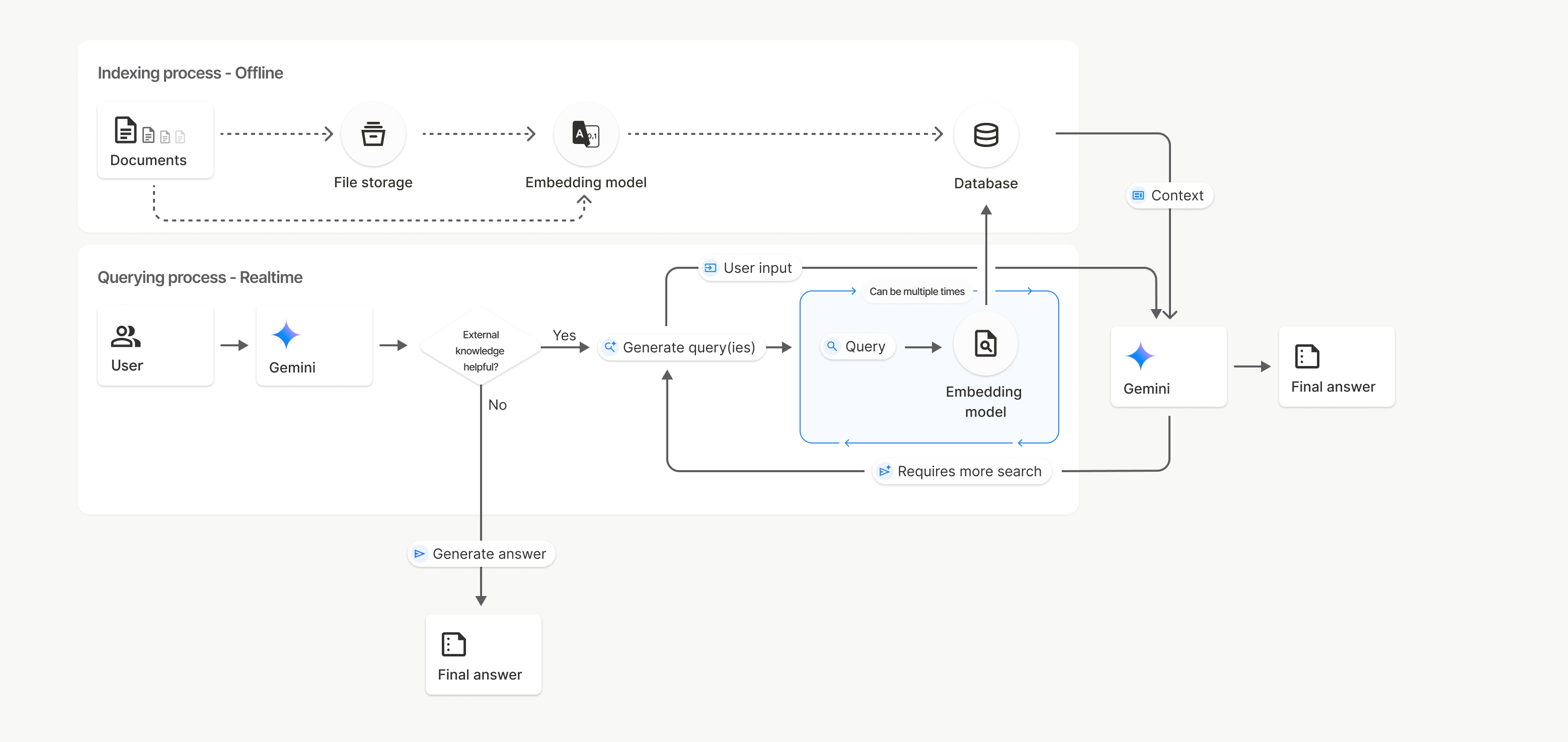
এই ডায়াগ্রামে, ডকুমেন্ট থেকে Embedding মডেল পর্যন্ত ডটেড লাইন
(gemini-embedding-001 ব্যবহার করে)
uploadToFileSearchStore API (ফাইল স্টোরেজ বাইপাস করে) বোঝায়।
অন্যথায়, আলাদাভাবে ফাইল তৈরি করতে
এবং তারপরে ফাইল ইমপোর্ট করতে Files API ব্যবহার করলে, ইন্ডেক্সিং প্রসেস ডকুমেন্ট থেকে
ফাইল স্টোরেজে এবং তারপরে Embedding মডেলে চলে যায়।
File Search স্টোর
ফাইল সার্চ স্টোর হল আপনার ডকুমেন্ট এম্বেডিংয়ের কন্টেনার। File API-এর মাধ্যমে আপলোড করা
র ফাইল ৪৮ ঘণ্টা পরে মুছে দেওয়া হলেও, File Search স্টোরে
ইমপোর্ট করা ডেটা আপনি ম্যানুয়ালি না মুছলে সেটি অনির্দিষ্টকালের জন্য স্টোর করা থাকে। আপনার ডকুমেন্ট গুছিয়ে রাখতে, আপনি একাধিক ফাইল সার্চ স্টোর
তৈরি করতে পারবেন। আপনার ফাইল
সার্চ স্টোর ম্যানেজ করার জন্য
FileSearchStore API আপনাকে তৈরি করতে, তালিকাভুক্ত করতে, পেতে এবং মুছে দিতে দেয়। ফাইল সার্চ স্টোরের নাম বিশ্বব্যাপী স্কোপ করা হয়।
আপনার File Search স্টোর কীভাবে ম্যানেজ করবেন তার কিছু উদাহরণ এখানে দেওয়া হল:
Python
file_search_store = client.file_search_stores.create(
    config={
        'display_name': 'my-file_search-store-123',
        'embedding_model': 'models/gemini-embedding-2'
    }
)

for file_search_store in client.file_search_stores.list():
    print(file_search_store)

my_file_search_store = client.file_search_stores.get(name='fileSearchStores/my-file_search-store-123')

client.file_search_stores.delete(name='fileSearchStores/my-file_search-store-123', config={'force': True})
জাভাস্ক্রিপ্ট
const fileSearchStore = await ai.fileSearchStores.create({
  config: {
    displayName: 'my-file_search-store-123',
    embeddingModel: 'models/gemini-embedding-2'
  }
});

const fileSearchStores = await ai.fileSearchStores.list();
for await (const store of fileSearchStores) {
  console.log(store);
}

const myFileSearchStore = await ai.fileSearchStores.get({
  name: 'fileSearchStores/my-file_search-store-123'
});

await ai.fileSearchStores.delete({
  name: 'fileSearchStores/my-file_search-store-123',
  config: { force: true }
});
REST
curl -X POST "https://generativelanguage.googleapis.com/v1beta/fileSearchStores?key=${GEMINI_API_KEY}" \
    -H "Content-Type: application/json" \
    -d '{ "displayName": "My Store", "embedding_model": "models/gemini-embedding-2" }'

curl "https://generativelanguage.googleapis.com/v1beta/fileSearchStores?key=${GEMINI_API_KEY}" \

curl "https://generativelanguage.googleapis.com/v1beta/fileSearchStores/my-file_search-store-123?key=${GEMINI_API_KEY}"

curl -X DELETE "https://generativelanguage.googleapis.com/v1beta/fileSearchStores/my-file_search-store-123?key=${GEMINI_API_KEY}"
ফাইল সার্চ ডকুমেন্ট
আপনি
ফাইল সার্চ ডকুমেন্ট API-এর সাহায্যে আপনার ফাইল স্টোরে থাকা আলাদা আলাদা ডকুমেন্ট ম্যানেজ করতে পারবেন। এর মাধ্যমে আপনি ফাইল সার্চ স্টোরে list প্রতিটি ডকুমেন্ট
সম্পর্কে তথ্য, get কোনও ডকুমেন্ট সম্পর্কে তথ্য এবং delete নাম
অনুসারে ডকুমেন্ট খুঁজে পাবেন।
Python
for document_in_store in client.file_search_stores.documents.list(parent='fileSearchStores/my-file_search-store-123'):
  print(document_in_store)

file_search_document = client.file_search_stores.documents.get(name='fileSearchStores/my-file_search-store-123/documents/my_doc')
print(file_search_document)

client.file_search_stores.documents.delete(name='fileSearchStores/my-file_search-store-123/documents/my_doc')
জাভাস্ক্রিপ্ট
const documents = await ai.fileSearchStores.documents.list({
  parent: 'fileSearchStores/my-file_search-store-123'
});
for await (const doc of documents) {
  console.log(doc);
}

const fileSearchDocument = await ai.fileSearchStores.documents.get({
  name: 'fileSearchStores/my-file_search-store-123/documents/my_doc',
});

await ai.fileSearchStores.documents.delete({
  name: 'fileSearchStores/my-file_search-store-123/documents/my_doc'
});
REST
curl "https://generativelanguage.googleapis.com/v1beta/fileSearchStores/my-file_search-store-123/documents?key=${GEMINI_API_KEY}"

curl "https://generativelanguage.googleapis.com/v1beta/fileSearchStores/my-file_search-store-123/documents/my_doc?key=${GEMINI_API_KEY}"

curl -X DELETE "https://generativelanguage.googleapis.com/v1beta/fileSearchStores/my-file_search-store-123/documents/my_doc?key=${GEMINI_API_KEY}"
ফাইলের মেটাডেটা
আপনার ফাইল ফিল্টার করতে বা অতিরিক্ত প্রসঙ্গ প্রদান করতে সাহায্য করার জন্য আপনি সেগুলিতে কাস্টম মেটাডেটা যোগ করতে পারেন। মেটাডেটা হল কী-ভ্যালু পেয়ারের একটি সেট।
Python
op = client.file_search_stores.import_file(
    file_search_store_name=file_search_store.name,
    file_name=sample_file.name,
    custom_metadata=[
        {"key": "author", "string_value": "Robert Graves"},
        {"key": "year", "numeric_value": 1934}
    ]
)
জাভাস্ক্রিপ্ট
let operation = await ai.fileSearchStores.importFile({
  fileSearchStoreName: fileSearchStore.name,
  fileName: sampleFile.name,
  config: {
    customMetadata: [
      { key: "author", stringValue: "Robert Graves" },
      { key: "year", numericValue: 1934 }
    ]
  }
});
আপনার File Search স্টোরে একাধিক ডকুমেন্ট থাকলে এবং আপনি সেগুলির মধ্যে থেকে শুধুমাত্র একটি সাবসেট সার্চ করতে চাইলে এটি কাজে লাগে।
Python
response = client.models.generate_content(
    model="gemini-3.8-flash",
    contents="Tell me about the book 'I, Claudius'",
    config=types.GenerateContentConfig(
        tools=[
            types.Tool(
                file_search=types.FileSearch(
                    file_search_store_names=[file_search_store.name],
                    metadata_filter="author=Robert Graves",
                )
            )
        ]
    )
)

print(response.text)
জাভাস্ক্রিপ্ট
const response = await ai.models.generateContent({
  model: "gemini-3.8-flash",
  contents: "Tell me about the book 'I, Claudius'",
  config: {
    tools: [
      {
        fileSearch: {
          fileSearchStoreNames: [fileSearchStore.name],
          metadataFilter: 'author="Robert Graves"',
        }
      }
    ]
  }
});

console.log(response.text);
REST
curl "https://generativelanguage.googleapis.com/v1beta/models/gemini-3.8-flash:generateContent?key=${GEMINI_API_KEY}" \
    -H 'Content-Type: application/json' \
    -X POST \
    -d '{
            "contents": [{
                "parts":[{"text": "Tell me about the book I, Claudius"}]
            }],
            "tools": [{
                "file_search": {
                    "file_search_store_names":["'$STORE_NAME'"],
                    "metadata_filter": "author = \"Robert Graves\""
                }
            }]
        }' 2> /dev/null > response.json

cat response.json
metadata_filter-এর জন্য তালিকা ফিল্টার সিনট্যাক্স প্রয়োগ করার ব্যাপারে নির্দেশিকা
google.aip.dev/160 লিঙ্কে পাওয়া যাবে
মাল্টিমোডাল ফাইল সার্চ
মাল্টিমোডাল ফাইল সার্চ আপনাকে নেটিভভাবে ছবি এম্বেড করতে এবং সেগুলির মাধ্যমে সার্চ করতে দেয়, এর ফলে সমৃদ্ধ, মাল্টিমোডাল RAG অ্যাপ্লিকেশন চালু করা যায়।
এম্বেডিং মডেল কনফিগার করা
আপনি FileSearchStore তৈরি করলে, মাল্টিমোডাল মডেল ব্যবহার করার জন্য আপনাকে অবশ্যই ডিফল্ট টেক্সট-অনলি
এমবেডিং মডেল ওভাররাইড করতে হবে। models/gemini-embedding-2 ব্যবহার করে
টেক্সট ও ছবি, দুটিই প্রসেস করুন।
Python
store = client.file_search_stores.create(
    config={
        "display_name": "Multimodal Catalog",
        "embedding_model": "models/gemini-embedding-2",
    }
)
জাভাস্ক্রিপ্ট
const fileSearchStore = await ai.fileSearchStores.create({
  config: {
    displayName: "Multimodal Catalog",
    embeddingModel: "models/gemini-embedding-2",
  },
});
REST
curl -X POST "https://generativelanguage.googleapis.com/v1beta/fileSearchStores?key=$GEMINI_API_KEY" \
    -H "Content-Type: application/json" \
    -d '{
      "display_name": "Multimodal Catalog",
      "embedding_model": "models/gemini-embedding-2"
    }'
ছবি আপলোড করুন
মাল্টিমোডাল এম্বেডিং মডেলের মাধ্যমে স্টোর তৈরি করার পরে, আপনি ফাইল সার্চ স্টোরে সরাসরি আপলোড করুন বা ফাইল ইমপোর্ট করা লিঙ্কে বর্ণিত একই আপলোড API ব্যবহার করে সরাসরি ইমেজ ফাইল আপলোড করতে পারবেন।
ছবির ফাইল সংক্রান্ত প্রয়োজনীয়তা:
- ছবির ফাইল রেজোলিউশন সর্বাধিক 4K x 4K পিক্সেল হতে হবে।
- PNG, JPEG ফর্ম্যাট কাজ করে।
উদ্ধৃতি
আপনি ফাইল সার্চ ব্যবহার করলে, মডেলের উত্তরে এমন উদ্ধৃতি থাকতে পারে যা নির্দিষ্ট করে যে আপনার আপলোড করা ডকুমেন্টের কোন অংশ উত্তর জেনারেট করতে ব্যবহার করা হয়েছে। এটি ফ্যাক্ট-চেকিং ও যাচাইকরণে সাহায্য করে।
উত্তরের grounding_metadata অ্যাট্রিবিউট
থেকে আপনি উদ্ধৃতি সংক্রান্ত তথ্য অ্যাক্সেস করতে পারবেন।
Python
print(response.candidates[0].grounding_metadata)
জাভাস্ক্রিপ্ট
console.log(JSON.stringify(response.candidates?.[0]?.groundingMetadata, null, 2));
গ্রাউন্ডিং মেটাডেটার গঠন সম্পর্কে বিস্তারিত তথ্য পেতে, ফাইল সার্চ কুকবুক অথবা Google Search-এর মাধ্যমে গ্রাউন্ডিং ডকুমেন্টের গ্রাউন্ডিং বিভাগ থেকে উদাহরণ দেখুন।
পৃষ্ঠা নম্বর
আপনি পৃষ্ঠা থাকা ডকুমেন্ট (যেমন, PDF) সহ ফাইল সার্চ ব্যবহার করলে, মডেলের
উত্তরে সেই পৃষ্ঠার নম্বর অন্তর্ভুক্ত থাকতে পারে যেখানে তথ্যটি পাওয়া গেছে।
আপনি page_number অ্যাট্রিবিউট থেকে এই তথ্য অ্যাক্সেস করতে পারবেন
retrieved_context।
Python
# Iterate through citations and check for page numbers
for chunk in response.grounding_metadata.grounding_chunks:
   if chunk.retrieved_context and chunk.retrieved_context.page_number:
       print(f"Cited Page: {chunk.retrieved_context.page_number}")
জাভাস্ক্রিপ্ট
const groundingMetadata = response.candidates[0].groundingMetadata;
for (const chunk of groundingMetadata.groundingChunks) {
  if (chunk.retrievedContext && chunk.retrievedContext.pageNumber) {
    console.log(`Cited Page: ${chunk.retrievedContext.pageNumber}`);
  }
}
মিডিয়া সাইটেশন
জেনারেট করার সময় মডেলটি কোনও ইমেজ চ্যাঙ্কের রেফারেন্স দিলে, API গ্রাউন্ডিং মেটাডেটাতে একটি
সাইটেশন রিটার্ন করে যার মধ্যে media_id থাকে। মডেলটি যে ইমেজ চ্যাঙ্কের রেফারেন্স দিয়েছে, সেটি ডাউনলোড করতে আপনি এই
আইডি ব্যবহার করতে পারবেন। এই media_id একাধিক সার্চ কলের মধ্যে
অপরিবর্তিত থাকে, যা আপনাকে আইডি ব্যবহার করে একই ছবি বা ক্যাশে নির্ভরযোগ্যভাবে
রিট্রিভ করতে দেয়।
নিচে দেওয়া স্নিপেটটি হল REST উত্তরের একটি উদাহরণ:
"groundingMetadata": {
  "groundingChunks": [
    {
      "retrievedContext": {
        "title": "product_image",
        "fileSearchStore": "fileSearchStores/my-store-123",
        "media_id": "fileSearchStores/my-store-123/media/BlobId-456"
      }
    }
  ]
}
নিচের কোড স্নিপেট থেকে কীভাবে media_id ও
মিডিয়া ডাউনলোড করতে হয় তা জানতে পারবেন:
Python
# Iterate through citations and download media if present
for chunk in response.grounding_metadata.grounding_chunks:
   if chunk.retrieved_context and chunk.retrieved_context.media_id:
       print(f"Cited Media ID: {chunk.retrieved_context.media_id}")
       # Download the blob using the SDK
       blob_content = client.file_search_stores.download_media(
           media_id=chunk.retrieved_context.media_id
       )
       # Save blob_content to file...
জাভাস্ক্রিপ্ট
const groundingMetadata = response.candidates[0].groundingMetadata;
for (const chunk of groundingMetadata.groundingChunks) {
  if (chunk.retrievedContext && chunk.retrievedContext.mediaId) {
    console.log(`Cited Media ID: ${chunk.retrievedContext.mediaId}`);
    const blobContent = await ai.fileSearchStores.downloadMedia(chunk.retrievedContext.mediaId);
    // Save blobContent to file...
  }
}
REST
curl -X GET "https://generativelanguage.googleapis.com/v1/fileSearchStores/my-store-123/media/BlobId-456" \
  -H "x-goog-api-key: $GEMINI_API_KEY"
গ্রাউন্ডিং ডেটাতে কাস্টম মেটাডেটা
আপনার ফাইলে কাস্টম মেটাডেটা যোগ করে থাকলে, আপনি মডেলের উত্তরের
গ্রাউন্ডিং মেটাডেটাতে সেটি অ্যাক্সেস করতে পারবেন। আপনার সোর্স
ডকুমেন্ট থেকে আপনার অ্যাপ্লিকেশন লজিকে
অতিরিক্ত প্রসঙ্গ (যেমন, URL, পৃষ্ঠা নম্বর বা লেখক) পাস করার জন্য এটি কার্যকর। grounding_chunk-এর মধ্যে থাকা প্রতিটি retrieved_context-এ
retrieved_context এই কাস্টম মেটাডেটা থাকে।
Python
response = client.models.generate_content(
    model="gemini-3.8-flash",
    contents="Tell me about [insert question]",
    config=types.GenerateContentConfig(
        tools=[
            types.Tool(
                file_search=types.FileSearch(
                    file_search_store_names=[file_search_store.name]
                )
            )
        ]
    )
)

for chunk in response.candidates[0].grounding_metadata.grounding_chunks:
    if chunk.retrieved_context:
        print(f"Text: {chunk.retrieved_context.text}")
        if chunk.retrieved_context.custom_metadata:
            for metadata in chunk.retrieved_context.custom_metadata:
                print(f"Metadata Key: {metadata.key}")
                print(f"Value: {metadata.string_value or metadata.numeric_value}")
জাভাস্ক্রিপ্ট
const response = await ai.models.generateContent({
  model: "gemini-3.8-flash",
  contents: "Tell me about [insert question]",
  config: {
    tools: [
      {
        fileSearch: {
          fileSearchStoreNames: [fileSearchStore.name]
        }
      }
    ]
  }
});

const groundingMetadata = response.candidates[0].groundingMetadata;
groundingMetadata.groundingChunks.forEach((chunk) => {
  if (chunk.retrievedContext) {
    console.log(`Text: ${chunk.retrievedContext.text}`);
    if (chunk.retrievedContext.customMetadata) {
      chunk.retrievedContext.customMetadata.forEach((metadata) => {
        console.log(`Metadata Key: ${metadata.key}`);
        console.log(`Value: ${metadata.stringValue || metadata.numericValue}`);
      });
    }
  }
});
REST
{
  "candidates": [
    {
      "content": { ... },
      "grounding_metadata": {
        "grounding_chunks": [
          {
            "retrieved_context": {
              "text": "...",
              "title": "...",
              "uri": "...",
              "custom_metadata": [
                {
                  "key": "author",
                  "string_value": "Robert Graves"
                },
                {
                  "key": "year",
                  "numeric_value": 1934
                }
              ]
            }
          }
        ],
        "grounding_supports": [ ... ]
      }
    }
  ]
}
স্ট্রাকচার্ড আউটপুট
Gemini 3 মডেল থেকে শুরু করে, আপনি ফাইল সার্চ টুলের সাথে স্ট্রাকচার্ড আউটপুট একত্রিত করতে পারবেন।
Python
from pydantic import BaseModel, Field

class Money(BaseModel):
    amount: str = Field(description="The numerical part of the amount.")
    currency: str = Field(description="The currency of amount.")

response = client.models.generate_content(
    model="gemini-3.8-flash",
    contents="What is the minimum hourly wage in Tokyo right now?",
    config=types.GenerateContentConfig(
                tools=[
                    types.Tool(
                        file_search=types.FileSearch(
                            file_search_store_names=[file_search_store.name]
                        )
                    )
                ],
                response_format={"text": {"mime_type": "application/json", "schema": Money.model_json_schema()}}
      )
)
result = Money.model_validate_json(response.text)
print(result)
জাভাস্ক্রিপ্ট
import { z } from "zod";

const moneySchema = z.object({
  amount: z.string().describe("The numerical part of the amount."),
  currency: z.string().describe("The currency of amount."),
});

async function run() {
  const response = await ai.models.generateContent({
    model: "gemini-3.8-flash",
    contents: "What is the minimum hourly wage in Tokyo right now?",
    config: {
      tools: [
        {
          fileSearch: {
            fileSearchStoreNames: [file_search_store.name],
          },
        },
      ],
      responseFormat: { text: { mimeType: "application/json", schema: z.toJSONSchema(moneySchema) } },
    },
  });

  const result = moneySchema.parse(JSON.parse(response.text));
  console.log(result);
}

run();
REST
curl "https://generativelanguage.googleapis.com/v1beta/models/gemini-3.8-flash:generateContent" \
  -H "x-goog-api-key: $GEMINI_API_KEY" \
  -H 'Content-Type: application/json' \
  -X POST \
  -d '{
    "contents": [{
      "parts": [{"text": "What is the minimum hourly wage in Tokyo right now?"}]
    }],
    "tools": [
      {
        "fileSearch": {
          "fileSearchStoreNames": ["$FILE_SEARCH_STORE_NAME"]
        }
      }
    ],
    "generationConfig": {
"responseFormat": {
  "text": {
    "mimeType": "application/json",
    "schema": {
            "type": "object",
            "properties": {
                "amount": {"type": "string", "description": "The numerical part of the amount."},
                "currency": {"type": "string", "description": "The currency of amount."}
  }
}
},
            "required": ["amount", "currency"]
        }
    }
  }'
মানানসই মডেল
নিম্নলিখিত মডেলগুলিতে ফাইল সার্চ কাজ করে:
| মডেল | ফাইল সার্চ |
|---|---|
| Gemini 3.8 Flash | ✔️ |
| Gemini 3.6 Flash | ✔️ |
| Gemini 3.5 Flash-Lite | ✔️ |
| Gemini 3.1 Pro প্রিভিউ | ✔️ |
| Gemini 3.1 Flash-Lite | ✔️ |
| Gemini 3 Flash প্রিভিউ | ✔️ |
| Gemini 2.5 Pro | ✔️ |
| Gemini 2.5 Flash-Lite | ✔️ |
কাজ করে এমন টুলের কম্বিনেশন
Gemini 3 মডেল, কাস্টম টুল (ফাংশন কলিং)-এর সাথে বিল্ট-ইন টুল (যেমন, ফাইল সার্চ) একত্রিত করার সুবিধা দেয়। টুলের কম্বিনেশন পৃষ্ঠা থেকে আরও জানুন।
এই ধরনের ফাইল কাজ করে
ফাইল সার্চে বিভিন্ন ধরনের ফাইল ফর্ম্যাট কাজ করে, যা নিম্নলিখিত বিভাগে তালিকাভুক্ত করা আছে।
অ্যাপ্লিকেশন ফাইলের ধরন
application/dartapplication/ecmascriptapplication/jsonapplication/ms-javaapplication/mswordapplication/pdfapplication/sqlapplication/typescriptapplication/vnd.curlapplication/vnd.dartapplication/vnd.ibm.secure-containerapplication/vnd.jupyterapplication/vnd.ms-excelapplication/vnd.oasis.opendocument.textapplication/vnd.openxmlformats-officedocument.presentationml.presentationapplication/vnd.openxmlformats-officedocument.spreadsheetml.sheetapplication/vnd.openxmlformats-officedocument.wordprocessingml.documentapplication/vnd.openxmlformats-officedocument.wordprocessingml.templateapplication/x-cshapplication/x-hwpapplication/x-hwp-v5application/x-latexapplication/x-phpapplication/x-powershellapplication/x-shapplication/x-shellscriptapplication/x-texapplication/x-zshapplication/xmlapplication/zip
টেক্সট ফাইলের ধরন
text/1d-interleaved-parityfectext/REDtext/SGMLtext/cache-manifesttext/calendartext/cqltext/cql-extensiontext/cql-identifiertext/csstext/csvtext/csv-schematext/dnstext/encaprtptext/enrichedtext/exampletext/fhirpathtext/flexfectext/fwdredtext/gff3text/grammar-ref-listtext/hl7v2text/htmltext/javascripttext/jcr-cndtext/jsxtext/markdowntext/mizartext/n3text/parameterstext/parityfectext/phptext/plaintext/provenance-notationtext/prs.fallenstein.rsttext/prs.lines.tagtext/prs.prop.logictext/raptorfectext/rfc822-headerstext/rtftext/rtp-enc-aescm128text/rtploopbacktext/rtxtext/sgmltext/shaclctext/shextext/spdxtext/stringstext/t140text/tab-separated-valuestext/texmacstext/trofftext/tsvtext/tsxtext/turtletext/ulpfectext/uri-listtext/vcardtext/vnd.DMClientScripttext/vnd.IPTC.NITFtext/vnd.IPTC.NewsMLtext/vnd.atext/vnd.abctext/vnd.ascii-arttext/vnd.curltext/vnd.debian.copyrighttext/vnd.dvb.subtitletext/vnd.esmertec.theme-descriptortext/vnd.exchangeabletext/vnd.familysearch.gedcomtext/vnd.ficlab.flttext/vnd.flytext/vnd.fmi.flexstortext/vnd.gmltext/vnd.graphviztext/vnd.hanstext/vnd.hgltext/vnd.in3d.3dmltext/vnd.in3d.spottext/vnd.latex-ztext/vnd.motorola.reflextext/vnd.ms-mediapackagetext/vnd.net2phone.commcenter.commandtext/vnd.radisys.msml-basic-layouttext/vnd.senx.warpscripttext/vnd.sositext/vnd.sun.j2me.app-descriptortext/vnd.trolltech.linguisttext/vnd.wap.sitext/vnd.wap.sltext/vnd.wap.wmltext/vnd.wap.wmlscripttext/vtttext/wgsltext/x-asmtext/x-bibtextext/x-bootext/x-ctext/x-c++hdrtext/x-c++srctext/x-cassandratext/x-chdrtext/x-coffeescripttext/x-componenttext/x-cshtext/x-csharptext/x-csrctext/x-cudatext/x-dtext/x-difftext/x-dsrctext/x-emacs-lisptext/x-erlangtext/x-gff3text/x-gotext/x-haskelltext/x-javatext/x-java-propertiestext/x-java-sourcetext/x-kotlintext/x-lilypondtext/x-lisptext/x-literate-haskelltext/x-luatext/x-moctext/x-objcsrctext/x-pascaltext/x-pcs-gcdtext/x-perltext/x-perl-scripttext/x-pythontext/x-python-scripttext/x-r-markdowntext/x-rsrctext/x-rsttext/x-ruby-scripttext/x-rusttext/x-sasstext/x-scalatext/x-schemetext/x-script.pythontext/x-scsstext/x-setexttext/x-sfvtext/x-shtext/x-siestatext/x-sostext/x-sqltext/x-swifttext/x-tcltext/x-textext/x-vbasictext/x-vcalendartext/xmltext/xml-dtdtext/xml-external-parsed-entitytext/yaml
সীমাবদ্ধতা
- Live API: ফাইল সার্চ করার সুবিধা Live API-তে কাজ করে না।
- টুল মানানসই নয়: ফাইল সার্চকে অন্যান্য টুলের সাথে একত্রিত করা যায় না যেমন Google Search-এর সাথে গ্রাউন্ডিং, URL কনটেক্সট ইত্যাদি।
রেট লিমিট
পরিষেবার স্থিতিশীলতা নিশ্চিত করতে, ফাইল সার্চ API-তে নিম্নলিখিত সীমা আরোপ করা হয়েছে:
- সর্বাধিক ফাইল সাইজ / প্রতি ডকুমেন্টের সীমা: ১০০ এমবি
- প্রোজেক্ট ফাইল সার্চ স্টোরের মোট সাইজ (ব্যবহারকারীর টিয়ারের উপর ভিত্তি করে):
- ফ্রি: ১ জিবি
- লেভেল ১: ১০ জিবি
- টিয়ার ২: ১০০ জিবি
- লেভেল ৩: ১ টিবি
- সাজেশন: অপ্টিমাল রিট্রিভাল ল্যাটেন্সি নিশ্চিত করতে, প্রতিটি ফাইল সার্চ স্টোরের সাইজ ২০ জিবি বা তার কম রাখুন।
দাম
- আগে থেকে থাকা এমবেডিংয়ের দাম অনুযায়ী ইন্ডেক্স করার সময় এমবেডিংয়ের জন্য আপনাকে চার্জ করা হয়।
- স্টোরেজের জন্য কোনও চার্জ লাগে না।
- কোয়েরি টাইম এম্বেডিংয়ের জন্য কোনও চার্জ লাগে না।
- রিট্রিভ করা ডকুমেন্ট টোকেনকে সাধারণ কনটেক্সট টোকেন হিসেবে চার্জ করা হয়।
এর পরে কী করতে হবে
- ফাইল সার্চ স্টোর ও ফাইল সার্চ ডকুমেন্টের জন্য API রেফারেন্স দেখুন।