

Gemini API позволяет выполнять генерацию с дополненной выборкой (RAG) с помощью инструмента File Search. Функция поиска файлов импортирует, разбивает на фрагменты и индексирует ваши данные, чтобы быстро находить нужную информацию по запросу. Полученная информация используется в качестве контекста для модели, что позволяет ей предоставлять более точные и релевантные ответы. Поиск файлов также поддерживает мультимодальные возможности с текстовыми эмбеддингами, поддерживаемыми gemini-embedding-001, и графическими/мультимодальными эмбеддингами, поддерживаемыми gemini-embedding-2.
Хранение файлов и генерация эмбеддингов при запросе бесплатны. Вы платите только за создание эмбеддингов при первом индексировании файлов и за входные и выходные токены модели Gemini. Новая модель оплаты делает инструмент поиска файлов более простым и экономичным в создании и масштабировании. Подробнее о ценах…
Загрузка непосредственно в хранилище поиска файлов
В примере ниже показано, как напрямую загрузить файл в хранилище для поиска файлов:
Python
from google import genai
from google.genai import types
import time

client = genai.Client()

# File name will be visible in citations
file_search_store = client.file_search_stores.create(
    config={
        'display_name': 'your-fileSearchStore-name',
        'embedding_model': 'models/gemini-embedding-2'
    }
)

operation = client.file_search_stores.upload_to_file_search_store(
  file='sample.txt',
  file_search_store_name=file_search_store.name,
  config={
      'display_name' : 'display-file-name',
  }
)

while not operation.done:
    time.sleep(5)
    operation = client.operations.get(operation)

response = client.models.generate_content(
    model="gemini-3.8-flash",
    contents="""Can you tell me about [insert question]""",
    config=types.GenerateContentConfig(
        tools=[
            types.Tool(
                file_search=types.FileSearch(
                    file_search_store_names=[file_search_store.name]
                )
            )
        ]
    )
)

print(response.text)
JavaScript
const { GoogleGenAI } = require('@google/genai');

const ai = new GoogleGenAI({});

async function run() {
  // File name will be visible in citations
  const fileSearchStore = await ai.fileSearchStores.create({
    config: {
      displayName: 'your-fileSearchStore-name',
      embeddingModel: 'models/gemini-embedding-2'
    }
  });

  let operation = await ai.fileSearchStores.uploadToFileSearchStore({
    file: 'file.txt',
    fileSearchStoreName: fileSearchStore.name,
    config: {
      displayName: 'file-name',
    }
  });

  while (!operation.done) {
    await new Promise(resolve => setTimeout(resolve, 5000));
    operation = await ai.operations.get({ operation });
  }

  const response = await ai.models.generateContent({
    model: "gemini-3.8-flash",
    contents: "Can you tell me about [insert question]",
    config: {
      tools: [
        {
          fileSearch: {
            fileSearchStoreNames: [fileSearchStore.name]
          }
        }
      ]
    }
  });

  console.log(response.text);
}

run();
Подробная информация приведена в uploadToFileSearchStoreдокументации по API.
Импорт файлов
Вы также можете загрузить существующий файл и импортировать его в хранилище для поиска файлов:
Python
from google import genai
from google.genai import types
import time

client = genai.Client()

# File name will be visible in citations
sample_file = client.files.upload(file='sample.txt', config={'name': 'display_file_name'})

file_search_store = client.file_search_stores.create(
    config={
        'display_name': 'your-fileSearchStore-name',
        'embedding_model': 'models/gemini-embedding-2'
    }
)

operation = client.file_search_stores.import_file(
    file_search_store_name=file_search_store.name,
    file_name=sample_file.name
)

while not operation.done:
    time.sleep(5)
    operation = client.operations.get(operation)

response = client.models.generate_content(
    model="gemini-3.8-flash",
    contents="""Can you tell me about [insert question]""",
    config=types.GenerateContentConfig(
        tools=[
            types.Tool(
                file_search=types.FileSearch(
                    file_search_store_names=[file_search_store.name]
                )
            )
        ]
    )
)

print(response.text)
JavaScript
const { GoogleGenAI } = require('@google/genai');

const ai = new GoogleGenAI({});

async function run() {
  // File name will be visible in citations
  const sampleFile = await ai.files.upload({
    file: 'sample.txt',
    config: { name: 'file-name' }
  });

  const fileSearchStore = await ai.fileSearchStores.create({
    config: {
      displayName: 'your-fileSearchStore-name',
      embeddingModel: 'models/gemini-embedding-2'
    }
  });

  let operation = await ai.fileSearchStores.importFile({
    fileSearchStoreName: fileSearchStore.name,
    fileName: sampleFile.name
  });

  while (!operation.done) {
    await new Promise(resolve => setTimeout(resolve, 5000));
    operation = await ai.operations.get({ operation: operation });
  }

  const response = await ai.models.generateContent({
    model: "gemini-3.8-flash",
    contents: "Can you tell me about [insert question]",
    config: {
      tools: [
        {
          fileSearch: {
            fileSearchStoreNames: [fileSearchStore.name]
          }
        }
      ]
    }
  });

  console.log(response.text);
}

run();
Дополнительную информацию можно найти в документации по API для importFile.
Настройка разбиения на фрагменты
Когда вы импортируете файл в хранилище File Search, он автоматически разбивается на фрагменты, встраивается, индексируется и загружается в хранилище File Search. Если вам нужен больший контроль над стратегией разбиения, вы можете указать параметр chunking_config, чтобы задать максимальное количество токенов на фрагмент и максимальное количество перекрывающихся токенов.
Python
from google import genai
from google.genai import types
import time

client = genai.Client()

operation = client.file_search_stores.upload_to_file_search_store(
    file_search_store_name=file_search_store.name,
    file_name=sample_file.name,
    config={
        'chunking_config': {
          'white_space_config': {
            'max_tokens_per_chunk': 200,
            'max_overlap_tokens': 20
          }
        }
    }
)

while not operation.done:
    time.sleep(5)
    operation = client.operations.get(operation)

print("Custom chunking complete.")
JavaScript
const { GoogleGenAI } = require('@google/genai');

const ai = new GoogleGenAI({});

let operation = await ai.fileSearchStores.uploadToFileSearchStore({
  file: 'file.txt',
  fileSearchStoreName: fileSearchStore.name,
  config: {
    displayName: 'file-name',
    chunkingConfig: {
      whiteSpaceConfig: {
        maxTokensPerChunk: 200,
        maxOverlapTokens: 20
      }
    }
  }
});

while (!operation.done) {
  await new Promise(resolve => setTimeout(resolve, 5000));
  operation = await ai.operations.get({ operation });
}
console.log("Custom chunking complete.");
Чтобы использовать хранилище File Search, передайте его в качестве инструмента в метод generateContent, как показано в примерах Upload и Import.
Принцип работы
Для поиска информации, соответствующей запросу пользователя, в инструменте File Search используется семантический поиск. В отличие от стандартного поиска по ключевым словам, семантический поиск понимает значение и контекст вашего запроса.
При импорте файл преобразуется в числовые представления, называемые эмбеддингами, которые отражают семантическое значение загруженного контента. Эти эмбеддинги хранятся в специализированной базе данных File Search. Когда вы вводите запрос, он также преобразуется во встраивание. Затем система выполняет поиск файлов, чтобы найти наиболее похожие и релевантные фрагменты документов из хранилища поиска файлов.
У встраиваемых объектов нет времени жизни (TTL). Они хранятся, пока не будут удалены вручную или пока не будет прекращена поддержка модели. Файлы удаляются через 48 часов.
Вот как работает File Search API:
uploadToFileSearchStore
Создайте хранилище для поиска по файлам. В нем будут содержаться обработанные данные из ваших файлов. Это постоянный контейнер для встраиваний, с которыми будет работать семантический поиск.
Загрузить файл и импортировать его в хранилище поиска по файлам. Вы можете одновременно загрузить файл и импортировать результаты в хранилище поиска по файлам. Это создает временный объект
File, который является ссылкой на исходный документ. Затем эти данные разбиваются на фрагменты, преобразуются во встраивания File Search и индексируются. ОбъектFileудаляется через 48 часов, а данные, импортированные в хранилище File Search, будут храниться неограниченно долго, пока вы не решите их удалить.Запрос с поиском файлов. Наконец, вы используете инструмент
FileSearchв вызовеgenerateContent. В конфигурации инструмента вы указываетеFileSearchRetrievalResource, который указывает наFileSearchStore, в котором вы хотите выполнить поиск. Это указывает модели на необходимость выполнить семантический поиск в определенном хранилище File Search, чтобы найти релевантную информацию для обоснования ответа.
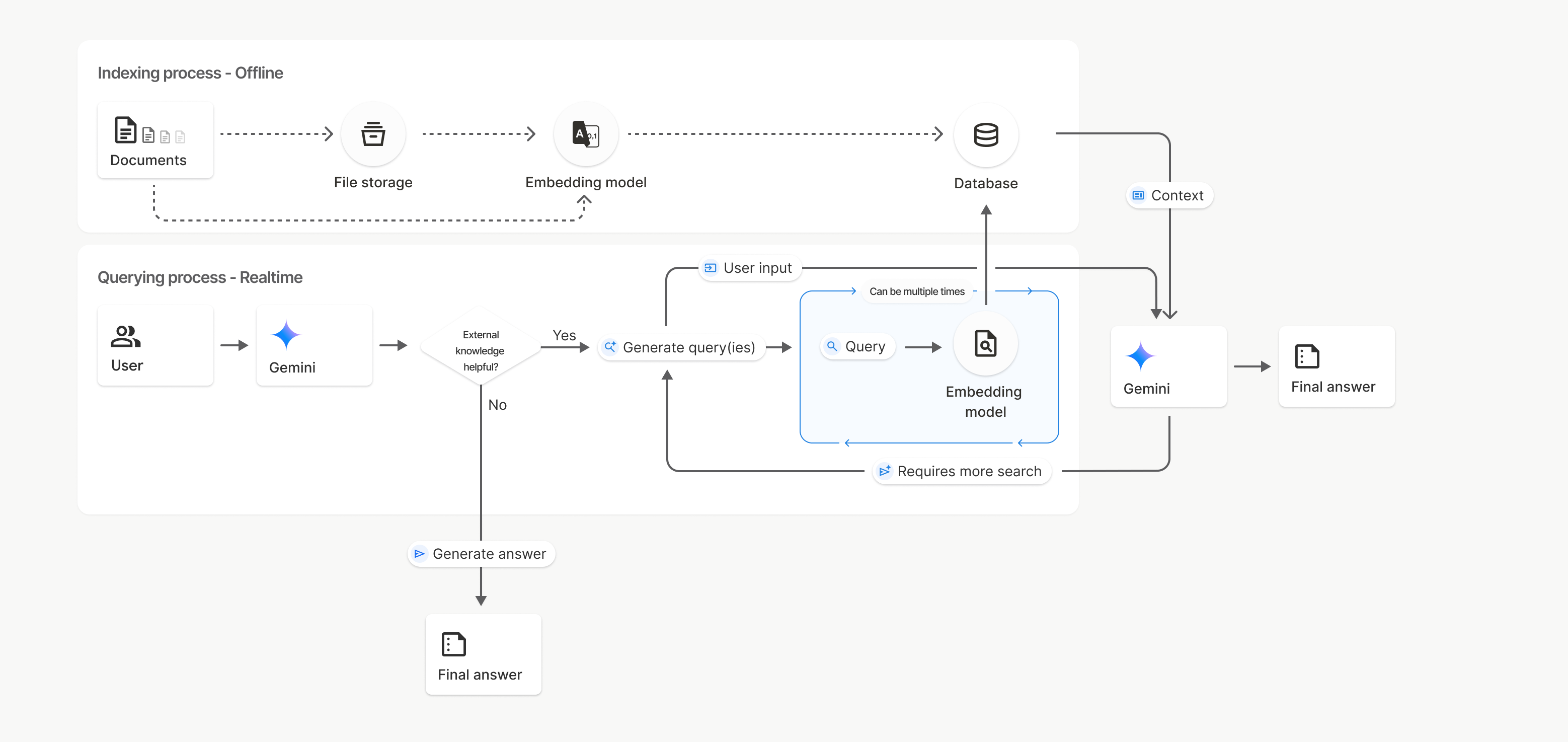
На этой схеме пунктирная линия от Документов к Модели встраивания (с использованием gemini-embedding-001) представляет API uploadToFileSearchStore (минуя Хранилище файлов).
В противном случае при использовании Files API для отдельного создания и последующего импорта файлов процесс индексирования перемещается из Документов в Хранилище файлов, а затем в Модель встраивания.
Хранилища поиска файлов
Хранилище поиска файлов – это контейнер для встроенных документов. Необработанные файлы, загруженные через File API, удаляются через 48 часов, а данные, импортированные в хранилище File Search, хранятся бессрочно, пока вы не удалите их вручную. Вы можете создать несколько хранилищ для поиска файлов, чтобы упорядочить документы. FileSearchStore API позволяет создавать, перечислять, получать и удалять хранилища для поиска файлов. Названия хранилищ для поиска файлов имеют глобальную область действия.
Ниже приведены примеры управления хранилищами для поиска в файлах.
Python
file_search_store = client.file_search_stores.create(
    config={
        'display_name': 'my-file_search-store-123',
        'embedding_model': 'models/gemini-embedding-2'
    }
)

for file_search_store in client.file_search_stores.list():
    print(file_search_store)

my_file_search_store = client.file_search_stores.get(name='fileSearchStores/my-file_search-store-123')

client.file_search_stores.delete(name='fileSearchStores/my-file_search-store-123', config={'force': True})
JavaScript
const fileSearchStore = await ai.fileSearchStores.create({
  config: {
    displayName: 'my-file_search-store-123',
    embeddingModel: 'models/gemini-embedding-2'
  }
});

const fileSearchStores = await ai.fileSearchStores.list();
for await (const store of fileSearchStores) {
  console.log(store);
}

const myFileSearchStore = await ai.fileSearchStores.get({
  name: 'fileSearchStores/my-file_search-store-123'
});

await ai.fileSearchStores.delete({
  name: 'fileSearchStores/my-file_search-store-123',
  config: { force: true }
});
REST
curl -X POST "https://generativelanguage.googleapis.com/v1beta/fileSearchStores?key=${GEMINI_API_KEY}" \
    -H "Content-Type: application/json" \
    -d '{ "displayName": "My Store", "embedding_model": "models/gemini-embedding-2" }'

curl "https://generativelanguage.googleapis.com/v1beta/fileSearchStores?key=${GEMINI_API_KEY}" \

curl "https://generativelanguage.googleapis.com/v1beta/fileSearchStores/my-file_search-store-123?key=${GEMINI_API_KEY}"

curl -X DELETE "https://generativelanguage.googleapis.com/v1beta/fileSearchStores/my-file_search-store-123?key=${GEMINI_API_KEY}"
Документы по поиску файлов
Вы можете управлять отдельными документами в хранилищах файлов с помощью File Search Documents API, чтобы list каждый документ в хранилище поиска файлов, get информацию о документе и delete документ по названию.
Python
for document_in_store in client.file_search_stores.documents.list(parent='fileSearchStores/my-file_search-store-123'):
  print(document_in_store)

file_search_document = client.file_search_stores.documents.get(name='fileSearchStores/my-file_search-store-123/documents/my_doc')
print(file_search_document)

client.file_search_stores.documents.delete(name='fileSearchStores/my-file_search-store-123/documents/my_doc')
JavaScript
const documents = await ai.fileSearchStores.documents.list({
  parent: 'fileSearchStores/my-file_search-store-123'
});
for await (const doc of documents) {
  console.log(doc);
}

const fileSearchDocument = await ai.fileSearchStores.documents.get({
  name: 'fileSearchStores/my-file_search-store-123/documents/my_doc',
});

await ai.fileSearchStores.documents.delete({
  name: 'fileSearchStores/my-file_search-store-123/documents/my_doc'
});
REST
curl "https://generativelanguage.googleapis.com/v1beta/fileSearchStores/my-file_search-store-123/documents?key=${GEMINI_API_KEY}"

curl "https://generativelanguage.googleapis.com/v1beta/fileSearchStores/my-file_search-store-123/documents/my_doc?key=${GEMINI_API_KEY}"

curl -X DELETE "https://generativelanguage.googleapis.com/v1beta/fileSearchStores/my-file_search-store-123/documents/my_doc?key=${GEMINI_API_KEY}"
Метаданные файлов
Вы можете добавить в файлы собственные метаданные, чтобы фильтровать их или предоставлять дополнительный контекст. Метаданные – это набор пар "ключ-значение".
Python
op = client.file_search_stores.import_file(
    file_search_store_name=file_search_store.name,
    file_name=sample_file.name,
    custom_metadata=[
        {"key": "author", "string_value": "Robert Graves"},
        {"key": "year", "numeric_value": 1934}
    ]
)
JavaScript
let operation = await ai.fileSearchStores.importFile({
  fileSearchStoreName: fileSearchStore.name,
  fileName: sampleFile.name,
  config: {
    customMetadata: [
      { key: "author", stringValue: "Robert Graves" },
      { key: "year", numericValue: 1934 }
    ]
  }
});
Это полезно, если в хранилище для поиска файлов много документов, а вам нужно выполнить поиск только по некоторым из них.
Python
response = client.models.generate_content(
    model="gemini-3.8-flash",
    contents="Tell me about the book 'I, Claudius'",
    config=types.GenerateContentConfig(
        tools=[
            types.Tool(
                file_search=types.FileSearch(
                    file_search_store_names=[file_search_store.name],
                    metadata_filter="author=Robert Graves",
                )
            )
        ]
    )
)

print(response.text)
JavaScript
const response = await ai.models.generateContent({
  model: "gemini-3.8-flash",
  contents: "Tell me about the book 'I, Claudius'",
  config: {
    tools: [
      {
        fileSearch: {
          fileSearchStoreNames: [fileSearchStore.name],
          metadataFilter: 'author="Robert Graves"',
        }
      }
    ]
  }
});

console.log(response.text);
REST
curl "https://generativelanguage.googleapis.com/v1beta/models/gemini-3.8-flash:generateContent?key=${GEMINI_API_KEY}" \
    -H 'Content-Type: application/json' \
    -X POST \
    -d '{
            "contents": [{
                "parts":[{"text": "Tell me about the book I, Claudius"}]
            }],
            "tools": [{
                "file_search": {
                    "file_search_store_names":["'$STORE_NAME'"],
                    "metadata_filter": "author = \"Robert Graves\""
                }
            }]
        }' 2> /dev/null > response.json

cat response.json
Инструкции по реализации синтаксиса фильтрации списков для metadata_filter можно найти на странице google.aip.dev/160.
Мультимодальный поиск файлов
Мультимодальный поиск по файлам позволяет встраивать изображения и выполнять поиск по ним, что дает возможность создавать многофункциональные мультимодальные RAG-приложения.
Как настроить модель встраивания
При создании FileSearchStore необходимо переопределить модель эмбеддинга, используемую по умолчанию и работающую только с текстом, чтобы использовать мультимодальную модель. Используйте models/gemini-embedding-2 для обработки текста и изображений.
Python
store = client.file_search_stores.create(
    config={
        "display_name": "Multimodal Catalog",
        "embedding_model": "models/gemini-embedding-2",
    }
)
JavaScript
const fileSearchStore = await ai.fileSearchStores.create({
  config: {
    displayName: "Multimodal Catalog",
    embeddingModel: "models/gemini-embedding-2",
  },
});
REST
curl -X POST "https://generativelanguage.googleapis.com/v1beta/fileSearchStores?key=$GEMINI_API_KEY" \
    -H "Content-Type: application/json" \
    -d '{
      "display_name": "Multimodal Catalog",
      "embedding_model": "models/gemini-embedding-2"
    }'
Загрузка изображений
После создания хранилища с мультимодальной моделью встраивания вы можете загружать графические файлы напрямую с помощью тех же API загрузки, которые описаны в разделах Прямая загрузка в хранилище поиска по файлам и Импорт файлов.
Требования к графическим файлам:
- Разрешение графических файлов должно быть не больше 4K x 4K пикселей.
- Поддерживаемые форматы: PNG, JPEG.
Библиографические ссылки
Когда вы используете поиск по файлам, в ответе модели могут быть ссылки на те части загруженных документов, которые были использованы для создания ответа. Это помогает проверять факты и подтверждать информацию.
Вы можете получить доступ к информации о цитировании через атрибут grounding_metadata ответа.
Python
print(response.candidates[0].grounding_metadata)
JavaScript
console.log(JSON.stringify(response.candidates?.[0]?.groundingMetadata, null, 2));
Подробную информацию о структуре метаданных для обоснования можно найти в примерах в руководстве по поиску файлов или в разделе об обосновании с помощью Google Поиска.
Номера страниц
Если вы используете поиск по файлам с документами, в которых есть страницы (например, PDF-файлами), ответ модели может содержать номер страницы, на которой была найдена информация.
Эту информацию можно получить с помощью атрибута page_number объекта retrieved_context.
Python
# Iterate through citations and check for page numbers
for chunk in response.grounding_metadata.grounding_chunks:
   if chunk.retrieved_context and chunk.retrieved_context.page_number:
       print(f"Cited Page: {chunk.retrieved_context.page_number}")
JavaScript
const groundingMetadata = response.candidates[0].groundingMetadata;
for (const chunk of groundingMetadata.groundingChunks) {
  if (chunk.retrievedContext && chunk.retrievedContext.pageNumber) {
    console.log(`Cited Page: ${chunk.retrievedContext.pageNumber}`);
  }
}
Ссылки на медиаконтент
Когда модель ссылается на фрагмент изображения во время генерации, API возвращает цитату в метаданных, которая включает media_id. Этот идентификатор можно использовать, чтобы скачать фрагмент изображения, на который ссылается модель. Этот идентификатор media_id сохраняется при нескольких вызовах поиска, что позволяет надежно извлекать одно и то же изображение или кешировать его с помощью идентификатора.
Ниже приведен пример ответа REST:
"groundingMetadata": {
  "groundingChunks": [
    {
      "retrievedContext": {
        "title": "product_image",
        "fileSearchStore": "fileSearchStores/my-store-123",
        "media_id": "fileSearchStores/my-store-123/media/BlobId-456"
      }
    }
  ]
}
В приведенных ниже фрагментах кода показано, как получить объект media_id и скачать медиаконтент:
Python
# Iterate through citations and download media if present
for chunk in response.grounding_metadata.grounding_chunks:
   if chunk.retrieved_context and chunk.retrieved_context.media_id:
       print(f"Cited Media ID: {chunk.retrieved_context.media_id}")
       # Download the blob using the SDK
       blob_content = client.file_search_stores.download_media(
           media_id=chunk.retrieved_context.media_id
       )
       # Save blob_content to file...
JavaScript
const groundingMetadata = response.candidates[0].groundingMetadata;
for (const chunk of groundingMetadata.groundingChunks) {
  if (chunk.retrievedContext && chunk.retrievedContext.mediaId) {
    console.log(`Cited Media ID: ${chunk.retrievedContext.mediaId}`);
    const blobContent = await ai.fileSearchStores.downloadMedia(chunk.retrievedContext.mediaId);
    // Save blobContent to file...
  }
}
REST
curl -X GET "https://generativelanguage.googleapis.com/v1/fileSearchStores/my-store-123/media/BlobId-456" \
  -H "x-goog-api-key: $GEMINI_API_KEY"
Специальные метаданные в данных заземления
Если вы добавили к файлам собственные метаданные, вы можете найти их в обосновывающих метаданных ответа модели. Это полезно для передачи дополнительного контекста (например, URL, номеров страниц или авторов) из исходных документов в логику приложения. Каждый элемент grounding_chunk в файле retrieved_context содержит эти метаданные.
Python
response = client.models.generate_content(
    model="gemini-3.8-flash",
    contents="Tell me about [insert question]",
    config=types.GenerateContentConfig(
        tools=[
            types.Tool(
                file_search=types.FileSearch(
                    file_search_store_names=[file_search_store.name]
                )
            )
        ]
    )
)

for chunk in response.candidates[0].grounding_metadata.grounding_chunks:
    if chunk.retrieved_context:
        print(f"Text: {chunk.retrieved_context.text}")
        if chunk.retrieved_context.custom_metadata:
            for metadata in chunk.retrieved_context.custom_metadata:
                print(f"Metadata Key: {metadata.key}")
                print(f"Value: {metadata.string_value or metadata.numeric_value}")
JavaScript
const response = await ai.models.generateContent({
  model: "gemini-3.8-flash",
  contents: "Tell me about [insert question]",
  config: {
    tools: [
      {
        fileSearch: {
          fileSearchStoreNames: [fileSearchStore.name]
        }
      }
    ]
  }
});

const groundingMetadata = response.candidates[0].groundingMetadata;
groundingMetadata.groundingChunks.forEach((chunk) => {
  if (chunk.retrievedContext) {
    console.log(`Text: ${chunk.retrievedContext.text}`);
    if (chunk.retrievedContext.customMetadata) {
      chunk.retrievedContext.customMetadata.forEach((metadata) => {
        console.log(`Metadata Key: ${metadata.key}`);
        console.log(`Value: ${metadata.stringValue || metadata.numericValue}`);
      });
    }
  }
});
REST
{
  "candidates": [
    {
      "content": { ... },
      "grounding_metadata": {
        "grounding_chunks": [
          {
            "retrieved_context": {
              "text": "...",
              "title": "...",
              "uri": "...",
              "custom_metadata": [
                {
                  "key": "author",
                  "string_value": "Robert Graves"
                },
                {
                  "key": "year",
                  "numeric_value": 1934
                }
              ]
            }
          }
        ],
        "grounding_supports": [ ... ]
      }
    }
  ]
}
Структурированные выходные данные
Начиная с моделей Gemini 3, вы можете комбинировать инструмент поиска файлов со структурированными выходными данными.
Python
from pydantic import BaseModel, Field

class Money(BaseModel):
    amount: str = Field(description="The numerical part of the amount.")
    currency: str = Field(description="The currency of amount.")

response = client.models.generate_content(
    model="gemini-3.8-flash",
    contents="What is the minimum hourly wage in Tokyo right now?",
    config=types.GenerateContentConfig(
                tools=[
                    types.Tool(
                        file_search=types.FileSearch(
                            file_search_store_names=[file_search_store.name]
                        )
                    )
                ],
                response_format={"text": {"mime_type": "application/json", "schema": Money.model_json_schema()}}
      )
)
result = Money.model_validate_json(response.text)
print(result)
JavaScript
import { z } from "zod";

const moneySchema = z.object({
  amount: z.string().describe("The numerical part of the amount."),
  currency: z.string().describe("The currency of amount."),
});

async function run() {
  const response = await ai.models.generateContent({
    model: "gemini-3.8-flash",
    contents: "What is the minimum hourly wage in Tokyo right now?",
    config: {
      tools: [
        {
          fileSearch: {
            fileSearchStoreNames: [file_search_store.name],
          },
        },
      ],
      responseFormat: { text: { mimeType: "application/json", schema: z.toJSONSchema(moneySchema) } },
    },
  });

  const result = moneySchema.parse(JSON.parse(response.text));
  console.log(result);
}

run();
REST
curl "https://generativelanguage.googleapis.com/v1beta/models/gemini-3.8-flash:generateContent" \
  -H "x-goog-api-key: $GEMINI_API_KEY" \
  -H 'Content-Type: application/json' \
  -X POST \
  -d '{
    "contents": [{
      "parts": [{"text": "What is the minimum hourly wage in Tokyo right now?"}]
    }],
    "tools": [
      {
        "fileSearch": {
          "fileSearchStoreNames": ["$FILE_SEARCH_STORE_NAME"]
        }
      }
    ],
    "generationConfig": {
"responseFormat": {
  "text": {
    "mimeType": "application/json",
    "schema": {
            "type": "object",
            "properties": {
                "amount": {"type": "string", "description": "The numerical part of the amount."},
                "currency": {"type": "string", "description": "The currency of amount."}
  }
}
},
            "required": ["amount", "currency"]
        }
    }
  }'
Поддерживаемые модели
Поиск в файлах поддерживают следующие модели:
| Модель | Поиск файлов |
|---|---|
| Gemini 4 Argon | ✔️ |
| Gemini 3.8 Flash | ✔️ |
| Gemini 3.6 Flash | ✔️ |
| Gemini 3.5 Flash-Lite | ✔️ |
| Gemini 3.1 Pro (предварительная версия) | ✔️ |
| Gemini 3.1 Flash-Lite | ✔️ |
| Gemini 3 Flash (предварительная версия) | ✔️ |
| Gemini 2.5 Pro | ✔️ |
| Gemini 2.5 Flash-Lite | ✔️ |
Поддерживаемые комбинации инструментов
Модели Gemini 4 и Gemini 3 поддерживают комбинирование встроенных инструментов (например, File Search) с пользовательскими (вызов функций). Подробнее о сочетаниях инструментов…
Поддерживаемые типы файлов
Поиск файлов поддерживает множество форматов, перечисленных в разделах ниже.
Типы файлов приложений
application/dartapplication/ecmascriptapplication/jsonapplication/ms-javaapplication/mswordapplication/pdfapplication/sqlapplication/typescriptapplication/vnd.curlapplication/vnd.dartapplication/vnd.ibm.secure-containerapplication/vnd.jupyterapplication/vnd.ms-excelapplication/vnd.oasis.opendocument.textapplication/vnd.openxmlformats-officedocument.presentationml.presentationapplication/vnd.openxmlformats-officedocument.spreadsheetml.sheetapplication/vnd.openxmlformats-officedocument.wordprocessingml.documentapplication/vnd.openxmlformats-officedocument.wordprocessingml.templateapplication/x-cshapplication/x-hwpapplication/x-hwp-v5application/x-latexapplication/x-phpapplication/x-powershellapplication/x-shapplication/x-shellscriptapplication/x-texapplication/x-zshapplication/xmlapplication/zip
Типы текстовых файлов
text/1d-interleaved-parityfectext/REDtext/SGMLtext/cache-manifesttext/calendartext/cqltext/cql-extensiontext/cql-identifiertext/csstext/csvtext/csv-schematext/dnstext/encaprtptext/enrichedtext/exampletext/fhirpathtext/flexfectext/fwdredtext/gff3text/grammar-ref-listtext/hl7v2text/htmltext/javascripttext/jcr-cndtext/jsxtext/markdowntext/mizartext/n3text/parameterstext/parityfectext/phptext/plaintext/provenance-notationtext/prs.fallenstein.rsttext/prs.lines.tagtext/prs.prop.logictext/raptorfectext/rfc822-headerstext/rtftext/rtp-enc-aescm128text/rtploopbacktext/rtxtext/sgmltext/shaclctext/shextext/spdxtext/stringstext/t140text/tab-separated-valuestext/texmacstext/trofftext/tsvtext/tsxtext/turtletext/ulpfectext/uri-listtext/vcardtext/vnd.DMClientScripttext/vnd.IPTC.NITFtext/vnd.IPTC.NewsMLtext/vnd.atext/vnd.abctext/vnd.ascii-arttext/vnd.curltext/vnd.debian.copyrighttext/vnd.dvb.subtitletext/vnd.esmertec.theme-descriptortext/vnd.exchangeabletext/vnd.familysearch.gedcomtext/vnd.ficlab.flttext/vnd.flytext/vnd.fmi.flexstortext/vnd.gmltext/vnd.graphviztext/vnd.hanstext/vnd.hgltext/vnd.in3d.3dmltext/vnd.in3d.spottext/vnd.latex-ztext/vnd.motorola.reflextext/vnd.ms-mediapackagetext/vnd.net2phone.commcenter.commandtext/vnd.radisys.msml-basic-layouttext/vnd.senx.warpscripttext/vnd.sositext/vnd.sun.j2me.app-descriptortext/vnd.trolltech.linguisttext/vnd.wap.sitext/vnd.wap.sltext/vnd.wap.wmltext/vnd.wap.wmlscripttext/vtttext/wgsltext/x-asmtext/x-bibtextext/x-bootext/x-ctext/x-c++hdrtext/x-c++srctext/x-cassandratext/x-chdrtext/x-coffeescripttext/x-componenttext/x-cshtext/x-csharptext/x-csrctext/x-cudatext/x-dtext/x-difftext/x-dsrctext/x-emacs-lisptext/x-erlangtext/x-gff3text/x-gotext/x-haskelltext/x-javatext/x-java-propertiestext/x-java-sourcetext/x-kotlintext/x-lilypondtext/x-lisptext/x-literate-haskelltext/x-luatext/x-moctext/x-objcsrctext/x-pascaltext/x-pcs-gcdtext/x-perltext/x-perl-scripttext/x-pythontext/x-python-scripttext/x-r-markdowntext/x-rsrctext/x-rsttext/x-ruby-scripttext/x-rusttext/x-sasstext/x-scalatext/x-schemetext/x-script.pythontext/x-scsstext/x-setexttext/x-sfvtext/x-shtext/x-siestatext/x-sostext/x-sqltext/x-swifttext/x-tcltext/x-textext/x-vbasictext/x-vcalendartext/xmltext/xml-dtdtext/xml-external-parsed-entitytext/yaml
Ограничения
- Live API. Поиск в файлах не поддерживается в Live API.
- Несовместимость с другими инструментами. В настоящее время поиск файлов нельзя использовать вместе с другими инструментами, например Обоснованием с помощью Google Поиска, контекстом URL и т. д.
Ограничение частоты запросов
Для обеспечения стабильной работы сервиса в File Search API действуют следующие ограничения:
- Максимальный размер файла или документа: 100 МБ.
- Общий размер хранилищ поиска файлов проекта (в зависимости от уровня пользователя):
- Бесплатно: 1 ГБ
- Уровень 1: 10 ГБ
- Уровень 2: 100 ГБ
- Уровень 3: 1 ТБ
- Рекомендация. Ограничьте размер каждого хранилища File Search до 20 ГБ, чтобы обеспечить оптимальную задержку при извлечении.
Цены
- Плата за встраивание взимается во время индексирования на основе существующих цен на встраивание.
- Хранилище предоставляется бесплатно.
- Встраивание во время запроса выполняется бесплатно.
- За извлеченные токены документов взимается плата как за обычные токены контекста.
Дальнейшие действия
- Ознакомьтесь с документацией по API для хранилищ поиска файлов и документов поиска файлов.