

La chiamata di funzioni ti consente di collegare i modelli a strumenti e API esterni. Anziché generare testo generato, il modello determina quando chiamare funzioni specifiche e fornisce i parametri necessari per eseguire azioni reali. In questo modo, il modello può fungere da ponte tra il linguaggio naturale e le azioni e i dati del mondo reale. La chiamata di funzione ha tre casi d'uso principali:
- Eseguire azioni: interagire con sistemi esterni utilizzando le API, ad esempio per fissare appuntamenti, creare fatture, inviare email o controllare dispositivi per la smart home.
- Aumentare le conoscenze: accedere alle informazioni da fonti esterne come database, API e knowledge base.
- Estendi le funzionalità: utilizza strumenti esterni per eseguire calcoli ed estendere i limiti del modello, ad esempio utilizzando una calcolatrice o creando grafici.
Di seguito sono riportati alcuni esempi di questi casi d'uso:
Pianifica riunione
Questo esempio mostra come definire una funzione che pianifica una riunione con i partecipanti a un'ora specifica, consentendo al modello di analizzare le richieste degli utenti e restituire argomenti strutturati per attivare azioni in sistemi esterni.
Python
from google import genai
from google.genai import types

# Define the function declaration for the model
schedule_meeting_function = {
    "name": "schedule_meeting",
    "description": "Schedules a meeting with specified attendees at a given time and date.",
    "parameters": {
        "type": "object",
        "properties": {
            "attendees": {
                "type": "array",
                "items": {"type": "string"},
                "description": "List of people attending the meeting.",
            },
            "date": {
                "type": "string",
                "description": "Date of the meeting (e.g., '2024-07-29')",
            },
            "time": {
                "type": "string",
                "description": "Time of the meeting (e.g., '15:00')",
            },
            "topic": {
                "type": "string",
                "description": "The subject or topic of the meeting.",
            },
        },
        "required": ["attendees", "date", "time", "topic"],
    },
}

# Configure the client and tools
client = genai.Client()
tools = types.Tool(function_declarations=[schedule_meeting_function])
config = types.GenerateContentConfig(tools=[tools])

# Send request with function declarations
response = client.models.generate_content(
    model="gemini-3.8-flash",
    contents="Schedule a meeting with Bob and Alice for 03/14/2025 at 10:00 AM about the Q3 planning.",
    config=config,
)

# Check for a function call
if response.candidates[0].content.parts[0].function_call:
    function_call = response.candidates[0].content.parts[0].function_call
    print(f"Function to call: {function_call.name}")
    print(f"ID: {function_call.id}")
    print(f"Arguments: {function_call.args}")
    #  In a real app, you would call your function here:
    #  result = schedule_meeting(**function_call.args)
else:
    print("No function call found in the response.")
    print(response.text)
JavaScript
import { GoogleGenAI, Type } from '@google/genai';

// Configure the client
const ai = new GoogleGenAI({});

// Define the function declaration for the model
const scheduleMeetingFunctionDeclaration = {
  name: 'schedule_meeting',
  description: 'Schedules a meeting with specified attendees at a given time and date.',
  parameters: {
    type: Type.OBJECT,
    properties: {
      attendees: {
        type: Type.ARRAY,
        items: { type: Type.STRING },
        description: 'List of people attending the meeting.',
      },
      date: {
        type: Type.STRING,
        description: 'Date of the meeting (e.g., "2024-07-29")',
      },
      time: {
        type: Type.STRING,
        description: 'Time of the meeting (e.g., "15:00")',
      },
      topic: {
        type: Type.STRING,
        description: 'The subject or topic of the meeting.',
      },
    },
    required: ['attendees', 'date', 'time', 'topic'],
  },
};

// Send request with function declarations
const response = await ai.models.generateContent({
  model: 'gemini-3.8-flash',
  contents: 'Schedule a meeting with Bob and Alice for 03/27/2025 at 10:00 AM about the Q3 planning.',
  config: {
    tools: [{
      functionDeclarations: [scheduleMeetingFunctionDeclaration]
    }],
  },
});

// Check for function calls in the response
if (response.functionCalls && response.functionCalls.length > 0) {
  const functionCall = response.functionCalls[0]; // Assuming one function call
  console.log(`Function to call: ${functionCall.name}`);
  console.log(`ID: ${functionCall.id}`);
  console.log(`Arguments: ${JSON.stringify(functionCall.args)}`);
  // In a real app, you would call your actual function here:
  // const result = await scheduleMeeting(functionCall.args);
} else {
  console.log("No function call found in the response.");
  console.log(response.text);
}
Go
package main

import (
    "context"
    "fmt"
    "log"

    "google.golang.org/genai"
)

func main() {
    ctx := context.Background()
    client, err := genai.NewClient(ctx, nil)
    if err != nil {
        log.Fatal(err)
    }

    // Define the function declaration for the model
    scheduleMeetingFunc := &genai.FunctionDeclaration{
        Name:        "schedule_meeting",
        Description: "Schedules a meeting with specified attendees at a given time and date.",
        Parameters: &genai.Schema{
            Type: genai.TypeObject,
            Properties: map[string]*genai.Schema{
                "attendees": {
                    Type:        genai.TypeArray,
                    Items:       &genai.Schema{Type: genai.TypeString},
                    Description: "List of people attending the meeting.",
                },
                "date": {
                    Type:        genai.TypeString,
                    Description: "Date of the meeting (e.g., '2024-07-29')",
                },
                "time": {
                    Type:        genai.TypeString,
                    Description: "Time of the meeting (e.g., '15:00')",
                },
                "topic": {
                    Type:        genai.TypeString,
                    Description: "The subject or topic of the meeting.",
                },
            },
            Required: []string{"attendees", "date", "time", "topic"},
        },
    }

    config := &genai.GenerateContentConfig{
        Tools: []*genai.Tool{
            {FunctionDeclarations: []*genai.FunctionDeclaration{scheduleMeetingFunc}},
        },
    }

    // Send request with function declarations
    response, err := client.Models.GenerateContent(
        ctx,
        "gemini-3.8-flash",
        genai.Text("Schedule a meeting with Bob and Alice for 03/14/2025 at 10:00 AM about the Q3 planning."),
        config,
    )
    if err != nil {
        log.Fatal(err)
    }

    // Check for a function call
    if len(response.FunctionCalls()) > 0 {
        functionCall := response.FunctionCalls()[0]
        fmt.Printf("Function to call: %s\n", functionCall.Name)
        fmt.Printf("ID: %s\n", functionCall.ID)
        fmt.Printf("Arguments: %v\n", functionCall.Args)
        // In a real app, you would call your function here:
        // result := scheduleMeeting(functionCall.Args)
    } else {
        fmt.Println("No function call found in the response.")
        fmt.Println(response.Text())
    }
}
REST
curl "https://generativelanguage.googleapis.com/v1beta/models/gemini-3.8-flash:generateContent" \
  -H "x-goog-api-key: $GEMINI_API_KEY" \
  -H 'Content-Type: application/json' \
  -X POST \
  -d '{
    "contents": [
      {
        "role": "user",
        "parts": [
          {
            "text": "Schedule a meeting with Bob and Alice for 03/27/2025 at 10:00 AM about the Q3 planning."
          }
        ]
      }
    ],
    "tools": [
      {
        "functionDeclarations": [
          {
            "name": "schedule_meeting",
            "description": "Schedules a meeting with specified attendees at a given time and date.",
            "parameters": {
              "type": "object",
              "properties": {
                "attendees": {
                  "type": "array",
                  "items": {"type": "string"},
                  "description": "List of people attending the meeting."
                },
                "date": {
                  "type": "string",
                  "description": "Date of the meeting (e.g., '2024-07-29')"
                },
                "time": {
                  "type": "string",
                  "description": "Time of the meeting (e.g., '15:00')"
                },
                "topic": {
                  "type": "string",
                  "description": "The subject or topic of the meeting."
                }
              },
              "required": ["attendees", "date", "time", "topic"]
            }
          }
        ]
      }
    ]
  }'
Ottieni informazioni meteo
Questo esempio mostra come definire una funzione che recupera i dati di temperatura per una località, consentendo al modello di chiamare API esterne per rispondere a query che richiedono informazioni esterne o in tempo reale.
Python
from google import genai
from google.genai import types

# Define the function declaration for the model
weather_function = {
    "name": "get_current_temperature",
    "description": "Gets the current temperature for a given location.",
    "parameters": {
        "type": "object",
        "properties": {
            "location": {
                "type": "string",
                "description": "The city name, e.g. San Francisco",
            },
        },
        "required": ["location"],
    },
}

# Configure the client and tools
client = genai.Client()
tools = types.Tool(function_declarations=[weather_function])
config = types.GenerateContentConfig(tools=[tools])

# Send request with function declarations
response = client.models.generate_content(
    model="gemini-3.8-flash",
    contents="What's the temperature in London?",
    config=config,
)

# Check for a function call
if response.candidates[0].content.parts[0].function_call:
    function_call = response.candidates[0].content.parts[0].function_call
    print(f"Function to call: {function_call.name}")
    print(f"ID: {function_call.id}")
    print(f"Arguments: {function_call.args}")
    #  In a real app, you would call your function here:
    #  result = get_current_temperature(**function_call.args)
else:
    print("No function call found in the response.")
    print(response.text)
JavaScript
import { GoogleGenAI, Type } from '@google/genai';

// Configure the client
const ai = new GoogleGenAI({});

// Define the function declaration for the model
const weatherFunctionDeclaration = {
  name: 'get_current_temperature',
  description: 'Gets the current temperature for a given location.',
  parameters: {
    type: Type.OBJECT,
    properties: {
      location: {
        type: Type.STRING,
        description: 'The city name, e.g. San Francisco',
      },
    },
    required: ['location'],
  },
};

// Send request with function declarations
const response = await ai.models.generateContent({
  model: 'gemini-3.8-flash',
  contents: "What's the temperature in London?",
  config: {
    tools: [{
      functionDeclarations: [weatherFunctionDeclaration]
    }],
  },
});

// Check for function calls in the response
if (response.functionCalls && response.functionCalls.length > 0) {
  const functionCall = response.functionCalls[0]; // Assuming one function call
  console.log(`Function to call: ${functionCall.name}`);
  console.log(`ID: ${functionCall.id}`);
  console.log(`Arguments: ${JSON.stringify(functionCall.args)}`);
  // In a real app, you would call your actual function here:
  // const result = await getCurrentTemperature(functionCall.args);
} else {
  console.log("No function call found in the response.");
  console.log(response.text);
}
Go
package main

import (
    "context"
    "fmt"
    "log"

    "google.golang.org/genai"
)

func main() {
    ctx := context.Background()
    client, err := genai.NewClient(ctx, nil)
    if err != nil {
        log.Fatal(err)
    }

    // Define the function declaration for the model
    weatherFunc := &genai.FunctionDeclaration{
        Name:        "get_current_temperature",
        Description: "Gets the current temperature for a given location.",
        Parameters: &genai.Schema{
            Type: genai.TypeObject,
            Properties: map[string]*genai.Schema{
                "location": {
                    Type:        genai.TypeString,
                    Description: "The city name, e.g. San Francisco",
                },
            },
            Required: []string{"location"},
        },
    }

    config := &genai.GenerateContentConfig{
        Tools: []*genai.Tool{
            {FunctionDeclarations: []*genai.FunctionDeclaration{weatherFunc}},
        },
    }

    // Send request with function declarations
    response, err := client.Models.GenerateContent(
        ctx,
        "gemini-3.8-flash",
        genai.Text("What's the temperature in London?"),
        config,
    )
    if err != nil {
        log.Fatal(err)
    }

    // Check for a function call
    if len(response.FunctionCalls()) > 0 {
        functionCall := response.FunctionCalls()[0]
        fmt.Printf("Function to call: %s\n", functionCall.Name)
        fmt.Printf("ID: %s\n", functionCall.ID)
        fmt.Printf("Arguments: %v\n", functionCall.Args)
        // In a real app, you would call your function here:
        // result := getCurrentTemperature(functionCall.Args)
    } else {
        fmt.Println("No function call found in the response.")
        fmt.Println(response.Text())
    }
}
REST
curl "https://generativelanguage.googleapis.com/v1beta/models/gemini-3.8-flash:generateContent" \
  -H "x-goog-api-key: $GEMINI_API_KEY" \
  -H 'Content-Type: application/json' \
  -X POST \
  -d '{
    "contents": [
      {
        "role": "user",
        "parts": [
          {
            "text": "What'\''s the temperature in London?"
          }
        ]
      }
    ],
    "tools": [
      {
        "functionDeclarations": [
          {
            "name": "get_current_temperature",
            "description": "Gets the current temperature for a given location.",
            "parameters": {
              "type": "object",
              "properties": {
                "location": {
                  "type": "string",
                  "description": "The city name, e.g. San Francisco"
                }
              },
              "required": ["location"]
            }
          }
        ]
      }
    ]
  }'
Crea grafico
Questo esempio mostra come definire una funzione che genera un grafico a barre da dati strutturati, dimostrando come il modello può utilizzare strumenti esterni per eseguire calcoli o creare asset visivi:
Python
import os
from google import genai
from google.genai import types

# Define the function declaration for the model
create_chart_function = {
    "name": "create_bar_chart",
    "description": "Creates a bar chart given a title, labels, and corresponding values.",
    "parameters": {
        "type": "object",
        "properties": {
            "title": {
                "type": "string",
                "description": "The title for the chart.",
            },
            "labels": {
                "type": "array",
                "items": {"type": "string"},
                "description": "List of labels for the data points (e.g., ['Q1', 'Q2', 'Q3']).",
            },
            "values": {
                "type": "array",
                "items": {"type": "number"},
                "description": "List of numerical values corresponding to the labels (e.g., [50000, 75000, 60000]).",
            },
        },
        "required": ["title", "labels", "values"],
    },
}

# Configure the client and tools
client = genai.Client()
tools = types.Tool(function_declarations=[create_chart_function])
config = types.GenerateContentConfig(tools=[tools])

# Send request with function declarations
response = client.models.generate_content(
    model="gemini-3.8-flash",
    contents="Create a bar chart titled 'Quarterly Sales' with data: Q1: 50000, Q2: 75000, Q3: 60000.",
    config=config,
)

# Check for a function call
if response.candidates[0].content.parts[0].function_call:
    function_call = response.candidates[0].content.parts[0].function_call
    print(f"Function to call: {function_call.name}")
    print(f"ID: {function_call.id}")
    print(f"Arguments: {function_call.args}")
    #  In a real app, you would call your function here using a charting library:
    #  result = create_bar_chart(**function_call.args)
else:
    print("No function call found in the response.")
    print(response.text)
JavaScript
import { GoogleGenAI, Type } from '@google/genai';

// Configure the client
const ai = new GoogleGenAI({});

// Define the function declaration for the model
const createChartFunctionDeclaration = {
  name: 'create_bar_chart',
  description: 'Creates a bar chart given a title, labels, and corresponding values.',
  parameters: {
    type: Type.OBJECT,
    properties: {
      title: {
        type: Type.STRING,
        description: 'The title for the chart.',
      },
      labels: {
        type: Type.ARRAY,
        items: { type: Type.STRING },
        description: 'List of labels for the data points (e.g., ["Q1", "Q2", "Q3"]).',
      },
      values: {
        type: Type.ARRAY,
        items: { type: Type.NUMBER },
        description: 'List of numerical values corresponding to the labels (e.g., [50000, 75000, 60000]).',
      },
    },
    required: ['title', 'labels', 'values'],
  },
};

// Send request with function declarations
const response = await ai.models.generateContent({
  model: 'gemini-3.8-flash',
  contents: "Create a bar chart titled 'Quarterly Sales' with data: Q1: 50000, Q2: 75000, Q3: 60000.",
  config: {
    tools: [{
      functionDeclarations: [createChartFunctionDeclaration]
    }],
  },
});

// Check for function calls in the response
if (response.functionCalls && response.functionCalls.length > 0) {
  const functionCall = response.functionCalls[0]; // Assuming one function call
  console.log(`Function to call: ${functionCall.name}`);
  console.log(`ID: ${functionCall.id}`);
  console.log(`Arguments: ${JSON.stringify(functionCall.args)}`);
  // In a real app, you would call your actual function here:
  // const result = await createBarChart(functionCall.args);
} else {
  console.log("No function call found in the response.");
  console.log(response.text);
}
Go
package main

import (
    "context"
    "fmt"
    "log"

    "google.golang.org/genai"
)

func main() {
    ctx := context.Background()
    client, err := genai.NewClient(ctx, nil)
    if err != nil {
        log.Fatal(err)
    }

    // Define the function declaration for the model
    createChartFunc := &genai.FunctionDeclaration{
        Name:        "create_bar_chart",
        Description: "Creates a bar chart given a title, labels, and corresponding values.",
        Parameters: &genai.Schema{
            Type: genai.TypeObject,
            Properties: map[string]*genai.Schema{
                "title": {
                    Type:        genai.TypeString,
                    Description: "The title for the chart.",
                },
                "labels": {
                    Type:        genai.TypeArray,
                    Items:       &genai.Schema{Type: genai.TypeString},
                    Description: "List of labels for the data points (e.g., ['Q1', 'Q2', 'Q3']).",
                },
                "values": {
                    Type:        genai.TypeArray,
                    Items:       &genai.Schema{Type: genai.TypeNumber},
                    Description: "List of numerical values corresponding to the labels (e.g., [50000, 75000, 60000]).",
                },
            },
            Required: []string{"title", "labels", "values"},
        },
    }

    config := &genai.GenerateContentConfig{
        Tools: []*genai.Tool{
            {FunctionDeclarations: []*genai.FunctionDeclaration{createChartFunc}},
        },
    }

    // Send request with function declarations
    response, err := client.Models.GenerateContent(
        ctx,
        "gemini-3.8-flash",
        genai.Text("Create a bar chart titled 'Quarterly Sales' with data: Q1: 50000, Q2: 75000, Q3: 60000."),
        config,
    )
    if err != nil {
        log.Fatal(err)
    }

    // Check for a function call
    if len(response.FunctionCalls()) > 0 {
        functionCall := response.FunctionCalls()[0]
        fmt.Printf("Function to call: %s\n", functionCall.Name)
        fmt.Printf("ID: %s\n", functionCall.ID)
        fmt.Printf("Arguments: %v\n", functionCall.Args)
        // In a real app, you would call your function here using a charting library:
        // result := createBarChart(functionCall.Args)
    } else {
        fmt.Println("No function call found in the response.")
        fmt.Println(response.Text())
    }
}
REST
curl "https://generativelanguage.googleapis.com/v1beta/models/gemini-3.8-flash:generateContent" \
  -H "x-goog-api-key: $GEMINI_API_KEY" \
  -H 'Content-Type: application/json' \
  -X POST \
  -d '{
    "contents": [
      {
        "role": "user",
        "parts": [
          {
            "text": "Create a bar chart titled ''Quarterly Sales'' with data: Q1: 50000, Q2: 75000, Q3: 60000."
          }
        ]
      }
    ],
    "tools": [
      {
        "functionDeclarations": [
          {
            "name": "create_bar_chart",
            "description": "Creates a bar chart given a title, labels, and corresponding values.",
            "parameters": {
              "type": "object",
              "properties": {
                "title": {
                  "type": "string",
                  "description": "The title for the chart."
                },
                "labels": {
                  "type": "array",
                  "items": {"type": "string"},
                  "description": "List of labels for the data points (e.g., [''Q1'', ''Q2'', ''Q3''])."
                },
                "values": {
                  "type": "array",
                  "items": {"type": "number"},
                  "description": "List of numerical values corresponding to the labels (e.g., [50000, 75000, 60000])."
                }
              },
              "required": ["title", "labels", "values"]
            }
          }
        ]
      }
    ]
  }'
Come funziona la chiamata di funzioni
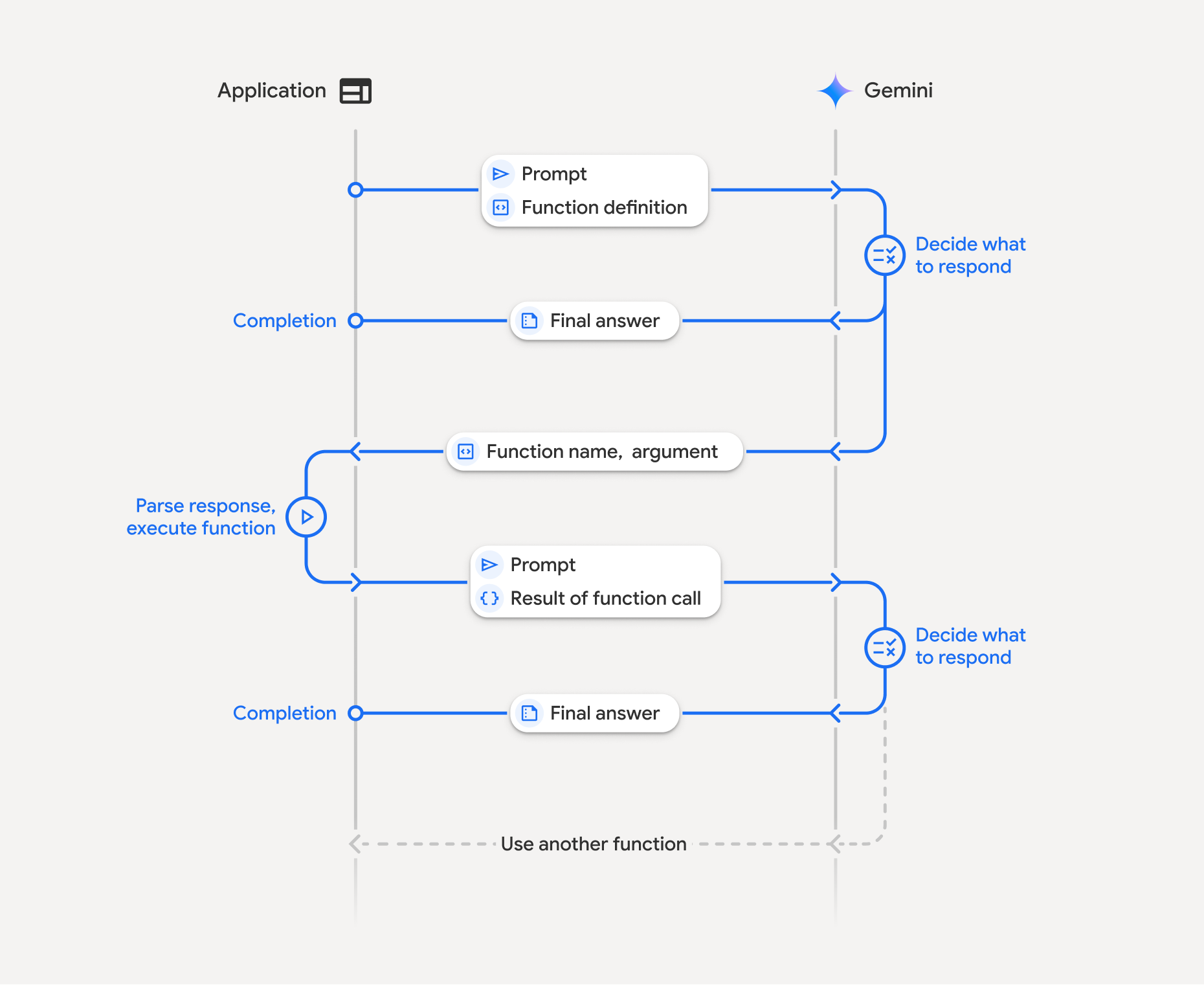
Le chiamate di funzione prevedono un'interazione strutturata tra l'applicazione, il modello e le funzioni esterne. Ecco una panoramica della procedura:
- Definisci la dichiarazione della funzione:definisci la dichiarazione della funzione nel codice dell'applicazione. Le dichiarazioni di funzione descrivono il nome, i parametri e lo scopo della funzione per il modello.
- Chiama l'API con le dichiarazioni di funzione: invia il prompt dell'utente insieme alle
dichiarazioni di funzione al modello. Analizza la richiesta e determina se una chiamata di funzione sarebbe utile. In questo caso, risponde con un oggetto JSON strutturato contenente il nome della funzione, gli argomenti e un
idunivoco (questoidviene ora sempre restituito dall'API per i modelli Gemini 3*). - Esecuzione del codice della funzione (tua responsabilità): il modello non
esegue la funzione stessa. È responsabilità della tua applicazione
elaborare la risposta e verificare la presenza di una chiamata di funzione. Se
- Sì: estrai il nome, gli argomenti e il
iddella funzione ed esegui la funzione corrispondente nella tua applicazione. - No:il modello ha fornito una risposta di testo diretta al prompt (questo flusso è meno enfatizzato nell'esempio, ma è un risultato possibile).
- Sì: estrai il nome, gli argomenti e il
- Crea una risposta intuitiva: se è stata eseguita una funzione, acquisisci il risultato e invialo di nuovo al modello, assicurandoti di includere il
idcorrispondente in un turno successivo della conversazione. Utilizzerà il risultato per generare una risposta finale e facile da usare che incorpori le informazioni dalla chiamata di funzione.
Questo processo può essere ripetuto più volte, consentendo interazioni e workflow complessi. Il modello supporta anche la chiamata di più funzioni in un singolo turno (chiamata di funzione parallela), in sequenza (chiamata di funzione compositiva) e con gli strumenti Gemini integrati (utilizzo di più strumenti).
* Mappa sempre gli ID funzione:Gemini 3 ora restituisce sempre un id univoco con ogni functionCall. Includi questo id esatto nel tuo functionResponse in modo che il modello possa mappare con precisione il risultato alla richiesta originale.
Passaggio 1: definisci una dichiarazione di funzione
Definisci una funzione e la relativa dichiarazione all'interno del codice dell'applicazione che consenta agli utenti di impostare i valori di luminosità ed effettuare una richiesta API. Questa funzione potrebbe chiamare servizi o API esterni.
Python
# Define a function that the model can call to control smart lights
set_light_values_declaration = {
    "name": "set_light_values",
    "description": "Sets the brightness and color temperature of a light.",
    "parameters": {
        "type": "object",
        "properties": {
            "brightness": {
                "type": "integer",
                "description": "Light level from 0 to 100. Zero is off and 100 is full brightness",
            },
            "color_temp": {
                "type": "string",
                "enum": ["daylight", "cool", "warm"],
                "description": "Color temperature of the light fixture, which can be `daylight`, `cool` or `warm`.",
            },
        },
        "required": ["brightness", "color_temp"],
    },
}

# This is the actual function that would be called based on the model's suggestion
def set_light_values(brightness: int, color_temp: str) -> dict[str, int | str]:
    """Set the brightness and color temperature of a room light. (mock API).

    Args:
        brightness: Light level from 0 to 100. Zero is off and 100 is full brightness
        color_temp: Color temperature of the light fixture, which can be `daylight`, `cool` or `warm`.

    Returns:
        A dictionary containing the set brightness and color temperature.
    """
    return {"brightness": brightness, "colorTemperature": color_temp}
JavaScript
import { Type } from '@google/genai';

// Define a function that the model can call to control smart lights
const setLightValuesFunctionDeclaration = {
  name: 'set_light_values',
  description: 'Sets the brightness and color temperature of a light.',
  parameters: {
    type: Type.OBJECT,
    properties: {
      brightness: {
        type: Type.NUMBER,
        description: 'Light level from 0 to 100. Zero is off and 100 is full brightness',
      },
      color_temp: {
        type: Type.STRING,
        enum: ['daylight', 'cool', 'warm'],
        description: 'Color temperature of the light fixture, which can be `daylight`, `cool` or `warm`.',
      },
    },
    required: ['brightness', 'color_temp'],
  },
};

/**

*   Set the brightness and color temperature of a room light. (mock API)
*   @param {number} brightness - Light level from 0 to 100. Zero is off and 100 is full brightness
*   @param {string} color_temp - Color temperature of the light fixture, which can be `daylight`, `cool` or `warm`.
*   @return {Object} A dictionary containing the set brightness and color temperature.
*/
function setLightValues(brightness, color_temp) {
  return {
    brightness: brightness,
    colorTemperature: color_temp
  };
}
Go
package main

import "google.golang.org/genai"

// Define a function declaration that the model can call to control smart lights
var setLightValuesDeclaration = &genai.FunctionDeclaration{
    Name:        "set_light_values",
    Description: "Sets the brightness and color temperature of a light.",
    Parameters: &genai.Schema{
        Type: genai.TypeObject,
        Properties: map[string]*genai.Schema{
            "brightness": {
                Type:        genai.TypeInteger,
                Description: "Light level from 0 to 100. Zero is off and 100 is full brightness",
            },
            "color_temp": {
                Type:        genai.TypeString,
                Enum:        []string{"daylight", "cool", "warm"},
                Description: "Color temperature of the light fixture, which can be `daylight`, `cool` or `warm`.",
            },
        },
        Required: []string{"brightness", "color_temp"},
    },
}

// This is the actual function that would be called based on the model's suggestion
func setLightValues(brightness int, colorTemp string) map[string]any {
    return map[string]any{
        "brightness":       brightness,
        "colorTemperature": colorTemp,
    }
}
Passaggio 2: chiama il modello con le dichiarazioni delle funzioni
Dopo aver definito le dichiarazioni delle funzioni, puoi chiedere al modello di utilizzarle. Analizza il prompt e le dichiarazioni delle funzioni e decide se rispondere direttamente o chiamare una funzione. Se viene chiamata una funzione, l'oggetto della risposta conterrà un suggerimento di chiamata di funzione.
Python
from google.genai import types

# Configure the client and tools
client = genai.Client()
tools = types.Tool(function_declarations=[set_light_values_declaration])
config = types.GenerateContentConfig(tools=[tools])

# Define user prompt
contents = [
    types.Content(
        role="user", parts=[types.Part(text="Turn the lights down to a romantic level")]
    )
]

# Send request with function declarations
response = client.models.generate_content(
    model="gemini-3.8-flash",
    contents=contents,
    config=config,
)

print(response.candidates[0].content.parts[0].function_call)
JavaScript
import { GoogleGenAI } from '@google/genai';

// Generation config with function declaration
const config = {
  tools: [{
    functionDeclarations: [setLightValuesFunctionDeclaration]
  }]
};

// Configure the client
const ai = new GoogleGenAI({});

// Define user prompt
const contents = [
  {
    role: 'user',
    parts: [{ text: 'Turn the lights down to a romantic level' }]
  }
];

// Send request with function declarations
const response = await ai.models.generateContent({
  model: 'gemini-3.8-flash',
  contents: contents,
  config: config
});

console.log(response.functionCalls[0]);
Go
ctx := context.Background()
client, err := genai.NewClient(ctx, nil)
if err != nil {
    log.Fatal(err)
}

// Generation config with function declaration
config := &genai.GenerateContentConfig{
    Tools: []*genai.Tool{
        {FunctionDeclarations: []*genai.FunctionDeclaration{setLightValuesDeclaration}},
    },
}

// Define user prompt
contents := []*genai.Content{
    genai.NewContentFromText("Turn the lights down to a romantic level", genai.RoleUser),
}

// Send request with function declarations
response, err := client.Models.GenerateContent(ctx, "gemini-3.8-flash", contents, config)
if err != nil {
    log.Fatal(err)
}

fmt.Println(response.FunctionCalls()[0])
Il modello restituisce quindi un oggetto functionCall in uno schema compatibile con OpenAPI che specifica come chiamare una o più funzioni dichiarate per rispondere alla domanda dell'utente.
Python
id='8f2b1a3c' args={'color_temp': 'warm', 'brightness': 25} name='set_light_values'
JavaScript
{
  id: '8f2b1a3c',
  name: 'set_light_values',
  args: { brightness: 25, color_temp: 'warm' }
}
Go
&{ID:8f2b1a3c Args:map[brightness:25 color_temp:warm] Name:set_light_values}
Passaggio 3: esegui il codice della funzione set_light_values
Estrai i dettagli della chiamata di funzione dalla risposta del modello, analizza gli argomenti
ed esegui la funzione set_light_values.
Python
# Extract tool call details, it may not be in the first part.
tool_call = response.candidates[0].content.parts[0].function_call

if tool_call.name == "set_light_values":
    result = set_light_values(**tool_call.args)
    print(f"Function execution result: {result}")
JavaScript
// Extract tool call details
const tool_call = response.functionCalls[0]

let result;
if (tool_call.name === 'set_light_values') {
  result = setLightValues(tool_call.args.brightness, tool_call.args.color_temp);
  console.log(`Function execution result: ${JSON.stringify(result)}`);
}
Go
// Extract tool call details
toolCall := response.FunctionCalls()[0]

var result map[string]any
if toolCall.Name == "set_light_values" {
    brightness := int(toolCall.Args["brightness"].(float64))
    colorTemp := toolCall.Args["color_temp"].(string)
    result = setLightValues(brightness, colorTemp)
    fmt.Printf("Function execution result: %v\n", result)
}
Passaggio 4: crea una risposta facile da usare con il risultato della funzione e chiama di nuovo il modello
Infine, invia il risultato dell'esecuzione della funzione al modello in modo che possa incorporare queste informazioni nella risposta finale all'utente.
Python
from google import genai
from google.genai import types

# Create a function response part
function_response_part = types.Part.from_function_response(
    name=tool_call.name,
    response={"result": result},
    id=tool_call.id,
)

# Append function call and result of the function execution to contents
contents.append(response.candidates[0].content) # Append the content from the model's response.
contents.append(types.Content(role="user", parts=[function_response_part])) # Append the function response

client = genai.Client()
final_response = client.models.generate_content(
    model="gemini-3.8-flash",
    config=config,
    contents=contents,
)

print(final_response.text)
JavaScript
// Create a function response part
const function_response_part = {
  name: tool_call.name,
  response: { result },
  id: tool_call.id
}

// Append function call and result of the function execution to contents
contents.push(response.candidates[0].content);
contents.push({ role: 'user', parts: [{ functionResponse: function_response_part }] });

// Get the final response from the model
const final_response = await ai.models.generateContent({
  model: 'gemini-3.8-flash',
  contents: contents,
  config: config
});

console.log(final_response.text);
Go
// Create a function response part
functionResponsePart := &genai.Part{
    FunctionResponse: &genai.FunctionResponse{
        ID:       toolCall.ID,
        Name:     toolCall.Name,
        Response: result,
    },
}

// Append function call and result of the function execution to contents
contents = append(contents, response.Candidates[0].Content)
contents = append(contents, &genai.Content{
    Role:  genai.RoleUser,
    Parts: []*genai.Part{functionResponsePart},
})

// Get the final response from the model
finalResponse, err := client.Models.GenerateContent(ctx, "gemini-3.8-flash", contents, config)
if err != nil {
    log.Fatal(err)
}

fmt.Println(finalResponse.Text())
In questo modo, il flusso di chiamata di funzione è completo. Il modello ha utilizzato correttamente la funzione set_light_values per eseguire l'azione richiesta dall'utente.
Dichiarazioni di funzione
Quando implementi la chiamata di funzione in un prompt, crei un oggetto tools,
che contiene uno o più function declarations. Definisci le funzioni utilizzando
JSON, in particolare con un sottoinsieme selezionato
del formato dello schema OpenAPI. Una
singola dichiarazione di funzione può includere i seguenti parametri:
name(stringa): un nome univoco per la funzione (get_weather_forecast,send_email). Utilizza nomi descrittivi senza spazi o caratteri speciali (utilizza trattini bassi o camelCase).description(stringa): una spiegazione chiara e dettagliata dello scopo e delle funzionalità della funzione. Questo è fondamentale affinché il modello comprenda quando utilizzare la funzione. Fornisci dettagli ed esempi, se utile ("Trova i cinema in base alla località e, facoltativamente, al titolo del film attualmente in programmazione").parameters(oggetto): definisce i parametri di input previsti dalla funzione.type(stringa): specifica il tipo di dati complessivo, ad esempioobject.properties(oggetto): elenca i singoli parametri, ognuno con:type(stringa): il tipo di dati del parametro, ad esempiostring,integer,boolean, array.description(stringa): una descrizione dello scopo e del formato del parametro. Fornisci esempi e vincoli ("La città e lo stato, ad esempio 'San Francisco, CA' o un codice postale, ad esempio '95616'").enum(array, facoltativo): se i valori dei parametri provengono da un insieme fisso, utilizza "enum" per elencare i valori consentiti anziché descriverli semplicemente nella descrizione. In questo modo, l'accuratezza migliora ("enum": ["daylight", "cool", "warm"]).
required(array): un array di stringhe che elenca i nomi dei parametri obbligatori per il funzionamento della funzione.
Puoi anche creare FunctionDeclarations direttamente dalle funzioni Python utilizzando
types.FunctionDeclaration.from_callable(client=client, callable=your_function).
Chiamata di funzione con modelli di ragionamento
I modelli delle serie Gemini 3 e 2.5 utilizzano un processo di "ragionamento" interno per elaborare le richieste. In questo modo, le prestazioni delle chiamate di funzione migliorano notevolmente, consentendo al modello di determinare meglio quando chiamare una funzione e quali parametri utilizzare. Poiché l'API Gemini è stateless, i modelli utilizzano le firme di pensiero per mantenere il contesto nelle conversazioni multi-turno.
Questa sezione tratta la gestione avanzata delle firme di pensiero ed è necessaria solo se stai creando manualmente richieste API (ad es. tramite REST) o manipolando la cronologia delle conversazioni.
Se utilizzi gli SDK Google GenAI (le nostre librerie ufficiali), non devi gestire questo processo. Gli SDK gestiscono automaticamente i passaggi necessari, come mostrato nell'esempio precedente.
Gestione manuale della cronologia delle conversazioni
Se modifichi manualmente la cronologia delle conversazioni, anziché inviare la risposta precedente completa, devi gestire correttamente l'elemento thought_signature incluso nel turno del modello.
Segui queste regole per assicurarti che il contesto del modello venga preservato:
- Invia sempre il
thought_signatureal modello all'interno del suoPartoriginale. - Includi sempre l'esatto
iddelfunction_callnel tuofunction_responsein modo che l'API possa mappare il risultato alla richiesta corretta. - Non unire un
Partcontenente una firma con uno che non la contiene. In questo modo viene interrotto il contesto posizionale del pensiero. - Non combinare due
Partsche contengono entrambe firme, poiché le stringhe delle firme non possono essere unite.
Firme del pensiero di Gemini 3
In Gemini 3, qualsiasi Part di una risposta del modello
può contenere una firma del pensiero.
Anche se in genere consigliamo di restituire le firme di tutti i tipi di Part,
il passaggio delle firme di pensiero è obbligatorio per la chiamata di funzioni. A meno che tu non stia manipolando manualmente la cronologia delle conversazioni, l'SDK Google GenAI gestirà automaticamente le firme dei pensieri.
Se manipoli manualmente la cronologia delle conversazioni, consulta la pagina Firme dei pensieri per indicazioni e dettagli completi sulla gestione delle firme dei pensieri per Gemini 3.
Esame delle firme del pensiero
Sebbene non sia necessario per l'implementazione, puoi esaminare la risposta per visualizzare il
thought_signature a scopo di debug o didattico.
Python
import base64
# After receiving a response from a model with thinking enabled
# response = client.models.generate_content(...)

# The signature is attached to the response part containing the function call
part = response.candidates[0].content.parts[0]
if part.thought_signature:
  print(base64.b64encode(part.thought_signature).decode("utf-8"))
JavaScript
// After receiving a response from a model with thinking enabled
// const response = await ai.models.generateContent(...)

// The signature is attached to the response part containing the function call
const part = response.candidates[0].content.parts[0];
if (part.thoughtSignature) {
  console.log(part.thoughtSignature);
}
Go
// After receiving a response from a model with thinking enabled
// response, err := client.Models.GenerateContent(...)

// The signature is attached to the response part containing the function call
part := response.Candidates[0].Content.Parts[0]
if len(part.ThoughtSignature) > 0 {
    fmt.Println(string(part.ThoughtSignature))
}
Scopri di più sulle limitazioni e sull'utilizzo delle firme di pensiero e sui modelli di ragionamento in generale nella pagina Ragionamento.
Chiamata di funzione parallela
Oltre alla chiamata di funzioni a turno singolo, puoi anche chiamare più funzioni contemporaneamente. La chiamata di funzione parallela consente di eseguire più funzioni contemporaneamente e viene utilizzata quando le funzioni non dipendono l'una dall'altra. Questa funzionalità è utile in scenari come la raccolta di dati da più origini indipendenti, ad esempio il recupero dei dettagli dei clienti da database diversi o il controllo dei livelli di inventario in vari magazzini o l'esecuzione di più azioni, come la trasformazione del tuo appartamento in una discoteca.
Quando il modello avvia più chiamate di funzioni in un singolo turno, non
devi restituire gli oggetti function_result nello stesso ordine in cui sono stati ricevuti gli oggetti
function_call. L'API Gemini mappa ogni risultato alla chiamata corrispondente utilizzando il id dall'output del modello. In questo modo puoi eseguire le funzioni in modo asincrono e aggiungere i risultati all'elenco man mano che vengono completati.
Python
power_disco_ball = {
    "name": "power_disco_ball",
    "description": "Powers the spinning disco ball.",
    "parameters": {
        "type": "object",
        "properties": {
            "power": {
                "type": "boolean",
                "description": "Whether to turn the disco ball on or off.",
            }
        },
        "required": ["power"],
    },
}

start_music = {
    "name": "start_music",
    "description": "Play some music matching the specified parameters.",
    "parameters": {
        "type": "object",
        "properties": {
            "energetic": {
                "type": "boolean",
                "description": "Whether the music is energetic or not.",
            },
            "loud": {
                "type": "boolean",
                "description": "Whether the music is loud or not.",
            },
        },
        "required": ["energetic", "loud"],
    },
}

dim_lights = {
    "name": "dim_lights",
    "description": "Dim the lights.",
    "parameters": {
        "type": "object",
        "properties": {
            "brightness": {
                "type": "number",
                "description": "The brightness of the lights, 0.0 is off, 1.0 is full.",
            }
        },
        "required": ["brightness"],
    },
}
JavaScript
import { Type } from '@google/genai';

const powerDiscoBall = {
  name: 'power_disco_ball',
  description: 'Powers the spinning disco ball.',
  parameters: {
    type: Type.OBJECT,
    properties: {
      power: {
        type: Type.BOOLEAN,
        description: 'Whether to turn the disco ball on or off.'
      }
    },
    required: ['power']
  }
};

const startMusic = {
  name: 'start_music',
  description: 'Play some music matching the specified parameters.',
  parameters: {
    type: Type.OBJECT,
    properties: {
      energetic: {
        type: Type.BOOLEAN,
        description: 'Whether the music is energetic or not.'
      },
      loud: {
        type: Type.BOOLEAN,
        description: 'Whether the music is loud or not.'
      }
    },
    required: ['energetic', 'loud']
  }
};

const dimLights = {
  name: 'dim_lights',
  description: 'Dim the lights.',
  parameters: {
    type: Type.OBJECT,
    properties: {
      brightness: {
        type: Type.NUMBER,
        description: 'The brightness of the lights, 0.0 is off, 1.0 is full.'
      }
    },
    required: ['brightness']
  }
};
Go
package main

import "google.golang.org/genai"

var powerDiscoBall = &genai.FunctionDeclaration{
    Name:        "power_disco_ball",
    Description: "Powers the spinning disco ball.",
    Parameters: &genai.Schema{
        Type: genai.TypeObject,
        Properties: map[string]*genai.Schema{
            "power": {
                Type:        genai.TypeBoolean,
                Description: "Whether to turn the disco ball on or off.",
            },
        },
        Required: []string{"power"},
    },
}

var startMusic = &genai.FunctionDeclaration{
    Name:        "start_music",
    Description: "Play some music matching the specified parameters.",
    Parameters: &genai.Schema{
        Type: genai.TypeObject,
        Properties: map[string]*genai.Schema{
            "energetic": {
                Type:        genai.TypeBoolean,
                Description: "Whether the music is energetic or not.",
            },
            "loud": {
                Type:        genai.TypeBoolean,
                Description: "Whether the music is loud or not.",
            },
        },
        Required: []string{"energetic", "loud"},
    },
}

var dimLights = &genai.FunctionDeclaration{
    Name:        "dim_lights",
    Description: "Dim the lights.",
    Parameters: &genai.Schema{
        Type: genai.TypeObject,
        Properties: map[string]*genai.Schema{
            "brightness": {
                Type:        genai.TypeNumber,
                Description: "The brightness of the lights, 0.0 is off, 1.0 is full.",
            },
        },
        Required: []string{"brightness"},
    },
}
Configura la modalità di chiamata di funzione per consentire l'utilizzo di tutti gli strumenti specificati. Per saperne di più, consulta la sezione sulla configurazione della chiamata di funzione.
Python
from google import genai
from google.genai import types

# Configure the client and tools
client = genai.Client()
house_tools = [
    types.Tool(function_declarations=[power_disco_ball, start_music, dim_lights])
]
config = types.GenerateContentConfig(
    tools=house_tools,
    automatic_function_calling=types.AutomaticFunctionCallingConfig(
        disable=True
    ),
    # Force the model to call 'any' function, instead of chatting.
    tool_config=types.ToolConfig(
        function_calling_config=types.FunctionCallingConfig(mode='ANY')
    ),
)

chat = client.chats.create(model="gemini-3.8-flash", config=config)
response = chat.send_message("Turn this place into a party!")

# Print out each of the function calls requested from this single call
print("Example 1: Forced function calling")
for fn in response.function_calls:
    args = ", ".join(f"{key}={val}" for key, val in fn.args.items())
    print(f"{fn.name}({args}) - ID: {fn.id}")
JavaScript
import { GoogleGenAI } from '@google/genai';

// Set up function declarations
const houseFns = [powerDiscoBall, startMusic, dimLights];

const config = {
    tools: [{
        functionDeclarations: houseFns
    }],
    // Force the model to call 'any' function, instead of chatting.
    toolConfig: {
        functionCallingConfig: {
            mode: 'any'
        }
    }
};

// Configure the client
const ai = new GoogleGenAI({});

// Create a chat session
const chat = ai.chats.create({
    model: 'gemini-3.8-flash',
    config: config
});
const response = await chat.sendMessage({message: 'Turn this place into a party!'});

// Print out each of the function calls requested from this single call
console.log("Example 1: Forced function calling");
for (const fn of response.functionCalls) {
    const args = Object.entries(fn.args)
        .map(([key, val]) => `${key}=${val}`)
        .join(', ');
    console.log(`${fn.name}(${args}) - ID: ${fn.id}`);
}
Go
ctx := context.Background()
client, err := genai.NewClient(ctx, nil)
if err != nil {
    log.Fatal(err)
}

houseTools := []*genai.Tool{
    {FunctionDeclarations: []*genai.FunctionDeclaration{powerDiscoBall, startMusic, dimLights}},
}

config := &genai.GenerateContentConfig{
    Tools: houseTools,
    // Force the model to call 'any' function, instead of chatting.
    ToolConfig: &genai.ToolConfig{
        FunctionCallingConfig: &genai.FunctionCallingConfig{
            Mode: genai.FunctionCallingConfigModeAny,
        },
    },
}

response, err := client.Models.GenerateContent(
    ctx,
    "gemini-3.8-flash",
    genai.Text("Turn this place into a party!"),
    config,
)
if err != nil {
    log.Fatal(err)
}

// Print out each of the function calls requested from this single call
fmt.Println("Example 1: Forced function calling")
for _, fn := range response.FunctionCalls() {
    fmt.Printf("%s(%v) - ID: %s\n", fn.Name, fn.Args, fn.ID)
}
Ciascuno dei risultati stampati riflette una singola chiamata di funzione richiesta dal modello. Per inviare i risultati, includi le risposte nello stesso ordine in cui sono state richieste.
L'SDK Python supporta la chiamata di funzione automatica, che converte automaticamente le funzioni Python in dichiarazioni e gestisce il ciclo di esecuzione e risposta della chiamata di funzione. Di seguito è riportato un esempio per il caso d'uso di Disco.
Python
from google import genai
from google.genai import types

# Actual function implementations
def power_disco_ball_impl(power: bool) -> dict:
    """Powers the spinning disco ball.

    Args:
        power: Whether to turn the disco ball on or off.

    Returns:
        A status dictionary indicating the current state.
    """
    return {"status": f"Disco ball powered {'on' if power else 'off'}"}

def start_music_impl(energetic: bool, loud: bool) -> dict:
    """Play some music matching the specified parameters.

    Args:
        energetic: Whether the music is energetic or not.
        loud: Whether the music is loud or not.

    Returns:
        A dictionary containing the music settings.
    """
    music_type = "energetic" if energetic else "chill"
    volume = "loud" if loud else "quiet"
    return {"music_type": music_type, "volume": volume}

def dim_lights_impl(brightness: float) -> dict:
    """Dim the lights.

    Args:
        brightness: The brightness of the lights, 0.0 is off, 1.0 is full.

    Returns:
        A dictionary containing the new brightness setting.
    """
    return {"brightness": brightness}

# Configure the client
client = genai.Client()
config = types.GenerateContentConfig(
    tools=[power_disco_ball_impl, start_music_impl, dim_lights_impl]
)

# Make the request
response = client.models.generate_content(
    model="gemini-3.8-flash",
    contents="Do everything you need to this place into party!",
    config=config,
)

print("\nExample 2: Automatic function calling")
print(response.text)
# I've turned on the disco ball, started playing loud and energetic music, and dimmed the lights to 50% brightness. Let's get this party started!
Chiamata di funzione compositiva
La chiamata di funzione compositiva o sequenziale consente a Gemini di concatenare più chiamate di funzione per soddisfare una richiesta complessa. Ad esempio, per rispondere a "Ottieni la temperatura nella mia posizione attuale", l'API Gemini potrebbe prima richiamare una funzione get_current_location() seguita da una funzione get_weather() che accetta la posizione come parametro.
L'esempio seguente mostra come implementare la chiamata di funzione compositiva utilizzando l'SDK Python e la chiamata di funzione automatica.
Python
Questo esempio utilizza la funzionalità di chiamata di funzione automatica dell'SDK Python google-genai. L'SDK converte automaticamente le funzioni Python nello schema richiesto, esegue le chiamate di funzione quando richieste dal modello e invia i risultati al modello per completare l'attività.
import os
from google import genai
from google.genai import types

# Example Functions
def get_weather_forecast(location: str) -> dict:
    """Gets the current weather temperature for a given location."""
    print(f"Tool Call: get_weather_forecast(location={location})")
    # TODO: Make API call
    print("Tool Response: {'temperature': 25, 'unit': 'celsius'}")
    return {"temperature": 25, "unit": "celsius"}  # Dummy response

def set_thermostat_temperature(temperature: int) -> dict:
    """Sets the thermostat to a desired temperature."""
    print(f"Tool Call: set_thermostat_temperature(temperature={temperature})")
    # TODO: Interact with a thermostat API
    print("Tool Response: {'status': 'success'}")
    return {"status": "success"}

# Configure the client and model
client = genai.Client()
config = types.GenerateContentConfig(
    tools=[get_weather_forecast, set_thermostat_temperature]
)

# Make the request
response = client.models.generate_content(
    model="gemini-3.8-flash",
    contents="If it's warmer than 20°C in London, set the thermostat to 20°C, otherwise set it to 18°C.",
    config=config,
)

# Print the final, user-facing response
print(response.text)
Output previsto
Quando esegui il codice, vedrai l'SDK orchestrare le chiamate di funzione. Il modello chiama prima get_weather_forecast, riceve la temperatura e poi chiama set_thermostat_temperature con il valore corretto in base alla logica nel prompt.
Tool Call: get_weather_forecast(location=London)
Tool Response: {'temperature': 25, 'unit': 'celsius'}
Tool Call: set_thermostat_temperature(temperature=20)
Tool Response: {'status': 'success'}
OK. I've set the thermostat to 20°C.
JavaScript
Questo esempio mostra come utilizzare l'SDK JavaScript/TypeScript per eseguire chiamate di funzioni composizionali utilizzando un ciclo di esecuzione manuale.
import { GoogleGenAI, Type } from "@google/genai";

// Configure the client
const ai = new GoogleGenAI({});

// Example Functions
function get_weather_forecast({ location }) {
  console.log(`Tool Call: get_weather_forecast(location=${location})`);
  // TODO: Make API call
  console.log("Tool Response: {'temperature': 25, 'unit': 'celsius'}");
  return { temperature: 25, unit: "celsius" };
}

function set_thermostat_temperature({ temperature }) {
  console.log(
    `Tool Call: set_thermostat_temperature(temperature=${temperature})`,
  );
  // TODO: Make API call
  console.log("Tool Response: {'status': 'success'}");
  return { status: "success" };
}

const toolFunctions = {
  get_weather_forecast,
  set_thermostat_temperature,
};

const tools = [
  {
    functionDeclarations: [
      {
        name: "get_weather_forecast",
        description:
          "Gets the current weather temperature for a given location.",
        parameters: {
          type: Type.OBJECT,
          properties: {
            location: {
              type: Type.STRING,
            },
          },
          required: ["location"],
        },
      },
      {
        name: "set_thermostat_temperature",
        description: "Sets the thermostat to a desired temperature.",
        parameters: {
          type: Type.OBJECT,
          properties: {
            temperature: {
              type: Type.NUMBER,
            },
          },
          required: ["temperature"],
        },
      },
    ],
  },
];

// Prompt for the model
let contents = [
  {
    role: "user",
    parts: [
      {
        text: "If it's warmer than 20°C in London, set the thermostat to 20°C, otherwise set it to 18°C.",
      },
    ],
  },
];

// Loop until the model has no more function calls to make
while (true) {
  const result = await ai.models.generateContent({
    model: "gemini-3.8-flash",
    contents,
    config: { tools },
  });

  if (result.functionCalls && result.functionCalls.length > 0) {
    const functionCall = result.functionCalls[0];

    const { name, args } = functionCall;

    if (!toolFunctions[name]) {
      throw new Error(`Unknown function call: ${name}`);
    }

    // Call the function and get the response.
    const toolResponse = toolFunctions[name](args);

    const functionResponsePart = {
      name: functionCall.name,
      response: {
        result: toolResponse,
      },
      id: functionCall.id,
    };

    // Send the function response back to the model.
    contents.push({
      role: "model",
      parts: [
        {
          functionCall: functionCall,
        },
      ],
    });
    contents.push({
      role: "user",
      parts: [
        {
          functionResponse: functionResponsePart,
        },
      ],
    });
  } else {
    // No more function calls, break the loop.
    console.log(result.text);
    break;
  }
}
Output previsto
Quando esegui il codice, vedrai l'SDK orchestrare le chiamate di funzione. Il modello chiama prima get_weather_forecast, riceve la
temperatura e poi chiama set_thermostat_temperature con il valore
corretto in base alla logica nel prompt.
Tool Call: get_weather_forecast(location=London)
Tool Response: {'temperature': 25, 'unit': 'celsius'}
Tool Call: set_thermostat_temperature(temperature=20)
Tool Response: {'status': 'success'}
OK. It's 25°C in London, so I've set the thermostat to 20°C.
Go
Questo esempio mostra come utilizzare l'SDK Go per eseguire chiamate di funzioni compositive utilizzando un ciclo di esecuzione manuale.
package main

import (
    "context"
    "fmt"
    "log"

    "google.golang.org/genai"
)

func getWeatherForecast(location string) map[string]any {
    fmt.Printf("Tool Call: get_weather_forecast(location=%s)\n", location)
    fmt.Println("Tool Response: map[temperature:25 unit:celsius]")
    return map[string]any{"temperature": 25, "unit": "celsius"}
}

func setThermostatTemperature(temperature float64) map[string]any {
    fmt.Printf("Tool Call: set_thermostat_temperature(temperature=%v)\n", temperature)
    fmt.Println("Tool Response: map[status:success]")
    return map[string]any{"status": "success"}
}

func main() {
    ctx := context.Background()
    client, err := genai.NewClient(ctx, nil)
    if err != nil {
        log.Fatal(err)
    }

    tools := []*genai.Tool{
        {
            FunctionDeclarations: []*genai.FunctionDeclaration{
                {
                    Name:        "get_weather_forecast",
                    Description: "Gets the current weather temperature for a given location.",
                    Parameters: &genai.Schema{
                        Type: genai.TypeObject,
                        Properties: map[string]*genai.Schema{
                            "location": {Type: genai.TypeString},
                        },
                        Required: []string{"location"},
                    },
                },
                {
                    Name:        "set_thermostat_temperature",
                    Description: "Sets the thermostat to a desired temperature.",
                    Parameters: &genai.Schema{
                        Type: genai.TypeObject,
                        Properties: map[string]*genai.Schema{
                            "temperature": {Type: genai.TypeNumber},
                        },
                        Required: []string{"temperature"},
                    },
                },
            },
        },
    }

    config := &genai.GenerateContentConfig{Tools: tools}

    contents := []*genai.Content{
        genai.NewContentFromText("If it's warmer than 20°C in London, set the thermostat to 20°C, otherwise set it to 18°C.", genai.RoleUser),
    }

    for {
        result, err := client.Models.GenerateContent(ctx, "gemini-3.8-flash", contents, config)
        if err != nil {
            log.Fatal(err)
        }

        if len(result.FunctionCalls()) > 0 {
            functionCall := result.FunctionCalls()[0]
            var toolResponse map[string]any

            switch functionCall.Name {
            case "get_weather_forecast":
                location := functionCall.Args["location"].(string)
                toolResponse = getWeatherForecast(location)
            case "set_thermostat_temperature":
                temperature := functionCall.Args["temperature"].(float64)
                toolResponse = setThermostatTemperature(temperature)
            default:
                log.Fatalf("Unknown function call: %s", functionCall.Name)
            }

            contents = append(contents, result.Candidates[0].Content)
            contents = append(contents, &genai.Content{
                Role: genai.RoleUser,
                Parts: []*genai.Part{
                    {
                        FunctionResponse: &genai.FunctionResponse{
                            ID:       functionCall.ID,
                            Name:     functionCall.Name,
                            Response: toolResponse,
                        },
                    },
                },
            })
        } else {
            fmt.Println(result.Text())
            break
        }
    }
}
Output previsto
Tool Call: get_weather_forecast(location=London)
Tool Response: map[temperature:25 unit:celsius]
Tool Call: set_thermostat_temperature(temperature=20)
Tool Response: map[status:success]
OK. It's 25°C in London, so I've set the thermostat to 20°C.
La chiamata di funzione compositiva è una funzionalità nativa dell'API Live. Ciò significa che l'API Live può gestire la chiamata di funzione in modo simile all'SDK Python.
Python
# Light control schemas
turn_on_the_lights_schema = {'name': 'turn_on_the_lights'}
turn_off_the_lights_schema = {'name': 'turn_off_the_lights'}

prompt = """
  Hey, can you write run some python code to turn on the lights, wait 10s and then turn off the lights?
  """

tools = [
    {'code_execution': {}},
    {'function_declarations': [turn_on_the_lights_schema, turn_off_the_lights_schema]}
]

await run(prompt, tools=tools, modality="AUDIO")
JavaScript
// Light control schemas
const turnOnTheLightsSchema = { name: 'turn_on_the_lights' };
const turnOffTheLightsSchema = { name: 'turn_off_the_lights' };

const prompt = `
  Hey, can you write run some python code to turn on the lights, wait 10s and then turn off the lights?
`;

const tools = [
  { codeExecution: {} },
  { functionDeclarations: [turnOnTheLightsSchema, turnOffTheLightsSchema] }
];

await run(prompt, tools=tools, modality="AUDIO")
Modalità di chiamata di funzione
L'API Gemini ti consente di controllare il modo in cui il modello utilizza gli strumenti forniti
(dichiarazioni di funzioni). Nello specifico, puoi impostare la modalità all'interno
di.function_calling_config.
VALIDATED: modalità predefinita per la combinazione di strumenti (quando sono abilitati anche gli strumenti integrati o gli output strutturati). Il modello è vincolato a prevedere chiamate di funzione o linguaggio naturale e garantisce l'aderenza allo schema della funzione. Se non viene fornitoallowed_function_names, il modello sceglie tra tutte le dichiarazioni di funzioni disponibili. Se viene fornitoallowed_function_names, il modello sceglie dall'insieme di funzioni consentite. Questa modalità riduce le chiamate di funzioni malformate (rispetto alla modalitàAUTO).AUTO: modalità predefinita quando è abilitato solo lo strumento function_declarations. Il modello decide se generare una risposta in linguaggio naturale o suggerire una chiamata di funzione in base al prompt e al contesto.ANY: il modello è vincolato a prevedere sempre una chiamata di funzione e garantisce l'aderenza allo schema della funzione. Seallowed_function_namesnon è specificato, il modello può scegliere tra una qualsiasi delle dichiarazioni di funzione fornite. Seallowed_function_namesviene fornito come elenco, il modello può scegliere solo tra le funzioni in quell'elenco. Utilizza questa modalità quando hai bisogno di una risposta di chiamata di funzione per ogni prompt (se applicabile).NONE: al modello è vietato effettuare chiamate di funzione. Equivale a inviare una richiesta senza dichiarazioni di funzioni. Utilizza questa opzione per disattivare temporaneamente la chiamata di funzione senza rimuovere le definizioni degli strumenti.
Python
from google.genai import types

# Configure function calling mode
tool_config = types.ToolConfig(
    function_calling_config=types.FunctionCallingConfig(
        mode="ANY", allowed_function_names=["get_current_temperature"]
    )
)

# Create the generation config
config = types.GenerateContentConfig(
    tools=[tools],  # not defined here.
    tool_config=tool_config,
)
JavaScript
import { FunctionCallingConfigMode } from '@google/genai';

// Configure function calling mode
const toolConfig = {
  functionCallingConfig: {
    mode: FunctionCallingConfigMode.ANY,
    allowedFunctionNames: ['get_current_temperature']
  }
};

// Create the generation config
const config = {
  tools: tools, // not defined here.
  toolConfig: toolConfig,
};
Go
// Configure function calling mode
toolConfig := &genai.ToolConfig{
    FunctionCallingConfig: &genai.FunctionCallingConfig{
        Mode:                 genai.FunctionCallingConfigModeAny,
        AllowedFunctionNames: []string{"get_current_temperature"},
    },
}

// Create the generation config
config := &genai.GenerateContentConfig{
    Tools:      tools, // not defined here.
    ToolConfig: toolConfig,
}
Chiamata di funzione automatica (solo Python)
Quando utilizzi l'SDK Python, puoi fornire funzioni Python direttamente come strumenti. L'SDK converte queste funzioni in dichiarazioni, gestisce l'esecuzione della chiamata di funzione e gestisce il ciclo di risposta per te. Definisci la funzione con suggerimenti sui tipi e una docstring. Per ottenere risultati ottimali, si consiglia di utilizzare docstring in stile Google. L'SDK eseguirà automaticamente le seguenti operazioni:
- Rileva le risposte alle chiamate di funzione dal modello.
- Chiama la funzione Python corrispondente nel codice.
- Invia la risposta della funzione al modello.
- Restituisce la risposta di testo finale del modello.
Al momento l'SDK non analizza le descrizioni degli argomenti negli slot della descrizione della proprietà della dichiarazione di funzione generata. Invece, invia l'intera docstring come descrizione della funzione di primo livello.
Python
from google import genai
from google.genai import types

# Define the function with type hints and docstring
def get_current_temperature(location: str) -> dict:
    """Gets the current temperature for a given location.

    Args:
        location: The city and state, e.g. San Francisco, CA

    Returns:
        A dictionary containing the temperature and unit.
    """
    # ... (implementation) ...
    return {"temperature": 25, "unit": "Celsius"}

# Configure the client
client = genai.Client()
config = types.GenerateContentConfig(
    tools=[get_current_temperature]
)  # Pass the function itself

# Make the request
response = client.models.generate_content(
    model="gemini-3.8-flash",
    contents="What's the temperature in Boston?",
    config=config,
)

print(response.text)  # The SDK handles the function call and returns the final text
Puoi disattivare la chiamata di funzione automatica con:
Python
config = types.GenerateContentConfig(
    tools=[get_current_temperature],
    automatic_function_calling=types.AutomaticFunctionCallingConfig(disable=True)
)
Dichiarazione automatica dello schema della funzione
L'API è in grado di descrivere uno qualsiasi dei seguenti tipi. I tipi Pydantic sono consentiti, a condizione che i campi definiti al loro interno siano composti anche da tipi consentiti. I tipi di dizionari (come dict[str: int]) non sono ben supportati qui, non
utilizzarli.
Python
AllowedType = (
  int | float | bool | str | list['AllowedType'] | pydantic.BaseModel)
Per vedere l'aspetto dello schema dedotto, puoi convertirlo utilizzando from_callable:
Python
from google import genai
from google.genai import types

def multiply(a: float, b: float):
    """Returns a * b."""
    return a * b

client = genai.Client()
fn_decl = types.FunctionDeclaration.from_callable(callable=multiply, client=client)

# to_json_dict() provides a clean JSON representation.
print(fn_decl.to_json_dict())
Utilizzo di più strumenti: combina gli strumenti integrati con le chiamate di funzione
Puoi attivare più strumenti, combinando quelli integrati con la chiamata di funzione nella stessa richiesta.
I modelli Gemini 3 possono combinare strumenti integrati con la chiamata di funzioni predefinita, grazie alla funzionalità di circolazione del contesto dello strumento. Per saperne di più, leggi la pagina sulla combinazione di strumenti integrati e chiamata di funzione.
Python
from google import genai
from google.genai import types

client = genai.Client()

getWeather = {
    "name": "getWeather",
    "description": "Gets the weather for a requested city.",
    "parameters": {
        "type": "object",
        "properties": {
            "city": {
                "type": "string",
                "description": "The city and state, e.g. Utqiaġvik, Alaska",
            },
        },
        "required": ["city"],
    },
}

response = client.models.generate_content(
    model="gemini-3.8-flash",
    contents="What is the northernmost city in the United States? What's the weather like there today?",
    config=types.GenerateContentConfig(
      tools=[
        types.Tool(
          google_search=types.ToolGoogleSearch(),  # Built-in tool
          function_declarations=[getWeather]       # Custom tool
        ),
      ],
      include_server_side_tool_invocations=True
    ),
)

history = [
    types.Content(
        role="user",
        parts=[types.Part(text="What is the northernmost city in the United States? What's the weather like there today?")]
    ),
    response.candidates[0].content,
    types.Content(
        role="user",
        parts=[types.Part(
            function_response=types.FunctionResponse(
                name="getWeather",
                response={"response": "Very cold. 22 degrees Fahrenheit."},
                id=response.candidates[0].content.parts[2].function_call.id
            )
        )]
    )
]

response_2 = client.models.generate_content(
    model="gemini-3.8-flash",
    contents=history,
    config=types.GenerateContentConfig(
      tools=[
        types.Tool(
          google_search=types.ToolGoogleSearch(),
          function_declarations=[getWeather]
        ),
      ],
      include_server_side_tool_invocations=True
    ),
)
JavaScript
import { GoogleGenAI} from '@google/genai';

const client = new GoogleGenAI({});

const getWeather = {
    name: "getWeather",
    description: "Get the weather in a given location",
    parameters: {
        type: "OBJECT",
        properties: {
            location: {
                type: "STRING",
                description: "The city and state, e.g. San Francisco, CA"
            }
        },
        required: ["location"]
    }
};

async function run() {
    const tools = [
      { googleSearch: {} },
      { functionDeclarations: [getWeather] }
    ];
    const toolConfig = { includeServerSideToolInvocations: true };

    const response1 = await client.models.generateContent({
        model: "gemini-3.8-flash",
        contents: [{role: "user", parts: [{text: "What is the northernmost city in the United States? What's the weather like there today?"}]}],
        config: {
            tools: tools,
            toolConfig: toolConfig,
        },
    });

    const functionCallId = response1.candidates[0].content.parts.find(p => p.functionCall)?.functionCall?.id;

    const history = [
        {
            role: "user",
            parts:[{text: "What is the northernmost city in the United States? What's the weather like there today?"}]
        },
        response1.candidates[0].content,
        {
            role: "user",
            parts: [{
                functionResponse: {
                    name: "getWeather",
                    response: {response: "Very cold. 22 degrees Fahrenheit."},
                    id: functionCallId
                }
            }]
        }
    ];

    const response2 = await client.models.generateContent({
        model: "gemini-3.8-flash",
        contents: history,
        config: {
            tools: tools,
            toolConfig: toolConfig,
        },
    });
}

run();
Go
package main

import (
    "context"
    "fmt"
    "log"

    "google.golang.org/genai"
)

func main() {
    ctx := context.Background()
    client, err := genai.NewClient(ctx, nil)
    if err != nil {
        log.Fatal(err)
    }

    getWeather := &genai.FunctionDeclaration{
        Name:        "getWeather",
        Description: "Get the weather in a given location",
        Parameters: &genai.Schema{
            Type: genai.TypeObject,
            Properties: map[string]*genai.Schema{
                "location": {
                    Type:        genai.TypeString,
                    Description: "The city and state, e.g. San Francisco, CA",
                },
            },
            Required: []string{"location"},
        },
    }

    tools := []*genai.Tool{
        {GoogleSearch: &genai.GoogleSearch{}},
        {FunctionDeclarations: []*genai.FunctionDeclaration{getWeather}},
    }

    config := &genai.GenerateContentConfig{
        Tools: tools,
    }

    prompt := "What is the northernmost city in the United States? What's the weather like there today?"
    response1, err := client.Models.GenerateContent(ctx, "gemini-3.8-flash", genai.Text(prompt), config)
    if err != nil {
        log.Fatal(err)
    }

    toolCall := response1.FunctionCalls()[0]

    history := []*genai.Content{
        genai.NewContentFromText(prompt, genai.RoleUser),
        response1.Candidates[0].Content,
        {
            Role: genai.RoleUser,
            Parts: []*genai.Part{
                {
                    FunctionResponse: &genai.FunctionResponse{
                        ID:       toolCall.ID,
                        Name:     toolCall.Name,
                        Response: map[string]any{"response": "Very cold. 22 degrees Fahrenheit."},
                    },
                },
            },
        },
    }

    response2, err := client.Models.GenerateContent(ctx, "gemini-3.8-flash", history, config)
    if err != nil {
        log.Fatal(err)
    }

    fmt.Println(response2.Text())
}
Per i modelli precedenti alla serie Gemini 3, utilizza l'API Live.
Risposte di funzioni multimodali
Per i modelli della serie Gemini 3, puoi includere contenuti multimodali nelle parti della risposta della funzione che invii al modello. Il modello può elaborare questi contenuti multimodali nel turno successivo per produrre una risposta più informata. I seguenti tipi MIME sono supportati per i contenuti multimodali nelle risposte delle funzioni:
- Google Immagini:
image/png,image/jpeg,image/webp - Documenti:
application/pdf,text/plain
Per includere dati multimodali in una risposta della funzione, includili come una o più
parti nidificate all'interno della parte functionResponse. Ogni parte multimodale deve contenere inlineData. Se fai riferimento a una parte multimodale dal campo response strutturato, deve contenere un displayName univoco.
Puoi anche fare riferimento a una parte multimodale dall'interno del campo strutturato response della parte functionResponse utilizzando il formato di riferimento JSON {"$ref": "<displayName>"}. Il modello sostituisce il riferimento con i contenuti multimodali durante l'elaborazione della risposta. Ogni displayName può essere referenziato una sola volta nel campo response strutturato.
L'esempio seguente mostra un messaggio contenente un functionResponse per una funzione denominata get_image e una parte nidificata contenente i dati dell'immagine con displayName: "instrument.jpg". Il campo functionResponse's response
fa riferimento a questa parte dell'immagine:
Python
from google import genai
from google.genai import types

import requests

client = genai.Client()

# This is a manual, two turn multimodal function calling workflow:

# 1. Define the function tool
get_image_declaration = types.FunctionDeclaration(
  name="get_image",
  description="Retrieves the image file reference for a specific order item.",
  parameters={
      "type": "object",
      "properties": {
          "item_name": {
              "type": "string",
              "description": "The name or description of the item ordered (e.g., 'instrument')."
          }
      },
      "required": ["item_name"],
  },
)
tool_config = types.Tool(function_declarations=[get_image_declaration])

# 2. Send a message that triggers the tool
prompt = "Show me the instrument I ordered last month."
response_1 = client.models.generate_content(
  model="gemini-3.8-flash",
  contents=[prompt],
  config=types.GenerateContentConfig(
      tools=[tool_config],
  )
)

# 3. Handle the function call
function_call = response_1.function_calls[0]
requested_item = function_call.args["item_name"]
print(f"Model wants to call: {function_call.name}")

# Execute your tool (e.g., call an API)
# (This is a mock response for the example)
print(f"Calling external tool for: {requested_item}")

function_response_data = {
  "image_ref": {"$ref": "instrument.jpg"},
}
image_path = "https://goo.gle/instrument-img"
image_bytes = requests.get(image_path).content
function_response_multimodal_data = types.FunctionResponsePart(
  inline_data=types.FunctionResponseBlob(
    mime_type="image/jpeg",
    display_name="instrument.jpg",
    data=image_bytes,
  )
)

# 4. Send the tool's result back
# Append this turn's messages to history for a final response.
history = [
  types.Content(role="user", parts=[types.Part(text=prompt)]),
  response_1.candidates[0].content,
  types.Content(
    role="user",
    parts=[
        types.Part.from_function_response(
          id=function_call.id,
          name=function_call.name,
          response=function_response_data,
          parts=[function_response_multimodal_data]
        )
    ],
  )
]

response_2 = client.models.generate_content(
  model="gemini-3.8-flash",
  contents=history,
  config=types.GenerateContentConfig(
      tools=[tool_config],
      thinking_config=types.ThinkingConfig(include_thoughts=True)
  ),
)

print(f"\nFinal model response: {response_2.text}")
JavaScript
import { GoogleGenAI, Type } from '@google/genai';

const client = new GoogleGenAI({ apiKey: process.env.GEMINI_API_KEY });

// This is a manual, two turn multimodal function calling workflow:
// 1. Define the function tool
const getImageDeclaration = {
  name: 'get_image',
  description: 'Retrieves the image file reference for a specific order item.',
  parameters: {
    type: Type.OBJECT,
    properties: {
      item_name: {
        type: Type.STRING,
        description: "The name or description of the item ordered (e.g., 'instrument').",
      },
    },
    required: ['item_name'],
  },
};

const toolConfig = {
  functionDeclarations: [getImageDeclaration],
};

// 2. Send a message that triggers the tool
const prompt = 'Show me the instrument I ordered last month.';
const response1 = await client.models.generateContent({
  model: 'gemini-3.8-flash',
  contents: prompt,
  config: {
    tools: [toolConfig],
  },
});

// 3. Handle the function call
const functionCall = response1.functionCalls[0];
const requestedItem = functionCall.args.item_name;
console.log(`Model wants to call: ${functionCall.name}`);

// Execute your tool (e.g., call an API)
// (This is a mock response for the example)
console.log(`Calling external tool for: ${requestedItem}`);

const functionResponseData = {
  image_ref: { $ref: 'instrument.jpg' },
};

const imageUrl = "https://goo.gle/instrument-img";
const response = await fetch(imageUrl);
const imageArrayBuffer = await response.arrayBuffer();
const base64ImageData = Buffer.from(imageArrayBuffer).toString('base64');

const functionResponseMultimodalData = {
  inlineData: {
    mimeType: 'image/jpeg',
    displayName: 'instrument.jpg',
    data: base64ImageData,
  },
};

// 4. Send the tool's result back
// Append this turn's messages to history for a final response.
const history = [
  { role: 'user', parts: [{ text: prompt }] },
  response1.candidates[0].content,
  {
    role: 'user',
    parts: [
      {
        functionResponse: {
          id: functionCall.id,
          name: functionCall.name,
          response: functionResponseData,
          parts: [functionResponseMultimodalData]
        },
      },
    ],
  },
];

const response2 = await client.models.generateContent({
  model: 'gemini-3.8-flash',
  contents: history,
  config: {
    tools: [toolConfig],
    thinkingConfig: { includeThoughts: true },
  },
});

console.log(`\nFinal model response: ${response2.text}`);
Go
package main

import (
    "context"
    "fmt"
    "io"
    "log"
    "net/http"

    "google.golang.org/genai"
)

func main() {
    ctx := context.Background()
    client, err := genai.NewClient(ctx, nil)
    if err != nil {
        log.Fatal(err)
    }

    // 1. Define the function tool
    getImageDeclaration := &genai.FunctionDeclaration{
        Name:        "get_image",
        Description: "Retrieves the image file reference for a specific order item.",
        Parameters: &genai.Schema{
            Type: genai.TypeObject,
            Properties: map[string]*genai.Schema{
                "item_name": {
                    Type:        genai.TypeString,
                    Description: "The name or description of the item ordered (e.g., 'instrument').",
                },
            },
            Required: []string{"item_name"},
        },
    }

    tools := []*genai.Tool{
        {FunctionDeclarations: []*genai.FunctionDeclaration{getImageDeclaration}},
    }

    // 2. Send a message that triggers the tool
    prompt := "Show me the instrument I ordered last month."
    response1, err := client.Models.GenerateContent(ctx, "gemini-3.8-flash", genai.Text(prompt), &genai.GenerateContentConfig{
        Tools: tools,
    })
    if err != nil {
        log.Fatal(err)
    }

    // 3. Handle the function call
    functionCall := response1.FunctionCalls()[0]
    requestedItem := functionCall.Args["item_name"]
    fmt.Printf("Model wants to call: %s\n", functionCall.Name)
    fmt.Printf("Calling external tool for: %v\n", requestedItem)

    resp, err := http.Get("https://goo.gle/instrument-img")
    if err != nil {
        log.Fatal(err)
    }
    defer resp.Body.Close()
    imageBytes, err := io.ReadAll(resp.Body)
    if err != nil {
        log.Fatal(err)
    }

    functionResponseData := map[string]any{
        "image_ref": map[string]any{"$ref": "instrument.jpg"},
    }

    functionResponseMultimodalData := &genai.FunctionResponsePart{
        InlineData: &genai.FunctionResponseBlob{
            MIMEType:    "image/jpeg",
            DisplayName: "instrument.jpg",
            Data:        imageBytes,
        },
    }

    // 4. Send the tool's result back
    history := []*genai.Content{
        genai.NewContentFromText(prompt, genai.RoleUser),
        response1.Candidates[0].Content,
        {
            Role: genai.RoleUser,
            Parts: []*genai.Part{
                {
                    FunctionResponse: &genai.FunctionResponse{
                        ID:       functionCall.ID,
                        Name:     functionCall.Name,
                        Response: functionResponseData,
                        Parts:    []*genai.FunctionResponsePart{functionResponseMultimodalData},
                    },
                },
            },
        },
    }

    response2, err := client.Models.GenerateContent(ctx, "gemini-3.8-flash", history, &genai.GenerateContentConfig{
        Tools: tools,
        ThinkingConfig: &genai.ThinkingConfig{
            IncludeThoughts: true,
        },
    })
    if err != nil {
        log.Fatal(err)
    }

    fmt.Printf("\nFinal model response: %s\n", response2.Text())
}
REST
IMG_URL="https://goo.gle/instrument-img"

MIME_TYPE=$(curl -sIL "$IMG_URL" | grep -i '^content-type:' | awk -F ': ' '{print $2}' | sed 's/\r$//' | head -n 1)
if [[ -z "$MIME_TYPE" || ! "$MIME_TYPE" == image/* ]]; then
  MIME_TYPE="image/jpeg"
fi

# Check for macOS
if [[ "$(uname)" == "Darwin" ]]; then
  IMAGE_B64=$(curl -sL "$IMG_URL" | base64 -b 0)
elif [[ "$(base64 --version 2>&1)" = *"FreeBSD"* ]]; then
  IMAGE_B64=$(curl -sL "$IMG_URL" | base64)
else
  IMAGE_B64=$(curl -sL "$IMG_URL" | base64 -w0)
fi

curl "https://generativelanguage.googleapis.com/v1beta/models/gemini-3.8-flash:generateContent" \
  -H "x-goog-api-key: $GEMINI_API_KEY" \
  -H 'Content-Type: application/json' \
  -X POST \
  -d '{
    "contents": [
      ...,
      {
        "role": "user",
        "parts": [
        {
            "functionResponse": {
              "name": "get_image",
              "id": "UNIQUE_CALL_ID_HERE",
              "response": {
                "image_ref": {
                  "$ref": "instrument.jpg"
                }
              },
              "parts": [
                {
                  "inlineData": {
                    "displayName": "instrument.jpg",
                    "mimeType":"'"$MIME_TYPE"'",
                    "data": "'"$IMAGE_B64"'"
                  }
                }
              ]
            }
          }
        ]
      }
    ]
  }'
Chiamata di funzione con output strutturato
Per i modelli della serie Gemini 3, puoi utilizzare la chiamata di funzione con l'output strutturato. In questo modo, il modello può prevedere chiamate di funzione o output conformi a uno schema specifico. Di conseguenza, ricevi risposte formattate in modo coerente quando il modello non genera chiamate di funzione.
Model Context Protocol (MCP)
Il Model Context Protocol (MCP) è uno standard aperto per connettere le applicazioni AI con strumenti e dati esterni. MCP fornisce un protocollo comune per l'accesso al contesto dei modelli, ad esempio funzioni (strumenti), origini dati (risorse) o prompt predefiniti.
Gli SDK Gemini hanno un supporto integrato per MCP, riducendo il codice boilerplate e offrendo chiamate automatiche agli strumenti per gli strumenti MCP. Quando il modello genera una chiamata allo strumento MCP, l'SDK client Python e JavaScript può eseguire automaticamente lo strumento MCP e inviare la risposta al modello in una richiesta successiva, continuando questo ciclo finché il modello non effettua più chiamate allo strumento.
Qui puoi trovare un esempio di come utilizzare un server MCP locale con Gemini e l'SDK mcp.
Python
Assicurati che l'ultima versione dell'SDK mcp sia installata sulla piattaforma che preferisci.
pip install mcp
import os
import asyncio
from datetime import datetime
from mcp import ClientSession, StdioServerParameters
from mcp.client.stdio import stdio_client
from google import genai

client = genai.Client()

# Create server parameters for stdio connection
server_params = StdioServerParameters(
    command="npx",  # Executable
    args=["-y", "@philschmid/weather-mcp"],  # MCP Server
    env=None,  # Optional environment variables
)

async def run():
    async with stdio_client(server_params) as (read, write):
        async with ClientSession(read, write) as session:
            # Prompt to get the weather for the current day in London.
            prompt = f"What is the weather in London in {datetime.now().strftime('%Y-%m-%d')}?"

            # Initialize the connection between client and server
            await session.initialize()

            # Send request to the model with MCP function declarations
            response = await client.aio.models.generate_content(
                model="gemini-3.8-flash",
                contents=prompt,
                config=genai.types.GenerateContentConfig(
                    temperature=0,
                    tools=[session],  # uses the session, will automatically call the tool
                    # Uncomment if you **don't** want the SDK to automatically call the tool
                    # automatic_function_calling=genai.types.AutomaticFunctionCallingConfig(
                    #     disable=True
                    # ),
                ),
            )
            print(response.text)

# Start the asyncio event loop and run the main function
asyncio.run(run())
JavaScript
Assicurati che sia installata l'ultima versione dell'SDK mcp sulla piattaforma
che preferisci.
npm install @modelcontextprotocol/sdk
import { GoogleGenAI, FunctionCallingConfigMode , mcpToTool} from '@google/genai';
import { Client } from "@modelcontextprotocol/sdk/client/index.js";
import { StdioClientTransport } from "@modelcontextprotocol/sdk/client/stdio.js";

// Create server parameters for stdio connection
const serverParams = new StdioClientTransport({
  command: "npx", // Executable
  args: ["-y", "@philschmid/weather-mcp"] // MCP Server
});

const client = new Client(
  {
    name: "example-client",
    version: "1.0.0"
  }
);

// Configure the client
const ai = new GoogleGenAI({});

// Initialize the connection between client and server
await client.connect(serverParams);

// Send request to the model with MCP tools
const response = await ai.models.generateContent({
  model: "gemini-3.8-flash",
  contents: `What is the weather in London in ${new Date().toLocaleDateString()}?`,
  config: {
    tools: [mcpToTool(client)],  // uses the session, will automatically call the tool
    // Uncomment if you **don't** want the sdk to automatically call the tool
    // automaticFunctionCalling: {
    //   disable: true,
    // },
  },
});
console.log(response.text)

// Close the connection
await client.close();
Limitazioni con il supporto MCP integrato
Il supporto MCP integrato è una funzionalità sperimentale nei nostri SDK e presenta le seguenti limitazioni:
- Sono supportati solo gli strumenti, non le risorse o i prompt
- È disponibile per l'SDK Python e JavaScript/TypeScript.
- Nelle release future potrebbero verificarsi modifiche che provocano errori.
L'integrazione manuale dei server MCP è sempre un'opzione se questi limitano ciò che stai creando.
Modelli supportati
Questa sezione elenca i modelli e le loro funzionalità di chiamata di funzione. I modelli sperimentali non sono inclusi. Puoi trovare una panoramica completa delle funzionalità nella pagina di panoramica del modello.
| Modello | Chiamata di funzione | Chiamata di funzione parallela | Chiamata di funzione compositiva |
|---|---|---|---|
| Gemini 4 Argon | ✔️ | ✔️ | ✔️ |
| Gemini 3.8 Flash | ✔️ | ✔️ | ✔️ |
| Gemini 3.6 Flash | ✔️ | ✔️ | ✔️ |
| Gemini 3.5 Flash-Lite | ✔️ | ✔️ | ✔️ |
| Gemini 3.1 Pro (anteprima) | ✔️ | ✔️ | ✔️ |
| Gemini 3.1 Flash-Lite | ✔️ | ✔️ | ✔️ |
| Gemini 2.5 Pro | ✔️ | ✔️ | ✔️ |
| Gemini 2.5 Flash | ✔️ | ✔️ | ✔️ |
| Gemini 2.5 Flash-Lite | ✔️ | ✔️ | ✔️ |
Best practice
- Descrizioni di funzioni e parametri: sii estremamente chiaro e specifico nelle tue descrizioni. Il modello si basa su questi per scegliere la funzione corretta e fornire argomenti appropriati.
- Denominazione:utilizza nomi di funzioni descrittivi (senza spazi, punti o trattini).
- Tipizzazione forte:utilizza tipi specifici (integer, stringa, enum) per i parametri per ridurre gli errori. Se un parametro ha un insieme limitato di valori validi, utilizza un enum.
- Selezione degli strumenti: sebbene il modello possa utilizzare un numero arbitrario di strumenti, fornirne troppi può aumentare il rischio di selezionare uno strumento errato o non ottimale. Per ottenere risultati ottimali, cerca di fornire solo gli strumenti pertinenti per il contesto o l'attività, idealmente mantenendo il set attivo a un massimo di 10-20. Se hai un numero totale elevato di strumenti, valuta la possibilità di selezionare gli strumenti in modo dinamico in base al contesto della conversazione.
- Prompt engineering:
- Fornisci il contesto: indica al modello il suo ruolo (ad es. "Sei un assistente meteo utile").
- Fornisci istruzioni: specifica come e quando utilizzare le funzioni (ad es. "Non indovinare le date; utilizza sempre una data futura per le previsioni").
- Incoraggia i chiarimenti: istruisci il modello a porre domande di chiarimento, se necessario.
- Per ulteriori strategie sulla progettazione di questi prompt, consulta Agentic Workflows. Ecco un esempio di istruzione di sistema testata.
Temperatura:utilizza una temperatura bassa (ad es. 0) per chiamate di funzione più deterministiche e affidabili.
Convalida:se una chiamata di funzione ha conseguenze significative (ad es. l'invio di un ordine), convalida la chiamata con l'utente prima di eseguirla.
Controlla il motivo della fine: controlla sempre il
finishReasonnella risposta del modello per gestire i casi in cui il modello non è riuscito a generare una chiamata di funzione valida.Gestione degli errori: implementa una gestione degli errori efficace nelle tue funzioni per gestire correttamente input imprevisti o errori dell'API. Restituisci messaggi di errore informativi che il modello può utilizzare per generare risposte utili per l'utente.
Sicurezza:presta attenzione alla sicurezza quando chiami API esterne. Utilizza meccanismi di autenticazione e autorizzazione appropriati. Evita di esporre dati sensibili nelle chiamate di funzioni.
Limiti di token: le descrizioni e i parametri delle funzioni vengono conteggiati ai fini del limite di token di input. Se raggiungi i limiti di token, valuta la possibilità di limitare il numero di funzioni o la lunghezza delle descrizioni, suddividi le attività complesse in set di funzioni più piccoli e mirati.
Mix di bash e strumenti personalizzati Per chi crea con un mix di bash e strumenti personalizzati, Gemini 3.1 Pro Preview è dotato di un endpoint separato disponibile tramite l'API chiamato
gemini-3.1-pro-preview-customtools.
Soluzioni alternative per i requisiti di testo pre-strumento
Problema:se il prompt richiede al modello di restituire testo strutturato (XML, YAML, JSON e così via) (ad es. <UPDATE>...</UPDATE>) immediatamente prima di effettuare una chiamata allo strumento, quest'ultima potrebbe occasionalmente non riuscire con Malformed_Function_Call.
Soluzioni:le seguenti soluzioni alternative risolvono il problema:
- OPZIONE PREFERITA: indica al modello di inserire le note pre-strumento all'interno di una chiamata di funzione
update()dedicata anziché di testo non elaborato (dettagli di seguito). - Chiedi al modello di scrivere le note come intestazioni Markdown (
# UPDATE,## PLAN) anziché come testo strutturato. - Non richiedere al modello di generare testo prima delle chiamate di strumenti.
Soluzione alternativa preferita: racchiudi le note di lavoro in una chiamata di funzione dedicata
Invece dell'istruzione originale:
Before calling a tool, in every response you MUST first output a single `<UPDATE>` part as specified, don't skip this part or any of required sub-tags within `<UPDATE>`.
Utilizza queste istruzioni aggiornate:
Before calling any other tool, in every response you MUST first call `update` with all required parameters (previous_step, plan, next_step, external).
E aggiorna tutti i riferimenti al vecchio formato XML <UPDATE> nella richiesta del cliente. Poi aggiungi la dichiarazione di funzione corrispondente per la funzione di aggiornamento:
{
  "name": "update",
  "description": "Update working notes (previous step analysis, plan, next step, external note).",
  "parameters": {
    "type": "OBJECT",
    "properties": {
      "previous_step": {
        "type": "STRING",
        "description": "Key findings and outcomes since the previous step."
      },
      "plan": {
        "type": "STRING",
        "description": "The current status of the plan."
      },
      "next_step": {
        "type": "STRING",
        "description": "Brief explanation of the immediate next action according to the plan."
      },
      "external": {
        "type": "STRING",
        "description": "A short, plain-language note shown to the User about what you are ABOUT TO DO next."
      }
    },
    "required": [
      "previous_step",
      "plan",
      "next_step",
      "external"
    ]
  }
}
Il modello effettuerà quindi due chiamate nello stesso passaggio: la chiamata update() che sostituisce l'XML strutturato e la chiamata di funzione effettiva che vuole effettuare.
Note e limitazioni
- Posizionamento delle parti della chiamata di funzione: quando utilizzi dichiarazioni di funzioni personalizzate insieme a strumenti integrati (come la Ricerca Google), il modello potrebbe restituire un mix di parti
functionCall,toolCalletoolResponsein un singolo turno. Per questo motivo, non dare per scontato chefunctionCallsia sempre l'ultimo elemento dell'array delle parti. Se analizzi manualmente la risposta JSON, esegui sempre l'iterazione dell'array parts anziché fare affidamento sulla posizione. - È supportato solo un sottoinsieme dello schema OpenAPI.
- Per la modalità
ANY, l'API potrebbe rifiutare schemi molto grandi o con nidificazione profonda. Se si verificano errori, prova a semplificare gli schemi dei parametri e delle risposte della funzione abbreviando i nomi delle proprietà, riducendo l'nidificazione o limitando il numero di dichiarazioni della funzione. - I tipi di parametri supportati in Python sono limitati.
- La chiamata di funzione automatica è una funzionalità esclusiva dell'SDK Python.