

การเรียกใช้ฟังก์ชันช่วยให้คุณเชื่อมต่อโมเดลกับเครื่องมือและ API ภายนอกได้ แทนที่จะสร้างข้อความที่สร้างขึ้น โมเดลจะกำหนดว่าจะเรียกใช้ฟังก์ชันที่เฉพาะเจาะจงเมื่อใด และระบุพารามิเตอร์ที่จำเป็นเพื่อดำเนินการในชีวิตจริง ซึ่งช่วยให้โมเดลทำหน้าที่เป็นตัวเชื่อมระหว่างภาษาธรรมชาติกับ การดำเนินการและข้อมูลในโลกแห่งความเป็นจริงได้ การเรียกใช้ฟังก์ชันมีกรณีการใช้งานหลัก 3 กรณีดังนี้
- ดำเนินการ: โต้ตอบกับระบบภายนอกโดยใช้ API เช่น กำหนดเวลานัดหมาย สร้างใบแจ้งหนี้ ส่งอีเมล หรือควบคุม อุปกรณ์สมาร์ทโฮม
- เพิ่มพูนความรู้: เข้าถึงข้อมูลจากแหล่งข้อมูลภายนอก เช่น ฐานข้อมูล, API และฐานความรู้
- ขยายขีดความสามารถ: ใช้เครื่องมือภายนอกเพื่อทำการคำนวณและขยายขีดจำกัดของโมเดล เช่น การใช้เครื่องคิดเลขหรือการสร้างแผนภูมิ
คุณสามารถเรียกดูตัวอย่างกรณีการใช้งานเหล่านี้ได้ที่ด้านล่าง
กำหนดเวลาการประชุม
ตัวอย่างนี้แสดงวิธีกำหนดฟังก์ชันที่กำหนดเวลาการประชุมกับผู้เข้าร่วมในเวลาที่เฉพาะเจาะจง ซึ่งจะช่วยให้โมเดลแยกวิเคราะห์คำขอของผู้ใช้และแสดงอาร์กิวเมนต์ที่มีโครงสร้างเพื่อทริกเกอร์การดำเนินการในระบบภายนอกได้
Python
from google import genai
from google.genai import types

# Define the function declaration for the model
schedule_meeting_function = {
    "name": "schedule_meeting",
    "description": "Schedules a meeting with specified attendees at a given time and date.",
    "parameters": {
        "type": "object",
        "properties": {
            "attendees": {
                "type": "array",
                "items": {"type": "string"},
                "description": "List of people attending the meeting.",
            },
            "date": {
                "type": "string",
                "description": "Date of the meeting (e.g., '2024-07-29')",
            },
            "time": {
                "type": "string",
                "description": "Time of the meeting (e.g., '15:00')",
            },
            "topic": {
                "type": "string",
                "description": "The subject or topic of the meeting.",
            },
        },
        "required": ["attendees", "date", "time", "topic"],
    },
}

# Configure the client and tools
client = genai.Client()
tools = types.Tool(function_declarations=[schedule_meeting_function])
config = types.GenerateContentConfig(tools=[tools])

# Send request with function declarations
response = client.models.generate_content(
    model="gemini-3.8-flash",
    contents="Schedule a meeting with Bob and Alice for 03/14/2025 at 10:00 AM about the Q3 planning.",
    config=config,
)

# Check for a function call
if response.candidates[0].content.parts[0].function_call:
    function_call = response.candidates[0].content.parts[0].function_call
    print(f"Function to call: {function_call.name}")
    print(f"ID: {function_call.id}")
    print(f"Arguments: {function_call.args}")
    #  In a real app, you would call your function here:
    #  result = schedule_meeting(**function_call.args)
else:
    print("No function call found in the response.")
    print(response.text)
JavaScript
import { GoogleGenAI, Type } from '@google/genai';

// Configure the client
const ai = new GoogleGenAI({});

// Define the function declaration for the model
const scheduleMeetingFunctionDeclaration = {
  name: 'schedule_meeting',
  description: 'Schedules a meeting with specified attendees at a given time and date.',
  parameters: {
    type: Type.OBJECT,
    properties: {
      attendees: {
        type: Type.ARRAY,
        items: { type: Type.STRING },
        description: 'List of people attending the meeting.',
      },
      date: {
        type: Type.STRING,
        description: 'Date of the meeting (e.g., "2024-07-29")',
      },
      time: {
        type: Type.STRING,
        description: 'Time of the meeting (e.g., "15:00")',
      },
      topic: {
        type: Type.STRING,
        description: 'The subject or topic of the meeting.',
      },
    },
    required: ['attendees', 'date', 'time', 'topic'],
  },
};

// Send request with function declarations
const response = await ai.models.generateContent({
  model: 'gemini-3.8-flash',
  contents: 'Schedule a meeting with Bob and Alice for 03/27/2025 at 10:00 AM about the Q3 planning.',
  config: {
    tools: [{
      functionDeclarations: [scheduleMeetingFunctionDeclaration]
    }],
  },
});

// Check for function calls in the response
if (response.functionCalls && response.functionCalls.length > 0) {
  const functionCall = response.functionCalls[0]; // Assuming one function call
  console.log(`Function to call: ${functionCall.name}`);
  console.log(`ID: ${functionCall.id}`);
  console.log(`Arguments: ${JSON.stringify(functionCall.args)}`);
  // In a real app, you would call your actual function here:
  // const result = await scheduleMeeting(functionCall.args);
} else {
  console.log("No function call found in the response.");
  console.log(response.text);
}
Go
package main

import (
    "context"
    "fmt"
    "log"

    "google.golang.org/genai"
)

func main() {
    ctx := context.Background()
    client, err := genai.NewClient(ctx, nil)
    if err != nil {
        log.Fatal(err)
    }

    // Define the function declaration for the model
    scheduleMeetingFunc := &genai.FunctionDeclaration{
        Name:        "schedule_meeting",
        Description: "Schedules a meeting with specified attendees at a given time and date.",
        Parameters: &genai.Schema{
            Type: genai.TypeObject,
            Properties: map[string]*genai.Schema{
                "attendees": {
                    Type:        genai.TypeArray,
                    Items:       &genai.Schema{Type: genai.TypeString},
                    Description: "List of people attending the meeting.",
                },
                "date": {
                    Type:        genai.TypeString,
                    Description: "Date of the meeting (e.g., '2024-07-29')",
                },
                "time": {
                    Type:        genai.TypeString,
                    Description: "Time of the meeting (e.g., '15:00')",
                },
                "topic": {
                    Type:        genai.TypeString,
                    Description: "The subject or topic of the meeting.",
                },
            },
            Required: []string{"attendees", "date", "time", "topic"},
        },
    }

    config := &genai.GenerateContentConfig{
        Tools: []*genai.Tool{
            {FunctionDeclarations: []*genai.FunctionDeclaration{scheduleMeetingFunc}},
        },
    }

    // Send request with function declarations
    response, err := client.Models.GenerateContent(
        ctx,
        "gemini-3.8-flash",
        genai.Text("Schedule a meeting with Bob and Alice for 03/14/2025 at 10:00 AM about the Q3 planning."),
        config,
    )
    if err != nil {
        log.Fatal(err)
    }

    // Check for a function call
    if len(response.FunctionCalls()) > 0 {
        functionCall := response.FunctionCalls()[0]
        fmt.Printf("Function to call: %s\n", functionCall.Name)
        fmt.Printf("ID: %s\n", functionCall.ID)
        fmt.Printf("Arguments: %v\n", functionCall.Args)
        // In a real app, you would call your function here:
        // result := scheduleMeeting(functionCall.Args)
    } else {
        fmt.Println("No function call found in the response.")
        fmt.Println(response.Text())
    }
}
REST
curl "https://generativelanguage.googleapis.com/v1beta/models/gemini-3.8-flash:generateContent" \
  -H "x-goog-api-key: $GEMINI_API_KEY" \
  -H 'Content-Type: application/json' \
  -X POST \
  -d '{
    "contents": [
      {
        "role": "user",
        "parts": [
          {
            "text": "Schedule a meeting with Bob and Alice for 03/27/2025 at 10:00 AM about the Q3 planning."
          }
        ]
      }
    ],
    "tools": [
      {
        "functionDeclarations": [
          {
            "name": "schedule_meeting",
            "description": "Schedules a meeting with specified attendees at a given time and date.",
            "parameters": {
              "type": "object",
              "properties": {
                "attendees": {
                  "type": "array",
                  "items": {"type": "string"},
                  "description": "List of people attending the meeting."
                },
                "date": {
                  "type": "string",
                  "description": "Date of the meeting (e.g., '2024-07-29')"
                },
                "time": {
                  "type": "string",
                  "description": "Time of the meeting (e.g., '15:00')"
                },
                "topic": {
                  "type": "string",
                  "description": "The subject or topic of the meeting."
                }
              },
              "required": ["attendees", "date", "time", "topic"]
            }
          }
        ]
      }
    ]
  }'
ดูสภาพอากาศ
ตัวอย่างนี้แสดงวิธีกำหนดฟังก์ชันที่ดึงข้อมูลอุณหภูมิสำหรับสถานที่หนึ่งๆ ซึ่งช่วยให้โมเดลเรียก API ภายนอกเพื่อตอบคำถามที่ต้องการข้อมูลแบบเรียลไทม์หรือข้อมูลภายนอกได้
Python
from google import genai
from google.genai import types

# Define the function declaration for the model
weather_function = {
    "name": "get_current_temperature",
    "description": "Gets the current temperature for a given location.",
    "parameters": {
        "type": "object",
        "properties": {
            "location": {
                "type": "string",
                "description": "The city name, e.g. San Francisco",
            },
        },
        "required": ["location"],
    },
}

# Configure the client and tools
client = genai.Client()
tools = types.Tool(function_declarations=[weather_function])
config = types.GenerateContentConfig(tools=[tools])

# Send request with function declarations
response = client.models.generate_content(
    model="gemini-3.8-flash",
    contents="What's the temperature in London?",
    config=config,
)

# Check for a function call
if response.candidates[0].content.parts[0].function_call:
    function_call = response.candidates[0].content.parts[0].function_call
    print(f"Function to call: {function_call.name}")
    print(f"ID: {function_call.id}")
    print(f"Arguments: {function_call.args}")
    #  In a real app, you would call your function here:
    #  result = get_current_temperature(**function_call.args)
else:
    print("No function call found in the response.")
    print(response.text)
JavaScript
import { GoogleGenAI, Type } from '@google/genai';

// Configure the client
const ai = new GoogleGenAI({});

// Define the function declaration for the model
const weatherFunctionDeclaration = {
  name: 'get_current_temperature',
  description: 'Gets the current temperature for a given location.',
  parameters: {
    type: Type.OBJECT,
    properties: {
      location: {
        type: Type.STRING,
        description: 'The city name, e.g. San Francisco',
      },
    },
    required: ['location'],
  },
};

// Send request with function declarations
const response = await ai.models.generateContent({
  model: 'gemini-3.8-flash',
  contents: "What's the temperature in London?",
  config: {
    tools: [{
      functionDeclarations: [weatherFunctionDeclaration]
    }],
  },
});

// Check for function calls in the response
if (response.functionCalls && response.functionCalls.length > 0) {
  const functionCall = response.functionCalls[0]; // Assuming one function call
  console.log(`Function to call: ${functionCall.name}`);
  console.log(`ID: ${functionCall.id}`);
  console.log(`Arguments: ${JSON.stringify(functionCall.args)}`);
  // In a real app, you would call your actual function here:
  // const result = await getCurrentTemperature(functionCall.args);
} else {
  console.log("No function call found in the response.");
  console.log(response.text);
}
Go
package main

import (
    "context"
    "fmt"
    "log"

    "google.golang.org/genai"
)

func main() {
    ctx := context.Background()
    client, err := genai.NewClient(ctx, nil)
    if err != nil {
        log.Fatal(err)
    }

    // Define the function declaration for the model
    weatherFunc := &genai.FunctionDeclaration{
        Name:        "get_current_temperature",
        Description: "Gets the current temperature for a given location.",
        Parameters: &genai.Schema{
            Type: genai.TypeObject,
            Properties: map[string]*genai.Schema{
                "location": {
                    Type:        genai.TypeString,
                    Description: "The city name, e.g. San Francisco",
                },
            },
            Required: []string{"location"},
        },
    }

    config := &genai.GenerateContentConfig{
        Tools: []*genai.Tool{
            {FunctionDeclarations: []*genai.FunctionDeclaration{weatherFunc}},
        },
    }

    // Send request with function declarations
    response, err := client.Models.GenerateContent(
        ctx,
        "gemini-3.8-flash",
        genai.Text("What's the temperature in London?"),
        config,
    )
    if err != nil {
        log.Fatal(err)
    }

    // Check for a function call
    if len(response.FunctionCalls()) > 0 {
        functionCall := response.FunctionCalls()[0]
        fmt.Printf("Function to call: %s\n", functionCall.Name)
        fmt.Printf("ID: %s\n", functionCall.ID)
        fmt.Printf("Arguments: %v\n", functionCall.Args)
        // In a real app, you would call your function here:
        // result := getCurrentTemperature(functionCall.Args)
    } else {
        fmt.Println("No function call found in the response.")
        fmt.Println(response.Text())
    }
}
REST
curl "https://generativelanguage.googleapis.com/v1beta/models/gemini-3.8-flash:generateContent" \
  -H "x-goog-api-key: $GEMINI_API_KEY" \
  -H 'Content-Type: application/json' \
  -X POST \
  -d '{
    "contents": [
      {
        "role": "user",
        "parts": [
          {
            "text": "What'\''s the temperature in London?"
          }
        ]
      }
    ],
    "tools": [
      {
        "functionDeclarations": [
          {
            "name": "get_current_temperature",
            "description": "Gets the current temperature for a given location.",
            "parameters": {
              "type": "object",
              "properties": {
                "location": {
                  "type": "string",
                  "description": "The city name, e.g. San Francisco"
                }
              },
              "required": ["location"]
            }
          }
        ]
      }
    ]
  }'
สร้างแผนภูมิ
ตัวอย่างนี้แสดงวิธีกำหนดฟังก์ชันที่สร้างแผนภูมิแท่งจาก Structured Data ซึ่งแสดงให้เห็นว่าโมเดลใช้เครื่องมือภายนอกเพื่อทำการคำนวณหรือสร้างชิ้นงานภาพได้อย่างไร
Python
import os
from google import genai
from google.genai import types

# Define the function declaration for the model
create_chart_function = {
    "name": "create_bar_chart",
    "description": "Creates a bar chart given a title, labels, and corresponding values.",
    "parameters": {
        "type": "object",
        "properties": {
            "title": {
                "type": "string",
                "description": "The title for the chart.",
            },
            "labels": {
                "type": "array",
                "items": {"type": "string"},
                "description": "List of labels for the data points (e.g., ['Q1', 'Q2', 'Q3']).",
            },
            "values": {
                "type": "array",
                "items": {"type": "number"},
                "description": "List of numerical values corresponding to the labels (e.g., [50000, 75000, 60000]).",
            },
        },
        "required": ["title", "labels", "values"],
    },
}

# Configure the client and tools
client = genai.Client()
tools = types.Tool(function_declarations=[create_chart_function])
config = types.GenerateContentConfig(tools=[tools])

# Send request with function declarations
response = client.models.generate_content(
    model="gemini-3.8-flash",
    contents="Create a bar chart titled 'Quarterly Sales' with data: Q1: 50000, Q2: 75000, Q3: 60000.",
    config=config,
)

# Check for a function call
if response.candidates[0].content.parts[0].function_call:
    function_call = response.candidates[0].content.parts[0].function_call
    print(f"Function to call: {function_call.name}")
    print(f"ID: {function_call.id}")
    print(f"Arguments: {function_call.args}")
    #  In a real app, you would call your function here using a charting library:
    #  result = create_bar_chart(**function_call.args)
else:
    print("No function call found in the response.")
    print(response.text)
JavaScript
import { GoogleGenAI, Type } from '@google/genai';

// Configure the client
const ai = new GoogleGenAI({});

// Define the function declaration for the model
const createChartFunctionDeclaration = {
  name: 'create_bar_chart',
  description: 'Creates a bar chart given a title, labels, and corresponding values.',
  parameters: {
    type: Type.OBJECT,
    properties: {
      title: {
        type: Type.STRING,
        description: 'The title for the chart.',
      },
      labels: {
        type: Type.ARRAY,
        items: { type: Type.STRING },
        description: 'List of labels for the data points (e.g., ["Q1", "Q2", "Q3"]).',
      },
      values: {
        type: Type.ARRAY,
        items: { type: Type.NUMBER },
        description: 'List of numerical values corresponding to the labels (e.g., [50000, 75000, 60000]).',
      },
    },
    required: ['title', 'labels', 'values'],
  },
};

// Send request with function declarations
const response = await ai.models.generateContent({
  model: 'gemini-3.8-flash',
  contents: "Create a bar chart titled 'Quarterly Sales' with data: Q1: 50000, Q2: 75000, Q3: 60000.",
  config: {
    tools: [{
      functionDeclarations: [createChartFunctionDeclaration]
    }],
  },
});

// Check for function calls in the response
if (response.functionCalls && response.functionCalls.length > 0) {
  const functionCall = response.functionCalls[0]; // Assuming one function call
  console.log(`Function to call: ${functionCall.name}`);
  console.log(`ID: ${functionCall.id}`);
  console.log(`Arguments: ${JSON.stringify(functionCall.args)}`);
  // In a real app, you would call your actual function here:
  // const result = await createBarChart(functionCall.args);
} else {
  console.log("No function call found in the response.");
  console.log(response.text);
}
Go
package main

import (
    "context"
    "fmt"
    "log"

    "google.golang.org/genai"
)

func main() {
    ctx := context.Background()
    client, err := genai.NewClient(ctx, nil)
    if err != nil {
        log.Fatal(err)
    }

    // Define the function declaration for the model
    createChartFunc := &genai.FunctionDeclaration{
        Name:        "create_bar_chart",
        Description: "Creates a bar chart given a title, labels, and corresponding values.",
        Parameters: &genai.Schema{
            Type: genai.TypeObject,
            Properties: map[string]*genai.Schema{
                "title": {
                    Type:        genai.TypeString,
                    Description: "The title for the chart.",
                },
                "labels": {
                    Type:        genai.TypeArray,
                    Items:       &genai.Schema{Type: genai.TypeString},
                    Description: "List of labels for the data points (e.g., ['Q1', 'Q2', 'Q3']).",
                },
                "values": {
                    Type:        genai.TypeArray,
                    Items:       &genai.Schema{Type: genai.TypeNumber},
                    Description: "List of numerical values corresponding to the labels (e.g., [50000, 75000, 60000]).",
                },
            },
            Required: []string{"title", "labels", "values"},
        },
    }

    config := &genai.GenerateContentConfig{
        Tools: []*genai.Tool{
            {FunctionDeclarations: []*genai.FunctionDeclaration{createChartFunc}},
        },
    }

    // Send request with function declarations
    response, err := client.Models.GenerateContent(
        ctx,
        "gemini-3.8-flash",
        genai.Text("Create a bar chart titled 'Quarterly Sales' with data: Q1: 50000, Q2: 75000, Q3: 60000."),
        config,
    )
    if err != nil {
        log.Fatal(err)
    }

    // Check for a function call
    if len(response.FunctionCalls()) > 0 {
        functionCall := response.FunctionCalls()[0]
        fmt.Printf("Function to call: %s\n", functionCall.Name)
        fmt.Printf("ID: %s\n", functionCall.ID)
        fmt.Printf("Arguments: %v\n", functionCall.Args)
        // In a real app, you would call your function here using a charting library:
        // result := createBarChart(functionCall.Args)
    } else {
        fmt.Println("No function call found in the response.")
        fmt.Println(response.Text())
    }
}
REST
curl "https://generativelanguage.googleapis.com/v1beta/models/gemini-3.8-flash:generateContent" \
  -H "x-goog-api-key: $GEMINI_API_KEY" \
  -H 'Content-Type: application/json' \
  -X POST \
  -d '{
    "contents": [
      {
        "role": "user",
        "parts": [
          {
            "text": "Create a bar chart titled ''Quarterly Sales'' with data: Q1: 50000, Q2: 75000, Q3: 60000."
          }
        ]
      }
    ],
    "tools": [
      {
        "functionDeclarations": [
          {
            "name": "create_bar_chart",
            "description": "Creates a bar chart given a title, labels, and corresponding values.",
            "parameters": {
              "type": "object",
              "properties": {
                "title": {
                  "type": "string",
                  "description": "The title for the chart."
                },
                "labels": {
                  "type": "array",
                  "items": {"type": "string"},
                  "description": "List of labels for the data points (e.g., [''Q1'', ''Q2'', ''Q3''])."
                },
                "values": {
                  "type": "array",
                  "items": {"type": "number"},
                  "description": "List of numerical values corresponding to the labels (e.g., [50000, 75000, 60000])."
                }
              },
              "required": ["title", "labels", "values"]
            }
          }
        ]
      }
    ]
  }'
วิธีการทำงานของการเรียกใช้ฟังก์ชัน
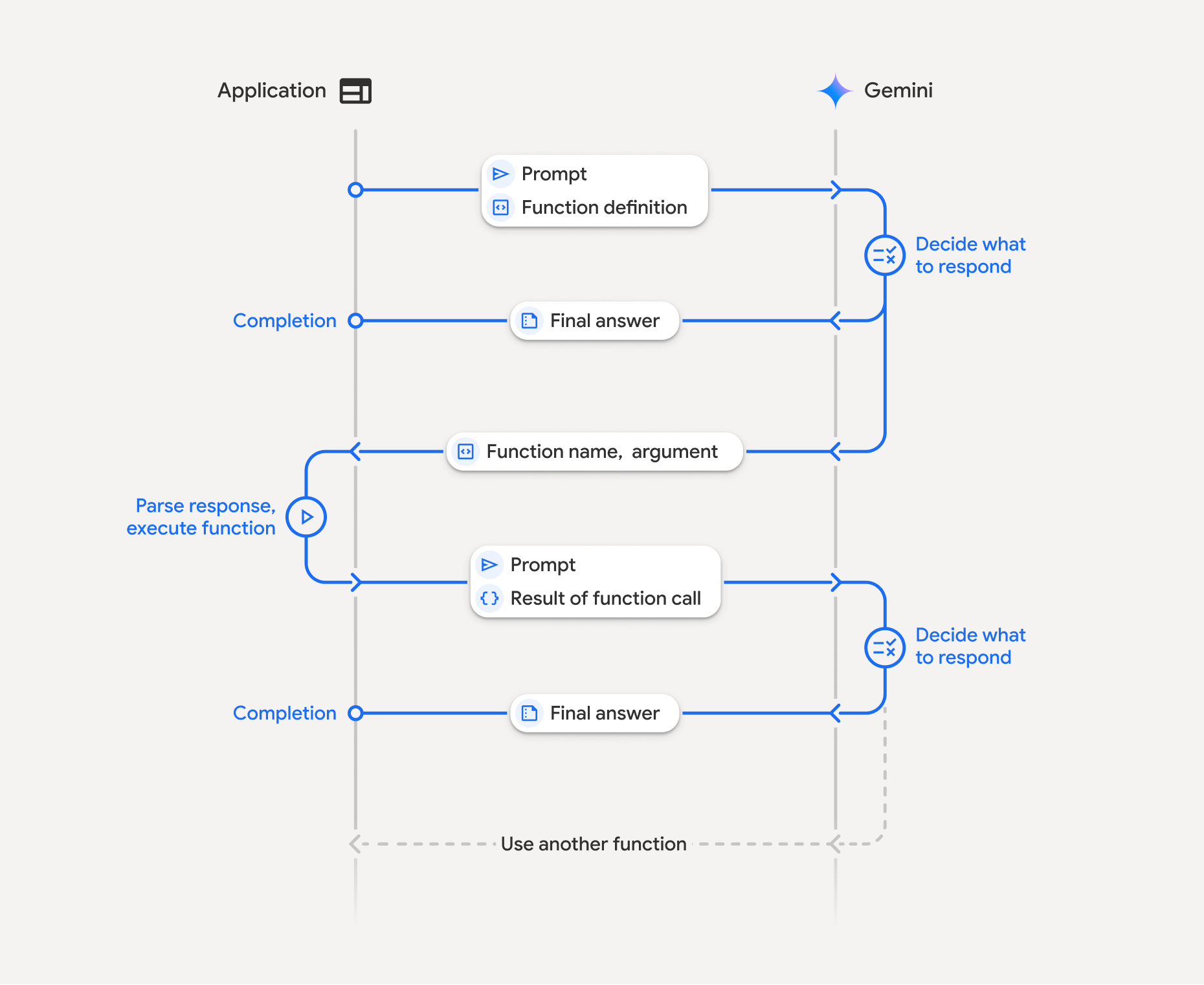
การเรียกใช้ฟังก์ชันเกี่ยวข้องกับการโต้ตอบที่มีโครงสร้างระหว่างแอปพลิเคชัน โมเดล และฟังก์ชันภายนอก รายละเอียดของกระบวนการมีดังนี้
- กำหนดการประกาศฟังก์ชัน: กำหนดการประกาศฟังก์ชันในโค้ดของแอปพลิเคชัน การประกาศฟังก์ชันจะอธิบายชื่อ พารามิเตอร์ และวัตถุประสงค์ของฟังก์ชันให้โมเดลทราบ
- เรียกใช้ API ด้วยการประกาศฟังก์ชัน: ส่งพรอมต์ของผู้ใช้พร้อมกับการประกาศฟังก์ชันไปยังโมเดล โดยจะวิเคราะห์คำขอและพิจารณาว่าการเรียกใช้ฟังก์ชันจะเป็นประโยชน์หรือไม่ หากใช่ ระบบจะตอบกลับด้วยออบเจ็กต์ JSON ที่มีโครงสร้างซึ่งประกอบด้วยชื่อฟังก์ชัน อาร์กิวเมนต์ และ
idที่ไม่ซ้ำกัน (ตอนนี้ API จะแสดงผลidนี้เสมอสำหรับโมเดล Gemini 3*) - เรียกใช้โค้ดฟังก์ชัน (ความรับผิดชอบของคุณ): โมเดลจะไม่เรียกใช้ฟังก์ชันด้วยตัวเอง แอปพลิเคชันของคุณมีหน้าที่รับผิดชอบในการประมวลผลคำตอบและตรวจสอบการเรียกใช้ฟังก์ชัน หาก
- ใช่: แยกชื่อ อาร์กิวเมนต์ และ
idของฟังก์ชัน แล้วเรียกใช้ ฟังก์ชันที่เกี่ยวข้องในแอปพลิเคชัน - ไม่: โมเดลได้ให้คำตอบเป็นข้อความโดยตรงต่อพรอมต์ (โฟลว์นี้ไม่ค่อยเน้นในตัวอย่าง แต่เป็นผลลัพธ์ที่เป็นไปได้)
- ใช่: แยกชื่อ อาร์กิวเมนต์ และ
- สร้างคำตอบที่เข้าใจง่าย: หากมีการเรียกใช้ฟังก์ชัน ให้บันทึกผลลัพธ์และส่งกลับไปยังโมเดล โดยตรวจสอบว่าคุณได้รวม
idที่ตรงกันไว้ในเทิร์นถัดไปของการสนทนา โดยจะใช้ผลลัพธ์เพื่อสร้างคำตอบสุดท้ายที่ใช้ง่ายซึ่งรวมข้อมูลจากการเรียกใช้ฟังก์ชัน
กระบวนการนี้สามารถทำซ้ำได้หลายครั้ง ซึ่งช่วยให้เกิดการโต้ตอบและเวิร์กโฟลว์ที่ซับซ้อนได้ นอกจากนี้ โมเดลยังรองรับการเรียกใช้ฟังก์ชันหลายรายการ ในเทิร์นเดียว (การเรียกใช้ฟังก์ชันแบบขนาน) ตาม ลำดับ (การเรียกใช้ฟังก์ชันแบบคอมโพสิต) และด้วยเครื่องมือ Gemini ในตัว (การใช้เครื่องมือหลายอย่าง)
* แมปรหัสฟังก์ชันเสมอ: ตอนนี้ Gemini 3 จะส่งคืนidที่ไม่ซ้ำกันเสมอ
functionCall ใส่ id นี้ใน functionResponse เพื่อให้โมเดลแมปผลลัพธ์กลับไปยังคำขอเดิมได้อย่างถูกต้อง
ขั้นตอนที่ 1: กำหนดการประกาศฟังก์ชัน
กำหนดฟังก์ชันและการประกาศภายในโค้ดของแอปพลิเคชันที่อนุญาตให้ผู้ใช้ตั้งค่าแสงและส่งคำขอ API ฟังก์ชันนี้อาจเรียกใช้ บริการหรือ API ภายนอก
Python
# Define a function that the model can call to control smart lights
set_light_values_declaration = {
    "name": "set_light_values",
    "description": "Sets the brightness and color temperature of a light.",
    "parameters": {
        "type": "object",
        "properties": {
            "brightness": {
                "type": "integer",
                "description": "Light level from 0 to 100. Zero is off and 100 is full brightness",
            },
            "color_temp": {
                "type": "string",
                "enum": ["daylight", "cool", "warm"],
                "description": "Color temperature of the light fixture, which can be `daylight`, `cool` or `warm`.",
            },
        },
        "required": ["brightness", "color_temp"],
    },
}

# This is the actual function that would be called based on the model's suggestion
def set_light_values(brightness: int, color_temp: str) -> dict[str, int | str]:
    """Set the brightness and color temperature of a room light. (mock API).

    Args:
        brightness: Light level from 0 to 100. Zero is off and 100 is full brightness
        color_temp: Color temperature of the light fixture, which can be `daylight`, `cool` or `warm`.

    Returns:
        A dictionary containing the set brightness and color temperature.
    """
    return {"brightness": brightness, "colorTemperature": color_temp}
JavaScript
import { Type } from '@google/genai';

// Define a function that the model can call to control smart lights
const setLightValuesFunctionDeclaration = {
  name: 'set_light_values',
  description: 'Sets the brightness and color temperature of a light.',
  parameters: {
    type: Type.OBJECT,
    properties: {
      brightness: {
        type: Type.NUMBER,
        description: 'Light level from 0 to 100. Zero is off and 100 is full brightness',
      },
      color_temp: {
        type: Type.STRING,
        enum: ['daylight', 'cool', 'warm'],
        description: 'Color temperature of the light fixture, which can be `daylight`, `cool` or `warm`.',
      },
    },
    required: ['brightness', 'color_temp'],
  },
};

/**

*   Set the brightness and color temperature of a room light. (mock API)
*   @param {number} brightness - Light level from 0 to 100. Zero is off and 100 is full brightness
*   @param {string} color_temp - Color temperature of the light fixture, which can be `daylight`, `cool` or `warm`.
*   @return {Object} A dictionary containing the set brightness and color temperature.
*/
function setLightValues(brightness, color_temp) {
  return {
    brightness: brightness,
    colorTemperature: color_temp
  };
}
Go
package main

import "google.golang.org/genai"

// Define a function declaration that the model can call to control smart lights
var setLightValuesDeclaration = &genai.FunctionDeclaration{
    Name:        "set_light_values",
    Description: "Sets the brightness and color temperature of a light.",
    Parameters: &genai.Schema{
        Type: genai.TypeObject,
        Properties: map[string]*genai.Schema{
            "brightness": {
                Type:        genai.TypeInteger,
                Description: "Light level from 0 to 100. Zero is off and 100 is full brightness",
            },
            "color_temp": {
                Type:        genai.TypeString,
                Enum:        []string{"daylight", "cool", "warm"},
                Description: "Color temperature of the light fixture, which can be `daylight`, `cool` or `warm`.",
            },
        },
        Required: []string{"brightness", "color_temp"},
    },
}

// This is the actual function that would be called based on the model's suggestion
func setLightValues(brightness int, colorTemp string) map[string]any {
    return map[string]any{
        "brightness":       brightness,
        "colorTemperature": colorTemp,
    }
}
ขั้นตอนที่ 2: เรียกใช้โมเดลด้วยการประกาศฟังก์ชัน
เมื่อกำหนดการประกาศฟังก์ชันแล้ว คุณสามารถแจ้งให้โมเดลใช้ฟังก์ชันเหล่านั้นได้ โดยจะวิเคราะห์พรอมต์และการประกาศฟังก์ชัน แล้วตัดสินใจว่าจะตอบกลับโดยตรงหรือเรียกใช้ฟังก์ชัน หากมีการเรียกใช้ฟังก์ชัน ออบเจ็กต์การตอบกลับจะมีคำแนะนำการเรียกใช้ฟังก์ชัน
Python
from google.genai import types

# Configure the client and tools
client = genai.Client()
tools = types.Tool(function_declarations=[set_light_values_declaration])
config = types.GenerateContentConfig(tools=[tools])

# Define user prompt
contents = [
    types.Content(
        role="user", parts=[types.Part(text="Turn the lights down to a romantic level")]
    )
]

# Send request with function declarations
response = client.models.generate_content(
    model="gemini-3.8-flash",
    contents=contents,
    config=config,
)

print(response.candidates[0].content.parts[0].function_call)
JavaScript
import { GoogleGenAI } from '@google/genai';

// Generation config with function declaration
const config = {
  tools: [{
    functionDeclarations: [setLightValuesFunctionDeclaration]
  }]
};

// Configure the client
const ai = new GoogleGenAI({});

// Define user prompt
const contents = [
  {
    role: 'user',
    parts: [{ text: 'Turn the lights down to a romantic level' }]
  }
];

// Send request with function declarations
const response = await ai.models.generateContent({
  model: 'gemini-3.8-flash',
  contents: contents,
  config: config
});

console.log(response.functionCalls[0]);
Go
ctx := context.Background()
client, err := genai.NewClient(ctx, nil)
if err != nil {
    log.Fatal(err)
}

// Generation config with function declaration
config := &genai.GenerateContentConfig{
    Tools: []*genai.Tool{
        {FunctionDeclarations: []*genai.FunctionDeclaration{setLightValuesDeclaration}},
    },
}

// Define user prompt
contents := []*genai.Content{
    genai.NewContentFromText("Turn the lights down to a romantic level", genai.RoleUser),
}

// Send request with function declarations
response, err := client.Models.GenerateContent(ctx, "gemini-3.8-flash", contents, config)
if err != nil {
    log.Fatal(err)
}

fmt.Println(response.FunctionCalls()[0])
จากนั้นโมเดลจะแสดงผลออบเจ็กต์ functionCall ในสคีมาที่เข้ากันได้กับ OpenAPI ซึ่งระบุวิธีเรียกใช้ฟังก์ชันที่ประกาศไว้อย่างน้อย 1 ฟังก์ชันเพื่อตอบคำถามของผู้ใช้
Python
id='8f2b1a3c' args={'color_temp': 'warm', 'brightness': 25} name='set_light_values'
JavaScript
{
  id: '8f2b1a3c',
  name: 'set_light_values',
  args: { brightness: 25, color_temp: 'warm' }
}
Go
&{ID:8f2b1a3c Args:map[brightness:25 color_temp:warm] Name:set_light_values}
ขั้นตอนที่ 3: เรียกใช้โค้ดฟังก์ชัน set_light_values
ดึงรายละเอียดการเรียกใช้ฟังก์ชันจากคำตอบของโมเดล แยกวิเคราะห์อาร์กิวเมนต์
และเรียกใช้ฟังก์ชัน set_light_values
Python
# Extract tool call details, it may not be in the first part.
tool_call = response.candidates[0].content.parts[0].function_call

if tool_call.name == "set_light_values":
    result = set_light_values(**tool_call.args)
    print(f"Function execution result: {result}")
JavaScript
// Extract tool call details
const tool_call = response.functionCalls[0]

let result;
if (tool_call.name === 'set_light_values') {
  result = setLightValues(tool_call.args.brightness, tool_call.args.color_temp);
  console.log(`Function execution result: ${JSON.stringify(result)}`);
}
Go
// Extract tool call details
toolCall := response.FunctionCalls()[0]

var result map[string]any
if toolCall.Name == "set_light_values" {
    brightness := int(toolCall.Args["brightness"].(float64))
    colorTemp := toolCall.Args["color_temp"].(string)
    result = setLightValues(brightness, colorTemp)
    fmt.Printf("Function execution result: %v\n", result)
}
ขั้นตอนที่ 4: สร้างคำตอบที่เข้าใจง่ายด้วยผลลัพธ์ของฟังก์ชันและเรียกใช้โมเดลอีกครั้ง
สุดท้าย ให้ส่งผลลัพธ์ของการเรียกใช้ฟังก์ชันกลับไปยังโมเดลเพื่อให้โมเดลสามารถ รวมข้อมูลนี้ไว้ในคำตอบสุดท้ายที่ส่งให้ผู้ใช้
Python
from google import genai
from google.genai import types

# Create a function response part
function_response_part = types.Part.from_function_response(
    name=tool_call.name,
    response={"result": result},
    id=tool_call.id,
)

# Append function call and result of the function execution to contents
contents.append(response.candidates[0].content) # Append the content from the model's response.
contents.append(types.Content(role="user", parts=[function_response_part])) # Append the function response

client = genai.Client()
final_response = client.models.generate_content(
    model="gemini-3.8-flash",
    config=config,
    contents=contents,
)

print(final_response.text)
JavaScript
// Create a function response part
const function_response_part = {
  name: tool_call.name,
  response: { result },
  id: tool_call.id
}

// Append function call and result of the function execution to contents
contents.push(response.candidates[0].content);
contents.push({ role: 'user', parts: [{ functionResponse: function_response_part }] });

// Get the final response from the model
const final_response = await ai.models.generateContent({
  model: 'gemini-3.8-flash',
  contents: contents,
  config: config
});

console.log(final_response.text);
Go
// Create a function response part
functionResponsePart := &genai.Part{
    FunctionResponse: &genai.FunctionResponse{
        ID:       toolCall.ID,
        Name:     toolCall.Name,
        Response: result,
    },
}

// Append function call and result of the function execution to contents
contents = append(contents, response.Candidates[0].Content)
contents = append(contents, &genai.Content{
    Role:  genai.RoleUser,
    Parts: []*genai.Part{functionResponsePart},
})

// Get the final response from the model
finalResponse, err := client.Models.GenerateContent(ctx, "gemini-3.8-flash", contents, config)
if err != nil {
    log.Fatal(err)
}

fmt.Println(finalResponse.Text())
ซึ่งจะเป็นการสิ้นสุดขั้นตอนการเรียกใช้ฟังก์ชัน โมเดลใช้ฟังก์ชัน set_light_values เพื่อดำเนินการตามคำขอของผู้ใช้เรียบร้อยแล้ว
การประกาศฟังก์ชัน
เมื่อใช้การเรียกใช้ฟังก์ชันในพรอมต์ คุณจะสร้างออบเจ็กต์ tools ซึ่งมี function declarations อย่างน้อย 1 รายการ คุณกำหนดฟังก์ชันโดยใช้ JSON โดยเฉพาะด้วยชุดย่อยที่เลือกของรูปแบบสคีมา OpenAPI การประกาศฟังก์ชันเดียวสามารถรวมพารามิเตอร์ต่อไปนี้ได้
name(สตริง): ชื่อที่ไม่ซ้ำกันสำหรับฟังก์ชัน (get_weather_forecast,send_email) ใช้ชื่อที่สื่อความหมายโดยไม่มีเว้นวรรคหรือสัญลักษณ์พิเศษ (ใช้ขีดล่างหรือ camelCase)description(สตริง): คำอธิบายที่ชัดเจนและละเอียดเกี่ยวกับวัตถุประสงค์และความสามารถของฟังก์ชัน ซึ่งเป็นขั้นตอนสำคัญที่ช่วยให้โมเดลเข้าใจว่าควรใช้ฟังก์ชันเมื่อใด ระบุรายละเอียดและยกตัวอย่างหากเป็นประโยชน์ ("ค้นหา โรงภาพยนตร์ตามสถานที่ตั้งและชื่อภาพยนตร์ (ไม่บังคับ) ที่กำลัง ฉายในโรงภาพยนตร์")parameters(ออบเจ็กต์): กำหนดพารามิเตอร์อินพุตที่ฟังก์ชัน คาดหวังtype(สตริง): ระบุประเภทข้อมูลโดยรวม เช่นobjectproperties(ออบเจ็กต์): แสดงรายการพารามิเตอร์แต่ละรายการ โดยแต่ละรายการมีข้อมูลต่อไปนี้type(สตริง): ประเภทข้อมูลของพารามิเตอร์ เช่นstring,integer,boolean, arraydescription(สตริง): คำอธิบายวัตถุประสงค์และรูปแบบของพารามิเตอร์ ระบุตัวอย่างและข้อจำกัด ("เมืองและรัฐ เช่น 'San Francisco, CA' หรือรหัสไปรษณีย์ เช่น '95616'")enum(อาร์เรย์ ไม่บังคับ): หากค่าพารามิเตอร์มาจากชุดที่กำหนดไว้ ให้ใช้ "enum" เพื่อแสดงรายการค่าที่อนุญาตแทนที่จะอธิบายไว้ในคำอธิบายเท่านั้น ซึ่งจะช่วยปรับปรุงความแม่นยำ ("enum": ["daylight", "cool", "warm"])
required(อาร์เรย์): อาร์เรย์ของสตริงที่แสดงชื่อพารามิเตอร์ที่ จำเป็นเพื่อให้ฟังก์ชันทำงานได้
นอกจากนี้ คุณยังสร้าง FunctionDeclarations จากฟังก์ชัน Python ได้โดยตรงโดยใช้ types.FunctionDeclaration.from_callable(client=client, callable=your_function)
การเรียกใช้ฟังก์ชันด้วยโมเดลการคิด
โมเดลซีรีส์ Gemini 3 และ 2.5 ใช้กระบวนการ "การคิด" ภายในเพื่อพิจารณาคำขอต่างๆ ซึ่งจะช่วยปรับปรุงประสิทธิภาพการเรียกใช้ฟังก์ชันได้อย่างมาก ทำให้โมเดลระบุได้ดีขึ้นว่าควรเรียกใช้ฟังก์ชันเมื่อใดและควรใช้พารามิเตอร์ใด เนื่องจาก Gemini API เป็นแบบไม่เก็บสถานะ โมเดลจึงใช้ลายเซ็นความคิดเพื่อรักษาบริบทในการสนทนาแบบหลายรอบ
ส่วนนี้ครอบคลุมการจัดการขั้นสูงของลายเซ็นความคิด และจำเป็นเฉพาะในกรณีที่คุณสร้างคำขอ API ด้วยตนเอง (เช่น ผ่าน REST) หรือจัดการประวัติการสนทนา
หากใช้ Google GenAI SDK (ไลบรารีอย่างเป็นทางการของเรา) คุณไม่จำเป็นต้องจัดการกระบวนการนี้ SDK จะจัดการขั้นตอนที่จำเป็นโดยอัตโนมัติ ดังที่แสดงในตัวอย่างก่อนหน้านี้
การจัดการประวัติการสนทนาด้วยตนเอง
หากคุณแก้ไขประวัติการสนทนาด้วยตนเอง แทนที่จะส่งคำตอบก่อนหน้าทั้งหมด คุณต้องจัดการ thought_signature ที่รวมอยู่ในเทิร์นของโมเดลอย่างถูกต้อง
ทำตามกฎต่อไปนี้เพื่อให้แน่ใจว่าบริบทของโมเดลจะยังคงอยู่
- ส่ง
thought_signatureกลับไปยังโมเดลภายในPartเดิมเสมอ - ใส่
idที่แน่นอนจากfunction_callในfunction_responseเสมอ เพื่อให้ API แมปผลลัพธ์กับคำขอที่ถูกต้องได้ - อย่าผสาน
Partที่มีลายเซ็นกับไฟล์ที่ไม่มีลายเซ็น ซึ่งจะทำลายบริบทเชิงตำแหน่งของความคิด - อย่ารวม
Parts2 รายการที่มีลายเซ็นทั้งคู่ เนื่องจากจะรวมสตริงลายเซ็นไม่ได้
ซิกเนเจอร์ความคิดของ Gemini 3
ใน Gemini 3 Part ของคำตอบจากโมเดล
อาจมีลายเซ็นความคิด
แม้ว่าโดยทั่วไปเราจะแนะนำให้แสดงผลลายเซ็นจาก Part ทุกประเภท แต่การส่งลายเซ็นความคิดกลับมาเป็นสิ่งจำเป็นสำหรับการเรียกใช้ฟังก์ชัน Google GenAI SDK จะจัดการลายเซ็นความคิดโดยอัตโนมัติ เว้นแต่คุณจะจัดการประวัติการสนทนาด้วยตนเอง
หากคุณจัดการประวัติการสนทนาด้วยตนเอง โปรดดูคำแนะนำและรายละเอียดทั้งหมดเกี่ยวกับการจัดการลายเซ็นความคิดสำหรับ Gemini 3 ในหน้าลายเซ็นความคิด
การตรวจสอบลายเซ็นความคิด
แม้ว่าจะไม่จำเป็นสำหรับการติดตั้งใช้งาน แต่คุณสามารถตรวจสอบการตอบกลับเพื่อดู
thought_signatureเพื่อวัตถุประสงค์ในการแก้ไขข้อบกพร่องหรือเพื่อการศึกษา
Python
import base64
# After receiving a response from a model with thinking enabled
# response = client.models.generate_content(...)

# The signature is attached to the response part containing the function call
part = response.candidates[0].content.parts[0]
if part.thought_signature:
  print(base64.b64encode(part.thought_signature).decode("utf-8"))
JavaScript
// After receiving a response from a model with thinking enabled
// const response = await ai.models.generateContent(...)

// The signature is attached to the response part containing the function call
const part = response.candidates[0].content.parts[0];
if (part.thoughtSignature) {
  console.log(part.thoughtSignature);
}
Go
// After receiving a response from a model with thinking enabled
// response, err := client.Models.GenerateContent(...)

// The signature is attached to the response part containing the function call
part := response.Candidates[0].Content.Parts[0]
if len(part.ThoughtSignature) > 0 {
    fmt.Println(string(part.ThoughtSignature))
}
ดูข้อมูลเพิ่มเติมเกี่ยวกับข้อจำกัดและการใช้งานลายเซ็นความคิด รวมถึงเกี่ยวกับโมเดลการคิดโดยทั่วไปได้ในหน้าการคิด
การเรียกใช้ฟังก์ชันพร้อมกัน
นอกจากฟังก์ชันการเรียกใช้ฟังก์ชันแบบครั้งเดียวแล้ว คุณยังเรียกใช้ฟังก์ชันหลายรายการพร้อมกันได้ด้วย การเรียกใช้ฟังก์ชันแบบขนานช่วยให้คุณเรียกใช้ฟังก์ชันหลายรายการ พร้อมกันได้ และใช้เมื่อฟังก์ชันไม่ได้ขึ้นอยู่กับฟังก์ชันอื่น ซึ่งมีประโยชน์ในสถานการณ์ต่างๆ เช่น การรวบรวมข้อมูลจากแหล่งข้อมูลอิสระหลายแหล่ง เช่น การดึงรายละเอียดลูกค้าจากฐานข้อมูลต่างๆ หรือการตรวจสอบระดับสินค้าคงคลังในคลังสินค้าต่างๆ หรือการดำเนินการหลายอย่าง เช่น การเปลี่ยนอพาร์ตเมนต์ให้เป็นดิสโก้
เมื่อโมเดลเริ่มการเรียกใช้ฟังก์ชันหลายรายการในเทิร์นเดียว คุณไม่จำเป็นต้องส่งคืนออบเจ็กต์ function_result ตามลำดับเดียวกับที่ได้รับออบเจ็กต์ function_call Gemini API จะแมปผลลัพธ์แต่ละรายการกลับไปยังการเรียกที่เกี่ยวข้องโดยใช้ id จากเอาต์พุตของโมเดล ซึ่งจะช่วยให้คุณ
เรียกใช้ฟังก์ชันแบบไม่พร้อมกันและต่อท้ายผลลัพธ์ในรายการเมื่อ
ฟังก์ชันทำงานเสร็จ
Python
power_disco_ball = {
    "name": "power_disco_ball",
    "description": "Powers the spinning disco ball.",
    "parameters": {
        "type": "object",
        "properties": {
            "power": {
                "type": "boolean",
                "description": "Whether to turn the disco ball on or off.",
            }
        },
        "required": ["power"],
    },
}

start_music = {
    "name": "start_music",
    "description": "Play some music matching the specified parameters.",
    "parameters": {
        "type": "object",
        "properties": {
            "energetic": {
                "type": "boolean",
                "description": "Whether the music is energetic or not.",
            },
            "loud": {
                "type": "boolean",
                "description": "Whether the music is loud or not.",
            },
        },
        "required": ["energetic", "loud"],
    },
}

dim_lights = {
    "name": "dim_lights",
    "description": "Dim the lights.",
    "parameters": {
        "type": "object",
        "properties": {
            "brightness": {
                "type": "number",
                "description": "The brightness of the lights, 0.0 is off, 1.0 is full.",
            }
        },
        "required": ["brightness"],
    },
}
JavaScript
import { Type } from '@google/genai';

const powerDiscoBall = {
  name: 'power_disco_ball',
  description: 'Powers the spinning disco ball.',
  parameters: {
    type: Type.OBJECT,
    properties: {
      power: {
        type: Type.BOOLEAN,
        description: 'Whether to turn the disco ball on or off.'
      }
    },
    required: ['power']
  }
};

const startMusic = {
  name: 'start_music',
  description: 'Play some music matching the specified parameters.',
  parameters: {
    type: Type.OBJECT,
    properties: {
      energetic: {
        type: Type.BOOLEAN,
        description: 'Whether the music is energetic or not.'
      },
      loud: {
        type: Type.BOOLEAN,
        description: 'Whether the music is loud or not.'
      }
    },
    required: ['energetic', 'loud']
  }
};

const dimLights = {
  name: 'dim_lights',
  description: 'Dim the lights.',
  parameters: {
    type: Type.OBJECT,
    properties: {
      brightness: {
        type: Type.NUMBER,
        description: 'The brightness of the lights, 0.0 is off, 1.0 is full.'
      }
    },
    required: ['brightness']
  }
};
Go
package main

import "google.golang.org/genai"

var powerDiscoBall = &genai.FunctionDeclaration{
    Name:        "power_disco_ball",
    Description: "Powers the spinning disco ball.",
    Parameters: &genai.Schema{
        Type: genai.TypeObject,
        Properties: map[string]*genai.Schema{
            "power": {
                Type:        genai.TypeBoolean,
                Description: "Whether to turn the disco ball on or off.",
            },
        },
        Required: []string{"power"},
    },
}

var startMusic = &genai.FunctionDeclaration{
    Name:        "start_music",
    Description: "Play some music matching the specified parameters.",
    Parameters: &genai.Schema{
        Type: genai.TypeObject,
        Properties: map[string]*genai.Schema{
            "energetic": {
                Type:        genai.TypeBoolean,
                Description: "Whether the music is energetic or not.",
            },
            "loud": {
                Type:        genai.TypeBoolean,
                Description: "Whether the music is loud or not.",
            },
        },
        Required: []string{"energetic", "loud"},
    },
}

var dimLights = &genai.FunctionDeclaration{
    Name:        "dim_lights",
    Description: "Dim the lights.",
    Parameters: &genai.Schema{
        Type: genai.TypeObject,
        Properties: map[string]*genai.Schema{
            "brightness": {
                Type:        genai.TypeNumber,
                Description: "The brightness of the lights, 0.0 is off, 1.0 is full.",
            },
        },
        Required: []string{"brightness"},
    },
}
กำหนดค่าโหมดการเรียกใช้ฟังก์ชันเพื่อให้ใช้เครื่องมือที่ระบุทั้งหมดได้ ดูข้อมูลเพิ่มเติมได้ที่หัวข้อการกำหนดค่าการเรียกใช้ฟังก์ชัน
Python
from google import genai
from google.genai import types

# Configure the client and tools
client = genai.Client()
house_tools = [
    types.Tool(function_declarations=[power_disco_ball, start_music, dim_lights])
]
config = types.GenerateContentConfig(
    tools=house_tools,
    automatic_function_calling=types.AutomaticFunctionCallingConfig(
        disable=True
    ),
    # Force the model to call 'any' function, instead of chatting.
    tool_config=types.ToolConfig(
        function_calling_config=types.FunctionCallingConfig(mode='ANY')
    ),
)

chat = client.chats.create(model="gemini-3.8-flash", config=config)
response = chat.send_message("Turn this place into a party!")

# Print out each of the function calls requested from this single call
print("Example 1: Forced function calling")
for fn in response.function_calls:
    args = ", ".join(f"{key}={val}" for key, val in fn.args.items())
    print(f"{fn.name}({args}) - ID: {fn.id}")
JavaScript
import { GoogleGenAI } from '@google/genai';

// Set up function declarations
const houseFns = [powerDiscoBall, startMusic, dimLights];

const config = {
    tools: [{
        functionDeclarations: houseFns
    }],
    // Force the model to call 'any' function, instead of chatting.
    toolConfig: {
        functionCallingConfig: {
            mode: 'any'
        }
    }
};

// Configure the client
const ai = new GoogleGenAI({});

// Create a chat session
const chat = ai.chats.create({
    model: 'gemini-3.8-flash',
    config: config
});
const response = await chat.sendMessage({message: 'Turn this place into a party!'});

// Print out each of the function calls requested from this single call
console.log("Example 1: Forced function calling");
for (const fn of response.functionCalls) {
    const args = Object.entries(fn.args)
        .map(([key, val]) => `${key}=${val}`)
        .join(', ');
    console.log(`${fn.name}(${args}) - ID: ${fn.id}`);
}
Go
ctx := context.Background()
client, err := genai.NewClient(ctx, nil)
if err != nil {
    log.Fatal(err)
}

houseTools := []*genai.Tool{
    {FunctionDeclarations: []*genai.FunctionDeclaration{powerDiscoBall, startMusic, dimLights}},
}

config := &genai.GenerateContentConfig{
    Tools: houseTools,
    // Force the model to call 'any' function, instead of chatting.
    ToolConfig: &genai.ToolConfig{
        FunctionCallingConfig: &genai.FunctionCallingConfig{
            Mode: genai.FunctionCallingConfigModeAny,
        },
    },
}

response, err := client.Models.GenerateContent(
    ctx,
    "gemini-3.8-flash",
    genai.Text("Turn this place into a party!"),
    config,
)
if err != nil {
    log.Fatal(err)
}

// Print out each of the function calls requested from this single call
fmt.Println("Example 1: Forced function calling")
for _, fn := range response.FunctionCalls() {
    fmt.Printf("%s(%v) - ID: %s\n", fn.Name, fn.Args, fn.ID)
}
ผลลัพธ์ที่พิมพ์แต่ละรายการแสดงถึงการเรียกใช้ฟังก์ชันเดียวที่โมเดลได้ ขอ หากต้องการส่งผลลัพธ์กลับ ให้ใส่คำตอบตามลำดับเดียวกับที่ขอ
Python SDK รองรับการเรียกใช้ฟังก์ชันอัตโนมัติ ซึ่งจะแปลงฟังก์ชัน Python เป็นการประกาศโดยอัตโนมัติ รวมถึงจัดการการเรียกใช้ฟังก์ชันและวงจรการตอบกลับให้คุณ ต่อไปนี้เป็นตัวอย่างสำหรับ กรณีการใช้งานดิสโก้
Python
from google import genai
from google.genai import types

# Actual function implementations
def power_disco_ball_impl(power: bool) -> dict:
    """Powers the spinning disco ball.

    Args:
        power: Whether to turn the disco ball on or off.

    Returns:
        A status dictionary indicating the current state.
    """
    return {"status": f"Disco ball powered {'on' if power else 'off'}"}

def start_music_impl(energetic: bool, loud: bool) -> dict:
    """Play some music matching the specified parameters.

    Args:
        energetic: Whether the music is energetic or not.
        loud: Whether the music is loud or not.

    Returns:
        A dictionary containing the music settings.
    """
    music_type = "energetic" if energetic else "chill"
    volume = "loud" if loud else "quiet"
    return {"music_type": music_type, "volume": volume}

def dim_lights_impl(brightness: float) -> dict:
    """Dim the lights.

    Args:
        brightness: The brightness of the lights, 0.0 is off, 1.0 is full.

    Returns:
        A dictionary containing the new brightness setting.
    """
    return {"brightness": brightness}

# Configure the client
client = genai.Client()
config = types.GenerateContentConfig(
    tools=[power_disco_ball_impl, start_music_impl, dim_lights_impl]
)

# Make the request
response = client.models.generate_content(
    model="gemini-3.8-flash",
    contents="Do everything you need to this place into party!",
    config=config,
)

print("\nExample 2: Automatic function calling")
print(response.text)
# I've turned on the disco ball, started playing loud and energetic music, and dimmed the lights to 50% brightness. Let's get this party started!
การเรียกใช้ฟังก์ชันแบบองค์ประกอบ
การเรียกใช้ฟังก์ชันแบบองค์ประกอบหรือการเรียกใช้ฟังก์ชันตามลำดับช่วยให้ Gemini เชื่อมโยงการเรียกใช้ฟังก์ชันหลายรายการเข้าด้วยกันเพื่อดำเนินการตามคำขอที่ซับซ้อนได้ ตัวอย่างเช่น หากต้องการตอบคำถาม "ดูอุณหภูมิในตำแหน่งปัจจุบันของฉัน" Gemini API อาจเรียกใช้ฟังก์ชัน get_current_location() ก่อน ตามด้วยฟังก์ชัน get_weather() ที่ใช้ตำแหน่งเป็นพารามิเตอร์
ตัวอย่างต่อไปนี้แสดงวิธีใช้การเรียกใช้ฟังก์ชันแบบคอมโพสิชันโดยใช้ Python SDK และการเรียกใช้ฟังก์ชันอัตโนมัติ
Python
ตัวอย่างนี้ใช้ฟีเจอร์การเรียกใช้ฟังก์ชันอัตโนมัติของ
google-genai Python SDK SDK จะแปลงฟังก์ชัน Python เป็นสคีมาที่จำเป็นโดยอัตโนมัติ ดำเนินการเรียกใช้ฟังก์ชันเมื่อโมเดลขอ และส่งผลลัพธ์กลับไปยังโมเดลเพื่อทำงานให้เสร็จสมบูรณ์
import os
from google import genai
from google.genai import types

# Example Functions
def get_weather_forecast(location: str) -> dict:
    """Gets the current weather temperature for a given location."""
    print(f"Tool Call: get_weather_forecast(location={location})")
    # TODO: Make API call
    print("Tool Response: {'temperature': 25, 'unit': 'celsius'}")
    return {"temperature": 25, "unit": "celsius"}  # Dummy response

def set_thermostat_temperature(temperature: int) -> dict:
    """Sets the thermostat to a desired temperature."""
    print(f"Tool Call: set_thermostat_temperature(temperature={temperature})")
    # TODO: Interact with a thermostat API
    print("Tool Response: {'status': 'success'}")
    return {"status": "success"}

# Configure the client and model
client = genai.Client()
config = types.GenerateContentConfig(
    tools=[get_weather_forecast, set_thermostat_temperature]
)

# Make the request
response = client.models.generate_content(
    model="gemini-3.8-flash",
    contents="If it's warmer than 20°C in London, set the thermostat to 20°C, otherwise set it to 18°C.",
    config=config,
)

# Print the final, user-facing response
print(response.text)
ผลลัพธ์ที่คาดไว้
เมื่อเรียกใช้โค้ด คุณจะเห็น SDK จัดการการเรียกฟังก์ชัน
โมเดลจะเรียกใช้ get_weather_forecast ก่อน จากนั้นจะรับ
อุณหภูมิ แล้วเรียกใช้ set_thermostat_temperature โดยมีค่าที่ถูกต้อง
ตามตรรกะในพรอมต์
Tool Call: get_weather_forecast(location=London)
Tool Response: {'temperature': 25, 'unit': 'celsius'}
Tool Call: set_thermostat_temperature(temperature=20)
Tool Response: {'status': 'success'}
OK. I've set the thermostat to 20°C.
JavaScript
ตัวอย่างนี้แสดงวิธีใช้ JavaScript/TypeScript SDK เพื่อเรียกใช้ฟังก์ชันแบบคอมโพสิชันโดยใช้ลูปการดำเนินการด้วยตนเอง
import { GoogleGenAI, Type } from "@google/genai";

// Configure the client
const ai = new GoogleGenAI({});

// Example Functions
function get_weather_forecast({ location }) {
  console.log(`Tool Call: get_weather_forecast(location=${location})`);
  // TODO: Make API call
  console.log("Tool Response: {'temperature': 25, 'unit': 'celsius'}");
  return { temperature: 25, unit: "celsius" };
}

function set_thermostat_temperature({ temperature }) {
  console.log(
    `Tool Call: set_thermostat_temperature(temperature=${temperature})`,
  );
  // TODO: Make API call
  console.log("Tool Response: {'status': 'success'}");
  return { status: "success" };
}

const toolFunctions = {
  get_weather_forecast,
  set_thermostat_temperature,
};

const tools = [
  {
    functionDeclarations: [
      {
        name: "get_weather_forecast",
        description:
          "Gets the current weather temperature for a given location.",
        parameters: {
          type: Type.OBJECT,
          properties: {
            location: {
              type: Type.STRING,
            },
          },
          required: ["location"],
        },
      },
      {
        name: "set_thermostat_temperature",
        description: "Sets the thermostat to a desired temperature.",
        parameters: {
          type: Type.OBJECT,
          properties: {
            temperature: {
              type: Type.NUMBER,
            },
          },
          required: ["temperature"],
        },
      },
    ],
  },
];

// Prompt for the model
let contents = [
  {
    role: "user",
    parts: [
      {
        text: "If it's warmer than 20°C in London, set the thermostat to 20°C, otherwise set it to 18°C.",
      },
    ],
  },
];

// Loop until the model has no more function calls to make
while (true) {
  const result = await ai.models.generateContent({
    model: "gemini-3.8-flash",
    contents,
    config: { tools },
  });

  if (result.functionCalls && result.functionCalls.length > 0) {
    const functionCall = result.functionCalls[0];

    const { name, args } = functionCall;

    if (!toolFunctions[name]) {
      throw new Error(`Unknown function call: ${name}`);
    }

    // Call the function and get the response.
    const toolResponse = toolFunctions[name](args);

    const functionResponsePart = {
      name: functionCall.name,
      response: {
        result: toolResponse,
      },
      id: functionCall.id,
    };

    // Send the function response back to the model.
    contents.push({
      role: "model",
      parts: [
        {
          functionCall: functionCall,
        },
      ],
    });
    contents.push({
      role: "user",
      parts: [
        {
          functionResponse: functionResponsePart,
        },
      ],
    });
  } else {
    // No more function calls, break the loop.
    console.log(result.text);
    break;
  }
}
ผลลัพธ์ที่คาดไว้
เมื่อเรียกใช้โค้ด คุณจะเห็น SDK จัดการการเรียกฟังก์ชัน
โมเดลจะเรียกใช้ get_weather_forecast ก่อน จากนั้นจะรับ
อุณหภูมิ แล้วเรียกใช้ set_thermostat_temperature โดยมีค่าที่ถูกต้อง
ตามตรรกะในพรอมต์
Tool Call: get_weather_forecast(location=London)
Tool Response: {'temperature': 25, 'unit': 'celsius'}
Tool Call: set_thermostat_temperature(temperature=20)
Tool Response: {'status': 'success'}
OK. It's 25°C in London, so I've set the thermostat to 20°C.
Go
ตัวอย่างนี้แสดงวิธีใช้ Go SDK เพื่อเรียกใช้ฟังก์ชันแบบคอมโพสิชัน โดยใช้ลูปการดำเนินการด้วยตนเอง
package main

import (
    "context"
    "fmt"
    "log"

    "google.golang.org/genai"
)

func getWeatherForecast(location string) map[string]any {
    fmt.Printf("Tool Call: get_weather_forecast(location=%s)\n", location)
    fmt.Println("Tool Response: map[temperature:25 unit:celsius]")
    return map[string]any{"temperature": 25, "unit": "celsius"}
}

func setThermostatTemperature(temperature float64) map[string]any {
    fmt.Printf("Tool Call: set_thermostat_temperature(temperature=%v)\n", temperature)
    fmt.Println("Tool Response: map[status:success]")
    return map[string]any{"status": "success"}
}

func main() {
    ctx := context.Background()
    client, err := genai.NewClient(ctx, nil)
    if err != nil {
        log.Fatal(err)
    }

    tools := []*genai.Tool{
        {
            FunctionDeclarations: []*genai.FunctionDeclaration{
                {
                    Name:        "get_weather_forecast",
                    Description: "Gets the current weather temperature for a given location.",
                    Parameters: &genai.Schema{
                        Type: genai.TypeObject,
                        Properties: map[string]*genai.Schema{
                            "location": {Type: genai.TypeString},
                        },
                        Required: []string{"location"},
                    },
                },
                {
                    Name:        "set_thermostat_temperature",
                    Description: "Sets the thermostat to a desired temperature.",
                    Parameters: &genai.Schema{
                        Type: genai.TypeObject,
                        Properties: map[string]*genai.Schema{
                            "temperature": {Type: genai.TypeNumber},
                        },
                        Required: []string{"temperature"},
                    },
                },
            },
        },
    }

    config := &genai.GenerateContentConfig{Tools: tools}

    contents := []*genai.Content{
        genai.NewContentFromText("If it's warmer than 20°C in London, set the thermostat to 20°C, otherwise set it to 18°C.", genai.RoleUser),
    }

    for {
        result, err := client.Models.GenerateContent(ctx, "gemini-3.8-flash", contents, config)
        if err != nil {
            log.Fatal(err)
        }

        if len(result.FunctionCalls()) > 0 {
            functionCall := result.FunctionCalls()[0]
            var toolResponse map[string]any

            switch functionCall.Name {
            case "get_weather_forecast":
                location := functionCall.Args["location"].(string)
                toolResponse = getWeatherForecast(location)
            case "set_thermostat_temperature":
                temperature := functionCall.Args["temperature"].(float64)
                toolResponse = setThermostatTemperature(temperature)
            default:
                log.Fatalf("Unknown function call: %s", functionCall.Name)
            }

            contents = append(contents, result.Candidates[0].Content)
            contents = append(contents, &genai.Content{
                Role: genai.RoleUser,
                Parts: []*genai.Part{
                    {
                        FunctionResponse: &genai.FunctionResponse{
                            ID:       functionCall.ID,
                            Name:     functionCall.Name,
                            Response: toolResponse,
                        },
                    },
                },
            })
        } else {
            fmt.Println(result.Text())
            break
        }
    }
}
ผลลัพธ์ที่คาดไว้
Tool Call: get_weather_forecast(location=London)
Tool Response: map[temperature:25 unit:celsius]
Tool Call: set_thermostat_temperature(temperature=20)
Tool Response: map[status:success]
OK. It's 25°C in London, so I've set the thermostat to 20°C.
การเรียกใช้ฟังก์ชันแบบองค์ประกอบเป็นฟีเจอร์ Live API แบบเนทีฟ ซึ่งหมายความว่า Live API สามารถจัดการการเรียกใช้ฟังก์ชันได้คล้ายกับ Python SDK
Python
# Light control schemas
turn_on_the_lights_schema = {'name': 'turn_on_the_lights'}
turn_off_the_lights_schema = {'name': 'turn_off_the_lights'}

prompt = """
  Hey, can you write run some python code to turn on the lights, wait 10s and then turn off the lights?
  """

tools = [
    {'code_execution': {}},
    {'function_declarations': [turn_on_the_lights_schema, turn_off_the_lights_schema]}
]

await run(prompt, tools=tools, modality="AUDIO")
JavaScript
// Light control schemas
const turnOnTheLightsSchema = { name: 'turn_on_the_lights' };
const turnOffTheLightsSchema = { name: 'turn_off_the_lights' };

const prompt = `
  Hey, can you write run some python code to turn on the lights, wait 10s and then turn off the lights?
`;

const tools = [
  { codeExecution: {} },
  { functionDeclarations: [turnOnTheLightsSchema, turnOffTheLightsSchema] }
];

await run(prompt, tools=tools, modality="AUDIO")
โหมดการเรียกใช้ฟังก์ชัน
Gemini API ช่วยให้คุณควบคุมวิธีที่โมเดลใช้เครื่องมือที่ระบุ (การประกาศฟังก์ชัน) ได้
โดยคุณสามารถตั้งค่าโหมดได้ภายในfunction_calling_config
VALIDATED: โหมดเริ่มต้นสำหรับการรวมเครื่องมือ (เมื่อเปิดใช้เครื่องมือในตัวหรือ เอาต์พุตที่มีโครงสร้างด้วย) โมเดลถูกจำกัดให้คาดการณ์การเรียกใช้ฟังก์ชันหรือภาษาธรรมชาติ และตรวจสอบว่าสอดคล้องกับสคีมาของฟังก์ชัน หากไม่ได้ระบุallowed_function_namesโมเดลจะเลือกจากประกาศฟังก์ชันที่มีอยู่ทั้งหมด หากระบุallowed_function_namesโมเดลจะเลือกจากชุดฟังก์ชันที่อนุญาต โหมดนี้ช่วยลดการเรียกใช้ฟังก์ชันที่รูปแบบไม่ถูกต้อง (เมื่อเทียบกับโหมดAUTO)AUTO: โหมดเริ่มต้นเมื่อเปิดใช้เฉพาะเครื่องมือ function_declarations โมเดลจะตัดสินใจว่าจะสร้างคำตอบในภาษาธรรมชาติหรือแนะนำการเรียกใช้ฟังก์ชันโดยอิงตามพรอมต์และบริบทANY: โมเดลถูกจำกัดให้คาดการณ์การเรียกใช้ฟังก์ชันเสมอและ ตรวจสอบว่าสคีมาฟังก์ชันเป็นไปตามข้อกำหนด หากไม่ได้ระบุallowed_function_namesโมเดลจะเลือกจากการประกาศฟังก์ชันที่ระบุไว้ได้ หากระบุallowed_function_namesเป็นรายการ โมเดลจะเลือกได้เฉพาะฟังก์ชันในรายการนั้นเท่านั้น ใช้โหมดนี้เมื่อคุณต้องการให้มีการตอบกลับการเรียกใช้ฟังก์ชัน สำหรับทุกพรอมต์ (หากมี)NONE: ห้ามไม่ให้โมเดลทำการเรียกใช้ฟังก์ชัน ซึ่งเทียบเท่ากับการส่งคำขอโดยไม่มีการประกาศฟังก์ชันใดๆ ใช้ตัวเลือกนี้เพื่อปิดใช้การเรียกใช้ฟังก์ชันชั่วคราวโดยไม่ต้องนำคำจำกัดความของเครื่องมือออก
Python
from google.genai import types

# Configure function calling mode
tool_config = types.ToolConfig(
    function_calling_config=types.FunctionCallingConfig(
        mode="ANY", allowed_function_names=["get_current_temperature"]
    )
)

# Create the generation config
config = types.GenerateContentConfig(
    tools=[tools],  # not defined here.
    tool_config=tool_config,
)
JavaScript
import { FunctionCallingConfigMode } from '@google/genai';

// Configure function calling mode
const toolConfig = {
  functionCallingConfig: {
    mode: FunctionCallingConfigMode.ANY,
    allowedFunctionNames: ['get_current_temperature']
  }
};

// Create the generation config
const config = {
  tools: tools, // not defined here.
  toolConfig: toolConfig,
};
Go
// Configure function calling mode
toolConfig := &genai.ToolConfig{
    FunctionCallingConfig: &genai.FunctionCallingConfig{
        Mode:                 genai.FunctionCallingConfigModeAny,
        AllowedFunctionNames: []string{"get_current_temperature"},
    },
}

// Create the generation config
config := &genai.GenerateContentConfig{
    Tools:      tools, // not defined here.
    ToolConfig: toolConfig,
}
การเรียกใช้ฟังก์ชันอัตโนมัติ (Python เท่านั้น)
เมื่อใช้ Python SDK คุณสามารถระบุฟังก์ชัน Python เป็นเครื่องมือได้โดยตรง SDK จะแปลงฟังก์ชันเหล่านี้เป็นการประกาศ จัดการการเรียกใช้ฟังก์ชัน และจัดการวงจรการตอบกลับให้คุณ กำหนดฟังก์ชันด้วยคำแนะนำประเภทและ Docstring เพื่อให้ได้ผลลัพธ์ที่ดีที่สุด ขอแนะนำให้ใช้ Docstring สไตล์ Google จากนั้น SDK จะดำเนินการต่อไปนี้โดยอัตโนมัติ
- ตรวจหาการตอบกลับการเรียกใช้ฟังก์ชันจากโมเดล
- เรียกใช้ฟังก์ชัน Python ที่เกี่ยวข้องในโค้ดของคุณ
- ส่งการตอบกลับของฟังก์ชันกลับไปยังโมเดล
- แสดงการตอบกลับข้อความสุดท้ายของโมเดล
ปัจจุบัน SDK ไม่ได้แยกวิเคราะห์คำอธิบายอาร์กิวเมนต์ลงในช่องคำอธิบายพร็อพเพอร์ตี้ของการประกาศฟังก์ชันที่สร้างขึ้น แต่จะส่ง Docstring ทั้งหมดเป็นคำอธิบายฟังก์ชันระดับบนสุดแทน
Python
from google import genai
from google.genai import types

# Define the function with type hints and docstring
def get_current_temperature(location: str) -> dict:
    """Gets the current temperature for a given location.

    Args:
        location: The city and state, e.g. San Francisco, CA

    Returns:
        A dictionary containing the temperature and unit.
    """
    # ... (implementation) ...
    return {"temperature": 25, "unit": "Celsius"}

# Configure the client
client = genai.Client()
config = types.GenerateContentConfig(
    tools=[get_current_temperature]
)  # Pass the function itself

# Make the request
response = client.models.generate_content(
    model="gemini-3.8-flash",
    contents="What's the temperature in Boston?",
    config=config,
)

print(response.text)  # The SDK handles the function call and returns the final text
คุณปิดใช้การเรียกใช้ฟังก์ชันอัตโนมัติได้โดยทำดังนี้
Python
config = types.GenerateContentConfig(
    tools=[get_current_temperature],
    automatic_function_calling=types.AutomaticFunctionCallingConfig(disable=True)
)
การประกาศสคีมาฟังก์ชันอัตโนมัติ
API สามารถอธิบายประเภทต่อไปนี้ อนุญาตให้ใช้ประเภท Pydantic ตราบใดที่ฟิลด์ที่กำหนดไว้ในประเภทดังกล่าวประกอบด้วยประเภทที่อนุญาตด้วย ระบบไม่รองรับประเภท Dict (เช่น dict[str: int]) ที่นี่ จึงไม่ควรใช้
Python
AllowedType = (
  int | float | bool | str | list['AllowedType'] | pydantic.BaseModel)
หากต้องการดูว่าสคีมาที่อนุมานมีลักษณะอย่างไร คุณสามารถแปลงสคีมาโดยใช้ from_callable ดังนี้
Python
from google import genai
from google.genai import types

def multiply(a: float, b: float):
    """Returns a * b."""
    return a * b

client = genai.Client()
fn_decl = types.FunctionDeclaration.from_callable(callable=multiply, client=client)

# to_json_dict() provides a clean JSON representation.
print(fn_decl.to_json_dict())
การใช้เครื่องมือหลายอย่าง: รวมเครื่องมือในตัวเข้ากับการเรียกใช้ฟังก์ชัน
คุณสามารถเปิดใช้เครื่องมือหลายรายการ โดยรวมเครื่องมือในตัวเข้ากับการเรียกใช้ฟังก์ชันในคำขอเดียวกัน
โมเดล Gemini 3 สามารถรวมเครื่องมือในตัวเข้ากับการเรียกใช้ฟังก์ชันได้ทันทีที่แกะกล่องด้วยฟีเจอร์การหมุนเวียนบริบทของเครื่องมือ อ่านหน้าการรวมเครื่องมือในตัวและการเรียกใช้ฟังก์ชันเพื่อดูข้อมูลเพิ่มเติม
Python
from google import genai
from google.genai import types

client = genai.Client()

getWeather = {
    "name": "getWeather",
    "description": "Gets the weather for a requested city.",
    "parameters": {
        "type": "object",
        "properties": {
            "city": {
                "type": "string",
                "description": "The city and state, e.g. Utqiaġvik, Alaska",
            },
        },
        "required": ["city"],
    },
}

response = client.models.generate_content(
    model="gemini-3.8-flash",
    contents="What is the northernmost city in the United States? What's the weather like there today?",
    config=types.GenerateContentConfig(
      tools=[
        types.Tool(
          google_search=types.ToolGoogleSearch(),  # Built-in tool
          function_declarations=[getWeather]       # Custom tool
        ),
      ],
      include_server_side_tool_invocations=True
    ),
)

history = [
    types.Content(
        role="user",
        parts=[types.Part(text="What is the northernmost city in the United States? What's the weather like there today?")]
    ),
    response.candidates[0].content,
    types.Content(
        role="user",
        parts=[types.Part(
            function_response=types.FunctionResponse(
                name="getWeather",
                response={"response": "Very cold. 22 degrees Fahrenheit."},
                id=response.candidates[0].content.parts[2].function_call.id
            )
        )]
    )
]

response_2 = client.models.generate_content(
    model="gemini-3.8-flash",
    contents=history,
    config=types.GenerateContentConfig(
      tools=[
        types.Tool(
          google_search=types.ToolGoogleSearch(),
          function_declarations=[getWeather]
        ),
      ],
      include_server_side_tool_invocations=True
    ),
)
JavaScript
import { GoogleGenAI} from '@google/genai';

const client = new GoogleGenAI({});

const getWeather = {
    name: "getWeather",
    description: "Get the weather in a given location",
    parameters: {
        type: "OBJECT",
        properties: {
            location: {
                type: "STRING",
                description: "The city and state, e.g. San Francisco, CA"
            }
        },
        required: ["location"]
    }
};

async function run() {
    const tools = [
      { googleSearch: {} },
      { functionDeclarations: [getWeather] }
    ];
    const toolConfig = { includeServerSideToolInvocations: true };

    const response1 = await client.models.generateContent({
        model: "gemini-3.8-flash",
        contents: [{role: "user", parts: [{text: "What is the northernmost city in the United States? What's the weather like there today?"}]}],
        config: {
            tools: tools,
            toolConfig: toolConfig,
        },
    });

    const functionCallId = response1.candidates[0].content.parts.find(p => p.functionCall)?.functionCall?.id;

    const history = [
        {
            role: "user",
            parts:[{text: "What is the northernmost city in the United States? What's the weather like there today?"}]
        },
        response1.candidates[0].content,
        {
            role: "user",
            parts: [{
                functionResponse: {
                    name: "getWeather",
                    response: {response: "Very cold. 22 degrees Fahrenheit."},
                    id: functionCallId
                }
            }]
        }
    ];

    const response2 = await client.models.generateContent({
        model: "gemini-3.8-flash",
        contents: history,
        config: {
            tools: tools,
            toolConfig: toolConfig,
        },
    });
}

run();
Go
package main

import (
    "context"
    "fmt"
    "log"

    "google.golang.org/genai"
)

func main() {
    ctx := context.Background()
    client, err := genai.NewClient(ctx, nil)
    if err != nil {
        log.Fatal(err)
    }

    getWeather := &genai.FunctionDeclaration{
        Name:        "getWeather",
        Description: "Get the weather in a given location",
        Parameters: &genai.Schema{
            Type: genai.TypeObject,
            Properties: map[string]*genai.Schema{
                "location": {
                    Type:        genai.TypeString,
                    Description: "The city and state, e.g. San Francisco, CA",
                },
            },
            Required: []string{"location"},
        },
    }

    tools := []*genai.Tool{
        {GoogleSearch: &genai.GoogleSearch{}},
        {FunctionDeclarations: []*genai.FunctionDeclaration{getWeather}},
    }

    config := &genai.GenerateContentConfig{
        Tools: tools,
    }

    prompt := "What is the northernmost city in the United States? What's the weather like there today?"
    response1, err := client.Models.GenerateContent(ctx, "gemini-3.8-flash", genai.Text(prompt), config)
    if err != nil {
        log.Fatal(err)
    }

    toolCall := response1.FunctionCalls()[0]

    history := []*genai.Content{
        genai.NewContentFromText(prompt, genai.RoleUser),
        response1.Candidates[0].Content,
        {
            Role: genai.RoleUser,
            Parts: []*genai.Part{
                {
                    FunctionResponse: &genai.FunctionResponse{
                        ID:       toolCall.ID,
                        Name:     toolCall.Name,
                        Response: map[string]any{"response": "Very cold. 22 degrees Fahrenheit."},
                    },
                },
            },
        },
    }

    response2, err := client.Models.GenerateContent(ctx, "gemini-3.8-flash", history, config)
    if err != nil {
        log.Fatal(err)
    }

    fmt.Println(response2.Text())
}
สำหรับโมเดลก่อนซีรีส์ Gemini 3 ให้ใช้ Live API
คำตอบฟังก์ชันหลายรูปแบบ
สำหรับโมเดล Gemini 3 Series คุณสามารถรวมเนื้อหาแบบหลายโมดัลไว้ในส่วนการตอบกลับของฟังก์ชันที่ส่งไปยังโมเดลได้ โมเดลสามารถประมวลผล เนื้อหามัลติโมดัลนี้ในรอบถัดไปเพื่อสร้างคำตอบที่อิงตามข้อมูลมากขึ้น ระบบรองรับประเภท MIME ต่อไปนี้สำหรับเนื้อหาแบบสื่อผสมในการตอบกลับฟังก์ชัน
- รูปภาพ:
image/png,image/jpeg,image/webp - เอกสาร:
application/pdf,text/plain
หากต้องการรวมข้อมูลมัลติโมดัลไว้ในการตอบกลับของฟังก์ชัน ให้รวมข้อมูลดังกล่าวเป็นส่วนอย่างน้อย 1 ส่วนที่ซ้อนอยู่ภายในส่วน functionResponse ชิ้นส่วนมัลติโมดัลแต่ละชิ้นต้องมีinlineData หากคุณอ้างอิงชิ้นส่วนมัลติโมดัลจากภายในresponseฟิลด์ที่มีโครงสร้าง จะต้องมีdisplayNameที่ไม่ซ้ำกัน
นอกจากนี้ คุณยังอ้างอิงชิ้นส่วนมัลติโมดัลจากภายในresponse
ฟิลด์ของชิ้นส่วน functionResponse Structured Data ได้โดยใช้รูปแบบการอ้างอิง JSON
{"$ref": "<displayName>"} โมเดลจะแทนที่ข้อมูลอ้างอิงด้วยเนื้อหามัลติโมดัลเมื่อประมวลผลคำตอบ displayName แต่ละรายการจะอ้างอิงได้เพียงครั้งเดียวในช่อง response ที่มีโครงสร้าง
ตัวอย่างต่อไปนี้แสดงข้อความที่มี functionResponse สำหรับฟังก์ชันชื่อ get_image และส่วนที่ซ้อนกันซึ่งมีข้อมูลรูปภาพพร้อม displayName: "instrument.jpg" ฟิลด์ functionResponse ของ response
อ้างอิงส่วนของรูปภาพนี้
Python
from google import genai
from google.genai import types

import requests

client = genai.Client()

# This is a manual, two turn multimodal function calling workflow:

# 1. Define the function tool
get_image_declaration = types.FunctionDeclaration(
  name="get_image",
  description="Retrieves the image file reference for a specific order item.",
  parameters={
      "type": "object",
      "properties": {
          "item_name": {
              "type": "string",
              "description": "The name or description of the item ordered (e.g., 'instrument')."
          }
      },
      "required": ["item_name"],
  },
)
tool_config = types.Tool(function_declarations=[get_image_declaration])

# 2. Send a message that triggers the tool
prompt = "Show me the instrument I ordered last month."
response_1 = client.models.generate_content(
  model="gemini-3.8-flash",
  contents=[prompt],
  config=types.GenerateContentConfig(
      tools=[tool_config],
  )
)

# 3. Handle the function call
function_call = response_1.function_calls[0]
requested_item = function_call.args["item_name"]
print(f"Model wants to call: {function_call.name}")

# Execute your tool (e.g., call an API)
# (This is a mock response for the example)
print(f"Calling external tool for: {requested_item}")

function_response_data = {
  "image_ref": {"$ref": "instrument.jpg"},
}
image_path = "https://goo.gle/instrument-img"
image_bytes = requests.get(image_path).content
function_response_multimodal_data = types.FunctionResponsePart(
  inline_data=types.FunctionResponseBlob(
    mime_type="image/jpeg",
    display_name="instrument.jpg",
    data=image_bytes,
  )
)

# 4. Send the tool's result back
# Append this turn's messages to history for a final response.
history = [
  types.Content(role="user", parts=[types.Part(text=prompt)]),
  response_1.candidates[0].content,
  types.Content(
    role="user",
    parts=[
        types.Part.from_function_response(
          id=function_call.id,
          name=function_call.name,
          response=function_response_data,
          parts=[function_response_multimodal_data]
        )
    ],
  )
]

response_2 = client.models.generate_content(
  model="gemini-3.8-flash",
  contents=history,
  config=types.GenerateContentConfig(
      tools=[tool_config],
      thinking_config=types.ThinkingConfig(include_thoughts=True)
  ),
)

print(f"\nFinal model response: {response_2.text}")
JavaScript
import { GoogleGenAI, Type } from '@google/genai';

const client = new GoogleGenAI({ apiKey: process.env.GEMINI_API_KEY });

// This is a manual, two turn multimodal function calling workflow:
// 1. Define the function tool
const getImageDeclaration = {
  name: 'get_image',
  description: 'Retrieves the image file reference for a specific order item.',
  parameters: {
    type: Type.OBJECT,
    properties: {
      item_name: {
        type: Type.STRING,
        description: "The name or description of the item ordered (e.g., 'instrument').",
      },
    },
    required: ['item_name'],
  },
};

const toolConfig = {
  functionDeclarations: [getImageDeclaration],
};

// 2. Send a message that triggers the tool
const prompt = 'Show me the instrument I ordered last month.';
const response1 = await client.models.generateContent({
  model: 'gemini-3.8-flash',
  contents: prompt,
  config: {
    tools: [toolConfig],
  },
});

// 3. Handle the function call
const functionCall = response1.functionCalls[0];
const requestedItem = functionCall.args.item_name;
console.log(`Model wants to call: ${functionCall.name}`);

// Execute your tool (e.g., call an API)
// (This is a mock response for the example)
console.log(`Calling external tool for: ${requestedItem}`);

const functionResponseData = {
  image_ref: { $ref: 'instrument.jpg' },
};

const imageUrl = "https://goo.gle/instrument-img";
const response = await fetch(imageUrl);
const imageArrayBuffer = await response.arrayBuffer();
const base64ImageData = Buffer.from(imageArrayBuffer).toString('base64');

const functionResponseMultimodalData = {
  inlineData: {
    mimeType: 'image/jpeg',
    displayName: 'instrument.jpg',
    data: base64ImageData,
  },
};

// 4. Send the tool's result back
// Append this turn's messages to history for a final response.
const history = [
  { role: 'user', parts: [{ text: prompt }] },
  response1.candidates[0].content,
  {
    role: 'user',
    parts: [
      {
        functionResponse: {
          id: functionCall.id,
          name: functionCall.name,
          response: functionResponseData,
          parts: [functionResponseMultimodalData]
        },
      },
    ],
  },
];

const response2 = await client.models.generateContent({
  model: 'gemini-3.8-flash',
  contents: history,
  config: {
    tools: [toolConfig],
    thinkingConfig: { includeThoughts: true },
  },
});

console.log(`\nFinal model response: ${response2.text}`);
Go
package main

import (
    "context"
    "fmt"
    "io"
    "log"
    "net/http"

    "google.golang.org/genai"
)

func main() {
    ctx := context.Background()
    client, err := genai.NewClient(ctx, nil)
    if err != nil {
        log.Fatal(err)
    }

    // 1. Define the function tool
    getImageDeclaration := &genai.FunctionDeclaration{
        Name:        "get_image",
        Description: "Retrieves the image file reference for a specific order item.",
        Parameters: &genai.Schema{
            Type: genai.TypeObject,
            Properties: map[string]*genai.Schema{
                "item_name": {
                    Type:        genai.TypeString,
                    Description: "The name or description of the item ordered (e.g., 'instrument').",
                },
            },
            Required: []string{"item_name"},
        },
    }

    tools := []*genai.Tool{
        {FunctionDeclarations: []*genai.FunctionDeclaration{getImageDeclaration}},
    }

    // 2. Send a message that triggers the tool
    prompt := "Show me the instrument I ordered last month."
    response1, err := client.Models.GenerateContent(ctx, "gemini-3.8-flash", genai.Text(prompt), &genai.GenerateContentConfig{
        Tools: tools,
    })
    if err != nil {
        log.Fatal(err)
    }

    // 3. Handle the function call
    functionCall := response1.FunctionCalls()[0]
    requestedItem := functionCall.Args["item_name"]
    fmt.Printf("Model wants to call: %s\n", functionCall.Name)
    fmt.Printf("Calling external tool for: %v\n", requestedItem)

    resp, err := http.Get("https://goo.gle/instrument-img")
    if err != nil {
        log.Fatal(err)
    }
    defer resp.Body.Close()
    imageBytes, err := io.ReadAll(resp.Body)
    if err != nil {
        log.Fatal(err)
    }

    functionResponseData := map[string]any{
        "image_ref": map[string]any{"$ref": "instrument.jpg"},
    }

    functionResponseMultimodalData := &genai.FunctionResponsePart{
        InlineData: &genai.FunctionResponseBlob{
            MIMEType:    "image/jpeg",
            DisplayName: "instrument.jpg",
            Data:        imageBytes,
        },
    }

    // 4. Send the tool's result back
    history := []*genai.Content{
        genai.NewContentFromText(prompt, genai.RoleUser),
        response1.Candidates[0].Content,
        {
            Role: genai.RoleUser,
            Parts: []*genai.Part{
                {
                    FunctionResponse: &genai.FunctionResponse{
                        ID:       functionCall.ID,
                        Name:     functionCall.Name,
                        Response: functionResponseData,
                        Parts:    []*genai.FunctionResponsePart{functionResponseMultimodalData},
                    },
                },
            },
        },
    }

    response2, err := client.Models.GenerateContent(ctx, "gemini-3.8-flash", history, &genai.GenerateContentConfig{
        Tools: tools,
        ThinkingConfig: &genai.ThinkingConfig{
            IncludeThoughts: true,
        },
    })
    if err != nil {
        log.Fatal(err)
    }

    fmt.Printf("\nFinal model response: %s\n", response2.Text())
}
REST
IMG_URL="https://goo.gle/instrument-img"

MIME_TYPE=$(curl -sIL "$IMG_URL" | grep -i '^content-type:' | awk -F ': ' '{print $2}' | sed 's/\r$//' | head -n 1)
if [[ -z "$MIME_TYPE" || ! "$MIME_TYPE" == image/* ]]; then
  MIME_TYPE="image/jpeg"
fi

# Check for macOS
if [[ "$(uname)" == "Darwin" ]]; then
  IMAGE_B64=$(curl -sL "$IMG_URL" | base64 -b 0)
elif [[ "$(base64 --version 2>&1)" = *"FreeBSD"* ]]; then
  IMAGE_B64=$(curl -sL "$IMG_URL" | base64)
else
  IMAGE_B64=$(curl -sL "$IMG_URL" | base64 -w0)
fi

curl "https://generativelanguage.googleapis.com/v1beta/models/gemini-3.8-flash:generateContent" \
  -H "x-goog-api-key: $GEMINI_API_KEY" \
  -H 'Content-Type: application/json' \
  -X POST \
  -d '{
    "contents": [
      ...,
      {
        "role": "user",
        "parts": [
        {
            "functionResponse": {
              "name": "get_image",
              "id": "UNIQUE_CALL_ID_HERE",
              "response": {
                "image_ref": {
                  "$ref": "instrument.jpg"
                }
              },
              "parts": [
                {
                  "inlineData": {
                    "displayName": "instrument.jpg",
                    "mimeType":"'"$MIME_TYPE"'",
                    "data": "'"$IMAGE_B64"'"
                  }
                }
              ]
            }
          }
        ]
      }
    ]
  }'
การเรียกใช้ฟังก์ชันที่มีเอาต์พุตที่มีโครงสร้าง
สำหรับโมเดล Gemini 3 Series คุณสามารถใช้การเรียกใช้ฟังก์ชันกับเอาต์พุตที่มีโครงสร้างได้ ซึ่งจะช่วยให้โมเดลคาดการณ์การเรียกใช้ฟังก์ชันหรือเอาต์พุตที่สอดคล้องกับสคีมาที่เฉพาะเจาะจงได้ ด้วยเหตุนี้ คุณจึงได้รับคำตอบที่มีรูปแบบสอดคล้องกันเมื่อโมเดลไม่ได้สร้าง การเรียกใช้ฟังก์ชัน
Model Context Protocol (MCP)
Model Context Protocol (MCP) เป็นมาตรฐานแบบเปิดสำหรับการเชื่อมต่อแอปพลิเคชัน AI กับเครื่องมือและข้อมูลภายนอก MCP มีโปรโตคอลทั่วไปสำหรับโมเดลในการเข้าถึงบริบท เช่น ฟังก์ชัน (เครื่องมือ) แหล่งข้อมูล (ทรัพยากร) หรือพรอมต์ที่กำหนดไว้ล่วงหน้า
SDK ของ Gemini มีการรองรับ MCP ในตัว ซึ่งช่วยลดโค้ด Boilerplate และมีการเรียกใช้เครื่องมืออัตโนมัติสำหรับเครื่องมือ MCP เมื่อโมเดลสร้างการเรียกใช้เครื่องมือ MCP แล้ว SDK ของไคลเอ็นต์ Python และ JavaScript จะเรียกใช้เครื่องมือ MCP โดยอัตโนมัติและส่งการตอบกลับกลับไปยังโมเดลในคำขอต่อมา โดยจะวนซ้ำเช่นนี้ไปเรื่อยๆ จนกว่าโมเดลจะไม่มีการเรียกใช้เครื่องมืออีก
คุณสามารถดูตัวอย่างวิธีใช้เซิร์ฟเวอร์ MCP ในเครื่องกับ Gemini และ SDK ของ mcp ได้ที่นี่
Python
ตรวจสอบว่าได้ติดตั้ง SDK ของ mcp เวอร์ชันล่าสุดในแพลตฟอร์มที่คุณเลือกแล้ว
pip install mcp
import os
import asyncio
from datetime import datetime
from mcp import ClientSession, StdioServerParameters
from mcp.client.stdio import stdio_client
from google import genai

client = genai.Client()

# Create server parameters for stdio connection
server_params = StdioServerParameters(
    command="npx",  # Executable
    args=["-y", "@philschmid/weather-mcp"],  # MCP Server
    env=None,  # Optional environment variables
)

async def run():
    async with stdio_client(server_params) as (read, write):
        async with ClientSession(read, write) as session:
            # Prompt to get the weather for the current day in London.
            prompt = f"What is the weather in London in {datetime.now().strftime('%Y-%m-%d')}?"

            # Initialize the connection between client and server
            await session.initialize()

            # Send request to the model with MCP function declarations
            response = await client.aio.models.generate_content(
                model="gemini-3.8-flash",
                contents=prompt,
                config=genai.types.GenerateContentConfig(
                    temperature=0,
                    tools=[session],  # uses the session, will automatically call the tool
                    # Uncomment if you **don't** want the SDK to automatically call the tool
                    # automatic_function_calling=genai.types.AutomaticFunctionCallingConfig(
                    #     disable=True
                    # ),
                ),
            )
            print(response.text)

# Start the asyncio event loop and run the main function
asyncio.run(run())
JavaScript
ตรวจสอบว่าได้ติดตั้ง mcp SDK เวอร์ชันล่าสุดในแพลตฟอร์ม
ที่คุณเลือกแล้ว
npm install @modelcontextprotocol/sdk
import { GoogleGenAI, FunctionCallingConfigMode , mcpToTool} from '@google/genai';
import { Client } from "@modelcontextprotocol/sdk/client/index.js";
import { StdioClientTransport } from "@modelcontextprotocol/sdk/client/stdio.js";

// Create server parameters for stdio connection
const serverParams = new StdioClientTransport({
  command: "npx", // Executable
  args: ["-y", "@philschmid/weather-mcp"] // MCP Server
});

const client = new Client(
  {
    name: "example-client",
    version: "1.0.0"
  }
);

// Configure the client
const ai = new GoogleGenAI({});

// Initialize the connection between client and server
await client.connect(serverParams);

// Send request to the model with MCP tools
const response = await ai.models.generateContent({
  model: "gemini-3.8-flash",
  contents: `What is the weather in London in ${new Date().toLocaleDateString()}?`,
  config: {
    tools: [mcpToTool(client)],  // uses the session, will automatically call the tool
    // Uncomment if you **don't** want the sdk to automatically call the tool
    // automaticFunctionCalling: {
    //   disable: true,
    // },
  },
});
console.log(response.text)

// Close the connection
await client.close();
ข้อจำกัดของการรองรับ MCP ในตัว
การรองรับ MCP ในตัวเป็นฟีเจอร์ทดลองใน SDK ของเราและมีข้อจำกัดต่อไปนี้
- รองรับเฉพาะเครื่องมือ ไม่รองรับทรัพยากรหรือพรอมต์
- โดยพร้อมใช้งานสำหรับ Python และ JavaScript/TypeScript SDK
- การเปลี่ยนแปลงที่ส่งผลกับส่วนอื่นในระบบอาจเกิดขึ้นในรุ่นต่อๆ ไป
คุณสามารถผสานรวมเซิร์ฟเวอร์ MCP ด้วยตนเองได้เสมอหากข้อจำกัดเหล่านี้ส่งผลต่อสิ่งที่คุณกำลังสร้าง
โมเดลที่รองรับ
ส่วนนี้จะแสดงโมเดลและความสามารถในการเรียกใช้ฟังก์ชันของโมเดล แต่ไม่รวมโมเดลทดลอง คุณดูภาพรวมความสามารถแบบครอบคลุมได้ในหน้าภาพรวมของโมเดล
| รุ่น | การเรียกใช้ฟังก์ชัน | การเรียกใช้ฟังก์ชันพร้อมกัน | การเรียกใช้ฟังก์ชันแบบคอมโพสิต |
|---|---|---|---|
| Gemini 4 Argon | ✔️ | ✔️ | ✔️ |
| Gemini 3.8 Flash | ✔️ | ✔️ | ✔️ |
| Gemini 3.6 Flash | ✔️ | ✔️ | ✔️ |
| Gemini 3.5 Flash-Lite | ✔️ | ✔️ | ✔️ |
| Gemini 3.1 Pro เวอร์ชันตัวอย่าง | ✔️ | ✔️ | ✔️ |
| Gemini 3.1 Flash-Lite | ✔️ | ✔️ | ✔️ |
| Gemini 2.5 Pro | ✔️ | ✔️ | ✔️ |
| Gemini 2.5 Flash | ✔️ | ✔️ | ✔️ |
| Gemini 2.5 Flash-Lite | ✔️ | ✔️ | ✔️ |
แนวทางปฏิบัติแนะนำ
- คำอธิบายฟังก์ชันและพารามิเตอร์: เขียนคำอธิบายให้ชัดเจนและเจาะจงอย่างยิ่ง โมเดลจะอาศัยข้อมูลเหล่านี้ในการเลือกฟังก์ชันที่ถูกต้องและระบุอาร์กิวเมนต์ที่เหมาะสม
- การตั้งชื่อ: ใช้ชื่อฟังก์ชันที่สื่อความหมาย (ไม่มีการเว้นวรรค จุด หรือ ขีดกลาง)
- การพิมพ์ที่เข้มงวด: ใช้ประเภทที่เฉพาะเจาะจง (จำนวนเต็ม, สตริง, enum) สำหรับพารามิเตอร์เพื่อลดข้อผิดพลาด หากพารามิเตอร์มีชุดค่าที่ถูกต้องแบบจำกัด ให้ใช้ enum
- การเลือกเครื่องมือ: แม้ว่าโมเดลจะใช้เครื่องมือจำนวนเท่าใดก็ได้ แต่การระบุเครื่องมือมากเกินไปอาจเพิ่มความเสี่ยงในการเลือกเครื่องมือที่ไม่ถูกต้องหรือ เครื่องมือที่ไม่ได้ประสิทธิภาพสูงสุด เพื่อให้ได้ผลลัพธ์ที่ดีที่สุด ให้พยายามจัดหาเฉพาะเครื่องมือที่เกี่ยวข้องกับบริบทหรือภารกิจ โดยควรจำกัดชุดเครื่องมือที่ใช้งานอยู่ให้ไม่เกิน 10-20 รายการ พิจารณาการเลือกเครื่องมือแบบไดนามิกตามบริบทของการสนทนาหากคุณมีเครื่องมือจำนวนมาก
- วิศวกรรมพรอมต์:
- ระบุบริบท: บอกบทบาทของโมเดล (เช่น "คุณเป็นผู้ช่วยด้านสภาพอากาศที่เป็นประโยชน์")
- ให้คำสั่ง: ระบุวิธีและเวลาที่จะใช้ฟังก์ชัน (เช่น "อย่า คาดเดาวันที่ ให้ใช้วันที่ในอนาคตเสมอสำหรับการคาดการณ์")
- กระตุ้นให้ขอคำชี้แจง: สั่งให้โมเดลถามคำถามเพื่อขอข้อมูลเพิ่มเติม หากจำเป็น
- ดูเวิร์กโฟลว์แบบ Agentic สำหรับกลยุทธ์เพิ่มเติมในการออกแบบพรอมต์เหล่านี้ ตัวอย่างคำสั่งของระบบที่ผ่านการทดสอบแล้วมีดังนี้
อุณหภูมิ: ใช้อุณหภูมิต่ำ (เช่น 0) เพื่อให้การเรียกใช้ฟังก์ชันมีความแน่นอนและเชื่อถือได้มากขึ้น
การตรวจสอบ: หากการเรียกใช้ฟังก์ชันมีผลลัพธ์ที่สำคัญ (เช่น การสั่งซื้อ) ให้ตรวจสอบการเรียกใช้กับผู้ใช้ก่อนดำเนินการ
ตรวจสอบเหตุผลที่เสร็จสิ้น: ตรวจสอบ
finishReasonในการตอบกลับของโมเดลเสมอเพื่อจัดการกรณีที่โมเดลสร้างการเรียกใช้ฟังก์ชันที่ถูกต้องไม่สำเร็จการจัดการข้อผิดพลาด: ใช้การจัดการข้อผิดพลาดที่มีประสิทธิภาพในฟังก์ชันเพื่อจัดการอินพุตที่ไม่คาดคิดหรือความล้มเหลวของ API ได้อย่างราบรื่น ส่งคืนข้อความแสดงข้อผิดพลาดที่ให้ข้อมูล ซึ่งโมเดลใช้สร้างคำตอบที่เป็นประโยชน์แก่ ผู้ใช้ได้
ความปลอดภัย: โปรดคำนึงถึงความปลอดภัยเมื่อเรียกใช้ API ภายนอก ใช้กลไกการตรวจสอบสิทธิ์และการให้สิทธิ์ที่เหมาะสม หลีกเลี่ยงการเปิดเผยข้อมูลที่ละเอียดอ่อนในการเรียกใช้ฟังก์ชัน
ขีดจำกัดโทเค็น: คำอธิบายและพารามิเตอร์ของฟังก์ชันจะนับรวมใน ขีดจำกัดโทเค็นอินพุต หากใช้โทเค็นจนถึงขีดจำกัด ให้พิจารณาจำกัดจำนวนฟังก์ชันหรือความยาวของคำอธิบาย แบ่งงานที่ซับซ้อนออกเป็นชุดฟังก์ชันที่เล็กลงและเฉพาะเจาะจงมากขึ้น
การผสมผสานระหว่าง Bash และเครื่องมือที่กำหนดเอง สำหรับผู้ที่สร้างโดยใช้การผสมผสานระหว่าง Bash และเครื่องมือที่กำหนดเอง Gemini 3.1 Pro เวอร์ชันตัวอย่าง มาพร้อมกับปลายทางแยกต่างหากที่พร้อมใช้งานผ่าน API ที่ชื่อ
gemini-3.1-pro-preview-customtools
วิธีแก้ปัญหาสำหรับข้อกำหนดด้านข้อความก่อนใช้เครื่องมือ
ปัญหา: หากพรอมต์กำหนดให้โมเดลแสดงผลข้อความที่มีโครงสร้าง (XML, YAML, JSON ฯลฯ) (เช่น <UPDATE>...</UPDATE>) ก่อนทำการเรียกใช้เครื่องมือ การเรียกใช้เครื่องมืออาจไม่สำเร็จเป็นครั้งคราวด้วย Malformed_Function_Call
วิธีแก้ปัญหา: วิธีแก้ปัญหาชั่วคราวต่อไปนี้จะช่วยแก้ปัญหานี้ได้
- แนะนำ: สั่งให้โมเดลใส่หมายเหตุที่เขียนไว้ก่อนใช้เครื่องมือไว้ใน
update()การเรียกใช้ฟังก์ชันเฉพาะแทนที่จะเป็นข้อความธรรมดา (ดูรายละเอียดด้านล่าง) - สั่งให้โมเดลเขียนโน้ตเป็นส่วนหัวมาร์กดาวน์ (
# UPDATE,## PLAN) แทนข้อความที่มีโครงสร้าง - อย่ากำหนดให้โมเดลแสดงผลข้อความก่อนการเรียกใช้เครื่องมือ
วิธีแก้ปัญหาที่แนะนำ: รวมโน้ตการทำงานไว้ในการเรียกใช้ฟังก์ชันเฉพาะ
แทนที่จะใช้คำสั่งเดิม
Before calling a tool, in every response you MUST first output a single `<UPDATE>` part as specified, don't skip this part or any of required sub-tags within `<UPDATE>`.
ใช้คำสั่งที่อัปเดตแล้วนี้
Before calling any other tool, in every response you MUST first call `update` with all required parameters (previous_step, plan, next_step, external).
และอัปเดตการอ้างอิงทั้งหมดเป็นรูปแบบ XML <UPDATE> แบบเก่าในคำขอของลูกค้า จากนั้นเพิ่มการประกาศฟังก์ชันที่เกี่ยวข้องสำหรับฟังก์ชันอัปเดต ดังนี้
{
  "name": "update",
  "description": "Update working notes (previous step analysis, plan, next step, external note).",
  "parameters": {
    "type": "OBJECT",
    "properties": {
      "previous_step": {
        "type": "STRING",
        "description": "Key findings and outcomes since the previous step."
      },
      "plan": {
        "type": "STRING",
        "description": "The current status of the plan."
      },
      "next_step": {
        "type": "STRING",
        "description": "Brief explanation of the immediate next action according to the plan."
      },
      "external": {
        "type": "STRING",
        "description": "A short, plain-language note shown to the User about what you are ABOUT TO DO next."
      }
    },
    "required": [
      "previous_step",
      "plan",
      "next_step",
      "external"
    ]
  }
}
จากนั้นโมเดลจะทำการเรียก 2 ครั้งในขั้นตอนเดียวกัน ได้แก่ การเรียก update() ที่แทนที่ XML ที่มีโครงสร้าง และการเรียกใช้ฟังก์ชันจริงที่ต้องการทำ
หมายเหตุและข้อจำกัด
- ตำแหน่งของส่วนการเรียกใช้ฟังก์ชัน: เมื่อใช้การประกาศฟังก์ชันที่กำหนดเองร่วมกับเครื่องมือในตัว (เช่น Google Search) โมเดลอาจแสดงส่วน
functionCall,toolCallและtoolResponseรวมกันในการเปลี่ยนเทิร์นเดียว ด้วยเหตุนี้ อย่าคิดว่าfunctionCallจะเป็นรายการสุดท้ายในอาร์เรย์ส่วนต่างๆ เสมอไป หากคุณแยกวิเคราะห์การตอบกลับ JSON ด้วยตนเอง ให้ทำซ้ำผ่านอาร์เรย์ส่วนต่างๆ เสมอแทนที่จะอาศัยตำแหน่ง - รองรับเฉพาะชุดย่อยของสคีมา OpenAPI
- สำหรับโหมด
ANYAPI อาจปฏิเสธสคีมาที่มีขนาดใหญ่มากหรือซ้อนกันหลายชั้น หากพบข้อผิดพลาด ให้ลองลดความซับซ้อนของพารามิเตอร์ฟังก์ชันและสคีมาการตอบกลับโดยย่อชื่อพร็อพเพอร์ตี้ ลดการฝัง หรือจำกัดจำนวนการประกาศฟังก์ชัน - ประเภทพารามิเตอร์ที่รองรับใน Python มีจำกัด
- การเรียกใช้ฟังก์ชันอัตโนมัติเป็นฟีเจอร์ของ Python SDK เท่านั้น