

Mit Funktionsaufrufen können Sie Modelle mit externen Tools und APIs verbinden. Anstatt Textantworten zu generieren, bestimmt das Modell, wann bestimmte Funktionen aufgerufen werden sollen, und stellt die erforderlichen Parameter zum Ausführen von Aktionen in der realen Welt bereit. So kann das Modell als Brücke zwischen natürlicher Sprache und realen Aktionen und Daten fungieren. Es gibt drei primäre Anwendungsfälle für Funktionsaufrufe:
- Aktionen ausführen: Über APIs mit externen Systemen interagieren, z. B. Termine planen, Rechnungen erstellen, E‑Mails senden oder Smart-Home-Geräte steuern.
- Wissen erweitern:Zugriff auf Informationen aus externen Quellen wie Datenbanken, APIs und Wissensdatenbanken.
- Funktionen erweitern:Verwenden Sie externe Tools, um Berechnungen durchzuführen und die Einschränkungen des Modells zu erweitern, z. B. durch die Verwendung eines Taschenrechners oder das Erstellen von Diagrammen.
Unten finden Sie Beispiele für diese Anwendungsfälle:
Besprechung planen
In diesem Beispiel wird gezeigt, wie Sie eine Funktion definieren, die eine Besprechung mit Teilnehmern zu einer bestimmten Zeit plant. So kann das Modell Nutzeranfragen parsen und strukturierte Argumente zurückgeben, um Aktionen in externen Systemen auszulösen.
Python
from google import genai
from google.genai import types

# Define the function declaration for the model
schedule_meeting_function = {
    "name": "schedule_meeting",
    "description": "Schedules a meeting with specified attendees at a given time and date.",
    "parameters": {
        "type": "object",
        "properties": {
            "attendees": {
                "type": "array",
                "items": {"type": "string"},
                "description": "List of people attending the meeting.",
            },
            "date": {
                "type": "string",
                "description": "Date of the meeting (e.g., '2024-07-29')",
            },
            "time": {
                "type": "string",
                "description": "Time of the meeting (e.g., '15:00')",
            },
            "topic": {
                "type": "string",
                "description": "The subject or topic of the meeting.",
            },
        },
        "required": ["attendees", "date", "time", "topic"],
    },
}

# Configure the client and tools
client = genai.Client()
tools = types.Tool(function_declarations=[schedule_meeting_function])
config = types.GenerateContentConfig(tools=[tools])

# Send request with function declarations
response = client.models.generate_content(
    model="gemini-3.8-flash",
    contents="Schedule a meeting with Bob and Alice for 03/14/2025 at 10:00 AM about the Q3 planning.",
    config=config,
)

# Check for a function call
if response.candidates[0].content.parts[0].function_call:
    function_call = response.candidates[0].content.parts[0].function_call
    print(f"Function to call: {function_call.name}")
    print(f"ID: {function_call.id}")
    print(f"Arguments: {function_call.args}")
    #  In a real app, you would call your function here:
    #  result = schedule_meeting(**function_call.args)
else:
    print("No function call found in the response.")
    print(response.text)
JavaScript
import { GoogleGenAI, Type } from '@google/genai';

// Configure the client
const ai = new GoogleGenAI({});

// Define the function declaration for the model
const scheduleMeetingFunctionDeclaration = {
  name: 'schedule_meeting',
  description: 'Schedules a meeting with specified attendees at a given time and date.',
  parameters: {
    type: Type.OBJECT,
    properties: {
      attendees: {
        type: Type.ARRAY,
        items: { type: Type.STRING },
        description: 'List of people attending the meeting.',
      },
      date: {
        type: Type.STRING,
        description: 'Date of the meeting (e.g., "2024-07-29")',
      },
      time: {
        type: Type.STRING,
        description: 'Time of the meeting (e.g., "15:00")',
      },
      topic: {
        type: Type.STRING,
        description: 'The subject or topic of the meeting.',
      },
    },
    required: ['attendees', 'date', 'time', 'topic'],
  },
};

// Send request with function declarations
const response = await ai.models.generateContent({
  model: 'gemini-3.8-flash',
  contents: 'Schedule a meeting with Bob and Alice for 03/27/2025 at 10:00 AM about the Q3 planning.',
  config: {
    tools: [{
      functionDeclarations: [scheduleMeetingFunctionDeclaration]
    }],
  },
});

// Check for function calls in the response
if (response.functionCalls && response.functionCalls.length > 0) {
  const functionCall = response.functionCalls[0]; // Assuming one function call
  console.log(`Function to call: ${functionCall.name}`);
  console.log(`ID: ${functionCall.id}`);
  console.log(`Arguments: ${JSON.stringify(functionCall.args)}`);
  // In a real app, you would call your actual function here:
  // const result = await scheduleMeeting(functionCall.args);
} else {
  console.log("No function call found in the response.");
  console.log(response.text);
}
Ok
package main

import (
    "context"
    "fmt"
    "log"

    "google.golang.org/genai"
)

func main() {
    ctx := context.Background()
    client, err := genai.NewClient(ctx, nil)
    if err != nil {
        log.Fatal(err)
    }

    // Define the function declaration for the model
    scheduleMeetingFunc := &genai.FunctionDeclaration{
        Name:        "schedule_meeting",
        Description: "Schedules a meeting with specified attendees at a given time and date.",
        Parameters: &genai.Schema{
            Type: genai.TypeObject,
            Properties: map[string]*genai.Schema{
                "attendees": {
                    Type:        genai.TypeArray,
                    Items:       &genai.Schema{Type: genai.TypeString},
                    Description: "List of people attending the meeting.",
                },
                "date": {
                    Type:        genai.TypeString,
                    Description: "Date of the meeting (e.g., '2024-07-29')",
                },
                "time": {
                    Type:        genai.TypeString,
                    Description: "Time of the meeting (e.g., '15:00')",
                },
                "topic": {
                    Type:        genai.TypeString,
                    Description: "The subject or topic of the meeting.",
                },
            },
            Required: []string{"attendees", "date", "time", "topic"},
        },
    }

    config := &genai.GenerateContentConfig{
        Tools: []*genai.Tool{
            {FunctionDeclarations: []*genai.FunctionDeclaration{scheduleMeetingFunc}},
        },
    }

    // Send request with function declarations
    response, err := client.Models.GenerateContent(
        ctx,
        "gemini-3.8-flash",
        genai.Text("Schedule a meeting with Bob and Alice for 03/14/2025 at 10:00 AM about the Q3 planning."),
        config,
    )
    if err != nil {
        log.Fatal(err)
    }

    // Check for a function call
    if len(response.FunctionCalls()) > 0 {
        functionCall := response.FunctionCalls()[0]
        fmt.Printf("Function to call: %s\n", functionCall.Name)
        fmt.Printf("ID: %s\n", functionCall.ID)
        fmt.Printf("Arguments: %v\n", functionCall.Args)
        // In a real app, you would call your function here:
        // result := scheduleMeeting(functionCall.Args)
    } else {
        fmt.Println("No function call found in the response.")
        fmt.Println(response.Text())
    }
}
REST
curl "https://generativelanguage.googleapis.com/v1beta/models/gemini-3.8-flash:generateContent" \
  -H "x-goog-api-key: $GEMINI_API_KEY" \
  -H 'Content-Type: application/json' \
  -X POST \
  -d '{
    "contents": [
      {
        "role": "user",
        "parts": [
          {
            "text": "Schedule a meeting with Bob and Alice for 03/27/2025 at 10:00 AM about the Q3 planning."
          }
        ]
      }
    ],
    "tools": [
      {
        "functionDeclarations": [
          {
            "name": "schedule_meeting",
            "description": "Schedules a meeting with specified attendees at a given time and date.",
            "parameters": {
              "type": "object",
              "properties": {
                "attendees": {
                  "type": "array",
                  "items": {"type": "string"},
                  "description": "List of people attending the meeting."
                },
                "date": {
                  "type": "string",
                  "description": "Date of the meeting (e.g., '2024-07-29')"
                },
                "time": {
                  "type": "string",
                  "description": "Time of the meeting (e.g., '15:00')"
                },
                "topic": {
                  "type": "string",
                  "description": "The subject or topic of the meeting."
                }
              },
              "required": ["attendees", "date", "time", "topic"]
            }
          }
        ]
      }
    ]
  }'
Wetter abrufen
In diesem Beispiel wird gezeigt, wie Sie eine Funktion definieren, die Temperaturdaten für einen Ort abruft. So kann das Modell externe APIs aufrufen, um Anfragen zu beantworten, für die Echtzeit- oder externe Informationen erforderlich sind.
Python
from google import genai
from google.genai import types

# Define the function declaration for the model
weather_function = {
    "name": "get_current_temperature",
    "description": "Gets the current temperature for a given location.",
    "parameters": {
        "type": "object",
        "properties": {
            "location": {
                "type": "string",
                "description": "The city name, e.g. San Francisco",
            },
        },
        "required": ["location"],
    },
}

# Configure the client and tools
client = genai.Client()
tools = types.Tool(function_declarations=[weather_function])
config = types.GenerateContentConfig(tools=[tools])

# Send request with function declarations
response = client.models.generate_content(
    model="gemini-3.8-flash",
    contents="What's the temperature in London?",
    config=config,
)

# Check for a function call
if response.candidates[0].content.parts[0].function_call:
    function_call = response.candidates[0].content.parts[0].function_call
    print(f"Function to call: {function_call.name}")
    print(f"ID: {function_call.id}")
    print(f"Arguments: {function_call.args}")
    #  In a real app, you would call your function here:
    #  result = get_current_temperature(**function_call.args)
else:
    print("No function call found in the response.")
    print(response.text)
JavaScript
import { GoogleGenAI, Type } from '@google/genai';

// Configure the client
const ai = new GoogleGenAI({});

// Define the function declaration for the model
const weatherFunctionDeclaration = {
  name: 'get_current_temperature',
  description: 'Gets the current temperature for a given location.',
  parameters: {
    type: Type.OBJECT,
    properties: {
      location: {
        type: Type.STRING,
        description: 'The city name, e.g. San Francisco',
      },
    },
    required: ['location'],
  },
};

// Send request with function declarations
const response = await ai.models.generateContent({
  model: 'gemini-3.8-flash',
  contents: "What's the temperature in London?",
  config: {
    tools: [{
      functionDeclarations: [weatherFunctionDeclaration]
    }],
  },
});

// Check for function calls in the response
if (response.functionCalls && response.functionCalls.length > 0) {
  const functionCall = response.functionCalls[0]; // Assuming one function call
  console.log(`Function to call: ${functionCall.name}`);
  console.log(`ID: ${functionCall.id}`);
  console.log(`Arguments: ${JSON.stringify(functionCall.args)}`);
  // In a real app, you would call your actual function here:
  // const result = await getCurrentTemperature(functionCall.args);
} else {
  console.log("No function call found in the response.");
  console.log(response.text);
}
Ok
package main

import (
    "context"
    "fmt"
    "log"

    "google.golang.org/genai"
)

func main() {
    ctx := context.Background()
    client, err := genai.NewClient(ctx, nil)
    if err != nil {
        log.Fatal(err)
    }

    // Define the function declaration for the model
    weatherFunc := &genai.FunctionDeclaration{
        Name:        "get_current_temperature",
        Description: "Gets the current temperature for a given location.",
        Parameters: &genai.Schema{
            Type: genai.TypeObject,
            Properties: map[string]*genai.Schema{
                "location": {
                    Type:        genai.TypeString,
                    Description: "The city name, e.g. San Francisco",
                },
            },
            Required: []string{"location"},
        },
    }

    config := &genai.GenerateContentConfig{
        Tools: []*genai.Tool{
            {FunctionDeclarations: []*genai.FunctionDeclaration{weatherFunc}},
        },
    }

    // Send request with function declarations
    response, err := client.Models.GenerateContent(
        ctx,
        "gemini-3.8-flash",
        genai.Text("What's the temperature in London?"),
        config,
    )
    if err != nil {
        log.Fatal(err)
    }

    // Check for a function call
    if len(response.FunctionCalls()) > 0 {
        functionCall := response.FunctionCalls()[0]
        fmt.Printf("Function to call: %s\n", functionCall.Name)
        fmt.Printf("ID: %s\n", functionCall.ID)
        fmt.Printf("Arguments: %v\n", functionCall.Args)
        // In a real app, you would call your function here:
        // result := getCurrentTemperature(functionCall.Args)
    } else {
        fmt.Println("No function call found in the response.")
        fmt.Println(response.Text())
    }
}
REST
curl "https://generativelanguage.googleapis.com/v1beta/models/gemini-3.8-flash:generateContent" \
  -H "x-goog-api-key: $GEMINI_API_KEY" \
  -H 'Content-Type: application/json' \
  -X POST \
  -d '{
    "contents": [
      {
        "role": "user",
        "parts": [
          {
            "text": "What'\''s the temperature in London?"
          }
        ]
      }
    ],
    "tools": [
      {
        "functionDeclarations": [
          {
            "name": "get_current_temperature",
            "description": "Gets the current temperature for a given location.",
            "parameters": {
              "type": "object",
              "properties": {
                "location": {
                  "type": "string",
                  "description": "The city name, e.g. San Francisco"
                }
              },
              "required": ["location"]
            }
          }
        ]
      }
    ]
  }'
Diagramm erstellen
In diesem Beispiel wird gezeigt, wie eine Funktion definiert wird, die ein Balkendiagramm aus strukturierten Daten generiert. Es wird veranschaulicht, wie das Modell externe Tools verwenden kann, um Berechnungen durchzuführen oder visuelle Elemente zu erstellen:
Python
import os
from google import genai
from google.genai import types

# Define the function declaration for the model
create_chart_function = {
    "name": "create_bar_chart",
    "description": "Creates a bar chart given a title, labels, and corresponding values.",
    "parameters": {
        "type": "object",
        "properties": {
            "title": {
                "type": "string",
                "description": "The title for the chart.",
            },
            "labels": {
                "type": "array",
                "items": {"type": "string"},
                "description": "List of labels for the data points (e.g., ['Q1', 'Q2', 'Q3']).",
            },
            "values": {
                "type": "array",
                "items": {"type": "number"},
                "description": "List of numerical values corresponding to the labels (e.g., [50000, 75000, 60000]).",
            },
        },
        "required": ["title", "labels", "values"],
    },
}

# Configure the client and tools
client = genai.Client()
tools = types.Tool(function_declarations=[create_chart_function])
config = types.GenerateContentConfig(tools=[tools])

# Send request with function declarations
response = client.models.generate_content(
    model="gemini-3.8-flash",
    contents="Create a bar chart titled 'Quarterly Sales' with data: Q1: 50000, Q2: 75000, Q3: 60000.",
    config=config,
)

# Check for a function call
if response.candidates[0].content.parts[0].function_call:
    function_call = response.candidates[0].content.parts[0].function_call
    print(f"Function to call: {function_call.name}")
    print(f"ID: {function_call.id}")
    print(f"Arguments: {function_call.args}")
    #  In a real app, you would call your function here using a charting library:
    #  result = create_bar_chart(**function_call.args)
else:
    print("No function call found in the response.")
    print(response.text)
JavaScript
import { GoogleGenAI, Type } from '@google/genai';

// Configure the client
const ai = new GoogleGenAI({});

// Define the function declaration for the model
const createChartFunctionDeclaration = {
  name: 'create_bar_chart',
  description: 'Creates a bar chart given a title, labels, and corresponding values.',
  parameters: {
    type: Type.OBJECT,
    properties: {
      title: {
        type: Type.STRING,
        description: 'The title for the chart.',
      },
      labels: {
        type: Type.ARRAY,
        items: { type: Type.STRING },
        description: 'List of labels for the data points (e.g., ["Q1", "Q2", "Q3"]).',
      },
      values: {
        type: Type.ARRAY,
        items: { type: Type.NUMBER },
        description: 'List of numerical values corresponding to the labels (e.g., [50000, 75000, 60000]).',
      },
    },
    required: ['title', 'labels', 'values'],
  },
};

// Send request with function declarations
const response = await ai.models.generateContent({
  model: 'gemini-3.8-flash',
  contents: "Create a bar chart titled 'Quarterly Sales' with data: Q1: 50000, Q2: 75000, Q3: 60000.",
  config: {
    tools: [{
      functionDeclarations: [createChartFunctionDeclaration]
    }],
  },
});

// Check for function calls in the response
if (response.functionCalls && response.functionCalls.length > 0) {
  const functionCall = response.functionCalls[0]; // Assuming one function call
  console.log(`Function to call: ${functionCall.name}`);
  console.log(`ID: ${functionCall.id}`);
  console.log(`Arguments: ${JSON.stringify(functionCall.args)}`);
  // In a real app, you would call your actual function here:
  // const result = await createBarChart(functionCall.args);
} else {
  console.log("No function call found in the response.");
  console.log(response.text);
}
Ok
package main

import (
    "context"
    "fmt"
    "log"

    "google.golang.org/genai"
)

func main() {
    ctx := context.Background()
    client, err := genai.NewClient(ctx, nil)
    if err != nil {
        log.Fatal(err)
    }

    // Define the function declaration for the model
    createChartFunc := &genai.FunctionDeclaration{
        Name:        "create_bar_chart",
        Description: "Creates a bar chart given a title, labels, and corresponding values.",
        Parameters: &genai.Schema{
            Type: genai.TypeObject,
            Properties: map[string]*genai.Schema{
                "title": {
                    Type:        genai.TypeString,
                    Description: "The title for the chart.",
                },
                "labels": {
                    Type:        genai.TypeArray,
                    Items:       &genai.Schema{Type: genai.TypeString},
                    Description: "List of labels for the data points (e.g., ['Q1', 'Q2', 'Q3']).",
                },
                "values": {
                    Type:        genai.TypeArray,
                    Items:       &genai.Schema{Type: genai.TypeNumber},
                    Description: "List of numerical values corresponding to the labels (e.g., [50000, 75000, 60000]).",
                },
            },
            Required: []string{"title", "labels", "values"},
        },
    }

    config := &genai.GenerateContentConfig{
        Tools: []*genai.Tool{
            {FunctionDeclarations: []*genai.FunctionDeclaration{createChartFunc}},
        },
    }

    // Send request with function declarations
    response, err := client.Models.GenerateContent(
        ctx,
        "gemini-3.8-flash",
        genai.Text("Create a bar chart titled 'Quarterly Sales' with data: Q1: 50000, Q2: 75000, Q3: 60000."),
        config,
    )
    if err != nil {
        log.Fatal(err)
    }

    // Check for a function call
    if len(response.FunctionCalls()) > 0 {
        functionCall := response.FunctionCalls()[0]
        fmt.Printf("Function to call: %s\n", functionCall.Name)
        fmt.Printf("ID: %s\n", functionCall.ID)
        fmt.Printf("Arguments: %v\n", functionCall.Args)
        // In a real app, you would call your function here using a charting library:
        // result := createBarChart(functionCall.Args)
    } else {
        fmt.Println("No function call found in the response.")
        fmt.Println(response.Text())
    }
}
REST
curl "https://generativelanguage.googleapis.com/v1beta/models/gemini-3.8-flash:generateContent" \
  -H "x-goog-api-key: $GEMINI_API_KEY" \
  -H 'Content-Type: application/json' \
  -X POST \
  -d '{
    "contents": [
      {
        "role": "user",
        "parts": [
          {
            "text": "Create a bar chart titled ''Quarterly Sales'' with data: Q1: 50000, Q2: 75000, Q3: 60000."
          }
        ]
      }
    ],
    "tools": [
      {
        "functionDeclarations": [
          {
            "name": "create_bar_chart",
            "description": "Creates a bar chart given a title, labels, and corresponding values.",
            "parameters": {
              "type": "object",
              "properties": {
                "title": {
                  "type": "string",
                  "description": "The title for the chart."
                },
                "labels": {
                  "type": "array",
                  "items": {"type": "string"},
                  "description": "List of labels for the data points (e.g., [''Q1'', ''Q2'', ''Q3''])."
                },
                "values": {
                  "type": "array",
                  "items": {"type": "number"},
                  "description": "List of numerical values corresponding to the labels (e.g., [50000, 75000, 60000])."
                }
              },
              "required": ["title", "labels", "values"]
            }
          }
        ]
      }
    ]
  }'
Funktionsweise von Funktionsaufrufen
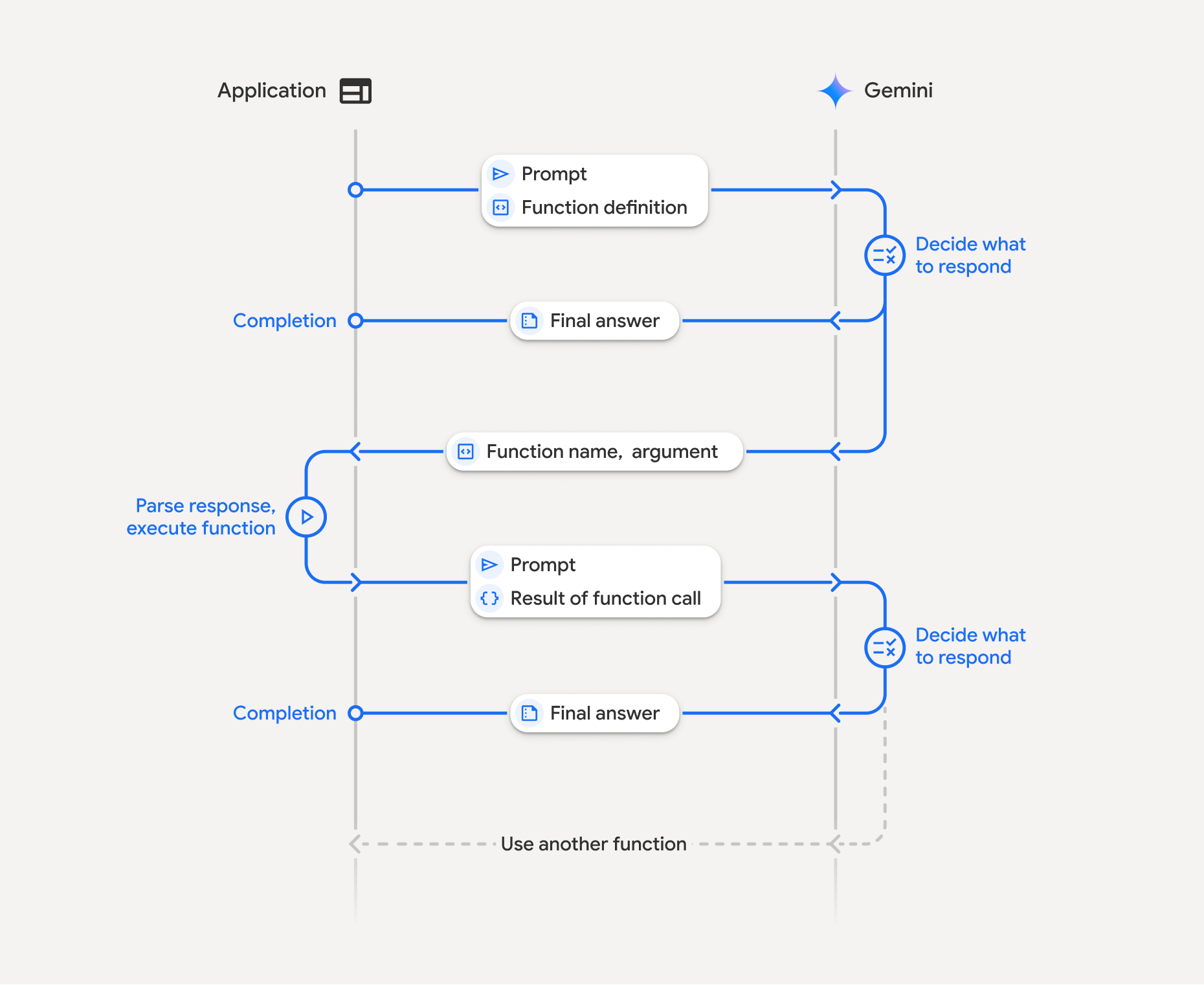
Funktionsaufrufe umfassen eine strukturierte Interaktion zwischen Ihrer Anwendung, dem Modell und externen Funktionen. So funktioniert es:
- Funktionsdeklaration definieren: Definieren Sie die Funktionsdeklaration in Ihrem Anwendungscode. Funktionsdeklarationen beschreiben dem Modell den Namen, die Parameter und den Zweck der Funktion.
- API mit Funktionsdeklarationen aufrufen: Senden Sie den Nutzer-Prompt zusammen mit den Funktionsdeklarationen an das Modell. Es analysiert die Anfrage und ermittelt, ob ein Funktionsaufruf hilfreich wäre. Wenn ja, antwortet sie mit einem strukturierten JSON-Objekt, das den Funktionsnamen, die Argumente und eine eindeutige
identhält. Dieseidwird jetzt immer von der API für Gemini 3-Modelle zurückgegeben*. - Funktionscode ausführen (Ihre Verantwortung): Das Modell führt die Funktion nicht selbst aus. Es liegt in der Verantwortung Ihrer Anwendung, die Antwort zu verarbeiten und nach einem Funktionsaufruf zu suchen. Wenn
- Ja: Extrahieren Sie den Namen, die Argumente und
idder Funktion und führen Sie die entsprechende Funktion in Ihrer Anwendung aus. - Nein:Das Modell hat eine direkte Textantwort auf den Prompt geliefert (dieser Ablauf wird im Beispiel weniger betont, ist aber ein mögliches Ergebnis).
- Ja: Extrahieren Sie den Namen, die Argumente und
- Nutzerfreundliche Antwort erstellen:Wenn eine Funktion ausgeführt wurde, erfassen Sie das Ergebnis und senden Sie es in einer nachfolgenden Runde der Unterhaltung zurück an das Modell. Achten Sie darauf, dass Sie das entsprechende
ideinfügen. Das Ergebnis wird verwendet, um eine endgültige, nutzerfreundliche Antwort zu generieren, die die Informationen aus dem Funktionsaufruf enthält.
Dieser Vorgang kann mehrmals wiederholt werden, was komplexe Interaktionen und Workflows ermöglicht. Das Modell unterstützt auch den Aufruf mehrerer Funktionen in einer einzelnen Runde (parallele Funktionsaufrufe), nacheinander (kompositionelle Funktionsaufrufe) und mit integrierten Gemini-Tools (Verwendung mehrerer Tools).
* Funktions-IDs immer zuordnen: Gemini 3 gibt jetzt bei jedem functionCall immer eine eindeutige id zurück. Fügen Sie diese genaue id in Ihre functionResponse ein, damit das Modell Ihr Ergebnis der ursprünglichen Anfrage genau zuordnen kann.
Schritt 1: Funktionsdeklaration definieren
Definieren Sie eine Funktion und ihre Deklaration in Ihrem Anwendungscode, mit der Nutzer Lichtwerte festlegen und eine API-Anfrage stellen können. Diese Funktion könnte externe Dienste oder APIs aufrufen.
Python
# Define a function that the model can call to control smart lights
set_light_values_declaration = {
    "name": "set_light_values",
    "description": "Sets the brightness and color temperature of a light.",
    "parameters": {
        "type": "object",
        "properties": {
            "brightness": {
                "type": "integer",
                "description": "Light level from 0 to 100. Zero is off and 100 is full brightness",
            },
            "color_temp": {
                "type": "string",
                "enum": ["daylight", "cool", "warm"],
                "description": "Color temperature of the light fixture, which can be `daylight`, `cool` or `warm`.",
            },
        },
        "required": ["brightness", "color_temp"],
    },
}

# This is the actual function that would be called based on the model's suggestion
def set_light_values(brightness: int, color_temp: str) -> dict[str, int | str]:
    """Set the brightness and color temperature of a room light. (mock API).

    Args:
        brightness: Light level from 0 to 100. Zero is off and 100 is full brightness
        color_temp: Color temperature of the light fixture, which can be `daylight`, `cool` or `warm`.

    Returns:
        A dictionary containing the set brightness and color temperature.
    """
    return {"brightness": brightness, "colorTemperature": color_temp}
JavaScript
import { Type } from '@google/genai';

// Define a function that the model can call to control smart lights
const setLightValuesFunctionDeclaration = {
  name: 'set_light_values',
  description: 'Sets the brightness and color temperature of a light.',
  parameters: {
    type: Type.OBJECT,
    properties: {
      brightness: {
        type: Type.NUMBER,
        description: 'Light level from 0 to 100. Zero is off and 100 is full brightness',
      },
      color_temp: {
        type: Type.STRING,
        enum: ['daylight', 'cool', 'warm'],
        description: 'Color temperature of the light fixture, which can be `daylight`, `cool` or `warm`.',
      },
    },
    required: ['brightness', 'color_temp'],
  },
};

/**

*   Set the brightness and color temperature of a room light. (mock API)
*   @param {number} brightness - Light level from 0 to 100. Zero is off and 100 is full brightness
*   @param {string} color_temp - Color temperature of the light fixture, which can be `daylight`, `cool` or `warm`.
*   @return {Object} A dictionary containing the set brightness and color temperature.
*/
function setLightValues(brightness, color_temp) {
  return {
    brightness: brightness,
    colorTemperature: color_temp
  };
}
Ok
package main

import "google.golang.org/genai"

// Define a function declaration that the model can call to control smart lights
var setLightValuesDeclaration = &genai.FunctionDeclaration{
    Name:        "set_light_values",
    Description: "Sets the brightness and color temperature of a light.",
    Parameters: &genai.Schema{
        Type: genai.TypeObject,
        Properties: map[string]*genai.Schema{
            "brightness": {
                Type:        genai.TypeInteger,
                Description: "Light level from 0 to 100. Zero is off and 100 is full brightness",
            },
            "color_temp": {
                Type:        genai.TypeString,
                Enum:        []string{"daylight", "cool", "warm"},
                Description: "Color temperature of the light fixture, which can be `daylight`, `cool` or `warm`.",
            },
        },
        Required: []string{"brightness", "color_temp"},
    },
}

// This is the actual function that would be called based on the model's suggestion
func setLightValues(brightness int, colorTemp string) map[string]any {
    return map[string]any{
        "brightness":       brightness,
        "colorTemperature": colorTemp,
    }
}
Schritt 2: Modell mit Funktionsdeklarationen aufrufen
Nachdem Sie Ihre Funktionsdeklarationen definiert haben, können Sie das Modell auffordern, sie zu verwenden. Es analysiert den Prompt und die Funktionsdeklarationen und entscheidet, ob es direkt antworten oder eine Funktion aufrufen soll. Wenn eine Funktion aufgerufen wird, enthält das Antwortobjekt einen Vorschlag für den Funktionsaufruf.
Python
from google.genai import types

# Configure the client and tools
client = genai.Client()
tools = types.Tool(function_declarations=[set_light_values_declaration])
config = types.GenerateContentConfig(tools=[tools])

# Define user prompt
contents = [
    types.Content(
        role="user", parts=[types.Part(text="Turn the lights down to a romantic level")]
    )
]

# Send request with function declarations
response = client.models.generate_content(
    model="gemini-3.8-flash",
    contents=contents,
    config=config,
)

print(response.candidates[0].content.parts[0].function_call)
JavaScript
import { GoogleGenAI } from '@google/genai';

// Generation config with function declaration
const config = {
  tools: [{
    functionDeclarations: [setLightValuesFunctionDeclaration]
  }]
};

// Configure the client
const ai = new GoogleGenAI({});

// Define user prompt
const contents = [
  {
    role: 'user',
    parts: [{ text: 'Turn the lights down to a romantic level' }]
  }
];

// Send request with function declarations
const response = await ai.models.generateContent({
  model: 'gemini-3.8-flash',
  contents: contents,
  config: config
});

console.log(response.functionCalls[0]);
Ok
ctx := context.Background()
client, err := genai.NewClient(ctx, nil)
if err != nil {
    log.Fatal(err)
}

// Generation config with function declaration
config := &genai.GenerateContentConfig{
    Tools: []*genai.Tool{
        {FunctionDeclarations: []*genai.FunctionDeclaration{setLightValuesDeclaration}},
    },
}

// Define user prompt
contents := []*genai.Content{
    genai.NewContentFromText("Turn the lights down to a romantic level", genai.RoleUser),
}

// Send request with function declarations
response, err := client.Models.GenerateContent(ctx, "gemini-3.8-flash", contents, config)
if err != nil {
    log.Fatal(err)
}

fmt.Println(response.FunctionCalls()[0])
Das Modell gibt dann ein functionCall-Objekt in einem OpenAPI-kompatiblen Schema zurück, das angibt, wie eine oder mehrere der deklarierten Funktionen aufgerufen werden sollen, um die Frage des Nutzers zu beantworten.
Python
id='8f2b1a3c' args={'color_temp': 'warm', 'brightness': 25} name='set_light_values'
JavaScript
{
  id: '8f2b1a3c',
  name: 'set_light_values',
  args: { brightness: 25, color_temp: 'warm' }
}
Ok
&{ID:8f2b1a3c Args:map[brightness:25 color_temp:warm] Name:set_light_values}
Schritt 3: Funktionscode „set_light_values“ ausführen
Extrahieren Sie die Details des Funktionsaufrufs aus der Antwort des Modells, parsen Sie die Argumente und führen Sie die Funktion set_light_values aus.
Python
# Extract tool call details, it may not be in the first part.
tool_call = response.candidates[0].content.parts[0].function_call

if tool_call.name == "set_light_values":
    result = set_light_values(**tool_call.args)
    print(f"Function execution result: {result}")
JavaScript
// Extract tool call details
const tool_call = response.functionCalls[0]

let result;
if (tool_call.name === 'set_light_values') {
  result = setLightValues(tool_call.args.brightness, tool_call.args.color_temp);
  console.log(`Function execution result: ${JSON.stringify(result)}`);
}
Ok
// Extract tool call details
toolCall := response.FunctionCalls()[0]

var result map[string]any
if toolCall.Name == "set_light_values" {
    brightness := int(toolCall.Args["brightness"].(float64))
    colorTemp := toolCall.Args["color_temp"].(string)
    result = setLightValues(brightness, colorTemp)
    fmt.Printf("Function execution result: %v\n", result)
}
Schritt 4: Nutzerfreundliche Antwort mit Funktionsergebnis erstellen und das Modell noch einmal aufrufen
Senden Sie das Ergebnis der Funktionsausführung schließlich zurück an das Modell, damit es diese Informationen in seine endgültige Antwort an den Nutzer einbeziehen kann.
Python
from google import genai
from google.genai import types

# Create a function response part
function_response_part = types.Part.from_function_response(
    name=tool_call.name,
    response={"result": result},
    id=tool_call.id,
)

# Append function call and result of the function execution to contents
contents.append(response.candidates[0].content) # Append the content from the model's response.
contents.append(types.Content(role="user", parts=[function_response_part])) # Append the function response

client = genai.Client()
final_response = client.models.generate_content(
    model="gemini-3.8-flash",
    config=config,
    contents=contents,
)

print(final_response.text)
JavaScript
// Create a function response part
const function_response_part = {
  name: tool_call.name,
  response: { result },
  id: tool_call.id
}

// Append function call and result of the function execution to contents
contents.push(response.candidates[0].content);
contents.push({ role: 'user', parts: [{ functionResponse: function_response_part }] });

// Get the final response from the model
const final_response = await ai.models.generateContent({
  model: 'gemini-3.8-flash',
  contents: contents,
  config: config
});

console.log(final_response.text);
Ok
// Create a function response part
functionResponsePart := &genai.Part{
    FunctionResponse: &genai.FunctionResponse{
        ID:       toolCall.ID,
        Name:     toolCall.Name,
        Response: result,
    },
}

// Append function call and result of the function execution to contents
contents = append(contents, response.Candidates[0].Content)
contents = append(contents, &genai.Content{
    Role:  genai.RoleUser,
    Parts: []*genai.Part{functionResponsePart},
})

// Get the final response from the model
finalResponse, err := client.Models.GenerateContent(ctx, "gemini-3.8-flash", contents, config)
if err != nil {
    log.Fatal(err)
}

fmt.Println(finalResponse.Text())
Damit ist der Ablauf für Funktionsaufrufe abgeschlossen. Das Modell hat die Funktion set_light_values erfolgreich verwendet, um die angeforderte Aktion des Nutzers auszuführen.
Funktionsdeklarationen
Wenn Sie Funktionsaufrufe in einem Prompt implementieren, erstellen Sie ein tools-Objekt, das ein oder mehrere function declarations enthält. Sie definieren Funktionen mit JSON, genauer gesagt mit einer ausgewählten Teilmenge des OpenAPI-Schemaformats. Eine einzelne Funktionsdeklaration kann die folgenden Parameter enthalten:
name(String): Ein eindeutiger Name für die Funktion (get_weather_forecast,send_email). Verwenden Sie beschreibende Namen ohne Leerzeichen oder Sonderzeichen (verwenden Sie Unterstriche oder camelCase).description(string): Eine klare und detaillierte Beschreibung des Zwecks und der Funktionen der Funktion. Das ist wichtig, damit das Modell weiß, wann es die Funktion verwenden soll. Seien Sie konkret und geben Sie gegebenenfalls Beispiele an („Findet Kinos basierend auf dem Standort und optional dem Titel eines Films, der gerade im Kino läuft“).parameters(Objekt): Definiert die Eingabeparameter, die die Funktion erwartet.type(String): Gibt den allgemeinen Datentyp an, z. B.object.properties(Objekt): Listet einzelne Parameter auf, jeweils mit:type(String): Der Datentyp des Parameters, z. B.string,integer,boolean, array.description(String): Eine Beschreibung des Zwecks und des Formats des Parameters. Geben Sie Beispiele und Einschränkungen an („Die Stadt und der Bundesstaat, z. B. ‚San Francisco, CA‘, oder eine Postleitzahl, z. B. ‚95616‘“).enum(Array, optional): Wenn die Parameterwerte aus einem festen Satz stammen, verwenden Sie „enum“, um die zulässigen Werte aufzulisten, anstatt sie nur in der Beschreibung zu beschreiben. Das verbessert die Genauigkeit ("enum": ["daylight", "cool", "warm"]).
required(Array): Ein Array von Strings, die die Parameternamen auflisten, die für die Funktion erforderlich sind.
Sie können FunctionDeclarations auch direkt mit types.FunctionDeclaration.from_callable(client=client, callable=your_function) aus Python-Funktionen erstellen.
Funktionsaufrufe mit Thinking-Modellen
Die Modelle der Gemini 3- und 2.5-Serie verwenden einen internen Denkprozess, um Anfragen zu bearbeiten. Dadurch wird die Leistung von Funktionsaufrufen erheblich verbessert, sodass das Modell besser bestimmen kann, wann eine Funktion aufgerufen werden soll und welche Parameter verwendet werden sollen. Da die Gemini API zustandslos ist, verwenden Modelle Gedankensignaturen, um den Kontext über mehrere Konversationsrunden hinweg beizubehalten.
In diesem Abschnitt wird die erweiterte Verwaltung von Gedankensignaturen behandelt. Er ist nur erforderlich, wenn Sie API-Anfragen manuell erstellen (z. B. über REST) oder den Unterhaltungsverlauf bearbeiten.
Wenn Sie die Google GenAI SDKs (unsere offiziellen Bibliotheken) verwenden, müssen Sie diesen Prozess nicht verwalten. Die SDKs führen die erforderlichen Schritte automatisch aus, wie im Beispiel oben gezeigt.
Unterhaltungsverlauf manuell verwalten
Wenn Sie den Unterhaltungsverlauf manuell ändern, müssen Sie anstelle der vollständigen vorherigen Antwort die thought_signature, die im Zug des Modells enthalten ist, korrekt verarbeiten.
Beachten Sie die folgenden Regeln, damit der Kontext des Modells erhalten bleibt:
- Senden Sie die
thought_signatureimmer im Original-Partan das Modell zurück. - Geben Sie in der
function_responseimmer die genaueidaus derfunction_callan, damit die API das Ergebnis der richtigen Anfrage zuordnen kann. - Führen Sie keine
Partmit einer Signatur mit einer ohne Signatur zusammen. Dadurch wird der Positionskontext des Gedankens unterbrochen. - Kombinieren Sie nicht zwei
Parts, die beide Signaturen enthalten, da die Signaturstrings nicht zusammengeführt werden können.
Gemini 3-Gedankensignaturen
In Gemini 3 kann jede Part einer Modellantwort eine Thought Signature enthalten.
Wir empfehlen zwar, Signaturen für alle Part-Typen zurückzugeben, aber für den Funktionsaufruf ist es obligatorisch, Thought-Signaturen zurückzugeben. Sofern Sie den Unterhaltungsverlauf nicht manuell bearbeiten, werden Gedanken-Signaturen automatisch vom Google GenAI SDK verarbeitet.
Wenn Sie den Unterhaltungsverlauf manuell bearbeiten, finden Sie auf der Seite Gedankensignaturen eine vollständige Anleitung und Details zum Umgang mit Gedankensignaturen für Gemini 3.
Gedankensignaturen prüfen
Die Antwort ist für die Implementierung nicht erforderlich, aber Sie können sie zu Debugging- oder Schulungszwecken prüfen, um die thought_signature zu sehen.
Python
import base64
# After receiving a response from a model with thinking enabled
# response = client.models.generate_content(...)

# The signature is attached to the response part containing the function call
part = response.candidates[0].content.parts[0]
if part.thought_signature:
  print(base64.b64encode(part.thought_signature).decode("utf-8"))
JavaScript
// After receiving a response from a model with thinking enabled
// const response = await ai.models.generateContent(...)

// The signature is attached to the response part containing the function call
const part = response.candidates[0].content.parts[0];
if (part.thoughtSignature) {
  console.log(part.thoughtSignature);
}
Ok
// After receiving a response from a model with thinking enabled
// response, err := client.Models.GenerateContent(...)

// The signature is attached to the response part containing the function call
part := response.Candidates[0].Content.Parts[0]
if len(part.ThoughtSignature) > 0 {
    fmt.Println(string(part.ThoughtSignature))
}
Weitere Informationen zu den Einschränkungen und zur Verwendung von Denksignaturen sowie zu Denkmodellen im Allgemeinen finden Sie auf der Seite Denken.
Parallele Funktionsaufrufe
Zusätzlich zu Funktionsaufrufen mit einer einzelnen Runde können Sie auch mehrere Funktionen gleichzeitig aufrufen. Mit parallelen Funktionsaufrufen können Sie mehrere Funktionen gleichzeitig ausführen. Das ist sinnvoll, wenn die Funktionen nicht voneinander abhängig sind. Das ist nützlich, wenn Sie Daten aus mehreren unabhängigen Quellen erfassen, z. B. Kundendetails aus verschiedenen Datenbanken abrufen, Lagerbestände in verschiedenen Lagern prüfen oder mehrere Aktionen ausführen, z. B. Ihre Wohnung in eine Disco verwandeln.
Wenn das Modell mehrere Funktionsaufrufe in einer einzelnen Runde initiiert, müssen Sie die function_result-Objekte nicht in derselben Reihenfolge zurückgeben, in der die function_call-Objekte empfangen wurden. Die Gemini API ordnet jedes Ergebnis mithilfe des id aus der Ausgabe des Modells dem entsprechenden Aufruf zu. So können Sie Ihre Funktionen asynchron ausführen und die Ergebnisse nach Abschluss an Ihre Liste anhängen.
Python
power_disco_ball = {
    "name": "power_disco_ball",
    "description": "Powers the spinning disco ball.",
    "parameters": {
        "type": "object",
        "properties": {
            "power": {
                "type": "boolean",
                "description": "Whether to turn the disco ball on or off.",
            }
        },
        "required": ["power"],
    },
}

start_music = {
    "name": "start_music",
    "description": "Play some music matching the specified parameters.",
    "parameters": {
        "type": "object",
        "properties": {
            "energetic": {
                "type": "boolean",
                "description": "Whether the music is energetic or not.",
            },
            "loud": {
                "type": "boolean",
                "description": "Whether the music is loud or not.",
            },
        },
        "required": ["energetic", "loud"],
    },
}

dim_lights = {
    "name": "dim_lights",
    "description": "Dim the lights.",
    "parameters": {
        "type": "object",
        "properties": {
            "brightness": {
                "type": "number",
                "description": "The brightness of the lights, 0.0 is off, 1.0 is full.",
            }
        },
        "required": ["brightness"],
    },
}
JavaScript
import { Type } from '@google/genai';

const powerDiscoBall = {
  name: 'power_disco_ball',
  description: 'Powers the spinning disco ball.',
  parameters: {
    type: Type.OBJECT,
    properties: {
      power: {
        type: Type.BOOLEAN,
        description: 'Whether to turn the disco ball on or off.'
      }
    },
    required: ['power']
  }
};

const startMusic = {
  name: 'start_music',
  description: 'Play some music matching the specified parameters.',
  parameters: {
    type: Type.OBJECT,
    properties: {
      energetic: {
        type: Type.BOOLEAN,
        description: 'Whether the music is energetic or not.'
      },
      loud: {
        type: Type.BOOLEAN,
        description: 'Whether the music is loud or not.'
      }
    },
    required: ['energetic', 'loud']
  }
};

const dimLights = {
  name: 'dim_lights',
  description: 'Dim the lights.',
  parameters: {
    type: Type.OBJECT,
    properties: {
      brightness: {
        type: Type.NUMBER,
        description: 'The brightness of the lights, 0.0 is off, 1.0 is full.'
      }
    },
    required: ['brightness']
  }
};
Ok
package main

import "google.golang.org/genai"

var powerDiscoBall = &genai.FunctionDeclaration{
    Name:        "power_disco_ball",
    Description: "Powers the spinning disco ball.",
    Parameters: &genai.Schema{
        Type: genai.TypeObject,
        Properties: map[string]*genai.Schema{
            "power": {
                Type:        genai.TypeBoolean,
                Description: "Whether to turn the disco ball on or off.",
            },
        },
        Required: []string{"power"},
    },
}

var startMusic = &genai.FunctionDeclaration{
    Name:        "start_music",
    Description: "Play some music matching the specified parameters.",
    Parameters: &genai.Schema{
        Type: genai.TypeObject,
        Properties: map[string]*genai.Schema{
            "energetic": {
                Type:        genai.TypeBoolean,
                Description: "Whether the music is energetic or not.",
            },
            "loud": {
                Type:        genai.TypeBoolean,
                Description: "Whether the music is loud or not.",
            },
        },
        Required: []string{"energetic", "loud"},
    },
}

var dimLights = &genai.FunctionDeclaration{
    Name:        "dim_lights",
    Description: "Dim the lights.",
    Parameters: &genai.Schema{
        Type: genai.TypeObject,
        Properties: map[string]*genai.Schema{
            "brightness": {
                Type:        genai.TypeNumber,
                Description: "The brightness of the lights, 0.0 is off, 1.0 is full.",
            },
        },
        Required: []string{"brightness"},
    },
}
Konfigurieren Sie den Funktionsaufrufmodus so, dass alle angegebenen Tools verwendet werden können. Weitere Informationen zum Konfigurieren von Funktionsaufrufen
Python
from google import genai
from google.genai import types

# Configure the client and tools
client = genai.Client()
house_tools = [
    types.Tool(function_declarations=[power_disco_ball, start_music, dim_lights])
]
config = types.GenerateContentConfig(
    tools=house_tools,
    automatic_function_calling=types.AutomaticFunctionCallingConfig(
        disable=True
    ),
    # Force the model to call 'any' function, instead of chatting.
    tool_config=types.ToolConfig(
        function_calling_config=types.FunctionCallingConfig(mode='ANY')
    ),
)

chat = client.chats.create(model="gemini-3.8-flash", config=config)
response = chat.send_message("Turn this place into a party!")

# Print out each of the function calls requested from this single call
print("Example 1: Forced function calling")
for fn in response.function_calls:
    args = ", ".join(f"{key}={val}" for key, val in fn.args.items())
    print(f"{fn.name}({args}) - ID: {fn.id}")
JavaScript
import { GoogleGenAI } from '@google/genai';

// Set up function declarations
const houseFns = [powerDiscoBall, startMusic, dimLights];

const config = {
    tools: [{
        functionDeclarations: houseFns
    }],
    // Force the model to call 'any' function, instead of chatting.
    toolConfig: {
        functionCallingConfig: {
            mode: 'any'
        }
    }
};

// Configure the client
const ai = new GoogleGenAI({});

// Create a chat session
const chat = ai.chats.create({
    model: 'gemini-3.8-flash',
    config: config
});
const response = await chat.sendMessage({message: 'Turn this place into a party!'});

// Print out each of the function calls requested from this single call
console.log("Example 1: Forced function calling");
for (const fn of response.functionCalls) {
    const args = Object.entries(fn.args)
        .map(([key, val]) => `${key}=${val}`)
        .join(', ');
    console.log(`${fn.name}(${args}) - ID: ${fn.id}`);
}
Ok
ctx := context.Background()
client, err := genai.NewClient(ctx, nil)
if err != nil {
    log.Fatal(err)
}

houseTools := []*genai.Tool{
    {FunctionDeclarations: []*genai.FunctionDeclaration{powerDiscoBall, startMusic, dimLights}},
}

config := &genai.GenerateContentConfig{
    Tools: houseTools,
    // Force the model to call 'any' function, instead of chatting.
    ToolConfig: &genai.ToolConfig{
        FunctionCallingConfig: &genai.FunctionCallingConfig{
            Mode: genai.FunctionCallingConfigModeAny,
        },
    },
}

response, err := client.Models.GenerateContent(
    ctx,
    "gemini-3.8-flash",
    genai.Text("Turn this place into a party!"),
    config,
)
if err != nil {
    log.Fatal(err)
}

// Print out each of the function calls requested from this single call
fmt.Println("Example 1: Forced function calling")
for _, fn := range response.FunctionCalls() {
    fmt.Printf("%s(%v) - ID: %s\n", fn.Name, fn.Args, fn.ID)
}
Jedes der ausgegebenen Ergebnisse entspricht einem einzelnen Funktionsaufruf, den das Modell angefordert hat. Wenn Sie die Ergebnisse zurücksenden, müssen die Antworten in derselben Reihenfolge wie die Anfragen enthalten sein.
Das Python SDK unterstützt den automatischen Funktionsaufruf, der Python-Funktionen automatisch in Deklarationen umwandelt und die Ausführung des Funktionsaufrufs und den Antwortzyklus für Sie übernimmt. Im Folgenden finden Sie ein Beispiel für den Anwendungsfall „Disco“.
Python
from google import genai
from google.genai import types

# Actual function implementations
def power_disco_ball_impl(power: bool) -> dict:
    """Powers the spinning disco ball.

    Args:
        power: Whether to turn the disco ball on or off.

    Returns:
        A status dictionary indicating the current state.
    """
    return {"status": f"Disco ball powered {'on' if power else 'off'}"}

def start_music_impl(energetic: bool, loud: bool) -> dict:
    """Play some music matching the specified parameters.

    Args:
        energetic: Whether the music is energetic or not.
        loud: Whether the music is loud or not.

    Returns:
        A dictionary containing the music settings.
    """
    music_type = "energetic" if energetic else "chill"
    volume = "loud" if loud else "quiet"
    return {"music_type": music_type, "volume": volume}

def dim_lights_impl(brightness: float) -> dict:
    """Dim the lights.

    Args:
        brightness: The brightness of the lights, 0.0 is off, 1.0 is full.

    Returns:
        A dictionary containing the new brightness setting.
    """
    return {"brightness": brightness}

# Configure the client
client = genai.Client()
config = types.GenerateContentConfig(
    tools=[power_disco_ball_impl, start_music_impl, dim_lights_impl]
)

# Make the request
response = client.models.generate_content(
    model="gemini-3.8-flash",
    contents="Do everything you need to this place into party!",
    config=config,
)

print("\nExample 2: Automatic function calling")
print(response.text)
# I've turned on the disco ball, started playing loud and energetic music, and dimmed the lights to 50% brightness. Let's get this party started!
Zusammengesetzte Funktionsaufrufe
Durch die Komposition oder die sequenzielle Ausführung von Funktionsaufrufen kann Gemini mehrere Funktionsaufrufe verketten, um eine komplexe Anfrage zu bearbeiten. Um beispielsweise die Frage „Wie ist die Temperatur an meinem aktuellen Standort?“ zu beantworten, ruft die Gemini API möglicherweise zuerst eine get_current_location()-Funktion und dann eine get_weather()-Funktion auf, die den Standort als Parameter verwendet.
Im folgenden Beispiel wird gezeigt, wie Sie zusammengesetzte Funktionsaufrufe mit dem Python SDK und automatischen Funktionsaufrufen implementieren.
Python
In diesem Beispiel wird das automatische Funktionsaufruffeature des google-genai Python SDK verwendet. Das SDK konvertiert die Python-Funktionen automatisch in das erforderliche Schema, führt die Funktionsaufrufe aus, wenn das Modell dies anfordert, und sendet die Ergebnisse zurück an das Modell, um die Aufgabe abzuschließen.
import os
from google import genai
from google.genai import types

# Example Functions
def get_weather_forecast(location: str) -> dict:
    """Gets the current weather temperature for a given location."""
    print(f"Tool Call: get_weather_forecast(location={location})")
    # TODO: Make API call
    print("Tool Response: {'temperature': 25, 'unit': 'celsius'}")
    return {"temperature": 25, "unit": "celsius"}  # Dummy response

def set_thermostat_temperature(temperature: int) -> dict:
    """Sets the thermostat to a desired temperature."""
    print(f"Tool Call: set_thermostat_temperature(temperature={temperature})")
    # TODO: Interact with a thermostat API
    print("Tool Response: {'status': 'success'}")
    return {"status": "success"}

# Configure the client and model
client = genai.Client()
config = types.GenerateContentConfig(
    tools=[get_weather_forecast, set_thermostat_temperature]
)

# Make the request
response = client.models.generate_content(
    model="gemini-3.8-flash",
    contents="If it's warmer than 20°C in London, set the thermostat to 20°C, otherwise set it to 18°C.",
    config=config,
)

# Print the final, user-facing response
print(response.text)
Erwartete Ausgabe
Wenn Sie den Code ausführen, sehen Sie, wie das SDK die Funktionsaufrufe orchestriert. Das Modell ruft zuerst get_weather_forecast auf, empfängt die Temperatur und ruft dann set_thermostat_temperature mit dem richtigen Wert auf, der auf der Logik im Prompt basiert.
Tool Call: get_weather_forecast(location=London)
Tool Response: {'temperature': 25, 'unit': 'celsius'}
Tool Call: set_thermostat_temperature(temperature=20)
Tool Response: {'status': 'success'}
OK. I've set the thermostat to 20°C.
JavaScript
In diesem Beispiel wird gezeigt, wie Sie mit dem JavaScript/TypeScript SDK Funktionsaufrufe mit einer manuellen Ausführungsschleife durchführen.
import { GoogleGenAI, Type } from "@google/genai";

// Configure the client
const ai = new GoogleGenAI({});

// Example Functions
function get_weather_forecast({ location }) {
  console.log(`Tool Call: get_weather_forecast(location=${location})`);
  // TODO: Make API call
  console.log("Tool Response: {'temperature': 25, 'unit': 'celsius'}");
  return { temperature: 25, unit: "celsius" };
}

function set_thermostat_temperature({ temperature }) {
  console.log(
    `Tool Call: set_thermostat_temperature(temperature=${temperature})`,
  );
  // TODO: Make API call
  console.log("Tool Response: {'status': 'success'}");
  return { status: "success" };
}

const toolFunctions = {
  get_weather_forecast,
  set_thermostat_temperature,
};

const tools = [
  {
    functionDeclarations: [
      {
        name: "get_weather_forecast",
        description:
          "Gets the current weather temperature for a given location.",
        parameters: {
          type: Type.OBJECT,
          properties: {
            location: {
              type: Type.STRING,
            },
          },
          required: ["location"],
        },
      },
      {
        name: "set_thermostat_temperature",
        description: "Sets the thermostat to a desired temperature.",
        parameters: {
          type: Type.OBJECT,
          properties: {
            temperature: {
              type: Type.NUMBER,
            },
          },
          required: ["temperature"],
        },
      },
    ],
  },
];

// Prompt for the model
let contents = [
  {
    role: "user",
    parts: [
      {
        text: "If it's warmer than 20°C in London, set the thermostat to 20°C, otherwise set it to 18°C.",
      },
    ],
  },
];

// Loop until the model has no more function calls to make
while (true) {
  const result = await ai.models.generateContent({
    model: "gemini-3.8-flash",
    contents,
    config: { tools },
  });

  if (result.functionCalls && result.functionCalls.length > 0) {
    const functionCall = result.functionCalls[0];

    const { name, args } = functionCall;

    if (!toolFunctions[name]) {
      throw new Error(`Unknown function call: ${name}`);
    }

    // Call the function and get the response.
    const toolResponse = toolFunctions[name](args);

    const functionResponsePart = {
      name: functionCall.name,
      response: {
        result: toolResponse,
      },
      id: functionCall.id,
    };

    // Send the function response back to the model.
    contents.push({
      role: "model",
      parts: [
        {
          functionCall: functionCall,
        },
      ],
    });
    contents.push({
      role: "user",
      parts: [
        {
          functionResponse: functionResponsePart,
        },
      ],
    });
  } else {
    // No more function calls, break the loop.
    console.log(result.text);
    break;
  }
}
Erwartete Ausgabe
Wenn Sie den Code ausführen, sehen Sie, wie das SDK die Funktionsaufrufe orchestriert. Das Modell ruft zuerst get_weather_forecast auf, empfängt die Temperatur und ruft dann set_thermostat_temperature mit dem richtigen Wert auf, basierend auf der Logik im Prompt.
Tool Call: get_weather_forecast(location=London)
Tool Response: {'temperature': 25, 'unit': 'celsius'}
Tool Call: set_thermostat_temperature(temperature=20)
Tool Response: {'status': 'success'}
OK. It's 25°C in London, so I've set the thermostat to 20°C.
Ok
In diesem Beispiel wird gezeigt, wie Sie mit dem Go SDK Funktionsaufrufe mit einer manuellen Ausführungsschleife erstellen.
package main

import (
    "context"
    "fmt"
    "log"

    "google.golang.org/genai"
)

func getWeatherForecast(location string) map[string]any {
    fmt.Printf("Tool Call: get_weather_forecast(location=%s)\n", location)
    fmt.Println("Tool Response: map[temperature:25 unit:celsius]")
    return map[string]any{"temperature": 25, "unit": "celsius"}
}

func setThermostatTemperature(temperature float64) map[string]any {
    fmt.Printf("Tool Call: set_thermostat_temperature(temperature=%v)\n", temperature)
    fmt.Println("Tool Response: map[status:success]")
    return map[string]any{"status": "success"}
}

func main() {
    ctx := context.Background()
    client, err := genai.NewClient(ctx, nil)
    if err != nil {
        log.Fatal(err)
    }

    tools := []*genai.Tool{
        {
            FunctionDeclarations: []*genai.FunctionDeclaration{
                {
                    Name:        "get_weather_forecast",
                    Description: "Gets the current weather temperature for a given location.",
                    Parameters: &genai.Schema{
                        Type: genai.TypeObject,
                        Properties: map[string]*genai.Schema{
                            "location": {Type: genai.TypeString},
                        },
                        Required: []string{"location"},
                    },
                },
                {
                    Name:        "set_thermostat_temperature",
                    Description: "Sets the thermostat to a desired temperature.",
                    Parameters: &genai.Schema{
                        Type: genai.TypeObject,
                        Properties: map[string]*genai.Schema{
                            "temperature": {Type: genai.TypeNumber},
                        },
                        Required: []string{"temperature"},
                    },
                },
            },
        },
    }

    config := &genai.GenerateContentConfig{Tools: tools}

    contents := []*genai.Content{
        genai.NewContentFromText("If it's warmer than 20°C in London, set the thermostat to 20°C, otherwise set it to 18°C.", genai.RoleUser),
    }

    for {
        result, err := client.Models.GenerateContent(ctx, "gemini-3.8-flash", contents, config)
        if err != nil {
            log.Fatal(err)
        }

        if len(result.FunctionCalls()) > 0 {
            functionCall := result.FunctionCalls()[0]
            var toolResponse map[string]any

            switch functionCall.Name {
            case "get_weather_forecast":
                location := functionCall.Args["location"].(string)
                toolResponse = getWeatherForecast(location)
            case "set_thermostat_temperature":
                temperature := functionCall.Args["temperature"].(float64)
                toolResponse = setThermostatTemperature(temperature)
            default:
                log.Fatalf("Unknown function call: %s", functionCall.Name)
            }

            contents = append(contents, result.Candidates[0].Content)
            contents = append(contents, &genai.Content{
                Role: genai.RoleUser,
                Parts: []*genai.Part{
                    {
                        FunctionResponse: &genai.FunctionResponse{
                            ID:       functionCall.ID,
                            Name:     functionCall.Name,
                            Response: toolResponse,
                        },
                    },
                },
            })
        } else {
            fmt.Println(result.Text())
            break
        }
    }
}
Erwartete Ausgabe
Tool Call: get_weather_forecast(location=London)
Tool Response: map[temperature:25 unit:celsius]
Tool Call: set_thermostat_temperature(temperature=20)
Tool Response: map[status:success]
OK. It's 25°C in London, so I've set the thermostat to 20°C.
Zusammengesetzte Funktionsaufrufe sind eine native Live API-Funktion. Das bedeutet, dass die Live API den Funktionsaufruf ähnlich wie das Python SDK verarbeiten kann.
Python
# Light control schemas
turn_on_the_lights_schema = {'name': 'turn_on_the_lights'}
turn_off_the_lights_schema = {'name': 'turn_off_the_lights'}

prompt = """
  Hey, can you write run some python code to turn on the lights, wait 10s and then turn off the lights?
  """

tools = [
    {'code_execution': {}},
    {'function_declarations': [turn_on_the_lights_schema, turn_off_the_lights_schema]}
]

await run(prompt, tools=tools, modality="AUDIO")
JavaScript
// Light control schemas
const turnOnTheLightsSchema = { name: 'turn_on_the_lights' };
const turnOffTheLightsSchema = { name: 'turn_off_the_lights' };

const prompt = `
  Hey, can you write run some python code to turn on the lights, wait 10s and then turn off the lights?
`;

const tools = [
  { codeExecution: {} },
  { functionDeclarations: [turnOnTheLightsSchema, turnOffTheLightsSchema] }
];

await run(prompt, tools=tools, modality="AUDIO")
Modi für Funktionsaufrufe
Mit der Gemini API können Sie steuern, wie das Modell die bereitgestellten Tools (Funktionsdeklarationen) verwendet. Konkret können Sie den Modus in der function_calling_config festlegen.
VALIDATED: Standardmodus für die Toolkombination (wenn integrierte Tools oder strukturierte Ausgaben ebenfalls aktiviert sind). Das Modell ist darauf beschränkt, entweder Funktionsaufrufe oder natürliche Sprache vorherzusagen, und sorgt dafür, dass das Funktionsschema eingehalten wird. Wennallowed_function_namesnicht angegeben ist, wählt das Modell aus allen verfügbaren Funktionsdeklarationen aus. Wennallowed_function_namesangegeben ist, wählt das Modell aus der Gruppe der zulässigen Funktionen aus. In diesem Modus werden fehlerhafte Funktionsaufrufe im Vergleich zum ModusAUTOreduziert.AUTO: Standardmodus, wenn nur das Tool „function_declarations“ aktiviert ist. Das Modell entscheidet anhand des Prompts und des Kontexts, ob eine Antwort in natürlicher Sprache generiert oder ein Funktionsaufruf vorgeschlagen werden soll.ANY: Das Modell ist darauf beschränkt, immer einen Funktionsaufruf vorherzusagen, und sorgt für die Einhaltung des Funktionsschemas. Wennallowed_function_namesnicht angegeben ist, kann das Modell eine beliebige der bereitgestellten Funktionsdeklarationen auswählen. Wennallowed_function_namesals Liste angegeben wird, kann das Modell nur aus den Funktionen in dieser Liste auswählen. Verwenden Sie diesen Modus, wenn Sie für jeden Prompt eine Funktionsaufrufantwort benötigen (falls zutreffend).NONE: Das Modell darf keine Funktionsaufrufe ausführen. Das entspricht dem Senden einer Anfrage ohne Funktionsdeklarationen. Damit können Sie Funktionsaufrufe vorübergehend deaktivieren, ohne Ihre Tool-Definitionen zu entfernen.
Python
from google.genai import types

# Configure function calling mode
tool_config = types.ToolConfig(
    function_calling_config=types.FunctionCallingConfig(
        mode="ANY", allowed_function_names=["get_current_temperature"]
    )
)

# Create the generation config
config = types.GenerateContentConfig(
    tools=[tools],  # not defined here.
    tool_config=tool_config,
)
JavaScript
import { FunctionCallingConfigMode } from '@google/genai';

// Configure function calling mode
const toolConfig = {
  functionCallingConfig: {
    mode: FunctionCallingConfigMode.ANY,
    allowedFunctionNames: ['get_current_temperature']
  }
};

// Create the generation config
const config = {
  tools: tools, // not defined here.
  toolConfig: toolConfig,
};
Ok
// Configure function calling mode
toolConfig := &genai.ToolConfig{
    FunctionCallingConfig: &genai.FunctionCallingConfig{
        Mode:                 genai.FunctionCallingConfigModeAny,
        AllowedFunctionNames: []string{"get_current_temperature"},
    },
}

// Create the generation config
config := &genai.GenerateContentConfig{
    Tools:      tools, // not defined here.
    ToolConfig: toolConfig,
}
Automatischer Funktionsaufruf (nur Python)
Wenn Sie das Python SDK verwenden, können Sie Python-Funktionen direkt als Tools bereitstellen. Das SDK wandelt diese Funktionen in Deklarationen um, verwaltet die Ausführung des Funktionsaufrufs und übernimmt den Antwortzyklus für Sie. Definieren Sie Ihre Funktion mit Type Hints und einem Docstring. Für optimale Ergebnisse wird empfohlen, Docstrings im Google-Stil zu verwenden. Das SDK führt dann automatisch Folgendes aus:
- Antworten auf Funktionsaufrufe vom Modell erkennen.
- Rufen Sie die entsprechende Python-Funktion in Ihrem Code auf.
- Senden Sie die Antwort der Funktion an das Modell zurück.
- Gibt die endgültige Textantwort des Modells zurück.
Das SDK parst derzeit keine Argumentbeschreibungen in die Property-Beschreibungsfelder der generierten Funktionsdeklaration. Stattdessen wird der gesamte Docstring als Funktionsbeschreibung auf oberster Ebene gesendet.
Python
from google import genai
from google.genai import types

# Define the function with type hints and docstring
def get_current_temperature(location: str) -> dict:
    """Gets the current temperature for a given location.

    Args:
        location: The city and state, e.g. San Francisco, CA

    Returns:
        A dictionary containing the temperature and unit.
    """
    # ... (implementation) ...
    return {"temperature": 25, "unit": "Celsius"}

# Configure the client
client = genai.Client()
config = types.GenerateContentConfig(
    tools=[get_current_temperature]
)  # Pass the function itself

# Make the request
response = client.models.generate_content(
    model="gemini-3.8-flash",
    contents="What's the temperature in Boston?",
    config=config,
)

print(response.text)  # The SDK handles the function call and returns the final text
So deaktivieren Sie den automatischen Funktionsaufruf:
Python
config = types.GenerateContentConfig(
    tools=[get_current_temperature],
    automatic_function_calling=types.AutomaticFunctionCallingConfig(disable=True)
)
Automatische Deklaration von Funktionsschemas
Die API kann die folgenden Typen beschreiben. Pydantic-Typen sind zulässig, solange die darin definierten Felder ebenfalls aus zulässigen Typen bestehen. Dict-Typen (wie dict[str: int]) werden hier nicht gut unterstützt. Verwenden Sie sie nicht.
Python
AllowedType = (
  int | float | bool | str | list['AllowedType'] | pydantic.BaseModel)
Wenn Sie sehen möchten, wie das abgeleitete Schema aussieht, können Sie es mit from_callable konvertieren:
Python
from google import genai
from google.genai import types

def multiply(a: float, b: float):
    """Returns a * b."""
    return a * b

client = genai.Client()
fn_decl = types.FunctionDeclaration.from_callable(callable=multiply, client=client)

# to_json_dict() provides a clean JSON representation.
print(fn_decl.to_json_dict())
Nutzung mehrerer Tools: Integrierte Tools mit Funktionsaufrufen kombinieren
Sie können mehrere Tools aktivieren und integrierte Tools mit Funktionsaufrufen in derselben Anfrage kombinieren.
Gemini 3-Modelle können dank der Tool-Kontext-Zirkulation integrierte Tools sofort mit Funktionsaufrufen kombinieren. Weitere Informationen finden Sie auf der Seite Integrierte Tools und Funktionsaufrufe kombinieren.
Python
from google import genai
from google.genai import types

client = genai.Client()

getWeather = {
    "name": "getWeather",
    "description": "Gets the weather for a requested city.",
    "parameters": {
        "type": "object",
        "properties": {
            "city": {
                "type": "string",
                "description": "The city and state, e.g. Utqiaġvik, Alaska",
            },
        },
        "required": ["city"],
    },
}

response = client.models.generate_content(
    model="gemini-3.8-flash",
    contents="What is the northernmost city in the United States? What's the weather like there today?",
    config=types.GenerateContentConfig(
      tools=[
        types.Tool(
          google_search=types.ToolGoogleSearch(),  # Built-in tool
          function_declarations=[getWeather]       # Custom tool
        ),
      ],
      include_server_side_tool_invocations=True
    ),
)

history = [
    types.Content(
        role="user",
        parts=[types.Part(text="What is the northernmost city in the United States? What's the weather like there today?")]
    ),
    response.candidates[0].content,
    types.Content(
        role="user",
        parts=[types.Part(
            function_response=types.FunctionResponse(
                name="getWeather",
                response={"response": "Very cold. 22 degrees Fahrenheit."},
                id=response.candidates[0].content.parts[2].function_call.id
            )
        )]
    )
]

response_2 = client.models.generate_content(
    model="gemini-3.8-flash",
    contents=history,
    config=types.GenerateContentConfig(
      tools=[
        types.Tool(
          google_search=types.ToolGoogleSearch(),
          function_declarations=[getWeather]
        ),
      ],
      include_server_side_tool_invocations=True
    ),
)
JavaScript
import { GoogleGenAI} from '@google/genai';

const client = new GoogleGenAI({});

const getWeather = {
    name: "getWeather",
    description: "Get the weather in a given location",
    parameters: {
        type: "OBJECT",
        properties: {
            location: {
                type: "STRING",
                description: "The city and state, e.g. San Francisco, CA"
            }
        },
        required: ["location"]
    }
};

async function run() {
    const tools = [
      { googleSearch: {} },
      { functionDeclarations: [getWeather] }
    ];
    const toolConfig = { includeServerSideToolInvocations: true };

    const response1 = await client.models.generateContent({
        model: "gemini-3.8-flash",
        contents: [{role: "user", parts: [{text: "What is the northernmost city in the United States? What's the weather like there today?"}]}],
        config: {
            tools: tools,
            toolConfig: toolConfig,
        },
    });

    const functionCallId = response1.candidates[0].content.parts.find(p => p.functionCall)?.functionCall?.id;

    const history = [
        {
            role: "user",
            parts:[{text: "What is the northernmost city in the United States? What's the weather like there today?"}]
        },
        response1.candidates[0].content,
        {
            role: "user",
            parts: [{
                functionResponse: {
                    name: "getWeather",
                    response: {response: "Very cold. 22 degrees Fahrenheit."},
                    id: functionCallId
                }
            }]
        }
    ];

    const response2 = await client.models.generateContent({
        model: "gemini-3.8-flash",
        contents: history,
        config: {
            tools: tools,
            toolConfig: toolConfig,
        },
    });
}

run();
Ok
package main

import (
    "context"
    "fmt"
    "log"

    "google.golang.org/genai"
)

func main() {
    ctx := context.Background()
    client, err := genai.NewClient(ctx, nil)
    if err != nil {
        log.Fatal(err)
    }

    getWeather := &genai.FunctionDeclaration{
        Name:        "getWeather",
        Description: "Get the weather in a given location",
        Parameters: &genai.Schema{
            Type: genai.TypeObject,
            Properties: map[string]*genai.Schema{
                "location": {
                    Type:        genai.TypeString,
                    Description: "The city and state, e.g. San Francisco, CA",
                },
            },
            Required: []string{"location"},
        },
    }

    tools := []*genai.Tool{
        {GoogleSearch: &genai.GoogleSearch{}},
        {FunctionDeclarations: []*genai.FunctionDeclaration{getWeather}},
    }

    config := &genai.GenerateContentConfig{
        Tools: tools,
    }

    prompt := "What is the northernmost city in the United States? What's the weather like there today?"
    response1, err := client.Models.GenerateContent(ctx, "gemini-3.8-flash", genai.Text(prompt), config)
    if err != nil {
        log.Fatal(err)
    }

    toolCall := response1.FunctionCalls()[0]

    history := []*genai.Content{
        genai.NewContentFromText(prompt, genai.RoleUser),
        response1.Candidates[0].Content,
        {
            Role: genai.RoleUser,
            Parts: []*genai.Part{
                {
                    FunctionResponse: &genai.FunctionResponse{
                        ID:       toolCall.ID,
                        Name:     toolCall.Name,
                        Response: map[string]any{"response": "Very cold. 22 degrees Fahrenheit."},
                    },
                },
            },
        },
    }

    response2, err := client.Models.GenerateContent(ctx, "gemini-3.8-flash", history, config)
    if err != nil {
        log.Fatal(err)
    }

    fmt.Println(response2.Text())
}
Verwenden Sie für Modelle vor der Gemini 3-Serie die Live API.
Multimodale Funktionsantworten
Bei Modellen der Gemini 3-Serie können Sie multimodale Inhalte in die Funktionsantwortteile einfügen, die Sie an das Modell senden. Das Modell kann diese multimodalen Inhalte im nächsten Schritt verarbeiten, um eine fundiertere Antwort zu generieren. Die folgenden MIME-Typen werden für multimodale Inhalte in Funktionsantworten unterstützt:
- Google Bilder:
image/png,image/jpeg,image/webp - Dokumente:
application/pdf,text/plain
Wenn Sie multimodale Daten in eine Funktionsantwort aufnehmen möchten, fügen Sie sie als einen oder mehrere Teile ein, die im functionResponse-Teil verschachtelt sind. Jeder multimodale Teil muss inlineData enthalten. Wenn Sie im strukturierten Feld response auf einen multimodalen Teil verweisen, muss dieser eine eindeutige displayName enthalten.
Sie können auch im strukturierten response-Feld des functionResponse-Teils auf einen multimodalen Teil verweisen. Verwenden Sie dazu das JSON-Referenzformat {"$ref": "<displayName>"}. Das Modell ersetzt den Verweis bei der Verarbeitung der Antwort durch den multimodalen Inhalt. Jeder displayName kann im strukturierten response-Feld nur einmal referenziert werden.
Im folgenden Beispiel sehen Sie eine Nachricht mit einem functionResponse für eine Funktion mit dem Namen get_image und einem verschachtelten Teil mit Bilddaten mit displayName: "instrument.jpg". Das Feld response von functionResponse verweist auf diesen Bildteil:
Python
from google import genai
from google.genai import types

import requests

client = genai.Client()

# This is a manual, two turn multimodal function calling workflow:

# 1. Define the function tool
get_image_declaration = types.FunctionDeclaration(
  name="get_image",
  description="Retrieves the image file reference for a specific order item.",
  parameters={
      "type": "object",
      "properties": {
          "item_name": {
              "type": "string",
              "description": "The name or description of the item ordered (e.g., 'instrument')."
          }
      },
      "required": ["item_name"],
  },
)
tool_config = types.Tool(function_declarations=[get_image_declaration])

# 2. Send a message that triggers the tool
prompt = "Show me the instrument I ordered last month."
response_1 = client.models.generate_content(
  model="gemini-3.8-flash",
  contents=[prompt],
  config=types.GenerateContentConfig(
      tools=[tool_config],
  )
)

# 3. Handle the function call
function_call = response_1.function_calls[0]
requested_item = function_call.args["item_name"]
print(f"Model wants to call: {function_call.name}")

# Execute your tool (e.g., call an API)
# (This is a mock response for the example)
print(f"Calling external tool for: {requested_item}")

function_response_data = {
  "image_ref": {"$ref": "instrument.jpg"},
}
image_path = "https://goo.gle/instrument-img"
image_bytes = requests.get(image_path).content
function_response_multimodal_data = types.FunctionResponsePart(
  inline_data=types.FunctionResponseBlob(
    mime_type="image/jpeg",
    display_name="instrument.jpg",
    data=image_bytes,
  )
)

# 4. Send the tool's result back
# Append this turn's messages to history for a final response.
history = [
  types.Content(role="user", parts=[types.Part(text=prompt)]),
  response_1.candidates[0].content,
  types.Content(
    role="user",
    parts=[
        types.Part.from_function_response(
          id=function_call.id,
          name=function_call.name,
          response=function_response_data,
          parts=[function_response_multimodal_data]
        )
    ],
  )
]

response_2 = client.models.generate_content(
  model="gemini-3.8-flash",
  contents=history,
  config=types.GenerateContentConfig(
      tools=[tool_config],
      thinking_config=types.ThinkingConfig(include_thoughts=True)
  ),
)

print(f"\nFinal model response: {response_2.text}")
JavaScript
import { GoogleGenAI, Type } from '@google/genai';

const client = new GoogleGenAI({ apiKey: process.env.GEMINI_API_KEY });

// This is a manual, two turn multimodal function calling workflow:
// 1. Define the function tool
const getImageDeclaration = {
  name: 'get_image',
  description: 'Retrieves the image file reference for a specific order item.',
  parameters: {
    type: Type.OBJECT,
    properties: {
      item_name: {
        type: Type.STRING,
        description: "The name or description of the item ordered (e.g., 'instrument').",
      },
    },
    required: ['item_name'],
  },
};

const toolConfig = {
  functionDeclarations: [getImageDeclaration],
};

// 2. Send a message that triggers the tool
const prompt = 'Show me the instrument I ordered last month.';
const response1 = await client.models.generateContent({
  model: 'gemini-3.8-flash',
  contents: prompt,
  config: {
    tools: [toolConfig],
  },
});

// 3. Handle the function call
const functionCall = response1.functionCalls[0];
const requestedItem = functionCall.args.item_name;
console.log(`Model wants to call: ${functionCall.name}`);

// Execute your tool (e.g., call an API)
// (This is a mock response for the example)
console.log(`Calling external tool for: ${requestedItem}`);

const functionResponseData = {
  image_ref: { $ref: 'instrument.jpg' },
};

const imageUrl = "https://goo.gle/instrument-img";
const response = await fetch(imageUrl);
const imageArrayBuffer = await response.arrayBuffer();
const base64ImageData = Buffer.from(imageArrayBuffer).toString('base64');

const functionResponseMultimodalData = {
  inlineData: {
    mimeType: 'image/jpeg',
    displayName: 'instrument.jpg',
    data: base64ImageData,
  },
};

// 4. Send the tool's result back
// Append this turn's messages to history for a final response.
const history = [
  { role: 'user', parts: [{ text: prompt }] },
  response1.candidates[0].content,
  {
    role: 'user',
    parts: [
      {
        functionResponse: {
          id: functionCall.id,
          name: functionCall.name,
          response: functionResponseData,
          parts: [functionResponseMultimodalData]
        },
      },
    ],
  },
];

const response2 = await client.models.generateContent({
  model: 'gemini-3.8-flash',
  contents: history,
  config: {
    tools: [toolConfig],
    thinkingConfig: { includeThoughts: true },
  },
});

console.log(`\nFinal model response: ${response2.text}`);
Go
package main

import (
    "context"
    "fmt"
    "io"
    "log"
    "net/http"

    "google.golang.org/genai"
)

func main() {
    ctx := context.Background()
    client, err := genai.NewClient(ctx, nil)
    if err != nil {
        log.Fatal(err)
    }

    // 1. Define the function tool
    getImageDeclaration := &genai.FunctionDeclaration{
        Name:        "get_image",
        Description: "Retrieves the image file reference for a specific order item.",
        Parameters: &genai.Schema{
            Type: genai.TypeObject,
            Properties: map[string]*genai.Schema{
                "item_name": {
                    Type:        genai.TypeString,
                    Description: "The name or description of the item ordered (e.g., 'instrument').",
                },
            },
            Required: []string{"item_name"},
        },
    }

    tools := []*genai.Tool{
        {FunctionDeclarations: []*genai.FunctionDeclaration{getImageDeclaration}},
    }

    // 2. Send a message that triggers the tool
    prompt := "Show me the instrument I ordered last month."
    response1, err := client.Models.GenerateContent(ctx, "gemini-3.8-flash", genai.Text(prompt), &genai.GenerateContentConfig{
        Tools: tools,
    })
    if err != nil {
        log.Fatal(err)
    }

    // 3. Handle the function call
    functionCall := response1.FunctionCalls()[0]
    requestedItem := functionCall.Args["item_name"]
    fmt.Printf("Model wants to call: %s\n", functionCall.Name)
    fmt.Printf("Calling external tool for: %v\n", requestedItem)

    resp, err := http.Get("https://goo.gle/instrument-img")
    if err != nil {
        log.Fatal(err)
    }
    defer resp.Body.Close()
    imageBytes, err := io.ReadAll(resp.Body)
    if err != nil {
        log.Fatal(err)
    }

    functionResponseData := map[string]any{
        "image_ref": map[string]any{"$ref": "instrument.jpg"},
    }

    functionResponseMultimodalData := &genai.FunctionResponsePart{
        InlineData: &genai.FunctionResponseBlob{
            MIMEType:    "image/jpeg",
            DisplayName: "instrument.jpg",
            Data:        imageBytes,
        },
    }

    // 4. Send the tool's result back
    history := []*genai.Content{
        genai.NewContentFromText(prompt, genai.RoleUser),
        response1.Candidates[0].Content,
        {
            Role: genai.RoleUser,
            Parts: []*genai.Part{
                {
                    FunctionResponse: &genai.FunctionResponse{
                        ID:       functionCall.ID,
                        Name:     functionCall.Name,
                        Response: functionResponseData,
                        Parts:    []*genai.FunctionResponsePart{functionResponseMultimodalData},
                    },
                },
            },
        },
    }

    response2, err := client.Models.GenerateContent(ctx, "gemini-3.8-flash", history, &genai.GenerateContentConfig{
        Tools: tools,
        ThinkingConfig: &genai.ThinkingConfig{
            IncludeThoughts: true,
        },
    })
    if err != nil {
        log.Fatal(err)
    }

    fmt.Printf("\nFinal model response: %s\n", response2.Text())
}
REST
IMG_URL="https://goo.gle/instrument-img"

MIME_TYPE=$(curl -sIL "$IMG_URL" | grep -i '^content-type:' | awk -F ': ' '{print $2}' | sed 's/\r$//' | head -n 1)
if [[ -z "$MIME_TYPE" || ! "$MIME_TYPE" == image/* ]]; then
  MIME_TYPE="image/jpeg"
fi

# Check for macOS
if [[ "$(uname)" == "Darwin" ]]; then
  IMAGE_B64=$(curl -sL "$IMG_URL" | base64 -b 0)
elif [[ "$(base64 --version 2>&1)" = *"FreeBSD"* ]]; then
  IMAGE_B64=$(curl -sL "$IMG_URL" | base64)
else
  IMAGE_B64=$(curl -sL "$IMG_URL" | base64 -w0)
fi

curl "https://generativelanguage.googleapis.com/v1beta/models/gemini-3.8-flash:generateContent" \
  -H "x-goog-api-key: $GEMINI_API_KEY" \
  -H 'Content-Type: application/json' \
  -X POST \
  -d '{
    "contents": [
      ...,
      {
        "role": "user",
        "parts": [
        {
            "functionResponse": {
              "name": "get_image",
              "id": "UNIQUE_CALL_ID_HERE",
              "response": {
                "image_ref": {
                  "$ref": "instrument.jpg"
                }
              },
              "parts": [
                {
                  "inlineData": {
                    "displayName": "instrument.jpg",
                    "mimeType":"'"$MIME_TYPE"'",
                    "data": "'"$IMAGE_B64"'"
                  }
                }
              ]
            }
          }
        ]
      }
    ]
  }'
Funktionsaufrufe mit strukturierter Ausgabe
Bei Modellen der Gemini 3-Serie können Sie Funktionsaufrufe mit strukturierter Ausgabe verwenden. So kann das Modell Funktionsaufrufe oder Ausgaben vorhersagen, die einem bestimmten Schema entsprechen. So erhalten Sie einheitlich formatierte Antworten, wenn das Modell keine Funktionsaufrufe generiert.
Model Context Protocol (MCP)
Das Model Context Protocol (MCP) ist ein offener Standard, der KI-Anwendungen mit externen Tools und Daten verbindet. MCP bietet ein gemeinsames Protokoll für Modelle, um auf Kontext zuzugreifen, z. B. auf Funktionen (Tools), Datenquellen (Ressourcen) oder vordefinierte Prompts.
Die Gemini SDKs bieten integrierte Unterstützung für das MCP, wodurch Boilerplate-Code reduziert und automatischer Toolaufruf für MCP-Tools ermöglicht wird. Wenn das Modell einen MCP-Toolaufruf generiert, kann das Python- und JavaScript-Client-SDK das MCP-Tool automatisch ausführen und die Antwort in einer nachfolgenden Anfrage an das Modell zurücksenden. Diese Schleife wird fortgesetzt, bis das Modell keine Toolaufrufe mehr ausführt.
Hier finden Sie ein Beispiel für die Verwendung eines lokalen MCP-Servers mit Gemini und dem mcp SDK.
Python
Achten Sie darauf, dass die aktuelle Version des mcp SDK auf der Plattform Ihrer Wahl installiert ist.
pip install mcp
import os
import asyncio
from datetime import datetime
from mcp import ClientSession, StdioServerParameters
from mcp.client.stdio import stdio_client
from google import genai

client = genai.Client()

# Create server parameters for stdio connection
server_params = StdioServerParameters(
    command="npx",  # Executable
    args=["-y", "@philschmid/weather-mcp"],  # MCP Server
    env=None,  # Optional environment variables
)

async def run():
    async with stdio_client(server_params) as (read, write):
        async with ClientSession(read, write) as session:
            # Prompt to get the weather for the current day in London.
            prompt = f"What is the weather in London in {datetime.now().strftime('%Y-%m-%d')}?"

            # Initialize the connection between client and server
            await session.initialize()

            # Send request to the model with MCP function declarations
            response = await client.aio.models.generate_content(
                model="gemini-3.8-flash",
                contents=prompt,
                config=genai.types.GenerateContentConfig(
                    temperature=0,
                    tools=[session],  # uses the session, will automatically call the tool
                    # Uncomment if you **don't** want the SDK to automatically call the tool
                    # automatic_function_calling=genai.types.AutomaticFunctionCallingConfig(
                    #     disable=True
                    # ),
                ),
            )
            print(response.text)

# Start the asyncio event loop and run the main function
asyncio.run(run())
JavaScript
Prüfen Sie, ob die aktuelle Version des mcp SDK auf der gewünschten Plattform installiert ist.
npm install @modelcontextprotocol/sdk
import { GoogleGenAI, FunctionCallingConfigMode , mcpToTool} from '@google/genai';
import { Client } from "@modelcontextprotocol/sdk/client/index.js";
import { StdioClientTransport } from "@modelcontextprotocol/sdk/client/stdio.js";

// Create server parameters for stdio connection
const serverParams = new StdioClientTransport({
  command: "npx", // Executable
  args: ["-y", "@philschmid/weather-mcp"] // MCP Server
});

const client = new Client(
  {
    name: "example-client",
    version: "1.0.0"
  }
);

// Configure the client
const ai = new GoogleGenAI({});

// Initialize the connection between client and server
await client.connect(serverParams);

// Send request to the model with MCP tools
const response = await ai.models.generateContent({
  model: "gemini-3.8-flash",
  contents: `What is the weather in London in ${new Date().toLocaleDateString()}?`,
  config: {
    tools: [mcpToTool(client)],  // uses the session, will automatically call the tool
    // Uncomment if you **don't** want the sdk to automatically call the tool
    // automaticFunctionCalling: {
    //   disable: true,
    // },
  },
});
console.log(response.text)

// Close the connection
await client.close();
Einschränkungen bei der integrierten MCP-Unterstützung
Die integrierte Unterstützung für MCP ist eine experimentelle Funktion in unseren SDKs und hat die folgenden Einschränkungen:
- Es werden nur Tools unterstützt, keine Ressourcen oder Prompts
- Sie ist für das Python- und das JavaScript/TypeScript-SDK verfügbar.
- In zukünftigen Releases kann es zu funktionsgefährdenden Änderungen kommen.
Die manuelle Integration von MCP-Servern ist immer eine Option, wenn diese die Entwicklung einschränken.
Unterstützte Modelle
In diesem Abschnitt werden Modelle und ihre Funktionsaufruffunktionen aufgeführt. Experimentelle Modelle sind nicht enthalten. Eine umfassende Übersicht über die Funktionen finden Sie auf der Seite Modellübersicht.
| Modell | Funktionsaufrufe | Parallele Funktionsaufrufe | Kompositionelle Funktionsaufrufe |
|---|---|---|---|
| Gemini 4 Argon | ✔️ | ✔️ | ✔️ |
| Gemini 3.8 Flash | ✔️ | ✔️ | ✔️ |
| Gemini 3.6 Flash | ✔️ | ✔️ | ✔️ |
| Gemini 3.5 Flash-Lite | ✔️ | ✔️ | ✔️ |
| Gemini 3.1 Pro (Vorabversion) | ✔️ | ✔️ | ✔️ |
| Gemini 3.1 Flash-Lite | ✔️ | ✔️ | ✔️ |
| Gemini 2.5 Pro | ✔️ | ✔️ | ✔️ |
| Gemini 2.5 Flash | ✔️ | ✔️ | ✔️ |
| Gemini 2.5 Flash-Lite | ✔️ | ✔️ | ✔️ |
Best Practices
- Funktions- und Parameterbeschreibungen: Seien Sie in Ihren Beschreibungen sehr klar und spezifisch. Das Modell verwendet diese, um die richtige Funktion auszuwählen und die entsprechenden Argumente bereitzustellen.
- Benennung:Verwenden Sie aussagekräftige Funktionsnamen (ohne Leerzeichen, Punkte oder Bindestriche).
- Starke Typisierung: Verwenden Sie für Parameter bestimmte Typen (Ganzzahl, String, Enum), um Fehler zu reduzieren. Wenn ein Parameter nur eine begrenzte Anzahl gültiger Werte haben kann, verwenden Sie ein Enum.
- Toolauswahl: Das Modell kann zwar eine beliebige Anzahl von Tools verwenden, aber wenn zu viele bereitgestellt werden, steigt das Risiko, dass ein falsches oder suboptimales Tool ausgewählt wird. Die besten Ergebnisse erzielen Sie, wenn Sie nur die relevanten Tools für den Kontext oder die Aufgabe bereitstellen und die Anzahl der aktiven Tools idealerweise auf maximal 10 bis 20 begrenzen. Wenn Sie eine große Anzahl von Tools haben, sollten Sie die dynamische Toolauswahl basierend auf dem Gesprächskontext in Betracht ziehen.
- Prompt Engineering:
- Kontext angeben: Teilen Sie dem Modell seine Rolle mit (z.B. „Du bist ein hilfreicher Wetterassistent.“).
- Geben Sie Anweisungen: Geben Sie an, wie und wann Funktionen verwendet werden sollen (z.B. „Raten Sie keine Daten; verwenden Sie für Prognosen immer ein zukünftiges Datum.“).
- Klärende Fragen fördern: Weisen Sie das Modell an, bei Bedarf klärende Fragen zu stellen.
- Weitere Strategien zum Entwerfen dieser Prompts finden Sie unter Agentic Workflows. Hier ein Beispiel für eine getestete Systemanweisung.
Temperatur: Verwenden Sie eine niedrige Temperatur (z.B. 0) für deterministischere und zuverlässigere Funktionsaufrufe.
Validierung: Wenn ein Funktionsaufruf erhebliche Konsequenzen hat (z.B. eine Bestellung aufgeben), validieren Sie den Aufruf vor der Ausführung mit dem Nutzer.
Abschlussgrund prüfen:Prüfen Sie immer den
finishReasonin der Antwort des Modells, um Fälle zu behandeln, in denen das Modell keinen gültigen Funktionsaufruf generieren konnte.Fehlerbehandlung: Implementieren Sie eine robuste Fehlerbehandlung in Ihren Funktionen, um unerwartete Eingaben oder API-Fehler ordnungsgemäß zu verarbeiten. Geben Sie informative Fehlermeldungen zurück, die das Modell verwenden kann, um hilfreiche Antworten für den Nutzer zu generieren.
Sicherheit: Achten Sie beim Aufrufen externer APIs auf die Sicherheit. Verwenden Sie geeignete Authentifizierungs- und Autorisierungsmechanismen. Vermeiden Sie die Offenlegung vertraulicher Daten in Funktionsaufrufen.
Tokenlimits: Funktionsbeschreibungen und Parameter werden auf das Limit für Eingabetokens angerechnet. Wenn Sie die Tokenlimits erreichen, sollten Sie die Anzahl der Funktionen oder die Länge der Beschreibungen begrenzen und komplexe Aufgaben in kleinere, fokussiertere Funktionsgruppen aufteilen.
Mischung aus Bash und benutzerdefinierten Tools: Für Entwickler, die eine Mischung aus Bash und benutzerdefinierten Tools verwenden, ist für Gemini 3.1 Pro Preview ein separater Endpunkt über die API verfügbar, der
gemini-3.1-pro-preview-customtoolsheißt.
Problemumgehungen für Textanforderungen vor dem Tool
Problem: Wenn Ihr Prompt erfordert, dass das Modell strukturierten Text (XML, YAML, JSON usw.) ausgibt. (z.B. <UPDATE>...</UPDATE>) unmittelbar vor dem Aufruf eines Tools, kann der Toolaufruf gelegentlich mit Malformed_Function_Call fehlschlagen.
Lösungen: Mit den folgenden Behelfslösungen lässt sich dieses Problem beheben:
- BEVORZUGT: Weisen Sie das Modell an, seine Notizen vor dem Tool in einen dedizierten
update()-Funktionsaufruf statt in Rohtext einzufügen (Details unten). - Weisen Sie das Modell an, Notizen als Markdown-Überschriften (
# UPDATE,## PLAN) statt als strukturierten Text zu schreiben. - Das Modell muss vor Toolaufrufen keinen Text ausgeben.
Bevorzugte Problemumgehung: Arbeitsnotizen in einen dedizierten Funktionsaufruf einbinden
Anstelle der ursprünglichen Anleitung:
Before calling a tool, in every response you MUST first output a single `<UPDATE>` part as specified, don't skip this part or any of required sub-tags within `<UPDATE>`.
Verwenden Sie diese aktualisierte Anweisung:
Before calling any other tool, in every response you MUST first call `update` with all required parameters (previous_step, plan, next_step, external).
Aktualisieren Sie alle Verweise auf das alte <UPDATE>-XML-Format in der Kundenanfrage. Fügen Sie dann die entsprechende Funktionsdeklaration für die Update-Funktion hinzu:
{
  "name": "update",
  "description": "Update working notes (previous step analysis, plan, next step, external note).",
  "parameters": {
    "type": "OBJECT",
    "properties": {
      "previous_step": {
        "type": "STRING",
        "description": "Key findings and outcomes since the previous step."
      },
      "plan": {
        "type": "STRING",
        "description": "The current status of the plan."
      },
      "next_step": {
        "type": "STRING",
        "description": "Brief explanation of the immediate next action according to the plan."
      },
      "external": {
        "type": "STRING",
        "description": "A short, plain-language note shown to the User about what you are ABOUT TO DO next."
      }
    },
    "required": [
      "previous_step",
      "plan",
      "next_step",
      "external"
    ]
  }
}
Das Modell führt dann im selben Schritt zwei Aufrufe aus: den update()-Aufruf, der das strukturierte XML ersetzt, und den eigentlichen Funktionsaufruf, den es ausführen möchte.
Hinweise und Einschränkungen
- Positionierung von Teilen des Funktionsaufrufs: Wenn Sie benutzerdefinierte Funktionsdeklarationen zusammen mit integrierten Tools (z. B. der Google Suche) verwenden, kann das Modell in einem einzigen Zug eine Mischung aus
functionCall-,toolCall- undtoolResponse-Teilen zurückgeben. Gehen Sie daher nicht davon aus, dassfunctionCallimmer das letzte Element im Array „parts“ ist. Wenn Sie die JSON-Antwort manuell parsen, sollten Sie immer das Array „parts“ durchlaufen, anstatt sich auf die Position zu verlassen. - Es wird nur eine Teilmenge des OpenAPI-Schemas unterstützt.
- Im Modus
ANYwerden sehr große oder tief verschachtelte Schemas von der API möglicherweise abgelehnt. Wenn Fehler auftreten, versuchen Sie, die Parameter und Antwortschemata Ihrer Funktion zu vereinfachen, indem Sie Eigenschaftsnamen verkürzen, die Schachtelung reduzieren oder die Anzahl der Funktionsdeklarationen begrenzen. - Die unterstützten Parametertypen in Python sind begrenzt.
- Der automatische Funktionsaufruf ist nur eine Funktion des Python SDK.