

Вызов функций позволяет подключать модели к внешним инструментам и API. Вместо того чтобы генерировать текстовые ответы, модель определяет, когда вызывать определенные функции, и предоставляет необходимые параметры для выполнения действий в реальном мире. Это позволяет модели выступать в качестве моста между естественным языком и реальными действиями и данными. Вызов функций используется в трех основных случаях:
- Выполнять действия. Взаимодействовать с внешними системами через API, например планировать встречи, создавать счета, отправлять электронные письма или управлять устройствами умного дома.
- Расширение знаний. Доступ к информации из внешних источников, таких как базы данных, API и базы знаний.
- Расширение возможностей. Используйте внешние инструменты для выполнения вычислений и расширения возможностей модели, например калькулятор или инструменты для создания диаграмм.
Ниже приведены примеры таких случаев.
Запланировать встречу
В этом примере показано, как определить функцию, которая планирует встречу с участниками в определенное время, позволяя модели анализировать запросы пользователей и возвращать структурированные аргументы для запуска действий во внешних системах.
Python
from google import genai
from google.genai import types

# Define the function declaration for the model
schedule_meeting_function = {
    "name": "schedule_meeting",
    "description": "Schedules a meeting with specified attendees at a given time and date.",
    "parameters": {
        "type": "object",
        "properties": {
            "attendees": {
                "type": "array",
                "items": {"type": "string"},
                "description": "List of people attending the meeting.",
            },
            "date": {
                "type": "string",
                "description": "Date of the meeting (e.g., '2024-07-29')",
            },
            "time": {
                "type": "string",
                "description": "Time of the meeting (e.g., '15:00')",
            },
            "topic": {
                "type": "string",
                "description": "The subject or topic of the meeting.",
            },
        },
        "required": ["attendees", "date", "time", "topic"],
    },
}

# Configure the client and tools
client = genai.Client()
tools = types.Tool(function_declarations=[schedule_meeting_function])
config = types.GenerateContentConfig(tools=[tools])

# Send request with function declarations
response = client.models.generate_content(
    model="gemini-3.8-flash",
    contents="Schedule a meeting with Bob and Alice for 03/14/2025 at 10:00 AM about the Q3 planning.",
    config=config,
)

# Check for a function call
if response.candidates[0].content.parts[0].function_call:
    function_call = response.candidates[0].content.parts[0].function_call
    print(f"Function to call: {function_call.name}")
    print(f"ID: {function_call.id}")
    print(f"Arguments: {function_call.args}")
    #  In a real app, you would call your function here:
    #  result = schedule_meeting(**function_call.args)
else:
    print("No function call found in the response.")
    print(response.text)
JavaScript
import { GoogleGenAI, Type } from '@google/genai';

// Configure the client
const ai = new GoogleGenAI({});

// Define the function declaration for the model
const scheduleMeetingFunctionDeclaration = {
  name: 'schedule_meeting',
  description: 'Schedules a meeting with specified attendees at a given time and date.',
  parameters: {
    type: Type.OBJECT,
    properties: {
      attendees: {
        type: Type.ARRAY,
        items: { type: Type.STRING },
        description: 'List of people attending the meeting.',
      },
      date: {
        type: Type.STRING,
        description: 'Date of the meeting (e.g., "2024-07-29")',
      },
      time: {
        type: Type.STRING,
        description: 'Time of the meeting (e.g., "15:00")',
      },
      topic: {
        type: Type.STRING,
        description: 'The subject or topic of the meeting.',
      },
    },
    required: ['attendees', 'date', 'time', 'topic'],
  },
};

// Send request with function declarations
const response = await ai.models.generateContent({
  model: 'gemini-3.8-flash',
  contents: 'Schedule a meeting with Bob and Alice for 03/27/2025 at 10:00 AM about the Q3 planning.',
  config: {
    tools: [{
      functionDeclarations: [scheduleMeetingFunctionDeclaration]
    }],
  },
});

// Check for function calls in the response
if (response.functionCalls && response.functionCalls.length > 0) {
  const functionCall = response.functionCalls[0]; // Assuming one function call
  console.log(`Function to call: ${functionCall.name}`);
  console.log(`ID: ${functionCall.id}`);
  console.log(`Arguments: ${JSON.stringify(functionCall.args)}`);
  // In a real app, you would call your actual function here:
  // const result = await scheduleMeeting(functionCall.args);
} else {
  console.log("No function call found in the response.");
  console.log(response.text);
}
Проложить маршрут
package main

import (
    "context"
    "fmt"
    "log"

    "google.golang.org/genai"
)

func main() {
    ctx := context.Background()
    client, err := genai.NewClient(ctx, nil)
    if err != nil {
        log.Fatal(err)
    }

    // Define the function declaration for the model
    scheduleMeetingFunc := &genai.FunctionDeclaration{
        Name:        "schedule_meeting",
        Description: "Schedules a meeting with specified attendees at a given time and date.",
        Parameters: &genai.Schema{
            Type: genai.TypeObject,
            Properties: map[string]*genai.Schema{
                "attendees": {
                    Type:        genai.TypeArray,
                    Items:       &genai.Schema{Type: genai.TypeString},
                    Description: "List of people attending the meeting.",
                },
                "date": {
                    Type:        genai.TypeString,
                    Description: "Date of the meeting (e.g., '2024-07-29')",
                },
                "time": {
                    Type:        genai.TypeString,
                    Description: "Time of the meeting (e.g., '15:00')",
                },
                "topic": {
                    Type:        genai.TypeString,
                    Description: "The subject or topic of the meeting.",
                },
            },
            Required: []string{"attendees", "date", "time", "topic"},
        },
    }

    config := &genai.GenerateContentConfig{
        Tools: []*genai.Tool{
            {FunctionDeclarations: []*genai.FunctionDeclaration{scheduleMeetingFunc}},
        },
    }

    // Send request with function declarations
    response, err := client.Models.GenerateContent(
        ctx,
        "gemini-3.8-flash",
        genai.Text("Schedule a meeting with Bob and Alice for 03/14/2025 at 10:00 AM about the Q3 planning."),
        config,
    )
    if err != nil {
        log.Fatal(err)
    }

    // Check for a function call
    if len(response.FunctionCalls()) > 0 {
        functionCall := response.FunctionCalls()[0]
        fmt.Printf("Function to call: %s\n", functionCall.Name)
        fmt.Printf("ID: %s\n", functionCall.ID)
        fmt.Printf("Arguments: %v\n", functionCall.Args)
        // In a real app, you would call your function here:
        // result := scheduleMeeting(functionCall.Args)
    } else {
        fmt.Println("No function call found in the response.")
        fmt.Println(response.Text())
    }
}
REST
curl "https://generativelanguage.googleapis.com/v1beta/models/gemini-3.8-flash:generateContent" \
  -H "x-goog-api-key: $GEMINI_API_KEY" \
  -H 'Content-Type: application/json' \
  -X POST \
  -d '{
    "contents": [
      {
        "role": "user",
        "parts": [
          {
            "text": "Schedule a meeting with Bob and Alice for 03/27/2025 at 10:00 AM about the Q3 planning."
          }
        ]
      }
    ],
    "tools": [
      {
        "functionDeclarations": [
          {
            "name": "schedule_meeting",
            "description": "Schedules a meeting with specified attendees at a given time and date.",
            "parameters": {
              "type": "object",
              "properties": {
                "attendees": {
                  "type": "array",
                  "items": {"type": "string"},
                  "description": "List of people attending the meeting."
                },
                "date": {
                  "type": "string",
                  "description": "Date of the meeting (e.g., '2024-07-29')"
                },
                "time": {
                  "type": "string",
                  "description": "Time of the meeting (e.g., '15:00')"
                },
                "topic": {
                  "type": "string",
                  "description": "The subject or topic of the meeting."
                }
              },
              "required": ["attendees", "date", "time", "topic"]
            }
          }
        ]
      }
    ]
  }'
Узнать погоду
В этом примере показано, как определить функцию, которая получает данные о температуре для местоположения, позволяя модели вызывать внешние API для ответа на запросы, требующие информации в реальном времени или внешней информации.
Python
from google import genai
from google.genai import types

# Define the function declaration for the model
weather_function = {
    "name": "get_current_temperature",
    "description": "Gets the current temperature for a given location.",
    "parameters": {
        "type": "object",
        "properties": {
            "location": {
                "type": "string",
                "description": "The city name, e.g. San Francisco",
            },
        },
        "required": ["location"],
    },
}

# Configure the client and tools
client = genai.Client()
tools = types.Tool(function_declarations=[weather_function])
config = types.GenerateContentConfig(tools=[tools])

# Send request with function declarations
response = client.models.generate_content(
    model="gemini-3.8-flash",
    contents="What's the temperature in London?",
    config=config,
)

# Check for a function call
if response.candidates[0].content.parts[0].function_call:
    function_call = response.candidates[0].content.parts[0].function_call
    print(f"Function to call: {function_call.name}")
    print(f"ID: {function_call.id}")
    print(f"Arguments: {function_call.args}")
    #  In a real app, you would call your function here:
    #  result = get_current_temperature(**function_call.args)
else:
    print("No function call found in the response.")
    print(response.text)
JavaScript
import { GoogleGenAI, Type } from '@google/genai';

// Configure the client
const ai = new GoogleGenAI({});

// Define the function declaration for the model
const weatherFunctionDeclaration = {
  name: 'get_current_temperature',
  description: 'Gets the current temperature for a given location.',
  parameters: {
    type: Type.OBJECT,
    properties: {
      location: {
        type: Type.STRING,
        description: 'The city name, e.g. San Francisco',
      },
    },
    required: ['location'],
  },
};

// Send request with function declarations
const response = await ai.models.generateContent({
  model: 'gemini-3.8-flash',
  contents: "What's the temperature in London?",
  config: {
    tools: [{
      functionDeclarations: [weatherFunctionDeclaration]
    }],
  },
});

// Check for function calls in the response
if (response.functionCalls && response.functionCalls.length > 0) {
  const functionCall = response.functionCalls[0]; // Assuming one function call
  console.log(`Function to call: ${functionCall.name}`);
  console.log(`ID: ${functionCall.id}`);
  console.log(`Arguments: ${JSON.stringify(functionCall.args)}`);
  // In a real app, you would call your actual function here:
  // const result = await getCurrentTemperature(functionCall.args);
} else {
  console.log("No function call found in the response.");
  console.log(response.text);
}
Проложить маршрут
package main

import (
    "context"
    "fmt"
    "log"

    "google.golang.org/genai"
)

func main() {
    ctx := context.Background()
    client, err := genai.NewClient(ctx, nil)
    if err != nil {
        log.Fatal(err)
    }

    // Define the function declaration for the model
    weatherFunc := &genai.FunctionDeclaration{
        Name:        "get_current_temperature",
        Description: "Gets the current temperature for a given location.",
        Parameters: &genai.Schema{
            Type: genai.TypeObject,
            Properties: map[string]*genai.Schema{
                "location": {
                    Type:        genai.TypeString,
                    Description: "The city name, e.g. San Francisco",
                },
            },
            Required: []string{"location"},
        },
    }

    config := &genai.GenerateContentConfig{
        Tools: []*genai.Tool{
            {FunctionDeclarations: []*genai.FunctionDeclaration{weatherFunc}},
        },
    }

    // Send request with function declarations
    response, err := client.Models.GenerateContent(
        ctx,
        "gemini-3.8-flash",
        genai.Text("What's the temperature in London?"),
        config,
    )
    if err != nil {
        log.Fatal(err)
    }

    // Check for a function call
    if len(response.FunctionCalls()) > 0 {
        functionCall := response.FunctionCalls()[0]
        fmt.Printf("Function to call: %s\n", functionCall.Name)
        fmt.Printf("ID: %s\n", functionCall.ID)
        fmt.Printf("Arguments: %v\n", functionCall.Args)
        // In a real app, you would call your function here:
        // result := getCurrentTemperature(functionCall.Args)
    } else {
        fmt.Println("No function call found in the response.")
        fmt.Println(response.Text())
    }
}
REST
curl "https://generativelanguage.googleapis.com/v1beta/models/gemini-3.8-flash:generateContent" \
  -H "x-goog-api-key: $GEMINI_API_KEY" \
  -H 'Content-Type: application/json' \
  -X POST \
  -d '{
    "contents": [
      {
        "role": "user",
        "parts": [
          {
            "text": "What'\''s the temperature in London?"
          }
        ]
      }
    ],
    "tools": [
      {
        "functionDeclarations": [
          {
            "name": "get_current_temperature",
            "description": "Gets the current temperature for a given location.",
            "parameters": {
              "type": "object",
              "properties": {
                "location": {
                  "type": "string",
                  "description": "The city name, e.g. San Francisco"
                }
              },
              "required": ["location"]
            }
          }
        ]
      }
    ]
  }'
Создать диаграмму
В этом примере показано, как определить функцию, которая создает столбчатую диаграмму на основе структурированных данных. Это демонстрирует, как модель может использовать внешние инструменты для выполнения вычислений или создания визуальных объектов:
Python
import os
from google import genai
from google.genai import types

# Define the function declaration for the model
create_chart_function = {
    "name": "create_bar_chart",
    "description": "Creates a bar chart given a title, labels, and corresponding values.",
    "parameters": {
        "type": "object",
        "properties": {
            "title": {
                "type": "string",
                "description": "The title for the chart.",
            },
            "labels": {
                "type": "array",
                "items": {"type": "string"},
                "description": "List of labels for the data points (e.g., ['Q1', 'Q2', 'Q3']).",
            },
            "values": {
                "type": "array",
                "items": {"type": "number"},
                "description": "List of numerical values corresponding to the labels (e.g., [50000, 75000, 60000]).",
            },
        },
        "required": ["title", "labels", "values"],
    },
}

# Configure the client and tools
client = genai.Client()
tools = types.Tool(function_declarations=[create_chart_function])
config = types.GenerateContentConfig(tools=[tools])

# Send request with function declarations
response = client.models.generate_content(
    model="gemini-3.8-flash",
    contents="Create a bar chart titled 'Quarterly Sales' with data: Q1: 50000, Q2: 75000, Q3: 60000.",
    config=config,
)

# Check for a function call
if response.candidates[0].content.parts[0].function_call:
    function_call = response.candidates[0].content.parts[0].function_call
    print(f"Function to call: {function_call.name}")
    print(f"ID: {function_call.id}")
    print(f"Arguments: {function_call.args}")
    #  In a real app, you would call your function here using a charting library:
    #  result = create_bar_chart(**function_call.args)
else:
    print("No function call found in the response.")
    print(response.text)
JavaScript
import { GoogleGenAI, Type } from '@google/genai';

// Configure the client
const ai = new GoogleGenAI({});

// Define the function declaration for the model
const createChartFunctionDeclaration = {
  name: 'create_bar_chart',
  description: 'Creates a bar chart given a title, labels, and corresponding values.',
  parameters: {
    type: Type.OBJECT,
    properties: {
      title: {
        type: Type.STRING,
        description: 'The title for the chart.',
      },
      labels: {
        type: Type.ARRAY,
        items: { type: Type.STRING },
        description: 'List of labels for the data points (e.g., ["Q1", "Q2", "Q3"]).',
      },
      values: {
        type: Type.ARRAY,
        items: { type: Type.NUMBER },
        description: 'List of numerical values corresponding to the labels (e.g., [50000, 75000, 60000]).',
      },
    },
    required: ['title', 'labels', 'values'],
  },
};

// Send request with function declarations
const response = await ai.models.generateContent({
  model: 'gemini-3.8-flash',
  contents: "Create a bar chart titled 'Quarterly Sales' with data: Q1: 50000, Q2: 75000, Q3: 60000.",
  config: {
    tools: [{
      functionDeclarations: [createChartFunctionDeclaration]
    }],
  },
});

// Check for function calls in the response
if (response.functionCalls && response.functionCalls.length > 0) {
  const functionCall = response.functionCalls[0]; // Assuming one function call
  console.log(`Function to call: ${functionCall.name}`);
  console.log(`ID: ${functionCall.id}`);
  console.log(`Arguments: ${JSON.stringify(functionCall.args)}`);
  // In a real app, you would call your actual function here:
  // const result = await createBarChart(functionCall.args);
} else {
  console.log("No function call found in the response.");
  console.log(response.text);
}
Проложить маршрут
package main

import (
    "context"
    "fmt"
    "log"

    "google.golang.org/genai"
)

func main() {
    ctx := context.Background()
    client, err := genai.NewClient(ctx, nil)
    if err != nil {
        log.Fatal(err)
    }

    // Define the function declaration for the model
    createChartFunc := &genai.FunctionDeclaration{
        Name:        "create_bar_chart",
        Description: "Creates a bar chart given a title, labels, and corresponding values.",
        Parameters: &genai.Schema{
            Type: genai.TypeObject,
            Properties: map[string]*genai.Schema{
                "title": {
                    Type:        genai.TypeString,
                    Description: "The title for the chart.",
                },
                "labels": {
                    Type:        genai.TypeArray,
                    Items:       &genai.Schema{Type: genai.TypeString},
                    Description: "List of labels for the data points (e.g., ['Q1', 'Q2', 'Q3']).",
                },
                "values": {
                    Type:        genai.TypeArray,
                    Items:       &genai.Schema{Type: genai.TypeNumber},
                    Description: "List of numerical values corresponding to the labels (e.g., [50000, 75000, 60000]).",
                },
            },
            Required: []string{"title", "labels", "values"},
        },
    }

    config := &genai.GenerateContentConfig{
        Tools: []*genai.Tool{
            {FunctionDeclarations: []*genai.FunctionDeclaration{createChartFunc}},
        },
    }

    // Send request with function declarations
    response, err := client.Models.GenerateContent(
        ctx,
        "gemini-3.8-flash",
        genai.Text("Create a bar chart titled 'Quarterly Sales' with data: Q1: 50000, Q2: 75000, Q3: 60000."),
        config,
    )
    if err != nil {
        log.Fatal(err)
    }

    // Check for a function call
    if len(response.FunctionCalls()) > 0 {
        functionCall := response.FunctionCalls()[0]
        fmt.Printf("Function to call: %s\n", functionCall.Name)
        fmt.Printf("ID: %s\n", functionCall.ID)
        fmt.Printf("Arguments: %v\n", functionCall.Args)
        // In a real app, you would call your function here using a charting library:
        // result := createBarChart(functionCall.Args)
    } else {
        fmt.Println("No function call found in the response.")
        fmt.Println(response.Text())
    }
}
REST
curl "https://generativelanguage.googleapis.com/v1beta/models/gemini-3.8-flash:generateContent" \
  -H "x-goog-api-key: $GEMINI_API_KEY" \
  -H 'Content-Type: application/json' \
  -X POST \
  -d '{
    "contents": [
      {
        "role": "user",
        "parts": [
          {
            "text": "Create a bar chart titled ''Quarterly Sales'' with data: Q1: 50000, Q2: 75000, Q3: 60000."
          }
        ]
      }
    ],
    "tools": [
      {
        "functionDeclarations": [
          {
            "name": "create_bar_chart",
            "description": "Creates a bar chart given a title, labels, and corresponding values.",
            "parameters": {
              "type": "object",
              "properties": {
                "title": {
                  "type": "string",
                  "description": "The title for the chart."
                },
                "labels": {
                  "type": "array",
                  "items": {"type": "string"},
                  "description": "List of labels for the data points (e.g., [''Q1'', ''Q2'', ''Q3''])."
                },
                "values": {
                  "type": "array",
                  "items": {"type": "number"},
                  "description": "List of numerical values corresponding to the labels (e.g., [50000, 75000, 60000])."
                }
              },
              "required": ["title", "labels", "values"]
            }
          }
        ]
      }
    ]
  }'
Как работает вызов функций
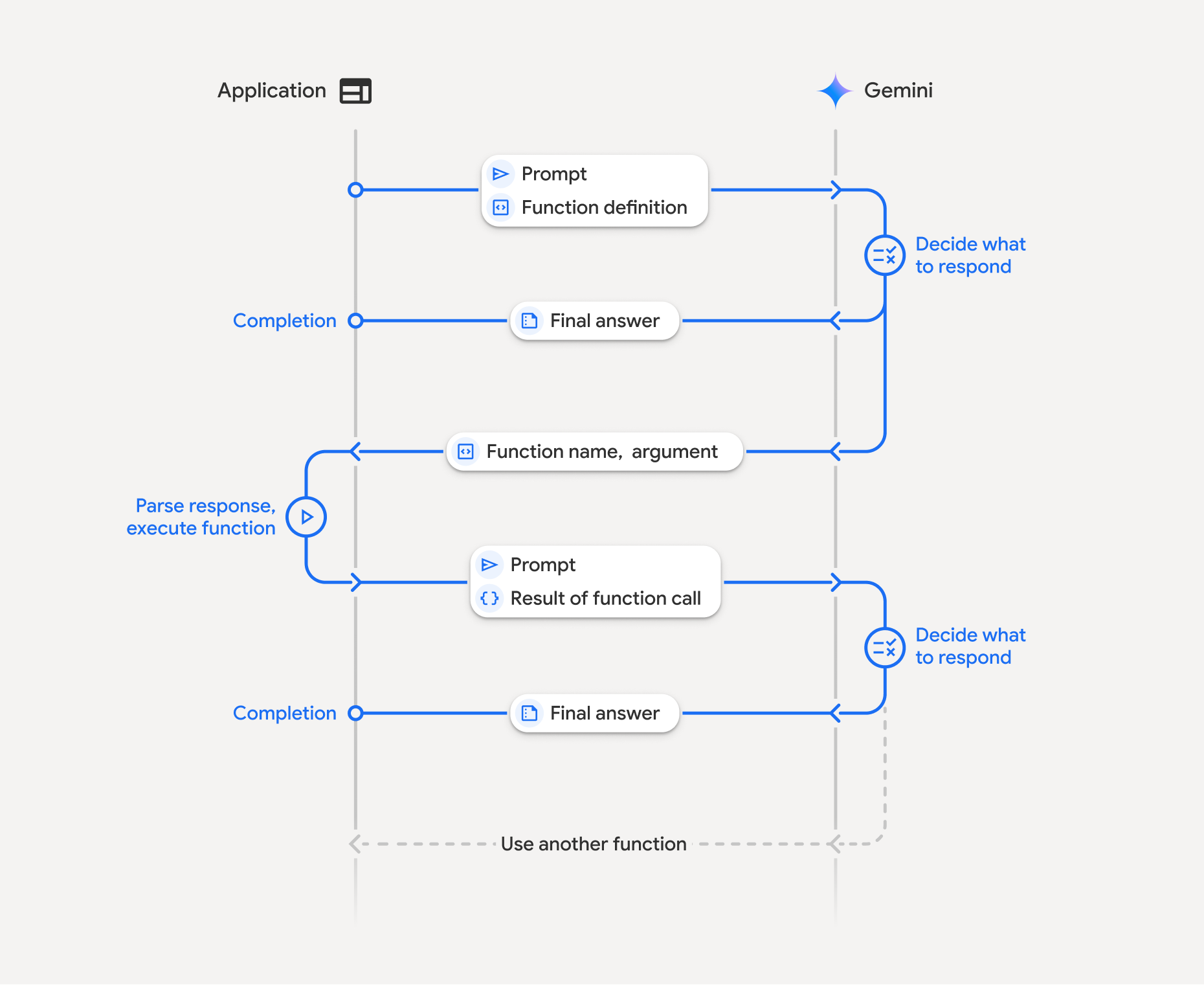
Вызов функций – это структурированное взаимодействие между вашим приложением, моделью и внешними функциями. Вот как это сделать:
- Определите объявление функции. Добавьте объявление функции в код приложения. Объявления функций описывают название, параметры и назначение функции для модели.
- Вызов API с объявлениями функций. Отправьте модели запрос пользователя вместе с объявлениями функций. Он анализирует запрос и определяет, будет ли полезен вызов функции. Если да, то она возвращает структурированный объект JSON, содержащий название функции, аргументы и уникальный идентификатор
id(теперь API всегда возвращает этот идентификаторidдля моделей Gemini 3*). - Выполнение кода функции (ваша ответственность). Модель не выполняет функцию. Ваше приложение должно обработать ответ и проверить, есть ли в нем вызов функции. Если:
- Да. Извлеките название, аргументы и
idфункции и выполните соответствующую функцию в приложении. - Нет. Модель предоставила прямой текстовый ответ на запрос (этот вариант менее подчеркнут в примере, но является возможным результатом).
- Да. Извлеките название, аргументы и
- Создайте удобный ответ. Если функция была выполнена, запишите результат и отправьте его обратно в модель, убедившись, что вы включили соответствующий
idв последующий ход разговора. и использует результат, чтобы сгенерировать окончательный, удобный для пользователя ответ, включающий информацию из вызова функции.
Этот процесс может повторяться несколько раз, что позволяет создавать сложные взаимодействия и рабочие процессы. Модель также поддерживает вызов нескольких функций за один ход (параллельный вызов функций), последовательный вызов функций (композиционный вызов функций) и использование нескольких инструментов Gemini (использование нескольких инструментов).
* Всегда сопоставляйте идентификаторы функций. Gemini 3 теперь всегда возвращает уникальный id с каждым functionCall. Добавьте этот id в functionResponse, чтобы модель могла точно сопоставить результат с исходным запросом.
Шаг 1. Объявите функцию
Определите функцию и ее декларацию в коде приложения, чтобы пользователи могли задавать значения освещенности и отправлять запросы к API. Эта функция может вызывать внешние сервисы или API.
Python
# Define a function that the model can call to control smart lights
set_light_values_declaration = {
    "name": "set_light_values",
    "description": "Sets the brightness and color temperature of a light.",
    "parameters": {
        "type": "object",
        "properties": {
            "brightness": {
                "type": "integer",
                "description": "Light level from 0 to 100. Zero is off and 100 is full brightness",
            },
            "color_temp": {
                "type": "string",
                "enum": ["daylight", "cool", "warm"],
                "description": "Color temperature of the light fixture, which can be `daylight`, `cool` or `warm`.",
            },
        },
        "required": ["brightness", "color_temp"],
    },
}

# This is the actual function that would be called based on the model's suggestion
def set_light_values(brightness: int, color_temp: str) -> dict[str, int | str]:
    """Set the brightness and color temperature of a room light. (mock API).

    Args:
        brightness: Light level from 0 to 100. Zero is off and 100 is full brightness
        color_temp: Color temperature of the light fixture, which can be `daylight`, `cool` or `warm`.

    Returns:
        A dictionary containing the set brightness and color temperature.
    """
    return {"brightness": brightness, "colorTemperature": color_temp}
JavaScript
import { Type } from '@google/genai';

// Define a function that the model can call to control smart lights
const setLightValuesFunctionDeclaration = {
  name: 'set_light_values',
  description: 'Sets the brightness and color temperature of a light.',
  parameters: {
    type: Type.OBJECT,
    properties: {
      brightness: {
        type: Type.NUMBER,
        description: 'Light level from 0 to 100. Zero is off and 100 is full brightness',
      },
      color_temp: {
        type: Type.STRING,
        enum: ['daylight', 'cool', 'warm'],
        description: 'Color temperature of the light fixture, which can be `daylight`, `cool` or `warm`.',
      },
    },
    required: ['brightness', 'color_temp'],
  },
};

/**

*   Set the brightness and color temperature of a room light. (mock API)
*   @param {number} brightness - Light level from 0 to 100. Zero is off and 100 is full brightness
*   @param {string} color_temp - Color temperature of the light fixture, which can be `daylight`, `cool` or `warm`.
*   @return {Object} A dictionary containing the set brightness and color temperature.
*/
function setLightValues(brightness, color_temp) {
  return {
    brightness: brightness,
    colorTemperature: color_temp
  };
}
Проложить маршрут
package main

import "google.golang.org/genai"

// Define a function declaration that the model can call to control smart lights
var setLightValuesDeclaration = &genai.FunctionDeclaration{
    Name:        "set_light_values",
    Description: "Sets the brightness and color temperature of a light.",
    Parameters: &genai.Schema{
        Type: genai.TypeObject,
        Properties: map[string]*genai.Schema{
            "brightness": {
                Type:        genai.TypeInteger,
                Description: "Light level from 0 to 100. Zero is off and 100 is full brightness",
            },
            "color_temp": {
                Type:        genai.TypeString,
                Enum:        []string{"daylight", "cool", "warm"},
                Description: "Color temperature of the light fixture, which can be `daylight`, `cool` or `warm`.",
            },
        },
        Required: []string{"brightness", "color_temp"},
    },
}

// This is the actual function that would be called based on the model's suggestion
func setLightValues(brightness int, colorTemp string) map[string]any {
    return map[string]any{
        "brightness":       brightness,
        "colorTemperature": colorTemp,
    }
}
Шаг 2. Вызовите модель с объявлениями функций
После того как вы определили объявления функций, вы можете предложить модели использовать их. Он анализирует запрос и объявления функций и решает, ответить напрямую или вызвать функцию. Если вызывается функция, объект ответа будет содержать предложение по вызову функции.
Python
from google.genai import types

# Configure the client and tools
client = genai.Client()
tools = types.Tool(function_declarations=[set_light_values_declaration])
config = types.GenerateContentConfig(tools=[tools])

# Define user prompt
contents = [
    types.Content(
        role="user", parts=[types.Part(text="Turn the lights down to a romantic level")]
    )
]

# Send request with function declarations
response = client.models.generate_content(
    model="gemini-3.8-flash",
    contents=contents,
    config=config,
)

print(response.candidates[0].content.parts[0].function_call)
JavaScript
import { GoogleGenAI } from '@google/genai';

// Generation config with function declaration
const config = {
  tools: [{
    functionDeclarations: [setLightValuesFunctionDeclaration]
  }]
};

// Configure the client
const ai = new GoogleGenAI({});

// Define user prompt
const contents = [
  {
    role: 'user',
    parts: [{ text: 'Turn the lights down to a romantic level' }]
  }
];

// Send request with function declarations
const response = await ai.models.generateContent({
  model: 'gemini-3.8-flash',
  contents: contents,
  config: config
});

console.log(response.functionCalls[0]);
Проложить маршрут
ctx := context.Background()
client, err := genai.NewClient(ctx, nil)
if err != nil {
    log.Fatal(err)
}

// Generation config with function declaration
config := &genai.GenerateContentConfig{
    Tools: []*genai.Tool{
        {FunctionDeclarations: []*genai.FunctionDeclaration{setLightValuesDeclaration}},
    },
}

// Define user prompt
contents := []*genai.Content{
    genai.NewContentFromText("Turn the lights down to a romantic level", genai.RoleUser),
}

// Send request with function declarations
response, err := client.Models.GenerateContent(ctx, "gemini-3.8-flash", contents, config)
if err != nil {
    log.Fatal(err)
}

fmt.Println(response.FunctionCalls()[0])
Затем модель возвращает объект functionCall в схеме, совместимой с OpenAPI, в котором указано, как вызвать одну или несколько объявленных функций, чтобы ответить на вопрос пользователя.
Python
id='8f2b1a3c' args={'color_temp': 'warm', 'brightness': 25} name='set_light_values'
JavaScript
{
  id: '8f2b1a3c',
  name: 'set_light_values',
  args: { brightness: 25, color_temp: 'warm' }
}
Проложить маршрут
&{ID:8f2b1a3c Args:map[brightness:25 color_temp:warm] Name:set_light_values}
Шаг 3. Выполните код функции set_light_values
Извлеките сведения о вызове функции из ответа модели, проанализируйте аргументы и выполните функцию set_light_values.
Python
# Extract tool call details, it may not be in the first part.
tool_call = response.candidates[0].content.parts[0].function_call

if tool_call.name == "set_light_values":
    result = set_light_values(**tool_call.args)
    print(f"Function execution result: {result}")
JavaScript
// Extract tool call details
const tool_call = response.functionCalls[0]

let result;
if (tool_call.name === 'set_light_values') {
  result = setLightValues(tool_call.args.brightness, tool_call.args.color_temp);
  console.log(`Function execution result: ${JSON.stringify(result)}`);
}
Проложить маршрут
// Extract tool call details
toolCall := response.FunctionCalls()[0]

var result map[string]any
if toolCall.Name == "set_light_values" {
    brightness := int(toolCall.Args["brightness"].(float64))
    colorTemp := toolCall.Args["color_temp"].(string)
    result = setLightValues(brightness, colorTemp)
    fmt.Printf("Function execution result: %v\n", result)
}
Шаг 4. Создайте понятный ответ с результатом функции и снова вызовите модель
Наконец, отправьте результат выполнения функции обратно в модель, чтобы она могла включить эту информацию в свой окончательный ответ пользователю.
Python
from google import genai
from google.genai import types

# Create a function response part
function_response_part = types.Part.from_function_response(
    name=tool_call.name,
    response={"result": result},
    id=tool_call.id,
)

# Append function call and result of the function execution to contents
contents.append(response.candidates[0].content) # Append the content from the model's response.
contents.append(types.Content(role="user", parts=[function_response_part])) # Append the function response

client = genai.Client()
final_response = client.models.generate_content(
    model="gemini-3.8-flash",
    config=config,
    contents=contents,
)

print(final_response.text)
JavaScript
// Create a function response part
const function_response_part = {
  name: tool_call.name,
  response: { result },
  id: tool_call.id
}

// Append function call and result of the function execution to contents
contents.push(response.candidates[0].content);
contents.push({ role: 'user', parts: [{ functionResponse: function_response_part }] });

// Get the final response from the model
const final_response = await ai.models.generateContent({
  model: 'gemini-3.8-flash',
  contents: contents,
  config: config
});

console.log(final_response.text);
Проложить маршрут
// Create a function response part
functionResponsePart := &genai.Part{
    FunctionResponse: &genai.FunctionResponse{
        ID:       toolCall.ID,
        Name:     toolCall.Name,
        Response: result,
    },
}

// Append function call and result of the function execution to contents
contents = append(contents, response.Candidates[0].Content)
contents = append(contents, &genai.Content{
    Role:  genai.RoleUser,
    Parts: []*genai.Part{functionResponsePart},
})

// Get the final response from the model
finalResponse, err := client.Models.GenerateContent(ctx, "gemini-3.8-flash", contents, config)
if err != nil {
    log.Fatal(err)
}

fmt.Println(finalResponse.Text())
На этом процесс вызова функции завершается. Модель успешно использовала функцию set_light_values, чтобы выполнить запрос пользователя.
Объявления функций
При реализации вызова функций в запросе вы создаете объект tools, который содержит один или несколько объектов function declarations. Функции определяются с помощью JSON, а именно с помощью выбранного подмножества формата схемы OpenAPI. В одном объявлении функции могут быть следующие параметры:
name(строка): уникальное название функции (get_weather_forecast,send_email). Используйте описательные названия без пробелов и специальных символов (используйте подчеркивания или camelCase).description(строка) – понятное и подробное объяснение назначения и возможностей функции. Это необходимо, чтобы модель понимала, когда использовать функцию. Будьте точны и при необходимости приводите примеры ("Находит кинотеатры по местоположению и, при необходимости, по названию фильма, который сейчас идет в кино").parameters(объект): определяет входные параметры, которые ожидает функция.type(строка) – указывает общий тип данных, напримерobject.properties(объект) – список отдельных параметров, каждый из которых содержит:type(строка) – тип данных параметра, напримерstring,integer,boolean, array.description(строка) – описание назначения и формата параметра. Приведите примеры и ограничения ("Город и штат, например "Сан-Франциско, Калифорния", или почтовый индекс, например "95616").enum(массив, необязательно). Если значения параметра относятся к фиксированному набору, используйте enum, чтобы перечислить допустимые значения, а не просто описать их. Это повышает точность ("enum": ["daylight", "cool", "warm"]).
required(массив): массив строк, в котором перечислены названия параметров, обязательных для работы функции.
Вы также можете создать объект FunctionDeclarations на основе функций Python, используя types.FunctionDeclaration.from_callable(client=client, callable=your_function).
Вызов функций с думающими моделями
Модели Gemini 3 и 2.5 используют внутренний процесс "мышления", чтобы рассуждать над запросами. Это значительно повышает производительность вызова функций, позволяя модели лучше определять, когда вызывать функцию и какие параметры использовать. Поскольку Gemini API не сохраняет состояние, модели используют сигнатуры мыслей, чтобы поддерживать контекст в пошаговых разговорах.
Этот раздел посвящен расширенному управлению подписями мыслей и необходим только в том случае, если вы вручную создаете запросы к API (например, через REST) или манипулируете историей разговоров.
Если вы используете Google GenAI SDK (наши официальные библиотеки), вам не нужно управлять этим процессом. SDK автоматически выполняет необходимые действия, как показано в примере выше.
Как управлять историей переписки вручную
Если вы вручную изменяете историю чата, вместо того чтобы отправлять полный предыдущий ответ, вы должны правильно обработать thought_signature, включенный в ход модели.
Чтобы сохранить контекст модели, следуйте приведенным ниже правилам.
- Всегда отправляйте
thought_signatureобратно в модель внутри исходного тегаPart. - Всегда указывайте в параметре
function_responseточное значениеidиз параметраfunction_call, чтобы API мог сопоставить результат с правильным запросом. - Не объединяйте объект
Partс подписью и без нее. Это нарушает позиционный контекст мысли. - Не объединяйте два объекта
Parts, содержащих подписи, поскольку строки подписей нельзя объединить.
Сигнатуры мыслей Gemini 3
В Gemini 3 любой Part ответа модели может содержать подпись рассуждения.
Мы рекомендуем возвращать подписи для всех типов Part, но для вызова функций обязательно передавать подписи размышлений. Если вы не управляете историей разговора вручную, Google GenAI SDK будет обрабатывать подписи мыслей автоматически.
Если вы вручную изменяете историю переписки, ознакомьтесь с инструкциями и подробной информацией о подписях размышлений для Gemini 3.
Проверка подписей мыслей
Для реализации это не требуется, но вы можете проверить ответ, чтобы увидеть thought_signature в целях отладки или обучения.
Python
import base64
# After receiving a response from a model with thinking enabled
# response = client.models.generate_content(...)

# The signature is attached to the response part containing the function call
part = response.candidates[0].content.parts[0]
if part.thought_signature:
  print(base64.b64encode(part.thought_signature).decode("utf-8"))
JavaScript
// After receiving a response from a model with thinking enabled
// const response = await ai.models.generateContent(...)

// The signature is attached to the response part containing the function call
const part = response.candidates[0].content.parts[0];
if (part.thoughtSignature) {
  console.log(part.thoughtSignature);
}
Проложить маршрут
// After receiving a response from a model with thinking enabled
// response, err := client.Models.GenerateContent(...)

// The signature is attached to the response part containing the function call
part := response.Candidates[0].Content.Parts[0]
if len(part.ThoughtSignature) > 0 {
    fmt.Println(string(part.ThoughtSignature))
}
Подробнее об ограничениях и использовании подписей мыслей, а также о думающих моделях в целом читайте на странице Thinking (Рассуждения).
Параллельный вызов функций
Помимо вызова одной функции за ход, вы также можете вызывать несколько функций одновременно. Параллельный вызов функций позволяет выполнять несколько функций одновременно и используется, когда функции не зависят друг от друга. Это полезно, когда нужно собрать данные из нескольких независимых источников, например получить информацию о клиентах из разных баз данных, проверить уровень запасов на разных складах или выполнить несколько действий, например превратить квартиру в дискотеку.
Когда модель инициирует несколько вызовов функций за один ход, вам не нужно возвращать объекты function_result в том же порядке, в котором были получены объекты function_call. Gemini API сопоставляет каждый результат с соответствующим вызовом, используя id из выходных данных модели. Это позволяет выполнять функции асинхронно и добавлять результаты в список по мере их завершения.
Python
power_disco_ball = {
    "name": "power_disco_ball",
    "description": "Powers the spinning disco ball.",
    "parameters": {
        "type": "object",
        "properties": {
            "power": {
                "type": "boolean",
                "description": "Whether to turn the disco ball on or off.",
            }
        },
        "required": ["power"],
    },
}

start_music = {
    "name": "start_music",
    "description": "Play some music matching the specified parameters.",
    "parameters": {
        "type": "object",
        "properties": {
            "energetic": {
                "type": "boolean",
                "description": "Whether the music is energetic or not.",
            },
            "loud": {
                "type": "boolean",
                "description": "Whether the music is loud or not.",
            },
        },
        "required": ["energetic", "loud"],
    },
}

dim_lights = {
    "name": "dim_lights",
    "description": "Dim the lights.",
    "parameters": {
        "type": "object",
        "properties": {
            "brightness": {
                "type": "number",
                "description": "The brightness of the lights, 0.0 is off, 1.0 is full.",
            }
        },
        "required": ["brightness"],
    },
}
JavaScript
import { Type } from '@google/genai';

const powerDiscoBall = {
  name: 'power_disco_ball',
  description: 'Powers the spinning disco ball.',
  parameters: {
    type: Type.OBJECT,
    properties: {
      power: {
        type: Type.BOOLEAN,
        description: 'Whether to turn the disco ball on or off.'
      }
    },
    required: ['power']
  }
};

const startMusic = {
  name: 'start_music',
  description: 'Play some music matching the specified parameters.',
  parameters: {
    type: Type.OBJECT,
    properties: {
      energetic: {
        type: Type.BOOLEAN,
        description: 'Whether the music is energetic or not.'
      },
      loud: {
        type: Type.BOOLEAN,
        description: 'Whether the music is loud or not.'
      }
    },
    required: ['energetic', 'loud']
  }
};

const dimLights = {
  name: 'dim_lights',
  description: 'Dim the lights.',
  parameters: {
    type: Type.OBJECT,
    properties: {
      brightness: {
        type: Type.NUMBER,
        description: 'The brightness of the lights, 0.0 is off, 1.0 is full.'
      }
    },
    required: ['brightness']
  }
};
Проложить маршрут
package main

import "google.golang.org/genai"

var powerDiscoBall = &genai.FunctionDeclaration{
    Name:        "power_disco_ball",
    Description: "Powers the spinning disco ball.",
    Parameters: &genai.Schema{
        Type: genai.TypeObject,
        Properties: map[string]*genai.Schema{
            "power": {
                Type:        genai.TypeBoolean,
                Description: "Whether to turn the disco ball on or off.",
            },
        },
        Required: []string{"power"},
    },
}

var startMusic = &genai.FunctionDeclaration{
    Name:        "start_music",
    Description: "Play some music matching the specified parameters.",
    Parameters: &genai.Schema{
        Type: genai.TypeObject,
        Properties: map[string]*genai.Schema{
            "energetic": {
                Type:        genai.TypeBoolean,
                Description: "Whether the music is energetic or not.",
            },
            "loud": {
                Type:        genai.TypeBoolean,
                Description: "Whether the music is loud or not.",
            },
        },
        Required: []string{"energetic", "loud"},
    },
}

var dimLights = &genai.FunctionDeclaration{
    Name:        "dim_lights",
    Description: "Dim the lights.",
    Parameters: &genai.Schema{
        Type: genai.TypeObject,
        Properties: map[string]*genai.Schema{
            "brightness": {
                Type:        genai.TypeNumber,
                Description: "The brightness of the lights, 0.0 is off, 1.0 is full.",
            },
        },
        Required: []string{"brightness"},
    },
}
Настройте режим вызова функций, чтобы разрешить использование всех указанных инструментов. Подробнее о настройке вызова функций…
Python
from google import genai
from google.genai import types

# Configure the client and tools
client = genai.Client()
house_tools = [
    types.Tool(function_declarations=[power_disco_ball, start_music, dim_lights])
]
config = types.GenerateContentConfig(
    tools=house_tools,
    automatic_function_calling=types.AutomaticFunctionCallingConfig(
        disable=True
    ),
    # Force the model to call 'any' function, instead of chatting.
    tool_config=types.ToolConfig(
        function_calling_config=types.FunctionCallingConfig(mode='ANY')
    ),
)

chat = client.chats.create(model="gemini-3.8-flash", config=config)
response = chat.send_message("Turn this place into a party!")

# Print out each of the function calls requested from this single call
print("Example 1: Forced function calling")
for fn in response.function_calls:
    args = ", ".join(f"{key}={val}" for key, val in fn.args.items())
    print(f"{fn.name}({args}) - ID: {fn.id}")
JavaScript
import { GoogleGenAI } from '@google/genai';

// Set up function declarations
const houseFns = [powerDiscoBall, startMusic, dimLights];

const config = {
    tools: [{
        functionDeclarations: houseFns
    }],
    // Force the model to call 'any' function, instead of chatting.
    toolConfig: {
        functionCallingConfig: {
            mode: 'any'
        }
    }
};

// Configure the client
const ai = new GoogleGenAI({});

// Create a chat session
const chat = ai.chats.create({
    model: 'gemini-3.8-flash',
    config: config
});
const response = await chat.sendMessage({message: 'Turn this place into a party!'});

// Print out each of the function calls requested from this single call
console.log("Example 1: Forced function calling");
for (const fn of response.functionCalls) {
    const args = Object.entries(fn.args)
        .map(([key, val]) => `${key}=${val}`)
        .join(', ');
    console.log(`${fn.name}(${args}) - ID: ${fn.id}`);
}
Проложить маршрут
ctx := context.Background()
client, err := genai.NewClient(ctx, nil)
if err != nil {
    log.Fatal(err)
}

houseTools := []*genai.Tool{
    {FunctionDeclarations: []*genai.FunctionDeclaration{powerDiscoBall, startMusic, dimLights}},
}

config := &genai.GenerateContentConfig{
    Tools: houseTools,
    // Force the model to call 'any' function, instead of chatting.
    ToolConfig: &genai.ToolConfig{
        FunctionCallingConfig: &genai.FunctionCallingConfig{
            Mode: genai.FunctionCallingConfigModeAny,
        },
    },
}

response, err := client.Models.GenerateContent(
    ctx,
    "gemini-3.8-flash",
    genai.Text("Turn this place into a party!"),
    config,
)
if err != nil {
    log.Fatal(err)
}

// Print out each of the function calls requested from this single call
fmt.Println("Example 1: Forced function calling")
for _, fn := range response.FunctionCalls() {
    fmt.Printf("%s(%v) - ID: %s\n", fn.Name, fn.Args, fn.ID)
}
Каждый из напечатанных результатов отражает один вызов функции, запрошенный моделью. Чтобы отправить результаты обратно, включите ответы в том же порядке, в котором они были запрошены.
Python SDK поддерживает автоматический вызов функций, который автоматически преобразует функции Python в объявления, а также обрабатывает цикл выполнения вызова функции и получения ответа. Ниже приведен пример для дискотеки.
Python
from google import genai
from google.genai import types

# Actual function implementations
def power_disco_ball_impl(power: bool) -> dict:
    """Powers the spinning disco ball.

    Args:
        power: Whether to turn the disco ball on or off.

    Returns:
        A status dictionary indicating the current state.
    """
    return {"status": f"Disco ball powered {'on' if power else 'off'}"}

def start_music_impl(energetic: bool, loud: bool) -> dict:
    """Play some music matching the specified parameters.

    Args:
        energetic: Whether the music is energetic or not.
        loud: Whether the music is loud or not.

    Returns:
        A dictionary containing the music settings.
    """
    music_type = "energetic" if energetic else "chill"
    volume = "loud" if loud else "quiet"
    return {"music_type": music_type, "volume": volume}

def dim_lights_impl(brightness: float) -> dict:
    """Dim the lights.

    Args:
        brightness: The brightness of the lights, 0.0 is off, 1.0 is full.

    Returns:
        A dictionary containing the new brightness setting.
    """
    return {"brightness": brightness}

# Configure the client
client = genai.Client()
config = types.GenerateContentConfig(
    tools=[power_disco_ball_impl, start_music_impl, dim_lights_impl]
)

# Make the request
response = client.models.generate_content(
    model="gemini-3.8-flash",
    contents="Do everything you need to this place into party!",
    config=config,
)

print("\nExample 2: Automatic function calling")
print(response.text)
# I've turned on the disco ball, started playing loud and energetic music, and dimmed the lights to 50% brightness. Let's get this party started!
Составной вызов функций
Композиционный или последовательный вызов функций позволяет Gemini объединять несколько вызовов функций для выполнения сложного запроса. Например, чтобы ответить на запрос "Какая температура там, где я нахожусь?", Gemini API может сначала вызвать функцию get_current_location(), а затем функцию get_weather(), которая принимает местоположение в качестве параметра.
В примере ниже показано, как реализовать вызов композиционных функций с помощью Python SDK и автоматического вызова функций.
Python
В этом примере используется функция автоматического вызова функций из Python SDK google-genai. SDK автоматически преобразует функции Python в нужную схему, выполняет вызовы функций по запросу модели и отправляет результаты обратно в модель для завершения задачи.
import os
from google import genai
from google.genai import types

# Example Functions
def get_weather_forecast(location: str) -> dict:
    """Gets the current weather temperature for a given location."""
    print(f"Tool Call: get_weather_forecast(location={location})")
    # TODO: Make API call
    print("Tool Response: {'temperature': 25, 'unit': 'celsius'}")
    return {"temperature": 25, "unit": "celsius"}  # Dummy response

def set_thermostat_temperature(temperature: int) -> dict:
    """Sets the thermostat to a desired temperature."""
    print(f"Tool Call: set_thermostat_temperature(temperature={temperature})")
    # TODO: Interact with a thermostat API
    print("Tool Response: {'status': 'success'}")
    return {"status": "success"}

# Configure the client and model
client = genai.Client()
config = types.GenerateContentConfig(
    tools=[get_weather_forecast, set_thermostat_temperature]
)

# Make the request
response = client.models.generate_content(
    model="gemini-3.8-flash",
    contents="If it's warmer than 20°C in London, set the thermostat to 20°C, otherwise set it to 18°C.",
    config=config,
)

# Print the final, user-facing response
print(response.text)
Ожидаемый результат
При запуске кода вы увидите, как SDK управляет вызовами функций. Модель сначала вызывает get_weather_forecast, получает температуру, а затем вызывает set_thermostat_temperature с правильным значением на основе логики в запросе.
Tool Call: get_weather_forecast(location=London)
Tool Response: {'temperature': 25, 'unit': 'celsius'}
Tool Call: set_thermostat_temperature(temperature=20)
Tool Response: {'status': 'success'}
OK. I've set the thermostat to 20°C.
JavaScript
В этом примере показано, как использовать JavaScript/TypeScript SDK для вызова составных функций с помощью цикла ручного выполнения.
import { GoogleGenAI, Type } from "@google/genai";

// Configure the client
const ai = new GoogleGenAI({});

// Example Functions
function get_weather_forecast({ location }) {
  console.log(`Tool Call: get_weather_forecast(location=${location})`);
  // TODO: Make API call
  console.log("Tool Response: {'temperature': 25, 'unit': 'celsius'}");
  return { temperature: 25, unit: "celsius" };
}

function set_thermostat_temperature({ temperature }) {
  console.log(
    `Tool Call: set_thermostat_temperature(temperature=${temperature})`,
  );
  // TODO: Make API call
  console.log("Tool Response: {'status': 'success'}");
  return { status: "success" };
}

const toolFunctions = {
  get_weather_forecast,
  set_thermostat_temperature,
};

const tools = [
  {
    functionDeclarations: [
      {
        name: "get_weather_forecast",
        description:
          "Gets the current weather temperature for a given location.",
        parameters: {
          type: Type.OBJECT,
          properties: {
            location: {
              type: Type.STRING,
            },
          },
          required: ["location"],
        },
      },
      {
        name: "set_thermostat_temperature",
        description: "Sets the thermostat to a desired temperature.",
        parameters: {
          type: Type.OBJECT,
          properties: {
            temperature: {
              type: Type.NUMBER,
            },
          },
          required: ["temperature"],
        },
      },
    ],
  },
];

// Prompt for the model
let contents = [
  {
    role: "user",
    parts: [
      {
        text: "If it's warmer than 20°C in London, set the thermostat to 20°C, otherwise set it to 18°C.",
      },
    ],
  },
];

// Loop until the model has no more function calls to make
while (true) {
  const result = await ai.models.generateContent({
    model: "gemini-3.8-flash",
    contents,
    config: { tools },
  });

  if (result.functionCalls && result.functionCalls.length > 0) {
    const functionCall = result.functionCalls[0];

    const { name, args } = functionCall;

    if (!toolFunctions[name]) {
      throw new Error(`Unknown function call: ${name}`);
    }

    // Call the function and get the response.
    const toolResponse = toolFunctions[name](args);

    const functionResponsePart = {
      name: functionCall.name,
      response: {
        result: toolResponse,
      },
      id: functionCall.id,
    };

    // Send the function response back to the model.
    contents.push({
      role: "model",
      parts: [
        {
          functionCall: functionCall,
        },
      ],
    });
    contents.push({
      role: "user",
      parts: [
        {
          functionResponse: functionResponsePart,
        },
      ],
    });
  } else {
    // No more function calls, break the loop.
    console.log(result.text);
    break;
  }
}
Ожидаемый результат
При запуске кода вы увидите, как SDK управляет вызовами функций. Модель сначала вызывает get_weather_forecast, получает температуру, а затем вызывает set_thermostat_temperature с правильным значением на основе логики в запросе.
Tool Call: get_weather_forecast(location=London)
Tool Response: {'temperature': 25, 'unit': 'celsius'}
Tool Call: set_thermostat_temperature(temperature=20)
Tool Response: {'status': 'success'}
OK. It's 25°C in London, so I've set the thermostat to 20°C.
Проложить маршрут
В этом примере показано, как использовать Go SDK для вызова композиционных функций с помощью цикла выполнения вручную.
package main

import (
    "context"
    "fmt"
    "log"

    "google.golang.org/genai"
)

func getWeatherForecast(location string) map[string]any {
    fmt.Printf("Tool Call: get_weather_forecast(location=%s)\n", location)
    fmt.Println("Tool Response: map[temperature:25 unit:celsius]")
    return map[string]any{"temperature": 25, "unit": "celsius"}
}

func setThermostatTemperature(temperature float64) map[string]any {
    fmt.Printf("Tool Call: set_thermostat_temperature(temperature=%v)\n", temperature)
    fmt.Println("Tool Response: map[status:success]")
    return map[string]any{"status": "success"}
}

func main() {
    ctx := context.Background()
    client, err := genai.NewClient(ctx, nil)
    if err != nil {
        log.Fatal(err)
    }

    tools := []*genai.Tool{
        {
            FunctionDeclarations: []*genai.FunctionDeclaration{
                {
                    Name:        "get_weather_forecast",
                    Description: "Gets the current weather temperature for a given location.",
                    Parameters: &genai.Schema{
                        Type: genai.TypeObject,
                        Properties: map[string]*genai.Schema{
                            "location": {Type: genai.TypeString},
                        },
                        Required: []string{"location"},
                    },
                },
                {
                    Name:        "set_thermostat_temperature",
                    Description: "Sets the thermostat to a desired temperature.",
                    Parameters: &genai.Schema{
                        Type: genai.TypeObject,
                        Properties: map[string]*genai.Schema{
                            "temperature": {Type: genai.TypeNumber},
                        },
                        Required: []string{"temperature"},
                    },
                },
            },
        },
    }

    config := &genai.GenerateContentConfig{Tools: tools}

    contents := []*genai.Content{
        genai.NewContentFromText("If it's warmer than 20°C in London, set the thermostat to 20°C, otherwise set it to 18°C.", genai.RoleUser),
    }

    for {
        result, err := client.Models.GenerateContent(ctx, "gemini-3.8-flash", contents, config)
        if err != nil {
            log.Fatal(err)
        }

        if len(result.FunctionCalls()) > 0 {
            functionCall := result.FunctionCalls()[0]
            var toolResponse map[string]any

            switch functionCall.Name {
            case "get_weather_forecast":
                location := functionCall.Args["location"].(string)
                toolResponse = getWeatherForecast(location)
            case "set_thermostat_temperature":
                temperature := functionCall.Args["temperature"].(float64)
                toolResponse = setThermostatTemperature(temperature)
            default:
                log.Fatalf("Unknown function call: %s", functionCall.Name)
            }

            contents = append(contents, result.Candidates[0].Content)
            contents = append(contents, &genai.Content{
                Role: genai.RoleUser,
                Parts: []*genai.Part{
                    {
                        FunctionResponse: &genai.FunctionResponse{
                            ID:       functionCall.ID,
                            Name:     functionCall.Name,
                            Response: toolResponse,
                        },
                    },
                },
            })
        } else {
            fmt.Println(result.Text())
            break
        }
    }
}
Ожидаемый результат
Tool Call: get_weather_forecast(location=London)
Tool Response: map[temperature:25 unit:celsius]
Tool Call: set_thermostat_temperature(temperature=20)
Tool Response: map[status:success]
OK. It's 25°C in London, so I've set the thermostat to 20°C.
Составной вызов функций – это встроенная функция Live API. Это означает, что Live API может обрабатывать вызовы функций так же, как Python SDK.
Python
# Light control schemas
turn_on_the_lights_schema = {'name': 'turn_on_the_lights'}
turn_off_the_lights_schema = {'name': 'turn_off_the_lights'}

prompt = """
  Hey, can you write run some python code to turn on the lights, wait 10s and then turn off the lights?
  """

tools = [
    {'code_execution': {}},
    {'function_declarations': [turn_on_the_lights_schema, turn_off_the_lights_schema]}
]

await run(prompt, tools=tools, modality="AUDIO")
JavaScript
// Light control schemas
const turnOnTheLightsSchema = { name: 'turn_on_the_lights' };
const turnOffTheLightsSchema = { name: 'turn_off_the_lights' };

const prompt = `
  Hey, can you write run some python code to turn on the lights, wait 10s and then turn off the lights?
`;

const tools = [
  { codeExecution: {} },
  { functionDeclarations: [turnOnTheLightsSchema, turnOffTheLightsSchema] }
];

await run(prompt, tools=tools, modality="AUDIO")
Режимы вызова функций
Gemini API позволяет управлять тем, как модель использует предоставленные инструменты (объявления функций). В частности, вы можете задать режим в разделе function_calling_config.
VALIDATED– режим по умолчанию для сочетания инструментов (если также включены встроенные инструменты или структурированные выходные данные). Модель может прогнозировать либо вызовы функций, либо естественный язык, и обеспечивает соблюдение схемы функций. Если параметрallowed_function_namesне указан, модель выбирает из всех доступных объявлений функций. Если указан параметрallowed_function_names, модель выбирает из набора разрешенных функций. В этом режиме снижается количество неправильно сформированных вызовов функций (по сравнению с режимомAUTO).AUTO– режим по умолчанию, когда включен только инструмент function_declarations. Модель решает, генерировать ли ответ на естественном языке или предложить вызов функции на основе подсказки и контекста.ANY– модель всегда прогнозирует вызов функции и обеспечивает соблюдение схемы функции. Если параметрallowed_function_namesне указан, модель может выбрать любое из предоставленных объявлений функций. Еслиallowed_function_namesпредоставляется в виде списка, модель может выбирать только из функций в этом списке. Используйте этот режим, когда вам нужен ответ на вызов функции для каждого запроса (если применимо).NONE– модели запрещено вызывать функции. Это эквивалентно отправке запроса без объявления функций. Используйте это, чтобы временно отключить вызов функции, не удаляя определения инструментов.
Python
from google.genai import types

# Configure function calling mode
tool_config = types.ToolConfig(
    function_calling_config=types.FunctionCallingConfig(
        mode="ANY", allowed_function_names=["get_current_temperature"]
    )
)

# Create the generation config
config = types.GenerateContentConfig(
    tools=[tools],  # not defined here.
    tool_config=tool_config,
)
JavaScript
import { FunctionCallingConfigMode } from '@google/genai';

// Configure function calling mode
const toolConfig = {
  functionCallingConfig: {
    mode: FunctionCallingConfigMode.ANY,
    allowedFunctionNames: ['get_current_temperature']
  }
};

// Create the generation config
const config = {
  tools: tools, // not defined here.
  toolConfig: toolConfig,
};
Проложить маршрут
// Configure function calling mode
toolConfig := &genai.ToolConfig{
    FunctionCallingConfig: &genai.FunctionCallingConfig{
        Mode:                 genai.FunctionCallingConfigModeAny,
        AllowedFunctionNames: []string{"get_current_temperature"},
    },
}

// Create the generation config
config := &genai.GenerateContentConfig{
    Tools:      tools, // not defined here.
    ToolConfig: toolConfig,
}
Автоматический вызов функций (только для Python)
При использовании Python SDK вы можете предоставлять функции Python непосредственно в качестве инструментов. SDK преобразует эти функции в объявления, управляет выполнением вызовов функций и обрабатывает цикл ответов. Определите функцию с помощью подсказок типов и строки документации. Для оптимальных результатов рекомендуется использовать строки документации в стиле Google. После этого SDK автоматически выполнит следующие действия:
- Обнаруживать ответы на вызовы функций от модели.
- Вызовите в коде соответствующую функцию Python.
- Отправьте ответ функции обратно в модель.
- Возвращает окончательный текстовый ответ модели.
В настоящее время SDK не анализирует описания аргументов в слотах описания свойств сгенерированного объявления функции. Вместо этого он отправляет всю строку документации в качестве описания функции верхнего уровня.
Python
from google import genai
from google.genai import types

# Define the function with type hints and docstring
def get_current_temperature(location: str) -> dict:
    """Gets the current temperature for a given location.

    Args:
        location: The city and state, e.g. San Francisco, CA

    Returns:
        A dictionary containing the temperature and unit.
    """
    # ... (implementation) ...
    return {"temperature": 25, "unit": "Celsius"}

# Configure the client
client = genai.Client()
config = types.GenerateContentConfig(
    tools=[get_current_temperature]
)  # Pass the function itself

# Make the request
response = client.models.generate_content(
    model="gemini-3.8-flash",
    contents="What's the temperature in Boston?",
    config=config,
)

print(response.text)  # The SDK handles the function call and returns the final text
Вы можете отключить автоматический вызов функций с помощью:
Python
config = types.GenerateContentConfig(
    tools=[get_current_temperature],
    automatic_function_calling=types.AutomaticFunctionCallingConfig(disable=True)
)
Автоматическое объявление схемы функций
API может описывать любой из следующих типов. Типы Pydantic разрешены, если поля, определенные в них, также состоят из разрешенных типов. Типы Dict (например, dict[str: int]) не поддерживаются, поэтому не используйте их.
Python
AllowedType = (
  int | float | bool | str | list['AllowedType'] | pydantic.BaseModel)
Чтобы посмотреть, как выглядит выведенная схема, вы можете преобразовать ее с помощью from_callable:
Python
from google import genai
from google.genai import types

def multiply(a: float, b: float):
    """Returns a * b."""
    return a * b

client = genai.Client()
fn_decl = types.FunctionDeclaration.from_callable(callable=multiply, client=client)

# to_json_dict() provides a clean JSON representation.
print(fn_decl.to_json_dict())
Использование нескольких инструментов: сочетание встроенных инструментов с вызовом функций
Вы можете включить несколько инструментов, объединив встроенные инструменты с вызовом функций в одном запросе.
Модели Gemini 3 могут сочетать встроенные инструменты с вызовом функций благодаря функции циркуляции контекста инструмента. Подробнее о том, как сочетать встроенные инструменты и вызовы функций…
Python
from google import genai
from google.genai import types

client = genai.Client()

getWeather = {
    "name": "getWeather",
    "description": "Gets the weather for a requested city.",
    "parameters": {
        "type": "object",
        "properties": {
            "city": {
                "type": "string",
                "description": "The city and state, e.g. Utqiaġvik, Alaska",
            },
        },
        "required": ["city"],
    },
}

response = client.models.generate_content(
    model="gemini-3.8-flash",
    contents="What is the northernmost city in the United States? What's the weather like there today?",
    config=types.GenerateContentConfig(
      tools=[
        types.Tool(
          google_search=types.ToolGoogleSearch(),  # Built-in tool
          function_declarations=[getWeather]       # Custom tool
        ),
      ],
      include_server_side_tool_invocations=True
    ),
)

history = [
    types.Content(
        role="user",
        parts=[types.Part(text="What is the northernmost city in the United States? What's the weather like there today?")]
    ),
    response.candidates[0].content,
    types.Content(
        role="user",
        parts=[types.Part(
            function_response=types.FunctionResponse(
                name="getWeather",
                response={"response": "Very cold. 22 degrees Fahrenheit."},
                id=response.candidates[0].content.parts[2].function_call.id
            )
        )]
    )
]

response_2 = client.models.generate_content(
    model="gemini-3.8-flash",
    contents=history,
    config=types.GenerateContentConfig(
      tools=[
        types.Tool(
          google_search=types.ToolGoogleSearch(),
          function_declarations=[getWeather]
        ),
      ],
      include_server_side_tool_invocations=True
    ),
)
JavaScript
import { GoogleGenAI} from '@google/genai';

const client = new GoogleGenAI({});

const getWeather = {
    name: "getWeather",
    description: "Get the weather in a given location",
    parameters: {
        type: "OBJECT",
        properties: {
            location: {
                type: "STRING",
                description: "The city and state, e.g. San Francisco, CA"
            }
        },
        required: ["location"]
    }
};

async function run() {
    const tools = [
      { googleSearch: {} },
      { functionDeclarations: [getWeather] }
    ];
    const toolConfig = { includeServerSideToolInvocations: true };

    const response1 = await client.models.generateContent({
        model: "gemini-3.8-flash",
        contents: [{role: "user", parts: [{text: "What is the northernmost city in the United States? What's the weather like there today?"}]}],
        config: {
            tools: tools,
            toolConfig: toolConfig,
        },
    });

    const functionCallId = response1.candidates[0].content.parts.find(p => p.functionCall)?.functionCall?.id;

    const history = [
        {
            role: "user",
            parts:[{text: "What is the northernmost city in the United States? What's the weather like there today?"}]
        },
        response1.candidates[0].content,
        {
            role: "user",
            parts: [{
                functionResponse: {
                    name: "getWeather",
                    response: {response: "Very cold. 22 degrees Fahrenheit."},
                    id: functionCallId
                }
            }]
        }
    ];

    const response2 = await client.models.generateContent({
        model: "gemini-3.8-flash",
        contents: history,
        config: {
            tools: tools,
            toolConfig: toolConfig,
        },
    });
}

run();
Проложить маршрут
package main

import (
    "context"
    "fmt"
    "log"

    "google.golang.org/genai"
)

func main() {
    ctx := context.Background()
    client, err := genai.NewClient(ctx, nil)
    if err != nil {
        log.Fatal(err)
    }

    getWeather := &genai.FunctionDeclaration{
        Name:        "getWeather",
        Description: "Get the weather in a given location",
        Parameters: &genai.Schema{
            Type: genai.TypeObject,
            Properties: map[string]*genai.Schema{
                "location": {
                    Type:        genai.TypeString,
                    Description: "The city and state, e.g. San Francisco, CA",
                },
            },
            Required: []string{"location"},
        },
    }

    tools := []*genai.Tool{
        {GoogleSearch: &genai.GoogleSearch{}},
        {FunctionDeclarations: []*genai.FunctionDeclaration{getWeather}},
    }

    config := &genai.GenerateContentConfig{
        Tools: tools,
    }

    prompt := "What is the northernmost city in the United States? What's the weather like there today?"
    response1, err := client.Models.GenerateContent(ctx, "gemini-3.8-flash", genai.Text(prompt), config)
    if err != nil {
        log.Fatal(err)
    }

    toolCall := response1.FunctionCalls()[0]

    history := []*genai.Content{
        genai.NewContentFromText(prompt, genai.RoleUser),
        response1.Candidates[0].Content,
        {
            Role: genai.RoleUser,
            Parts: []*genai.Part{
                {
                    FunctionResponse: &genai.FunctionResponse{
                        ID:       toolCall.ID,
                        Name:     toolCall.Name,
                        Response: map[string]any{"response": "Very cold. 22 degrees Fahrenheit."},
                    },
                },
            },
        },
    }

    response2, err := client.Models.GenerateContent(ctx, "gemini-3.8-flash", history, config)
    if err != nil {
        log.Fatal(err)
    }

    fmt.Println(response2.Text())
}
Для моделей до серии Gemini 3 используйте Live API.
Мультимодальные ответы функций
Для моделей серии Gemini 3 вы можете включать мультимодальный контент в части ответа функции, которые вы отправляете модели. Модель может обработать этот мультимодальный контент и использовать его в следующем ответе. Для мультимодального контента в ответах функций поддерживаются следующие MIME-типы:
- Картинки:
image/png,image/jpeg,image/webp - Документы:
application/pdf,text/plain
Чтобы включить мультимодальные данные в ответ функции, добавьте их в виде одной или нескольких частей, вложенных в часть functionResponse. Каждая мультимодальная часть должна содержать inlineData. Если вы ссылаетесь на мультимодальный сегмент из структурированного поля response, оно должно содержать уникальное значение displayName.
Вы также можете сослаться на мультимодальную часть из структурированного поля response части functionResponse, используя формат ссылки JSON {"$ref": "<displayName>"}. При обработке ответа модель заменяет ссылку мультимодальным контентом. Каждый элемент displayName может быть указан в структурированном поле response только один раз.
В следующем примере показано сообщение, содержащее functionResponse для функции с названием get_image и вложенную часть с данными изображения с displayName: "instrument.jpg". Поле response в functionResponse ссылается на эту часть изображения:
Python
from google import genai
from google.genai import types

import requests

client = genai.Client()

# This is a manual, two turn multimodal function calling workflow:

# 1. Define the function tool
get_image_declaration = types.FunctionDeclaration(
  name="get_image",
  description="Retrieves the image file reference for a specific order item.",
  parameters={
      "type": "object",
      "properties": {
          "item_name": {
              "type": "string",
              "description": "The name or description of the item ordered (e.g., 'instrument')."
          }
      },
      "required": ["item_name"],
  },
)
tool_config = types.Tool(function_declarations=[get_image_declaration])

# 2. Send a message that triggers the tool
prompt = "Show me the instrument I ordered last month."
response_1 = client.models.generate_content(
  model="gemini-3.8-flash",
  contents=[prompt],
  config=types.GenerateContentConfig(
      tools=[tool_config],
  )
)

# 3. Handle the function call
function_call = response_1.function_calls[0]
requested_item = function_call.args["item_name"]
print(f"Model wants to call: {function_call.name}")

# Execute your tool (e.g., call an API)
# (This is a mock response for the example)
print(f"Calling external tool for: {requested_item}")

function_response_data = {
  "image_ref": {"$ref": "instrument.jpg"},
}
image_path = "https://goo.gle/instrument-img"
image_bytes = requests.get(image_path).content
function_response_multimodal_data = types.FunctionResponsePart(
  inline_data=types.FunctionResponseBlob(
    mime_type="image/jpeg",
    display_name="instrument.jpg",
    data=image_bytes,
  )
)

# 4. Send the tool's result back
# Append this turn's messages to history for a final response.
history = [
  types.Content(role="user", parts=[types.Part(text=prompt)]),
  response_1.candidates[0].content,
  types.Content(
    role="user",
    parts=[
        types.Part.from_function_response(
          id=function_call.id,
          name=function_call.name,
          response=function_response_data,
          parts=[function_response_multimodal_data]
        )
    ],
  )
]

response_2 = client.models.generate_content(
  model="gemini-3.8-flash",
  contents=history,
  config=types.GenerateContentConfig(
      tools=[tool_config],
      thinking_config=types.ThinkingConfig(include_thoughts=True)
  ),
)

print(f"\nFinal model response: {response_2.text}")
JavaScript
import { GoogleGenAI, Type } from '@google/genai';

const client = new GoogleGenAI({ apiKey: process.env.GEMINI_API_KEY });

// This is a manual, two turn multimodal function calling workflow:
// 1. Define the function tool
const getImageDeclaration = {
  name: 'get_image',
  description: 'Retrieves the image file reference for a specific order item.',
  parameters: {
    type: Type.OBJECT,
    properties: {
      item_name: {
        type: Type.STRING,
        description: "The name or description of the item ordered (e.g., 'instrument').",
      },
    },
    required: ['item_name'],
  },
};

const toolConfig = {
  functionDeclarations: [getImageDeclaration],
};

// 2. Send a message that triggers the tool
const prompt = 'Show me the instrument I ordered last month.';
const response1 = await client.models.generateContent({
  model: 'gemini-3.8-flash',
  contents: prompt,
  config: {
    tools: [toolConfig],
  },
});

// 3. Handle the function call
const functionCall = response1.functionCalls[0];
const requestedItem = functionCall.args.item_name;
console.log(`Model wants to call: ${functionCall.name}`);

// Execute your tool (e.g., call an API)
// (This is a mock response for the example)
console.log(`Calling external tool for: ${requestedItem}`);

const functionResponseData = {
  image_ref: { $ref: 'instrument.jpg' },
};

const imageUrl = "https://goo.gle/instrument-img";
const response = await fetch(imageUrl);
const imageArrayBuffer = await response.arrayBuffer();
const base64ImageData = Buffer.from(imageArrayBuffer).toString('base64');

const functionResponseMultimodalData = {
  inlineData: {
    mimeType: 'image/jpeg',
    displayName: 'instrument.jpg',
    data: base64ImageData,
  },
};

// 4. Send the tool's result back
// Append this turn's messages to history for a final response.
const history = [
  { role: 'user', parts: [{ text: prompt }] },
  response1.candidates[0].content,
  {
    role: 'user',
    parts: [
      {
        functionResponse: {
          id: functionCall.id,
          name: functionCall.name,
          response: functionResponseData,
          parts: [functionResponseMultimodalData]
        },
      },
    ],
  },
];

const response2 = await client.models.generateContent({
  model: 'gemini-3.8-flash',
  contents: history,
  config: {
    tools: [toolConfig],
    thinkingConfig: { includeThoughts: true },
  },
});

console.log(`\nFinal model response: ${response2.text}`);
Проложить маршрут
package main

import (
    "context"
    "fmt"
    "io"
    "log"
    "net/http"

    "google.golang.org/genai"
)

func main() {
    ctx := context.Background()
    client, err := genai.NewClient(ctx, nil)
    if err != nil {
        log.Fatal(err)
    }

    // 1. Define the function tool
    getImageDeclaration := &genai.FunctionDeclaration{
        Name:        "get_image",
        Description: "Retrieves the image file reference for a specific order item.",
        Parameters: &genai.Schema{
            Type: genai.TypeObject,
            Properties: map[string]*genai.Schema{
                "item_name": {
                    Type:        genai.TypeString,
                    Description: "The name or description of the item ordered (e.g., 'instrument').",
                },
            },
            Required: []string{"item_name"},
        },
    }

    tools := []*genai.Tool{
        {FunctionDeclarations: []*genai.FunctionDeclaration{getImageDeclaration}},
    }

    // 2. Send a message that triggers the tool
    prompt := "Show me the instrument I ordered last month."
    response1, err := client.Models.GenerateContent(ctx, "gemini-3.8-flash", genai.Text(prompt), &genai.GenerateContentConfig{
        Tools: tools,
    })
    if err != nil {
        log.Fatal(err)
    }

    // 3. Handle the function call
    functionCall := response1.FunctionCalls()[0]
    requestedItem := functionCall.Args["item_name"]
    fmt.Printf("Model wants to call: %s\n", functionCall.Name)
    fmt.Printf("Calling external tool for: %v\n", requestedItem)

    resp, err := http.Get("https://goo.gle/instrument-img")
    if err != nil {
        log.Fatal(err)
    }
    defer resp.Body.Close()
    imageBytes, err := io.ReadAll(resp.Body)
    if err != nil {
        log.Fatal(err)
    }

    functionResponseData := map[string]any{
        "image_ref": map[string]any{"$ref": "instrument.jpg"},
    }

    functionResponseMultimodalData := &genai.FunctionResponsePart{
        InlineData: &genai.FunctionResponseBlob{
            MIMEType:    "image/jpeg",
            DisplayName: "instrument.jpg",
            Data:        imageBytes,
        },
    }

    // 4. Send the tool's result back
    history := []*genai.Content{
        genai.NewContentFromText(prompt, genai.RoleUser),
        response1.Candidates[0].Content,
        {
            Role: genai.RoleUser,
            Parts: []*genai.Part{
                {
                    FunctionResponse: &genai.FunctionResponse{
                        ID:       functionCall.ID,
                        Name:     functionCall.Name,
                        Response: functionResponseData,
                        Parts:    []*genai.FunctionResponsePart{functionResponseMultimodalData},
                    },
                },
            },
        },
    }

    response2, err := client.Models.GenerateContent(ctx, "gemini-3.8-flash", history, &genai.GenerateContentConfig{
        Tools: tools,
        ThinkingConfig: &genai.ThinkingConfig{
            IncludeThoughts: true,
        },
    })
    if err != nil {
        log.Fatal(err)
    }

    fmt.Printf("\nFinal model response: %s\n", response2.Text())
}
REST
IMG_URL="https://goo.gle/instrument-img"

MIME_TYPE=$(curl -sIL "$IMG_URL" | grep -i '^content-type:' | awk -F ': ' '{print $2}' | sed 's/\r$//' | head -n 1)
if [[ -z "$MIME_TYPE" || ! "$MIME_TYPE" == image/* ]]; then
  MIME_TYPE="image/jpeg"
fi

# Check for macOS
if [[ "$(uname)" == "Darwin" ]]; then
  IMAGE_B64=$(curl -sL "$IMG_URL" | base64 -b 0)
elif [[ "$(base64 --version 2>&1)" = *"FreeBSD"* ]]; then
  IMAGE_B64=$(curl -sL "$IMG_URL" | base64)
else
  IMAGE_B64=$(curl -sL "$IMG_URL" | base64 -w0)
fi

curl "https://generativelanguage.googleapis.com/v1beta/models/gemini-3.8-flash:generateContent" \
  -H "x-goog-api-key: $GEMINI_API_KEY" \
  -H 'Content-Type: application/json' \
  -X POST \
  -d '{
    "contents": [
      ...,
      {
        "role": "user",
        "parts": [
        {
            "functionResponse": {
              "name": "get_image",
              "id": "UNIQUE_CALL_ID_HERE",
              "response": {
                "image_ref": {
                  "$ref": "instrument.jpg"
                }
              },
              "parts": [
                {
                  "inlineData": {
                    "displayName": "instrument.jpg",
                    "mimeType":"'"$MIME_TYPE"'",
                    "data": "'"$IMAGE_B64"'"
                  }
                }
              ]
            }
          }
        ]
      }
    ]
  }'
Вызов функций со структурированными выходными данными
Для моделей Gemini 3 можно использовать вызов функций со структурированным выводом. Это позволяет модели прогнозировать вызовы функций или выходные данные, соответствующие определенной схеме. В результате вы получаете ответы в едином формате, когда модель не генерирует вызовы функций.
Model Context Protocol (MCP)
Протокол контекста модели (MCP) – это открытый стандарт для подключения ИИ-приложений к внешним инструментам и данным. MCP – это общий протокол, который позволяет моделям получать доступ к контексту, например функциям (инструментам), источникам данных (ресурсам) или предварительно заданным запросам.
В Gemini SDK встроена поддержка MCP, что позволяет сократить объем шаблонного кода и использовать автоматический вызов инструментов для инструментов MCP. Когда модель генерирует вызов инструмента MCP, клиентские SDK на Python и JavaScript могут автоматически выполнить инструмент MCP и отправить ответ обратно модели в последующем запросе. Этот цикл продолжается до тех пор, пока модель не перестанет вызывать инструменты.
Ниже приведен пример использования локального MCP-сервера с Gemini и mcp SDK.
Python
Убедитесь, что на вашей платформе установлена последняя версия mcp SDK.
pip install mcp
import os
import asyncio
from datetime import datetime
from mcp import ClientSession, StdioServerParameters
from mcp.client.stdio import stdio_client
from google import genai

client = genai.Client()

# Create server parameters for stdio connection
server_params = StdioServerParameters(
    command="npx",  # Executable
    args=["-y", "@philschmid/weather-mcp"],  # MCP Server
    env=None,  # Optional environment variables
)

async def run():
    async with stdio_client(server_params) as (read, write):
        async with ClientSession(read, write) as session:
            # Prompt to get the weather for the current day in London.
            prompt = f"What is the weather in London in {datetime.now().strftime('%Y-%m-%d')}?"

            # Initialize the connection between client and server
            await session.initialize()

            # Send request to the model with MCP function declarations
            response = await client.aio.models.generate_content(
                model="gemini-3.8-flash",
                contents=prompt,
                config=genai.types.GenerateContentConfig(
                    temperature=0,
                    tools=[session],  # uses the session, will automatically call the tool
                    # Uncomment if you **don't** want the SDK to automatically call the tool
                    # automatic_function_calling=genai.types.AutomaticFunctionCallingConfig(
                    #     disable=True
                    # ),
                ),
            )
            print(response.text)

# Start the asyncio event loop and run the main function
asyncio.run(run())
JavaScript
Убедитесь, что на вашей платформе установлена последняя версия mcp SDK.
npm install @modelcontextprotocol/sdk
import { GoogleGenAI, FunctionCallingConfigMode , mcpToTool} from '@google/genai';
import { Client } from "@modelcontextprotocol/sdk/client/index.js";
import { StdioClientTransport } from "@modelcontextprotocol/sdk/client/stdio.js";

// Create server parameters for stdio connection
const serverParams = new StdioClientTransport({
  command: "npx", // Executable
  args: ["-y", "@philschmid/weather-mcp"] // MCP Server
});

const client = new Client(
  {
    name: "example-client",
    version: "1.0.0"
  }
);

// Configure the client
const ai = new GoogleGenAI({});

// Initialize the connection between client and server
await client.connect(serverParams);

// Send request to the model with MCP tools
const response = await ai.models.generateContent({
  model: "gemini-3.8-flash",
  contents: `What is the weather in London in ${new Date().toLocaleDateString()}?`,
  config: {
    tools: [mcpToTool(client)],  // uses the session, will automatically call the tool
    // Uncomment if you **don't** want the sdk to automatically call the tool
    // automaticFunctionCalling: {
    //   disable: true,
    // },
  },
});
console.log(response.text)

// Close the connection
await client.close();
Ограничения встроенной поддержки MCP
Встроенная поддержка MCP – это экспериментальная функция в наших SDK, которая имеет следующие ограничения:
- Поддерживаются только инструменты, а не ресурсы или запросы.
- Она доступна для Python и JavaScript/TypeScript SDK.
- В будущих выпусках могут быть критические изменения.
Если эти ограничения мешают вам, вы всегда можете интегрировать MCP-серверы вручную.
Поддерживаемые модели
В этом разделе перечислены модели и их возможности вызова функций. Экспериментальные модели не включены. Подробную информацию о возможностях модели можно найти на странице Обзор модели.
| Модель | Вызов функций | Параллельный вызов функций | Составной вызов функций |
|---|---|---|---|
| Gemini 4 Argon | ✔️ | ✔️ | ✔️ |
| Gemini 3.8 Flash | ✔️ | ✔️ | ✔️ |
| Gemini 3.6 Flash | ✔️ | ✔️ | ✔️ |
| Gemini 3.5 Flash-Lite | ✔️ | ✔️ | ✔️ |
| Gemini 3.1 Pro Preview | ✔️ | ✔️ | ✔️ |
| Gemini 3.1 Flash-Lite | ✔️ | ✔️ | ✔️ |
| Gemini 2.5 Pro | ✔️ | ✔️ | ✔️ |
| Gemini 2.5 Flash | ✔️ | ✔️ | ✔️ |
| Gemini 2.5 Flash-Lite | ✔️ | ✔️ | ✔️ |
Рекомендации
- Описания функций и параметров. Они должны быть максимально понятными и точными. Модель полагается на них, чтобы выбрать правильную функцию и предоставить соответствующие аргументы.
- Названия. Используйте описательные названия функций (без пробелов, точек и тире).
- Строгая типизация. Используйте для параметров определенные типы (целое число, строка, перечисление), чтобы уменьшить количество ошибок. Если у параметра ограниченный набор допустимых значений, используйте перечисление.
- Выбор инструмента. Хотя модель может использовать любое количество инструментов, если их слишком много, повышается риск выбора неправильного или неоптимального инструмента. Для достижения наилучших результатов старайтесь предоставлять только те инструменты, которые подходят для контекста или задачи. В идеале активный набор должен содержать не более 10–20 инструментов. Если у вас много инструментов, используйте динамический выбор на основе контекста разговора.
- Составление запросов
- Предоставьте контекст. Укажите роль модели, например: "Ты полезный помощник по погоде".
- Дайте инструкции. Укажите, как и когда использовать функции (например, "Не угадывай даты, всегда используй будущую дату для прогнозов").
- Попросите модель задавать уточняющие вопросы, если это необходимо.
- Дополнительные стратегии по созданию таких запросов можно найти в статье Рабочие процессы с участием агентов. Вот пример протестированной системной инструкции.
Температура. Используйте низкую температуру (например, 0), чтобы вызовы функций были более детерминированными и надежными.
Проверка. Если вызов функции имеет значительные последствия (например, размещение заказа), подтвердите вызов у пользователя перед его выполнением.
Проверяйте причину завершения. Всегда проверяйте
finishReasonв ответе модели, чтобы обрабатывать случаи, когда модели не удалось сгенерировать допустимый вызов функции.Обработка ошибок. Реализуйте надежную обработку ошибок в функциях, чтобы корректно обрабатывать неожиданные входные данные или сбои API. Возвращайте информативные сообщения об ошибках, которые модель может использовать для генерации полезных ответов пользователю.
Безопасность. При вызове внешних API учитывайте требования безопасности. Используйте подходящие механизмы аутентификации и авторизации. Не раскрывайте конфиденциальные данные в вызовах функций.
Ограничения на количество токенов. Описания функций и параметры учитываются в ограничении на количество входных токенов. Если вы достигаете лимитов токенов, попробуйте ограничить количество функций или длину описаний, а также разбить сложные задачи на более мелкие и узконаправленные наборы функций.
Сочетание bash и собственных инструментов. Для тех, кто использует bash и собственные инструменты, в Gemini 3.1 Pro Preview есть отдельная конечная точка, доступная через API под названием
gemini-3.1-pro-preview-customtools.
Обходные пути для требований к тексту до появления инструмента
Проблема. Если ваш запрос требует от модели вывода структурированного текста (XML, YAML, JSON и т. д.) (например, <UPDATE>...</UPDATE>) непосредственно перед вызовом инструмента, вызов может завершиться ошибкой Malformed_Function_Call.
Решения. Чтобы устранить эту проблему, выполните следующие действия:
- РЕКОМЕНДУЕТСЯ. Попросите модель помещать заметки перед использованием инструментов в специальный вызов функции
update(), а не в виде обычного текста (подробности ниже). - Попросите модель писать заметки в виде заголовков Markdown (
# UPDATE,## PLAN), а не структурированного текста. - Не требуйте от модели выводить текст перед вызовами инструментов.
Рекомендуемое решение: оберните рабочие заметки в вызов специальной функции
Вместо исходной инструкции:
Before calling a tool, in every response you MUST first output a single `<UPDATE>` part as specified, don't skip this part or any of required sub-tags within `<UPDATE>`.
Используйте эту обновленную инструкцию:
Before calling any other tool, in every response you MUST first call `update` with all required parameters (previous_step, plan, next_step, external).
и обновите все ссылки на старый XML-формат <UPDATE> в запросе клиента. Затем добавьте соответствующее объявление функции для функции обновления:
{
  "name": "update",
  "description": "Update working notes (previous step analysis, plan, next step, external note).",
  "parameters": {
    "type": "OBJECT",
    "properties": {
      "previous_step": {
        "type": "STRING",
        "description": "Key findings and outcomes since the previous step."
      },
      "plan": {
        "type": "STRING",
        "description": "The current status of the plan."
      },
      "next_step": {
        "type": "STRING",
        "description": "Brief explanation of the immediate next action according to the plan."
      },
      "external": {
        "type": "STRING",
        "description": "A short, plain-language note shown to the User about what you are ABOUT TO DO next."
      }
    },
    "required": [
      "previous_step",
      "plan",
      "next_step",
      "external"
    ]
  }
}
Затем модель сделает два вызова на одном шаге: вызов update(), который заменяет структурированный XML, и вызов функции, которую она хочет выполнить.
Примечания и ограничения
- Расположение частей вызова функции. При использовании объявлений пользовательских функций вместе со встроенными инструментами (например, Google Поиском) модель может возвращать сочетание частей
functionCall,toolCallиtoolResponseза один ход. Поэтому не стоит предполагать, чтоfunctionCallвсегда будет последним элементом в массиве частей. Если вы вручную анализируете ответ JSON, всегда выполняйте итерацию по массиву parts, а не полагайтесь на позицию. - Поддерживается только часть схемы OpenAPI.
- В режиме
ANYAPI может отклонять очень большие или глубоко вложенные схемы. Если вы столкнулись с ошибками, попробуйте упростить схемы параметров и ответов функции, сократив названия свойств, уменьшив вложенность или ограничив количество объявлений функций. - Поддерживаемые типы параметров в Python ограничены.
- Автоматический вызов функций – это функция, доступная только в Python SDK.