

İşlev çağırma, modelleri harici araçlara ve API'lere bağlamanıza olanak tanır. Model, metin yanıtları oluşturmak yerine belirli işlevlerin ne zaman çağrılacağını belirler ve gerçek dünyadaki işlemleri yürütmek için gerekli parametreleri sağlar. Bu sayede model, doğal dil ile gerçek dünyadaki işlemler ve veriler arasında köprü görevi görebilir. İşlev çağrısının 3 temel kullanım alanı vardır:
- Harekete Geçin: API'leri kullanarak harici sistemlerle etkileşim kurun. Örneğin, randevu planlayın, fatura oluşturun, e-posta gönderin veya akıllı ev cihazlarını kontrol edin.
- Bilgiyi Artırma: Veritabanları, API'ler ve bilgi tabanları gibi harici kaynaklardaki bilgilere erişin.
- İşlevleri genişletme: Hesaplama yapmak ve modelin sınırlamalarını genişletmek için harici araçlar kullanın (ör. hesap makinesi kullanma veya grafik oluşturma).
Bu kullanım alanlarının örneklerine aşağıdan göz atabilirsiniz:
Toplantı planlama
Bu örnekte, belirli bir zamanda katılımcılarla toplantı planlayan bir işlevin nasıl tanımlanacağı gösterilmektedir. Bu sayede model, kullanıcı isteklerini ayrıştırabilir ve harici sistemlerdeki işlemleri tetiklemek için yapılandırılmış bağımsız değişkenler döndürebilir.
Python
from google import genai
from google.genai import types

# Define the function declaration for the model
schedule_meeting_function = {
    "name": "schedule_meeting",
    "description": "Schedules a meeting with specified attendees at a given time and date.",
    "parameters": {
        "type": "object",
        "properties": {
            "attendees": {
                "type": "array",
                "items": {"type": "string"},
                "description": "List of people attending the meeting.",
            },
            "date": {
                "type": "string",
                "description": "Date of the meeting (e.g., '2024-07-29')",
            },
            "time": {
                "type": "string",
                "description": "Time of the meeting (e.g., '15:00')",
            },
            "topic": {
                "type": "string",
                "description": "The subject or topic of the meeting.",
            },
        },
        "required": ["attendees", "date", "time", "topic"],
    },
}

# Configure the client and tools
client = genai.Client()
tools = types.Tool(function_declarations=[schedule_meeting_function])
config = types.GenerateContentConfig(tools=[tools])

# Send request with function declarations
response = client.models.generate_content(
    model="gemini-3.8-flash",
    contents="Schedule a meeting with Bob and Alice for 03/14/2025 at 10:00 AM about the Q3 planning.",
    config=config,
)

# Check for a function call
if response.candidates[0].content.parts[0].function_call:
    function_call = response.candidates[0].content.parts[0].function_call
    print(f"Function to call: {function_call.name}")
    print(f"ID: {function_call.id}")
    print(f"Arguments: {function_call.args}")
    #  In a real app, you would call your function here:
    #  result = schedule_meeting(**function_call.args)
else:
    print("No function call found in the response.")
    print(response.text)
JavaScript
import { GoogleGenAI, Type } from '@google/genai';

// Configure the client
const ai = new GoogleGenAI({});

// Define the function declaration for the model
const scheduleMeetingFunctionDeclaration = {
  name: 'schedule_meeting',
  description: 'Schedules a meeting with specified attendees at a given time and date.',
  parameters: {
    type: Type.OBJECT,
    properties: {
      attendees: {
        type: Type.ARRAY,
        items: { type: Type.STRING },
        description: 'List of people attending the meeting.',
      },
      date: {
        type: Type.STRING,
        description: 'Date of the meeting (e.g., "2024-07-29")',
      },
      time: {
        type: Type.STRING,
        description: 'Time of the meeting (e.g., "15:00")',
      },
      topic: {
        type: Type.STRING,
        description: 'The subject or topic of the meeting.',
      },
    },
    required: ['attendees', 'date', 'time', 'topic'],
  },
};

// Send request with function declarations
const response = await ai.models.generateContent({
  model: 'gemini-3.8-flash',
  contents: 'Schedule a meeting with Bob and Alice for 03/27/2025 at 10:00 AM about the Q3 planning.',
  config: {
    tools: [{
      functionDeclarations: [scheduleMeetingFunctionDeclaration]
    }],
  },
});

// Check for function calls in the response
if (response.functionCalls && response.functionCalls.length > 0) {
  const functionCall = response.functionCalls[0]; // Assuming one function call
  console.log(`Function to call: ${functionCall.name}`);
  console.log(`ID: ${functionCall.id}`);
  console.log(`Arguments: ${JSON.stringify(functionCall.args)}`);
  // In a real app, you would call your actual function here:
  // const result = await scheduleMeeting(functionCall.args);
} else {
  console.log("No function call found in the response.");
  console.log(response.text);
}
Go
package main

import (
    "context"
    "fmt"
    "log"

    "google.golang.org/genai"
)

func main() {
    ctx := context.Background()
    client, err := genai.NewClient(ctx, nil)
    if err != nil {
        log.Fatal(err)
    }

    // Define the function declaration for the model
    scheduleMeetingFunc := &genai.FunctionDeclaration{
        Name:        "schedule_meeting",
        Description: "Schedules a meeting with specified attendees at a given time and date.",
        Parameters: &genai.Schema{
            Type: genai.TypeObject,
            Properties: map[string]*genai.Schema{
                "attendees": {
                    Type:        genai.TypeArray,
                    Items:       &genai.Schema{Type: genai.TypeString},
                    Description: "List of people attending the meeting.",
                },
                "date": {
                    Type:        genai.TypeString,
                    Description: "Date of the meeting (e.g., '2024-07-29')",
                },
                "time": {
                    Type:        genai.TypeString,
                    Description: "Time of the meeting (e.g., '15:00')",
                },
                "topic": {
                    Type:        genai.TypeString,
                    Description: "The subject or topic of the meeting.",
                },
            },
            Required: []string{"attendees", "date", "time", "topic"},
        },
    }

    config := &genai.GenerateContentConfig{
        Tools: []*genai.Tool{
            {FunctionDeclarations: []*genai.FunctionDeclaration{scheduleMeetingFunc}},
        },
    }

    // Send request with function declarations
    response, err := client.Models.GenerateContent(
        ctx,
        "gemini-3.8-flash",
        genai.Text("Schedule a meeting with Bob and Alice for 03/14/2025 at 10:00 AM about the Q3 planning."),
        config,
    )
    if err != nil {
        log.Fatal(err)
    }

    // Check for a function call
    if len(response.FunctionCalls()) > 0 {
        functionCall := response.FunctionCalls()[0]
        fmt.Printf("Function to call: %s\n", functionCall.Name)
        fmt.Printf("ID: %s\n", functionCall.ID)
        fmt.Printf("Arguments: %v\n", functionCall.Args)
        // In a real app, you would call your function here:
        // result := scheduleMeeting(functionCall.Args)
    } else {
        fmt.Println("No function call found in the response.")
        fmt.Println(response.Text())
    }
}
REST
curl "https://generativelanguage.googleapis.com/v1beta/models/gemini-3.8-flash:generateContent" \
  -H "x-goog-api-key: $GEMINI_API_KEY" \
  -H 'Content-Type: application/json' \
  -X POST \
  -d '{
    "contents": [
      {
        "role": "user",
        "parts": [
          {
            "text": "Schedule a meeting with Bob and Alice for 03/27/2025 at 10:00 AM about the Q3 planning."
          }
        ]
      }
    ],
    "tools": [
      {
        "functionDeclarations": [
          {
            "name": "schedule_meeting",
            "description": "Schedules a meeting with specified attendees at a given time and date.",
            "parameters": {
              "type": "object",
              "properties": {
                "attendees": {
                  "type": "array",
                  "items": {"type": "string"},
                  "description": "List of people attending the meeting."
                },
                "date": {
                  "type": "string",
                  "description": "Date of the meeting (e.g., '2024-07-29')"
                },
                "time": {
                  "type": "string",
                  "description": "Time of the meeting (e.g., '15:00')"
                },
                "topic": {
                  "type": "string",
                  "description": "The subject or topic of the meeting."
                }
              },
              "required": ["attendees", "date", "time", "topic"]
            }
          }
        ]
      }
    ]
  }'
Hava Durumu'nu alma
Bu örnekte, bir konumun sıcaklık verilerini alan bir işlevin nasıl tanımlanacağı gösterilmektedir. Bu sayede model, gerçek zamanlı veya harici bilgi gerektiren sorguları yanıtlamak için harici API'leri çağırabilir.
Python
from google import genai
from google.genai import types

# Define the function declaration for the model
weather_function = {
    "name": "get_current_temperature",
    "description": "Gets the current temperature for a given location.",
    "parameters": {
        "type": "object",
        "properties": {
            "location": {
                "type": "string",
                "description": "The city name, e.g. San Francisco",
            },
        },
        "required": ["location"],
    },
}

# Configure the client and tools
client = genai.Client()
tools = types.Tool(function_declarations=[weather_function])
config = types.GenerateContentConfig(tools=[tools])

# Send request with function declarations
response = client.models.generate_content(
    model="gemini-3.8-flash",
    contents="What's the temperature in London?",
    config=config,
)

# Check for a function call
if response.candidates[0].content.parts[0].function_call:
    function_call = response.candidates[0].content.parts[0].function_call
    print(f"Function to call: {function_call.name}")
    print(f"ID: {function_call.id}")
    print(f"Arguments: {function_call.args}")
    #  In a real app, you would call your function here:
    #  result = get_current_temperature(**function_call.args)
else:
    print("No function call found in the response.")
    print(response.text)
JavaScript
import { GoogleGenAI, Type } from '@google/genai';

// Configure the client
const ai = new GoogleGenAI({});

// Define the function declaration for the model
const weatherFunctionDeclaration = {
  name: 'get_current_temperature',
  description: 'Gets the current temperature for a given location.',
  parameters: {
    type: Type.OBJECT,
    properties: {
      location: {
        type: Type.STRING,
        description: 'The city name, e.g. San Francisco',
      },
    },
    required: ['location'],
  },
};

// Send request with function declarations
const response = await ai.models.generateContent({
  model: 'gemini-3.8-flash',
  contents: "What's the temperature in London?",
  config: {
    tools: [{
      functionDeclarations: [weatherFunctionDeclaration]
    }],
  },
});

// Check for function calls in the response
if (response.functionCalls && response.functionCalls.length > 0) {
  const functionCall = response.functionCalls[0]; // Assuming one function call
  console.log(`Function to call: ${functionCall.name}`);
  console.log(`ID: ${functionCall.id}`);
  console.log(`Arguments: ${JSON.stringify(functionCall.args)}`);
  // In a real app, you would call your actual function here:
  // const result = await getCurrentTemperature(functionCall.args);
} else {
  console.log("No function call found in the response.");
  console.log(response.text);
}
Go
package main

import (
    "context"
    "fmt"
    "log"

    "google.golang.org/genai"
)

func main() {
    ctx := context.Background()
    client, err := genai.NewClient(ctx, nil)
    if err != nil {
        log.Fatal(err)
    }

    // Define the function declaration for the model
    weatherFunc := &genai.FunctionDeclaration{
        Name:        "get_current_temperature",
        Description: "Gets the current temperature for a given location.",
        Parameters: &genai.Schema{
            Type: genai.TypeObject,
            Properties: map[string]*genai.Schema{
                "location": {
                    Type:        genai.TypeString,
                    Description: "The city name, e.g. San Francisco",
                },
            },
            Required: []string{"location"},
        },
    }

    config := &genai.GenerateContentConfig{
        Tools: []*genai.Tool{
            {FunctionDeclarations: []*genai.FunctionDeclaration{weatherFunc}},
        },
    }

    // Send request with function declarations
    response, err := client.Models.GenerateContent(
        ctx,
        "gemini-3.8-flash",
        genai.Text("What's the temperature in London?"),
        config,
    )
    if err != nil {
        log.Fatal(err)
    }

    // Check for a function call
    if len(response.FunctionCalls()) > 0 {
        functionCall := response.FunctionCalls()[0]
        fmt.Printf("Function to call: %s\n", functionCall.Name)
        fmt.Printf("ID: %s\n", functionCall.ID)
        fmt.Printf("Arguments: %v\n", functionCall.Args)
        // In a real app, you would call your function here:
        // result := getCurrentTemperature(functionCall.Args)
    } else {
        fmt.Println("No function call found in the response.")
        fmt.Println(response.Text())
    }
}
REST
curl "https://generativelanguage.googleapis.com/v1beta/models/gemini-3.8-flash:generateContent" \
  -H "x-goog-api-key: $GEMINI_API_KEY" \
  -H 'Content-Type: application/json' \
  -X POST \
  -d '{
    "contents": [
      {
        "role": "user",
        "parts": [
          {
            "text": "What'\''s the temperature in London?"
          }
        ]
      }
    ],
    "tools": [
      {
        "functionDeclarations": [
          {
            "name": "get_current_temperature",
            "description": "Gets the current temperature for a given location.",
            "parameters": {
              "type": "object",
              "properties": {
                "location": {
                  "type": "string",
                  "description": "The city name, e.g. San Francisco"
                }
              },
              "required": ["location"]
            }
          }
        ]
      }
    ]
  }'
Grafik oluştur
Bu örnekte, yapılandırılmış verilerden çubuk grafik oluşturan bir işlevin nasıl tanımlanacağı gösterilmektedir. Ayrıca, modelin hesaplama yapmak veya görsel öğeler oluşturmak için harici araçları nasıl kullanabileceği de gösterilmektedir:
Python
import os
from google import genai
from google.genai import types

# Define the function declaration for the model
create_chart_function = {
    "name": "create_bar_chart",
    "description": "Creates a bar chart given a title, labels, and corresponding values.",
    "parameters": {
        "type": "object",
        "properties": {
            "title": {
                "type": "string",
                "description": "The title for the chart.",
            },
            "labels": {
                "type": "array",
                "items": {"type": "string"},
                "description": "List of labels for the data points (e.g., ['Q1', 'Q2', 'Q3']).",
            },
            "values": {
                "type": "array",
                "items": {"type": "number"},
                "description": "List of numerical values corresponding to the labels (e.g., [50000, 75000, 60000]).",
            },
        },
        "required": ["title", "labels", "values"],
    },
}

# Configure the client and tools
client = genai.Client()
tools = types.Tool(function_declarations=[create_chart_function])
config = types.GenerateContentConfig(tools=[tools])

# Send request with function declarations
response = client.models.generate_content(
    model="gemini-3.8-flash",
    contents="Create a bar chart titled 'Quarterly Sales' with data: Q1: 50000, Q2: 75000, Q3: 60000.",
    config=config,
)

# Check for a function call
if response.candidates[0].content.parts[0].function_call:
    function_call = response.candidates[0].content.parts[0].function_call
    print(f"Function to call: {function_call.name}")
    print(f"ID: {function_call.id}")
    print(f"Arguments: {function_call.args}")
    #  In a real app, you would call your function here using a charting library:
    #  result = create_bar_chart(**function_call.args)
else:
    print("No function call found in the response.")
    print(response.text)
JavaScript
import { GoogleGenAI, Type } from '@google/genai';

// Configure the client
const ai = new GoogleGenAI({});

// Define the function declaration for the model
const createChartFunctionDeclaration = {
  name: 'create_bar_chart',
  description: 'Creates a bar chart given a title, labels, and corresponding values.',
  parameters: {
    type: Type.OBJECT,
    properties: {
      title: {
        type: Type.STRING,
        description: 'The title for the chart.',
      },
      labels: {
        type: Type.ARRAY,
        items: { type: Type.STRING },
        description: 'List of labels for the data points (e.g., ["Q1", "Q2", "Q3"]).',
      },
      values: {
        type: Type.ARRAY,
        items: { type: Type.NUMBER },
        description: 'List of numerical values corresponding to the labels (e.g., [50000, 75000, 60000]).',
      },
    },
    required: ['title', 'labels', 'values'],
  },
};

// Send request with function declarations
const response = await ai.models.generateContent({
  model: 'gemini-3.8-flash',
  contents: "Create a bar chart titled 'Quarterly Sales' with data: Q1: 50000, Q2: 75000, Q3: 60000.",
  config: {
    tools: [{
      functionDeclarations: [createChartFunctionDeclaration]
    }],
  },
});

// Check for function calls in the response
if (response.functionCalls && response.functionCalls.length > 0) {
  const functionCall = response.functionCalls[0]; // Assuming one function call
  console.log(`Function to call: ${functionCall.name}`);
  console.log(`ID: ${functionCall.id}`);
  console.log(`Arguments: ${JSON.stringify(functionCall.args)}`);
  // In a real app, you would call your actual function here:
  // const result = await createBarChart(functionCall.args);
} else {
  console.log("No function call found in the response.");
  console.log(response.text);
}
Go
package main

import (
    "context"
    "fmt"
    "log"

    "google.golang.org/genai"
)

func main() {
    ctx := context.Background()
    client, err := genai.NewClient(ctx, nil)
    if err != nil {
        log.Fatal(err)
    }

    // Define the function declaration for the model
    createChartFunc := &genai.FunctionDeclaration{
        Name:        "create_bar_chart",
        Description: "Creates a bar chart given a title, labels, and corresponding values.",
        Parameters: &genai.Schema{
            Type: genai.TypeObject,
            Properties: map[string]*genai.Schema{
                "title": {
                    Type:        genai.TypeString,
                    Description: "The title for the chart.",
                },
                "labels": {
                    Type:        genai.TypeArray,
                    Items:       &genai.Schema{Type: genai.TypeString},
                    Description: "List of labels for the data points (e.g., ['Q1', 'Q2', 'Q3']).",
                },
                "values": {
                    Type:        genai.TypeArray,
                    Items:       &genai.Schema{Type: genai.TypeNumber},
                    Description: "List of numerical values corresponding to the labels (e.g., [50000, 75000, 60000]).",
                },
            },
            Required: []string{"title", "labels", "values"},
        },
    }

    config := &genai.GenerateContentConfig{
        Tools: []*genai.Tool{
            {FunctionDeclarations: []*genai.FunctionDeclaration{createChartFunc}},
        },
    }

    // Send request with function declarations
    response, err := client.Models.GenerateContent(
        ctx,
        "gemini-3.8-flash",
        genai.Text("Create a bar chart titled 'Quarterly Sales' with data: Q1: 50000, Q2: 75000, Q3: 60000."),
        config,
    )
    if err != nil {
        log.Fatal(err)
    }

    // Check for a function call
    if len(response.FunctionCalls()) > 0 {
        functionCall := response.FunctionCalls()[0]
        fmt.Printf("Function to call: %s\n", functionCall.Name)
        fmt.Printf("ID: %s\n", functionCall.ID)
        fmt.Printf("Arguments: %v\n", functionCall.Args)
        // In a real app, you would call your function here using a charting library:
        // result := createBarChart(functionCall.Args)
    } else {
        fmt.Println("No function call found in the response.")
        fmt.Println(response.Text())
    }
}
REST
curl "https://generativelanguage.googleapis.com/v1beta/models/gemini-3.8-flash:generateContent" \
  -H "x-goog-api-key: $GEMINI_API_KEY" \
  -H 'Content-Type: application/json' \
  -X POST \
  -d '{
    "contents": [
      {
        "role": "user",
        "parts": [
          {
            "text": "Create a bar chart titled ''Quarterly Sales'' with data: Q1: 50000, Q2: 75000, Q3: 60000."
          }
        ]
      }
    ],
    "tools": [
      {
        "functionDeclarations": [
          {
            "name": "create_bar_chart",
            "description": "Creates a bar chart given a title, labels, and corresponding values.",
            "parameters": {
              "type": "object",
              "properties": {
                "title": {
                  "type": "string",
                  "description": "The title for the chart."
                },
                "labels": {
                  "type": "array",
                  "items": {"type": "string"},
                  "description": "List of labels for the data points (e.g., [''Q1'', ''Q2'', ''Q3''])."
                },
                "values": {
                  "type": "array",
                  "items": {"type": "number"},
                  "description": "List of numerical values corresponding to the labels (e.g., [50000, 75000, 60000])."
                }
              },
              "required": ["title", "labels", "values"]
            }
          }
        ]
      }
    ]
  }'
İşlev çağrısının işleyiş şekli
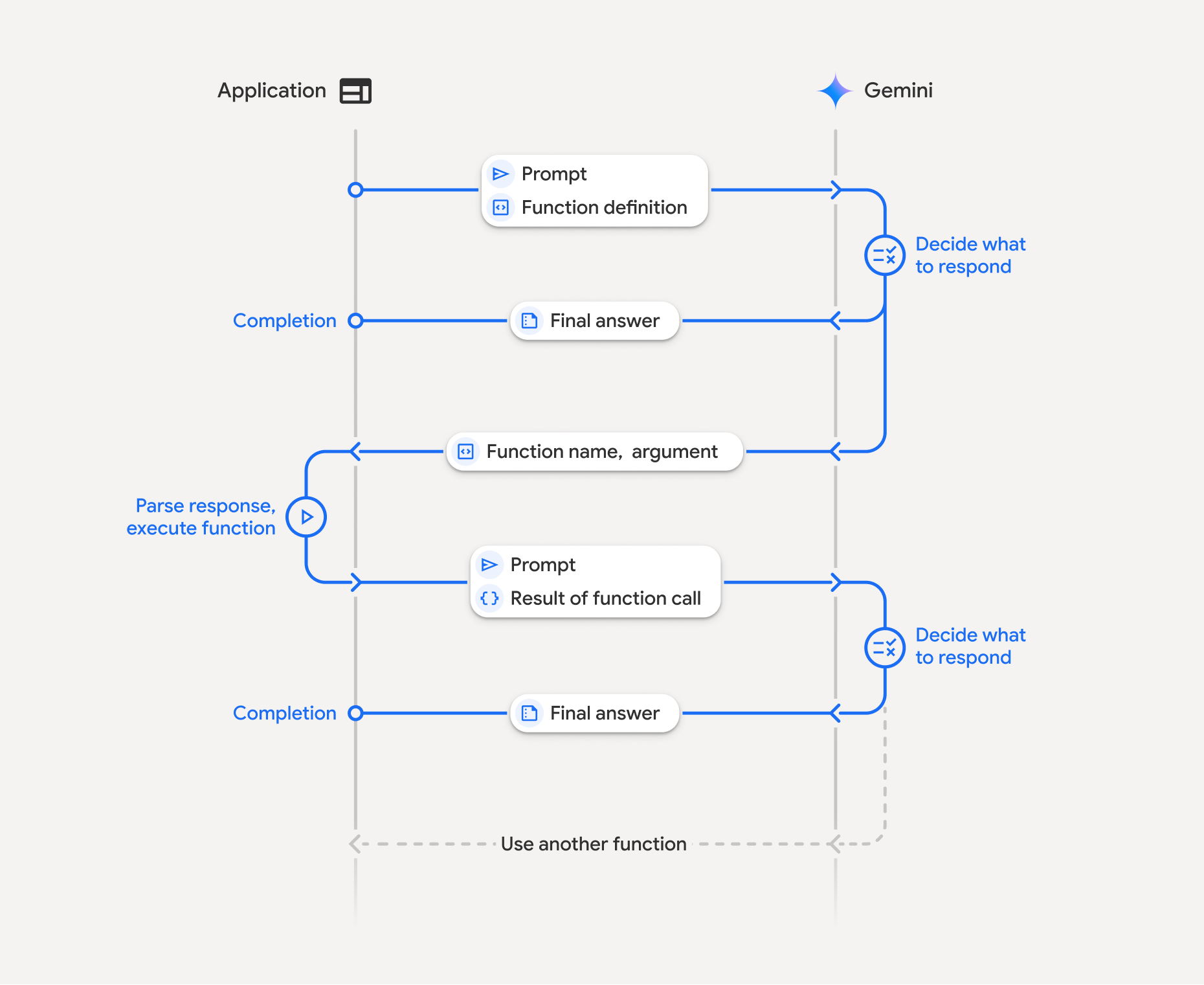
İşlev çağırma, uygulamanız, model ve harici işlevler arasında yapılandırılmış bir etkileşimi içerir. Sürecin dökümü şu şekildedir:
- İşlev bildirimini tanımlayın: Uygulama kodunuzda işlev bildirimini tanımlayın. İşlev Bildirimleri, işlevin adını, parametrelerini ve amacını modele açıklar.
- İşlev bildirimleriyle API'yi çağırın: Kullanıcı istemini, işlev bildirimleriyle birlikte modele gönderin. İsteği analiz eder ve işlev çağrısının
faydalı olup olmayacağını belirler. Bu durumda, işlev adını, bağımsız değişkenleri ve benzersiz bir
idiçeren yapılandırılmış bir JSON nesnesiyle yanıt verir (Buidartık Gemini 3 modelleri için API tarafından her zaman döndürülür*). - İşlev kodunu yürütme (sizin sorumluluğunuz): Model, işlevi kendisi yürütmez. Yanıtı işlemek ve işlev çağrısı olup olmadığını kontrol etmek uygulamanızın sorumluluğundadır. If
- Evet: İşlevin adını, bağımsız değişkenlerini ve
iddeğerini çıkarıp uygulamanızda ilgili işlevi yürütün. - Hayır: Model, isteme doğrudan metin yanıtı vermiştir (Bu akış, örnekte daha az vurgulanmıştır ancak olası bir sonuçtur).
- Evet: İşlevin adını, bağımsız değişkenlerini ve
- Kullanıcı dostu yanıt oluşturma: Bir işlev yürütüldüyse sonucu yakalayıp modele geri gönderin. Sohbetin sonraki aşamasında eşleşen
iddeğerini eklediğinizden emin olun. Ardından, işlev çağrısından elde edilen bilgileri içeren, kullanıcı dostu bir nihai yanıt oluşturmak için bu sonucu kullanır.
Bu işlem birden fazla kez tekrarlanabilir ve karmaşık etkileşimlere ve iş akışlarına olanak tanır. Model ayrıca tek bir adımda (paralel fonksiyon çağırma), sırayla (bileşik fonksiyon çağırma) ve yerleşik Gemini araçlarıyla (çoklu araç kullanımı) birden fazla fonksiyonun çağrılmasını da destekler.
* İşlev kimliklerini her zaman eşleme: Gemini 3 artık her functionCall için her zaman benzersiz bir id döndürür. Modelin sonucunuzu orijinal istekle doğru şekilde eşleştirebilmesi için id karakterini functionResponse içine ekleyin.
1. adım: Fonksiyon bildirimi tanımlayın
Uygulama kodunuzda, kullanıcıların ışık değerlerini ayarlamasına ve API isteğinde bulunmasına olanak tanıyan bir işlev ve işlev bildirimi tanımlayın. Bu işlev, harici hizmetleri veya API'leri çağırabilir.
Python
# Define a function that the model can call to control smart lights
set_light_values_declaration = {
    "name": "set_light_values",
    "description": "Sets the brightness and color temperature of a light.",
    "parameters": {
        "type": "object",
        "properties": {
            "brightness": {
                "type": "integer",
                "description": "Light level from 0 to 100. Zero is off and 100 is full brightness",
            },
            "color_temp": {
                "type": "string",
                "enum": ["daylight", "cool", "warm"],
                "description": "Color temperature of the light fixture, which can be `daylight`, `cool` or `warm`.",
            },
        },
        "required": ["brightness", "color_temp"],
    },
}

# This is the actual function that would be called based on the model's suggestion
def set_light_values(brightness: int, color_temp: str) -> dict[str, int | str]:
    """Set the brightness and color temperature of a room light. (mock API).

    Args:
        brightness: Light level from 0 to 100. Zero is off and 100 is full brightness
        color_temp: Color temperature of the light fixture, which can be `daylight`, `cool` or `warm`.

    Returns:
        A dictionary containing the set brightness and color temperature.
    """
    return {"brightness": brightness, "colorTemperature": color_temp}
JavaScript
import { Type } from '@google/genai';

// Define a function that the model can call to control smart lights
const setLightValuesFunctionDeclaration = {
  name: 'set_light_values',
  description: 'Sets the brightness and color temperature of a light.',
  parameters: {
    type: Type.OBJECT,
    properties: {
      brightness: {
        type: Type.NUMBER,
        description: 'Light level from 0 to 100. Zero is off and 100 is full brightness',
      },
      color_temp: {
        type: Type.STRING,
        enum: ['daylight', 'cool', 'warm'],
        description: 'Color temperature of the light fixture, which can be `daylight`, `cool` or `warm`.',
      },
    },
    required: ['brightness', 'color_temp'],
  },
};

/**

*   Set the brightness and color temperature of a room light. (mock API)
*   @param {number} brightness - Light level from 0 to 100. Zero is off and 100 is full brightness
*   @param {string} color_temp - Color temperature of the light fixture, which can be `daylight`, `cool` or `warm`.
*   @return {Object} A dictionary containing the set brightness and color temperature.
*/
function setLightValues(brightness, color_temp) {
  return {
    brightness: brightness,
    colorTemperature: color_temp
  };
}
Go
package main

import "google.golang.org/genai"

// Define a function declaration that the model can call to control smart lights
var setLightValuesDeclaration = &genai.FunctionDeclaration{
    Name:        "set_light_values",
    Description: "Sets the brightness and color temperature of a light.",
    Parameters: &genai.Schema{
        Type: genai.TypeObject,
        Properties: map[string]*genai.Schema{
            "brightness": {
                Type:        genai.TypeInteger,
                Description: "Light level from 0 to 100. Zero is off and 100 is full brightness",
            },
            "color_temp": {
                Type:        genai.TypeString,
                Enum:        []string{"daylight", "cool", "warm"},
                Description: "Color temperature of the light fixture, which can be `daylight`, `cool` or `warm`.",
            },
        },
        Required: []string{"brightness", "color_temp"},
    },
}

// This is the actual function that would be called based on the model's suggestion
func setLightValues(brightness int, colorTemp string) map[string]any {
    return map[string]any{
        "brightness":       brightness,
        "colorTemperature": colorTemp,
    }
}
2. adım: Modeli işlev bildirimleriyle çağırın
İşlev bildirimlerinizi tanımladıktan sonra modele bunları kullanmasını isteyebilirsiniz. İstemi ve işlev bildirimlerini analiz ederek doğrudan yanıt verip vermeyeceğine veya bir işlevi çağırıp çağırmayacağına karar verir. Bir işlev çağrılırsa yanıt nesnesi bir işlev çağrısı önerisi içerir.
Python
from google.genai import types

# Configure the client and tools
client = genai.Client()
tools = types.Tool(function_declarations=[set_light_values_declaration])
config = types.GenerateContentConfig(tools=[tools])

# Define user prompt
contents = [
    types.Content(
        role="user", parts=[types.Part(text="Turn the lights down to a romantic level")]
    )
]

# Send request with function declarations
response = client.models.generate_content(
    model="gemini-3.8-flash",
    contents=contents,
    config=config,
)

print(response.candidates[0].content.parts[0].function_call)
JavaScript
import { GoogleGenAI } from '@google/genai';

// Generation config with function declaration
const config = {
  tools: [{
    functionDeclarations: [setLightValuesFunctionDeclaration]
  }]
};

// Configure the client
const ai = new GoogleGenAI({});

// Define user prompt
const contents = [
  {
    role: 'user',
    parts: [{ text: 'Turn the lights down to a romantic level' }]
  }
];

// Send request with function declarations
const response = await ai.models.generateContent({
  model: 'gemini-3.8-flash',
  contents: contents,
  config: config
});

console.log(response.functionCalls[0]);
Go
ctx := context.Background()
client, err := genai.NewClient(ctx, nil)
if err != nil {
    log.Fatal(err)
}

// Generation config with function declaration
config := &genai.GenerateContentConfig{
    Tools: []*genai.Tool{
        {FunctionDeclarations: []*genai.FunctionDeclaration{setLightValuesDeclaration}},
    },
}

// Define user prompt
contents := []*genai.Content{
    genai.NewContentFromText("Turn the lights down to a romantic level", genai.RoleUser),
}

// Send request with function declarations
response, err := client.Models.GenerateContent(ctx, "gemini-3.8-flash", contents, config)
if err != nil {
    log.Fatal(err)
}

fmt.Println(response.FunctionCalls()[0])
Ardından model, kullanıcının sorusuna yanıt vermek için bildirilen işlevlerden birini veya daha fazlasını nasıl çağıracağını belirten OpenAPI uyumlu bir şemada functionCall nesnesi döndürür.
Python
id='8f2b1a3c' args={'color_temp': 'warm', 'brightness': 25} name='set_light_values'
JavaScript
{
  id: '8f2b1a3c',
  name: 'set_light_values',
  args: { brightness: 25, color_temp: 'warm' }
}
Go
&{ID:8f2b1a3c Args:map[brightness:25 color_temp:warm] Name:set_light_values}
3. adım: set_light_values işlev kodunu yürütün
Modelin yanıtından işlev çağrısı ayrıntılarını ayıklayın, bağımsız değişkenleri ayrıştırın ve set_light_values işlevini yürütün.
Python
# Extract tool call details, it may not be in the first part.
tool_call = response.candidates[0].content.parts[0].function_call

if tool_call.name == "set_light_values":
    result = set_light_values(**tool_call.args)
    print(f"Function execution result: {result}")
JavaScript
// Extract tool call details
const tool_call = response.functionCalls[0]

let result;
if (tool_call.name === 'set_light_values') {
  result = setLightValues(tool_call.args.brightness, tool_call.args.color_temp);
  console.log(`Function execution result: ${JSON.stringify(result)}`);
}
Go
// Extract tool call details
toolCall := response.FunctionCalls()[0]

var result map[string]any
if toolCall.Name == "set_light_values" {
    brightness := int(toolCall.Args["brightness"].(float64))
    colorTemp := toolCall.Args["color_temp"].(string)
    result = setLightValues(brightness, colorTemp)
    fmt.Printf("Function execution result: %v\n", result)
}
4. adım: İşlev sonucuyla kullanıcı dostu bir yanıt oluşturun ve modeli tekrar çağırın
Son olarak, işlev yürütme sonucunu modele geri gönderin. Böylece model, bu bilgiyi kullanıcıya verdiği nihai yanıta dahil edebilir.
Python
from google import genai
from google.genai import types

# Create a function response part
function_response_part = types.Part.from_function_response(
    name=tool_call.name,
    response={"result": result},
    id=tool_call.id,
)

# Append function call and result of the function execution to contents
contents.append(response.candidates[0].content) # Append the content from the model's response.
contents.append(types.Content(role="user", parts=[function_response_part])) # Append the function response

client = genai.Client()
final_response = client.models.generate_content(
    model="gemini-3.8-flash",
    config=config,
    contents=contents,
)

print(final_response.text)
JavaScript
// Create a function response part
const function_response_part = {
  name: tool_call.name,
  response: { result },
  id: tool_call.id
}

// Append function call and result of the function execution to contents
contents.push(response.candidates[0].content);
contents.push({ role: 'user', parts: [{ functionResponse: function_response_part }] });

// Get the final response from the model
const final_response = await ai.models.generateContent({
  model: 'gemini-3.8-flash',
  contents: contents,
  config: config
});

console.log(final_response.text);
Go
// Create a function response part
functionResponsePart := &genai.Part{
    FunctionResponse: &genai.FunctionResponse{
        ID:       toolCall.ID,
        Name:     toolCall.Name,
        Response: result,
    },
}

// Append function call and result of the function execution to contents
contents = append(contents, response.Candidates[0].Content)
contents = append(contents, &genai.Content{
    Role:  genai.RoleUser,
    Parts: []*genai.Part{functionResponsePart},
})

// Get the final response from the model
finalResponse, err := client.Models.GenerateContent(ctx, "gemini-3.8-flash", contents, config)
if err != nil {
    log.Fatal(err)
}

fmt.Println(finalResponse.Text())
Böylece işlev çağrısı akışı tamamlanır. Model, kullanıcının istek işlemini gerçekleştirmek için set_light_values işlevini başarıyla kullandı.
İşlev bildirimleri
Bir istemde işlev çağrısını uyguladığınızda, bir veya daha fazla function declarations içeren bir tools nesnesi oluşturursunuz. İşlevleri JSON kullanarak tanımlarsınız. Özellikle OpenAPI şema biçiminin alt kümesini seç ile tanımlarsınız. Tek bir işlev bildirimi aşağıdaki parametreleri içerebilir:
name(dize): İşlev için benzersiz bir ad (get_weather_forecast,send_email). Boşluk veya özel karakter içermeyen açıklayıcı adlar kullanın (alt çizgi veya camelCase kullanın).description(dize): İşlevin amacının ve yeteneklerinin net ve ayrıntılı açıklaması. Bu, modelin işlevi ne zaman kullanacağını anlaması açısından çok önemlidir. Açıklayıcı olun ve faydalı olacaksa örnekler verin ("Konuma ve isteğe bağlı olarak sinemalarda gösterilen film başlığına göre sinema salonlarını bulur.").parameters(object): İşlevin beklediği giriş parametrelerini tanımlar.type(dize):objectgibi genel veri türünü belirtir.properties(nesne): Her biri aşağıdakileri içeren ayrı parametreleri listeler:type(dize): Parametrenin veri türü (ör.string,integer,boolean, array).description(dize): Parametrenin amacının ve biçiminin açıklaması. Örnekler ve kısıtlamalar sağlayın ("Şehir ve eyalet, örneğin 'San Francisco, CA' veya posta kodu, örneğin '95616'.").enum(dizi, isteğe bağlı): Parametre değerleri sabit bir kümeden geliyorsa izin verilen değerleri yalnızca açıklamada belirtmek yerine "enum" kullanarak listeleyin. Bu, doğruluğu artırır ("enum": ["daylight", "cool", "warm"]).
required(dizi): İşlevin çalışması için zorunlu olan parametre adlarını listeleyen bir dize dizisi.
FunctionDeclarations nesnesini doğrudan types.FunctionDeclaration.from_callable(client=client, callable=your_function) kullanarak Python işlevlerinden de oluşturabilirsiniz.
Düşünebilen modellerle işlev çağrısı
Gemini 3 ve 2.5 serisi modeller, istekleri değerlendirmek için dahili bir "düşünme" süreci kullanır. Bu, işlev çağrısı performansını önemli ölçüde artırarak modelin bir işlevi ne zaman çağıracağını ve hangi parametreleri kullanacağını daha iyi belirlemesine olanak tanır. Gemini API durum bilgisi içermediğinden, modeller çok adımlı sohbetlerde bağlamı korumak için düşünce imzalarını kullanır.
Bu bölümde, düşünce imzalarının gelişmiş yönetimi ele alınmaktadır.Bu bölüm yalnızca API isteklerini manuel olarak oluşturuyorsanız (ör. REST aracılığıyla) veya görüşme geçmişini değiştiriyorsanız gereklidir.
Resmi kitaplıklarımız olan Google GenAI SDK'larını kullanıyorsanız bu süreci yönetmeniz gerekmez. SDK'lar, önceki örnekte gösterildiği gibi gerekli adımları otomatik olarak işler.
Sohbet geçmişini manuel olarak yönetme
Sohbet geçmişini manuel olarak değiştirirseniz önceki yanıtın tamamını göndermek yerine modelin sırasına dahil edilen thought_signature öğesini doğru şekilde işlemeniz gerekir.
Modelin bağlamının korunması için aşağıdaki kurallara uyun:
thought_signatureher zaman orijinalPartiçinde modele geri gönderin.- API'nin sonucu doğru istekle eşleyebilmesi için
function_calliçindekiiddeğerini her zamanfunction_responseiçine ekleyin. - İmza içeren bir
Partile imza içermeyen bir'yi birleştirmeyin. Bu, düşüncenin konumsal bağlamını bozar. - İmza dizeleri birleştirilemediğinden, her ikisi de imza içeren iki
Partsbirleştirilemez.
Gemini 3 düşünce imzaları
Gemini 3'te, bir model yanıtının herhangi bir Part, düşünce imzası içerebilir.
Genel olarak tüm Part türlerinden imza döndürmenizi öneririz ancak işlev çağrısı için düşünce imzalarını geri iletmek zorunludur. Görüşme geçmişini manuel olarak değiştirmediğiniz sürece Google GenAI SDK, düşünce imzalarını otomatik olarak işler.
Sohbet geçmişini manuel olarak değiştiriyorsanız Gemini 3'te düşünce imzalarını işleme konusunda eksiksiz rehberlik ve ayrıntılı bilgi için Thoughts Signatures (Düşünce İmzaları) sayfasına bakın.
Düşünce imzalarını inceleme
Uygulama için gerekli olmasa da hata ayıklama veya eğitim amaçlarıyla yanıtı inceleyerek thought_signature değerini görebilirsiniz.
Python
import base64
# After receiving a response from a model with thinking enabled
# response = client.models.generate_content(...)

# The signature is attached to the response part containing the function call
part = response.candidates[0].content.parts[0]
if part.thought_signature:
  print(base64.b64encode(part.thought_signature).decode("utf-8"))
JavaScript
// After receiving a response from a model with thinking enabled
// const response = await ai.models.generateContent(...)

// The signature is attached to the response part containing the function call
const part = response.candidates[0].content.parts[0];
if (part.thoughtSignature) {
  console.log(part.thoughtSignature);
}
Go
// After receiving a response from a model with thinking enabled
// response, err := client.Models.GenerateContent(...)

// The signature is attached to the response part containing the function call
part := response.Candidates[0].Content.Parts[0]
if len(part.ThoughtSignature) > 0 {
    fmt.Println(string(part.ThoughtSignature))
}
Düşünce imzalarının sınırlamaları ve kullanımı ile genel olarak düşünen modeller hakkında daha fazla bilgiyi Düşünme sayfasında bulabilirsiniz.
Paralel fonksiyon çağırma
Tek dönüşlü işlev çağrısının yanı sıra aynı anda birden fazla işlevi de çağırabilirsiniz. Paralel fonksiyon çağırma, birden fazla fonksiyonu aynı anda çalıştırmanıza olanak tanır ve fonksiyonlar birbirine bağlı olmadığında kullanılır. Bu, farklı veritabanlarından müşteri bilgilerini alma veya çeşitli depolardaki envanter seviyelerini kontrol etme gibi birden fazla bağımsız kaynaktan veri toplama ya da dairenizi diskoya dönüştürme gibi birden fazla işlem gerçekleştirme senaryolarında kullanışlıdır.
Model tek bir dönüşte birden fazla işlev çağrısı başlattığında function_result nesnelerini, function_call nesnelerinin alındığı sırayla döndürmeniz gerekmez. Gemini API, modelin çıkışındaki id değerini kullanarak her sonucu ilgili çağrıyla eşler. Bu sayede işlevlerinizi eşzamansız olarak yürütebilir ve tamamlandıkça sonuçları listenize ekleyebilirsiniz.
Python
power_disco_ball = {
    "name": "power_disco_ball",
    "description": "Powers the spinning disco ball.",
    "parameters": {
        "type": "object",
        "properties": {
            "power": {
                "type": "boolean",
                "description": "Whether to turn the disco ball on or off.",
            }
        },
        "required": ["power"],
    },
}

start_music = {
    "name": "start_music",
    "description": "Play some music matching the specified parameters.",
    "parameters": {
        "type": "object",
        "properties": {
            "energetic": {
                "type": "boolean",
                "description": "Whether the music is energetic or not.",
            },
            "loud": {
                "type": "boolean",
                "description": "Whether the music is loud or not.",
            },
        },
        "required": ["energetic", "loud"],
    },
}

dim_lights = {
    "name": "dim_lights",
    "description": "Dim the lights.",
    "parameters": {
        "type": "object",
        "properties": {
            "brightness": {
                "type": "number",
                "description": "The brightness of the lights, 0.0 is off, 1.0 is full.",
            }
        },
        "required": ["brightness"],
    },
}
JavaScript
import { Type } from '@google/genai';

const powerDiscoBall = {
  name: 'power_disco_ball',
  description: 'Powers the spinning disco ball.',
  parameters: {
    type: Type.OBJECT,
    properties: {
      power: {
        type: Type.BOOLEAN,
        description: 'Whether to turn the disco ball on or off.'
      }
    },
    required: ['power']
  }
};

const startMusic = {
  name: 'start_music',
  description: 'Play some music matching the specified parameters.',
  parameters: {
    type: Type.OBJECT,
    properties: {
      energetic: {
        type: Type.BOOLEAN,
        description: 'Whether the music is energetic or not.'
      },
      loud: {
        type: Type.BOOLEAN,
        description: 'Whether the music is loud or not.'
      }
    },
    required: ['energetic', 'loud']
  }
};

const dimLights = {
  name: 'dim_lights',
  description: 'Dim the lights.',
  parameters: {
    type: Type.OBJECT,
    properties: {
      brightness: {
        type: Type.NUMBER,
        description: 'The brightness of the lights, 0.0 is off, 1.0 is full.'
      }
    },
    required: ['brightness']
  }
};
Go
package main

import "google.golang.org/genai"

var powerDiscoBall = &genai.FunctionDeclaration{
    Name:        "power_disco_ball",
    Description: "Powers the spinning disco ball.",
    Parameters: &genai.Schema{
        Type: genai.TypeObject,
        Properties: map[string]*genai.Schema{
            "power": {
                Type:        genai.TypeBoolean,
                Description: "Whether to turn the disco ball on or off.",
            },
        },
        Required: []string{"power"},
    },
}

var startMusic = &genai.FunctionDeclaration{
    Name:        "start_music",
    Description: "Play some music matching the specified parameters.",
    Parameters: &genai.Schema{
        Type: genai.TypeObject,
        Properties: map[string]*genai.Schema{
            "energetic": {
                Type:        genai.TypeBoolean,
                Description: "Whether the music is energetic or not.",
            },
            "loud": {
                Type:        genai.TypeBoolean,
                Description: "Whether the music is loud or not.",
            },
        },
        Required: []string{"energetic", "loud"},
    },
}

var dimLights = &genai.FunctionDeclaration{
    Name:        "dim_lights",
    Description: "Dim the lights.",
    Parameters: &genai.Schema{
        Type: genai.TypeObject,
        Properties: map[string]*genai.Schema{
            "brightness": {
                Type:        genai.TypeNumber,
                Description: "The brightness of the lights, 0.0 is off, 1.0 is full.",
            },
        },
        Required: []string{"brightness"},
    },
}
İşlev çağrısı modunu, belirtilen tüm araçların kullanılmasına izin verecek şekilde yapılandırın. Daha fazla bilgi edinmek için işlev çağrısını yapılandırma ile ilgili makaleyi okuyabilirsiniz.
Python
from google import genai
from google.genai import types

# Configure the client and tools
client = genai.Client()
house_tools = [
    types.Tool(function_declarations=[power_disco_ball, start_music, dim_lights])
]
config = types.GenerateContentConfig(
    tools=house_tools,
    automatic_function_calling=types.AutomaticFunctionCallingConfig(
        disable=True
    ),
    # Force the model to call 'any' function, instead of chatting.
    tool_config=types.ToolConfig(
        function_calling_config=types.FunctionCallingConfig(mode='ANY')
    ),
)

chat = client.chats.create(model="gemini-3.8-flash", config=config)
response = chat.send_message("Turn this place into a party!")

# Print out each of the function calls requested from this single call
print("Example 1: Forced function calling")
for fn in response.function_calls:
    args = ", ".join(f"{key}={val}" for key, val in fn.args.items())
    print(f"{fn.name}({args}) - ID: {fn.id}")
JavaScript
import { GoogleGenAI } from '@google/genai';

// Set up function declarations
const houseFns = [powerDiscoBall, startMusic, dimLights];

const config = {
    tools: [{
        functionDeclarations: houseFns
    }],
    // Force the model to call 'any' function, instead of chatting.
    toolConfig: {
        functionCallingConfig: {
            mode: 'any'
        }
    }
};

// Configure the client
const ai = new GoogleGenAI({});

// Create a chat session
const chat = ai.chats.create({
    model: 'gemini-3.8-flash',
    config: config
});
const response = await chat.sendMessage({message: 'Turn this place into a party!'});

// Print out each of the function calls requested from this single call
console.log("Example 1: Forced function calling");
for (const fn of response.functionCalls) {
    const args = Object.entries(fn.args)
        .map(([key, val]) => `${key}=${val}`)
        .join(', ');
    console.log(`${fn.name}(${args}) - ID: ${fn.id}`);
}
Go
ctx := context.Background()
client, err := genai.NewClient(ctx, nil)
if err != nil {
    log.Fatal(err)
}

houseTools := []*genai.Tool{
    {FunctionDeclarations: []*genai.FunctionDeclaration{powerDiscoBall, startMusic, dimLights}},
}

config := &genai.GenerateContentConfig{
    Tools: houseTools,
    // Force the model to call 'any' function, instead of chatting.
    ToolConfig: &genai.ToolConfig{
        FunctionCallingConfig: &genai.FunctionCallingConfig{
            Mode: genai.FunctionCallingConfigModeAny,
        },
    },
}

response, err := client.Models.GenerateContent(
    ctx,
    "gemini-3.8-flash",
    genai.Text("Turn this place into a party!"),
    config,
)
if err != nil {
    log.Fatal(err)
}

// Print out each of the function calls requested from this single call
fmt.Println("Example 1: Forced function calling")
for _, fn := range response.FunctionCalls() {
    fmt.Printf("%s(%v) - ID: %s\n", fn.Name, fn.Args, fn.ID)
}
Yazdırılan sonuçların her biri, modelin istediği tek bir işlev çağrısını yansıtır. Sonuçları geri göndermek için yanıtları, istendikleri sırayla ekleyin.
Python SDK'sı, Python işlevlerini otomatik olarak bildirimlere dönüştüren, işlev çağrısı yürütme ve yanıt döngüsünü sizin için yöneten otomatik işlev çağrısını destekler. Aşağıda, keşif kullanım alanına örnek verilmiştir.
Python
from google import genai
from google.genai import types

# Actual function implementations
def power_disco_ball_impl(power: bool) -> dict:
    """Powers the spinning disco ball.

    Args:
        power: Whether to turn the disco ball on or off.

    Returns:
        A status dictionary indicating the current state.
    """
    return {"status": f"Disco ball powered {'on' if power else 'off'}"}

def start_music_impl(energetic: bool, loud: bool) -> dict:
    """Play some music matching the specified parameters.

    Args:
        energetic: Whether the music is energetic or not.
        loud: Whether the music is loud or not.

    Returns:
        A dictionary containing the music settings.
    """
    music_type = "energetic" if energetic else "chill"
    volume = "loud" if loud else "quiet"
    return {"music_type": music_type, "volume": volume}

def dim_lights_impl(brightness: float) -> dict:
    """Dim the lights.

    Args:
        brightness: The brightness of the lights, 0.0 is off, 1.0 is full.

    Returns:
        A dictionary containing the new brightness setting.
    """
    return {"brightness": brightness}

# Configure the client
client = genai.Client()
config = types.GenerateContentConfig(
    tools=[power_disco_ball_impl, start_music_impl, dim_lights_impl]
)

# Make the request
response = client.models.generate_content(
    model="gemini-3.8-flash",
    contents="Do everything you need to this place into party!",
    config=config,
)

print("\nExample 2: Automatic function calling")
print(response.text)
# I've turned on the disco ball, started playing loud and energetic music, and dimmed the lights to 50% brightness. Let's get this party started!
Birleşik işlev çağrısı
Kompozisyonel veya ardışık fonksiyon çağırma, Gemini'ın karmaşık bir isteği yerine getirmek için birden fazla işlev çağrısını birlikte kullanmasına olanak tanır. Örneğin, "Bulunduğum yerdeki sıcaklığı öğren" sorusunu yanıtlamak için Gemini API önce bir get_current_location() işlevini, ardından konumu parametre olarak alan bir get_weather() işlevini çağırabilir.
Aşağıdaki örnekte, Python SDK'sı ve otomatik işlev çağrısı kullanılarak bileşik işlev çağrısının nasıl uygulanacağı gösterilmektedir.
Python
Bu örnekte, google-genai Python SDK'sının otomatik işlev çağırma özelliği kullanılmaktadır. SDK, Python işlevlerini otomatik olarak gerekli şemaya dönüştürür, model tarafından istendiğinde işlev çağrılarını yürütür ve görevi tamamlamak için sonuçları modele geri gönderir.
import os
from google import genai
from google.genai import types

# Example Functions
def get_weather_forecast(location: str) -> dict:
    """Gets the current weather temperature for a given location."""
    print(f"Tool Call: get_weather_forecast(location={location})")
    # TODO: Make API call
    print("Tool Response: {'temperature': 25, 'unit': 'celsius'}")
    return {"temperature": 25, "unit": "celsius"}  # Dummy response

def set_thermostat_temperature(temperature: int) -> dict:
    """Sets the thermostat to a desired temperature."""
    print(f"Tool Call: set_thermostat_temperature(temperature={temperature})")
    # TODO: Interact with a thermostat API
    print("Tool Response: {'status': 'success'}")
    return {"status": "success"}

# Configure the client and model
client = genai.Client()
config = types.GenerateContentConfig(
    tools=[get_weather_forecast, set_thermostat_temperature]
)

# Make the request
response = client.models.generate_content(
    model="gemini-3.8-flash",
    contents="If it's warmer than 20°C in London, set the thermostat to 20°C, otherwise set it to 18°C.",
    config=config,
)

# Print the final, user-facing response
print(response.text)
Beklenen çıkış
Kodu çalıştırdığınızda SDK'nın işlev çağrılarını yönettiğini görürsünüz. Model önce get_weather_forecast işlevini çağırır, sıcaklığı alır ve ardından istemdeki mantığa göre doğru değerle set_thermostat_temperature işlevini çağırır.
Tool Call: get_weather_forecast(location=London)
Tool Response: {'temperature': 25, 'unit': 'celsius'}
Tool Call: set_thermostat_temperature(temperature=20)
Tool Response: {'status': 'success'}
OK. I've set the thermostat to 20°C.
JavaScript
Bu örnekte, manuel yürütme döngüsü kullanarak bileşik işlev çağrısı yapmak için JavaScript/TypeScript SDK'nın nasıl kullanılacağı gösterilmektedir.
import { GoogleGenAI, Type } from "@google/genai";

// Configure the client
const ai = new GoogleGenAI({});

// Example Functions
function get_weather_forecast({ location }) {
  console.log(`Tool Call: get_weather_forecast(location=${location})`);
  // TODO: Make API call
  console.log("Tool Response: {'temperature': 25, 'unit': 'celsius'}");
  return { temperature: 25, unit: "celsius" };
}

function set_thermostat_temperature({ temperature }) {
  console.log(
    `Tool Call: set_thermostat_temperature(temperature=${temperature})`,
  );
  // TODO: Make API call
  console.log("Tool Response: {'status': 'success'}");
  return { status: "success" };
}

const toolFunctions = {
  get_weather_forecast,
  set_thermostat_temperature,
};

const tools = [
  {
    functionDeclarations: [
      {
        name: "get_weather_forecast",
        description:
          "Gets the current weather temperature for a given location.",
        parameters: {
          type: Type.OBJECT,
          properties: {
            location: {
              type: Type.STRING,
            },
          },
          required: ["location"],
        },
      },
      {
        name: "set_thermostat_temperature",
        description: "Sets the thermostat to a desired temperature.",
        parameters: {
          type: Type.OBJECT,
          properties: {
            temperature: {
              type: Type.NUMBER,
            },
          },
          required: ["temperature"],
        },
      },
    ],
  },
];

// Prompt for the model
let contents = [
  {
    role: "user",
    parts: [
      {
        text: "If it's warmer than 20°C in London, set the thermostat to 20°C, otherwise set it to 18°C.",
      },
    ],
  },
];

// Loop until the model has no more function calls to make
while (true) {
  const result = await ai.models.generateContent({
    model: "gemini-3.8-flash",
    contents,
    config: { tools },
  });

  if (result.functionCalls && result.functionCalls.length > 0) {
    const functionCall = result.functionCalls[0];

    const { name, args } = functionCall;

    if (!toolFunctions[name]) {
      throw new Error(`Unknown function call: ${name}`);
    }

    // Call the function and get the response.
    const toolResponse = toolFunctions[name](args);

    const functionResponsePart = {
      name: functionCall.name,
      response: {
        result: toolResponse,
      },
      id: functionCall.id,
    };

    // Send the function response back to the model.
    contents.push({
      role: "model",
      parts: [
        {
          functionCall: functionCall,
        },
      ],
    });
    contents.push({
      role: "user",
      parts: [
        {
          functionResponse: functionResponsePart,
        },
      ],
    });
  } else {
    // No more function calls, break the loop.
    console.log(result.text);
    break;
  }
}
Beklenen çıkış
Kodu çalıştırdığınızda, işlev çağrılarını düzenleyen SDK'yı görürsünüz. Model önce get_weather_forecast işlevini çağırır, sıcaklığı alır ve ardından istemdeki mantığa göre doğru değerle set_thermostat_temperature işlevini çağırır.
Tool Call: get_weather_forecast(location=London)
Tool Response: {'temperature': 25, 'unit': 'celsius'}
Tool Call: set_thermostat_temperature(temperature=20)
Tool Response: {'status': 'success'}
OK. It's 25°C in London, so I've set the thermostat to 20°C.
Go
Bu örnekte, manuel yürütme döngüsü kullanarak bileşik işlev çağrısı yapmak için Go SDK'nın nasıl kullanılacağı gösterilmektedir.
package main

import (
    "context"
    "fmt"
    "log"

    "google.golang.org/genai"
)

func getWeatherForecast(location string) map[string]any {
    fmt.Printf("Tool Call: get_weather_forecast(location=%s)\n", location)
    fmt.Println("Tool Response: map[temperature:25 unit:celsius]")
    return map[string]any{"temperature": 25, "unit": "celsius"}
}

func setThermostatTemperature(temperature float64) map[string]any {
    fmt.Printf("Tool Call: set_thermostat_temperature(temperature=%v)\n", temperature)
    fmt.Println("Tool Response: map[status:success]")
    return map[string]any{"status": "success"}
}

func main() {
    ctx := context.Background()
    client, err := genai.NewClient(ctx, nil)
    if err != nil {
        log.Fatal(err)
    }

    tools := []*genai.Tool{
        {
            FunctionDeclarations: []*genai.FunctionDeclaration{
                {
                    Name:        "get_weather_forecast",
                    Description: "Gets the current weather temperature for a given location.",
                    Parameters: &genai.Schema{
                        Type: genai.TypeObject,
                        Properties: map[string]*genai.Schema{
                            "location": {Type: genai.TypeString},
                        },
                        Required: []string{"location"},
                    },
                },
                {
                    Name:        "set_thermostat_temperature",
                    Description: "Sets the thermostat to a desired temperature.",
                    Parameters: &genai.Schema{
                        Type: genai.TypeObject,
                        Properties: map[string]*genai.Schema{
                            "temperature": {Type: genai.TypeNumber},
                        },
                        Required: []string{"temperature"},
                    },
                },
            },
        },
    }

    config := &genai.GenerateContentConfig{Tools: tools}

    contents := []*genai.Content{
        genai.NewContentFromText("If it's warmer than 20°C in London, set the thermostat to 20°C, otherwise set it to 18°C.", genai.RoleUser),
    }

    for {
        result, err := client.Models.GenerateContent(ctx, "gemini-3.8-flash", contents, config)
        if err != nil {
            log.Fatal(err)
        }

        if len(result.FunctionCalls()) > 0 {
            functionCall := result.FunctionCalls()[0]
            var toolResponse map[string]any

            switch functionCall.Name {
            case "get_weather_forecast":
                location := functionCall.Args["location"].(string)
                toolResponse = getWeatherForecast(location)
            case "set_thermostat_temperature":
                temperature := functionCall.Args["temperature"].(float64)
                toolResponse = setThermostatTemperature(temperature)
            default:
                log.Fatalf("Unknown function call: %s", functionCall.Name)
            }

            contents = append(contents, result.Candidates[0].Content)
            contents = append(contents, &genai.Content{
                Role: genai.RoleUser,
                Parts: []*genai.Part{
                    {
                        FunctionResponse: &genai.FunctionResponse{
                            ID:       functionCall.ID,
                            Name:     functionCall.Name,
                            Response: toolResponse,
                        },
                    },
                },
            })
        } else {
            fmt.Println(result.Text())
            break
        }
    }
}
Beklenen Çıkış
Tool Call: get_weather_forecast(location=London)
Tool Response: map[temperature:25 unit:celsius]
Tool Call: set_thermostat_temperature(temperature=20)
Tool Response: map[status:success]
OK. It's 25°C in London, so I've set the thermostat to 20°C.
Birleşik işlev çağrısı, yerel bir Live API özelliğidir. Bu nedenle Live API, işlev çağrılarını Python SDK'sına benzer şekilde işleyebilir.
Python
# Light control schemas
turn_on_the_lights_schema = {'name': 'turn_on_the_lights'}
turn_off_the_lights_schema = {'name': 'turn_off_the_lights'}

prompt = """
  Hey, can you write run some python code to turn on the lights, wait 10s and then turn off the lights?
  """

tools = [
    {'code_execution': {}},
    {'function_declarations': [turn_on_the_lights_schema, turn_off_the_lights_schema]}
]

await run(prompt, tools=tools, modality="AUDIO")
JavaScript
// Light control schemas
const turnOnTheLightsSchema = { name: 'turn_on_the_lights' };
const turnOffTheLightsSchema = { name: 'turn_off_the_lights' };

const prompt = `
  Hey, can you write run some python code to turn on the lights, wait 10s and then turn off the lights?
`;

const tools = [
  { codeExecution: {} },
  { functionDeclarations: [turnOnTheLightsSchema, turnOffTheLightsSchema] }
];

await run(prompt, tools=tools, modality="AUDIO")
İşlev çağırma modları
Gemini API, modelin sağlanan araçları (işlev bildirimleri) nasıl kullanacağını kontrol etmenize olanak tanır. Özellikle, modu function_calling_config içinde ayarlayabilirsiniz.
VALIDATED: Araç kombinasyonu için varsayılan mod (yerleşik araçlar veya yapılandırılmış çıktılar da etkinleştirildiğinde). Model, işlev çağrılarını veya doğal dili tahmin etmekle sınırlıdır ve işlev şemasına uyulmasını sağlar.allowed_function_namessağlanmazsa model, mevcut tüm işlev bildirimleri arasından seçim yapar.allowed_function_namessağlanırsa model, izin verilen işlevler arasından seçim yapar. Bu mod, hatalı biçimlendirilmiş işlev çağrılarını azaltır (AUTOmoduna kıyasla).AUTO: Yalnızca function_declarations aracı etkinleştirildiğinde kullanılan varsayılan mod. Model, isteme ve bağlama göre doğal dilde bir yanıt mı oluşturacağına yoksa işlev çağrısı mı önereceğine karar verir.ANY: Model, her zaman bir işlev çağrısı tahmin edecek şekilde kısıtlanır ve işlev şemasına uyulmasını sağlar.allowed_function_namesbelirtilmezse model, sağlanan işlev bildirimlerinden herhangi birini seçebilir.allowed_function_namesbir liste olarak sağlanırsa model yalnızca bu listedeki işlevler arasından seçim yapabilir. Her isteme bir işlev çağrısı yanıtı verilmesini istediğinizde bu modu kullanın (geçerliyse).NONE: Modelin işlev çağrısı yapması yasaklanmıştır. Bu, herhangi bir işlev bildirimi olmadan istek göndermeye eşdeğerdir. Bu özelliği, araç tanımlarınızı kaldırmadan işlev çağrısını geçici olarak devre dışı bırakmak için kullanın.
Python
from google.genai import types

# Configure function calling mode
tool_config = types.ToolConfig(
    function_calling_config=types.FunctionCallingConfig(
        mode="ANY", allowed_function_names=["get_current_temperature"]
    )
)

# Create the generation config
config = types.GenerateContentConfig(
    tools=[tools],  # not defined here.
    tool_config=tool_config,
)
JavaScript
import { FunctionCallingConfigMode } from '@google/genai';

// Configure function calling mode
const toolConfig = {
  functionCallingConfig: {
    mode: FunctionCallingConfigMode.ANY,
    allowedFunctionNames: ['get_current_temperature']
  }
};

// Create the generation config
const config = {
  tools: tools, // not defined here.
  toolConfig: toolConfig,
};
Go
// Configure function calling mode
toolConfig := &genai.ToolConfig{
    FunctionCallingConfig: &genai.FunctionCallingConfig{
        Mode:                 genai.FunctionCallingConfigModeAny,
        AllowedFunctionNames: []string{"get_current_temperature"},
    },
}

// Create the generation config
config := &genai.GenerateContentConfig{
    Tools:      tools, // not defined here.
    ToolConfig: toolConfig,
}
Otomatik işlev çağrısı (yalnızca Python)
Python SDK'yı kullanırken Python işlevlerini doğrudan araç olarak sağlayabilirsiniz. SDK, bu işlevleri bildirimlere dönüştürür, işlev çağrısı yürütme işlemini yönetir ve yanıt döngüsünü sizin için gerçekleştirir. Fonksiyonunuzu tür ipuçları ve bir docstring ile tanımlayın. En iyi sonuçlar için Google tarzı docstring'ler kullanmanız önerilir. SDK daha sonra otomatik olarak:
- Modelden gelen işlev çağrısı yanıtlarını algılar.
- Kodunuzda ilgili Python işlevini çağırın.
- İşlevin yanıtını modele geri gönderin.
- Modelin son metin yanıtını döndürür.
SDK şu anda bağımsız değişken açıklamalarını, oluşturulan işlev bildiriminin özellik açıklaması alanlarına ayrıştırmıyor. Bunun yerine, tüm docstring'i üst düzey işlev açıklaması olarak gönderir.
Python
from google import genai
from google.genai import types

# Define the function with type hints and docstring
def get_current_temperature(location: str) -> dict:
    """Gets the current temperature for a given location.

    Args:
        location: The city and state, e.g. San Francisco, CA

    Returns:
        A dictionary containing the temperature and unit.
    """
    # ... (implementation) ...
    return {"temperature": 25, "unit": "Celsius"}

# Configure the client
client = genai.Client()
config = types.GenerateContentConfig(
    tools=[get_current_temperature]
)  # Pass the function itself

# Make the request
response = client.models.generate_content(
    model="gemini-3.8-flash",
    contents="What's the temperature in Boston?",
    config=config,
)

print(response.text)  # The SDK handles the function call and returns the final text
Otomatik işlev çağrısını şu yöntemlerle devre dışı bırakabilirsiniz:
Python
config = types.GenerateContentConfig(
    tools=[get_current_temperature],
    automatic_function_calling=types.AutomaticFunctionCallingConfig(disable=True)
)
Otomatik işlev şeması bildirimi
API, aşağıdaki türlerin herhangi birini açıklayabilir. Pydantic türlerine izin verilir. Ancak bu türlerde tanımlanan alanlar da izin verilen türlerden oluşmalıdır. Sözlük türleri (ör. dict[str: int]) burada tam olarak desteklenmediğinden kullanılmamalıdır.
Python
AllowedType = (
  int | float | bool | str | list['AllowedType'] | pydantic.BaseModel)
Çıkarılan şemanın nasıl göründüğünü görmek için from_callable kullanarak dönüştürebilirsiniz:
Python
from google import genai
from google.genai import types

def multiply(a: float, b: float):
    """Returns a * b."""
    return a * b

client = genai.Client()
fn_decl = types.FunctionDeclaration.from_callable(callable=multiply, client=client)

# to_json_dict() provides a clean JSON representation.
print(fn_decl.to_json_dict())
Çoklu araç kullanımı: Yerleşik araçları işlev çağrısıyla birleştirme
Yerleşik araçları işlev çağrısıyla birleştirerek aynı istekte birden fazla aracı etkinleştirebilirsiniz.
Gemini 3 modelleri, araç bağlamı dolaşımı özelliği sayesinde yerleşik araçları işlev çağrısıyla birleştirebilir. Daha fazla bilgi edinmek için Yerleşik araçları ve işlev çağrılarını birleştirme sayfasını inceleyin.
Python
from google import genai
from google.genai import types

client = genai.Client()

getWeather = {
    "name": "getWeather",
    "description": "Gets the weather for a requested city.",
    "parameters": {
        "type": "object",
        "properties": {
            "city": {
                "type": "string",
                "description": "The city and state, e.g. Utqiaġvik, Alaska",
            },
        },
        "required": ["city"],
    },
}

response = client.models.generate_content(
    model="gemini-3.8-flash",
    contents="What is the northernmost city in the United States? What's the weather like there today?",
    config=types.GenerateContentConfig(
      tools=[
        types.Tool(
          google_search=types.ToolGoogleSearch(),  # Built-in tool
          function_declarations=[getWeather]       # Custom tool
        ),
      ],
      include_server_side_tool_invocations=True
    ),
)

history = [
    types.Content(
        role="user",
        parts=[types.Part(text="What is the northernmost city in the United States? What's the weather like there today?")]
    ),
    response.candidates[0].content,
    types.Content(
        role="user",
        parts=[types.Part(
            function_response=types.FunctionResponse(
                name="getWeather",
                response={"response": "Very cold. 22 degrees Fahrenheit."},
                id=response.candidates[0].content.parts[2].function_call.id
            )
        )]
    )
]

response_2 = client.models.generate_content(
    model="gemini-3.8-flash",
    contents=history,
    config=types.GenerateContentConfig(
      tools=[
        types.Tool(
          google_search=types.ToolGoogleSearch(),
          function_declarations=[getWeather]
        ),
      ],
      include_server_side_tool_invocations=True
    ),
)
JavaScript
import { GoogleGenAI} from '@google/genai';

const client = new GoogleGenAI({});

const getWeather = {
    name: "getWeather",
    description: "Get the weather in a given location",
    parameters: {
        type: "OBJECT",
        properties: {
            location: {
                type: "STRING",
                description: "The city and state, e.g. San Francisco, CA"
            }
        },
        required: ["location"]
    }
};

async function run() {
    const tools = [
      { googleSearch: {} },
      { functionDeclarations: [getWeather] }
    ];
    const toolConfig = { includeServerSideToolInvocations: true };

    const response1 = await client.models.generateContent({
        model: "gemini-3.8-flash",
        contents: [{role: "user", parts: [{text: "What is the northernmost city in the United States? What's the weather like there today?"}]}],
        config: {
            tools: tools,
            toolConfig: toolConfig,
        },
    });

    const functionCallId = response1.candidates[0].content.parts.find(p => p.functionCall)?.functionCall?.id;

    const history = [
        {
            role: "user",
            parts:[{text: "What is the northernmost city in the United States? What's the weather like there today?"}]
        },
        response1.candidates[0].content,
        {
            role: "user",
            parts: [{
                functionResponse: {
                    name: "getWeather",
                    response: {response: "Very cold. 22 degrees Fahrenheit."},
                    id: functionCallId
                }
            }]
        }
    ];

    const response2 = await client.models.generateContent({
        model: "gemini-3.8-flash",
        contents: history,
        config: {
            tools: tools,
            toolConfig: toolConfig,
        },
    });
}

run();
Go
package main

import (
    "context"
    "fmt"
    "log"

    "google.golang.org/genai"
)

func main() {
    ctx := context.Background()
    client, err := genai.NewClient(ctx, nil)
    if err != nil {
        log.Fatal(err)
    }

    getWeather := &genai.FunctionDeclaration{
        Name:        "getWeather",
        Description: "Get the weather in a given location",
        Parameters: &genai.Schema{
            Type: genai.TypeObject,
            Properties: map[string]*genai.Schema{
                "location": {
                    Type:        genai.TypeString,
                    Description: "The city and state, e.g. San Francisco, CA",
                },
            },
            Required: []string{"location"},
        },
    }

    tools := []*genai.Tool{
        {GoogleSearch: &genai.GoogleSearch{}},
        {FunctionDeclarations: []*genai.FunctionDeclaration{getWeather}},
    }

    config := &genai.GenerateContentConfig{
        Tools: tools,
    }

    prompt := "What is the northernmost city in the United States? What's the weather like there today?"
    response1, err := client.Models.GenerateContent(ctx, "gemini-3.8-flash", genai.Text(prompt), config)
    if err != nil {
        log.Fatal(err)
    }

    toolCall := response1.FunctionCalls()[0]

    history := []*genai.Content{
        genai.NewContentFromText(prompt, genai.RoleUser),
        response1.Candidates[0].Content,
        {
            Role: genai.RoleUser,
            Parts: []*genai.Part{
                {
                    FunctionResponse: &genai.FunctionResponse{
                        ID:       toolCall.ID,
                        Name:     toolCall.Name,
                        Response: map[string]any{"response": "Very cold. 22 degrees Fahrenheit."},
                    },
                },
            },
        },
    }

    response2, err := client.Models.GenerateContent(ctx, "gemini-3.8-flash", history, config)
    if err != nil {
        log.Fatal(err)
    }

    fmt.Println(response2.Text())
}
Gemini 3 serisinden önceki modeller için Live API'yi kullanın.
Çok formatlı işlev yanıtları
Gemini 3 serisi modellerde, modele gönderdiğiniz işlev yanıtı bölümlerine çok formatlı içerik ekleyebilirsiniz. Model, bir sonraki adımda bu çok formatlı içeriği işleyerek daha bilinçli bir yanıt üretebilir. İşlev yanıtlarındaki çok formatlı içerik için aşağıdaki MIME türleri desteklenir:
- Görseller:
image/png,image/jpeg,image/webp - Belgeler:
application/pdf,text/plain
İşlev yanıtına çok formatlı verileri dahil etmek için bunları functionResponse bölümünde iç içe yerleştirilmiş bir veya daha fazla bölüm olarak ekleyin. Her çok formatlı bölüm inlineData içermelidir. Yapılandırılmış response alanında çok formatlı bir bölümden bahsediyorsanız bu bölüm benzersiz bir displayName içermelidir.
Ayrıca, JSON referans biçimini {"$ref": "<displayName>"} kullanarak functionResponse bölümünün yapılandırılmış response alanındaki çok formatlı bir bölüme de referans verebilirsiniz. Model, yanıtı işlerken referansı çok formatlı içerikle değiştirir. Her displayName, yapılandırılmış response alanında yalnızca bir kez referans verilebilir.
Aşağıdaki örnekte, get_image adlı bir işlev için functionResponse içeren bir mesaj ve displayName: "instrument.jpg" ile resim verileri içeren iç içe yerleştirilmiş bir bölüm gösterilmektedir. functionResponse öğesinin response alanı,
bu resim bölümüne referans veriyor:
Python
from google import genai
from google.genai import types

import requests

client = genai.Client()

# This is a manual, two turn multimodal function calling workflow:

# 1. Define the function tool
get_image_declaration = types.FunctionDeclaration(
  name="get_image",
  description="Retrieves the image file reference for a specific order item.",
  parameters={
      "type": "object",
      "properties": {
          "item_name": {
              "type": "string",
              "description": "The name or description of the item ordered (e.g., 'instrument')."
          }
      },
      "required": ["item_name"],
  },
)
tool_config = types.Tool(function_declarations=[get_image_declaration])

# 2. Send a message that triggers the tool
prompt = "Show me the instrument I ordered last month."
response_1 = client.models.generate_content(
  model="gemini-3.8-flash",
  contents=[prompt],
  config=types.GenerateContentConfig(
      tools=[tool_config],
  )
)

# 3. Handle the function call
function_call = response_1.function_calls[0]
requested_item = function_call.args["item_name"]
print(f"Model wants to call: {function_call.name}")

# Execute your tool (e.g., call an API)
# (This is a mock response for the example)
print(f"Calling external tool for: {requested_item}")

function_response_data = {
  "image_ref": {"$ref": "instrument.jpg"},
}
image_path = "https://goo.gle/instrument-img"
image_bytes = requests.get(image_path).content
function_response_multimodal_data = types.FunctionResponsePart(
  inline_data=types.FunctionResponseBlob(
    mime_type="image/jpeg",
    display_name="instrument.jpg",
    data=image_bytes,
  )
)

# 4. Send the tool's result back
# Append this turn's messages to history for a final response.
history = [
  types.Content(role="user", parts=[types.Part(text=prompt)]),
  response_1.candidates[0].content,
  types.Content(
    role="user",
    parts=[
        types.Part.from_function_response(
          id=function_call.id,
          name=function_call.name,
          response=function_response_data,
          parts=[function_response_multimodal_data]
        )
    ],
  )
]

response_2 = client.models.generate_content(
  model="gemini-3.8-flash",
  contents=history,
  config=types.GenerateContentConfig(
      tools=[tool_config],
      thinking_config=types.ThinkingConfig(include_thoughts=True)
  ),
)

print(f"\nFinal model response: {response_2.text}")
JavaScript
import { GoogleGenAI, Type } from '@google/genai';

const client = new GoogleGenAI({ apiKey: process.env.GEMINI_API_KEY });

// This is a manual, two turn multimodal function calling workflow:
// 1. Define the function tool
const getImageDeclaration = {
  name: 'get_image',
  description: 'Retrieves the image file reference for a specific order item.',
  parameters: {
    type: Type.OBJECT,
    properties: {
      item_name: {
        type: Type.STRING,
        description: "The name or description of the item ordered (e.g., 'instrument').",
      },
    },
    required: ['item_name'],
  },
};

const toolConfig = {
  functionDeclarations: [getImageDeclaration],
};

// 2. Send a message that triggers the tool
const prompt = 'Show me the instrument I ordered last month.';
const response1 = await client.models.generateContent({
  model: 'gemini-3.8-flash',
  contents: prompt,
  config: {
    tools: [toolConfig],
  },
});

// 3. Handle the function call
const functionCall = response1.functionCalls[0];
const requestedItem = functionCall.args.item_name;
console.log(`Model wants to call: ${functionCall.name}`);

// Execute your tool (e.g., call an API)
// (This is a mock response for the example)
console.log(`Calling external tool for: ${requestedItem}`);

const functionResponseData = {
  image_ref: { $ref: 'instrument.jpg' },
};

const imageUrl = "https://goo.gle/instrument-img";
const response = await fetch(imageUrl);
const imageArrayBuffer = await response.arrayBuffer();
const base64ImageData = Buffer.from(imageArrayBuffer).toString('base64');

const functionResponseMultimodalData = {
  inlineData: {
    mimeType: 'image/jpeg',
    displayName: 'instrument.jpg',
    data: base64ImageData,
  },
};

// 4. Send the tool's result back
// Append this turn's messages to history for a final response.
const history = [
  { role: 'user', parts: [{ text: prompt }] },
  response1.candidates[0].content,
  {
    role: 'user',
    parts: [
      {
        functionResponse: {
          id: functionCall.id,
          name: functionCall.name,
          response: functionResponseData,
          parts: [functionResponseMultimodalData]
        },
      },
    ],
  },
];

const response2 = await client.models.generateContent({
  model: 'gemini-3.8-flash',
  contents: history,
  config: {
    tools: [toolConfig],
    thinkingConfig: { includeThoughts: true },
  },
});

console.log(`\nFinal model response: ${response2.text}`);
Go
package main

import (
    "context"
    "fmt"
    "io"
    "log"
    "net/http"

    "google.golang.org/genai"
)

func main() {
    ctx := context.Background()
    client, err := genai.NewClient(ctx, nil)
    if err != nil {
        log.Fatal(err)
    }

    // 1. Define the function tool
    getImageDeclaration := &genai.FunctionDeclaration{
        Name:        "get_image",
        Description: "Retrieves the image file reference for a specific order item.",
        Parameters: &genai.Schema{
            Type: genai.TypeObject,
            Properties: map[string]*genai.Schema{
                "item_name": {
                    Type:        genai.TypeString,
                    Description: "The name or description of the item ordered (e.g., 'instrument').",
                },
            },
            Required: []string{"item_name"},
        },
    }

    tools := []*genai.Tool{
        {FunctionDeclarations: []*genai.FunctionDeclaration{getImageDeclaration}},
    }

    // 2. Send a message that triggers the tool
    prompt := "Show me the instrument I ordered last month."
    response1, err := client.Models.GenerateContent(ctx, "gemini-3.8-flash", genai.Text(prompt), &genai.GenerateContentConfig{
        Tools: tools,
    })
    if err != nil {
        log.Fatal(err)
    }

    // 3. Handle the function call
    functionCall := response1.FunctionCalls()[0]
    requestedItem := functionCall.Args["item_name"]
    fmt.Printf("Model wants to call: %s\n", functionCall.Name)
    fmt.Printf("Calling external tool for: %v\n", requestedItem)

    resp, err := http.Get("https://goo.gle/instrument-img")
    if err != nil {
        log.Fatal(err)
    }
    defer resp.Body.Close()
    imageBytes, err := io.ReadAll(resp.Body)
    if err != nil {
        log.Fatal(err)
    }

    functionResponseData := map[string]any{
        "image_ref": map[string]any{"$ref": "instrument.jpg"},
    }

    functionResponseMultimodalData := &genai.FunctionResponsePart{
        InlineData: &genai.FunctionResponseBlob{
            MIMEType:    "image/jpeg",
            DisplayName: "instrument.jpg",
            Data:        imageBytes,
        },
    }

    // 4. Send the tool's result back
    history := []*genai.Content{
        genai.NewContentFromText(prompt, genai.RoleUser),
        response1.Candidates[0].Content,
        {
            Role: genai.RoleUser,
            Parts: []*genai.Part{
                {
                    FunctionResponse: &genai.FunctionResponse{
                        ID:       functionCall.ID,
                        Name:     functionCall.Name,
                        Response: functionResponseData,
                        Parts:    []*genai.FunctionResponsePart{functionResponseMultimodalData},
                    },
                },
            },
        },
    }

    response2, err := client.Models.GenerateContent(ctx, "gemini-3.8-flash", history, &genai.GenerateContentConfig{
        Tools: tools,
        ThinkingConfig: &genai.ThinkingConfig{
            IncludeThoughts: true,
        },
    })
    if err != nil {
        log.Fatal(err)
    }

    fmt.Printf("\nFinal model response: %s\n", response2.Text())
}
REST
IMG_URL="https://goo.gle/instrument-img"

MIME_TYPE=$(curl -sIL "$IMG_URL" | grep -i '^content-type:' | awk -F ': ' '{print $2}' | sed 's/\r$//' | head -n 1)
if [[ -z "$MIME_TYPE" || ! "$MIME_TYPE" == image/* ]]; then
  MIME_TYPE="image/jpeg"
fi

# Check for macOS
if [[ "$(uname)" == "Darwin" ]]; then
  IMAGE_B64=$(curl -sL "$IMG_URL" | base64 -b 0)
elif [[ "$(base64 --version 2>&1)" = *"FreeBSD"* ]]; then
  IMAGE_B64=$(curl -sL "$IMG_URL" | base64)
else
  IMAGE_B64=$(curl -sL "$IMG_URL" | base64 -w0)
fi

curl "https://generativelanguage.googleapis.com/v1beta/models/gemini-3.8-flash:generateContent" \
  -H "x-goog-api-key: $GEMINI_API_KEY" \
  -H 'Content-Type: application/json' \
  -X POST \
  -d '{
    "contents": [
      ...,
      {
        "role": "user",
        "parts": [
        {
            "functionResponse": {
              "name": "get_image",
              "id": "UNIQUE_CALL_ID_HERE",
              "response": {
                "image_ref": {
                  "$ref": "instrument.jpg"
                }
              },
              "parts": [
                {
                  "inlineData": {
                    "displayName": "instrument.jpg",
                    "mimeType":"'"$MIME_TYPE"'",
                    "data": "'"$IMAGE_B64"'"
                  }
                }
              ]
            }
          }
        ]
      }
    ]
  }'
Yapılandırılmış çıkışla işlev çağrısı
Gemini 3 serisi modellerde, yapılandırılmış çıkış ile işlev çağrısını kullanabilirsiniz. Bu sayede model, belirli bir şemaya uygun işlev çağrılarını veya çıkışları tahmin edebilir. Böylece, model işlev çağrıları oluşturmadığında tutarlı bir şekilde biçimlendirilmiş yanıtlar alırsınız.
Model Context Protocol (MCP)
Model Bağlam Protokolü (MCP), yapay zeka uygulamalarını harici araçlara ve verilere bağlamak için kullanılan açık bir standarttır. MCP, modellerin işlevler (araçlar), veri kaynakları (kaynaklar) veya önceden tanımlanmış istemler gibi bağlama erişmesi için ortak bir protokol sağlar.
Gemini SDK'ları, MCP için yerleşik destek sunar. Bu sayede ortak metin kodunu azaltır ve MCP araçları için otomatik araç çağırma özelliği sunar. Model bir MCP aracı çağrısı oluşturduğunda Python ve JavaScript istemci SDK'sı, MCP aracını otomatik olarak çalıştırabilir ve yanıtı sonraki bir istekte modele geri gönderebilir. Bu döngü, model tarafından başka araç çağrısı yapılmayana kadar devam eder.
Burada, yerel bir MCP sunucusunu Gemini ve mcp SDK ile nasıl kullanabileceğinize dair bir örnek bulabilirsiniz.
Python
Seçtiğiniz platformda mcp SDK'sının en yeni sürümünün yüklü olduğundan emin olun.
pip install mcp
import os
import asyncio
from datetime import datetime
from mcp import ClientSession, StdioServerParameters
from mcp.client.stdio import stdio_client
from google import genai

client = genai.Client()

# Create server parameters for stdio connection
server_params = StdioServerParameters(
    command="npx",  # Executable
    args=["-y", "@philschmid/weather-mcp"],  # MCP Server
    env=None,  # Optional environment variables
)

async def run():
    async with stdio_client(server_params) as (read, write):
        async with ClientSession(read, write) as session:
            # Prompt to get the weather for the current day in London.
            prompt = f"What is the weather in London in {datetime.now().strftime('%Y-%m-%d')}?"

            # Initialize the connection between client and server
            await session.initialize()

            # Send request to the model with MCP function declarations
            response = await client.aio.models.generate_content(
                model="gemini-3.8-flash",
                contents=prompt,
                config=genai.types.GenerateContentConfig(
                    temperature=0,
                    tools=[session],  # uses the session, will automatically call the tool
                    # Uncomment if you **don't** want the SDK to automatically call the tool
                    # automatic_function_calling=genai.types.AutomaticFunctionCallingConfig(
                    #     disable=True
                    # ),
                ),
            )
            print(response.text)

# Start the asyncio event loop and run the main function
asyncio.run(run())
JavaScript
Tercih ettiğiniz platformda mcp SDK'nın en yeni sürümünün yüklü olduğundan emin olun.
npm install @modelcontextprotocol/sdk
import { GoogleGenAI, FunctionCallingConfigMode , mcpToTool} from '@google/genai';
import { Client } from "@modelcontextprotocol/sdk/client/index.js";
import { StdioClientTransport } from "@modelcontextprotocol/sdk/client/stdio.js";

// Create server parameters for stdio connection
const serverParams = new StdioClientTransport({
  command: "npx", // Executable
  args: ["-y", "@philschmid/weather-mcp"] // MCP Server
});

const client = new Client(
  {
    name: "example-client",
    version: "1.0.0"
  }
);

// Configure the client
const ai = new GoogleGenAI({});

// Initialize the connection between client and server
await client.connect(serverParams);

// Send request to the model with MCP tools
const response = await ai.models.generateContent({
  model: "gemini-3.8-flash",
  contents: `What is the weather in London in ${new Date().toLocaleDateString()}?`,
  config: {
    tools: [mcpToTool(client)],  // uses the session, will automatically call the tool
    // Uncomment if you **don't** want the sdk to automatically call the tool
    // automaticFunctionCalling: {
    //   disable: true,
    // },
  },
});
console.log(response.text)

// Close the connection
await client.close();
Yerleşik MCP desteğiyle ilgili sınırlamalar
Dahili MCP desteği, SDK'larımızda deneysel bir özelliktir ve aşağıdaki sınırlamalara sahiptir:
- Yalnızca araçlar desteklenir, kaynaklar veya istemler desteklenmez.
- Python ve JavaScript/TypeScript SDK'da kullanılabilir.
- Gelecekteki sürümlerde zarar veren değişiklikler olabilir.
Bu yöntemler, geliştirdiğiniz uygulamayı sınırlıyorsa MCP sunucularını manuel olarak entegre edebilirsiniz.
Desteklenen modeller
Bu bölümde, modeller ve işlev çağrısı özellikleri listelenmektedir. Deneysel modeller dahil değildir. Yeteneklere dair kapsamlı bir genel bakışı modele genel bakış sayfasında bulabilirsiniz.
| Model | İşlev çağırma | Paralel fonksiyon çağırma | Birleşik işlev çağrısı |
|---|---|---|---|
| Gemini 4 Argon | ✔️ | ✔️ | ✔️ |
| Gemini 3.8 Flash | ✔️ | ✔️ | ✔️ |
| Gemini 3.6 Flash | ✔️ | ✔️ | ✔️ |
| Gemini 3.5 Flash-Lite | ✔️ | ✔️ | ✔️ |
| Gemini 3.1 Pro Önizlemesi | ✔️ | ✔️ | ✔️ |
| Gemini 3.1 Flash-Lite | ✔️ | ✔️ | ✔️ |
| Gemini 2.5 Pro | ✔️ | ✔️ | ✔️ |
| Gemini 2.5 Flash | ✔️ | ✔️ | ✔️ |
| Gemini 2.5 Flash-Lite | ✔️ | ✔️ | ✔️ |
En iyi uygulamalar
- İşlev ve Parametre Açıklamaları: Açıklamalarınızda son derece net ve spesifik olun. Model, doğru işlevi seçmek ve uygun argümanlar sağlamak için bunlardan yararlanır.
- Adlandırma: Açıklayıcı işlev adları kullanın (boşluk, nokta veya tire içermeyen).
- Güçlü Tür Belirleme: Hataları azaltmak için parametrelerde belirli türleri (tam sayı, dize, enum) kullanın. Bir parametrenin sınırlı sayıda geçerli değeri varsa enum kullanın.
- Araç seçimi: Model, dilediği sayıda araç kullanabilir ancak çok fazla araç sağlamak, yanlış veya ideal olmayan bir aracın seçilme riskini artırabilir. En iyi sonuçları elde etmek için bağlam veya görevle alakalı araçları sağlamayı hedefleyin. İdeal olarak, etkin küme en fazla 10-20 araçtan oluşmalıdır. Toplam araç sayınız çok fazlaysa sohbet bağlamına göre dinamik araç seçimi yapmayı düşünebilirsiniz.
- İstem mühendisliği:
- Bağlam sağlayın: Modele rolünü söyleyin (ör. "Faydalı bir hava durumu asistanısın.").
- Talimat verin: Fonksiyonların nasıl ve ne zaman kullanılacağını belirtin (ör. "Tarihleri tahmin etmeyin. Tahminler için her zaman gelecekteki bir tarihi kullanın.").
- Açıklama yapmaya teşvik etme: Gerekirse modele açıklayıcı sorular sorması talimatını verin.
- Bu istemleri tasarlamayla ilgili diğer stratejiler için Agentic iş akışları başlıklı makaleyi inceleyin. Aşağıda test edilmiş bir sistem talimatı örneği verilmiştir.
Sıcaklık: Daha belirgin ve güvenilir işlev çağrıları için düşük bir sıcaklık (ör. 0) kullanın.
Doğrulama: Bir işlev çağrısının önemli sonuçları varsa (ör. sipariş verme) yürütmeden önce kullanıcıyla birlikte çağrıyı doğrulayın.
Tamamlama Nedenini Kontrol Edin: Modelin geçerli bir işlev çağrısı oluşturamadığı durumları ele almak için modelin yanıtındaki
finishReasonöğesini her zaman kontrol edin.Hata İşleme: Beklenmedik girişleri veya API hatalarını sorunsuz bir şekilde işlemek için işlevlerinizde güçlü hata işleme yöntemleri uygulayın. Modelin kullanıcıya faydalı yanıtlar oluşturmak için kullanabileceği bilgilendirici hata mesajları döndürün.
Güvenlik: Harici API'leri çağırırken güvenliğe dikkat edin. Uygun kimlik doğrulama ve yetkilendirme mekanizmalarını kullanın. İşlev çağrılarında hassas verileri açığa çıkarmaktan kaçının.
Jeton sınırları: İşlev açıklamaları ve parametreler, giriş jetonu sınırınıza dahil edilir. Parça sınırlarına ulaşıyorsanız işlev sayısını veya açıklamaların uzunluğunu sınırlamayı, karmaşık görevleri daha küçük ve daha odaklanmış işlev kümelerine ayırmayı düşünebilirsiniz.
Bash ve özel araçların karışımı Bash ve özel araçların karışımıyla geliştirme yapanlar için Gemini 3.1 Pro Preview, API aracılığıyla kullanılabilen
gemini-3.1-pro-preview-customtoolsadlı ayrı bir uç nokta ile birlikte gelir.
Araç öncesi metin şartları için geçici çözümler
Sorun: İsteminizde modelin yapılandırılmış metin (XML, YAML, JSON vb.) çıkışı vermesi gerekiyorsa (ör. <UPDATE>...</UPDATE>) hemen önce bir araç çağrısı yaparsanız araç çağrısı bazen Malformed_Function_Call ile başarısız olabilir.
Çözümler: Aşağıdaki geçici çözümler bu sorunu çözer:
- TERCİH EDİLEN: Modele, araç öncesi notlarını ham metin yerine özel bir
update()işlev çağrısının içine yerleştirmesini söyleyin (ayrıntılar aşağıda). - Modele, notları yapılandırılmış metin yerine Markdown başlıkları (
# UPDATE,## PLAN) olarak yazmasını söyleyin. - Modelin, araç çağrılarından önce metin çıkışı yapmasını zorunlu kılmayın.
Tercih edilen geçici çözüm: Çalışma notlarını özel bir işlev çağrısına sarmalama
Orijinal talimat yerine:
Before calling a tool, in every response you MUST first output a single `<UPDATE>` part as specified, don't skip this part or any of required sub-tags within `<UPDATE>`.
Güncellenen bu talimatı kullanın:
Before calling any other tool, in every response you MUST first call `update` with all required parameters (previous_step, plan, next_step, external).
Ayrıca müşteri isteğindeki eski <UPDATE> XML biçimine yapılan tüm referansları güncelleyin. Ardından, güncelleme işlevi için ilgili işlev beyanını ekleyin:
{
  "name": "update",
  "description": "Update working notes (previous step analysis, plan, next step, external note).",
  "parameters": {
    "type": "OBJECT",
    "properties": {
      "previous_step": {
        "type": "STRING",
        "description": "Key findings and outcomes since the previous step."
      },
      "plan": {
        "type": "STRING",
        "description": "The current status of the plan."
      },
      "next_step": {
        "type": "STRING",
        "description": "Brief explanation of the immediate next action according to the plan."
      },
      "external": {
        "type": "STRING",
        "description": "A short, plain-language note shown to the User about what you are ABOUT TO DO next."
      }
    },
    "required": [
      "previous_step",
      "plan",
      "next_step",
      "external"
    ]
  }
}
Ardından model, aynı adımda iki çağrı yapar: Yapılandırılmış XML'nin yerini alan update() çağrısı ve yapmak istediği asıl işlev çağrısı.
Notlar ve sınırlamalar
- İşlev çağrısı bölümlerinin konumlandırılması: Yerleşik araçlarla birlikte (ör. Google Arama) özel işlev bildirimleri kullanılırken model, tek bir dönüşte
functionCall,toolCallvetoolResponsebölümlerinin bir karışımını döndürebilir. Bu nedenle,functionCallöğesinin her zaman parçalar dizisindeki son öğe olacağını varsaymayın. JSON yanıtını manuel olarak ayrıştırıyorsanız konuma güvenmek yerine her zaman parts dizisini iterasyonla işleyin. - Yalnızca OpenAPI şemasının bir alt kümesi desteklenir.
ANYmodu için API, çok büyük veya derinlemesine iç içe yerleştirilmiş şemaları reddedebilir. Hata alırsanız özellik adlarını kısaltarak, iç içe yerleştirmeyi azaltarak veya işlev bildirimlerinin sayısını sınırlayarak işlev parametrenizi ve yanıt şemalarınızı basitleştirmeyi deneyin.- Python'da desteklenen parametre türleri sınırlıdır.
- Otomatik işlev çağrısı yalnızca Python SDK'sında kullanılabilen bir özelliktir.