

โมเดล Gemini Robotics ER สามารถวางแผนงานและให้เหตุผลเกี่ยวกับพื้นที่ โดยอนุมานการดำเนินการที่จะทำและวัตถุที่จะย้ายเพื่อให้บรรลุเป้าหมาย หน้านี้ แสดงตัวอย่างสำหรับ การขับเคลื่อนการดำเนินการหยิบและวาง ผ่าน API ของหุ่นยนต์ที่กำหนดเองเพื่อจัดระเบียบงานในการวางสิ่งของ ลงในชาม
ดูโค้ดที่เรียกใช้ได้ทั้งหมดที่ คู่มือการใช้งาน Robotics
การใช้ API ของหุ่นยนต์ที่กำหนดเอง
ตัวอย่างนี้แสดงการจัดระเบียบงานด้วย API ของหุ่นยนต์ที่กำหนดเอง โดยจะแนะนำ API จำลองที่ออกแบบมาสำหรับการดำเนินการหยิบและวาง งานคือการหยิบบล็อกสีน้ำเงินและวางลงในชามสีส้ม
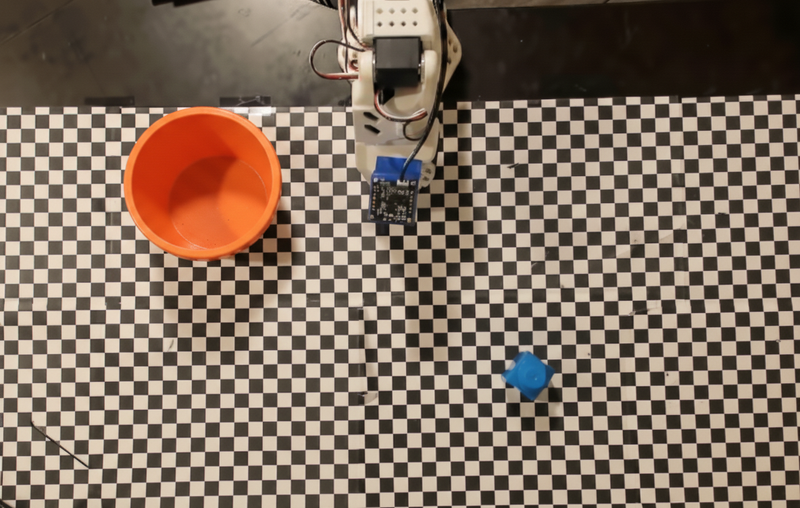
ตัวอย่างนี้ใช้ API ของหุ่นยนต์จำลองและคำจำกัดความของเครื่องมือต่อไปนี้
Python
from google import genai
from google.genai import types

client = genai.Client()

def move(x, y, high):
    print(f"Mock Robot: Moving to coordinates: {x}, {y}, {'high above table' if high else 'down at table level'}")

def setGripperState(opened):
    print(f"Mock Robot: {'Opening gripper' if opened else 'Closing gripper'}")

robot_origin_y = 300
robot_origin_x = 500

move_declaration = types.FunctionDeclaration(
    name="move",
    description="Moves the arm to the given coordinates.",
    parameters=types.Schema(
        type=types.Type.OBJECT,
        properties={
            "x": types.Schema(type=types.Type.INTEGER, description="X coordinate relative to the origin"),
            "y": types.Schema(type=types.Type.INTEGER, description="Y coordinate relative to the origin"),
            "high": types.Schema(type=types.Type.BOOLEAN, description="Set to True to lift the robot arm above the scene. Set to False to place the gripper on the surface."),
        },
        required=["x", "y", "high"],
    ),
)

set_gripper_state_declaration = types.FunctionDeclaration(
    name="setGripperState",
    description="Opens or closes the robot's gripper.",
    parameters=types.Schema(
        type=types.Type.OBJECT,
        properties={
            "opened": types.Schema(type=types.Type.BOOLEAN, description="True opens the gripper, False closes the gripper."),
        },
        required=["opened"],
    ),
)

robot_tools = types.Tool(function_declarations=[move_declaration, set_gripper_state_declaration])
ตัวอย่างต่อไปนี้จะส่งพรอมต์และรูปภาพไปยังโมเดลพร้อมคำจำกัดความของเครื่องมือ จากนั้นจะเรียกใช้ลูปของเอเจนต์ โดยหลังจากที่โมเดลตอบกลับแต่ละครั้ง ระบบจะเรียกใช้ฟังก์ชันที่ขอ (move, setGripperState), ส่งผลลัพธ์กลับไปยังโมเดล และทำซ้ำจนกว่าโมเดลจะหยุดเรียกใช้ฟังก์ชันหรือถึงขีดจำกัดของขั้นตอน
Python
with open("robot-api-example.png", "rb") as f:
    img_bytes = f.read()

prompt = (
    "You are a robotic arm with six degrees-of-freedom. "
    f"The origin point for calculating the moves is at normalized point y={robot_origin_y}, x={robot_origin_x}. "
    "Use this as the new (0,0) for calculating moves, allowing x and y to be negative.\n\n"
    "Find the blue block and the orange bowl. Calculate their coordinates relative to the origin.\n"
    "Perform a pick and place operation where you pick up the blue block and place it into the orange bowl. "
    "Call the appropriate sequence of functions to complete this operation."
)

contents = [
    types.Content(role="user", parts=[
        types.Part.from_bytes(data=img_bytes, mime_type="image/png"),
        types.Part(text=prompt),
    ])
]

print("\n--- Executing Orchestrated Plan ---")

max_steps = 15  # Safety limit to prevent infinite loops
step_count = 0

# The Agentic Loop
while step_count < max_steps:
    step_count += 1

    response = client.models.generate_content(
        model="gemini-robotics-er-2-preview",
        contents=contents,
        config=types.GenerateContentConfig(
            tools=[robot_tools],
            thinking_config=types.ThinkingConfig(thinking_level="low"),
        ),
    )

    # Add model response to conversation history
    contents.append(response.candidates[0].content)

    # Check for function calls
    function_calls = [part for part in response.candidates[0].content.parts if part.function_call]

    if not function_calls:
        # Model is done calling functions
        print("Sequence complete.")
        print(f"Model Summary: {response.text}")
        break

    # Execute function calls and collect results
    function_response_parts = []
    for part in function_calls:
        fc = part.function_call
        if fc.name == "move":
            move(**fc.args)
        elif fc.name == "setGripperState":
            setGripperState(**fc.args)

        function_response_parts.append(
            types.Part.from_function_response(
                name=fc.name,
                response={"status": "success"},
            )
        )

    # Send function results back to model
    contents.append(types.Content(role="user", parts=function_response_parts))
ตัวอย่างต่อไปนี้แสดงเอาต์พุตที่เป็นไปได้ของโมเดลตามพรอมต์และ API ของหุ่นยนต์จำลอง เอาต์พุตประกอบด้วยเอาต์พุตของการเรียกใช้ฟังก์ชันของหุ่นยนต์ที่โมเดลจัดลำดับไว้ด้วยกัน
--- Executing Orchestrated Plan ---
Mock Robot: Opening gripper
Mock Robot: Moving to coordinates: 160, 440, high above table
Mock Robot: Moving to coordinates: 160, 440, down at table level
Mock Robot: Closing gripper
Mock Robot: Moving to coordinates: 160, 440, high above table
Mock Robot: Moving to coordinates: -250, 60, high above table
Mock Robot: Moving to coordinates: -250, 60, down at table level
Mock Robot: Opening gripper
Mock Robot: Moving to coordinates: -250, 60, high above table
Sequence complete.
Model Summary: I have completed the task of picking up the blue block and placing it into the orange bowl.
ขั้นตอนถัดไป
- Robotics พร้อมการสตรีมมิง - การสตรีมมิงแบบเรียลไทม์พร้อมการเรียกใช้ฟังก์ชัน (Gemini Robotics ER 2 เท่านั้น)
- ความเข้าใจวิดีโอ - ติดตามความคืบหน้าของงานจากวิดีโอ (ER 2 เท่านั้น)
- การให้เหตุผลเชิงพื้นที่ - ตัวอย่างการชี้ การติดตาม และกรอบล้อมรอบ