

Gemini Robotics-ER 2 は、次の 2 つの機能を使用して、継続的な動画フィードからタスクの進行状況を追跡できます。
- モーメント検出: キーイベントが発生した正確なタイムスタンプを特定します。
- 進行状況の分類: 各動画を 5 つの完了率の範囲(0 ~ 20%、20 ~ 40%、40 ~ 60%、60 ~ 80%、80 ~ 100%)のいずれかに割り当てます。
モーメントの検出
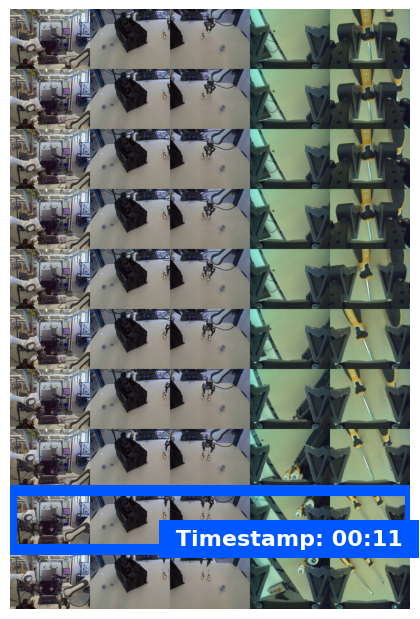
モーメント検出は、重大なイベントが発生した正確な動画フレーム(カップが満杯になったときや、結び目が結ばれたときなど)を特定します。ロボットはこれを使用して、成功の確認、ステップの順序付け、修正のトリガーを行います。
次のプロンプトの例では、動画内の特定のタスクの完了時点を識別するようモデルに指示しています。
from google import genai
from google.genai import types

client = genai.Client()

with open("task_video.mp4", "rb") as f:
    video_bytes = f.read()

prompt = """
At what timestamp (in seconds) does the task reach successful completion?
Return a JSON object: {"completion_time_seconds": <float>}.
If the task is not completed, return {"completion_time_seconds": null}.
"""

response = client.models.generate_content(
    model="gemini-robotics-er-2-preview",
    contents=[
        types.Part.from_bytes(data=video_bytes, mime_type="video/mp4"),
        prompt,
    ],
)

print(response.text)
次の図は、モデルがタスク完了のタイムスタンプを特定している、モーメント検出動画のフレームの例を示しています。
進行状況の分類
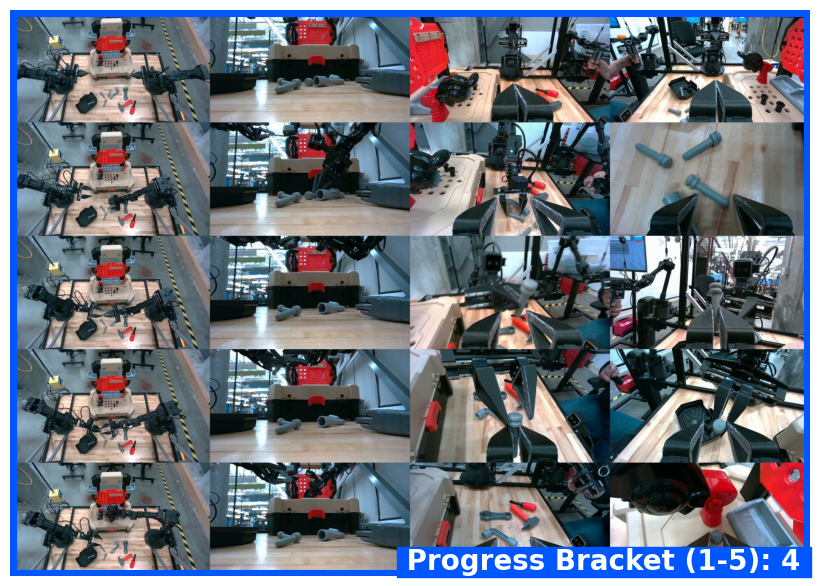
進行状況の分類では、動画が 5 つの完了範囲(0 ~ 20%、20 ~ 40%、40 ~ 60%、60 ~ 80%、80 ~ 100%)のいずれかに割り当てられます。これにより、ロボットはリアルタイムで状況を認識し、ワークフロー全体を再起動することなく、アクションを調整したり、失敗したステップを再試行したりできます。
次のプロンプトの例では、動画の現在の進行状況レベルを分類するようにモデルに求めています。
from google import genai
from google.genai import types

client = genai.Client()

with open("task_video.mp4", "rb") as f:
    video_bytes = f.read()

prompt = """
Watch this video and classify the task progress level at the final frame.
Return a JSON object with the progress bracket:
{"progress_level": "0-20" | "20-40" | "40-60" | "60-80" | "80-100"}.
"""

response = client.models.generate_content(
    model="gemini-robotics-er-2-preview",
    contents=[
        types.Part.from_bytes(data=video_bytes, mime_type="video/mp4"),
        prompt,
    ],
)

print(response.text)
次の図は、進行状況分類動画のフレームの例を示しています。モデルは進行状況の範囲を割り当てています。
例
マルチステップ タスク トラッキングを含む実行可能な例については、ロボティクス クックブックをご覧ください。
次のステップ
- ロボット工学用の Live API - リアルタイムの双方向ストリーミング。
- タスク オーケストレーション - 空間推論を伴う長期的なタスク。
- Gemini Robotics ER の概要 - モデルの比較と機能。