
Voice replication lets you replicate a speaker's vocal characteristics from a
short audio sample using the Gemini API Voices endpoint (POST /v1beta/voices).
Both Gemini 3.8 Flash TTS
(gemini-3.8-flash-tts) and
Gemini 3.8 Flash-Lite TTS
(gemini-3.8-flash-lite-tts) support Voice replication.
The fastest way to replicate, verify consent, and audition a replicated voice is
with the interactive Voice Replication experience in
Google AI Studio. You can record
or upload reference and consent clips directly in the browser, preview the
voice, and copy the resulting voice_... ID directly into your application
code.
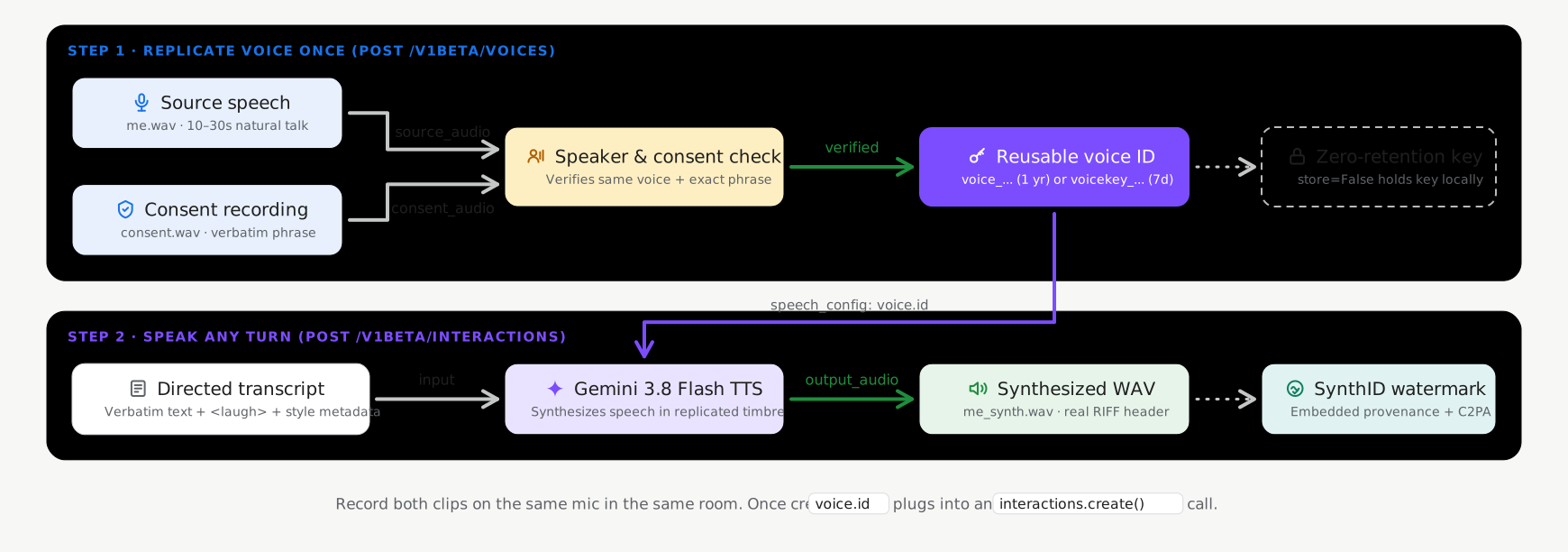
Stateful versus stateless storage modes
Voice replication supports two storage modes when calling voices.create
(POST /v1beta/voices), with stateful storage enabled by default:
- Stateful storage (
store=True, recommended default): Google stores your verified voice profile in your project and returns a lightweight, persistentvoice_id(replicated_voice.id, such asvoice_abc123...). You can pass thisvoice_idacross requests and manage it withvoices.list(),voices.get(), andvoices.delete(). - Stateless client-managed keys (
store=False, optional): For workloads requiring zero server-side persistence of biometric voice profiles, setstore=False. The API returns an encrypted, self-containedvoice_key(replicated_voice.key, starting withvoicekey_...) that your application stores locally and passes directly in synthesis requests.
| Storage mode | Identifier | Project limit | Retention (TTL) |
|---|---|---|---|
Stateful voices (store=True) |
voice_... |
200 voices per project (shared across prompted and replicated voices) | 1 year |
Stateless voice keys (store=False) |
voicekey_... |
Client-managed | 7 days |
Audio and consent requirements
Every CreateVoice replication request requires two real human audio recordings
from the same adult speaker (24kHz mono 16-bit WAV recommended):
- Reference audio (
source_audio): A 10–30 second clip of clean, natural speech from the speaker whose voice you want to replicate. - Consent audio (
consent_audio): A recording of the same speaker clearly reciting the mandatory consent statement in one of the supported languages (for example, in English): > "I am the owner of this voice and I consent to Google using this voice to > create a synthetic voice model."
Create a replicated voice (stateful default)
Use the Google GenAI SDK (google-genai 2.25.0+ / @google/genai 2.24.0+) or REST API
with store=True to create and save a replicated voice profile in your project:
Python
import base64
from google import genai

client = genai.Client()

with open("reference_speaker.wav", "rb") as f:
    source_b64 = base64.b64encode(f.read()).decode("utf-8")

with open("speaker_consent.wav", "rb") as f:
    consent_b64 = base64.b64encode(f.read()).decode("utf-8")

# Create a persistent replicated voice (store=True)
replicated_voice = client.voices.create(
    store=True,
    voice={
        "model": "gemini-3.8-flash-tts",
        "type": "replicated",
        "display_name": "Custom Replicated Speaker",
        "replicated": {
            "source_audio": {
                "mime_type": "audio/wav",
                "data": source_b64,
            },
            "consent_audio": {
                "mime_type": "audio/wav",
                "data": consent_b64,
            },
        },
    },
)

print(f"Created voice ID: {replicated_voice.id}")
JavaScript
import * as fs from "node:fs";
import { GoogleGenAI } from "@google/genai";

const ai = new GoogleGenAI();

const sourceB64 = fs.readFileSync("reference_speaker.wav").toString("base64");
const consentB64 = fs.readFileSync("speaker_consent.wav").toString("base64");

// Create a persistent replicated voice (store: true)
const replicatedVoice = await ai.voices.create({
  store: true,
  voice: {
    model: "gemini-3.8-flash-tts",
    type: "replicated",
    display_name: "Custom Replicated Speaker",
    replicated: {
      source_audio: {
        mime_type: "audio/wav",
        data: sourceB64,
      },
      consent_audio: {
        mime_type: "audio/wav",
        data: consentB64,
      },
    },
  },
});

console.log(`Created voice ID: ${replicatedVoice.id}`);
REST
SOURCE_B64=$(base64 -w 0 reference_speaker.wav)
CONSENT_B64=$(base64 -w 0 speaker_consent.wav)

curl "https://generativelanguage.googleapis.com/v1beta/voices" \
  -H "x-goog-api-key: $GEMINI_API_KEY" \
  -H "Content-Type: application/json" \
  -X POST \
  -d "{
    \"store\": true,
    \"voice\": {
      \"model\": \"gemini-3.8-flash-tts\",
      \"type\": \"replicated\",
      \"display_name\": \"Custom Replicated Speaker\",
      \"replicated\": {
        \"source_audio\": {
          \"mime_type\": \"audio/wav\",
          \"data\": \"$SOURCE_B64\"
        },
        \"consent_audio\": {
          \"mime_type\": \"audio/wav\",
          \"data\": \"$CONSENT_B64\"
        }
      }
    }
  }"
Synthesize speech with your replicated voice
Pass the returned id (voice_...) in voiceConfig.voice when calling
generateContent:
Python
from google import genai

client = genai.Client()

response = client.models.generate_content(
    model="gemini-3.8-flash-tts",
    contents=[{
        "role": "user",
        "parts": [{
            "text": (
                "Hello! This audio was synthesized using a replicated"
                " speaker voice."
            ),
            "speech_metadata": {"style": "warm and conversational"},
        }],
    }],
    config={
        "response_modalities": ["AUDIO"],
        "speech_config": {
            "voice_config": {"voice": replicated_voice.id}
        },
    },
)

audio_bytes = response.candidates[0].content.parts[0].inline_data.data
with open("replicated_speech.wav", "wb") as f:
    f.write(audio_bytes)
JavaScript
import * as fs from "node:fs";
import { GoogleGenAI } from "@google/genai";

const ai = new GoogleGenAI();

const response = await ai.models.generateContent({
  model: "gemini-3.8-flash-tts",
  contents: [{
    role: "user",
    parts: [{
      text: "Hello! This audio was synthesized using a replicated speaker voice.",
      speechMetadata: { style: "warm and conversational" },
    }],
  }],
  config: {
    responseModalities: ["AUDIO"],
    speechConfig: {
      voiceConfig: { voice: replicatedVoice.id },
    },
  },
});

const data = response.candidates?.[0]?.content?.parts?.[0]?.inlineData?.data;
if (data) {
  fs.writeFileSync("replicated_speech.wav", Buffer.from(data, "base64"));
}
REST
curl "https://generativelanguage.googleapis.com/v1beta/models/gemini-3.8-flash-tts:generateContent" \
  -H "x-goog-api-key: $GEMINI_API_KEY" \
  -H "Content-Type: application/json" \
  -X POST \
  -d '{
    "contents": [{
      "role": "user",
      "parts": [{
        "text": "Hello! This audio was synthesized using a replicated speaker voice.",
        "speech_metadata": {
          "style": "warm and conversational"
        }
      }]
    }],
    "generationConfig": {
      "responseModalities": ["AUDIO"],
      "speechConfig": {
        "voiceConfig": {
          "voice": "voice_YOUR_REPLICATED_VOICE_ID"
        }
      }
    }
  }'
Manage stored replicated voices
When created with store=True, your replicated voices can be listed, filtered,
inspected, and deleted through the Voices API (see
Extended Voice Library and filtering
for all filter parameters):
Python
from google import genai

client = genai.Client()

# List stored replicated voices in your project
response = client.voices.list(type_=["replicated"])
for voice in response.voices or []:
    print(voice.id, voice.display_name, voice.type)

# Retrieve a specific voice by ID
voice_details = client.voices.get(id=replicated_voice.id)

# Delete a stored replicated voice
client.voices.delete(id=replicated_voice.id)
JavaScript
import { GoogleGenAI } from "@google/genai";

const ai = new GoogleGenAI();

// List stored replicated voices in your project
const response = await ai.voices.list({ type: ["replicated"] });
for (const voice of response.voices ?? []) {
  console.log(voice.id, voice.display_name, voice.type);
}

// Retrieve a specific voice by ID
const voiceDetails = await ai.voices.get(replicatedVoice.id);

// Delete a stored replicated voice
await ai.voices.delete(replicatedVoice.id);
REST
# List stored replicated voices in your project
curl -G "https://generativelanguage.googleapis.com/v1beta/voices" \
  -H "x-goog-api-key: $GEMINI_API_KEY" \
  --data-urlencode "type=replicated"

# Retrieve a specific voice by ID
curl "https://generativelanguage.googleapis.com/v1beta/voices/voice_YOUR_REPLICATED_VOICE_ID" \
  -H "x-goog-api-key: $GEMINI_API_KEY"

# Delete a stored replicated voice
curl -X DELETE "https://generativelanguage.googleapis.com/v1beta/voices/voice_YOUR_REPLICATED_VOICE_ID" \
  -H "x-goog-api-key: $GEMINI_API_KEY"
Option: Stateless client-managed voice keys (store=False)
If your application requires zero server-side persistence of voice profiles, set
store=False when creating the replicated voice. The API returns an encrypted
voice_key (replicated_voice.key, starting with voicekey_...) that you
store client-side and pass directly in voiceConfig.voice:
Python
import base64
from google import genai

client = genai.Client()

with open("reference_speaker.wav", "rb") as f:
    source_b64 = base64.b64encode(f.read()).decode("utf-8")

with open("speaker_consent.wav", "rb") as f:
    consent_b64 = base64.b64encode(f.read()).decode("utf-8")

# Create a stateless client-managed voice key (store=False)
replicated_voice = client.voices.create(
    store=False,
    voice={
        "model": "gemini-3.8-flash-tts",
        "type": "replicated",
        "replicated": {
            "source_audio": {"mime_type": "audio/wav", "data": source_b64},
            "consent_audio": {"mime_type": "audio/wav", "data": consent_b64},
        },
    },
)

# Pass replicated_voice.key ("voicekey_...") directly in voice_config
response = client.models.generate_content(
    model="gemini-3.8-flash-tts",
    contents=[{
        "role": "user",
        "parts": [{
            "text": "Hello! This audio uses a stateless client-managed voice key.",
            "speech_metadata": {"style": "warm and conversational"},
        }],
    }],
    config={
        "response_modalities": ["AUDIO"],
        "speech_config": {
            "voice_config": {"voice": replicated_voice.key}
        },
    },
)
JavaScript
import * as fs from "node:fs";
import { GoogleGenAI } from "@google/genai";

const ai = new GoogleGenAI();

const sourceB64 = fs.readFileSync("reference_speaker.wav").toString("base64");
const consentB64 = fs.readFileSync("speaker_consent.wav").toString("base64");

// Create a stateless client-managed voice key (store: false)
const replicatedVoice = await ai.voices.create({
  store: false,
  voice: {
    model: "gemini-3.8-flash-tts",
    type: "replicated",
    replicated: {
      source_audio: { mime_type: "audio/wav", data: sourceB64 },
      consent_audio: { mime_type: "audio/wav", data: consentB64 },
    },
  },
});

// Pass replicatedVoice.key ("voicekey_...") directly in voiceConfig
const response = await ai.models.generateContent({
  model: "gemini-3.8-flash-tts",
  contents: [{
    role: "user",
    parts: [{
      text: "Hello! This audio uses a stateless client-managed voice key.",
      speechMetadata: { style: "warm and conversational" },
    }],
  }],
  config: {
    responseModalities: ["AUDIO"],
    speechConfig: {
      voiceConfig: { voice: replicatedVoice.key },
    },
  },
});
REST
SOURCE_B64=$(base64 -w 0 reference_speaker.wav)
CONSENT_B64=$(base64 -w 0 speaker_consent.wav)

curl "https://generativelanguage.googleapis.com/v1beta/voices" \
  -H "x-goog-api-key: $GEMINI_API_KEY" \
  -H "Content-Type: application/json" \
  -X POST \
  -d "{
    \"store\": false,
    \"voice\": {
      \"model\": \"gemini-3.8-flash-tts\",
      \"type\": \"replicated\",
      \"replicated\": {
        \"source_audio\": {\"mime_type\": \"audio/wav\", \"data\": \"$SOURCE_B64\"},
        \"consent_audio\": {\"mime_type\": \"audio/wav\", \"data\": \"$CONSENT_B64\"}
      }
    }
  }"
Supported consent phrases by language
The consent audio must clearly recite the exact statement in one of the 30 supported language locales:
| Language | Locale (lang_id) |
Verbatim Consent Statement |
|---|---|---|
| Arabic | ar-XA |
أنا مالك هذا الصوت وأوافق على أن تستخدم Google هذا الصوت لإنشاء نموذج صوتي اصطناعي. |
| Bengali | bn-IN |
আমি এই ভয়েসের মালিক এবং আমি একটি সিন্থেটিক ভয়েস মডেল তৈরি করতে এই ভয়েস ব্যবহার করে Google-এর সাথে সম্মতি দিচ্ছি। |
| Chinese (Simplified) | zh-CN |
我是此声音的拥有者并授权谷歌使用此声音创建语音合成模型 |
| Dutch | nl-NL |
Ik ben de eigenaar van deze stem en ik geef Google toestemming om deze stem te gebruiken om een synthetisch stemmodel te maken. |
| English (US) | en-US |
I am the owner of this voice and I consent to Google using this voice to create a synthetic voice model. |
| English (UK) | en-GB |
I am the owner of this voice and I consent to Google using this voice to create a synthetic voice model. |
| English (India) | en-IN |
I am the owner of this voice and I consent to Google using this voice to create a synthetic voice model. |
| English (Australia) | en-AU |
I am the owner of this voice and I consent to Google using this voice to create a synthetic voice model. |
| French (France) | fr-FR |
Je suis le propriétaire de cette voix et j'autorise Google à utiliser cette voix pour créer un modèle de voix synthétique. |
| French (Canada) | fr-CA |
Je suis le propriétaire de cette voix et j'autorise Google à utiliser cette voix pour créer un modèle de voix synthétique. |
| German | de-DE |
Ich bin der Eigentümer dieser Stimme und bin damit einverstanden, dass Google diese Stimme zur Erstellung eines synthetischen Stimmmodells verwendet. |
| Gujarati | gu-IN |
હું આ વોઈસનો માલિક છું અને સિન્થેટિક વોઈસ મોડલ બનાવવા માટે આ વોઈસનો ઉપયોગ કરીને google ને હું સંમતિ આપું છું |
| Hindi | hi-IN |
मैं इस आवाज का मालिक हूं और मैं सिंथेटिक आवाज मॉडल बनाने के लिए Google को इस आवाज का उपयोग करने की सहमति देता हूं |
| Indonesian | id-ID |
Saya pemilik suara ini dan saya menyetujui Google menggunakan suara ini untuk membuat model suara sintetis. |
| Italian | it-IT |
Sono il proprietario di questa voce e acconsento che Google la utilizzi per creare un modello di voce sintetica. |
| Japanese | ja-JP |
私はこの音声の所有者であり、Googleがこの音声を使用して音声合成モデルを作成することを承認します。 |
| Kannada | kn-IN |
ನಾನು ಈ ಧ್ವನಿಯ ಮಾಲಿಕ ಮತ್ತು ಸಂಶ್ಲೇಷಿತ ಧ್ವನಿ ಮಾದರಿಯನ್ನು ರಚಿಸಲು ಈ ಧ್ವನಿಯನ್ನು ಬಳಸಿಕೊಂಡುಗೂಗಲ್ ಗೆ ನಾನು ಸಮ್ಮತಿಸುತ್ತೇನೆ. |
| Korean | ko-KR |
나는 이 음성의 소유자이며 구글이 이 음성을 사용하여 음성 합성 모델을 생성할 것을 허용합니다. |
| Malayalam | ml-IN |
ഈ ശബ്ദത്തിന്റെ ഉടമ ഞാനാണ്, ഒരു സിന്തറ്റിക് വോയ്സ് മോഡൽ സൃഷ്ടിക്കാൻ ഈ ശബ്ദം ഉപയോഗിക്കുന്നതിന് ഞാൻ Google-ന് സമ്മതം നൽകുന്നു. |
| Marathi | mr-IN |
मी या आवाजाचा मालक आहे आणि सिंथेटिक व्हॉइस मॉडेल तयार करण्यासाठी हा आवाज वापरण्यासाठी मी Google ला संमती देतो |
| Polish | pl-PL |
Jestem właścicielem tego głosu i wyrażam zgodę na wykorzystanie go przez Google w celu utworzenia syntetycznego modelu głosu. |
| Portuguese (Brazil) | pt-BR |
Eu sou o proprietário desta voz e autorizo o Google a usá-la para criar um modelo de voz sintética. |
| Russian | ru-RU |
Я являюсь владельцем этого голоса и даю согласие Google на использование этого голоса для создания модели синтетического голоса. |
| Spanish (Spain) | es-ES |
Soy el propietario de esta voz y doy mi consentimiento para que Google la utilice para crear un modelo de voz sintética. |
| Spanish (US) | es-US |
Soy el propietario de esta voz y doy mi consentimiento para que Google la utilice para crear un modelo de voz sintética. |
| Tamil | ta-IN |
நான் இந்த குரலின் உரிமையாளர் மற்றும் செயற்கை குரல் மாதிரியை உருவாக்க இந்த குரலை பயன்படுத்த குகல்க்கு நான் ஒப்புக்கொள்கிறேன். |
| Telugu | te-IN |
నేను ఈ వాయిస్ యజమానిని మరియు సింతటిక్ వాయిస్ మోడల్ ని రూపొందించడానికి ఈ వాయిస్ ని ఉపయోగించడానికి googleకి నేను సమ్మతిస్తున్నాను. |
| Thai | th-TH |
ฉันเป็นเจ้าของเสียงนี้ และฉันยินยอมให้ Google ใช้เสียงนี้เพื่อสร้างแบบจำลองเสียงสังเคราะห์ |
| Turkish | tr-TR |
Bu sesin sahibi benim ve Google'ın bu sesi kullanarak sentetik bir ses modeli oluşturmasına izin veriyorum. |
| Vietnamese | vi-VN |
Tôi là chủ sở hữu giọng nói này và tôi đồng ý cho Google sử dụng giọng nói này để tạo mô hình giọng nói tổng hợp. |
Best practices for recording reference audio
- Record in a quiet environment: Minimize room echo, background noise, music, and overlapping voices.
- Match recording conditions: Record both
source_audioandconsent_audioon the same microphone in the same acoustic setting so the speaker verification check succeeds reliably. - Convert to 24kHz mono WAV: For best results, resample input audio to 24kHz mono 16-bit PCM WAV before encoding.
What's next
- Learn how to create custom personas from text descriptions in Voice design.
- Explore turn-level styling, inline tags, and multi-speaker dialogue in the Text-to-speech guide.