

Gemini API 提供了安全设置,您可以在原型设计阶段调整这些设置,以确定您的应用需要更严格还是更宽松的安全配置。您可以在各个过滤条件类别中调整这些设置,以限制或允许某些类型的内容。
本指南介绍了如何针对互动设置安全设置、内容被屏蔽时会发生什么情况,以及您可以使用的类别和阈值。
设置安全设置
创建互动时,请传递 safety_settings 列表。每项设置都会将危害类别 (type) 与屏蔽阈值 (threshold) 配对。
以下示例将仇恨言论 (hate_speech) 类别设置为 block_low_and_above,这会屏蔽任何包含仇恨言论概率较低或较高的内容:
Python
from google import genai

client = genai.Client()

interaction = client.interactions.create(
    model="gemini-3.8-flash",
    input="Some potentially unsafe prompt.",
    safety_settings=[
        {
            "type": "hate_speech",
            "threshold": "block_low_and_above",
        }
    ],
)

print(interaction.output_text)
JavaScript
import { GoogleGenAI } from "@google/genai";

const ai = new GoogleGenAI({});

async function main() {
  const interaction = await ai.interactions.create({
    model: "gemini-3.8-flash",
    input: "Some potentially unsafe prompt.",
    safety_settings: [
      {
        type: "hate_speech",
        threshold: "block_low_and_above",
      },
    ],
  });
  console.log(interaction.output_text);
}

await main();
Java
import com.google.genai.Client;
import com.google.genai.gaos.models.interactions.CreateModelInteraction;
import com.google.genai.gaos.models.interactions.HarmCategory;
import com.google.genai.gaos.models.interactions.Interaction;
import com.google.genai.gaos.models.interactions.InteractionsInput;
import com.google.genai.gaos.models.interactions.Model;
import com.google.genai.gaos.models.interactions.SafetySetting;
import com.google.genai.gaos.models.interactions.Threshold;
import com.google.genai.gaos.models.operations.CreateInteractionRequestBody;
import java.util.List;

Client client = new Client();

SafetySetting hateSpeechSafety =
    SafetySetting.builder()
        .type(HarmCategory.HATE_SPEECH)
        .threshold(Threshold.BLOCK_LOW_AND_ABOVE)
        .build();

CreateModelInteraction params =
    CreateModelInteraction.builder()
        .model(Model.of("gemini-3.8-flash"))
        .input(InteractionsInput.of("Some potentially unsafe prompt."))
        .safetySettings(List.of(hateSpeechSafety))
        .build();

Interaction interaction =
    client.interactions.create(CreateInteractionRequestBody.of(params)).interaction().get();

System.out.println(interaction.outputText().orElse(""));
Go
package main

import (
    "context"
    "fmt"
    "log"

    "google.golang.org/genai"
    "google.golang.org/genai/interactions/models/interactions"
    "google.golang.org/genai/interactions/models/operations"
)

func main() {
    ctx := context.Background()
    client, err := genai.NewClient(ctx, nil)
    if err != nil {
        log.Fatal(err)
    }

    res, err := client.Interactions.Create(ctx, operations.CreateInteractionRequest{
        Body: operations.NewCreateInteractionRequestBody(interactions.CreateModelInteraction{
            Model: interactions.Model("gemini-3.8-flash"),
            Input: interactions.NewInteractionsInput("Some potentially unsafe prompt."),
            SafetySettings: []interactions.SafetySetting{
                {
                    Type:      interactions.HarmCategoryHateSpeech,
                    Threshold: interactions.ThresholdBlockLowAndAbove,
                },
            },
        }),
    })
    if err != nil {
        log.Fatal(err)
    }

    if res.Interaction.OutputText != nil {
        fmt.Println(*res.Interaction.OutputText)
    }
}
REST
curl -X POST "https://generativelanguage.googleapis.com/v1beta/interactions" \
  -H "x-goog-api-key: $GEMINI_API_KEY" \
  -H 'Content-Type: application/json' \
  -H "Api-Revision: 2026-05-20" \
  -d '{
    "model": "gemini-3.8-flash",
    "input": "Some potentially unsafe prompt.",
    "safety_settings": [
      {"type": "hate_speech", "threshold": "block_low_and_above"}
    ]
  }'
您可以为每个类别添加一项设置。对于您未设置的类别,系统会使用默认阈值,对于 Gemini 2.5 及更高版本的模型,默认阈值为关闭 。
内容被屏蔽时
如果安全过滤器屏蔽了输入内容或模型的响应,互动会失败并显示 HTTP 400 错误。系统不会返回被屏蔽的内容。
错误 code 会告知您请求被屏蔽的原因:
safety:输入内容或响应被安全过滤器屏蔽。jailbreak、prohibited_content或blocklist:输入内容因该原因而被屏蔽。错误message以Input blocked:开头。
例如:
{
  "error": {
    "code": "safety",
    "message": "Request blocked due to safety violations (harmful content). Please modify your input and retry."
  }
}
对于后台互动 (background=true),互动的 status 会
设置为 failed,并且相同的 code 和 message 会显示在其 errors 列表中。
进行流式传输时,错误会作为 error 事件到达。
安全过滤器
Gemini API 的可调整安全过滤器涵盖以下类别:
| 类别 | 值 (API) | 说明 |
|---|---|---|
| 骚扰 | harassment |
辱骂、威胁性内容,或旨在欺凌、折磨或嘲笑的内容。 |
| 仇恨言论 | hate_speech |
宣扬暴力或煽动对具有某些特征的个人或群体采取仇恨行为的内容。 |
| 露骨色情内容 | sexually_explicit |
包含露骨色情内容的内容。 |
| 危险内容 | dangerous_content |
宣扬、助长或促成危险活动的内容。 |
| 越狱 | jailbreak |
旨在绕过安全过滤器的提示。 |
您可以使用这些过滤器,针对您的应用场景进行适当的调整。例如,如果您要构建视频游戏对话,可能会认为鉴于游戏的性质,较多地使用被评为“危险”的内容是可以接受的。
除了可调整的安全过滤器之外,Gemini API 还内置了针对核心危害(例如危害儿童安全的内容)的保护措施。 这些类型的危害始终会被屏蔽,且无法调整。
屏蔽阈值
由于模型具有固有的安全性,因此默认情况下,其他过滤器处于关闭 状态。 默认模型行为涵盖了大多数应用场景,因此,只有当您的应用确实需要时才应调整这些设置。
下表介绍了您可以为每个类别设置的阈值。例如,如果您将仇恨言论 设置为屏蔽少部分 (block_only_high),则系统会屏蔽包含仇恨言论概率较高的内容,而允许包含仇恨言论概率较低的内容。
| 阈值 (Google AI Studio) | 阈值 (API) | 说明 |
|---|---|---|
| 关闭 | off |
关闭安全过滤条件 |
| 屏蔽少部分 | block_only_high |
在出现不安全内容的概率较高时屏蔽 |
| 屏蔽一部分 | block_medium_and_above |
当不安全内容的可能性为中等或较高时屏蔽 |
| 屏蔽大部分 | block_low_and_above |
当不安全内容的可能性为较低、中等或较高时屏蔽 |
概率与严重程度
Gemini API 会将内容不安全的概率评为高、中、低或可忽略不计。它会根据该概率(而不是危害的严重程度)来屏蔽内容。即使危害可能很严重,某些内容的不安全概率也可能较低。例如,比较以下句子:
- 机器人打了我一拳。
- 机器人把我砍伤了。
第一个句子不安全的概率可能更高,但您可能会认为第二个句子更严重。请仔细测试,找到既能支持您的应用场景,又能最大限度地减少对最终用户伤害的屏蔽级别。
在 Google AI Studio 中调整安全设置
在 Run settings (运行设置)面板中,点击 Advanced settings (高级设置)下的 Safety settings (安全设置),打开 Run safety settings (运行安全设置)模态对话框。在该模态对话框中,您可以使用滑块来调整每个安全类别的内容过滤级别:
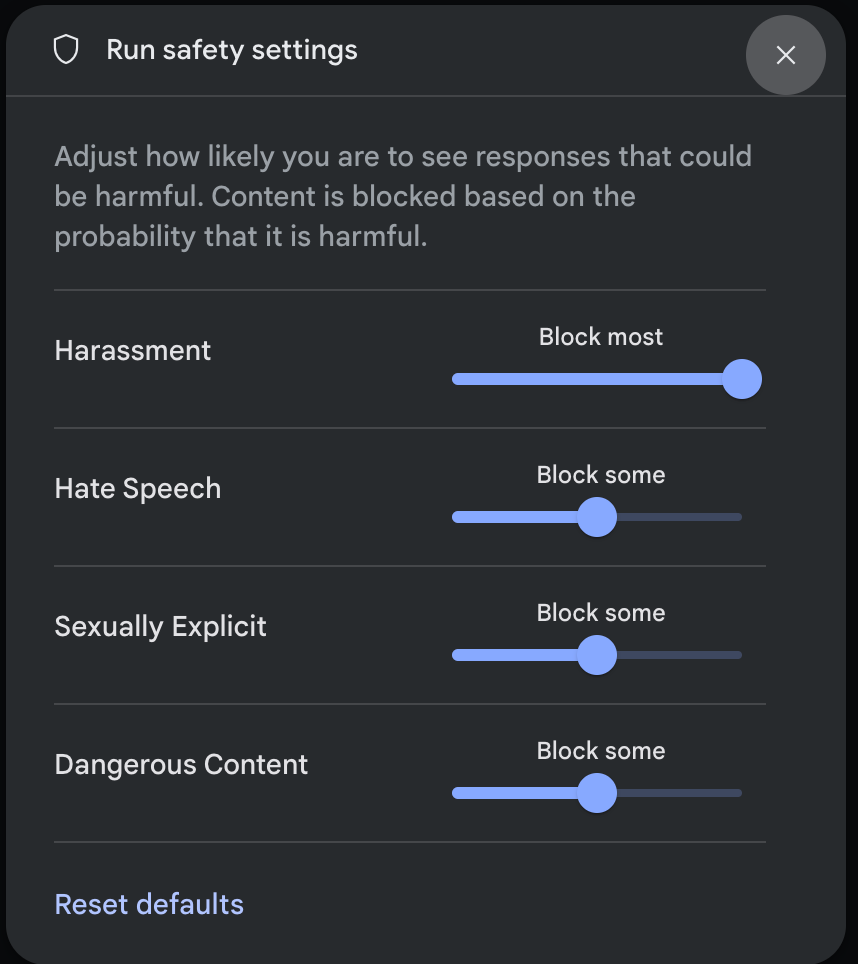
当您发送请求(例如,向模型提问)时,如果请求的 内容被屏蔽,系统会显示 内容被屏蔽 消息。如需查看更多详细信息,请将指针悬停在内容被屏蔽 文本上,以查看类别和危害分类的概率。
后续步骤
- 如需详细了解完整的 API,请参阅 Interactions API 参考文档 。
- 如需大致了解在使用 LL0}M 进行开发时的安全 注意事项,请查看安全指南。
- 详细了解 Jigsaw 团队对概率与严重程度的评估。
- 详细了解有助于提供安全解决方案(例如 Perspective API)的产品。