

توفّر Gemini API أداة لتنفيذ الرموز البرمجية تتيح للنموذج إنشاء رموز Python وتشغيلها. يمكن للنموذج بعد ذلك التعلّم بشكل متكرّر من نتائج تنفيذ الرموز البرمجية إلى أن يصل إلى ناتج نهائي. يمكنك استخدام أداة تنفيذ الرموز البرمجية لإنشاء تطبيقات تستفيد من إمكانات الاستنتاج المستندة إلى الرموز البرمجية. على سبيل المثال، يمكنك استخدام أداة تنفيذ الرموز البرمجية لحلّ المعادلات أو معالجة النصوص. يمكنك أيضًا استخدام المكتبات المضمّنة في بيئة تنفيذ الرموز البرمجية لإجراء مهام أكثر تخصّصًا.
لا يمكن لـ Gemini تنفيذ الرموز البرمجية إلا بلغة Python. يمكنك مع ذلك أن تطلب من Gemini إنشاء رموز برمجية بلغة أخرى، ولكن لا يمكن للنموذج استخدام أداة تنفيذ الرموز البرمجية لتشغيلها.
تفعيل أداة تنفيذ الرموز البرمجية
لتفعيل أداة تنفيذ الرموز البرمجية، عليك ضبطها على النموذج. يسمح ذلك للنموذج بإنشاء الرموز البرمجية وتشغيلها.
Python
from google import genai

client = genai.Client()

interaction = client.interactions.create(
    model="gemini-3.8-flash",
    input="What is the sum of the first 50 prime numbers? "
          "Generate and run code for the calculation, and make sure you get all 50.",
    tools=[{"type": "code_execution"}]
)

for step in interaction.steps:
    if step.type == "model_output":
        for content_block in step.content:
            if content_block.type == "text":
                print(content_block.text)
    elif step.type == "code_execution_call":
        print(step.arguments.code)
    elif step.type == "code_execution_result":
        print(step.result)
JavaScript
import { GoogleGenAI } from "@google/genai";

const client = new GoogleGenAI({});

const interaction = await client.interactions.create({
    model: "gemini-3.8-flash",
    input: "What is the sum of the first 50 prime numbers? " +
           "Generate and run code for the calculation, and make sure you get all 50.",
    tools: [{ type: "code_execution" }]
});

for (const step of interaction.steps) {
    if (step.type === "model_output") {
        for (const contentBlock of step.content) {
            if (contentBlock.type === "text") {
                console.log(contentBlock.text);
            }
        }
    } else if (step.type === "code_execution_call") {
        console.log(step.arguments.code);
    } else if (step.type === "code_execution_result") {
        console.log(step.result);
    }
}
جافا
import com.google.genai.Client;
import com.google.genai.gaos.models.interactions.CodeExecution;
import com.google.genai.gaos.models.interactions.CodeExecutionCallStep;
import com.google.genai.gaos.models.interactions.CodeExecutionResultStep;
import com.google.genai.gaos.models.interactions.Content;
import com.google.genai.gaos.models.interactions.CreateModelInteraction;
import com.google.genai.gaos.models.interactions.Interaction;
import com.google.genai.gaos.models.interactions.InteractionsInput;
import com.google.genai.gaos.models.interactions.ModelOutputStep;
import com.google.genai.gaos.models.interactions.Step;
import com.google.genai.gaos.models.interactions.TextContent;
import com.google.genai.gaos.models.operations.CreateInteractionRequestBody;
import java.util.Arrays;
import java.util.Collections;

Client client = new Client();

CreateModelInteraction params =
    CreateModelInteraction.builder()
        .model("gemini-3.8-flash")
        .input(
            InteractionsInput.of(
                "What is the sum of the first 50 prime numbers? "
                    + "Generate and run code for the calculation, and make sure you get all 50."))
        .tools(Arrays.asList(CodeExecution.builder().build()))
        .build();

Interaction interaction =
    client.interactions.create(CreateInteractionRequestBody.of(params)).interaction().get();

for (Step step : interaction.steps().orElse(Collections.emptyList())) {
  if (step instanceof ModelOutputStep) {
    ModelOutputStep outputStep = (ModelOutputStep) step;
    for (Content contentBlock : outputStep.content().orElse(Collections.emptyList())) {
      if (contentBlock instanceof TextContent) {
        System.out.println(((TextContent) contentBlock).text().orElse(""));
      }
    }
  } else if (step instanceof CodeExecutionCallStep) {
    CodeExecutionCallStep callStep = (CodeExecutionCallStep) step;
    callStep.arguments().ifPresent(args -> System.out.println(args.code().orElse("")));
  } else if (step instanceof CodeExecutionResultStep) {
    CodeExecutionResultStep resultStep = (CodeExecutionResultStep) step;
    System.out.println(resultStep.result().orElse(""));
  }
}
انتقال
package main

import (
    "context"
    "fmt"
    "log"

    "google.golang.org/genai"
    "google.golang.org/genai/interactions/models/interactions"
    "google.golang.org/genai/interactions/models/operations"
)

func main() {
    ctx := context.Background()
    client, err := genai.NewClient(ctx, nil)
    if err != nil {
        log.Fatal(err)
    }

    res, err := client.Interactions.Create(ctx, operations.CreateInteractionRequest{
        Body: operations.NewCreateInteractionRequestBody(interactions.CreateModelInteraction{
            Model: interactions.Model("gemini-3.8-flash"),
            Input: interactions.NewInteractionsInput(
                "What is the sum of the first 50 prime numbers? " +
                    "Generate and run code for the calculation, and make sure you get all 50.",
            ),
            Tools: []interactions.Tool{
                interactions.NewTool(interactions.CodeExecution{}),
            },
        }),
    })
    if err != nil {
        log.Fatal(err)
    }

    for _, step := range res.Interaction.Steps {
        if outStep := step.ModelOutputStep; outStep != nil {
            for _, contentBlock := range outStep.Content {
                if textContent := contentBlock.TextContent; textContent != nil {
                    fmt.Println(textContent.GetText())
                }
            }
        } else if callStep := step.CodeExecutionCallStep; callStep != nil {
            if code := callStep.Arguments.GetCode(); code != nil {
                fmt.Println(*code)
            }
        } else if resultStep := step.CodeExecutionResultStep; resultStep != nil {
            fmt.Println(resultStep.GetResult())
        }
    }
}
REST
curl -X POST "https://generativelanguage.googleapis.com/v1beta/interactions" \
-H "x-goog-api-key: $GEMINI_API_KEY" \
-H 'Content-Type: application/json' \
-d '{
    "model": "gemini-3.8-flash",
    "input": "What is the sum of the first 50 prime numbers? Generate and run code for the calculation, and make sure you get all 50.",
    "tools": [{"type": "code_execution"}]
}'
قد تبدو النتيجة على النحو التالي، وقد تم تنسيقها لتسهيل قراءتها:
Okay, I need to calculate the sum of the first 50 prime numbers. Here's how I'll
approach this:

1.  **Generate Prime Numbers:** I'll use an iterative method to find prime
    numbers. I'll start with 2 and check if each subsequent number is divisible
    by any number between 2 and its square root. If not, it's a prime.
2.  **Store Primes:** I'll store the prime numbers in a list until I have 50 of
    them.
3.  **Calculate the Sum:**  Finally, I'll sum the prime numbers in the list.

Here's the Python code to do this:

def is_prime(n):
  """Efficiently checks if a number is prime."""
  if n <= 1:
    return False
  if n <= 3:
    return True
  if n % 2 == 0 or n % 3 == 0:
    return False
  i = 5
  while i * i <= n:
    if n % i == 0 or n % (i + 2) == 0:
      return False
    i += 6
  return True

primes = []
num = 2
while len(primes) < 50:
  if is_prime(num):
    primes.append(num)
  num += 1

sum_of_primes = sum(primes)
print(f'{primes=}')
print(f'{sum_of_primes=}')

primes=[2, 3, 5, 7, 11, 13, 17, 19, 23, 29, 31, 37, 41, 43, 47, 53, 59, 61, 67,
71, 73, 79, 83, 89, 97, 101, 103, 107, 109, 113, 127, 131, 137, 139, 149, 151,
157, 163, 167, 173, 179, 181, 191, 193, 197, 199, 211, 223, 227, 229]
sum_of_primes=5117

The sum of the first 50 prime numbers is 5117.
تجمع هذه النتيجة عدة أجزاء من المحتوى يعرضها النموذج عند استخدام أداة تنفيذ الرموز البرمجية:
text: نص مضمّن تم إنشاؤه بواسطة النموذجcode_execution_call: رمز تم إنشاؤه بواسطة النموذج ويُفترض تنفيذهcode_execution_result: نتيجة الرمز القابل للتنفيذ
تنفيذ الرموز البرمجية باستخدام الصور (Gemini 3)
يمكن الآن لنموذج Gemini 3 Flash كتابة رموز Python وتنفيذها لمعالجة الصور وفحصها بشكل نشط.
حالات الاستخدام
- التكبير والفحص: يرصد النموذج ضمنيًا ما إذا كانت التفاصيل صغيرة جدًا (مثل قراءة مقياس بعيد)، ويكتب رمزًا لقصّ المنطقة وإعادة فحصها بدقة أعلى.
- الرياضيات المرئية: يمكن للنموذج إجراء عمليات حسابية متعددة الخطوات باستخدام الرموز البرمجية (مثل جمع بنود في فاتورة).
- إضافة تعليقات توضيحية إلى الصور: يمكن للنموذج إضافة تعليقات توضيحية إلى الصور للإجابة عن الأسئلة، مثل رسم أسهم لإظهار العلاقات.
تفعيل أداة تنفيذ الرموز البرمجية باستخدام الصور
تتوفّر أداة تنفيذ الرموز البرمجية باستخدام الصور رسميًا في Gemini 3 Flash. يمكنك تفعيل هذا السلوك من خلال تفعيل كل من "الاستخدام كأداة تنفيذ رموز برمجية" و"التفكير".
Python
from google import genai
import requests
import base64
from PIL import Image
import io

image_path = "https://goo.gle/instrument-img"
image_bytes = requests.get(image_path).content

client = genai.Client()

interaction = client.interactions.create(
    model="gemini-3.8-flash",
    input=[
        {"type": "image", "data": base64.b64encode(image_bytes).decode('utf-8'), "mime_type": "image/jpeg"},
        {"type": "text", "text": "Zoom into the expression pedals and tell me how many pedals are there?"}
    ],
    tools=[{"type": "code_execution"}]
)

for step in interaction.steps:
    if step.type == "model_output":
        for content_block in step.content:
            if content_block.type == "text":
                print(content_block.text)
            elif content_block.type == "image":
                img = Image.open(io.BytesIO(base64.b64decode(content_block.data)))
                img.show()  # or: img.save("output_image.jpg")
    elif step.type == "code_execution_call":
        print(step.arguments.code)
    elif step.type == "code_execution_result":
        print(step.result)
JavaScript
import { GoogleGenAI } from "@google/genai";

async function main() {
  const client = new GoogleGenAI({});

  const imageUrl = "https://goo.gle/instrument-img";
  const response = await fetch(imageUrl);
  const imageArrayBuffer = await response.arrayBuffer();
  const base64ImageData = Buffer.from(imageArrayBuffer).toString('base64');

  const interaction = await client.interactions.create({
    model: "gemini-3.8-flash",
    input: [
      {
        type: "image",
        data: base64ImageData,
        mime_type: "image/jpeg"
      },
      { type: "text", text: "Zoom into the expression pedals and tell me how many pedals are there?" }
    ],
    tools: [{ type: "code_execution" }]
  });

  for (const step of interaction.steps) {
    if (step.type === "model_output") {
      for (const contentBlock of step.content) {
        if (contentBlock.type === "text") {
          console.log("Text:", contentBlock.text);
        }
      }
    } else if (step.type === "code_execution_call") {
      console.log(`\nGenerated Code:\n`, step.arguments.code);
    } else if (step.type === "code_execution_result") {
      console.log(`\nExecution Output:\n`, step.result);
    }
  }
}

main();
جافا
import com.google.genai.Client;
import com.google.genai.gaos.models.interactions.CodeExecution;
import com.google.genai.gaos.models.interactions.CodeExecutionCallStep;
import com.google.genai.gaos.models.interactions.CodeExecutionResultStep;
import com.google.genai.gaos.models.interactions.Content;
import com.google.genai.gaos.models.interactions.CreateModelInteraction;
import com.google.genai.gaos.models.interactions.ImageContent;
import com.google.genai.gaos.models.interactions.ImageContentMimeType;
import com.google.genai.gaos.models.interactions.Interaction;
import com.google.genai.gaos.models.interactions.InteractionsInput;
import com.google.genai.gaos.models.interactions.ModelOutputStep;
import com.google.genai.gaos.models.interactions.Step;
import com.google.genai.gaos.models.interactions.TextContent;
import com.google.genai.gaos.models.operations.CreateInteractionRequestBody;
import java.io.InputStream;
import java.net.URI;
import java.nio.file.Files;
import java.nio.file.Paths;
import java.util.Arrays;
import java.util.Base64;
import java.util.Collections;

String imageUrl = "https://goo.gle/instrument-img";
byte[] imageBytes;
try (InputStream in = URI.create(imageUrl).toURL().openStream()) {
  imageBytes = in.readAllBytes();
}
String base64Image = Base64.getEncoder().encodeToString(imageBytes);

Client client = new Client();

CreateModelInteraction params =
    CreateModelInteraction.builder()
        .model("gemini-3.8-flash")
        .input(
            InteractionsInput.ofContent(
                Arrays.asList(
                    ImageContent.builder()
                        .data(base64Image)
                        .mimeType(ImageContentMimeType.IMAGE_JPEG)
                        .build(),
                    TextContent.builder()
                        .text(
                            "Zoom into the expression pedals and tell me how many pedals are there?")
                        .build())))
        .tools(Arrays.asList(CodeExecution.builder().build()))
        .build();

Interaction interaction =
    client.interactions.create(CreateInteractionRequestBody.of(params)).interaction().get();

for (Step step : interaction.steps().orElse(Collections.emptyList())) {
  if (step instanceof ModelOutputStep) {
    ModelOutputStep outputStep = (ModelOutputStep) step;
    for (Content contentBlock : outputStep.content().orElse(Collections.emptyList())) {
      if (contentBlock instanceof TextContent) {
        System.out.println(((TextContent) contentBlock).text().orElse(""));
      } else if (contentBlock instanceof ImageContent) {
        ImageContent imgContent = (ImageContent) contentBlock;
        if (imgContent.data().isPresent()) {
          byte[] decoded = Base64.getDecoder().decode(imgContent.data().get());
          Files.write(Paths.get("output_image.jpg"), decoded);
        }
      }
    }
  } else if (step instanceof CodeExecutionCallStep) {
    CodeExecutionCallStep callStep = (CodeExecutionCallStep) step;
    callStep.arguments().ifPresent(args -> System.out.println(args.code().orElse("")));
  } else if (step instanceof CodeExecutionResultStep) {
    CodeExecutionResultStep resultStep = (CodeExecutionResultStep) step;
    System.out.println(resultStep.result().orElse(""));
  }
}
انتقال
package main

import (
    "context"
    "encoding/base64"
    "fmt"
    "io"
    "log"
    "net/http"
    "os"

    "google.golang.org/genai"
    "google.golang.org/genai/interactions/models/interactions"
    "google.golang.org/genai/interactions/models/operations"
)

func main() {
    ctx := context.Background()
    client, err := genai.NewClient(ctx, nil)
    if err != nil {
        log.Fatal(err)
    }

    imageURL := "https://goo.gle/instrument-img"
    httpResp, err := http.Get(imageURL)
    if err != nil {
        log.Fatal(err)
    }
    defer httpResp.Body.Close()
    imageBytes, err := io.ReadAll(httpResp.Body)
    if err != nil {
        log.Fatal(err)
    }
    base64Image := base64.StdEncoding.EncodeToString(imageBytes)

    res, err := client.Interactions.Create(ctx, operations.CreateInteractionRequest{
        Body: operations.NewCreateInteractionRequestBody(interactions.CreateModelInteraction{
            Model: interactions.Model("gemini-3.8-flash"),
            Input: interactions.NewInteractionsInput([]interactions.Content{
                interactions.NewContent(interactions.ImageContent{
                    Data:     genai.Ptr(base64Image),
                    MimeType: interactions.ImageContentMimeType("image/jpeg").ToPointer(),
                }),
                interactions.NewContent(interactions.TextContent{
                    Text: "Zoom into the expression pedals and tell me how many pedals are there?",
                }),
            }),
            Tools: []interactions.Tool{
                interactions.NewTool(interactions.CodeExecution{}),
            },
        }),
    })
    if err != nil {
        log.Fatal(err)
    }

    for _, step := range res.Interaction.Steps {
        if outStep := step.ModelOutputStep; outStep != nil {
            for _, contentBlock := range outStep.Content {
                if textContent := contentBlock.TextContent; textContent != nil {
                    fmt.Println(textContent.GetText())
                } else if imgContent := contentBlock.ImageContent; imgContent != nil && imgContent.Data != nil {
                    decoded, err := base64.StdEncoding.DecodeString(*imgContent.Data)
                    if err == nil {
                        _ = os.WriteFile("output_image.jpg", decoded, 0644)
                    }
                }
            }
        } else if callStep := step.CodeExecutionCallStep; callStep != nil {
            if code := callStep.Arguments.GetCode(); code != nil {
                fmt.Println(*code)
            }
        } else if resultStep := step.CodeExecutionResultStep; resultStep != nil {
            fmt.Println(resultStep.GetResult())
        }
    }
}
REST
IMG_URL="https://goo.gle/instrument-img"
MODEL="gemini-3.8-flash"

MIME_TYPE=$(curl -sIL "$IMG_URL" | grep -i '^content-type:' | awk -F ': ' '{print $2}' | sed 's/\r$//' | head -n 1)
if [[ -z "$MIME_TYPE" || ! "$MIME_TYPE" == image/* ]]; then
  MIME_TYPE="image/jpeg"
fi

if [[ "$(uname)" == "Darwin" ]]; then
  IMAGE_B64=$(curl -sL "$IMG_URL" | base64 -b 0)
elif [[ "$(base64 --version 2>&1)" = *"FreeBSD"* ]]; then
  IMAGE_B64=$(curl -sL "$IMG_URL" | base64)
else
  IMAGE_B64=$(curl -sL "$IMG_URL" | base64 -w0)
fi

# Use jq to create the JSON payload to avoid "Argument list too long" error with large base64 strings
echo -n "$IMAGE_B64" > image_b64.txt
jq -n \
  --rawfile b64 image_b64.txt \
  --arg mime "$MIME_TYPE" \
  '{
    model: "gemini-3.8-flash",
    input: [
      {type: "image", data: $b64, mime_type: $mime},
      {type: "text", text: "Zoom into the expression pedals and tell me how many pedals are there?"}
    ],
    tools: [{type: "code_execution"}]
  }' > payload.json

curl -X POST "https://generativelanguage.googleapis.com/v1beta/interactions" \
    -H "x-goog-api-key: $GEMINI_API_KEY" \
    -H 'Content-Type: application/json' \
    -d @payload.json
استخدام أداة تنفيذ الرموز البرمجية في التفاعلات المتعددة الأدوار
يمكنك أيضًا استخدام أداة تنفيذ الرموز البرمجية كجزء من محادثة متعددة الأدوار باستخدام previous_interaction_id.
Python
from google import genai

client = genai.Client()

interaction1 = client.interactions.create(
    model="gemini-3.8-flash",
    input="I have a math question for you.",
    tools=[{"type": "code_execution"}]
)
print(interaction1.output_text)

interaction2 = client.interactions.create(
    model="gemini-3.8-flash",
    previous_interaction_id=interaction1.id,
    input="What is the sum of the first 50 prime numbers? "
          "Generate and run code for the calculation, and make sure you get all 50.",
    tools=[{"type": "code_execution"}]
)

for step in interaction2.steps:
    if step.type == "model_output":
        for content_block in step.content:
            if content_block.type == "text":
                print(content_block.text)
    elif step.type == "code_execution_call":
        print(step.arguments.code)
    elif step.type == "code_execution_result":
        print(step.result)
JavaScript
import { GoogleGenAI } from "@google/genai";

const client = new GoogleGenAI({});

const interaction1 = await client.interactions.create({
    model: "gemini-3.8-flash",
    input: "I have a math question for you.",
    tools: [{ type: "code_execution" }]
});
console.log(interaction1.output_text);

const interaction2 = await client.interactions.create({
    model: "gemini-3.8-flash",
    previous_interaction_id: interaction1.id,
    input: "What is the sum of the first 50 prime numbers? " +
           "Generate and run code for the calculation, and make sure you get all 50.",
    tools: [{ type: "code_execution" }]
});

for (const step of interaction2.steps) {
    if (step.type === "model_output") {
        for (const contentBlock of step.content) {
            if (contentBlock.type === "text") {
                console.log(contentBlock.text);
            }
        }
    } else if (step.type === "code_execution_call") {
        console.log(step.arguments.code);
    } else if (step.type === "code_execution_result") {
        console.log(step.result);
    }
}
جافا
import com.google.genai.Client;
import com.google.genai.gaos.models.interactions.CodeExecution;
import com.google.genai.gaos.models.interactions.CodeExecutionCallStep;
import com.google.genai.gaos.models.interactions.CodeExecutionResultStep;
import com.google.genai.gaos.models.interactions.Content;
import com.google.genai.gaos.models.interactions.CreateModelInteraction;
import com.google.genai.gaos.models.interactions.Interaction;
import com.google.genai.gaos.models.interactions.InteractionsInput;
import com.google.genai.gaos.models.interactions.ModelOutputStep;
import com.google.genai.gaos.models.interactions.Step;
import com.google.genai.gaos.models.interactions.TextContent;
import com.google.genai.gaos.models.operations.CreateInteractionRequestBody;
import java.util.Arrays;
import java.util.Collections;

Client client = new Client();

CreateModelInteraction params1 =
    CreateModelInteraction.builder()
        .model("gemini-3.8-flash")
        .input(InteractionsInput.of("I have a math question for you."))
        .tools(Arrays.asList(CodeExecution.builder().build()))
        .build();

Interaction interaction1 =
    client.interactions.create(CreateInteractionRequestBody.of(params1)).interaction().get();
System.out.println(interaction1.outputText().orElse(""));

CreateModelInteraction params2 =
    CreateModelInteraction.builder()
        .model("gemini-3.8-flash")
        .previousInteractionId(interaction1.id().get())
        .input(
            InteractionsInput.of(
                "What is the sum of the first 50 prime numbers? "
                    + "Generate and run code for the calculation, and make sure you get all 50."))
        .tools(Arrays.asList(CodeExecution.builder().build()))
        .build();

Interaction interaction2 =
    client.interactions.create(CreateInteractionRequestBody.of(params2)).interaction().get();

for (Step step : interaction2.steps().orElse(Collections.emptyList())) {
  if (step instanceof ModelOutputStep) {
    ModelOutputStep outputStep = (ModelOutputStep) step;
    for (Content contentBlock : outputStep.content().orElse(Collections.emptyList())) {
      if (contentBlock instanceof TextContent) {
        System.out.println(((TextContent) contentBlock).text().orElse(""));
      }
    }
  } else if (step instanceof CodeExecutionCallStep) {
    CodeExecutionCallStep callStep = (CodeExecutionCallStep) step;
    callStep.arguments().ifPresent(args -> System.out.println(args.code().orElse("")));
  } else if (step instanceof CodeExecutionResultStep) {
    CodeExecutionResultStep resultStep = (CodeExecutionResultStep) step;
    System.out.println(resultStep.result().orElse(""));
  }
}
انتقال
package main

import (
    "context"
    "fmt"
    "log"

    "google.golang.org/genai"
    "google.golang.org/genai/interactions/models/interactions"
    "google.golang.org/genai/interactions/models/operations"
)

func main() {
    ctx := context.Background()
    client, err := genai.NewClient(ctx, nil)
    if err != nil {
        log.Fatal(err)
    }

    res1, err := client.Interactions.Create(ctx, operations.CreateInteractionRequest{
        Body: operations.NewCreateInteractionRequestBody(interactions.CreateModelInteraction{
            Model: interactions.Model("gemini-3.8-flash"),
            Input: interactions.NewInteractionsInput("I have a math question for you."),
            Tools: []interactions.Tool{
                interactions.NewTool(interactions.CodeExecution{}),
            },
        }),
    })
    if err != nil {
        log.Fatal(err)
    }
    if res1.Interaction.OutputText != nil {
        fmt.Println(*res1.Interaction.OutputText)
    }

    res2, err := client.Interactions.Create(ctx, operations.CreateInteractionRequest{
        Body: operations.NewCreateInteractionRequestBody(interactions.CreateModelInteraction{
            Model:                 interactions.Model("gemini-3.8-flash"),
            PreviousInteractionID: res1.Interaction.ID,
            Input: interactions.NewInteractionsInput(
                "What is the sum of the first 50 prime numbers? " +
                    "Generate and run code for the calculation, and make sure you get all 50.",
            ),
            Tools: []interactions.Tool{
                interactions.NewTool(interactions.CodeExecution{}),
            },
        }),
    })
    if err != nil {
        log.Fatal(err)
    }

    for _, step := range res2.Interaction.Steps {
        if outStep := step.ModelOutputStep; outStep != nil {
            for _, contentBlock := range outStep.Content {
                if textContent := contentBlock.TextContent; textContent != nil {
                    fmt.Println(textContent.GetText())
                }
            }
        } else if callStep := step.CodeExecutionCallStep; callStep != nil {
            if code := callStep.Arguments.GetCode(); code != nil {
                fmt.Println(*code)
            }
        } else if resultStep := step.CodeExecutionResultStep; resultStep != nil {
            fmt.Println(resultStep.GetResult())
        }
    }
}
REST
# First turn
RESPONSE1=$(curl -s -X POST "https://generativelanguage.googleapis.com/v1beta/interactions" \
-H "x-goog-api-key: $GEMINI_API_KEY" \
-H 'Content-Type: application/json' \
-d '{
    "model": "gemini-3.8-flash",
    "input": "I have a math question for you.",
    "tools": [{"type": "code_execution"}]
}')

INTERACTION_ID=$(echo $RESPONSE1 | jq -r '.id')

# Second turn with previous_interaction_id
curl -X POST "https://generativelanguage.googleapis.com/v1beta/interactions" \
-H "x-goog-api-key: $GEMINI_API_KEY" \
-H 'Content-Type: application/json' \
-d '{
    "model": "gemini-3.8-flash",
    "previous_interaction_id": "'"$INTERACTION_ID"'",
    "input": "What is the sum of the first 50 prime numbers? Generate and run code for the calculation, and make sure you get all 50.",
    "tools": [{"type": "code_execution"}]
}'
وحدات الإدخال والإخراج
في نماذج Gemini الحالية، مثل Gemini 3.8 Flash، تتيح أداة تنفيذ الرموز البرمجية إدخال الملفات وإخراج الرسومات البيانية. باستخدام إمكانات الإدخال والإخراج هذه ، يمكنك تحميل ملفات CSV وملفات نصية وطرح أسئلة حول الملفات، وإنشاء رسومات بيانية باستخدام Matplotlib كجزء من الردّ. يتم عرض ملفات الإخراج كصور مضمّنة في الردّ.
تسعير الإدخال والإخراج
عند استخدام إمكانات الإدخال والإخراج لأداة تنفيذ الرموز البرمجية، يتم تحصيل رسوم منك مقابل رموز الإدخال ورموز الإخراج:
رموز الإدخال:
- طلب المستخدم
رموز الإخراج:
- الرمز الذي أنشأه النموذج
- ناتج تطبيق الرموز البرمجية في بيئة الرمز
- رموز التفكير
- الملخّص الذي أنشأه النموذج
تفاصيل الإدخال والإخراج
عند استخدام إمكانات الإدخال والإخراج لأداة تنفيذ الرموز البرمجية، يُرجى العِلم بالتفاصيل الفنية التالية:
- الحد الأقصى لوقت تشغيل بيئة الرمز هو 30 ثانية.
- إذا أظهرت بيئة الرمز خطأً، قد يقرّر النموذج إعادة إنشاء ناتج الرمز. ويمكن أن يحدث ذلك ما يصل إلى 5 مرات.
- يتم تحديد الحد الأقصى لحجم ملف الإدخال من خلال نافذة الرموز المميّزة للنموذج. إذا حمّلت ملفًا يتجاوز الحد الأقصى لنافذة السياق للنموذج، ستعرض واجهة برمجة التطبيقات خطأً.
- تعمل أداة تنفيذ الرموز البرمجية بشكل أفضل مع الملفات النصية وملفات CSV.
- يمكن تمرير ملف الإدخال كبيانات مضمّنة أو تحميله باستخدام الـ Files API، ويتم دائمًا عرض ملف الإخراج كبيانات مضمّنة.
الفوترة
لا يتم تحصيل أي رسوم إضافية مقابل تفعيل أداة تنفيذ الرموز البرمجية من Gemini API. سيتم تحصيل رسوم منك بالسعر الحالي لرموز الإدخال ورموز الإخراج استنادًا إلى نموذج Gemini الذي تستخدمه.
في ما يلي بعض المعلومات الأخرى التي يجب معرفتها حول الفوترة المتعلقة بأداة تنفيذ الرموز البرمجية:
- يتم تحصيل رسوم منك مرة واحدة فقط مقابل رموز الإدخال التي تمرّرها إلى النموذج، ويتم تحصيل رسوم منك مقابل رموز الإخراج النهائية التي يعرضها لك النموذج.
- يتم احتساب الرموز المميّزة التي تمثّل الرمز الذي تم إنشاؤه كرموز إخراج. يمكن أن يشمل الرمز الذي تم إنشاؤه نصًا ونتائج متعددة الوسائط، مثل الصور.
- يتم أيضًا احتساب نتائج تنفيذ الرموز البرمجية كرموز إخراج.
يظهر نموذج الفوترة في الرسم البياني التالي:
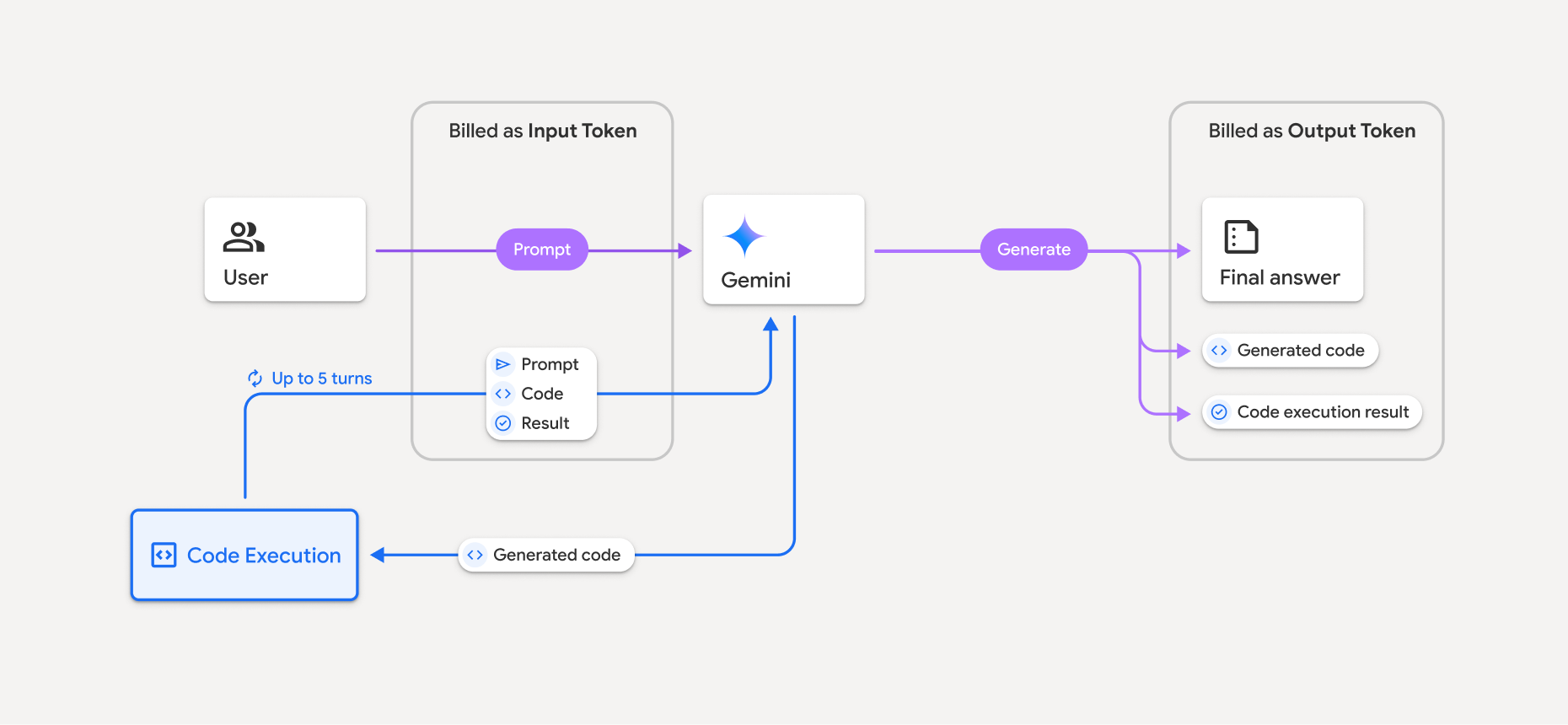
- سيتم تحصيل رسوم منك بالسعر الحالي لرموز الإدخال ورموز الإخراج استنادًا إلى نموذج Gemini الذي تستخدمه.
- إذا استخدم Gemini أداة تنفيذ الرموز البرمجية عند إنشاء ردّك، يتم تصنيف الطلب الأصلي والرمز الذي تم إنشاؤه ونتيجة الرمز الذي تم تنفيذه على أنّها رموز مميّزة وسيطة ويتم تحصيل رسوم منك مقابلها كـ رموز إدخال.
- بعد ذلك، ينشئ Gemini ملخّصًا ويعرض الرمز الذي تم إنشاؤه ونتيجة الرمز الذي تم تنفيذه والملخّص النهائي. ويتم تحصيل رسوم منك مقابل هذه العناصر كـ رموز إخراج.
- تتضمّن Gemini API عدد الرموز المميّزة الوسيطة في الردّ من واجهة برمجة التطبيقات، ما يتيح لك معرفة سبب حصولك على رموز إدخال إضافية بخلاف طلبك الأولي.
القيود
- لا يمكن للنموذج سوى إنشاء الرموز البرمجية وتنفيذها. ولا يمكنه عرض عناصر أخرى، مثل ملفات الوسائط.
- في بعض الحالات، يمكن أن يؤدي تفعيل أداة تنفيذ الرموز البرمجية إلى حدوث تراجع في جوانب أخرى من مخرجات النموذج (على سبيل المثال، كتابة قصة).
- هناك بعض الاختلاف في قدرة النماذج المختلفة على استخدام أداة تنفيذ الرموز البرمجية بنجاح.
مجموعات الأدوات المتوافقة
يمكن دمج أداة تنفيذ الرموز البرمجية مع تحديد المصدر من خلال "بحث Google" لتشغيل حالات استخدام أكثر تعقيدًا.
تتيح نماذج Gemini 4 وGemini 3 الجمع بين الأدوات المضمّنة (مثل أداة تنفيذ الرموز البرمجية) والأدوات المخصّصة (استدعاء الدوال).
المكتبات المتوافقة
تتضمّن بيئة تنفيذ الرموز البرمجية المكتبات التالية:
- attrs
- شطرنج
- contourpy
- fpdf
- geopandas
- imageio
- jinja2
- joblib
- jsonschema
- jsonschema-specifications
- lxml
- matplotlib
- mpmath
- مكتبة نامبي
- opencv-python
- openpyxl
- حزمة محتوى التطبيق
- باندا
- وسادة
- protobuf
- pylatex
- pyparsing
- PyPDF2
- python-dateutil
- python-docx
- python-pptx
- reportlab
- scikit-learn
- scipy
- seaborn
- ستة
- striprtf
- sympy
- tabulate
- tensorflow
- toolz
- xlrd
لا يمكنك تثبيت مكتباتك الخاصة.
الخطوات التالية
- جرِّب دليل التشغيل السريع لواجهة برمجة التطبيقات Interactions API.
- تعرَّف على أدوات Gemini API الأخرى: