

Gemini API, कोड को एक्ज़ीक्यूट करने वाला टूल उपलब्ध कराता है. इसकी मदद से मॉडल, Python कोड जनरेट और उसे चला सकता है. इसके बाद, मॉडल कोड को बार-बार एक्ज़ीक्यूट करके, उसके नतीजों से सीखता है. ऐसा तब तक होता है, जब तक उसे फ़ाइनल आउटपुट नहीं मिल जाता. कोड के आधार पर तर्क देने की सुविधा का फ़ायदा पाने वाले ऐप्लिकेशन बनाने के लिए, कोड एक्ज़ीक्यूशन का इस्तेमाल किया जा सकता है. उदाहरण के लिए, कोड एक्ज़ीक्यूशन का इस्तेमाल, समीकरणों को हल करने या टेक्स्ट को प्रोसेस करने के लिए किया जा सकता है. ज़्यादा खास टास्क पूरे करने के लिए, कोड एक्ज़ीक्यूशन एनवायरमेंट में शामिल लाइब्रेरी का इस्तेमाल भी किया जा सकता है.
Gemini सिर्फ़ Python में कोड को एक्ज़ीक्यूट कर सकता है. Gemini से अब भी किसी दूसरी भाषा में कोड जनरेट करने के लिए कहा जा सकता है. हालाँकि, मॉडल इस कोड को चलाने के लिए, कोड एक्ज़ीक्यूशन टूल का इस्तेमाल नहीं कर सकता.
कोड एक्ज़ीक्यूशन की सुविधा चालू करना
कोड एक्ज़ीक्यूट करने की सुविधा चालू करने के लिए, मॉडल पर कोड एक्ज़ीक्यूट करने वाले टूल को कॉन्फ़िगर करें. इससे मॉडल को कोड जनरेट करने और उसे चलाने की अनुमति मिलती है.
Python
from google import genai

client = genai.Client()

interaction = client.interactions.create(
    model="gemini-3.8-flash",
    input="What is the sum of the first 50 prime numbers? "
          "Generate and run code for the calculation, and make sure you get all 50.",
    tools=[{"type": "code_execution"}]
)

for step in interaction.steps:
    if step.type == "model_output":
        for content_block in step.content:
            if content_block.type == "text":
                print(content_block.text)
    elif step.type == "code_execution_call":
        print(step.arguments.code)
    elif step.type == "code_execution_result":
        print(step.result)
JavaScript
import { GoogleGenAI } from "@google/genai";

const client = new GoogleGenAI({});

const interaction = await client.interactions.create({
    model: "gemini-3.8-flash",
    input: "What is the sum of the first 50 prime numbers? " +
           "Generate and run code for the calculation, and make sure you get all 50.",
    tools: [{ type: "code_execution" }]
});

for (const step of interaction.steps) {
    if (step.type === "model_output") {
        for (const contentBlock of step.content) {
            if (contentBlock.type === "text") {
                console.log(contentBlock.text);
            }
        }
    } else if (step.type === "code_execution_call") {
        console.log(step.arguments.code);
    } else if (step.type === "code_execution_result") {
        console.log(step.result);
    }
}
Java
import com.google.genai.Client;
import com.google.genai.gaos.models.interactions.CodeExecution;
import com.google.genai.gaos.models.interactions.CodeExecutionCallStep;
import com.google.genai.gaos.models.interactions.CodeExecutionResultStep;
import com.google.genai.gaos.models.interactions.Content;
import com.google.genai.gaos.models.interactions.CreateModelInteraction;
import com.google.genai.gaos.models.interactions.Interaction;
import com.google.genai.gaos.models.interactions.InteractionsInput;
import com.google.genai.gaos.models.interactions.ModelOutputStep;
import com.google.genai.gaos.models.interactions.Step;
import com.google.genai.gaos.models.interactions.TextContent;
import com.google.genai.gaos.models.operations.CreateInteractionRequestBody;
import java.util.Arrays;
import java.util.Collections;

Client client = new Client();

CreateModelInteraction params =
    CreateModelInteraction.builder()
        .model("gemini-3.8-flash")
        .input(
            InteractionsInput.of(
                "What is the sum of the first 50 prime numbers? "
                    + "Generate and run code for the calculation, and make sure you get all 50."))
        .tools(Arrays.asList(CodeExecution.builder().build()))
        .build();

Interaction interaction =
    client.interactions.create(CreateInteractionRequestBody.of(params)).interaction().get();

for (Step step : interaction.steps().orElse(Collections.emptyList())) {
  if (step instanceof ModelOutputStep) {
    ModelOutputStep outputStep = (ModelOutputStep) step;
    for (Content contentBlock : outputStep.content().orElse(Collections.emptyList())) {
      if (contentBlock instanceof TextContent) {
        System.out.println(((TextContent) contentBlock).text().orElse(""));
      }
    }
  } else if (step instanceof CodeExecutionCallStep) {
    CodeExecutionCallStep callStep = (CodeExecutionCallStep) step;
    callStep.arguments().ifPresent(args -> System.out.println(args.code().orElse("")));
  } else if (step instanceof CodeExecutionResultStep) {
    CodeExecutionResultStep resultStep = (CodeExecutionResultStep) step;
    System.out.println(resultStep.result().orElse(""));
  }
}
ऐप पर जाएं
package main

import (
    "context"
    "fmt"
    "log"

    "google.golang.org/genai"
    "google.golang.org/genai/interactions/models/interactions"
    "google.golang.org/genai/interactions/models/operations"
)

func main() {
    ctx := context.Background()
    client, err := genai.NewClient(ctx, nil)
    if err != nil {
        log.Fatal(err)
    }

    res, err := client.Interactions.Create(ctx, operations.CreateInteractionRequest{
        Body: operations.NewCreateInteractionRequestBody(interactions.CreateModelInteraction{
            Model: interactions.Model("gemini-3.8-flash"),
            Input: interactions.NewInteractionsInput(
                "What is the sum of the first 50 prime numbers? " +
                    "Generate and run code for the calculation, and make sure you get all 50.",
            ),
            Tools: []interactions.Tool{
                interactions.NewTool(interactions.CodeExecution{}),
            },
        }),
    })
    if err != nil {
        log.Fatal(err)
    }

    for _, step := range res.Interaction.Steps {
        if outStep := step.ModelOutputStep; outStep != nil {
            for _, contentBlock := range outStep.Content {
                if textContent := contentBlock.TextContent; textContent != nil {
                    fmt.Println(textContent.GetText())
                }
            }
        } else if callStep := step.CodeExecutionCallStep; callStep != nil {
            if code := callStep.Arguments.GetCode(); code != nil {
                fmt.Println(*code)
            }
        } else if resultStep := step.CodeExecutionResultStep; resultStep != nil {
            fmt.Println(resultStep.GetResult())
        }
    }
}
REST
curl -X POST "https://generativelanguage.googleapis.com/v1beta/interactions" \
-H "x-goog-api-key: $GEMINI_API_KEY" \
-H 'Content-Type: application/json' \
-d '{
    "model": "gemini-3.8-flash",
    "input": "What is the sum of the first 50 prime numbers? Generate and run code for the calculation, and make sure you get all 50.",
    "tools": [{"type": "code_execution"}]
}'
आउटपुट कुछ ऐसा दिख सकता है. इसे पढ़ने में आसानी हो, इसके लिए फ़ॉर्मैट किया गया है:
Okay, I need to calculate the sum of the first 50 prime numbers. Here's how I'll
approach this:

1.  **Generate Prime Numbers:** I'll use an iterative method to find prime
    numbers. I'll start with 2 and check if each subsequent number is divisible
    by any number between 2 and its square root. If not, it's a prime.
2.  **Store Primes:** I'll store the prime numbers in a list until I have 50 of
    them.
3.  **Calculate the Sum:**  Finally, I'll sum the prime numbers in the list.

Here's the Python code to do this:

def is_prime(n):
  """Efficiently checks if a number is prime."""
  if n <= 1:
    return False
  if n <= 3:
    return True
  if n % 2 == 0 or n % 3 == 0:
    return False
  i = 5
  while i * i <= n:
    if n % i == 0 or n % (i + 2) == 0:
      return False
    i += 6
  return True

primes = []
num = 2
while len(primes) < 50:
  if is_prime(num):
    primes.append(num)
  num += 1

sum_of_primes = sum(primes)
print(f'{primes=}')
print(f'{sum_of_primes=}')

primes=[2, 3, 5, 7, 11, 13, 17, 19, 23, 29, 31, 37, 41, 43, 47, 53, 59, 61, 67,
71, 73, 79, 83, 89, 97, 101, 103, 107, 109, 113, 127, 131, 137, 139, 149, 151,
157, 163, 167, 173, 179, 181, 191, 193, 197, 199, 211, 223, 227, 229]
sum_of_primes=5117

The sum of the first 50 prime numbers is 5117.
इस आउटपुट में, कॉन्टेंट के कई ऐसे हिस्से शामिल होते हैं जिन्हें कोड एक्ज़ीक्यूशन की सुविधा का इस्तेमाल करते समय मॉडल दिखाता है:
text: मॉडल से जनरेट किया गया इनलाइन टेक्स्टcode_execution_call: मॉडल से जनरेट किया गया कोड, जिसे एक्ज़ीक्यूट किया जाना हैcode_execution_result: एक्ज़ीक्यूटेबल कोड का नतीजा
इमेज के साथ कोड एक्ज़ीक्यूट करना (Gemini 3)
Gemini 3 Flash मॉडल अब Python कोड लिख सकता है और उसे चला सकता है. इससे वह इमेज में बदलाव कर सकता है और उनकी जाँच कर सकता है.
इस्तेमाल के उदाहरण
- ज़ूम करना और जांच करना: मॉडल अपने-आप यह पता लगा लेता है कि जानकारी बहुत छोटी है (जैसे, दूर से गेज को पढ़ना). इसके बाद, वह उस हिस्से को क्रॉप करने और ज़्यादा रिज़ॉल्यूशन पर फिर से जांच करने के लिए कोड लिखता है.
- विज़ुअल मैथ: मॉडल, कोड का इस्तेमाल करके कई चरणों में हिसाब-किताब कर सकता है. जैसे, रसीद पर मौजूद लाइन आइटम का हिसाब लगाना.
- इमेज एनोटेशन: मॉडल, सवालों के जवाब देने के लिए इमेज को एनोटेट कर सकता है. जैसे, संबंधों को दिखाने के लिए ऐरो बनाना.
इमेज के साथ कोड एक्ज़ीक्यूशन की सुविधा चालू करना
Gemini 3 Flash में, इमेज के साथ कोड को आधिकारिक तौर पर इस्तेमाल किया जा सकता है. इस सुविधा को चालू करने के लिए, 'टूल के तौर पर कोड एक्ज़ीक्यूशन' और 'सोचना', दोनों को चालू करें.
Python
from google import genai
import requests
import base64
from PIL import Image
import io

image_path = "https://goo.gle/instrument-img"
image_bytes = requests.get(image_path).content

client = genai.Client()

interaction = client.interactions.create(
    model="gemini-3.8-flash",
    input=[
        {"type": "image", "data": base64.b64encode(image_bytes).decode('utf-8'), "mime_type": "image/jpeg"},
        {"type": "text", "text": "Zoom into the expression pedals and tell me how many pedals are there?"}
    ],
    tools=[{"type": "code_execution"}]
)

for step in interaction.steps:
    if step.type == "model_output":
        for content_block in step.content:
            if content_block.type == "text":
                print(content_block.text)
            elif content_block.type == "image":
                img = Image.open(io.BytesIO(base64.b64decode(content_block.data)))
                img.show()  # or: img.save("output_image.jpg")
    elif step.type == "code_execution_call":
        print(step.arguments.code)
    elif step.type == "code_execution_result":
        print(step.result)
JavaScript
import { GoogleGenAI } from "@google/genai";

async function main() {
  const client = new GoogleGenAI({});

  const imageUrl = "https://goo.gle/instrument-img";
  const response = await fetch(imageUrl);
  const imageArrayBuffer = await response.arrayBuffer();
  const base64ImageData = Buffer.from(imageArrayBuffer).toString('base64');

  const interaction = await client.interactions.create({
    model: "gemini-3.8-flash",
    input: [
      {
        type: "image",
        data: base64ImageData,
        mime_type: "image/jpeg"
      },
      { type: "text", text: "Zoom into the expression pedals and tell me how many pedals are there?" }
    ],
    tools: [{ type: "code_execution" }]
  });

  for (const step of interaction.steps) {
    if (step.type === "model_output") {
      for (const contentBlock of step.content) {
        if (contentBlock.type === "text") {
          console.log("Text:", contentBlock.text);
        }
      }
    } else if (step.type === "code_execution_call") {
      console.log(`\nGenerated Code:\n`, step.arguments.code);
    } else if (step.type === "code_execution_result") {
      console.log(`\nExecution Output:\n`, step.result);
    }
  }
}

main();
Java
import com.google.genai.Client;
import com.google.genai.gaos.models.interactions.CodeExecution;
import com.google.genai.gaos.models.interactions.CodeExecutionCallStep;
import com.google.genai.gaos.models.interactions.CodeExecutionResultStep;
import com.google.genai.gaos.models.interactions.Content;
import com.google.genai.gaos.models.interactions.CreateModelInteraction;
import com.google.genai.gaos.models.interactions.ImageContent;
import com.google.genai.gaos.models.interactions.ImageContentMimeType;
import com.google.genai.gaos.models.interactions.Interaction;
import com.google.genai.gaos.models.interactions.InteractionsInput;
import com.google.genai.gaos.models.interactions.ModelOutputStep;
import com.google.genai.gaos.models.interactions.Step;
import com.google.genai.gaos.models.interactions.TextContent;
import com.google.genai.gaos.models.operations.CreateInteractionRequestBody;
import java.io.InputStream;
import java.net.URI;
import java.nio.file.Files;
import java.nio.file.Paths;
import java.util.Arrays;
import java.util.Base64;
import java.util.Collections;

String imageUrl = "https://goo.gle/instrument-img";
byte[] imageBytes;
try (InputStream in = URI.create(imageUrl).toURL().openStream()) {
  imageBytes = in.readAllBytes();
}
String base64Image = Base64.getEncoder().encodeToString(imageBytes);

Client client = new Client();

CreateModelInteraction params =
    CreateModelInteraction.builder()
        .model("gemini-3.8-flash")
        .input(
            InteractionsInput.ofContent(
                Arrays.asList(
                    ImageContent.builder()
                        .data(base64Image)
                        .mimeType(ImageContentMimeType.IMAGE_JPEG)
                        .build(),
                    TextContent.builder()
                        .text(
                            "Zoom into the expression pedals and tell me how many pedals are there?")
                        .build())))
        .tools(Arrays.asList(CodeExecution.builder().build()))
        .build();

Interaction interaction =
    client.interactions.create(CreateInteractionRequestBody.of(params)).interaction().get();

for (Step step : interaction.steps().orElse(Collections.emptyList())) {
  if (step instanceof ModelOutputStep) {
    ModelOutputStep outputStep = (ModelOutputStep) step;
    for (Content contentBlock : outputStep.content().orElse(Collections.emptyList())) {
      if (contentBlock instanceof TextContent) {
        System.out.println(((TextContent) contentBlock).text().orElse(""));
      } else if (contentBlock instanceof ImageContent) {
        ImageContent imgContent = (ImageContent) contentBlock;
        if (imgContent.data().isPresent()) {
          byte[] decoded = Base64.getDecoder().decode(imgContent.data().get());
          Files.write(Paths.get("output_image.jpg"), decoded);
        }
      }
    }
  } else if (step instanceof CodeExecutionCallStep) {
    CodeExecutionCallStep callStep = (CodeExecutionCallStep) step;
    callStep.arguments().ifPresent(args -> System.out.println(args.code().orElse("")));
  } else if (step instanceof CodeExecutionResultStep) {
    CodeExecutionResultStep resultStep = (CodeExecutionResultStep) step;
    System.out.println(resultStep.result().orElse(""));
  }
}
ऐप पर जाएं
package main

import (
    "context"
    "encoding/base64"
    "fmt"
    "io"
    "log"
    "net/http"
    "os"

    "google.golang.org/genai"
    "google.golang.org/genai/interactions/models/interactions"
    "google.golang.org/genai/interactions/models/operations"
)

func main() {
    ctx := context.Background()
    client, err := genai.NewClient(ctx, nil)
    if err != nil {
        log.Fatal(err)
    }

    imageURL := "https://goo.gle/instrument-img"
    httpResp, err := http.Get(imageURL)
    if err != nil {
        log.Fatal(err)
    }
    defer httpResp.Body.Close()
    imageBytes, err := io.ReadAll(httpResp.Body)
    if err != nil {
        log.Fatal(err)
    }
    base64Image := base64.StdEncoding.EncodeToString(imageBytes)

    res, err := client.Interactions.Create(ctx, operations.CreateInteractionRequest{
        Body: operations.NewCreateInteractionRequestBody(interactions.CreateModelInteraction{
            Model: interactions.Model("gemini-3.8-flash"),
            Input: interactions.NewInteractionsInput([]interactions.Content{
                interactions.NewContent(interactions.ImageContent{
                    Data:     genai.Ptr(base64Image),
                    MimeType: interactions.ImageContentMimeType("image/jpeg").ToPointer(),
                }),
                interactions.NewContent(interactions.TextContent{
                    Text: "Zoom into the expression pedals and tell me how many pedals are there?",
                }),
            }),
            Tools: []interactions.Tool{
                interactions.NewTool(interactions.CodeExecution{}),
            },
        }),
    })
    if err != nil {
        log.Fatal(err)
    }

    for _, step := range res.Interaction.Steps {
        if outStep := step.ModelOutputStep; outStep != nil {
            for _, contentBlock := range outStep.Content {
                if textContent := contentBlock.TextContent; textContent != nil {
                    fmt.Println(textContent.GetText())
                } else if imgContent := contentBlock.ImageContent; imgContent != nil && imgContent.Data != nil {
                    decoded, err := base64.StdEncoding.DecodeString(*imgContent.Data)
                    if err == nil {
                        _ = os.WriteFile("output_image.jpg", decoded, 0644)
                    }
                }
            }
        } else if callStep := step.CodeExecutionCallStep; callStep != nil {
            if code := callStep.Arguments.GetCode(); code != nil {
                fmt.Println(*code)
            }
        } else if resultStep := step.CodeExecutionResultStep; resultStep != nil {
            fmt.Println(resultStep.GetResult())
        }
    }
}
REST
IMG_URL="https://goo.gle/instrument-img"
MODEL="gemini-3.8-flash"

MIME_TYPE=$(curl -sIL "$IMG_URL" | grep -i '^content-type:' | awk -F ': ' '{print $2}' | sed 's/\r$//' | head -n 1)
if [[ -z "$MIME_TYPE" || ! "$MIME_TYPE" == image/* ]]; then
  MIME_TYPE="image/jpeg"
fi

if [[ "$(uname)" == "Darwin" ]]; then
  IMAGE_B64=$(curl -sL "$IMG_URL" | base64 -b 0)
elif [[ "$(base64 --version 2>&1)" = *"FreeBSD"* ]]; then
  IMAGE_B64=$(curl -sL "$IMG_URL" | base64)
else
  IMAGE_B64=$(curl -sL "$IMG_URL" | base64 -w0)
fi

# Use jq to create the JSON payload to avoid "Argument list too long" error with large base64 strings
echo -n "$IMAGE_B64" > image_b64.txt
jq -n \
  --rawfile b64 image_b64.txt \
  --arg mime "$MIME_TYPE" \
  '{
    model: "gemini-3.8-flash",
    input: [
      {type: "image", data: $b64, mime_type: $mime},
      {type: "text", text: "Zoom into the expression pedals and tell me how many pedals are there?"}
    ],
    tools: [{type: "code_execution"}]
  }' > payload.json

curl -X POST "https://generativelanguage.googleapis.com/v1beta/interactions" \
    -H "x-goog-api-key: $GEMINI_API_KEY" \
    -H 'Content-Type: application/json' \
    -d @payload.json
सिलसिलेवार बातचीत में कोड एक्ज़ीक्यूशन का इस्तेमाल करना
previous_interaction_id का इस्तेमाल करके, सिलसिलेवार बातचीत के दौरान कोड को एक्ज़ीक्यूट किया जा सकता है.
Python
from google import genai

client = genai.Client()

interaction1 = client.interactions.create(
    model="gemini-3.8-flash",
    input="I have a math question for you.",
    tools=[{"type": "code_execution"}]
)
print(interaction1.output_text)

interaction2 = client.interactions.create(
    model="gemini-3.8-flash",
    previous_interaction_id=interaction1.id,
    input="What is the sum of the first 50 prime numbers? "
          "Generate and run code for the calculation, and make sure you get all 50.",
    tools=[{"type": "code_execution"}]
)

for step in interaction2.steps:
    if step.type == "model_output":
        for content_block in step.content:
            if content_block.type == "text":
                print(content_block.text)
    elif step.type == "code_execution_call":
        print(step.arguments.code)
    elif step.type == "code_execution_result":
        print(step.result)
JavaScript
import { GoogleGenAI } from "@google/genai";

const client = new GoogleGenAI({});

const interaction1 = await client.interactions.create({
    model: "gemini-3.8-flash",
    input: "I have a math question for you.",
    tools: [{ type: "code_execution" }]
});
console.log(interaction1.output_text);

const interaction2 = await client.interactions.create({
    model: "gemini-3.8-flash",
    previous_interaction_id: interaction1.id,
    input: "What is the sum of the first 50 prime numbers? " +
           "Generate and run code for the calculation, and make sure you get all 50.",
    tools: [{ type: "code_execution" }]
});

for (const step of interaction2.steps) {
    if (step.type === "model_output") {
        for (const contentBlock of step.content) {
            if (contentBlock.type === "text") {
                console.log(contentBlock.text);
            }
        }
    } else if (step.type === "code_execution_call") {
        console.log(step.arguments.code);
    } else if (step.type === "code_execution_result") {
        console.log(step.result);
    }
}
Java
import com.google.genai.Client;
import com.google.genai.gaos.models.interactions.CodeExecution;
import com.google.genai.gaos.models.interactions.CodeExecutionCallStep;
import com.google.genai.gaos.models.interactions.CodeExecutionResultStep;
import com.google.genai.gaos.models.interactions.Content;
import com.google.genai.gaos.models.interactions.CreateModelInteraction;
import com.google.genai.gaos.models.interactions.Interaction;
import com.google.genai.gaos.models.interactions.InteractionsInput;
import com.google.genai.gaos.models.interactions.ModelOutputStep;
import com.google.genai.gaos.models.interactions.Step;
import com.google.genai.gaos.models.interactions.TextContent;
import com.google.genai.gaos.models.operations.CreateInteractionRequestBody;
import java.util.Arrays;
import java.util.Collections;

Client client = new Client();

CreateModelInteraction params1 =
    CreateModelInteraction.builder()
        .model("gemini-3.8-flash")
        .input(InteractionsInput.of("I have a math question for you."))
        .tools(Arrays.asList(CodeExecution.builder().build()))
        .build();

Interaction interaction1 =
    client.interactions.create(CreateInteractionRequestBody.of(params1)).interaction().get();
System.out.println(interaction1.outputText().orElse(""));

CreateModelInteraction params2 =
    CreateModelInteraction.builder()
        .model("gemini-3.8-flash")
        .previousInteractionId(interaction1.id().get())
        .input(
            InteractionsInput.of(
                "What is the sum of the first 50 prime numbers? "
                    + "Generate and run code for the calculation, and make sure you get all 50."))
        .tools(Arrays.asList(CodeExecution.builder().build()))
        .build();

Interaction interaction2 =
    client.interactions.create(CreateInteractionRequestBody.of(params2)).interaction().get();

for (Step step : interaction2.steps().orElse(Collections.emptyList())) {
  if (step instanceof ModelOutputStep) {
    ModelOutputStep outputStep = (ModelOutputStep) step;
    for (Content contentBlock : outputStep.content().orElse(Collections.emptyList())) {
      if (contentBlock instanceof TextContent) {
        System.out.println(((TextContent) contentBlock).text().orElse(""));
      }
    }
  } else if (step instanceof CodeExecutionCallStep) {
    CodeExecutionCallStep callStep = (CodeExecutionCallStep) step;
    callStep.arguments().ifPresent(args -> System.out.println(args.code().orElse("")));
  } else if (step instanceof CodeExecutionResultStep) {
    CodeExecutionResultStep resultStep = (CodeExecutionResultStep) step;
    System.out.println(resultStep.result().orElse(""));
  }
}
ऐप पर जाएं
package main

import (
    "context"
    "fmt"
    "log"

    "google.golang.org/genai"
    "google.golang.org/genai/interactions/models/interactions"
    "google.golang.org/genai/interactions/models/operations"
)

func main() {
    ctx := context.Background()
    client, err := genai.NewClient(ctx, nil)
    if err != nil {
        log.Fatal(err)
    }

    res1, err := client.Interactions.Create(ctx, operations.CreateInteractionRequest{
        Body: operations.NewCreateInteractionRequestBody(interactions.CreateModelInteraction{
            Model: interactions.Model("gemini-3.8-flash"),
            Input: interactions.NewInteractionsInput("I have a math question for you."),
            Tools: []interactions.Tool{
                interactions.NewTool(interactions.CodeExecution{}),
            },
        }),
    })
    if err != nil {
        log.Fatal(err)
    }
    if res1.Interaction.OutputText != nil {
        fmt.Println(*res1.Interaction.OutputText)
    }

    res2, err := client.Interactions.Create(ctx, operations.CreateInteractionRequest{
        Body: operations.NewCreateInteractionRequestBody(interactions.CreateModelInteraction{
            Model:                 interactions.Model("gemini-3.8-flash"),
            PreviousInteractionID: res1.Interaction.ID,
            Input: interactions.NewInteractionsInput(
                "What is the sum of the first 50 prime numbers? " +
                    "Generate and run code for the calculation, and make sure you get all 50.",
            ),
            Tools: []interactions.Tool{
                interactions.NewTool(interactions.CodeExecution{}),
            },
        }),
    })
    if err != nil {
        log.Fatal(err)
    }

    for _, step := range res2.Interaction.Steps {
        if outStep := step.ModelOutputStep; outStep != nil {
            for _, contentBlock := range outStep.Content {
                if textContent := contentBlock.TextContent; textContent != nil {
                    fmt.Println(textContent.GetText())
                }
            }
        } else if callStep := step.CodeExecutionCallStep; callStep != nil {
            if code := callStep.Arguments.GetCode(); code != nil {
                fmt.Println(*code)
            }
        } else if resultStep := step.CodeExecutionResultStep; resultStep != nil {
            fmt.Println(resultStep.GetResult())
        }
    }
}
REST
# First turn
RESPONSE1=$(curl -s -X POST "https://generativelanguage.googleapis.com/v1beta/interactions" \
-H "x-goog-api-key: $GEMINI_API_KEY" \
-H 'Content-Type: application/json' \
-d '{
    "model": "gemini-3.8-flash",
    "input": "I have a math question for you.",
    "tools": [{"type": "code_execution"}]
}')

INTERACTION_ID=$(echo $RESPONSE1 | jq -r '.id')

# Second turn with previous_interaction_id
curl -X POST "https://generativelanguage.googleapis.com/v1beta/interactions" \
-H "x-goog-api-key: $GEMINI_API_KEY" \
-H 'Content-Type: application/json' \
-d '{
    "model": "gemini-3.8-flash",
    "previous_interaction_id": "'"$INTERACTION_ID"'",
    "input": "What is the sum of the first 50 prime numbers? Generate and run code for the calculation, and make sure you get all 50.",
    "tools": [{"type": "code_execution"}]
}'
इनपुट/आउटपुट (I/O)
Gemini के मौजूदा मॉडल, जैसे कि Gemini 3.5 Flash में कोड को एक्ज़ीक्यूट करने के लिए, फ़ाइल इनपुट और ग्राफ़ आउटपुट की सुविधा उपलब्ध है. इनपुट और आउटपुट की इन सुविधाओं का इस्तेमाल करके, CSV और टेक्स्ट फ़ाइलें अपलोड की जा सकती हैं. साथ ही, फ़ाइलों के बारे में सवाल पूछे जा सकते हैं. इसके अलावा, जवाब के तौर पर Matplotlib ग्राफ़ जनरेट किए जा सकते हैं. आउटपुट फ़ाइलें, जवाब में इनलाइन इमेज के तौर पर दिखती हैं.
I/O की कीमत
कोड एक्ज़ीक्यूशन I/O का इस्तेमाल करने पर, आपसे इनपुट टोकन और आउटपुट टोकन के लिए शुल्क लिया जाता है:
इनपुट टोकन:
- उपयोगकर्ता का प्रॉम्प्ट
आउटपुट टोकन:
- मॉडल से जनरेट किया गया कोड
- कोड एनवायरमेंट में कोड एक्ज़ीक्यूशन का आउटपुट
- थिंकिंग टोकन
- मॉडल से जनरेट की गई खास जानकारी
I/O की जानकारी
कोड एक्ज़ीक्यूशन I/O के साथ काम करते समय, यहां दी गई तकनीकी जानकारी का ध्यान रखें:
- कोड एनवायरमेंट के चलने की ज़्यादा से ज़्यादा अवधि 30 सेकंड है.
- अगर कोड एनवायरमेंट में कोई गड़बड़ी होती है, तो मॉडल कोड के आउटपुट को फिर से जनरेट करने का फ़ैसला कर सकता है. ऐसा ज़्यादा से ज़्यादा पांच बार किया जा सकता है.
- फ़ाइल के इनपुट का ज़्यादा से ज़्यादा साइज़, मॉडल के टोकन विंडो के हिसाब से तय होता है. अगर आपने ऐसी फ़ाइल अपलोड की है जिसका साइज़, मॉडल की ज़्यादा से ज़्यादा कॉन्टेक्स्ट विंडो से ज़्यादा है, तो एपीआई गड़बड़ी का मैसेज दिखाएगा.
- कोड एक्ज़ीक्यूशन टेक्स्ट और CSV फ़ाइलों के साथ सबसे सही तरीके से काम करता है.
- इनपुट फ़ाइल को इनलाइन डेटा के तौर पर पास किया जा सकता है या Files API का इस्तेमाल करके अपलोड किया जा सकता है. साथ ही, आउटपुट फ़ाइल हमेशा इनलाइन डेटा के तौर पर दिखाई जाती है.
बिलिंग
Gemini API से कोड एक्ज़ीक्यूट करने की सुविधा चालू करने के लिए, कोई अतिरिक्त शुल्क नहीं लिया जाता. आपसे इनपुट और आउटपुट टोकन के लिए, मौजूदा दर के हिसाब से शुल्क लिया जाएगा. यह शुल्क, इस्तेमाल किए जा रहे Gemini मॉडल के हिसाब से लिया जाएगा.
कोड एक्ज़ीक्यूट करने के लिए बिलिंग के बारे में यहां कुछ और बातें बताई गई हैं:
- मॉडल को दिए गए इनपुट टोकन के लिए, आपसे सिर्फ़ एक बार शुल्क लिया जाता है. साथ ही, मॉडल से मिले फ़ाइनल आउटपुट टोकन के लिए भी आपसे शुल्क लिया जाता है.
- जनरेट किए गए कोड को दिखाने वाले टोकन, आउटपुट टोकन के तौर पर गिने जाते हैं. जनरेट किए गए कोड में टेक्स्ट और इमेज जैसे मल्टीमॉडल आउटपुट शामिल हो सकते हैं.
- कोड एक्ज़ीक्यूशन के नतीजों को भी आउटपुट टोकन के तौर पर गिना जाता है.
बिलिंग मॉडल को इस डायग्राम में दिखाया गया है:
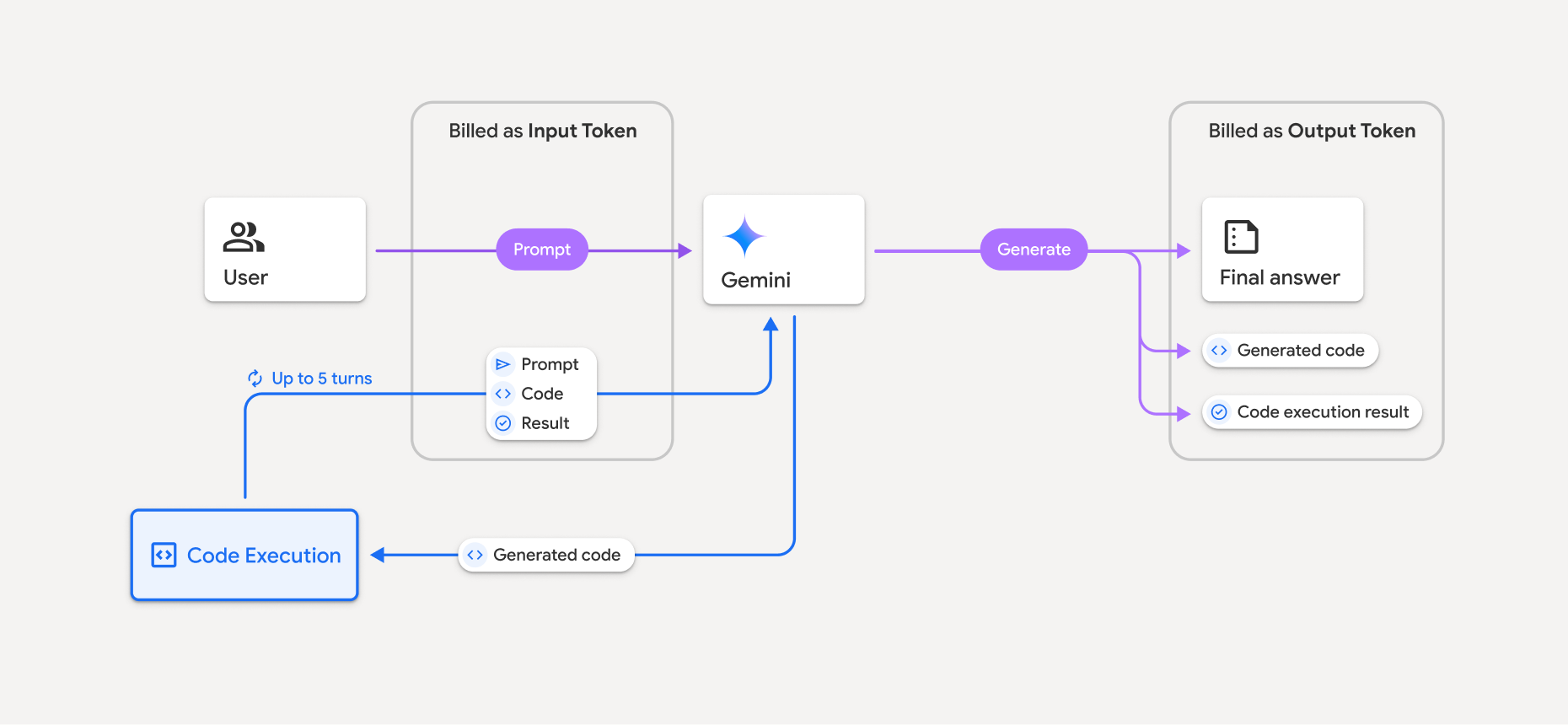
- आपको इनपुट और आउटपुट टोकन की मौजूदा दर के हिसाब से बिल भेजा जाता है. यह दर, इस्तेमाल किए जा रहे Gemini मॉडल पर आधारित होती है.
- अगर Gemini, जवाब जनरेट करते समय कोड को एक्ज़ीक्यूट करता है, तो ओरिजनल प्रॉम्प्ट, जनरेट किया गया कोड, और एक्ज़ीक्यूट किए गए कोड के नतीजे को इंटरमीडिएट टोकन के तौर पर लेबल किया जाता है. साथ ही, इनका बिल इनपुट टोकन के तौर पर भेजा जाता है.
- इसके बाद, Gemini एक खास जानकारी जनरेट करता है. साथ ही, जनरेट किया गया कोड, कोड को लागू करने का नतीजा, और खास जानकारी दिखाता है. इनके लिए, आउटपुट टोकन के तौर पर बिल भेजा जाता है.
- Gemini API, एपीआई के जवाब में इंटरमीडिएट टोकन की गिनती शामिल करता है. इससे आपको पता चलता है कि आपको अपने शुरुआती प्रॉम्प्ट के अलावा, अतिरिक्त इनपुट टोकन क्यों मिल रहे हैं.
सीमाएं
- यह मॉडल सिर्फ़ कोड जनरेट और एक्ज़ीक्यूट कर सकता है. यह मीडिया फ़ाइलों जैसे अन्य आर्टफ़ैक्ट वापस नहीं ला सकता.
- कुछ मामलों में, कोड एक्ज़ीक्यूशन की सुविधा चालू करने से, मॉडल आउटपुट की अन्य सुविधाओं में समस्याएं आ सकती हैं. उदाहरण के लिए, कहानी लिखना.
- अलग-अलग मॉडल, कोड को अलग-अलग तरीके से इस्तेमाल करते हैं.
इस्तेमाल किए जा सकने वाले टूल कॉम्बिनेशन
ज़्यादा मुश्किल सवालों के जवाब देने के लिए, कोड एग्ज़ीक्यूशन टूल को Google Search से मिली जानकारी का इस्तेमाल करने की सुविधा के साथ इस्तेमाल किया जा सकता है.
Gemini 3 मॉडल, पहले से मौजूद टूल (जैसे, कोड एक्ज़ीक्यूशन) को कस्टम टूल (फ़ंक्शन कॉलिंग) के साथ इस्तेमाल करने की सुविधा देते हैं.
साथ काम करने वाली लाइब्रेरी
कोड एक्ज़ीक्यूशन एनवायरमेंट में ये लाइब्रेरी शामिल हैं:
- attrs
- शतरंज
- contourpy
- fpdf
- geopandas
- imageio
- jinja2
- joblib
- jsonschema
- jsonschema-specifications
- lxml
- matplotlib
- mpmath
- numpy
- opencv-python
- openpyxl
- पैकेजिंग
- पांडा
- तकिया
- protobuf
- pylatex
- pyparsing
- PyPDF2
- python-dateutil
- python-docx
- python-pptx
- reportlab
- scikit-learn
- scipy
- seaborn
- छह
- striprtf
- sympy
- टेबल में व्यवस्थित करना
- tensorflow
- toolz
- xlrd
आपके पास अपनी लाइब्रेरी इंस्टॉल करने का विकल्प नहीं होता.
आगे क्या करना है
- Interactions API Quickstart को आज़माएं.
- Gemini API के अन्य टूल के बारे में जानें: