

Gemini API-তে কোড এক্সিকিউশন টুল আছে যা মডেলকে Python কোড তৈরি ও রান করতে দেয়। মডেলটি তারপরে কোড এক্সিকিউশনের ফলাফল থেকে ইটারেটিভ পদ্ধতিতে শিখতে পারে যতক্ষণ না এটি চূড়ান্ত আউটপুটে পৌঁছায়। কোড-ভিত্তিক যুক্তি থেকে সুবিধা পাওয়া যায় এমন অ্যাপ্লিকেশন তৈরি করতে, আপনি কোড এক্সিকিউশন ব্যবহার করতে পারেন। যেমন, আপনি কোড এক্সিকিউশন ব্যবহার করে সমীকরণ সমাধান করতে বা টেক্সট প্রসেস করতে পারেন। এছাড়াও, আরও বিশেষ টাস্ক পারফর্ম করতে, কোড এক্সিকিউশন এনভায়রনমেন্টে অন্তর্ভুক্ত লাইব্রেরি ব্যবহার করতে পারেন।
Gemini শুধুমাত্র Python-এ কোড এক্সিকিউট করতে পারে। আপনি এখনও Gemini-কে অন্য ভাষায় কোড জেনারেট করতে বলতে পারেন, তবে মডেলটি সেটি রান করানোর জন্য কোড এক্সিকিউশন টুল ব্যবহার করতে পারবে না।
কোড এক্সিকিউশন চালু করা
কোড এক্সিকিউশন চালু করতে, মডেলে কোড এক্সিকিউশন টুল কনফিগার করুন। এটি মডেলকে কোড জেনারেট ও রান করতে দেয়।
Python
from google import genai

client = genai.Client()

interaction = client.interactions.create(
    model="gemini-3.8-flash",
    input="What is the sum of the first 50 prime numbers? "
          "Generate and run code for the calculation, and make sure you get all 50.",
    tools=[{"type": "code_execution"}]
)

for step in interaction.steps:
    if step.type == "model_output":
        for content_block in step.content:
            if content_block.type == "text":
                print(content_block.text)
    elif step.type == "code_execution_call":
        print(step.arguments.code)
    elif step.type == "code_execution_result":
        print(step.result)
জাভাস্ক্রিপ্ট
import { GoogleGenAI } from "@google/genai";

const client = new GoogleGenAI({});

const interaction = await client.interactions.create({
    model: "gemini-3.8-flash",
    input: "What is the sum of the first 50 prime numbers? " +
           "Generate and run code for the calculation, and make sure you get all 50.",
    tools: [{ type: "code_execution" }]
});

for (const step of interaction.steps) {
    if (step.type === "model_output") {
        for (const contentBlock of step.content) {
            if (contentBlock.type === "text") {
                console.log(contentBlock.text);
            }
        }
    } else if (step.type === "code_execution_call") {
        console.log(step.arguments.code);
    } else if (step.type === "code_execution_result") {
        console.log(step.result);
    }
}
Java
import com.google.genai.Client;
import com.google.genai.gaos.models.interactions.CodeExecution;
import com.google.genai.gaos.models.interactions.CodeExecutionCallStep;
import com.google.genai.gaos.models.interactions.CodeExecutionResultStep;
import com.google.genai.gaos.models.interactions.Content;
import com.google.genai.gaos.models.interactions.CreateModelInteraction;
import com.google.genai.gaos.models.interactions.Interaction;
import com.google.genai.gaos.models.interactions.InteractionsInput;
import com.google.genai.gaos.models.interactions.ModelOutputStep;
import com.google.genai.gaos.models.interactions.Step;
import com.google.genai.gaos.models.interactions.TextContent;
import com.google.genai.gaos.models.operations.CreateInteractionRequestBody;
import java.util.Arrays;
import java.util.Collections;

Client client = new Client();

CreateModelInteraction params =
    CreateModelInteraction.builder()
        .model("gemini-3.8-flash")
        .input(
            InteractionsInput.of(
                "What is the sum of the first 50 prime numbers? "
                    + "Generate and run code for the calculation, and make sure you get all 50."))
        .tools(Arrays.asList(CodeExecution.builder().build()))
        .build();

Interaction interaction =
    client.interactions.create(CreateInteractionRequestBody.of(params)).interaction().get();

for (Step step : interaction.steps().orElse(Collections.emptyList())) {
  if (step instanceof ModelOutputStep) {
    ModelOutputStep outputStep = (ModelOutputStep) step;
    for (Content contentBlock : outputStep.content().orElse(Collections.emptyList())) {
      if (contentBlock instanceof TextContent) {
        System.out.println(((TextContent) contentBlock).text().orElse(""));
      }
    }
  } else if (step instanceof CodeExecutionCallStep) {
    CodeExecutionCallStep callStep = (CodeExecutionCallStep) step;
    callStep.arguments().ifPresent(args -> System.out.println(args.code().orElse("")));
  } else if (step instanceof CodeExecutionResultStep) {
    CodeExecutionResultStep resultStep = (CodeExecutionResultStep) step;
    System.out.println(resultStep.result().orElse(""));
  }
}
খুলুন
package main

import (
    "context"
    "fmt"
    "log"

    "google.golang.org/genai"
    "google.golang.org/genai/interactions/models/interactions"
    "google.golang.org/genai/interactions/models/operations"
)

func main() {
    ctx := context.Background()
    client, err := genai.NewClient(ctx, nil)
    if err != nil {
        log.Fatal(err)
    }

    res, err := client.Interactions.Create(ctx, operations.CreateInteractionRequest{
        Body: operations.NewCreateInteractionRequestBody(interactions.CreateModelInteraction{
            Model: interactions.Model("gemini-3.8-flash"),
            Input: interactions.NewInteractionsInput(
                "What is the sum of the first 50 prime numbers? " +
                    "Generate and run code for the calculation, and make sure you get all 50.",
            ),
            Tools: []interactions.Tool{
                interactions.NewTool(interactions.CodeExecution{}),
            },
        }),
    })
    if err != nil {
        log.Fatal(err)
    }

    for _, step := range res.Interaction.Steps {
        if outStep := step.ModelOutputStep; outStep != nil {
            for _, contentBlock := range outStep.Content {
                if textContent := contentBlock.TextContent; textContent != nil {
                    fmt.Println(textContent.GetText())
                }
            }
        } else if callStep := step.CodeExecutionCallStep; callStep != nil {
            if code := callStep.Arguments.GetCode(); code != nil {
                fmt.Println(*code)
            }
        } else if resultStep := step.CodeExecutionResultStep; resultStep != nil {
            fmt.Println(resultStep.GetResult())
        }
    }
}
REST
curl -X POST "https://generativelanguage.googleapis.com/v1beta/interactions" \
-H "x-goog-api-key: $GEMINI_API_KEY" \
-H 'Content-Type: application/json' \
-d '{
    "model": "gemini-3.8-flash",
    "input": "What is the sum of the first 50 prime numbers? Generate and run code for the calculation, and make sure you get all 50.",
    "tools": [{"type": "code_execution"}]
}'
আউটপুটটি নিচে দেখানো উদাহরণের মতো হতে পারে, যা পাঠযোগ্যতার জন্য ফর্ম্যাট করা হয়েছে:
Okay, I need to calculate the sum of the first 50 prime numbers. Here's how I'll
approach this:

1.  **Generate Prime Numbers:** I'll use an iterative method to find prime
    numbers. I'll start with 2 and check if each subsequent number is divisible
    by any number between 2 and its square root. If not, it's a prime.
2.  **Store Primes:** I'll store the prime numbers in a list until I have 50 of
    them.
3.  **Calculate the Sum:**  Finally, I'll sum the prime numbers in the list.

Here's the Python code to do this:

def is_prime(n):
  """Efficiently checks if a number is prime."""
  if n <= 1:
    return False
  if n <= 3:
    return True
  if n % 2 == 0 or n % 3 == 0:
    return False
  i = 5
  while i * i <= n:
    if n % i == 0 or n % (i + 2) == 0:
      return False
    i += 6
  return True

primes = []
num = 2
while len(primes) < 50:
  if is_prime(num):
    primes.append(num)
  num += 1

sum_of_primes = sum(primes)
print(f'{primes=}')
print(f'{sum_of_primes=}')

primes=[2, 3, 5, 7, 11, 13, 17, 19, 23, 29, 31, 37, 41, 43, 47, 53, 59, 61, 67,
71, 73, 79, 83, 89, 97, 101, 103, 107, 109, 113, 127, 131, 137, 139, 149, 151,
157, 163, 167, 173, 179, 181, 191, 193, 197, 199, 211, 223, 227, 229]
sum_of_primes=5117

The sum of the first 50 prime numbers is 5117.
এই আউটপুটটি একাধিক কন্টেন্ট পার্টকে একত্রিত করে যা কোড এক্সিকিউশন ব্যবহার করার সময় মডেলটি রিটার্ন করে:
text: মডেলের তৈরি করা ইনলাইন টেক্সটcode_execution_call: মডেলের তৈরি করা কোড যা এক্সিকিউট করার জন্য তৈরি করা হয়েছেcode_execution_result: এক্সিকিউটেবল কোডের ফলাফল
ছবি সহ কোড এক্সিকিউশন (Gemini 3)
Gemini 3 Flash মডেল এখন ছবি অ্যাক্টিভভাবে ম্যানিপুলেট ও পরিদর্শন করার জন্য Python কোড লিখতে ও এক্সিকিউট করতে পারে।
ব্যবহারের ক্ষেত্র
- জুম ও পরিদর্শন করা: কোনও বিবরণ খুব ছোট হলে মডেলটি তা বুঝে নেয় (যেমন, দূর থেকে কোনও গেজ রিডিং) এবং সেই অংশটি ক্রপ করে আরও বেশি রেজোলিউশনে আবার পরীক্ষা করার জন্য কোড লেখে।
- ভিজ্যুয়াল গণিত: মডেলটি কোড ব্যবহার করে একাধিক ধাপের গণনা করতে পারে (যেমন, রসিদে আইটেম যোগ করা)।
- ছবিতে অ্যানোটেশন: প্রশ্নের উত্তর দেওয়ার জন্য মডেল ছবিতে অ্যানোটেশন করতে পারে, যেমন সম্পর্ক দেখানোর জন্য তীরচিহ্ন আঁকা।
ছবির সাহায্যে কোড এক্সিকিউশন চালু করা
Gemini 3 Flash-এ ছবি সহ কোড এক্সিকিউশন আনুষ্ঠানিকভাবে কাজ করে। আপনি টুল হিসেবে কোড এক্সিকিউশন ও থিঙ্কিং, এই দুটিই চালু করে এই আচরণ অ্যাক্টিভেট করতে পারবেন।
Python
from google import genai
import requests
import base64
from PIL import Image
import io

image_path = "https://goo.gle/instrument-img"
image_bytes = requests.get(image_path).content

client = genai.Client()

interaction = client.interactions.create(
    model="gemini-3.8-flash",
    input=[
        {"type": "image", "data": base64.b64encode(image_bytes).decode('utf-8'), "mime_type": "image/jpeg"},
        {"type": "text", "text": "Zoom into the expression pedals and tell me how many pedals are there?"}
    ],
    tools=[{"type": "code_execution"}]
)

for step in interaction.steps:
    if step.type == "model_output":
        for content_block in step.content:
            if content_block.type == "text":
                print(content_block.text)
            elif content_block.type == "image":
                img = Image.open(io.BytesIO(base64.b64decode(content_block.data)))
                img.show()  # or: img.save("output_image.jpg")
    elif step.type == "code_execution_call":
        print(step.arguments.code)
    elif step.type == "code_execution_result":
        print(step.result)
জাভাস্ক্রিপ্ট
import { GoogleGenAI } from "@google/genai";

async function main() {
  const client = new GoogleGenAI({});

  const imageUrl = "https://goo.gle/instrument-img";
  const response = await fetch(imageUrl);
  const imageArrayBuffer = await response.arrayBuffer();
  const base64ImageData = Buffer.from(imageArrayBuffer).toString('base64');

  const interaction = await client.interactions.create({
    model: "gemini-3.8-flash",
    input: [
      {
        type: "image",
        data: base64ImageData,
        mime_type: "image/jpeg"
      },
      { type: "text", text: "Zoom into the expression pedals and tell me how many pedals are there?" }
    ],
    tools: [{ type: "code_execution" }]
  });

  for (const step of interaction.steps) {
    if (step.type === "model_output") {
      for (const contentBlock of step.content) {
        if (contentBlock.type === "text") {
          console.log("Text:", contentBlock.text);
        }
      }
    } else if (step.type === "code_execution_call") {
      console.log(`\nGenerated Code:\n`, step.arguments.code);
    } else if (step.type === "code_execution_result") {
      console.log(`\nExecution Output:\n`, step.result);
    }
  }
}

main();
Java
import com.google.genai.Client;
import com.google.genai.gaos.models.interactions.CodeExecution;
import com.google.genai.gaos.models.interactions.CodeExecutionCallStep;
import com.google.genai.gaos.models.interactions.CodeExecutionResultStep;
import com.google.genai.gaos.models.interactions.Content;
import com.google.genai.gaos.models.interactions.CreateModelInteraction;
import com.google.genai.gaos.models.interactions.ImageContent;
import com.google.genai.gaos.models.interactions.ImageContentMimeType;
import com.google.genai.gaos.models.interactions.Interaction;
import com.google.genai.gaos.models.interactions.InteractionsInput;
import com.google.genai.gaos.models.interactions.ModelOutputStep;
import com.google.genai.gaos.models.interactions.Step;
import com.google.genai.gaos.models.interactions.TextContent;
import com.google.genai.gaos.models.operations.CreateInteractionRequestBody;
import java.io.InputStream;
import java.net.URI;
import java.nio.file.Files;
import java.nio.file.Paths;
import java.util.Arrays;
import java.util.Base64;
import java.util.Collections;

String imageUrl = "https://goo.gle/instrument-img";
byte[] imageBytes;
try (InputStream in = URI.create(imageUrl).toURL().openStream()) {
  imageBytes = in.readAllBytes();
}
String base64Image = Base64.getEncoder().encodeToString(imageBytes);

Client client = new Client();

CreateModelInteraction params =
    CreateModelInteraction.builder()
        .model("gemini-3.8-flash")
        .input(
            InteractionsInput.ofContent(
                Arrays.asList(
                    ImageContent.builder()
                        .data(base64Image)
                        .mimeType(ImageContentMimeType.IMAGE_JPEG)
                        .build(),
                    TextContent.builder()
                        .text(
                            "Zoom into the expression pedals and tell me how many pedals are there?")
                        .build())))
        .tools(Arrays.asList(CodeExecution.builder().build()))
        .build();

Interaction interaction =
    client.interactions.create(CreateInteractionRequestBody.of(params)).interaction().get();

for (Step step : interaction.steps().orElse(Collections.emptyList())) {
  if (step instanceof ModelOutputStep) {
    ModelOutputStep outputStep = (ModelOutputStep) step;
    for (Content contentBlock : outputStep.content().orElse(Collections.emptyList())) {
      if (contentBlock instanceof TextContent) {
        System.out.println(((TextContent) contentBlock).text().orElse(""));
      } else if (contentBlock instanceof ImageContent) {
        ImageContent imgContent = (ImageContent) contentBlock;
        if (imgContent.data().isPresent()) {
          byte[] decoded = Base64.getDecoder().decode(imgContent.data().get());
          Files.write(Paths.get("output_image.jpg"), decoded);
        }
      }
    }
  } else if (step instanceof CodeExecutionCallStep) {
    CodeExecutionCallStep callStep = (CodeExecutionCallStep) step;
    callStep.arguments().ifPresent(args -> System.out.println(args.code().orElse("")));
  } else if (step instanceof CodeExecutionResultStep) {
    CodeExecutionResultStep resultStep = (CodeExecutionResultStep) step;
    System.out.println(resultStep.result().orElse(""));
  }
}
খুলুন
package main

import (
    "context"
    "encoding/base64"
    "fmt"
    "io"
    "log"
    "net/http"
    "os"

    "google.golang.org/genai"
    "google.golang.org/genai/interactions/models/interactions"
    "google.golang.org/genai/interactions/models/operations"
)

func main() {
    ctx := context.Background()
    client, err := genai.NewClient(ctx, nil)
    if err != nil {
        log.Fatal(err)
    }

    imageURL := "https://goo.gle/instrument-img"
    httpResp, err := http.Get(imageURL)
    if err != nil {
        log.Fatal(err)
    }
    defer httpResp.Body.Close()
    imageBytes, err := io.ReadAll(httpResp.Body)
    if err != nil {
        log.Fatal(err)
    }
    base64Image := base64.StdEncoding.EncodeToString(imageBytes)

    res, err := client.Interactions.Create(ctx, operations.CreateInteractionRequest{
        Body: operations.NewCreateInteractionRequestBody(interactions.CreateModelInteraction{
            Model: interactions.Model("gemini-3.8-flash"),
            Input: interactions.NewInteractionsInput([]interactions.Content{
                interactions.NewContent(interactions.ImageContent{
                    Data:     genai.Ptr(base64Image),
                    MimeType: interactions.ImageContentMimeType("image/jpeg").ToPointer(),
                }),
                interactions.NewContent(interactions.TextContent{
                    Text: "Zoom into the expression pedals and tell me how many pedals are there?",
                }),
            }),
            Tools: []interactions.Tool{
                interactions.NewTool(interactions.CodeExecution{}),
            },
        }),
    })
    if err != nil {
        log.Fatal(err)
    }

    for _, step := range res.Interaction.Steps {
        if outStep := step.ModelOutputStep; outStep != nil {
            for _, contentBlock := range outStep.Content {
                if textContent := contentBlock.TextContent; textContent != nil {
                    fmt.Println(textContent.GetText())
                } else if imgContent := contentBlock.ImageContent; imgContent != nil && imgContent.Data != nil {
                    decoded, err := base64.StdEncoding.DecodeString(*imgContent.Data)
                    if err == nil {
                        _ = os.WriteFile("output_image.jpg", decoded, 0644)
                    }
                }
            }
        } else if callStep := step.CodeExecutionCallStep; callStep != nil {
            if code := callStep.Arguments.GetCode(); code != nil {
                fmt.Println(*code)
            }
        } else if resultStep := step.CodeExecutionResultStep; resultStep != nil {
            fmt.Println(resultStep.GetResult())
        }
    }
}
REST
IMG_URL="https://goo.gle/instrument-img"
MODEL="gemini-3.8-flash"

MIME_TYPE=$(curl -sIL "$IMG_URL" | grep -i '^content-type:' | awk -F ': ' '{print $2}' | sed 's/\r$//' | head -n 1)
if [[ -z "$MIME_TYPE" || ! "$MIME_TYPE" == image/* ]]; then
  MIME_TYPE="image/jpeg"
fi

if [[ "$(uname)" == "Darwin" ]]; then
  IMAGE_B64=$(curl -sL "$IMG_URL" | base64 -b 0)
elif [[ "$(base64 --version 2>&1)" = *"FreeBSD"* ]]; then
  IMAGE_B64=$(curl -sL "$IMG_URL" | base64)
else
  IMAGE_B64=$(curl -sL "$IMG_URL" | base64 -w0)
fi

# Use jq to create the JSON payload to avoid "Argument list too long" error with large base64 strings
echo -n "$IMAGE_B64" > image_b64.txt
jq -n \
  --rawfile b64 image_b64.txt \
  --arg mime "$MIME_TYPE" \
  '{
    model: "gemini-3.8-flash",
    input: [
      {type: "image", data: $b64, mime_type: $mime},
      {type: "text", text: "Zoom into the expression pedals and tell me how many pedals are there?"}
    ],
    tools: [{type: "code_execution"}]
  }' > payload.json

curl -X POST "https://generativelanguage.googleapis.com/v1beta/interactions" \
    -H "x-goog-api-key: $GEMINI_API_KEY" \
    -H 'Content-Type: application/json' \
    -d @payload.json
একাধিকবার কথোপকথনের সময় কোড এক্সিকিউশন ব্যবহার করা
এছাড়াও, আপনি
previous_interaction_id ব্যবহার করে মাল্টি-টার্ন কথোপকথনের অংশ হিসেবে কোড এক্সিকিউশন ব্যবহার করতে পারেন।
Python
from google import genai

client = genai.Client()

interaction1 = client.interactions.create(
    model="gemini-3.8-flash",
    input="I have a math question for you.",
    tools=[{"type": "code_execution"}]
)
print(interaction1.output_text)

interaction2 = client.interactions.create(
    model="gemini-3.8-flash",
    previous_interaction_id=interaction1.id,
    input="What is the sum of the first 50 prime numbers? "
          "Generate and run code for the calculation, and make sure you get all 50.",
    tools=[{"type": "code_execution"}]
)

for step in interaction2.steps:
    if step.type == "model_output":
        for content_block in step.content:
            if content_block.type == "text":
                print(content_block.text)
    elif step.type == "code_execution_call":
        print(step.arguments.code)
    elif step.type == "code_execution_result":
        print(step.result)
জাভাস্ক্রিপ্ট
import { GoogleGenAI } from "@google/genai";

const client = new GoogleGenAI({});

const interaction1 = await client.interactions.create({
    model: "gemini-3.8-flash",
    input: "I have a math question for you.",
    tools: [{ type: "code_execution" }]
});
console.log(interaction1.output_text);

const interaction2 = await client.interactions.create({
    model: "gemini-3.8-flash",
    previous_interaction_id: interaction1.id,
    input: "What is the sum of the first 50 prime numbers? " +
           "Generate and run code for the calculation, and make sure you get all 50.",
    tools: [{ type: "code_execution" }]
});

for (const step of interaction2.steps) {
    if (step.type === "model_output") {
        for (const contentBlock of step.content) {
            if (contentBlock.type === "text") {
                console.log(contentBlock.text);
            }
        }
    } else if (step.type === "code_execution_call") {
        console.log(step.arguments.code);
    } else if (step.type === "code_execution_result") {
        console.log(step.result);
    }
}
Java
import com.google.genai.Client;
import com.google.genai.gaos.models.interactions.CodeExecution;
import com.google.genai.gaos.models.interactions.CodeExecutionCallStep;
import com.google.genai.gaos.models.interactions.CodeExecutionResultStep;
import com.google.genai.gaos.models.interactions.Content;
import com.google.genai.gaos.models.interactions.CreateModelInteraction;
import com.google.genai.gaos.models.interactions.Interaction;
import com.google.genai.gaos.models.interactions.InteractionsInput;
import com.google.genai.gaos.models.interactions.ModelOutputStep;
import com.google.genai.gaos.models.interactions.Step;
import com.google.genai.gaos.models.interactions.TextContent;
import com.google.genai.gaos.models.operations.CreateInteractionRequestBody;
import java.util.Arrays;
import java.util.Collections;

Client client = new Client();

CreateModelInteraction params1 =
    CreateModelInteraction.builder()
        .model("gemini-3.8-flash")
        .input(InteractionsInput.of("I have a math question for you."))
        .tools(Arrays.asList(CodeExecution.builder().build()))
        .build();

Interaction interaction1 =
    client.interactions.create(CreateInteractionRequestBody.of(params1)).interaction().get();
System.out.println(interaction1.outputText().orElse(""));

CreateModelInteraction params2 =
    CreateModelInteraction.builder()
        .model("gemini-3.8-flash")
        .previousInteractionId(interaction1.id().get())
        .input(
            InteractionsInput.of(
                "What is the sum of the first 50 prime numbers? "
                    + "Generate and run code for the calculation, and make sure you get all 50."))
        .tools(Arrays.asList(CodeExecution.builder().build()))
        .build();

Interaction interaction2 =
    client.interactions.create(CreateInteractionRequestBody.of(params2)).interaction().get();

for (Step step : interaction2.steps().orElse(Collections.emptyList())) {
  if (step instanceof ModelOutputStep) {
    ModelOutputStep outputStep = (ModelOutputStep) step;
    for (Content contentBlock : outputStep.content().orElse(Collections.emptyList())) {
      if (contentBlock instanceof TextContent) {
        System.out.println(((TextContent) contentBlock).text().orElse(""));
      }
    }
  } else if (step instanceof CodeExecutionCallStep) {
    CodeExecutionCallStep callStep = (CodeExecutionCallStep) step;
    callStep.arguments().ifPresent(args -> System.out.println(args.code().orElse("")));
  } else if (step instanceof CodeExecutionResultStep) {
    CodeExecutionResultStep resultStep = (CodeExecutionResultStep) step;
    System.out.println(resultStep.result().orElse(""));
  }
}
খুলুন
package main

import (
    "context"
    "fmt"
    "log"

    "google.golang.org/genai"
    "google.golang.org/genai/interactions/models/interactions"
    "google.golang.org/genai/interactions/models/operations"
)

func main() {
    ctx := context.Background()
    client, err := genai.NewClient(ctx, nil)
    if err != nil {
        log.Fatal(err)
    }

    res1, err := client.Interactions.Create(ctx, operations.CreateInteractionRequest{
        Body: operations.NewCreateInteractionRequestBody(interactions.CreateModelInteraction{
            Model: interactions.Model("gemini-3.8-flash"),
            Input: interactions.NewInteractionsInput("I have a math question for you."),
            Tools: []interactions.Tool{
                interactions.NewTool(interactions.CodeExecution{}),
            },
        }),
    })
    if err != nil {
        log.Fatal(err)
    }
    if res1.Interaction.OutputText != nil {
        fmt.Println(*res1.Interaction.OutputText)
    }

    res2, err := client.Interactions.Create(ctx, operations.CreateInteractionRequest{
        Body: operations.NewCreateInteractionRequestBody(interactions.CreateModelInteraction{
            Model:                 interactions.Model("gemini-3.8-flash"),
            PreviousInteractionID: res1.Interaction.ID,
            Input: interactions.NewInteractionsInput(
                "What is the sum of the first 50 prime numbers? " +
                    "Generate and run code for the calculation, and make sure you get all 50.",
            ),
            Tools: []interactions.Tool{
                interactions.NewTool(interactions.CodeExecution{}),
            },
        }),
    })
    if err != nil {
        log.Fatal(err)
    }

    for _, step := range res2.Interaction.Steps {
        if outStep := step.ModelOutputStep; outStep != nil {
            for _, contentBlock := range outStep.Content {
                if textContent := contentBlock.TextContent; textContent != nil {
                    fmt.Println(textContent.GetText())
                }
            }
        } else if callStep := step.CodeExecutionCallStep; callStep != nil {
            if code := callStep.Arguments.GetCode(); code != nil {
                fmt.Println(*code)
            }
        } else if resultStep := step.CodeExecutionResultStep; resultStep != nil {
            fmt.Println(resultStep.GetResult())
        }
    }
}
REST
# First turn
RESPONSE1=$(curl -s -X POST "https://generativelanguage.googleapis.com/v1beta/interactions" \
-H "x-goog-api-key: $GEMINI_API_KEY" \
-H 'Content-Type: application/json' \
-d '{
    "model": "gemini-3.8-flash",
    "input": "I have a math question for you.",
    "tools": [{"type": "code_execution"}]
}')

INTERACTION_ID=$(echo $RESPONSE1 | jq -r '.id')

# Second turn with previous_interaction_id
curl -X POST "https://generativelanguage.googleapis.com/v1beta/interactions" \
-H "x-goog-api-key: $GEMINI_API_KEY" \
-H 'Content-Type: application/json' \
-d '{
    "model": "gemini-3.8-flash",
    "previous_interaction_id": "'"$INTERACTION_ID"'",
    "input": "What is the sum of the first 50 prime numbers? Generate and run code for the calculation, and make sure you get all 50.",
    "tools": [{"type": "code_execution"}]
}'
ইনপুট/আউটপুট (I/O)
বর্তমান Gemini মডেল যেমন Gemini 3.8 Flash-এ, কোড এক্সিকিউশন ফাইল ইনপুট ও গ্রাফ আউটপুট সাপোর্ট করে। এইসব ইনপুট ও আউটপুট ক্ষমতা ব্যবহার করে, আপনি CSV ও টেক্সট ফাইল আপলোড করতে, ফাইল সম্পর্কে প্রশ্ন জিজ্ঞাসা করতে এবং উত্তরের অংশ হিসেবে Matplotlib গ্রাফ জেনারেট করতে পারবেন। আউটপুট ফাইলগুলি উত্তরের মধ্যে ইনলাইন ছবি হিসেবে দেখানো হয়।
I/O-এর দাম
কোড এক্সিকিউশন I/O ব্যবহার করার সময়, আপনাকে ইনপুট টোকেন ও আউটপুট টোকেনের জন্য চার্জ করা হয়:
ইনপুট টোকেন:
- ব্যবহারকারীর প্রম্পট
আউটপুট টোকেন:
- মডেলের তৈরি করা কোড
- কোড এনভায়রনমেন্টে কোড এক্সিকিউশনের আউটপুট
- থিঙ্কিং টোকেন
- মডেলের তৈরি করা সারসংক্ষেপ
I/O বিবরণ
কোড এক্সিকিউশন I/O নিয়ে কাজ করার সময়, নিম্নলিখিত টেকনিক্যাল বিষয়গুলি সম্পর্কে সচেতন থাকুন:
- কোড এনভায়রনমেন্টের সর্বাধিক রানটাইম হল ৩০ সেকেন্ড।
- কোড এনভায়রনমেন্টে কোনও সমস্যা হলে, মডেলটি কোড আউটপুট আবার জেনারেট করার সিদ্ধান্ত নিতে পারে। এটি সর্বাধিক ৫ বার হতে পারে।
- মডেল টোকেন উইন্ডো দ্বারা সর্বাধিক ফাইল ইনপুট সাইজ সীমিত করা হয়। আপনি যদি এমন কোনও ফাইল আপলোড করেন যা মডেলের সর্বাধিক কন্টেক্সট উইন্ডোর চেয়ে বড়, তাহলে API একটি সমস্যা দেখাবে।
- কোড এক্সিকিউশন টেক্সট ও CSV ফাইলের সাথে সবচেয়ে ভালো কাজ করে।
- ইনপুট ফাইলকে ইনলাইন ডেটা হিসেবে পাস করা যেতে পারে অথবা Files API ব্যবহার করে আপলোড করা যেতে পারে, এবং আউটপুট ফাইল সবসময় ইনলাইন ডেটা হিসেবে রিটার্ন করা হয়।
বিলিং
Gemini API থেকে কোড এক্সিকিউশন চালু করার জন্য কোনও অতিরিক্ত চার্জ লাগে না। আপনি যে Gemini মডেল ব্যবহার করছেন তার উপর ভিত্তি করে ইনপুট ও আউটপুট টোকেনের বর্তমান রেট অনুযায়ী আপনাকে বিল করা হবে।
কোড এক্সিকিউশনের জন্য বিলিং সম্পর্কে আরও কিছু বিষয় এখানে দেওয়া হল:
- মডেলকে দেওয়া ইনপুট টোকেনের জন্য আপনাকে একবারই বিল করা হয় এবং মডেলের থেকে পাওয়া ফাইনাল আউটপুট টোকেনের জন্য আপনাকে বিল করা হয়।
- জেনারেট করা কোডকে আউটপুট টোকেন হিসেবে গণনা করা হয়। জেনারেট করা কোডে টেক্সট ও ছবির মতো মাল্টিমোডাল আউটপুট থাকতে পারে।
- কোড এক্সিকিউশনের ফলাফলকেও আউটপুট টোকেন হিসেবে গণনা করা হয়।
নিচের ডায়াগ্রামে বিলিং মডেল দেখানো হয়েছে:
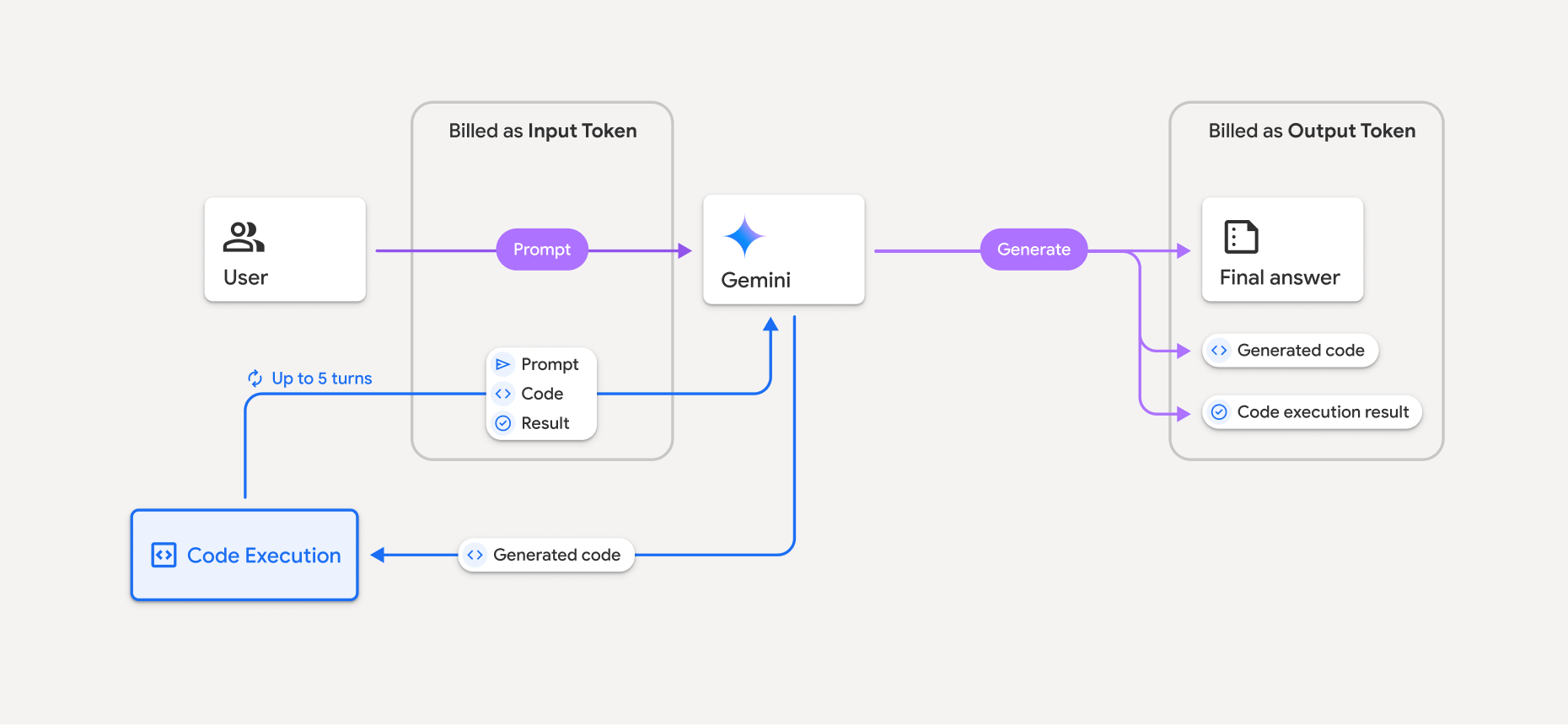
- আপনি যে Gemini মডেল ব্যবহার করছেন তার উপর ভিত্তি করে ইনপুট ও আউটপুট টোকেনের বর্তমান রেট অনুযায়ী আপনাকে বিল করা হয়।
- আপনার উত্তর তৈরি করার সময় Gemini কোড এক্সিকিউশন ব্যবহার করলে, মূল প্রম্পট, জেনারেট করা কোড ও এক্সিকিউট করা কোডের ফলাফলকে ইন্টারমিডিয়েট টোকেন হিসেবে লেবেল করা হয় এবং ইনপুট টোকেন হিসেবে বিল করা হয়।
- Gemini তারপরে একটি সারসংক্ষেপ তৈরি করে এবং তৈরি করা কোড, এক্সিকিউট করা কোডের ফলাফল এবং চূড়ান্ত সারসংক্ষেপ প্রদান করে। এগুলি আউটপুট টোকেন হিসেবে বিল করা হয়।
- Gemini API-এর API উত্তরে একটি মধ্যবর্তী টোকেন সংখ্যা অন্তর্ভুক্ত থাকে, তাই আপনি বুঝতে পারবেন যে কেন আপনার প্রাথমিক প্রম্পটের বাইরে অতিরিক্ত ইনপুট টোকেন পাচ্ছেন।
সীমাবদ্ধতা
- মডেলটি শুধুমাত্র কোড জেনারেট ও এক্সিকিউট করতে পারে। এটি মিডিয়া ফাইলের মতো অন্যান্য আর্টিফ্যাক্ট ফেরাতে পারে না।
- কিছু ক্ষেত্রে, কোড এক্সিকিউশন চালু করলে, মডেল আউটপুটের অন্যান্য অংশে রিগ্রেশন হতে পারে (যেমন, গল্প লেখা)।
- বিভিন্ন মডেলের কোড এক্সিকিউট করার ক্ষমতার মধ্যে কিছু পার্থক্য আছে।
কাজ করে এমন টুলের কম্বিনেশন
আরও জটিল ব্যবহারের ক্ষেত্রে Google Search-এর মাধ্যমে গ্রাউন্ডিং-এর সাথে কোড এক্সিকিউশন টুলকে একত্রিত করা যেতে পারে।
Gemini 3 মডেল, কাস্টম টুল (ফাংশন কলিং)-এর সাথে বিল্ট-ইন টুল (যেমন, কোড এক্সিকিউশন) একত্রিত করে কাজ করতে পারে।
যেসব লাইব্রেরি কাজ করে
কোড এক্সিকিউশন এনভায়রনমেন্টে নিম্নলিখিত লাইব্রেরি অন্তর্ভুক্ত থাকে:
- attrs
- দাবা
- contourpy
- fpdf
- geopandas
- imageio
- jinja2
- joblib
- jsonschema
- jsonschema-specifications
- lxml
- matplotlib
- mpmath
- numpy
- opencv-python
- openpyxl
- প্যাকেজিং
- পান্ডা
- বালিশ
- protobuf
- pylatex
- pyparsing
- PyPDF2
- python-dateutil
- python-docx
- python-pptx
- reportlab
- scikit-learn
- scipy
- seaborn
- ছয়
- striprtf
- sympy
- তালিকাভুক্ত করা
- tensorflow
- toolz
- xlrd
আপনি নিজের লাইব্রেরি ইনস্টল করতে পারবেন না।
এর পরে কী করতে হবে
- Interactions API ক্যুইকস্টার্ট ব্যবহার করে দেখুন।
- অন্যান্য Gemini API টুল সম্পর্কে জানুন: