

В Gemini API есть инструмент для выполнения кода, который позволяет модели генерировать и выполнять код на Python. Затем модель может итеративно учиться на результатах выполнения кода, пока не придет к окончательному выводу. Вы можете использовать выполнение кода для создания приложений, в которых применяется логика на основе кода. Например, с помощью выполнения кода можно решать уравнения или обрабатывать текст. Вы также можете использовать библиотеки, включенные в среду выполнения кода, для выполнения более специализированных задач.
Gemini может выполнять код только на языке Python. Вы по-прежнему можете попросить Gemini сгенерировать код на другом языке, но модель не сможет использовать инструмент выполнения кода, чтобы запустить его.
Как включить выполнение кода
Чтобы включить выполнение кода, настройте инструмент выполнения кода в модели. Это позволяет модели генерировать и запускать код.
Python
from google import genai

client = genai.Client()

interaction = client.interactions.create(
    model="gemini-3.8-flash",
    input="What is the sum of the first 50 prime numbers? "
          "Generate and run code for the calculation, and make sure you get all 50.",
    tools=[{"type": "code_execution"}]
)

for step in interaction.steps:
    if step.type == "model_output":
        for content_block in step.content:
            if content_block.type == "text":
                print(content_block.text)
    elif step.type == "code_execution_call":
        print(step.arguments.code)
    elif step.type == "code_execution_result":
        print(step.result)
JavaScript
import { GoogleGenAI } from "@google/genai";

const client = new GoogleGenAI({});

const interaction = await client.interactions.create({
    model: "gemini-3.8-flash",
    input: "What is the sum of the first 50 prime numbers? " +
           "Generate and run code for the calculation, and make sure you get all 50.",
    tools: [{ type: "code_execution" }]
});

for (const step of interaction.steps) {
    if (step.type === "model_output") {
        for (const contentBlock of step.content) {
            if (contentBlock.type === "text") {
                console.log(contentBlock.text);
            }
        }
    } else if (step.type === "code_execution_call") {
        console.log(step.arguments.code);
    } else if (step.type === "code_execution_result") {
        console.log(step.result);
    }
}
Java
import com.google.genai.Client;
import com.google.genai.gaos.models.interactions.CodeExecution;
import com.google.genai.gaos.models.interactions.CodeExecutionCallStep;
import com.google.genai.gaos.models.interactions.CodeExecutionResultStep;
import com.google.genai.gaos.models.interactions.Content;
import com.google.genai.gaos.models.interactions.CreateModelInteraction;
import com.google.genai.gaos.models.interactions.Interaction;
import com.google.genai.gaos.models.interactions.InteractionsInput;
import com.google.genai.gaos.models.interactions.ModelOutputStep;
import com.google.genai.gaos.models.interactions.Step;
import com.google.genai.gaos.models.interactions.TextContent;
import com.google.genai.gaos.models.operations.CreateInteractionRequestBody;
import java.util.Arrays;
import java.util.Collections;

Client client = new Client();

CreateModelInteraction params =
    CreateModelInteraction.builder()
        .model("gemini-3.8-flash")
        .input(
            InteractionsInput.of(
                "What is the sum of the first 50 prime numbers? "
                    + "Generate and run code for the calculation, and make sure you get all 50."))
        .tools(Arrays.asList(CodeExecution.builder().build()))
        .build();

Interaction interaction =
    client.interactions.create(CreateInteractionRequestBody.of(params)).interaction().get();

for (Step step : interaction.steps().orElse(Collections.emptyList())) {
  if (step instanceof ModelOutputStep) {
    ModelOutputStep outputStep = (ModelOutputStep) step;
    for (Content contentBlock : outputStep.content().orElse(Collections.emptyList())) {
      if (contentBlock instanceof TextContent) {
        System.out.println(((TextContent) contentBlock).text().orElse(""));
      }
    }
  } else if (step instanceof CodeExecutionCallStep) {
    CodeExecutionCallStep callStep = (CodeExecutionCallStep) step;
    callStep.arguments().ifPresent(args -> System.out.println(args.code().orElse("")));
  } else if (step instanceof CodeExecutionResultStep) {
    CodeExecutionResultStep resultStep = (CodeExecutionResultStep) step;
    System.out.println(resultStep.result().orElse(""));
  }
}
Проложить маршрут
package main

import (
    "context"
    "fmt"
    "log"

    "google.golang.org/genai"
    "google.golang.org/genai/interactions/models/interactions"
    "google.golang.org/genai/interactions/models/operations"
)

func main() {
    ctx := context.Background()
    client, err := genai.NewClient(ctx, nil)
    if err != nil {
        log.Fatal(err)
    }

    res, err := client.Interactions.Create(ctx, operations.CreateInteractionRequest{
        Body: operations.NewCreateInteractionRequestBody(interactions.CreateModelInteraction{
            Model: interactions.Model("gemini-3.8-flash"),
            Input: interactions.NewInteractionsInput(
                "What is the sum of the first 50 prime numbers? " +
                    "Generate and run code for the calculation, and make sure you get all 50.",
            ),
            Tools: []interactions.Tool{
                interactions.NewTool(interactions.CodeExecution{}),
            },
        }),
    })
    if err != nil {
        log.Fatal(err)
    }

    for _, step := range res.Interaction.Steps {
        if outStep := step.ModelOutputStep; outStep != nil {
            for _, contentBlock := range outStep.Content {
                if textContent := contentBlock.TextContent; textContent != nil {
                    fmt.Println(textContent.GetText())
                }
            }
        } else if callStep := step.CodeExecutionCallStep; callStep != nil {
            if code := callStep.Arguments.GetCode(); code != nil {
                fmt.Println(*code)
            }
        } else if resultStep := step.CodeExecutionResultStep; resultStep != nil {
            fmt.Println(resultStep.GetResult())
        }
    }
}
REST
curl -X POST "https://generativelanguage.googleapis.com/v1beta/interactions" \
-H "x-goog-api-key: $GEMINI_API_KEY" \
-H 'Content-Type: application/json' \
-d '{
    "model": "gemini-3.8-flash",
    "input": "What is the sum of the first 50 prime numbers? Generate and run code for the calculation, and make sure you get all 50.",
    "tools": [{"type": "code_execution"}]
}'
Выходные данные могут выглядеть примерно так (для удобства чтения они отформатированы):
Okay, I need to calculate the sum of the first 50 prime numbers. Here's how I'll
approach this:

1.  **Generate Prime Numbers:** I'll use an iterative method to find prime
    numbers. I'll start with 2 and check if each subsequent number is divisible
    by any number between 2 and its square root. If not, it's a prime.
2.  **Store Primes:** I'll store the prime numbers in a list until I have 50 of
    them.
3.  **Calculate the Sum:**  Finally, I'll sum the prime numbers in the list.

Here's the Python code to do this:

def is_prime(n):
  """Efficiently checks if a number is prime."""
  if n <= 1:
    return False
  if n <= 3:
    return True
  if n % 2 == 0 or n % 3 == 0:
    return False
  i = 5
  while i * i <= n:
    if n % i == 0 or n % (i + 2) == 0:
      return False
    i += 6
  return True

primes = []
num = 2
while len(primes) < 50:
  if is_prime(num):
    primes.append(num)
  num += 1

sum_of_primes = sum(primes)
print(f'{primes=}')
print(f'{sum_of_primes=}')

primes=[2, 3, 5, 7, 11, 13, 17, 19, 23, 29, 31, 37, 41, 43, 47, 53, 59, 61, 67,
71, 73, 79, 83, 89, 97, 101, 103, 107, 109, 113, 127, 131, 137, 139, 149, 151,
157, 163, 167, 173, 179, 181, 191, 193, 197, 199, 211, 223, 227, 229]
sum_of_primes=5117

The sum of the first 50 prime numbers is 5117.
Этот вывод объединяет несколько частей контента, которые модель возвращает при использовании выполнения кода:
text: встроенный текст, сгенерированный моделью.code_execution_call– код, сгенерированный моделью и предназначенный для выполнения.code_execution_result– результат выполнения исполняемого кода.
Выполнение кода с изображениями (Gemini 3)
Модель Gemini 3 Flash теперь может писать и выполнять код на Python, чтобы активно обрабатывать и анализировать изображения.
Примеры использования
- Увеличение и проверка. Модель автоматически определяет, когда детали слишком малы (например, при чтении показаний удаленного датчика), и пишет код для обрезки и повторного изучения области с более высоким разрешением.
- Визуальные вычисления. Модель может выполнять многоэтапные вычисления с помощью кода (например, суммировать позиции в чеке).
- Аннотирование изображений. Модель может добавлять аннотации к изображениям, чтобы отвечать на вопросы, например рисовать стрелки, чтобы показать связи.
Как включить выполнение кода с изображениями
Выполнение кода с изображениями официально поддерживается в Gemini 3 Flash. Чтобы активировать такое поведение, включите и выполнение кода, и рассуждение.
Python
from google import genai
import requests
import base64
from PIL import Image
import io

image_path = "https://goo.gle/instrument-img"
image_bytes = requests.get(image_path).content

client = genai.Client()

interaction = client.interactions.create(
    model="gemini-3.8-flash",
    input=[
        {"type": "image", "data": base64.b64encode(image_bytes).decode('utf-8'), "mime_type": "image/jpeg"},
        {"type": "text", "text": "Zoom into the expression pedals and tell me how many pedals are there?"}
    ],
    tools=[{"type": "code_execution"}]
)

for step in interaction.steps:
    if step.type == "model_output":
        for content_block in step.content:
            if content_block.type == "text":
                print(content_block.text)
            elif content_block.type == "image":
                img = Image.open(io.BytesIO(base64.b64decode(content_block.data)))
                img.show()  # or: img.save("output_image.jpg")
    elif step.type == "code_execution_call":
        print(step.arguments.code)
    elif step.type == "code_execution_result":
        print(step.result)
JavaScript
import { GoogleGenAI } from "@google/genai";

async function main() {
  const client = new GoogleGenAI({});

  const imageUrl = "https://goo.gle/instrument-img";
  const response = await fetch(imageUrl);
  const imageArrayBuffer = await response.arrayBuffer();
  const base64ImageData = Buffer.from(imageArrayBuffer).toString('base64');

  const interaction = await client.interactions.create({
    model: "gemini-3.8-flash",
    input: [
      {
        type: "image",
        data: base64ImageData,
        mime_type: "image/jpeg"
      },
      { type: "text", text: "Zoom into the expression pedals and tell me how many pedals are there?" }
    ],
    tools: [{ type: "code_execution" }]
  });

  for (const step of interaction.steps) {
    if (step.type === "model_output") {
      for (const contentBlock of step.content) {
        if (contentBlock.type === "text") {
          console.log("Text:", contentBlock.text);
        }
      }
    } else if (step.type === "code_execution_call") {
      console.log(`\nGenerated Code:\n`, step.arguments.code);
    } else if (step.type === "code_execution_result") {
      console.log(`\nExecution Output:\n`, step.result);
    }
  }
}

main();
Java
import com.google.genai.Client;
import com.google.genai.gaos.models.interactions.CodeExecution;
import com.google.genai.gaos.models.interactions.CodeExecutionCallStep;
import com.google.genai.gaos.models.interactions.CodeExecutionResultStep;
import com.google.genai.gaos.models.interactions.Content;
import com.google.genai.gaos.models.interactions.CreateModelInteraction;
import com.google.genai.gaos.models.interactions.ImageContent;
import com.google.genai.gaos.models.interactions.ImageContentMimeType;
import com.google.genai.gaos.models.interactions.Interaction;
import com.google.genai.gaos.models.interactions.InteractionsInput;
import com.google.genai.gaos.models.interactions.ModelOutputStep;
import com.google.genai.gaos.models.interactions.Step;
import com.google.genai.gaos.models.interactions.TextContent;
import com.google.genai.gaos.models.operations.CreateInteractionRequestBody;
import java.io.InputStream;
import java.net.URI;
import java.nio.file.Files;
import java.nio.file.Paths;
import java.util.Arrays;
import java.util.Base64;
import java.util.Collections;

String imageUrl = "https://goo.gle/instrument-img";
byte[] imageBytes;
try (InputStream in = URI.create(imageUrl).toURL().openStream()) {
  imageBytes = in.readAllBytes();
}
String base64Image = Base64.getEncoder().encodeToString(imageBytes);

Client client = new Client();

CreateModelInteraction params =
    CreateModelInteraction.builder()
        .model("gemini-3.8-flash")
        .input(
            InteractionsInput.ofContent(
                Arrays.asList(
                    ImageContent.builder()
                        .data(base64Image)
                        .mimeType(ImageContentMimeType.IMAGE_JPEG)
                        .build(),
                    TextContent.builder()
                        .text(
                            "Zoom into the expression pedals and tell me how many pedals are there?")
                        .build())))
        .tools(Arrays.asList(CodeExecution.builder().build()))
        .build();

Interaction interaction =
    client.interactions.create(CreateInteractionRequestBody.of(params)).interaction().get();

for (Step step : interaction.steps().orElse(Collections.emptyList())) {
  if (step instanceof ModelOutputStep) {
    ModelOutputStep outputStep = (ModelOutputStep) step;
    for (Content contentBlock : outputStep.content().orElse(Collections.emptyList())) {
      if (contentBlock instanceof TextContent) {
        System.out.println(((TextContent) contentBlock).text().orElse(""));
      } else if (contentBlock instanceof ImageContent) {
        ImageContent imgContent = (ImageContent) contentBlock;
        if (imgContent.data().isPresent()) {
          byte[] decoded = Base64.getDecoder().decode(imgContent.data().get());
          Files.write(Paths.get("output_image.jpg"), decoded);
        }
      }
    }
  } else if (step instanceof CodeExecutionCallStep) {
    CodeExecutionCallStep callStep = (CodeExecutionCallStep) step;
    callStep.arguments().ifPresent(args -> System.out.println(args.code().orElse("")));
  } else if (step instanceof CodeExecutionResultStep) {
    CodeExecutionResultStep resultStep = (CodeExecutionResultStep) step;
    System.out.println(resultStep.result().orElse(""));
  }
}
Проложить маршрут
package main

import (
    "context"
    "encoding/base64"
    "fmt"
    "io"
    "log"
    "net/http"
    "os"

    "google.golang.org/genai"
    "google.golang.org/genai/interactions/models/interactions"
    "google.golang.org/genai/interactions/models/operations"
)

func main() {
    ctx := context.Background()
    client, err := genai.NewClient(ctx, nil)
    if err != nil {
        log.Fatal(err)
    }

    imageURL := "https://goo.gle/instrument-img"
    httpResp, err := http.Get(imageURL)
    if err != nil {
        log.Fatal(err)
    }
    defer httpResp.Body.Close()
    imageBytes, err := io.ReadAll(httpResp.Body)
    if err != nil {
        log.Fatal(err)
    }
    base64Image := base64.StdEncoding.EncodeToString(imageBytes)

    res, err := client.Interactions.Create(ctx, operations.CreateInteractionRequest{
        Body: operations.NewCreateInteractionRequestBody(interactions.CreateModelInteraction{
            Model: interactions.Model("gemini-3.8-flash"),
            Input: interactions.NewInteractionsInput([]interactions.Content{
                interactions.NewContent(interactions.ImageContent{
                    Data:     genai.Ptr(base64Image),
                    MimeType: interactions.ImageContentMimeType("image/jpeg").ToPointer(),
                }),
                interactions.NewContent(interactions.TextContent{
                    Text: "Zoom into the expression pedals and tell me how many pedals are there?",
                }),
            }),
            Tools: []interactions.Tool{
                interactions.NewTool(interactions.CodeExecution{}),
            },
        }),
    })
    if err != nil {
        log.Fatal(err)
    }

    for _, step := range res.Interaction.Steps {
        if outStep := step.ModelOutputStep; outStep != nil {
            for _, contentBlock := range outStep.Content {
                if textContent := contentBlock.TextContent; textContent != nil {
                    fmt.Println(textContent.GetText())
                } else if imgContent := contentBlock.ImageContent; imgContent != nil && imgContent.Data != nil {
                    decoded, err := base64.StdEncoding.DecodeString(*imgContent.Data)
                    if err == nil {
                        _ = os.WriteFile("output_image.jpg", decoded, 0644)
                    }
                }
            }
        } else if callStep := step.CodeExecutionCallStep; callStep != nil {
            if code := callStep.Arguments.GetCode(); code != nil {
                fmt.Println(*code)
            }
        } else if resultStep := step.CodeExecutionResultStep; resultStep != nil {
            fmt.Println(resultStep.GetResult())
        }
    }
}
REST
IMG_URL="https://goo.gle/instrument-img"
MODEL="gemini-3.8-flash"

MIME_TYPE=$(curl -sIL "$IMG_URL" | grep -i '^content-type:' | awk -F ': ' '{print $2}' | sed 's/\r$//' | head -n 1)
if [[ -z "$MIME_TYPE" || ! "$MIME_TYPE" == image/* ]]; then
  MIME_TYPE="image/jpeg"
fi

if [[ "$(uname)" == "Darwin" ]]; then
  IMAGE_B64=$(curl -sL "$IMG_URL" | base64 -b 0)
elif [[ "$(base64 --version 2>&1)" = *"FreeBSD"* ]]; then
  IMAGE_B64=$(curl -sL "$IMG_URL" | base64)
else
  IMAGE_B64=$(curl -sL "$IMG_URL" | base64 -w0)
fi

# Use jq to create the JSON payload to avoid "Argument list too long" error with large base64 strings
echo -n "$IMAGE_B64" > image_b64.txt
jq -n \
  --rawfile b64 image_b64.txt \
  --arg mime "$MIME_TYPE" \
  '{
    model: "gemini-3.8-flash",
    input: [
      {type: "image", data: $b64, mime_type: $mime},
      {type: "text", text: "Zoom into the expression pedals and tell me how many pedals are there?"}
    ],
    tools: [{type: "code_execution"}]
  }' > payload.json

curl -X POST "https://generativelanguage.googleapis.com/v1beta/interactions" \
    -H "x-goog-api-key: $GEMINI_API_KEY" \
    -H 'Content-Type: application/json' \
    -d @payload.json
Как использовать выполнение кода в пошаговых взаимодействиях
Вы также можете использовать выполнение кода в многоходовом диалоге с помощью previous_interaction_id.
Python
from google import genai

client = genai.Client()

interaction1 = client.interactions.create(
    model="gemini-3.8-flash",
    input="I have a math question for you.",
    tools=[{"type": "code_execution"}]
)
print(interaction1.output_text)

interaction2 = client.interactions.create(
    model="gemini-3.8-flash",
    previous_interaction_id=interaction1.id,
    input="What is the sum of the first 50 prime numbers? "
          "Generate and run code for the calculation, and make sure you get all 50.",
    tools=[{"type": "code_execution"}]
)

for step in interaction2.steps:
    if step.type == "model_output":
        for content_block in step.content:
            if content_block.type == "text":
                print(content_block.text)
    elif step.type == "code_execution_call":
        print(step.arguments.code)
    elif step.type == "code_execution_result":
        print(step.result)
JavaScript
import { GoogleGenAI } from "@google/genai";

const client = new GoogleGenAI({});

const interaction1 = await client.interactions.create({
    model: "gemini-3.8-flash",
    input: "I have a math question for you.",
    tools: [{ type: "code_execution" }]
});
console.log(interaction1.output_text);

const interaction2 = await client.interactions.create({
    model: "gemini-3.8-flash",
    previous_interaction_id: interaction1.id,
    input: "What is the sum of the first 50 prime numbers? " +
           "Generate and run code for the calculation, and make sure you get all 50.",
    tools: [{ type: "code_execution" }]
});

for (const step of interaction2.steps) {
    if (step.type === "model_output") {
        for (const contentBlock of step.content) {
            if (contentBlock.type === "text") {
                console.log(contentBlock.text);
            }
        }
    } else if (step.type === "code_execution_call") {
        console.log(step.arguments.code);
    } else if (step.type === "code_execution_result") {
        console.log(step.result);
    }
}
Java
import com.google.genai.Client;
import com.google.genai.gaos.models.interactions.CodeExecution;
import com.google.genai.gaos.models.interactions.CodeExecutionCallStep;
import com.google.genai.gaos.models.interactions.CodeExecutionResultStep;
import com.google.genai.gaos.models.interactions.Content;
import com.google.genai.gaos.models.interactions.CreateModelInteraction;
import com.google.genai.gaos.models.interactions.Interaction;
import com.google.genai.gaos.models.interactions.InteractionsInput;
import com.google.genai.gaos.models.interactions.ModelOutputStep;
import com.google.genai.gaos.models.interactions.Step;
import com.google.genai.gaos.models.interactions.TextContent;
import com.google.genai.gaos.models.operations.CreateInteractionRequestBody;
import java.util.Arrays;
import java.util.Collections;

Client client = new Client();

CreateModelInteraction params1 =
    CreateModelInteraction.builder()
        .model("gemini-3.8-flash")
        .input(InteractionsInput.of("I have a math question for you."))
        .tools(Arrays.asList(CodeExecution.builder().build()))
        .build();

Interaction interaction1 =
    client.interactions.create(CreateInteractionRequestBody.of(params1)).interaction().get();
System.out.println(interaction1.outputText().orElse(""));

CreateModelInteraction params2 =
    CreateModelInteraction.builder()
        .model("gemini-3.8-flash")
        .previousInteractionId(interaction1.id().get())
        .input(
            InteractionsInput.of(
                "What is the sum of the first 50 prime numbers? "
                    + "Generate and run code for the calculation, and make sure you get all 50."))
        .tools(Arrays.asList(CodeExecution.builder().build()))
        .build();

Interaction interaction2 =
    client.interactions.create(CreateInteractionRequestBody.of(params2)).interaction().get();

for (Step step : interaction2.steps().orElse(Collections.emptyList())) {
  if (step instanceof ModelOutputStep) {
    ModelOutputStep outputStep = (ModelOutputStep) step;
    for (Content contentBlock : outputStep.content().orElse(Collections.emptyList())) {
      if (contentBlock instanceof TextContent) {
        System.out.println(((TextContent) contentBlock).text().orElse(""));
      }
    }
  } else if (step instanceof CodeExecutionCallStep) {
    CodeExecutionCallStep callStep = (CodeExecutionCallStep) step;
    callStep.arguments().ifPresent(args -> System.out.println(args.code().orElse("")));
  } else if (step instanceof CodeExecutionResultStep) {
    CodeExecutionResultStep resultStep = (CodeExecutionResultStep) step;
    System.out.println(resultStep.result().orElse(""));
  }
}
Проложить маршрут
package main

import (
    "context"
    "fmt"
    "log"

    "google.golang.org/genai"
    "google.golang.org/genai/interactions/models/interactions"
    "google.golang.org/genai/interactions/models/operations"
)

func main() {
    ctx := context.Background()
    client, err := genai.NewClient(ctx, nil)
    if err != nil {
        log.Fatal(err)
    }

    res1, err := client.Interactions.Create(ctx, operations.CreateInteractionRequest{
        Body: operations.NewCreateInteractionRequestBody(interactions.CreateModelInteraction{
            Model: interactions.Model("gemini-3.8-flash"),
            Input: interactions.NewInteractionsInput("I have a math question for you."),
            Tools: []interactions.Tool{
                interactions.NewTool(interactions.CodeExecution{}),
            },
        }),
    })
    if err != nil {
        log.Fatal(err)
    }
    if res1.Interaction.OutputText != nil {
        fmt.Println(*res1.Interaction.OutputText)
    }

    res2, err := client.Interactions.Create(ctx, operations.CreateInteractionRequest{
        Body: operations.NewCreateInteractionRequestBody(interactions.CreateModelInteraction{
            Model:                 interactions.Model("gemini-3.8-flash"),
            PreviousInteractionID: res1.Interaction.ID,
            Input: interactions.NewInteractionsInput(
                "What is the sum of the first 50 prime numbers? " +
                    "Generate and run code for the calculation, and make sure you get all 50.",
            ),
            Tools: []interactions.Tool{
                interactions.NewTool(interactions.CodeExecution{}),
            },
        }),
    })
    if err != nil {
        log.Fatal(err)
    }

    for _, step := range res2.Interaction.Steps {
        if outStep := step.ModelOutputStep; outStep != nil {
            for _, contentBlock := range outStep.Content {
                if textContent := contentBlock.TextContent; textContent != nil {
                    fmt.Println(textContent.GetText())
                }
            }
        } else if callStep := step.CodeExecutionCallStep; callStep != nil {
            if code := callStep.Arguments.GetCode(); code != nil {
                fmt.Println(*code)
            }
        } else if resultStep := step.CodeExecutionResultStep; resultStep != nil {
            fmt.Println(resultStep.GetResult())
        }
    }
}
REST
# First turn
RESPONSE1=$(curl -s -X POST "https://generativelanguage.googleapis.com/v1beta/interactions" \
-H "x-goog-api-key: $GEMINI_API_KEY" \
-H 'Content-Type: application/json' \
-d '{
    "model": "gemini-3.8-flash",
    "input": "I have a math question for you.",
    "tools": [{"type": "code_execution"}]
}')

INTERACTION_ID=$(echo $RESPONSE1 | jq -r '.id')

# Second turn with previous_interaction_id
curl -X POST "https://generativelanguage.googleapis.com/v1beta/interactions" \
-H "x-goog-api-key: $GEMINI_API_KEY" \
-H 'Content-Type: application/json' \
-d '{
    "model": "gemini-3.8-flash",
    "previous_interaction_id": "'"$INTERACTION_ID"'",
    "input": "What is the sum of the first 50 prime numbers? Generate and run code for the calculation, and make sure you get all 50.",
    "tools": [{"type": "code_execution"}]
}'
Ввод-вывод (I/O)
В текущих моделях Gemini, таких как Gemini 3.8 Flash, выполнение кода поддерживает входные файлы и выходные графики. Используя эти возможности ввода и вывода, вы можете загружать CSV- и текстовые файлы, задавать вопросы о них и получать в ответ графики Matplotlib. Выходные файлы возвращаются в виде встроенных изображений в ответе.
Цены на ввод-вывод
При использовании ввода-вывода для выполнения кода с вас взимается плата за входные и выходные токены:
Входные токены:
- Запрос пользователя
Выходные токены:
- Код, сгенерированный моделью
- Выходные данные выполнения кода в среде кода
- Токены мышления
- Сводка, созданная моделью
Сведения о Google I/O
При работе с вводом-выводом для выполнения кода учитывайте следующие технические детали:
- Максимальное время выполнения кода – 30 секунд.
- Если в среде выполнения кода возникает ошибка, модель может решить сгенерировать код заново. Это можно сделать до пяти раз.
- Максимальный размер входного файла ограничен окном токенов модели. Если вы загрузите файл, размер которого превышает максимальный размер контекстного окна модели, API вернет ошибку.
- Выполнение кода лучше всего работает с текстовыми файлами и файлами CSV.
- Входной файл можно передать как встроенные данные или загрузить с помощью Files API. Выходной файл всегда возвращается как встроенные данные.
Оплата
За включение выполнения кода в Gemini API дополнительная плата не взимается. Плата будет взиматься по текущей цене за входные и выходные токены в зависимости от используемой модели Gemini.
Вот ещё несколько фактов о выставлении счетов за выполнение кода:
- Плата взимается только один раз за входные токены, переданные модели, и за выходные токены, возвращенные моделью.
- Токены, представляющие сгенерированный код, считаются токенами вывода. Сгенерированный код может включать текст и мультимодальные выходные данные, например изображения.
- Результаты выполнения кода также считаются выходными токенами.
Модель оплаты показана на следующей схеме:
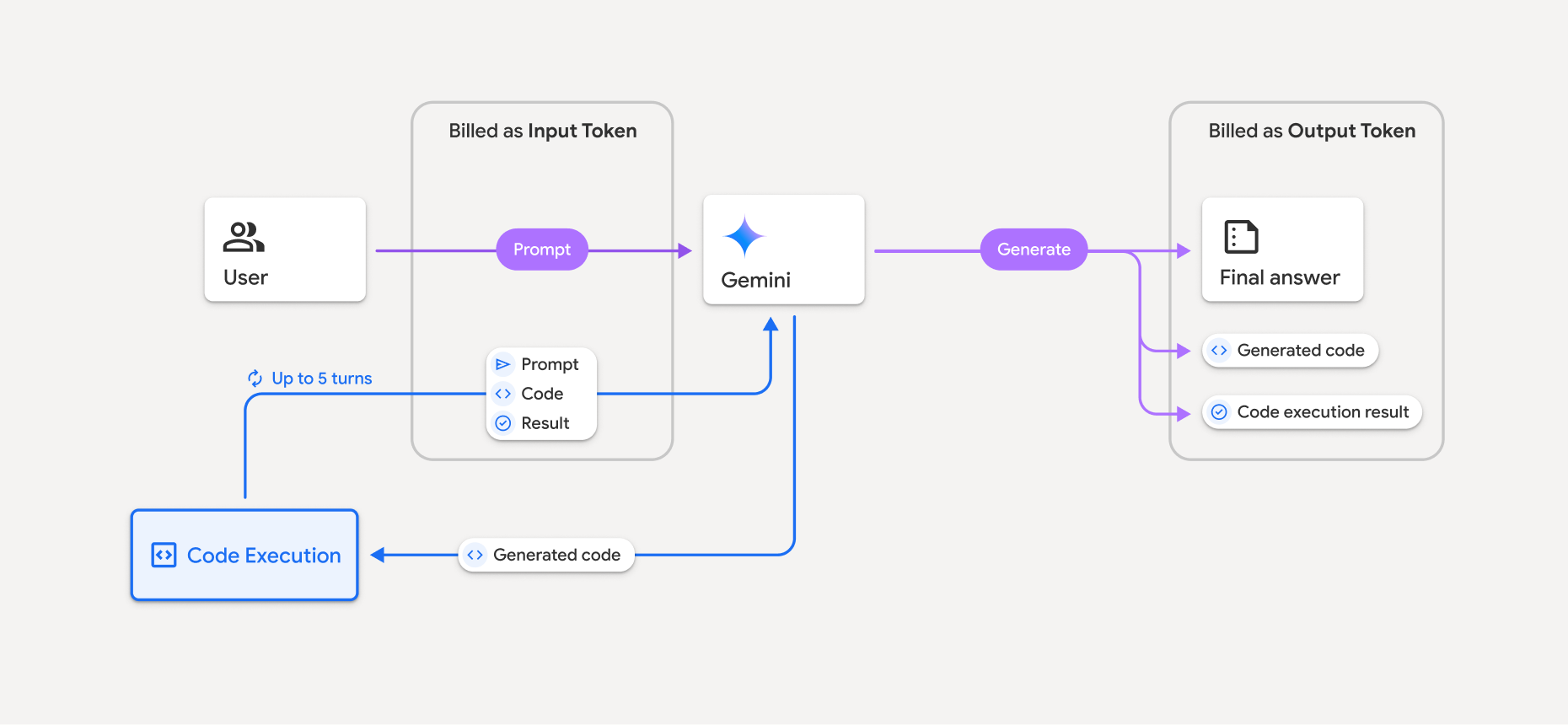
- С вас будет списана плата по текущей ставке за входные и выходные токены в зависимости от используемой модели Gemini.
- Если при создании ответа Gemini выполняет код, исходный запрос, сгенерированный код и результат выполнения кода помечаются как промежуточные токены и оплачиваются как входные токены.
- Затем Gemini генерирует сводку и возвращает сгенерированный код, результат его выполнения и итоговую сводку. Они оплачиваются как выходные токены.
- Gemini API включает количество промежуточных токенов в ответ API, чтобы вы знали, почему получаете дополнительные входные токены помимо исходного запроса.
Ограничения
- Модель может только генерировать и выполнять код. Другие объекты, например медиафайлы, не возвращаются.
- В некоторых случаях включение выполнения кода может привести к регрессии в других областях выходных данных модели (например, при написании рассказа).
- Способность успешно выполнять код у разных моделей может различаться.
Поддерживаемые комбинации инструментов
Инструмент выполнения кода можно комбинировать с обоснованием с Google Поиском, чтобы решать более сложные задачи.
Модели Gemini 4 и Gemini 3 поддерживают комбинирование встроенных инструментов (например, выполнение кода) с пользовательскими (вызов функций).
Поддерживаемые библиотеки
Среда выполнения кода включает следующие библиотеки:
- attrs
- шахматы
- contourpy
- fpdf
- geopandas
- imageio
- Jinja2
- joblib
- jsonschema
- jsonschema-specifications
- lxml
- matplotlib
- mpmath
- numpy
- opencv-python
- openpyxl
- упаковка
- панды
- подушка
- protobuf
- pylatex
- pyparsing
- PyPDF2
- python-dateutil
- python-docx
- python-pptx
- reportlab
- scikit-learn
- scipy
- seaborn
- шесть
- striprtf
- sympy
- табулировать
- tensorflow
- toolz
- xlrd
Вы не можете устанавливать собственные библиотеки.
Дальнейшие действия
- Попробуйте краткое руководство по Interactions API.
- Узнайте о других инструментах Gemini API: