

Gemini API позволяет использовать генерацию с дополненной выборкой (RAG) с помощью инструмента File Search. Поиск файлов импортирует, разбивает на фрагменты и индексирует ваши данные, чтобы вы могли быстро находить нужную информацию по запросу. Полученная информация используется в качестве контекста для модели, что позволяет ей предоставлять более точные и релевантные ответы. Поиск файлов также поддерживает мультимодальные возможности с текстовыми эмбеддингами, поддерживаемыми gemini-embedding-001, и графическими/мультимодальными эмбеддингами, поддерживаемыми gemini-embedding-2.
Хранение файлов и создание встраиваний во время запроса бесплатны. Вы платите только за создание встраиваний при первой индексации файлов и за токены ввода и вывода обычной модели Gemini. Новая модель оплаты упрощает и удешевляет создание и масштабирование инструмента поиска файлов. Подробную информацию вы найдете в разделе Цены.
Загрузка напрямую в хранилище поиска файлов
В примере ниже показано, как загрузить файл напрямую в хранилище поиска по файлам.
Python
from google import genai
from google.genai import types
import time

client = genai.Client()

file_search_store = client.file_search_stores.create(
    config={
        'display_name': 'your-fileSearchStore-name',
        'embedding_model': 'models/gemini-embedding-2'
    }
)

operation = client.file_search_stores.upload_to_file_search_store(
  file='sample.txt',
  file_search_store_name=file_search_store.name,
  config={
      'display_name' : 'display-file-name',
  }
)

while not operation.done:
    time.sleep(5)
    operation = client.operations.get(operation)

interaction = client.interactions.create(
    model="gemini-3.8-flash",
    input="Can you tell me about [insert question]",
    tools=[{
        "type": "file_search",
        "file_search_store_names": [file_search_store.name]
    }]
)

for step in interaction.steps:
    if step.type == "model_output":
        for content_block in step.content:
            if content_block.type == "text":
                print(content_block.text)
                if content_block.annotations:
                    print("\nSources:")
                    for annotation in content_block.annotations:
                        if annotation.type == "file_citation":
                            print(f"  - {annotation.file_name}: {annotation.source}")
JavaScript
import { GoogleGenAI } from '@google/genai';

const ai = new GoogleGenAI({});

async function run() {
  const fileSearchStore = await ai.fileSearchStores.create({
    config: {
      displayName: 'your-fileSearchStore-name',
      embeddingModel: 'models/gemini-embedding-2'
    }
  });

  let operation = await ai.fileSearchStores.uploadToFileSearchStore({
    file: 'file.txt',
    fileSearchStoreName: fileSearchStore.name,
    config: {
      displayName: 'file-name',
    }
  });

  while (!operation.done) {
    await new Promise(resolve => setTimeout(resolve, 5000));
    operation = await ai.operations.get({ operation });
  }

  const interaction = await ai.interactions.create({
    model: "gemini-3.8-flash",
    input: "Can you tell me about [insert question]",
    tools: [{
      type: "file_search",
      file_search_store_names: [fileSearchStore.name]
    }]
  });

  for (const step of interaction.steps) {
    if (step.type === 'model_output') {
      for (const contentBlock of step.content) {
        if (contentBlock.type === 'text') {
          console.log(contentBlock.text);
          if (contentBlock.annotations) {
            console.log("\nSources:");
            for (const annotation of contentBlock.annotations) {
              if (annotation.type === 'file_citation') {
                console.log(`  - ${annotation.file_name}: ${annotation.source}`);
              }
            }
          }
        }
      }
    }
  }
}

run();
Java
import com.google.genai.Client;
import com.google.genai.gaos.models.interactions.Annotation;
import com.google.genai.gaos.models.interactions.Content;
import com.google.genai.gaos.models.interactions.CreateModelInteraction;
import com.google.genai.gaos.models.interactions.FileCitation;
import com.google.genai.gaos.models.interactions.FileSearch;
import com.google.genai.gaos.models.interactions.Interaction;
import com.google.genai.gaos.models.interactions.InteractionsInput;
import com.google.genai.gaos.models.interactions.Model;
import com.google.genai.gaos.models.interactions.ModelOutputStep;
import com.google.genai.gaos.models.interactions.Step;
import com.google.genai.gaos.models.interactions.TextContent;
import com.google.genai.gaos.models.operations.CreateInteractionRequestBody;
import com.google.genai.types.CreateFileSearchStoreConfig;
import com.google.genai.types.FileSearchStore;
import com.google.genai.types.UploadToFileSearchStoreConfig;
import com.google.genai.types.UploadToFileSearchStoreOperation;
import java.util.Arrays;

Client client = new Client();

FileSearchStore fileSearchStore =
    client.fileSearchStores.create(
        CreateFileSearchStoreConfig.builder()
            .displayName("your-fileSearchStore-name")
            .embeddingModel("models/gemini-embedding-2")
            .build());

UploadToFileSearchStoreOperation operation =
    client.fileSearchStores.uploadToFileSearchStore(
        fileSearchStore.name().get(),
        "sample.txt",
        UploadToFileSearchStoreConfig.builder().displayName("display-file-name").build());

while (!operation.done().orElse(false)) {
  Thread.sleep(5000);
  operation = client.operations.get(operation, null);
}

CreateModelInteraction params =
    CreateModelInteraction.builder()
        .model(Model.of("gemini-3.8-flash"))
        .input(InteractionsInput.of("Can you tell me about [insert question]"))
        .tools(
            Arrays.asList(
                FileSearch.builder()
                    .fileSearchStoreNames(Arrays.asList(fileSearchStore.name().get()))
                    .build()))
        .build();

Interaction interaction =
    client.interactions.create(CreateInteractionRequestBody.of(params)).interaction().get();

if (interaction.steps().isPresent()) {
  for (Step step : interaction.steps().get()) {
    if (step instanceof ModelOutputStep) {
      ModelOutputStep outputStep = (ModelOutputStep) step;
      if (outputStep.content().isPresent()) {
        for (Content contentBlock : outputStep.content().get()) {
          if (contentBlock instanceof TextContent) {
            TextContent textContent = (TextContent) contentBlock;
            System.out.println(textContent.text().orElse(""));
            if (textContent.annotations().isPresent()
                && !textContent.annotations().get().isEmpty()) {
              System.out.println("\nSources:");
              for (Annotation annotation : textContent.annotations().get()) {
                if (annotation instanceof FileCitation) {
                  FileCitation citation = (FileCitation) annotation;
                  System.out.printf(
                      "  - %s: %s%n",
                      citation.fileName().orElse(""), citation.source().orElse(""));
                }
              }
            }
          }
        }
      }
    }
  }
}
Проложить маршрут
package main

import (
    "context"
    "fmt"
    "log"
    "time"

    "google.golang.org/genai"
    "google.golang.org/genai/interactions/models/interactions"
    "google.golang.org/genai/interactions/models/operations"
)

func main() {
    ctx := context.Background()
    client, err := genai.NewClient(ctx, nil)
    if err != nil {
        log.Fatal(err)
    }

    fileSearchStore, err := client.FileSearchStores.Create(ctx, &genai.CreateFileSearchStoreConfig{
        DisplayName:    "your-fileSearchStore-name",
        EmbeddingModel: "models/gemini-embedding-2",
    })
    if err != nil {
        log.Fatal(err)
    }

    operation, err := client.FileSearchStores.UploadToFileSearchStoreFromPath(
        ctx,
        "sample.txt",
        fileSearchStore.Name,
        &genai.UploadToFileSearchStoreConfig{
            DisplayName: "display-file-name",
        },
    )
    if err != nil {
        log.Fatal(err)
    }

    for !operation.Done {
        time.Sleep(5 * time.Second)
        operation, err = client.Operations.GetUploadToFileSearchStoreOperation(ctx, operation, nil)
        if err != nil {
            log.Fatal(err)
        }
    }

    resp, err := client.Interactions.Create(ctx, operations.CreateInteractionRequest{
        Body: operations.NewCreateInteractionRequestBody(
            interactions.CreateModelInteraction{
                Model: interactions.Model("gemini-3.8-flash"),
                Input: interactions.NewInteractionsInput("Can you tell me about [insert question]"),
                Tools: []interactions.Tool{
                    interactions.NewTool(interactions.FileSearch{
                        FileSearchStoreNames: []string{fileSearchStore.Name},
                    }),
                },
            },
        ),
    })
    if err != nil {
        log.Fatal(err)
    }

    for _, step := range resp.Interaction.Steps {
        if step.ModelOutputStep != nil {
            for _, content := range step.ModelOutputStep.Content {
                if content.TextContent != nil {
                    fmt.Println(content.TextContent.Text)
                    if len(content.TextContent.Annotations) > 0 {
                        fmt.Println("\nSources:")
                        for _, annotation := range content.TextContent.Annotations {
                            if annotation.FileCitation != nil {
                                c := annotation.FileCitation
                                fileName := ""
                                if c.FileName != nil {
                                    fileName = *c.FileName
                                }
                                source := ""
                                if c.Source != nil {
                                    source = *c.Source
                                }
                                fmt.Printf("  - %s: %s\n", fileName, source)
                            }
                        }
                    }
                }
            }
        }
    }
}
REST
# 1. Create a File Search store
curl -X POST "https://generativelanguage.googleapis.com/v1beta/fileSearchStores?key=$GEMINI_API_KEY" \
    -H "Content-Type: application/json" \
    -d '{
      "displayName": "your-file-search-store-name",
      "embeddingModel": "models/gemini-embedding-2"
    }' > store_res.json

FILE_SEARCH_STORE_NAME=$(jq -r ".name" store_res.json)

# 2. Upload directly to File Search store using resumable upload
NUM_BYTES=$(wc -c < "sample.txt")
curl "https://generativelanguage.googleapis.com/upload/v1beta/fileSearchStores/$FILE_SEARCH_STORE_NAME:uploadToFileSearchStore?key=$GEMINI_API_KEY" \
    -D upload-header.tmp \
    -H "X-Goog-Upload-Protocol: resumable" \
    -H "X-Goog-Upload-Command: start" \
    -H "X-Goog-Upload-Header-Content-Length: $NUM_BYTES" \
    -H "X-Goog-Upload-Header-Content-Type: text/plain" \
    -H "Content-Type: application/json" \
    -d '{"displayName": "sample.txt"}' 2> /dev/null

upload_url=$(grep -i "x-goog-upload-url: " upload-header.tmp | cut -d" " -f2 | tr -d "\r")
rm upload-header.tmp

curl "${upload_url}" \
    -H "Content-Length: $NUM_BYTES" \
    -H "X-Goog-Upload-Offset: 0" \
    -H "X-Goog-Upload-Command: upload, finalize" \
    --data-binary "@sample.txt" 2> /dev/null > upload_response.json

cat upload_response.json

# 3. Query using the File Search store
curl -X POST "https://generativelanguage.googleapis.com/v1beta/interactions" \
    -H "x-goog-api-key: $GEMINI_API_KEY" \
    -H "Content-Type: application/json" \
    -d '{
      "model": "gemini-3.8-flash",
      "input": "Can you tell me about [insert question]",
      "tools": [{
        "type": "file_search",
        "file_search_store_names": ["'"$FILE_SEARCH_STORE_NAME"'"]
      }]
    }'
Дополнительную информацию можно найти в документации по API для uploadToFileSearchStore.
Импорт файлов
Вы также можете загрузить существующий файл и импортировать его в хранилище поиска по файлам.
Python
from google import genai
from google.genai import types
import time

client = genai.Client()

sample_file = client.files.upload(file='sample.txt', config={'display_name': 'display_file_name'})

file_search_store = client.file_search_stores.create(
    config={
        'display_name': 'your-fileSearchStore-name',
        'embedding_model': 'models/gemini-embedding-2'
    }
)

operation = client.file_search_stores.import_file(
    file_search_store_name=file_search_store.name,
    file_name=sample_file.name
)

while not operation.done:
    time.sleep(5)
    operation = client.operations.get(operation)

interaction = client.interactions.create(
    model="gemini-3.8-flash",
    input="Can you tell me about [insert question]",
    tools=[{
        "type": "file_search",
        "file_search_store_names": [file_search_store.name]
    }]
)

for step in interaction.steps:
    if step.type == "model_output":
        for content_block in step.content:
            if content_block.type == "text":
                print(content_block.text)
JavaScript
import { GoogleGenAI } from '@google/genai';

const ai = new GoogleGenAI({});

async function run() {
  const sampleFile = await ai.files.upload({
    file: 'sample.txt',
    config: { displayName: 'file-name' }
  });

  const fileSearchStore = await ai.fileSearchStores.create({
    config: {
      displayName: 'your-fileSearchStore-name',
      embeddingModel: 'models/gemini-embedding-2'
    }
  });

  let operation = await ai.fileSearchStores.importFile({
    fileSearchStoreName: fileSearchStore.name,
    fileName: sampleFile.name
  });

  while (!operation.done) {
    await new Promise(resolve => setTimeout(resolve, 5000));
    operation = await ai.operations.get({ operation: operation });
  }

  const interaction = await ai.interactions.create({
    model: "gemini-3.8-flash",
    input: "Can you tell me about [insert question]",
    tools: [{
      type: "file_search",
      file_search_store_names: [fileSearchStore.name]
    }]
  });

  for (const step of interaction.steps) {
    if (step.type === 'model_output') {
      for (const contentBlock of step.content) {
        if (contentBlock.type === 'text') {
          console.log(contentBlock.text);
        }
      }
    }
  }
}

run();
Java
import com.google.genai.Client;
import com.google.genai.gaos.models.interactions.Content;
import com.google.genai.gaos.models.interactions.CreateModelInteraction;
import com.google.genai.gaos.models.interactions.FileSearch;
import com.google.genai.gaos.models.interactions.Interaction;
import com.google.genai.gaos.models.interactions.InteractionsInput;
import com.google.genai.gaos.models.interactions.Model;
import com.google.genai.gaos.models.interactions.ModelOutputStep;
import com.google.genai.gaos.models.interactions.Step;
import com.google.genai.gaos.models.interactions.TextContent;
import com.google.genai.gaos.models.operations.CreateInteractionRequestBody;
import com.google.genai.types.CreateFileSearchStoreConfig;
import com.google.genai.types.File;
import com.google.genai.types.FileSearchStore;
import com.google.genai.types.ImportFileOperation;
import com.google.genai.types.UploadFileConfig;
import java.util.Arrays;

Client client = new Client();

File sampleFile =
    client.files.upload(
        "sample.txt", UploadFileConfig.builder().displayName("display_file_name").build());

FileSearchStore fileSearchStore =
    client.fileSearchStores.create(
        CreateFileSearchStoreConfig.builder()
            .displayName("your-fileSearchStore-name")
            .embeddingModel("models/gemini-embedding-2")
            .build());

ImportFileOperation operation =
    client.fileSearchStores.importFile(
        fileSearchStore.name().get(), sampleFile.name().get(), null);

while (!operation.done().orElse(false)) {
  Thread.sleep(5000);
  operation = client.operations.get(operation, null);
}

CreateModelInteraction params =
    CreateModelInteraction.builder()
        .model(Model.of("gemini-3.8-flash"))
        .input(InteractionsInput.of("Can you tell me about [insert question]"))
        .tools(
            Arrays.asList(
                FileSearch.builder()
                    .fileSearchStoreNames(Arrays.asList(fileSearchStore.name().get()))
                    .build()))
        .build();

Interaction interaction =
    client.interactions.create(CreateInteractionRequestBody.of(params)).interaction().get();

if (interaction.steps().isPresent()) {
  for (Step step : interaction.steps().get()) {
    if (step instanceof ModelOutputStep) {
      ModelOutputStep outputStep = (ModelOutputStep) step;
      if (outputStep.content().isPresent()) {
        for (Content contentBlock : outputStep.content().get()) {
          if (contentBlock instanceof TextContent) {
            TextContent textContent = (TextContent) contentBlock;
            System.out.println(textContent.text().orElse(""));
          }
        }
      }
    }
  }
}
Проложить маршрут
package main

import (
    "context"
    "fmt"
    "log"
    "time"

    "google.golang.org/genai"
    "google.golang.org/genai/interactions/models/interactions"
    "google.golang.org/genai/interactions/models/operations"
)

func main() {
    ctx := context.Background()
    client, err := genai.NewClient(ctx, nil)
    if err != nil {
        log.Fatal(err)
    }

    sampleFile, err := client.Files.UploadFromPath(ctx, "sample.txt", &genai.UploadFileConfig{
        DisplayName: "display_file_name",
    })
    if err != nil {
        log.Fatal(err)
    }

    fileSearchStore, err := client.FileSearchStores.Create(ctx, &genai.CreateFileSearchStoreConfig{
        DisplayName:    "your-fileSearchStore-name",
        EmbeddingModel: "models/gemini-embedding-2",
    })
    if err != nil {
        log.Fatal(err)
    }

    operation, err := client.FileSearchStores.ImportFile(ctx, fileSearchStore.Name, sampleFile.Name, nil)
    if err != nil {
        log.Fatal(err)
    }

    for !operation.Done {
        time.Sleep(5 * time.Second)
        operation, err = client.Operations.GetImportFileOperation(ctx, operation, nil)
        if err != nil {
            log.Fatal(err)
        }
    }

    resp, err := client.Interactions.Create(ctx, operations.CreateInteractionRequest{
        Body: operations.NewCreateInteractionRequestBody(
            interactions.CreateModelInteraction{
                Model: interactions.Model("gemini-3.8-flash"),
                Input: interactions.NewInteractionsInput("Can you tell me about [insert question]"),
                Tools: []interactions.Tool{
                    interactions.NewTool(interactions.FileSearch{
                        FileSearchStoreNames: []string{fileSearchStore.Name},
                    }),
                },
            },
        ),
    })
    if err != nil {
        log.Fatal(err)
    }

    for _, step := range resp.Interaction.Steps {
        if step.ModelOutputStep != nil {
            for _, content := range step.ModelOutputStep.Content {
                if content.TextContent != nil {
                    fmt.Println(content.TextContent.Text)
                }
            }
        }
    }
}
REST
# 1. Upload file using the Files API
NUM_BYTES=$(wc -c < "sample.txt")
curl "https://generativelanguage.googleapis.com/upload/v1beta/files?key=$GEMINI_API_KEY" \
    -D upload-header.tmp \
    -H "X-Goog-Upload-Protocol: resumable" \
    -H "X-Goog-Upload-Command: start" \
    -H "X-Goog-Upload-Header-Content-Length: $NUM_BYTES" \
    -H "X-Goog-Upload-Header-Content-Type: text/plain" \
    -H "Content-Type: application/json" \
    -d '{"file": {"displayName": "sample.txt"}}' 2> /dev/null

upload_url=$(grep -i "x-goog-upload-url: " upload-header.tmp | cut -d" " -f2 | tr -d "\r")
rm upload-header.tmp

curl "${upload_url}" \
    -H "Content-Length: $NUM_BYTES" \
    -H "X-Goog-Upload-Offset: 0" \
    -H "X-Goog-Upload-Command: upload, finalize" \
    --data-binary "@sample.txt" 2> /dev/null > file_info.json

FILE_NAME=$(jq -r ".file.name" file_info.json)

# 2. Create a File Search store
curl -X POST "https://generativelanguage.googleapis.com/v1beta/fileSearchStores?key=$GEMINI_API_KEY" \
    -H "Content-Type: application/json" \
    -d '{
      "displayName": "your-file-search-store-name",
      "embeddingModel": "models/gemini-embedding-2"
    }' > store_res.json

FILE_SEARCH_STORE_NAME=$(jq -r ".name" store_res.json)

# 3. Import the file into the File Search store
curl -X POST "https://generativelanguage.googleapis.com/v1beta/fileSearchStores/$FILE_SEARCH_STORE_NAME:importFile?key=$GEMINI_API_KEY" \
    -H "Content-Type: application/json" \
    -d '{"fileName": "'"$FILE_NAME"'"}'

# 4. Query using the File Search store
curl -X POST "https://generativelanguage.googleapis.com/v1beta/interactions" \
    -H "x-goog-api-key: $GEMINI_API_KEY" \
    -H "Content-Type: application/json" \
    -d '{
      "model": "gemini-3.8-flash",
      "input": "Can you tell me about [insert question]",
      "tools": [{
        "type": "file_search",
        "file_search_store_names": ["'"$FILE_SEARCH_STORE_NAME"'"]
      }]
    }'
Подробная информация приведена в importFileдокументации по API.
Конфигурация разбиения на фрагменты
Когда вы импортируете файл в хранилище поиска файлов, он автоматически разбивается на фрагменты, встраивается, индексируется и загружается в хранилище. Если вам нужен больший контроль над стратегией разбиения, вы можете указать параметр chunking_config, чтобы задать максимальное количество токенов на фрагмент и максимальное количество перекрывающихся токенов.
Python
from google import genai
from google.genai import types
import time

client = genai.Client()

operation = client.file_search_stores.upload_to_file_search_store(
    file_search_store_name=file_search_store.name,
    file='sample.txt',
    config={
        'chunking_config': {
          'white_space_config': {
            'max_tokens_per_chunk': 200,
            'max_overlap_tokens': 20
          }
        }
    }
)

while not operation.done:
    time.sleep(5)
    operation = client.operations.get(operation)

print("Custom chunking complete.")
JavaScript
import { GoogleGenAI } from '@google/genai';

const ai = new GoogleGenAI({});

let operation = await ai.fileSearchStores.uploadToFileSearchStore({
  file: 'file.txt',
  fileSearchStoreName: fileSearchStore.name,
  config: {
    displayName: 'file-name',
    chunkingConfig: {
      whiteSpaceConfig: {
        maxTokensPerChunk: 200,
        maxOverlapTokens: 20
      }
    }
  }
});

while (!operation.done) {
  await new Promise(resolve => setTimeout(resolve, 5000));
  operation = await ai.operations.get({ operation });
}
console.log("Custom chunking complete.");
Java
import com.google.genai.Client;
import com.google.genai.types.ChunkingConfig;
import com.google.genai.types.UploadToFileSearchStoreConfig;
import com.google.genai.types.UploadToFileSearchStoreOperation;
import com.google.genai.types.WhiteSpaceConfig;

Client client = new Client();

UploadToFileSearchStoreOperation operation =
    client.fileSearchStores.uploadToFileSearchStore(
        "fileSearchStores/my-file-search-store",
        "sample.txt",
        UploadToFileSearchStoreConfig.builder()
            .displayName("file-name")
            .chunkingConfig(
                ChunkingConfig.builder()
                    .whiteSpaceConfig(
                        WhiteSpaceConfig.builder()
                            .maxTokensPerChunk(200)
                            .maxOverlapTokens(20)
                            .build())
                    .build())
            .build());

while (!operation.done().orElse(false)) {
  Thread.sleep(5000);
  operation = client.operations.get(operation, null);
}

System.out.println("Custom chunking complete.");
Проложить маршрут
package main

import (
    "context"
    "fmt"
    "log"
    "time"

    "google.golang.org/genai"
)

func main() {
    ctx := context.Background()
    client, err := genai.NewClient(ctx, nil)
    if err != nil {
        log.Fatal(err)
    }

    operation, err := client.FileSearchStores.UploadToFileSearchStoreFromPath(
        ctx,
        "sample.txt",
        "fileSearchStores/my-file-search-store",
        &genai.UploadToFileSearchStoreConfig{
            DisplayName: "file-name",
            ChunkingConfig: &genai.ChunkingConfig{
                WhiteSpaceConfig: &genai.WhiteSpaceConfig{
                    MaxTokensPerChunk: genai.Ptr(int32(200)),
                    MaxOverlapTokens:  genai.Ptr(int32(20)),
                },
            },
        },
    )
    if err != nil {
        log.Fatal(err)
    }

    for !operation.Done {
        time.Sleep(5 * time.Second)
        operation, err = client.Operations.GetUploadToFileSearchStoreOperation(ctx, operation, nil)
        if err != nil {
            log.Fatal(err)
        }
    }

    fmt.Println("Custom chunking complete.")
}
REST
NUM_BYTES=$(wc -c < "sample.txt")
curl "https://generativelanguage.googleapis.com/upload/v1beta/fileSearchStores/$FILE_SEARCH_STORE_NAME:uploadToFileSearchStore?key=$GEMINI_API_KEY" \
    -D upload-header.tmp \
    -H "X-Goog-Upload-Protocol: resumable" \
    -H "X-Goog-Upload-Command: start" \
    -H "X-Goog-Upload-Header-Content-Length: $NUM_BYTES" \
    -H "X-Goog-Upload-Header-Content-Type: text/plain" \
    -H "Content-Type: application/json" \
    -d '{
      "displayName": "sample.txt",
      "chunkingConfig": {
        "whiteSpaceConfig": {
          "maxTokensPerChunk": 200,
          "maxOverlapTokens": 20
        }
      }
    }' 2> /dev/null

upload_url=$(grep -i "x-goog-upload-url: " upload-header.tmp | cut -d" " -f2 | tr -d "\r")
rm upload-header.tmp

curl "${upload_url}" \
    -H "Content-Length: $NUM_BYTES" \
    -H "X-Goog-Upload-Offset: 0" \
    -H "X-Goog-Upload-Command: upload, finalize" \
    --data-binary "@sample.txt" 2> /dev/null > upload_response.json

cat upload_response.json
Чтобы использовать хранилище File Search, передайте его в качестве инструмента в метод interactions.create, как показано в примерах Загрузка и Импорт.
Принцип работы
Для поиска файлов используется семантический поиск, который позволяет находить информацию, соответствующую запросу пользователя. В отличие от стандартного поиска по ключевым словам, семантический поиск понимает значение и контекст вашего запроса.
При импорте файл преобразуется в числовые представления, называемые эмбеддингами, которые отражают семантическое значение загруженного контента. Эти эмбеддинги хранятся в специализированной базе данных File Search. Когда вы вводите запрос, он также преобразуется во встраивание. Затем система выполняет поиск по файлам, чтобы найти наиболее похожие и релевантные фрагменты документов в хранилище поиска по файлам.
У эмбеддингов нет срока жизни (TTL). Они хранятся, пока не будут удалены вручную или пока не будет прекращена поддержка модели. Файлы удаляются через 48 часов.
Вот как работает File Search API:
uploadToFileSearchStore
Создайте хранилище для поиска файлов. В нем будут храниться обработанные данные из ваших файлов. Это постоянный контейнер для встраиваний, с которыми будет работать семантический поиск.
Загрузить файл и импортировать его в хранилище поиска файлов. Вы можете одновременно загрузить файл и импортировать результаты в хранилище поиска файлов. При этом создается временный объект
File, который является ссылкой на ваш необработанный документ. Затем эти данные разбиваются на фрагменты, преобразуются во встраивания File Search и индексируются. ОбъектFileудаляется через 48 часов, а данные, импортированные в хранилище File Search, будут храниться неограниченно долго, пока вы не решите их удалить.Запрос с поиском файлов. Наконец, вы используете инструмент
FileSearchв вызовеgenerateContent. В конфигурации инструмента вы указываетеFileSearchRetrievalResource, который указывает наFileSearchStore, который вы хотите найти. Это указывает модели на необходимость выполнить семантический поиск в определенном хранилище File Search, чтобы найти релевантную информацию для обоснования ответа.
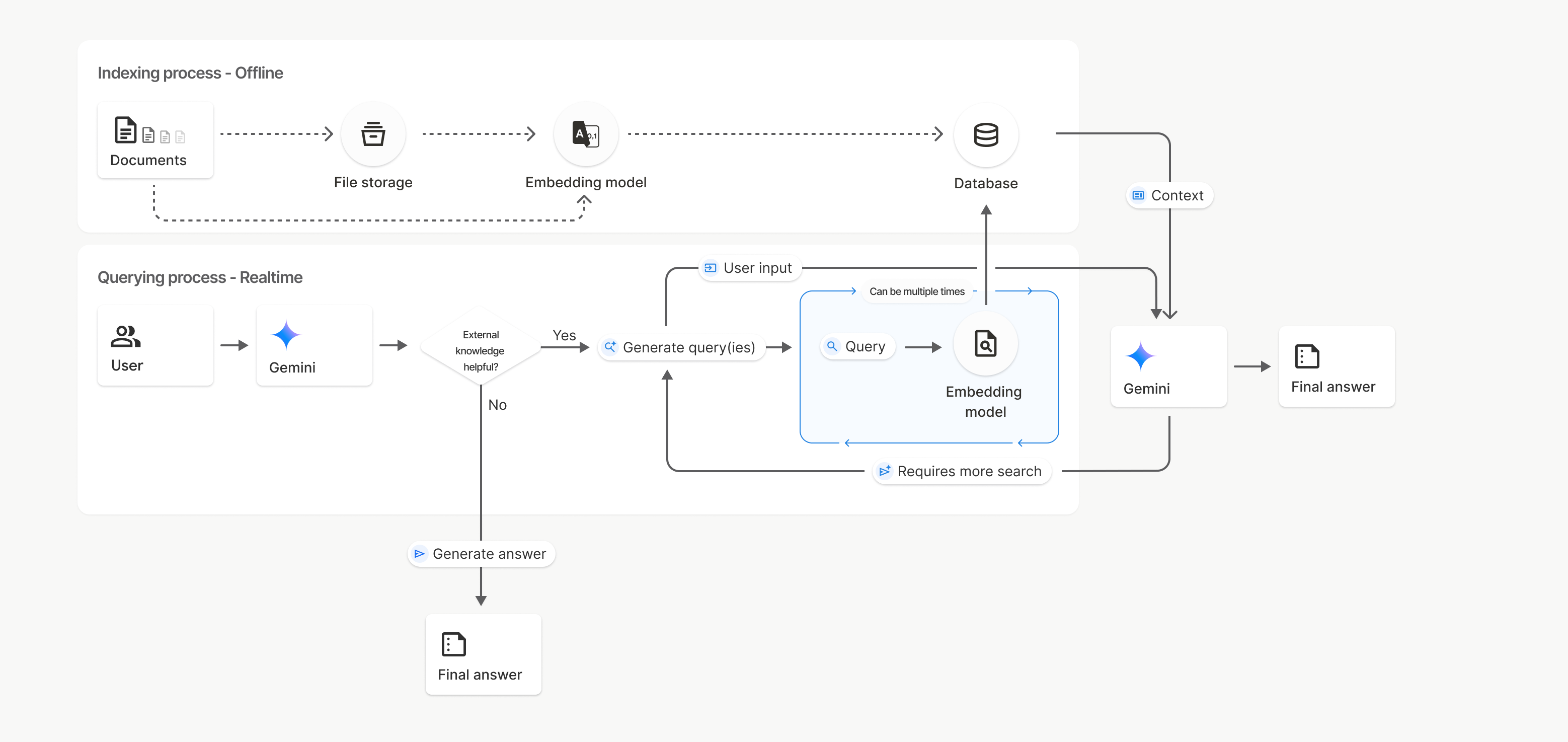
На этой схеме пунктирная линия от Документов к Модели встраивания (с использованием gemini-embedding-001) представляет API uploadToFileSearchStore (минуя Хранилище файлов).
В противном случае использование Files API для отдельного создания и импорта файлов переносит процесс индексирования из Документов в Хранилище файлов, а затем в Модель встраивания.
Хранилища поиска файлов
Хранилище File Search – это контейнер для эмбеддингов документов. Исходные файлы, загруженные через File API, удаляются через 48 часов, но данные, импортированные в хранилище File Search, хранятся бессрочно, пока вы не удалите их вручную. Вы можете создать несколько хранилищ для поиска файлов, чтобы упорядочить документы. С помощью API FileSearchStore можно создавать, перечислять, получать и удалять хранилища для поиска файлов. Названия магазинов в поиске файлов имеют глобальную область действия.
Ниже приведены примеры управления хранилищами для поиска в файлах.
Python
file_search_store = client.file_search_stores.create(
    config={
        'display_name': 'myfilesearchstore123',
        'embedding_model': 'models/gemini-embedding-2'
    }
)

for store in client.file_search_stores.list():
    print(store)

my_file_search_store = client.file_search_stores.get(name=file_search_store.name)

client.file_search_stores.delete(name=file_search_store.name, config={'force': True})
JavaScript
const fileSearchStore = await ai.fileSearchStores.create({
  config: {
    displayName: 'myfilesearchstore123',
    embeddingModel: 'models/gemini-embedding-2'
  }
});

const fileSearchStores = await ai.fileSearchStores.list();
for await (const store of fileSearchStores) {
  console.log(store);
}

const myFileSearchStore = await ai.fileSearchStores.get({
  name: fileSearchStore.name
});

await ai.fileSearchStores.delete({
  name: fileSearchStore.name,
  config: { force: true }
});
Java
import com.google.genai.Client;
import com.google.genai.types.CreateFileSearchStoreConfig;
import com.google.genai.types.DeleteFileSearchStoreConfig;
import com.google.genai.types.FileSearchStore;

Client client = new Client();

FileSearchStore fileSearchStore =
    client.fileSearchStores.create(
        CreateFileSearchStoreConfig.builder()
            .displayName("myfilesearchstore123")
            .embeddingModel("models/gemini-embedding-2")
            .build());

for (FileSearchStore store : client.fileSearchStores.list(null)) {
  System.out.println(store);
}

FileSearchStore myFileSearchStore =
    client.fileSearchStores.get(fileSearchStore.name().get(), null);

client.fileSearchStores.delete(
    fileSearchStore.name().get(), DeleteFileSearchStoreConfig.builder().force(true).build());
Проложить маршрут
package main

import (
    "context"
    "fmt"
    "log"

    "google.golang.org/genai"
)

func main() {
    ctx := context.Background()
    client, err := genai.NewClient(ctx, nil)
    if err != nil {
        log.Fatal(err)
    }

    fileSearchStore, err := client.FileSearchStores.Create(ctx, &genai.CreateFileSearchStoreConfig{
        DisplayName:    "myfilesearchstore123",
        EmbeddingModel: "models/gemini-embedding-2",
    })
    if err != nil {
        log.Fatal(err)
    }

    for store, err := range client.FileSearchStores.All(ctx) {
        if err != nil {
            log.Fatal(err)
        }
        fmt.Println(store)
    }

    myFileSearchStore, err := client.FileSearchStores.Get(ctx, fileSearchStore.Name, nil)
    if err != nil {
        log.Fatal(err)
    }
    _ = myFileSearchStore

    err = client.FileSearchStores.Delete(ctx, fileSearchStore.Name, &genai.DeleteFileSearchStoreConfig{
        Force: genai.Ptr(true),
    })
    if err != nil {
        log.Fatal(err)
    }
}
REST
curl -X POST "https://generativelanguage.googleapis.com/v1beta/fileSearchStores?key=${GEMINI_API_KEY}" \
    -H "Content-Type: application/json" \
    -d '{ "displayName": "My Store", "embedding_model": "models/gemini-embedding-2" }'

curl "https://generativelanguage.googleapis.com/v1beta/fileSearchStores?key=${GEMINI_API_KEY}"

curl "https://generativelanguage.googleapis.com/v1beta/fileSearchStores/myfilesearchstore123?key=${GEMINI_API_KEY}"

curl -X DELETE "https://generativelanguage.googleapis.com/v1beta/fileSearchStores/myfilesearchstore123?key=${GEMINI_API_KEY}"
Документы по поиску файлов
Вы можете управлять отдельными документами в хранилищах файлов с помощью File Search Documents API, чтобы list каждый документ в хранилище поиска файлов, get информацию о документе и delete документ по названию.
Python
for document_in_store in client.file_search_stores.documents.list(parent='fileSearchStores/myfilesearchstore123'):
  print(document_in_store)

file_search_document = client.file_search_stores.documents.get(name='fileSearchStores/myfilesearchstore123/documents/sampletxt123')
print(file_search_document)

client.file_search_stores.documents.delete(name='fileSearchStores/myfilesearchstore123/documents/sampletxt123', config={'force': True})
JavaScript
const documents = await ai.fileSearchStores.documents.list({
  parent: 'fileSearchStores/myfilesearchstore123'
});
for await (const doc of documents) {
  console.log(doc);
}

const fileSearchDocument = await ai.fileSearchStores.documents.get({
  name: 'fileSearchStores/myfilesearchstore123/documents/sampletxt123'
});

await ai.fileSearchStores.documents.delete({
  name: 'fileSearchStores/myfilesearchstore123/documents/sampletxt123',
  config: { force: true }
});
Java
import com.google.genai.Client;
import com.google.genai.types.DeleteDocumentConfig;
import com.google.genai.types.Document;

Client client = new Client();

for (Document documentInStore :
    client.fileSearchStores.documents.list("fileSearchStores/myfilesearchstore123", null)) {
  System.out.println(documentInStore);
}

Document fileSearchDocument =
    client.fileSearchStores.documents.get(
        "fileSearchStores/myfilesearchstore123/documents/sampletxt123", null);
System.out.println(fileSearchDocument);

client.fileSearchStores.documents.delete(
    "fileSearchStores/myfilesearchstore123/documents/sampletxt123",
    DeleteDocumentConfig.builder().force(true).build());
Проложить маршрут
package main

import (
    "context"
    "fmt"
    "log"

    "google.golang.org/genai"
)

func main() {
    ctx := context.Background()
    client, err := genai.NewClient(ctx, nil)
    if err != nil {
        log.Fatal(err)
    }

    for documentInStore, err := range client.FileSearchStores.Documents.All(ctx, "fileSearchStores/myfilesearchstore123") {
        if err != nil {
            log.Fatal(err)
        }
        fmt.Println(documentInStore)
    }

    fileSearchDocument, err := client.FileSearchStores.Documents.Get(ctx, "fileSearchStores/myfilesearchstore123/documents/sampletxt123", nil)
    if err != nil {
        log.Fatal(err)
    }
    fmt.Println(fileSearchDocument)

    err = client.FileSearchStores.Documents.Delete(ctx, "fileSearchStores/myfilesearchstore123/documents/sampletxt123", &genai.DeleteDocumentConfig{
        Force: genai.Ptr(true),
    })
    if err != nil {
        log.Fatal(err)
    }
}
REST
curl "https://generativelanguage.googleapis.com/v1beta/fileSearchStores/myfilesearchstore123/documents?key=${GEMINI_API_KEY}"

curl "https://generativelanguage.googleapis.com/v1beta/fileSearchStores/myfilesearchstore123/documents/sampletxt123?key=${GEMINI_API_KEY}"

curl -X DELETE "https://generativelanguage.googleapis.com/v1beta/fileSearchStores/myfilesearchstore123/documents/sampletxt123?key=${GEMINI_API_KEY}&force=true"
Метаданные файлов
Вы можете добавить в файлы собственные метаданные, чтобы фильтровать их или предоставлять дополнительный контекст. Метаданные – это набор пар "ключ-значение".
Python
op = client.file_search_stores.import_file(
    file_search_store_name=file_search_store.name,
    file_name=sample_file.name,
    config={
        'custom_metadata': [
            {"key": "author", "string_value": "Robert Graves"},
            {"key": "year", "numeric_value": 1934}
        ]
    }
)
JavaScript
let operation = await ai.fileSearchStores.importFile({
  fileSearchStoreName: fileSearchStore.name,
  fileName: sampleFile.name,
  config: {
    customMetadata: [
      { key: "author", stringValue: "Robert Graves" },
      { key: "year", numericValue: 1934 }
    ]
  }
});
Java
import com.google.genai.Client;
import com.google.genai.types.CustomMetadata;
import com.google.genai.types.ImportFileConfig;
import com.google.genai.types.ImportFileOperation;
import java.util.Arrays;

Client client = new Client();

ImportFileOperation op =
    client.fileSearchStores.importFile(
        "fileSearchStores/myfilesearchstore123",
        "files/samplefile123",
        ImportFileConfig.builder()
            .customMetadata(
                Arrays.asList(
                    CustomMetadata.builder().key("author").stringValue("Robert Graves").build(),
                    CustomMetadata.builder().key("year").numericValue(1934f).build()))
            .build());
Проложить маршрут
package main

import (
    "context"
    "log"

    "google.golang.org/genai"
)

func main() {
    ctx := context.Background()
    client, err := genai.NewClient(ctx, nil)
    if err != nil {
        log.Fatal(err)
    }

    op, err := client.FileSearchStores.ImportFile(
        ctx,
        "fileSearchStores/myfilesearchstore123",
        "files/samplefile123",
        &genai.ImportFileConfig{
            CustomMetadata: []*genai.CustomMetadata{
                {Key: "author", StringValue: "Robert Graves"},
                {Key: "year", NumericValue: genai.Ptr(float32(1934))},
            },
        },
    )
    if err != nil {
        log.Fatal(err)
    }
    _ = op
}
Это полезно, если в хранилище для поиска файлов много документов, а вам нужно выполнить поиск только по некоторым из них.
Python
interaction = client.interactions.create(
    model="gemini-3.8-flash",
    input="Tell me about the book 'I, Claudius'",
    tools=[{
        "type": "file_search",
        "file_search_store_names": [file_search_store.name],
        "metadata_filter": 'author="Robert Graves"',
    }]
)

for step in interaction.steps:
    if step.type == "model_output":
        for content_block in step.content:
            if content_block.type == "text":
                print(content_block.text)
JavaScript
const interaction = await ai.interactions.create({
  model: "gemini-3.8-flash",
  input: "Tell me about the book 'I, Claudius'",
  tools: [{
    type: "file_search",
    file_search_store_names: [fileSearchStore.name],
    metadata_filter: 'author="Robert Graves"',
  }]
});

for (const step of interaction.steps) {
  if (step.type === 'model_output') {
    for (const contentBlock of step.content) {
      if (contentBlock.type === 'text') {
        console.log(contentBlock.text);
      }
    }
  }
}
Java
import com.google.genai.Client;
import com.google.genai.gaos.models.interactions.Content;
import com.google.genai.gaos.models.interactions.CreateModelInteraction;
import com.google.genai.gaos.models.interactions.FileSearch;
import com.google.genai.gaos.models.interactions.Interaction;
import com.google.genai.gaos.models.interactions.InteractionsInput;
import com.google.genai.gaos.models.interactions.Model;
import com.google.genai.gaos.models.interactions.ModelOutputStep;
import com.google.genai.gaos.models.interactions.Step;
import com.google.genai.gaos.models.interactions.TextContent;
import com.google.genai.gaos.models.operations.CreateInteractionRequestBody;
import java.util.Arrays;

Client client = new Client();

CreateModelInteraction params =
    CreateModelInteraction.builder()
        .model(Model.of("gemini-3.8-flash"))
        .input(InteractionsInput.of("Tell me about the book 'I, Claudius'"))
        .tools(
            Arrays.asList(
                FileSearch.builder()
                    .fileSearchStoreNames(Arrays.asList("fileSearchStores/myfilesearchstore123"))
                    .metadataFilter("author=\"Robert Graves\"")
                    .build()))
        .build();

Interaction interaction =
    client.interactions.create(CreateInteractionRequestBody.of(params)).interaction().get();

if (interaction.steps().isPresent()) {
  for (Step step : interaction.steps().get()) {
    if (step instanceof ModelOutputStep) {
      ModelOutputStep outputStep = (ModelOutputStep) step;
      if (outputStep.content().isPresent()) {
        for (Content contentBlock : outputStep.content().get()) {
          if (contentBlock instanceof TextContent) {
            TextContent textContent = (TextContent) contentBlock;
            System.out.println(textContent.text().orElse(""));
          }
        }
      }
    }
  }
}
Проложить маршрут
package main

import (
    "context"
    "fmt"
    "log"

    "google.golang.org/genai"
    "google.golang.org/genai/interactions/models/interactions"
    "google.golang.org/genai/interactions/models/operations"
)

func main() {
    ctx := context.Background()
    client, err := genai.NewClient(ctx, nil)
    if err != nil {
        log.Fatal(err)
    }

    resp, err := client.Interactions.Create(ctx, operations.CreateInteractionRequest{
        Body: operations.NewCreateInteractionRequestBody(
            interactions.CreateModelInteraction{
                Model: interactions.Model("gemini-3.8-flash"),
                Input: interactions.NewInteractionsInput("Tell me about the book 'I, Claudius'"),
                Tools: []interactions.Tool{
                    interactions.NewTool(interactions.FileSearch{
                        FileSearchStoreNames: []string{"fileSearchStores/myfilesearchstore123"},
                        MetadataFilter:       genai.Ptr(`author="Robert Graves"`),
                    }),
                },
            },
        ),
    })
    if err != nil {
        log.Fatal(err)
    }

    for _, step := range resp.Interaction.Steps {
        if step.ModelOutputStep != nil {
            for _, content := range step.ModelOutputStep.Content {
                if content.TextContent != nil {
                    fmt.Println(content.TextContent.Text)
                }
            }
        }
    }
}
REST
curl "https://generativelanguage.googleapis.com/v1beta/interactions" \
    -H "x-goog-api-key: $GEMINI_API_KEY" \
    -H 'Content-Type: application/json' \
    -X POST \
    -d '{
            "model": "gemini-3.8-flash",
            "input": [{"type": "text", "text": "Tell me about the book I, Claudius"}],
            "tools": [{
                "type": "file_search",
                "file_search_store_names": ["'$STORE_NAME'"],
                "metadata_filter": "author = \"Robert Graves\""
            }]
        }' 2> /dev/null > response.json

cat response.json
Инструкции по реализации синтаксиса фильтра списка для metadata_filter можно найти на странице google.aip.dev/160.
Мультимодальный поиск файлов
Мультимодальный поиск по файлам позволяет встраивать изображения и выполнять поиск по ним, что дает возможность создавать многофункциональные мультимодальные RAG-приложения.
Настройте модель встраивания
При создании FileSearchStore необходимо переопределить модель встраивания по умолчанию, которая работает только с текстом, и использовать мультимодальную модель. Используйте models/gemini-embedding-2 для обработки текста и изображений.
Python
store = client.file_search_stores.create(
    config={
        "display_name": "Multimodal Catalog",
        "embedding_model": "models/gemini-embedding-2",
    }
)
JavaScript
const fileSearchStore = await ai.fileSearchStores.create({
  config: {
    displayName: "Multimodal Catalog",
    embeddingModel: "models/gemini-embedding-2",
  },
});
Java
import com.google.genai.Client;
import com.google.genai.types.CreateFileSearchStoreConfig;
import com.google.genai.types.FileSearchStore;

Client client = new Client();

FileSearchStore store =
    client.fileSearchStores.create(
        CreateFileSearchStoreConfig.builder()
            .displayName("Multimodal Catalog")
            .embeddingModel("models/gemini-embedding-2")
            .build());
Проложить маршрут
package main

import (
    "context"
    "log"

    "google.golang.org/genai"
)

func main() {
    ctx := context.Background()
    client, err := genai.NewClient(ctx, nil)
    if err != nil {
        log.Fatal(err)
    }

    store, err := client.FileSearchStores.Create(ctx, &genai.CreateFileSearchStoreConfig{
        DisplayName:    "Multimodal Catalog",
        EmbeddingModel: "models/gemini-embedding-2",
    })
    if err != nil {
        log.Fatal(err)
    }
    _ = store
}
REST
curl -X POST "https://generativelanguage.googleapis.com/v1beta/fileSearchStores?key=$GEMINI_API_KEY" \
    -H "Content-Type: application/json" \
    -d '{
      "display_name": "Multimodal Catalog",
      "embedding_model": "models/gemini-embedding-2"
    }'
Загрузка изображений
После создания хранилища с мультимодальной моделью встраивания вы можете загружать графические файлы напрямую с помощью тех же API загрузки, которые описаны в разделах Прямая загрузка в хранилище поиска по файлам и Импорт файлов.
Требования к графическим файлам:
- Разрешение графических файлов не должно превышать 4K x 4K пикселей.
- Поддерживаемые форматы: PNG, JPEG.
Библиографические ссылки
Когда вы используете поиск по файлам, в ответе модели могут быть ссылки на те части загруженных документов, которые были использованы для создания ответа. Это помогает проверять факты и подтверждать информацию.
Информация о цитировании доступна в атрибуте annotations внутри блоков content шага model_output ответа.
Python
for step in interaction.steps:
    if step.type == 'model_output':
        for content in step.content:
            if content.type == 'text' and content.annotations:
                print(content.annotations)
JavaScript
for (const step of interaction.steps) {
  if (step.type === 'model_output') {
    for (const contentBlock of step.content) {
      if (contentBlock.type === 'text' && contentBlock.annotations) {
        console.log(JSON.stringify(contentBlock.annotations, null, 2));
      }
    }
  }
}
Java
import com.google.genai.Client;
import com.google.genai.gaos.models.interactions.Content;
import com.google.genai.gaos.models.interactions.CreateModelInteraction;
import com.google.genai.gaos.models.interactions.FileSearch;
import com.google.genai.gaos.models.interactions.Interaction;
import com.google.genai.gaos.models.interactions.InteractionsInput;
import com.google.genai.gaos.models.interactions.Model;
import com.google.genai.gaos.models.interactions.ModelOutputStep;
import com.google.genai.gaos.models.interactions.Step;
import com.google.genai.gaos.models.interactions.TextContent;
import com.google.genai.gaos.models.operations.CreateInteractionRequestBody;
import java.util.Arrays;

Client client = new Client();

CreateModelInteraction params =
    CreateModelInteraction.builder()
        .model(Model.of("gemini-3.8-flash"))
        .input(InteractionsInput.of("Can you tell me about [insert question]"))
        .tools(
            Arrays.asList(
                FileSearch.builder()
                    .fileSearchStoreNames(Arrays.asList("fileSearchStores/myfilesearchstore123"))
                    .build()))
        .build();

Interaction interaction =
    client.interactions.create(CreateInteractionRequestBody.of(params)).interaction().get();

if (interaction.steps().isPresent()) {
  for (Step step : interaction.steps().get()) {
    if (step instanceof ModelOutputStep) {
      ModelOutputStep outputStep = (ModelOutputStep) step;
      if (outputStep.content().isPresent()) {
        for (Content content : outputStep.content().get()) {
          if (content instanceof TextContent) {
            TextContent textContent = (TextContent) content;
            if (textContent.annotations().isPresent()) {
              System.out.println(textContent.annotations().get());
            }
          }
        }
      }
    }
  }
}
Проложить маршрут
package main

import (
    "context"
    "fmt"
    "log"

    "google.golang.org/genai"
    "google.golang.org/genai/interactions/models/interactions"
    "google.golang.org/genai/interactions/models/operations"
)

func main() {
    ctx := context.Background()
    client, err := genai.NewClient(ctx, nil)
    if err != nil {
        log.Fatal(err)
    }

    resp, err := client.Interactions.Create(ctx, operations.CreateInteractionRequest{
        Body: operations.NewCreateInteractionRequestBody(
            interactions.CreateModelInteraction{
                Model: interactions.Model("gemini-3.8-flash"),
                Input: interactions.NewInteractionsInput("Can you tell me about [insert question]"),
                Tools: []interactions.Tool{
                    interactions.NewTool(interactions.FileSearch{
                        FileSearchStoreNames: []string{"fileSearchStores/myfilesearchstore123"},
                    }),
                },
            },
        ),
    })
    if err != nil {
        log.Fatal(err)
    }

    for _, step := range resp.Interaction.Steps {
        if step.ModelOutputStep != nil {
            for _, content := range step.ModelOutputStep.Content {
                if content.TextContent != nil && len(content.TextContent.Annotations) > 0 {
                    fmt.Println(content.TextContent.Annotations)
                }
            }
        }
    }
}
REST
{
  "steps": [
    {
      "type": "model_output",
      "content": [
        {
          "type": "text",
          "text": "...",
          "annotations": [
            {
              "type": "file_citation",
              "file_name": "sample.txt",
              "source": "..."
            }
          ]
        }
      ]
    }
  ]
}
Подробную информацию о структуре цитат можно найти в документации по API для взаимодействий.
Номера страниц
Если вы используете поиск по файлам с документами, в которых есть страницы (например, PDF-файлами), ответ модели может содержать номер страницы, на которой была найдена информация.
Эту информацию можно получить с помощью атрибута page_number аннотации file_citation.
Python
for step in interaction.steps:
    if step.type == "model_output":
        for content in step.content:
            if content.type == "text" and content.annotations:
                for annotation in content.annotations:
                    if annotation.type == "file_citation" and annotation.page_number:
                        print(f"Cited Page: {annotation.page_number}")
JavaScript
for (const step of interaction.steps) {
  if (step.type === 'model_output') {
    for (const block of step.content) {
      if (block.type === 'text' && block.annotations) {
        for (const annotation of block.annotations) {
          if (annotation.type === 'file_citation' && annotation.pageNumber) {
            console.log(`Cited Page: ${annotation.pageNumber}`);
          }
        }
      }
    }
  }
}
Java
import com.google.genai.Client;
import com.google.genai.gaos.models.interactions.Annotation;
import com.google.genai.gaos.models.interactions.Content;
import com.google.genai.gaos.models.interactions.CreateModelInteraction;
import com.google.genai.gaos.models.interactions.FileCitation;
import com.google.genai.gaos.models.interactions.FileSearch;
import com.google.genai.gaos.models.interactions.Interaction;
import com.google.genai.gaos.models.interactions.InteractionsInput;
import com.google.genai.gaos.models.interactions.Model;
import com.google.genai.gaos.models.interactions.ModelOutputStep;
import com.google.genai.gaos.models.interactions.Step;
import com.google.genai.gaos.models.interactions.TextContent;
import com.google.genai.gaos.models.operations.CreateInteractionRequestBody;
import java.util.Arrays;

Client client = new Client();

CreateModelInteraction params =
    CreateModelInteraction.builder()
        .model(Model.of("gemini-3.8-flash"))
        .input(InteractionsInput.of("Can you tell me about [insert question]"))
        .tools(
            Arrays.asList(
                FileSearch.builder()
                    .fileSearchStoreNames(Arrays.asList("fileSearchStores/myfilesearchstore123"))
                    .build()))
        .build();

Interaction interaction =
    client.interactions.create(CreateInteractionRequestBody.of(params)).interaction().get();

if (interaction.steps().isPresent()) {
  for (Step step : interaction.steps().get()) {
    if (step instanceof ModelOutputStep) {
      ModelOutputStep outputStep = (ModelOutputStep) step;
      if (outputStep.content().isPresent()) {
        for (Content content : outputStep.content().get()) {
          if (content instanceof TextContent) {
            TextContent textContent = (TextContent) content;
            if (textContent.annotations().isPresent()) {
              for (Annotation annotation : textContent.annotations().get()) {
                if (annotation instanceof FileCitation) {
                  FileCitation citation = (FileCitation) annotation;
                  if (citation.pageNumber().isPresent()) {
                    System.out.println("Cited Page: " + citation.pageNumber().get());
                  }
                }
              }
            }
          }
        }
      }
    }
  }
}
Проложить маршрут
package main

import (
    "context"
    "fmt"
    "log"

    "google.golang.org/genai"
    "google.golang.org/genai/interactions/models/interactions"
    "google.golang.org/genai/interactions/models/operations"
)

func main() {
    ctx := context.Background()
    client, err := genai.NewClient(ctx, nil)
    if err != nil {
        log.Fatal(err)
    }

    resp, err := client.Interactions.Create(ctx, operations.CreateInteractionRequest{
        Body: operations.NewCreateInteractionRequestBody(
            interactions.CreateModelInteraction{
                Model: interactions.Model("gemini-3.8-flash"),
                Input: interactions.NewInteractionsInput("Can you tell me about [insert question]"),
                Tools: []interactions.Tool{
                    interactions.NewTool(interactions.FileSearch{
                        FileSearchStoreNames: []string{"fileSearchStores/myfilesearchstore123"},
                    }),
                },
            },
        ),
    })
    if err != nil {
        log.Fatal(err)
    }

    for _, step := range resp.Interaction.Steps {
        if step.ModelOutputStep != nil {
            for _, content := range step.ModelOutputStep.Content {
                if content.TextContent != nil {
                    for _, annotation := range content.TextContent.Annotations {
                        if annotation.FileCitation != nil && annotation.FileCitation.PageNumber != nil {
                            fmt.Println("Cited Page:", *annotation.FileCitation.PageNumber)
                        }
                    }
                }
            }
        }
    }
}
REST
{
  "steps": [
    {
      "type": "model_output",
      "content": [
        {
          "type": "text",
          "text": "...",
          "annotations": [
            {
              "type": "file_citation",
              "file_name": "document.pdf",
              "page_number": 1,
              "source": "..."
            }
          ]
        }
      ]
    }
  ]
}
Ссылки на медиаконтент
Когда модель ссылается на фрагмент изображения во время генерации, API возвращает аннотацию типа file_citation, которая включает media_id. С помощью этого идентификатора можно скачать фрагмент изображения, на который ссылается модель. Этот идентификатор media_id сохраняется при нескольких вызовах поиска, что позволяет надежно получать одно и то же изображение или кешировать его с помощью идентификатора.
Ниже приведен пример ответа REST:
{
  "type": "model_output",
  "content": [
    {
      "type": "text",
      "text": "...",
      "annotations": [
        {
          "type": "file_citation",
          "file_name": "product_image",
          "media_id": "fileSearchStores/my-store-123/media/BlobId-456"
        }
      ]
    }
  ]
}
В приведенных ниже фрагментах кода показано, как получить объект media_id и скачать медиаконтент:
Python
for step in interaction.steps:
    if step.type == "model_output":
        for content in step.content:
            if content.type == "text" and content.annotations:
                for annotation in content.annotations:
                    if annotation.type == "file_citation" and annotation.media_id:
                        print(f"Cited Media ID: {annotation.media_id}")
                        blob_content = client.file_search_stores.download_media(
                            media_id=annotation.media_id
                        )
JavaScript
for (const step of interaction.steps) {
  if (step.type === 'model_output') {
    for (const block of step.content) {
      if (block.type === 'text' && block.annotations) {
        for (const annotation of block.annotations) {
          if (annotation.type === 'file_citation' && annotation.mediaId) {
            console.log(`Cited Media ID: ${annotation.mediaId}`);
            const blobContent = await ai.fileSearchStores.downloadMedia(annotation.mediaId);
          }
        }
      }
    }
  }
}
Java
import com.google.genai.Client;
import com.google.genai.gaos.models.interactions.Annotation;
import com.google.genai.gaos.models.interactions.Content;
import com.google.genai.gaos.models.interactions.CreateModelInteraction;
import com.google.genai.gaos.models.interactions.FileCitation;
import com.google.genai.gaos.models.interactions.FileSearch;
import com.google.genai.gaos.models.interactions.Interaction;
import com.google.genai.gaos.models.interactions.InteractionsInput;
import com.google.genai.gaos.models.interactions.Model;
import com.google.genai.gaos.models.interactions.ModelOutputStep;
import com.google.genai.gaos.models.interactions.Step;
import com.google.genai.gaos.models.interactions.TextContent;
import com.google.genai.gaos.models.operations.CreateInteractionRequestBody;
import java.util.Arrays;

Client client = new Client();

CreateModelInteraction params =
    CreateModelInteraction.builder()
        .model(Model.of("gemini-3.8-flash"))
        .input(InteractionsInput.of("Can you tell me about [insert question]"))
        .tools(
            Arrays.asList(
                FileSearch.builder()
                    .fileSearchStoreNames(Arrays.asList("fileSearchStores/myfilesearchstore123"))
                    .build()))
        .build();

Interaction interaction =
    client.interactions.create(CreateInteractionRequestBody.of(params)).interaction().get();

if (interaction.steps().isPresent()) {
  for (Step step : interaction.steps().get()) {
    if (step instanceof ModelOutputStep) {
      ModelOutputStep outputStep = (ModelOutputStep) step;
      if (outputStep.content().isPresent()) {
        for (Content content : outputStep.content().get()) {
          if (content instanceof TextContent) {
            TextContent textContent = (TextContent) content;
            if (textContent.annotations().isPresent()) {
              for (Annotation annotation : textContent.annotations().get()) {
                if (annotation instanceof FileCitation) {
                  FileCitation citation = (FileCitation) annotation;
                  if (citation.mediaId().isPresent()) {
                    System.out.println("Cited Media ID: " + citation.mediaId().get());
                    byte[] blobContent =
                        client.fileSearchStores.downloadMedia(citation.mediaId().get(), null);
                  }
                }
              }
            }
          }
        }
      }
    }
  }
}
Проложить маршрут
package main

import (
    "context"
    "fmt"
    "log"

    "google.golang.org/genai"
    "google.golang.org/genai/interactions/models/interactions"
    "google.golang.org/genai/interactions/models/operations"
)

func main() {
    ctx := context.Background()
    client, err := genai.NewClient(ctx, nil)
    if err != nil {
        log.Fatal(err)
    }

    resp, err := client.Interactions.Create(ctx, operations.CreateInteractionRequest{
        Body: operations.NewCreateInteractionRequestBody(
            interactions.CreateModelInteraction{
                Model: interactions.Model("gemini-3.8-flash"),
                Input: interactions.NewInteractionsInput("Can you tell me about [insert question]"),
                Tools: []interactions.Tool{
                    interactions.NewTool(interactions.FileSearch{
                        FileSearchStoreNames: []string{"fileSearchStores/myfilesearchstore123"},
                    }),
                },
            },
        ),
    })
    if err != nil {
        log.Fatal(err)
    }

    for _, step := range resp.Interaction.Steps {
        if step.ModelOutputStep != nil {
            for _, content := range step.ModelOutputStep.Content {
                if content.TextContent != nil {
                    for _, annotation := range content.TextContent.Annotations {
                        if annotation.FileCitation != nil && annotation.FileCitation.MediaID != nil {
                            fmt.Println("Cited Media ID:", *annotation.FileCitation.MediaID)
                            blobContent, err := client.FileSearchStores.DownloadMedia(ctx, *annotation.FileCitation.MediaID, nil)
                            if err != nil {
                                log.Fatal(err)
                            }
                            _ = blobContent
                        }
                    }
                }
            }
        }
    }
}
REST
curl -X GET "https://generativelanguage.googleapis.com/v1/fileSearchStores/my-store-123/media/BlobId-456" \
  -H "x-goog-api-key: $GEMINI_API_KEY"
Пользовательские метаданные
Если вы добавили в файлы собственные метаданные, то можете посмотреть их в аннотациях к ответу модели. Это полезно, если вам нужно передать дополнительный контекст (например, URL, номера страниц или авторов) из исходных документов в логику приложения. Каждая аннотация цитирования типа file_citation содержит эти метаданные.
Python
interaction = client.interactions.create(
    model="gemini-3.8-flash",
    input="Tell me about [insert question]",
    tools=[{
        "type": "file_search",
        "file_search_store_names": [file_search_store.name]
    }]
)

for step in interaction.steps:
    if step.type == "model_output":
        for content_block in step.content:
            if content_block.annotations:
                for annotation in content_block.annotations:
                    print(annotation)
JavaScript
const interaction = await ai.interactions.create({
  model: "gemini-3.8-flash",
  input: "Tell me about [insert question]",
  tools: [{
    type: "file_search",
    file_search_store_names: [fileSearchStore.name]
  }]
});

for (const step of interaction.steps) {
  if (step.type === 'model_output') {
    for (const contentBlock of step.content) {
      if (contentBlock.annotations) {
        contentBlock.annotations.forEach((annotation) => {
          console.log(annotation);
        });
      }
    }
  }
}
Java
import com.google.genai.Client;
import com.google.genai.gaos.models.interactions.Annotation;
import com.google.genai.gaos.models.interactions.Content;
import com.google.genai.gaos.models.interactions.CreateModelInteraction;
import com.google.genai.gaos.models.interactions.FileSearch;
import com.google.genai.gaos.models.interactions.Interaction;
import com.google.genai.gaos.models.interactions.InteractionsInput;
import com.google.genai.gaos.models.interactions.Model;
import com.google.genai.gaos.models.interactions.ModelOutputStep;
import com.google.genai.gaos.models.interactions.Step;
import com.google.genai.gaos.models.interactions.TextContent;
import com.google.genai.gaos.models.operations.CreateInteractionRequestBody;
import java.util.Arrays;

Client client = new Client();

CreateModelInteraction params =
    CreateModelInteraction.builder()
        .model(Model.of("gemini-3.8-flash"))
        .input(InteractionsInput.of("Tell me about [insert question]"))
        .tools(
            Arrays.asList(
                FileSearch.builder()
                    .fileSearchStoreNames(Arrays.asList("fileSearchStores/myfilesearchstore123"))
                    .build()))
        .build();

Interaction interaction =
    client.interactions.create(CreateInteractionRequestBody.of(params)).interaction().get();

if (interaction.steps().isPresent()) {
  for (Step step : interaction.steps().get()) {
    if (step instanceof ModelOutputStep) {
      ModelOutputStep outputStep = (ModelOutputStep) step;
      if (outputStep.content().isPresent()) {
        for (Content contentBlock : outputStep.content().get()) {
          if (contentBlock instanceof TextContent) {
            TextContent textContent = (TextContent) contentBlock;
            if (textContent.annotations().isPresent()) {
              for (Annotation annotation : textContent.annotations().get()) {
                System.out.println(annotation);
              }
            }
          }
        }
      }
    }
  }
}
Проложить маршрут
package main

import (
    "context"
    "fmt"
    "log"

    "google.golang.org/genai"
    "google.golang.org/genai/interactions/models/interactions"
    "google.golang.org/genai/interactions/models/operations"
)

func main() {
    ctx := context.Background()
    client, err := genai.NewClient(ctx, nil)
    if err != nil {
        log.Fatal(err)
    }

    resp, err := client.Interactions.Create(ctx, operations.CreateInteractionRequest{
        Body: operations.NewCreateInteractionRequestBody(
            interactions.CreateModelInteraction{
                Model: interactions.Model("gemini-3.8-flash"),
                Input: interactions.NewInteractionsInput("Tell me about [insert question]"),
                Tools: []interactions.Tool{
                    interactions.NewTool(interactions.FileSearch{
                        FileSearchStoreNames: []string{"fileSearchStores/myfilesearchstore123"},
                    }),
                },
            },
        ),
    })
    if err != nil {
        log.Fatal(err)
    }

    for _, step := range resp.Interaction.Steps {
        if step.ModelOutputStep != nil {
            for _, content := range step.ModelOutputStep.Content {
                if content.TextContent != nil {
                    for _, annotation := range content.TextContent.Annotations {
                        fmt.Println(annotation)
                    }
                }
            }
        }
    }
}
REST
{
  "steps": [
    {
      "type": "model_output",
      "content": [
        {
          "type": "text",
          "text": "...",
          "annotations": [
            {
              "file_name": "...",
              "source": "...",
              "custom_metadata": [
                {
                  "key": "author",
                  "string_value": "Robert Graves"
                },
                {
                  "key": "year",
                  "numeric_value": 1934
                }
              ]
            }
          ]
        }
      ]
    }
  ]
}
Структурированные выходные данные
Начиная с моделей Gemini 3, вы можете комбинировать инструмент поиска файлов со структурированными выходными данными.
Python
from pydantic import BaseModel, Field

class Money(BaseModel):
    amount: str = Field(description="The numerical part of the amount.")
    currency: str = Field(description="The currency of amount.")

interaction = client.interactions.create(
    model="gemini-3.8-flash",
    input="What is the minimum hourly wage in Tokyo right now?",
    tools=[{
        "type": "file_search",
        "file_search_store_names": [file_search_store.name]
    }],
    response_format={
        "type": "text",
        "mime_type": "application/json",
        "schema": Money.model_json_schema()
    },
)
result = Money.model_validate_json(interaction.output_text)
print(result)
JavaScript
import { z } from "zod";

const moneyJsonSchema = {
  type: "object",
  properties: {
    amount: { type: "string", description: "The numerical part of the amount." },
    currency: { type: "string", description: "The currency of amount." }
  },
  required: ["amount", "currency"]
};

const moneySchema = z.fromJSONSchema(moneyJsonSchema);

async function run() {
  const interaction = await ai.interactions.create({
    model: "gemini-3.8-flash",
    input: "What is the minimum hourly wage in Tokyo right now?",
    tools: [{
      type: "file_search",
      file_search_store_names: [fileSearchStore.name],
    }],
    response_format: {
      type: 'text',
      mime_type: 'application/json',
      schema: moneyJsonSchema
    },
  });

  const result = moneySchema.parse(JSON.parse(interaction.output_text));
  console.log(result);
}

run();
Java
import com.google.genai.Client;
import com.google.genai.gaos.models.interactions.CreateModelInteraction;
import com.google.genai.gaos.models.interactions.CreateModelInteractionResponseFormat;
import com.google.genai.gaos.models.interactions.FileSearch;
import com.google.genai.gaos.models.interactions.Interaction;
import com.google.genai.gaos.models.interactions.InteractionsInput;
import com.google.genai.gaos.models.interactions.Model;
import com.google.genai.gaos.models.interactions.ResponseFormat;
import com.google.genai.gaos.models.interactions.TextResponseFormat;
import com.google.genai.gaos.models.interactions.TextResponseFormatMimeType;
import com.google.genai.gaos.models.operations.CreateInteractionRequestBody;
import java.util.Arrays;
import java.util.HashMap;
import java.util.Map;

Client client = new Client();

Map<String, Object> properties = new HashMap<>();

Map<String, Object> amountProp = new HashMap<>();
amountProp.put("type", "string");
amountProp.put("description", "The numerical part of the amount.");
properties.put("amount", amountProp);

Map<String, Object> currencyProp = new HashMap<>();
currencyProp.put("type", "string");
currencyProp.put("description", "The currency of amount.");
properties.put("currency", currencyProp);

Map<String, Object> moneyJsonSchema = new HashMap<>();
moneyJsonSchema.put("type", "object");
moneyJsonSchema.put("properties", properties);
moneyJsonSchema.put("required", Arrays.asList("amount", "currency"));

CreateModelInteractionResponseFormat format =
    CreateModelInteractionResponseFormat.of(
        ResponseFormat.of(
            TextResponseFormat.builder()
                .mimeType(TextResponseFormatMimeType.APPLICATION_JSON)
                .schema(moneyJsonSchema)
                .build()));

CreateModelInteraction params =
    CreateModelInteraction.builder()
        .model(Model.of("gemini-3.8-flash"))
        .input(InteractionsInput.of("What is the minimum hourly wage in Tokyo right now?"))
        .tools(
            Arrays.asList(
                FileSearch.builder()
                    .fileSearchStoreNames(Arrays.asList("fileSearchStores/myfilesearchstore123"))
                    .build()))
        .responseFormat(format)
        .build();

Interaction interaction =
    client.interactions.create(CreateInteractionRequestBody.of(params)).interaction().get();

System.out.println(interaction.outputText().orElse(""));
Проложить маршрут
package main

import (
    "context"
    "fmt"
    "log"

    "google.golang.org/genai"
    "google.golang.org/genai/interactions/models/interactions"
    "google.golang.org/genai/interactions/models/operations"
)

func main() {
    ctx := context.Background()
    client, err := genai.NewClient(ctx, nil)
    if err != nil {
        log.Fatal(err)
    }

    moneyJsonSchema := map[string]any{
        "type": "object",
        "properties": map[string]any{
            "amount": map[string]any{
                "type":        "string",
                "description": "The numerical part of the amount.",
            },
            "currency": map[string]any{
                "type":        "string",
                "description": "The currency of amount.",
            },
        },
        "required": []string{"amount", "currency"},
    }

    format := interactions.NewCreateModelInteractionResponseFormat(
        interactions.NewResponseFormat(interactions.TextResponseFormat{
            MimeType: interactions.TextResponseFormatMimeTypeApplicationJSON.ToPointer(),
            Schema:   moneyJsonSchema,
        }),
    )

    resp, err := client.Interactions.Create(ctx, operations.CreateInteractionRequest{
        Body: operations.NewCreateInteractionRequestBody(
            interactions.CreateModelInteraction{
                Model: interactions.Model("gemini-3.8-flash"),
                Input: interactions.NewInteractionsInput("What is the minimum hourly wage in Tokyo right now?"),
                Tools: []interactions.Tool{
                    interactions.NewTool(interactions.FileSearch{
                        FileSearchStoreNames: []string{"fileSearchStores/myfilesearchstore123"},
                    }),
                },
                ResponseFormat: &format,
            },
        ),
    })
    if err != nil {
        log.Fatal(err)
    }

    fmt.Println(resp.Interaction.GetOutputText())
}
REST
curl "https://generativelanguage.googleapis.com/v1beta/interactions" \
  -H "x-goog-api-key: $GEMINI_API_KEY" \
  -H 'Content-Type: application/json' \
  -X POST \
  -d '{
    "model": "gemini-3.8-flash",
    "input": "What is the minimum hourly wage in Tokyo right now?",
    "tools": [{
      "type": "file_search",
      "file_search_store_names": ["$FILE_SEARCH_STORE_NAME"]
    }],
    "response_format": {
      "type": "text",
      "mime_type": "application/json",
      "schema": {
        "type": "object",
        "properties": {
          "amount": {"type": "string", "description": "The numerical part of the amount."},
          "currency": {"type": "string", "description": "The currency of amount."}
        },
        "required": ["amount", "currency"]
      }
    }
  }'
Поддерживаемые модели
Поиск в файлах поддерживают следующие модели:
| Модель | Поиск файлов |
|---|---|
| Gemini 4 Argon | ✔️ |
| Gemini 3.8 Flash | ✔️ |
| Gemini 3.6 Flash | ✔️ |
| Gemini 3.5 Flash-Lite | ✔️ |
| Gemini 3.1 Pro (предварительная версия) | ✔️ |
| Gemini 3.1 Flash-Lite | ✔️ |
| Gemini 3 Flash Preview | ✔️ |
Поддерживаемые сочетания инструментов
Модели Gemini 4 и Gemini 3 поддерживают комбинирование встроенных инструментов (например, File Search) с пользовательскими (вызов функций). Подробнее о сочетаниях инструментов…
Поддерживаемые типы файлов
Поиск файлов поддерживает множество форматов, перечисленных в разделах ниже.
Типы файлов приложений
application/dartapplication/ecmascriptapplication/jsonapplication/ms-javaapplication/mswordapplication/pdfapplication/sqlapplication/typescriptapplication/vnd.curlapplication/vnd.dartapplication/vnd.ibm.secure-containerapplication/vnd.jupyterapplication/vnd.ms-excelapplication/vnd.oasis.opendocument.textapplication/vnd.openxmlformats-officedocument.presentationml.presentationapplication/vnd.openxmlformats-officedocument.spreadsheetml.sheetapplication/vnd.openxmlformats-officedocument.wordprocessingml.documentapplication/vnd.openxmlformats-officedocument.wordprocessingml.templateapplication/x-cshapplication/x-hwpapplication/x-hwp-v5application/x-latexapplication/x-phpapplication/x-powershellapplication/x-shapplication/x-shellscriptapplication/x-texapplication/x-zshapplication/xmlapplication/zip
Типы текстовых файлов
text/1d-interleaved-parityfectext/REDtext/SGMLtext/cache-manifesttext/calendartext/cqltext/cql-extensiontext/cql-identifiertext/csstext/csvtext/csv-schematext/dnstext/encaprtptext/enrichedtext/exampletext/fhirpathtext/flexfectext/fwdredtext/gff3text/grammar-ref-listtext/hl7v2text/htmltext/javascripttext/jcr-cndtext/jsxtext/markdowntext/mizartext/n3text/parameterstext/parityfectext/phptext/plaintext/provenance-notationtext/prs.fallenstein.rsttext/prs.lines.tagtext/prs.prop.logictext/raptorfectext/rfc822-headerstext/rtftext/rtp-enc-aescm128text/rtploopbacktext/rtxtext/sgmltext/shaclctext/shextext/spdxtext/stringstext/t140text/tab-separated-valuestext/texmacstext/trofftext/tsvtext/tsxtext/turtletext/ulpfectext/uri-listtext/vcardtext/vnd.DMClientScripttext/vnd.IPTC.NITFtext/vnd.IPTC.NewsMLtext/vnd.atext/vnd.abctext/vnd.ascii-arttext/vnd.curltext/vnd.debian.copyrighttext/vnd.dvb.subtitletext/vnd.esmertec.theme-descriptortext/vnd.exchangeabletext/vnd.familysearch.gedcomtext/vnd.ficlab.flttext/vnd.flytext/vnd.fmi.flexstortext/vnd.gmltext/vnd.graphviztext/vnd.hanstext/vnd.hgltext/vnd.in3d.3dmltext/vnd.in3d.spottext/vnd.latex-ztext/vnd.motorola.reflextext/vnd.ms-mediapackagetext/vnd.net2phone.commcenter.commandtext/vnd.radisys.msml-basic-layouttext/vnd.senx.warpscripttext/vnd.sositext/vnd.sun.j2me.app-descriptortext/vnd.trolltech.linguisttext/vnd.wap.sitext/vnd.wap.sltext/vnd.wap.wmltext/vnd.wap.wmlscripttext/vtttext/wgsltext/x-asmtext/x-bibtextext/x-bootext/x-ctext/x-c++hdrtext/x-c++srctext/x-cassandratext/x-chdrtext/x-coffeescripttext/x-componenttext/x-cshtext/x-csharptext/x-csrctext/x-cudatext/x-dtext/x-difftext/x-dsrctext/x-emacs-lisptext/x-erlangtext/x-gff3text/x-gotext/x-haskelltext/x-javatext/x-java-propertiestext/x-java-sourcetext/x-kotlintext/x-lilypondtext/x-lisptext/x-literate-haskelltext/x-luatext/x-moctext/x-objcsrctext/x-pascaltext/x-pcs-gcdtext/x-perltext/x-perl-scripttext/x-pythontext/x-python-scripttext/x-r-markdowntext/x-rsrctext/x-rsttext/x-ruby-scripttext/x-rusttext/x-sasstext/x-scalatext/x-schemetext/x-script.pythontext/x-scsstext/x-setexttext/x-sfvtext/x-shtext/x-siestatext/x-sostext/x-sqltext/x-swifttext/x-tcltext/x-textext/x-vbasictext/x-vcalendartext/xmltext/xml-dtdtext/xml-external-parsed-entitytext/yaml
Ограничения
- Live API. Поиск в файлах не поддерживается в Live API.
- Несовместимость инструментов. Встроенные инструменты обоснования нельзя комбинировать друг с другом. Например, в одном запросе нельзя одновременно использовать поиск по файлам и обоснование с Google Поиском или URL-контекст.
Ограничение частоты запросов
Для обеспечения стабильной работы сервиса в File Search API действуют следующие ограничения:
- Максимальный размер файла или документа: 100 МБ.
- Общий размер хранилищ поиска файлов проекта (в зависимости от уровня пользователя):
- Бесплатная версия: 1 ГБ.
- Уровень 1: 10 ГБ
- Уровень 2: 100 ГБ
- Уровень 3: 1 ТБ.
- Рекомендация. Ограничьте размер каждого хранилища File Search до 20 ГБ, чтобы обеспечить оптимальную задержку при извлечении.
Цены
- Плата за эмбеддинги взимается во время индексирования на основе существующих цен на эмбеддинги.
- Хранилище предоставляется бесплатно.
- Встраивание во время запроса выполняется бесплатно.
- Извлеченные токены документов оплачиваются как обычные токены контекста.
Дальнейшие действия
- Ознакомьтесь с документацией по API для хранилищ поиска файлов и документов поиска файлов.