

Mit Funktionsaufrufen können Sie Modelle mit externen Tools und APIs verbinden. Anstatt Textantworten zu generieren, bestimmt das Modell, wann bestimmte Funktionen aufgerufen werden sollen, und stellt die erforderlichen Parameter zum Ausführen von Aktionen in der realen Welt bereit. So kann das Modell als Brücke zwischen natürlicher Sprache und realen Aktionen und Daten fungieren. Funktionsaufrufe haben drei primäre Anwendungsfälle:
- Aktionen ausführen:Über APIs mit externen Systemen interagieren, z. B. Termine planen, Rechnungen erstellen, E‑Mails senden oder Smart-Home-Geräte steuern.
- Wissen erweitern:Zugriff auf Informationen aus externen Quellen wie Datenbanken, APIs und Wissensdatenbanken.
- Funktionen erweitern:Verwenden Sie externe Tools, um Berechnungen durchzuführen und die Einschränkungen des Modells zu erweitern, z. B. durch die Verwendung eines Taschenrechners oder das Erstellen von Diagrammen.
Unten finden Sie Beispiele für diese Anwendungsfälle:
Besprechung planen
In diesem Beispiel wird gezeigt, wie Sie eine Funktion definieren, mit der eine Besprechung mit Teilnehmern zu einem bestimmten Zeitpunkt geplant wird. So kann das Modell Nutzeranfragen parsen und strukturierte Argumente zurückgeben, um Aktionen in externen Systemen auszulösen.
Python
from google import genai

schedule_meeting_function = {
    "type": "function",
    "name": "schedule_meeting",
    "description": "Schedules a meeting with specified attendees at a given time and date.",
    "parameters": {
        "type": "object",
        "properties": {
            "attendees": {"type": "array", "items": {"type": "string"}},
            "date": {"type": "string", "description": "Date (e.g., '2024-07-29')"},
            "time": {"type": "string", "description": "Time (e.g., '15:00')"},
            "topic": {"type": "string", "description": "The meeting topic."},
        },
        "required": ["attendees", "date", "time", "topic"],
    },
}

client = genai.Client()

interaction = client.interactions.create(
    model="gemini-3.8-flash",
    input="Schedule a meeting with Bob and Alice for 03/14/2025 at 10:00 AM about Q3 planning.",
    tools=[{"type": "function", **schedule_meeting_function}],
)

for step in interaction.steps:
    if step.type == "function_call":
        print(f"Function to call: {step.name}")
        print(f"Arguments: {step.arguments}")
JavaScript
import { GoogleGenAI } from '@google/genai';

const client = new GoogleGenAI({});

const scheduleMeetingFunction = {
  type: 'function',
  name: 'schedule_meeting',
  description: 'Schedules a meeting with specified attendees at a given time and date.',
  parameters: {
    type: 'object',
    properties: {
      attendees: { type: 'array', items: { type: 'string' } },
      date: { type: 'string', description: 'Date (e.g., "2024-07-29")' },
      time: { type: 'string', description: 'Time (e.g., "15:00")' },
      topic: { type: 'string', description: 'The meeting topic.' },
    },
    required: ['attendees', 'date', 'time', 'topic'],
  },
};

const interaction = await client.interactions.create({
  model: 'gemini-3.8-flash',
  input: 'Schedule a meeting with Bob and Alice for 03/27/2025 at 10:00 AM about Q3 planning.',
  tools: [scheduleMeetingFunction],
});

for (const step of interaction.steps) {
  if (step.type === 'function_call') {
    console.log(`Function to call: ${step.name}`);
    console.log(`Arguments: ${JSON.stringify(step.arguments)}`);
  }
}
Java
import com.google.genai.Client;
import com.google.genai.gaos.models.interactions.CreateModelInteraction;
import com.google.genai.gaos.models.interactions.Function;
import com.google.genai.gaos.models.interactions.FunctionCallStep;
import com.google.genai.gaos.models.interactions.Interaction;
import com.google.genai.gaos.models.interactions.InteractionsInput;
import com.google.genai.gaos.models.interactions.Model;
import com.google.genai.gaos.models.interactions.Step;
import com.google.genai.gaos.models.operations.CreateInteractionRequestBody;
import java.util.Arrays;
import java.util.Collections;
import java.util.HashMap;
import java.util.Map;

Client client = new Client();

Map<String, Object> attendeesProp = new HashMap<>();
attendeesProp.put("type", "array");
attendeesProp.put("items", Collections.singletonMap("type", "string"));

Map<String, Object> dateProp = new HashMap<>();
dateProp.put("type", "string");
dateProp.put("description", "Date (e.g., '2024-07-29')");

Map<String, Object> timeProp = new HashMap<>();
timeProp.put("type", "string");
timeProp.put("description", "Time (e.g., '15:00')");

Map<String, Object> topicProp = new HashMap<>();
topicProp.put("type", "string");
topicProp.put("description", "The meeting topic.");

Map<String, Object> properties = new HashMap<>();
properties.put("attendees", attendeesProp);
properties.put("date", dateProp);
properties.put("time", timeProp);
properties.put("topic", topicProp);

Map<String, Object> parameters = new HashMap<>();
parameters.put("type", "object");
parameters.put("properties", properties);
parameters.put("required", Arrays.asList("attendees", "date", "time", "topic"));

Function scheduleMeetingFunction =
    Function.builder()
        .name("schedule_meeting")
        .description("Schedules a meeting with specified attendees at a given time and date.")
        .parameters(parameters)
        .build();

CreateModelInteraction params =
    CreateModelInteraction.builder()
        .model(Model.of("gemini-3.8-flash"))
        .input(
            InteractionsInput.of(
                "Schedule a meeting with Bob and Alice for 03/14/2025 at 10:00 AM about Q3 planning."))
        .tools(Arrays.asList(scheduleMeetingFunction))
        .build();

Interaction interaction =
    client.interactions.create(CreateInteractionRequestBody.of(params)).interaction().get();

if (interaction.steps().isPresent()) {
  for (Step step : interaction.steps().get()) {
    if (step instanceof FunctionCallStep) {
      FunctionCallStep functionCall = (FunctionCallStep) step;
      System.out.println("Function to call: " + functionCall.name().orElse(""));
      System.out.println("Arguments: " + functionCall.arguments().orElse(null));
    }
  }
}
Go
package main

import (
    "context"
    "fmt"
    "log"

    "google.golang.org/genai"
)

func main() {
    ctx := context.Background()
    client, err := genai.NewClient(ctx, nil)
    if err != nil {
        log.Fatal(err)
    }

    // Define the function declaration for the model
    scheduleMeetingFunc := &genai.FunctionDeclaration{
        Name:        "schedule_meeting",
        Description: "Schedules a meeting with specified attendees at a given time and date.",
        Parameters: &genai.Schema{
            Type: genai.TypeObject,
            Properties: map[string]*genai.Schema{
                "attendees": {
                    Type:        genai.TypeArray,
                    Items:       &genai.Schema{Type: genai.TypeString},
                    Description: "List of people attending the meeting.",
                },
                "date": {
                    Type:        genai.TypeString,
                    Description: "Date (e.g., '2024-07-29')",
                },
                "time": {
                    Type:        genai.TypeString,
                    Description: "Time (e.g., '15:00')",
                },
                "topic": {
                    Type:        genai.TypeString,
                    Description: "The meeting topic.",
                },
            },
            Required: []string{"attendees", "date", "time", "topic"},
        },
    }

    config := &genai.GenerateContentConfig{
        Tools: []*genai.Tool{
            {FunctionDeclarations: []*genai.FunctionDeclaration{scheduleMeetingFunc}},
        },
    }

    // Send request with function declarations
    response, err := client.Models.GenerateContent(
        ctx,
        "gemini-3.8-flash",
        genai.Text("Schedule a meeting with Bob and Alice for 03/14/2025 at 10:00 AM about Q3 planning."),
        config,
    )
    if err != nil {
        log.Fatal(err)
    }

    // Check for a function call
    if len(response.FunctionCalls()) > 0 {
        functionCall := response.FunctionCalls()[0]
        fmt.Printf("Function to call: %s\n", functionCall.Name)
        fmt.Printf("Arguments: %v\n", functionCall.Args)
    } else {
        fmt.Println("No function call found in the response.")
        fmt.Println(response.Text())
    }
}
REST
curl -X POST "https://generativelanguage.googleapis.com/v1beta/interactions" \
  -H "x-goog-api-key: $GEMINI_API_KEY" \
  -H 'Content-Type: application/json' \
  -d '{
    "model": "gemini-3.8-flash",
    "input": "Schedule a meeting with Bob and Alice for 03/27/2025 at 10:00 AM about Q3 planning.",
    "tools": [{
        "type": "function",
        "name": "schedule_meeting",
        "description": "Schedules a meeting with specified attendees at a given time and date.",
        "parameters": {
          "type": "object",
          "properties": {
            "attendees": {"type": "array", "items": {"type": "string"}},
            "date": {"type": "string"},
            "time": {"type": "string"},
            "topic": {"type": "string"}
          },
          "required": ["attendees", "date", "time", "topic"]
        }
    }]
  }'
Wettervorhersage abrufen
In diesem Beispiel wird gezeigt, wie eine Funktion definiert wird, die Temperaturdaten für einen Ort abruft. So kann das Modell externe APIs aufrufen, um Anfragen zu beantworten, für die Echtzeit- oder externe Informationen erforderlich sind.
Python
from google import genai

weather_function = {
    "type": "function",
    "name": "get_current_temperature",
    "description": "Gets the current temperature for a given location.",
    "parameters": {
        "type": "object",
        "properties": {
            "location": {
                "type": "string",
                "description": "The city name, e.g. San Francisco",
            },
        },
        "required": ["location"],
    },
}

client = genai.Client()

interaction = client.interactions.create(
    model="gemini-3.8-flash",
    input="What's the temperature in London?",
    tools=[weather_function],
)

for step in interaction.steps:
    if step.type == "function_call":
        print(f"Function to call: {step.name}")
        print(f"Arguments: {step.arguments}")
JavaScript
import { GoogleGenAI } from '@google/genai';

const client = new GoogleGenAI({});

const weatherFunctionDeclaration = {
  type: 'function',
  name: 'get_current_temperature',
  description: 'Gets the current temperature for a given location.',
  parameters: {
    type: 'object',
    properties: {
      location: {
        type: 'string',
        description: 'The city name, e.g. San Francisco',
      },
    },
    required: ['location'],
  },
};

const interaction = await client.interactions.create({
  model: 'gemini-3.8-flash',
  input: "What's the temperature in London?",
  tools: [weatherFunctionDeclaration],
});

for (const step of interaction.steps) {
  if (step.type === 'function_call') {
    console.log(`Function to call: ${step.name}`);
    console.log(`Arguments: ${JSON.stringify(step.arguments)}`);
  }
}
Java
import com.google.genai.Client;
import com.google.genai.gaos.models.interactions.CreateModelInteraction;
import com.google.genai.gaos.models.interactions.Function;
import com.google.genai.gaos.models.interactions.FunctionCallStep;
import com.google.genai.gaos.models.interactions.Interaction;
import com.google.genai.gaos.models.interactions.InteractionsInput;
import com.google.genai.gaos.models.interactions.Model;
import com.google.genai.gaos.models.interactions.Step;
import com.google.genai.gaos.models.operations.CreateInteractionRequestBody;
import java.util.Arrays;
import java.util.HashMap;
import java.util.Map;

Client client = new Client();

Map<String, Object> locationProp = new HashMap<>();
locationProp.put("type", "string");
locationProp.put("description", "The city name, e.g. San Francisco");

Map<String, Object> properties = new HashMap<>();
properties.put("location", locationProp);

Map<String, Object> parameters = new HashMap<>();
parameters.put("type", "object");
parameters.put("properties", properties);
parameters.put("required", Arrays.asList("location"));

Function weatherFunction =
    Function.builder()
        .name("get_current_temperature")
        .description("Gets the current temperature for a given location.")
        .parameters(parameters)
        .build();

CreateModelInteraction params =
    CreateModelInteraction.builder()
        .model(Model.of("gemini-3.8-flash"))
        .input(InteractionsInput.of("What's the temperature in London?"))
        .tools(Arrays.asList(weatherFunction))
        .build();

Interaction interaction =
    client.interactions.create(CreateInteractionRequestBody.of(params)).interaction().get();

if (interaction.steps().isPresent()) {
  for (Step step : interaction.steps().get()) {
    if (step instanceof FunctionCallStep) {
      FunctionCallStep functionCall = (FunctionCallStep) step;
      System.out.println("Function to call: " + functionCall.name().orElse(""));
      System.out.println("Arguments: " + functionCall.arguments().orElse(null));
    }
  }
}
Go
package main

import (
    "context"
    "fmt"
    "log"

    "google.golang.org/genai"
)

func main() {
    ctx := context.Background()
    client, err := genai.NewClient(ctx, nil)
    if err != nil {
        log.Fatal(err)
    }

    // Define the function declaration for the model
    weatherFunc := &genai.FunctionDeclaration{
        Name:        "get_current_temperature",
        Description: "Gets the current temperature for a given location.",
        Parameters: &genai.Schema{
            Type: genai.TypeObject,
            Properties: map[string]*genai.Schema{
                "location": {
                    Type:        genai.TypeString,
                    Description: "The city name, e.g. San Francisco",
                },
            },
            Required: []string{"location"},
        },
    }

    config := &genai.GenerateContentConfig{
        Tools: []*genai.Tool{
            {FunctionDeclarations: []*genai.FunctionDeclaration{weatherFunc}},
        },
    }

    // Send request with function declarations
    response, err := client.Models.GenerateContent(
        ctx,
        "gemini-3.8-flash",
        genai.Text("What's the temperature in London?"),
        config,
    )
    if err != nil {
        log.Fatal(err)
    }

    // Check for a function call
    if len(response.FunctionCalls()) > 0 {
        functionCall := response.FunctionCalls()[0]
        fmt.Printf("Function to call: %s\n", functionCall.Name)
        fmt.Printf("Arguments: %v\n", functionCall.Args)
    } else {
        fmt.Println("No function call found in the response.")
        fmt.Println(response.Text())
    }
}
REST
curl -X POST "https://generativelanguage.googleapis.com/v1beta/interactions" \
  -H "x-goog-api-key: $GEMINI_API_KEY" \
  -H 'Content-Type: application/json' \
  -d '{
    "model": "gemini-3.8-flash",
    "input": "What'\''s the temperature in London?",
    "tools": [{
      "type": "function",
      "name": "get_current_temperature",
      "description": "Gets the current temperature for a given location.",
      "parameters": {
        "type": "object",
        "properties": {
          "location": {"type": "string", "description": "The city name"}
        },
        "required": ["location"]
      }
    }]
  }'
Diagramm erstellen
In diesem Beispiel wird gezeigt, wie Sie eine Funktion definieren, die ein Balkendiagramm aus strukturierten Daten generiert. So wird veranschaulicht, wie das Modell externe Tools verwenden kann, um Berechnungen durchzuführen oder visuelle Elemente zu erstellen:
Python
from google import genai

create_chart_function = {
    "type": "function",
    "name": "create_bar_chart",
    "description": "Creates a bar chart given a title, labels, and values.",
    "parameters": {
        "type": "object",
        "properties": {
            "title": {"type": "string", "description": "The title for the chart."},
            "labels": {"type": "array", "items": {"type": "string"}},
            "values": {"type": "array", "items": {"type": "number"}},
        },
        "required": ["title", "labels", "values"],
    },
}

client = genai.Client()

interaction = client.interactions.create(
    model="gemini-3.8-flash",
    input="Create a bar chart titled 'Quarterly Sales' with Q1: 50000, Q2: 75000, Q3: 60000.",
    tools=[create_chart_function],
)

for step in interaction.steps:
    if step.type == "function_call":
        print(f"Function to call: {step.name}")
        print(f"Arguments: {step.arguments}")
JavaScript
import { GoogleGenAI } from '@google/genai';

const client = new GoogleGenAI({});

const createChartFunctionDeclaration = {
  type: 'function',
  name: 'create_bar_chart',
  description: 'Creates a bar chart given a title, labels, and values.',
  parameters: {
    type: 'object',
    properties: {
      title: { type: 'string', description: 'The title for the chart.' },
      labels: { type: 'array', items: { type: 'string' } },
      values: { type: 'array', items: { type: 'number' } },
    },
    required: ['title', 'labels', 'values'],
  },
};

const interaction = await client.interactions.create({
  model: 'gemini-3.8-flash',
  input: "Create a bar chart titled 'Quarterly Sales' with Q1: 50000, Q2: 75000, Q3: 60000.",
  tools: [createChartFunctionDeclaration],
});

for (const step of interaction.steps) {
  if (step.type === 'function_call') {
    console.log(`${step.name}(${JSON.stringify(step.arguments)})`);
  }
}
Java
import com.google.genai.Client;
import com.google.genai.gaos.models.interactions.CreateModelInteraction;
import com.google.genai.gaos.models.interactions.Function;
import com.google.genai.gaos.models.interactions.FunctionCallStep;
import com.google.genai.gaos.models.interactions.Interaction;
import com.google.genai.gaos.models.interactions.InteractionsInput;
import com.google.genai.gaos.models.interactions.Model;
import com.google.genai.gaos.models.interactions.Step;
import com.google.genai.gaos.models.operations.CreateInteractionRequestBody;
import java.util.Arrays;
import java.util.Collections;
import java.util.HashMap;
import java.util.Map;

Client client = new Client();

Map<String, Object> properties = new HashMap<>();
Map<String, Object> titleMap = new HashMap<>();
titleMap.put("type", "string");
titleMap.put("description", "The title for the chart.");
properties.put("title", titleMap);

Map<String, Object> labelsMap = new HashMap<>();
labelsMap.put("type", "array");
labelsMap.put("items", Collections.singletonMap("type", "string"));
properties.put("labels", labelsMap);

Map<String, Object> valuesMap = new HashMap<>();
valuesMap.put("type", "array");
valuesMap.put("items", Collections.singletonMap("type", "number"));
properties.put("values", valuesMap);

Map<String, Object> parameters = new HashMap<>();
parameters.put("type", "object");
parameters.put("properties", properties);
parameters.put("required", Arrays.asList("title", "labels", "values"));

Function createChartFunction =
    Function.builder()
        .name("create_bar_chart")
        .description("Creates a bar chart given a title, labels, and values.")
        .parameters(parameters)
        .build();

CreateModelInteraction params =
    CreateModelInteraction.builder()
        .model(Model.of("gemini-3.8-flash"))
        .input(
            InteractionsInput.of(
                "Create a bar chart titled 'Quarterly Sales' with Q1: 50000, Q2: 75000, Q3: 60000."))
        .tools(Arrays.asList(createChartFunction))
        .build();

Interaction interaction =
    client.interactions.create(CreateInteractionRequestBody.of(params)).interaction().get();

if (interaction.steps().isPresent()) {
  for (Step step : interaction.steps().get()) {
    if (step instanceof FunctionCallStep) {
      FunctionCallStep functionCall = (FunctionCallStep) step;
      System.out.println("Function to call: " + functionCall.name().orElse(""));
      System.out.println("Arguments: " + functionCall.arguments().orElse(null));
    }
  }
}
Go
package main

import (
    "context"
    "fmt"
    "log"

    "google.golang.org/genai"
)

func main() {
    ctx := context.Background()
    client, err := genai.NewClient(ctx, nil)
    if err != nil {
        log.Fatal(err)
    }

    // Define the function declaration for the model
    createChartFunc := &genai.FunctionDeclaration{
        Name:        "create_bar_chart",
        Description: "Creates a bar chart given a title, labels, and values.",
        Parameters: &genai.Schema{
            Type: genai.TypeObject,
            Properties: map[string]*genai.Schema{
                "title": {
                    Type:        genai.TypeString,
                    Description: "The title for the chart.",
                },
                "labels": {
                    Type:  genai.TypeArray,
                    Items: &genai.Schema{Type: genai.TypeString},
                },
                "values": {
                    Type:  genai.TypeArray,
                    Items: &genai.Schema{Type: genai.TypeNumber},
                },
            },
            Required: []string{"title", "labels", "values"},
        },
    }

    config := &genai.GenerateContentConfig{
        Tools: []*genai.Tool{
            {FunctionDeclarations: []*genai.FunctionDeclaration{createChartFunc}},
        },
    }

    // Send request with function declarations
    response, err := client.Models.GenerateContent(
        ctx,
        "gemini-3.8-flash",
        genai.Text("Create a bar chart titled 'Quarterly Sales' with Q1: 50000, Q2: 75000, Q3: 60000."),
        config,
    )
    if err != nil {
        log.Fatal(err)
    }

    // Check for a function call
    if len(response.FunctionCalls()) > 0 {
        functionCall := response.FunctionCalls()[0]
        fmt.Printf("Function to call: %s\n", functionCall.Name)
        fmt.Printf("Arguments: %v\n", functionCall.Args)
    } else {
        fmt.Println("No function call found in the response.")
        fmt.Println(response.Text())
    }
}
REST
curl -X POST "https://generativelanguage.googleapis.com/v1beta/interactions" \
  -H "x-goog-api-key: $GEMINI_API_KEY" \
  -H 'Content-Type: application/json' \
  -d '{
    "model": "gemini-3.8-flash",
    "input": "Create a bar chart titled '\''Quarterly Sales'\'' with Q1: 50000, Q2: 75000, Q3: 60000.",
    "tools": [{
        "type": "function",
        "name": "create_bar_chart",
        "description": "Creates a bar chart given a title, labels, and values.",
        "parameters": {
          "type": "object",
          "properties": {
            "title": {"type": "string"},
            "labels": {"type": "array", "items": {"type": "string"}},
            "values": {"type": "array", "items": {"type": "number"}}
          },
          "required": ["title", "labels", "values"]
        }
    }]
  }'
Funktionsweise von Funktionsaufrufen
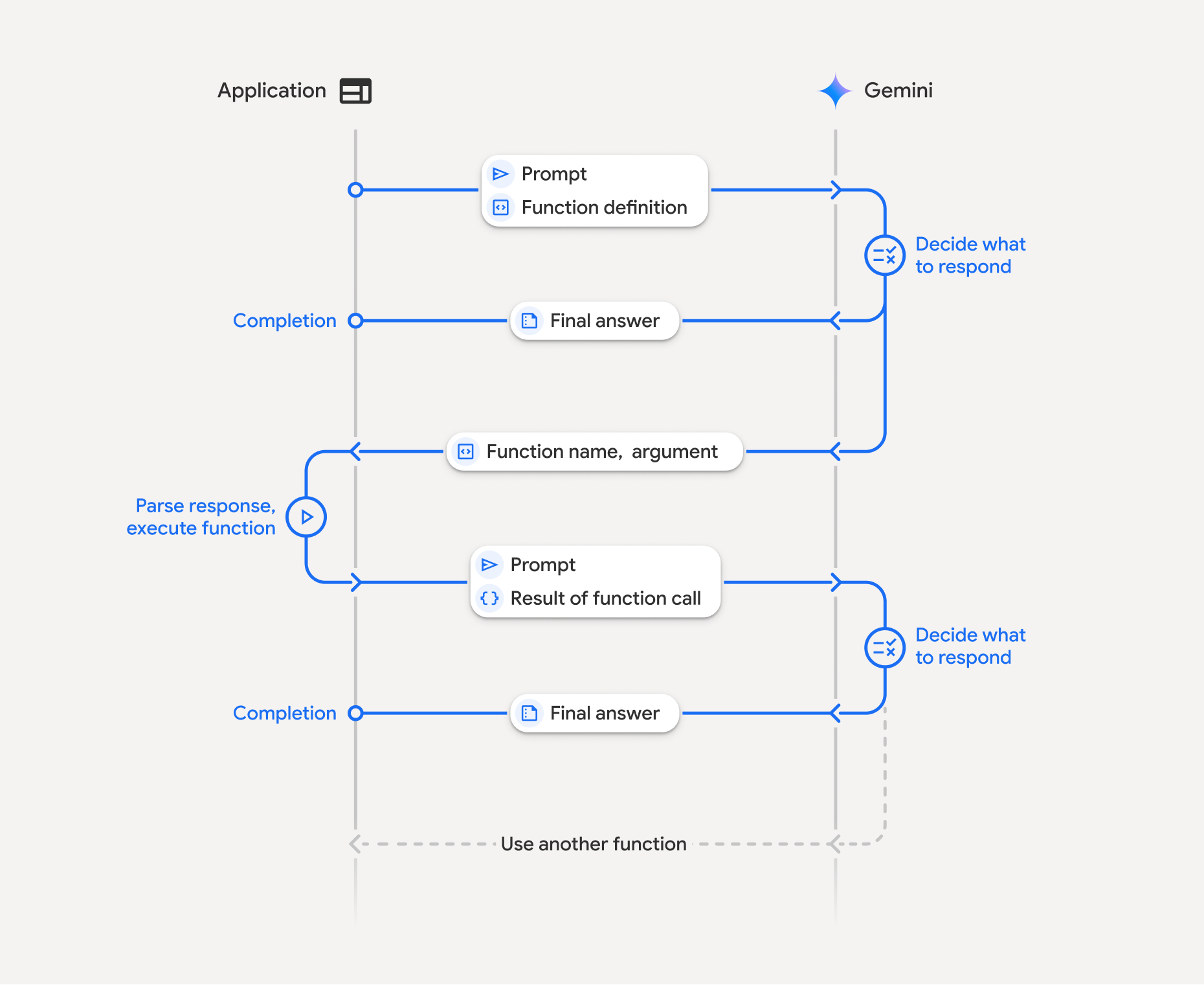
Funktionsaufrufe umfassen eine strukturierte Interaktion zwischen Ihrer Anwendung, dem Modell und externen Funktionen:
- Funktionsdeklaration definieren:Definieren Sie den Namen, die Parameter und den Zweck der Funktion für das Modell.
- LLM mit Funktionsdeklarationen aufrufen:Senden Sie den Nutzer-Prompt zusammen mit den Funktionsdeklarationen an das Modell.
- Funktionscode ausführen (Ihre Verantwortung): Das Modell führt die Funktion nicht selbst aus. Extrahieren Sie den Namen und die Argumente und führen Sie sie in Ihrer Anwendung aus.
- Nutzerfreundliche Antwort erstellen:Senden Sie das Ergebnis zurück an das Modell, um eine endgültige, nutzerfreundliche Antwort zu erhalten.
Dieser Vorgang kann über mehrere Züge hinweg wiederholt werden. Das Modell unterstützt das Aufrufen mehrerer Funktionen in einer einzelnen Runde (paralleler Funktionsaufruf) und in einer Sequenz (zusammengesetzter Funktionsaufruf).
Schritt 1: Funktionsdeklaration definieren
Python
set_light_values_declaration = {
    "type": "function",
    "name": "set_light_values",
    "description": "Sets the brightness and color temperature of a light.",
    "parameters": {
        "type": "object",
        "properties": {
            "brightness": {
                "type": "integer",
                "description": "Light level from 0 to 100",
            },
            "color_temp": {
                "type": "string",
                "enum": ["daylight", "cool", "warm"],
                "description": "Color temperature",
            },
        },
        "required": ["brightness", "color_temp"],
    },
}

def set_light_values(brightness: int, color_temp: str) -> dict:
    """Set the brightness and color temperature of a room light."""
    return {"brightness": brightness, "colorTemperature": color_temp}
JavaScript
const setLightValuesTool = {
  type: 'function',
  name: 'set_light_values',
  description: 'Sets the brightness and color temperature of a light.',
  parameters: {
    type: 'object',
    properties: {
      brightness: { type: 'number', description: 'Light level from 0 to 100' },
      color_temp: { type: 'string', enum: ['daylight', 'cool', 'warm'] },
    },
    required: ['brightness', 'color_temp'],
  },
};

function setLightValues(brightness, color_temp) {
  return { brightness: brightness, colorTemperature: color_temp };
}
Java
import com.google.genai.gaos.models.interactions.Function;
import java.util.Arrays;
import java.util.HashMap;
import java.util.Map;
import java.util.function.BiFunction;

Map<String, Object> brightnessProp = new HashMap<>();
brightnessProp.put("type", "integer");
brightnessProp.put("description", "Light level from 0 to 100");

Map<String, Object> colorTempProp = new HashMap<>();
colorTempProp.put("type", "string");
colorTempProp.put("enum", Arrays.asList("daylight", "cool", "warm"));
colorTempProp.put("description", "Color temperature");

Map<String, Object> properties = new HashMap<>();
properties.put("brightness", brightnessProp);
properties.put("color_temp", colorTempProp);

Map<String, Object> parameters = new HashMap<>();
parameters.put("type", "object");
parameters.put("properties", properties);
parameters.put("required", Arrays.asList("brightness", "color_temp"));

Function setLightValuesDeclaration =
    Function.builder()
        .name("set_light_values")
        .description("Sets the brightness and color temperature of a light.")
        .parameters(parameters)
        .build();

BiFunction<Integer, String, Map<String, Object>> setLightValues =
    (brightness, colorTemp) -> {
      Map<String, Object> result = new HashMap<>();
      result.put("brightness", brightness);
      result.put("colorTemperature", colorTemp);
      return result;
    };
Ok
package main

import "google.golang.org/genai"

var setLightValuesDeclaration = &genai.FunctionDeclaration{
    Name:        "set_light_values",
    Description: "Sets the brightness and color temperature of a light.",
    Parameters: &genai.Schema{
        Type: genai.TypeObject,
        Properties: map[string]*genai.Schema{
            "brightness": {
                Type:        genai.TypeInteger,
                Description: "Light level from 0 to 100",
            },
            "color_temp": {
                Type:        genai.TypeString,
                Enum:        []string{"daylight", "cool", "warm"},
                Description: "Color temperature",
            },
        },
        Required: []string{"brightness", "color_temp"},
    },
}

func setLightValues(brightness int, colorTemp string) map[string]any {
    return map[string]any{"brightness": brightness, "colorTemperature": colorTemp}
}
Schritt 2: Modell mit Funktionsdeklarationen aufrufen
Python
from google import genai

client = genai.Client()

interaction = client.interactions.create(
    model="gemini-3.8-flash",
    input="Turn the lights down to a romantic level",
    tools=[set_light_values_declaration],
)

fc_step = next(s for s in interaction.steps if s.type == "function_call")
print(fc_step)
JavaScript
import { GoogleGenAI } from '@google/genai';

const client = new GoogleGenAI({});

const interaction = await client.interactions.create({
  model: 'gemini-3.8-flash',
  input: 'Turn the lights down to a romantic level',
  tools: [setLightValuesTool],
});

const fcStep = interaction.steps.find(s => s.type === 'function_call');
console.log(fcStep);
Java
import com.google.genai.Client;
import com.google.genai.gaos.models.interactions.CreateModelInteraction;
import com.google.genai.gaos.models.interactions.Function;
import com.google.genai.gaos.models.interactions.FunctionCallStep;
import com.google.genai.gaos.models.interactions.Interaction;
import com.google.genai.gaos.models.interactions.InteractionsInput;
import com.google.genai.gaos.models.interactions.Model;
import com.google.genai.gaos.models.interactions.Step;
import com.google.genai.gaos.models.operations.CreateInteractionRequestBody;
import java.util.Arrays;
import java.util.HashMap;
import java.util.Map;

Client client = new Client();

Map<String, Object> brightnessProp = new HashMap<>();
brightnessProp.put("type", "integer");
brightnessProp.put("description", "Light level from 0 to 100");

Map<String, Object> colorTempProp = new HashMap<>();
colorTempProp.put("type", "string");
colorTempProp.put("enum", Arrays.asList("daylight", "cool", "warm"));
colorTempProp.put("description", "Color temperature");

Map<String, Object> properties = new HashMap<>();
properties.put("brightness", brightnessProp);
properties.put("color_temp", colorTempProp);

Map<String, Object> parameters = new HashMap<>();
parameters.put("type", "object");
parameters.put("properties", properties);
parameters.put("required", Arrays.asList("brightness", "color_temp"));

Function setLightValuesDeclaration =
    Function.builder()
        .name("set_light_values")
        .description("Sets the brightness and color temperature of a light.")
        .parameters(parameters)
        .build();

CreateModelInteraction params =
    CreateModelInteraction.builder()
        .model(Model.of("gemini-3.8-flash"))
        .input(InteractionsInput.of("Turn the lights down to a romantic level"))
        .tools(Arrays.asList(setLightValuesDeclaration))
        .build();

Interaction interaction =
    client.interactions.create(CreateInteractionRequestBody.of(params)).interaction().get();

FunctionCallStep fcStep = null;
if (interaction.steps().isPresent()) {
  for (Step step : interaction.steps().get()) {
    if (step instanceof FunctionCallStep) {
      fcStep = (FunctionCallStep) step;
      break;
    }
  }
}
System.out.println(fcStep);
Ok
ctx := context.Background()
client, err := genai.NewClient(ctx, nil)
if err != nil {
    log.Fatal(err)
}

config := &genai.GenerateContentConfig{
    Tools: []*genai.Tool{
        {FunctionDeclarations: []*genai.FunctionDeclaration{setLightValuesDeclaration}},
    },
}

contents := []*genai.Content{
    genai.NewContentFromText("Turn the lights down to a romantic level", genai.RoleUser),
}

response, err := client.Models.GenerateContent(ctx, "gemini-3.8-flash", contents, config)
if err != nil {
    log.Fatal(err)
}

fmt.Println(response.FunctionCalls()[0])
Das Modell gibt einen function_call-Schritt mit type, name und arguments zurück:
type='function_call'
name='set_light_values'
arguments={'color_temp': 'warm', 'brightness': 25}
Schritt 3: Funktion ausführen
Python
fc_step = next(s for s in interaction.steps if s.type == "function_call")

if fc_step.name == "set_light_values":
    result = set_light_values(**fc_step.arguments)
    print(f"Function execution result: {result}")
JavaScript
const fcStep = interaction.steps.find(s => s.type === 'function_call');

let result;
if (fcStep.name === 'set_light_values') {
  result = setLightValues(fcStep.arguments.brightness, fcStep.arguments.color_temp);
  console.log(`Function execution result: ${JSON.stringify(result)}`);
}
Java
import com.google.genai.Client;
import com.google.genai.gaos.models.interactions.CreateModelInteraction;
import com.google.genai.gaos.models.interactions.Function;
import com.google.genai.gaos.models.interactions.FunctionCallStep;
import com.google.genai.gaos.models.interactions.Interaction;
import com.google.genai.gaos.models.interactions.InteractionsInput;
import com.google.genai.gaos.models.interactions.Model;
import com.google.genai.gaos.models.interactions.Step;
import com.google.genai.gaos.models.operations.CreateInteractionRequestBody;
import java.util.Arrays;
import java.util.Collections;
import java.util.HashMap;
import java.util.Map;
import java.util.function.BiFunction;

Client client = new Client();

Map<String, Object> brightnessProp = new HashMap<>();
brightnessProp.put("type", "integer");
brightnessProp.put("description", "Light level from 0 to 100");

Map<String, Object> colorTempProp = new HashMap<>();
colorTempProp.put("type", "string");
colorTempProp.put("enum", Arrays.asList("daylight", "cool", "warm"));
colorTempProp.put("description", "Color temperature");

Map<String, Object> properties = new HashMap<>();
properties.put("brightness", brightnessProp);
properties.put("color_temp", colorTempProp);

Map<String, Object> parameters = new HashMap<>();
parameters.put("type", "object");
parameters.put("properties", properties);
parameters.put("required", Arrays.asList("brightness", "color_temp"));

Function setLightValuesDeclaration =
    Function.builder()
        .name("set_light_values")
        .description("Sets the brightness and color temperature of a light.")
        .parameters(parameters)
        .build();

BiFunction<Integer, String, Map<String, Object>> setLightValues =
    (brightness, colorTemp) -> {
      Map<String, Object> result = new HashMap<>();
      result.put("brightness", brightness);
      result.put("colorTemperature", colorTemp);
      return result;
    };

CreateModelInteraction params =
    CreateModelInteraction.builder()
        .model(Model.of("gemini-3.8-flash"))
        .input(InteractionsInput.of("Turn the lights down to a romantic level"))
        .tools(Arrays.asList(setLightValuesDeclaration))
        .build();

Interaction interaction =
    client.interactions.create(CreateInteractionRequestBody.of(params)).interaction().get();

if (interaction.steps().isPresent()) {
  for (Step step : interaction.steps().get()) {
    if (step instanceof FunctionCallStep) {
      FunctionCallStep fcStep = (FunctionCallStep) step;
      if ("set_light_values".equals(fcStep.name().orElse(""))) {
        Map<String, Object> args = fcStep.arguments().orElse(Collections.emptyMap());
        int brightness = ((Number) args.getOrDefault("brightness", 25)).intValue();
        String colorTemp = (String) args.getOrDefault("color_temp", "warm");
        Map<String, Object> result = setLightValues.apply(brightness, colorTemp);
        System.out.println("Function execution result: " + result);
      }
    }
  }
}
Ok
toolCall := response.FunctionCalls()[0]

var result map[string]any
if toolCall.Name == "set_light_values" {
    brightness := int(toolCall.Args["brightness"].(float64))
    colorTemp := toolCall.Args["color_temp"].(string)
    result = setLightValues(brightness, colorTemp)
    fmt.Printf("Function execution result: %v\n", result)
}
Schritt 4: Ergebnis an das Modell zurücksenden
Python
final_interaction = client.interactions.create(
    model="gemini-3.8-flash",
    input=[
        {
            "type": "function_result",
            "name": fc_step.name,
            "call_id": fc_step.id,
            "result": [{"type": "text", "text": json.dumps(result)}],
        }
    ],
    tools=[set_light_values_declaration],
    previous_interaction_id=interaction.id,
)

print(final_interaction.output_text)
JavaScript
const finalInteraction = await client.interactions.create({
  model: 'gemini-3.8-flash',
  input: [{
    type: 'function_result',
    name: fcStep.name,
    call_id: fcStep.id,
    result: [{ type: 'text', text: JSON.stringify(result) }]
  }],
  tools: [setLightValuesTool],
  previous_interaction_id: interaction.id,
});

console.log(finalInteraction.output_text);
Java
import com.google.genai.Client;
import com.google.genai.gaos.models.interactions.CreateModelInteraction;
import com.google.genai.gaos.models.interactions.Function;
import com.google.genai.gaos.models.interactions.FunctionCallStep;
import com.google.genai.gaos.models.interactions.FunctionResultStep;
import com.google.genai.gaos.models.interactions.FunctionResultStepResultUnion;
import com.google.genai.gaos.models.interactions.FunctionResultSubcontent;
import com.google.genai.gaos.models.interactions.Interaction;
import com.google.genai.gaos.models.interactions.InteractionsInput;
import com.google.genai.gaos.models.interactions.Model;
import com.google.genai.gaos.models.interactions.Step;
import com.google.genai.gaos.models.interactions.TextContent;
import com.google.genai.gaos.models.operations.CreateInteractionRequestBody;
import java.util.Arrays;
import java.util.HashMap;
import java.util.Map;

Client client = new Client();

Map<String, Object> brightnessProp = new HashMap<>();
brightnessProp.put("type", "integer");
brightnessProp.put("description", "Light level from 0 to 100");

Map<String, Object> colorTempProp = new HashMap<>();
colorTempProp.put("type", "string");
colorTempProp.put("enum", Arrays.asList("daylight", "cool", "warm"));
colorTempProp.put("description", "Color temperature");

Map<String, Object> properties = new HashMap<>();
properties.put("brightness", brightnessProp);
properties.put("color_temp", colorTempProp);

Map<String, Object> parameters = new HashMap<>();
parameters.put("type", "object");
parameters.put("properties", properties);
parameters.put("required", Arrays.asList("brightness", "color_temp"));

Function setLightValuesDeclaration =
    Function.builder()
        .name("set_light_values")
        .description("Sets the brightness and color temperature of a light.")
        .parameters(parameters)
        .build();

CreateModelInteraction params =
    CreateModelInteraction.builder()
        .model(Model.of("gemini-3.8-flash"))
        .input(InteractionsInput.of("Turn the lights down to a romantic level"))
        .tools(Arrays.asList(setLightValuesDeclaration))
        .build();

Interaction interaction =
    client.interactions.create(CreateInteractionRequestBody.of(params)).interaction().get();

FunctionCallStep fcStep = null;
if (interaction.steps().isPresent()) {
  for (Step step : interaction.steps().get()) {
    if (step instanceof FunctionCallStep) {
      fcStep = (FunctionCallStep) step;
      break;
    }
  }
}

if (fcStep != null) {
  String resultJson = "{\"brightness\": 25, \"colorTemperature\": \"warm\"}";
  FunctionResultStep resultStep =
      FunctionResultStep.builder()
          .name(fcStep.name().orElse(""))
          .callId(fcStep.id().orElse(""))
          .result(
              FunctionResultStepResultUnion.of(
                  Arrays.<FunctionResultSubcontent>asList(
                      TextContent.builder().text(resultJson).build())))
          .build();

  CreateModelInteraction finalParams =
      CreateModelInteraction.builder()
          .model(Model.of("gemini-3.8-flash"))
          .previousInteractionId(interaction.id().orElse(""))
          .tools(Arrays.asList(setLightValuesDeclaration))
          .input(InteractionsInput.ofStep(Arrays.<Step>asList(resultStep)))
          .build();

  Interaction finalInteraction =
      client
          .interactions
          .create(CreateInteractionRequestBody.of(finalParams))
          .interaction()
          .get();

  System.out.println(finalInteraction.outputText().orElse(""));
}
Ok
functionResponsePart := &genai.Part{
    FunctionResponse: &genai.FunctionResponse{
        ID:       toolCall.ID,
        Name:     toolCall.Name,
        Response: result,
    },
}

contents = append(contents, response.Candidates[0].Content)
contents = append(contents, &genai.Content{
    Role:  genai.RoleUser,
    Parts: []*genai.Part{functionResponsePart},
})

finalResponse, err := client.Models.GenerateContent(ctx, "gemini-3.8-flash", contents, config)
if err != nil {
    log.Fatal(err)
}

fmt.Println(finalResponse.Text())
Zustandslose Funktionsaufrufe
Sie können Funktionsaufrufe auch im statuslosen Modus verwenden, indem Sie den Unterhaltungsverlauf clientseitig verwalten und store=false festlegen.
Im zustandslosen Modus müssen Sie den vollständigen Verlauf der Unterhaltung im Feld input jeder nachfolgenden Anfrage übergeben. Dieser Verlauf muss Folgendes enthalten:
1. Der erste Schritt user_input.
2. Alle vom Modell generierten Schritte, die in Turn 1 zurückgegeben werden (einschließlich der Schritte thought und function_call), werden genau so zurückgegeben, wie sie empfangen wurden.
3. Der function_result-Schritt, der die Ausgabe Ihrer ausgeführten Funktion enthält.
Python
from google import genai
import json

client = genai.Client()

history = [
    {
        "type": "user_input",
        "content": [{"type": "text", "text": "Turn the lights down to a romantic level"}]
    }
]

interaction = client.interactions.create(
    model="gemini-3.8-flash",
    store=False,
    input=history,
    tools=[set_light_values_declaration],
)

for step in interaction.steps:
    history.append(step.model_dump())

fc_step = next(s for s in interaction.steps if s.type == "function_call")
if fc_step.name == "set_light_values":
    result = set_light_values(**fc_step.arguments)

history.append({
    "type": "function_result",
    "name": fc_step.name,
    "call_id": fc_step.id,
    "result": [{"type": "text", "text": json.dumps(result)}],
})

final_interaction = client.interactions.create(
    model="gemini-3.8-flash",
    store=False,
    input=history,
    tools=[set_light_values_declaration],
)

print(final_interaction.output_text)
JavaScript
import { GoogleGenAI } from "@google/genai";

const client = new GoogleGenAI({});

async function main() {
  const history = [
    {
      type: "user_input",
      content: [{ type: "text", text: "Turn the lights down to a romantic level" }]
    }
  ];

  const interaction = await client.interactions.create({
    model: "gemini-3.8-flash",
    store: false,
    input: history,
    tools: [setLightValuesTool],
  });

  history.push(...interaction.steps);

  const fcStep = interaction.steps.find(s => s.type === 'function_call');
  let result;
  if (fcStep.name === 'set_light_values') {
    result = setLightValues(fcStep.arguments.brightness, fcStep.arguments.color_temp);
  }

  history.push({
    type: 'function_result',
    name: fcStep.name,
    call_id: fcStep.id,
    result: [{ type: 'text', text: JSON.stringify(result) }]
  });

  const finalInteraction = await client.interactions.create({
    model: 'gemini-3.8-flash',
    store: false,
    input: history,
    tools: [setLightValuesTool],
  });

  console.log(finalInteraction.output_text);
}

await main();
Java
import com.google.genai.Client;
import com.google.genai.gaos.models.interactions.CreateModelInteraction;
import com.google.genai.gaos.models.interactions.Function;
import com.google.genai.gaos.models.interactions.FunctionCallStep;
import com.google.genai.gaos.models.interactions.FunctionResultStep;
import com.google.genai.gaos.models.interactions.FunctionResultStepResultUnion;
import com.google.genai.gaos.models.interactions.FunctionResultSubcontent;
import com.google.genai.gaos.models.interactions.Interaction;
import com.google.genai.gaos.models.interactions.InteractionsInput;
import com.google.genai.gaos.models.interactions.Model;
import com.google.genai.gaos.models.interactions.Step;
import com.google.genai.gaos.models.interactions.TextContent;
import com.google.genai.gaos.models.interactions.UserInputStep;
import com.google.genai.gaos.models.operations.CreateInteractionRequestBody;
import java.util.ArrayList;
import java.util.Arrays;
import java.util.HashMap;
import java.util.List;
import java.util.Map;

Client client = new Client();

Map<String, Object> brightnessProp = new HashMap<>();
brightnessProp.put("type", "integer");
brightnessProp.put("description", "Light level from 0 to 100");

Map<String, Object> colorTempProp = new HashMap<>();
colorTempProp.put("type", "string");
colorTempProp.put("enum", Arrays.asList("daylight", "cool", "warm"));
colorTempProp.put("description", "Color temperature");

Map<String, Object> properties = new HashMap<>();
properties.put("brightness", brightnessProp);
properties.put("color_temp", colorTempProp);

Map<String, Object> parameters = new HashMap<>();
parameters.put("type", "object");
parameters.put("properties", properties);
parameters.put("required", Arrays.asList("brightness", "color_temp"));

Function setLightValuesDeclaration =
    Function.builder()
        .name("set_light_values")
        .description("Sets the brightness and color temperature of a light.")
        .parameters(parameters)
        .build();

List<Step> history = new ArrayList<>();
history.add(
    UserInputStep.builder()
        .content(
            Arrays.asList(
                TextContent.builder()
                    .text("Turn the lights down to a romantic level")
                    .build()))
        .build());

CreateModelInteraction params =
    CreateModelInteraction.builder()
        .model(Model.of("gemini-3.8-flash"))
        .store(false)
        .input(InteractionsInput.ofStep(history))
        .tools(Arrays.asList(setLightValuesDeclaration))
        .build();

Interaction interaction =
    client.interactions.create(CreateInteractionRequestBody.of(params)).interaction().get();

FunctionCallStep fcStep = null;
if (interaction.steps().isPresent()) {
  history.addAll(interaction.steps().get());
  for (Step step : interaction.steps().get()) {
    if (step instanceof FunctionCallStep) {
      fcStep = (FunctionCallStep) step;
      break;
    }
  }
}

if (fcStep != null) {
  String resultJson = "{\"brightness\": 25, \"colorTemperature\": \"warm\"}";
  history.add(
      FunctionResultStep.builder()
          .name(fcStep.name().orElse(""))
          .callId(fcStep.id().orElse(""))
          .result(
              FunctionResultStepResultUnion.of(
                  Arrays.<FunctionResultSubcontent>asList(
                      TextContent.builder().text(resultJson).build())))
          .build());

  CreateModelInteraction finalParams =
      CreateModelInteraction.builder()
          .model(Model.of("gemini-3.8-flash"))
          .store(false)
          .input(InteractionsInput.ofStep(history))
          .tools(Arrays.asList(setLightValuesDeclaration))
          .build();

  Interaction finalInteraction =
      client
          .interactions
          .create(CreateInteractionRequestBody.of(finalParams))
          .interaction()
          .get();

  System.out.println(finalInteraction.outputText().orElse(""));
}
Go
ctx := context.Background()
client, err := genai.NewClient(ctx, nil)
if err != nil {
    log.Fatal(err)
}

config := &genai.GenerateContentConfig{
    Tools: []*genai.Tool{
        {FunctionDeclarations: []*genai.FunctionDeclaration{setLightValuesDeclaration}},
    },
}

history := []*genai.Content{
    genai.NewContentFromText("Turn the lights down to a romantic level", genai.RoleUser),
}

response, err := client.Models.GenerateContent(ctx, "gemini-3.8-flash", history, config)
if err != nil {
    log.Fatal(err)
}

toolCall := response.FunctionCalls()[0]
brightness := int(toolCall.Args["brightness"].(float64))
colorTemp := toolCall.Args["color_temp"].(string)
result := setLightValues(brightness, colorTemp)

history = append(history, response.Candidates[0].Content)
history = append(history, &genai.Content{
    Role: genai.RoleUser,
    Parts: []*genai.Part{
        {
            FunctionResponse: &genai.FunctionResponse{
                ID:       toolCall.ID,
                Name:     toolCall.Name,
                Response: result,
            },
        },
    },
})

finalResponse, err := client.Models.GenerateContent(ctx, "gemini-3.8-flash", history, config)
if err != nil {
    log.Fatal(err)
}

fmt.Println(finalResponse.Text())
REST
# Turn 1: Send request with tools and store: false
RESPONSE1=$(curl -s -X POST "https://generativelanguage.googleapis.com/v1beta/interactions" \
  -H "x-goog-api-key: $GEMINI_API_KEY" \
  -H 'Content-Type: application/json' \
  -d '{
    "model": "gemini-3.8-flash",
    "store": false,
    "input": [
      {
        "type": "user_input",
        "content": "Turn the lights down to a romantic level"
      }
    ],
    "tools": [{
      "type": "function",
      "name": "set_light_values",
      "description": "Sets the brightness and color temperature of a light.",
      "parameters": {
        "type": "object",
        "properties": {
          "brightness": {"type": "integer", "description": "Light level from 0 to 100"},
          "color_temp": {"type": "string", "enum": ["daylight", "cool", "warm"]}
        },
        "required": ["brightness", "color_temp"]
      }
    }]
  }')

# Extract model steps (thought, function_call)
MODEL_STEPS=$(echo "$RESPONSE1" | jq '.steps')

# Extract function call details to execute
FC_NAME=$(echo "$RESPONSE1" | jq -r '.steps[] | select(.type=="function_call") | .name')
FC_ID=$(echo "$RESPONSE1" | jq -r '.steps[] | select(.type=="function_call") | .id')

# Assume local execution returns: {"brightness": 25, "colorTemperature": "warm"}
RESULT="{\"brightness\": 25, \"colorTemperature\": \"warm\"}"

# Reconstruct history for Turn 2
HISTORY=$(jq -n \
  --argjson first_input '[{"type": "user_input", "content": "Turn the lights down to a romantic level"}]' \
  --argjson model_steps "$MODEL_STEPS" \
  --arg fc_name "$FC_NAME" \
  --arg fc_id "$FC_ID" \
  --arg result "$RESULT" \
  '$first_input + $model_steps + [{"type": "function_result", "name": $fc_name, "call_id": $fc_id, "result": [{"type": "text", "text": $result}]}]')

# Turn 2: Send the full history
curl -X POST "https://generativelanguage.googleapis.com/v1beta/interactions" \
  -H "x-goog-api-key: $GEMINI_API_KEY" \
  -H 'Content-Type: application/json' \
  -d "{
    \"model\": \"gemini-3.8-flash\",
    \"store\": false,
    \"input\": $HISTORY,
    \"tools\": [{
      \"type\": \"function\",
      \"name\": \"set_light_values\",
      \"description\": \"Sets the brightness and color temperature of a light.\",
      \"parameters\": {
        \"type\": \"object\",
        \"properties\": {
          \"brightness\": {\"type\": \"integer\"},
          \"color_temp\": {\"type\": \"string\"}
        },
        \"required\": [\"brightness\", \"color_temp\"]
      }
    }]
  }"
Funktionsdeklarationen
Eine Funktionsdeklaration wird als Tool übergeben und enthält Folgendes:
type(String): Muss für benutzerdefinierte Funktionen"function"sein.name(String): Eindeutiger Funktionsname (Unterstriche oder CamelCase verwenden).description(String): Klare Erläuterung des Zwecks der Funktion.parameters(Objekt): Eingabeparameter, die die Funktion erwartet.type(String): Gesamtdatentyp, z. B.object.properties(Objekt): Einzelne Parameter mit Typ und Beschreibung.required(Array): Namen der Pflichtparameter.
Funktionsaufrufe mit Thinking-Modellen
Die Modelle der Gemini 3-Serie verwenden einen internen Denkprozess, der Funktionsaufrufe verbessert. Die SDKs verarbeiten Gedankensignaturen automatisch für Sie.
Parallele Funktionsaufrufe
Rufen Sie mehrere Funktionen gleichzeitig auf, wenn sie unabhängig voneinander sind:
Python
power_disco_ball = {"type": "function", "name": "power_disco_ball", "description": "Powers the disco ball.",
    "parameters": {"type": "object", "properties": {"power": {"type": "boolean"}}, "required": ["power"]}}
start_music = {"type": "function", "name": "start_music", "description": "Play music.",
    "parameters": {"type": "object", "properties": {"energetic": {"type": "boolean"}, "loud": {"type": "boolean"}}, "required": ["energetic", "loud"]}}
dim_lights = {"type": "function", "name": "dim_lights", "description": "Dim the lights.",
    "parameters": {"type": "object", "properties": {"brightness": {"type": "number"}}, "required": ["brightness"]}}

client = genai.Client()

interaction = client.interactions.create(
    model="gemini-3.8-flash",
    input="Turn this place into a party!",
    tools=[power_disco_ball, start_music, dim_lights],
    generation_config={"tool_choice": "any"},
)

for step in interaction.steps:
    if step.type == "function_call":
        args = ", ".join(f"{key}={val}" for key, val in step.arguments.items())
        print(f"{step.name}({args})")
JavaScript
const powerDiscoBall = { type: 'function', name: 'power_disco_ball', description: 'Powers the disco ball.',
  parameters: { type: 'object', properties: { power: { type: 'boolean' } }, required: ['power'] } };
const startMusic = { type: 'function', name: 'start_music', description: 'Play music.',
  parameters: { type: 'object', properties: { energetic: { type: 'boolean' }, loud: { type: 'boolean' } }, required: ['energetic', 'loud'] } };
const dimLights = { type: 'function', name: 'dim_lights', description: 'Dim the lights.',
  parameters: { type: 'object', properties: { brightness: { type: 'number' } }, required: ['brightness'] } };

const interaction = await client.interactions.create({
  model: 'gemini-3.8-flash',
  input: 'Turn this place into a party!',
  tools: [powerDiscoBall, startMusic, dimLights],
  generation_config: { tool_choice: 'any' },
});

for (const step of interaction.steps) {
  if (step.type === 'function_call') {
    console.log(`${step.name}(${JSON.stringify(step.arguments)})`);
  }
}
Java
import com.google.genai.Client;
import com.google.genai.gaos.models.interactions.CreateModelInteraction;
import com.google.genai.gaos.models.interactions.Function;
import com.google.genai.gaos.models.interactions.FunctionCallStep;
import com.google.genai.gaos.models.interactions.GenerationConfig;
import com.google.genai.gaos.models.interactions.Interaction;
import com.google.genai.gaos.models.interactions.InteractionsInput;
import com.google.genai.gaos.models.interactions.Model;
import com.google.genai.gaos.models.interactions.Step;
import com.google.genai.gaos.models.interactions.ToolChoice;
import com.google.genai.gaos.models.interactions.ToolChoiceType;
import com.google.genai.gaos.models.operations.CreateInteractionRequestBody;
import java.util.Arrays;
import java.util.Collections;
import java.util.HashMap;
import java.util.Map;

Client client = new Client();

Map<String, Object> discoParams = new HashMap<>();
discoParams.put("type", "object");
discoParams.put(
    "properties", Collections.singletonMap("power", Collections.singletonMap("type", "boolean")));
discoParams.put("required", Arrays.asList("power"));

Function powerDiscoBall =
    Function.builder()
        .name("power_disco_ball")
        .description("Powers the disco ball.")
        .parameters(discoParams)
        .build();

Map<String, Object> musicProps = new HashMap<>();
musicProps.put("energetic", Collections.singletonMap("type", "boolean"));
musicProps.put("loud", Collections.singletonMap("type", "boolean"));
Map<String, Object> musicParams = new HashMap<>();
musicParams.put("type", "object");
musicParams.put("properties", musicProps);
musicParams.put("required", Arrays.asList("energetic", "loud"));

Function startMusic =
    Function.builder()
        .name("start_music")
        .description("Play music.")
        .parameters(musicParams)
        .build();

Map<String, Object> lightsParams = new HashMap<>();
lightsParams.put("type", "object");
lightsParams.put(
    "properties",
    Collections.singletonMap("brightness", Collections.singletonMap("type", "number")));
lightsParams.put("required", Arrays.asList("brightness"));

Function dimLights =
    Function.builder()
        .name("dim_lights")
        .description("Dim the lights.")
        .parameters(lightsParams)
        .build();

CreateModelInteraction params =
    CreateModelInteraction.builder()
        .model(Model.of("gemini-3.8-flash"))
        .input(InteractionsInput.of("Turn this place into a party!"))
        .tools(Arrays.asList(powerDiscoBall, startMusic, dimLights))
        .generationConfig(
            GenerationConfig.builder().toolChoice(ToolChoice.of(ToolChoiceType.ANY)).build())
        .build();

Interaction interaction =
    client.interactions.create(CreateInteractionRequestBody.of(params)).interaction().get();

if (interaction.steps().isPresent()) {
  for (Step step : interaction.steps().get()) {
    if (step instanceof FunctionCallStep) {
      FunctionCallStep fc = (FunctionCallStep) step;
      System.out.println(fc.name().orElse("") + "(" + fc.arguments().orElse(null) + ")");
    }
  }
}
Go
package main

import (
    "context"
    "fmt"
    "log"

    "google.golang.org/genai"
)

func main() {
    ctx := context.Background()
    client, err := genai.NewClient(ctx, nil)
    if err != nil {
        log.Fatal(err)
    }

    powerDiscoBall := &genai.FunctionDeclaration{
        Name:        "power_disco_ball",
        Description: "Powers the disco ball.",
        Parameters: &genai.Schema{
            Type: genai.TypeObject,
            Properties: map[string]*genai.Schema{
                "power": {Type: genai.TypeBoolean},
            },
            Required: []string{"power"},
        },
    }
    startMusic := &genai.FunctionDeclaration{
        Name:        "start_music",
        Description: "Play music.",
        Parameters: &genai.Schema{
            Type: genai.TypeObject,
            Properties: map[string]*genai.Schema{
                "energetic": {Type: genai.TypeBoolean},
                "loud":      {Type: genai.TypeBoolean},
            },
            Required: []string{"energetic", "loud"},
        },
    }
    dimLights := &genai.FunctionDeclaration{
        Name:        "dim_lights",
        Description: "Dim the lights.",
        Parameters: &genai.Schema{
            Type: genai.TypeObject,
            Properties: map[string]*genai.Schema{
                "brightness": {Type: genai.TypeNumber},
            },
            Required: []string{"brightness"},
        },
    }

    config := &genai.GenerateContentConfig{
        Tools: []*genai.Tool{
            {FunctionDeclarations: []*genai.FunctionDeclaration{powerDiscoBall, startMusic, dimLights}},
        },
        ToolConfig: &genai.ToolConfig{
            FunctionCallingConfig: &genai.FunctionCallingConfig{
                Mode: genai.FunctionCallingConfigModeAny,
            },
        },
    }

    response, err := client.Models.GenerateContent(
        ctx,
        "gemini-3.8-flash",
        genai.Text("Turn this place into a party!"),
        config,
    )
    if err != nil {
        log.Fatal(err)
    }

    for _, fn := range response.FunctionCalls() {
        fmt.Printf("%s(%v)\n", fn.Name, fn.Args)
    }
}
REST
curl -X POST "https://generativelanguage.googleapis.com/v1beta/interactions" \
  -H "x-goog-api-key: $GEMINI_API_KEY" \
  -H 'Content-Type: application/json' \
  -d '{
    "model": "gemini-3.8-flash",
    "input": "Turn this place into a party!",
    "tools": [
      {
        "type": "function",
        "name": "power_disco_ball",
        "description": "Powers the disco ball.",
        "parameters": {
          "type": "object",
          "properties": {
            "power": {"type": "boolean"}
          },
          "required": ["power"]
        }
      },
      {
        "type": "function",
        "name": "start_music",
        "description": "Play music.",
        "parameters": {
          "type": "object",
          "properties": {
            "energetic": {"type": "boolean"},
            "loud": {"type": "boolean"}
          },
          "required": ["energetic", "loud"]
        }
      },
      {
        "type": "function",
        "name": "dim_lights",
        "description": "Dim the lights.",
        "parameters": {
          "type": "object",
          "properties": {
            "brightness": {"type": "number"}
          },
          "required": ["brightness"]
        }
      }
    ]
  }'
Zusammengesetzte Funktionsaufrufe
Verketten Sie mehrere Funktionsaufrufe für komplexe Anfragen (z.B. zuerst den Standort abrufen und dann das Wetter für diesen Standort).
Python
get_weather_forecast_declaration = {
    "type": "function",
    "name": "get_weather_forecast",
    "description": "Gets the current weather temperature for a given location.",
    "parameters": {
        "type": "object",
        "properties": {
            "location": {"type": "string", "description": "The location"},
        },
        "required": ["location"],
    },
}

set_thermostat_temperature_declaration = {
    "type": "function",
    "name": "set_thermostat_temperature",
    "description": "Sets the thermostat to a desired temperature.",
    "parameters": {
        "type": "object",
        "properties": {
            "temperature": {
                "type": "integer",
                "description": "The temperature in Celsius",
            },
        },
        "required": ["temperature"],
    },
}

client = genai.Client()

interaction = client.interactions.create(
    model="gemini-3.8-flash",
    input="If it's warmer than 20°C in London, set the thermostat to 20°C, otherwise 18°C.",
    tools=[
        get_weather_forecast_declaration,
        set_thermostat_temperature_declaration,
    ],
)

for step in interaction.steps:
    if step.type == "function_call":
        print(f"Function to call: {step.name}")
        print(f"Arguments: {step.arguments}")
    elif hasattr(step, "content") and step.content:
         for part in step.content:
             if hasattr(part, "text"):
                 print(part.text)
JavaScript
import { GoogleGenAI } from '@google/genai';

const client = new GoogleGenAI({});

const getWeatherForecastTool = {
  type: 'function',
  name: 'get_weather_forecast',
  description: 'Gets the current weather temperature for a given location.',
  parameters: {
    type: 'object',
    properties: {
      location: { type: 'string', description: 'The location' },
    },
    required: ['location'],
  },
};

const setThermostatTemperatureTool = {
  type: 'function',
  name: 'set_thermostat_temperature',
  description: 'Sets the thermostat to a desired temperature.',
  parameters: {
    type: 'object',
    properties: {
      temperature: {
        type: 'integer',
        description: 'The temperature in Celsius',
      },
    },
    required: ['temperature'],
  },
};

const interaction = await client.interactions.create({
  model: 'gemini-3.8-flash',
  input: "If it's warmer than 20°C in London, set the thermostat to 20°C, otherwise 18°C.",
  tools: [
    getWeatherForecastTool,
    setThermostatTemperatureTool,
  ],
});

for (const step of interaction.steps) {
  if (step.type === 'function_call') {
    console.log(`Function to call: ${step.name}`);
    console.log(`Arguments: ${JSON.stringify(step.arguments)}`);
  } else if (step.content) {
    for (const part of step.content) {
      if (part.text) {
        console.log(part.text);
      }
    }
  }
}
Java
import com.google.genai.Client;
import com.google.genai.gaos.models.interactions.Content;
import com.google.genai.gaos.models.interactions.CreateModelInteraction;
import com.google.genai.gaos.models.interactions.Function;
import com.google.genai.gaos.models.interactions.FunctionCallStep;
import com.google.genai.gaos.models.interactions.Interaction;
import com.google.genai.gaos.models.interactions.InteractionsInput;
import com.google.genai.gaos.models.interactions.Model;
import com.google.genai.gaos.models.interactions.ModelOutputStep;
import com.google.genai.gaos.models.interactions.Step;
import com.google.genai.gaos.models.interactions.TextContent;
import com.google.genai.gaos.models.operations.CreateInteractionRequestBody;
import java.util.Arrays;
import java.util.HashMap;
import java.util.Map;

Client client = new Client();

Map<String, Object> locationProp = new HashMap<>();
locationProp.put("type", "string");
locationProp.put("description", "The location");

Map<String, Object> weatherProps = new HashMap<>();
weatherProps.put("location", locationProp);

Map<String, Object> weatherParams = new HashMap<>();
weatherParams.put("type", "object");
weatherParams.put("properties", weatherProps);
weatherParams.put("required", Arrays.asList("location"));

Function getWeatherForecastDeclaration =
    Function.builder()
        .name("get_weather_forecast")
        .description("Gets the current weather temperature for a given location.")
        .parameters(weatherParams)
        .build();

Map<String, Object> tempProp = new HashMap<>();
tempProp.put("type", "integer");
tempProp.put("description", "The temperature in Celsius");

Map<String, Object> thermostatProps = new HashMap<>();
thermostatProps.put("temperature", tempProp);

Map<String, Object> thermostatParams = new HashMap<>();
thermostatParams.put("type", "object");
thermostatParams.put("properties", thermostatProps);
thermostatParams.put("required", Arrays.asList("temperature"));

Function setThermostatTemperatureDeclaration =
    Function.builder()
        .name("set_thermostat_temperature")
        .description("Sets the thermostat to a desired temperature.")
        .parameters(thermostatParams)
        .build();

CreateModelInteraction params =
    CreateModelInteraction.builder()
        .model(Model.of("gemini-3.8-flash"))
        .input(
            InteractionsInput.of(
                "If it's warmer than 20°C in London, set the thermostat to 20°C, otherwise 18°C."))
        .tools(Arrays.asList(getWeatherForecastDeclaration, setThermostatTemperatureDeclaration))
        .build();

Interaction interaction =
    client.interactions.create(CreateInteractionRequestBody.of(params)).interaction().get();

if (interaction.steps().isPresent()) {
  for (Step step : interaction.steps().get()) {
    if (step instanceof FunctionCallStep) {
      FunctionCallStep fc = (FunctionCallStep) step;
      System.out.println("Function to call: " + fc.name().orElse(""));
      System.out.println("Arguments: " + fc.arguments().orElse(null));
    } else if (step instanceof ModelOutputStep) {
      ModelOutputStep outputStep = (ModelOutputStep) step;
      if (outputStep.content().isPresent()) {
        for (Content part : outputStep.content().get()) {
          if (part instanceof TextContent) {
            System.out.println(((TextContent) part).text().orElse(""));
          }
        }
      }
    }
  }
}
Go
package main

import (
    "context"
    "fmt"
    "log"

    "google.golang.org/genai"
)

func main() {
    ctx := context.Background()
    client, err := genai.NewClient(ctx, nil)
    if err != nil {
        log.Fatal(err)
    }

    getWeatherForecastDecl := &genai.FunctionDeclaration{
        Name:        "get_weather_forecast",
        Description: "Gets the current weather temperature for a given location.",
        Parameters: &genai.Schema{
            Type: genai.TypeObject,
            Properties: map[string]*genai.Schema{
                "location": {Type: genai.TypeString, Description: "The location"},
            },
            Required: []string{"location"},
        },
    }

    setThermostatTemperatureDecl := &genai.FunctionDeclaration{
        Name:        "set_thermostat_temperature",
        Description: "Sets the thermostat to a desired temperature.",
        Parameters: &genai.Schema{
            Type: genai.TypeObject,
            Properties: map[string]*genai.Schema{
                "temperature": {Type: genai.TypeInteger, Description: "The temperature in Celsius"},
            },
            Required: []string{"temperature"},
        },
    }

    config := &genai.GenerateContentConfig{
        Tools: []*genai.Tool{
            {FunctionDeclarations: []*genai.FunctionDeclaration{getWeatherForecastDecl, setThermostatTemperatureDecl}},
        },
    }

    response, err := client.Models.GenerateContent(
        ctx,
        "gemini-3.8-flash",
        genai.Text("If it's warmer than 20°C in London, set the thermostat to 20°C, otherwise 18°C."),
        config,
    )
    if err != nil {
        log.Fatal(err)
    }

    for _, fn := range response.FunctionCalls() {
        fmt.Printf("Function to call: %s\n", fn.Name)
        fmt.Printf("Arguments: %v\n", fn.Args)
    }
}
REST
curl -X POST "https://generativelanguage.googleapis.com/v1beta/interactions" \
  -H "x-goog-api-key: $GEMINI_API_KEY" \
  -H 'Content-Type: application/json' \
  -d '{
    "model": "gemini-3.8-flash",
    "input": "If it'\''s warmer than 20°C in London, set the thermostat to 20°C, otherwise 18°C.",
    "tools": [
      {
        "type": "function",
        "name": "get_weather_forecast",
        "description": "Gets the current weather temperature for a given location.",
        "parameters": {
          "type": "object",
          "properties": {
            "location": {"type": "string"}
          },
          "required": ["location"]
        }
      },
      {
        "type": "function",
        "name": "set_thermostat_temperature",
        "description": "Sets the thermostat to a desired temperature.",
        "parameters": {
          "type": "object",
          "properties": {
            "temperature": {"type": "integer"}
          },
          "required": ["temperature"]
        }
      }
    ]
  }'
Modi für Funktionsaufrufe
Mit tool_choice in generation_config können Sie festlegen, wie das Modell Tools verwendet:
auto(Standard): Das Modell entscheidet, ob eine Funktion aufgerufen oder direkt geantwortet werden soll.any: Das Modell ist darauf beschränkt, immer einen Funktionsaufruf vorherzusagen.none: Das Modell darf keine Funktionsaufrufe ausführen.validated: Das Modell sorgt für die Einhaltung des Funktionsschemas.
Python
generation_config = {
    "tool_choice": {
        "allowed_tools": {
            "mode": "any",
            "tools": ["get_current_temperature"]
        }
    }
}
JavaScript
const generation_config = {
  tool_choice: {
    allowed_tools: {
      mode: 'any',
      tools: ['get_current_temperature']
    }
  }
};
Java
import com.google.genai.gaos.models.interactions.AllowedTools;
import com.google.genai.gaos.models.interactions.GenerationConfig;
import com.google.genai.gaos.models.interactions.ToolChoice;
import com.google.genai.gaos.models.interactions.ToolChoiceConfig;
import com.google.genai.gaos.models.interactions.ToolChoiceType;
import java.util.Arrays;

GenerationConfig generationConfig =
    GenerationConfig.builder()
        .toolChoice(
            ToolChoice.of(
                ToolChoiceConfig.builder()
                    .allowedTools(
                        AllowedTools.builder()
                            .mode(ToolChoiceType.ANY)
                            .tools(Arrays.asList("get_current_temperature"))
                            .build())
                    .build()))
        .build();
Go
// Configure function calling mode
toolConfig := &genai.ToolConfig{
    FunctionCallingConfig: &genai.FunctionCallingConfig{
        Mode:                 genai.FunctionCallingConfigModeAny,
        AllowedFunctionNames: []string{"get_current_temperature"},
    },
}

// Create the generation config
config := &genai.GenerateContentConfig{
    Tools:      tools, // not defined here.
    ToolConfig: toolConfig,
}
REST
curl -X POST "https://generativelanguage.googleapis.com/v1beta/interactions" \
  -H "x-goog-api-key: $GEMINI_API_KEY" \
  -H 'Content-Type: application/json' \
  -d '{
    "model": "gemini-3.8-flash",
    "input": "What is the temperature in Boston?",
    "tools": [{
      "type": "function",
      "name": "get_current_temperature",
      "description": "Gets the current temperature for a given location.",
      "parameters": {
        "type": "object",
        "properties": {
          "location": {"type": "string"}
        },
        "required": ["location"]
      }
    }],
    "generation_config": {
      "tool_choice": {
        "allowed_tools": {
          "mode": "any",
          "tools": ["get_current_temperature"]
        }
      }
    }
  }'
Verwendung von mehreren Tools
Sie können mehrere Tools aktivieren und integrierte Tools mit Funktionsaufrufen in derselben Anfrage kombinieren. Gemini 3-Modelle können integrierte Tools mit Funktionsaufrufen in Interaktionen kombinieren. Wenn Sie previous_interaction_id übergeben, wird der integrierte Tool-Kontext automatisch weitergegeben.
Python
from google import genai
import json

client = genai.Client()

get_weather = {
    "type": "function",
    "name": "get_weather",
    "description": "Gets the weather for a requested city.",
    "parameters": {
        "type": "object",
        "properties": {
            "city": {
                "type": "string",
                "description": "The city and state, e.g. Utqiaġvik, Alaska",
            },
        },
        "required": ["city"],
    },
}

tools = [
    {"type": "google_search"},
    get_weather
]

interaction = client.interactions.create(
    model="gemini-3.8-flash",
    input="What is the northernmost city in the United States? What's the weather like there today?",
    tools=tools
)

for step in interaction.steps:
    if step.type == "function_call":
        print(f"Function call: {step.name} (ID: {step.id})")
        result = {"response": "Very cold. 22 degrees Fahrenheit."}
        interaction_2 = client.interactions.create(
            model="gemini-3.8-flash",
            previous_interaction_id=interaction.id,
            tools=tools,
            input=[{
                "type": "function_result",
                "name": step.name,
                "call_id": step.id,
                "result": [{"type": "text", "text": json.dumps(result)}]
            }]
        )

        print(interaction_2.output_text)
JavaScript
import { GoogleGenAI } from '@google/genai';

const client = new GoogleGenAI({});

const weatherTool = {
  type: 'function',
  name: 'get_weather',
  description: 'Gets the weather for a given location.',
  parameters: {
    type: 'object',
    properties: {
      location: {
        type: 'string',
        description: 'The city and state, e.g. San Francisco, CA',
      },
    },
    required: ['location'],
  },
};

const tools = [
  { type: 'google_search' }, // Built-in tool
  weatherTool,
];

const interaction = await client.interactions.create({
  model: 'gemini-3.8-flash',
  input: "What is the northernmost city in the United States? What's the weather like there today?",
  tools: tools,
});

for (const step of interaction.steps) {
  if (step.type === 'function_call') {
    console.log(`Function call: ${step.name} (ID: ${step.id})`);
    const result = { response: 'Very cold. 22 degrees Fahrenheit.' };
    const interaction_2 = await client.interactions.create({
      model: 'gemini-3.8-flash',
      previous_interaction_id: interaction.id,
      tools: tools,
      input: [
        {
          type: 'function_result',
          name: step.name,
          call_id: step.id,
          result: [{ type: 'text', text: JSON.stringify(result) }],
        },
      ],
    });

    console.log(interaction_2.output_text);
  }
}
Java
import com.google.genai.Client;
import com.google.genai.gaos.models.interactions.CreateModelInteraction;
import com.google.genai.gaos.models.interactions.Function;
import com.google.genai.gaos.models.interactions.FunctionCallStep;
import com.google.genai.gaos.models.interactions.FunctionResultStep;
import com.google.genai.gaos.models.interactions.FunctionResultStepResultUnion;
import com.google.genai.gaos.models.interactions.FunctionResultSubcontent;
import com.google.genai.gaos.models.interactions.GoogleSearch;
import com.google.genai.gaos.models.interactions.Interaction;
import com.google.genai.gaos.models.interactions.InteractionsInput;
import com.google.genai.gaos.models.interactions.Model;
import com.google.genai.gaos.models.interactions.Step;
import com.google.genai.gaos.models.interactions.TextContent;
import com.google.genai.gaos.models.interactions.Tool;
import com.google.genai.gaos.models.operations.CreateInteractionRequestBody;
import java.util.Arrays;
import java.util.HashMap;
import java.util.List;
import java.util.Map;

Client client = new Client();

Map<String, Object> cityProp = new HashMap<>();
cityProp.put("type", "string");
cityProp.put("description", "The city and state, e.g. Utqiaġvik, Alaska");

Map<String, Object> properties = new HashMap<>();
properties.put("city", cityProp);

Map<String, Object> parameters = new HashMap<>();
parameters.put("type", "object");
parameters.put("properties", properties);
parameters.put("required", Arrays.asList("city"));

Function getWeather =
    Function.builder()
        .name("get_weather")
        .description("Gets the weather for a requested city.")
        .parameters(parameters)
        .build();

List<Tool> tools = Arrays.asList(GoogleSearch.builder().build(), getWeather);

CreateModelInteraction params =
    CreateModelInteraction.builder()
        .model(Model.of("gemini-3.8-flash"))
        .input(
            InteractionsInput.of(
                "What is the northernmost city in the United States? What's the weather like there today?"))
        .tools(tools)
        .build();

Interaction interaction =
    client.interactions.create(CreateInteractionRequestBody.of(params)).interaction().get();

if (interaction.steps().isPresent()) {
  for (Step step : interaction.steps().get()) {
    if (step instanceof FunctionCallStep) {
      FunctionCallStep fcStep = (FunctionCallStep) step;
      System.out.printf(
          "Function call: %s (ID: %s)%n", fcStep.name().orElse(""), fcStep.id().orElse(""));
      String resultJson = "{\"response\": \"Very cold. 22 degrees Fahrenheit.\"}";

      FunctionResultStep resultStep =
          FunctionResultStep.builder()
              .name(fcStep.name().orElse(""))
              .callId(fcStep.id().orElse(""))
              .result(
                  FunctionResultStepResultUnion.of(
                      Arrays.<FunctionResultSubcontent>asList(
                          TextContent.builder().text(resultJson).build())))
              .build();

      CreateModelInteraction params2 =
          CreateModelInteraction.builder()
              .model(Model.of("gemini-3.8-flash"))
              .previousInteractionId(interaction.id().orElse(""))
              .tools(tools)
              .input(InteractionsInput.ofStep(Arrays.<Step>asList(resultStep)))
              .build();

      Interaction interaction2 =
          client
              .interactions
              .create(CreateInteractionRequestBody.of(params2))
              .interaction()
              .get();

      System.out.println(interaction2.outputText().orElse(""));
    }
  }
}
Go
package main

import (
    "context"
    "fmt"
    "log"

    "google.golang.org/genai"
)

func main() {
    ctx := context.Background()
    client, err := genai.NewClient(ctx, nil)
    if err != nil {
        log.Fatal(err)
    }

    getWeather := &genai.FunctionDeclaration{
        Name:        "get_weather",
        Description: "Gets the weather for a given location.",
        Parameters: &genai.Schema{
            Type: genai.TypeObject,
            Properties: map[string]*genai.Schema{
                "location": {
                    Type:        genai.TypeString,
                    Description: "The city and state, e.g. San Francisco, CA",
                },
            },
            Required: []string{"location"},
        },
    }

    tools := []*genai.Tool{
        {GoogleSearch: &genai.GoogleSearch{}},
        {FunctionDeclarations: []*genai.FunctionDeclaration{getWeather}},
    }

    config := &genai.GenerateContentConfig{
        Tools: tools,
    }

    prompt := "What is the northernmost city in the United States? What's the weather like there today?"
    response1, err := client.Models.GenerateContent(ctx, "gemini-3.8-flash", genai.Text(prompt), config)
    if err != nil {
        log.Fatal(err)
    }

    toolCall := response1.FunctionCalls()[0]
    fmt.Printf("Function call: %s (ID: %s)\n", toolCall.Name, toolCall.ID)

    history := []*genai.Content{
        genai.NewContentFromText(prompt, genai.RoleUser),
        response1.Candidates[0].Content,
        {
            Role: genai.RoleUser,
            Parts: []*genai.Part{
                {
                    FunctionResponse: &genai.FunctionResponse{
                        ID:       toolCall.ID,
                        Name:     toolCall.Name,
                        Response: map[string]any{"response": "Very cold. 22 degrees Fahrenheit."},
                    },
                },
            },
        },
    }

    response2, err := client.Models.GenerateContent(ctx, "gemini-3.8-flash", history, config)
    if err != nil {
        log.Fatal(err)
    }

    fmt.Println(response2.Text())
}
REST
# Turn 1: Send request with built-in google_search tool and custom weather tool
curl -X POST "https://generativelanguage.googleapis.com/v1beta/interactions" \
  -H "x-goog-api-key: $GEMINI_API_KEY" \
  -H 'Content-Type: application/json' \
  -d '{
    "model": "gemini-3.8-flash",
    "input": "What is the northernmost city in the United States? What'\''s the weather like there today?",
    "tools": [
      {"type": "google_search"},
      {
        "type": "function",
        "name": "get_weather",
        "description": "Gets the weather for a given location.",
        "parameters": {
          "type": "object",
          "properties": {
            "location": {"type": "string", "description": "The city and state, e.g. San Francisco, CA"}
          },
          "required": ["location"]
        }
      }
    ]
  }'

# Turn 2: Provide function result and pass previous_interaction_id
curl -X POST "https://generativelanguage.googleapis.com/v1beta/interactions" \
  -H "x-goog-api-key: $GEMINI_API_KEY" \
  -H 'Content-Type: application/json' \
  -d '{
    "model": "gemini-3.8-flash",
    "previous_interaction_id": "INTERACTION_ID",
    "tools": [
      {"type": "google_search"},
      {
        "type": "function",
        "name": "get_weather",
        "description": "Gets the weather for a given location.",
        "parameters": {
          "type": "object",
          "properties": {
            "location": {"type": "string", "description": "The city and state, e.g. San Francisco, CA"}
          },
          "required": ["location"]
        }
      }
    ],
    "input": [
      {
        "type": "function_result",
        "name": "get_weather",
        "call_id": "call_123",
        "result": [{"type": "text", "text": "{\"response\": \"Very cold. 22 degrees Fahrenheit.\"}"}]
      }
    ]
  }'
Multimodale Funktionsantworten
Bei Modellen der Gemini 3-Serie können Sie multimodale Inhalte in die Funktionsantwortteile einfügen, die Sie an das Modell senden. Das Modell kann diese multimodalen Inhalte in seinem nächsten Zug verarbeiten, um eine fundiertere Antwort zu generieren.
Wenn Sie multimodale Daten in eine Funktionsantwort einfügen möchten, müssen Sie sie als einen oder mehrere Inhaltsblöcke im Feld result des Schritts function_result angeben. Für jeden Inhaltsblock muss die type angegeben werden (z.B. "text", "image").
Das folgende Beispiel zeigt, wie Sie in einer Interaktion eine Funktionsantwort mit Bilddaten an das Modell zurücksenden:
Python
import base64
from google import genai
import requests

client = genai.Client()

tool_call = next(s for s in interaction.steps if s.type == "function_call")

image_path = "https://goo.gle/instrument-img"
image_bytes = requests.get(image_path).content

base64_image_data = base64.b64encode(image_bytes).decode("utf-8")

final_interaction = client.interactions.create(
    model="gemini-3.8-flash",
    previous_interaction_id=interaction.id,
    input=[
        {
            "type": "function_result",
            "name": tool_call.name,
            "call_id": tool_call.id,
            "result": [
                {"type": "text", "text": "instrument.jpg"},
                {
                    "type": "image",
                    "mime_type": "image/jpeg",
                    "data": base64_image_data,
                },
            ],
        }
    ],
)

print(final_interaction.output_text)
JavaScript
import { GoogleGenAI } from "@google/genai";

const client = new GoogleGenAI({});

const toolCall = interaction.steps.find(s => s.type === 'function_call');

const base64ImageData = "BASE64_IMAGE_DATA";

const finalInteraction = await client.interactions.create({
    model: 'gemini-3.8-flash',
    previous_interaction_id: interaction.id,
    input: [{
        type: 'function_result',
        name: toolCall.name,
        call_id: toolCall.id,
        result: [
            { type: 'text', text: 'instrument.jpg' },
            {
                type: 'image',
                mime_type: 'image/jpeg',
                data: base64ImageData,
            }
        ]
    }]
});

console.log(finalInteraction.output_text);
Java
import com.google.genai.Client;
import com.google.genai.gaos.models.interactions.CreateModelInteraction;
import com.google.genai.gaos.models.interactions.Function;
import com.google.genai.gaos.models.interactions.FunctionCallStep;
import com.google.genai.gaos.models.interactions.FunctionResultStep;
import com.google.genai.gaos.models.interactions.FunctionResultStepResultUnion;
import com.google.genai.gaos.models.interactions.FunctionResultSubcontent;
import com.google.genai.gaos.models.interactions.ImageContent;
import com.google.genai.gaos.models.interactions.ImageContentMimeType;
import com.google.genai.gaos.models.interactions.Interaction;
import com.google.genai.gaos.models.interactions.InteractionsInput;
import com.google.genai.gaos.models.interactions.Model;
import com.google.genai.gaos.models.interactions.Step;
import com.google.genai.gaos.models.interactions.TextContent;
import com.google.genai.gaos.models.operations.CreateInteractionRequestBody;
import java.util.Arrays;
import java.util.HashMap;
import java.util.Map;

Client client = new Client();

Map<String, Object> parameters = new HashMap<>();
parameters.put("type", "object");

Function getInstrumentImage =
    Function.builder()
        .name("get_instrument_image")
        .description("Gets an image of an instrument.")
        .parameters(parameters)
        .build();

CreateModelInteraction params =
    CreateModelInteraction.builder()
        .model(Model.of("gemini-3.8-flash"))
        .input(InteractionsInput.of("Show me the instrument."))
        .tools(Arrays.asList(getInstrumentImage))
        .build();

Interaction interaction =
    client.interactions.create(CreateInteractionRequestBody.of(params)).interaction().get();

FunctionCallStep toolCall = null;
if (interaction.steps().isPresent()) {
  for (Step step : interaction.steps().get()) {
    if (step instanceof FunctionCallStep) {
      toolCall = (FunctionCallStep) step;
      break;
    }
  }
}

if (toolCall != null) {
  String base64ImageData = "BASE64_IMAGE_DATA";

  FunctionResultStep resultStep =
      FunctionResultStep.builder()
          .name(toolCall.name().orElse(""))
          .callId(toolCall.id().orElse(""))
          .result(
              FunctionResultStepResultUnion.of(
                  Arrays.<FunctionResultSubcontent>asList(
                      TextContent.builder().text("instrument.jpg").build(),
                      ImageContent.builder()
                          .mimeType(ImageContentMimeType.IMAGE_JPEG)
                          .data(base64ImageData)
                          .build())))
          .build();

  CreateModelInteraction finalParams =
      CreateModelInteraction.builder()
          .model(Model.of("gemini-3.8-flash"))
          .previousInteractionId(interaction.id().orElse(""))
          .input(InteractionsInput.ofStep(Arrays.<Step>asList(resultStep)))
          .build();

  Interaction finalInteraction =
      client
          .interactions
          .create(CreateInteractionRequestBody.of(finalParams))
          .interaction()
          .get();

  System.out.println(finalInteraction.outputText().orElse(""));
}
Go
package main

import (
    "context"
    "fmt"
    "io"
    "log"
    "net/http"

    "google.golang.org/genai"
)

func main() {
    ctx := context.Background()
    client, err := genai.NewClient(ctx, nil)
    if err != nil {
        log.Fatal(err)
    }

    // 1. Define the function tool
    getImageDeclaration := &genai.FunctionDeclaration{
        Name:        "get_image",
        Description: "Retrieves the image file reference for a specific order item.",
        Parameters: &genai.Schema{
            Type: genai.TypeObject,
            Properties: map[string]*genai.Schema{
                "item_name": {
                    Type:        genai.TypeString,
                    Description: "The name or description of the item ordered (e.g., 'instrument').",
                },
            },
            Required: []string{"item_name"},
        },
    }

    tools := []*genai.Tool{
        {FunctionDeclarations: []*genai.FunctionDeclaration{getImageDeclaration}},
    }

    // 2. Send a message that triggers the tool
    prompt := "Show me the instrument I ordered last month."
    response1, err := client.Models.GenerateContent(ctx, "gemini-3.8-flash", genai.Text(prompt), &genai.GenerateContentConfig{
        Tools: tools,
    })
    if err != nil {
        log.Fatal(err)
    }

    // 3. Handle the function call
    functionCall := response1.FunctionCalls()[0]
    requestedItem := functionCall.Args["item_name"]
    fmt.Printf("Model wants to call: %s\n", functionCall.Name)
    fmt.Printf("Calling external tool for: %v\n", requestedItem)

    resp, err := http.Get("https://goo.gle/instrument-img")
    if err != nil {
        log.Fatal(err)
    }
    defer resp.Body.Close()
    imageBytes, err := io.ReadAll(resp.Body)
    if err != nil {
        log.Fatal(err)
    }

    functionResponseData := map[string]any{
        "image_ref": map[string]any{"$ref": "instrument.jpg"},
    }

    functionResponseMultimodalData := &genai.FunctionResponsePart{
        InlineData: &genai.FunctionResponseBlob{
            MIMEType:    "image/jpeg",
            DisplayName: "instrument.jpg",
            Data:        imageBytes,
        },
    }

    // 4. Send the tool's result back
    history := []*genai.Content{
        genai.NewContentFromText(prompt, genai.RoleUser),
        response1.Candidates[0].Content,
        {
            Role: genai.RoleUser,
            Parts: []*genai.Part{
                {
                    FunctionResponse: &genai.FunctionResponse{
                        ID:       functionCall.ID,
                        Name:     functionCall.Name,
                        Response: functionResponseData,
                        Parts:    []*genai.FunctionResponsePart{functionResponseMultimodalData},
                    },
                },
            },
        },
    }

    response2, err := client.Models.GenerateContent(ctx, "gemini-3.8-flash", history, &genai.GenerateContentConfig{
        Tools: tools,
        ThinkingConfig: &genai.ThinkingConfig{
            IncludeThoughts: true,
        },
    })
    if err != nil {
        log.Fatal(err)
    }

    fmt.Printf("\nFinal model response: %s\n", response2.Text())
}
REST
curl -X POST "https://generativelanguage.googleapis.com/v1beta/interactions" \
  -H "x-goog-api-key: $GEMINI_API_KEY" \
  -H 'Content-Type: application/json' \
  -d '{
    "model": "gemini-3.8-flash",
    "previous_interaction_id": "INTERACTION_ID",
    "input": [
      {
        "type": "function_result",
        "name": "get_image",
        "call_id": "call_123",
        "result": [
          {"type": "text", "text": "instrument.jpg"},
          {
            "type": "image",
            "mime_type": "image/jpeg",
            "data": "BASE64_IMAGE_DATA"
          }
        ]
      }
    ]
  }'
Funktionsaufrufe mit strukturierter Ausgabe
Bei Modellen der Gemini 3-Serie können Sie Funktionsaufrufe mit strukturierter Ausgabe kombinieren, um konsistent formatierte Antworten zu erhalten.
Remote-MCP (Model Context Protocol)
Die Interactions API unterstützt die Verbindung mit Remote-MCP-Servern, um dem Modell Zugriff auf externe Tools und Dienste zu ermöglichen. Sie geben den Server name und url in der Tools-Konfiguration an.
Beachten Sie bei der Verwendung von Remote MCP die folgenden Einschränkungen:
- Servertypen: Remote-MCP funktioniert nur mit streamfähigen HTTP-Servern. SSE-Server (Server-Sent Events) werden nicht unterstützt.
- Benennung: MCP-Servernamen dürfen das Zeichen
-nicht enthalten. Verwenden Sie stattdessensnake_case-Servernamen.
| Feld | Typ | Erforderlich | Beschreibung |
|---|---|---|---|
type |
string |
Ja | Muss "mcp_server" lauten. |
name |
string |
Nein | Ein Anzeigename für den MCP-Server. |
url |
string |
Nein | Die vollständige URL für den MCP-Serverendpunkt. |
headers |
object |
Nein | Schlüssel/Wert-Paare, die mit jeder Anfrage an den Server als HTTP-Header gesendet werden (z. B. Authentifizierungstokens). |
allowed_tools |
array |
Nein | Einschränken, welche Tools vom Server der Agent aufrufen darf. |
Beispiel
Python
from google import genai

client = genai.Client()

interaction = client.interactions.create(
    model="gemini-3.8-flash",
    input="Check the weather in San Francisco.",
    tools=[
        {
            "type": "mcp_server",
            "name": "weather",
            "url": "https://gemini-api-demos.uc.r.appspot.com/mcp",
        }
    ]
)
JavaScript
import { GoogleGenAI } from '@google/genai';

const client = new GoogleGenAI({});

const interaction = await client.interactions.create({
    model: 'gemini-3.8-flash',
    input: 'Check the weather in San Francisco.',
    tools: [
        {
            type: 'mcp_server',
            name: 'weather',
            url: 'https://gemini-api-demos.uc.r.appspot.com/mcp'
        }
    ]
});
Java
import com.google.genai.Client;
import com.google.genai.gaos.models.interactions.CreateModelInteraction;
import com.google.genai.gaos.models.interactions.Interaction;
import com.google.genai.gaos.models.interactions.InteractionsInput;
import com.google.genai.gaos.models.interactions.MCPServer;
import com.google.genai.gaos.models.interactions.Model;
import com.google.genai.gaos.models.operations.CreateInteractionRequestBody;
import java.util.Arrays;

Client client = new Client();

CreateModelInteraction params =
    CreateModelInteraction.builder()
        .model(Model.of("gemini-3.8-flash"))
        .input(InteractionsInput.of("Check the weather in San Francisco."))
        .tools(
            Arrays.asList(
                MCPServer.builder()
                    .name("weather")
                    .url("https://gemini-api-demos.uc.r.appspot.com/mcp")
                    .build()))
        .build();

Interaction interaction =
    client.interactions.create(CreateInteractionRequestBody.of(params)).interaction().get();
REST
curl -X POST "https://generativelanguage.googleapis.com/v1beta/interactions" \
  -H "Content-Type: application/json" \
  -H "x-goog-api-key: $GEMINI_API_KEY" \
-d '{
    "model": "gemini-3.8-flash",
    "input": "Check the weather in San Francisco.",
    "tools": [
        {
            "type": "mcp_server",
            "name": "weather",
            "url": "https://gemini-api-demos.uc.r.appspot.com/mcp"
        }
    ]
}'
Toolaufrufe streamen
Wenn Sie Tools mit Streaming verwenden, generiert das Modell Funktionsaufrufe als Folge von step.delta-Ereignissen im Stream. Toolargumente können mit arguments als partielle Argumente gestreamt werden. Sie müssen diese Deltas zusammenfassen, um die vollständigen Tool-Aufrufe zu rekonstruieren, bevor Sie sie ausführen.
Python
import json
from google import genai

client = genai.Client()

weather_tool = {
    "type": "function",
    "name": "get_weather",
    "description": "Gets the weather for a given location.",
    "parameters": {
        "type": "object",
        "properties": {
            "location": {"type": "string", "description": "The city and state"}
        },
        "required": ["location"]
    }
}

stream = client.interactions.create(
    model="gemini-3.8-flash",
    input="What is the weather in Paris?",
    tools=[weather_tool],
    stream=True
)

current_calls = {}
tool_calls = []

for event in stream:
    if event.event_type == "step.start":
        if event.step.type == "function_call":
            current_calls[event.index] = {
                "id": event.step.id,
                "name": event.step.name,
                "arguments": ""
            }
            if hasattr(event.step, "arguments") and event.step.arguments:
                if isinstance(event.step.arguments, dict):
                    current_calls[event.index]["arguments"] = json.dumps(event.step.arguments)
                else:
                    current_calls[event.index]["arguments"] = event.step.arguments
    elif event.event_type == "step.delta":
        if event.delta.type == "arguments":
            if event.index in current_calls:
                current_calls[event.index]["arguments"] += event.delta.partial_arguments
        elif event.delta.type == "text":
            print(event.delta.text, end="", flush=True)

    elif event.event_type == "interaction.completed":
        for index, call in current_calls.items():
            args = call["arguments"]
            if args:
                args = json.loads(args)
            else:
                args = {}

            tool_calls.append({
                "type": "function_call",
                "id": call["id"],
                "name": call["name"],
                "arguments": args
            })

        print(f"\nFinal tool calls ready to execute:")
        print(json.dumps(tool_calls, indent=2))
JavaScript
import { GoogleGenAI } from '@google/genai';

const client = new GoogleGenAI({});

const weatherTool = {
    type: 'function',
    name: 'get_weather',
    description: 'Gets the weather for a given location.',
    parameters: {
        type: 'object',
        properties: {
            location: { type: 'string', description: 'The city and state' }
        },
        required: ['location']
    }
};

const stream = await client.interactions.create({
    model: 'gemini-3.8-flash',
    input: 'What is the weather in Paris?',
    tools: [weatherTool],
    stream: true,
});

const currentCalls = new Map();
let toolCalls = [];

for await (const event of stream) {
    const evType = event.event_type;
    if (evType === 'step.start') {
        if (event.step.type === 'function_call') {
            currentCalls.set(event.index, {
                id: event.step.id,
                name: event.step.name,
                arguments: ''
            });
            if (event.step.arguments) {
                if (typeof event.step.arguments === 'object') {
                    currentCalls.get(event.index).arguments = JSON.stringify(event.step.arguments);
                } else {
                    currentCalls.get(event.index).arguments = event.step.arguments;
                }
            }
        }
    } else if (evType === 'step.delta') {
        if (event.delta.type === 'arguments') {
            if (currentCalls.has(event.index)) {
                currentCalls.get(event.index).arguments += event.delta.partial_arguments;
            }
        } else if (event.delta.type === 'text') {
            process.stdout.write(event.delta.text);
        }
    } else if (evType === 'interaction.completed' || evType === 'interaction.complete') {
        toolCalls = Array.from(currentCalls.values()).map(call => ({
            type: 'function_call',
            id: call.id,
            name: call.name,
            arguments: call.arguments ? JSON.parse(call.arguments) : {}
        }));
        console.log('\nFinal tool calls ready to execute:');
        console.log(JSON.stringify(toolCalls, null, 2));
    }
}
Java
import com.google.genai.Client;
import com.google.genai.gaos.models.interactions.ArgumentsDelta;
import com.google.genai.gaos.models.interactions.CreateModelInteraction;
import com.google.genai.gaos.models.interactions.Function;
import com.google.genai.gaos.models.interactions.FunctionCallStep;
import com.google.genai.gaos.models.interactions.InteractionCompletedEvent;
import com.google.genai.gaos.models.interactions.InteractionSSEEvent;
import com.google.genai.gaos.models.interactions.InteractionSSEStreamEvent;
import com.google.genai.gaos.models.interactions.InteractionsInput;
import com.google.genai.gaos.models.interactions.Model;
import com.google.genai.gaos.models.interactions.Step;
import com.google.genai.gaos.models.interactions.StepDelta;
import com.google.genai.gaos.models.interactions.StepDeltaData;
import com.google.genai.gaos.models.interactions.StepStart;
import com.google.genai.gaos.models.interactions.TextDelta;
import com.google.genai.gaos.models.operations.CreateInteractionRequestBody;
import com.google.genai.gaos.models.operations.CreateInteractionResponse;
import com.google.genai.gaos.utils.EventStream;
import java.util.ArrayList;
import java.util.Arrays;
import java.util.HashMap;
import java.util.List;
import java.util.Map;

Client client = new Client();

Map<String, Object> locationProp = new HashMap<>();
locationProp.put("type", "string");
locationProp.put("description", "The city and state");

Map<String, Object> properties = new HashMap<>();
properties.put("location", locationProp);

Map<String, Object> parameters = new HashMap<>();
parameters.put("type", "object");
parameters.put("properties", properties);
parameters.put("required", Arrays.asList("location"));

Function weatherTool =
    Function.builder()
        .name("get_weather")
        .description("Gets the weather for a given location.")
        .parameters(parameters)
        .build();

CreateModelInteraction params =
    CreateModelInteraction.builder()
        .model(Model.of("gemini-3.8-flash"))
        .input(InteractionsInput.of("What is the weather in Paris?"))
        .tools(Arrays.asList(weatherTool))
        .stream(true)
        .build();

CreateInteractionResponse response =
    client.interactions.create(CreateInteractionRequestBody.of(params));

Map<Integer, Map<String, Object>> currentCalls = new HashMap<>();
List<Map<String, Object>> toolCalls = new ArrayList<>();

try (EventStream<InteractionSSEStreamEvent> events = response.events()) {
  for (InteractionSSEStreamEvent streamEvent : events) {
    InteractionSSEEvent event = streamEvent.data().orElse(null);
    if (event instanceof StepStart) {
      StepStart stepStart = (StepStart) event;
      Step step = stepStart.step().orElse(null);
      if (step instanceof FunctionCallStep) {
        FunctionCallStep fcStep = (FunctionCallStep) step;
        int idx = stepStart.index().orElse(0);
        Map<String, Object> callInfo = new HashMap<>();
        callInfo.put("id", fcStep.id().orElse(""));
        callInfo.put("name", fcStep.name().orElse(""));
        callInfo.put("arguments", new StringBuilder());
        if (fcStep.arguments().isPresent() && !fcStep.arguments().get().isEmpty()) {
          ((StringBuilder) callInfo.get("arguments")).append(fcStep.arguments().get().toString());
        }
        currentCalls.put(idx, callInfo);
      }
    } else if (event instanceof StepDelta) {
      StepDelta stepDelta = (StepDelta) event;
      StepDeltaData delta = stepDelta.delta().orElse(null);
      int idx = stepDelta.index().orElse(0);
      if (delta instanceof ArgumentsDelta) {
        String partialArgs = ((ArgumentsDelta) delta).arguments().orElse("");
        if (currentCalls.containsKey(idx)) {
          ((StringBuilder) currentCalls.get(idx).get("arguments")).append(partialArgs);
        }
      } else if (delta instanceof TextDelta) {
        ((TextDelta) delta).text().ifPresent(System.out::print);
      }
    } else if (event instanceof InteractionCompletedEvent) {
      for (Map<String, Object> call : currentCalls.values()) {
        Map<String, Object> finishedCall = new HashMap<>();
        finishedCall.put("type", "function_call");
        finishedCall.put("id", call.get("id"));
        finishedCall.put("name", call.get("name"));
        finishedCall.put("arguments", call.get("arguments").toString());
        toolCalls.add(finishedCall);
      }
      System.out.println("\nFinal tool calls ready to execute:");
      System.out.println(toolCalls);
    }
  }
}
Go
package main

import (
    "context"
    "fmt"
    "log"

    "google.golang.org/genai"
)

func main() {
    ctx := context.Background()
    client, err := genai.NewClient(ctx, nil)
    if err != nil {
        log.Fatal(err)
    }

    getWeather := &genai.FunctionDeclaration{
        Name:        "get_weather",
        Description: "Gets the weather for a given location.",
        Parameters: &genai.Schema{
            Type: genai.TypeObject,
            Properties: map[string]*genai.Schema{
                "location": {
                    Type:        genai.TypeString,
                    Description: "The city and state",
                },
            },
            Required: []string{"location"},
        },
    }

    config := &genai.GenerateContentConfig{
        Tools: []*genai.Tool{
            {FunctionDeclarations: []*genai.FunctionDeclaration{getWeather}},
        },
    }

    for resp, err := range client.Models.GenerateContentStream(
        ctx,
        "gemini-3.8-flash",
        genai.Text("What is the weather in Paris?"),
        config,
    ) {
        if err != nil {
            log.Fatal(err)
        }
        for _, fc := range resp.FunctionCalls() {
            fmt.Printf("Function to call: %s\n", fc.Name)
            fmt.Printf("Arguments: %v\n", fc.Args)
        }
    }
}
REST
curl -X POST "https://generativelanguage.googleapis.com/v1beta/interactions?alt=sse" \
  -H "Content-Type: application/json" \
  -H "x-goog-api-key: $GEMINI_API_KEY" \
-d '{
    "model": "gemini-3.8-flash",
    "input": "What is the weather in Paris?",
    "tools": [{
        "type": "function",
        "name": "get_weather",
        "description": "Gets the weather for a given location.",
        "parameters": {
            "type": "object",
            "properties": {
                "location": {"type": "string", "description": "The city and state"}
            },
            "required": ["location"]
        }
    }],
    "stream": true
}'
Best Practices
- Funktions- und Parameterbeschreibungen:Formulieren Sie klar und präzise.
- Benennung:Verwenden Sie aussagekräftige Namen ohne Leerzeichen oder Sonderzeichen.
- Strikte Typisierung:Verwenden Sie bestimmte Typen (Ganzzahl, String, Enum).
- Toolauswahl:Halten Sie die Anzahl der aktiven Tools auf maximal 10 bis 20.
- Prompt Engineering:Geben Sie Kontext und Anweisungen an.
- Validierung:Funktionsaufrufe vor der Ausführung validieren.
- Fehlerbehandlung:Implementieren Sie eine robuste Fehlerbehandlung.
- Sicherheit:Verwenden Sie eine geeignete Authentifizierung für externe APIs.
Problemumgehungen für Textanforderungen vor der Verwendung des Tools
Problem:Wenn in Ihrem Prompt das Modell aufgefordert wird, strukturierten Text (XML, YAML, JSON usw.) auszugeben. Wenn Sie beispielsweise <UPDATE>...</UPDATE> unmittelbar vor einem Tool-Aufruf verwenden, kann der Tool-Aufruf gelegentlich mit Malformed_Function_Call fehlschlagen.
Lösungen: Die folgenden Behelfslösungen beheben dieses Problem:
- VORZUGSWEISE:Weisen Sie das Modell an, seine Notizen vor dem Tool in einem dedizierten
update()-Funktionsaufruf anstelle von Rohtext zu platzieren (siehe unten). - Weisen Sie das Modell an, Notizen als Markdown-Überschriften (
# UPDATE,## PLAN) anstelle von strukturiertem Text zu schreiben. - Das Modell muss vor Tool-Aufrufen keinen Text ausgeben.
Bevorzugte Problemumgehung: Arbeitsnotizen in einen dedizierten Funktionsaufruf einfügen
Anstelle der ursprünglichen Anleitung:
Before calling a tool, in every response you MUST first output a single `<UPDATE>` part as specified, don't skip this part or any of required sub-tags within `<UPDATE>`.
Verwenden Sie diese aktualisierte Anleitung:
Before calling any other tool, in every response you MUST first call `update` with all required parameters (previous_step, plan, next_step, external).
Aktualisieren Sie alle Verweise auf das alte <UPDATE>-XML-Format in der Kundenanfrage. Fügen Sie dann die entsprechende Funktionsdeklaration für die Update-Funktion hinzu:
{
  "name": "update",
  "description": "Update working notes (previous step analysis, plan, next step, external note).",
  "parameters": {
    "type": "OBJECT",
    "properties": {
      "previous_step": {
        "type": "STRING",
        "description": "Key findings and outcomes since the previous step."
      },
      "plan": {
        "type": "STRING",
        "description": "The current status of the plan."
      },
      "next_step": {
        "type": "STRING",
        "description": "Brief explanation of the immediate next action according to the plan."
      },
      "external": {
        "type": "STRING",
        "description": "A short, plain-language note shown to the User about what you are ABOUT TO DO next."
      }
    },
    "required": [
      "previous_step",
      "plan",
      "next_step",
      "external"
    ]
  }
}
Das Modell führt dann im selben Schritt zwei Aufrufe aus: den update()-Aufruf, der das strukturierte XML ersetzt, und den eigentlichen Funktionsaufruf, den es ausführen möchte.
Hinweise und Einschränkungen
- Es wird nur eine Teilmenge des OpenAPI-Schemas unterstützt.
- Im
any-Modus lehnt die API möglicherweise sehr große oder tief verschachtelte Schemas ab. - Die unterstützten Parametertypen in Python sind begrenzt.