

Panggilan fungsi memungkinkan Anda menghubungkan model ke alat dan API eksternal. Daripada membuat respons teks, model menentukan kapan harus memanggil fungsi tertentu dan memberikan parameter yang diperlukan untuk menjalankan tindakan di dunia nyata. Hal ini memungkinkan model bertindak sebagai jembatan antara bahasa alami dan tindakan serta data dunia nyata. Pemanggilan fungsi memiliki 3 kasus penggunaan utama:
- Mengambil Tindakan: Berinteraksi dengan sistem eksternal menggunakan API, seperti menjadwalkan janji temu, membuat invoice, mengirim email, atau mengontrol perangkat smart home.
- Augment Knowledge (Meningkatkan Pengetahuan): Mengakses informasi dari sumber eksternal seperti database, API, dan pusat informasi.
- Memperluas Kemampuan: Menggunakan alat eksternal untuk melakukan komputasi dan memperluas batasan model, seperti menggunakan kalkulator atau membuat diagram.
Anda dapat menjelajahi contoh kasus penggunaan ini di bawah:
Jadwalkan Rapat
Contoh ini menunjukkan cara menentukan fungsi yang menjadwalkan rapat dengan peserta pada waktu tertentu, sehingga model dapat mengurai permintaan pengguna dan menampilkan argumen terstruktur untuk memicu tindakan dalam sistem eksternal.
Python
from google import genai

schedule_meeting_function = {
    "type": "function",
    "name": "schedule_meeting",
    "description": "Schedules a meeting with specified attendees at a given time and date.",
    "parameters": {
        "type": "object",
        "properties": {
            "attendees": {"type": "array", "items": {"type": "string"}},
            "date": {"type": "string", "description": "Date (e.g., '2024-07-29')"},
            "time": {"type": "string", "description": "Time (e.g., '15:00')"},
            "topic": {"type": "string", "description": "The meeting topic."},
        },
        "required": ["attendees", "date", "time", "topic"],
    },
}

client = genai.Client()

interaction = client.interactions.create(
    model="gemini-3.8-flash",
    input="Schedule a meeting with Bob and Alice for 03/14/2025 at 10:00 AM about Q3 planning.",
    tools=[{"type": "function", **schedule_meeting_function}],
)

for step in interaction.steps:
    if step.type == "function_call":
        print(f"Function to call: {step.name}")
        print(f"Arguments: {step.arguments}")
JavaScript
import { GoogleGenAI } from '@google/genai';

const client = new GoogleGenAI({});

const scheduleMeetingFunction = {
  type: 'function',
  name: 'schedule_meeting',
  description: 'Schedules a meeting with specified attendees at a given time and date.',
  parameters: {
    type: 'object',
    properties: {
      attendees: { type: 'array', items: { type: 'string' } },
      date: { type: 'string', description: 'Date (e.g., "2024-07-29")' },
      time: { type: 'string', description: 'Time (e.g., "15:00")' },
      topic: { type: 'string', description: 'The meeting topic.' },
    },
    required: ['attendees', 'date', 'time', 'topic'],
  },
};

const interaction = await client.interactions.create({
  model: 'gemini-3.8-flash',
  input: 'Schedule a meeting with Bob and Alice for 03/27/2025 at 10:00 AM about Q3 planning.',
  tools: [scheduleMeetingFunction],
});

for (const step of interaction.steps) {
  if (step.type === 'function_call') {
    console.log(`Function to call: ${step.name}`);
    console.log(`Arguments: ${JSON.stringify(step.arguments)}`);
  }
}
Java
import com.google.genai.Client;
import com.google.genai.gaos.models.interactions.CreateModelInteraction;
import com.google.genai.gaos.models.interactions.Function;
import com.google.genai.gaos.models.interactions.FunctionCallStep;
import com.google.genai.gaos.models.interactions.Interaction;
import com.google.genai.gaos.models.interactions.InteractionsInput;
import com.google.genai.gaos.models.interactions.Model;
import com.google.genai.gaos.models.interactions.Step;
import com.google.genai.gaos.models.operations.CreateInteractionRequestBody;
import java.util.Arrays;
import java.util.Collections;
import java.util.HashMap;
import java.util.Map;

Client client = new Client();

Map<String, Object> attendeesProp = new HashMap<>();
attendeesProp.put("type", "array");
attendeesProp.put("items", Collections.singletonMap("type", "string"));

Map<String, Object> dateProp = new HashMap<>();
dateProp.put("type", "string");
dateProp.put("description", "Date (e.g., '2024-07-29')");

Map<String, Object> timeProp = new HashMap<>();
timeProp.put("type", "string");
timeProp.put("description", "Time (e.g., '15:00')");

Map<String, Object> topicProp = new HashMap<>();
topicProp.put("type", "string");
topicProp.put("description", "The meeting topic.");

Map<String, Object> properties = new HashMap<>();
properties.put("attendees", attendeesProp);
properties.put("date", dateProp);
properties.put("time", timeProp);
properties.put("topic", topicProp);

Map<String, Object> parameters = new HashMap<>();
parameters.put("type", "object");
parameters.put("properties", properties);
parameters.put("required", Arrays.asList("attendees", "date", "time", "topic"));

Function scheduleMeetingFunction =
    Function.builder()
        .name("schedule_meeting")
        .description("Schedules a meeting with specified attendees at a given time and date.")
        .parameters(parameters)
        .build();

CreateModelInteraction params =
    CreateModelInteraction.builder()
        .model(Model.of("gemini-3.8-flash"))
        .input(
            InteractionsInput.of(
                "Schedule a meeting with Bob and Alice for 03/14/2025 at 10:00 AM about Q3 planning."))
        .tools(Arrays.asList(scheduleMeetingFunction))
        .build();

Interaction interaction =
    client.interactions.create(CreateInteractionRequestBody.of(params)).interaction().get();

if (interaction.steps().isPresent()) {
  for (Step step : interaction.steps().get()) {
    if (step instanceof FunctionCallStep) {
      FunctionCallStep functionCall = (FunctionCallStep) step;
      System.out.println("Function to call: " + functionCall.name().orElse(""));
      System.out.println("Arguments: " + functionCall.arguments().orElse(null));
    }
  }
}
Go
package main

import (
    "context"
    "fmt"
    "log"

    "google.golang.org/genai"
    "google.golang.org/genai/interactions/models/interactions"
    "google.golang.org/genai/interactions/models/operations"
)

func main() {
    ctx := context.Background()
    client, err := genai.NewClient(ctx, nil)
    if err != nil {
        log.Fatal(err)
    }

    scheduleMeetingFunction := interactions.NewTool(interactions.Function{
        Name:        genai.Ptr("schedule_meeting"),
        Description: genai.Ptr("Schedules a meeting with specified attendees at a given time and date."),
        Parameters: map[string]any{
            "type": "object",
            "properties": map[string]any{
                "attendees": map[string]any{
                    "type":  "array",
                    "items": map[string]any{"type": "string"},
                },
                "date": map[string]any{
                    "type":        "string",
                    "description": "Date (e.g., '2024-07-29')",
                },
                "time": map[string]any{
                    "type":        "string",
                    "description": "Time (e.g., '15:00')",
                },
                "topic": map[string]any{
                    "type":        "string",
                    "description": "The meeting topic.",
                },
            },
            "required": []string{"attendees", "date", "time", "topic"},
        },
    })

    resp, err := client.Interactions.Create(ctx, operations.CreateInteractionRequest{
        Body: operations.NewCreateInteractionRequestBody(
            interactions.CreateModelInteraction{
                Model: interactions.Model("gemini-3.8-flash"),
                Input: interactions.NewInteractionsInput("Schedule a meeting with Bob and Alice for 03/14/2025 at 10:00 AM about Q3 planning."),
                Tools: []interactions.Tool{scheduleMeetingFunction},
            },
        ),
    })
    if err != nil {
        log.Fatal(err)
    }

    for _, step := range resp.Interaction.Steps {
        if step.FunctionCallStep != nil {
            fc := step.FunctionCallStep
            fmt.Println("Function to call:", fc.Name)
            fmt.Println("Arguments:", fc.Arguments)
        }
    }
}
REST
curl -X POST "https://generativelanguage.googleapis.com/v1beta/interactions" \
  -H "x-goog-api-key: $GEMINI_API_KEY" \
  -H 'Content-Type: application/json' \
  -d '{
    "model": "gemini-3.8-flash",
    "input": "Schedule a meeting with Bob and Alice for 03/27/2025 at 10:00 AM about Q3 planning.",
    "tools": [{
        "type": "function",
        "name": "schedule_meeting",
        "description": "Schedules a meeting with specified attendees at a given time and date.",
        "parameters": {
          "type": "object",
          "properties": {
            "attendees": {"type": "array", "items": {"type": "string"}},
            "date": {"type": "string"},
            "time": {"type": "string"},
            "topic": {"type": "string"}
          },
          "required": ["attendees", "date", "time", "topic"]
        }
    }]
  }'
Dapatkan Cuaca
Contoh ini menunjukkan cara menentukan fungsi yang mengambil data suhu untuk suatu lokasi, sehingga model dapat memanggil API eksternal untuk menjawab kueri yang memerlukan informasi eksternal atau real-time.
Python
from google import genai

weather_function = {
    "type": "function",
    "name": "get_current_temperature",
    "description": "Gets the current temperature for a given location.",
    "parameters": {
        "type": "object",
        "properties": {
            "location": {
                "type": "string",
                "description": "The city name, e.g. San Francisco",
            },
        },
        "required": ["location"],
    },
}

client = genai.Client()

interaction = client.interactions.create(
    model="gemini-3.8-flash",
    input="What's the temperature in London?",
    tools=[weather_function],
)

for step in interaction.steps:
    if step.type == "function_call":
        print(f"Function to call: {step.name}")
        print(f"Arguments: {step.arguments}")
JavaScript
import { GoogleGenAI } from '@google/genai';

const client = new GoogleGenAI({});

const weatherFunctionDeclaration = {
  type: 'function',
  name: 'get_current_temperature',
  description: 'Gets the current temperature for a given location.',
  parameters: {
    type: 'object',
    properties: {
      location: {
        type: 'string',
        description: 'The city name, e.g. San Francisco',
      },
    },
    required: ['location'],
  },
};

const interaction = await client.interactions.create({
  model: 'gemini-3.8-flash',
  input: "What's the temperature in London?",
  tools: [weatherFunctionDeclaration],
});

for (const step of interaction.steps) {
  if (step.type === 'function_call') {
    console.log(`Function to call: ${step.name}`);
    console.log(`Arguments: ${JSON.stringify(step.arguments)}`);
  }
}
Java
import com.google.genai.Client;
import com.google.genai.gaos.models.interactions.CreateModelInteraction;
import com.google.genai.gaos.models.interactions.Function;
import com.google.genai.gaos.models.interactions.FunctionCallStep;
import com.google.genai.gaos.models.interactions.Interaction;
import com.google.genai.gaos.models.interactions.InteractionsInput;
import com.google.genai.gaos.models.interactions.Model;
import com.google.genai.gaos.models.interactions.Step;
import com.google.genai.gaos.models.operations.CreateInteractionRequestBody;
import java.util.Arrays;
import java.util.HashMap;
import java.util.Map;

Client client = new Client();

Map<String, Object> locationProp = new HashMap<>();
locationProp.put("type", "string");
locationProp.put("description", "The city name, e.g. San Francisco");

Map<String, Object> properties = new HashMap<>();
properties.put("location", locationProp);

Map<String, Object> parameters = new HashMap<>();
parameters.put("type", "object");
parameters.put("properties", properties);
parameters.put("required", Arrays.asList("location"));

Function weatherFunction =
    Function.builder()
        .name("get_current_temperature")
        .description("Gets the current temperature for a given location.")
        .parameters(parameters)
        .build();

CreateModelInteraction params =
    CreateModelInteraction.builder()
        .model(Model.of("gemini-3.8-flash"))
        .input(InteractionsInput.of("What's the temperature in London?"))
        .tools(Arrays.asList(weatherFunction))
        .build();

Interaction interaction =
    client.interactions.create(CreateInteractionRequestBody.of(params)).interaction().get();

if (interaction.steps().isPresent()) {
  for (Step step : interaction.steps().get()) {
    if (step instanceof FunctionCallStep) {
      FunctionCallStep functionCall = (FunctionCallStep) step;
      System.out.println("Function to call: " + functionCall.name().orElse(""));
      System.out.println("Arguments: " + functionCall.arguments().orElse(null));
    }
  }
}
Go
package main

import (
    "context"
    "fmt"
    "log"

    "google.golang.org/genai"
    "google.golang.org/genai/interactions/models/interactions"
    "google.golang.org/genai/interactions/models/operations"
)

func main() {
    ctx := context.Background()
    client, err := genai.NewClient(ctx, nil)
    if err != nil {
        log.Fatal(err)
    }

    weatherFunction := interactions.NewTool(interactions.Function{
        Name:        genai.Ptr("get_current_temperature"),
        Description: genai.Ptr("Gets the current temperature for a given location."),
        Parameters: map[string]any{
            "type": "object",
            "properties": map[string]any{
                "location": map[string]any{
                    "type":        "string",
                    "description": "The city name, e.g. San Francisco",
                },
            },
            "required": []string{"location"},
        },
    })

    resp, err := client.Interactions.Create(ctx, operations.CreateInteractionRequest{
        Body: operations.NewCreateInteractionRequestBody(
            interactions.CreateModelInteraction{
                Model: interactions.Model("gemini-3.8-flash"),
                Input: interactions.NewInteractionsInput("What's the temperature in London?"),
                Tools: []interactions.Tool{weatherFunction},
            },
        ),
    })
    if err != nil {
        log.Fatal(err)
    }

    for _, step := range resp.Interaction.Steps {
        if step.FunctionCallStep != nil {
            fc := step.FunctionCallStep
            fmt.Println("Function to call:", fc.Name)
            fmt.Println("Arguments:", fc.Arguments)
        }
    }
}
REST
curl -X POST "https://generativelanguage.googleapis.com/v1beta/interactions" \
  -H "x-goog-api-key: $GEMINI_API_KEY" \
  -H 'Content-Type: application/json' \
  -d '{
    "model": "gemini-3.8-flash",
    "input": "What'\''s the temperature in London?",
    "tools": [{
      "type": "function",
      "name": "get_current_temperature",
      "description": "Gets the current temperature for a given location.",
      "parameters": {
        "type": "object",
        "properties": {
          "location": {"type": "string", "description": "The city name"}
        },
        "required": ["location"]
      }
    }]
  }'
Buat Diagram
Contoh ini menunjukkan cara menentukan fungsi yang menghasilkan diagram batang dari data terstruktur, yang menunjukkan cara model dapat menggunakan alat eksternal untuk melakukan komputasi atau membuat aset visual:
Python
from google import genai

create_chart_function = {
    "type": "function",
    "name": "create_bar_chart",
    "description": "Creates a bar chart given a title, labels, and values.",
    "parameters": {
        "type": "object",
        "properties": {
            "title": {"type": "string", "description": "The title for the chart."},
            "labels": {"type": "array", "items": {"type": "string"}},
            "values": {"type": "array", "items": {"type": "number"}},
        },
        "required": ["title", "labels", "values"],
    },
}

client = genai.Client()

interaction = client.interactions.create(
    model="gemini-3.8-flash",
    input="Create a bar chart titled 'Quarterly Sales' with Q1: 50000, Q2: 75000, Q3: 60000.",
    tools=[create_chart_function],
)

for step in interaction.steps:
    if step.type == "function_call":
        print(f"Function to call: {step.name}")
        print(f"Arguments: {step.arguments}")
JavaScript
import { GoogleGenAI } from '@google/genai';

const client = new GoogleGenAI({});

const createChartFunctionDeclaration = {
  type: 'function',
  name: 'create_bar_chart',
  description: 'Creates a bar chart given a title, labels, and values.',
  parameters: {
    type: 'object',
    properties: {
      title: { type: 'string', description: 'The title for the chart.' },
      labels: { type: 'array', items: { type: 'string' } },
      values: { type: 'array', items: { type: 'number' } },
    },
    required: ['title', 'labels', 'values'],
  },
};

const interaction = await client.interactions.create({
  model: 'gemini-3.8-flash',
  input: "Create a bar chart titled 'Quarterly Sales' with Q1: 50000, Q2: 75000, Q3: 60000.",
  tools: [createChartFunctionDeclaration],
});

for (const step of interaction.steps) {
  if (step.type === 'function_call') {
    console.log(`${step.name}(${JSON.stringify(step.arguments)})`);
  }
}
Java
import com.google.genai.Client;
import com.google.genai.gaos.models.interactions.CreateModelInteraction;
import com.google.genai.gaos.models.interactions.Function;
import com.google.genai.gaos.models.interactions.FunctionCallStep;
import com.google.genai.gaos.models.interactions.Interaction;
import com.google.genai.gaos.models.interactions.InteractionsInput;
import com.google.genai.gaos.models.interactions.Model;
import com.google.genai.gaos.models.interactions.Step;
import com.google.genai.gaos.models.operations.CreateInteractionRequestBody;
import java.util.Arrays;
import java.util.Collections;
import java.util.HashMap;
import java.util.Map;

Client client = new Client();

Map<String, Object> properties = new HashMap<>();
Map<String, Object> titleMap = new HashMap<>();
titleMap.put("type", "string");
titleMap.put("description", "The title for the chart.");
properties.put("title", titleMap);

Map<String, Object> labelsMap = new HashMap<>();
labelsMap.put("type", "array");
labelsMap.put("items", Collections.singletonMap("type", "string"));
properties.put("labels", labelsMap);

Map<String, Object> valuesMap = new HashMap<>();
valuesMap.put("type", "array");
valuesMap.put("items", Collections.singletonMap("type", "number"));
properties.put("values", valuesMap);

Map<String, Object> parameters = new HashMap<>();
parameters.put("type", "object");
parameters.put("properties", properties);
parameters.put("required", Arrays.asList("title", "labels", "values"));

Function createChartFunction =
    Function.builder()
        .name("create_bar_chart")
        .description("Creates a bar chart given a title, labels, and values.")
        .parameters(parameters)
        .build();

CreateModelInteraction params =
    CreateModelInteraction.builder()
        .model(Model.of("gemini-3.8-flash"))
        .input(
            InteractionsInput.of(
                "Create a bar chart titled 'Quarterly Sales' with Q1: 50000, Q2: 75000, Q3: 60000."))
        .tools(Arrays.asList(createChartFunction))
        .build();

Interaction interaction =
    client.interactions.create(CreateInteractionRequestBody.of(params)).interaction().get();

if (interaction.steps().isPresent()) {
  for (Step step : interaction.steps().get()) {
    if (step instanceof FunctionCallStep) {
      FunctionCallStep functionCall = (FunctionCallStep) step;
      System.out.println("Function to call: " + functionCall.name().orElse(""));
      System.out.println("Arguments: " + functionCall.arguments().orElse(null));
    }
  }
}
Go
package main

import (
    "context"
    "fmt"
    "log"

    "google.golang.org/genai"
    "google.golang.org/genai/interactions/models/interactions"
    "google.golang.org/genai/interactions/models/operations"
)

func main() {
    ctx := context.Background()
    client, err := genai.NewClient(ctx, nil)
    if err != nil {
        log.Fatal(err)
    }

    createChartFunction := interactions.NewTool(interactions.Function{
        Name:        genai.Ptr("create_bar_chart"),
        Description: genai.Ptr("Creates a bar chart given a title, labels, and values."),
        Parameters: map[string]any{
            "type": "object",
            "properties": map[string]any{
                "title": map[string]any{
                    "type":        "string",
                    "description": "The title for the chart.",
                },
                "labels": map[string]any{
                    "type":  "array",
                    "items": map[string]any{"type": "string"},
                },
                "values": map[string]any{
                    "type":  "array",
                    "items": map[string]any{"type": "number"},
                },
            },
            "required": []string{"title", "labels", "values"},
        },
    })

    resp, err := client.Interactions.Create(ctx, operations.CreateInteractionRequest{
        Body: operations.NewCreateInteractionRequestBody(
            interactions.CreateModelInteraction{
                Model: interactions.Model("gemini-3.8-flash"),
                Input: interactions.NewInteractionsInput("Create a bar chart titled 'Quarterly Sales' with Q1: 50000, Q2: 75000, Q3: 60000."),
                Tools: []interactions.Tool{createChartFunction},
            },
        ),
    })
    if err != nil {
        log.Fatal(err)
    }

    for _, step := range resp.Interaction.Steps {
        if step.FunctionCallStep != nil {
            fc := step.FunctionCallStep
            fmt.Println("Function to call:", fc.Name)
            fmt.Println("Arguments:", fc.Arguments)
        }
    }
}
REST
curl -X POST "https://generativelanguage.googleapis.com/v1beta/interactions" \
  -H "x-goog-api-key: $GEMINI_API_KEY" \
  -H 'Content-Type: application/json' \
  -d '{
    "model": "gemini-3.8-flash",
    "input": "Create a bar chart titled '\''Quarterly Sales'\'' with Q1: 50000, Q2: 75000, Q3: 60000.",
    "tools": [{
        "type": "function",
        "name": "create_bar_chart",
        "description": "Creates a bar chart given a title, labels, and values.",
        "parameters": {
          "type": "object",
          "properties": {
            "title": {"type": "string"},
            "labels": {"type": "array", "items": {"type": "string"}},
            "values": {"type": "array", "items": {"type": "number"}}
          },
          "required": ["title", "labels", "values"]
        }
    }]
  }'
Cara kerja pemanggilan fungsi
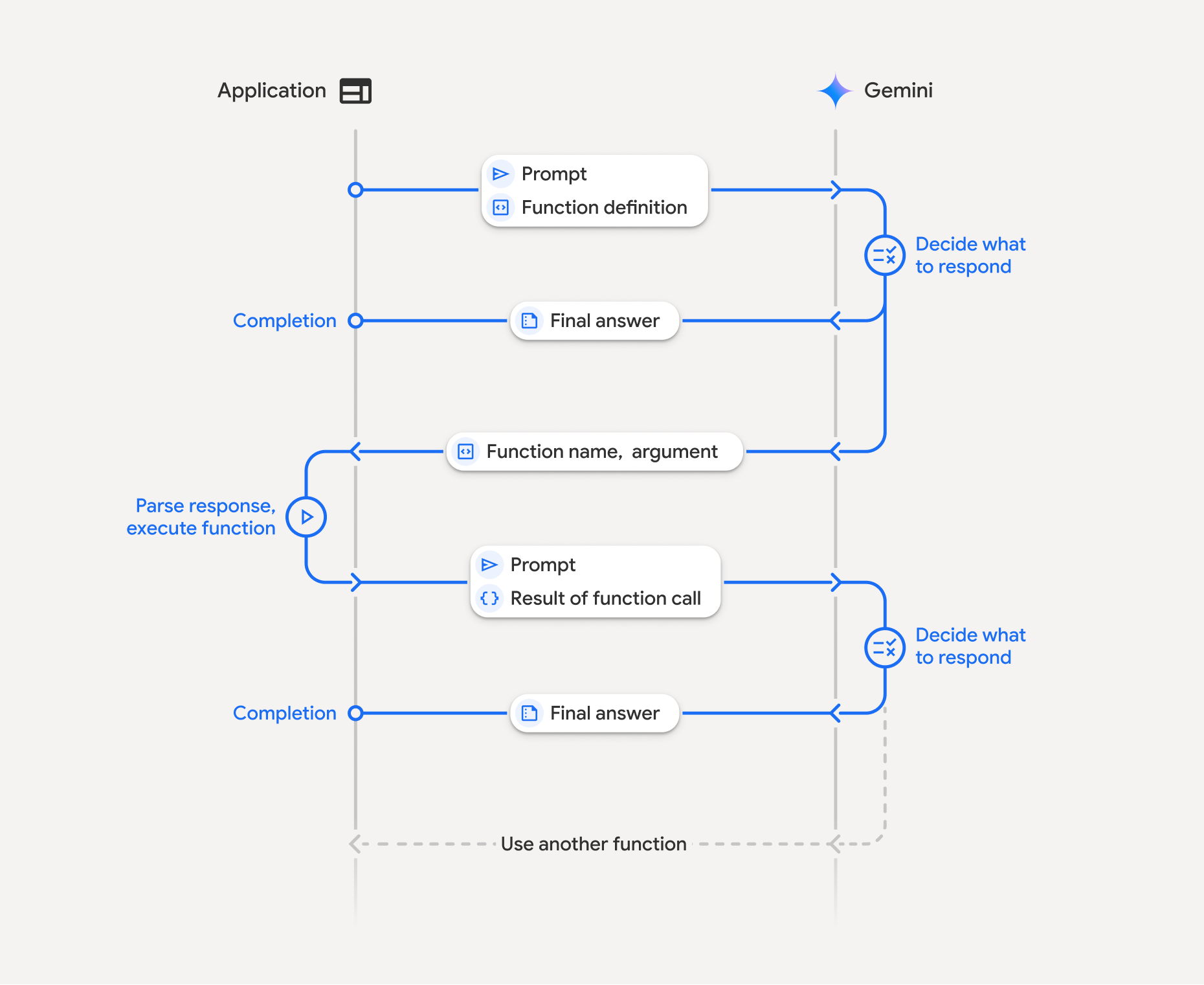
Panggilan fungsi melibatkan interaksi terstruktur antara aplikasi, model, dan fungsi eksternal:
- Tentukan Deklarasi Fungsi: Tentukan nama, parameter, dan tujuan fungsi ke model.
- Panggil LLM dengan deklarasi fungsi: Kirim perintah pengguna beserta deklarasi fungsi ke model.
- Jalankan Kode Fungsi (Tanggung Jawab Anda): Model tidak menjalankan fungsi itu sendiri. Ekstrak nama dan argumen, lalu jalankan di aplikasi Anda.
- Buat respons yang mudah dipahami pengguna: Kirim kembali hasil ke model untuk mendapatkan respons akhir yang mudah dipahami pengguna.
Proses ini dapat diulang di beberapa giliran. Model ini mendukung pemanggilan beberapa fungsi dalam satu giliran (pemanggilan fungsi paralel) dan secara berurutan (pemanggilan fungsi komposit).
Langkah 1: Tentukan deklarasi fungsi
Python
set_light_values_declaration = {
    "type": "function",
    "name": "set_light_values",
    "description": "Sets the brightness and color temperature of a light.",
    "parameters": {
        "type": "object",
        "properties": {
            "brightness": {
                "type": "integer",
                "description": "Light level from 0 to 100",
            },
            "color_temp": {
                "type": "string",
                "enum": ["daylight", "cool", "warm"],
                "description": "Color temperature",
            },
        },
        "required": ["brightness", "color_temp"],
    },
}

def set_light_values(brightness: int, color_temp: str) -> dict:
    """Set the brightness and color temperature of a room light."""
    return {"brightness": brightness, "colorTemperature": color_temp}
JavaScript
const setLightValuesTool = {
  type: 'function',
  name: 'set_light_values',
  description: 'Sets the brightness and color temperature of a light.',
  parameters: {
    type: 'object',
    properties: {
      brightness: { type: 'number', description: 'Light level from 0 to 100' },
      color_temp: { type: 'string', enum: ['daylight', 'cool', 'warm'] },
    },
    required: ['brightness', 'color_temp'],
  },
};

function setLightValues(brightness, color_temp) {
  return { brightness: brightness, colorTemperature: color_temp };
}
Java
import com.google.genai.gaos.models.interactions.Function;
import java.util.Arrays;
import java.util.HashMap;
import java.util.Map;
import java.util.function.BiFunction;

Map<String, Object> brightnessProp = new HashMap<>();
brightnessProp.put("type", "integer");
brightnessProp.put("description", "Light level from 0 to 100");

Map<String, Object> colorTempProp = new HashMap<>();
colorTempProp.put("type", "string");
colorTempProp.put("enum", Arrays.asList("daylight", "cool", "warm"));
colorTempProp.put("description", "Color temperature");

Map<String, Object> properties = new HashMap<>();
properties.put("brightness", brightnessProp);
properties.put("color_temp", colorTempProp);

Map<String, Object> parameters = new HashMap<>();
parameters.put("type", "object");
parameters.put("properties", properties);
parameters.put("required", Arrays.asList("brightness", "color_temp"));

Function setLightValuesDeclaration =
    Function.builder()
        .name("set_light_values")
        .description("Sets the brightness and color temperature of a light.")
        .parameters(parameters)
        .build();

BiFunction<Integer, String, Map<String, Object>> setLightValues =
    (brightness, colorTemp) -> {
      Map<String, Object> result = new HashMap<>();
      result.put("brightness", brightness);
      result.put("colorTemperature", colorTemp);
      return result;
    };
Go
package main

import (
    "google.golang.org/genai"
    "google.golang.org/genai/interactions/models/interactions"
)

func setLightValues(brightness int, colorTemp string) map[string]any {
    return map[string]any{
        "brightness":       brightness,
        "colorTemperature": colorTemp,
    }
}

func main() {
    setLightValuesDeclaration := interactions.NewTool(interactions.Function{
        Name:        genai.Ptr("set_light_values"),
        Description: genai.Ptr("Sets the brightness and color temperature of a light."),
        Parameters: map[string]any{
            "type": "object",
            "properties": map[string]any{
                "brightness": map[string]any{
                    "type":        "integer",
                    "description": "Light level from 0 to 100",
                },
                "color_temp": map[string]any{
                    "type":        "string",
                    "enum":        []string{"daylight", "cool", "warm"},
                    "description": "Color temperature",
                },
            },
            "required": []string{"brightness", "color_temp"},
        },
    })
    _ = setLightValuesDeclaration
}
Langkah 2: Panggil model dengan deklarasi fungsi
Python
from google import genai

client = genai.Client()

interaction = client.interactions.create(
    model="gemini-3.8-flash",
    input="Turn the lights down to a romantic level",
    tools=[set_light_values_declaration],
)

fc_step = next(s for s in interaction.steps if s.type == "function_call")
print(fc_step)
JavaScript
import { GoogleGenAI } from '@google/genai';

const client = new GoogleGenAI({});

const interaction = await client.interactions.create({
  model: 'gemini-3.8-flash',
  input: 'Turn the lights down to a romantic level',
  tools: [setLightValuesTool],
});

const fcStep = interaction.steps.find(s => s.type === 'function_call');
console.log(fcStep);
Java
import com.google.genai.Client;
import com.google.genai.gaos.models.interactions.CreateModelInteraction;
import com.google.genai.gaos.models.interactions.Function;
import com.google.genai.gaos.models.interactions.FunctionCallStep;
import com.google.genai.gaos.models.interactions.Interaction;
import com.google.genai.gaos.models.interactions.InteractionsInput;
import com.google.genai.gaos.models.interactions.Model;
import com.google.genai.gaos.models.interactions.Step;
import com.google.genai.gaos.models.operations.CreateInteractionRequestBody;
import java.util.Arrays;
import java.util.HashMap;
import java.util.Map;

Client client = new Client();

Map<String, Object> brightnessProp = new HashMap<>();
brightnessProp.put("type", "integer");
brightnessProp.put("description", "Light level from 0 to 100");

Map<String, Object> colorTempProp = new HashMap<>();
colorTempProp.put("type", "string");
colorTempProp.put("enum", Arrays.asList("daylight", "cool", "warm"));
colorTempProp.put("description", "Color temperature");

Map<String, Object> properties = new HashMap<>();
properties.put("brightness", brightnessProp);
properties.put("color_temp", colorTempProp);

Map<String, Object> parameters = new HashMap<>();
parameters.put("type", "object");
parameters.put("properties", properties);
parameters.put("required", Arrays.asList("brightness", "color_temp"));

Function setLightValuesDeclaration =
    Function.builder()
        .name("set_light_values")
        .description("Sets the brightness and color temperature of a light.")
        .parameters(parameters)
        .build();

CreateModelInteraction params =
    CreateModelInteraction.builder()
        .model(Model.of("gemini-3.8-flash"))
        .input(InteractionsInput.of("Turn the lights down to a romantic level"))
        .tools(Arrays.asList(setLightValuesDeclaration))
        .build();

Interaction interaction =
    client.interactions.create(CreateInteractionRequestBody.of(params)).interaction().get();

FunctionCallStep fcStep = null;
if (interaction.steps().isPresent()) {
  for (Step step : interaction.steps().get()) {
    if (step instanceof FunctionCallStep) {
      fcStep = (FunctionCallStep) step;
      break;
    }
  }
}
System.out.println(fcStep);
Go
package main

import (
    "context"
    "fmt"
    "log"

    "google.golang.org/genai"
    "google.golang.org/genai/interactions/models/interactions"
    "google.golang.org/genai/interactions/models/operations"
)

func main() {
    ctx := context.Background()
    client, err := genai.NewClient(ctx, nil)
    if err != nil {
        log.Fatal(err)
    }

    setLightValuesDeclaration := interactions.NewTool(interactions.Function{
        Name:        genai.Ptr("set_light_values"),
        Description: genai.Ptr("Sets the brightness and color temperature of a light."),
        Parameters: map[string]any{
            "type": "object",
            "properties": map[string]any{
                "brightness": map[string]any{
                    "type":        "integer",
                    "description": "Light level from 0 to 100",
                },
                "color_temp": map[string]any{
                    "type":        "string",
                    "enum":        []string{"daylight", "cool", "warm"},
                    "description": "Color temperature",
                },
            },
            "required": []string{"brightness", "color_temp"},
        },
    })

    resp, err := client.Interactions.Create(ctx, operations.CreateInteractionRequest{
        Body: operations.NewCreateInteractionRequestBody(
            interactions.CreateModelInteraction{
                Model: interactions.Model("gemini-3.8-flash"),
                Input: interactions.NewInteractionsInput("Turn the lights down to a romantic level"),
                Tools: []interactions.Tool{setLightValuesDeclaration},
            },
        ),
    })
    if err != nil {
        log.Fatal(err)
    }

    var fcStep *interactions.FunctionCallStep
    for _, step := range resp.Interaction.Steps {
        if step.FunctionCallStep != nil {
            fcStep = step.FunctionCallStep
            break
        }
    }
    fmt.Println(fcStep)
}
Model menampilkan langkah function_call dengan type, name, dan arguments:
type='function_call'
name='set_light_values'
arguments={'color_temp': 'warm', 'brightness': 25}
Langkah 3: Jalankan fungsi
Python
fc_step = next(s for s in interaction.steps if s.type == "function_call")

if fc_step.name == "set_light_values":
    result = set_light_values(**fc_step.arguments)
    print(f"Function execution result: {result}")
JavaScript
const fcStep = interaction.steps.find(s => s.type === 'function_call');

let result;
if (fcStep.name === 'set_light_values') {
  result = setLightValues(fcStep.arguments.brightness, fcStep.arguments.color_temp);
  console.log(`Function execution result: ${JSON.stringify(result)}`);
}
Java
import com.google.genai.Client;
import com.google.genai.gaos.models.interactions.CreateModelInteraction;
import com.google.genai.gaos.models.interactions.Function;
import com.google.genai.gaos.models.interactions.FunctionCallStep;
import com.google.genai.gaos.models.interactions.Interaction;
import com.google.genai.gaos.models.interactions.InteractionsInput;
import com.google.genai.gaos.models.interactions.Model;
import com.google.genai.gaos.models.interactions.Step;
import com.google.genai.gaos.models.operations.CreateInteractionRequestBody;
import java.util.Arrays;
import java.util.Collections;
import java.util.HashMap;
import java.util.Map;
import java.util.function.BiFunction;

Client client = new Client();

Map<String, Object> brightnessProp = new HashMap<>();
brightnessProp.put("type", "integer");
brightnessProp.put("description", "Light level from 0 to 100");

Map<String, Object> colorTempProp = new HashMap<>();
colorTempProp.put("type", "string");
colorTempProp.put("enum", Arrays.asList("daylight", "cool", "warm"));
colorTempProp.put("description", "Color temperature");

Map<String, Object> properties = new HashMap<>();
properties.put("brightness", brightnessProp);
properties.put("color_temp", colorTempProp);

Map<String, Object> parameters = new HashMap<>();
parameters.put("type", "object");
parameters.put("properties", properties);
parameters.put("required", Arrays.asList("brightness", "color_temp"));

Function setLightValuesDeclaration =
    Function.builder()
        .name("set_light_values")
        .description("Sets the brightness and color temperature of a light.")
        .parameters(parameters)
        .build();

BiFunction<Integer, String, Map<String, Object>> setLightValues =
    (brightness, colorTemp) -> {
      Map<String, Object> result = new HashMap<>();
      result.put("brightness", brightness);
      result.put("colorTemperature", colorTemp);
      return result;
    };

CreateModelInteraction params =
    CreateModelInteraction.builder()
        .model(Model.of("gemini-3.8-flash"))
        .input(InteractionsInput.of("Turn the lights down to a romantic level"))
        .tools(Arrays.asList(setLightValuesDeclaration))
        .build();

Interaction interaction =
    client.interactions.create(CreateInteractionRequestBody.of(params)).interaction().get();

if (interaction.steps().isPresent()) {
  for (Step step : interaction.steps().get()) {
    if (step instanceof FunctionCallStep) {
      FunctionCallStep fcStep = (FunctionCallStep) step;
      if ("set_light_values".equals(fcStep.name().orElse(""))) {
        Map<String, Object> args = fcStep.arguments().orElse(Collections.emptyMap());
        int brightness = ((Number) args.getOrDefault("brightness", 25)).intValue();
        String colorTemp = (String) args.getOrDefault("color_temp", "warm");
        Map<String, Object> result = setLightValues.apply(brightness, colorTemp);
        System.out.println("Function execution result: " + result);
      }
    }
  }
}
Go
package main

import (
    "context"
    "fmt"
    "log"

    "google.golang.org/genai"
    "google.golang.org/genai/interactions/models/interactions"
    "google.golang.org/genai/interactions/models/operations"
)

func setLightValues(brightness int, colorTemp string) map[string]any {
    return map[string]any{
        "brightness":       brightness,
        "colorTemperature": colorTemp,
    }
}

func main() {
    ctx := context.Background()
    client, err := genai.NewClient(ctx, nil)
    if err != nil {
        log.Fatal(err)
    }

    setLightValuesDeclaration := interactions.NewTool(interactions.Function{
        Name:        genai.Ptr("set_light_values"),
        Description: genai.Ptr("Sets the brightness and color temperature of a light."),
        Parameters: map[string]any{
            "type": "object",
            "properties": map[string]any{
                "brightness": map[string]any{
                    "type":        "integer",
                    "description": "Light level from 0 to 100",
                },
                "color_temp": map[string]any{
                    "type":        "string",
                    "enum":        []string{"daylight", "cool", "warm"},
                    "description": "Color temperature",
                },
            },
            "required": []string{"brightness", "color_temp"},
        },
    })

    resp, err := client.Interactions.Create(ctx, operations.CreateInteractionRequest{
        Body: operations.NewCreateInteractionRequestBody(
            interactions.CreateModelInteraction{
                Model: interactions.Model("gemini-3.8-flash"),
                Input: interactions.NewInteractionsInput("Turn the lights down to a romantic level"),
                Tools: []interactions.Tool{setLightValuesDeclaration},
            },
        ),
    })
    if err != nil {
        log.Fatal(err)
    }

    for _, step := range resp.Interaction.Steps {
        if step.FunctionCallStep != nil {
            fcStep := step.FunctionCallStep
            if fcStep.Name == "set_light_values" {
                brightness := 25
                if b, ok := fcStep.Arguments["brightness"].(float64); ok {
                    brightness = int(b)
                }
                colorTemp := "warm"
                if c, ok := fcStep.Arguments["color_temp"].(string); ok {
                    colorTemp = c
                }
                result := setLightValues(brightness, colorTemp)
                fmt.Println("Function execution result:", result)
            }
        }
    }
}
Langkah 4: Kirim hasil kembali ke model
Python
final_interaction = client.interactions.create(
    model="gemini-3.8-flash",
    input=[
        {
            "type": "function_result",
            "name": fc_step.name,
            "call_id": fc_step.id,
            "result": [{"type": "text", "text": json.dumps(result)}],
        }
    ],
    tools=[set_light_values_declaration],
    previous_interaction_id=interaction.id,
)

print(final_interaction.output_text)
JavaScript
const finalInteraction = await client.interactions.create({
  model: 'gemini-3.8-flash',
  input: [{
    type: 'function_result',
    name: fcStep.name,
    call_id: fcStep.id,
    result: [{ type: 'text', text: JSON.stringify(result) }]
  }],
  tools: [setLightValuesTool],
  previous_interaction_id: interaction.id,
});

console.log(finalInteraction.output_text);
Java
import com.google.genai.Client;
import com.google.genai.gaos.models.interactions.CreateModelInteraction;
import com.google.genai.gaos.models.interactions.Function;
import com.google.genai.gaos.models.interactions.FunctionCallStep;
import com.google.genai.gaos.models.interactions.FunctionResultStep;
import com.google.genai.gaos.models.interactions.FunctionResultStepResultUnion;
import com.google.genai.gaos.models.interactions.FunctionResultSubcontent;
import com.google.genai.gaos.models.interactions.Interaction;
import com.google.genai.gaos.models.interactions.InteractionsInput;
import com.google.genai.gaos.models.interactions.Model;
import com.google.genai.gaos.models.interactions.Step;
import com.google.genai.gaos.models.interactions.TextContent;
import com.google.genai.gaos.models.operations.CreateInteractionRequestBody;
import java.util.Arrays;
import java.util.HashMap;
import java.util.Map;

Client client = new Client();

Map<String, Object> brightnessProp = new HashMap<>();
brightnessProp.put("type", "integer");
brightnessProp.put("description", "Light level from 0 to 100");

Map<String, Object> colorTempProp = new HashMap<>();
colorTempProp.put("type", "string");
colorTempProp.put("enum", Arrays.asList("daylight", "cool", "warm"));
colorTempProp.put("description", "Color temperature");

Map<String, Object> properties = new HashMap<>();
properties.put("brightness", brightnessProp);
properties.put("color_temp", colorTempProp);

Map<String, Object> parameters = new HashMap<>();
parameters.put("type", "object");
parameters.put("properties", properties);
parameters.put("required", Arrays.asList("brightness", "color_temp"));

Function setLightValuesDeclaration =
    Function.builder()
        .name("set_light_values")
        .description("Sets the brightness and color temperature of a light.")
        .parameters(parameters)
        .build();

CreateModelInteraction params =
    CreateModelInteraction.builder()
        .model(Model.of("gemini-3.8-flash"))
        .input(InteractionsInput.of("Turn the lights down to a romantic level"))
        .tools(Arrays.asList(setLightValuesDeclaration))
        .build();

Interaction interaction =
    client.interactions.create(CreateInteractionRequestBody.of(params)).interaction().get();

FunctionCallStep fcStep = null;
if (interaction.steps().isPresent()) {
  for (Step step : interaction.steps().get()) {
    if (step instanceof FunctionCallStep) {
      fcStep = (FunctionCallStep) step;
      break;
    }
  }
}

if (fcStep != null) {
  String resultJson = "{\"brightness\": 25, \"colorTemperature\": \"warm\"}";
  FunctionResultStep resultStep =
      FunctionResultStep.builder()
          .name(fcStep.name().orElse(""))
          .callId(fcStep.id().orElse(""))
          .result(
              FunctionResultStepResultUnion.of(
                  Arrays.<FunctionResultSubcontent>asList(
                      TextContent.builder().text(resultJson).build())))
          .build();

  CreateModelInteraction finalParams =
      CreateModelInteraction.builder()
          .model(Model.of("gemini-3.8-flash"))
          .previousInteractionId(interaction.id().orElse(""))
          .tools(Arrays.asList(setLightValuesDeclaration))
          .input(InteractionsInput.ofStep(Arrays.<Step>asList(resultStep)))
          .build();

  Interaction finalInteraction =
      client
          .interactions
          .create(CreateInteractionRequestBody.of(finalParams))
          .interaction()
          .get();

  System.out.println(finalInteraction.outputText().orElse(""));
}
Go
package main

import (
    "context"
    "fmt"
    "log"

    "google.golang.org/genai"
    "google.golang.org/genai/interactions/models/interactions"
    "google.golang.org/genai/interactions/models/operations"
)

func main() {
    ctx := context.Background()
    client, err := genai.NewClient(ctx, nil)
    if err != nil {
        log.Fatal(err)
    }

    setLightValuesDeclaration := interactions.NewTool(interactions.Function{
        Name:        genai.Ptr("set_light_values"),
        Description: genai.Ptr("Sets the brightness and color temperature of a light."),
        Parameters: map[string]any{
            "type": "object",
            "properties": map[string]any{
                "brightness": map[string]any{
                    "type":        "integer",
                    "description": "Light level from 0 to 100",
                },
                "color_temp": map[string]any{
                    "type":        "string",
                    "enum":        []string{"daylight", "cool", "warm"},
                    "description": "Color temperature",
                },
            },
            "required": []string{"brightness", "color_temp"},
        },
    })

    resp, err := client.Interactions.Create(ctx, operations.CreateInteractionRequest{
        Body: operations.NewCreateInteractionRequestBody(
            interactions.CreateModelInteraction{
                Model: interactions.Model("gemini-3.8-flash"),
                Input: interactions.NewInteractionsInput("Turn the lights down to a romantic level"),
                Tools: []interactions.Tool{setLightValuesDeclaration},
            },
        ),
    })
    if err != nil {
        log.Fatal(err)
    }

    var fcStep *interactions.FunctionCallStep
    for _, step := range resp.Interaction.Steps {
        if step.FunctionCallStep != nil {
            fcStep = step.FunctionCallStep
            break
        }
    }

    if fcStep != nil {
        resultJson := `{"brightness": 25, "colorTemperature": "warm"}`
        resultStep := interactions.NewStep(interactions.FunctionResultStep{
            Name:   genai.Ptr(fcStep.Name),
            CallID: fcStep.ID,
            Result: interactions.NewFunctionResultStepResultUnion([]interactions.FunctionResultSubcontent{
                interactions.NewFunctionResultSubcontent(interactions.TextContent{
                    Text: resultJson,
                }),
            }),
        })

        finalResp, err := client.Interactions.Create(ctx, operations.CreateInteractionRequest{
            Body: operations.NewCreateInteractionRequestBody(
                interactions.CreateModelInteraction{
                    Model:                 interactions.Model("gemini-3.8-flash"),
                    PreviousInteractionID: resp.Interaction.ID,
                    Tools:                 []interactions.Tool{setLightValuesDeclaration},
                    Input:                 interactions.NewInteractionsInput([]interactions.Step{resultStep}),
                },
            ),
        })
        if err != nil {
            log.Fatal(err)
        }

        fmt.Println(finalResp.Interaction.GetOutputText())
    }
}
Pemanggilan fungsi tanpa status
Anda juga dapat menggunakan panggilan fungsi dalam mode tanpa status dengan mengelola histori percakapan di sisi klien dan menyetel store=false.
Dalam mode tanpa status, Anda harus meneruskan histori lengkap percakapan di kolom input dari setiap permintaan berikutnya. Histori ini harus mencakup:
1. Langkah user_input awal.
2. Semua langkah yang dihasilkan model ditampilkan di Turn 1 (termasuk langkah thought dan function_call) persis seperti yang diterima.
3. Langkah function_result yang berisi output fungsi yang dijalankan.
Python
from google import genai
import json

client = genai.Client()

history = [
    {
        "type": "user_input",
        "content": [{"type": "text", "text": "Turn the lights down to a romantic level"}]
    }
]

interaction = client.interactions.create(
    model="gemini-3.8-flash",
    store=False,
    input=history,
    tools=[set_light_values_declaration],
)

for step in interaction.steps:
    history.append(step.model_dump())

fc_step = next(s for s in interaction.steps if s.type == "function_call")
if fc_step.name == "set_light_values":
    result = set_light_values(**fc_step.arguments)

history.append({
    "type": "function_result",
    "name": fc_step.name,
    "call_id": fc_step.id,
    "result": [{"type": "text", "text": json.dumps(result)}],
})

final_interaction = client.interactions.create(
    model="gemini-3.8-flash",
    store=False,
    input=history,
    tools=[set_light_values_declaration],
)

print(final_interaction.output_text)
JavaScript
import { GoogleGenAI } from "@google/genai";

const client = new GoogleGenAI({});

async function main() {
  const history = [
    {
      type: "user_input",
      content: [{ type: "text", text: "Turn the lights down to a romantic level" }]
    }
  ];

  const interaction = await client.interactions.create({
    model: "gemini-3.8-flash",
    store: false,
    input: history,
    tools: [setLightValuesTool],
  });

  history.push(...interaction.steps);

  const fcStep = interaction.steps.find(s => s.type === 'function_call');
  let result;
  if (fcStep.name === 'set_light_values') {
    result = setLightValues(fcStep.arguments.brightness, fcStep.arguments.color_temp);
  }

  history.push({
    type: 'function_result',
    name: fcStep.name,
    call_id: fcStep.id,
    result: [{ type: 'text', text: JSON.stringify(result) }]
  });

  const finalInteraction = await client.interactions.create({
    model: 'gemini-3.8-flash',
    store: false,
    input: history,
    tools: [setLightValuesTool],
  });

  console.log(finalInteraction.output_text);
}

await main();
Java
import com.google.genai.Client;
import com.google.genai.gaos.models.interactions.CreateModelInteraction;
import com.google.genai.gaos.models.interactions.Function;
import com.google.genai.gaos.models.interactions.FunctionCallStep;
import com.google.genai.gaos.models.interactions.FunctionResultStep;
import com.google.genai.gaos.models.interactions.FunctionResultStepResultUnion;
import com.google.genai.gaos.models.interactions.FunctionResultSubcontent;
import com.google.genai.gaos.models.interactions.Interaction;
import com.google.genai.gaos.models.interactions.InteractionsInput;
import com.google.genai.gaos.models.interactions.Model;
import com.google.genai.gaos.models.interactions.Step;
import com.google.genai.gaos.models.interactions.TextContent;
import com.google.genai.gaos.models.interactions.UserInputStep;
import com.google.genai.gaos.models.operations.CreateInteractionRequestBody;
import java.util.ArrayList;
import java.util.Arrays;
import java.util.HashMap;
import java.util.List;
import java.util.Map;

Client client = new Client();

Map<String, Object> brightnessProp = new HashMap<>();
brightnessProp.put("type", "integer");
brightnessProp.put("description", "Light level from 0 to 100");

Map<String, Object> colorTempProp = new HashMap<>();
colorTempProp.put("type", "string");
colorTempProp.put("enum", Arrays.asList("daylight", "cool", "warm"));
colorTempProp.put("description", "Color temperature");

Map<String, Object> properties = new HashMap<>();
properties.put("brightness", brightnessProp);
properties.put("color_temp", colorTempProp);

Map<String, Object> parameters = new HashMap<>();
parameters.put("type", "object");
parameters.put("properties", properties);
parameters.put("required", Arrays.asList("brightness", "color_temp"));

Function setLightValuesDeclaration =
    Function.builder()
        .name("set_light_values")
        .description("Sets the brightness and color temperature of a light.")
        .parameters(parameters)
        .build();

List<Step> history = new ArrayList<>();
history.add(
    UserInputStep.builder()
        .content(
            Arrays.asList(
                TextContent.builder()
                    .text("Turn the lights down to a romantic level")
                    .build()))
        .build());

CreateModelInteraction params =
    CreateModelInteraction.builder()
        .model(Model.of("gemini-3.8-flash"))
        .store(false)
        .input(InteractionsInput.ofStep(history))
        .tools(Arrays.asList(setLightValuesDeclaration))
        .build();

Interaction interaction =
    client.interactions.create(CreateInteractionRequestBody.of(params)).interaction().get();

FunctionCallStep fcStep = null;
if (interaction.steps().isPresent()) {
  history.addAll(interaction.steps().get());
  for (Step step : interaction.steps().get()) {
    if (step instanceof FunctionCallStep) {
      fcStep = (FunctionCallStep) step;
      break;
    }
  }
}

if (fcStep != null) {
  String resultJson = "{\"brightness\": 25, \"colorTemperature\": \"warm\"}";
  history.add(
      FunctionResultStep.builder()
          .name(fcStep.name().orElse(""))
          .callId(fcStep.id().orElse(""))
          .result(
              FunctionResultStepResultUnion.of(
                  Arrays.<FunctionResultSubcontent>asList(
                      TextContent.builder().text(resultJson).build())))
          .build());

  CreateModelInteraction finalParams =
      CreateModelInteraction.builder()
          .model(Model.of("gemini-3.8-flash"))
          .store(false)
          .input(InteractionsInput.ofStep(history))
          .tools(Arrays.asList(setLightValuesDeclaration))
          .build();

  Interaction finalInteraction =
      client
          .interactions
          .create(CreateInteractionRequestBody.of(finalParams))
          .interaction()
          .get();

  System.out.println(finalInteraction.outputText().orElse(""));
}
Go
package main

import (
    "context"
    "fmt"
    "log"

    "google.golang.org/genai"
    "google.golang.org/genai/interactions/models/interactions"
    "google.golang.org/genai/interactions/models/operations"
)

func main() {
    ctx := context.Background()
    client, err := genai.NewClient(ctx, nil)
    if err != nil {
        log.Fatal(err)
    }

    setLightValuesDeclaration := interactions.NewTool(interactions.Function{
        Name:        genai.Ptr("set_light_values"),
        Description: genai.Ptr("Sets the brightness and color temperature of a light."),
        Parameters: map[string]any{
            "type": "object",
            "properties": map[string]any{
                "brightness": map[string]any{
                    "type":        "integer",
                    "description": "Light level from 0 to 100",
                },
                "color_temp": map[string]any{
                    "type":        "string",
                    "enum":        []string{"daylight", "cool", "warm"},
                    "description": "Color temperature",
                },
            },
            "required": []string{"brightness", "color_temp"},
        },
    })

    history := []interactions.Step{
        interactions.NewStep(interactions.UserInputStep{
            Content: []interactions.Content{
                interactions.NewContent(interactions.TextContent{
                    Text: "Turn the lights down to a romantic level",
                }),
            },
        }),
    }

    resp, err := client.Interactions.Create(ctx, operations.CreateInteractionRequest{
        Body: operations.NewCreateInteractionRequestBody(
            interactions.CreateModelInteraction{
                Model: interactions.Model("gemini-3.8-flash"),
                Store: genai.Ptr(false),
                Input: interactions.NewInteractionsInput(history),
                Tools: []interactions.Tool{setLightValuesDeclaration},
            },
        ),
    })
    if err != nil {
        log.Fatal(err)
    }

    history = append(history, resp.Interaction.Steps...)
    var fcStep *interactions.FunctionCallStep
    for _, step := range resp.Interaction.Steps {
        if step.FunctionCallStep != nil {
            fcStep = step.FunctionCallStep
            break
        }
    }

    if fcStep != nil {
        resultJson := `{"brightness": 25, "colorTemperature": "warm"}`
        history = append(history, interactions.NewStep(interactions.FunctionResultStep{
            Name:   genai.Ptr(fcStep.Name),
            CallID: fcStep.ID,
            Result: interactions.NewFunctionResultStepResultUnion([]interactions.FunctionResultSubcontent{
                interactions.NewFunctionResultSubcontent(interactions.TextContent{
                    Text: resultJson,
                }),
            }),
        }))

        finalResp, err := client.Interactions.Create(ctx, operations.CreateInteractionRequest{
            Body: operations.NewCreateInteractionRequestBody(
                interactions.CreateModelInteraction{
                    Model: interactions.Model("gemini-3.8-flash"),
                    Store: genai.Ptr(false),
                    Input: interactions.NewInteractionsInput(history),
                    Tools: []interactions.Tool{setLightValuesDeclaration},
                },
            ),
        })
        if err != nil {
            log.Fatal(err)
        }

        fmt.Println(finalResp.Interaction.GetOutputText())
    }
}
REST
# Turn 1: Send request with tools and store: false
RESPONSE1=$(curl -s -X POST "https://generativelanguage.googleapis.com/v1beta/interactions" \
  -H "x-goog-api-key: $GEMINI_API_KEY" \
  -H 'Content-Type: application/json' \
  -d '{
    "model": "gemini-3.8-flash",
    "store": false,
    "input": [
      {
        "type": "user_input",
        "content": "Turn the lights down to a romantic level"
      }
    ],
    "tools": [{
      "type": "function",
      "name": "set_light_values",
      "description": "Sets the brightness and color temperature of a light.",
      "parameters": {
        "type": "object",
        "properties": {
          "brightness": {"type": "integer", "description": "Light level from 0 to 100"},
          "color_temp": {"type": "string", "enum": ["daylight", "cool", "warm"]}
        },
        "required": ["brightness", "color_temp"]
      }
    }]
  }')

# Extract model steps (thought, function_call)
MODEL_STEPS=$(echo "$RESPONSE1" | jq '.steps')

# Extract function call details to execute
FC_NAME=$(echo "$RESPONSE1" | jq -r '.steps[] | select(.type=="function_call") | .name')
FC_ID=$(echo "$RESPONSE1" | jq -r '.steps[] | select(.type=="function_call") | .id')

# Assume local execution returns: {"brightness": 25, "colorTemperature": "warm"}
RESULT="{\"brightness\": 25, \"colorTemperature\": \"warm\"}"

# Reconstruct history for Turn 2
HISTORY=$(jq -n \
  --argjson first_input '[{"type": "user_input", "content": "Turn the lights down to a romantic level"}]' \
  --argjson model_steps "$MODEL_STEPS" \
  --arg fc_name "$FC_NAME" \
  --arg fc_id "$FC_ID" \
  --arg result "$RESULT" \
  '$first_input + $model_steps + [{"type": "function_result", "name": $fc_name, "call_id": $fc_id, "result": [{"type": "text", "text": $result}]}]')

# Turn 2: Send the full history
curl -X POST "https://generativelanguage.googleapis.com/v1beta/interactions" \
  -H "x-goog-api-key: $GEMINI_API_KEY" \
  -H 'Content-Type: application/json' \
  -d "{
    \"model\": \"gemini-3.8-flash\",
    \"store\": false,
    \"input\": $HISTORY,
    \"tools\": [{
      \"type\": \"function\",
      \"name\": \"set_light_values\",
      \"description\": \"Sets the brightness and color temperature of a light.\",
      \"parameters\": {
        \"type\": \"object\",
        \"properties\": {
          \"brightness\": {\"type\": \"integer\"},
          \"color_temp\": {\"type\": \"string\"}
        },
        \"required\": [\"brightness\", \"color_temp\"]
      }
    }]
  }"
Deklarasi fungsi
Deklarasi fungsi diteruskan sebagai alat dan mencakup:
type(string): Harus berupa"function"untuk fungsi kustom.name(string): Nama fungsi unik (gunakan garis bawah atau camelCase).description(string): Penjelasan yang jelas tentang tujuan fungsi.parameters(objek): Parameter input yang diharapkan fungsi.type(string): Jenis data keseluruhan, sepertiobject.properties(objek): Parameter individual dengan jenis dan deskripsi.required(array): Nama parameter wajib.
Panggilan fungsi dengan model penalaran
Model seri Gemini 3 menggunakan proses "pemikiran" internal yang meningkatkan kualitas panggilan fungsi. SDK akan otomatis menangani tanda tangan pikiran untuk Anda.
Pemanggilan fungsi paralel
Panggil beberapa fungsi sekaligus jika fungsi tersebut independen:
Python
power_disco_ball = {"type": "function", "name": "power_disco_ball", "description": "Powers the disco ball.",
    "parameters": {"type": "object", "properties": {"power": {"type": "boolean"}}, "required": ["power"]}}
start_music = {"type": "function", "name": "start_music", "description": "Play music.",
    "parameters": {"type": "object", "properties": {"energetic": {"type": "boolean"}, "loud": {"type": "boolean"}}, "required": ["energetic", "loud"]}}
dim_lights = {"type": "function", "name": "dim_lights", "description": "Dim the lights.",
    "parameters": {"type": "object", "properties": {"brightness": {"type": "number"}}, "required": ["brightness"]}}

client = genai.Client()

interaction = client.interactions.create(
    model="gemini-3.8-flash",
    input="Turn this place into a party!",
    tools=[power_disco_ball, start_music, dim_lights],
    generation_config={"tool_choice": "any"},
)

for step in interaction.steps:
    if step.type == "function_call":
        args = ", ".join(f"{key}={val}" for key, val in step.arguments.items())
        print(f"{step.name}({args})")
JavaScript
const powerDiscoBall = { type: 'function', name: 'power_disco_ball', description: 'Powers the disco ball.',
  parameters: { type: 'object', properties: { power: { type: 'boolean' } }, required: ['power'] } };
const startMusic = { type: 'function', name: 'start_music', description: 'Play music.',
  parameters: { type: 'object', properties: { energetic: { type: 'boolean' }, loud: { type: 'boolean' } }, required: ['energetic', 'loud'] } };
const dimLights = { type: 'function', name: 'dim_lights', description: 'Dim the lights.',
  parameters: { type: 'object', properties: { brightness: { type: 'number' } }, required: ['brightness'] } };

const interaction = await client.interactions.create({
  model: 'gemini-3.8-flash',
  input: 'Turn this place into a party!',
  tools: [powerDiscoBall, startMusic, dimLights],
  generation_config: { tool_choice: 'any' },
});

for (const step of interaction.steps) {
  if (step.type === 'function_call') {
    console.log(`${step.name}(${JSON.stringify(step.arguments)})`);
  }
}
Java
import com.google.genai.Client;
import com.google.genai.gaos.models.interactions.CreateModelInteraction;
import com.google.genai.gaos.models.interactions.Function;
import com.google.genai.gaos.models.interactions.FunctionCallStep;
import com.google.genai.gaos.models.interactions.GenerationConfig;
import com.google.genai.gaos.models.interactions.Interaction;
import com.google.genai.gaos.models.interactions.InteractionsInput;
import com.google.genai.gaos.models.interactions.Model;
import com.google.genai.gaos.models.interactions.Step;
import com.google.genai.gaos.models.interactions.ToolChoice;
import com.google.genai.gaos.models.interactions.ToolChoiceType;
import com.google.genai.gaos.models.operations.CreateInteractionRequestBody;
import java.util.Arrays;
import java.util.Collections;
import java.util.HashMap;
import java.util.Map;

Client client = new Client();

Map<String, Object> discoParams = new HashMap<>();
discoParams.put("type", "object");
discoParams.put(
    "properties", Collections.singletonMap("power", Collections.singletonMap("type", "boolean")));
discoParams.put("required", Arrays.asList("power"));

Function powerDiscoBall =
    Function.builder()
        .name("power_disco_ball")
        .description("Powers the disco ball.")
        .parameters(discoParams)
        .build();

Map<String, Object> musicProps = new HashMap<>();
musicProps.put("energetic", Collections.singletonMap("type", "boolean"));
musicProps.put("loud", Collections.singletonMap("type", "boolean"));
Map<String, Object> musicParams = new HashMap<>();
musicParams.put("type", "object");
musicParams.put("properties", musicProps);
musicParams.put("required", Arrays.asList("energetic", "loud"));

Function startMusic =
    Function.builder()
        .name("start_music")
        .description("Play music.")
        .parameters(musicParams)
        .build();

Map<String, Object> lightsParams = new HashMap<>();
lightsParams.put("type", "object");
lightsParams.put(
    "properties",
    Collections.singletonMap("brightness", Collections.singletonMap("type", "number")));
lightsParams.put("required", Arrays.asList("brightness"));

Function dimLights =
    Function.builder()
        .name("dim_lights")
        .description("Dim the lights.")
        .parameters(lightsParams)
        .build();

CreateModelInteraction params =
    CreateModelInteraction.builder()
        .model(Model.of("gemini-3.8-flash"))
        .input(InteractionsInput.of("Turn this place into a party!"))
        .tools(Arrays.asList(powerDiscoBall, startMusic, dimLights))
        .generationConfig(
            GenerationConfig.builder().toolChoice(ToolChoice.of(ToolChoiceType.ANY)).build())
        .build();

Interaction interaction =
    client.interactions.create(CreateInteractionRequestBody.of(params)).interaction().get();

if (interaction.steps().isPresent()) {
  for (Step step : interaction.steps().get()) {
    if (step instanceof FunctionCallStep) {
      FunctionCallStep fc = (FunctionCallStep) step;
      System.out.println(fc.name().orElse("") + "(" + fc.arguments().orElse(null) + ")");
    }
  }
}
Go
package main

import (
    "context"
    "fmt"
    "log"

    "google.golang.org/genai"
    "google.golang.org/genai/interactions/models/interactions"
    "google.golang.org/genai/interactions/models/operations"
)

func main() {
    ctx := context.Background()
    client, err := genai.NewClient(ctx, nil)
    if err != nil {
        log.Fatal(err)
    }

    powerDiscoBall := interactions.NewTool(interactions.Function{
        Name:        genai.Ptr("power_disco_ball"),
        Description: genai.Ptr("Powers the disco ball."),
        Parameters: map[string]any{
            "type": "object",
            "properties": map[string]any{
                "power": map[string]any{"type": "boolean"},
            },
            "required": []string{"power"},
        },
    })

    startMusic := interactions.NewTool(interactions.Function{
        Name:        genai.Ptr("start_music"),
        Description: genai.Ptr("Play music."),
        Parameters: map[string]any{
            "type": "object",
            "properties": map[string]any{
                "energetic": map[string]any{"type": "boolean"},
                "loud":      map[string]any{"type": "boolean"},
            },
            "required": []string{"energetic", "loud"},
        },
    })

    dimLights := interactions.NewTool(interactions.Function{
        Name:        genai.Ptr("dim_lights"),
        Description: genai.Ptr("Dim the lights."),
        Parameters: map[string]any{
            "type": "object",
            "properties": map[string]any{
                "brightness": map[string]any{"type": "number"},
            },
            "required": []string{"brightness"},
        },
    })

    resp, err := client.Interactions.Create(ctx, operations.CreateInteractionRequest{
        Body: operations.NewCreateInteractionRequestBody(
            interactions.CreateModelInteraction{
                Model: interactions.Model("gemini-3.8-flash"),
                Input: interactions.NewInteractionsInput("Turn this place into a party!"),
                Tools: []interactions.Tool{powerDiscoBall, startMusic, dimLights},
                GenerationConfig: &interactions.GenerationConfig{
                    ToolChoice: genai.Ptr(interactions.NewToolChoice(interactions.ToolChoiceTypeAny)),
                },
            },
        ),
    })
    if err != nil {
        log.Fatal(err)
    }

    for _, step := range resp.Interaction.Steps {
        if step.FunctionCallStep != nil {
            fc := step.FunctionCallStep
            fmt.Printf("%s(%v)\n", fc.Name, fc.Arguments)
        }
    }
}
REST
curl -X POST "https://generativelanguage.googleapis.com/v1beta/interactions" \
  -H "x-goog-api-key: $GEMINI_API_KEY" \
  -H 'Content-Type: application/json' \
  -d '{
    "model": "gemini-3.8-flash",
    "input": "Turn this place into a party!",
    "tools": [
      {
        "type": "function",
        "name": "power_disco_ball",
        "description": "Powers the disco ball.",
        "parameters": {
          "type": "object",
          "properties": {
            "power": {"type": "boolean"}
          },
          "required": ["power"]
        }
      },
      {
        "type": "function",
        "name": "start_music",
        "description": "Play music.",
        "parameters": {
          "type": "object",
          "properties": {
            "energetic": {"type": "boolean"},
            "loud": {"type": "boolean"}
          },
          "required": ["energetic", "loud"]
        }
      },
      {
        "type": "function",
        "name": "dim_lights",
        "description": "Dim the lights.",
        "parameters": {
          "type": "object",
          "properties": {
            "brightness": {"type": "number"}
          },
          "required": ["brightness"]
        }
      }
    ]
  }'
Panggilan fungsi komposit
Rangkai beberapa panggilan fungsi untuk permintaan yang kompleks (misalnya, dapatkan lokasi terlebih dahulu, lalu dapatkan cuaca untuk lokasi tersebut).
Python
get_weather_forecast_declaration = {
    "type": "function",
    "name": "get_weather_forecast",
    "description": "Gets the current weather temperature for a given location.",
    "parameters": {
        "type": "object",
        "properties": {
            "location": {"type": "string", "description": "The location"},
        },
        "required": ["location"],
    },
}

set_thermostat_temperature_declaration = {
    "type": "function",
    "name": "set_thermostat_temperature",
    "description": "Sets the thermostat to a desired temperature.",
    "parameters": {
        "type": "object",
        "properties": {
            "temperature": {
                "type": "integer",
                "description": "The temperature in Celsius",
            },
        },
        "required": ["temperature"],
    },
}

client = genai.Client()

interaction = client.interactions.create(
    model="gemini-3.8-flash",
    input="If it's warmer than 20°C in London, set the thermostat to 20°C, otherwise 18°C.",
    tools=[
        get_weather_forecast_declaration,
        set_thermostat_temperature_declaration,
    ],
)

for step in interaction.steps:
    if step.type == "function_call":
        print(f"Function to call: {step.name}")
        print(f"Arguments: {step.arguments}")
    elif hasattr(step, "content") and step.content:
         for part in step.content:
             if hasattr(part, "text"):
                 print(part.text)
JavaScript
import { GoogleGenAI } from '@google/genai';

const client = new GoogleGenAI({});

const getWeatherForecastTool = {
  type: 'function',
  name: 'get_weather_forecast',
  description: 'Gets the current weather temperature for a given location.',
  parameters: {
    type: 'object',
    properties: {
      location: { type: 'string', description: 'The location' },
    },
    required: ['location'],
  },
};

const setThermostatTemperatureTool = {
  type: 'function',
  name: 'set_thermostat_temperature',
  description: 'Sets the thermostat to a desired temperature.',
  parameters: {
    type: 'object',
    properties: {
      temperature: {
        type: 'integer',
        description: 'The temperature in Celsius',
      },
    },
    required: ['temperature'],
  },
};

const interaction = await client.interactions.create({
  model: 'gemini-3.8-flash',
  input: "If it's warmer than 20°C in London, set the thermostat to 20°C, otherwise 18°C.",
  tools: [
    getWeatherForecastTool,
    setThermostatTemperatureTool,
  ],
});

for (const step of interaction.steps) {
  if (step.type === 'function_call') {
    console.log(`Function to call: ${step.name}`);
    console.log(`Arguments: ${JSON.stringify(step.arguments)}`);
  } else if (step.content) {
    for (const part of step.content) {
      if (part.text) {
        console.log(part.text);
      }
    }
  }
}
Java
import com.google.genai.Client;
import com.google.genai.gaos.models.interactions.Content;
import com.google.genai.gaos.models.interactions.CreateModelInteraction;
import com.google.genai.gaos.models.interactions.Function;
import com.google.genai.gaos.models.interactions.FunctionCallStep;
import com.google.genai.gaos.models.interactions.Interaction;
import com.google.genai.gaos.models.interactions.InteractionsInput;
import com.google.genai.gaos.models.interactions.Model;
import com.google.genai.gaos.models.interactions.ModelOutputStep;
import com.google.genai.gaos.models.interactions.Step;
import com.google.genai.gaos.models.interactions.TextContent;
import com.google.genai.gaos.models.operations.CreateInteractionRequestBody;
import java.util.Arrays;
import java.util.HashMap;
import java.util.Map;

Client client = new Client();

Map<String, Object> locationProp = new HashMap<>();
locationProp.put("type", "string");
locationProp.put("description", "The location");

Map<String, Object> weatherProps = new HashMap<>();
weatherProps.put("location", locationProp);

Map<String, Object> weatherParams = new HashMap<>();
weatherParams.put("type", "object");
weatherParams.put("properties", weatherProps);
weatherParams.put("required", Arrays.asList("location"));

Function getWeatherForecastDeclaration =
    Function.builder()
        .name("get_weather_forecast")
        .description("Gets the current weather temperature for a given location.")
        .parameters(weatherParams)
        .build();

Map<String, Object> tempProp = new HashMap<>();
tempProp.put("type", "integer");
tempProp.put("description", "The temperature in Celsius");

Map<String, Object> thermostatProps = new HashMap<>();
thermostatProps.put("temperature", tempProp);

Map<String, Object> thermostatParams = new HashMap<>();
thermostatParams.put("type", "object");
thermostatParams.put("properties", thermostatProps);
thermostatParams.put("required", Arrays.asList("temperature"));

Function setThermostatTemperatureDeclaration =
    Function.builder()
        .name("set_thermostat_temperature")
        .description("Sets the thermostat to a desired temperature.")
        .parameters(thermostatParams)
        .build();

CreateModelInteraction params =
    CreateModelInteraction.builder()
        .model(Model.of("gemini-3.8-flash"))
        .input(
            InteractionsInput.of(
                "If it's warmer than 20°C in London, set the thermostat to 20°C, otherwise 18°C."))
        .tools(Arrays.asList(getWeatherForecastDeclaration, setThermostatTemperatureDeclaration))
        .build();

Interaction interaction =
    client.interactions.create(CreateInteractionRequestBody.of(params)).interaction().get();

if (interaction.steps().isPresent()) {
  for (Step step : interaction.steps().get()) {
    if (step instanceof FunctionCallStep) {
      FunctionCallStep fc = (FunctionCallStep) step;
      System.out.println("Function to call: " + fc.name().orElse(""));
      System.out.println("Arguments: " + fc.arguments().orElse(null));
    } else if (step instanceof ModelOutputStep) {
      ModelOutputStep outputStep = (ModelOutputStep) step;
      if (outputStep.content().isPresent()) {
        for (Content part : outputStep.content().get()) {
          if (part instanceof TextContent) {
            System.out.println(((TextContent) part).text().orElse(""));
          }
        }
      }
    }
  }
}
Go
package main

import (
    "context"
    "fmt"
    "log"

    "google.golang.org/genai"
    "google.golang.org/genai/interactions/models/interactions"
    "google.golang.org/genai/interactions/models/operations"
)

func main() {
    ctx := context.Background()
    client, err := genai.NewClient(ctx, nil)
    if err != nil {
        log.Fatal(err)
    }

    getWeatherForecastDeclaration := interactions.NewTool(interactions.Function{
        Name:        genai.Ptr("get_weather_forecast"),
        Description: genai.Ptr("Gets the current weather temperature for a given location."),
        Parameters: map[string]any{
            "type": "object",
            "properties": map[string]any{
                "location": map[string]any{
                    "type":        "string",
                    "description": "The location",
                },
            },
            "required": []string{"location"},
        },
    })

    setThermostatTemperatureDeclaration := interactions.NewTool(interactions.Function{
        Name:        genai.Ptr("set_thermostat_temperature"),
        Description: genai.Ptr("Sets the thermostat to a desired temperature."),
        Parameters: map[string]any{
            "type": "object",
            "properties": map[string]any{
                "temperature": map[string]any{
                    "type":        "integer",
                    "description": "The temperature in Celsius",
                },
            },
            "required": []string{"temperature"},
        },
    })

    resp, err := client.Interactions.Create(ctx, operations.CreateInteractionRequest{
        Body: operations.NewCreateInteractionRequestBody(
            interactions.CreateModelInteraction{
                Model: interactions.Model("gemini-3.8-flash"),
                Input: interactions.NewInteractionsInput("If it's warmer than 20°C in London, set the thermostat to 20°C, otherwise 18°C."),
                Tools: []interactions.Tool{getWeatherForecastDeclaration, setThermostatTemperatureDeclaration},
            },
        ),
    })
    if err != nil {
        log.Fatal(err)
    }

    for _, step := range resp.Interaction.Steps {
        if step.FunctionCallStep != nil {
            fc := step.FunctionCallStep
            fmt.Println("Function to call:", fc.Name)
            fmt.Println("Arguments:", fc.Arguments)
        } else if step.ModelOutputStep != nil {
            for _, part := range step.ModelOutputStep.Content {
                if part.TextContent != nil {
                    fmt.Println(part.TextContent.Text)
                }
            }
        }
    }
}
REST
curl -X POST "https://generativelanguage.googleapis.com/v1beta/interactions" \
  -H "x-goog-api-key: $GEMINI_API_KEY" \
  -H 'Content-Type: application/json' \
  -d '{
    "model": "gemini-3.8-flash",
    "input": "If it'\''s warmer than 20°C in London, set the thermostat to 20°C, otherwise 18°C.",
    "tools": [
      {
        "type": "function",
        "name": "get_weather_forecast",
        "description": "Gets the current weather temperature for a given location.",
        "parameters": {
          "type": "object",
          "properties": {
            "location": {"type": "string"}
          },
          "required": ["location"]
        }
      },
      {
        "type": "function",
        "name": "set_thermostat_temperature",
        "description": "Sets the thermostat to a desired temperature.",
        "parameters": {
          "type": "object",
          "properties": {
            "temperature": {"type": "integer"}
          },
          "required": ["temperature"]
        }
      }
    ]
  }'
Mode panggilan fungsi
Mengontrol cara model menggunakan alat menggunakan tool_choice di generation_config:
auto(Default): Model memutuskan apakah akan memanggil fungsi atau merespons secara langsung.any: Model dibatasi untuk selalu memprediksi panggilan fungsi.none: Model dilarang melakukan panggilan fungsi.validated: Model memastikan kepatuhan skema fungsi.
Python
generation_config = {
    "tool_choice": {
        "allowed_tools": {
            "mode": "any",
            "tools": ["get_current_temperature"]
        }
    }
}
JavaScript
const generation_config = {
  tool_choice: {
    allowed_tools: {
      mode: 'any',
      tools: ['get_current_temperature']
    }
  }
};
Java
import com.google.genai.gaos.models.interactions.AllowedTools;
import com.google.genai.gaos.models.interactions.GenerationConfig;
import com.google.genai.gaos.models.interactions.ToolChoice;
import com.google.genai.gaos.models.interactions.ToolChoiceConfig;
import com.google.genai.gaos.models.interactions.ToolChoiceType;
import java.util.Arrays;

GenerationConfig generationConfig =
    GenerationConfig.builder()
        .toolChoice(
            ToolChoice.of(
                ToolChoiceConfig.builder()
                    .allowedTools(
                        AllowedTools.builder()
                            .mode(ToolChoiceType.ANY)
                            .tools(Arrays.asList("get_current_temperature"))
                            .build())
                    .build()))
        .build();
Go
package main

import (
    "google.golang.org/genai"
    "google.golang.org/genai/interactions/models/interactions"
)

func main() {
    generationConfig := interactions.GenerationConfig{
        ToolChoice: genai.Ptr(interactions.NewToolChoice(interactions.ToolChoiceConfig{
            AllowedTools: &interactions.AllowedTools{
                Mode:  interactions.ToolChoiceTypeAny.ToPointer(),
                Tools: []string{"get_current_temperature"},
            },
        })),
    }
    _ = generationConfig
}
REST
curl -X POST "https://generativelanguage.googleapis.com/v1beta/interactions" \
  -H "x-goog-api-key: $GEMINI_API_KEY" \
  -H 'Content-Type: application/json' \
  -d '{
    "model": "gemini-3.8-flash",
    "input": "What is the temperature in Boston?",
    "tools": [{
      "type": "function",
      "name": "get_current_temperature",
      "description": "Gets the current temperature for a given location.",
      "parameters": {
        "type": "object",
        "properties": {
          "location": {"type": "string"}
        },
        "required": ["location"]
      }
    }],
    "generation_config": {
      "tool_choice": {
        "allowed_tools": {
          "mode": "any",
          "tools": ["get_current_temperature"]
        }
      }
    }
  }'
Penggunaan alat serbaguna
Anda dapat mengaktifkan beberapa alat, menggabungkan alat bawaan dengan panggilan fungsi dalam
permintaan yang sama. Model Gemini 3 dapat menggabungkan alat bawaan dengan panggilan fungsi secara langsung di Interaksi. Meneruskan previous_interaction_id
secara otomatis menyebarkan konteks alat bawaan.
Python
from google import genai
import json

client = genai.Client()

get_weather = {
    "type": "function",
    "name": "get_weather",
    "description": "Gets the weather for a requested city.",
    "parameters": {
        "type": "object",
        "properties": {
            "city": {
                "type": "string",
                "description": "The city and state, e.g. Utqiaġvik, Alaska",
            },
        },
        "required": ["city"],
    },
}

tools = [
    {"type": "google_search"},
    get_weather
]

interaction = client.interactions.create(
    model="gemini-3.8-flash",
    input="What is the northernmost city in the United States? What's the weather like there today?",
    tools=tools
)

for step in interaction.steps:
    if step.type == "function_call":
        print(f"Function call: {step.name} (ID: {step.id})")
        result = {"response": "Very cold. 22 degrees Fahrenheit."}
        interaction_2 = client.interactions.create(
            model="gemini-3.8-flash",
            previous_interaction_id=interaction.id,
            tools=tools,
            input=[{
                "type": "function_result",
                "name": step.name,
                "call_id": step.id,
                "result": [{"type": "text", "text": json.dumps(result)}]
            }]
        )

        print(interaction_2.output_text)
JavaScript
import { GoogleGenAI } from '@google/genai';

const client = new GoogleGenAI({});

const weatherTool = {
  type: 'function',
  name: 'get_weather',
  description: 'Gets the weather for a given location.',
  parameters: {
    type: 'object',
    properties: {
      location: {
        type: 'string',
        description: 'The city and state, e.g. San Francisco, CA',
      },
    },
    required: ['location'],
  },
};

const tools = [
  { type: 'google_search' }, // Built-in tool
  weatherTool,
];

const interaction = await client.interactions.create({
  model: 'gemini-3.8-flash',
  input: "What is the northernmost city in the United States? What's the weather like there today?",
  tools: tools,
});

for (const step of interaction.steps) {
  if (step.type === 'function_call') {
    console.log(`Function call: ${step.name} (ID: ${step.id})`);
    const result = { response: 'Very cold. 22 degrees Fahrenheit.' };
    const interaction_2 = await client.interactions.create({
      model: 'gemini-3.8-flash',
      previous_interaction_id: interaction.id,
      tools: tools,
      input: [
        {
          type: 'function_result',
          name: step.name,
          call_id: step.id,
          result: [{ type: 'text', text: JSON.stringify(result) }],
        },
      ],
    });

    console.log(interaction_2.output_text);
  }
}
Java
import com.google.genai.Client;
import com.google.genai.gaos.models.interactions.CreateModelInteraction;
import com.google.genai.gaos.models.interactions.Function;
import com.google.genai.gaos.models.interactions.FunctionCallStep;
import com.google.genai.gaos.models.interactions.FunctionResultStep;
import com.google.genai.gaos.models.interactions.FunctionResultStepResultUnion;
import com.google.genai.gaos.models.interactions.FunctionResultSubcontent;
import com.google.genai.gaos.models.interactions.GoogleSearch;
import com.google.genai.gaos.models.interactions.Interaction;
import com.google.genai.gaos.models.interactions.InteractionsInput;
import com.google.genai.gaos.models.interactions.Model;
import com.google.genai.gaos.models.interactions.Step;
import com.google.genai.gaos.models.interactions.TextContent;
import com.google.genai.gaos.models.interactions.Tool;
import com.google.genai.gaos.models.operations.CreateInteractionRequestBody;
import java.util.Arrays;
import java.util.HashMap;
import java.util.List;
import java.util.Map;

Client client = new Client();

Map<String, Object> cityProp = new HashMap<>();
cityProp.put("type", "string");
cityProp.put("description", "The city and state, e.g. Utqiaġvik, Alaska");

Map<String, Object> properties = new HashMap<>();
properties.put("city", cityProp);

Map<String, Object> parameters = new HashMap<>();
parameters.put("type", "object");
parameters.put("properties", properties);
parameters.put("required", Arrays.asList("city"));

Function getWeather =
    Function.builder()
        .name("get_weather")
        .description("Gets the weather for a requested city.")
        .parameters(parameters)
        .build();

List<Tool> tools = Arrays.asList(GoogleSearch.builder().build(), getWeather);

CreateModelInteraction params =
    CreateModelInteraction.builder()
        .model(Model.of("gemini-3.8-flash"))
        .input(
            InteractionsInput.of(
                "What is the northernmost city in the United States? What's the weather like there today?"))
        .tools(tools)
        .build();

Interaction interaction =
    client.interactions.create(CreateInteractionRequestBody.of(params)).interaction().get();

if (interaction.steps().isPresent()) {
  for (Step step : interaction.steps().get()) {
    if (step instanceof FunctionCallStep) {
      FunctionCallStep fcStep = (FunctionCallStep) step;
      System.out.printf(
          "Function call: %s (ID: %s)%n", fcStep.name().orElse(""), fcStep.id().orElse(""));
      String resultJson = "{\"response\": \"Very cold. 22 degrees Fahrenheit.\"}";

      FunctionResultStep resultStep =
          FunctionResultStep.builder()
              .name(fcStep.name().orElse(""))
              .callId(fcStep.id().orElse(""))
              .result(
                  FunctionResultStepResultUnion.of(
                      Arrays.<FunctionResultSubcontent>asList(
                          TextContent.builder().text(resultJson).build())))
              .build();

      CreateModelInteraction params2 =
          CreateModelInteraction.builder()
              .model(Model.of("gemini-3.8-flash"))
              .previousInteractionId(interaction.id().orElse(""))
              .tools(tools)
              .input(InteractionsInput.ofStep(Arrays.<Step>asList(resultStep)))
              .build();

      Interaction interaction2 =
          client
              .interactions
              .create(CreateInteractionRequestBody.of(params2))
              .interaction()
              .get();

      System.out.println(interaction2.outputText().orElse(""));
    }
  }
}
Go
package main

import (
    "context"
    "fmt"
    "log"

    "google.golang.org/genai"
    "google.golang.org/genai/interactions/models/interactions"
    "google.golang.org/genai/interactions/models/operations"
)

func main() {
    ctx := context.Background()
    client, err := genai.NewClient(ctx, nil)
    if err != nil {
        log.Fatal(err)
    }

    getWeather := interactions.NewTool(interactions.Function{
        Name:        genai.Ptr("get_weather"),
        Description: genai.Ptr("Gets the weather for a requested city."),
        Parameters: map[string]any{
            "type": "object",
            "properties": map[string]any{
                "city": map[string]any{
                    "type":        "string",
                    "description": "The city and state, e.g. Utqiaġvik, Alaska",
                },
            },
            "required": []string{"city"},
        },
    })

    tools := []interactions.Tool{
        interactions.NewTool(interactions.GoogleSearch{}),
        getWeather,
    }

    resp, err := client.Interactions.Create(ctx, operations.CreateInteractionRequest{
        Body: operations.NewCreateInteractionRequestBody(
            interactions.CreateModelInteraction{
                Model: interactions.Model("gemini-3.8-flash"),
                Input: interactions.NewInteractionsInput("What is the northernmost city in the United States? What's the weather like there today?"),
                Tools: tools,
            },
        ),
    })
    if err != nil {
        log.Fatal(err)
    }

    for _, step := range resp.Interaction.Steps {
        if step.FunctionCallStep != nil {
            fcStep := step.FunctionCallStep
            fmt.Printf("Function call: %s (ID: %s)\n", fcStep.Name, fcStep.ID)
            resultJson := `{"response": "Very cold. 22 degrees Fahrenheit."}`

            resultStep := interactions.NewStep(interactions.FunctionResultStep{
                Name:   genai.Ptr(fcStep.Name),
                CallID: fcStep.ID,
                Result: interactions.NewFunctionResultStepResultUnion([]interactions.FunctionResultSubcontent{
                    interactions.NewFunctionResultSubcontent(interactions.TextContent{
                        Text: resultJson,
                    }),
                }),
            })

            resp2, err := client.Interactions.Create(ctx, operations.CreateInteractionRequest{
                Body: operations.NewCreateInteractionRequestBody(
                    interactions.CreateModelInteraction{
                        Model:                 interactions.Model("gemini-3.8-flash"),
                        PreviousInteractionID: resp.Interaction.ID,
                        Tools:                 tools,
                        Input:                 interactions.NewInteractionsInput([]interactions.Step{resultStep}),
                    },
                ),
            })
            if err != nil {
                log.Fatal(err)
            }

            fmt.Println(resp2.Interaction.GetOutputText())
        }
    }
}
REST
# Turn 1: Send request with built-in google_search tool and custom weather tool
curl -X POST "https://generativelanguage.googleapis.com/v1beta/interactions" \
  -H "x-goog-api-key: $GEMINI_API_KEY" \
  -H 'Content-Type: application/json' \
  -d '{
    "model": "gemini-3.8-flash",
    "input": "What is the northernmost city in the United States? What'\''s the weather like there today?",
    "tools": [
      {"type": "google_search"},
      {
        "type": "function",
        "name": "get_weather",
        "description": "Gets the weather for a given location.",
        "parameters": {
          "type": "object",
          "properties": {
            "location": {"type": "string", "description": "The city and state, e.g. San Francisco, CA"}
          },
          "required": ["location"]
        }
      }
    ]
  }'

# Turn 2: Provide function result and pass previous_interaction_id
curl -X POST "https://generativelanguage.googleapis.com/v1beta/interactions" \
  -H "x-goog-api-key: $GEMINI_API_KEY" \
  -H 'Content-Type: application/json' \
  -d '{
    "model": "gemini-3.8-flash",
    "previous_interaction_id": "INTERACTION_ID",
    "tools": [
      {"type": "google_search"},
      {
        "type": "function",
        "name": "get_weather",
        "description": "Gets the weather for a given location.",
        "parameters": {
          "type": "object",
          "properties": {
            "location": {"type": "string", "description": "The city and state, e.g. San Francisco, CA"}
          },
          "required": ["location"]
        }
      }
    ],
    "input": [
      {
        "type": "function_result",
        "name": "get_weather",
        "call_id": "call_123",
        "result": [{"type": "text", "text": "{\"response\": \"Very cold. 22 degrees Fahrenheit.\"}"}]
      }
    ]
  }'
Respons fungsi multimodal
Untuk model seri Gemini 3, Anda dapat menyertakan konten multimodal di bagian respons fungsi yang Anda kirim ke model. Model dapat memproses konten multimodal ini pada giliran berikutnya untuk menghasilkan respons yang lebih informatif.
Untuk menyertakan data multimodal dalam respons fungsi, sertakan sebagai satu atau beberapa blok konten di kolom result pada langkah function_result. Setiap blok konten harus menentukan type (misalnya, "text", "image").
Contoh berikut menunjukkan cara mengirim respons fungsi yang berisi data gambar kembali ke model dalam interaksi:
Python
import base64
from google import genai
import requests

client = genai.Client()

tool_call = next(s for s in interaction.steps if s.type == "function_call")

image_path = "https://goo.gle/instrument-img"
image_bytes = requests.get(image_path).content

base64_image_data = base64.b64encode(image_bytes).decode("utf-8")

final_interaction = client.interactions.create(
    model="gemini-3.8-flash",
    previous_interaction_id=interaction.id,
    input=[
        {
            "type": "function_result",
            "name": tool_call.name,
            "call_id": tool_call.id,
            "result": [
                {"type": "text", "text": "instrument.jpg"},
                {
                    "type": "image",
                    "mime_type": "image/jpeg",
                    "data": base64_image_data,
                },
            ],
        }
    ],
)

print(final_interaction.output_text)
JavaScript
import { GoogleGenAI } from "@google/genai";

const client = new GoogleGenAI({});

const toolCall = interaction.steps.find(s => s.type === 'function_call');

const base64ImageData = "BASE64_IMAGE_DATA";

const finalInteraction = await client.interactions.create({
    model: 'gemini-3.8-flash',
    previous_interaction_id: interaction.id,
    input: [{
        type: 'function_result',
        name: toolCall.name,
        call_id: toolCall.id,
        result: [
            { type: 'text', text: 'instrument.jpg' },
            {
                type: 'image',
                mime_type: 'image/jpeg',
                data: base64ImageData,
            }
        ]
    }]
});

console.log(finalInteraction.output_text);
Java
import com.google.genai.Client;
import com.google.genai.gaos.models.interactions.CreateModelInteraction;
import com.google.genai.gaos.models.interactions.Function;
import com.google.genai.gaos.models.interactions.FunctionCallStep;
import com.google.genai.gaos.models.interactions.FunctionResultStep;
import com.google.genai.gaos.models.interactions.FunctionResultStepResultUnion;
import com.google.genai.gaos.models.interactions.FunctionResultSubcontent;
import com.google.genai.gaos.models.interactions.ImageContent;
import com.google.genai.gaos.models.interactions.ImageContentMimeType;
import com.google.genai.gaos.models.interactions.Interaction;
import com.google.genai.gaos.models.interactions.InteractionsInput;
import com.google.genai.gaos.models.interactions.Model;
import com.google.genai.gaos.models.interactions.Step;
import com.google.genai.gaos.models.interactions.TextContent;
import com.google.genai.gaos.models.operations.CreateInteractionRequestBody;
import java.util.Arrays;
import java.util.HashMap;
import java.util.Map;

Client client = new Client();

Map<String, Object> parameters = new HashMap<>();
parameters.put("type", "object");

Function getInstrumentImage =
    Function.builder()
        .name("get_instrument_image")
        .description("Gets an image of an instrument.")
        .parameters(parameters)
        .build();

CreateModelInteraction params =
    CreateModelInteraction.builder()
        .model(Model.of("gemini-3.8-flash"))
        .input(InteractionsInput.of("Show me the instrument."))
        .tools(Arrays.asList(getInstrumentImage))
        .build();

Interaction interaction =
    client.interactions.create(CreateInteractionRequestBody.of(params)).interaction().get();

FunctionCallStep toolCall = null;
if (interaction.steps().isPresent()) {
  for (Step step : interaction.steps().get()) {
    if (step instanceof FunctionCallStep) {
      toolCall = (FunctionCallStep) step;
      break;
    }
  }
}

if (toolCall != null) {
  String base64ImageData = "BASE64_IMAGE_DATA";

  FunctionResultStep resultStep =
      FunctionResultStep.builder()
          .name(toolCall.name().orElse(""))
          .callId(toolCall.id().orElse(""))
          .result(
              FunctionResultStepResultUnion.of(
                  Arrays.<FunctionResultSubcontent>asList(
                      TextContent.builder().text("instrument.jpg").build(),
                      ImageContent.builder()
                          .mimeType(ImageContentMimeType.IMAGE_JPEG)
                          .data(base64ImageData)
                          .build())))
          .build();

  CreateModelInteraction finalParams =
      CreateModelInteraction.builder()
          .model(Model.of("gemini-3.8-flash"))
          .previousInteractionId(interaction.id().orElse(""))
          .input(InteractionsInput.ofStep(Arrays.<Step>asList(resultStep)))
          .build();

  Interaction finalInteraction =
      client
          .interactions
          .create(CreateInteractionRequestBody.of(finalParams))
          .interaction()
          .get();

  System.out.println(finalInteraction.outputText().orElse(""));
}
Go
package main

import (
    "context"
    "fmt"
    "log"

    "google.golang.org/genai"
    "google.golang.org/genai/interactions/models/interactions"
    "google.golang.org/genai/interactions/models/operations"
)

func main() {
    ctx := context.Background()
    client, err := genai.NewClient(ctx, nil)
    if err != nil {
        log.Fatal(err)
    }

    getInstrumentImage := interactions.NewTool(interactions.Function{
        Name:        genai.Ptr("get_instrument_image"),
        Description: genai.Ptr("Gets an image of an instrument."),
        Parameters: map[string]any{
            "type": "object",
        },
    })

    resp, err := client.Interactions.Create(ctx, operations.CreateInteractionRequest{
        Body: operations.NewCreateInteractionRequestBody(
            interactions.CreateModelInteraction{
                Model: interactions.Model("gemini-3.8-flash"),
                Input: interactions.NewInteractionsInput("Show me the instrument."),
                Tools: []interactions.Tool{getInstrumentImage},
            },
        ),
    })
    if err != nil {
        log.Fatal(err)
    }

    var toolCall *interactions.FunctionCallStep
    for _, step := range resp.Interaction.Steps {
        if step.FunctionCallStep != nil {
            toolCall = step.FunctionCallStep
            break
        }
    }

    if toolCall != nil {
        base64ImageData := "BASE64_IMAGE_DATA"

        resultStep := interactions.NewStep(interactions.FunctionResultStep{
            Name:   genai.Ptr(toolCall.Name),
            CallID: toolCall.ID,
            Result: interactions.NewFunctionResultStepResultUnion([]interactions.FunctionResultSubcontent{
                interactions.NewFunctionResultSubcontent(interactions.TextContent{
                    Text: "instrument.jpg",
                }),
                interactions.NewFunctionResultSubcontent(interactions.ImageContent{
                    MimeType: interactions.ImageContentMimeTypeImageJpeg.ToPointer(),
                    Data:     genai.Ptr(base64ImageData),
                }),
            }),
        })

        finalResp, err := client.Interactions.Create(ctx, operations.CreateInteractionRequest{
            Body: operations.NewCreateInteractionRequestBody(
                interactions.CreateModelInteraction{
                    Model:                 interactions.Model("gemini-3.8-flash"),
                    PreviousInteractionID: resp.Interaction.ID,
                    Input:                 interactions.NewInteractionsInput([]interactions.Step{resultStep}),
                },
            ),
        })
        if err != nil {
            log.Fatal(err)
        }

        fmt.Println(finalResp.Interaction.GetOutputText())
    }
}
REST
curl -X POST "https://generativelanguage.googleapis.com/v1beta/interactions" \
  -H "x-goog-api-key: $GEMINI_API_KEY" \
  -H 'Content-Type: application/json' \
  -d '{
    "model": "gemini-3.8-flash",
    "previous_interaction_id": "INTERACTION_ID",
    "input": [
      {
        "type": "function_result",
        "name": "get_image",
        "call_id": "call_123",
        "result": [
          {"type": "text", "text": "instrument.jpg"},
          {
            "type": "image",
            "mime_type": "image/jpeg",
            "data": "BASE64_IMAGE_DATA"
          }
        ]
      }
    ]
  }'
Pemanggilan fungsi dengan Output terstruktur
Untuk model seri Gemini 3, gabungkan panggilan fungsi dengan output terstruktur untuk respons yang diformat secara konsisten.
MCP (Model Context Protocol) Jarak Jauh
Interactions API mendukung koneksi ke server MCP jarak jauh untuk memberikan akses model ke alat dan layanan eksternal. Anda memberikan server name dan url dalam konfigurasi alat.
Saat menggunakan MCP Jarak Jauh, perhatikan batasan berikut:
- Jenis server: MCP jarak jauh hanya berfungsi dengan server HTTP yang dapat di-streaming. Server SSE (Server-Sent Events) tidak didukung.
- Penamaan: Nama server MCP tidak boleh menyertakan karakter
-. Sebagai gantinya, gunakan nama serversnake_case.
| Kolom | Jenis | Wajib diisi | Deskripsi |
|---|---|---|---|
type |
string |
Ya | Harus berupa "mcp_server". |
name |
string |
Tidak | Nama tampilan untuk server MCP. |
url |
string |
Tidak | URL lengkap untuk endpoint server MCP. |
headers |
object |
Tidak | Pasangan nilai kunci yang dikirim sebagai header HTTP dengan setiap permintaan ke server (misalnya, token autentikasi). |
allowed_tools |
array |
Tidak | Membatasi alat dari server yang dapat dipanggil oleh agen. |
Contoh
Python
from google import genai

client = genai.Client()

interaction = client.interactions.create(
    model="gemini-3.8-flash",
    input="Check the weather in San Francisco.",
    tools=[
        {
            "type": "mcp_server",
            "name": "weather",
            "url": "https://gemini-api-demos.uc.r.appspot.com/mcp",
        }
    ]
)
JavaScript
import { GoogleGenAI } from '@google/genai';

const client = new GoogleGenAI({});

const interaction = await client.interactions.create({
    model: 'gemini-3.8-flash',
    input: 'Check the weather in San Francisco.',
    tools: [
        {
            type: 'mcp_server',
            name: 'weather',
            url: 'https://gemini-api-demos.uc.r.appspot.com/mcp'
        }
    ]
});
Java
import com.google.genai.Client;
import com.google.genai.gaos.models.interactions.CreateModelInteraction;
import com.google.genai.gaos.models.interactions.Interaction;
import com.google.genai.gaos.models.interactions.InteractionsInput;
import com.google.genai.gaos.models.interactions.MCPServer;
import com.google.genai.gaos.models.interactions.Model;
import com.google.genai.gaos.models.operations.CreateInteractionRequestBody;
import java.util.Arrays;

Client client = new Client();

CreateModelInteraction params =
    CreateModelInteraction.builder()
        .model(Model.of("gemini-3.8-flash"))
        .input(InteractionsInput.of("Check the weather in San Francisco."))
        .tools(
            Arrays.asList(
                MCPServer.builder()
                    .name("weather")
                    .url("https://gemini-api-demos.uc.r.appspot.com/mcp")
                    .build()))
        .build();

Interaction interaction =
    client.interactions.create(CreateInteractionRequestBody.of(params)).interaction().get();
Go
package main

import (
    "context"
    "log"

    "google.golang.org/genai"
    "google.golang.org/genai/interactions/models/interactions"
    "google.golang.org/genai/interactions/models/operations"
)

func main() {
    ctx := context.Background()
    client, err := genai.NewClient(ctx, nil)
    if err != nil {
        log.Fatal(err)
    }

    resp, err := client.Interactions.Create(ctx, operations.CreateInteractionRequest{
        Body: operations.NewCreateInteractionRequestBody(
            interactions.CreateModelInteraction{
                Model: interactions.Model("gemini-3.8-flash"),
                Input: interactions.NewInteractionsInput("Check the weather in San Francisco."),
                Tools: []interactions.Tool{
                    interactions.NewTool(interactions.MCPServer{
                        Name: genai.Ptr("weather"),
                        URL:  genai.Ptr("https://gemini-api-demos.uc.r.appspot.com/mcp"),
                    }),
                },
            },
        ),
    })
    if err != nil {
        log.Fatal(err)
    }
    _ = resp
}
REST
curl -X POST "https://generativelanguage.googleapis.com/v1beta/interactions" \
  -H "Content-Type: application/json" \
  -H "x-goog-api-key: $GEMINI_API_KEY" \
-d '{
    "model": "gemini-3.8-flash",
    "input": "Check the weather in San Francisco.",
    "tools": [
        {
            "type": "mcp_server",
            "name": "weather",
            "url": "https://gemini-api-demos.uc.r.appspot.com/mcp"
        }
    ]
}'
Panggilan alat streaming
Saat menggunakan alat dengan streaming, model menghasilkan panggilan fungsi sebagai
urutan peristiwa step.delta di stream. Argumen alat dapat di-streaming
sebagai argumen parsial menggunakan arguments. Anda harus menggabungkan delta ini untuk merekonstruksi panggilan alat lengkap sebelum mengeksekusinya.
Python
import json
from google import genai

client = genai.Client()

weather_tool = {
    "type": "function",
    "name": "get_weather",
    "description": "Gets the weather for a given location.",
    "parameters": {
        "type": "object",
        "properties": {
            "location": {"type": "string", "description": "The city and state"}
        },
        "required": ["location"]
    }
}

stream = client.interactions.create(
    model="gemini-3.8-flash",
    input="What is the weather in Paris?",
    tools=[weather_tool],
    stream=True
)

current_calls = {}
tool_calls = []

for event in stream:
    if event.event_type == "step.start":
        if event.step.type == "function_call":
            current_calls[event.index] = {
                "id": event.step.id,
                "name": event.step.name,
                "arguments": ""
            }
            if hasattr(event.step, "arguments") and event.step.arguments:
                if isinstance(event.step.arguments, dict):
                    current_calls[event.index]["arguments"] = json.dumps(event.step.arguments)
                else:
                    current_calls[event.index]["arguments"] = event.step.arguments
    elif event.event_type == "step.delta":
        if event.delta.type == "arguments":
            if event.index in current_calls:
                current_calls[event.index]["arguments"] += event.delta.partial_arguments
        elif event.delta.type == "text":
            print(event.delta.text, end="", flush=True)

    elif event.event_type == "interaction.completed":
        for index, call in current_calls.items():
            args = call["arguments"]
            if args:
                args = json.loads(args)
            else:
                args = {}

            tool_calls.append({
                "type": "function_call",
                "id": call["id"],
                "name": call["name"],
                "arguments": args
            })

        print(f"\nFinal tool calls ready to execute:")
        print(json.dumps(tool_calls, indent=2))
JavaScript
import { GoogleGenAI } from '@google/genai';

const client = new GoogleGenAI({});

const weatherTool = {
    type: 'function',
    name: 'get_weather',
    description: 'Gets the weather for a given location.',
    parameters: {
        type: 'object',
        properties: {
            location: { type: 'string', description: 'The city and state' }
        },
        required: ['location']
    }
};

const stream = await client.interactions.create({
    model: 'gemini-3.8-flash',
    input: 'What is the weather in Paris?',
    tools: [weatherTool],
    stream: true,
});

const currentCalls = new Map();
let toolCalls = [];

for await (const event of stream) {
    const evType = event.event_type;
    if (evType === 'step.start') {
        if (event.step.type === 'function_call') {
            currentCalls.set(event.index, {
                id: event.step.id,
                name: event.step.name,
                arguments: ''
            });
            if (event.step.arguments) {
                if (typeof event.step.arguments === 'object') {
                    currentCalls.get(event.index).arguments = JSON.stringify(event.step.arguments);
                } else {
                    currentCalls.get(event.index).arguments = event.step.arguments;
                }
            }
        }
    } else if (evType === 'step.delta') {
        if (event.delta.type === 'arguments') {
            if (currentCalls.has(event.index)) {
                currentCalls.get(event.index).arguments += event.delta.partial_arguments;
            }
        } else if (event.delta.type === 'text') {
            process.stdout.write(event.delta.text);
        }
    } else if (evType === 'interaction.completed' || evType === 'interaction.complete') {
        toolCalls = Array.from(currentCalls.values()).map(call => ({
            type: 'function_call',
            id: call.id,
            name: call.name,
            arguments: call.arguments ? JSON.parse(call.arguments) : {}
        }));
        console.log('\nFinal tool calls ready to execute:');
        console.log(JSON.stringify(toolCalls, null, 2));
    }
}
Java
import com.google.genai.Client;
import com.google.genai.gaos.models.interactions.ArgumentsDelta;
import com.google.genai.gaos.models.interactions.CreateModelInteraction;
import com.google.genai.gaos.models.interactions.Function;
import com.google.genai.gaos.models.interactions.FunctionCallStep;
import com.google.genai.gaos.models.interactions.InteractionCompletedEvent;
import com.google.genai.gaos.models.interactions.InteractionSSEEvent;
import com.google.genai.gaos.models.interactions.InteractionSSEStreamEvent;
import com.google.genai.gaos.models.interactions.InteractionsInput;
import com.google.genai.gaos.models.interactions.Model;
import com.google.genai.gaos.models.interactions.Step;
import com.google.genai.gaos.models.interactions.StepDelta;
import com.google.genai.gaos.models.interactions.StepDeltaData;
import com.google.genai.gaos.models.interactions.StepStart;
import com.google.genai.gaos.models.interactions.TextDelta;
import com.google.genai.gaos.models.operations.CreateInteractionRequestBody;
import com.google.genai.gaos.models.operations.CreateInteractionResponse;
import com.google.genai.gaos.utils.EventStream;
import java.util.ArrayList;
import java.util.Arrays;
import java.util.HashMap;
import java.util.List;
import java.util.Map;

Client client = new Client();

Map<String, Object> locationProp = new HashMap<>();
locationProp.put("type", "string");
locationProp.put("description", "The city and state");

Map<String, Object> properties = new HashMap<>();
properties.put("location", locationProp);

Map<String, Object> parameters = new HashMap<>();
parameters.put("type", "object");
parameters.put("properties", properties);
parameters.put("required", Arrays.asList("location"));

Function weatherTool =
    Function.builder()
        .name("get_weather")
        .description("Gets the weather for a given location.")
        .parameters(parameters)
        .build();

CreateModelInteraction params =
    CreateModelInteraction.builder()
        .model(Model.of("gemini-3.8-flash"))
        .input(InteractionsInput.of("What is the weather in Paris?"))
        .tools(Arrays.asList(weatherTool))
        .stream(true)
        .build();

CreateInteractionResponse response =
    client.interactions.create(CreateInteractionRequestBody.of(params));

Map<Integer, Map<String, Object>> currentCalls = new HashMap<>();
List<Map<String, Object>> toolCalls = new ArrayList<>();

try (EventStream<InteractionSSEStreamEvent> events = response.events()) {
  for (InteractionSSEStreamEvent streamEvent : events) {
    InteractionSSEEvent event = streamEvent.data().orElse(null);
    if (event instanceof StepStart) {
      StepStart stepStart = (StepStart) event;
      Step step = stepStart.step().orElse(null);
      if (step instanceof FunctionCallStep) {
        FunctionCallStep fcStep = (FunctionCallStep) step;
        int idx = stepStart.index().orElse(0);
        Map<String, Object> callInfo = new HashMap<>();
        callInfo.put("id", fcStep.id().orElse(""));
        callInfo.put("name", fcStep.name().orElse(""));
        callInfo.put("arguments", new StringBuilder());
        if (fcStep.arguments().isPresent() && !fcStep.arguments().get().isEmpty()) {
          ((StringBuilder) callInfo.get("arguments")).append(fcStep.arguments().get().toString());
        }
        currentCalls.put(idx, callInfo);
      }
    } else if (event instanceof StepDelta) {
      StepDelta stepDelta = (StepDelta) event;
      StepDeltaData delta = stepDelta.delta().orElse(null);
      int idx = stepDelta.index().orElse(0);
      if (delta instanceof ArgumentsDelta) {
        String partialArgs = ((ArgumentsDelta) delta).arguments().orElse("");
        if (currentCalls.containsKey(idx)) {
          ((StringBuilder) currentCalls.get(idx).get("arguments")).append(partialArgs);
        }
      } else if (delta instanceof TextDelta) {
        ((TextDelta) delta).text().ifPresent(System.out::print);
      }
    } else if (event instanceof InteractionCompletedEvent) {
      for (Map<String, Object> call : currentCalls.values()) {
        Map<String, Object> finishedCall = new HashMap<>();
        finishedCall.put("type", "function_call");
        finishedCall.put("id", call.get("id"));
        finishedCall.put("name", call.get("name"));
        finishedCall.put("arguments", call.get("arguments").toString());
        toolCalls.add(finishedCall);
      }
      System.out.println("\nFinal tool calls ready to execute:");
      System.out.println(toolCalls);
    }
  }
}
Go
package main

import (
    "context"
    "fmt"
    "log"
    "strings"

    "google.golang.org/genai"
    "google.golang.org/genai/interactions/models/interactions"
    "google.golang.org/genai/interactions/models/operations"
)

type callState struct {
    id        string
    name      string
    arguments *strings.Builder
}

func main() {
    ctx := context.Background()
    client, err := genai.NewClient(ctx, nil)
    if err != nil {
        log.Fatal(err)
    }

    weatherTool := interactions.NewTool(interactions.Function{
        Name:        genai.Ptr("get_weather"),
        Description: genai.Ptr("Gets the weather for a given location."),
        Parameters: map[string]any{
            "type": "object",
            "properties": map[string]any{
                "location": map[string]any{
                    "type":        "string",
                    "description": "The city and state",
                },
            },
            "required": []string{"location"},
        },
    })

    resp, err := client.Interactions.Create(ctx, operations.CreateInteractionRequest{
        Body: operations.NewCreateInteractionRequestBody(
            interactions.CreateModelInteraction{
                Model:  interactions.Model("gemini-3.8-flash"),
                Input:  interactions.NewInteractionsInput("What is the weather in Paris?"),
                Tools:  []interactions.Tool{weatherTool},
                Stream: genai.Ptr(true),
            },
        ),
    })
    if err != nil {
        log.Fatal(err)
    }
    defer resp.InteractionSSEStreamEvent.Close()

    currentCalls := make(map[int]*callState)
    var toolCalls []map[string]any

    for resp.InteractionSSEStreamEvent.Next() {
        event := resp.InteractionSSEStreamEvent.Value()
        if stepStart := event.GetDataStepStart(); stepStart != nil {
            if fcStep := stepStart.GetStepFunctionCall(); fcStep != nil {
                idx := stepStart.Index
                builder := &strings.Builder{}
                if len(fcStep.Arguments) > 0 {
                    builder.WriteString(fmt.Sprint(fcStep.Arguments))
                }
                currentCalls[idx] = &callState{
                    id:        fcStep.ID,
                    name:      fcStep.Name,
                    arguments: builder,
                }
            }
        } else if stepDelta := event.GetDataStepDelta(); stepDelta != nil {
            idx := stepDelta.Index
            if argsDelta := stepDelta.GetDeltaArgumentsDelta(); argsDelta != nil {
                if argsDelta.Arguments != nil {
                    if call, ok := currentCalls[idx]; ok {
                        call.arguments.WriteString(*argsDelta.Arguments)
                    }
                }
            } else if textDelta := stepDelta.GetDeltaText(); textDelta != nil {
                fmt.Print(textDelta.GetText())
            }
        } else if completed := event.GetDataInteractionCompleted(); completed != nil {
            for _, call := range currentCalls {
                toolCalls = append(toolCalls, map[string]any{
                    "type":      "function_call",
                    "id":        call.id,
                    "name":      call.name,
                    "arguments": call.arguments.String(),
                })
            }
            fmt.Println("\nFinal tool calls ready to execute:")
            fmt.Println(toolCalls)
        }
    }
}
REST
curl -X POST "https://generativelanguage.googleapis.com/v1beta/interactions?alt=sse" \
  -H "Content-Type: application/json" \
  -H "x-goog-api-key: $GEMINI_API_KEY" \
-d '{
    "model": "gemini-3.8-flash",
    "input": "What is the weather in Paris?",
    "tools": [{
        "type": "function",
        "name": "get_weather",
        "description": "Gets the weather for a given location.",
        "parameters": {
            "type": "object",
            "properties": {
                "location": {"type": "string", "description": "The city and state"}
            },
            "required": ["location"]
        }
    }],
    "stream": true
}'
Praktik terbaik
- Deskripsi Fungsi dan Parameter: Harus jelas dan spesifik.
- Penamaan: Gunakan nama deskriptif tanpa spasi atau karakter khusus.
- Pengetikan Kuat: Gunakan jenis tertentu (integer, string, enum).
- Pemilihan Alat: Tetapkan alat aktif maksimal 10-20.
- Rekayasa Perintah: Berikan konteks dan petunjuk.
- Validasi: Validasi panggilan fungsi sebelum dieksekusi.
- Penanganan Error: Terapkan penanganan error yang andal.
- Keamanan: Gunakan autentikasi yang sesuai untuk API eksternal.
Solusi untuk persyaratan teks sebelum alat
Masalah: Jika perintah Anda mengharuskan model menghasilkan teks terstruktur (XML, YAML, JSON, dll.) (misalnya, <UPDATE>...</UPDATE>) tepat sebelum melakukan panggilan alat, panggilan alat terkadang dapat gagal dengan Malformed_Function_Call.
Solusi: Solusi berikut dapat mengatasi masalah ini:
- DISARANKAN: Beri petunjuk kepada model untuk menempatkan catatan pra-alatnya di dalam panggilan fungsi
update()khusus, bukan teks mentah (detail di bawah). - Instruksikan model untuk menulis catatan sebagai header Markdown (
# UPDATE,## PLAN) dan bukan teks terstruktur. - Jangan mewajibkan model untuk menampilkan teks sebelum panggilan alat.
Solusi yang lebih disukai: Gabungkan catatan kerja dalam panggilan fungsi khusus
Daripada petunjuk asli:
Before calling a tool, in every response you MUST first output a single `<UPDATE>` part as specified, don't skip this part or any of required sub-tags within `<UPDATE>`.
Gunakan petunjuk yang diperbarui ini:
Before calling any other tool, in every response you MUST first call `update` with all required parameters (previous_step, plan, next_step, external).
Perbarui semua referensi ke format XML <UPDATE> lama dalam permintaan pelanggan. Kemudian, tambahkan deklarasi fungsi yang sesuai untuk fungsi update:
{
  "name": "update",
  "description": "Update working notes (previous step analysis, plan, next step, external note).",
  "parameters": {
    "type": "OBJECT",
    "properties": {
      "previous_step": {
        "type": "STRING",
        "description": "Key findings and outcomes since the previous step."
      },
      "plan": {
        "type": "STRING",
        "description": "The current status of the plan."
      },
      "next_step": {
        "type": "STRING",
        "description": "Brief explanation of the immediate next action according to the plan."
      },
      "external": {
        "type": "STRING",
        "description": "A short, plain-language note shown to the User about what you are ABOUT TO DO next."
      }
    },
    "required": [
      "previous_step",
      "plan",
      "next_step",
      "external"
    ]
  }
}
Kemudian, model akan melakukan dua panggilan dalam langkah yang sama: panggilan update() yang menggantikan XML terstruktur, dan panggilan fungsi sebenarnya yang ingin dilakukan.
Catatan dan batasan
- Hanya subset skema OpenAPI yang didukung.
- Untuk mode
any, API dapat menolak skema yang sangat besar atau bertingkat dalam. - Jenis parameter yang didukung di Python terbatas.