

La llamada a función te permite conectar modelos a herramientas y APIs externas. En lugar de generar respuestas de texto, el modelo determina cuándo llamar a funciones específicas y proporciona los parámetros necesarios para ejecutar acciones en el mundo real. Esto permite que el modelo actúe como un puente entre el lenguaje natural y las acciones y los datos del mundo real. Las llamadas a función tienen 3 casos de uso principales:
- Realizar acciones: Interactúa con sistemas externos a través de APIs, como programar citas, crear facturas, enviar correos electrónicos o controlar dispositivos inteligentes para la casa.
- Aumentar el conocimiento: Accede a información de fuentes externas, como bases de datos, APIs y bases de conocimiento.
- Extender capacidades: Usa herramientas externas para realizar cálculos y extender las limitaciones del modelo, como usar una calculadora o crear gráficos.
A continuación, puedes explorar ejemplos de estos casos de uso:
Programar reunión
En este ejemplo, se muestra cómo definir una función que programa una reunión con los asistentes a una hora específica, lo que permite que el modelo analice las solicitudes de los usuarios y devuelva argumentos estructurados para activar acciones en sistemas externos.
Python
from google import genai

schedule_meeting_function = {
    "type": "function",
    "name": "schedule_meeting",
    "description": "Schedules a meeting with specified attendees at a given time and date.",
    "parameters": {
        "type": "object",
        "properties": {
            "attendees": {"type": "array", "items": {"type": "string"}},
            "date": {"type": "string", "description": "Date (e.g., '2024-07-29')"},
            "time": {"type": "string", "description": "Time (e.g., '15:00')"},
            "topic": {"type": "string", "description": "The meeting topic."},
        },
        "required": ["attendees", "date", "time", "topic"],
    },
}

client = genai.Client()

interaction = client.interactions.create(
    model="gemini-3.8-flash",
    input="Schedule a meeting with Bob and Alice for 03/14/2025 at 10:00 AM about Q3 planning.",
    tools=[{"type": "function", **schedule_meeting_function}],
)

for step in interaction.steps:
    if step.type == "function_call":
        print(f"Function to call: {step.name}")
        print(f"Arguments: {step.arguments}")
JavaScript
import { GoogleGenAI } from '@google/genai';

const client = new GoogleGenAI({});

const scheduleMeetingFunction = {
  type: 'function',
  name: 'schedule_meeting',
  description: 'Schedules a meeting with specified attendees at a given time and date.',
  parameters: {
    type: 'object',
    properties: {
      attendees: { type: 'array', items: { type: 'string' } },
      date: { type: 'string', description: 'Date (e.g., "2024-07-29")' },
      time: { type: 'string', description: 'Time (e.g., "15:00")' },
      topic: { type: 'string', description: 'The meeting topic.' },
    },
    required: ['attendees', 'date', 'time', 'topic'],
  },
};

const interaction = await client.interactions.create({
  model: 'gemini-3.8-flash',
  input: 'Schedule a meeting with Bob and Alice for 03/27/2025 at 10:00 AM about Q3 planning.',
  tools: [scheduleMeetingFunction],
});

for (const step of interaction.steps) {
  if (step.type === 'function_call') {
    console.log(`Function to call: ${step.name}`);
    console.log(`Arguments: ${JSON.stringify(step.arguments)}`);
  }
}
Java
import com.google.genai.Client;
import com.google.genai.gaos.models.interactions.CreateModelInteraction;
import com.google.genai.gaos.models.interactions.Function;
import com.google.genai.gaos.models.interactions.FunctionCallStep;
import com.google.genai.gaos.models.interactions.Interaction;
import com.google.genai.gaos.models.interactions.InteractionsInput;
import com.google.genai.gaos.models.interactions.Model;
import com.google.genai.gaos.models.interactions.Step;
import com.google.genai.gaos.models.operations.CreateInteractionRequestBody;
import java.util.Arrays;
import java.util.Collections;
import java.util.HashMap;
import java.util.Map;

Client client = new Client();

Map<String, Object> attendeesProp = new HashMap<>();
attendeesProp.put("type", "array");
attendeesProp.put("items", Collections.singletonMap("type", "string"));

Map<String, Object> dateProp = new HashMap<>();
dateProp.put("type", "string");
dateProp.put("description", "Date (e.g., '2024-07-29')");

Map<String, Object> timeProp = new HashMap<>();
timeProp.put("type", "string");
timeProp.put("description", "Time (e.g., '15:00')");

Map<String, Object> topicProp = new HashMap<>();
topicProp.put("type", "string");
topicProp.put("description", "The meeting topic.");

Map<String, Object> properties = new HashMap<>();
properties.put("attendees", attendeesProp);
properties.put("date", dateProp);
properties.put("time", timeProp);
properties.put("topic", topicProp);

Map<String, Object> parameters = new HashMap<>();
parameters.put("type", "object");
parameters.put("properties", properties);
parameters.put("required", Arrays.asList("attendees", "date", "time", "topic"));

Function scheduleMeetingFunction =
    Function.builder()
        .name("schedule_meeting")
        .description("Schedules a meeting with specified attendees at a given time and date.")
        .parameters(parameters)
        .build();

CreateModelInteraction params =
    CreateModelInteraction.builder()
        .model(Model.of("gemini-3.8-flash"))
        .input(
            InteractionsInput.of(
                "Schedule a meeting with Bob and Alice for 03/14/2025 at 10:00 AM about Q3 planning."))
        .tools(Arrays.asList(scheduleMeetingFunction))
        .build();

Interaction interaction =
    client.interactions.create(CreateInteractionRequestBody.of(params)).interaction().get();

if (interaction.steps().isPresent()) {
  for (Step step : interaction.steps().get()) {
    if (step instanceof FunctionCallStep) {
      FunctionCallStep functionCall = (FunctionCallStep) step;
      System.out.println("Function to call: " + functionCall.name().orElse(""));
      System.out.println("Arguments: " + functionCall.arguments().orElse(null));
    }
  }
}
Go
package main

import (
    "context"
    "fmt"
    "log"

    "google.golang.org/genai"
    "google.golang.org/genai/interactions/models/interactions"
    "google.golang.org/genai/interactions/models/operations"
)

func main() {
    ctx := context.Background()
    client, err := genai.NewClient(ctx, nil)
    if err != nil {
        log.Fatal(err)
    }

    scheduleMeetingFunction := interactions.NewTool(interactions.Function{
        Name:        genai.Ptr("schedule_meeting"),
        Description: genai.Ptr("Schedules a meeting with specified attendees at a given time and date."),
        Parameters: map[string]any{
            "type": "object",
            "properties": map[string]any{
                "attendees": map[string]any{
                    "type":  "array",
                    "items": map[string]any{"type": "string"},
                },
                "date": map[string]any{
                    "type":        "string",
                    "description": "Date (e.g., '2024-07-29')",
                },
                "time": map[string]any{
                    "type":        "string",
                    "description": "Time (e.g., '15:00')",
                },
                "topic": map[string]any{
                    "type":        "string",
                    "description": "The meeting topic.",
                },
            },
            "required": []string{"attendees", "date", "time", "topic"},
        },
    })

    resp, err := client.Interactions.Create(ctx, operations.CreateInteractionRequest{
        Body: operations.NewCreateInteractionRequestBody(
            interactions.CreateModelInteraction{
                Model: interactions.Model("gemini-3.8-flash"),
                Input: interactions.NewInteractionsInput("Schedule a meeting with Bob and Alice for 03/14/2025 at 10:00 AM about Q3 planning."),
                Tools: []interactions.Tool{scheduleMeetingFunction},
            },
        ),
    })
    if err != nil {
        log.Fatal(err)
    }

    for _, step := range resp.Interaction.Steps {
        if step.FunctionCallStep != nil {
            fc := step.FunctionCallStep
            fmt.Println("Function to call:", fc.Name)
            fmt.Println("Arguments:", fc.Arguments)
        }
    }
}
REST
curl -X POST "https://generativelanguage.googleapis.com/v1beta/interactions" \
  -H "x-goog-api-key: $GEMINI_API_KEY" \
  -H 'Content-Type: application/json' \
  -d '{
    "model": "gemini-3.8-flash",
    "input": "Schedule a meeting with Bob and Alice for 03/27/2025 at 10:00 AM about Q3 planning.",
    "tools": [{
        "type": "function",
        "name": "schedule_meeting",
        "description": "Schedules a meeting with specified attendees at a given time and date.",
        "parameters": {
          "type": "object",
          "properties": {
            "attendees": {"type": "array", "items": {"type": "string"}},
            "date": {"type": "string"},
            "time": {"type": "string"},
            "topic": {"type": "string"}
          },
          "required": ["attendees", "date", "time", "topic"]
        }
    }]
  }'
Obtener el clima
En este ejemplo, se muestra cómo definir una función que recupera datos de temperatura para una ubicación, lo que permite que el modelo llame a APIs externas para responder preguntas que requieren información externa o en tiempo real.
Python
from google import genai

weather_function = {
    "type": "function",
    "name": "get_current_temperature",
    "description": "Gets the current temperature for a given location.",
    "parameters": {
        "type": "object",
        "properties": {
            "location": {
                "type": "string",
                "description": "The city name, e.g. San Francisco",
            },
        },
        "required": ["location"],
    },
}

client = genai.Client()

interaction = client.interactions.create(
    model="gemini-3.8-flash",
    input="What's the temperature in London?",
    tools=[weather_function],
)

for step in interaction.steps:
    if step.type == "function_call":
        print(f"Function to call: {step.name}")
        print(f"Arguments: {step.arguments}")
JavaScript
import { GoogleGenAI } from '@google/genai';

const client = new GoogleGenAI({});

const weatherFunctionDeclaration = {
  type: 'function',
  name: 'get_current_temperature',
  description: 'Gets the current temperature for a given location.',
  parameters: {
    type: 'object',
    properties: {
      location: {
        type: 'string',
        description: 'The city name, e.g. San Francisco',
      },
    },
    required: ['location'],
  },
};

const interaction = await client.interactions.create({
  model: 'gemini-3.8-flash',
  input: "What's the temperature in London?",
  tools: [weatherFunctionDeclaration],
});

for (const step of interaction.steps) {
  if (step.type === 'function_call') {
    console.log(`Function to call: ${step.name}`);
    console.log(`Arguments: ${JSON.stringify(step.arguments)}`);
  }
}
Java
import com.google.genai.Client;
import com.google.genai.gaos.models.interactions.CreateModelInteraction;
import com.google.genai.gaos.models.interactions.Function;
import com.google.genai.gaos.models.interactions.FunctionCallStep;
import com.google.genai.gaos.models.interactions.Interaction;
import com.google.genai.gaos.models.interactions.InteractionsInput;
import com.google.genai.gaos.models.interactions.Model;
import com.google.genai.gaos.models.interactions.Step;
import com.google.genai.gaos.models.operations.CreateInteractionRequestBody;
import java.util.Arrays;
import java.util.HashMap;
import java.util.Map;

Client client = new Client();

Map<String, Object> locationProp = new HashMap<>();
locationProp.put("type", "string");
locationProp.put("description", "The city name, e.g. San Francisco");

Map<String, Object> properties = new HashMap<>();
properties.put("location", locationProp);

Map<String, Object> parameters = new HashMap<>();
parameters.put("type", "object");
parameters.put("properties", properties);
parameters.put("required", Arrays.asList("location"));

Function weatherFunction =
    Function.builder()
        .name("get_current_temperature")
        .description("Gets the current temperature for a given location.")
        .parameters(parameters)
        .build();

CreateModelInteraction params =
    CreateModelInteraction.builder()
        .model(Model.of("gemini-3.8-flash"))
        .input(InteractionsInput.of("What's the temperature in London?"))
        .tools(Arrays.asList(weatherFunction))
        .build();

Interaction interaction =
    client.interactions.create(CreateInteractionRequestBody.of(params)).interaction().get();

if (interaction.steps().isPresent()) {
  for (Step step : interaction.steps().get()) {
    if (step instanceof FunctionCallStep) {
      FunctionCallStep functionCall = (FunctionCallStep) step;
      System.out.println("Function to call: " + functionCall.name().orElse(""));
      System.out.println("Arguments: " + functionCall.arguments().orElse(null));
    }
  }
}
Go
package main

import (
    "context"
    "fmt"
    "log"

    "google.golang.org/genai"
    "google.golang.org/genai/interactions/models/interactions"
    "google.golang.org/genai/interactions/models/operations"
)

func main() {
    ctx := context.Background()
    client, err := genai.NewClient(ctx, nil)
    if err != nil {
        log.Fatal(err)
    }

    weatherFunction := interactions.NewTool(interactions.Function{
        Name:        genai.Ptr("get_current_temperature"),
        Description: genai.Ptr("Gets the current temperature for a given location."),
        Parameters: map[string]any{
            "type": "object",
            "properties": map[string]any{
                "location": map[string]any{
                    "type":        "string",
                    "description": "The city name, e.g. San Francisco",
                },
            },
            "required": []string{"location"},
        },
    })

    resp, err := client.Interactions.Create(ctx, operations.CreateInteractionRequest{
        Body: operations.NewCreateInteractionRequestBody(
            interactions.CreateModelInteraction{
                Model: interactions.Model("gemini-3.8-flash"),
                Input: interactions.NewInteractionsInput("What's the temperature in London?"),
                Tools: []interactions.Tool{weatherFunction},
            },
        ),
    })
    if err != nil {
        log.Fatal(err)
    }

    for _, step := range resp.Interaction.Steps {
        if step.FunctionCallStep != nil {
            fc := step.FunctionCallStep
            fmt.Println("Function to call:", fc.Name)
            fmt.Println("Arguments:", fc.Arguments)
        }
    }
}
REST
curl -X POST "https://generativelanguage.googleapis.com/v1beta/interactions" \
  -H "x-goog-api-key: $GEMINI_API_KEY" \
  -H 'Content-Type: application/json' \
  -d '{
    "model": "gemini-3.8-flash",
    "input": "What'\''s the temperature in London?",
    "tools": [{
      "type": "function",
      "name": "get_current_temperature",
      "description": "Gets the current temperature for a given location.",
      "parameters": {
        "type": "object",
        "properties": {
          "location": {"type": "string", "description": "The city name"}
        },
        "required": ["location"]
      }
    }]
  }'
Crear gráfico
En este ejemplo, se muestra cómo definir una función que genera un gráfico de barras a partir de datos estructurados, lo que demuestra cómo el modelo puede usar herramientas externas para realizar cálculos o crear recursos visuales:
Python
from google import genai

create_chart_function = {
    "type": "function",
    "name": "create_bar_chart",
    "description": "Creates a bar chart given a title, labels, and values.",
    "parameters": {
        "type": "object",
        "properties": {
            "title": {"type": "string", "description": "The title for the chart."},
            "labels": {"type": "array", "items": {"type": "string"}},
            "values": {"type": "array", "items": {"type": "number"}},
        },
        "required": ["title", "labels", "values"],
    },
}

client = genai.Client()

interaction = client.interactions.create(
    model="gemini-3.8-flash",
    input="Create a bar chart titled 'Quarterly Sales' with Q1: 50000, Q2: 75000, Q3: 60000.",
    tools=[create_chart_function],
)

for step in interaction.steps:
    if step.type == "function_call":
        print(f"Function to call: {step.name}")
        print(f"Arguments: {step.arguments}")
JavaScript
import { GoogleGenAI } from '@google/genai';

const client = new GoogleGenAI({});

const createChartFunctionDeclaration = {
  type: 'function',
  name: 'create_bar_chart',
  description: 'Creates a bar chart given a title, labels, and values.',
  parameters: {
    type: 'object',
    properties: {
      title: { type: 'string', description: 'The title for the chart.' },
      labels: { type: 'array', items: { type: 'string' } },
      values: { type: 'array', items: { type: 'number' } },
    },
    required: ['title', 'labels', 'values'],
  },
};

const interaction = await client.interactions.create({
  model: 'gemini-3.8-flash',
  input: "Create a bar chart titled 'Quarterly Sales' with Q1: 50000, Q2: 75000, Q3: 60000.",
  tools: [createChartFunctionDeclaration],
});

for (const step of interaction.steps) {
  if (step.type === 'function_call') {
    console.log(`${step.name}(${JSON.stringify(step.arguments)})`);
  }
}
Java
import com.google.genai.Client;
import com.google.genai.gaos.models.interactions.CreateModelInteraction;
import com.google.genai.gaos.models.interactions.Function;
import com.google.genai.gaos.models.interactions.FunctionCallStep;
import com.google.genai.gaos.models.interactions.Interaction;
import com.google.genai.gaos.models.interactions.InteractionsInput;
import com.google.genai.gaos.models.interactions.Model;
import com.google.genai.gaos.models.interactions.Step;
import com.google.genai.gaos.models.operations.CreateInteractionRequestBody;
import java.util.Arrays;
import java.util.Collections;
import java.util.HashMap;
import java.util.Map;

Client client = new Client();

Map<String, Object> properties = new HashMap<>();
Map<String, Object> titleMap = new HashMap<>();
titleMap.put("type", "string");
titleMap.put("description", "The title for the chart.");
properties.put("title", titleMap);

Map<String, Object> labelsMap = new HashMap<>();
labelsMap.put("type", "array");
labelsMap.put("items", Collections.singletonMap("type", "string"));
properties.put("labels", labelsMap);

Map<String, Object> valuesMap = new HashMap<>();
valuesMap.put("type", "array");
valuesMap.put("items", Collections.singletonMap("type", "number"));
properties.put("values", valuesMap);

Map<String, Object> parameters = new HashMap<>();
parameters.put("type", "object");
parameters.put("properties", properties);
parameters.put("required", Arrays.asList("title", "labels", "values"));

Function createChartFunction =
    Function.builder()
        .name("create_bar_chart")
        .description("Creates a bar chart given a title, labels, and values.")
        .parameters(parameters)
        .build();

CreateModelInteraction params =
    CreateModelInteraction.builder()
        .model(Model.of("gemini-3.8-flash"))
        .input(
            InteractionsInput.of(
                "Create a bar chart titled 'Quarterly Sales' with Q1: 50000, Q2: 75000, Q3: 60000."))
        .tools(Arrays.asList(createChartFunction))
        .build();

Interaction interaction =
    client.interactions.create(CreateInteractionRequestBody.of(params)).interaction().get();

if (interaction.steps().isPresent()) {
  for (Step step : interaction.steps().get()) {
    if (step instanceof FunctionCallStep) {
      FunctionCallStep functionCall = (FunctionCallStep) step;
      System.out.println("Function to call: " + functionCall.name().orElse(""));
      System.out.println("Arguments: " + functionCall.arguments().orElse(null));
    }
  }
}
Go
package main

import (
    "context"
    "fmt"
    "log"

    "google.golang.org/genai"
    "google.golang.org/genai/interactions/models/interactions"
    "google.golang.org/genai/interactions/models/operations"
)

func main() {
    ctx := context.Background()
    client, err := genai.NewClient(ctx, nil)
    if err != nil {
        log.Fatal(err)
    }

    createChartFunction := interactions.NewTool(interactions.Function{
        Name:        genai.Ptr("create_bar_chart"),
        Description: genai.Ptr("Creates a bar chart given a title, labels, and values."),
        Parameters: map[string]any{
            "type": "object",
            "properties": map[string]any{
                "title": map[string]any{
                    "type":        "string",
                    "description": "The title for the chart.",
                },
                "labels": map[string]any{
                    "type":  "array",
                    "items": map[string]any{"type": "string"},
                },
                "values": map[string]any{
                    "type":  "array",
                    "items": map[string]any{"type": "number"},
                },
            },
            "required": []string{"title", "labels", "values"},
        },
    })

    resp, err := client.Interactions.Create(ctx, operations.CreateInteractionRequest{
        Body: operations.NewCreateInteractionRequestBody(
            interactions.CreateModelInteraction{
                Model: interactions.Model("gemini-3.8-flash"),
                Input: interactions.NewInteractionsInput("Create a bar chart titled 'Quarterly Sales' with Q1: 50000, Q2: 75000, Q3: 60000."),
                Tools: []interactions.Tool{createChartFunction},
            },
        ),
    })
    if err != nil {
        log.Fatal(err)
    }

    for _, step := range resp.Interaction.Steps {
        if step.FunctionCallStep != nil {
            fc := step.FunctionCallStep
            fmt.Println("Function to call:", fc.Name)
            fmt.Println("Arguments:", fc.Arguments)
        }
    }
}
REST
curl -X POST "https://generativelanguage.googleapis.com/v1beta/interactions" \
  -H "x-goog-api-key: $GEMINI_API_KEY" \
  -H 'Content-Type: application/json' \
  -d '{
    "model": "gemini-3.8-flash",
    "input": "Create a bar chart titled '\''Quarterly Sales'\'' with Q1: 50000, Q2: 75000, Q3: 60000.",
    "tools": [{
        "type": "function",
        "name": "create_bar_chart",
        "description": "Creates a bar chart given a title, labels, and values.",
        "parameters": {
          "type": "object",
          "properties": {
            "title": {"type": "string"},
            "labels": {"type": "array", "items": {"type": "string"}},
            "values": {"type": "array", "items": {"type": "number"}}
          },
          "required": ["title", "labels", "values"]
        }
    }]
  }'
Cómo funciona la llamada a función
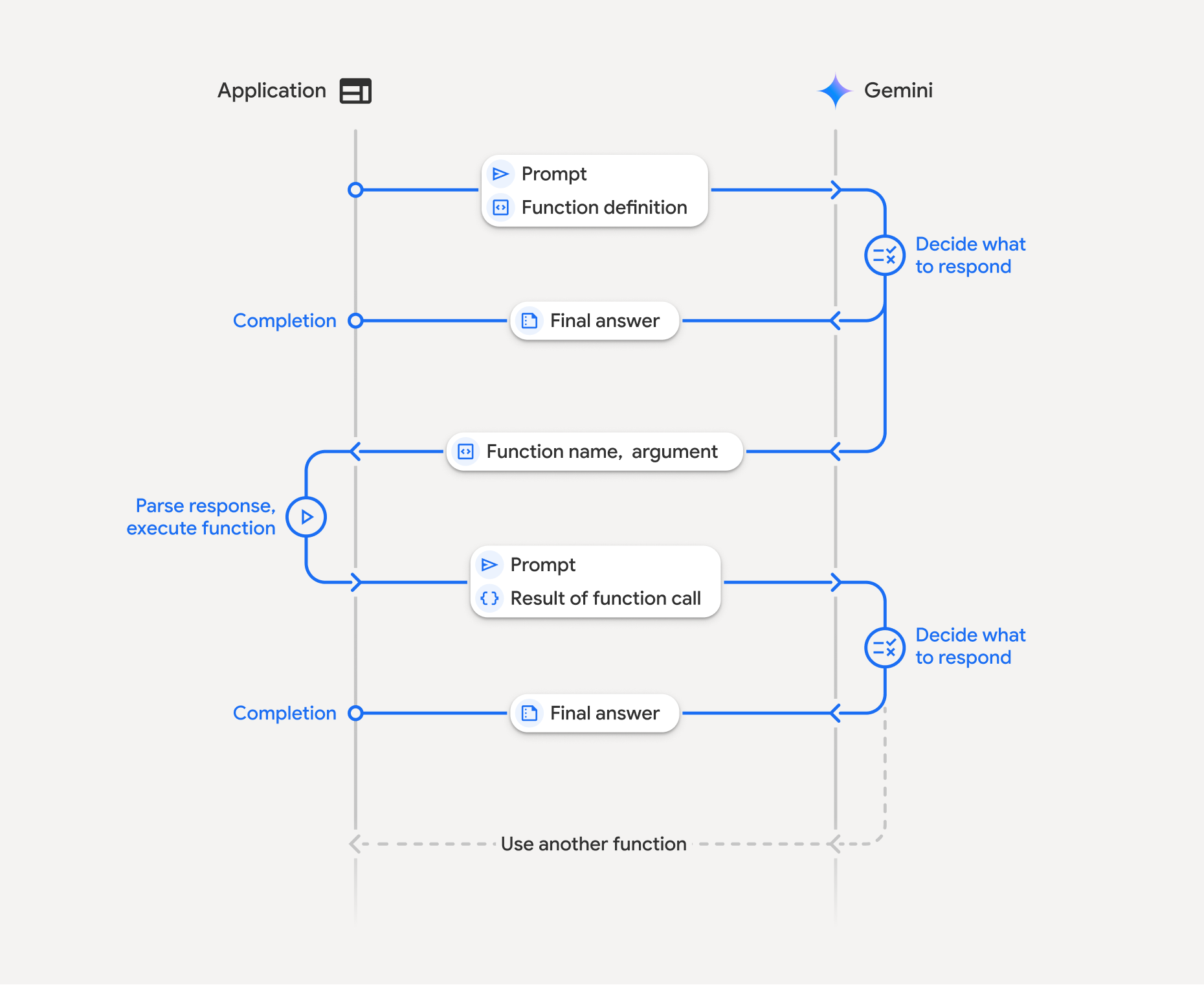
La llamada a funciones implica una interacción estructurada entre tu aplicación, el modelo y las funciones externas:
- Define Function Declaration: Define el nombre, los parámetros y el propósito de la función para el modelo.
- Llama al LLM con declaraciones de funciones: Envía la instrucción del usuario junto con las declaraciones de funciones al modelo.
- Ejecutar código de función (tu responsabilidad): El modelo no ejecuta la función en sí. Extrae el nombre y los argumentos, y ejecútalos en tu aplicación.
- Crea una respuesta fácil de usar: Envía el resultado al modelo para obtener una respuesta final y fácil de usar.
Este proceso se puede repetir varias veces. El modelo admite llamadas a varias funciones en un solo turno (llamada a función paralela) y en secuencia (llamada a función compositiva).
Paso 1: Define una declaración de función
Python
set_light_values_declaration = {
    "type": "function",
    "name": "set_light_values",
    "description": "Sets the brightness and color temperature of a light.",
    "parameters": {
        "type": "object",
        "properties": {
            "brightness": {
                "type": "integer",
                "description": "Light level from 0 to 100",
            },
            "color_temp": {
                "type": "string",
                "enum": ["daylight", "cool", "warm"],
                "description": "Color temperature",
            },
        },
        "required": ["brightness", "color_temp"],
    },
}

def set_light_values(brightness: int, color_temp: str) -> dict:
    """Set the brightness and color temperature of a room light."""
    return {"brightness": brightness, "colorTemperature": color_temp}
JavaScript
const setLightValuesTool = {
  type: 'function',
  name: 'set_light_values',
  description: 'Sets the brightness and color temperature of a light.',
  parameters: {
    type: 'object',
    properties: {
      brightness: { type: 'number', description: 'Light level from 0 to 100' },
      color_temp: { type: 'string', enum: ['daylight', 'cool', 'warm'] },
    },
    required: ['brightness', 'color_temp'],
  },
};

function setLightValues(brightness, color_temp) {
  return { brightness: brightness, colorTemperature: color_temp };
}
Java
import com.google.genai.gaos.models.interactions.Function;
import java.util.Arrays;
import java.util.HashMap;
import java.util.Map;
import java.util.function.BiFunction;

Map<String, Object> brightnessProp = new HashMap<>();
brightnessProp.put("type", "integer");
brightnessProp.put("description", "Light level from 0 to 100");

Map<String, Object> colorTempProp = new HashMap<>();
colorTempProp.put("type", "string");
colorTempProp.put("enum", Arrays.asList("daylight", "cool", "warm"));
colorTempProp.put("description", "Color temperature");

Map<String, Object> properties = new HashMap<>();
properties.put("brightness", brightnessProp);
properties.put("color_temp", colorTempProp);

Map<String, Object> parameters = new HashMap<>();
parameters.put("type", "object");
parameters.put("properties", properties);
parameters.put("required", Arrays.asList("brightness", "color_temp"));

Function setLightValuesDeclaration =
    Function.builder()
        .name("set_light_values")
        .description("Sets the brightness and color temperature of a light.")
        .parameters(parameters)
        .build();

BiFunction<Integer, String, Map<String, Object>> setLightValues =
    (brightness, colorTemp) -> {
      Map<String, Object> result = new HashMap<>();
      result.put("brightness", brightness);
      result.put("colorTemperature", colorTemp);
      return result;
    };
Go
package main

import (
    "google.golang.org/genai"
    "google.golang.org/genai/interactions/models/interactions"
)

func setLightValues(brightness int, colorTemp string) map[string]any {
    return map[string]any{
        "brightness":       brightness,
        "colorTemperature": colorTemp,
    }
}

func main() {
    setLightValuesDeclaration := interactions.NewTool(interactions.Function{
        Name:        genai.Ptr("set_light_values"),
        Description: genai.Ptr("Sets the brightness and color temperature of a light."),
        Parameters: map[string]any{
            "type": "object",
            "properties": map[string]any{
                "brightness": map[string]any{
                    "type":        "integer",
                    "description": "Light level from 0 to 100",
                },
                "color_temp": map[string]any{
                    "type":        "string",
                    "enum":        []string{"daylight", "cool", "warm"},
                    "description": "Color temperature",
                },
            },
            "required": []string{"brightness", "color_temp"},
        },
    })
    _ = setLightValuesDeclaration
}
Paso 2: Llama al modelo con declaraciones de funciones
Python
from google import genai

client = genai.Client()

interaction = client.interactions.create(
    model="gemini-3.8-flash",
    input="Turn the lights down to a romantic level",
    tools=[set_light_values_declaration],
)

fc_step = next(s for s in interaction.steps if s.type == "function_call")
print(fc_step)
JavaScript
import { GoogleGenAI } from '@google/genai';

const client = new GoogleGenAI({});

const interaction = await client.interactions.create({
  model: 'gemini-3.8-flash',
  input: 'Turn the lights down to a romantic level',
  tools: [setLightValuesTool],
});

const fcStep = interaction.steps.find(s => s.type === 'function_call');
console.log(fcStep);
Java
import com.google.genai.Client;
import com.google.genai.gaos.models.interactions.CreateModelInteraction;
import com.google.genai.gaos.models.interactions.Function;
import com.google.genai.gaos.models.interactions.FunctionCallStep;
import com.google.genai.gaos.models.interactions.Interaction;
import com.google.genai.gaos.models.interactions.InteractionsInput;
import com.google.genai.gaos.models.interactions.Model;
import com.google.genai.gaos.models.interactions.Step;
import com.google.genai.gaos.models.operations.CreateInteractionRequestBody;
import java.util.Arrays;
import java.util.HashMap;
import java.util.Map;

Client client = new Client();

Map<String, Object> brightnessProp = new HashMap<>();
brightnessProp.put("type", "integer");
brightnessProp.put("description", "Light level from 0 to 100");

Map<String, Object> colorTempProp = new HashMap<>();
colorTempProp.put("type", "string");
colorTempProp.put("enum", Arrays.asList("daylight", "cool", "warm"));
colorTempProp.put("description", "Color temperature");

Map<String, Object> properties = new HashMap<>();
properties.put("brightness", brightnessProp);
properties.put("color_temp", colorTempProp);

Map<String, Object> parameters = new HashMap<>();
parameters.put("type", "object");
parameters.put("properties", properties);
parameters.put("required", Arrays.asList("brightness", "color_temp"));

Function setLightValuesDeclaration =
    Function.builder()
        .name("set_light_values")
        .description("Sets the brightness and color temperature of a light.")
        .parameters(parameters)
        .build();

CreateModelInteraction params =
    CreateModelInteraction.builder()
        .model(Model.of("gemini-3.8-flash"))
        .input(InteractionsInput.of("Turn the lights down to a romantic level"))
        .tools(Arrays.asList(setLightValuesDeclaration))
        .build();

Interaction interaction =
    client.interactions.create(CreateInteractionRequestBody.of(params)).interaction().get();

FunctionCallStep fcStep = null;
if (interaction.steps().isPresent()) {
  for (Step step : interaction.steps().get()) {
    if (step instanceof FunctionCallStep) {
      fcStep = (FunctionCallStep) step;
      break;
    }
  }
}
System.out.println(fcStep);
Go
package main

import (
    "context"
    "fmt"
    "log"

    "google.golang.org/genai"
    "google.golang.org/genai/interactions/models/interactions"
    "google.golang.org/genai/interactions/models/operations"
)

func main() {
    ctx := context.Background()
    client, err := genai.NewClient(ctx, nil)
    if err != nil {
        log.Fatal(err)
    }

    setLightValuesDeclaration := interactions.NewTool(interactions.Function{
        Name:        genai.Ptr("set_light_values"),
        Description: genai.Ptr("Sets the brightness and color temperature of a light."),
        Parameters: map[string]any{
            "type": "object",
            "properties": map[string]any{
                "brightness": map[string]any{
                    "type":        "integer",
                    "description": "Light level from 0 to 100",
                },
                "color_temp": map[string]any{
                    "type":        "string",
                    "enum":        []string{"daylight", "cool", "warm"},
                    "description": "Color temperature",
                },
            },
            "required": []string{"brightness", "color_temp"},
        },
    })

    resp, err := client.Interactions.Create(ctx, operations.CreateInteractionRequest{
        Body: operations.NewCreateInteractionRequestBody(
            interactions.CreateModelInteraction{
                Model: interactions.Model("gemini-3.8-flash"),
                Input: interactions.NewInteractionsInput("Turn the lights down to a romantic level"),
                Tools: []interactions.Tool{setLightValuesDeclaration},
            },
        ),
    })
    if err != nil {
        log.Fatal(err)
    }

    var fcStep *interactions.FunctionCallStep
    for _, step := range resp.Interaction.Steps {
        if step.FunctionCallStep != nil {
            fcStep = step.FunctionCallStep
            break
        }
    }
    fmt.Println(fcStep)
}
El modelo devuelve un paso function_call con type, name y arguments:
type='function_call'
name='set_light_values'
arguments={'color_temp': 'warm', 'brightness': 25}
Paso 3: Ejecuta la función
Python
fc_step = next(s for s in interaction.steps if s.type == "function_call")

if fc_step.name == "set_light_values":
    result = set_light_values(**fc_step.arguments)
    print(f"Function execution result: {result}")
JavaScript
const fcStep = interaction.steps.find(s => s.type === 'function_call');

let result;
if (fcStep.name === 'set_light_values') {
  result = setLightValues(fcStep.arguments.brightness, fcStep.arguments.color_temp);
  console.log(`Function execution result: ${JSON.stringify(result)}`);
}
Java
import com.google.genai.Client;
import com.google.genai.gaos.models.interactions.CreateModelInteraction;
import com.google.genai.gaos.models.interactions.Function;
import com.google.genai.gaos.models.interactions.FunctionCallStep;
import com.google.genai.gaos.models.interactions.Interaction;
import com.google.genai.gaos.models.interactions.InteractionsInput;
import com.google.genai.gaos.models.interactions.Model;
import com.google.genai.gaos.models.interactions.Step;
import com.google.genai.gaos.models.operations.CreateInteractionRequestBody;
import java.util.Arrays;
import java.util.Collections;
import java.util.HashMap;
import java.util.Map;
import java.util.function.BiFunction;

Client client = new Client();

Map<String, Object> brightnessProp = new HashMap<>();
brightnessProp.put("type", "integer");
brightnessProp.put("description", "Light level from 0 to 100");

Map<String, Object> colorTempProp = new HashMap<>();
colorTempProp.put("type", "string");
colorTempProp.put("enum", Arrays.asList("daylight", "cool", "warm"));
colorTempProp.put("description", "Color temperature");

Map<String, Object> properties = new HashMap<>();
properties.put("brightness", brightnessProp);
properties.put("color_temp", colorTempProp);

Map<String, Object> parameters = new HashMap<>();
parameters.put("type", "object");
parameters.put("properties", properties);
parameters.put("required", Arrays.asList("brightness", "color_temp"));

Function setLightValuesDeclaration =
    Function.builder()
        .name("set_light_values")
        .description("Sets the brightness and color temperature of a light.")
        .parameters(parameters)
        .build();

BiFunction<Integer, String, Map<String, Object>> setLightValues =
    (brightness, colorTemp) -> {
      Map<String, Object> result = new HashMap<>();
      result.put("brightness", brightness);
      result.put("colorTemperature", colorTemp);
      return result;
    };

CreateModelInteraction params =
    CreateModelInteraction.builder()
        .model(Model.of("gemini-3.8-flash"))
        .input(InteractionsInput.of("Turn the lights down to a romantic level"))
        .tools(Arrays.asList(setLightValuesDeclaration))
        .build();

Interaction interaction =
    client.interactions.create(CreateInteractionRequestBody.of(params)).interaction().get();

if (interaction.steps().isPresent()) {
  for (Step step : interaction.steps().get()) {
    if (step instanceof FunctionCallStep) {
      FunctionCallStep fcStep = (FunctionCallStep) step;
      if ("set_light_values".equals(fcStep.name().orElse(""))) {
        Map<String, Object> args = fcStep.arguments().orElse(Collections.emptyMap());
        int brightness = ((Number) args.getOrDefault("brightness", 25)).intValue();
        String colorTemp = (String) args.getOrDefault("color_temp", "warm");
        Map<String, Object> result = setLightValues.apply(brightness, colorTemp);
        System.out.println("Function execution result: " + result);
      }
    }
  }
}
Go
package main

import (
    "context"
    "fmt"
    "log"

    "google.golang.org/genai"
    "google.golang.org/genai/interactions/models/interactions"
    "google.golang.org/genai/interactions/models/operations"
)

func setLightValues(brightness int, colorTemp string) map[string]any {
    return map[string]any{
        "brightness":       brightness,
        "colorTemperature": colorTemp,
    }
}

func main() {
    ctx := context.Background()
    client, err := genai.NewClient(ctx, nil)
    if err != nil {
        log.Fatal(err)
    }

    setLightValuesDeclaration := interactions.NewTool(interactions.Function{
        Name:        genai.Ptr("set_light_values"),
        Description: genai.Ptr("Sets the brightness and color temperature of a light."),
        Parameters: map[string]any{
            "type": "object",
            "properties": map[string]any{
                "brightness": map[string]any{
                    "type":        "integer",
                    "description": "Light level from 0 to 100",
                },
                "color_temp": map[string]any{
                    "type":        "string",
                    "enum":        []string{"daylight", "cool", "warm"},
                    "description": "Color temperature",
                },
            },
            "required": []string{"brightness", "color_temp"},
        },
    })

    resp, err := client.Interactions.Create(ctx, operations.CreateInteractionRequest{
        Body: operations.NewCreateInteractionRequestBody(
            interactions.CreateModelInteraction{
                Model: interactions.Model("gemini-3.8-flash"),
                Input: interactions.NewInteractionsInput("Turn the lights down to a romantic level"),
                Tools: []interactions.Tool{setLightValuesDeclaration},
            },
        ),
    })
    if err != nil {
        log.Fatal(err)
    }

    for _, step := range resp.Interaction.Steps {
        if step.FunctionCallStep != nil {
            fcStep := step.FunctionCallStep
            if fcStep.Name == "set_light_values" {
                brightness := 25
                if b, ok := fcStep.Arguments["brightness"].(float64); ok {
                    brightness = int(b)
                }
                colorTemp := "warm"
                if c, ok := fcStep.Arguments["color_temp"].(string); ok {
                    colorTemp = c
                }
                result := setLightValues(brightness, colorTemp)
                fmt.Println("Function execution result:", result)
            }
        }
    }
}
Paso 4: Envía el resultado al modelo
Python
final_interaction = client.interactions.create(
    model="gemini-3.8-flash",
    input=[
        {
            "type": "function_result",
            "name": fc_step.name,
            "call_id": fc_step.id,
            "result": [{"type": "text", "text": json.dumps(result)}],
        }
    ],
    tools=[set_light_values_declaration],
    previous_interaction_id=interaction.id,
)

print(final_interaction.output_text)
JavaScript
const finalInteraction = await client.interactions.create({
  model: 'gemini-3.8-flash',
  input: [{
    type: 'function_result',
    name: fcStep.name,
    call_id: fcStep.id,
    result: [{ type: 'text', text: JSON.stringify(result) }]
  }],
  tools: [setLightValuesTool],
  previous_interaction_id: interaction.id,
});

console.log(finalInteraction.output_text);
Java
import com.google.genai.Client;
import com.google.genai.gaos.models.interactions.CreateModelInteraction;
import com.google.genai.gaos.models.interactions.Function;
import com.google.genai.gaos.models.interactions.FunctionCallStep;
import com.google.genai.gaos.models.interactions.FunctionResultStep;
import com.google.genai.gaos.models.interactions.FunctionResultStepResultUnion;
import com.google.genai.gaos.models.interactions.FunctionResultSubcontent;
import com.google.genai.gaos.models.interactions.Interaction;
import com.google.genai.gaos.models.interactions.InteractionsInput;
import com.google.genai.gaos.models.interactions.Model;
import com.google.genai.gaos.models.interactions.Step;
import com.google.genai.gaos.models.interactions.TextContent;
import com.google.genai.gaos.models.operations.CreateInteractionRequestBody;
import java.util.Arrays;
import java.util.HashMap;
import java.util.Map;

Client client = new Client();

Map<String, Object> brightnessProp = new HashMap<>();
brightnessProp.put("type", "integer");
brightnessProp.put("description", "Light level from 0 to 100");

Map<String, Object> colorTempProp = new HashMap<>();
colorTempProp.put("type", "string");
colorTempProp.put("enum", Arrays.asList("daylight", "cool", "warm"));
colorTempProp.put("description", "Color temperature");

Map<String, Object> properties = new HashMap<>();
properties.put("brightness", brightnessProp);
properties.put("color_temp", colorTempProp);

Map<String, Object> parameters = new HashMap<>();
parameters.put("type", "object");
parameters.put("properties", properties);
parameters.put("required", Arrays.asList("brightness", "color_temp"));

Function setLightValuesDeclaration =
    Function.builder()
        .name("set_light_values")
        .description("Sets the brightness and color temperature of a light.")
        .parameters(parameters)
        .build();

CreateModelInteraction params =
    CreateModelInteraction.builder()
        .model(Model.of("gemini-3.8-flash"))
        .input(InteractionsInput.of("Turn the lights down to a romantic level"))
        .tools(Arrays.asList(setLightValuesDeclaration))
        .build();

Interaction interaction =
    client.interactions.create(CreateInteractionRequestBody.of(params)).interaction().get();

FunctionCallStep fcStep = null;
if (interaction.steps().isPresent()) {
  for (Step step : interaction.steps().get()) {
    if (step instanceof FunctionCallStep) {
      fcStep = (FunctionCallStep) step;
      break;
    }
  }
}

if (fcStep != null) {
  String resultJson = "{\"brightness\": 25, \"colorTemperature\": \"warm\"}";
  FunctionResultStep resultStep =
      FunctionResultStep.builder()
          .name(fcStep.name().orElse(""))
          .callId(fcStep.id().orElse(""))
          .result(
              FunctionResultStepResultUnion.of(
                  Arrays.<FunctionResultSubcontent>asList(
                      TextContent.builder().text(resultJson).build())))
          .build();

  CreateModelInteraction finalParams =
      CreateModelInteraction.builder()
          .model(Model.of("gemini-3.8-flash"))
          .previousInteractionId(interaction.id().orElse(""))
          .tools(Arrays.asList(setLightValuesDeclaration))
          .input(InteractionsInput.ofStep(Arrays.<Step>asList(resultStep)))
          .build();

  Interaction finalInteraction =
      client
          .interactions
          .create(CreateInteractionRequestBody.of(finalParams))
          .interaction()
          .get();

  System.out.println(finalInteraction.outputText().orElse(""));
}
Go
package main

import (
    "context"
    "fmt"
    "log"

    "google.golang.org/genai"
    "google.golang.org/genai/interactions/models/interactions"
    "google.golang.org/genai/interactions/models/operations"
)

func main() {
    ctx := context.Background()
    client, err := genai.NewClient(ctx, nil)
    if err != nil {
        log.Fatal(err)
    }

    setLightValuesDeclaration := interactions.NewTool(interactions.Function{
        Name:        genai.Ptr("set_light_values"),
        Description: genai.Ptr("Sets the brightness and color temperature of a light."),
        Parameters: map[string]any{
            "type": "object",
            "properties": map[string]any{
                "brightness": map[string]any{
                    "type":        "integer",
                    "description": "Light level from 0 to 100",
                },
                "color_temp": map[string]any{
                    "type":        "string",
                    "enum":        []string{"daylight", "cool", "warm"},
                    "description": "Color temperature",
                },
            },
            "required": []string{"brightness", "color_temp"},
        },
    })

    resp, err := client.Interactions.Create(ctx, operations.CreateInteractionRequest{
        Body: operations.NewCreateInteractionRequestBody(
            interactions.CreateModelInteraction{
                Model: interactions.Model("gemini-3.8-flash"),
                Input: interactions.NewInteractionsInput("Turn the lights down to a romantic level"),
                Tools: []interactions.Tool{setLightValuesDeclaration},
            },
        ),
    })
    if err != nil {
        log.Fatal(err)
    }

    var fcStep *interactions.FunctionCallStep
    for _, step := range resp.Interaction.Steps {
        if step.FunctionCallStep != nil {
            fcStep = step.FunctionCallStep
            break
        }
    }

    if fcStep != nil {
        resultJson := `{"brightness": 25, "colorTemperature": "warm"}`
        resultStep := interactions.NewStep(interactions.FunctionResultStep{
            Name:   genai.Ptr(fcStep.Name),
            CallID: fcStep.ID,
            Result: interactions.NewFunctionResultStepResultUnion([]interactions.FunctionResultSubcontent{
                interactions.NewFunctionResultSubcontent(interactions.TextContent{
                    Text: resultJson,
                }),
            }),
        })

        finalResp, err := client.Interactions.Create(ctx, operations.CreateInteractionRequest{
            Body: operations.NewCreateInteractionRequestBody(
                interactions.CreateModelInteraction{
                    Model:                 interactions.Model("gemini-3.8-flash"),
                    PreviousInteractionID: resp.Interaction.ID,
                    Tools:                 []interactions.Tool{setLightValuesDeclaration},
                    Input:                 interactions.NewInteractionsInput([]interactions.Step{resultStep}),
                },
            ),
        })
        if err != nil {
            log.Fatal(err)
        }

        fmt.Println(finalResp.Interaction.GetOutputText())
    }
}
Llamada a funciones sin estado
También puedes usar la llamada a funciones en modo sin estado administrando el historial de conversaciones del cliente y configurando store=false.
En el modo sin estado, debes pasar el historial completo de la conversación en el campo input de cada solicitud posterior. Este historial debe incluir lo siguiente:
1. Es el paso user_input inicial.
2. Todos los pasos generados por el modelo que se devuelven en el turno 1 (incluidos los pasos thought y function_call) exactamente como se recibieron.
3. El paso function_result que contiene el resultado de la función ejecutada.
Python
from google import genai
import json

client = genai.Client()

history = [
    {
        "type": "user_input",
        "content": [{"type": "text", "text": "Turn the lights down to a romantic level"}]
    }
]

interaction = client.interactions.create(
    model="gemini-3.8-flash",
    store=False,
    input=history,
    tools=[set_light_values_declaration],
)

for step in interaction.steps:
    history.append(step.model_dump())

fc_step = next(s for s in interaction.steps if s.type == "function_call")
if fc_step.name == "set_light_values":
    result = set_light_values(**fc_step.arguments)

history.append({
    "type": "function_result",
    "name": fc_step.name,
    "call_id": fc_step.id,
    "result": [{"type": "text", "text": json.dumps(result)}],
})

final_interaction = client.interactions.create(
    model="gemini-3.8-flash",
    store=False,
    input=history,
    tools=[set_light_values_declaration],
)

print(final_interaction.output_text)
JavaScript
import { GoogleGenAI } from "@google/genai";

const client = new GoogleGenAI({});

async function main() {
  const history = [
    {
      type: "user_input",
      content: [{ type: "text", text: "Turn the lights down to a romantic level" }]
    }
  ];

  const interaction = await client.interactions.create({
    model: "gemini-3.8-flash",
    store: false,
    input: history,
    tools: [setLightValuesTool],
  });

  history.push(...interaction.steps);

  const fcStep = interaction.steps.find(s => s.type === 'function_call');
  let result;
  if (fcStep.name === 'set_light_values') {
    result = setLightValues(fcStep.arguments.brightness, fcStep.arguments.color_temp);
  }

  history.push({
    type: 'function_result',
    name: fcStep.name,
    call_id: fcStep.id,
    result: [{ type: 'text', text: JSON.stringify(result) }]
  });

  const finalInteraction = await client.interactions.create({
    model: 'gemini-3.8-flash',
    store: false,
    input: history,
    tools: [setLightValuesTool],
  });

  console.log(finalInteraction.output_text);
}

await main();
Java
import com.google.genai.Client;
import com.google.genai.gaos.models.interactions.CreateModelInteraction;
import com.google.genai.gaos.models.interactions.Function;
import com.google.genai.gaos.models.interactions.FunctionCallStep;
import com.google.genai.gaos.models.interactions.FunctionResultStep;
import com.google.genai.gaos.models.interactions.FunctionResultStepResultUnion;
import com.google.genai.gaos.models.interactions.FunctionResultSubcontent;
import com.google.genai.gaos.models.interactions.Interaction;
import com.google.genai.gaos.models.interactions.InteractionsInput;
import com.google.genai.gaos.models.interactions.Model;
import com.google.genai.gaos.models.interactions.Step;
import com.google.genai.gaos.models.interactions.TextContent;
import com.google.genai.gaos.models.interactions.UserInputStep;
import com.google.genai.gaos.models.operations.CreateInteractionRequestBody;
import java.util.ArrayList;
import java.util.Arrays;
import java.util.HashMap;
import java.util.List;
import java.util.Map;

Client client = new Client();

Map<String, Object> brightnessProp = new HashMap<>();
brightnessProp.put("type", "integer");
brightnessProp.put("description", "Light level from 0 to 100");

Map<String, Object> colorTempProp = new HashMap<>();
colorTempProp.put("type", "string");
colorTempProp.put("enum", Arrays.asList("daylight", "cool", "warm"));
colorTempProp.put("description", "Color temperature");

Map<String, Object> properties = new HashMap<>();
properties.put("brightness", brightnessProp);
properties.put("color_temp", colorTempProp);

Map<String, Object> parameters = new HashMap<>();
parameters.put("type", "object");
parameters.put("properties", properties);
parameters.put("required", Arrays.asList("brightness", "color_temp"));

Function setLightValuesDeclaration =
    Function.builder()
        .name("set_light_values")
        .description("Sets the brightness and color temperature of a light.")
        .parameters(parameters)
        .build();

List<Step> history = new ArrayList<>();
history.add(
    UserInputStep.builder()
        .content(
            Arrays.asList(
                TextContent.builder()
                    .text("Turn the lights down to a romantic level")
                    .build()))
        .build());

CreateModelInteraction params =
    CreateModelInteraction.builder()
        .model(Model.of("gemini-3.8-flash"))
        .store(false)
        .input(InteractionsInput.ofStep(history))
        .tools(Arrays.asList(setLightValuesDeclaration))
        .build();

Interaction interaction =
    client.interactions.create(CreateInteractionRequestBody.of(params)).interaction().get();

FunctionCallStep fcStep = null;
if (interaction.steps().isPresent()) {
  history.addAll(interaction.steps().get());
  for (Step step : interaction.steps().get()) {
    if (step instanceof FunctionCallStep) {
      fcStep = (FunctionCallStep) step;
      break;
    }
  }
}

if (fcStep != null) {
  String resultJson = "{\"brightness\": 25, \"colorTemperature\": \"warm\"}";
  history.add(
      FunctionResultStep.builder()
          .name(fcStep.name().orElse(""))
          .callId(fcStep.id().orElse(""))
          .result(
              FunctionResultStepResultUnion.of(
                  Arrays.<FunctionResultSubcontent>asList(
                      TextContent.builder().text(resultJson).build())))
          .build());

  CreateModelInteraction finalParams =
      CreateModelInteraction.builder()
          .model(Model.of("gemini-3.8-flash"))
          .store(false)
          .input(InteractionsInput.ofStep(history))
          .tools(Arrays.asList(setLightValuesDeclaration))
          .build();

  Interaction finalInteraction =
      client
          .interactions
          .create(CreateInteractionRequestBody.of(finalParams))
          .interaction()
          .get();

  System.out.println(finalInteraction.outputText().orElse(""));
}
Go
package main

import (
    "context"
    "fmt"
    "log"

    "google.golang.org/genai"
    "google.golang.org/genai/interactions/models/interactions"
    "google.golang.org/genai/interactions/models/operations"
)

func main() {
    ctx := context.Background()
    client, err := genai.NewClient(ctx, nil)
    if err != nil {
        log.Fatal(err)
    }

    setLightValuesDeclaration := interactions.NewTool(interactions.Function{
        Name:        genai.Ptr("set_light_values"),
        Description: genai.Ptr("Sets the brightness and color temperature of a light."),
        Parameters: map[string]any{
            "type": "object",
            "properties": map[string]any{
                "brightness": map[string]any{
                    "type":        "integer",
                    "description": "Light level from 0 to 100",
                },
                "color_temp": map[string]any{
                    "type":        "string",
                    "enum":        []string{"daylight", "cool", "warm"},
                    "description": "Color temperature",
                },
            },
            "required": []string{"brightness", "color_temp"},
        },
    })

    history := []interactions.Step{
        interactions.NewStep(interactions.UserInputStep{
            Content: []interactions.Content{
                interactions.NewContent(interactions.TextContent{
                    Text: "Turn the lights down to a romantic level",
                }),
            },
        }),
    }

    resp, err := client.Interactions.Create(ctx, operations.CreateInteractionRequest{
        Body: operations.NewCreateInteractionRequestBody(
            interactions.CreateModelInteraction{
                Model: interactions.Model("gemini-3.8-flash"),
                Store: genai.Ptr(false),
                Input: interactions.NewInteractionsInput(history),
                Tools: []interactions.Tool{setLightValuesDeclaration},
            },
        ),
    })
    if err != nil {
        log.Fatal(err)
    }

    history = append(history, resp.Interaction.Steps...)
    var fcStep *interactions.FunctionCallStep
    for _, step := range resp.Interaction.Steps {
        if step.FunctionCallStep != nil {
            fcStep = step.FunctionCallStep
            break
        }
    }

    if fcStep != nil {
        resultJson := `{"brightness": 25, "colorTemperature": "warm"}`
        history = append(history, interactions.NewStep(interactions.FunctionResultStep{
            Name:   genai.Ptr(fcStep.Name),
            CallID: fcStep.ID,
            Result: interactions.NewFunctionResultStepResultUnion([]interactions.FunctionResultSubcontent{
                interactions.NewFunctionResultSubcontent(interactions.TextContent{
                    Text: resultJson,
                }),
            }),
        }))

        finalResp, err := client.Interactions.Create(ctx, operations.CreateInteractionRequest{
            Body: operations.NewCreateInteractionRequestBody(
                interactions.CreateModelInteraction{
                    Model: interactions.Model("gemini-3.8-flash"),
                    Store: genai.Ptr(false),
                    Input: interactions.NewInteractionsInput(history),
                    Tools: []interactions.Tool{setLightValuesDeclaration},
                },
            ),
        })
        if err != nil {
            log.Fatal(err)
        }

        fmt.Println(finalResp.Interaction.GetOutputText())
    }
}
REST
# Turn 1: Send request with tools and store: false
RESPONSE1=$(curl -s -X POST "https://generativelanguage.googleapis.com/v1beta/interactions" \
  -H "x-goog-api-key: $GEMINI_API_KEY" \
  -H 'Content-Type: application/json' \
  -d '{
    "model": "gemini-3.8-flash",
    "store": false,
    "input": [
      {
        "type": "user_input",
        "content": "Turn the lights down to a romantic level"
      }
    ],
    "tools": [{
      "type": "function",
      "name": "set_light_values",
      "description": "Sets the brightness and color temperature of a light.",
      "parameters": {
        "type": "object",
        "properties": {
          "brightness": {"type": "integer", "description": "Light level from 0 to 100"},
          "color_temp": {"type": "string", "enum": ["daylight", "cool", "warm"]}
        },
        "required": ["brightness", "color_temp"]
      }
    }]
  }')

# Extract model steps (thought, function_call)
MODEL_STEPS=$(echo "$RESPONSE1" | jq '.steps')

# Extract function call details to execute
FC_NAME=$(echo "$RESPONSE1" | jq -r '.steps[] | select(.type=="function_call") | .name')
FC_ID=$(echo "$RESPONSE1" | jq -r '.steps[] | select(.type=="function_call") | .id')

# Assume local execution returns: {"brightness": 25, "colorTemperature": "warm"}
RESULT="{\"brightness\": 25, \"colorTemperature\": \"warm\"}"

# Reconstruct history for Turn 2
HISTORY=$(jq -n \
  --argjson first_input '[{"type": "user_input", "content": "Turn the lights down to a romantic level"}]' \
  --argjson model_steps "$MODEL_STEPS" \
  --arg fc_name "$FC_NAME" \
  --arg fc_id "$FC_ID" \
  --arg result "$RESULT" \
  '$first_input + $model_steps + [{"type": "function_result", "name": $fc_name, "call_id": $fc_id, "result": [{"type": "text", "text": $result}]}]')

# Turn 2: Send the full history
curl -X POST "https://generativelanguage.googleapis.com/v1beta/interactions" \
  -H "x-goog-api-key: $GEMINI_API_KEY" \
  -H 'Content-Type: application/json' \
  -d "{
    \"model\": \"gemini-3.8-flash\",
    \"store\": false,
    \"input\": $HISTORY,
    \"tools\": [{
      \"type\": \"function\",
      \"name\": \"set_light_values\",
      \"description\": \"Sets the brightness and color temperature of a light.\",
      \"parameters\": {
        \"type\": \"object\",
        \"properties\": {
          \"brightness\": {\"type\": \"integer\"},
          \"color_temp\": {\"type\": \"string\"}
        },
        \"required\": [\"brightness\", \"color_temp\"]
      }
    }]
  }"
Declaraciones de funciones
Se pasa una declaración de función como herramienta y se incluye lo siguiente:
type(cadena): Debe ser"function"para las funciones personalizadas.name(cadena): Nombre único de la función (usa guiones bajos o camelCase).description(cadena): Explicación clara del propósito de la función.parameters(objeto): Son los parámetros de entrada que espera la función.type(cadena): Tipo de datos general, comoobject.properties(objeto): Son parámetros individuales con tipo y descripción.required(array): Nombres de parámetros obligatorios.
Llamada a función con modelos de pensamiento
Los modelos de la serie Gemini 3 utilizan un proceso interno de "pensamiento" que mejora las llamadas a funciones. Los SDKs controlan automáticamente las firmas de pensamiento por ti.
Llamada a función paralela
Llama a varias funciones a la vez cuando sean independientes:
Python
power_disco_ball = {"type": "function", "name": "power_disco_ball", "description": "Powers the disco ball.",
    "parameters": {"type": "object", "properties": {"power": {"type": "boolean"}}, "required": ["power"]}}
start_music = {"type": "function", "name": "start_music", "description": "Play music.",
    "parameters": {"type": "object", "properties": {"energetic": {"type": "boolean"}, "loud": {"type": "boolean"}}, "required": ["energetic", "loud"]}}
dim_lights = {"type": "function", "name": "dim_lights", "description": "Dim the lights.",
    "parameters": {"type": "object", "properties": {"brightness": {"type": "number"}}, "required": ["brightness"]}}

client = genai.Client()

interaction = client.interactions.create(
    model="gemini-3.8-flash",
    input="Turn this place into a party!",
    tools=[power_disco_ball, start_music, dim_lights],
    generation_config={"tool_choice": "any"},
)

for step in interaction.steps:
    if step.type == "function_call":
        args = ", ".join(f"{key}={val}" for key, val in step.arguments.items())
        print(f"{step.name}({args})")
JavaScript
const powerDiscoBall = { type: 'function', name: 'power_disco_ball', description: 'Powers the disco ball.',
  parameters: { type: 'object', properties: { power: { type: 'boolean' } }, required: ['power'] } };
const startMusic = { type: 'function', name: 'start_music', description: 'Play music.',
  parameters: { type: 'object', properties: { energetic: { type: 'boolean' }, loud: { type: 'boolean' } }, required: ['energetic', 'loud'] } };
const dimLights = { type: 'function', name: 'dim_lights', description: 'Dim the lights.',
  parameters: { type: 'object', properties: { brightness: { type: 'number' } }, required: ['brightness'] } };

const interaction = await client.interactions.create({
  model: 'gemini-3.8-flash',
  input: 'Turn this place into a party!',
  tools: [powerDiscoBall, startMusic, dimLights],
  generation_config: { tool_choice: 'any' },
});

for (const step of interaction.steps) {
  if (step.type === 'function_call') {
    console.log(`${step.name}(${JSON.stringify(step.arguments)})`);
  }
}
Java
import com.google.genai.Client;
import com.google.genai.gaos.models.interactions.CreateModelInteraction;
import com.google.genai.gaos.models.interactions.Function;
import com.google.genai.gaos.models.interactions.FunctionCallStep;
import com.google.genai.gaos.models.interactions.GenerationConfig;
import com.google.genai.gaos.models.interactions.Interaction;
import com.google.genai.gaos.models.interactions.InteractionsInput;
import com.google.genai.gaos.models.interactions.Model;
import com.google.genai.gaos.models.interactions.Step;
import com.google.genai.gaos.models.interactions.ToolChoice;
import com.google.genai.gaos.models.interactions.ToolChoiceType;
import com.google.genai.gaos.models.operations.CreateInteractionRequestBody;
import java.util.Arrays;
import java.util.Collections;
import java.util.HashMap;
import java.util.Map;

Client client = new Client();

Map<String, Object> discoParams = new HashMap<>();
discoParams.put("type", "object");
discoParams.put(
    "properties", Collections.singletonMap("power", Collections.singletonMap("type", "boolean")));
discoParams.put("required", Arrays.asList("power"));

Function powerDiscoBall =
    Function.builder()
        .name("power_disco_ball")
        .description("Powers the disco ball.")
        .parameters(discoParams)
        .build();

Map<String, Object> musicProps = new HashMap<>();
musicProps.put("energetic", Collections.singletonMap("type", "boolean"));
musicProps.put("loud", Collections.singletonMap("type", "boolean"));
Map<String, Object> musicParams = new HashMap<>();
musicParams.put("type", "object");
musicParams.put("properties", musicProps);
musicParams.put("required", Arrays.asList("energetic", "loud"));

Function startMusic =
    Function.builder()
        .name("start_music")
        .description("Play music.")
        .parameters(musicParams)
        .build();

Map<String, Object> lightsParams = new HashMap<>();
lightsParams.put("type", "object");
lightsParams.put(
    "properties",
    Collections.singletonMap("brightness", Collections.singletonMap("type", "number")));
lightsParams.put("required", Arrays.asList("brightness"));

Function dimLights =
    Function.builder()
        .name("dim_lights")
        .description("Dim the lights.")
        .parameters(lightsParams)
        .build();

CreateModelInteraction params =
    CreateModelInteraction.builder()
        .model(Model.of("gemini-3.8-flash"))
        .input(InteractionsInput.of("Turn this place into a party!"))
        .tools(Arrays.asList(powerDiscoBall, startMusic, dimLights))
        .generationConfig(
            GenerationConfig.builder().toolChoice(ToolChoice.of(ToolChoiceType.ANY)).build())
        .build();

Interaction interaction =
    client.interactions.create(CreateInteractionRequestBody.of(params)).interaction().get();

if (interaction.steps().isPresent()) {
  for (Step step : interaction.steps().get()) {
    if (step instanceof FunctionCallStep) {
      FunctionCallStep fc = (FunctionCallStep) step;
      System.out.println(fc.name().orElse("") + "(" + fc.arguments().orElse(null) + ")");
    }
  }
}
Go
package main

import (
    "context"
    "fmt"
    "log"

    "google.golang.org/genai"
    "google.golang.org/genai/interactions/models/interactions"
    "google.golang.org/genai/interactions/models/operations"
)

func main() {
    ctx := context.Background()
    client, err := genai.NewClient(ctx, nil)
    if err != nil {
        log.Fatal(err)
    }

    powerDiscoBall := interactions.NewTool(interactions.Function{
        Name:        genai.Ptr("power_disco_ball"),
        Description: genai.Ptr("Powers the disco ball."),
        Parameters: map[string]any{
            "type": "object",
            "properties": map[string]any{
                "power": map[string]any{"type": "boolean"},
            },
            "required": []string{"power"},
        },
    })

    startMusic := interactions.NewTool(interactions.Function{
        Name:        genai.Ptr("start_music"),
        Description: genai.Ptr("Play music."),
        Parameters: map[string]any{
            "type": "object",
            "properties": map[string]any{
                "energetic": map[string]any{"type": "boolean"},
                "loud":      map[string]any{"type": "boolean"},
            },
            "required": []string{"energetic", "loud"},
        },
    })

    dimLights := interactions.NewTool(interactions.Function{
        Name:        genai.Ptr("dim_lights"),
        Description: genai.Ptr("Dim the lights."),
        Parameters: map[string]any{
            "type": "object",
            "properties": map[string]any{
                "brightness": map[string]any{"type": "number"},
            },
            "required": []string{"brightness"},
        },
    })

    resp, err := client.Interactions.Create(ctx, operations.CreateInteractionRequest{
        Body: operations.NewCreateInteractionRequestBody(
            interactions.CreateModelInteraction{
                Model: interactions.Model("gemini-3.8-flash"),
                Input: interactions.NewInteractionsInput("Turn this place into a party!"),
                Tools: []interactions.Tool{powerDiscoBall, startMusic, dimLights},
                GenerationConfig: &interactions.GenerationConfig{
                    ToolChoice: genai.Ptr(interactions.NewToolChoice(interactions.ToolChoiceTypeAny)),
                },
            },
        ),
    })
    if err != nil {
        log.Fatal(err)
    }

    for _, step := range resp.Interaction.Steps {
        if step.FunctionCallStep != nil {
            fc := step.FunctionCallStep
            fmt.Printf("%s(%v)\n", fc.Name, fc.Arguments)
        }
    }
}
REST
curl -X POST "https://generativelanguage.googleapis.com/v1beta/interactions" \
  -H "x-goog-api-key: $GEMINI_API_KEY" \
  -H 'Content-Type: application/json' \
  -d '{
    "model": "gemini-3.8-flash",
    "input": "Turn this place into a party!",
    "tools": [
      {
        "type": "function",
        "name": "power_disco_ball",
        "description": "Powers the disco ball.",
        "parameters": {
          "type": "object",
          "properties": {
            "power": {"type": "boolean"}
          },
          "required": ["power"]
        }
      },
      {
        "type": "function",
        "name": "start_music",
        "description": "Play music.",
        "parameters": {
          "type": "object",
          "properties": {
            "energetic": {"type": "boolean"},
            "loud": {"type": "boolean"}
          },
          "required": ["energetic", "loud"]
        }
      },
      {
        "type": "function",
        "name": "dim_lights",
        "description": "Dim the lights.",
        "parameters": {
          "type": "object",
          "properties": {
            "brightness": {"type": "number"}
          },
          "required": ["brightness"]
        }
      }
    ]
  }'
Llamada a funciones compositiva
Encadenar varias llamadas a funciones para solicitudes complejas (p. ej., primero obtener la ubicación y, luego, obtener el clima para esa ubicación)
Python
get_weather_forecast_declaration = {
    "type": "function",
    "name": "get_weather_forecast",
    "description": "Gets the current weather temperature for a given location.",
    "parameters": {
        "type": "object",
        "properties": {
            "location": {"type": "string", "description": "The location"},
        },
        "required": ["location"],
    },
}

set_thermostat_temperature_declaration = {
    "type": "function",
    "name": "set_thermostat_temperature",
    "description": "Sets the thermostat to a desired temperature.",
    "parameters": {
        "type": "object",
        "properties": {
            "temperature": {
                "type": "integer",
                "description": "The temperature in Celsius",
            },
        },
        "required": ["temperature"],
    },
}

client = genai.Client()

interaction = client.interactions.create(
    model="gemini-3.8-flash",
    input="If it's warmer than 20°C in London, set the thermostat to 20°C, otherwise 18°C.",
    tools=[
        get_weather_forecast_declaration,
        set_thermostat_temperature_declaration,
    ],
)

for step in interaction.steps:
    if step.type == "function_call":
        print(f"Function to call: {step.name}")
        print(f"Arguments: {step.arguments}")
    elif hasattr(step, "content") and step.content:
         for part in step.content:
             if hasattr(part, "text"):
                 print(part.text)
JavaScript
import { GoogleGenAI } from '@google/genai';

const client = new GoogleGenAI({});

const getWeatherForecastTool = {
  type: 'function',
  name: 'get_weather_forecast',
  description: 'Gets the current weather temperature for a given location.',
  parameters: {
    type: 'object',
    properties: {
      location: { type: 'string', description: 'The location' },
    },
    required: ['location'],
  },
};

const setThermostatTemperatureTool = {
  type: 'function',
  name: 'set_thermostat_temperature',
  description: 'Sets the thermostat to a desired temperature.',
  parameters: {
    type: 'object',
    properties: {
      temperature: {
        type: 'integer',
        description: 'The temperature in Celsius',
      },
    },
    required: ['temperature'],
  },
};

const interaction = await client.interactions.create({
  model: 'gemini-3.8-flash',
  input: "If it's warmer than 20°C in London, set the thermostat to 20°C, otherwise 18°C.",
  tools: [
    getWeatherForecastTool,
    setThermostatTemperatureTool,
  ],
});

for (const step of interaction.steps) {
  if (step.type === 'function_call') {
    console.log(`Function to call: ${step.name}`);
    console.log(`Arguments: ${JSON.stringify(step.arguments)}`);
  } else if (step.content) {
    for (const part of step.content) {
      if (part.text) {
        console.log(part.text);
      }
    }
  }
}
Java
import com.google.genai.Client;
import com.google.genai.gaos.models.interactions.Content;
import com.google.genai.gaos.models.interactions.CreateModelInteraction;
import com.google.genai.gaos.models.interactions.Function;
import com.google.genai.gaos.models.interactions.FunctionCallStep;
import com.google.genai.gaos.models.interactions.Interaction;
import com.google.genai.gaos.models.interactions.InteractionsInput;
import com.google.genai.gaos.models.interactions.Model;
import com.google.genai.gaos.models.interactions.ModelOutputStep;
import com.google.genai.gaos.models.interactions.Step;
import com.google.genai.gaos.models.interactions.TextContent;
import com.google.genai.gaos.models.operations.CreateInteractionRequestBody;
import java.util.Arrays;
import java.util.HashMap;
import java.util.Map;

Client client = new Client();

Map<String, Object> locationProp = new HashMap<>();
locationProp.put("type", "string");
locationProp.put("description", "The location");

Map<String, Object> weatherProps = new HashMap<>();
weatherProps.put("location", locationProp);

Map<String, Object> weatherParams = new HashMap<>();
weatherParams.put("type", "object");
weatherParams.put("properties", weatherProps);
weatherParams.put("required", Arrays.asList("location"));

Function getWeatherForecastDeclaration =
    Function.builder()
        .name("get_weather_forecast")
        .description("Gets the current weather temperature for a given location.")
        .parameters(weatherParams)
        .build();

Map<String, Object> tempProp = new HashMap<>();
tempProp.put("type", "integer");
tempProp.put("description", "The temperature in Celsius");

Map<String, Object> thermostatProps = new HashMap<>();
thermostatProps.put("temperature", tempProp);

Map<String, Object> thermostatParams = new HashMap<>();
thermostatParams.put("type", "object");
thermostatParams.put("properties", thermostatProps);
thermostatParams.put("required", Arrays.asList("temperature"));

Function setThermostatTemperatureDeclaration =
    Function.builder()
        .name("set_thermostat_temperature")
        .description("Sets the thermostat to a desired temperature.")
        .parameters(thermostatParams)
        .build();

CreateModelInteraction params =
    CreateModelInteraction.builder()
        .model(Model.of("gemini-3.8-flash"))
        .input(
            InteractionsInput.of(
                "If it's warmer than 20°C in London, set the thermostat to 20°C, otherwise 18°C."))
        .tools(Arrays.asList(getWeatherForecastDeclaration, setThermostatTemperatureDeclaration))
        .build();

Interaction interaction =
    client.interactions.create(CreateInteractionRequestBody.of(params)).interaction().get();

if (interaction.steps().isPresent()) {
  for (Step step : interaction.steps().get()) {
    if (step instanceof FunctionCallStep) {
      FunctionCallStep fc = (FunctionCallStep) step;
      System.out.println("Function to call: " + fc.name().orElse(""));
      System.out.println("Arguments: " + fc.arguments().orElse(null));
    } else if (step instanceof ModelOutputStep) {
      ModelOutputStep outputStep = (ModelOutputStep) step;
      if (outputStep.content().isPresent()) {
        for (Content part : outputStep.content().get()) {
          if (part instanceof TextContent) {
            System.out.println(((TextContent) part).text().orElse(""));
          }
        }
      }
    }
  }
}
Go
package main

import (
    "context"
    "fmt"
    "log"

    "google.golang.org/genai"
    "google.golang.org/genai/interactions/models/interactions"
    "google.golang.org/genai/interactions/models/operations"
)

func main() {
    ctx := context.Background()
    client, err := genai.NewClient(ctx, nil)
    if err != nil {
        log.Fatal(err)
    }

    getWeatherForecastDeclaration := interactions.NewTool(interactions.Function{
        Name:        genai.Ptr("get_weather_forecast"),
        Description: genai.Ptr("Gets the current weather temperature for a given location."),
        Parameters: map[string]any{
            "type": "object",
            "properties": map[string]any{
                "location": map[string]any{
                    "type":        "string",
                    "description": "The location",
                },
            },
            "required": []string{"location"},
        },
    })

    setThermostatTemperatureDeclaration := interactions.NewTool(interactions.Function{
        Name:        genai.Ptr("set_thermostat_temperature"),
        Description: genai.Ptr("Sets the thermostat to a desired temperature."),
        Parameters: map[string]any{
            "type": "object",
            "properties": map[string]any{
                "temperature": map[string]any{
                    "type":        "integer",
                    "description": "The temperature in Celsius",
                },
            },
            "required": []string{"temperature"},
        },
    })

    resp, err := client.Interactions.Create(ctx, operations.CreateInteractionRequest{
        Body: operations.NewCreateInteractionRequestBody(
            interactions.CreateModelInteraction{
                Model: interactions.Model("gemini-3.8-flash"),
                Input: interactions.NewInteractionsInput("If it's warmer than 20°C in London, set the thermostat to 20°C, otherwise 18°C."),
                Tools: []interactions.Tool{getWeatherForecastDeclaration, setThermostatTemperatureDeclaration},
            },
        ),
    })
    if err != nil {
        log.Fatal(err)
    }

    for _, step := range resp.Interaction.Steps {
        if step.FunctionCallStep != nil {
            fc := step.FunctionCallStep
            fmt.Println("Function to call:", fc.Name)
            fmt.Println("Arguments:", fc.Arguments)
        } else if step.ModelOutputStep != nil {
            for _, part := range step.ModelOutputStep.Content {
                if part.TextContent != nil {
                    fmt.Println(part.TextContent.Text)
                }
            }
        }
    }
}
REST
curl -X POST "https://generativelanguage.googleapis.com/v1beta/interactions" \
  -H "x-goog-api-key: $GEMINI_API_KEY" \
  -H 'Content-Type: application/json' \
  -d '{
    "model": "gemini-3.8-flash",
    "input": "If it'\''s warmer than 20°C in London, set the thermostat to 20°C, otherwise 18°C.",
    "tools": [
      {
        "type": "function",
        "name": "get_weather_forecast",
        "description": "Gets the current weather temperature for a given location.",
        "parameters": {
          "type": "object",
          "properties": {
            "location": {"type": "string"}
          },
          "required": ["location"]
        }
      },
      {
        "type": "function",
        "name": "set_thermostat_temperature",
        "description": "Sets the thermostat to a desired temperature.",
        "parameters": {
          "type": "object",
          "properties": {
            "temperature": {"type": "integer"}
          },
          "required": ["temperature"]
        }
      }
    ]
  }'
Modos de llamada a funciones
Controla cómo el modelo usa las herramientas con tool_choice en generation_config:
auto(predeterminado): El modelo decide si llamar a una función o responder directamente.any: El modelo está restringido para predecir siempre una llamada a función.none: Se prohíbe que el modelo realice llamadas a funciones.validated: El modelo garantiza el cumplimiento del esquema de la función.
Python
generation_config = {
    "tool_choice": {
        "allowed_tools": {
            "mode": "any",
            "tools": ["get_current_temperature"]
        }
    }
}
JavaScript
const generation_config = {
  tool_choice: {
    allowed_tools: {
      mode: 'any',
      tools: ['get_current_temperature']
    }
  }
};
Java
import com.google.genai.gaos.models.interactions.AllowedTools;
import com.google.genai.gaos.models.interactions.GenerationConfig;
import com.google.genai.gaos.models.interactions.ToolChoice;
import com.google.genai.gaos.models.interactions.ToolChoiceConfig;
import com.google.genai.gaos.models.interactions.ToolChoiceType;
import java.util.Arrays;

GenerationConfig generationConfig =
    GenerationConfig.builder()
        .toolChoice(
            ToolChoice.of(
                ToolChoiceConfig.builder()
                    .allowedTools(
                        AllowedTools.builder()
                            .mode(ToolChoiceType.ANY)
                            .tools(Arrays.asList("get_current_temperature"))
                            .build())
                    .build()))
        .build();
Go
package main

import (
    "google.golang.org/genai"
    "google.golang.org/genai/interactions/models/interactions"
)

func main() {
    generationConfig := interactions.GenerationConfig{
        ToolChoice: genai.Ptr(interactions.NewToolChoice(interactions.ToolChoiceConfig{
            AllowedTools: &interactions.AllowedTools{
                Mode:  interactions.ToolChoiceTypeAny.ToPointer(),
                Tools: []string{"get_current_temperature"},
            },
        })),
    }
    _ = generationConfig
}
REST
curl -X POST "https://generativelanguage.googleapis.com/v1beta/interactions" \
  -H "x-goog-api-key: $GEMINI_API_KEY" \
  -H 'Content-Type: application/json' \
  -d '{
    "model": "gemini-3.8-flash",
    "input": "What is the temperature in Boston?",
    "tools": [{
      "type": "function",
      "name": "get_current_temperature",
      "description": "Gets the current temperature for a given location.",
      "parameters": {
        "type": "object",
        "properties": {
          "location": {"type": "string"}
        },
        "required": ["location"]
      }
    }],
    "generation_config": {
      "tool_choice": {
        "allowed_tools": {
          "mode": "any",
          "tools": ["get_current_temperature"]
        }
      }
    }
  }'
Uso de herramientas múltiples
Puedes habilitar varias herramientas y combinar las integradas con la llamada a funciones en la misma solicitud. Los modelos de Gemini 3 pueden combinar herramientas integradas con llamadas a funciones listas para usar en Interacciones. Si pasas previous_interaction_id, se hace circular automáticamente el contexto de la herramienta integrada.
Python
from google import genai
import json

client = genai.Client()

get_weather = {
    "type": "function",
    "name": "get_weather",
    "description": "Gets the weather for a requested city.",
    "parameters": {
        "type": "object",
        "properties": {
            "city": {
                "type": "string",
                "description": "The city and state, e.g. Utqiaġvik, Alaska",
            },
        },
        "required": ["city"],
    },
}

tools = [
    {"type": "google_search"},
    get_weather
]

interaction = client.interactions.create(
    model="gemini-3.8-flash",
    input="What is the northernmost city in the United States? What's the weather like there today?",
    tools=tools
)

for step in interaction.steps:
    if step.type == "function_call":
        print(f"Function call: {step.name} (ID: {step.id})")
        result = {"response": "Very cold. 22 degrees Fahrenheit."}
        interaction_2 = client.interactions.create(
            model="gemini-3.8-flash",
            previous_interaction_id=interaction.id,
            tools=tools,
            input=[{
                "type": "function_result",
                "name": step.name,
                "call_id": step.id,
                "result": [{"type": "text", "text": json.dumps(result)}]
            }]
        )

        print(interaction_2.output_text)
JavaScript
import { GoogleGenAI } from '@google/genai';

const client = new GoogleGenAI({});

const weatherTool = {
  type: 'function',
  name: 'get_weather',
  description: 'Gets the weather for a given location.',
  parameters: {
    type: 'object',
    properties: {
      location: {
        type: 'string',
        description: 'The city and state, e.g. San Francisco, CA',
      },
    },
    required: ['location'],
  },
};

const tools = [
  { type: 'google_search' }, // Built-in tool
  weatherTool,
];

const interaction = await client.interactions.create({
  model: 'gemini-3.8-flash',
  input: "What is the northernmost city in the United States? What's the weather like there today?",
  tools: tools,
});

for (const step of interaction.steps) {
  if (step.type === 'function_call') {
    console.log(`Function call: ${step.name} (ID: ${step.id})`);
    const result = { response: 'Very cold. 22 degrees Fahrenheit.' };
    const interaction_2 = await client.interactions.create({
      model: 'gemini-3.8-flash',
      previous_interaction_id: interaction.id,
      tools: tools,
      input: [
        {
          type: 'function_result',
          name: step.name,
          call_id: step.id,
          result: [{ type: 'text', text: JSON.stringify(result) }],
        },
      ],
    });

    console.log(interaction_2.output_text);
  }
}
Java
import com.google.genai.Client;
import com.google.genai.gaos.models.interactions.CreateModelInteraction;
import com.google.genai.gaos.models.interactions.Function;
import com.google.genai.gaos.models.interactions.FunctionCallStep;
import com.google.genai.gaos.models.interactions.FunctionResultStep;
import com.google.genai.gaos.models.interactions.FunctionResultStepResultUnion;
import com.google.genai.gaos.models.interactions.FunctionResultSubcontent;
import com.google.genai.gaos.models.interactions.GoogleSearch;
import com.google.genai.gaos.models.interactions.Interaction;
import com.google.genai.gaos.models.interactions.InteractionsInput;
import com.google.genai.gaos.models.interactions.Model;
import com.google.genai.gaos.models.interactions.Step;
import com.google.genai.gaos.models.interactions.TextContent;
import com.google.genai.gaos.models.interactions.Tool;
import com.google.genai.gaos.models.operations.CreateInteractionRequestBody;
import java.util.Arrays;
import java.util.HashMap;
import java.util.List;
import java.util.Map;

Client client = new Client();

Map<String, Object> cityProp = new HashMap<>();
cityProp.put("type", "string");
cityProp.put("description", "The city and state, e.g. Utqiaġvik, Alaska");

Map<String, Object> properties = new HashMap<>();
properties.put("city", cityProp);

Map<String, Object> parameters = new HashMap<>();
parameters.put("type", "object");
parameters.put("properties", properties);
parameters.put("required", Arrays.asList("city"));

Function getWeather =
    Function.builder()
        .name("get_weather")
        .description("Gets the weather for a requested city.")
        .parameters(parameters)
        .build();

List<Tool> tools = Arrays.asList(GoogleSearch.builder().build(), getWeather);

CreateModelInteraction params =
    CreateModelInteraction.builder()
        .model(Model.of("gemini-3.8-flash"))
        .input(
            InteractionsInput.of(
                "What is the northernmost city in the United States? What's the weather like there today?"))
        .tools(tools)
        .build();

Interaction interaction =
    client.interactions.create(CreateInteractionRequestBody.of(params)).interaction().get();

if (interaction.steps().isPresent()) {
  for (Step step : interaction.steps().get()) {
    if (step instanceof FunctionCallStep) {
      FunctionCallStep fcStep = (FunctionCallStep) step;
      System.out.printf(
          "Function call: %s (ID: %s)%n", fcStep.name().orElse(""), fcStep.id().orElse(""));
      String resultJson = "{\"response\": \"Very cold. 22 degrees Fahrenheit.\"}";

      FunctionResultStep resultStep =
          FunctionResultStep.builder()
              .name(fcStep.name().orElse(""))
              .callId(fcStep.id().orElse(""))
              .result(
                  FunctionResultStepResultUnion.of(
                      Arrays.<FunctionResultSubcontent>asList(
                          TextContent.builder().text(resultJson).build())))
              .build();

      CreateModelInteraction params2 =
          CreateModelInteraction.builder()
              .model(Model.of("gemini-3.8-flash"))
              .previousInteractionId(interaction.id().orElse(""))
              .tools(tools)
              .input(InteractionsInput.ofStep(Arrays.<Step>asList(resultStep)))
              .build();

      Interaction interaction2 =
          client
              .interactions
              .create(CreateInteractionRequestBody.of(params2))
              .interaction()
              .get();

      System.out.println(interaction2.outputText().orElse(""));
    }
  }
}
Go
package main

import (
    "context"
    "fmt"
    "log"

    "google.golang.org/genai"
    "google.golang.org/genai/interactions/models/interactions"
    "google.golang.org/genai/interactions/models/operations"
)

func main() {
    ctx := context.Background()
    client, err := genai.NewClient(ctx, nil)
    if err != nil {
        log.Fatal(err)
    }

    getWeather := interactions.NewTool(interactions.Function{
        Name:        genai.Ptr("get_weather"),
        Description: genai.Ptr("Gets the weather for a requested city."),
        Parameters: map[string]any{
            "type": "object",
            "properties": map[string]any{
                "city": map[string]any{
                    "type":        "string",
                    "description": "The city and state, e.g. Utqiaġvik, Alaska",
                },
            },
            "required": []string{"city"},
        },
    })

    tools := []interactions.Tool{
        interactions.NewTool(interactions.GoogleSearch{}),
        getWeather,
    }

    resp, err := client.Interactions.Create(ctx, operations.CreateInteractionRequest{
        Body: operations.NewCreateInteractionRequestBody(
            interactions.CreateModelInteraction{
                Model: interactions.Model("gemini-3.8-flash"),
                Input: interactions.NewInteractionsInput("What is the northernmost city in the United States? What's the weather like there today?"),
                Tools: tools,
            },
        ),
    })
    if err != nil {
        log.Fatal(err)
    }

    for _, step := range resp.Interaction.Steps {
        if step.FunctionCallStep != nil {
            fcStep := step.FunctionCallStep
            fmt.Printf("Function call: %s (ID: %s)\n", fcStep.Name, fcStep.ID)
            resultJson := `{"response": "Very cold. 22 degrees Fahrenheit."}`

            resultStep := interactions.NewStep(interactions.FunctionResultStep{
                Name:   genai.Ptr(fcStep.Name),
                CallID: fcStep.ID,
                Result: interactions.NewFunctionResultStepResultUnion([]interactions.FunctionResultSubcontent{
                    interactions.NewFunctionResultSubcontent(interactions.TextContent{
                        Text: resultJson,
                    }),
                }),
            })

            resp2, err := client.Interactions.Create(ctx, operations.CreateInteractionRequest{
                Body: operations.NewCreateInteractionRequestBody(
                    interactions.CreateModelInteraction{
                        Model:                 interactions.Model("gemini-3.8-flash"),
                        PreviousInteractionID: resp.Interaction.ID,
                        Tools:                 tools,
                        Input:                 interactions.NewInteractionsInput([]interactions.Step{resultStep}),
                    },
                ),
            })
            if err != nil {
                log.Fatal(err)
            }

            fmt.Println(resp2.Interaction.GetOutputText())
        }
    }
}
REST
# Turn 1: Send request with built-in google_search tool and custom weather tool
curl -X POST "https://generativelanguage.googleapis.com/v1beta/interactions" \
  -H "x-goog-api-key: $GEMINI_API_KEY" \
  -H 'Content-Type: application/json' \
  -d '{
    "model": "gemini-3.8-flash",
    "input": "What is the northernmost city in the United States? What'\''s the weather like there today?",
    "tools": [
      {"type": "google_search"},
      {
        "type": "function",
        "name": "get_weather",
        "description": "Gets the weather for a given location.",
        "parameters": {
          "type": "object",
          "properties": {
            "location": {"type": "string", "description": "The city and state, e.g. San Francisco, CA"}
          },
          "required": ["location"]
        }
      }
    ]
  }'

# Turn 2: Provide function result and pass previous_interaction_id
curl -X POST "https://generativelanguage.googleapis.com/v1beta/interactions" \
  -H "x-goog-api-key: $GEMINI_API_KEY" \
  -H 'Content-Type: application/json' \
  -d '{
    "model": "gemini-3.8-flash",
    "previous_interaction_id": "INTERACTION_ID",
    "tools": [
      {"type": "google_search"},
      {
        "type": "function",
        "name": "get_weather",
        "description": "Gets the weather for a given location.",
        "parameters": {
          "type": "object",
          "properties": {
            "location": {"type": "string", "description": "The city and state, e.g. San Francisco, CA"}
          },
          "required": ["location"]
        }
      }
    ],
    "input": [
      {
        "type": "function_result",
        "name": "get_weather",
        "call_id": "call_123",
        "result": [{"type": "text", "text": "{\"response\": \"Very cold. 22 degrees Fahrenheit.\"}"}]
      }
    ]
  }'
Respuestas de funciones multimodales
En el caso de los modelos de la serie Gemini 3, puedes incluir contenido multimodal en las partes de la respuesta de la función que envías al modelo. El modelo puede procesar este contenido multimodal en su siguiente turno para producir una respuesta más fundamentada.
Para incluir datos multimodales en la respuesta de una función, inclúyelos como uno o más bloques de contenido en el campo result del paso function_result. Cada bloque de contenido debe especificar su type (p.ej., "text", "image").
En el siguiente ejemplo, se muestra cómo enviar una respuesta de función que contiene datos de imágenes al modelo en una interacción:
Python
import base64
from google import genai
import requests

client = genai.Client()

tool_call = next(s for s in interaction.steps if s.type == "function_call")

image_path = "https://goo.gle/instrument-img"
image_bytes = requests.get(image_path).content

base64_image_data = base64.b64encode(image_bytes).decode("utf-8")

final_interaction = client.interactions.create(
    model="gemini-3.8-flash",
    previous_interaction_id=interaction.id,
    input=[
        {
            "type": "function_result",
            "name": tool_call.name,
            "call_id": tool_call.id,
            "result": [
                {"type": "text", "text": "instrument.jpg"},
                {
                    "type": "image",
                    "mime_type": "image/jpeg",
                    "data": base64_image_data,
                },
            ],
        }
    ],
)

print(final_interaction.output_text)
JavaScript
import { GoogleGenAI } from "@google/genai";

const client = new GoogleGenAI({});

const toolCall = interaction.steps.find(s => s.type === 'function_call');

const base64ImageData = "BASE64_IMAGE_DATA";

const finalInteraction = await client.interactions.create({
    model: 'gemini-3.8-flash',
    previous_interaction_id: interaction.id,
    input: [{
        type: 'function_result',
        name: toolCall.name,
        call_id: toolCall.id,
        result: [
            { type: 'text', text: 'instrument.jpg' },
            {
                type: 'image',
                mime_type: 'image/jpeg',
                data: base64ImageData,
            }
        ]
    }]
});

console.log(finalInteraction.output_text);
Java
import com.google.genai.Client;
import com.google.genai.gaos.models.interactions.CreateModelInteraction;
import com.google.genai.gaos.models.interactions.Function;
import com.google.genai.gaos.models.interactions.FunctionCallStep;
import com.google.genai.gaos.models.interactions.FunctionResultStep;
import com.google.genai.gaos.models.interactions.FunctionResultStepResultUnion;
import com.google.genai.gaos.models.interactions.FunctionResultSubcontent;
import com.google.genai.gaos.models.interactions.ImageContent;
import com.google.genai.gaos.models.interactions.ImageContentMimeType;
import com.google.genai.gaos.models.interactions.Interaction;
import com.google.genai.gaos.models.interactions.InteractionsInput;
import com.google.genai.gaos.models.interactions.Model;
import com.google.genai.gaos.models.interactions.Step;
import com.google.genai.gaos.models.interactions.TextContent;
import com.google.genai.gaos.models.operations.CreateInteractionRequestBody;
import java.util.Arrays;
import java.util.HashMap;
import java.util.Map;

Client client = new Client();

Map<String, Object> parameters = new HashMap<>();
parameters.put("type", "object");

Function getInstrumentImage =
    Function.builder()
        .name("get_instrument_image")
        .description("Gets an image of an instrument.")
        .parameters(parameters)
        .build();

CreateModelInteraction params =
    CreateModelInteraction.builder()
        .model(Model.of("gemini-3.8-flash"))
        .input(InteractionsInput.of("Show me the instrument."))
        .tools(Arrays.asList(getInstrumentImage))
        .build();

Interaction interaction =
    client.interactions.create(CreateInteractionRequestBody.of(params)).interaction().get();

FunctionCallStep toolCall = null;
if (interaction.steps().isPresent()) {
  for (Step step : interaction.steps().get()) {
    if (step instanceof FunctionCallStep) {
      toolCall = (FunctionCallStep) step;
      break;
    }
  }
}

if (toolCall != null) {
  String base64ImageData = "BASE64_IMAGE_DATA";

  FunctionResultStep resultStep =
      FunctionResultStep.builder()
          .name(toolCall.name().orElse(""))
          .callId(toolCall.id().orElse(""))
          .result(
              FunctionResultStepResultUnion.of(
                  Arrays.<FunctionResultSubcontent>asList(
                      TextContent.builder().text("instrument.jpg").build(),
                      ImageContent.builder()
                          .mimeType(ImageContentMimeType.IMAGE_JPEG)
                          .data(base64ImageData)
                          .build())))
          .build();

  CreateModelInteraction finalParams =
      CreateModelInteraction.builder()
          .model(Model.of("gemini-3.8-flash"))
          .previousInteractionId(interaction.id().orElse(""))
          .input(InteractionsInput.ofStep(Arrays.<Step>asList(resultStep)))
          .build();

  Interaction finalInteraction =
      client
          .interactions
          .create(CreateInteractionRequestBody.of(finalParams))
          .interaction()
          .get();

  System.out.println(finalInteraction.outputText().orElse(""));
}
Go
package main

import (
    "context"
    "fmt"
    "log"

    "google.golang.org/genai"
    "google.golang.org/genai/interactions/models/interactions"
    "google.golang.org/genai/interactions/models/operations"
)

func main() {
    ctx := context.Background()
    client, err := genai.NewClient(ctx, nil)
    if err != nil {
        log.Fatal(err)
    }

    getInstrumentImage := interactions.NewTool(interactions.Function{
        Name:        genai.Ptr("get_instrument_image"),
        Description: genai.Ptr("Gets an image of an instrument."),
        Parameters: map[string]any{
            "type": "object",
        },
    })

    resp, err := client.Interactions.Create(ctx, operations.CreateInteractionRequest{
        Body: operations.NewCreateInteractionRequestBody(
            interactions.CreateModelInteraction{
                Model: interactions.Model("gemini-3.8-flash"),
                Input: interactions.NewInteractionsInput("Show me the instrument."),
                Tools: []interactions.Tool{getInstrumentImage},
            },
        ),
    })
    if err != nil {
        log.Fatal(err)
    }

    var toolCall *interactions.FunctionCallStep
    for _, step := range resp.Interaction.Steps {
        if step.FunctionCallStep != nil {
            toolCall = step.FunctionCallStep
            break
        }
    }

    if toolCall != nil {
        base64ImageData := "BASE64_IMAGE_DATA"

        resultStep := interactions.NewStep(interactions.FunctionResultStep{
            Name:   genai.Ptr(toolCall.Name),
            CallID: toolCall.ID,
            Result: interactions.NewFunctionResultStepResultUnion([]interactions.FunctionResultSubcontent{
                interactions.NewFunctionResultSubcontent(interactions.TextContent{
                    Text: "instrument.jpg",
                }),
                interactions.NewFunctionResultSubcontent(interactions.ImageContent{
                    MimeType: interactions.ImageContentMimeTypeImageJpeg.ToPointer(),
                    Data:     genai.Ptr(base64ImageData),
                }),
            }),
        })

        finalResp, err := client.Interactions.Create(ctx, operations.CreateInteractionRequest{
            Body: operations.NewCreateInteractionRequestBody(
                interactions.CreateModelInteraction{
                    Model:                 interactions.Model("gemini-3.8-flash"),
                    PreviousInteractionID: resp.Interaction.ID,
                    Input:                 interactions.NewInteractionsInput([]interactions.Step{resultStep}),
                },
            ),
        })
        if err != nil {
            log.Fatal(err)
        }

        fmt.Println(finalResp.Interaction.GetOutputText())
    }
}
REST
curl -X POST "https://generativelanguage.googleapis.com/v1beta/interactions" \
  -H "x-goog-api-key: $GEMINI_API_KEY" \
  -H 'Content-Type: application/json' \
  -d '{
    "model": "gemini-3.8-flash",
    "previous_interaction_id": "INTERACTION_ID",
    "input": [
      {
        "type": "function_result",
        "name": "get_image",
        "call_id": "call_123",
        "result": [
          {"type": "text", "text": "instrument.jpg"},
          {
            "type": "image",
            "mime_type": "image/jpeg",
            "data": "BASE64_IMAGE_DATA"
          }
        ]
      }
    ]
  }'
Llamada a funciones con resultados estructurados
En el caso de los modelos de la serie Gemini 3, combina la llamada a funciones con el resultado estructurado para obtener respuestas con un formato coherente.
MCP (Protocolo de contexto del modelo) remoto
La API de Interactions admite la conexión a servidores de MCP remotos para brindar al modelo acceso a herramientas y servicios externos. Proporcionas el servidor name y url en la configuración de las herramientas.
Cuando uses Remote MCP, ten en cuenta las siguientes restricciones:
- Tipos de servidores: El MCP remoto solo funciona con servidores HTTP transmitibles. No se admiten los servidores de SSE (eventos enviados por el servidor).
- Nombres: Los nombres de los servidores de MCP no deben incluir el carácter
-. En su lugar, usa los nombres de servidorsnake_case.
| Campo | Tipo | Obligatorio | Descripción |
|---|---|---|---|
type |
string |
Sí | Debe ser "mcp_server". |
name |
string |
No | Es un nombre visible para el servidor de MCP. |
url |
string |
No | Es la URL completa del extremo del servidor de MCP. |
headers |
object |
No | Pares clave-valor enviados como encabezados HTTP con cada solicitud al servidor (por ejemplo, tokens de autenticación). |
allowed_tools |
array |
No | Restringe las herramientas del servidor a las que puede llamar el agente. |
Ejemplo
Python
from google import genai

client = genai.Client()

interaction = client.interactions.create(
    model="gemini-3.8-flash",
    input="Check the weather in San Francisco.",
    tools=[
        {
            "type": "mcp_server",
            "name": "weather",
            "url": "https://gemini-api-demos.uc.r.appspot.com/mcp",
        }
    ]
)
JavaScript
import { GoogleGenAI } from '@google/genai';

const client = new GoogleGenAI({});

const interaction = await client.interactions.create({
    model: 'gemini-3.8-flash',
    input: 'Check the weather in San Francisco.',
    tools: [
        {
            type: 'mcp_server',
            name: 'weather',
            url: 'https://gemini-api-demos.uc.r.appspot.com/mcp'
        }
    ]
});
Java
import com.google.genai.Client;
import com.google.genai.gaos.models.interactions.CreateModelInteraction;
import com.google.genai.gaos.models.interactions.Interaction;
import com.google.genai.gaos.models.interactions.InteractionsInput;
import com.google.genai.gaos.models.interactions.MCPServer;
import com.google.genai.gaos.models.interactions.Model;
import com.google.genai.gaos.models.operations.CreateInteractionRequestBody;
import java.util.Arrays;

Client client = new Client();

CreateModelInteraction params =
    CreateModelInteraction.builder()
        .model(Model.of("gemini-3.8-flash"))
        .input(InteractionsInput.of("Check the weather in San Francisco."))
        .tools(
            Arrays.asList(
                MCPServer.builder()
                    .name("weather")
                    .url("https://gemini-api-demos.uc.r.appspot.com/mcp")
                    .build()))
        .build();

Interaction interaction =
    client.interactions.create(CreateInteractionRequestBody.of(params)).interaction().get();
Go
package main

import (
    "context"
    "log"

    "google.golang.org/genai"
    "google.golang.org/genai/interactions/models/interactions"
    "google.golang.org/genai/interactions/models/operations"
)

func main() {
    ctx := context.Background()
    client, err := genai.NewClient(ctx, nil)
    if err != nil {
        log.Fatal(err)
    }

    resp, err := client.Interactions.Create(ctx, operations.CreateInteractionRequest{
        Body: operations.NewCreateInteractionRequestBody(
            interactions.CreateModelInteraction{
                Model: interactions.Model("gemini-3.8-flash"),
                Input: interactions.NewInteractionsInput("Check the weather in San Francisco."),
                Tools: []interactions.Tool{
                    interactions.NewTool(interactions.MCPServer{
                        Name: genai.Ptr("weather"),
                        URL:  genai.Ptr("https://gemini-api-demos.uc.r.appspot.com/mcp"),
                    }),
                },
            },
        ),
    })
    if err != nil {
        log.Fatal(err)
    }
    _ = resp
}
REST
curl -X POST "https://generativelanguage.googleapis.com/v1beta/interactions" \
  -H "Content-Type: application/json" \
  -H "x-goog-api-key: $GEMINI_API_KEY" \
-d '{
    "model": "gemini-3.8-flash",
    "input": "Check the weather in San Francisco.",
    "tools": [
        {
            "type": "mcp_server",
            "name": "weather",
            "url": "https://gemini-api-demos.uc.r.appspot.com/mcp"
        }
    ]
}'
Llama a herramientas de transmisión
Cuando se usan herramientas con transmisión, el modelo genera llamadas a funciones como una secuencia de eventos step.delta en la transmisión. Los argumentos de la herramienta se pueden transmitir como argumentos parciales con arguments. Debes agregar estos deltas para reconstruir las llamadas a herramientas completas antes de ejecutarlas.
Python
import json
from google import genai

client = genai.Client()

weather_tool = {
    "type": "function",
    "name": "get_weather",
    "description": "Gets the weather for a given location.",
    "parameters": {
        "type": "object",
        "properties": {
            "location": {"type": "string", "description": "The city and state"}
        },
        "required": ["location"]
    }
}

stream = client.interactions.create(
    model="gemini-3.8-flash",
    input="What is the weather in Paris?",
    tools=[weather_tool],
    stream=True
)

current_calls = {}
tool_calls = []

for event in stream:
    if event.event_type == "step.start":
        if event.step.type == "function_call":
            current_calls[event.index] = {
                "id": event.step.id,
                "name": event.step.name,
                "arguments": ""
            }
            if hasattr(event.step, "arguments") and event.step.arguments:
                if isinstance(event.step.arguments, dict):
                    current_calls[event.index]["arguments"] = json.dumps(event.step.arguments)
                else:
                    current_calls[event.index]["arguments"] = event.step.arguments
    elif event.event_type == "step.delta":
        if event.delta.type == "arguments":
            if event.index in current_calls:
                current_calls[event.index]["arguments"] += event.delta.partial_arguments
        elif event.delta.type == "text":
            print(event.delta.text, end="", flush=True)

    elif event.event_type == "interaction.completed":
        for index, call in current_calls.items():
            args = call["arguments"]
            if args:
                args = json.loads(args)
            else:
                args = {}

            tool_calls.append({
                "type": "function_call",
                "id": call["id"],
                "name": call["name"],
                "arguments": args
            })

        print(f"\nFinal tool calls ready to execute:")
        print(json.dumps(tool_calls, indent=2))
JavaScript
import { GoogleGenAI } from '@google/genai';

const client = new GoogleGenAI({});

const weatherTool = {
    type: 'function',
    name: 'get_weather',
    description: 'Gets the weather for a given location.',
    parameters: {
        type: 'object',
        properties: {
            location: { type: 'string', description: 'The city and state' }
        },
        required: ['location']
    }
};

const stream = await client.interactions.create({
    model: 'gemini-3.8-flash',
    input: 'What is the weather in Paris?',
    tools: [weatherTool],
    stream: true,
});

const currentCalls = new Map();
let toolCalls = [];

for await (const event of stream) {
    const evType = event.event_type;
    if (evType === 'step.start') {
        if (event.step.type === 'function_call') {
            currentCalls.set(event.index, {
                id: event.step.id,
                name: event.step.name,
                arguments: ''
            });
            if (event.step.arguments) {
                if (typeof event.step.arguments === 'object') {
                    currentCalls.get(event.index).arguments = JSON.stringify(event.step.arguments);
                } else {
                    currentCalls.get(event.index).arguments = event.step.arguments;
                }
            }
        }
    } else if (evType === 'step.delta') {
        if (event.delta.type === 'arguments') {
            if (currentCalls.has(event.index)) {
                currentCalls.get(event.index).arguments += event.delta.partial_arguments;
            }
        } else if (event.delta.type === 'text') {
            process.stdout.write(event.delta.text);
        }
    } else if (evType === 'interaction.completed' || evType === 'interaction.complete') {
        toolCalls = Array.from(currentCalls.values()).map(call => ({
            type: 'function_call',
            id: call.id,
            name: call.name,
            arguments: call.arguments ? JSON.parse(call.arguments) : {}
        }));
        console.log('\nFinal tool calls ready to execute:');
        console.log(JSON.stringify(toolCalls, null, 2));
    }
}
Java
import com.google.genai.Client;
import com.google.genai.gaos.models.interactions.ArgumentsDelta;
import com.google.genai.gaos.models.interactions.CreateModelInteraction;
import com.google.genai.gaos.models.interactions.Function;
import com.google.genai.gaos.models.interactions.FunctionCallStep;
import com.google.genai.gaos.models.interactions.InteractionCompletedEvent;
import com.google.genai.gaos.models.interactions.InteractionSSEEvent;
import com.google.genai.gaos.models.interactions.InteractionSSEStreamEvent;
import com.google.genai.gaos.models.interactions.InteractionsInput;
import com.google.genai.gaos.models.interactions.Model;
import com.google.genai.gaos.models.interactions.Step;
import com.google.genai.gaos.models.interactions.StepDelta;
import com.google.genai.gaos.models.interactions.StepDeltaData;
import com.google.genai.gaos.models.interactions.StepStart;
import com.google.genai.gaos.models.interactions.TextDelta;
import com.google.genai.gaos.models.operations.CreateInteractionRequestBody;
import com.google.genai.gaos.models.operations.CreateInteractionResponse;
import com.google.genai.gaos.utils.EventStream;
import java.util.ArrayList;
import java.util.Arrays;
import java.util.HashMap;
import java.util.List;
import java.util.Map;

Client client = new Client();

Map<String, Object> locationProp = new HashMap<>();
locationProp.put("type", "string");
locationProp.put("description", "The city and state");

Map<String, Object> properties = new HashMap<>();
properties.put("location", locationProp);

Map<String, Object> parameters = new HashMap<>();
parameters.put("type", "object");
parameters.put("properties", properties);
parameters.put("required", Arrays.asList("location"));

Function weatherTool =
    Function.builder()
        .name("get_weather")
        .description("Gets the weather for a given location.")
        .parameters(parameters)
        .build();

CreateModelInteraction params =
    CreateModelInteraction.builder()
        .model(Model.of("gemini-3.8-flash"))
        .input(InteractionsInput.of("What is the weather in Paris?"))
        .tools(Arrays.asList(weatherTool))
        .stream(true)
        .build();

CreateInteractionResponse response =
    client.interactions.create(CreateInteractionRequestBody.of(params));

Map<Integer, Map<String, Object>> currentCalls = new HashMap<>();
List<Map<String, Object>> toolCalls = new ArrayList<>();

try (EventStream<InteractionSSEStreamEvent> events = response.events()) {
  for (InteractionSSEStreamEvent streamEvent : events) {
    InteractionSSEEvent event = streamEvent.data().orElse(null);
    if (event instanceof StepStart) {
      StepStart stepStart = (StepStart) event;
      Step step = stepStart.step().orElse(null);
      if (step instanceof FunctionCallStep) {
        FunctionCallStep fcStep = (FunctionCallStep) step;
        int idx = stepStart.index().orElse(0);
        Map<String, Object> callInfo = new HashMap<>();
        callInfo.put("id", fcStep.id().orElse(""));
        callInfo.put("name", fcStep.name().orElse(""));
        callInfo.put("arguments", new StringBuilder());
        if (fcStep.arguments().isPresent() && !fcStep.arguments().get().isEmpty()) {
          ((StringBuilder) callInfo.get("arguments")).append(fcStep.arguments().get().toString());
        }
        currentCalls.put(idx, callInfo);
      }
    } else if (event instanceof StepDelta) {
      StepDelta stepDelta = (StepDelta) event;
      StepDeltaData delta = stepDelta.delta().orElse(null);
      int idx = stepDelta.index().orElse(0);
      if (delta instanceof ArgumentsDelta) {
        String partialArgs = ((ArgumentsDelta) delta).arguments().orElse("");
        if (currentCalls.containsKey(idx)) {
          ((StringBuilder) currentCalls.get(idx).get("arguments")).append(partialArgs);
        }
      } else if (delta instanceof TextDelta) {
        ((TextDelta) delta).text().ifPresent(System.out::print);
      }
    } else if (event instanceof InteractionCompletedEvent) {
      for (Map<String, Object> call : currentCalls.values()) {
        Map<String, Object> finishedCall = new HashMap<>();
        finishedCall.put("type", "function_call");
        finishedCall.put("id", call.get("id"));
        finishedCall.put("name", call.get("name"));
        finishedCall.put("arguments", call.get("arguments").toString());
        toolCalls.add(finishedCall);
      }
      System.out.println("\nFinal tool calls ready to execute:");
      System.out.println(toolCalls);
    }
  }
}
Go
package main

import (
    "context"
    "fmt"
    "log"
    "strings"

    "google.golang.org/genai"
    "google.golang.org/genai/interactions/models/interactions"
    "google.golang.org/genai/interactions/models/operations"
)

type callState struct {
    id        string
    name      string
    arguments *strings.Builder
}

func main() {
    ctx := context.Background()
    client, err := genai.NewClient(ctx, nil)
    if err != nil {
        log.Fatal(err)
    }

    weatherTool := interactions.NewTool(interactions.Function{
        Name:        genai.Ptr("get_weather"),
        Description: genai.Ptr("Gets the weather for a given location."),
        Parameters: map[string]any{
            "type": "object",
            "properties": map[string]any{
                "location": map[string]any{
                    "type":        "string",
                    "description": "The city and state",
                },
            },
            "required": []string{"location"},
        },
    })

    resp, err := client.Interactions.Create(ctx, operations.CreateInteractionRequest{
        Body: operations.NewCreateInteractionRequestBody(
            interactions.CreateModelInteraction{
                Model:  interactions.Model("gemini-3.8-flash"),
                Input:  interactions.NewInteractionsInput("What is the weather in Paris?"),
                Tools:  []interactions.Tool{weatherTool},
                Stream: genai.Ptr(true),
            },
        ),
    })
    if err != nil {
        log.Fatal(err)
    }
    defer resp.InteractionSSEStreamEvent.Close()

    currentCalls := make(map[int]*callState)
    var toolCalls []map[string]any

    for resp.InteractionSSEStreamEvent.Next() {
        event := resp.InteractionSSEStreamEvent.Value()
        if stepStart := event.GetDataStepStart(); stepStart != nil {
            if fcStep := stepStart.GetStepFunctionCall(); fcStep != nil {
                idx := stepStart.Index
                builder := &strings.Builder{}
                if len(fcStep.Arguments) > 0 {
                    builder.WriteString(fmt.Sprint(fcStep.Arguments))
                }
                currentCalls[idx] = &callState{
                    id:        fcStep.ID,
                    name:      fcStep.Name,
                    arguments: builder,
                }
            }
        } else if stepDelta := event.GetDataStepDelta(); stepDelta != nil {
            idx := stepDelta.Index
            if argsDelta := stepDelta.GetDeltaArgumentsDelta(); argsDelta != nil {
                if argsDelta.Arguments != nil {
                    if call, ok := currentCalls[idx]; ok {
                        call.arguments.WriteString(*argsDelta.Arguments)
                    }
                }
            } else if textDelta := stepDelta.GetDeltaText(); textDelta != nil {
                fmt.Print(textDelta.GetText())
            }
        } else if completed := event.GetDataInteractionCompleted(); completed != nil {
            for _, call := range currentCalls {
                toolCalls = append(toolCalls, map[string]any{
                    "type":      "function_call",
                    "id":        call.id,
                    "name":      call.name,
                    "arguments": call.arguments.String(),
                })
            }
            fmt.Println("\nFinal tool calls ready to execute:")
            fmt.Println(toolCalls)
        }
    }
}
REST
curl -X POST "https://generativelanguage.googleapis.com/v1beta/interactions?alt=sse" \
  -H "Content-Type: application/json" \
  -H "x-goog-api-key: $GEMINI_API_KEY" \
-d '{
    "model": "gemini-3.8-flash",
    "input": "What is the weather in Paris?",
    "tools": [{
        "type": "function",
        "name": "get_weather",
        "description": "Gets the weather for a given location.",
        "parameters": {
            "type": "object",
            "properties": {
                "location": {"type": "string", "description": "The city and state"}
            },
            "required": ["location"]
        }
    }],
    "stream": true
}'
Prácticas recomendadas
- Descripciones de funciones y parámetros: Sé claro y específico.
- Nombres: Usa nombres descriptivos sin espacios ni caracteres especiales.
- Tipificación fuerte: Usa tipos específicos (número entero, cadena, enumeración).
- Selección de herramientas: Mantén el conjunto activo en un máximo de 10 a 20 herramientas.
- Ingeniería de instrucciones: Proporciona contexto y especificaciones.
- Validación: Valida las llamadas a funciones antes de ejecutarlas.
- Manejo de errores: Implementa un manejo de errores sólido.
- Seguridad: Usa la autenticación adecuada para las APIs externas.
Soluciones alternativas para los requisitos de texto previos a la herramienta
Problema: Si tu instrucción requiere que el modelo genere texto estructurado (XML, YAML, JSON, etc.) (p.ej., <UPDATE>...</UPDATE>) inmediatamente antes de realizar una llamada a la herramienta, es posible que la llamada a la herramienta falle ocasionalmente con Malformed_Function_Call.
Soluciones: Las siguientes soluciones alternativas resuelven este problema:
- PREFERIDO: Indícale al modelo que coloque sus notas previas a la herramienta dentro de una llamada a la función
update()dedicada en lugar de texto sin formato (detalles a continuación). - Indica al modelo que escriba notas como encabezados de Markdown (
# UPDATE,## PLAN) en lugar de texto estructurado. - No es necesario que el modelo genere texto antes de las llamadas a herramientas.
Solución alternativa preferida: Envuelve las notas de trabajo en una llamada a función dedicada
En lugar de la instrucción original, se debe usar la siguiente:
Before calling a tool, in every response you MUST first output a single `<UPDATE>` part as specified, don't skip this part or any of required sub-tags within `<UPDATE>`.
Usa esta instrucción actualizada:
Before calling any other tool, in every response you MUST first call `update` with all required parameters (previous_step, plan, next_step, external).
Y actualiza todas las referencias al formato XML <UPDATE> antiguo en la solicitud del cliente. Luego, agrega la declaración de función correspondiente para la función de actualización:
{
  "name": "update",
  "description": "Update working notes (previous step analysis, plan, next step, external note).",
  "parameters": {
    "type": "OBJECT",
    "properties": {
      "previous_step": {
        "type": "STRING",
        "description": "Key findings and outcomes since the previous step."
      },
      "plan": {
        "type": "STRING",
        "description": "The current status of the plan."
      },
      "next_step": {
        "type": "STRING",
        "description": "Brief explanation of the immediate next action according to the plan."
      },
      "external": {
        "type": "STRING",
        "description": "A short, plain-language note shown to the User about what you are ABOUT TO DO next."
      }
    },
    "required": [
      "previous_step",
      "plan",
      "next_step",
      "external"
    ]
  }
}
Luego, el modelo realizará dos llamadas en el mismo paso: la llamada update() que reemplaza el XML estructurado y la llamada a la función real que desea realizar.
Notas y limitaciones
- Solo se admite un subconjunto del esquema de OpenAPI.
- En el modo
any, la API puede rechazar esquemas muy grandes o anidados de forma profunda. - Los tipos de parámetros admitidos en Python son limitados.