

Gemini API hỗ trợ tính năng Tạo sinh tăng cường truy xuất ("RAG") thông qua công cụ Tìm kiếm tệp. Tính năng Tìm kiếm tệp sẽ nhập, phân đoạn và lập chỉ mục dữ liệu của bạn để
cho phép truy xuất nhanh thông tin liên quan dựa trên câu lệnh được cung cấp. Thông tin truy xuất này sau đó được dùng làm bối cảnh cho mô hình, giúp mô hình đưa ra câu trả lời chính xác và phù hợp hơn. Tính năng tìm kiếm tệp cũng có thể
cung cấp các chức năng đa phương thức với các mục nhúng văn bản được hỗ trợ bởi
gemini-embedding-001 và mục nhúng hình ảnh/đa phương thức được hỗ trợ bởi gemini-embedding-2.
Bạn không mất phí lưu trữ tệp và tạo nhúng tại thời điểm truy vấn, mà chỉ phải trả phí tạo nhúng khi lập chỉ mục tệp lần đầu và phí token đầu vào / đầu ra thông thường của mô hình Gemini. Mô hình thanh toán mới này giúp Công cụ tìm kiếm tệp vừa dễ dàng vừa tiết kiệm chi phí hơn khi xây dựng và mở rộng quy mô. Hãy xem phần giá để biết thông tin chi tiết.
Tải trực tiếp lên kho lưu trữ Tìm kiếm tệp
Ví dụ này cho thấy cách tải tệp trực tiếp lên kho lưu trữ tìm kiếm tệp:
Python
from google import genai
from google.genai import types
import time

client = genai.Client()

# File name will be visible in citations
file_search_store = client.file_search_stores.create(
    config={
        'display_name': 'your-fileSearchStore-name',
        'embedding_model': 'models/gemini-embedding-2'
    }
)

operation = client.file_search_stores.upload_to_file_search_store(
  file='sample.txt',
  file_search_store_name=file_search_store.name,
  config={
      'display_name' : 'display-file-name',
  }
)

while not operation.done:
    time.sleep(5)
    operation = client.operations.get(operation)

response = client.models.generate_content(
    model="gemini-3.8-flash",
    contents="""Can you tell me about [insert question]""",
    config=types.GenerateContentConfig(
        tools=[
            types.Tool(
                file_search=types.FileSearch(
                    file_search_store_names=[file_search_store.name]
                )
            )
        ]
    )
)

print(response.text)
JavaScript
const { GoogleGenAI } = require('@google/genai');

const ai = new GoogleGenAI({});

async function run() {
  // File name will be visible in citations
  const fileSearchStore = await ai.fileSearchStores.create({
    config: {
      displayName: 'your-fileSearchStore-name',
      embeddingModel: 'models/gemini-embedding-2'
    }
  });

  let operation = await ai.fileSearchStores.uploadToFileSearchStore({
    file: 'file.txt',
    fileSearchStoreName: fileSearchStore.name,
    config: {
      displayName: 'file-name',
    }
  });

  while (!operation.done) {
    await new Promise(resolve => setTimeout(resolve, 5000));
    operation = await ai.operations.get({ operation });
  }

  const response = await ai.models.generateContent({
    model: "gemini-3.8-flash",
    contents: "Can you tell me about [insert question]",
    config: {
      tools: [
        {
          fileSearch: {
            fileSearchStoreNames: [fileSearchStore.name]
          }
        }
      ]
    }
  });

  console.log(response.text);
}

run();
Hãy xem tài liệu tham khảo API cho uploadToFileSearchStore để biết thêm thông tin.
Đang nhập tệp
Ngoài ra, bạn có thể tải một tệp hiện có lên và nhập tệp đó vào kho lưu trữ tìm kiếm tệp:
Python
from google import genai
from google.genai import types
import time

client = genai.Client()

# File name will be visible in citations
sample_file = client.files.upload(file='sample.txt', config={'name': 'display_file_name'})

file_search_store = client.file_search_stores.create(
    config={
        'display_name': 'your-fileSearchStore-name',
        'embedding_model': 'models/gemini-embedding-2'
    }
)

operation = client.file_search_stores.import_file(
    file_search_store_name=file_search_store.name,
    file_name=sample_file.name
)

while not operation.done:
    time.sleep(5)
    operation = client.operations.get(operation)

response = client.models.generate_content(
    model="gemini-3.8-flash",
    contents="""Can you tell me about [insert question]""",
    config=types.GenerateContentConfig(
        tools=[
            types.Tool(
                file_search=types.FileSearch(
                    file_search_store_names=[file_search_store.name]
                )
            )
        ]
    )
)

print(response.text)
JavaScript
const { GoogleGenAI } = require('@google/genai');

const ai = new GoogleGenAI({});

async function run() {
  // File name will be visible in citations
  const sampleFile = await ai.files.upload({
    file: 'sample.txt',
    config: { name: 'file-name' }
  });

  const fileSearchStore = await ai.fileSearchStores.create({
    config: {
      displayName: 'your-fileSearchStore-name',
      embeddingModel: 'models/gemini-embedding-2'
    }
  });

  let operation = await ai.fileSearchStores.importFile({
    fileSearchStoreName: fileSearchStore.name,
    fileName: sampleFile.name
  });

  while (!operation.done) {
    await new Promise(resolve => setTimeout(resolve, 5000));
    operation = await ai.operations.get({ operation: operation });
  }

  const response = await ai.models.generateContent({
    model: "gemini-3.8-flash",
    contents: "Can you tell me about [insert question]",
    config: {
      tools: [
        {
          fileSearch: {
            fileSearchStoreNames: [fileSearchStore.name]
          }
        }
      ]
    }
  });

  console.log(response.text);
}

run();
Hãy xem Tài liệu tham khảo API importFile để biết thêm thông tin.
Cấu hình phân đoạn
Khi bạn nhập một tệp vào kho lưu trữ Tìm kiếm tệp, tệp đó sẽ tự động được chia nhỏ thành các đoạn, được nhúng, lập chỉ mục và tải lên kho lưu trữ Tìm kiếm tệp. Nếu cần kiểm soát nhiều hơn đối với chiến lược phân đoạn, bạn có thể chỉ định chế độ cài đặt chunking_config để đặt số lượng mã thông báo tối đa cho mỗi đoạn và số lượng mã thông báo trùng lặp tối đa.
Python
from google import genai
from google.genai import types
import time

client = genai.Client()

operation = client.file_search_stores.upload_to_file_search_store(
    file_search_store_name=file_search_store.name,
    file_name=sample_file.name,
    config={
        'chunking_config': {
          'white_space_config': {
            'max_tokens_per_chunk': 200,
            'max_overlap_tokens': 20
          }
        }
    }
)

while not operation.done:
    time.sleep(5)
    operation = client.operations.get(operation)

print("Custom chunking complete.")
JavaScript
const { GoogleGenAI } = require('@google/genai');

const ai = new GoogleGenAI({});

let operation = await ai.fileSearchStores.uploadToFileSearchStore({
  file: 'file.txt',
  fileSearchStoreName: fileSearchStore.name,
  config: {
    displayName: 'file-name',
    chunkingConfig: {
      whiteSpaceConfig: {
        maxTokensPerChunk: 200,
        maxOverlapTokens: 20
      }
    }
  }
});

while (!operation.done) {
  await new Promise(resolve => setTimeout(resolve, 5000));
  operation = await ai.operations.get({ operation });
}
console.log("Custom chunking complete.");
Để sử dụng kho lưu trữ Tìm kiếm tệp, hãy truyền kho lưu trữ đó dưới dạng một công cụ vào phương thức generateContent, như trong các ví dụ về Tải lên và Nhập.
Cách hoạt động
Tính năng Tìm kiếm tệp sử dụng một kỹ thuật gọi là tìm kiếm ngữ nghĩa để tìm thông tin liên quan đến câu lệnh của người dùng. Không giống như tính năng tìm kiếm dựa trên từ khoá thông thường, tính năng tìm kiếm ngữ nghĩa hiểu được ý nghĩa và ngữ cảnh của cụm từ tìm kiếm.
Khi bạn nhập một tệp, tệp đó sẽ được chuyển đổi thành các biểu thị bằng số gọi là dữ liệu nhúng, giúp nắm bắt ý nghĩa ngữ nghĩa của nội dung được tải lên. Các mục nhúng này được lưu trữ trong một cơ sở dữ liệu chuyên biệt của tính năng Tìm tệp. Khi bạn đưa ra một cụm từ tìm kiếm, cụm từ đó cũng được chuyển đổi thành một vectơ nhúng. Sau đó, hệ thống sẽ thực hiện một thao tác Tìm kiếm tệp để tìm các đoạn tài liệu tương tự và phù hợp nhất trong kho lưu trữ Tìm kiếm tệp.
Không có Thời gian tồn tại (TTL) cho các mục nhúng; các mục này sẽ tồn tại cho đến khi bị xoá theo cách thủ công hoặc khi mô hình không còn được dùng nữa. Tuy nhiên, các tệp sẽ bị xoá sau 48 giờ.
Sau đây là quy trình sử dụng API Tìm kiếm tệp uploadToFileSearchStore:
Tạo kho lưu trữ Tìm kiếm tệp: Kho lưu trữ Tìm kiếm tệp chứa dữ liệu đã xử lý từ các tệp của bạn. Đây là vùng chứa cố định cho các mục nhúng mà tính năng tìm kiếm ngữ nghĩa sẽ hoạt động.
Tải tệp lên và nhập vào một kho lưu trữ Tìm kiếm tệp: Tải đồng thời một tệp lên và nhập kết quả vào kho lưu trữ Tìm kiếm tệp. Thao tác này sẽ tạo một đối tượng
Filetạm thời, là tệp đối chiếu cho tài liệu thô của bạn. Sau đó, dữ liệu đó sẽ được phân đoạn, chuyển đổi thành các mục nhúng của tính năng Tìm tệp và được lập chỉ mục. Đối tượngFilesẽ bị xoá sau 48 giờ, còn dữ liệu được nhập vào kho lưu trữ Tìm kiếm tệp sẽ được lưu trữ vô thời hạn cho đến khi bạn chọn xoá.Truy vấn bằng tính năng Tìm kiếm tệp: Cuối cùng, bạn sử dụng công cụ
FileSearchtrong lệnh gọigenerateContent. Trong cấu hình công cụ, bạn chỉ định mộtFileSearchRetrievalResource, trỏ đếnFileSearchStoremà bạn muốn tìm kiếm. Điều này yêu cầu mô hình thực hiện tìm kiếm ngữ nghĩa trên kho lưu trữ Tìm kiếm tệp cụ thể đó để tìm thông tin liên quan nhằm làm cơ sở cho câu trả lời.
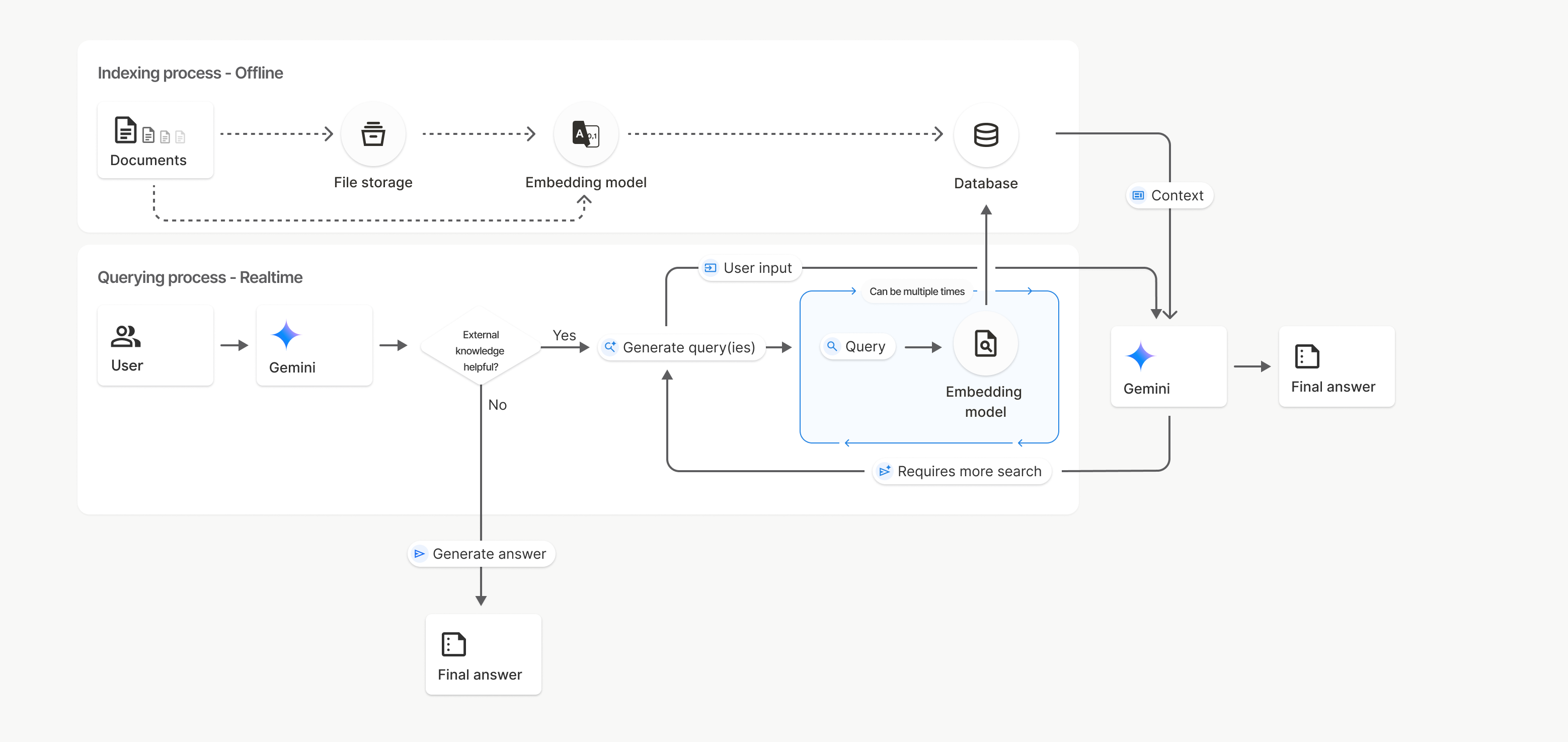
Trong biểu đồ này, đường chấm từ Tài liệu đến Mô hình nhúng (sử dụng gemini-embedding-001) biểu thị API uploadToFileSearchStore (bỏ qua Bộ nhớ tệp).
Nếu không, việc sử dụng Files API để tạo riêng rồi nhập tệp sẽ chuyển quy trình lập chỉ mục từ Tài liệu sang Bộ nhớ tệp rồi sang Mô hình nhúng.
Kho lưu trữ của tính năng Tìm kiếm tệp
Kho lưu trữ Tìm kiếm tệp là một vùng chứa cho các mục nhúng tài liệu của bạn. Mặc dù các tệp thô được tải lên thông qua File API sẽ bị xoá sau 48 giờ, nhưng dữ liệu được nhập vào kho lưu trữ Tìm kiếm tệp sẽ được lưu trữ vô thời hạn cho đến khi bạn xoá theo cách thủ công. Bạn có thể tạo nhiều kho lưu trữ Tìm kiếm tệp để sắp xếp tài liệu. API FileSearchStore cho phép bạn tạo, liệt kê, lấy và xoá để quản lý kho lưu trữ tìm kiếm tệp. Tên cửa hàng Tìm kiếm tệp có phạm vi trên toàn cầu.
Sau đây là một số ví dụ về cách quản lý kho lưu trữ Tìm kiếm tệp:
Python
file_search_store = client.file_search_stores.create(
    config={
        'display_name': 'my-file_search-store-123',
        'embedding_model': 'models/gemini-embedding-2'
    }
)

for file_search_store in client.file_search_stores.list():
    print(file_search_store)

my_file_search_store = client.file_search_stores.get(name='fileSearchStores/my-file_search-store-123')

client.file_search_stores.delete(name='fileSearchStores/my-file_search-store-123', config={'force': True})
JavaScript
const fileSearchStore = await ai.fileSearchStores.create({
  config: {
    displayName: 'my-file_search-store-123',
    embeddingModel: 'models/gemini-embedding-2'
  }
});

const fileSearchStores = await ai.fileSearchStores.list();
for await (const store of fileSearchStores) {
  console.log(store);
}

const myFileSearchStore = await ai.fileSearchStores.get({
  name: 'fileSearchStores/my-file_search-store-123'
});

await ai.fileSearchStores.delete({
  name: 'fileSearchStores/my-file_search-store-123',
  config: { force: true }
});
REST
curl -X POST "https://generativelanguage.googleapis.com/v1beta/fileSearchStores?key=${GEMINI_API_KEY}" \
    -H "Content-Type: application/json" \
    -d '{ "displayName": "My Store", "embedding_model": "models/gemini-embedding-2" }'

curl "https://generativelanguage.googleapis.com/v1beta/fileSearchStores?key=${GEMINI_API_KEY}" \

curl "https://generativelanguage.googleapis.com/v1beta/fileSearchStores/my-file_search-store-123?key=${GEMINI_API_KEY}"

curl -X DELETE "https://generativelanguage.googleapis.com/v1beta/fileSearchStores/my-file_search-store-123?key=${GEMINI_API_KEY}"
Tài liệu về tính năng Tìm kiếm tệp
Bạn có thể quản lý từng tài liệu trong kho lưu trữ tệp bằng API File Search Documents để list từng tài liệu trong kho lưu trữ tìm kiếm tệp, get thông tin về tài liệu và delete tài liệu theo tên.
Python
for document_in_store in client.file_search_stores.documents.list(parent='fileSearchStores/my-file_search-store-123'):
  print(document_in_store)

file_search_document = client.file_search_stores.documents.get(name='fileSearchStores/my-file_search-store-123/documents/my_doc')
print(file_search_document)

client.file_search_stores.documents.delete(name='fileSearchStores/my-file_search-store-123/documents/my_doc')
JavaScript
const documents = await ai.fileSearchStores.documents.list({
  parent: 'fileSearchStores/my-file_search-store-123'
});
for await (const doc of documents) {
  console.log(doc);
}

const fileSearchDocument = await ai.fileSearchStores.documents.get({
  name: 'fileSearchStores/my-file_search-store-123/documents/my_doc',
});

await ai.fileSearchStores.documents.delete({
  name: 'fileSearchStores/my-file_search-store-123/documents/my_doc'
});
REST
curl "https://generativelanguage.googleapis.com/v1beta/fileSearchStores/my-file_search-store-123/documents?key=${GEMINI_API_KEY}"

curl "https://generativelanguage.googleapis.com/v1beta/fileSearchStores/my-file_search-store-123/documents/my_doc?key=${GEMINI_API_KEY}"

curl -X DELETE "https://generativelanguage.googleapis.com/v1beta/fileSearchStores/my-file_search-store-123/documents/my_doc?key=${GEMINI_API_KEY}"
Siêu dữ liệu của tệp
Bạn có thể thêm siêu dữ liệu tuỳ chỉnh vào tệp để lọc tệp hoặc cung cấp thêm bối cảnh. Siêu dữ liệu là một tập hợp các cặp khoá-giá trị.
Python
op = client.file_search_stores.import_file(
    file_search_store_name=file_search_store.name,
    file_name=sample_file.name,
    custom_metadata=[
        {"key": "author", "string_value": "Robert Graves"},
        {"key": "year", "numeric_value": 1934}
    ]
)
JavaScript
let operation = await ai.fileSearchStores.importFile({
  fileSearchStoreName: fileSearchStore.name,
  fileName: sampleFile.name,
  config: {
    customMetadata: [
      { key: "author", stringValue: "Robert Graves" },
      { key: "year", numericValue: 1934 }
    ]
  }
});
Điều này rất hữu ích khi bạn có nhiều tài liệu trong kho lưu trữ Tìm kiếm tệp và chỉ muốn tìm kiếm một nhóm nhỏ trong số đó.
Python
response = client.models.generate_content(
    model="gemini-3.8-flash",
    contents="Tell me about the book 'I, Claudius'",
    config=types.GenerateContentConfig(
        tools=[
            types.Tool(
                file_search=types.FileSearch(
                    file_search_store_names=[file_search_store.name],
                    metadata_filter="author=Robert Graves",
                )
            )
        ]
    )
)

print(response.text)
JavaScript
const response = await ai.models.generateContent({
  model: "gemini-3.8-flash",
  contents: "Tell me about the book 'I, Claudius'",
  config: {
    tools: [
      {
        fileSearch: {
          fileSearchStoreNames: [fileSearchStore.name],
          metadataFilter: 'author="Robert Graves"',
        }
      }
    ]
  }
});

console.log(response.text);
REST
curl "https://generativelanguage.googleapis.com/v1beta/models/gemini-3.8-flash:generateContent?key=${GEMINI_API_KEY}" \
    -H 'Content-Type: application/json' \
    -X POST \
    -d '{
            "contents": [{
                "parts":[{"text": "Tell me about the book I, Claudius"}]
            }],
            "tools": [{
                "file_search": {
                    "file_search_store_names":["'$STORE_NAME'"],
                    "metadata_filter": "author = \"Robert Graves\""
                }
            }]
        }' 2> /dev/null > response.json

cat response.json
Bạn có thể xem hướng dẫn triển khai cú pháp bộ lọc danh sách cho metadata_filter tại google.aip.dev/160
Tìm kiếm tệp đa phương thức
Tính năng Tìm kiếm tệp đa phương thức cho phép bạn nhúng và tìm kiếm hình ảnh một cách tự nhiên, từ đó tạo ra các ứng dụng RAG đa phương thức phong phú.
Định cấu hình mô hình nhúng
Khi tạo một FileSearchStore, bạn phải ghi đè mô hình nhúng chỉ văn bản mặc định để sử dụng mô hình đa phương thức. Sử dụng models/gemini-embedding-2 để xử lý cả văn bản và hình ảnh.
Python
store = client.file_search_stores.create(
    config={
        "display_name": "Multimodal Catalog",
        "embedding_model": "models/gemini-embedding-2",
    }
)
JavaScript
const fileSearchStore = await ai.fileSearchStores.create({
  config: {
    displayName: "Multimodal Catalog",
    embeddingModel: "models/gemini-embedding-2",
  },
});
REST
curl -X POST "https://generativelanguage.googleapis.com/v1beta/fileSearchStores?key=$GEMINI_API_KEY" \
    -H "Content-Type: application/json" \
    -d '{
      "display_name": "Multimodal Catalog",
      "embedding_model": "models/gemini-embedding-2"
    }'
Tải hình ảnh lên
Sau khi tạo kho lưu trữ bằng mô hình nhúng đa phương thức, bạn có thể tải tệp hình ảnh lên trực tiếp bằng cùng một API tải lên được mô tả trong phần Tải trực tiếp lên kho lưu trữ Tìm kiếm tệp hoặc Nhập tệp.
Yêu cầu về tệp hình ảnh:
- Tệp hình ảnh phải có độ phân giải tối đa là 4K x 4K pixel.
- Các định dạng được hỗ trợ là PNG, JPEG.
Trích dẫn
Khi bạn sử dụng tính năng Tìm kiếm tệp, câu trả lời của mô hình có thể bao gồm các trích dẫn nêu rõ những phần nào trong tài liệu bạn tải lên đã được dùng để tạo câu trả lời. Điều này giúp ích cho việc kiểm chứng và xác minh.
Bạn có thể truy cập thông tin trích dẫn thông qua thuộc tính grounding_metadata của câu trả lời.
Python
print(response.candidates[0].grounding_metadata)
JavaScript
console.log(JSON.stringify(response.candidates?.[0]?.groundingMetadata, null, 2));
Để biết thông tin chi tiết về cấu trúc của siêu dữ liệu cơ sở, hãy xem các ví dụ trong Sổ tay Tìm kiếm tệp hoặc phần cơ sở của tài liệu Cơ sở với Google Tìm kiếm.
Số trang
Khi bạn sử dụng tính năng Tìm kiếm tệp với những tài liệu có trang (chẳng hạn như tệp PDF), câu trả lời của mô hình có thể bao gồm số trang nơi thông tin được tìm thấy.
Bạn có thể truy cập thông tin này thông qua thuộc tính page_number của retrieved_context.
Python
# Iterate through citations and check for page numbers
for chunk in response.grounding_metadata.grounding_chunks:
   if chunk.retrieved_context and chunk.retrieved_context.page_number:
       print(f"Cited Page: {chunk.retrieved_context.page_number}")
JavaScript
const groundingMetadata = response.candidates[0].groundingMetadata;
for (const chunk of groundingMetadata.groundingChunks) {
  if (chunk.retrievedContext && chunk.retrievedContext.pageNumber) {
    console.log(`Cited Page: ${chunk.retrievedContext.pageNumber}`);
  }
}
Trích dẫn nội dung nghe nhìn
Khi mô hình tham chiếu đến một đoạn hình ảnh trong quá trình tạo, API sẽ trả về một
trích dẫn trong siêu dữ liệu căn cứ, bao gồm cả media_id. Bạn có thể sử dụng mã nhận dạng này để tải chính xác đoạn hình ảnh mà mô hình đã tham chiếu. media_id này
vẫn tồn tại trong nhiều lệnh gọi tìm kiếm, cho phép bạn truy xuất
cùng một hình ảnh một cách đáng tin cậy hoặc lưu hình ảnh đó vào bộ nhớ đệm bằng mã nhận dạng.
Đoạn mã sau đây là một ví dụ về phản hồi REST:
"groundingMetadata": {
  "groundingChunks": [
    {
      "retrievedContext": {
        "title": "product_image",
        "fileSearchStore": "fileSearchStores/my-store-123",
        "media_id": "fileSearchStores/my-store-123/media/BlobId-456"
      }
    }
  ]
}
Các đoạn mã sau đây minh hoạ cách truy xuất media_id và tải nội dung nghe nhìn xuống:
Python
# Iterate through citations and download media if present
for chunk in response.grounding_metadata.grounding_chunks:
   if chunk.retrieved_context and chunk.retrieved_context.media_id:
       print(f"Cited Media ID: {chunk.retrieved_context.media_id}")
       # Download the blob using the SDK
       blob_content = client.file_search_stores.download_media(
           media_id=chunk.retrieved_context.media_id
       )
       # Save blob_content to file...
JavaScript
const groundingMetadata = response.candidates[0].groundingMetadata;
for (const chunk of groundingMetadata.groundingChunks) {
  if (chunk.retrievedContext && chunk.retrievedContext.mediaId) {
    console.log(`Cited Media ID: ${chunk.retrievedContext.mediaId}`);
    const blobContent = await ai.fileSearchStores.downloadMedia(chunk.retrievedContext.mediaId);
    // Save blobContent to file...
  }
}
REST
curl -X GET "https://generativelanguage.googleapis.com/v1/fileSearchStores/my-store-123/media/BlobId-456" \
  -H "x-goog-api-key: $GEMINI_API_KEY"
Siêu dữ liệu tuỳ chỉnh trong dữ liệu cơ sở
Nếu đã thêm siêu dữ liệu tuỳ chỉnh vào tệp, bạn có thể truy cập vào siêu dữ liệu đó trong siêu dữ liệu căn cứ của phản hồi từ mô hình. Điều này rất hữu ích khi bạn muốn truyền
thông tin bối cảnh bổ sung (như URL, số trang hoặc tác giả) từ tài liệu
nguồn đến logic ứng dụng. Mỗi grounding_chunk trong retrieved_context đều chứa siêu dữ liệu tuỳ chỉnh này.
Python
response = client.models.generate_content(
    model="gemini-3.8-flash",
    contents="Tell me about [insert question]",
    config=types.GenerateContentConfig(
        tools=[
            types.Tool(
                file_search=types.FileSearch(
                    file_search_store_names=[file_search_store.name]
                )
            )
        ]
    )
)

for chunk in response.candidates[0].grounding_metadata.grounding_chunks:
    if chunk.retrieved_context:
        print(f"Text: {chunk.retrieved_context.text}")
        if chunk.retrieved_context.custom_metadata:
            for metadata in chunk.retrieved_context.custom_metadata:
                print(f"Metadata Key: {metadata.key}")
                print(f"Value: {metadata.string_value or metadata.numeric_value}")
JavaScript
const response = await ai.models.generateContent({
  model: "gemini-3.8-flash",
  contents: "Tell me about [insert question]",
  config: {
    tools: [
      {
        fileSearch: {
          fileSearchStoreNames: [fileSearchStore.name]
        }
      }
    ]
  }
});

const groundingMetadata = response.candidates[0].groundingMetadata;
groundingMetadata.groundingChunks.forEach((chunk) => {
  if (chunk.retrievedContext) {
    console.log(`Text: ${chunk.retrievedContext.text}`);
    if (chunk.retrievedContext.customMetadata) {
      chunk.retrievedContext.customMetadata.forEach((metadata) => {
        console.log(`Metadata Key: ${metadata.key}`);
        console.log(`Value: ${metadata.stringValue || metadata.numericValue}`);
      });
    }
  }
});
REST
{
  "candidates": [
    {
      "content": { ... },
      "grounding_metadata": {
        "grounding_chunks": [
          {
            "retrieved_context": {
              "text": "...",
              "title": "...",
              "uri": "...",
              "custom_metadata": [
                {
                  "key": "author",
                  "string_value": "Robert Graves"
                },
                {
                  "key": "year",
                  "numeric_value": 1934
                }
              ]
            }
          }
        ],
        "grounding_supports": [ ... ]
      }
    }
  ]
}
Kết quả có cấu trúc
Bắt đầu từ các mô hình Gemini 3, bạn có thể kết hợp công cụ tìm kiếm tệp với đầu ra có cấu trúc.
Python
from pydantic import BaseModel, Field

class Money(BaseModel):
    amount: str = Field(description="The numerical part of the amount.")
    currency: str = Field(description="The currency of amount.")

response = client.models.generate_content(
    model="gemini-3.8-flash",
    contents="What is the minimum hourly wage in Tokyo right now?",
    config=types.GenerateContentConfig(
                tools=[
                    types.Tool(
                        file_search=types.FileSearch(
                            file_search_store_names=[file_search_store.name]
                        )
                    )
                ],
                response_format={"text": {"mime_type": "application/json", "schema": Money.model_json_schema()}}
      )
)
result = Money.model_validate_json(response.text)
print(result)
JavaScript
import { z } from "zod";

const moneySchema = z.object({
  amount: z.string().describe("The numerical part of the amount."),
  currency: z.string().describe("The currency of amount."),
});

async function run() {
  const response = await ai.models.generateContent({
    model: "gemini-3.8-flash",
    contents: "What is the minimum hourly wage in Tokyo right now?",
    config: {
      tools: [
        {
          fileSearch: {
            fileSearchStoreNames: [file_search_store.name],
          },
        },
      ],
      responseFormat: { text: { mimeType: "application/json", schema: z.toJSONSchema(moneySchema) } },
    },
  });

  const result = moneySchema.parse(JSON.parse(response.text));
  console.log(result);
}

run();
REST
curl "https://generativelanguage.googleapis.com/v1beta/models/gemini-3.8-flash:generateContent" \
  -H "x-goog-api-key: $GEMINI_API_KEY" \
  -H 'Content-Type: application/json' \
  -X POST \
  -d '{
    "contents": [{
      "parts": [{"text": "What is the minimum hourly wage in Tokyo right now?"}]
    }],
    "tools": [
      {
        "fileSearch": {
          "fileSearchStoreNames": ["$FILE_SEARCH_STORE_NAME"]
        }
      }
    ],
    "generationConfig": {
"responseFormat": {
  "text": {
    "mimeType": "application/json",
    "schema": {
            "type": "object",
            "properties": {
                "amount": {"type": "string", "description": "The numerical part of the amount."},
                "currency": {"type": "string", "description": "The currency of amount."}
  }
}
},
            "required": ["amount", "currency"]
        }
    }
  }'
Mô hình được hỗ trợ
Các mẫu sau đây hỗ trợ tính năng Tìm kiếm tệp:
| Mô hình | Tìm kiếm tệp |
|---|---|
| Gemini 4 Argon | ✔️ |
| Gemini 3.8 Flash | ✔️ |
| Gemini 3.6 Flash | ✔️ |
| Gemini 3.5 Flash-Lite | ✔️ |
| Bản dùng thử Gemini 3.1 Pro | ✔️ |
| Gemini 3.1 Flash-Lite | ✔️ |
| Gemini 3 Flash Preview | ✔️ |
| Gemini 2.5 Pro | ✔️ |
| Gemini 2.5 Flash-Lite | ✔️ |
Các kiểu kết hợp công cụ được hỗ trợ
Các mô hình Gemini 4 và Gemini 3 hỗ trợ kết hợp các công cụ tích hợp sẵn (như Tìm kiếm tệp) với các công cụ tuỳ chỉnh (gọi hàm). Tìm hiểu thêm trên trang kết hợp công cụ.
Các loại tệp được hỗ trợ
Tính năng Tìm kiếm tệp hỗ trợ nhiều định dạng tệp, được liệt kê trong các phần sau.
Các loại tệp ứng dụng
application/dartapplication/ecmascriptapplication/jsonapplication/ms-javaapplication/mswordapplication/pdfapplication/sqlapplication/typescriptapplication/vnd.curlapplication/vnd.dartapplication/vnd.ibm.secure-containerapplication/vnd.jupyterapplication/vnd.ms-excelapplication/vnd.oasis.opendocument.textapplication/vnd.openxmlformats-officedocument.presentationml.presentationapplication/vnd.openxmlformats-officedocument.spreadsheetml.sheetapplication/vnd.openxmlformats-officedocument.wordprocessingml.documentapplication/vnd.openxmlformats-officedocument.wordprocessingml.templateapplication/x-cshapplication/x-hwpapplication/x-hwp-v5application/x-latexapplication/x-phpapplication/x-powershellapplication/x-shapplication/x-shellscriptapplication/x-texapplication/x-zshapplication/xmlapplication/zip
Loại tệp văn bản
text/1d-interleaved-parityfectext/REDtext/SGMLtext/cache-manifesttext/calendartext/cqltext/cql-extensiontext/cql-identifiertext/csstext/csvtext/csv-schematext/dnstext/encaprtptext/enrichedtext/exampletext/fhirpathtext/flexfectext/fwdredtext/gff3text/grammar-ref-listtext/hl7v2text/htmltext/javascripttext/jcr-cndtext/jsxtext/markdowntext/mizartext/n3text/parameterstext/parityfectext/phptext/plaintext/provenance-notationtext/prs.fallenstein.rsttext/prs.lines.tagtext/prs.prop.logictext/raptorfectext/rfc822-headerstext/rtftext/rtp-enc-aescm128text/rtploopbacktext/rtxtext/sgmltext/shaclctext/shextext/spdxtext/stringstext/t140text/tab-separated-valuestext/texmacstext/trofftext/tsvtext/tsxtext/turtletext/ulpfectext/uri-listtext/vcardtext/vnd.DMClientScripttext/vnd.IPTC.NITFtext/vnd.IPTC.NewsMLtext/vnd.atext/vnd.abctext/vnd.ascii-arttext/vnd.curltext/vnd.debian.copyrighttext/vnd.dvb.subtitletext/vnd.esmertec.theme-descriptortext/vnd.exchangeabletext/vnd.familysearch.gedcomtext/vnd.ficlab.flttext/vnd.flytext/vnd.fmi.flexstortext/vnd.gmltext/vnd.graphviztext/vnd.hanstext/vnd.hgltext/vnd.in3d.3dmltext/vnd.in3d.spottext/vnd.latex-ztext/vnd.motorola.reflextext/vnd.ms-mediapackagetext/vnd.net2phone.commcenter.commandtext/vnd.radisys.msml-basic-layouttext/vnd.senx.warpscripttext/vnd.sositext/vnd.sun.j2me.app-descriptortext/vnd.trolltech.linguisttext/vnd.wap.sitext/vnd.wap.sltext/vnd.wap.wmltext/vnd.wap.wmlscripttext/vtttext/wgsltext/x-asmtext/x-bibtextext/x-bootext/x-ctext/x-c++hdrtext/x-c++srctext/x-cassandratext/x-chdrtext/x-coffeescripttext/x-componenttext/x-cshtext/x-csharptext/x-csrctext/x-cudatext/x-dtext/x-difftext/x-dsrctext/x-emacs-lisptext/x-erlangtext/x-gff3text/x-gotext/x-haskelltext/x-javatext/x-java-propertiestext/x-java-sourcetext/x-kotlintext/x-lilypondtext/x-lisptext/x-literate-haskelltext/x-luatext/x-moctext/x-objcsrctext/x-pascaltext/x-pcs-gcdtext/x-perltext/x-perl-scripttext/x-pythontext/x-python-scripttext/x-r-markdowntext/x-rsrctext/x-rsttext/x-ruby-scripttext/x-rusttext/x-sasstext/x-scalatext/x-schemetext/x-script.pythontext/x-scsstext/x-setexttext/x-sfvtext/x-shtext/x-siestatext/x-sostext/x-sqltext/x-swifttext/x-tcltext/x-textext/x-vbasictext/x-vcalendartext/xmltext/xml-dtdtext/xml-external-parsed-entitytext/yaml
Các điểm hạn chế
- Live API: File Search không được hỗ trợ trong Live API.
- Không tương thích với các công cụ: Hiện tại, bạn không thể kết hợp tính năng Tìm kiếm tệp với các công cụ khác như Neo bám vào Google Tìm kiếm, Bối cảnh từ URL, v. v.
Giới hạn số lượng yêu cầu
File Search API có các giới hạn sau để đảm bảo tính ổn định của dịch vụ:
- Kích thước tệp tối đa / giới hạn cho mỗi tài liệu: 100 MB
- Tổng kích thước của bộ nhớ Tìm kiếm tệp dự án (dựa trên cấp người dùng):
- Miễn phí: 1 GB
- Bậc 1: 10 GB
- Bậc 2: 100 GB
- Cấp 3: 1 TB
- Đề xuất: Giới hạn kích thước của mỗi kho lưu trữ Tìm kiếm tệp ở mức dưới 20 GB để đảm bảo độ trễ truy xuất tối ưu.
Giá
- Bạn sẽ bị tính phí cho các mục nhúng tại thời điểm lập chỉ mục dựa trên mức giá hiện tại của mục nhúng.
- Bộ nhớ được cung cấp miễn phí.
- Bạn không mất phí khi nhúng thời gian truy vấn.
- Các mã thông báo tài liệu đã truy xuất được tính phí như token ngữ cảnh thông thường.
Bước tiếp theo
- Truy cập vào tài liệu tham khảo API cho Kho lưu trữ tìm kiếm tệp và Tài liệu tìm kiếm tệp.