

ফাংশন কলিংয়ের মাধ্যমে আপনি মডেলকে এক্সটার্নাল টুল ও API-এর সাথে কানেক্ট করতে পারেন। টেক্সট উত্তর তৈরি করার পরিবর্তে, মডেলটি নির্ধারণ করে যে কখন নির্দিষ্ট ফাংশন কল করতে হবে এবং বাস্তব-জগতের অ্যাকশন কার্যকর করার জন্য প্রয়োজনীয় প্যারামিটার প্রদান করে। এর ফলে মডেলটি প্রাকৃতিক ভাষা এবং বাস্তব-জগতের অ্যাকশন ও ডেটার মধ্যে একটি ব্রিজ হিসেবে কাজ করতে পারে। ফাংশন কলিংয়ের ৩টি প্রাথমিক ব্যবহারিক ক্ষেত্র রয়েছে:
- অ্যাকশন নেওয়া: API ব্যবহার করে এক্সটার্নাল সিস্টেমের সাথে ইন্টার্যাক্ট করা, যেমন অ্যাপয়েন্টমেন্ট শিডিউল করা, ইনভয়েস তৈরি করা, ইমেল পাঠানো অথবা স্মার্ট হোম ডিভাইস কন্ট্রোল করা।
- জ্ঞান বৃদ্ধি করা: ডেটাবেস, API ও নলেজ বেসের মতো এক্সটার্নাল সোর্স থেকে তথ্য অ্যাক্সেস করা।
- ক্ষমতা বাড়ানো: গণনা করা এবং মডেলের সীমাবদ্ধতা বাড়ানোর জন্য এক্সটার্নাল টুল ব্যবহার করুন, যেমন ক্যালকুলেটর ব্যবহার করা বা চার্ট তৈরি করা।
আপনি নিচে এইসব ব্যবহারের কেসের উদাহরণ ব্রাউজ করতে পারবেন:
মিটিং শিডিউল করা
এই উদাহরণে দেখানো হয়েছে কীভাবে এমন একটি ফাংশন নির্ধারণ করতে হয় যা নির্দিষ্ট সময়ে অংশগ্রহণকারীদের সাথে মিটিং শিডিউল করে, এর ফলে মডেল ব্যবহারকারীর অনুরোধ পার্স করতে এবং এক্সটার্নাল সিস্টেমে অ্যাকশন ট্রিগার করার জন্য স্ট্রাকচার্ড আর্গুমেন্ট রিটার্ন করতে পারে।
Python
from google import genai
from google.genai import types

# Define the function declaration for the model
schedule_meeting_function = {
    "name": "schedule_meeting",
    "description": "Schedules a meeting with specified attendees at a given time and date.",
    "parameters": {
        "type": "object",
        "properties": {
            "attendees": {
                "type": "array",
                "items": {"type": "string"},
                "description": "List of people attending the meeting.",
            },
            "date": {
                "type": "string",
                "description": "Date of the meeting (e.g., '2024-07-29')",
            },
            "time": {
                "type": "string",
                "description": "Time of the meeting (e.g., '15:00')",
            },
            "topic": {
                "type": "string",
                "description": "The subject or topic of the meeting.",
            },
        },
        "required": ["attendees", "date", "time", "topic"],
    },
}

# Configure the client and tools
client = genai.Client()
tools = types.Tool(function_declarations=[schedule_meeting_function])
config = types.GenerateContentConfig(tools=[tools])

# Send request with function declarations
response = client.models.generate_content(
    model="gemini-3.8-flash",
    contents="Schedule a meeting with Bob and Alice for 03/14/2025 at 10:00 AM about the Q3 planning.",
    config=config,
)

# Check for a function call
if response.candidates[0].content.parts[0].function_call:
    function_call = response.candidates[0].content.parts[0].function_call
    print(f"Function to call: {function_call.name}")
    print(f"ID: {function_call.id}")
    print(f"Arguments: {function_call.args}")
    #  In a real app, you would call your function here:
    #  result = schedule_meeting(**function_call.args)
else:
    print("No function call found in the response.")
    print(response.text)
জাভাস্ক্রিপ্ট
import { GoogleGenAI, Type } from '@google/genai';

// Configure the client
const ai = new GoogleGenAI({});

// Define the function declaration for the model
const scheduleMeetingFunctionDeclaration = {
  name: 'schedule_meeting',
  description: 'Schedules a meeting with specified attendees at a given time and date.',
  parameters: {
    type: Type.OBJECT,
    properties: {
      attendees: {
        type: Type.ARRAY,
        items: { type: Type.STRING },
        description: 'List of people attending the meeting.',
      },
      date: {
        type: Type.STRING,
        description: 'Date of the meeting (e.g., "2024-07-29")',
      },
      time: {
        type: Type.STRING,
        description: 'Time of the meeting (e.g., "15:00")',
      },
      topic: {
        type: Type.STRING,
        description: 'The subject or topic of the meeting.',
      },
    },
    required: ['attendees', 'date', 'time', 'topic'],
  },
};

// Send request with function declarations
const response = await ai.models.generateContent({
  model: 'gemini-3.8-flash',
  contents: 'Schedule a meeting with Bob and Alice for 03/27/2025 at 10:00 AM about the Q3 planning.',
  config: {
    tools: [{
      functionDeclarations: [scheduleMeetingFunctionDeclaration]
    }],
  },
});

// Check for function calls in the response
if (response.functionCalls && response.functionCalls.length > 0) {
  const functionCall = response.functionCalls[0]; // Assuming one function call
  console.log(`Function to call: ${functionCall.name}`);
  console.log(`ID: ${functionCall.id}`);
  console.log(`Arguments: ${JSON.stringify(functionCall.args)}`);
  // In a real app, you would call your actual function here:
  // const result = await scheduleMeeting(functionCall.args);
} else {
  console.log("No function call found in the response.");
  console.log(response.text);
}
খুলুন
package main

import (
    "context"
    "fmt"
    "log"

    "google.golang.org/genai"
)

func main() {
    ctx := context.Background()
    client, err := genai.NewClient(ctx, nil)
    if err != nil {
        log.Fatal(err)
    }

    // Define the function declaration for the model
    scheduleMeetingFunc := &genai.FunctionDeclaration{
        Name:        "schedule_meeting",
        Description: "Schedules a meeting with specified attendees at a given time and date.",
        Parameters: &genai.Schema{
            Type: genai.TypeObject,
            Properties: map[string]*genai.Schema{
                "attendees": {
                    Type:        genai.TypeArray,
                    Items:       &genai.Schema{Type: genai.TypeString},
                    Description: "List of people attending the meeting.",
                },
                "date": {
                    Type:        genai.TypeString,
                    Description: "Date of the meeting (e.g., '2024-07-29')",
                },
                "time": {
                    Type:        genai.TypeString,
                    Description: "Time of the meeting (e.g., '15:00')",
                },
                "topic": {
                    Type:        genai.TypeString,
                    Description: "The subject or topic of the meeting.",
                },
            },
            Required: []string{"attendees", "date", "time", "topic"},
        },
    }

    config := &genai.GenerateContentConfig{
        Tools: []*genai.Tool{
            {FunctionDeclarations: []*genai.FunctionDeclaration{scheduleMeetingFunc}},
        },
    }

    // Send request with function declarations
    response, err := client.Models.GenerateContent(
        ctx,
        "gemini-3.8-flash",
        genai.Text("Schedule a meeting with Bob and Alice for 03/14/2025 at 10:00 AM about the Q3 planning."),
        config,
    )
    if err != nil {
        log.Fatal(err)
    }

    // Check for a function call
    if len(response.FunctionCalls()) > 0 {
        functionCall := response.FunctionCalls()[0]
        fmt.Printf("Function to call: %s\n", functionCall.Name)
        fmt.Printf("ID: %s\n", functionCall.ID)
        fmt.Printf("Arguments: %v\n", functionCall.Args)
        // In a real app, you would call your function here:
        // result := scheduleMeeting(functionCall.Args)
    } else {
        fmt.Println("No function call found in the response.")
        fmt.Println(response.Text())
    }
}
REST
curl "https://generativelanguage.googleapis.com/v1beta/models/gemini-3.8-flash:generateContent" \
  -H "x-goog-api-key: $GEMINI_API_KEY" \
  -H 'Content-Type: application/json' \
  -X POST \
  -d '{
    "contents": [
      {
        "role": "user",
        "parts": [
          {
            "text": "Schedule a meeting with Bob and Alice for 03/27/2025 at 10:00 AM about the Q3 planning."
          }
        ]
      }
    ],
    "tools": [
      {
        "functionDeclarations": [
          {
            "name": "schedule_meeting",
            "description": "Schedules a meeting with specified attendees at a given time and date.",
            "parameters": {
              "type": "object",
              "properties": {
                "attendees": {
                  "type": "array",
                  "items": {"type": "string"},
                  "description": "List of people attending the meeting."
                },
                "date": {
                  "type": "string",
                  "description": "Date of the meeting (e.g., '2024-07-29')"
                },
                "time": {
                  "type": "string",
                  "description": "Time of the meeting (e.g., '15:00')"
                },
                "topic": {
                  "type": "string",
                  "description": "The subject or topic of the meeting."
                }
              },
              "required": ["attendees", "date", "time", "topic"]
            }
          }
        ]
      }
    ]
  }'
Weather অ্যাপ পাওয়া
এই উদাহরণে দেখানো হয়েছে যে কীভাবে এমন একটি ফাংশন নির্ধারণ করতে হয় যা কোনও লোকেশনের তাপমাত্রা সংক্রান্ত ডেটা রিট্রিভ করে, এর ফলে মডেলটি রিয়েল-টাইম বা এক্সটার্নাল তথ্য প্রয়োজন এমন কোয়েরির উত্তর দেওয়ার জন্য এক্সটার্নাল API কল করতে পারে।
Python
from google import genai
from google.genai import types

# Define the function declaration for the model
weather_function = {
    "name": "get_current_temperature",
    "description": "Gets the current temperature for a given location.",
    "parameters": {
        "type": "object",
        "properties": {
            "location": {
                "type": "string",
                "description": "The city name, e.g. San Francisco",
            },
        },
        "required": ["location"],
    },
}

# Configure the client and tools
client = genai.Client()
tools = types.Tool(function_declarations=[weather_function])
config = types.GenerateContentConfig(tools=[tools])

# Send request with function declarations
response = client.models.generate_content(
    model="gemini-3.8-flash",
    contents="What's the temperature in London?",
    config=config,
)

# Check for a function call
if response.candidates[0].content.parts[0].function_call:
    function_call = response.candidates[0].content.parts[0].function_call
    print(f"Function to call: {function_call.name}")
    print(f"ID: {function_call.id}")
    print(f"Arguments: {function_call.args}")
    #  In a real app, you would call your function here:
    #  result = get_current_temperature(**function_call.args)
else:
    print("No function call found in the response.")
    print(response.text)
জাভাস্ক্রিপ্ট
import { GoogleGenAI, Type } from '@google/genai';

// Configure the client
const ai = new GoogleGenAI({});

// Define the function declaration for the model
const weatherFunctionDeclaration = {
  name: 'get_current_temperature',
  description: 'Gets the current temperature for a given location.',
  parameters: {
    type: Type.OBJECT,
    properties: {
      location: {
        type: Type.STRING,
        description: 'The city name, e.g. San Francisco',
      },
    },
    required: ['location'],
  },
};

// Send request with function declarations
const response = await ai.models.generateContent({
  model: 'gemini-3.8-flash',
  contents: "What's the temperature in London?",
  config: {
    tools: [{
      functionDeclarations: [weatherFunctionDeclaration]
    }],
  },
});

// Check for function calls in the response
if (response.functionCalls && response.functionCalls.length > 0) {
  const functionCall = response.functionCalls[0]; // Assuming one function call
  console.log(`Function to call: ${functionCall.name}`);
  console.log(`ID: ${functionCall.id}`);
  console.log(`Arguments: ${JSON.stringify(functionCall.args)}`);
  // In a real app, you would call your actual function here:
  // const result = await getCurrentTemperature(functionCall.args);
} else {
  console.log("No function call found in the response.");
  console.log(response.text);
}
খুলুন
package main

import (
    "context"
    "fmt"
    "log"

    "google.golang.org/genai"
)

func main() {
    ctx := context.Background()
    client, err := genai.NewClient(ctx, nil)
    if err != nil {
        log.Fatal(err)
    }

    // Define the function declaration for the model
    weatherFunc := &genai.FunctionDeclaration{
        Name:        "get_current_temperature",
        Description: "Gets the current temperature for a given location.",
        Parameters: &genai.Schema{
            Type: genai.TypeObject,
            Properties: map[string]*genai.Schema{
                "location": {
                    Type:        genai.TypeString,
                    Description: "The city name, e.g. San Francisco",
                },
            },
            Required: []string{"location"},
        },
    }

    config := &genai.GenerateContentConfig{
        Tools: []*genai.Tool{
            {FunctionDeclarations: []*genai.FunctionDeclaration{weatherFunc}},
        },
    }

    // Send request with function declarations
    response, err := client.Models.GenerateContent(
        ctx,
        "gemini-3.8-flash",
        genai.Text("What's the temperature in London?"),
        config,
    )
    if err != nil {
        log.Fatal(err)
    }

    // Check for a function call
    if len(response.FunctionCalls()) > 0 {
        functionCall := response.FunctionCalls()[0]
        fmt.Printf("Function to call: %s\n", functionCall.Name)
        fmt.Printf("ID: %s\n", functionCall.ID)
        fmt.Printf("Arguments: %v\n", functionCall.Args)
        // In a real app, you would call your function here:
        // result := getCurrentTemperature(functionCall.Args)
    } else {
        fmt.Println("No function call found in the response.")
        fmt.Println(response.Text())
    }
}
REST
curl "https://generativelanguage.googleapis.com/v1beta/models/gemini-3.8-flash:generateContent" \
  -H "x-goog-api-key: $GEMINI_API_KEY" \
  -H 'Content-Type: application/json' \
  -X POST \
  -d '{
    "contents": [
      {
        "role": "user",
        "parts": [
          {
            "text": "What'\''s the temperature in London?"
          }
        ]
      }
    ],
    "tools": [
      {
        "functionDeclarations": [
          {
            "name": "get_current_temperature",
            "description": "Gets the current temperature for a given location.",
            "parameters": {
              "type": "object",
              "properties": {
                "location": {
                  "type": "string",
                  "description": "The city name, e.g. San Francisco"
                }
              },
              "required": ["location"]
            }
          }
        ]
      }
    ]
  }'
চার্ট তৈরি করা
এই উদাহরণে দেখানো হয়েছে যে কীভাবে স্ট্রাকচার্ড ডেটা থেকে বার চার্ট তৈরি করার জন্য একটি ফাংশন ডিফাইন করতে হয়। এর মাধ্যমে এটিও দেখানো হয়েছে যে কীভাবে মডেলটি গণনা করতে বা ভিজ্যুয়াল অ্যাসেট তৈরি করতে এক্সটার্নাল টুল ব্যবহার করতে পারে:
Python
import os
from google import genai
from google.genai import types

# Define the function declaration for the model
create_chart_function = {
    "name": "create_bar_chart",
    "description": "Creates a bar chart given a title, labels, and corresponding values.",
    "parameters": {
        "type": "object",
        "properties": {
            "title": {
                "type": "string",
                "description": "The title for the chart.",
            },
            "labels": {
                "type": "array",
                "items": {"type": "string"},
                "description": "List of labels for the data points (e.g., ['Q1', 'Q2', 'Q3']).",
            },
            "values": {
                "type": "array",
                "items": {"type": "number"},
                "description": "List of numerical values corresponding to the labels (e.g., [50000, 75000, 60000]).",
            },
        },
        "required": ["title", "labels", "values"],
    },
}

# Configure the client and tools
client = genai.Client()
tools = types.Tool(function_declarations=[create_chart_function])
config = types.GenerateContentConfig(tools=[tools])

# Send request with function declarations
response = client.models.generate_content(
    model="gemini-3.8-flash",
    contents="Create a bar chart titled 'Quarterly Sales' with data: Q1: 50000, Q2: 75000, Q3: 60000.",
    config=config,
)

# Check for a function call
if response.candidates[0].content.parts[0].function_call:
    function_call = response.candidates[0].content.parts[0].function_call
    print(f"Function to call: {function_call.name}")
    print(f"ID: {function_call.id}")
    print(f"Arguments: {function_call.args}")
    #  In a real app, you would call your function here using a charting library:
    #  result = create_bar_chart(**function_call.args)
else:
    print("No function call found in the response.")
    print(response.text)
জাভাস্ক্রিপ্ট
import { GoogleGenAI, Type } from '@google/genai';

// Configure the client
const ai = new GoogleGenAI({});

// Define the function declaration for the model
const createChartFunctionDeclaration = {
  name: 'create_bar_chart',
  description: 'Creates a bar chart given a title, labels, and corresponding values.',
  parameters: {
    type: Type.OBJECT,
    properties: {
      title: {
        type: Type.STRING,
        description: 'The title for the chart.',
      },
      labels: {
        type: Type.ARRAY,
        items: { type: Type.STRING },
        description: 'List of labels for the data points (e.g., ["Q1", "Q2", "Q3"]).',
      },
      values: {
        type: Type.ARRAY,
        items: { type: Type.NUMBER },
        description: 'List of numerical values corresponding to the labels (e.g., [50000, 75000, 60000]).',
      },
    },
    required: ['title', 'labels', 'values'],
  },
};

// Send request with function declarations
const response = await ai.models.generateContent({
  model: 'gemini-3.8-flash',
  contents: "Create a bar chart titled 'Quarterly Sales' with data: Q1: 50000, Q2: 75000, Q3: 60000.",
  config: {
    tools: [{
      functionDeclarations: [createChartFunctionDeclaration]
    }],
  },
});

// Check for function calls in the response
if (response.functionCalls && response.functionCalls.length > 0) {
  const functionCall = response.functionCalls[0]; // Assuming one function call
  console.log(`Function to call: ${functionCall.name}`);
  console.log(`ID: ${functionCall.id}`);
  console.log(`Arguments: ${JSON.stringify(functionCall.args)}`);
  // In a real app, you would call your actual function here:
  // const result = await createBarChart(functionCall.args);
} else {
  console.log("No function call found in the response.");
  console.log(response.text);
}
খুলুন
package main

import (
    "context"
    "fmt"
    "log"

    "google.golang.org/genai"
)

func main() {
    ctx := context.Background()
    client, err := genai.NewClient(ctx, nil)
    if err != nil {
        log.Fatal(err)
    }

    // Define the function declaration for the model
    createChartFunc := &genai.FunctionDeclaration{
        Name:        "create_bar_chart",
        Description: "Creates a bar chart given a title, labels, and corresponding values.",
        Parameters: &genai.Schema{
            Type: genai.TypeObject,
            Properties: map[string]*genai.Schema{
                "title": {
                    Type:        genai.TypeString,
                    Description: "The title for the chart.",
                },
                "labels": {
                    Type:        genai.TypeArray,
                    Items:       &genai.Schema{Type: genai.TypeString},
                    Description: "List of labels for the data points (e.g., ['Q1', 'Q2', 'Q3']).",
                },
                "values": {
                    Type:        genai.TypeArray,
                    Items:       &genai.Schema{Type: genai.TypeNumber},
                    Description: "List of numerical values corresponding to the labels (e.g., [50000, 75000, 60000]).",
                },
            },
            Required: []string{"title", "labels", "values"},
        },
    }

    config := &genai.GenerateContentConfig{
        Tools: []*genai.Tool{
            {FunctionDeclarations: []*genai.FunctionDeclaration{createChartFunc}},
        },
    }

    // Send request with function declarations
    response, err := client.Models.GenerateContent(
        ctx,
        "gemini-3.8-flash",
        genai.Text("Create a bar chart titled 'Quarterly Sales' with data: Q1: 50000, Q2: 75000, Q3: 60000."),
        config,
    )
    if err != nil {
        log.Fatal(err)
    }

    // Check for a function call
    if len(response.FunctionCalls()) > 0 {
        functionCall := response.FunctionCalls()[0]
        fmt.Printf("Function to call: %s\n", functionCall.Name)
        fmt.Printf("ID: %s\n", functionCall.ID)
        fmt.Printf("Arguments: %v\n", functionCall.Args)
        // In a real app, you would call your function here using a charting library:
        // result := createBarChart(functionCall.Args)
    } else {
        fmt.Println("No function call found in the response.")
        fmt.Println(response.Text())
    }
}
REST
curl "https://generativelanguage.googleapis.com/v1beta/models/gemini-3.8-flash:generateContent" \
  -H "x-goog-api-key: $GEMINI_API_KEY" \
  -H 'Content-Type: application/json' \
  -X POST \
  -d '{
    "contents": [
      {
        "role": "user",
        "parts": [
          {
            "text": "Create a bar chart titled ''Quarterly Sales'' with data: Q1: 50000, Q2: 75000, Q3: 60000."
          }
        ]
      }
    ],
    "tools": [
      {
        "functionDeclarations": [
          {
            "name": "create_bar_chart",
            "description": "Creates a bar chart given a title, labels, and corresponding values.",
            "parameters": {
              "type": "object",
              "properties": {
                "title": {
                  "type": "string",
                  "description": "The title for the chart."
                },
                "labels": {
                  "type": "array",
                  "items": {"type": "string"},
                  "description": "List of labels for the data points (e.g., [''Q1'', ''Q2'', ''Q3''])."
                },
                "values": {
                  "type": "array",
                  "items": {"type": "number"},
                  "description": "List of numerical values corresponding to the labels (e.g., [50000, 75000, 60000])."
                }
              },
              "required": ["title", "labels", "values"]
            }
          }
        ]
      }
    ]
  }'
ফাংশন কলিং কীভাবে কাজ করে
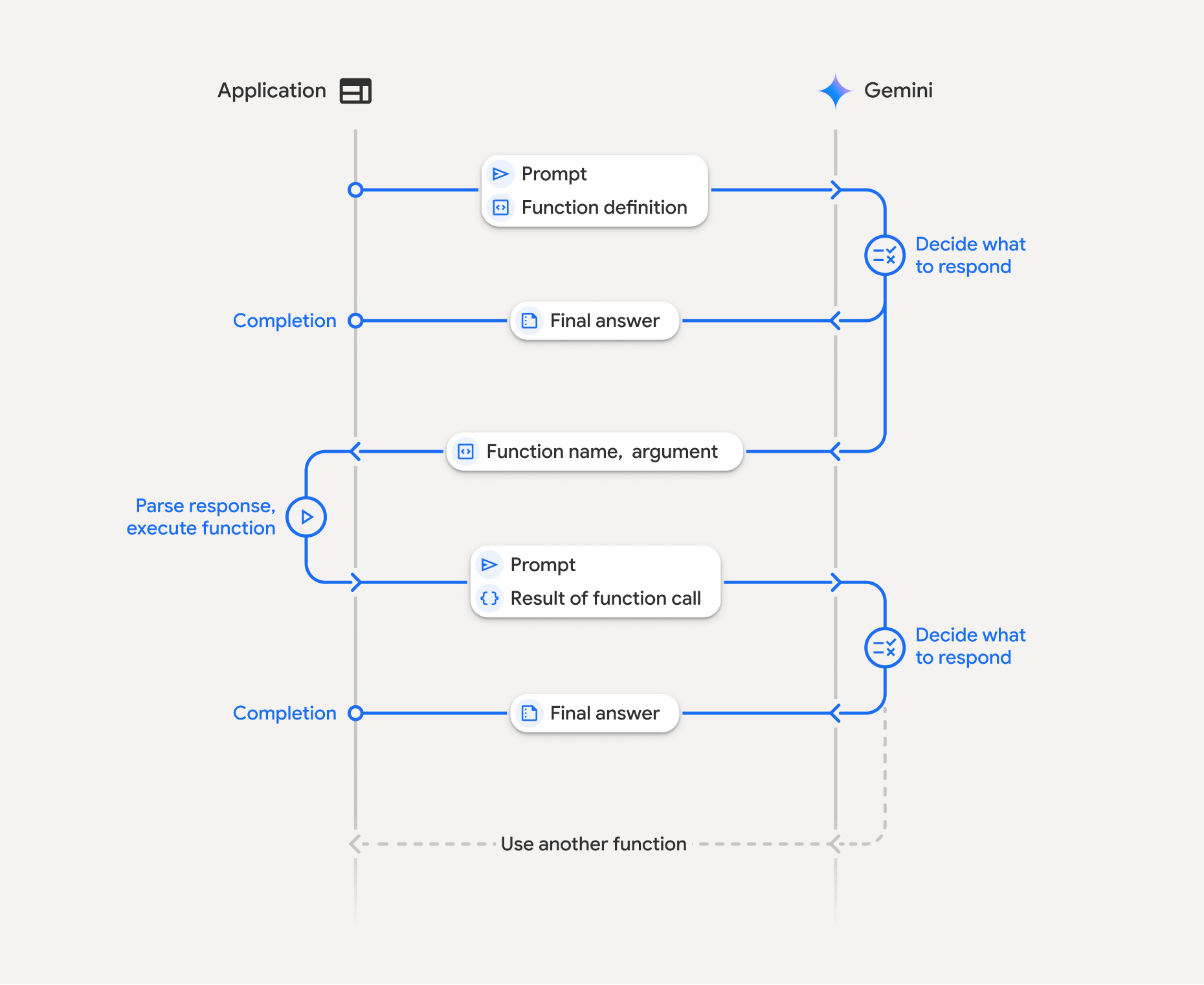
ফাংশন কলিংয়ের মধ্যে আপনার অ্যাপ্লিকেশন, মডেল এবং এক্সটার্নাল ফাংশনের মধ্যে একটি স্ট্রাকচার্ড ইন্টার্যাকশন অন্তর্ভুক্ত। প্রসেসের ব্রেকডাউন এখানে দেওয়া হল:
- ফাংশন ঘোষণা নির্ধারণ করুন: আপনার অ্যাপ্লিকেশন কোডে ফাংশন ঘোষণা নির্ধারণ করুন। ফাংশন ঘোষণা মডেলে ফাংশনের নাম, প্যারামিটার ও উদ্দেশ্য বর্ণনা করে।
- ফাংশন ঘোষণা সহ API কল করুন: মডেলকে
ফাংশন ঘোষণা সহ ব্যবহারকারীর প্রম্পট পাঠান। এটি অনুরোধ বিশ্লেষণ করে এবং
ফাংশন কল সহায়ক হবে কিনা তা নির্ধারণ করে। যদি তাই হয়, তাহলে এটি ফাংশনের নাম, আর্গুমেন্ট ও অনন্য
id(এইidএখন Gemini 3 মডেলের জন্য API-এর মাধ্যমে সবসময় রিটার্ন করা হয়*) সহ একটি স্ট্রাকচার্ড JSON অবজেক্ট দিয়ে উত্তর দেয়। - ফাংশন কোড এক্সিকিউট করা (আপনার দায়িত্ব): মডেলটি নিজে থেকে ফাংশন এক্সিকিউট করে না।
আপনার অ্যাপ্লিকেশনের দায়িত্ব হল
উত্তর প্রসেস করা এবং ফাংশন কল চেক করা। যদি
- হ্যাঁ: ফাংশনের নাম, আর্গুমেন্ট ও
idএক্সট্র্যাক্ট করে আপনার অ্যাপ্লিকেশনে সংশ্লিষ্ট ফাংশনটি এক্সিকিউট করো। - না: মডেলটি প্রম্পটের সরাসরি টেক্সট উত্তর দিয়েছে (এই ফ্লোটি উদাহরণে কম জোর দেওয়া হয়েছে, তবে এটি একটি সম্ভাব্য ফলাফল)।
- হ্যাঁ: ফাংশনের নাম, আর্গুমেন্ট ও
- ব্যবহারকারীর পক্ষে সহজবোধ্য উত্তর তৈরি করো: কোনও ফাংশন এক্সিকিউট করা হলে, তার
ফলাফল ক্যাপচার করে মডেলকে ফেরত পাঠাও। কথোপকথনের পরবর্তী টার্নে, যেন
ম্যাচ করা
idযোগ করতে ভুলো না। এটি ফলাফল ব্যবহার করে ফাংশন কল থেকে পাওয়া তথ্যকে অন্তর্ভুক্ত করে একটি চূড়ান্ত, ব্যবহারকারীর পক্ষে উপযুক্ত উত্তর তৈরি করবে।
এই প্রসেস একাধিকবার রিপিট করা যেতে পারে, এর ফলে জটিল ইন্টার্যাকশন ও ওয়ার্কফ্লো সম্ভব হয়। এছাড়াও, মডেলটি একটি সিঙ্গেল টার্নে একাধিক ফাংশন কল করার সুবিধা দেয় (প্যারালাল ফাংশন কলিং), সিকোয়েন্সে (কম্পোজিশনাল ফাংশন কলিং), এবং বিল্ট-ইন Gemini টুলের মাধ্যমে (মাল্টি-টুল ব্যবহার)।
* ফাংশন আইডি সবসময় ম্যাপ করা হয়: Gemini 3 এখন সবসময় প্রতিটি functionCall-এর সাথে একটি অনন্য
id রিটার্ন করে। আপনার
functionResponse-এ এই হুবহু id যোগ করুন, যাতে মডেলটি আপনার ফলাফলকে
মূল অনুরোধের সাথে সঠিকভাবে ম্যাপ করতে পারে।
ধাপ ১: ফাংশন ঘোষণা নির্ধারণ করুন
আপনার অ্যাপ্লিকেশন কোডের মধ্যে একটি ফাংশন ও তার ঘোষণা ডিফাইন করুন যা ব্যবহারকারীদের আলোর ভ্যালু সেট করতে এবং API অনুরোধ করতে দেয়। এই ফাংশন এক্সটার্নাল পরিষেবা বা API কল করতে পারে।
Python
# Define a function that the model can call to control smart lights
set_light_values_declaration = {
    "name": "set_light_values",
    "description": "Sets the brightness and color temperature of a light.",
    "parameters": {
        "type": "object",
        "properties": {
            "brightness": {
                "type": "integer",
                "description": "Light level from 0 to 100. Zero is off and 100 is full brightness",
            },
            "color_temp": {
                "type": "string",
                "enum": ["daylight", "cool", "warm"],
                "description": "Color temperature of the light fixture, which can be `daylight`, `cool` or `warm`.",
            },
        },
        "required": ["brightness", "color_temp"],
    },
}

# This is the actual function that would be called based on the model's suggestion
def set_light_values(brightness: int, color_temp: str) -> dict[str, int | str]:
    """Set the brightness and color temperature of a room light. (mock API).

    Args:
        brightness: Light level from 0 to 100. Zero is off and 100 is full brightness
        color_temp: Color temperature of the light fixture, which can be `daylight`, `cool` or `warm`.

    Returns:
        A dictionary containing the set brightness and color temperature.
    """
    return {"brightness": brightness, "colorTemperature": color_temp}
জাভাস্ক্রিপ্ট
import { Type } from '@google/genai';

// Define a function that the model can call to control smart lights
const setLightValuesFunctionDeclaration = {
  name: 'set_light_values',
  description: 'Sets the brightness and color temperature of a light.',
  parameters: {
    type: Type.OBJECT,
    properties: {
      brightness: {
        type: Type.NUMBER,
        description: 'Light level from 0 to 100. Zero is off and 100 is full brightness',
      },
      color_temp: {
        type: Type.STRING,
        enum: ['daylight', 'cool', 'warm'],
        description: 'Color temperature of the light fixture, which can be `daylight`, `cool` or `warm`.',
      },
    },
    required: ['brightness', 'color_temp'],
  },
};

/**

*   Set the brightness and color temperature of a room light. (mock API)
*   @param {number} brightness - Light level from 0 to 100. Zero is off and 100 is full brightness
*   @param {string} color_temp - Color temperature of the light fixture, which can be `daylight`, `cool` or `warm`.
*   @return {Object} A dictionary containing the set brightness and color temperature.
*/
function setLightValues(brightness, color_temp) {
  return {
    brightness: brightness,
    colorTemperature: color_temp
  };
}
খুলুন
package main

import "google.golang.org/genai"

// Define a function declaration that the model can call to control smart lights
var setLightValuesDeclaration = &genai.FunctionDeclaration{
    Name:        "set_light_values",
    Description: "Sets the brightness and color temperature of a light.",
    Parameters: &genai.Schema{
        Type: genai.TypeObject,
        Properties: map[string]*genai.Schema{
            "brightness": {
                Type:        genai.TypeInteger,
                Description: "Light level from 0 to 100. Zero is off and 100 is full brightness",
            },
            "color_temp": {
                Type:        genai.TypeString,
                Enum:        []string{"daylight", "cool", "warm"},
                Description: "Color temperature of the light fixture, which can be `daylight`, `cool` or `warm`.",
            },
        },
        Required: []string{"brightness", "color_temp"},
    },
}

// This is the actual function that would be called based on the model's suggestion
func setLightValues(brightness int, colorTemp string) map[string]any {
    return map[string]any{
        "brightness":       brightness,
        "colorTemperature": colorTemp,
    }
}
ধাপ ২: ফাংশন ডিক্লেয়ারেশন সহ মডেলকে কল করুন
ফাংশন ঘোষণা করার পরে, আপনি মডেলকে সেগুলি ব্যবহার করার জন্য প্রম্পট করতে পারবেন। এটি প্রম্পট ও ফাংশন ঘোষণা বিশ্লেষণ করে এবং সিদ্ধান্ত নেয় যে সরাসরি উত্তর দেবে নাকি কোনও ফাংশন কল করবে। কোনও ফাংশন কল করা হলে, response অবজেক্টে একটি ফাংশন কল সংক্রান্ত সাজেশন থাকবে।
Python
from google.genai import types

# Configure the client and tools
client = genai.Client()
tools = types.Tool(function_declarations=[set_light_values_declaration])
config = types.GenerateContentConfig(tools=[tools])

# Define user prompt
contents = [
    types.Content(
        role="user", parts=[types.Part(text="Turn the lights down to a romantic level")]
    )
]

# Send request with function declarations
response = client.models.generate_content(
    model="gemini-3.8-flash",
    contents=contents,
    config=config,
)

print(response.candidates[0].content.parts[0].function_call)
জাভাস্ক্রিপ্ট
import { GoogleGenAI } from '@google/genai';

// Generation config with function declaration
const config = {
  tools: [{
    functionDeclarations: [setLightValuesFunctionDeclaration]
  }]
};

// Configure the client
const ai = new GoogleGenAI({});

// Define user prompt
const contents = [
  {
    role: 'user',
    parts: [{ text: 'Turn the lights down to a romantic level' }]
  }
];

// Send request with function declarations
const response = await ai.models.generateContent({
  model: 'gemini-3.8-flash',
  contents: contents,
  config: config
});

console.log(response.functionCalls[0]);
খুলুন
ctx := context.Background()
client, err := genai.NewClient(ctx, nil)
if err != nil {
    log.Fatal(err)
}

// Generation config with function declaration
config := &genai.GenerateContentConfig{
    Tools: []*genai.Tool{
        {FunctionDeclarations: []*genai.FunctionDeclaration{setLightValuesDeclaration}},
    },
}

// Define user prompt
contents := []*genai.Content{
    genai.NewContentFromText("Turn the lights down to a romantic level", genai.RoleUser),
}

// Send request with function declarations
response, err := client.Models.GenerateContent(ctx, "gemini-3.8-flash", contents, config)
if err != nil {
    log.Fatal(err)
}

fmt.Println(response.FunctionCalls()[0])
তারপরে, মডেলটি একটি functionCall অবজেক্ট রিটার্ন করে যা OpenAPI-এর সাথে মানানসই
স্কিমায় উল্লেখ করে যে কীভাবে ব্যবহারকারীর প্রশ্নের উত্তর দেওয়ার জন্য
ঘোষিত ফাংশনগুলির মধ্যে একটি বা একাধিক ফাংশন কল করতে হয়।
Python
id='8f2b1a3c' args={'color_temp': 'warm', 'brightness': 25} name='set_light_values'
জাভাস্ক্রিপ্ট
{
  id: '8f2b1a3c',
  name: 'set_light_values',
  args: { brightness: 25, color_temp: 'warm' }
}
খুলুন
&{ID:8f2b1a3c Args:map[brightness:25 color_temp:warm] Name:set_light_values}
ধাপ ৩: set_light_values ফাংশন কোড এক্সিকিউট করা
মডেলের উত্তর থেকে ফাংশন কলের বিবরণ এক্সট্র্যাক্ট করুন, আর্গুমেন্ট পার্স করুন
এবং set_light_values ফাংশনটি এক্সিকিউট করুন।
Python
# Extract tool call details, it may not be in the first part.
tool_call = response.candidates[0].content.parts[0].function_call

if tool_call.name == "set_light_values":
    result = set_light_values(**tool_call.args)
    print(f"Function execution result: {result}")
জাভাস্ক্রিপ্ট
// Extract tool call details
const tool_call = response.functionCalls[0]

let result;
if (tool_call.name === 'set_light_values') {
  result = setLightValues(tool_call.args.brightness, tool_call.args.color_temp);
  console.log(`Function execution result: ${JSON.stringify(result)}`);
}
খুলুন
// Extract tool call details
toolCall := response.FunctionCalls()[0]

var result map[string]any
if toolCall.Name == "set_light_values" {
    brightness := int(toolCall.Args["brightness"].(float64))
    colorTemp := toolCall.Args["color_temp"].(string)
    result = setLightValues(brightness, colorTemp)
    fmt.Printf("Function execution result: %v\n", result)
}
ধাপ ৪: ফাংশনের ফলাফল সহ ব্যবহারকারীর পক্ষে উপযুক্ত উত্তর তৈরি করো এবং মডেলকে আবার কল করো
সবশেষে, ফাংশন এক্সিকিউশনের ফলাফল মডেলকে ফেরত পাঠাও যাতে এটি ব্যবহারকারীকে দেওয়া চূড়ান্ত উত্তরে এই তথ্য যোগ করতে পারে।
Python
from google import genai
from google.genai import types

# Create a function response part
function_response_part = types.Part.from_function_response(
    name=tool_call.name,
    response={"result": result},
    id=tool_call.id,
)

# Append function call and result of the function execution to contents
contents.append(response.candidates[0].content) # Append the content from the model's response.
contents.append(types.Content(role="user", parts=[function_response_part])) # Append the function response

client = genai.Client()
final_response = client.models.generate_content(
    model="gemini-3.8-flash",
    config=config,
    contents=contents,
)

print(final_response.text)
জাভাস্ক্রিপ্ট
// Create a function response part
const function_response_part = {
  name: tool_call.name,
  response: { result },
  id: tool_call.id
}

// Append function call and result of the function execution to contents
contents.push(response.candidates[0].content);
contents.push({ role: 'user', parts: [{ functionResponse: function_response_part }] });

// Get the final response from the model
const final_response = await ai.models.generateContent({
  model: 'gemini-3.8-flash',
  contents: contents,
  config: config
});

console.log(final_response.text);
খুলুন
// Create a function response part
functionResponsePart := &genai.Part{
    FunctionResponse: &genai.FunctionResponse{
        ID:       toolCall.ID,
        Name:     toolCall.Name,
        Response: result,
    },
}

// Append function call and result of the function execution to contents
contents = append(contents, response.Candidates[0].Content)
contents = append(contents, &genai.Content{
    Role:  genai.RoleUser,
    Parts: []*genai.Part{functionResponsePart},
})

// Get the final response from the model
finalResponse, err := client.Models.GenerateContent(ctx, "gemini-3.8-flash", contents, config)
if err != nil {
    log.Fatal(err)
}

fmt.Println(finalResponse.Text())
এর ফলে ফাংশন কলিং ফ্লো সম্পূর্ণ হয়। ব্যবহারকারীর অনুরোধ করা অ্যাকশন পারফর্ম করতে মডেলটি সফলভাবে
set_light_values ফাংশন ব্যবহার করেছে।
ফাংশন ঘোষণা
আপনি কোনও প্রম্পটে ফাংশন কলিং প্রয়োগ করলে, আপনি একটি tools অবজেক্ট তৈরি করেন,
যেটিতে একটি বা একাধিক function declarations থাকে। আপনি JSON ব্যবহার করে ফাংশন ডিফাইন করেন, বিশেষ করে OpenAPI স্কিমা
ফর্ম্যাটের বেছে নেওয়া সাবসেট
ব্যবহার করে। একটি
ফাংশন ঘোষণার মধ্যে নিম্নলিখিত প্যারামিটার অন্তর্ভুক্ত থাকতে পারে:
name(স্ট্রিং): ফাংশনের অনন্য নাম (get_weather_forecast,send_email)। স্পেস বা বিশেষ অক্ষর ছাড়া বর্ণনামূলক নাম ব্যবহার করুন (আন্ডারস্কোর বা ক্যামেলকেস ব্যবহার করুন)।description(স্ট্রিং): ফাংশনের উদ্দেশ্য ও কার্যকারিতা সম্পর্কে স্পষ্ট ও বিস্তারিত ব্যাখ্যা। ফাংশন কখন ব্যবহার করতে হবে তা বোঝার জন্য এটি মডেলের পক্ষে খুবই গুরুত্বপূর্ণ। নির্দিষ্টভাবে উত্তর দাও এবং সহায়ক হলে উদাহরণ দাও ("লোকেশন ও ঐচ্ছিকভাবে সিনেমার নামের উপর ভিত্তি করে থিয়েটার খুঁজে পায়, যা বর্তমানে থিয়েটারে চলছে।")।parameters(অবজেক্ট): ফাংশন যে ইনপুট প্যারামিটার প্রত্যাশা করে তা নির্ধারণ করে।type(স্ট্রিং): সামগ্রিক ডেটার ধরন নির্দিষ্ট করে, যেমনobject।properties(অবজেক্ট): প্রতিটি আলাদা আলাদা প্যারামিটার সহ তালিকা, প্রত্যেকটির সাথে:type(স্ট্রিং): প্যারামিটারের ডেটা টাইপ, যেমনstring,integer,boolean, array.description(স্ট্রিং): প্যারামিটারের উদ্দেশ্য ও ফর্ম্যাটের বিবরণ। উদাহরণ ও বিধিনিষেধ দাও ("শহর ও রাজ্য, যেমন, 'সান ফ্রান্সিসকো, ক্যালিফোর্নিয়া' অথবা পিন কোড, যেমন, '95616'।")।enum(অ্যারে, ঐচ্ছিক): প্যারামিটারের ভ্যালু যদি কোনও নির্দিষ্ট সেট থেকে আসে, তাহলে বিবরণে শুধু বর্ণনা করার পরিবর্তে অনুমোদিত ভ্যালু তালিকাভুক্ত করতে "enum" ব্যবহার করুন। এটি নির্ভুলতা উন্নত করে ("enum": ["daylight", "cool", "warm"])।
required(অ্যারে): ফাংশনটি অপারেট করার জন্য বাধ্যতামূলক প্যারামিটারের নাম তালিকাভুক্ত স্ট্রিংয়ের একটি অ্যারে।
এছাড়াও, আপনি সরাসরি Python ফাংশন থেকে FunctionDeclarations তৈরি করতে পারেন, এর জন্য
types.FunctionDeclaration.from_callable(client=client, callable=your_function) ব্যবহার করুন।
'থিঙ্কিং' মডেলের মাধ্যমে ফাংশন কল করা
Gemini 3 ও 2.5 সিরিজের মডেল, অনুরোধের উত্তর দেওয়ার জন্য ইন্টার্নাল "থিঙ্কিং" প্রসেস ব্যবহার করে। এটি ফাংশন কলিং পারফর্ম্যান্সকে উল্লেখযোগ্যভাবে উন্নত করে, মডেলকে আরও ভালোভাবে নির্ধারণ করতে দেয় যে কখন কোনও ফাংশন কল করতে হবে এবং কোন প্যারামিটার ব্যবহার করতে হবে। Gemini API স্টেটলেস হওয়ার কারণে, মডেলগুলি একাধিক কথোপকথন জুড়ে কন্টেক্সট বজায় রাখতে থট সিগনেচার ব্যবহার করে।
এই বিভাগে থট সিগনেচার ম্যানেজ করার উন্নত পদ্ধতি সম্পর্কে বলা হয়েছে এবং আপনি যদি ম্যানুয়ালি API অনুরোধ (যেমন, REST-এর মাধ্যমে) তৈরি করেন বা কথোপকথনের ইতিহাস ম্যানিপুলেট করেন, তবেই এটি প্রয়োজনীয়।
আপনি Google GenAI SDK (আমাদের অফিসিয়াল লাইব্রেরি) ব্যবহার করলে, আপনাকে এই প্রসেস ম্যানেজ করতে হবে না। SDK অটোমেটিক প্রয়োজনীয় ধাপগুলি ম্যানেজ করে, যেমন আগেকার উদাহরণে দেখানো হয়েছে।
ম্যানুয়ালি কথোপকথনের ইতিহাস ম্যানেজ করা
আপনি যদি ম্যানুয়ালি কথোপকথনের ইতিহাস পরিবর্তন করেন, তাহলে
আগের সম্পূর্ণ উত্তর পাঠানোর পরিবর্তে আপনাকে
অবশ্যই মডেলের টার্নে অন্তর্ভুক্ত thought_signature সঠিকভাবে হ্যান্ডেল করতে হবে।
মডেলের প্রসঙ্গ যাতে বজায় থাকে তা নিশ্চিত করতে এইসব নিয়ম মেনে চলুন:
- সবসময়
thought_signature-কে মডেলের আসলPart-এর মধ্যে ফেরত পাঠাও। - আপনার
function_response-এfunction_callথেকে পাওয়াidসবসময় হুবহু অন্তর্ভুক্ত করুন, যাতে API সঠিক অনুরোধের সাথে ফলাফল ম্যাপ করতে পারে। - স্বাক্ষর আছে এমন
Part-এর সাথে স্বাক্ষর নেই এমন মার্জ করবেন না। এটি ভাবনার পজিশনাল প্রসঙ্গ ভেঙে দেয়। - দুটি
Partsএকত্রিত করবেন না, কারণ দুটিতেই স্বাক্ষর থাকলে স্বাক্ষর স্ট্রিং মার্জ করা যায় না।
Gemini 3 থট সিগনেচার
Gemini 3-তে, কোনও মডেল উত্তরের Part
মধ্যে থট সিগনেচার থাকতে পারে।
আমরা সাধারণত সব Part ধরনের সিগনেচার রিটার্ন করার সাজেশন দিলেও,
ফাংশন কলিংয়ের ক্ষেত্রে থট সিগনেচার পাস করা বাধ্যতামূলক। আপনি যদি ম্যানুয়ালি কথোপকথনের ইতিহাস
পরিবর্তন না করেন, তাহলে Google GenAI SDK অটোমেটিক
থট সিগনেচার ম্যানেজ করবে।
আপনি যদি ম্যানুয়ালি কথোপকথনের ইতিহাস ম্যানিপুলেট করেন, তাহলে Gemini 3-এর জন্য থট সিগনেচার ম্যানেজ করা সংক্রান্ত সম্পূর্ণ নির্দেশাবলী ও বিবরণের জন্য থট সিগনেচার পৃষ্ঠা দেখুন।
চিন্তার স্বাক্ষর পরীক্ষা করা
ইমপ্লিমেন্টেশনের জন্য এটি প্রয়োজনীয় না হলেও, আপনি
thought_signature দেখতে উত্তরের ব্যাপারে ভাল করে চেক করে নিতে পারেন, এটি ডিবাগিং বা শিক্ষামূলক উদ্দেশ্যে করা যেতে পারে।
Python
import base64
# After receiving a response from a model with thinking enabled
# response = client.models.generate_content(...)

# The signature is attached to the response part containing the function call
part = response.candidates[0].content.parts[0]
if part.thought_signature:
  print(base64.b64encode(part.thought_signature).decode("utf-8"))
জাভাস্ক্রিপ্ট
// After receiving a response from a model with thinking enabled
// const response = await ai.models.generateContent(...)

// The signature is attached to the response part containing the function call
const part = response.candidates[0].content.parts[0];
if (part.thoughtSignature) {
  console.log(part.thoughtSignature);
}
খুলুন
// After receiving a response from a model with thinking enabled
// response, err := client.Models.GenerateContent(...)

// The signature is attached to the response part containing the function call
part := response.Candidates[0].Content.Parts[0]
if len(part.ThoughtSignature) > 0 {
    fmt.Println(string(part.ThoughtSignature))
}
থিঙ্কিং পৃষ্ঠায় থট সিগনেচার ও থিঙ্কিং মডেলের সীমাবদ্ধতা ও ব্যবহার সম্পর্কে আরও জানুন।
প্যারালাল ফাংশন কলিং
সিঙ্গেল টার্ন ফাংশন কলিং ছাড়াও, আপনি একসাথে একাধিক ফাংশন কল করতে পারবেন। প্যারালাল ফাংশন কলিং আপনাকে একসাথে একাধিক ফাংশন এক্সিকিউট করতে দেয় এবং ফাংশনগুলি একে অপরের উপর নির্ভরশীল না হলে এটি ব্যবহার করা হয়। একাধিক স্বতন্ত্র সোর্স থেকে ডেটা সংগ্রহ করার মতো পরিস্থিতিতে এটি কাজে লাগে, যেমন বিভিন্ন ডেটাবেস থেকে গ্রাহকের বিবরণ পাওয়া বা বিভিন্ন ওয়্যারহাউস জুড়ে ইনভেনটরি লেভেল চেক করা অথবা আপনার অ্যাপার্টমেন্টকে ডিস্কোতে পরিবর্তন করার মতো একাধিক অ্যাকশন পারফর্ম করা।
মডেলটি যখন একটি টার্নে একাধিক ফাংশন কল শুরু করে, তখন আপনাকে
function_call অবজেক্টগুলি যে ক্রমে পাওয়া গেছে সেই একই ক্রমে function_result অবজেক্টগুলি ফেরত
দিতে হবে না। Gemini API, মডেলের আউটপুট থেকে পাওয়া id ব্যবহার করে প্রতিটি ফলাফলকে
এর সংশ্লিষ্ট কলের সাথে ম্যাপ করে। এটি আপনাকে
অ্যাসিঙ্ক্রোনাসভাবে ফাংশন এক্সিকিউট করতে এবং সেগুলি সম্পূর্ণ হওয়ার সাথে সাথে
ফলাফল আপনার তালিকায় যোগ করতে দেয়।
Python
power_disco_ball = {
    "name": "power_disco_ball",
    "description": "Powers the spinning disco ball.",
    "parameters": {
        "type": "object",
        "properties": {
            "power": {
                "type": "boolean",
                "description": "Whether to turn the disco ball on or off.",
            }
        },
        "required": ["power"],
    },
}

start_music = {
    "name": "start_music",
    "description": "Play some music matching the specified parameters.",
    "parameters": {
        "type": "object",
        "properties": {
            "energetic": {
                "type": "boolean",
                "description": "Whether the music is energetic or not.",
            },
            "loud": {
                "type": "boolean",
                "description": "Whether the music is loud or not.",
            },
        },
        "required": ["energetic", "loud"],
    },
}

dim_lights = {
    "name": "dim_lights",
    "description": "Dim the lights.",
    "parameters": {
        "type": "object",
        "properties": {
            "brightness": {
                "type": "number",
                "description": "The brightness of the lights, 0.0 is off, 1.0 is full.",
            }
        },
        "required": ["brightness"],
    },
}
জাভাস্ক্রিপ্ট
import { Type } from '@google/genai';

const powerDiscoBall = {
  name: 'power_disco_ball',
  description: 'Powers the spinning disco ball.',
  parameters: {
    type: Type.OBJECT,
    properties: {
      power: {
        type: Type.BOOLEAN,
        description: 'Whether to turn the disco ball on or off.'
      }
    },
    required: ['power']
  }
};

const startMusic = {
  name: 'start_music',
  description: 'Play some music matching the specified parameters.',
  parameters: {
    type: Type.OBJECT,
    properties: {
      energetic: {
        type: Type.BOOLEAN,
        description: 'Whether the music is energetic or not.'
      },
      loud: {
        type: Type.BOOLEAN,
        description: 'Whether the music is loud or not.'
      }
    },
    required: ['energetic', 'loud']
  }
};

const dimLights = {
  name: 'dim_lights',
  description: 'Dim the lights.',
  parameters: {
    type: Type.OBJECT,
    properties: {
      brightness: {
        type: Type.NUMBER,
        description: 'The brightness of the lights, 0.0 is off, 1.0 is full.'
      }
    },
    required: ['brightness']
  }
};
খুলুন
package main

import "google.golang.org/genai"

var powerDiscoBall = &genai.FunctionDeclaration{
    Name:        "power_disco_ball",
    Description: "Powers the spinning disco ball.",
    Parameters: &genai.Schema{
        Type: genai.TypeObject,
        Properties: map[string]*genai.Schema{
            "power": {
                Type:        genai.TypeBoolean,
                Description: "Whether to turn the disco ball on or off.",
            },
        },
        Required: []string{"power"},
    },
}

var startMusic = &genai.FunctionDeclaration{
    Name:        "start_music",
    Description: "Play some music matching the specified parameters.",
    Parameters: &genai.Schema{
        Type: genai.TypeObject,
        Properties: map[string]*genai.Schema{
            "energetic": {
                Type:        genai.TypeBoolean,
                Description: "Whether the music is energetic or not.",
            },
            "loud": {
                Type:        genai.TypeBoolean,
                Description: "Whether the music is loud or not.",
            },
        },
        Required: []string{"energetic", "loud"},
    },
}

var dimLights = &genai.FunctionDeclaration{
    Name:        "dim_lights",
    Description: "Dim the lights.",
    Parameters: &genai.Schema{
        Type: genai.TypeObject,
        Properties: map[string]*genai.Schema{
            "brightness": {
                Type:        genai.TypeNumber,
                Description: "The brightness of the lights, 0.0 is off, 1.0 is full.",
            },
        },
        Required: []string{"brightness"},
    },
}
উল্লেখ করা সব টুল ব্যবহার করার অনুমতি দিতে ফাংশন কলিং মোড কনফিগার করুন। আরও জানতে, আপনি ফাংশন কলিং কনফিগার করা সম্পর্কে পড়তে পারেন।
Python
from google import genai
from google.genai import types

# Configure the client and tools
client = genai.Client()
house_tools = [
    types.Tool(function_declarations=[power_disco_ball, start_music, dim_lights])
]
config = types.GenerateContentConfig(
    tools=house_tools,
    automatic_function_calling=types.AutomaticFunctionCallingConfig(
        disable=True
    ),
    # Force the model to call 'any' function, instead of chatting.
    tool_config=types.ToolConfig(
        function_calling_config=types.FunctionCallingConfig(mode='ANY')
    ),
)

chat = client.chats.create(model="gemini-3.8-flash", config=config)
response = chat.send_message("Turn this place into a party!")

# Print out each of the function calls requested from this single call
print("Example 1: Forced function calling")
for fn in response.function_calls:
    args = ", ".join(f"{key}={val}" for key, val in fn.args.items())
    print(f"{fn.name}({args}) - ID: {fn.id}")
জাভাস্ক্রিপ্ট
import { GoogleGenAI } from '@google/genai';

// Set up function declarations
const houseFns = [powerDiscoBall, startMusic, dimLights];

const config = {
    tools: [{
        functionDeclarations: houseFns
    }],
    // Force the model to call 'any' function, instead of chatting.
    toolConfig: {
        functionCallingConfig: {
            mode: 'any'
        }
    }
};

// Configure the client
const ai = new GoogleGenAI({});

// Create a chat session
const chat = ai.chats.create({
    model: 'gemini-3.8-flash',
    config: config
});
const response = await chat.sendMessage({message: 'Turn this place into a party!'});

// Print out each of the function calls requested from this single call
console.log("Example 1: Forced function calling");
for (const fn of response.functionCalls) {
    const args = Object.entries(fn.args)
        .map(([key, val]) => `${key}=${val}`)
        .join(', ');
    console.log(`${fn.name}(${args}) - ID: ${fn.id}`);
}
খুলুন
ctx := context.Background()
client, err := genai.NewClient(ctx, nil)
if err != nil {
    log.Fatal(err)
}

houseTools := []*genai.Tool{
    {FunctionDeclarations: []*genai.FunctionDeclaration{powerDiscoBall, startMusic, dimLights}},
}

config := &genai.GenerateContentConfig{
    Tools: houseTools,
    // Force the model to call 'any' function, instead of chatting.
    ToolConfig: &genai.ToolConfig{
        FunctionCallingConfig: &genai.FunctionCallingConfig{
            Mode: genai.FunctionCallingConfigModeAny,
        },
    },
}

response, err := client.Models.GenerateContent(
    ctx,
    "gemini-3.8-flash",
    genai.Text("Turn this place into a party!"),
    config,
)
if err != nil {
    log.Fatal(err)
}

// Print out each of the function calls requested from this single call
fmt.Println("Example 1: Forced function calling")
for _, fn := range response.FunctionCalls() {
    fmt.Printf("%s(%v) - ID: %s\n", fn.Name, fn.Args, fn.ID)
}
প্রিন্ট করা প্রতিটি ফলাফল মডেলের অনুরোধ করা একটি ফাংশন কলকে প্রতিফলিত করে। ফলাফল পাঠানোর জন্য, যেভাবে অনুরোধ করা হয়েছে, সেই একই ক্রমে উত্তরগুলি অন্তর্ভুক্ত করুন।
Python SDK অটোমেটিক ফাংশন কলিং কাজ করে, যা Python ফাংশনকে অটোমেটিক ডিক্লারেশনে কনভার্ট করে, আপনার জন্য ফাংশন কল এক্সিকিউশন ও রেসপন্স সাইকেল ম্যানেজ করে। ডিস্কো ব্যবহারের ক্ষেত্রে নিম্নলিখিত উদাহরণটি দেখুন।
Python
from google import genai
from google.genai import types

# Actual function implementations
def power_disco_ball_impl(power: bool) -> dict:
    """Powers the spinning disco ball.

    Args:
        power: Whether to turn the disco ball on or off.

    Returns:
        A status dictionary indicating the current state.
    """
    return {"status": f"Disco ball powered {'on' if power else 'off'}"}

def start_music_impl(energetic: bool, loud: bool) -> dict:
    """Play some music matching the specified parameters.

    Args:
        energetic: Whether the music is energetic or not.
        loud: Whether the music is loud or not.

    Returns:
        A dictionary containing the music settings.
    """
    music_type = "energetic" if energetic else "chill"
    volume = "loud" if loud else "quiet"
    return {"music_type": music_type, "volume": volume}

def dim_lights_impl(brightness: float) -> dict:
    """Dim the lights.

    Args:
        brightness: The brightness of the lights, 0.0 is off, 1.0 is full.

    Returns:
        A dictionary containing the new brightness setting.
    """
    return {"brightness": brightness}

# Configure the client
client = genai.Client()
config = types.GenerateContentConfig(
    tools=[power_disco_ball_impl, start_music_impl, dim_lights_impl]
)

# Make the request
response = client.models.generate_content(
    model="gemini-3.8-flash",
    contents="Do everything you need to this place into party!",
    config=config,
)

print("\nExample 2: Automatic function calling")
print(response.text)
# I've turned on the disco ball, started playing loud and energetic music, and dimmed the lights to 50% brightness. Let's get this party started!
কম্পোজিশনাল ফাংশন কলিং
কম্পোজিশনাল বা সিকোয়েন্সিয়াল ফাংশন কলিং, Gemini-কে একাধিক
ফাংশন কল একসাথে চেইন করে জটিল অনুরোধ পূরণ করতে দেয়। যেমন, "আমার বর্তমান লোকেশনের তাপমাত্রা কত" প্রশ্নের উত্তর দিতে Gemini API প্রথমে
get_current_location() ফাংশন এবং তারপরে get_weather() ফাংশন ইনভোক করতে পারে যা
লোকেশনকে প্যারামিটার হিসেবে নেয়।
Python SDK ও অটোমেটিক ফাংশন কলিং ব্যবহার করে কীভাবে কম্পোজিশনাল ফাংশন কলিং প্রয়োগ করতে হয় তা নিম্নলিখিত উদাহরণে দেখানো হয়েছে।
Python
এই উদাহরণে
google-genai Python SDK-এর অটোমেটিক ফাংশন কলিং ফিচার ব্যবহার করা হয়েছে। SDK, Python
ফাংশনগুলিকে প্রয়োজনীয় স্কিমায় অটোমেটিক কনভার্ট করে, মডেলের অনুরোধ করা
ফাংশন কল এক্সিকিউট করে এবং টাস্ক সম্পূর্ণ করার জন্য ফলাফল মডেলকে ফেরত পাঠায়।
import os
from google import genai
from google.genai import types

# Example Functions
def get_weather_forecast(location: str) -> dict:
    """Gets the current weather temperature for a given location."""
    print(f"Tool Call: get_weather_forecast(location={location})")
    # TODO: Make API call
    print("Tool Response: {'temperature': 25, 'unit': 'celsius'}")
    return {"temperature": 25, "unit": "celsius"}  # Dummy response

def set_thermostat_temperature(temperature: int) -> dict:
    """Sets the thermostat to a desired temperature."""
    print(f"Tool Call: set_thermostat_temperature(temperature={temperature})")
    # TODO: Interact with a thermostat API
    print("Tool Response: {'status': 'success'}")
    return {"status": "success"}

# Configure the client and model
client = genai.Client()
config = types.GenerateContentConfig(
    tools=[get_weather_forecast, set_thermostat_temperature]
)

# Make the request
response = client.models.generate_content(
    model="gemini-3.8-flash",
    contents="If it's warmer than 20°C in London, set the thermostat to 20°C, otherwise set it to 18°C.",
    config=config,
)

# Print the final, user-facing response
print(response.text)
প্রত্যাশিত আউটপুট
আপনি কোড চালালে, SDK-কে ফাংশন
কল অর্কেস্ট্রেট করতে দেখবেন। মডেলটি প্রথমে get_weather_forecast-এ কল করে, তাপমাত্রা
সংক্রান্ত তথ্য পায় এবং তারপরে প্রম্পটের লজিক অনুযায়ী সঠিক
ভ্যালু সহ set_thermostat_temperature-এ কল করে।
Tool Call: get_weather_forecast(location=London)
Tool Response: {'temperature': 25, 'unit': 'celsius'}
Tool Call: set_thermostat_temperature(temperature=20)
Tool Response: {'status': 'success'}
OK. I've set the thermostat to 20°C.
জাভাস্ক্রিপ্ট
ম্যানুয়াল এক্সিকিউশন লুপ ব্যবহার করে কম্পোজিশনাল ফাংশন কলিং করার জন্য JavaScript/TypeScript SDK কীভাবে ব্যবহার করতে হয় তা এই উদাহরণে দেখানো হয়েছে।
import { GoogleGenAI, Type } from "@google/genai";

// Configure the client
const ai = new GoogleGenAI({});

// Example Functions
function get_weather_forecast({ location }) {
  console.log(`Tool Call: get_weather_forecast(location=${location})`);
  // TODO: Make API call
  console.log("Tool Response: {'temperature': 25, 'unit': 'celsius'}");
  return { temperature: 25, unit: "celsius" };
}

function set_thermostat_temperature({ temperature }) {
  console.log(
    `Tool Call: set_thermostat_temperature(temperature=${temperature})`,
  );
  // TODO: Make API call
  console.log("Tool Response: {'status': 'success'}");
  return { status: "success" };
}

const toolFunctions = {
  get_weather_forecast,
  set_thermostat_temperature,
};

const tools = [
  {
    functionDeclarations: [
      {
        name: "get_weather_forecast",
        description:
          "Gets the current weather temperature for a given location.",
        parameters: {
          type: Type.OBJECT,
          properties: {
            location: {
              type: Type.STRING,
            },
          },
          required: ["location"],
        },
      },
      {
        name: "set_thermostat_temperature",
        description: "Sets the thermostat to a desired temperature.",
        parameters: {
          type: Type.OBJECT,
          properties: {
            temperature: {
              type: Type.NUMBER,
            },
          },
          required: ["temperature"],
        },
      },
    ],
  },
];

// Prompt for the model
let contents = [
  {
    role: "user",
    parts: [
      {
        text: "If it's warmer than 20°C in London, set the thermostat to 20°C, otherwise set it to 18°C.",
      },
    ],
  },
];

// Loop until the model has no more function calls to make
while (true) {
  const result = await ai.models.generateContent({
    model: "gemini-3.8-flash",
    contents,
    config: { tools },
  });

  if (result.functionCalls && result.functionCalls.length > 0) {
    const functionCall = result.functionCalls[0];

    const { name, args } = functionCall;

    if (!toolFunctions[name]) {
      throw new Error(`Unknown function call: ${name}`);
    }

    // Call the function and get the response.
    const toolResponse = toolFunctions[name](args);

    const functionResponsePart = {
      name: functionCall.name,
      response: {
        result: toolResponse,
      },
      id: functionCall.id,
    };

    // Send the function response back to the model.
    contents.push({
      role: "model",
      parts: [
        {
          functionCall: functionCall,
        },
      ],
    });
    contents.push({
      role: "user",
      parts: [
        {
          functionResponse: functionResponsePart,
        },
      ],
    });
  } else {
    // No more function calls, break the loop.
    console.log(result.text);
    break;
  }
}
প্রত্যাশিত আউটপুট
আপনি কোড চালালে, SDK-কে ফাংশন
কল অর্কেস্ট্রেট করতে দেখবেন। মডেলটি প্রথমে get_weather_forecast-এ কল করে, তাপমাত্রা
সংক্রান্ত তথ্য পায় এবং তারপরে প্রম্পটের লজিক অনুযায়ী সঠিক
ভ্যালু সহ set_thermostat_temperature-এ কল করে।
Tool Call: get_weather_forecast(location=London)
Tool Response: {'temperature': 25, 'unit': 'celsius'}
Tool Call: set_thermostat_temperature(temperature=20)
Tool Response: {'status': 'success'}
OK. It's 25°C in London, so I've set the thermostat to 20°C.
খুলুন
এই উদাহরণে দেখানো হয়েছে যে কীভাবে ম্যানুয়াল এক্সিকিউশন লুপ ব্যবহার করে কম্পোজিশনাল ফাংশন কল করার জন্য Go SDK ব্যবহার করতে হয়।
package main

import (
    "context"
    "fmt"
    "log"

    "google.golang.org/genai"
)

func getWeatherForecast(location string) map[string]any {
    fmt.Printf("Tool Call: get_weather_forecast(location=%s)\n", location)
    fmt.Println("Tool Response: map[temperature:25 unit:celsius]")
    return map[string]any{"temperature": 25, "unit": "celsius"}
}

func setThermostatTemperature(temperature float64) map[string]any {
    fmt.Printf("Tool Call: set_thermostat_temperature(temperature=%v)\n", temperature)
    fmt.Println("Tool Response: map[status:success]")
    return map[string]any{"status": "success"}
}

func main() {
    ctx := context.Background()
    client, err := genai.NewClient(ctx, nil)
    if err != nil {
        log.Fatal(err)
    }

    tools := []*genai.Tool{
        {
            FunctionDeclarations: []*genai.FunctionDeclaration{
                {
                    Name:        "get_weather_forecast",
                    Description: "Gets the current weather temperature for a given location.",
                    Parameters: &genai.Schema{
                        Type: genai.TypeObject,
                        Properties: map[string]*genai.Schema{
                            "location": {Type: genai.TypeString},
                        },
                        Required: []string{"location"},
                    },
                },
                {
                    Name:        "set_thermostat_temperature",
                    Description: "Sets the thermostat to a desired temperature.",
                    Parameters: &genai.Schema{
                        Type: genai.TypeObject,
                        Properties: map[string]*genai.Schema{
                            "temperature": {Type: genai.TypeNumber},
                        },
                        Required: []string{"temperature"},
                    },
                },
            },
        },
    }

    config := &genai.GenerateContentConfig{Tools: tools}

    contents := []*genai.Content{
        genai.NewContentFromText("If it's warmer than 20°C in London, set the thermostat to 20°C, otherwise set it to 18°C.", genai.RoleUser),
    }

    for {
        result, err := client.Models.GenerateContent(ctx, "gemini-3.8-flash", contents, config)
        if err != nil {
            log.Fatal(err)
        }

        if len(result.FunctionCalls()) > 0 {
            functionCall := result.FunctionCalls()[0]
            var toolResponse map[string]any

            switch functionCall.Name {
            case "get_weather_forecast":
                location := functionCall.Args["location"].(string)
                toolResponse = getWeatherForecast(location)
            case "set_thermostat_temperature":
                temperature := functionCall.Args["temperature"].(float64)
                toolResponse = setThermostatTemperature(temperature)
            default:
                log.Fatalf("Unknown function call: %s", functionCall.Name)
            }

            contents = append(contents, result.Candidates[0].Content)
            contents = append(contents, &genai.Content{
                Role: genai.RoleUser,
                Parts: []*genai.Part{
                    {
                        FunctionResponse: &genai.FunctionResponse{
                            ID:       functionCall.ID,
                            Name:     functionCall.Name,
                            Response: toolResponse,
                        },
                    },
                },
            })
        } else {
            fmt.Println(result.Text())
            break
        }
    }
}
প্রত্যাশিত আউটপুট
Tool Call: get_weather_forecast(location=London)
Tool Response: map[temperature:25 unit:celsius]
Tool Call: set_thermostat_temperature(temperature=20)
Tool Response: map[status:success]
OK. It's 25°C in London, so I've set the thermostat to 20°C.
কম্পোজিশনাল ফাংশন কলিং হল নেটিভ Live API ফিচার। এর অর্থ হল, Live API Python SDK-এর মতো ফাংশন কলিং হ্যান্ডেল করতে পারে।
Python
# Light control schemas
turn_on_the_lights_schema = {'name': 'turn_on_the_lights'}
turn_off_the_lights_schema = {'name': 'turn_off_the_lights'}

prompt = """
  Hey, can you write run some python code to turn on the lights, wait 10s and then turn off the lights?
  """

tools = [
    {'code_execution': {}},
    {'function_declarations': [turn_on_the_lights_schema, turn_off_the_lights_schema]}
]

await run(prompt, tools=tools, modality="AUDIO")
জাভাস্ক্রিপ্ট
// Light control schemas
const turnOnTheLightsSchema = { name: 'turn_on_the_lights' };
const turnOffTheLightsSchema = { name: 'turn_off_the_lights' };

const prompt = `
  Hey, can you write run some python code to turn on the lights, wait 10s and then turn off the lights?
`;

const tools = [
  { codeExecution: {} },
  { functionDeclarations: [turnOnTheLightsSchema, turnOffTheLightsSchema] }
];

await run(prompt, tools=tools, modality="AUDIO")
ফাংশন কলিং মোড
Gemini API আপনাকে নিয়ন্ত্রণ করতে দেয় যে কীভাবে মডেলটি প্রদত্ত টুল (ফাংশন ঘোষণা)
ব্যবহার করে। বিশেষত, আপনি
এর মধ্যে মোড সেট করতে পারবেন।function_calling_config.
VALIDATED: টুল কম্বিনেশনের ডিফল্ট মোড (বিল্ট-ইন টুল বা স্ট্রাকচার্ড আউটপুটও চালু থাকলে)। মডেলটি ফাংশন কল বা স্বাভাবিক ভাষা অনুমান করার জন্য সীমাবদ্ধ এবং ফাংশন স্কিমা মেনে চলা নিশ্চিত করে। যদিallowed_function_namesপ্রদান করা না হয়, তাহলে মডেলটি উপলভ্য ফাংশন ঘোষণার মধ্যে থেকে বেছে নেয়।allowed_function_namesপ্রদান করা হলে, মডেলটি অনুমোদিত ফাংশনের সেট থেকে বেছে নেয়। এই মোডটি ভুলভাবে ফর্ম্যাট করা ফাংশন কল (AUTOমোডের তুলনায়) কম করে।AUTO: শুধুমাত্র function_declarations টুল চালু থাকলে ডিফল্ট মোড। প্রম্পট ও প্রসঙ্গ অনুযায়ী, মডেলটি সিদ্ধান্ত নেয় যে কোনও ন্যাচারাল ল্যাঙ্গুয়েজ উত্তর জেনারেট করবে নাকি ফাংশন কল সাজেস্ট করবে।ANY: মডেলটি সবসময় একটি ফাংশন কল করার জন্য সীমাবদ্ধ এবং ফাংশন স্কিমা মেনে চলার বিষয়টি নিশ্চিত করে।allowed_function_namesউল্লেখ করা না থাকলে, মডেলটি প্রদত্ত ফাংশন ঘোষণার যেকোনও একটি বেছে নিতে পারে।allowed_function_names-কে তালিকা হিসেবে প্রদান করা হলে, মডেলটি শুধুমাত্র সেই তালিকায় থাকা ফাংশন থেকে বেছে নিতে পারবে। প্রতিটি প্রম্পটের জন্য ফাংশন কলের উত্তর প্রয়োজন হলে এই মোড ব্যবহার করুন (প্রযোজ্য হলে)।NONE: মডেলটিকে ফাংশন কল করার ব্যাপারে নিষেধাজ্ঞা আরোপ করা হয়েছে। এটি কোনও ফাংশন ঘোষণা ছাড়াই অনুরোধ পাঠানোর সমতুল্য। আপনার টুল সংজ্ঞা না সরিয়ে ফাংশন কলিং সাময়িকভাবে বন্ধ করতে এটি ব্যবহার করুন।
Python
from google.genai import types

# Configure function calling mode
tool_config = types.ToolConfig(
    function_calling_config=types.FunctionCallingConfig(
        mode="ANY", allowed_function_names=["get_current_temperature"]
    )
)

# Create the generation config
config = types.GenerateContentConfig(
    tools=[tools],  # not defined here.
    tool_config=tool_config,
)
জাভাস্ক্রিপ্ট
import { FunctionCallingConfigMode } from '@google/genai';

// Configure function calling mode
const toolConfig = {
  functionCallingConfig: {
    mode: FunctionCallingConfigMode.ANY,
    allowedFunctionNames: ['get_current_temperature']
  }
};

// Create the generation config
const config = {
  tools: tools, // not defined here.
  toolConfig: toolConfig,
};
খুলুন
// Configure function calling mode
toolConfig := &genai.ToolConfig{
    FunctionCallingConfig: &genai.FunctionCallingConfig{
        Mode:                 genai.FunctionCallingConfigModeAny,
        AllowedFunctionNames: []string{"get_current_temperature"},
    },
}

// Create the generation config
config := &genai.GenerateContentConfig{
    Tools:      tools, // not defined here.
    ToolConfig: toolConfig,
}
অটোমেটিক ফাংশন কলিং (শুধুমাত্র Python)
Python SDK ব্যবহার করার সময়, আপনি সরাসরি Python ফাংশনকে টুল হিসেবে প্রদান করতে পারবেন। SDK এইসব ফাংশনকে ডিক্লারেশনে কনভার্ট করে, ফাংশন কল এক্সিকিউশন ম্যানেজ করে এবং আপনার জন্য রেসপন্স সাইকেল হ্যান্ডেল করে। টাইপ হিন্ট ও ডকস্ট্রিং সহ আপনার ফাংশন সংজ্ঞায়িত করুন। ভালো ফলাফল পেতে, Google-স্টাইলের ডকস্ট্রিং ব্যবহার করার জন্য সাজেস্ট করা হয়। SDK তারপর অটোমেটিক:
- মডেল থেকে ফাংশন কল সংক্রান্ত উত্তর শনাক্ত করা।
- আপনার কোডে সংশ্লিষ্ট Python ফাংশন কল করুন।
- মডেলকে ফাংশনের উত্তর পাঠান।
- মডেলের চূড়ান্ত টেক্সট উত্তর ফেরত দাও।
SDK বর্তমানে জেনারেট করা ফাংশন ডিক্লারেশনের প্রপার্টির বিবরণ স্লটে আর্গুমেন্টের বিবরণ পার্স করে না। পরিবর্তে, এটি সম্পূর্ণ ডকস্ট্রিংটি টপ-লেভেল ফাংশন বিবরণ হিসেবে পাঠায়।
Python
from google import genai
from google.genai import types

# Define the function with type hints and docstring
def get_current_temperature(location: str) -> dict:
    """Gets the current temperature for a given location.

    Args:
        location: The city and state, e.g. San Francisco, CA

    Returns:
        A dictionary containing the temperature and unit.
    """
    # ... (implementation) ...
    return {"temperature": 25, "unit": "Celsius"}

# Configure the client
client = genai.Client()
config = types.GenerateContentConfig(
    tools=[get_current_temperature]
)  # Pass the function itself

# Make the request
response = client.models.generate_content(
    model="gemini-3.8-flash",
    contents="What's the temperature in Boston?",
    config=config,
)

print(response.text)  # The SDK handles the function call and returns the final text
আপনি এগুলির সাহায্যে অটোমেটিক ফাংশন কলিং বন্ধ করতে পারবেন:
Python
config = types.GenerateContentConfig(
    tools=[get_current_temperature],
    automatic_function_calling=types.AutomaticFunctionCallingConfig(disable=True)
)
ফাংশন স্কিমার অটোমেটিক ঘোষণা
API নিম্নলিখিত যেকোনও ধরনের বর্ণনা দিতে পারে। Pydantic ধরনের অনুমতি দেওয়া হয়, তবে সেগুলিতে সংজ্ঞায়িত ফিল্ডকেও অনুমোদিত
ধরনের হতে হবে। এখানে ডিকশনারি টাইপ (যেমন dict[str: int]) ভালভাবে কাজ করে না, সেগুলি ব্যবহার
করবেন না।
Python
AllowedType = (
  int | float | bool | str | list['AllowedType'] | pydantic.BaseModel)
অনুমান করা স্কিমা কেমন দেখতে হয় তা দেখতে, আপনি এটি
from_callable ব্যবহার করে কনভার্ট করতে পারেন:
Python
from google import genai
from google.genai import types

def multiply(a: float, b: float):
    """Returns a * b."""
    return a * b

client = genai.Client()
fn_decl = types.FunctionDeclaration.from_callable(callable=multiply, client=client)

# to_json_dict() provides a clean JSON representation.
print(fn_decl.to_json_dict())
একাধিক টুল ব্যবহার করা: ফাংশন কলিংয়ের সাথে বিল্ট-ইন টুল একত্রিত করা
আপনি একই অনুরোধে বিল্ট-ইন টুলের সাথে ফাংশন কলিং একত্রিত করে একাধিক টুল চালু করতে পারবেন।
Gemini 3 মডেল, টুল কনটেক্সট সার্কুলেশন ফিচারের জন্য, বিল্ট-ইন টুলকে ফাংশন কলিং আউট-অফ-দ্য-বক্সের সাথে একত্রিত করতে পারে। আরও জানতে বিল্ট-ইন টুল ও ফাংশন কলিংয়ের কম্বিনেশন সম্পর্কে পৃষ্ঠাটি পড়ুন।
Python
from google import genai
from google.genai import types

client = genai.Client()

getWeather = {
    "name": "getWeather",
    "description": "Gets the weather for a requested city.",
    "parameters": {
        "type": "object",
        "properties": {
            "city": {
                "type": "string",
                "description": "The city and state, e.g. Utqiaġvik, Alaska",
            },
        },
        "required": ["city"],
    },
}

response = client.models.generate_content(
    model="gemini-3.8-flash",
    contents="What is the northernmost city in the United States? What's the weather like there today?",
    config=types.GenerateContentConfig(
      tools=[
        types.Tool(
          google_search=types.ToolGoogleSearch(),  # Built-in tool
          function_declarations=[getWeather]       # Custom tool
        ),
      ],
      include_server_side_tool_invocations=True
    ),
)

history = [
    types.Content(
        role="user",
        parts=[types.Part(text="What is the northernmost city in the United States? What's the weather like there today?")]
    ),
    response.candidates[0].content,
    types.Content(
        role="user",
        parts=[types.Part(
            function_response=types.FunctionResponse(
                name="getWeather",
                response={"response": "Very cold. 22 degrees Fahrenheit."},
                id=response.candidates[0].content.parts[2].function_call.id
            )
        )]
    )
]

response_2 = client.models.generate_content(
    model="gemini-3.8-flash",
    contents=history,
    config=types.GenerateContentConfig(
      tools=[
        types.Tool(
          google_search=types.ToolGoogleSearch(),
          function_declarations=[getWeather]
        ),
      ],
      include_server_side_tool_invocations=True
    ),
)
Javascript
import { GoogleGenAI} from '@google/genai';

const client = new GoogleGenAI({});

const getWeather = {
    name: "getWeather",
    description: "Get the weather in a given location",
    parameters: {
        type: "OBJECT",
        properties: {
            location: {
                type: "STRING",
                description: "The city and state, e.g. San Francisco, CA"
            }
        },
        required: ["location"]
    }
};

async function run() {
    const tools = [
      { googleSearch: {} },
      { functionDeclarations: [getWeather] }
    ];
    const toolConfig = { includeServerSideToolInvocations: true };

    const response1 = await client.models.generateContent({
        model: "gemini-3.8-flash",
        contents: [{role: "user", parts: [{text: "What is the northernmost city in the United States? What's the weather like there today?"}]}],
        config: {
            tools: tools,
            toolConfig: toolConfig,
        },
    });

    const functionCallId = response1.candidates[0].content.parts.find(p => p.functionCall)?.functionCall?.id;

    const history = [
        {
            role: "user",
            parts:[{text: "What is the northernmost city in the United States? What's the weather like there today?"}]
        },
        response1.candidates[0].content,
        {
            role: "user",
            parts: [{
                functionResponse: {
                    name: "getWeather",
                    response: {response: "Very cold. 22 degrees Fahrenheit."},
                    id: functionCallId
                }
            }]
        }
    ];

    const response2 = await client.models.generateContent({
        model: "gemini-3.8-flash",
        contents: history,
        config: {
            tools: tools,
            toolConfig: toolConfig,
        },
    });
}

run();
খুলুন
package main

import (
    "context"
    "fmt"
    "log"

    "google.golang.org/genai"
)

func main() {
    ctx := context.Background()
    client, err := genai.NewClient(ctx, nil)
    if err != nil {
        log.Fatal(err)
    }

    getWeather := &genai.FunctionDeclaration{
        Name:        "getWeather",
        Description: "Get the weather in a given location",
        Parameters: &genai.Schema{
            Type: genai.TypeObject,
            Properties: map[string]*genai.Schema{
                "location": {
                    Type:        genai.TypeString,
                    Description: "The city and state, e.g. San Francisco, CA",
                },
            },
            Required: []string{"location"},
        },
    }

    tools := []*genai.Tool{
        {GoogleSearch: &genai.GoogleSearch{}},
        {FunctionDeclarations: []*genai.FunctionDeclaration{getWeather}},
    }

    config := &genai.GenerateContentConfig{
        Tools: tools,
    }

    prompt := "What is the northernmost city in the United States? What's the weather like there today?"
    response1, err := client.Models.GenerateContent(ctx, "gemini-3.8-flash", genai.Text(prompt), config)
    if err != nil {
        log.Fatal(err)
    }

    toolCall := response1.FunctionCalls()[0]

    history := []*genai.Content{
        genai.NewContentFromText(prompt, genai.RoleUser),
        response1.Candidates[0].Content,
        {
            Role: genai.RoleUser,
            Parts: []*genai.Part{
                {
                    FunctionResponse: &genai.FunctionResponse{
                        ID:       toolCall.ID,
                        Name:     toolCall.Name,
                        Response: map[string]any{"response": "Very cold. 22 degrees Fahrenheit."},
                    },
                },
            },
        },
    }

    response2, err := client.Models.GenerateContent(ctx, "gemini-3.8-flash", history, config)
    if err != nil {
        log.Fatal(err)
    }

    fmt.Println(response2.Text())
}
Gemini 3 সিরিজের আগের মডেলের জন্য, Live API ব্যবহার করুন।
মাল্টিমোডাল ফাংশন রেসপন্স
Gemini 3 সিরিজের মডেলের ক্ষেত্রে, আপনি মডেলকে যে ফাংশন রেসপন্স পার্ট পাঠান, তাতে মাল্টিমোডাল কন্টেন্ট অন্তর্ভুক্ত করতে পারেন। আরও তথ্যপূর্ণ উত্তর দেওয়ার জন্য মডেলটি পরের ধাপে এই মাল্টিমোডাল কন্টেন্ট প্রসেস করতে পারে। ফাংশন রেসপন্সে মাল্টিমোডাল কন্টেন্টের জন্য নিম্নলিখিত MIME ধরন কাজ করে:
- ছবি:
image/png,image/jpeg,image/webp - ডকুমেন্ট:
application/pdf,text/plain
ফাংশন উত্তরে মাল্টিমোডাল ডেটা যোগ করতে, এটিকে functionResponse পার্টের মধ্যে নেস্ট করা এক বা একাধিক
পার্ট হিসেবে যোগ করুন। প্রতিটি মাল্টিমোডাল পার্টে inlineData থাকতে হবে।
আপনি যদি স্ট্রাকচার করা response ফিল্ডের মধ্যে থেকে
কোনও মাল্টিমোডাল পার্ট রেফারেন্স করেন, তাহলে এতে অবশ্যই একটি অনন্য displayName থাকতে হবে।
এছাড়াও, আপনি JSON রেফারেন্স ফর্ম্যাট ব্যবহার করে স্ট্রাকচার করা response
functionResponse পার্টের ফিল্ড থেকে মাল্টিমোডাল পার্ট রেফারেন্স করতে পারেন
{"$ref": "<displayName>"}। উত্তর প্রসেস করার সময় মডেলটি রেফারেন্সের পরিবর্তে
মাল্টিমোডাল কন্টেন্ট ব্যবহার করে। প্রতিটি displayName-কে স্ট্রাকচার্ড response ফিল্ডে
একবারই রেফারেন্স করা যাবে।
নিচে দেওয়া উদাহরণে get_image নামের একটি ফাংশনের জন্য functionResponse সহ একটি মেসেজ এবং displayName: "instrument.jpg" সহ
ইমেজ ডেটা থাকা নেস্টেড পার্ট দেখানো হয়েছে।
functionResponse-এর response ফিল্ডে
এই ছবির অংশটি রেফারেন্স হিসেবে ব্যবহার করা হয়েছে:
Python
from google import genai
from google.genai import types

import requests

client = genai.Client()

# This is a manual, two turn multimodal function calling workflow:

# 1. Define the function tool
get_image_declaration = types.FunctionDeclaration(
  name="get_image",
  description="Retrieves the image file reference for a specific order item.",
  parameters={
      "type": "object",
      "properties": {
          "item_name": {
              "type": "string",
              "description": "The name or description of the item ordered (e.g., 'instrument')."
          }
      },
      "required": ["item_name"],
  },
)
tool_config = types.Tool(function_declarations=[get_image_declaration])

# 2. Send a message that triggers the tool
prompt = "Show me the instrument I ordered last month."
response_1 = client.models.generate_content(
  model="gemini-3.8-flash",
  contents=[prompt],
  config=types.GenerateContentConfig(
      tools=[tool_config],
  )
)

# 3. Handle the function call
function_call = response_1.function_calls[0]
requested_item = function_call.args["item_name"]
print(f"Model wants to call: {function_call.name}")

# Execute your tool (e.g., call an API)
# (This is a mock response for the example)
print(f"Calling external tool for: {requested_item}")

function_response_data = {
  "image_ref": {"$ref": "instrument.jpg"},
}
image_path = "https://goo.gle/instrument-img"
image_bytes = requests.get(image_path).content
function_response_multimodal_data = types.FunctionResponsePart(
  inline_data=types.FunctionResponseBlob(
    mime_type="image/jpeg",
    display_name="instrument.jpg",
    data=image_bytes,
  )
)

# 4. Send the tool's result back
# Append this turn's messages to history for a final response.
history = [
  types.Content(role="user", parts=[types.Part(text=prompt)]),
  response_1.candidates[0].content,
  types.Content(
    role="user",
    parts=[
        types.Part.from_function_response(
          id=function_call.id,
          name=function_call.name,
          response=function_response_data,
          parts=[function_response_multimodal_data]
        )
    ],
  )
]

response_2 = client.models.generate_content(
  model="gemini-3.8-flash",
  contents=history,
  config=types.GenerateContentConfig(
      tools=[tool_config],
      thinking_config=types.ThinkingConfig(include_thoughts=True)
  ),
)

print(f"\nFinal model response: {response_2.text}")
জাভাস্ক্রিপ্ট
import { GoogleGenAI, Type } from '@google/genai';

const client = new GoogleGenAI({ apiKey: process.env.GEMINI_API_KEY });

// This is a manual, two turn multimodal function calling workflow:
// 1. Define the function tool
const getImageDeclaration = {
  name: 'get_image',
  description: 'Retrieves the image file reference for a specific order item.',
  parameters: {
    type: Type.OBJECT,
    properties: {
      item_name: {
        type: Type.STRING,
        description: "The name or description of the item ordered (e.g., 'instrument').",
      },
    },
    required: ['item_name'],
  },
};

const toolConfig = {
  functionDeclarations: [getImageDeclaration],
};

// 2. Send a message that triggers the tool
const prompt = 'Show me the instrument I ordered last month.';
const response1 = await client.models.generateContent({
  model: 'gemini-3.8-flash',
  contents: prompt,
  config: {
    tools: [toolConfig],
  },
});

// 3. Handle the function call
const functionCall = response1.functionCalls[0];
const requestedItem = functionCall.args.item_name;
console.log(`Model wants to call: ${functionCall.name}`);

// Execute your tool (e.g., call an API)
// (This is a mock response for the example)
console.log(`Calling external tool for: ${requestedItem}`);

const functionResponseData = {
  image_ref: { $ref: 'instrument.jpg' },
};

const imageUrl = "https://goo.gle/instrument-img";
const response = await fetch(imageUrl);
const imageArrayBuffer = await response.arrayBuffer();
const base64ImageData = Buffer.from(imageArrayBuffer).toString('base64');

const functionResponseMultimodalData = {
  inlineData: {
    mimeType: 'image/jpeg',
    displayName: 'instrument.jpg',
    data: base64ImageData,
  },
};

// 4. Send the tool's result back
// Append this turn's messages to history for a final response.
const history = [
  { role: 'user', parts: [{ text: prompt }] },
  response1.candidates[0].content,
  {
    role: 'user',
    parts: [
      {
        functionResponse: {
          id: functionCall.id,
          name: functionCall.name,
          response: functionResponseData,
          parts: [functionResponseMultimodalData]
        },
      },
    ],
  },
];

const response2 = await client.models.generateContent({
  model: 'gemini-3.8-flash',
  contents: history,
  config: {
    tools: [toolConfig],
    thinkingConfig: { includeThoughts: true },
  },
});

console.log(`\nFinal model response: ${response2.text}`);
খুলুন
package main

import (
    "context"
    "fmt"
    "io"
    "log"
    "net/http"

    "google.golang.org/genai"
)

func main() {
    ctx := context.Background()
    client, err := genai.NewClient(ctx, nil)
    if err != nil {
        log.Fatal(err)
    }

    // 1. Define the function tool
    getImageDeclaration := &genai.FunctionDeclaration{
        Name:        "get_image",
        Description: "Retrieves the image file reference for a specific order item.",
        Parameters: &genai.Schema{
            Type: genai.TypeObject,
            Properties: map[string]*genai.Schema{
                "item_name": {
                    Type:        genai.TypeString,
                    Description: "The name or description of the item ordered (e.g., 'instrument').",
                },
            },
            Required: []string{"item_name"},
        },
    }

    tools := []*genai.Tool{
        {FunctionDeclarations: []*genai.FunctionDeclaration{getImageDeclaration}},
    }

    // 2. Send a message that triggers the tool
    prompt := "Show me the instrument I ordered last month."
    response1, err := client.Models.GenerateContent(ctx, "gemini-3.8-flash", genai.Text(prompt), &genai.GenerateContentConfig{
        Tools: tools,
    })
    if err != nil {
        log.Fatal(err)
    }

    // 3. Handle the function call
    functionCall := response1.FunctionCalls()[0]
    requestedItem := functionCall.Args["item_name"]
    fmt.Printf("Model wants to call: %s\n", functionCall.Name)
    fmt.Printf("Calling external tool for: %v\n", requestedItem)

    resp, err := http.Get("https://goo.gle/instrument-img")
    if err != nil {
        log.Fatal(err)
    }
    defer resp.Body.Close()
    imageBytes, err := io.ReadAll(resp.Body)
    if err != nil {
        log.Fatal(err)
    }

    functionResponseData := map[string]any{
        "image_ref": map[string]any{"$ref": "instrument.jpg"},
    }

    functionResponseMultimodalData := &genai.FunctionResponsePart{
        InlineData: &genai.FunctionResponseBlob{
            MIMEType:    "image/jpeg",
            DisplayName: "instrument.jpg",
            Data:        imageBytes,
        },
    }

    // 4. Send the tool's result back
    history := []*genai.Content{
        genai.NewContentFromText(prompt, genai.RoleUser),
        response1.Candidates[0].Content,
        {
            Role: genai.RoleUser,
            Parts: []*genai.Part{
                {
                    FunctionResponse: &genai.FunctionResponse{
                        ID:       functionCall.ID,
                        Name:     functionCall.Name,
                        Response: functionResponseData,
                        Parts:    []*genai.FunctionResponsePart{functionResponseMultimodalData},
                    },
                },
            },
        },
    }

    response2, err := client.Models.GenerateContent(ctx, "gemini-3.8-flash", history, &genai.GenerateContentConfig{
        Tools: tools,
        ThinkingConfig: &genai.ThinkingConfig{
            IncludeThoughts: true,
        },
    })
    if err != nil {
        log.Fatal(err)
    }

    fmt.Printf("\nFinal model response: %s\n", response2.Text())
}
REST
IMG_URL="https://goo.gle/instrument-img"

MIME_TYPE=$(curl -sIL "$IMG_URL" | grep -i '^content-type:' | awk -F ': ' '{print $2}' | sed 's/\r$//' | head -n 1)
if [[ -z "$MIME_TYPE" || ! "$MIME_TYPE" == image/* ]]; then
  MIME_TYPE="image/jpeg"
fi

# Check for macOS
if [[ "$(uname)" == "Darwin" ]]; then
  IMAGE_B64=$(curl -sL "$IMG_URL" | base64 -b 0)
elif [[ "$(base64 --version 2>&1)" = *"FreeBSD"* ]]; then
  IMAGE_B64=$(curl -sL "$IMG_URL" | base64)
else
  IMAGE_B64=$(curl -sL "$IMG_URL" | base64 -w0)
fi

curl "https://generativelanguage.googleapis.com/v1beta/models/gemini-3.8-flash:generateContent" \
  -H "x-goog-api-key: $GEMINI_API_KEY" \
  -H 'Content-Type: application/json' \
  -X POST \
  -d '{
    "contents": [
      ...,
      {
        "role": "user",
        "parts": [
        {
            "functionResponse": {
              "name": "get_image",
              "id": "UNIQUE_CALL_ID_HERE",
              "response": {
                "image_ref": {
                  "$ref": "instrument.jpg"
                }
              },
              "parts": [
                {
                  "inlineData": {
                    "displayName": "instrument.jpg",
                    "mimeType":"'"$MIME_TYPE"'",
                    "data": "'"$IMAGE_B64"'"
                  }
                }
              ]
            }
          }
        ]
      }
    ]
  }'
স্ট্রাকচার্ড আউটপুট সহ ফাংশন কলিং
Gemini 3 সিরিজের মডেলের জন্য, আপনি স্ট্রাকচার্ড আউটপুট সহ ফাংশন কলিং ব্যবহার করতে পারবেন। এর ফলে মডেল নির্দিষ্ট স্কিমা মেনে চলা ফাংশন কল বা আউটপুট অনুমান করতে পারে। এর ফলে, মডেল ফাংশন কল জেনারেট না করলে, আপনি ধারাবাহিকভাবে ফর্ম্যাট করা উত্তর পান।
মডেল কন্টেক্সট প্রোটোকল (MCP)
মডেল কন্টেক্সট প্রোটোকল (MCP) হল এক্সটার্নাল টুল ও ডেটার সাথে AI অ্যাপ্লিকেশন কানেক্ট করার একটি ওপেন স্ট্যান্ডার্ড। ফাংশন (টুল), ডেটা সোর্স (রিসোর্স) বা পূর্বনির্ধারিত প্রম্পটের মতো কন্টেক্সট অ্যাক্সেস করার জন্য MCP মডেলের জন্য একটি সাধারণ প্রোটোকল প্রদান করে।
Gemini SDK-তে MCP-এর জন্য বিল্ট-ইন সহায়তা আছে, যা বয়লারপ্লেট কোড কমায় এবং MCP টুলের জন্য অটোমেটিক টুল কলিং অফার করে। মডেল কোনও MCP টুল কল জেনারেট করলে, Python এবং JavaScript ক্লায়েন্ট SDK অটোমেটিক MCP টুল এক্সিকিউট করতে পারে এবং পরবর্তী অনুরোধে মডেলকে উত্তর পাঠাতে পারে। মডেল আর কোনও টুল কল না করা পর্যন্ত এই লুপ চলতে থাকে।
Gemini ও
mcp SDK-র সাথে কীভাবে লোকাল MCP সার্ভার ব্যবহার করতে হয়, তার একটি উদাহরণ এখানে দেওয়া হল।
Python
আপনার পছন্দের প্ল্যাটফর্মে
mcp SDK-এর লেটেস্ট ভার্সন ইনস্টল করা আছে কিনা
তা নিশ্চিত করুন।
pip install mcp
import os
import asyncio
from datetime import datetime
from mcp import ClientSession, StdioServerParameters
from mcp.client.stdio import stdio_client
from google import genai

client = genai.Client()

# Create server parameters for stdio connection
server_params = StdioServerParameters(
    command="npx",  # Executable
    args=["-y", "@philschmid/weather-mcp"],  # MCP Server
    env=None,  # Optional environment variables
)

async def run():
    async with stdio_client(server_params) as (read, write):
        async with ClientSession(read, write) as session:
            # Prompt to get the weather for the current day in London.
            prompt = f"What is the weather in London in {datetime.now().strftime('%Y-%m-%d')}?"

            # Initialize the connection between client and server
            await session.initialize()

            # Send request to the model with MCP function declarations
            response = await client.aio.models.generate_content(
                model="gemini-3.8-flash",
                contents=prompt,
                config=genai.types.GenerateContentConfig(
                    temperature=0,
                    tools=[session],  # uses the session, will automatically call the tool
                    # Uncomment if you **don't** want the SDK to automatically call the tool
                    # automatic_function_calling=genai.types.AutomaticFunctionCallingConfig(
                    #     disable=True
                    # ),
                ),
            )
            print(response.text)

# Start the asyncio event loop and run the main function
asyncio.run(run())
জাভাস্ক্রিপ্ট
আপনার পছন্দের প্ল্যাটফর্মে mcp SDK-এর লেটেস্ট ভার্সন ইনস্টল করা আছে কিনা তা নিশ্চিত করুন
।
npm install @modelcontextprotocol/sdk
import { GoogleGenAI, FunctionCallingConfigMode , mcpToTool} from '@google/genai';
import { Client } from "@modelcontextprotocol/sdk/client/index.js";
import { StdioClientTransport } from "@modelcontextprotocol/sdk/client/stdio.js";

// Create server parameters for stdio connection
const serverParams = new StdioClientTransport({
  command: "npx", // Executable
  args: ["-y", "@philschmid/weather-mcp"] // MCP Server
});

const client = new Client(
  {
    name: "example-client",
    version: "1.0.0"
  }
);

// Configure the client
const ai = new GoogleGenAI({});

// Initialize the connection between client and server
await client.connect(serverParams);

// Send request to the model with MCP tools
const response = await ai.models.generateContent({
  model: "gemini-3.8-flash",
  contents: `What is the weather in London in ${new Date().toLocaleDateString()}?`,
  config: {
    tools: [mcpToTool(client)],  // uses the session, will automatically call the tool
    // Uncomment if you **don't** want the sdk to automatically call the tool
    // automaticFunctionCalling: {
    //   disable: true,
    // },
  },
});
console.log(response.text)

// Close the connection
await client.close();
বিল্ট-ইন MCP সহায়তা সংক্রান্ত সীমাবদ্ধতা
আমাদের SDK-তে বিল্ট-ইন MCP কাজ করে, এটি একটি পরীক্ষামূলক ফিচার এবং এর নিম্নলিখিত সীমাবদ্ধতা আছে:
- শুধুমাত্র টুল কাজ করে, রিসোর্স বা প্রম্পট নয়
- এটি Python এবং JavaScript/TypeScript SDK-এর জন্য উপলভ্য।
- ভবিষ্যতের রিলিজে ব্রেকিং পরিবর্তন হতে পারে।
আপনি যা তৈরি করছেন, তা যদি এইসব সীমাবদ্ধতার কারণে বাধা পায়, তাহলে MCP সার্ভার ম্যানুয়ালি ইন্টিগ্রেট করার বিকল্প সবসময়ই উপলভ্য।
মানানসই মডেল
এই বিভাগে মডেল ও তার ফাংশন কলিং সংক্রান্ত ক্ষমতার তালিকা দেওয়া আছে। এক্সপেরিমেন্টাল মডেল অন্তর্ভুক্ত করা হয় না। আপনি মডেল ওভারভিউ পৃষ্ঠায় এর ক্ষমতা সম্পর্কে বিস্তারিত তথ্য পাবেন।
| মডেল | ফাংশন কলিং | প্যারালাল ফাংশন কলিং | কম্পোজিশনাল ফাংশন কলিং |
|---|---|---|---|
| Gemini 3.8 Flash | ✔️ | ✔️ | ✔️ |
| Gemini 3.6 Flash | ✔️ | ✔️ | ✔️ |
| Gemini 3.5 Flash-Lite | ✔️ | ✔️ | ✔️ |
| Gemini 3.1 Pro প্রিভিউ | ✔️ | ✔️ | ✔️ |
| Gemini 3.1 Flash-Lite | ✔️ | ✔️ | ✔️ |
| Gemini 2.5 Pro | ✔️ | ✔️ | ✔️ |
| Gemini 2.5 Flash | ✔️ | ✔️ | ✔️ |
| Gemini 2.5 Flash-Lite | ✔️ | ✔️ | ✔️ |
পেশাদার পদ্ধতি
- ফাংশন ও প্যারামিটারের বিবরণ: আপনার বিবরণে অত্যন্ত স্পষ্ট ও নির্দিষ্ট হতে হবে। সঠিক ফাংশন বেছে নিতে এবং উপযুক্ত আর্গুমেন্ট প্রদান করতে মডেলটি এগুলির উপর নির্ভর করে।
- নামকরণ: ফাংশনের নাম এমনভাবে লিখুন যাতে তা দেখে বোঝা যায় (স্পেস, পূর্ণচ্ছেদ বা ড্যাশ ব্যবহার করবেন না)।
- স্ট্রং টাইপিং: ভুল কমানোর জন্য প্যারামিটারের নির্দিষ্ট ধরন (পূর্ণসংখ্যা, স্ট্রিং, এনুম) ব্যবহার করুন। কোনও প্যারামিটারের বৈধ ভ্যালুর সীমিত সেট থাকলে, একটি enum ব্যবহার করুন।
- টুল বেছে নেওয়া: মডেলটি যেকোনও সংখ্যক টুল ব্যবহার করতে পারলেও, অনেক বেশি টুল প্রদান করলে ভুল বা সাব-অপ্টিমাল টুল বেছে নেওয়ার ঝুঁকি বেড়ে যেতে পারে। সবচেয়ে ভালো ফলাফল পেতে, প্রসঙ্গ বা টাস্কের জন্য শুধুমাত্র প্রাসঙ্গিক টুল দেওয়ার চেষ্টা করুন। অ্যাক্টিভ সেটকে সর্বাধিক ১০-২০টি রাখলে ভালো হয়। আপনার কাছে যদি টুলের মোট সংখ্যা অনেক বেশি হয়, তাহলে কথোপকথনের প্রসঙ্গ অনুযায়ী ডায়নামিক টুল বেছে নেওয়ার কথা বিবেচনা করুন।
- প্রম্পট ইঞ্জিনিয়ারিং:
- প্রসঙ্গ উল্লেখ করা: মডেলের ভূমিকা সম্পর্কে তাকে বলুন (যেমন, "তুমি একজন সহায়ক আবহাওয়া সংক্রান্ত অ্যাসিস্ট্যান্ট।")।
- নির্দেশাবলী দাও: ফাংশন কীভাবে ও কখন ব্যবহার করতে হবে তা নির্দিষ্ট করো (যেমন, "তারিখ অনুমান করবে না; সবসময় ভবিষ্যতের তারিখের পূর্বাভাস দেবে।")।
- ব্যাখ্যা চাওয়াকে উৎসাহিত করা: প্রয়োজন হলে, মডেলকে ব্যাখ্যামূলক প্রশ্ন জিজ্ঞাসা করতে নির্দেশ দিন।
- এইসব প্রম্পট ডিজাইন করার আরও কৌশল জানতে এজেন্টিক ওয়ার্কফ্লো দেখুন। পরীক্ষা করা সিস্টেম নির্দেশ-এর একটি উদাহরণ এখানে দেওয়া হল।
তাপমাত্রা: আরও বেশি ডিটারমিনিস্টিক ও নির্ভরযোগ্য ফাংশন কলের জন্য কম তাপমাত্রা (যেমন, ০) ব্যবহার করুন।
যাচাইকরণ: কোনও ফাংশন কলের উল্লেখযোগ্য পরিণতি থাকলে (যেমন, কোনও অর্ডার প্লেস করা), সেটি এক্সিকিউট করার আগে ব্যবহারকারীর সাথে কলটি যাচাই করে নিন।
সম্পূর্ণ হওয়ার কারণ চেক করুন: মডেলের উত্তর দেওয়ার সময় সবসময়
finishReasonচেক করুন। এর ফলে, মডেল কোনও সঠিক ফাংশন কল তৈরি করতে না পারলে সেইসব কেস হ্যান্ডেল করা যাবে।সমস্যা সমাধান: অপ্রত্যাশিত ইনপুট বা API কাজ না করলে তা ভালোভাবে সামলানোর জন্য আপনার ফাংশনে শক্তিশালী সমস্যা সমাধান প্রক্রিয়া প্রয়োগ করুন। মডেলটি যাতে ব্যবহারকারীকে সহায়ক উত্তর দিতে পারে, সেই জন্য তথ্যপূর্ণ ভুল মেসেজ ফেরত দাও।
নিরাপত্তা: এক্সটার্নাল API কল করার সময় নিরাপত্তা সম্পর্কে সচেতন থাকুন। যথাযথ যাচাইকরণ ও অনুমোদন প্রক্রিয়া ব্যবহার করুন। ফাংশন কলে সংবেদনশীল ডেটা প্রকাশ করা এড়িয়ে চলুন।
টোকেন সীমা: ফাংশনের বিবরণ ও প্যারামিটার আপনার ইনপুট টোকেন সীমার মধ্যে গণনা করা হয়। আপনি টোকেন সীমা পেরিয়ে গেলে, ফাংশনের সংখ্যা বা বিবরণের দৈর্ঘ্য সীমিত করার কথা বিবেচনা করুন। জটিল টাস্ককে ছোট, আরও ফোকাসড ফাংশন সেটে ভেঙে দিন।
bash ও কাস্টম টুলের মিক্স যারা bash ও কাস্টম টুলের মিক্স ব্যবহার করে তৈরি করছেন, তাদের জন্য Gemini 3.1 Pro প্রিভিউ একটি আলাদা এন্ডপয়েন্ট নিয়ে এসেছে যা API-এর মাধ্যমে উপলভ্য। এটিকে
gemini-3.1-pro-preview-customtoolsবলা হয়।
টুল-পূর্ববর্তী টেক্সট সংক্রান্ত প্রয়োজনীয়তার বিকল্প সমাধান
সমস্যা: আপনার প্রম্পটে যদি মডেলকে স্ট্রাকচার্ড টেক্সট (XML, YAML, JSON, ইত্যাদি) আউটপুট দিতে বলা হয় (যেমন, <UPDATE>...</UPDATE>) টুল কল করার ঠিক আগে, টুল কলটি মাঝে মাঝে Malformed_Function_Call সহ ব্যর্থ হতে পারে।
সমাধান: নিম্নলিখিত সমাধানগুলি এই সমস্যার সমাধান করে:
- সাজেস্ট করা: মডেলকে নির্দেশ দিন যাতে সেটি কাঁচা টেক্সটের পরিবর্তে একটি নির্দিষ্ট
update()ফাংশন কলের মধ্যে তার প্রি-টুল নোট রাখে (নিচে বিবরণ দেওয়া হল)। - মডেলকে স্ট্রাকচার্ড টেক্সটের পরিবর্তে মার্কডাউন হেডার (
# UPDATE,## PLAN) হিসেবে নোট লিখতে নির্দেশ দিন। - টুল কল করার আগে মডেলকে টেক্সট আউটপুট করতে হবে না।
পছন্দসই বিকল্প সমাধান: একটি নির্দিষ্ট ফাংশন কলের মধ্যে ওয়ার্কিং নোট র্যাপ করা
আসল নির্দেশের পরিবর্তে:
Before calling a tool, in every response you MUST first output a single `<UPDATE>` part as specified, don't skip this part or any of required sub-tags within `<UPDATE>`.
এই আপডেট করা নির্দেশাবলী ব্যবহার করুন:
Before calling any other tool, in every response you MUST first call `update` with all required parameters (previous_step, plan, next_step, external).
এবং গ্রাহকের অনুরোধে পুরনো <UPDATE> XML ফর্ম্যাটের সব রেফারেন্স আপডেট করুন। তারপরে, আপডেট ফাংশনের জন্য সংশ্লিষ্ট ফাংশন ঘোষণা যোগ করুন:
{
  "name": "update",
  "description": "Update working notes (previous step analysis, plan, next step, external note).",
  "parameters": {
    "type": "OBJECT",
    "properties": {
      "previous_step": {
        "type": "STRING",
        "description": "Key findings and outcomes since the previous step."
      },
      "plan": {
        "type": "STRING",
        "description": "The current status of the plan."
      },
      "next_step": {
        "type": "STRING",
        "description": "Brief explanation of the immediate next action according to the plan."
      },
      "external": {
        "type": "STRING",
        "description": "A short, plain-language note shown to the User about what you are ABOUT TO DO next."
      }
    },
    "required": [
      "previous_step",
      "plan",
      "next_step",
      "external"
    ]
  }
}
তারপরে মডেলটি একই ধাপে দুটি কল করবে: update() কল যা স্ট্রাকচার্ড XML-কে প্রতিস্থাপন করে এবং আসল ফাংশন কল যা এটি করতে চায়।
মনে রাখার বিষয় ও সীমাবদ্ধতা
- ফাংশন কলের অংশগুলির পজিশনিং: কাস্টম ফাংশন ঘোষণা করার সময়
বিল্ট-ইন টুলের (যেমন, Google
Search) সাথে, মডেলটি একটি সিঙ্গেল টার্নে
functionCall,toolCallএবংtoolResponseঅংশগুলির মিশ্রণ রিটার্ন করতে পারে। এই কারণে, ধরে নেবেন না যেfunctionCallসবসময় পার্ট অ্যারের শেষ আইটেম হবে। আপনি JSON উত্তর ম্যানুয়ালি পার্স করলে, পজিশনের উপর নির্ভর না করে সবসময় পার্ট অ্যারের মাধ্যমে ইটারেট করুন। - শুধুমাত্র OpenAPI স্কিমার সাবসেট কাজ করে।
ANYমোডের জন্য, API খুব বড় বা গভীরভাবে নেস্ট করা স্কিমা প্রত্যাখ্যান করতে পারে। আপনি সমস্যার সম্মুখীন হলে, প্রপার্টির নাম ছোট করে, নেস্টিং কমিয়ে বা ফাংশন ঘোষণার সংখ্যা সীমিত করে আপনার ফাংশন প্যারামিটার ও উত্তর স্কিমা সহজ করার চেষ্টা করুন।- Python-এ কাজ করে এমন প্যারামিটারের ধরন সীমিত।
- অটোমেটিক ফাংশন কলিং শুধুমাত্র Python SDK ফিচার।