

Google Search से सटीक जानकारी पाने की सुविधा, Gemini मॉडल को रीयल-टाइम में वेब कॉन्टेंट से कनेक्ट करती है और सभी उपलब्ध भाषाओं में काम करती है. इससे Gemini, जानकारी न मिलने की स्थिति के दायरे से बाहर निकलकर ज़्यादा सटीक जवाब और भरोसेमंद सोर्स के रेफ़रंस दे पाता है.
ग्राउंडिंग की मदद से, ऐसे ऐप्लिकेशन बनाए जा सकते हैं जो ये काम कर सकते हैं:
- तथ्यों के हिसाब से जवाबों को ज़्यादा सटीक बनाना: मॉडल के भ्रम को कम करने के लिए, जवाबों को असल दुनिया की जानकारी के आधार पर तैयार करना.
- रीयल-टाइम में जानकारी ऐक्सेस करना: हाल ही की घटनाओं और विषयों के बारे में सवालों के जवाब देना.
उद्धरण दें: मॉडल के दावों के सोर्स दिखाकर, उपयोगकर्ताओं का भरोसा जीतें.
Python
from google import genai
from google.genai import types

client = genai.Client()

grounding_tool = types.Tool(
    google_search=types.GoogleSearch()
)

config = types.GenerateContentConfig(
    tools=[grounding_tool]
)

response = client.models.generate_content(
    model="gemini-3.6-flash",
    contents="Who won the euro 2024?",
    config=config,
)

print(response.text)
JavaScript
import { GoogleGenAI } from "@google/genai";

const ai = new GoogleGenAI({});

const groundingTool = {
  googleSearch: {},
};

const config = {
  tools: [groundingTool],
};

const response = await ai.models.generateContent({
  model: "gemini-3.6-flash",
  contents: "Who won the euro 2024?",
  config,
});

console.log(response.text);
REST
curl "https://generativelanguage.googleapis.com/v1beta/models/gemini-3.6-flash:generateContent" \
  -H "x-goog-api-key: $GEMINI_API_KEY" \
  -H "Content-Type: application/json" \
  -X POST \
  -d '{
    "contents": [
      {
        "parts": [
          {"text": "Who won the euro 2024?"}
        ]
      }
    ],
    "tools": [
      {
        "google_search": {}
      }
    ]
  }'
ज़्यादा जानने के लिए, खोज टूल नोटबुक का इस्तेमाल करें.
Google Search से सटीक जानकारी पाने की सुविधा कैसे काम करती है
google_search टूल चालू करने पर, मॉडल खोज करने, जानकारी को प्रोसेस करने, और उद्धरण देने का पूरा वर्कफ़्लो अपने-आप मैनेज करता है.
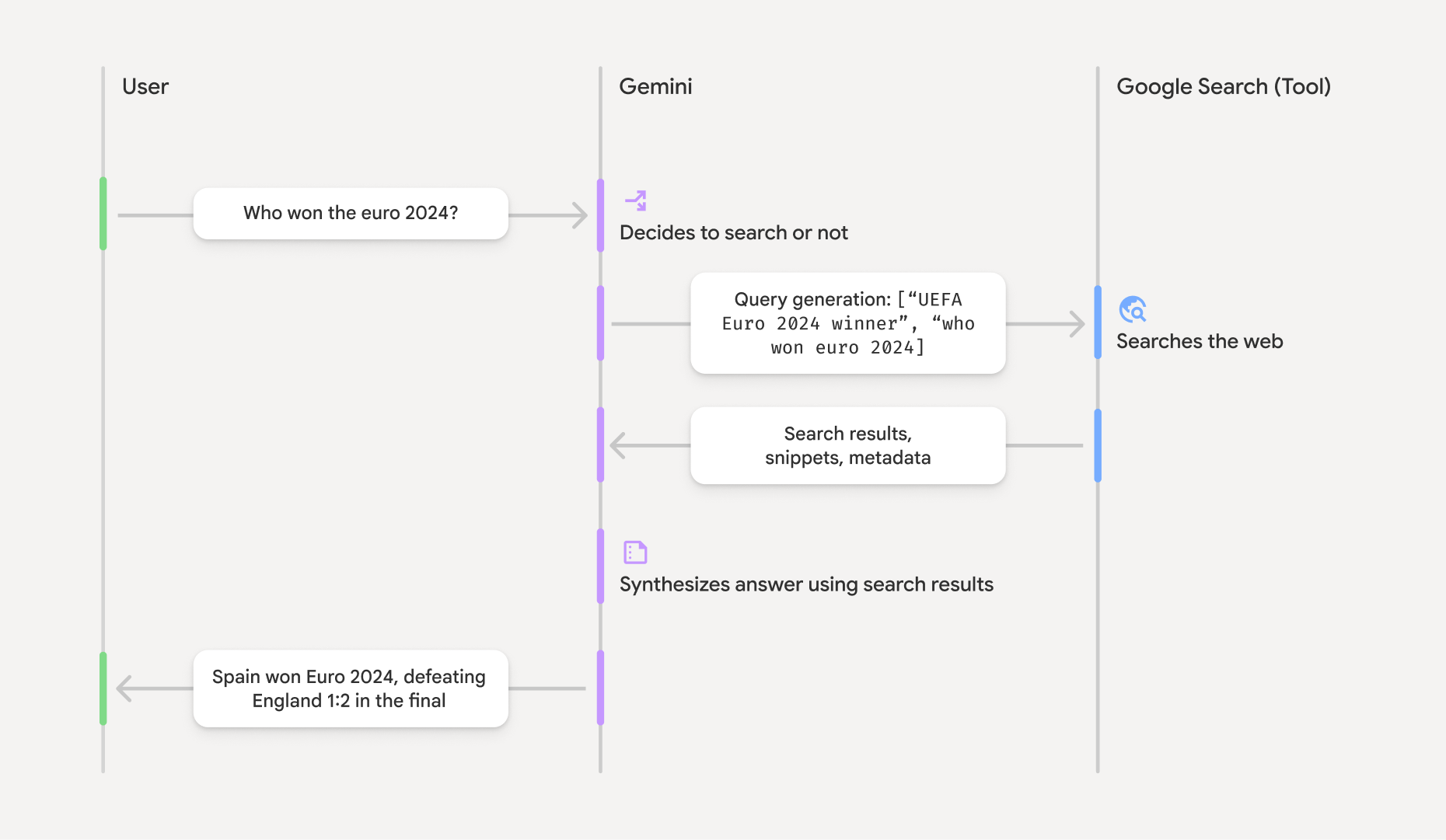
- उपयोगकर्ता का प्रॉम्प्ट: आपका ऐप्लिकेशन, उपयोगकर्ता के प्रॉम्प्ट को Gemini API को भेजता है. इसके लिए,
google_searchटूल चालू होना चाहिए. - प्रॉम्प्ट का विश्लेषण: मॉडल, प्रॉम्प्ट का विश्लेषण करता है और यह तय करता है कि क्या Google Search से जवाब को बेहतर बनाया जा सकता है.
- Google Search: ज़रूरत पड़ने पर, मॉडल अपने-आप एक या एक से ज़्यादा सर्च क्वेरी जनरेट करता है और उन्हें पूरा करता है.
- खोज के नतीजों को प्रोसेस करना: मॉडल, खोज के नतीजों को प्रोसेस करता है, जानकारी को इकट्ठा करता है, और जवाब तैयार करता है.
- भरोसेमंद स्रोतों से मिली जानकारी के आधार पर जवाब देना: एपीआई, खोज के नतीजों के आधार पर उपयोगकर्ता के लिए एक आसान जवाब देता है. इस जवाब में, मॉडल के टेक्स्ट वाले जवाब और
groundingMetadataके साथ-साथ खोज क्वेरी, वेब नतीजे, और उद्धरण शामिल हैं.
भरोसेमंद स्रोतों से मिले जवाब को समझना
जब किसी जवाब में भरोसेमंद सोर्स से जानकारी शामिल की जाती है, तो उस जवाब में groundingMetadata फ़ील्ड शामिल होता है. दावों की पुष्टि करने और अपने ऐप्लिकेशन में उद्धरणों को ज़्यादा बेहतर तरीके से दिखाने के लिए, यह स्ट्रक्चर्ड डेटा ज़रूरी है.
{
  "candidates": [
    {
      "content": {
        "parts": [
          {
            "text": "Spain won Euro 2024, defeating England 2-1 in the final. This victory marks Spain's record fourth European Championship title."
          }
        ],
        "role": "model"
      },
      "groundingMetadata": {
        "webSearchQueries": [
          "UEFA Euro 2024 winner",
          "who won euro 2024"
        ],
        "searchEntryPoint": {
          "renderedContent": "<!-- HTML and CSS for the search widget -->"
        },
        "groundingChunks": [
          {"web": {"uri": "https://vertexaisearch.cloud.google.com.....", "title": "aljazeera.com"}},
          {"web": {"uri": "https://vertexaisearch.cloud.google.com.....", "title": "uefa.com"}}
        ],
        "groundingSupports": [
          {
            "segment": {"startIndex": 0, "endIndex": 85, "text": "Spain won Euro 2024, defeatin..."},
            "groundingChunkIndices": [0]
          },
          {
            "segment": {"startIndex": 86, "endIndex": 210, "text": "This victory marks Spain's..."},
            "groundingChunkIndices": [0, 1]
          }
        ]
      }
    }
  ]
}
Gemini API, groundingMetadata के साथ यह जानकारी दिखाता है:
webSearchQueries: इस्तेमाल की गई सर्च क्वेरी का कलेक्शन. यह डीबग करने और मॉडल की तर्क देने की प्रोसेस को समझने के लिए फ़ायदेमंद है.searchEntryPoint: इसमें ज़रूरी खोज के सुझावों को रेंडर करने के लिए एचटीएमएल और सीएसएस शामिल होता है. इस्तेमाल से जुड़ी सभी ज़रूरी शर्तों के बारे में, सेवा की शर्तों में बताया गया है.groundingChunks: यह ऑब्जेक्ट का ऐसा कलेक्शन है जिसमें वेब सोर्स (uriऔरtitle) शामिल होते हैं.groundingSupports: यह चंक का ऐसा कलेक्शन है जिसका इस्तेमाल, मॉडल के जवाबtextकोgroundingChunksमें मौजूद सोर्स से कनेक्ट करने के लिए किया जाता है. हर चंक, टेक्स्टsegmentको एक या उससे ज़्यादाgroundingChunkIndicesसे लिंक करता है. टेक्स्ट कोstartIndexऔरendIndexके ज़रिए तय किया जाता है. इनलाइन उद्धरण बनाने के लिए, यह ज़रूरी है.
Google Search से मिली जानकारी का इस्तेमाल, यूआरएल के कॉन्टेक्स्ट वाले टूल के साथ भी किया जा सकता है. इससे, जवाबों को सार्वजनिक वेब डेटा और आपके दिए गए यूआरएल, दोनों के हिसाब से तैयार किया जा सकता है.
इनलाइन उद्धरणों के साथ सोर्स एट्रिब्यूट करना
यह एपीआई, स्ट्रक्चर्ड उद्धरण डेटा दिखाता है. इससे आपको यह तय करने का पूरा कंट्रोल मिलता है कि आपको अपने यूज़र इंटरफ़ेस में सोर्स कैसे दिखाने हैं. groundingSupports और groundingChunks फ़ील्ड का इस्तेमाल करके, मॉडल के जवाबों को सीधे उनके सोर्स से लिंक किया जा सकता है. यहां मेटाडेटा को प्रोसेस करने का सामान्य पैटर्न दिया गया है, ताकि इनलाइन और क्लिक किए जा सकने वाले उद्धरणों के साथ जवाब बनाया जा सके.
Python
def add_citations(response):
    text = response.text
    supports = response.candidates[0].grounding_metadata.grounding_supports
    chunks = response.candidates[0].grounding_metadata.grounding_chunks

    # Sort supports by end_index in descending order to avoid shifting issues when inserting.
    sorted_supports = sorted(supports, key=lambda s: s.segment.end_index, reverse=True)

    for support in sorted_supports:
        end_index = support.segment.end_index
        if support.grounding_chunk_indices:
            # Create citation string like [1](link1)[2](link2)
            citation_links = []
            for i in support.grounding_chunk_indices:
                if i < len(chunks):
                    uri = chunks[i].web.uri
                    citation_links.append(f"[{i + 1}]({uri})")

            citation_string = ", ".join(citation_links)
            text = text[:end_index] + citation_string + text[end_index:]

    return text

# Assuming response with grounding metadata
text_with_citations = add_citations(response)
print(text_with_citations)
JavaScript
function addCitations(response) {
    let text = response.text;
    const supports = response.candidates[0]?.groundingMetadata?.groundingSupports;
    const chunks = response.candidates[0]?.groundingMetadata?.groundingChunks;

    // Sort supports by end_index in descending order to avoid shifting issues when inserting.
    const sortedSupports = [...supports].sort(
        (a, b) => (b.segment?.endIndex ?? 0) - (a.segment?.endIndex ?? 0),
    );

    for (const support of sortedSupports) {
        const endIndex = support.segment?.endIndex;
        if (endIndex === undefined || !support.groundingChunkIndices?.length) {
        continue;
        }

        const citationLinks = support.groundingChunkIndices
        .map(i => {
            const uri = chunks[i]?.web?.uri;
            if (uri) {
            return `[${i + 1}](${uri})`;
            }
            return null;
        })
        .filter(Boolean);

        if (citationLinks.length > 0) {
        const citationString = citationLinks.join(", ");
        text = text.slice(0, endIndex) + citationString + text.slice(endIndex);
        }
    }

    return text;
}

const textWithCitations = addCitations(response);
console.log(textWithCitations);
इनलाइन उद्धरणों के साथ नया जवाब ऐसा दिखेगा:
Spain won Euro 2024, defeating England 2-1 in the final.[1](https:/...), [2](https:/...), [4](https:/...), [5](https:/...) This victory marks Spain's record-breaking fourth European Championship title.[5]((https:/...), [2](https:/...), [3](https:/...), [4](https:/...)
कीमत
Gemini 3 के साथ Google Search की ग्राउंडिंग का इस्तेमाल करने पर, आपके प्रोजेक्ट को हर उस खोज क्वेरी के लिए बिल किया जाता है जिसे मॉडल पूरा करने का फ़ैसला करता है. अगर मॉडल किसी एक प्रॉम्प्ट का जवाब देने के लिए, कई खोज क्वेरी चलाने का फ़ैसला करता है (उदाहरण के लिए, एक ही एपीआई कॉल में "UEFA Euro 2024 winner" और "Spain vs England Euro 2024 final
score" खोजना), तो इसे उस अनुरोध के लिए, टूल के दो बार इस्तेमाल के तौर पर गिना जाएगा. इसके लिए, आपसे शुल्क लिया जाएगा. बिलिंग के लिए, यूनीक क्वेरी की गिनती करते समय, हम वेब सर्च की उन क्वेरी को अनदेखा करते हैं जिनमें कोई शब्द नहीं होता. यह बिलिंग मॉडल सिर्फ़ Gemini 3 मॉडल पर लागू होता है. Gemini 2.5 या इससे पुराने मॉडल के साथ खोज के नतीजों का इस्तेमाल करने पर, आपके प्रोजेक्ट के लिए हर प्रॉम्प्ट के हिसाब से बिल भेजा जाता है.
शुल्क के बारे में ज़्यादा जानकारी के लिए, Gemini API के शुल्क वाला पेज देखें.
इन मॉडल के साथ काम करता है
मॉडल की खास जानकारी वाले पेज पर जाकर, सभी सुविधाओं के बारे में जाना जा सकता है.
| मॉडल | Google Search से सटीक जानकारी पाने की सुविधा |
|---|---|
| Gemini 3.6 Flash | ✔️ |
| Gemini 3.5 Flash-Lite | ✔️ |
| Gemini 3.5 Flash | ✔️ |
| Gemini 3.1 Flash-Lite | ✔️ |
| Gemini 3.1 Flash की इमेज का प्रीव्यू | ✔️ |
| Gemini 3.1 Pro की झलक | ✔️ |
| Gemini 3 Pro की इमेज की झलक | ✔️ |
| Gemini 3 Flash की झलक | ✔️ |
| Gemini 3.1 Flash-Lite की झलक | ✔️ |
| Gemini 2.5 Pro | ✔️ |
| Gemini 2.5 Flash | ✔️ |
| Gemini 2.5 Flash-Lite | ✔️ |
| Gemini 2.0 Flash | ✔️ |
इस्तेमाल किए जा सकने वाले टूल कॉम्बिनेशन
ज़्यादा मुश्किल इस्तेमाल के उदाहरणों के लिए, Google Search के साथ ग्राउंडिंग की सुविधा का इस्तेमाल अन्य टूल के साथ किया जा सकता है. जैसे, कोड एक्ज़ीक्यूशन और यूआरएल कॉन्टेक्स्ट.
Gemini 3 मॉडल, बिल्ट-इन टूल (जैसे, Google Search के साथ ग्राउंडिंग) को कस्टम टूल (फ़ंक्शन कॉलिंग) के साथ इस्तेमाल करने की सुविधा देते हैं. टूल के कॉम्बिनेशन पेज पर जाकर, इस बारे में ज़्यादा जानें.
आगे क्या करना है
- Gemini API की कुकबुक में, Google Search की मदद से जवाब को भरोसेमंद बनाने की सुविधा आज़माएं.
- उपलब्ध अन्य टूल के बारे में जानें. जैसे, फ़ंक्शन कॉलिंग.
- यूआरएल कॉन्टेक्स्ट टूल का इस्तेमाल करके, प्रॉम्प्ट में यूआरएल जोड़ने का तरीका जानें.