

مدلهای ER رباتهای Gemini میتوانند وظایف را برنامهریزی کرده و در مورد فضا استدلال کنند، و استنباط کنند که برای رسیدن به یک هدف، چه اقداماتی باید انجام شود و کدام اشیاء باید جابجا شوند. این صفحه مثالی را برای هدایت عملیات برداشتن و گذاشتن از طریق یک API ربات سفارشی نشان میدهد تا وظیفه قرار دادن یک شیء در یک کاسه را هماهنگ کند.
برای کد کامل قابل اجرا، به کتاب آشپزی رباتیک مراجعه کنید.
استفاده از API ربات سفارشی
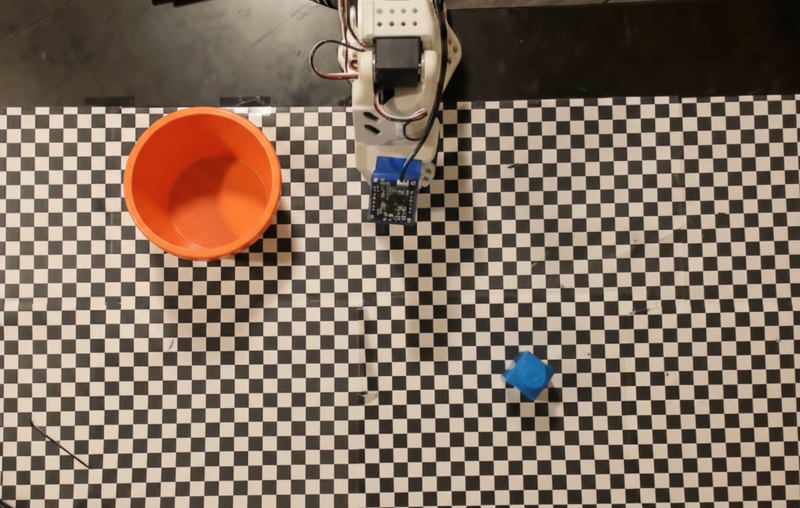
این مثال، هماهنگسازی وظایف را با یک API ربات سفارشی نشان میدهد. این مثال یک API شبیهسازی شده را معرفی میکند که برای عملیات برداشتن و گذاشتن طراحی شده است. وظیفه این است که یک بلوک آبی را برداشته و آن را در یک کاسه نارنجی قرار دهید:
این مثال از API ربات آزمایشی و تعاریف ابزار زیر استفاده میکند:
پایتون
from google import genai
from google.genai import types

client = genai.Client()

def move(x, y, high):
    print(f"Mock Robot: Moving to coordinates: {x}, {y}, {'high above table' if high else 'down at table level'}")

def setGripperState(opened):
    print(f"Mock Robot: {'Opening gripper' if opened else 'Closing gripper'}")

robot_origin_y = 300
robot_origin_x = 500

move_declaration = types.FunctionDeclaration(
    name="move",
    description="Moves the arm to the given coordinates.",
    parameters=types.Schema(
        type=types.Type.OBJECT,
        properties={
            "x": types.Schema(type=types.Type.INTEGER, description="X coordinate relative to the origin"),
            "y": types.Schema(type=types.Type.INTEGER, description="Y coordinate relative to the origin"),
            "high": types.Schema(type=types.Type.BOOLEAN, description="Set to True to lift the robot arm above the scene. Set to False to place the gripper on the surface."),
        },
        required=["x", "y", "high"],
    ),
)

set_gripper_state_declaration = types.FunctionDeclaration(
    name="setGripperState",
    description="Opens or closes the robot's gripper.",
    parameters=types.Schema(
        type=types.Type.OBJECT,
        properties={
            "opened": types.Schema(type=types.Type.BOOLEAN, description="True opens the gripper, False closes the gripper."),
        },
        required=["opened"],
    ),
)

robot_tools = types.Tool(function_declarations=[move_declaration, set_gripper_state_declaration])
مثال زیر، اعلان و تصویر را به همراه تعاریف ابزار به مدل ارسال میکند. سپس یک حلقه عامل اجرا میکند: پس از هر پاسخ مدل، هرگونه فراخوانی تابع درخواستی ( move ، setGripperState ) را اجرا میکند، نتایج را به مدل برمیگرداند و این کار را تا زمانی که مدل فراخوانی توابع را متوقف کند یا به حد مجاز مرحله برسد، تکرار میکند.
پایتون
with open("robot-api-example.png", "rb") as f:
    img_bytes = f.read()

prompt = (
    "You are a robotic arm with six degrees-of-freedom. "
    f"The origin point for calculating the moves is at normalized point y={robot_origin_y}, x={robot_origin_x}. "
    "Use this as the new (0,0) for calculating moves, allowing x and y to be negative.\n\n"
    "Find the blue block and the orange bowl. Calculate their coordinates relative to the origin.\n"
    "Perform a pick and place operation where you pick up the blue block and place it into the orange bowl. "
    "Call the appropriate sequence of functions to complete this operation."
)

contents = [
    types.Content(role="user", parts=[
        types.Part.from_bytes(data=img_bytes, mime_type="image/png"),
        types.Part(text=prompt),
    ])
]

print("\n--- Executing Orchestrated Plan ---")

max_steps = 15  # Safety limit to prevent infinite loops
step_count = 0

# The Agentic Loop
while step_count < max_steps:
    step_count += 1

    response = client.models.generate_content(
        model="gemini-robotics-er-2-preview",
        contents=contents,
        config=types.GenerateContentConfig(
            tools=[robot_tools],
            thinking_config=types.ThinkingConfig(thinking_level="low"),
        ),
    )

    # Add model response to conversation history
    contents.append(response.candidates[0].content)

    # Check for function calls
    function_calls = [part for part in response.candidates[0].content.parts if part.function_call]

    if not function_calls:
        # Model is done calling functions
        print("Sequence complete.")
        print(f"Model Summary: {response.text}")
        break

    # Execute function calls and collect results
    function_response_parts = []
    for part in function_calls:
        fc = part.function_call
        if fc.name == "move":
            move(**fc.args)
        elif fc.name == "setGripperState":
            setGripperState(**fc.args)

        function_response_parts.append(
            types.Part.from_function_response(
                name=fc.name,
                response={"status": "success"},
            )
        )

    # Send function results back to model
    contents.append(types.Content(role="user", parts=function_response_parts))
در ادامه، خروجی احتمالی مدل بر اساس اعلان و API ربات شبیهسازیشده نشان داده شده است. این خروجی شامل خروجی فراخوانیهای تابع ربات است که مدل آنها را به ترتیب با هم ترکیب کرده است.
--- Executing Orchestrated Plan ---
Mock Robot: Opening gripper
Mock Robot: Moving to coordinates: 160, 440, high above table
Mock Robot: Moving to coordinates: 160, 440, down at table level
Mock Robot: Closing gripper
Mock Robot: Moving to coordinates: 160, 440, high above table
Mock Robot: Moving to coordinates: -250, 60, high above table
Mock Robot: Moving to coordinates: -250, 60, down at table level
Mock Robot: Opening gripper
Mock Robot: Moving to coordinates: -250, 60, high above table
Sequence complete.
Model Summary: I have completed the task of picking up the blue block and placing it into the orange bowl.
قدم بعدی چیست؟
- رباتیک با استریمینگ — استریمینگ بلادرنگ با فراخوانی تابع (فقط Gemini Robotics ER 2).
- درک ویدیو — پیگیری پیشرفت کار از ویدیو (فقط ER 2).
- استدلال فضایی - مثالهایی از اشاره، ردیابی و تعیین محدودهی کادر.
مدلهای ER رباتهای Gemini میتوانند وظایف را برنامهریزی کرده و در مورد فضا استدلال کنند، و استنباط کنند که برای رسیدن به یک هدف، چه اقداماتی باید انجام شود و کدام اشیاء باید جابجا شوند. این صفحه مثالی را برای هدایت عملیات برداشتن و گذاشتن از طریق یک API ربات سفارشی نشان میدهد تا وظیفه قرار دادن یک شیء در یک کاسه را هماهنگ کند.
برای کد کامل قابل اجرا، به کتاب آشپزی رباتیک مراجعه کنید.
استفاده از API ربات سفارشی
این مثال، هماهنگسازی وظایف را با یک API ربات سفارشی نشان میدهد. این مثال یک API شبیهسازی شده را معرفی میکند که برای عملیات برداشتن و گذاشتن طراحی شده است. وظیفه این است که یک بلوک آبی را برداشته و آن را در یک کاسه نارنجی قرار دهید:
این مثال از API ربات آزمایشی و تعاریف ابزار زیر استفاده میکند:
پایتون
from google import genai
from google.genai import types

client = genai.Client()

def move(x, y, high):
    print(f"Mock Robot: Moving to coordinates: {x}, {y}, {'high above table' if high else 'down at table level'}")

def setGripperState(opened):
    print(f"Mock Robot: {'Opening gripper' if opened else 'Closing gripper'}")

robot_origin_y = 300
robot_origin_x = 500

move_declaration = types.FunctionDeclaration(
    name="move",
    description="Moves the arm to the given coordinates.",
    parameters=types.Schema(
        type=types.Type.OBJECT,
        properties={
            "x": types.Schema(type=types.Type.INTEGER, description="X coordinate relative to the origin"),
            "y": types.Schema(type=types.Type.INTEGER, description="Y coordinate relative to the origin"),
            "high": types.Schema(type=types.Type.BOOLEAN, description="Set to True to lift the robot arm above the scene. Set to False to place the gripper on the surface."),
        },
        required=["x", "y", "high"],
    ),
)

set_gripper_state_declaration = types.FunctionDeclaration(
    name="setGripperState",
    description="Opens or closes the robot's gripper.",
    parameters=types.Schema(
        type=types.Type.OBJECT,
        properties={
            "opened": types.Schema(type=types.Type.BOOLEAN, description="True opens the gripper, False closes the gripper."),
        },
        required=["opened"],
    ),
)

robot_tools = types.Tool(function_declarations=[move_declaration, set_gripper_state_declaration])
مثال زیر، اعلان و تصویر را به همراه تعاریف ابزار به مدل ارسال میکند. سپس یک حلقه عامل اجرا میکند: پس از هر پاسخ مدل، هرگونه فراخوانی تابع درخواستی ( move ، setGripperState ) را اجرا میکند، نتایج را به مدل برمیگرداند و این کار را تا زمانی که مدل فراخوانی توابع را متوقف کند یا به حد مجاز مرحله برسد، تکرار میکند.
پایتون
with open("robot-api-example.png", "rb") as f:
    img_bytes = f.read()

prompt = (
    "You are a robotic arm with six degrees-of-freedom. "
    f"The origin point for calculating the moves is at normalized point y={robot_origin_y}, x={robot_origin_x}. "
    "Use this as the new (0,0) for calculating moves, allowing x and y to be negative.\n\n"
    "Find the blue block and the orange bowl. Calculate their coordinates relative to the origin.\n"
    "Perform a pick and place operation where you pick up the blue block and place it into the orange bowl. "
    "Call the appropriate sequence of functions to complete this operation."
)

contents = [
    types.Content(role="user", parts=[
        types.Part.from_bytes(data=img_bytes, mime_type="image/png"),
        types.Part(text=prompt),
    ])
]

print("\n--- Executing Orchestrated Plan ---")

max_steps = 15  # Safety limit to prevent infinite loops
step_count = 0

# The Agentic Loop
while step_count < max_steps:
    step_count += 1

    response = client.models.generate_content(
        model="gemini-robotics-er-2-preview",
        contents=contents,
        config=types.GenerateContentConfig(
            tools=[robot_tools],
            thinking_config=types.ThinkingConfig(thinking_level="low"),
        ),
    )

    # Add model response to conversation history
    contents.append(response.candidates[0].content)

    # Check for function calls
    function_calls = [part for part in response.candidates[0].content.parts if part.function_call]

    if not function_calls:
        # Model is done calling functions
        print("Sequence complete.")
        print(f"Model Summary: {response.text}")
        break

    # Execute function calls and collect results
    function_response_parts = []
    for part in function_calls:
        fc = part.function_call
        if fc.name == "move":
            move(**fc.args)
        elif fc.name == "setGripperState":
            setGripperState(**fc.args)

        function_response_parts.append(
            types.Part.from_function_response(
                name=fc.name,
                response={"status": "success"},
            )
        )

    # Send function results back to model
    contents.append(types.Content(role="user", parts=function_response_parts))
در ادامه، خروجی احتمالی مدل بر اساس اعلان و API ربات شبیهسازیشده نشان داده شده است. این خروجی شامل خروجی فراخوانیهای تابع ربات است که مدل آنها را به ترتیب با هم ترکیب کرده است.
--- Executing Orchestrated Plan ---
Mock Robot: Opening gripper
Mock Robot: Moving to coordinates: 160, 440, high above table
Mock Robot: Moving to coordinates: 160, 440, down at table level
Mock Robot: Closing gripper
Mock Robot: Moving to coordinates: 160, 440, high above table
Mock Robot: Moving to coordinates: -250, 60, high above table
Mock Robot: Moving to coordinates: -250, 60, down at table level
Mock Robot: Opening gripper
Mock Robot: Moving to coordinates: -250, 60, high above table
Sequence complete.
Model Summary: I have completed the task of picking up the blue block and placing it into the orange bowl.
قدم بعدی چیست؟
- رباتیک با استریمینگ — استریمینگ بلادرنگ با فراخوانی تابع (فقط Gemini Robotics ER 2).
- درک ویدیو — پیگیری پیشرفت کار از ویدیو (فقط ER 2).
- استدلال فضایی - مثالهایی از اشاره، ردیابی و تعیین محدودهی کادر.
مدلهای ER رباتهای Gemini میتوانند وظایف را برنامهریزی کرده و در مورد فضا استدلال کنند، و استنباط کنند که برای رسیدن به یک هدف، چه اقداماتی باید انجام شود و کدام اشیاء باید جابجا شوند. این صفحه مثالی را برای هدایت عملیات برداشتن و گذاشتن از طریق یک API ربات سفارشی نشان میدهد تا وظیفه قرار دادن یک شیء در یک کاسه را هماهنگ کند.
برای کد کامل قابل اجرا، به کتاب آشپزی رباتیک مراجعه کنید.
استفاده از API ربات سفارشی
این مثال، هماهنگسازی وظایف را با یک API ربات سفارشی نشان میدهد. این مثال یک API شبیهسازی شده را معرفی میکند که برای عملیات برداشتن و گذاشتن طراحی شده است. وظیفه این است که یک بلوک آبی را برداشته و آن را در یک کاسه نارنجی قرار دهید:
این مثال از API ربات آزمایشی و تعاریف ابزار زیر استفاده میکند:
پایتون
from google import genai
from google.genai import types

client = genai.Client()

def move(x, y, high):
    print(f"Mock Robot: Moving to coordinates: {x}, {y}, {'high above table' if high else 'down at table level'}")

def setGripperState(opened):
    print(f"Mock Robot: {'Opening gripper' if opened else 'Closing gripper'}")

robot_origin_y = 300
robot_origin_x = 500

move_declaration = types.FunctionDeclaration(
    name="move",
    description="Moves the arm to the given coordinates.",
    parameters=types.Schema(
        type=types.Type.OBJECT,
        properties={
            "x": types.Schema(type=types.Type.INTEGER, description="X coordinate relative to the origin"),
            "y": types.Schema(type=types.Type.INTEGER, description="Y coordinate relative to the origin"),
            "high": types.Schema(type=types.Type.BOOLEAN, description="Set to True to lift the robot arm above the scene. Set to False to place the gripper on the surface."),
        },
        required=["x", "y", "high"],
    ),
)

set_gripper_state_declaration = types.FunctionDeclaration(
    name="setGripperState",
    description="Opens or closes the robot's gripper.",
    parameters=types.Schema(
        type=types.Type.OBJECT,
        properties={
            "opened": types.Schema(type=types.Type.BOOLEAN, description="True opens the gripper, False closes the gripper."),
        },
        required=["opened"],
    ),
)

robot_tools = types.Tool(function_declarations=[move_declaration, set_gripper_state_declaration])
مثال زیر، اعلان و تصویر را به همراه تعاریف ابزار به مدل ارسال میکند. سپس یک حلقه عامل اجرا میکند: پس از هر پاسخ مدل، هرگونه فراخوانی تابع درخواستی ( move ، setGripperState ) را اجرا میکند، نتایج را به مدل برمیگرداند و این کار را تا زمانی که مدل فراخوانی توابع را متوقف کند یا به حد مجاز مرحله برسد، تکرار میکند.
پایتون
with open("robot-api-example.png", "rb") as f:
    img_bytes = f.read()

prompt = (
    "You are a robotic arm with six degrees-of-freedom. "
    f"The origin point for calculating the moves is at normalized point y={robot_origin_y}, x={robot_origin_x}. "
    "Use this as the new (0,0) for calculating moves, allowing x and y to be negative.\n\n"
    "Find the blue block and the orange bowl. Calculate their coordinates relative to the origin.\n"
    "Perform a pick and place operation where you pick up the blue block and place it into the orange bowl. "
    "Call the appropriate sequence of functions to complete this operation."
)

contents = [
    types.Content(role="user", parts=[
        types.Part.from_bytes(data=img_bytes, mime_type="image/png"),
        types.Part(text=prompt),
    ])
]

print("\n--- Executing Orchestrated Plan ---")

max_steps = 15  # Safety limit to prevent infinite loops
step_count = 0

# The Agentic Loop
while step_count < max_steps:
    step_count += 1

    response = client.models.generate_content(
        model="gemini-robotics-er-2-preview",
        contents=contents,
        config=types.GenerateContentConfig(
            tools=[robot_tools],
            thinking_config=types.ThinkingConfig(thinking_level="low"),
        ),
    )

    # Add model response to conversation history
    contents.append(response.candidates[0].content)

    # Check for function calls
    function_calls = [part for part in response.candidates[0].content.parts if part.function_call]

    if not function_calls:
        # Model is done calling functions
        print("Sequence complete.")
        print(f"Model Summary: {response.text}")
        break

    # Execute function calls and collect results
    function_response_parts = []
    for part in function_calls:
        fc = part.function_call
        if fc.name == "move":
            move(**fc.args)
        elif fc.name == "setGripperState":
            setGripperState(**fc.args)

        function_response_parts.append(
            types.Part.from_function_response(
                name=fc.name,
                response={"status": "success"},
            )
        )

    # Send function results back to model
    contents.append(types.Content(role="user", parts=function_response_parts))
در ادامه، خروجی احتمالی مدل بر اساس اعلان و API ربات شبیهسازیشده نشان داده شده است. این خروجی شامل خروجی فراخوانیهای تابع ربات است که مدل آنها را به ترتیب با هم ترکیب کرده است.
--- Executing Orchestrated Plan ---
Mock Robot: Opening gripper
Mock Robot: Moving to coordinates: 160, 440, high above table
Mock Robot: Moving to coordinates: 160, 440, down at table level
Mock Robot: Closing gripper
Mock Robot: Moving to coordinates: 160, 440, high above table
Mock Robot: Moving to coordinates: -250, 60, high above table
Mock Robot: Moving to coordinates: -250, 60, down at table level
Mock Robot: Opening gripper
Mock Robot: Moving to coordinates: -250, 60, high above table
Sequence complete.
Model Summary: I have completed the task of picking up the blue block and placing it into the orange bowl.
قدم بعدی چیست؟
- رباتیک با استریمینگ — استریمینگ بلادرنگ با فراخوانی تابع (فقط Gemini Robotics ER 2).
- درک ویدیو — پیگیری پیشرفت کار از ویدیو (فقط ER 2).
- استدلال فضایی - مثالهایی از اشاره، ردیابی و تعیین محدودهی کادر.
مدلهای ER رباتهای Gemini میتوانند وظایف را برنامهریزی کرده و در مورد فضا استدلال کنند، و استنباط کنند که برای رسیدن به یک هدف، چه اقداماتی باید انجام شود و کدام اشیاء باید جابجا شوند. این صفحه مثالی را برای هدایت عملیات برداشتن و گذاشتن از طریق یک API ربات سفارشی نشان میدهد تا وظیفه قرار دادن یک شیء در یک کاسه را هماهنگ کند.
برای کد کامل قابل اجرا، به کتاب آشپزی رباتیک مراجعه کنید.
استفاده از API ربات سفارشی
این مثال، هماهنگسازی وظایف را با یک API ربات سفارشی نشان میدهد. این مثال یک API شبیهسازی شده را معرفی میکند که برای عملیات برداشتن و گذاشتن طراحی شده است. وظیفه این است که یک بلوک آبی را برداشته و آن را در یک کاسه نارنجی قرار دهید:
این مثال از API ربات آزمایشی و تعاریف ابزار زیر استفاده میکند:
پایتون
from google import genai
from google.genai import types

client = genai.Client()

def move(x, y, high):
    print(f"Mock Robot: Moving to coordinates: {x}, {y}, {'high above table' if high else 'down at table level'}")

def setGripperState(opened):
    print(f"Mock Robot: {'Opening gripper' if opened else 'Closing gripper'}")

robot_origin_y = 300
robot_origin_x = 500

move_declaration = types.FunctionDeclaration(
    name="move",
    description="Moves the arm to the given coordinates.",
    parameters=types.Schema(
        type=types.Type.OBJECT,
        properties={
            "x": types.Schema(type=types.Type.INTEGER, description="X coordinate relative to the origin"),
            "y": types.Schema(type=types.Type.INTEGER, description="Y coordinate relative to the origin"),
            "high": types.Schema(type=types.Type.BOOLEAN, description="Set to True to lift the robot arm above the scene. Set to False to place the gripper on the surface."),
        },
        required=["x", "y", "high"],
    ),
)

set_gripper_state_declaration = types.FunctionDeclaration(
    name="setGripperState",
    description="Opens or closes the robot's gripper.",
    parameters=types.Schema(
        type=types.Type.OBJECT,
        properties={
            "opened": types.Schema(type=types.Type.BOOLEAN, description="True opens the gripper, False closes the gripper."),
        },
        required=["opened"],
    ),
)

robot_tools = types.Tool(function_declarations=[move_declaration, set_gripper_state_declaration])
مثال زیر، اعلان و تصویر را به همراه تعاریف ابزار به مدل ارسال میکند. سپس یک حلقه عامل اجرا میکند: پس از هر پاسخ مدل، هرگونه فراخوانی تابع درخواستی ( move ، setGripperState ) را اجرا میکند، نتایج را به مدل برمیگرداند و این کار را تا زمانی که مدل فراخوانی توابع را متوقف کند یا به حد مجاز مرحله برسد، تکرار میکند.
پایتون
with open("robot-api-example.png", "rb") as f:
    img_bytes = f.read()

prompt = (
    "You are a robotic arm with six degrees-of-freedom. "
    f"The origin point for calculating the moves is at normalized point y={robot_origin_y}, x={robot_origin_x}. "
    "Use this as the new (0,0) for calculating moves, allowing x and y to be negative.\n\n"
    "Find the blue block and the orange bowl. Calculate their coordinates relative to the origin.\n"
    "Perform a pick and place operation where you pick up the blue block and place it into the orange bowl. "
    "Call the appropriate sequence of functions to complete this operation."
)

contents = [
    types.Content(role="user", parts=[
        types.Part.from_bytes(data=img_bytes, mime_type="image/png"),
        types.Part(text=prompt),
    ])
]

print("\n--- Executing Orchestrated Plan ---")

max_steps = 15  # Safety limit to prevent infinite loops
step_count = 0

# The Agentic Loop
while step_count < max_steps:
    step_count += 1

    response = client.models.generate_content(
        model="gemini-robotics-er-2-preview",
        contents=contents,
        config=types.GenerateContentConfig(
            tools=[robot_tools],
            thinking_config=types.ThinkingConfig(thinking_level="low"),
        ),
    )

    # Add model response to conversation history
    contents.append(response.candidates[0].content)

    # Check for function calls
    function_calls = [part for part in response.candidates[0].content.parts if part.function_call]

    if not function_calls:
        # Model is done calling functions
        print("Sequence complete.")
        print(f"Model Summary: {response.text}")
        break

    # Execute function calls and collect results
    function_response_parts = []
    for part in function_calls:
        fc = part.function_call
        if fc.name == "move":
            move(**fc.args)
        elif fc.name == "setGripperState":
            setGripperState(**fc.args)

        function_response_parts.append(
            types.Part.from_function_response(
                name=fc.name,
                response={"status": "success"},
            )
        )

    # Send function results back to model
    contents.append(types.Content(role="user", parts=function_response_parts))
در ادامه، خروجی احتمالی مدل بر اساس اعلان و API ربات شبیهسازیشده نشان داده شده است. این خروجی شامل خروجی فراخوانیهای تابع ربات است که مدل آنها را به ترتیب با هم ترکیب کرده است.
--- Executing Orchestrated Plan ---
Mock Robot: Opening gripper
Mock Robot: Moving to coordinates: 160, 440, high above table
Mock Robot: Moving to coordinates: 160, 440, down at table level
Mock Robot: Closing gripper
Mock Robot: Moving to coordinates: 160, 440, high above table
Mock Robot: Moving to coordinates: -250, 60, high above table
Mock Robot: Moving to coordinates: -250, 60, down at table level
Mock Robot: Opening gripper
Mock Robot: Moving to coordinates: -250, 60, high above table
Sequence complete.
Model Summary: I have completed the task of picking up the blue block and placing it into the orange bowl.
قدم بعدی چیست؟
- رباتیک با استریمینگ — استریمینگ بلادرنگ با فراخوانی تابع (فقط Gemini Robotics ER 2).
- درک ویدیو — پیگیری پیشرفت کار از ویدیو (فقط ER 2).
- استدلال فضایی - مثالهایی از اشاره، ردیابی و تعیین محدودهی کادر.