

مدلهای ER شرکت Gemini Robotics میتوانند به اشیاء اشاره کنند، آنها را در ویدیو ردیابی کنند، آنها را با جعبههای محدودکننده تشخیص دهند و مسیرهای حرکتی ایجاد کنند.
برای کد کامل قابل اجرا، به کتاب آشپزی رباتیک مراجعه کنید.
به اشیاء اشاره کنید
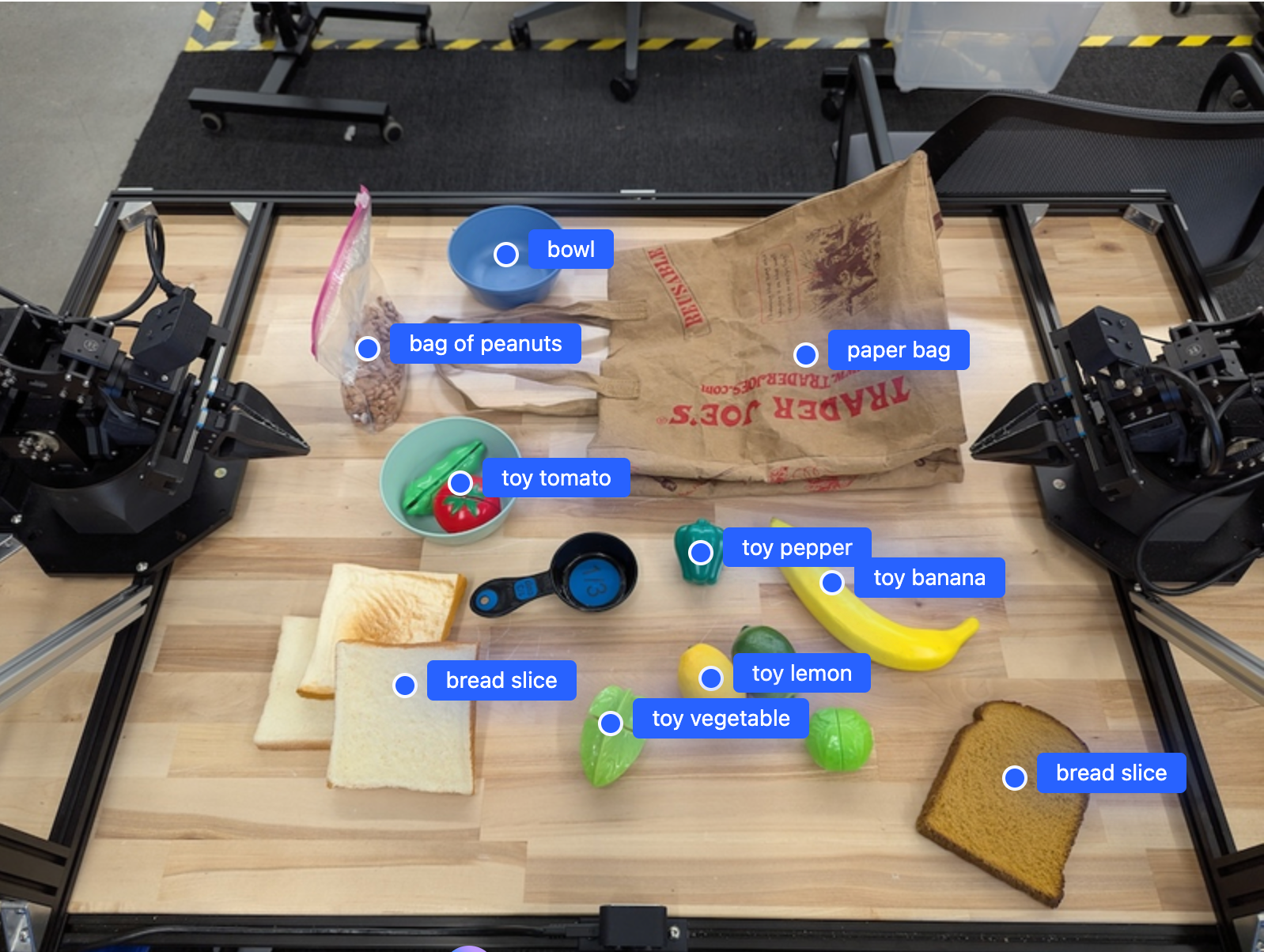
مثال زیر اشیاء خاصی را در یک تصویر پیدا میکند و مختصات نرمالشده [y, x] آنها را برمیگرداند:
پایتون
from google import genai

PROMPT = """
          Point to no more than 10 items in the image. The label returned
          should be an identifying name for the object detected.
          The answer should follow the json format: [{"point": <point>,
          "label": <label1>}, ...]. The points are in [y, x] format
          normalized to 0-1000.
        """
client = genai.Client()

uploaded_file = client.files.upload(file="my-image.png")

image_response = client.interactions.create(
    model="gemini-robotics-er-2-preview",
    input=[
        {
            "type": "image",
            "uri": uploaded_file.uri,
            "mime_type": uploaded_file.mime_type
        },
        {"type": "text", "text": PROMPT}
    ],
    generation_config={"thinking_level": "high"},
)

print(image_response.output_text)
استراحت
# First, ensure you have the image file locally.
# Encode the image to base64
IMAGE_BASE64=$(base64 -w 0 my-image.png)

curl -X POST \
  "https://generativelanguage.googleapis.com/v1beta/interactions" \
  -H "x-goog-api-key: $GEMINI_API_KEY" \
  -H "Content-Type: application/json" \
  -d '{
    "model": "gemini-robotics-er-2-preview",
    "input": {
      "parts": [
        {
          "inlineData": {
            "mimeType": "image/png",
            "data": "'"${IMAGE_BASE64}"'"
          }
        },
        {
          "text": "Point to no more than 10 items in the image. The label returned should be an identifying name for the object detected. The answer should follow the json format: [{\"point\": [y, x], \"label\": <label1>}, ...]. The points are in [y, x] format normalized to 0-1000."
        }
      ]
    },
    "generation_config": {
      "thinking_config": {
        "thinking_level": "high"
      }
    }
  }'
خروجی یک آرایه JSON حاوی اشیاء خواهد بود که هر کدام دارای یک point (مختصات نرمال شده [y, x] ) و یک label شناسایی کننده شیء هستند.
جیسون
[
  {"point": [376, 508], "label": "small banana"},
  {"point": [287, 609], "label": "larger banana"},
  {"point": [223, 303], "label": "pink starfruit"},
  {"point": [435, 172], "label": "paper bag"},
  {"point": [270, 786], "label": "green plastic bowl"},
  {"point": [488, 775], "label": "metal measuring cup"},
  {"point": [673, 580], "label": "dark blue bowl"},
  {"point": [471, 353], "label": "light blue bowl"},
  {"point": [492, 497], "label": "bread"},
  {"point": [525, 429], "label": "lime"}
]
تصویر زیر نمونهای از نحوه نمایش این نقاط است:
ردیابی اشیاء در یک ویدیو
Gemini Robotics ER 2 همچنین میتواند فریمهای ویدیویی را برای ردیابی اشیاء در طول زمان تجزیه و تحلیل کند. برای مشاهده لیست فرمتهای ویدیویی پشتیبانی شده، به ورودیهای ویدیویی مراجعه کنید.
پایتون
from google import genai

client = genai.Client()

uploaded_file = client.files.upload(file="my-video.mp4")

prompt = """
          Point to the red ball in every frame where it appears.
          The answer should follow the json format: [{"point": [y, x],
          "label": <label>}, ...]. The points are in [y, x] format
          normalized to 0-1000. Return one entry per frame that contains
          the object.
        """

image_response = client.interactions.create(
  model="gemini-robotics-er-2-preview",
  input=[
    {
        "type": "video",
        "uri": uploaded_file.uri,
        "mime_type": uploaded_file.mime_type
    },
    {"type": "text", "text": prompt}
  ],
)

print(image_response.output_text)
تشخیص شیء و جعبههای محدودکننده
علاوه بر نقاط، میتوانید مدل را وادار کنید تا جعبههای مرزی دوبعدی را برگرداند، که جزئیات مکانی بیشتری را برای اشیاء شناساییشده ارائه میدهند.
پایتون
from google import genai

client = genai.Client()

uploaded_file = client.files.upload(file="my-image.png")

prompt = """
          Detect all objects in this image and return bounding boxes.
          The answer should follow the JSON format:
          [{"label": <label>, "y": <y_min>, "x": <x_min>,
            "y2": <y_max>, "x2": <x_max>}, ...]
          where coordinates are normalized to 0-1000.
        """

image_response = client.interactions.create(
  model="gemini-robotics-er-2-preview",
  input=[
    {
        "type": "image",
        "uri": uploaded_file.uri,
        "mime_type": uploaded_file.mime_type
    },
    {"type": "text", "text": prompt}
  ],
)

print(image_response.output_text)
مسیرها
Gemini Robotics ER 2 میتواند توالیهایی از نقاط را ایجاد کند که یک مسیر را تعریف میکنند و برای هدایت حرکت ربات مفید هستند.
این مثال، درخواست یک مسیر برای حرکت یک خودکار قرمز به یک سازماندهنده، شامل تخمینی از نقاط مسیر میانی را دارد. کد به گونهای کاهش یافته است که فقط اعلان را نشان دهد.
پایتون
prompt = """
          Generate a trajectory for the robotic arm to pick up the red pen
          and place it in the organizer. Return a list of waypoints as JSON:
          [{"step": <int>, "point": [y, x], "action": <description>}, ...]
          where coordinates are normalized to 0-1000.
        """
ایجاد فضای کافی برای لپتاپ
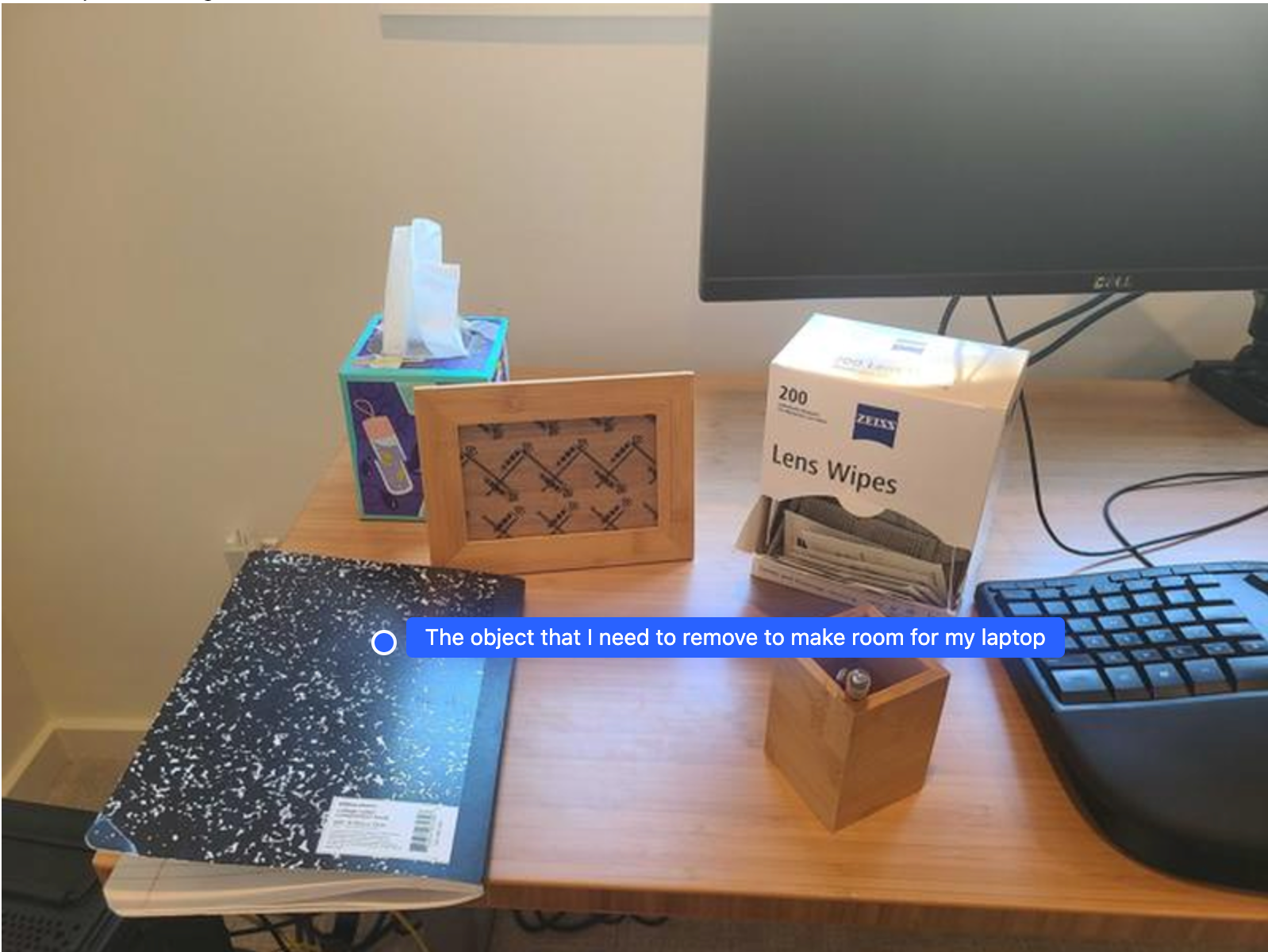
این مثال نشان میدهد که چگونه Gemini Robotics ER میتواند در مورد یک فضا استدلال کند. این اعلان از مدل میخواهد که مشخص کند کدام شیء باید جابجا شود تا فضا برای یک مورد دیگر ایجاد شود.
پایتون
from google import genai

client = genai.Client()

uploaded_file = client.files.upload(file="path/to/image-with-objects.jpg")

prompt = """
          Point to the object that I need to remove to make room for my laptop
          The answer should follow the JSON format: [{"point": <point>,
          "label": <label1>}, ...]. The points are in [y, x] format normalized to 0-1000.
        """

image_response = client.interactions.create(
  model="gemini-robotics-er-2-preview",
  input=[
    {
        "type": "image",
        "uri": uploaded_file.uri,
        "mime_type": uploaded_file.mime_type
    },
    {"type": "text", "text": prompt}
  ],
)

print(image_response.output_text)
پاسخ شامل مختصات دوبعدی شیء است که به سوال کاربر پاسخ میدهد، در این مورد، شیءای که باید حرکت کند تا جایی برای لپتاپ ایجاد شود.
[
  {"point": [672, 301], "label": "The object that I need to remove to make room for my laptop"}
]
بسته بندی ناهار
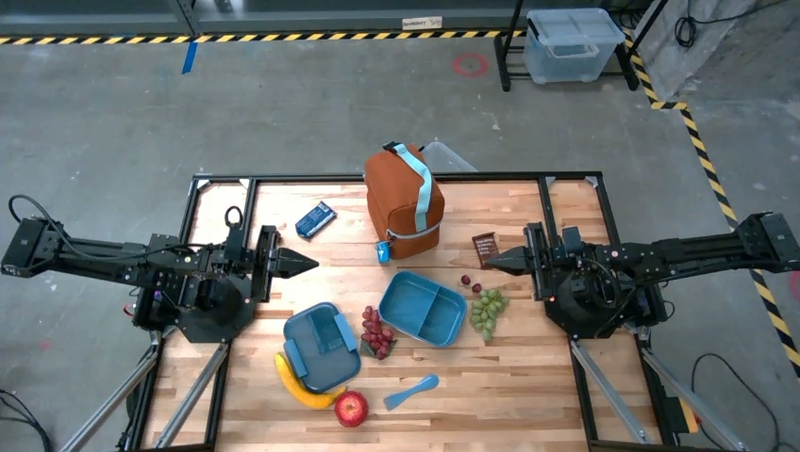
این مدل همچنین میتواند دستورالعملهایی برای کارهای چند مرحلهای ارائه دهد و برای هر مرحله به اشیاء مربوطه اشاره کند. این مثال نشان میدهد که چگونه مدل مجموعهای از مراحل را برای بستهبندی یک کیسه ناهار برنامهریزی میکند.
پایتون
from google import genai

client = genai.Client()

uploaded_file = client.files.upload(file="path/to/image-of-lunch.jpg")

prompt = """
          Explain how to pack the lunch box and lunch bag. Point to each
          object that you refer to. Each point should be in the format:
          [{"point": [y, x], "label": }], where the coordinates are
          normalized between 0-1000.
        """

image_response = client.interactions.create(
  model="gemini-robotics-er-2-preview",
  input=[
    {
        "type": "image",
        "uri": uploaded_file.uri,
        "mime_type": uploaded_file.mime_type
    },
    {"type": "text", "text": prompt}
  ],
)

print(image_response.output_text)
پاسخ این سوال، مجموعهای از دستورالعملهای گام به گام در مورد نحوه بستهبندی کیسه ناهار از ورودی تصویر است.
تصویر ورودی
خروجی مدل
Based on the image, here is a plan to pack the lunch box and lunch bag:

1.  **Pack the fruit into the lunch box.** Place the [apple](apple), [banana](banana), [red grapes](red grapes), and [green grapes](green grapes) into the [blue lunch box](blue lunch box).
2.  **Add the spoon to the lunch box.** Put the [blue spoon](blue spoon) inside the lunch box as well.
3.  **Close the lunch box.** Secure the lid on the [blue lunch box](blue lunch box).
4.  **Place the lunch box inside the lunch bag.** Put the closed [blue lunch box](blue lunch box) into the [brown lunch bag](brown lunch bag).
5.  **Pack the remaining items into the lunch bag.** Place the [blue snack bar](blue snack bar) and the [brown snack bar](brown snack bar) into the [brown lunch bag](brown lunch bag).

Here is the list of objects and their locations:
*   [{"point": [899, 440], "label": "apple"}]
*   [{"point": [814, 363], "label": "banana"}]
*   [{"point": [727, 470], "label": "red grapes"}]
*   [{"point": [675, 608], "label": "green grapes"}]
*   [{"point": [706, 529], "label": "blue lunch box"}]
*   [{"point": [864, 517], "label": "blue spoon"}]
*   [{"point": [499, 401], "label": "blue snack bar"}]
*   [{"point": [614, 705], "label": "brown snack bar"}]
*   [{"point": [448, 501], "label": "brown lunch bag"}]
قدم بعدی چیست؟
- قابلیتهای عاملیتی - اجرای کد، خواندن ابزار، حاشیهنویسی تصویر.
- هماهنگسازی وظایف — وظایف بلندمدت با APIهای سفارشی ربات.
- رباتیک با استریمینگ — استریمینگ دوطرفه بلادرنگ (فقط Gemini Robotics ER 2).
- درک ویدیو — یافتن لحظه و طبقهبندی پیشرفت (فقط Gemini Robotics ER 2).