

Gemini Robotics ER modelleri, görevleri planlayabilir ve uzayla ilgili akıl yürütebilir. Bu sayede, bir hedefi tamamlamak için hangi işlemlerin yapılacağını ve hangi nesnelerin taşınacağını çıkarabilir. Bu sayfada, bir öğeyi kaseye yerleştirme görevini düzenlemek için özel bir robot API'si aracılığıyla alma ve yerleştirme işleminin nasıl yapılacağına dair bir örnek gösterilmektedir.
Çalıştırılabilir kodun tamamı için Robotics cookbook'a (Robotik yemek kitabı) bakın.
Özel bir robot API'si kullanma
Bu örnekte, özel bir robot API'si ile görev düzenleme gösterilmektedir. Bu kitapta, seçme ve yerleştirme işlemi için tasarlanmış bir sahte API tanıtılmaktadır. Görev, mavi bir bloğu alıp turuncu bir kaseye yerleştirmektir:
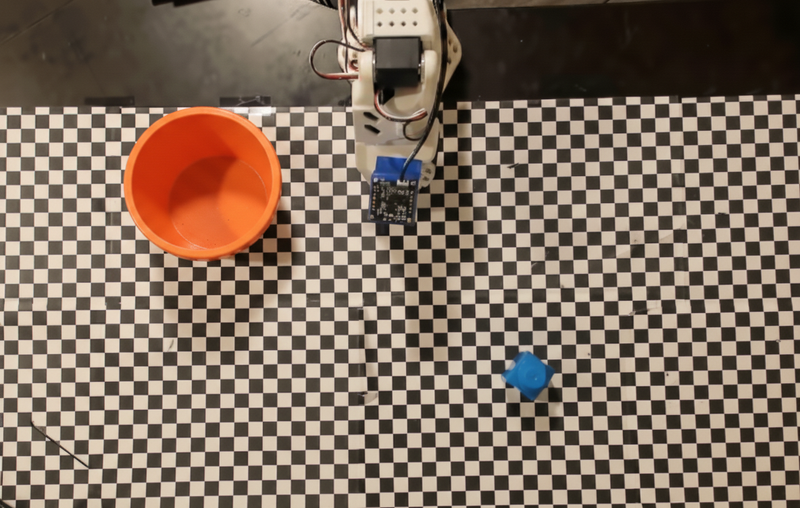
Bu örnekte aşağıdaki sahte robot API'si ve araç tanımları kullanılmaktadır:
Python
from google import genai
from google.genai import types

client = genai.Client()

def move(x, y, high):
    print(f"Mock Robot: Moving to coordinates: {x}, {y}, {'high above table' if high else 'down at table level'}")

def setGripperState(opened):
    print(f"Mock Robot: {'Opening gripper' if opened else 'Closing gripper'}")

robot_origin_y = 300
robot_origin_x = 500

move_declaration = types.FunctionDeclaration(
    name="move",
    description="Moves the arm to the given coordinates.",
    parameters=types.Schema(
        type=types.Type.OBJECT,
        properties={
            "x": types.Schema(type=types.Type.INTEGER, description="X coordinate relative to the origin"),
            "y": types.Schema(type=types.Type.INTEGER, description="Y coordinate relative to the origin"),
            "high": types.Schema(type=types.Type.BOOLEAN, description="Set to True to lift the robot arm above the scene. Set to False to place the gripper on the surface."),
        },
        required=["x", "y", "high"],
    ),
)

set_gripper_state_declaration = types.FunctionDeclaration(
    name="setGripperState",
    description="Opens or closes the robot's gripper.",
    parameters=types.Schema(
        type=types.Type.OBJECT,
        properties={
            "opened": types.Schema(type=types.Type.BOOLEAN, description="True opens the gripper, False closes the gripper."),
        },
        required=["opened"],
    ),
)

robot_tools = types.Tool(function_declarations=[move_declaration, set_gripper_state_declaration])
Aşağıdaki örnekte, istem ve resim, araç tanımlarıyla birlikte modele gönderilir. Ardından, temsilciye dayalı bir döngü çalıştırır: Her model yanıtından sonra, istenen işlev çağrılarını (move, setGripperState) yürütür, sonuçları modele geri döndürür ve model işlev çağırmayı durdurana veya adım sınırına ulaşılana kadar tekrarlar.
Python
with open("robot-api-example.png", "rb") as f:
    img_bytes = f.read()

prompt = (
    "You are a robotic arm with six degrees-of-freedom. "
    f"The origin point for calculating the moves is at normalized point y={robot_origin_y}, x={robot_origin_x}. "
    "Use this as the new (0,0) for calculating moves, allowing x and y to be negative.\n\n"
    "Find the blue block and the orange bowl. Calculate their coordinates relative to the origin.\n"
    "Perform a pick and place operation where you pick up the blue block and place it into the orange bowl. "
    "Call the appropriate sequence of functions to complete this operation."
)

contents = [
    types.Content(role="user", parts=[
        types.Part.from_bytes(data=img_bytes, mime_type="image/png"),
        types.Part(text=prompt),
    ])
]

print("\n--- Executing Orchestrated Plan ---")

max_steps = 15  # Safety limit to prevent infinite loops
step_count = 0

# The Agentic Loop
while step_count < max_steps:
    step_count += 1

    response = client.models.generate_content(
        model="gemini-robotics-er-2-preview",
        contents=contents,
        config=types.GenerateContentConfig(
            tools=[robot_tools],
            thinking_config=types.ThinkingConfig(thinking_level="low"),
        ),
    )

    # Add model response to conversation history
    contents.append(response.candidates[0].content)

    # Check for function calls
    function_calls = [part for part in response.candidates[0].content.parts if part.function_call]

    if not function_calls:
        # Model is done calling functions
        print("Sequence complete.")
        print(f"Model Summary: {response.text}")
        break

    # Execute function calls and collect results
    function_response_parts = []
    for part in function_calls:
        fc = part.function_call
        if fc.name == "move":
            move(**fc.args)
        elif fc.name == "setGripperState":
            setGripperState(**fc.args)

        function_response_parts.append(
            types.Part.from_function_response(
                name=fc.name,
                response={"status": "success"},
            )
        )

    # Send function results back to model
    contents.append(types.Content(role="user", parts=function_response_parts))
Aşağıda, isteme ve sahte robot API'sine dayalı olarak modelin olası bir çıkışı gösterilmektedir. Çıkış, modelin birlikte sıraladığı robot işlevi çağrılarının çıkışını içerir.
--- Executing Orchestrated Plan ---
Mock Robot: Opening gripper
Mock Robot: Moving to coordinates: 160, 440, high above table
Mock Robot: Moving to coordinates: 160, 440, down at table level
Mock Robot: Closing gripper
Mock Robot: Moving to coordinates: 160, 440, high above table
Mock Robot: Moving to coordinates: -250, 60, high above table
Mock Robot: Moving to coordinates: -250, 60, down at table level
Mock Robot: Opening gripper
Mock Robot: Moving to coordinates: -250, 60, high above table
Sequence complete.
Model Summary: I have completed the task of picking up the blue block and placing it into the orange bowl.
Sırada ne var?
- Akışlı robotik: İşlev çağrısıyla gerçek zamanlı akış (yalnızca Gemini Robotics ER 2).
- Video anlama: Video görevindeki ilerlemeyi takip edin (yalnızca ER 2).
- Uzamsal akıl yürütme: İşaretleme, izleme ve sınırlayıcı kutu örnekleri.