

Gemini Robotics ER modelleri, nesneleri işaret edebilir, videoda takip edebilir, sınırlayıcı kutularla algılayabilir ve hareket yörüngeleri oluşturabilir.
Çalıştırılabilir kodun tamamı için Robotics cookbook'a (Robotik yemek kitabı) bakın.
Nesneleri işaret etme
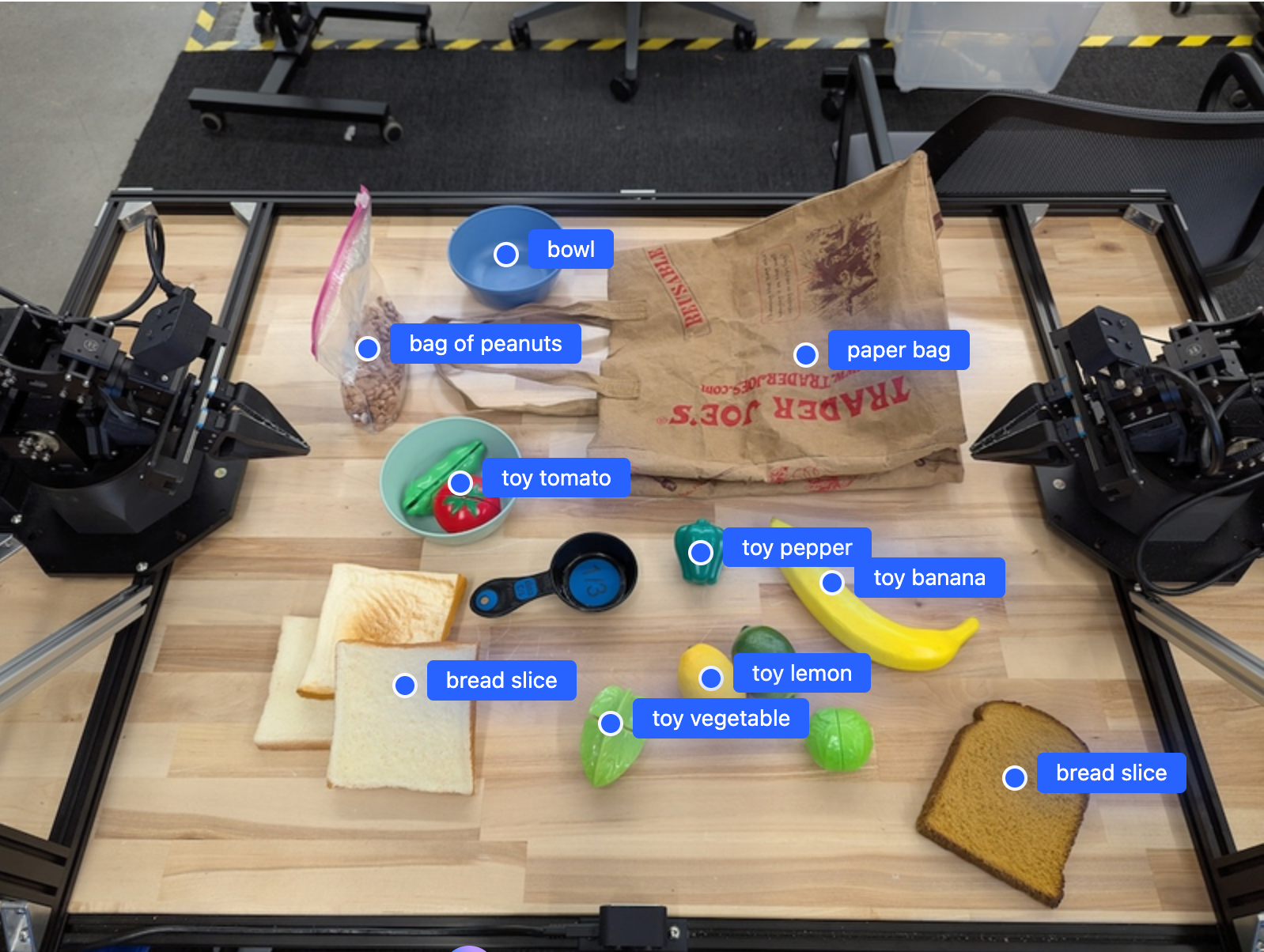
Aşağıdaki örnekte, bir resimdeki belirli nesneler bulunur ve normalleştirilmiş [y, x] koordinatları döndürülür:
Python
from google import genai

PROMPT = """
          Point to no more than 10 items in the image. The label returned
          should be an identifying name for the object detected.
          The answer should follow the json format: [{"point": <point>,
          "label": <label1>}, ...]. The points are in [y, x] format
          normalized to 0-1000.
        """
client = genai.Client()

uploaded_file = client.files.upload(file="my-image.png")

image_response = client.interactions.create(
    model="gemini-robotics-er-2-preview",
    input=[
        {
            "type": "image",
            "uri": uploaded_file.uri,
            "mime_type": uploaded_file.mime_type
        },
        {"type": "text", "text": PROMPT}
    ],
    generation_config={"thinking_level": "high"},
)

print(image_response.output_text)
REST
# First, ensure you have the image file locally.
# Encode the image to base64
IMAGE_BASE64=$(base64 -w 0 my-image.png)

curl -X POST \
  "https://generativelanguage.googleapis.com/v1beta/interactions" \
  -H "x-goog-api-key: $GEMINI_API_KEY" \
  -H "Content-Type: application/json" \
  -d '{
    "model": "gemini-robotics-er-2-preview",
    "input": {
      "parts": [
        {
          "inlineData": {
            "mimeType": "image/png",
            "data": "'"${IMAGE_BASE64}"'"
          }
        },
        {
          "text": "Point to no more than 10 items in the image. The label returned should be an identifying name for the object detected. The answer should follow the json format: [{\"point\": [y, x], \"label\": <label1>}, ...]. The points are in [y, x] format normalized to 0-1000."
        }
      ]
    },
    "generation_config": {
      "thinking_config": {
        "thinking_level": "high"
      }
    }
  }'
Çıktı, her biri point (normalleştirilmiş [y, x] koordinatları) ve nesneyi tanımlayan bir label içeren nesnelerden oluşan bir JSON dizisi olacaktır.
JSON
[
  {"point": [376, 508], "label": "small banana"},
  {"point": [287, 609], "label": "larger banana"},
  {"point": [223, 303], "label": "pink starfruit"},
  {"point": [435, 172], "label": "paper bag"},
  {"point": [270, 786], "label": "green plastic bowl"},
  {"point": [488, 775], "label": "metal measuring cup"},
  {"point": [673, 580], "label": "dark blue bowl"},
  {"point": [471, 353], "label": "light blue bowl"},
  {"point": [492, 497], "label": "bread"},
  {"point": [525, 429], "label": "lime"}
]
Aşağıdaki resimde, bu noktaların nasıl gösterilebileceğine dair bir örnek verilmiştir:
Videodaki nesneleri izleme
Gemini Robotics ER 2, nesneleri zaman içinde takip etmek için video karelerini de analiz edebilir. Desteklenen video biçimlerinin listesi için Video girişleri bölümüne bakın.
Python
from google import genai

client = genai.Client()

uploaded_file = client.files.upload(file="my-video.mp4")

prompt = """
          Point to the red ball in every frame where it appears.
          The answer should follow the json format: [{"point": [y, x],
          "label": <label>}, ...]. The points are in [y, x] format
          normalized to 0-1000. Return one entry per frame that contains
          the object.
        """

image_response = client.interactions.create(
  model="gemini-robotics-er-2-preview",
  input=[
    {
        "type": "video",
        "uri": uploaded_file.uri,
        "mime_type": uploaded_file.mime_type
    },
    {"type": "text", "text": prompt}
  ],
)

print(image_response.output_text)
Nesne tespit etme ve sınırlayıcı kutular
Noktalara ek olarak, modelden algılanan nesneler için daha fazla mekansal ayrıntı sağlayan 2D sınırlayıcı kutular döndürmesini de isteyebilirsiniz.
Python
from google import genai

client = genai.Client()

uploaded_file = client.files.upload(file="my-image.png")

prompt = """
          Detect all objects in this image and return bounding boxes.
          The answer should follow the JSON format:
          [{"label": <label>, "y": <y_min>, "x": <x_min>,
            "y2": <y_max>, "x2": <x_max>}, ...]
          where coordinates are normalized to 0-1000.
        """

image_response = client.interactions.create(
  model="gemini-robotics-er-2-preview",
  input=[
    {
        "type": "image",
        "uri": uploaded_file.uri,
        "mime_type": uploaded_file.mime_type
    },
    {"type": "text", "text": prompt}
  ],
)

print(image_response.output_text)
Yörüngeler
Gemini Robotics ER 2, robot hareketini yönlendirmek için yararlı olan ve bir yörüngeyi tanımlayan nokta dizileri oluşturabilir.
Bu örnekte, ara noktaların tahmini de dahil olmak üzere kırmızı bir kalemi düzenleyiciye götürmek için bir yörünge isteniyor. Kod, yalnızca istemi gösterecek şekilde kısaltıldı.
Python
prompt = """
          Generate a trajectory for the robotic arm to pick up the red pen
          and place it in the organizer. Return a list of waypoints as JSON:
          [{"step": <int>, "point": [y, x], "action": <description>}, ...]
          where coordinates are normalized to 0-1000.
        """
Dizüstü bilgisayar için yer açma
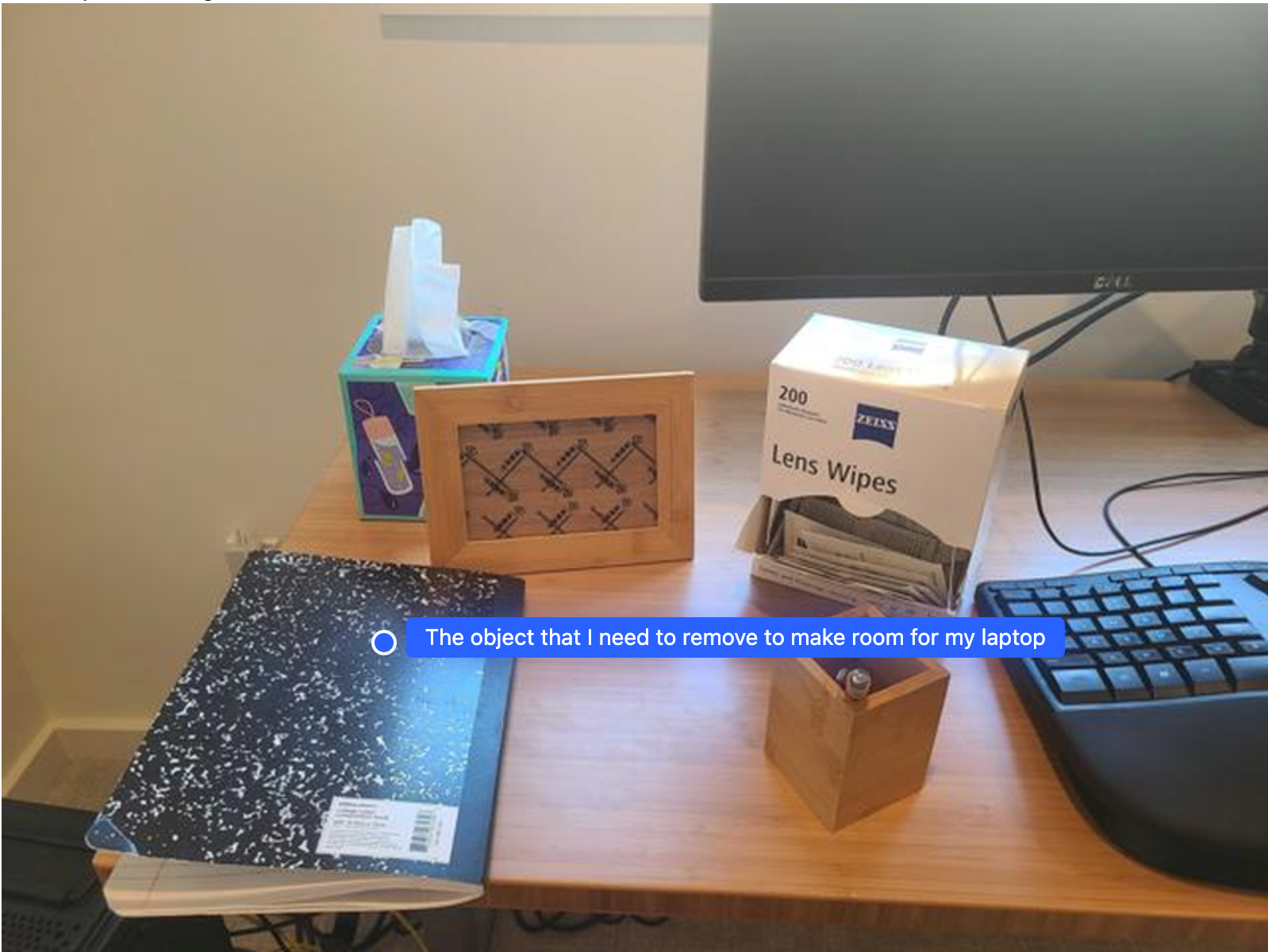
Bu örnekte, Gemini Robotics ER'ın bir alan hakkında nasıl akıl yürütebileceği gösterilmektedir. İstemde, başka bir öğe için yer açmak üzere hangi nesnenin taşınması gerektiği soruluyor.
Python
from google import genai

client = genai.Client()

uploaded_file = client.files.upload(file="path/to/image-with-objects.jpg")

prompt = """
          Point to the object that I need to remove to make room for my laptop
          The answer should follow the JSON format: [{"point": <point>,
          "label": <label1>}, ...]. The points are in [y, x] format normalized to 0-1000.
        """

image_response = client.interactions.create(
  model="gemini-robotics-er-2-preview",
  input=[
    {
        "type": "image",
        "uri": uploaded_file.uri,
        "mime_type": uploaded_file.mime_type
    },
    {"type": "text", "text": prompt}
  ],
)

print(image_response.output_text)
Yanıtta, kullanıcının sorusunu yanıtlayan nesnenin 2 boyutlu koordinatı yer alır. Bu örnekte, dizüstü bilgisayara yer açmak için taşınması gereken nesne söz konusudur.
[
  {"point": [672, 301], "label": "The object that I need to remove to make room for my laptop"}
]
Öğle yemeği hazırlama
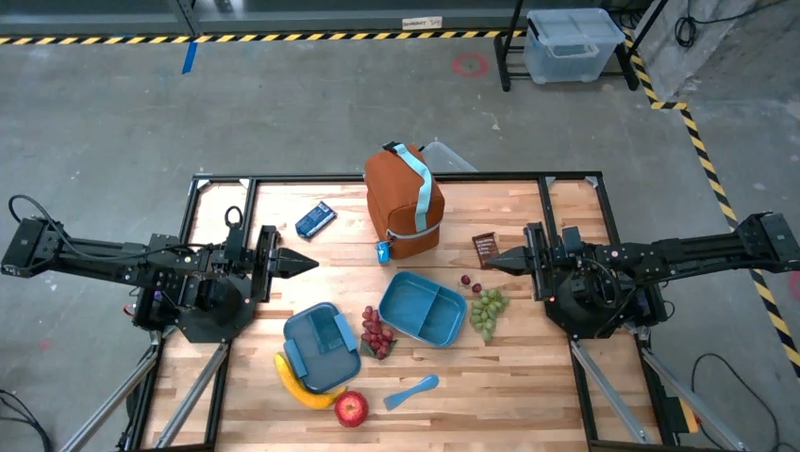
Model, çok adımlı görevlerle ilgili talimatlar da verebilir ve her adım için ilgili nesneleri gösterebilir. Bu örnekte, modelin bir öğle yemeği çantasını hazırlamak için bir dizi adımı nasıl planladığı gösterilmektedir.
Python
from google import genai

client = genai.Client()

uploaded_file = client.files.upload(file="path/to/image-of-lunch.jpg")

prompt = """
          Explain how to pack the lunch box and lunch bag. Point to each
          object that you refer to. Each point should be in the format:
          [{"point": [y, x], "label": }], where the coordinates are
          normalized between 0-1000.
        """

image_response = client.interactions.create(
  model="gemini-robotics-er-2-preview",
  input=[
    {
        "type": "image",
        "uri": uploaded_file.uri,
        "mime_type": uploaded_file.mime_type
    },
    {"type": "text", "text": prompt}
  ],
)

print(image_response.output_text)
Bu istemin yanıtı, resim girişinden yola çıkarak bir öğle yemeği çantasını nasıl paketleyeceğinizle ilgili adım adım talimatlar içerir.
Giriş resmi
Model çıkışı
Based on the image, here is a plan to pack the lunch box and lunch bag:

1.  **Pack the fruit into the lunch box.** Place the [apple](apple), [banana](banana), [red grapes](red grapes), and [green grapes](green grapes) into the [blue lunch box](blue lunch box).
2.  **Add the spoon to the lunch box.** Put the [blue spoon](blue spoon) inside the lunch box as well.
3.  **Close the lunch box.** Secure the lid on the [blue lunch box](blue lunch box).
4.  **Place the lunch box inside the lunch bag.** Put the closed [blue lunch box](blue lunch box) into the [brown lunch bag](brown lunch bag).
5.  **Pack the remaining items into the lunch bag.** Place the [blue snack bar](blue snack bar) and the [brown snack bar](brown snack bar) into the [brown lunch bag](brown lunch bag).

Here is the list of objects and their locations:
*   [{"point": [899, 440], "label": "apple"}]
*   [{"point": [814, 363], "label": "banana"}]
*   [{"point": [727, 470], "label": "red grapes"}]
*   [{"point": [675, 608], "label": "green grapes"}]
*   [{"point": [706, 529], "label": "blue lunch box"}]
*   [{"point": [864, 517], "label": "blue spoon"}]
*   [{"point": [499, 401], "label": "blue snack bar"}]
*   [{"point": [614, 705], "label": "brown snack bar"}]
*   [{"point": [448, 501], "label": "brown lunch bag"}]
Sırada ne var?
- Ajan tabanlı yetenekler: Kod yürütme, enstrüman okuma, görüntü açıklama.
- Görev düzenleme: Özel robot API'leri içeren uzun vadeli görevler.
- Yayın özellikli robotik: Gerçek zamanlı çift yönlü yayın (yalnızca Gemini Robotics ER 2).
- Video anlama: Anları bulma ve ilerleme sınıflandırması (yalnızca Gemini Robotics ER 2).