

Gemini Robotics ER मॉडल, ऑब्जेक्ट की ओर इशारा कर सकते हैं, वीडियो में उन्हें ट्रैक कर सकते हैं, उन्हें बाउंडिंग बॉक्स के साथ पहचान सकते हैं, और मूवमेंट ट्रैजेक्ट्री जनरेट कर सकते हैं. इस पेज पर दिए गए सभी उदाहरणों में, generateContent के साथ नैचुरल लैंग्वेज वाले प्रॉम्प्ट का इस्तेमाल किया गया है.
पूरे रन करने लायक कोड के लिए, रोबोटिक्स कुकबुक देखें.
ऑब्जेक्ट की ओर पॉइंट करना
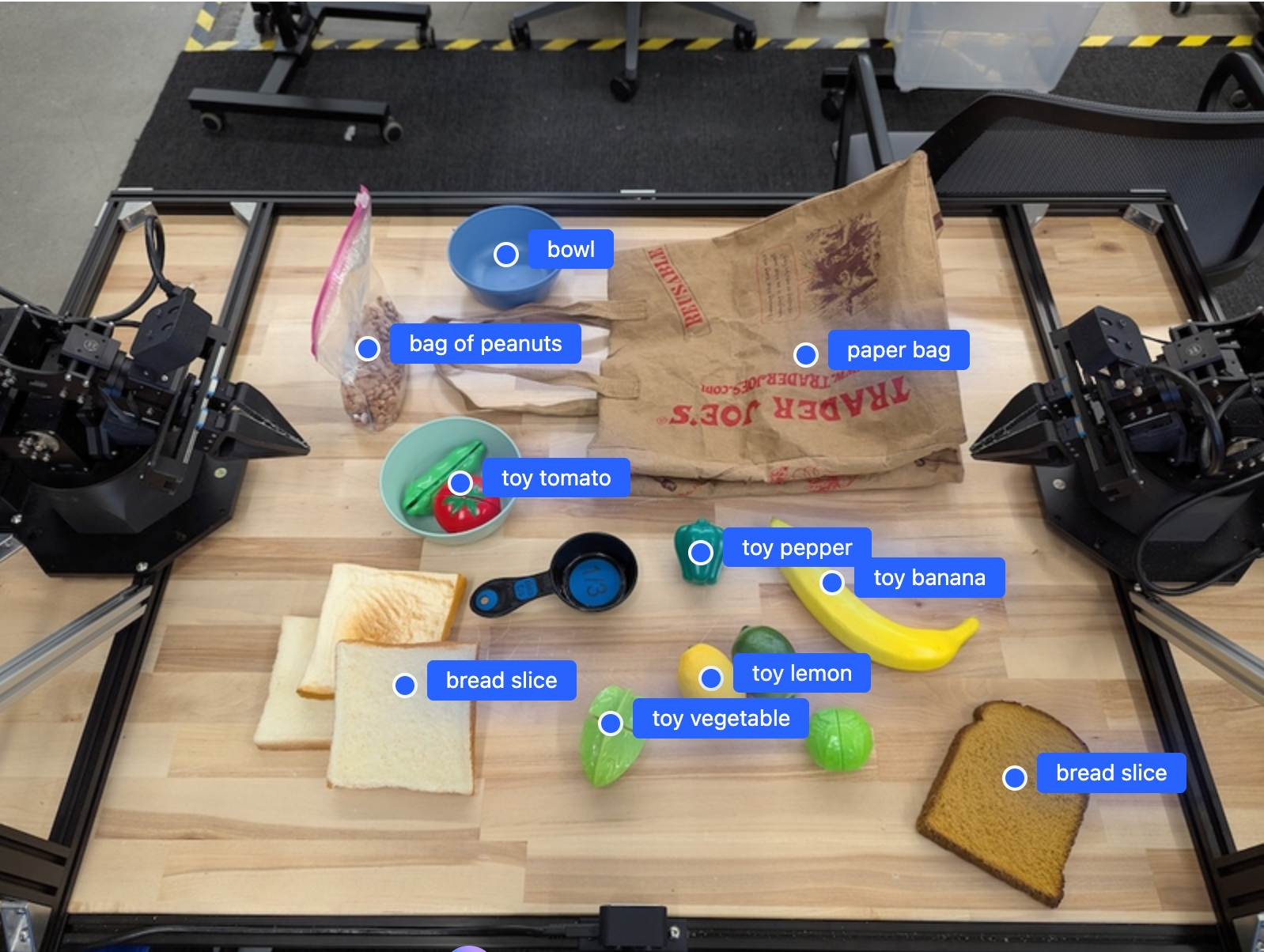
इस उदाहरण में, किसी इमेज में मौजूद कुछ ऑब्जेक्ट का पता लगाया जाता है और उनके सामान्य किए गए [y, x] कोऑर्डिनेट दिखाए जाते हैं:
Python
from google import genai
from google.genai import types

PROMPT = """
          Point to no more than 10 items in the image. The label returned
          should be an identifying name for the object detected.
          The answer should follow the json format: [{"point": <point>,
          "label": <label1>}, ...]. The points are in [y, x] format
          normalized to 0-1000.
        """
client = genai.Client()

# Load your image
with open("my-image.png", 'rb') as f:
    image_bytes = f.read()

image_response = client.models.generate_content(
    model="gemini-robotics-er-2-preview",
    contents=[
        types.Part.from_bytes(
            data=image_bytes,
            mime_type='image/png',
        ),
        PROMPT
    ],
    config = types.GenerateContentConfig(
        thinking_config=types.ThinkingConfig(thinking_level="high")
    )
)

print(image_response.text)
REST
# First, ensure you have the image file locally.
# Encode the image to base64
IMAGE_BASE64=$(base64 -w 0 my-image.png)

curl -X POST \
  "https://generativelanguage.googleapis.com/v1beta/models/gemini-robotics-er-2-preview:generateContent \
  -H "x-goog-api-key: $GEMINI_API_KEY" \
  -H "Content-Type: application/json" \
  -d '{
    "contents": [
      {
        "parts": [
          {
            "inlineData": {
              "mimeType": "image/png",
              "data": "'"${IMAGE_BASE64}"'"
            }
          },
          {
            "text": "Point to no more than 10 items in the image. The label returned should be an identifying name for the object detected. The answer should follow the json format: [{\"point\": [y, x], \"label\": <label1>}, ...]. The points are in [y, x] format normalized to 0-1000."
          }
        ]
      }
    ],
    "generationConfig": {
      "thinkingConfig": {
        "thinkingLevel": "high"
      }
    }
  }'
आउटपुट के तौर पर एक JSON कलेक्शन मिलेगा. इसमें ऑब्जेक्ट शामिल होंगे. हर ऑब्जेक्ट में point (सामान्य किए गए [y, x] कोऑर्डिनेट) और ऑब्जेक्ट की पहचान करने वाला label होगा.
JSON
[
  {"point": [376, 508], "label": "small banana"},
  {"point": [287, 609], "label": "larger banana"},
  {"point": [223, 303], "label": "pink starfruit"},
  {"point": [435, 172], "label": "paper bag"},
  {"point": [270, 786], "label": "green plastic bowl"},
  {"point": [488, 775], "label": "metal measuring cup"},
  {"point": [673, 580], "label": "dark blue bowl"},
  {"point": [471, 353], "label": "light blue bowl"},
  {"point": [492, 497], "label": "bread"},
  {"point": [525, 429], "label": "lime"}
]
नीचे दी गई इमेज में, इन पॉइंट को दिखाने का तरीका बताया गया है:
वीडियो में ऑब्जेक्ट ट्रैक करना
Gemini Robotics ER 2, वीडियो फ़्रेम का विश्लेषण करके, समय के साथ-साथ ऑब्जेक्ट को ट्रैक भी कर सकता है. काम करने वाले वीडियो फ़ॉर्मैट की सूची देखने के लिए, वीडियो इनपुट देखें.
Python
from google import genai
from google.genai import types

client = genai.Client()

# Load your video
with open("my-video.mp4", 'rb') as f:
    video_bytes = f.read()

prompt = """
          Point to the red ball in every frame where it appears.
          The answer should follow the json format: [{"point": [y, x],
          "label": <label>}, ...]. The points are in [y, x] format
          normalized to 0-1000. Return one entry per frame that contains
          the object.
        """

image_response = client.models.generate_content(
  model="gemini-robotics-er-2-preview",
  contents=[
    types.Part.from_bytes(
      data=video_bytes,
      mime_type='video/mp4',
    ),
    prompt
  ],
  config = types.GenerateContentConfig(
      thinking_config=types.ThinkingConfig(thinking_level="high")
  )
)

print(image_response.text)
ऑब्जेक्ट का पता लगाने की सुविधा और बाउंडिंग बॉक्स
पॉइंट के अलावा, मॉडल को 2D बाउंडिंग बॉक्स दिखाने के लिए भी कहा जा सकता है. इससे, पहचाने गए ऑब्जेक्ट के बारे में ज़्यादा जानकारी मिलती है.
Python
from google import genai
from google.genai import types

client = genai.Client()

with open("my-image.png", 'rb') as f:
    image_bytes = f.read()

prompt = """
          Detect all objects in this image and return bounding boxes.
          The answer should follow the JSON format:
          [{"label": <label>, "y": <y_min>, "x": <x_min>,
            "y2": <y_max>, "x2": <x_max>}, ...]
          where coordinates are normalized to 0-1000.
        """

image_response = client.models.generate_content(
  model="gemini-robotics-er-2-preview",
  contents=[
    types.Part.from_bytes(
      data=image_bytes,
      mime_type='image/png',
    ),
    prompt
  ],
  config = types.GenerateContentConfig(
      thinking_config=types.ThinkingConfig(thinking_level="low")
  )
)

print(image_response.text)
ट्रैजेक्ट्री
Gemini Robotics ER 2, ऐसे पॉइंट के सीक्वेंस जनरेट कर सकता है जो किसी ट्रैजेक्ट्री को तय करते हैं. ये पॉइंट, रोबोट को मूव करने के लिए गाइड करने में मददगार होते हैं.
इस उदाहरण में, लाल पेन को किसी ऑर्गेनाइज़र तक ले जाने के लिए, ट्रैजेक्ट्री का अनुरोध किया गया है. इसमें इंटरमीडिएट वेपॉइंट का अनुमान भी शामिल है. कोड को छोटा कर दिया गया है, ताकि सिर्फ़ प्रॉम्प्ट दिखे.
Python
prompt = """
          Generate a trajectory for the robotic arm to pick up the red pen
          and place it in the organizer. Return a list of waypoints as JSON:
          [{"step": <int>, "point": [y, x], "action": <description>}, ...]
          where coordinates are normalized to 0-1000.
        """
लैपटॉप रखने के लिए जगह बनाना
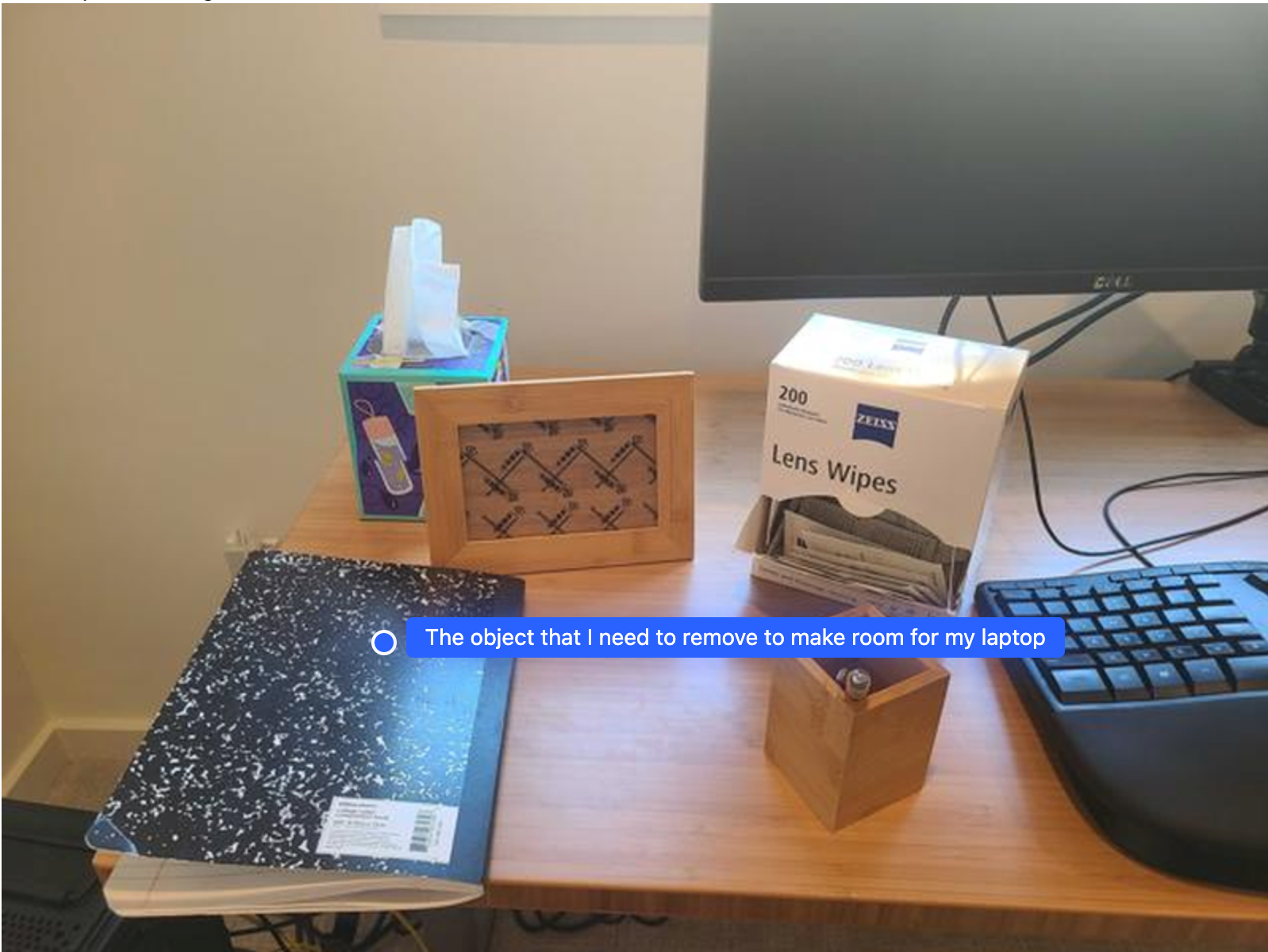
इस उदाहरण में दिखाया गया है कि Gemini Robotics ER, किसी जगह के बारे में कैसे तर्क दे सकता है. प्रॉम्प्ट में मॉडल से यह पूछा जाता है कि किस ऑब्जेक्ट को हटाकर, किसी दूसरे आइटम के लिए जगह बनानी है.
Python
from google import genai
from google.genai import types

client = genai.Client()

with open('path/to/image-with-objects.jpg', 'rb') as f:
    image_bytes = f.read()

prompt = """
          Point to the object that I need to remove to make room for my laptop
          The answer should follow the JSON format: [{"point": <point>,
          "label": <label1>}, ...]. The points are in [y, x] format normalized to 0-1000.
        """

image_response = client.models.generate_content(
  model="gemini-robotics-er-2-preview",
  contents=[
    types.Part.from_bytes(
      data=image_bytes,
      mime_type='image/jpeg',
    ),
    prompt
  ],
  config=types.GenerateContentConfig(
      thinking_config=types.ThinkingConfig(thinking_level="high")
  )
)

print(image_response.text)
जवाब में, उस ऑब्जेक्ट का 2D कोऑर्डिनेट होता है जो उपयोगकर्ता के सवाल का जवाब देता है. इस मामले में, वह ऑब्जेक्ट जो लैपटॉप के लिए जगह बनाने के लिए हिलना चाहिए.
[
  {"point": [672, 301], "label": "The object that I need to remove to make room for my laptop"}
]
लंच पैक करना
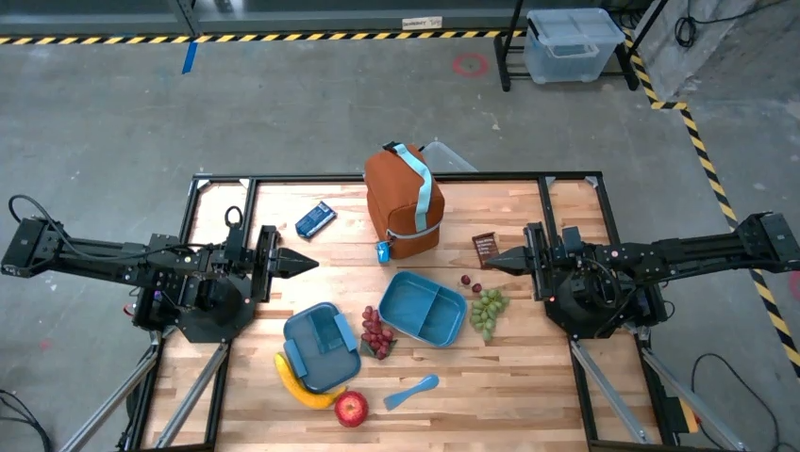
यह मॉडल, एक से ज़्यादा चरणों वाले टास्क के लिए निर्देश भी दे सकता है. साथ ही, हर चरण के लिए काम की चीज़ों की ओर इशारा कर सकता है. इस उदाहरण में दिखाया गया है कि मॉडल, लंच बैग पैक करने के लिए सिलसिलेवार तरीके से कैसे प्लान करता है.
Python
from google import genai
from google.genai import types

client = genai.Client()

with open('path/to/image-of-lunch.jpg', 'rb') as f:
    image_bytes = f.read()

prompt = """
          Explain how to pack the lunch box and lunch bag. Point to each
          object that you refer to. Each point should be in the format:
          [{"point": [y, x], "label": }], where the coordinates are
          normalized between 0-1000.
        """

image_response = client.models.generate_content(
  model="gemini-robotics-er-2-preview",
  contents=[
    types.Part.from_bytes(
      data=image_bytes,
      mime_type='image/jpeg',
    ),
    prompt
  ],
  config=types.GenerateContentConfig(
      thinking_config=types.ThinkingConfig(thinking_level="high")
  )
)

print(image_response.text)
इस प्रॉम्प्ट के जवाब में, इमेज इनपुट से लंच बैग पैक करने के बारे में सिलसिलेवार निर्देश दिए गए हैं.
इनपुट इमेज
मॉडल आउटपुट
Based on the image, here is a plan to pack the lunch box and lunch bag:

1.  **Pack the fruit into the lunch box.** Place the [apple](apple), [banana](banana), [red grapes](red grapes), and [green grapes](green grapes) into the [blue lunch box](blue lunch box).
2.  **Add the spoon to the lunch box.** Put the [blue spoon](blue spoon) inside the lunch box as well.
3.  **Close the lunch box.** Secure the lid on the [blue lunch box](blue lunch box).
4.  **Place the lunch box inside the lunch bag.** Put the closed [blue lunch box](blue lunch box) into the [brown lunch bag](brown lunch bag).
5.  **Pack the remaining items into the lunch bag.** Place the [blue snack bar](blue snack bar) and the [brown snack bar](brown snack bar) into the [brown lunch bag](brown lunch bag).

Here is the list of objects and their locations:
*   [{"point": [899, 440], "label": "apple"}]
*   [{"point": [814, 363], "label": "banana"}]
*   [{"point": [727, 470], "label": "red grapes"}]
*   [{"point": [675, 608], "label": "green grapes"}]
*   [{"point": [706, 529], "label": "blue lunch box"}]
*   [{"point": [864, 517], "label": "blue spoon"}]
*   [{"point": [499, 401], "label": "blue snack bar"}]
*   [{"point": [614, 705], "label": "brown snack bar"}]
*   [{"point": [448, 501], "label": "brown lunch bag"}]
आगे क्या करना है
- एजेंटिक एआई की सुविधाएँ — कोड एक्ज़ीक्यूशन, इंस्ट्रुमेंट को पढ़ना, इमेज की व्याख्या करना.
- टास्क ऑर्केस्ट्रेशन — कस्टम रोबोट एपीआई के साथ लंबे समय तक चलने वाले टास्क.
- स्ट्रीमिंग के साथ रोबोटिक्स — रीयल-टाइम में दोनों तरफ़ से स्ट्रीमिंग (सिर्फ़ Gemini Robotics ER 2 के लिए).
- वीडियो को समझना — वीडियो में किसी खास पल को ढूंढना और प्रोग्रेस को कैटगरी में बांटना (सिर्फ़ Gemini Robotics ER 2 के लिए).