

การเชื่อมต่อแหล่งข้อมูลกับ Google Search จะเชื่อมต่อโมเดล Gemini กับเนื้อหาเว็บแบบเรียลไทม์ และจะใช้งานได้กับทุกภาษาที่มี ซึ่งจะช่วยให้ Gemini ให้คำตอบที่แม่นยำยิ่งขึ้นและอ้างอิงแหล่งข้อมูลที่ตรวจสอบได้แม้จะผ่านการตัดข้อมูลมาแล้ว
การอ้างอิงช่วยให้คุณสร้างแอปพลิเคชันที่ทำสิ่งต่อไปนี้ได้
- เพิ่มความถูกต้องตามข้อเท็จจริง: ลดอาการหลอนของโมเดลโดยอิงคำตอบตามข้อมูลในโลกแห่งความเป็นจริง
- เข้าถึงข้อมูลแบบเรียลไทม์: ตอบคำถามเกี่ยวกับเหตุการณ์และหัวข้อล่าสุด
อ้างอิงแหล่งที่มา: สร้างความไว้วางใจจากผู้ใช้โดยแสดงแหล่งที่มาของข้อกล่าวอ้างของโมเดล
Python
from google import genai

client = genai.Client()

interaction = client.interactions.create(
    model="gemini-3.8-flash",
    input="Who won the euro 2024?",
    tools=[{"type": "google_search"}]
)

print(interaction.output_text)
JavaScript
import { GoogleGenAI } from "@google/genai";

const client = new GoogleGenAI({});

const interaction = await client.interactions.create({
    model: "gemini-3.8-flash",
    input: "Who won the euro 2024?",
    tools: [{ type: "google_search" }]
});

console.log(interaction.output_text);
Java
import com.google.genai.Client;
import com.google.genai.gaos.models.interactions.CreateModelInteraction;
import com.google.genai.gaos.models.interactions.GoogleSearch;
import com.google.genai.gaos.models.interactions.Interaction;
import com.google.genai.gaos.models.interactions.InteractionsInput;
import com.google.genai.gaos.models.interactions.Model;
import com.google.genai.gaos.models.operations.CreateInteractionRequestBody;
import java.util.Arrays;

Client client = new Client();

CreateModelInteraction params =
    CreateModelInteraction.builder()
        .model(Model.of("gemini-3.8-flash"))
        .input(InteractionsInput.of("Who won the euro 2024?"))
        .tools(Arrays.asList(GoogleSearch.builder().build()))
        .build();

Interaction interaction =
    client.interactions.create(CreateInteractionRequestBody.of(params)).interaction().get();

System.out.println(interaction.outputText().orElse(""));
Go
package main

import (
    "context"
    "fmt"
    "log"

    "google.golang.org/genai"
    "google.golang.org/genai/interactions/models/interactions"
    "google.golang.org/genai/interactions/models/operations"
)

func main() {
    ctx := context.Background()
    client, err := genai.NewClient(ctx, nil)
    if err != nil {
        log.Fatal(err)
    }

    resp, err := client.Interactions.Create(ctx, operations.CreateInteractionRequest{
        Body: operations.NewCreateInteractionRequestBody(
            interactions.CreateModelInteraction{
                Model: interactions.Model("gemini-3.8-flash"),
                Input: interactions.NewInteractionsInput("Who won the euro 2024?"),
                Tools: []interactions.Tool{
                    interactions.NewTool(interactions.GoogleSearch{}),
                },
            },
        ),
    })
    if err != nil {
        log.Fatal(err)
    }

    fmt.Println(resp.Interaction.GetOutputText())
}
REST
curl -X POST "https://generativelanguage.googleapis.com/v1beta/interactions" \
  -H "x-goog-api-key: $GEMINI_API_KEY" \
  -H "Content-Type: application/json" \
  -d '{
    "model": "gemini-3.8-flash",
    "input": "Who won the euro 2024?",
    "tools": [{"type": "google_search"}]
  }'
วิธีการทำงานของการเชื่อมต่อแหล่งข้อมูลกับ Google Search
เมื่อเปิดใช้เครื่องมือ google_search โมเดลจะจัดการเวิร์กโฟลว์ทั้งหมด
ของการค้นหา ประมวลผล และอ้างอิงข้อมูลโดยอัตโนมัติ
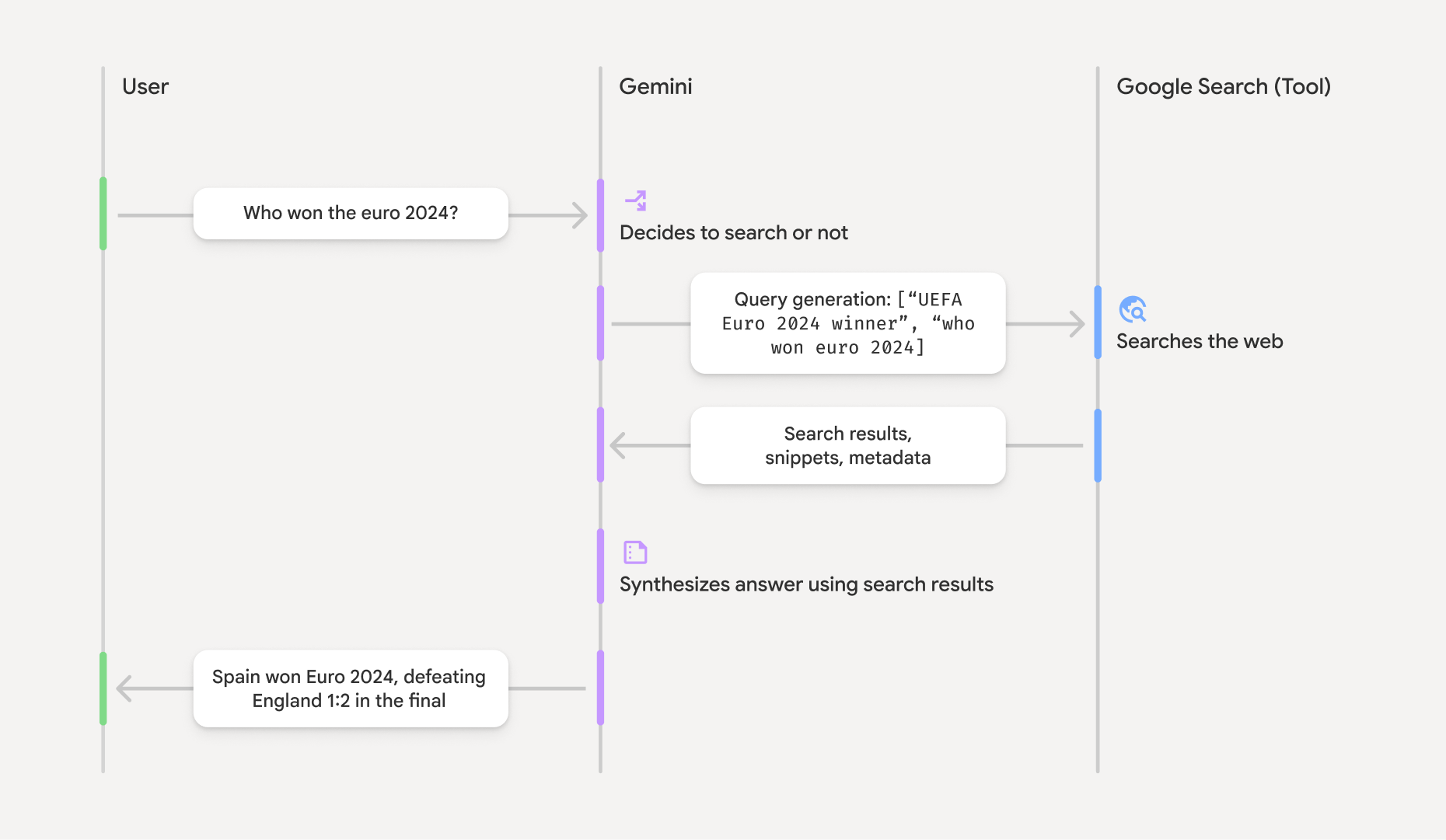
- พรอมต์ของผู้ใช้: แอปพลิเคชันของคุณจะส่งพรอมต์ของผู้ใช้ไปยัง Gemini API
โดยเปิดใช้เครื่องมือ
google_search - การวิเคราะห์พรอมต์: โมเดลจะวิเคราะห์พรอมต์และพิจารณาว่า Google Search สามารถปรับปรุงคำตอบได้หรือไม่
- Google Search: หากจำเป็น โมเดลจะสร้างคำค้นหาอย่างน้อย 1 รายการโดยอัตโนมัติและดำเนินการค้นหา
- การประมวลผลผลการค้นหา: โมเดลจะประมวลผลผลการค้นหา สังเคราะห์ข้อมูล และสร้างคำตอบ
- คำตอบที่อิงตามข้อมูล: API จะแสดงคำตอบสุดท้ายที่ใช้งานง่ายซึ่งอิงตามผลการค้นหา
การตอบกลับนี้รวมถึงคำตอบที่เป็นข้อความของโมเดลพร้อมด้วย
annotationsแบบอินไลน์ที่มีการอ้างอิง รวมถึงขั้นตอนgoogle_search_callและgoogle_search_resultพร้อมด้วยคำค้นหาและคำแนะนำในการค้นหา
ทำความเข้าใจคำตอบที่อ้างอิง
เมื่อการอ้างอิงคำตอบสำเร็จแล้ว เอาต์พุตข้อความของโมเดลจะมีannotationsในบรรทัด
ในบล็อกเนื้อหาข้อความโดยตรง คำอธิบายประกอบเหล่านี้
ให้ข้อมูลการอ้างอิงที่ลิงก์ส่วนต่างๆ ของคำตอบไปยังแหล่งที่มา
{
  "steps": [
    {
      "type": "thought",
      "summary": [
        {
          "type": "text",
          "text": "The user is asking for the winner of Euro 2024. I need to search for the result of the Euro 2024 final."
        }
      ],
      "signature": "CoMDAXLI2nynRYojJIy6B1Jh9os2crpWLfB0..."
    },
    {
      "type": "google_search_call",
      "arguments": {
        "queries": ["UEFA Euro 2024 winner"]
      }
    },
    {
      "type": "google_search_result",
      "call_id": "search_001",
      "result": [
        {
          "search_suggestions": "<!-- HTML and CSS for the search widget -->"
        }
      ]
    },
    {
      "type": "model_output",
      "content": [
        {
          "type": "text",
          "text": "Spain won Euro 2024, defeating England 2-1 in the final. This victory marks Spain's record fourth European Championship title.",
          "annotations": [
            {
              "type": "url_citation",
              "url": "https://www.aljazeera.com/sports/euro-2024-final",
              "title": "aljazeera.com",
              "start_index": 0,
              "end_index": 56
            },
            {
              "type": "url_citation",
              "url": "https://www.uefa.com/euro2024/news/spain-wins-euro-2024",
              "title": "uefa.com",
              "start_index": 57,
              "end_index": 124
            }
          ]
        }
      ]
    }
  ]
}
ฟิลด์คีย์ในการตอบกลับ
google_search_call: มีการค้นหาที่โมเดลqueriesดำเนินการgoogle_search_result: มีsearch_suggestionsซึ่งเป็นตัวอย่างข้อมูล HTML สำหรับการแสดงผลคำแนะนำในการค้นหาใน UI ดูข้อกำหนดในการใช้งานทั้งหมดได้ในข้อกำหนดในการให้บริการtextพร้อมannotations: คำตอบที่โมเดลสังเคราะห์พร้อมการอ้างอิงในบรรทัด คำอธิบายประกอบแต่ละรายการurl_citationจะลิงก์กลุ่มข้อความ (กำหนดโดยstart_indexและend_index) ไปยัง URL แหล่งที่มา ซึ่งเป็นกุญแจสำคัญในการ สร้างการอ้างอิงในบรรทัด
นอกจากนี้ คุณยังใช้การเชื่อมต่อแหล่งข้อมูลกับ Google Search ร่วมกับเครื่องมือบริบท URL เพื่ออ้างอิงคำตอบจากทั้งข้อมูลเว็บสาธารณะและ URL ที่เฉพาะเจาะจงที่คุณระบุได้ด้วย
การระบุแหล่งที่มาด้วยการอ้างอิงในบรรทัด
API จะแสดงurl_citationคำอธิบายประกอบในบรรทัดในบล็อกเนื้อหาข้อความ
เพื่อให้คุณควบคุมวิธีแสดงแหล่งที่มาในอินเทอร์เฟซผู้ใช้ได้อย่างสมบูรณ์
คำอธิบายประกอบแต่ละรายการจะมี start_index และ end_index เพื่อระบุส่วนของข้อความที่อ้างอิง วิธีแยกและแสดงข้อมูลมีดังนี้
Python
for step in interaction.steps:
    if step.type == "model_output":
        for content_block in step.content:
            if content_block.type == "text":
                print(content_block.text)
                if content_block.annotations:
                    print("\nCitations:")
                    for annotation in content_block.annotations:
                        if annotation.type == "url_citation":
                            cited_text = content_block.text[annotation.start_index:annotation.end_index]
                            print(f"  [{annotation.title}]({annotation.url})")
                            print(f"    Cited text: \"{cited_text}\"")
JavaScript
for (const step of interaction.steps) {
  if (step.type === 'model_output') {
    for (const contentBlock of step.content) {
      if (contentBlock.type === 'text') {
        console.log(contentBlock.text);
        if (contentBlock.annotations) {
          console.log("\nCitations:");
          for (const annotation of contentBlock.annotations) {
            if (annotation.type === 'url_citation') {
              const citedText = contentBlock.text.slice(annotation.startIndex, annotation.endIndex);
              console.log(`  [${annotation.title}](${annotation.url})`);
              console.log(`    Cited text: "${citedText}"`);
            }
          }
        }
      }
    }
  }
}
Java
import com.google.genai.Client;
import com.google.genai.gaos.models.interactions.Annotation;
import com.google.genai.gaos.models.interactions.Content;
import com.google.genai.gaos.models.interactions.CreateModelInteraction;
import com.google.genai.gaos.models.interactions.GoogleSearch;
import com.google.genai.gaos.models.interactions.Interaction;
import com.google.genai.gaos.models.interactions.InteractionsInput;
import com.google.genai.gaos.models.interactions.Model;
import com.google.genai.gaos.models.interactions.ModelOutputStep;
import com.google.genai.gaos.models.interactions.Step;
import com.google.genai.gaos.models.interactions.TextContent;
import com.google.genai.gaos.models.interactions.URLCitation;
import com.google.genai.gaos.models.operations.CreateInteractionRequestBody;
import java.util.Arrays;

Client client = new Client();

CreateModelInteraction params =
    CreateModelInteraction.builder()
        .model(Model.of("gemini-3.8-flash"))
        .input(InteractionsInput.of("Who won the euro 2024?"))
        .tools(Arrays.asList(GoogleSearch.builder().build()))
        .build();

Interaction interaction =
    client.interactions.create(CreateInteractionRequestBody.of(params)).interaction().get();

if (interaction.steps().isPresent()) {
  for (Step step : interaction.steps().get()) {
    if (step instanceof ModelOutputStep) {
      ModelOutputStep outputStep = (ModelOutputStep) step;
      if (outputStep.content().isPresent()) {
        for (Content contentBlock : outputStep.content().get()) {
          if (contentBlock instanceof TextContent) {
            TextContent textContent = (TextContent) contentBlock;
            String text = textContent.text().orElse("");
            System.out.println(text);
            if (textContent.annotations().isPresent()
                && !textContent.annotations().get().isEmpty()) {
              System.out.println("\nCitations:");
              for (Annotation annotation : textContent.annotations().get()) {
                if (annotation instanceof URLCitation) {
                  URLCitation citation = (URLCitation) annotation;
                  int start = citation.startIndex().orElse(0);
                  int end = citation.endIndex().orElse(0);
                  String citedText =
                      (start >= 0 && end <= text.length() && start <= end)
                          ? text.substring(start, end)
                          : "";
                  System.out.printf(
                      "  [%s](%s)%n", citation.title().orElse(""), citation.url().orElse(""));
                  System.out.printf("    Cited text: \"%s\"%n", citedText);
                }
              }
            }
          }
        }
      }
    }
  }
}
Go
package main

import (
    "context"
    "fmt"
    "log"

    "google.golang.org/genai"
    "google.golang.org/genai/interactions/models/interactions"
    "google.golang.org/genai/interactions/models/operations"
)

func main() {
    ctx := context.Background()
    client, err := genai.NewClient(ctx, nil)
    if err != nil {
        log.Fatal(err)
    }

    resp, err := client.Interactions.Create(ctx, operations.CreateInteractionRequest{
        Body: operations.NewCreateInteractionRequestBody(
            interactions.CreateModelInteraction{
                Model: interactions.Model("gemini-3.8-flash"),
                Input: interactions.NewInteractionsInput("Who won the euro 2024?"),
                Tools: []interactions.Tool{
                    interactions.NewTool(interactions.GoogleSearch{}),
                },
            },
        ),
    })
    if err != nil {
        log.Fatal(err)
    }

    for _, step := range resp.Interaction.Steps {
        if step.ModelOutputStep != nil {
            for _, content := range step.ModelOutputStep.Content {
                if content.TextContent != nil {
                    text := content.TextContent.Text
                    fmt.Println(text)
                    if len(content.TextContent.Annotations) > 0 {
                        fmt.Println("\nCitations:")
                        for _, annotation := range content.TextContent.Annotations {
                            if annotation.URLCitation != nil {
                                c := annotation.URLCitation
                                start := 0
                                if c.StartIndex != nil {
                                    start = *c.StartIndex
                                }
                                end := 0
                                if c.EndIndex != nil {
                                    end = *c.EndIndex
                                }
                                citedText := ""
                                if start >= 0 && end <= len(text) && start <= end {
                                    citedText = text[start:end]
                                }
                                title := ""
                                if c.Title != nil {
                                    title = *c.Title
                                }
                                url := ""
                                if c.URL != nil {
                                    url = *c.URL
                                }
                                fmt.Printf("  [%s](%s)\n", title, url)
                                fmt.Printf("    Cited text: %q\n", citedText)
                            }
                        }
                    }
                }
            }
        }
    }
}
เอาต์พุตจะแสดงข้อความตามด้วยการอ้างอิง
Spain won Euro 2024, defeating England 2-1 in the final. This victory marks Spain's record fourth European Championship title.

Citations:
  [aljazeera.com](https://www.aljazeera.com/sports/euro-2024-final)
    Cited text: "Spain won Euro 2024, defeating England 2-1 in the final."
  [uefa.com](https://www.uefa.com/euro2024/news/spain-wins-euro-2024)
    Cited text: "This victory marks Spain's record fourth European Championship title."
ราคา
เมื่อใช้การเชื่อมต่อแหล่งข้อมูลกับ Google Search ด้วย Gemini 3 ระบบจะเรียกเก็บเงินจากโปรเจ็กต์ของคุณ
สำหรับคำค้นหาแต่ละคำที่โมเดลตัดสินใจดำเนินการ หากโมเดลตัดสินใจที่จะ เรียกใช้คำค้นหาหลายรายการเพื่อตอบพรอมต์เดียว (เช่น ค้นหา "UEFA Euro 2024 winner" และ "Spain vs England Euro 2024 final
score" ภายใน การเรียก API เดียวกัน) ระบบจะนับเป็นการใช้เครื่องมือที่เรียกเก็บเงินได้ 2 ครั้ง สำหรับคำขอนั้น เพื่อวัตถุประสงค์ในการเรียกเก็บเงิน เราจะไม่สนใจคำค้นหาบนเว็บที่ว่างเปล่า
เมื่อนับคำค้นหาที่ไม่ซ้ำกัน โมเดลการเรียกเก็บเงินนี้ใช้กับโมเดล Gemini 3 เท่านั้น
เมื่อคุณใช้การอ้างอิงการค้นหากับโมเดล Gemini 2.5 หรือรุ่นเก่ากว่า
ระบบจะเรียกเก็บเงินโปรเจ็กต์ต่อพรอมต์
ดูข้อมูลการกำหนดราคาแบบละเอียดได้ที่หน้าการกำหนดราคา Gemini API
รุ่นที่รองรับ
ดูความสามารถทั้งหมดได้ในหน้าภาพรวมของโมเดล
| รุ่น | การเชื่อมต่อแหล่งข้อมูลกับ Google Search |
|---|---|
| Gemini 3.8 Flash | ✔️ |
| Gemini 3.7 Flash | ✔️ |
| Gemini 3.6 Flash | ✔️ |
| Gemini 3.5 Flash-Lite | ✔️ |
| Gemini 3.5 Flash | ✔️ |
| ตัวอย่างรูปภาพ Gemini 3.1 Flash | ✔️ |
| เวอร์ชันตัวอย่างของ Gemini 3.1 Pro | ✔️ |
| ตัวอย่างรูปภาพ Gemini 3 Pro | ✔️ |
| Gemini 3 Flash (เวอร์ชันตัวอย่าง) | ✔️ |
| Gemini 2.5 Pro | ✔️ |
| Gemini 2.5 Flash | ✔️ |
| Gemini 2.5 Flash-Lite | ✔️ |
| Gemini 2.0 Flash | ✔️ |
ชุดเครื่องมือที่รองรับ
คุณสามารถใช้การเชื่อมต่อแหล่งข้อมูลกับ Google Search ร่วมกับเครื่องมืออื่นๆ เช่น การเรียกใช้โค้ด บริบท URL และ การเชื่อมต่อแหล่งข้อมูลกับ Google Maps (รองรับใน Gemini 3.5 Flash และรุ่นที่ใหม่กว่า) เพื่อขับเคลื่อน Use Case ที่ซับซ้อนยิ่งขึ้น โมเดล Gemini 3 ยังรองรับการรวมเครื่องมือในตัวเหล่านี้กับเครื่องมือที่กำหนดเอง (การเรียกใช้ฟังก์ชัน) ด้วย ดูข้อมูลเพิ่มเติมได้ที่หน้าการผสมผสานเครื่องมือ
ขั้นตอนถัดไป
- ดูข้อมูลเกี่ยวกับเครื่องมืออื่นๆ ที่พร้อมใช้งาน เช่น การเรียกใช้ฟังก์ชัน
- ดูวิธีเพิ่มพรอมต์ด้วย URL ที่เฉพาะเจาะจงโดยใช้เครื่องมือบริบท URL