

Обоснование с Google Поиском позволяет модели Gemini получать доступ к веб-контенту в реальном времени и работает на всех доступных языках. Gemini может давать более точные ответы и ссылаться на проверенные источники, которые были опубликованы после даты актуальности данных.
Обоснование помогает создавать приложения, которые могут:
- Повышение фактической точности. Уменьшите количество галлюцинаций модели, основывая ответы на реальной информации.
- Получать информацию в реальном времени. Задавайте вопросы о недавних событиях и темах.
Указывайте источники. Показывайте источники утверждений модели, чтобы завоевать доверие пользователей.
Python
from google import genai

client = genai.Client()

interaction = client.interactions.create(
    model="gemini-3.8-flash",
    input="Who won the euro 2024?",
    tools=[{"type": "google_search"}]
)

print(interaction.output_text)
JavaScript
import { GoogleGenAI } from "@google/genai";

const client = new GoogleGenAI({});

const interaction = await client.interactions.create({
    model: "gemini-3.8-flash",
    input: "Who won the euro 2024?",
    tools: [{ type: "google_search" }]
});

console.log(interaction.output_text);
Java
import com.google.genai.Client;
import com.google.genai.gaos.models.interactions.CreateModelInteraction;
import com.google.genai.gaos.models.interactions.GoogleSearch;
import com.google.genai.gaos.models.interactions.Interaction;
import com.google.genai.gaos.models.interactions.InteractionsInput;
import com.google.genai.gaos.models.interactions.Model;
import com.google.genai.gaos.models.operations.CreateInteractionRequestBody;
import java.util.Arrays;

Client client = new Client();

CreateModelInteraction params =
    CreateModelInteraction.builder()
        .model(Model.of("gemini-3.8-flash"))
        .input(InteractionsInput.of("Who won the euro 2024?"))
        .tools(Arrays.asList(GoogleSearch.builder().build()))
        .build();

Interaction interaction =
    client.interactions.create(CreateInteractionRequestBody.of(params)).interaction().get();

System.out.println(interaction.outputText().orElse(""));
Проложить маршрут
package main

import (
    "context"
    "fmt"
    "log"

    "google.golang.org/genai"
    "google.golang.org/genai/interactions/models/interactions"
    "google.golang.org/genai/interactions/models/operations"
)

func main() {
    ctx := context.Background()
    client, err := genai.NewClient(ctx, nil)
    if err != nil {
        log.Fatal(err)
    }

    resp, err := client.Interactions.Create(ctx, operations.CreateInteractionRequest{
        Body: operations.NewCreateInteractionRequestBody(
            interactions.CreateModelInteraction{
                Model: interactions.Model("gemini-3.8-flash"),
                Input: interactions.NewInteractionsInput("Who won the euro 2024?"),
                Tools: []interactions.Tool{
                    interactions.NewTool(interactions.GoogleSearch{}),
                },
            },
        ),
    })
    if err != nil {
        log.Fatal(err)
    }

    fmt.Println(resp.Interaction.GetOutputText())
}
REST
curl -X POST "https://generativelanguage.googleapis.com/v1beta/interactions" \
  -H "x-goog-api-key: $GEMINI_API_KEY" \
  -H "Content-Type: application/json" \
  -d '{
    "model": "gemini-3.8-flash",
    "input": "Who won the euro 2024?",
    "tools": [{"type": "google_search"}]
  }'
Как работает обоснование с Google Поиском
Когда вы включаете инструмент google_search, модель автоматически выполняет весь рабочий процесс поиска, обработки и цитирования информации.
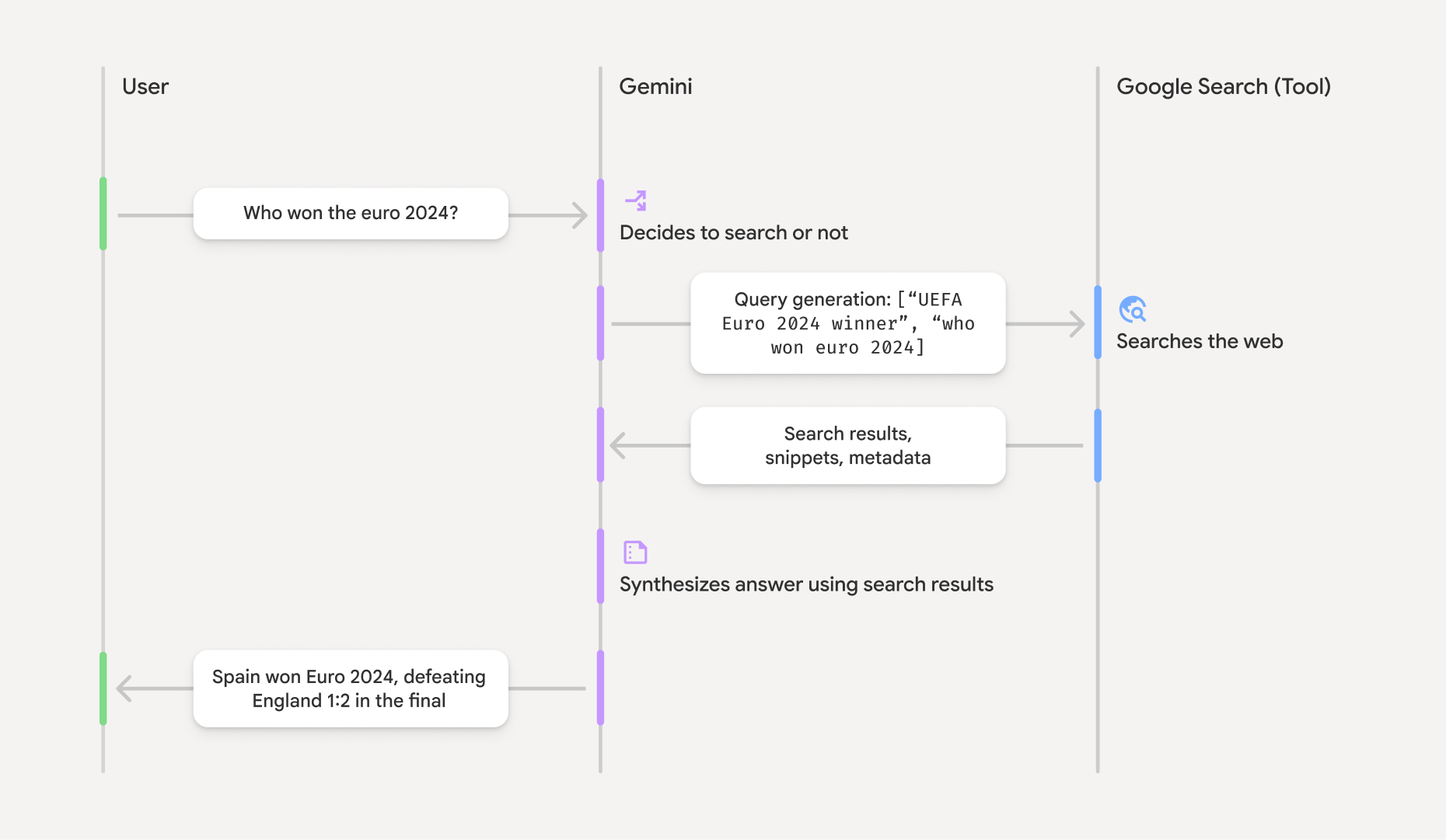
- Запрос пользователя. Ваше приложение отправляет запрос пользователя в Gemini API с включенным инструментом
google_search. - Анализ запроса. Модель анализирует запрос и определяет, можно ли улучшить ответ с помощью Google Поиска.
- Google Поиск. Если необходимо, модель автоматически генерирует один или несколько поисковых запросов и выполняет их.
- Обработка результатов поиска. Модель обрабатывает результаты поиска, синтезирует информацию и формулирует ответ.
- Обоснованный ответ. API возвращает окончательный ответ, который основан на результатах поиска и удобен для пользователя. Этот ответ включает текстовый ответ модели со встроенными объектами
annotations, содержащими цитаты, а также шагиgoogle_search_callиgoogle_search_resultс поисковыми запросами и подсказками.
Как работает уточнение ответа
Если ответ успешно обоснован, текстовый вывод модели включает встроенный тег annotations непосредственно в текстовый блок. Эти аннотации
содержат информацию о цитировании, связывающую части ответа с их источниками.
{
  "steps": [
    {
      "type": "thought",
      "summary": [
        {
          "type": "text",
          "text": "The user is asking for the winner of Euro 2024. I need to search for the result of the Euro 2024 final."
        }
      ],
      "signature": "CoMDAXLI2nynRYojJIy6B1Jh9os2crpWLfB0..."
    },
    {
      "type": "google_search_call",
      "arguments": {
        "queries": ["UEFA Euro 2024 winner"]
      }
    },
    {
      "type": "google_search_result",
      "call_id": "search_001",
      "result": [
        {
          "search_suggestions": "<!-- HTML and CSS for the search widget -->"
        }
      ]
    },
    {
      "type": "model_output",
      "content": [
        {
          "type": "text",
          "text": "Spain won Euro 2024, defeating England 2-1 in the final. This victory marks Spain's record fourth European Championship title.",
          "annotations": [
            {
              "type": "url_citation",
              "url": "https://www.aljazeera.com/sports/euro-2024-final",
              "title": "aljazeera.com",
              "start_index": 0,
              "end_index": 56
            },
            {
              "type": "url_citation",
              "url": "https://www.uefa.com/euro2024/news/spain-wins-euro-2024",
              "title": "uefa.com",
              "start_index": 57,
              "end_index": 124
            }
          ]
        }
      ]
    }
  ]
}
Основные поля в ответе:
google_search_call: содержит поисковый запросqueries, который выполнила модель.google_search_result: содержитsearch_suggestions– фрагмент HTML-кода для отображения подсказок при поиске в вашем интерфейсе. Полные требования к использованию описаны в Условиях использования.textсannotations: синтезированный ответ модели со встроенными цитатами. Каждая аннотацияurl_citationсвязывает фрагмент текста (определенный с помощью атрибутовstart_indexиend_index) с исходным URL. Это ключ к созданию встроенных цитат.
Обоснование ответов с помощью Google Поиска также можно использовать в сочетании с инструментом контекста URL, чтобы обосновывать ответы как общедоступными данными из интернета, так и определенными URL, которые вы предоставляете.
Указание источников с помощью встроенных цитат
API возвращает встроенные аннотации url_citation в текстовом блоке, что позволяет вам полностью контролировать, как источники отображаются в пользовательском интерфейсе.
Каждая аннотация содержит символы start_index и end_index, чтобы указать, к какой части текста она относится. Ниже рассказывается, как извлечь и показать их.
Python
for step in interaction.steps:
    if step.type == "model_output":
        for content_block in step.content:
            if content_block.type == "text":
                print(content_block.text)
                if content_block.annotations:
                    print("\nCitations:")
                    for annotation in content_block.annotations:
                        if annotation.type == "url_citation":
                            cited_text = content_block.text[annotation.start_index:annotation.end_index]
                            print(f"  [{annotation.title}]({annotation.url})")
                            print(f"    Cited text: \"{cited_text}\"")
JavaScript
for (const step of interaction.steps) {
  if (step.type === 'model_output') {
    for (const contentBlock of step.content) {
      if (contentBlock.type === 'text') {
        console.log(contentBlock.text);
        if (contentBlock.annotations) {
          console.log("\nCitations:");
          for (const annotation of contentBlock.annotations) {
            if (annotation.type === 'url_citation') {
              const citedText = contentBlock.text.slice(annotation.startIndex, annotation.endIndex);
              console.log(`  [${annotation.title}](${annotation.url})`);
              console.log(`    Cited text: "${citedText}"`);
            }
          }
        }
      }
    }
  }
}
Java
import com.google.genai.Client;
import com.google.genai.gaos.models.interactions.Annotation;
import com.google.genai.gaos.models.interactions.Content;
import com.google.genai.gaos.models.interactions.CreateModelInteraction;
import com.google.genai.gaos.models.interactions.GoogleSearch;
import com.google.genai.gaos.models.interactions.Interaction;
import com.google.genai.gaos.models.interactions.InteractionsInput;
import com.google.genai.gaos.models.interactions.Model;
import com.google.genai.gaos.models.interactions.ModelOutputStep;
import com.google.genai.gaos.models.interactions.Step;
import com.google.genai.gaos.models.interactions.TextContent;
import com.google.genai.gaos.models.interactions.URLCitation;
import com.google.genai.gaos.models.operations.CreateInteractionRequestBody;
import java.util.Arrays;

Client client = new Client();

CreateModelInteraction params =
    CreateModelInteraction.builder()
        .model(Model.of("gemini-3.8-flash"))
        .input(InteractionsInput.of("Who won the euro 2024?"))
        .tools(Arrays.asList(GoogleSearch.builder().build()))
        .build();

Interaction interaction =
    client.interactions.create(CreateInteractionRequestBody.of(params)).interaction().get();

if (interaction.steps().isPresent()) {
  for (Step step : interaction.steps().get()) {
    if (step instanceof ModelOutputStep) {
      ModelOutputStep outputStep = (ModelOutputStep) step;
      if (outputStep.content().isPresent()) {
        for (Content contentBlock : outputStep.content().get()) {
          if (contentBlock instanceof TextContent) {
            TextContent textContent = (TextContent) contentBlock;
            String text = textContent.text().orElse("");
            System.out.println(text);
            if (textContent.annotations().isPresent()
                && !textContent.annotations().get().isEmpty()) {
              System.out.println("\nCitations:");
              for (Annotation annotation : textContent.annotations().get()) {
                if (annotation instanceof URLCitation) {
                  URLCitation citation = (URLCitation) annotation;
                  int start = citation.startIndex().orElse(0);
                  int end = citation.endIndex().orElse(0);
                  String citedText =
                      (start >= 0 && end <= text.length() && start <= end)
                          ? text.substring(start, end)
                          : "";
                  System.out.printf(
                      "  [%s](%s)%n", citation.title().orElse(""), citation.url().orElse(""));
                  System.out.printf("    Cited text: \"%s\"%n", citedText);
                }
              }
            }
          }
        }
      }
    }
  }
}
Проложить маршрут
package main

import (
    "context"
    "fmt"
    "log"

    "google.golang.org/genai"
    "google.golang.org/genai/interactions/models/interactions"
    "google.golang.org/genai/interactions/models/operations"
)

func main() {
    ctx := context.Background()
    client, err := genai.NewClient(ctx, nil)
    if err != nil {
        log.Fatal(err)
    }

    resp, err := client.Interactions.Create(ctx, operations.CreateInteractionRequest{
        Body: operations.NewCreateInteractionRequestBody(
            interactions.CreateModelInteraction{
                Model: interactions.Model("gemini-3.8-flash"),
                Input: interactions.NewInteractionsInput("Who won the euro 2024?"),
                Tools: []interactions.Tool{
                    interactions.NewTool(interactions.GoogleSearch{}),
                },
            },
        ),
    })
    if err != nil {
        log.Fatal(err)
    }

    for _, step := range resp.Interaction.Steps {
        if step.ModelOutputStep != nil {
            for _, content := range step.ModelOutputStep.Content {
                if content.TextContent != nil {
                    text := content.TextContent.Text
                    fmt.Println(text)
                    if len(content.TextContent.Annotations) > 0 {
                        fmt.Println("\nCitations:")
                        for _, annotation := range content.TextContent.Annotations {
                            if annotation.URLCitation != nil {
                                c := annotation.URLCitation
                                start := 0
                                if c.StartIndex != nil {
                                    start = *c.StartIndex
                                }
                                end := 0
                                if c.EndIndex != nil {
                                    end = *c.EndIndex
                                }
                                citedText := ""
                                if start >= 0 && end <= len(text) && start <= end {
                                    citedText = text[start:end]
                                }
                                title := ""
                                if c.Title != nil {
                                    title = *c.Title
                                }
                                url := ""
                                if c.URL != nil {
                                    url = *c.URL
                                }
                                fmt.Printf("  [%s](%s)\n", title, url)
                                fmt.Printf("    Cited text: %q\n", citedText)
                            }
                        }
                    }
                }
            }
        }
    }
}
В выходных данных будет показан текст, а затем цитаты:
Spain won Euro 2024, defeating England 2-1 in the final. This victory marks Spain's record fourth European Championship title.

Citations:
  [aljazeera.com](https://www.aljazeera.com/sports/euro-2024-final)
    Cited text: "Spain won Euro 2024, defeating England 2-1 in the final."
  [uefa.com](https://www.uefa.com/euro2024/news/spain-wins-euro-2024)
    Cited text: "This victory marks Spain's record fourth European Championship title."
Цены
При использовании обоснования с Google Поиском с Gemini 3 и более новыми моделями с вашего проекта списывается плата за каждый поисковый запрос, который модель решает выполнить. Эта модель оплаты за запрос включает 5000 бесплатных запросов в месяц, которые можно использовать для всех моделей Gemini 3 и более новых. После этого стоимость составляет 14 долларов США за 1000 запросов.
Например, если модель решает выполнить несколько поисковых запросов, чтобы ответить на один запрос (например, поиск "UEFA Euro 2024 winner" и "Spain vs
England Euro 2024 final score" в рамках одного вызова API), это считается двумя оплачиваемыми использованиями инструмента для этого запроса. При подсчете уникальных запросов для выставления счетов мы игнорируем пустые поисковые запросы.
При использовании поиска в качестве основы с моделями Gemini 2.5 или более ранними с вашего проекта взимается плата за каждый запрос.
Подробную информацию о ценах можно найти на странице Gemini API.
Поддерживаемые модели
Полный список возможностей приведен на странице обзора модели.
| Модель | Обоснование с Google Поиском |
|---|---|
| Gemini 3.8 Flash | ✔️ |
| Gemini 3.6 Flash | ✔️ |
| Gemini 3.5 Flash-Lite | ✔️ |
| Предварительная версия Gemini 3.1 Flash Image | ✔️ |
| Gemini 3.1 Pro Preview | ✔️ |
| Предварительный просмотр изображений Gemini 3 Pro | ✔️ |
| Gemini 3 Flash Preview | ✔️ |
| Gemini 2.5 Pro | ✔️ |
| Gemini 2.5 Flash | ✔️ |
| Gemini 2.5 Flash-Lite | ✔️ |
| Gemini 2.0 Flash | ✔️ |
Поддерживаемые сочетания инструментов
Вы можете использовать Grounding with Google Search с другими инструментами, такими как выполнение кода, контекст URL и Grounding with Google Maps (поддерживается в Gemini 3.5 Flash-Lite и более поздних моделях), чтобы решать более сложные задачи. Модели Gemini 3 также поддерживают сочетание встроенных инструментов с пользовательскими (вызов функций). Подробнее о сочетаниях инструментов…
Дальнейшие действия
- Узнайте больше о других доступных инструментах, например вызове функций.
- Узнайте, как дополнять запросы определенными URL с помощью инструмента контекста URL.