

Durch die Fundierung mit der Google Suche wird das Gemini-Modell in Echtzeit mit Webinhalten verbunden und kann mit allen verfügbaren Sprachen genutzt werden. So kann Gemini genauere Antworten geben und überprüfbare Quellen zitieren, die über den Wissensstichtag des Modells hinausgehen.
Mit der Fundierung können Sie Anwendungen erstellen, die Folgendes können:
- Sachliche Genauigkeit erhöhen:Reduzieren Sie Modellhalluzinationen, indem Sie Antworten auf realen Informationen basieren.
- Auf Echtzeitinformationen zugreifen:Beantworten Sie Fragen zu aktuellen Ereignissen und Themen.
Zitate bereitstellen:Bauen Sie Vertrauen bei Nutzern auf, indem Sie die Quellen für die Aussagen des Modells angeben.
Python
from google import genai

client = genai.Client()

interaction = client.interactions.create(
    model="gemini-3.8-flash",
    input="Who won the euro 2024?",
    tools=[{"type": "google_search"}]
)

print(interaction.output_text)
JavaScript
import { GoogleGenAI } from "@google/genai";

const client = new GoogleGenAI({});

const interaction = await client.interactions.create({
    model: "gemini-3.8-flash",
    input: "Who won the euro 2024?",
    tools: [{ type: "google_search" }]
});

console.log(interaction.output_text);
Java
import com.google.genai.Client;
import com.google.genai.gaos.models.interactions.CreateModelInteraction;
import com.google.genai.gaos.models.interactions.GoogleSearch;
import com.google.genai.gaos.models.interactions.Interaction;
import com.google.genai.gaos.models.interactions.InteractionsInput;
import com.google.genai.gaos.models.interactions.Model;
import com.google.genai.gaos.models.operations.CreateInteractionRequestBody;
import java.util.Arrays;

Client client = new Client();

CreateModelInteraction params =
    CreateModelInteraction.builder()
        .model(Model.of("gemini-3.8-flash"))
        .input(InteractionsInput.of("Who won the euro 2024?"))
        .tools(Arrays.asList(GoogleSearch.builder().build()))
        .build();

Interaction interaction =
    client.interactions.create(CreateInteractionRequestBody.of(params)).interaction().get();

System.out.println(interaction.outputText().orElse(""));
Go
package main

import (
    "context"
    "fmt"
    "log"

    "google.golang.org/genai"
    "google.golang.org/genai/interactions/models/interactions"
    "google.golang.org/genai/interactions/models/operations"
)

func main() {
    ctx := context.Background()
    client, err := genai.NewClient(ctx, nil)
    if err != nil {
        log.Fatal(err)
    }

    resp, err := client.Interactions.Create(ctx, operations.CreateInteractionRequest{
        Body: operations.NewCreateInteractionRequestBody(
            interactions.CreateModelInteraction{
                Model: interactions.Model("gemini-3.8-flash"),
                Input: interactions.NewInteractionsInput("Who won the euro 2024?"),
                Tools: []interactions.Tool{
                    interactions.NewTool(interactions.GoogleSearch{}),
                },
            },
        ),
    })
    if err != nil {
        log.Fatal(err)
    }

    fmt.Println(resp.Interaction.GetOutputText())
}
REST
curl -X POST "https://generativelanguage.googleapis.com/v1beta/interactions" \
  -H "x-goog-api-key: $GEMINI_API_KEY" \
  -H "Content-Type: application/json" \
  -d '{
    "model": "gemini-3.8-flash",
    "input": "Who won the euro 2024?",
    "tools": [{"type": "google_search"}]
  }'
So funktioniert die Fundierung mit der Google Suche
Wenn Sie das Tool google_search aktivieren, verarbeitet das Modell den gesamten Workflow der Suche, Verarbeitung und Zitation von Informationen automatisch.
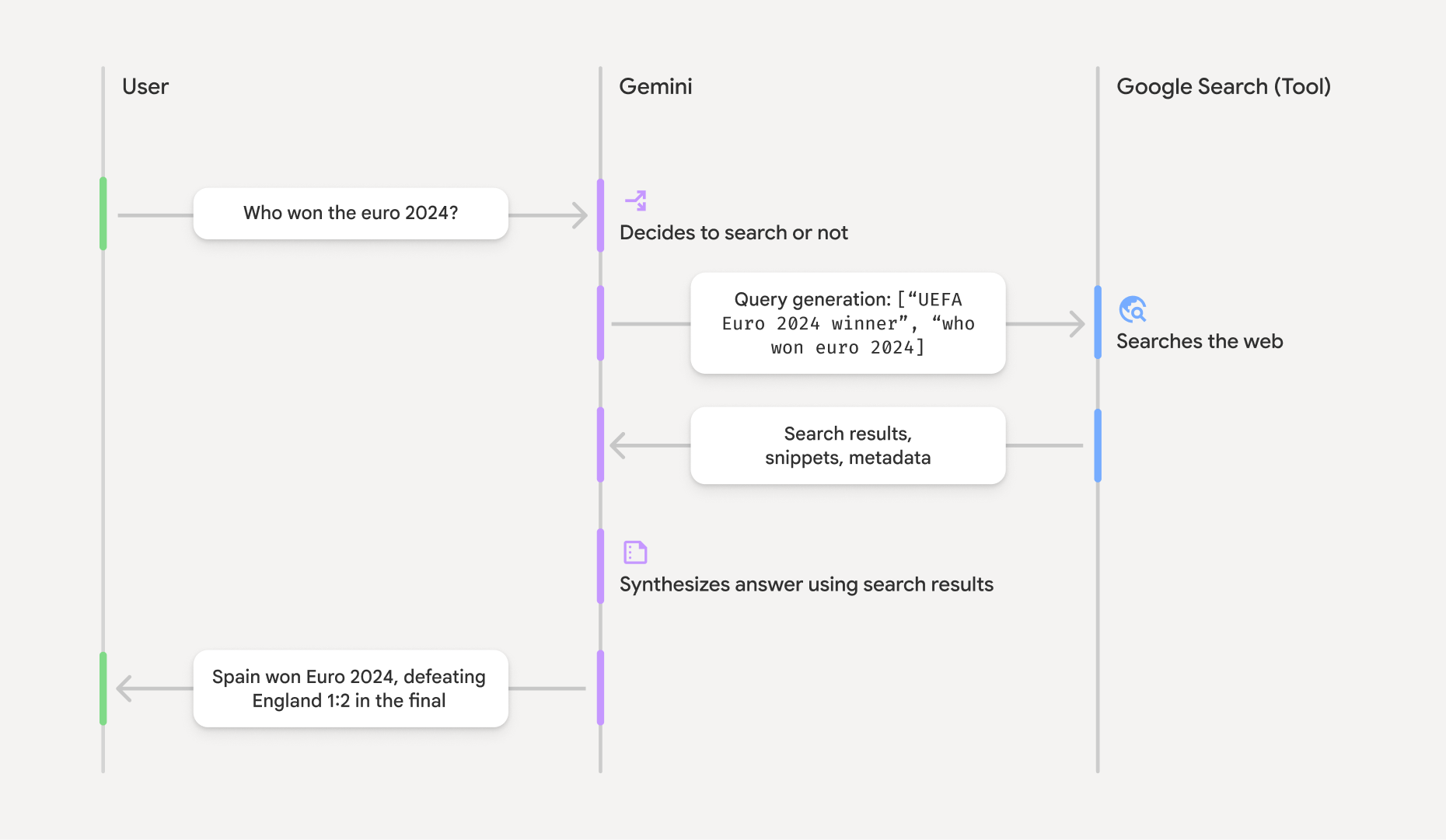
- Nutzerprompt:Ihre Anwendung sendet einen Nutzerprompt an die Gemini API, wobei das Tool
google_searchaktiviert ist. - Promptanalyse:Das Modell analysiert den Prompt und ermittelt, ob eine Google Suche die Antwort verbessern kann.
- Google Suche:Bei Bedarf generiert das Modell automatisch eine oder mehrere Suchanfragen und führt sie aus.
- Verarbeitung der Suchergebnisse:Das Modell verarbeitet die Suchergebnisse, fasst die Informationen zusammen und formuliert eine Antwort.
- Fundierte Antwort:Die API gibt eine endgültige, nutzerfreundliche Antwort zurück, die auf den Suchergebnissen basiert. Diese Antwort enthält die Textantwort des Modells mit Inline-
annotations, die die Zitate enthalten, sowie die Schrittegoogle_search_callundgoogle_search_resultmit den Suchanfragen und Suchvorschlägen.
Die Fundierungsantwort verstehen
Wenn eine Antwort erfolgreich fundiert wurde, enthält die Textausgabe des Modells Inline-annotations direkt im Textinhaltsblock. Diese Anmerkungen enthalten Zitationsinformationen, die Teile der Antwort mit ihren Quellen verknüpfen.
{
  "steps": [
    {
      "type": "thought",
      "summary": [
        {
          "type": "text",
          "text": "The user is asking for the winner of Euro 2024. I need to search for the result of the Euro 2024 final."
        }
      ],
      "signature": "CoMDAXLI2nynRYojJIy6B1Jh9os2crpWLfB0..."
    },
    {
      "type": "google_search_call",
      "arguments": {
        "queries": ["UEFA Euro 2024 winner"]
      }
    },
    {
      "type": "google_search_result",
      "call_id": "search_001",
      "result": [
        {
          "search_suggestions": "<!-- HTML and CSS for the search widget -->"
        }
      ]
    },
    {
      "type": "model_output",
      "content": [
        {
          "type": "text",
          "text": "Spain won Euro 2024, defeating England 2-1 in the final. This victory marks Spain's record fourth European Championship title.",
          "annotations": [
            {
              "type": "url_citation",
              "url": "https://www.aljazeera.com/sports/euro-2024-final",
              "title": "aljazeera.com",
              "start_index": 0,
              "end_index": 56
            },
            {
              "type": "url_citation",
              "url": "https://www.uefa.com/euro2024/news/spain-wins-euro-2024",
              "title": "uefa.com",
              "start_index": 57,
              "end_index": 124
            }
          ]
        }
      ]
    }
  ]
}
Die wichtigsten Felder in der Antwort:
google_search_call: Enthält diequeries, die das Modell ausgeführt hat.google_search_result: Enthältsearch_suggestions, ein HTML-Snippet zum Rendern von Suchvorschlägen in Ihrer UI. Die vollständigen Nutzungsanforderungen sind in den Nutzungsbedingungen aufgeführt.textmitannotations: Die zusammengefasste Antwort des Modells mit Inline-Zitaten. Jedeurl_citation-Anmerkung verknüpft ein Textsegment (definiert durchstart_indexundend_index) mit einer Quell-URL. So lassen sich Inline-Zitate erstellen.
Die Fundierung mit der Google Suche kann auch in Kombination mit dem URL Kontext-Tool verwendet werden, um Antworten sowohl auf öffentlichen Webdaten als auch auf den von Ihnen angegebenen URLs zu fundieren.
Quellen mit Inline-Zitaten angeben
Die API gibt Inline-url_citation-Anmerkungen im Textinhaltsblock zurück, sodass Sie vollständig steuern können, wie Quellen in Ihrer Benutzeroberfläche angezeigt werden.
Jede Anmerkung enthält start_index und end_index, um anzugeben, auf welchen Teil des Texts sie sich bezieht. So können Sie sie extrahieren und anzeigen.
Python
for step in interaction.steps:
    if step.type == "model_output":
        for content_block in step.content:
            if content_block.type == "text":
                print(content_block.text)
                if content_block.annotations:
                    print("\nCitations:")
                    for annotation in content_block.annotations:
                        if annotation.type == "url_citation":
                            cited_text = content_block.text[annotation.start_index:annotation.end_index]
                            print(f"  [{annotation.title}]({annotation.url})")
                            print(f"    Cited text: \"{cited_text}\"")
JavaScript
for (const step of interaction.steps) {
  if (step.type === 'model_output') {
    for (const contentBlock of step.content) {
      if (contentBlock.type === 'text') {
        console.log(contentBlock.text);
        if (contentBlock.annotations) {
          console.log("\nCitations:");
          for (const annotation of contentBlock.annotations) {
            if (annotation.type === 'url_citation') {
              const citedText = contentBlock.text.slice(annotation.startIndex, annotation.endIndex);
              console.log(`  [${annotation.title}](${annotation.url})`);
              console.log(`    Cited text: "${citedText}"`);
            }
          }
        }
      }
    }
  }
}
Java
import com.google.genai.Client;
import com.google.genai.gaos.models.interactions.Annotation;
import com.google.genai.gaos.models.interactions.Content;
import com.google.genai.gaos.models.interactions.CreateModelInteraction;
import com.google.genai.gaos.models.interactions.GoogleSearch;
import com.google.genai.gaos.models.interactions.Interaction;
import com.google.genai.gaos.models.interactions.InteractionsInput;
import com.google.genai.gaos.models.interactions.Model;
import com.google.genai.gaos.models.interactions.ModelOutputStep;
import com.google.genai.gaos.models.interactions.Step;
import com.google.genai.gaos.models.interactions.TextContent;
import com.google.genai.gaos.models.interactions.URLCitation;
import com.google.genai.gaos.models.operations.CreateInteractionRequestBody;
import java.util.Arrays;

Client client = new Client();

CreateModelInteraction params =
    CreateModelInteraction.builder()
        .model(Model.of("gemini-3.8-flash"))
        .input(InteractionsInput.of("Who won the euro 2024?"))
        .tools(Arrays.asList(GoogleSearch.builder().build()))
        .build();

Interaction interaction =
    client.interactions.create(CreateInteractionRequestBody.of(params)).interaction().get();

if (interaction.steps().isPresent()) {
  for (Step step : interaction.steps().get()) {
    if (step instanceof ModelOutputStep) {
      ModelOutputStep outputStep = (ModelOutputStep) step;
      if (outputStep.content().isPresent()) {
        for (Content contentBlock : outputStep.content().get()) {
          if (contentBlock instanceof TextContent) {
            TextContent textContent = (TextContent) contentBlock;
            String text = textContent.text().orElse("");
            System.out.println(text);
            if (textContent.annotations().isPresent()
                && !textContent.annotations().get().isEmpty()) {
              System.out.println("\nCitations:");
              for (Annotation annotation : textContent.annotations().get()) {
                if (annotation instanceof URLCitation) {
                  URLCitation citation = (URLCitation) annotation;
                  int start = citation.startIndex().orElse(0);
                  int end = citation.endIndex().orElse(0);
                  String citedText =
                      (start >= 0 && end <= text.length() && start <= end)
                          ? text.substring(start, end)
                          : "";
                  System.out.printf(
                      "  [%s](%s)%n", citation.title().orElse(""), citation.url().orElse(""));
                  System.out.printf("    Cited text: \"%s\"%n", citedText);
                }
              }
            }
          }
        }
      }
    }
  }
}
Go
package main

import (
    "context"
    "fmt"
    "log"

    "google.golang.org/genai"
    "google.golang.org/genai/interactions/models/interactions"
    "google.golang.org/genai/interactions/models/operations"
)

func main() {
    ctx := context.Background()
    client, err := genai.NewClient(ctx, nil)
    if err != nil {
        log.Fatal(err)
    }

    resp, err := client.Interactions.Create(ctx, operations.CreateInteractionRequest{
        Body: operations.NewCreateInteractionRequestBody(
            interactions.CreateModelInteraction{
                Model: interactions.Model("gemini-3.8-flash"),
                Input: interactions.NewInteractionsInput("Who won the euro 2024?"),
                Tools: []interactions.Tool{
                    interactions.NewTool(interactions.GoogleSearch{}),
                },
            },
        ),
    })
    if err != nil {
        log.Fatal(err)
    }

    for _, step := range resp.Interaction.Steps {
        if step.ModelOutputStep != nil {
            for _, content := range step.ModelOutputStep.Content {
                if content.TextContent != nil {
                    text := content.TextContent.Text
                    fmt.Println(text)
                    if len(content.TextContent.Annotations) > 0 {
                        fmt.Println("\nCitations:")
                        for _, annotation := range content.TextContent.Annotations {
                            if annotation.URLCitation != nil {
                                c := annotation.URLCitation
                                start := 0
                                if c.StartIndex != nil {
                                    start = *c.StartIndex
                                }
                                end := 0
                                if c.EndIndex != nil {
                                    end = *c.EndIndex
                                }
                                citedText := ""
                                if start >= 0 && end <= len(text) && start <= end {
                                    citedText = text[start:end]
                                }
                                title := ""
                                if c.Title != nil {
                                    title = *c.Title
                                }
                                url := ""
                                if c.URL != nil {
                                    url = *c.URL
                                }
                                fmt.Printf("  [%s](%s)\n", title, url)
                                fmt.Printf("    Cited text: %q\n", citedText)
                            }
                        }
                    }
                }
            }
        }
    }
}
In der Ausgabe wird der Text gefolgt von den Zitaten angezeigt:
Spain won Euro 2024, defeating England 2-1 in the final. This victory marks Spain's record fourth European Championship title.

Citations:
  [aljazeera.com](https://www.aljazeera.com/sports/euro-2024-final)
    Cited text: "Spain won Euro 2024, defeating England 2-1 in the final."
  [uefa.com](https://www.uefa.com/euro2024/news/spain-wins-euro-2024)
    Cited text: "This victory marks Spain's record fourth European Championship title."
Preise
Wenn Sie die Fundierung mit der Google Suche mit Gemini 3 und neueren Modellen verwenden, wird Ihrem Projekt jede Suchanfrage in Rechnung gestellt, die das Modell ausführt. Dieses Abrechnungsmodell pro Anfrage umfasst 5.000 kostenlose Suchanfragen pro Monat, die auf alle Gemini 3-Modelle und neueren Modelle verteilt sind. Danach kostet es 14 $ pro 1.000 Suchanfragen.
Wenn das Modell beispielsweise mehrere Suchanfragen ausführt, um
einen einzelnen Prompt zu beantworten (z.B. Suche nach "UEFA Euro 2024 winner" und "Spain vs
England Euro 2024 final score" im selben API-Aufruf), gilt dies als zwei
kostenpflichtige Nutzungen des Tools für diese Anfrage. Für Abrechnungszwecke werden leere Websuchanfragen bei der Zählung eindeutiger Anfragen ignoriert.
Wenn Sie die Fundierung mit der Google Suche mit Gemini 2.5 oder älteren Modellen verwenden, wird Ihrem Projekt pro Prompt in Rechnung gestellt.
Ausführliche Preisinformationen finden Sie auf der Seite Gemini API-Preise page.
Unterstützte Modelle
Eine vollständige Übersicht der Funktionen finden Sie auf der Seite Modell übersicht.
| Modell | Fundierung mit der Google Suche |
|---|---|
| Gemini 4 Argon | ✔️ |
| Gemini 3.8 Flash | ✔️ |
| Gemini 3.6 Flash | ✔️ |
| Gemini 3.5 Flash-Lite | ✔️ |
| Gemini 3.1 Flash Image (Vorabversion) | ✔️ |
| Gemini 3.1 Pro (Vorabversion) | ✔️ |
| Gemini 3 Pro Image (Vorabversion) | ✔️ |
| Gemini 3 Flash (Vorabversion) | ✔️ |
| Gemini 2.5 Pro | ✔️ |
| Gemini 2.5 Flash | ✔️ |
| Gemini 2.5 Flash-Lite | ✔️ |
| Gemini 2.0 Flash | ✔️ |
Unterstützte Toolkombinationen
Sie können die Fundierung mit der Google Suche mit anderen Tools wie der Codeausführung, dem URL-Kontext und der Fundierung mit Google Maps (unterstützt in Gemini 3.5 Flash-Lite und neueren Modellen) kombinieren, um komplexere Anwendungsfälle zu ermöglichen. Gemini 3-Modelle unterstützen auch die Kombination dieser integrierten Tools mit benutzerdefinierten Tools (Funktionsaufrufe). Weitere Informationen finden Sie auf der Seite Toolkombinationen.
Nächste Schritte
- Weitere Informationen zu anderen verfügbaren Tools wie Funktionsaufrufen
- Informationen zum Erweitern von Prompts mit bestimmten URLs mithilfe des Tools für den URL-Kontext