

تتيح ميزة "تحديد المصدر من خلال بحث Search" ربط نموذج Gemini بمحتوى الويب في الوقت الفعلي، وهي تعمل بجميع اللغات المتاحة. يتيح ذلك لـ Gemini تقديم إجابات أكثر دقة والإشارة إلى مصادر يمكن التحقّق منها بعد تاريخ آخر تحديث للبيانات.
تساعدك ميزة "الاستناد إلى مصادر" في إنشاء تطبيقات يمكنها إجراء ما يلي:
- زيادة الدقة الواقعية: يمكنك تقليل حالات الهلوسة في النموذج من خلال الاستناد إلى معلومات واقعية عند تقديم الردود.
- الوصول إلى معلومات في الوقت الفعلي: يمكنك الحصول على إجابات عن أسئلة حول الأحداث والمواضيع الحديثة.
تضمين اقتباسات: يمكنك بناء ثقة المستخدمين من خلال عرض مصادر المعلومات التي تقدّمها النماذج.
Python
from google import genai

client = genai.Client()

interaction = client.interactions.create(
    model="gemini-3.8-flash",
    input="Who won the euro 2024?",
    tools=[{"type": "google_search"}]
)

print(interaction.output_text)
JavaScript
import { GoogleGenAI } from "@google/genai";

const client = new GoogleGenAI({});

const interaction = await client.interactions.create({
    model: "gemini-3.8-flash",
    input: "Who won the euro 2024?",
    tools: [{ type: "google_search" }]
});

console.log(interaction.output_text);
جافا
import com.google.genai.Client;
import com.google.genai.gaos.models.interactions.CreateModelInteraction;
import com.google.genai.gaos.models.interactions.GoogleSearch;
import com.google.genai.gaos.models.interactions.Interaction;
import com.google.genai.gaos.models.interactions.InteractionsInput;
import com.google.genai.gaos.models.interactions.Model;
import com.google.genai.gaos.models.operations.CreateInteractionRequestBody;
import java.util.Arrays;

Client client = new Client();

CreateModelInteraction params =
    CreateModelInteraction.builder()
        .model(Model.of("gemini-3.8-flash"))
        .input(InteractionsInput.of("Who won the euro 2024?"))
        .tools(Arrays.asList(GoogleSearch.builder().build()))
        .build();

Interaction interaction =
    client.interactions.create(CreateInteractionRequestBody.of(params)).interaction().get();

System.out.println(interaction.outputText().orElse(""));
Go
package main

import (
    "context"
    "fmt"
    "log"

    "google.golang.org/genai"
    "google.golang.org/genai/interactions/models/interactions"
    "google.golang.org/genai/interactions/models/operations"
)

func main() {
    ctx := context.Background()
    client, err := genai.NewClient(ctx, nil)
    if err != nil {
        log.Fatal(err)
    }

    resp, err := client.Interactions.Create(ctx, operations.CreateInteractionRequest{
        Body: operations.NewCreateInteractionRequestBody(
            interactions.CreateModelInteraction{
                Model: interactions.Model("gemini-3.8-flash"),
                Input: interactions.NewInteractionsInput("Who won the euro 2024?"),
                Tools: []interactions.Tool{
                    interactions.NewTool(interactions.GoogleSearch{}),
                },
            },
        ),
    })
    if err != nil {
        log.Fatal(err)
    }

    fmt.Println(resp.Interaction.GetOutputText())
}
REST
curl -X POST "https://generativelanguage.googleapis.com/v1beta/interactions" \
  -H "x-goog-api-key: $GEMINI_API_KEY" \
  -H "Content-Type: application/json" \
  -d '{
    "model": "gemini-3.8-flash",
    "input": "Who won the euro 2024?",
    "tools": [{"type": "google_search"}]
  }'
طريقة عمل ميزة "تحديد المصدر من خلال بحث Google"
عند تفعيل أداة google_search، يتولّى النموذج سير العمل الكامل
للبحث عن المعلومات ومعالجتها والاقتباس منها تلقائيًا.
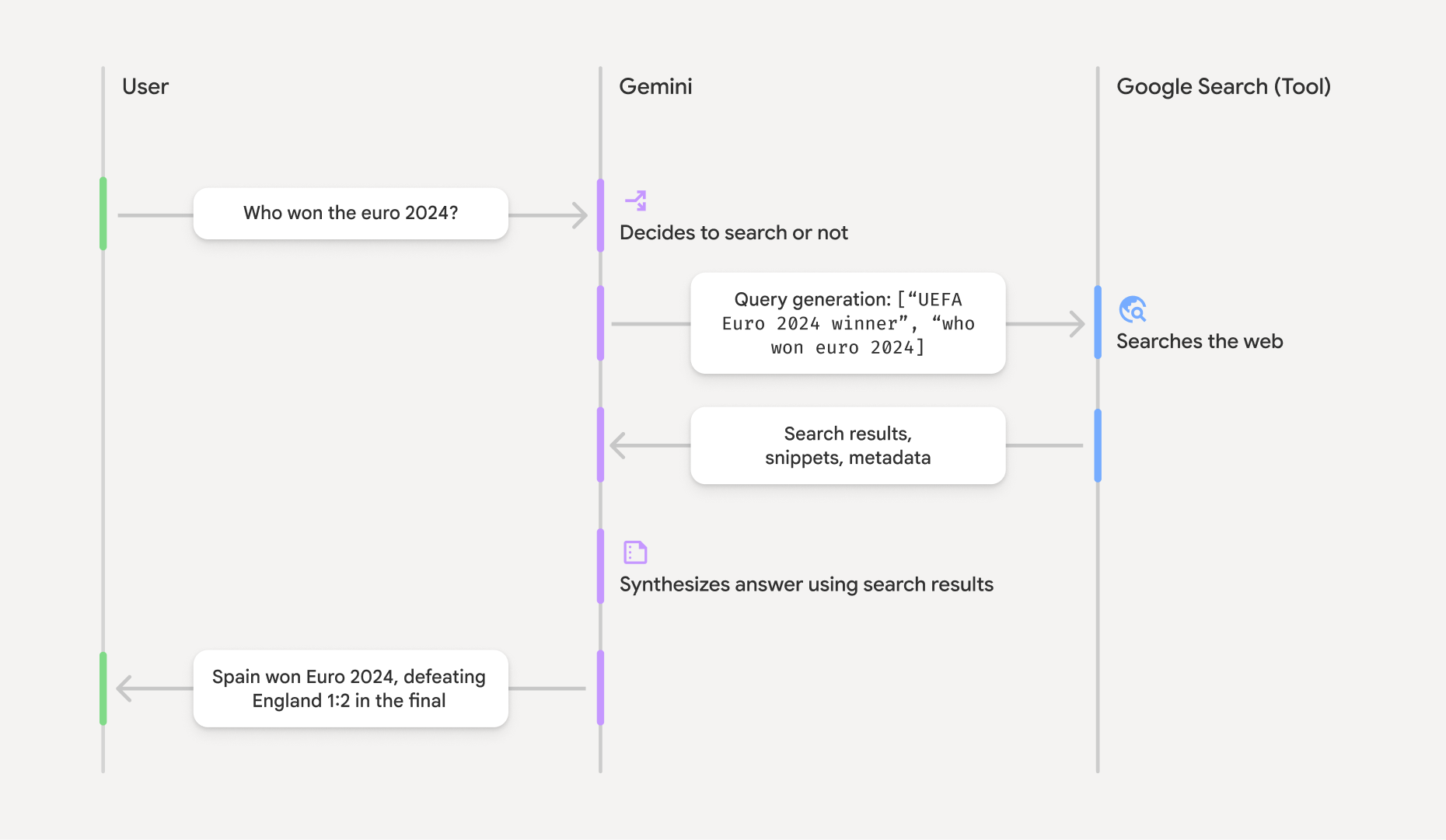
- طلب المستخدم: يرسل تطبيقك طلب المستخدم إلى Gemini API مع تفعيل الأداة
google_search. - تحليل الطلب: يحلّل النموذج الطلب ويحدّد ما إذا كان بإمكان "بحث Google" تحسين الإجابة.
- بحث Google: إذا لزم الأمر، ينشئ النموذج تلقائيًا طلب بحث واحدًا أو أكثر وينفّذها.
- معالجة نتائج البحث: يعالج النموذج نتائج البحث، ويجمع المعلومات، ويصوغ ردًا.
- الردّ المستند إلى معلومات موثوقة: تعرض واجهة برمجة التطبيقات ردًا نهائيًا سهل الاستخدام يستند إلى نتائج البحث. تتضمّن هذه الاستجابة الإجابة النصية التي قدّمها النموذج مع
annotationsمضمّنة تحتوي على الاقتباسات، بالإضافة إلى الخطوتَينgoogle_search_callوgoogle_search_resultاللتين تتضمّنان طلبات البحث واقتراحات البحث.
فهم الردّ المستند إلى معلومات خارجية
عندما يتم استناد الردّ إلى معلومات خارجية بنجاح، يتضمّن الناتج النصي للنموذج annotations مضمّنًا مباشرةً في كتلة المحتوى النصي. توفّر هذه التعليقات التوضيحية معلومات الاقتباس التي تربط أجزاء الرد بمصادرها.
{
  "steps": [
    {
      "type": "thought",
      "summary": [
        {
          "type": "text",
          "text": "The user is asking for the winner of Euro 2024. I need to search for the result of the Euro 2024 final."
        }
      ],
      "signature": "CoMDAXLI2nynRYojJIy6B1Jh9os2crpWLfB0..."
    },
    {
      "type": "google_search_call",
      "arguments": {
        "queries": ["UEFA Euro 2024 winner"]
      }
    },
    {
      "type": "google_search_result",
      "call_id": "search_001",
      "result": [
        {
          "search_suggestions": "<!-- HTML and CSS for the search widget -->"
        }
      ]
    },
    {
      "type": "model_output",
      "content": [
        {
          "type": "text",
          "text": "Spain won Euro 2024, defeating England 2-1 in the final. This victory marks Spain's record fourth European Championship title.",
          "annotations": [
            {
              "type": "url_citation",
              "url": "https://www.aljazeera.com/sports/euro-2024-final",
              "title": "aljazeera.com",
              "start_index": 0,
              "end_index": 56
            },
            {
              "type": "url_citation",
              "url": "https://www.uefa.com/euro2024/news/spain-wins-euro-2024",
              "title": "uefa.com",
              "start_index": 57,
              "end_index": 124
            }
          ]
        }
      ]
    }
  ]
}
الحقول الرئيسية في الردّ:
-
google_search_call: يحتوي على طلب البحثqueriesالذي نفّذه النموذج. -
google_search_result: يحتوي علىsearch_suggestions، وهو مقتطف HTML لعرض اقتراحات البحث في واجهة المستخدم. يمكنك الاطّلاع على متطلبات الاستخدام الكاملة في بنود الخدمة. textمعannotations: الإجابة التي تم إنشاؤها من قِبل النموذج مع اقتباسات مضمّنة يربط كل تعليق توضيحي من النوعurl_citationجزءًا من النص (محدّدًا بواسطةstart_indexوend_index) بعنوان URL للمصدر. هذا هو المفتاح لإنشاء اقتباسات مضمّنة.
يمكن أيضًا استخدام ميزة تحديد المصدر من خلال "بحث Search" مع أداة سياق عناوين URL لتحديد المصدر من كلّ من البيانات العلنية على الويب وعناوين URL المحدّدة التي تقدّمها.
تحديد مصادر المحتوى من خلال اقتباسات مضمّنة
تعرض واجهة برمجة التطبيقات url_citation تعليقات توضيحية مضمّنة على كتلة المحتوى النصي،
ما يمنحك تحكّمًا كاملاً في طريقة عرض المصادر في واجهة المستخدم.
يتضمّن كل تعليق توضيحي start_index وend_index لتحديد الجزء الذي يشير إليه من النص. في ما يلي كيفية استخراجها وعرضها.
Python
for step in interaction.steps:
    if step.type == "model_output":
        for content_block in step.content:
            if content_block.type == "text":
                print(content_block.text)
                if content_block.annotations:
                    print("\nCitations:")
                    for annotation in content_block.annotations:
                        if annotation.type == "url_citation":
                            cited_text = content_block.text[annotation.start_index:annotation.end_index]
                            print(f"  [{annotation.title}]({annotation.url})")
                            print(f"    Cited text: \"{cited_text}\"")
JavaScript
for (const step of interaction.steps) {
  if (step.type === 'model_output') {
    for (const contentBlock of step.content) {
      if (contentBlock.type === 'text') {
        console.log(contentBlock.text);
        if (contentBlock.annotations) {
          console.log("\nCitations:");
          for (const annotation of contentBlock.annotations) {
            if (annotation.type === 'url_citation') {
              const citedText = contentBlock.text.slice(annotation.startIndex, annotation.endIndex);
              console.log(`  [${annotation.title}](${annotation.url})`);
              console.log(`    Cited text: "${citedText}"`);
            }
          }
        }
      }
    }
  }
}
جافا
import com.google.genai.Client;
import com.google.genai.gaos.models.interactions.Annotation;
import com.google.genai.gaos.models.interactions.Content;
import com.google.genai.gaos.models.interactions.CreateModelInteraction;
import com.google.genai.gaos.models.interactions.GoogleSearch;
import com.google.genai.gaos.models.interactions.Interaction;
import com.google.genai.gaos.models.interactions.InteractionsInput;
import com.google.genai.gaos.models.interactions.Model;
import com.google.genai.gaos.models.interactions.ModelOutputStep;
import com.google.genai.gaos.models.interactions.Step;
import com.google.genai.gaos.models.interactions.TextContent;
import com.google.genai.gaos.models.interactions.URLCitation;
import com.google.genai.gaos.models.operations.CreateInteractionRequestBody;
import java.util.Arrays;

Client client = new Client();

CreateModelInteraction params =
    CreateModelInteraction.builder()
        .model(Model.of("gemini-3.8-flash"))
        .input(InteractionsInput.of("Who won the euro 2024?"))
        .tools(Arrays.asList(GoogleSearch.builder().build()))
        .build();

Interaction interaction =
    client.interactions.create(CreateInteractionRequestBody.of(params)).interaction().get();

if (interaction.steps().isPresent()) {
  for (Step step : interaction.steps().get()) {
    if (step instanceof ModelOutputStep) {
      ModelOutputStep outputStep = (ModelOutputStep) step;
      if (outputStep.content().isPresent()) {
        for (Content contentBlock : outputStep.content().get()) {
          if (contentBlock instanceof TextContent) {
            TextContent textContent = (TextContent) contentBlock;
            String text = textContent.text().orElse("");
            System.out.println(text);
            if (textContent.annotations().isPresent()
                && !textContent.annotations().get().isEmpty()) {
              System.out.println("\nCitations:");
              for (Annotation annotation : textContent.annotations().get()) {
                if (annotation instanceof URLCitation) {
                  URLCitation citation = (URLCitation) annotation;
                  int start = citation.startIndex().orElse(0);
                  int end = citation.endIndex().orElse(0);
                  String citedText =
                      (start >= 0 && end <= text.length() && start <= end)
                          ? text.substring(start, end)
                          : "";
                  System.out.printf(
                      "  [%s](%s)%n", citation.title().orElse(""), citation.url().orElse(""));
                  System.out.printf("    Cited text: \"%s\"%n", citedText);
                }
              }
            }
          }
        }
      }
    }
  }
}
Go
package main

import (
    "context"
    "fmt"
    "log"

    "google.golang.org/genai"
    "google.golang.org/genai/interactions/models/interactions"
    "google.golang.org/genai/interactions/models/operations"
)

func main() {
    ctx := context.Background()
    client, err := genai.NewClient(ctx, nil)
    if err != nil {
        log.Fatal(err)
    }

    resp, err := client.Interactions.Create(ctx, operations.CreateInteractionRequest{
        Body: operations.NewCreateInteractionRequestBody(
            interactions.CreateModelInteraction{
                Model: interactions.Model("gemini-3.8-flash"),
                Input: interactions.NewInteractionsInput("Who won the euro 2024?"),
                Tools: []interactions.Tool{
                    interactions.NewTool(interactions.GoogleSearch{}),
                },
            },
        ),
    })
    if err != nil {
        log.Fatal(err)
    }

    for _, step := range resp.Interaction.Steps {
        if step.ModelOutputStep != nil {
            for _, content := range step.ModelOutputStep.Content {
                if content.TextContent != nil {
                    text := content.TextContent.Text
                    fmt.Println(text)
                    if len(content.TextContent.Annotations) > 0 {
                        fmt.Println("\nCitations:")
                        for _, annotation := range content.TextContent.Annotations {
                            if annotation.URLCitation != nil {
                                c := annotation.URLCitation
                                start := 0
                                if c.StartIndex != nil {
                                    start = *c.StartIndex
                                }
                                end := 0
                                if c.EndIndex != nil {
                                    end = *c.EndIndex
                                }
                                citedText := ""
                                if start >= 0 && end <= len(text) && start <= end {
                                    citedText = text[start:end]
                                }
                                title := ""
                                if c.Title != nil {
                                    title = *c.Title
                                }
                                url := ""
                                if c.URL != nil {
                                    url = *c.URL
                                }
                                fmt.Printf("  [%s](%s)\n", title, url)
                                fmt.Printf("    Cited text: %q\n", citedText)
                            }
                        }
                    }
                }
            }
        }
    }
}
ستعرض النتيجة النص متبوعًا بالاقتباسات:
Spain won Euro 2024, defeating England 2-1 in the final. This victory marks Spain's record fourth European Championship title.

Citations:
  [aljazeera.com](https://www.aljazeera.com/sports/euro-2024-final)
    Cited text: "Spain won Euro 2024, defeating England 2-1 in the final."
  [uefa.com](https://www.uefa.com/euro2024/news/spain-wins-euro-2024)
    Cited text: "This victory marks Spain's record fourth European Championship title."
الأسعار
عند استخدام ميزة "الاستناد إلى مصادر" مع "بحث Google" باستخدام Gemini 3، يتم تحصيل رسوم من مشروعك مقابل كل طلب بحث يقرّر النموذج تنفيذه. إذا قرر النموذج تنفيذ طلبات بحث متعددة للإجابة عن طلب واحد (على سبيل المثال، البحث عن "UEFA Euro 2024 winner" و"Spain vs England Euro 2024 final
score" ضمن طلب واحد من واجهة برمجة التطبيقات)، سيتم احتساب ذلك كاستخدامَين قابلَين للفوترة للأداة لهذا الطلب. لأغراض الفوترة، نتجاهل طلبات البحث الفارغة على الويب عند احتساب طلبات البحث الفريدة. لا ينطبق نموذج الفوترة هذا إلا على نماذج Gemini 3، وعند استخدام ميزة "الاستناد إلى البحث" مع Gemini 2.5 أو النماذج الأقدم، تتم فوترة مشروعك لكل طلب.
للحصول على معلومات تفصيلية حول الأسعار، يُرجى الاطّلاع على صفحة أسعار Gemini API.
النماذج المتوافقة
يمكنك الاطّلاع على الإمكانات الكاملة في صفحة النظرة العامة على الطراز.
| الطراز | تحديد المصدر من خلال "بحث Search" |
|---|---|
| Gemini 3.8 Flash | ✔️ |
| Gemini 3.7 Flash | ✔️ |
| Gemini 3.6 Flash | ✔️ |
| Gemini 3.5 Flash-Lite | ✔️ |
| Gemini 3.5 Flash | ✔️ |
| معاينة Gemini 3.1 Flash Image | ✔️ |
| معاينة Gemini 3.1 Pro | ✔️ |
| معاينة الصور في Gemini 3 Pro | ✔️ |
| معاينة Gemini 3 Flash | ✔️ |
| Gemini 2.5 Pro | ✔️ |
| Gemini 2.5 Flash | ✔️ |
| Gemini 2.5 Flash-Lite | ✔️ |
| Gemini 2.0 Flash | ✔️ |
مجموعات الأدوات المتوافقة
يمكنك استخدام ميزة "الاستناد إلى معلومات من بحث Google" مع أدوات أخرى، مثل تنفيذ الرمز البرمجي وسياق عنوان URL والاستناد إلى معلومات من "خرائط Google" (متاحة على Gemini 3.5 Flash والإصدارات الأحدث) لتنفيذ حالات استخدام أكثر تعقيدًا. تتيح نماذج Gemini 3 أيضًا إمكانية الجمع بين هذه الأدوات المضمّنة والأدوات المخصّصة (طلب تنفيذ وظيفة). يمكنك الاطّلاع على مزيد من المعلومات في صفحة مجموعات الأدوات.
الخطوات التالية
- يمكنك التعرّف على الأدوات الأخرى المتاحة، مثل استدعاء الدوال.
- تعرَّف على كيفية تحسين الطلبات باستخدام عناوين URL محدّدة من خلال أداة سياق عنوان URL.