

העיגון באמצעות חיפוש Google מחבר את מודל Gemini לתוכן מהאינטרנט שמתעדכן בזמן אמת, ועובד בכל השפות הזמינות. כך Gemini יכול לתת תשובות מדויקות יותר ולצטט מקורות ניתנים לאימות, מעבר לתאריך סף הידע שלו.
ההארקה עוזרת לכם ליצור אפליקציות שיכולות:
- לשפר את הדיוק העובדתי: להפחית את ההזיות של המודל על ידי ביסוס התשובות על מידע מהעולם האמיתי.
- לגשת למידע בזמן אמת: לענות על שאלות לגבי אירועים ונושאים שקרו לאחרונה.
ציטוט מקורות: כדי לבנות את אמון המשתמשים, כדאי להציג את המקורות של הטענות שהמודל מציג.
Python
from google import genai

client = genai.Client()

interaction = client.interactions.create(
    model="gemini-3.8-flash",
    input="Who won the euro 2024?",
    tools=[{"type": "google_search"}]
)

print(interaction.output_text)
JavaScript
import { GoogleGenAI } from "@google/genai";

const client = new GoogleGenAI({});

const interaction = await client.interactions.create({
    model: "gemini-3.8-flash",
    input: "Who won the euro 2024?",
    tools: [{ type: "google_search" }]
});

console.log(interaction.output_text);
Java
import com.google.genai.Client;
import com.google.genai.gaos.models.interactions.CreateModelInteraction;
import com.google.genai.gaos.models.interactions.GoogleSearch;
import com.google.genai.gaos.models.interactions.Interaction;
import com.google.genai.gaos.models.interactions.InteractionsInput;
import com.google.genai.gaos.models.interactions.Model;
import com.google.genai.gaos.models.operations.CreateInteractionRequestBody;
import java.util.Arrays;

Client client = new Client();

CreateModelInteraction params =
    CreateModelInteraction.builder()
        .model(Model.of("gemini-3.8-flash"))
        .input(InteractionsInput.of("Who won the euro 2024?"))
        .tools(Arrays.asList(GoogleSearch.builder().build()))
        .build();

Interaction interaction =
    client.interactions.create(CreateInteractionRequestBody.of(params)).interaction().get();

System.out.println(interaction.outputText().orElse(""));
Go
package main

import (
    "context"
    "fmt"
    "log"

    "google.golang.org/genai"
    "google.golang.org/genai/interactions/models/interactions"
    "google.golang.org/genai/interactions/models/operations"
)

func main() {
    ctx := context.Background()
    client, err := genai.NewClient(ctx, nil)
    if err != nil {
        log.Fatal(err)
    }

    resp, err := client.Interactions.Create(ctx, operations.CreateInteractionRequest{
        Body: operations.NewCreateInteractionRequestBody(
            interactions.CreateModelInteraction{
                Model: interactions.Model("gemini-3.8-flash"),
                Input: interactions.NewInteractionsInput("Who won the euro 2024?"),
                Tools: []interactions.Tool{
                    interactions.NewTool(interactions.GoogleSearch{}),
                },
            },
        ),
    })
    if err != nil {
        log.Fatal(err)
    }

    fmt.Println(resp.Interaction.GetOutputText())
}
REST
curl -X POST "https://generativelanguage.googleapis.com/v1beta/interactions" \
  -H "x-goog-api-key: $GEMINI_API_KEY" \
  -H "Content-Type: application/json" \
  -d '{
    "model": "gemini-3.8-flash",
    "input": "Who won the euro 2024?",
    "tools": [{"type": "google_search"}]
  }'
איך עיגון באמצעות חיפוש Google פועל
כשמפעילים את הכלי google_search, המודל מטפל בכל תהליך העבודה של חיפוש, עיבוד וציטוט מידע באופן אוטומטי.
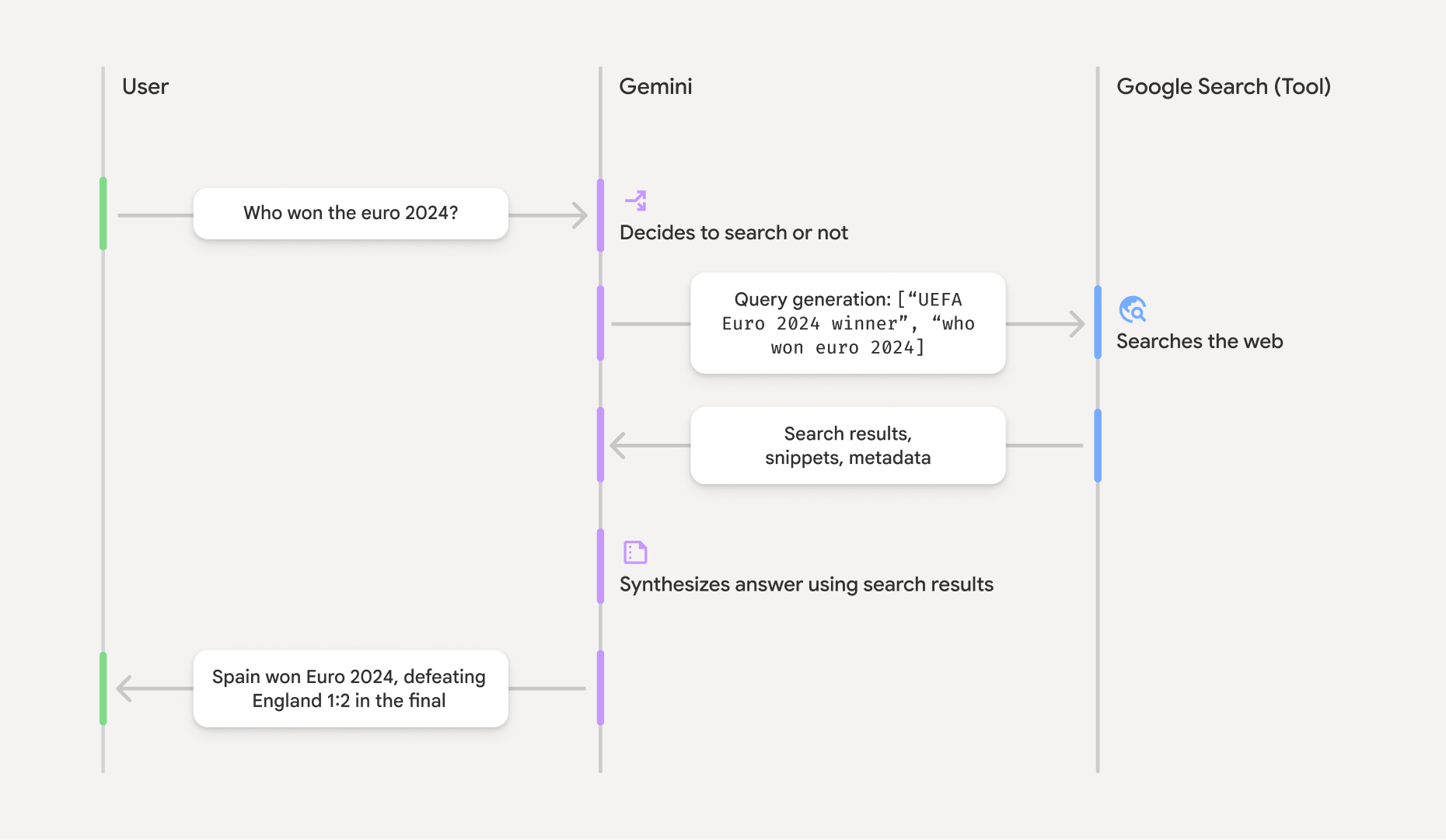
- הנחיית משתמש: האפליקציה שולחת הנחיית משתמש ל-Gemini API עם הכלי
google_searchמופעל. - ניתוח ההנחיה: המודל מנתח את ההנחיה וקובע אם חיפוש ב-Google יכול לשפר את התשובה.
- חיפוש Google: אם צריך, המודל יוצר באופן אוטומטי שאילתת חיפוש אחת או יותר ומריץ אותן.
- עיבוד תוצאות החיפוש: המודל מעבד את תוצאות החיפוש, מסנתז את המידע ומנסח תשובה.
- תשובה מבוססת: ה-API מחזיר תשובה סופית וידידותית למשתמש שמבוססת על תוצאות החיפוש. התשובה הזו כוללת את התשובה הטקסטואלית של המודל עם
annotationsמוטבעות שמכילות את הציטוטים, וגם את השלביםgoogle_search_callו-google_search_resultעם שאילתות החיפוש וההצעות לחיפוש.
הסבר על תשובת העיגון
כשמקרקעים תשובה בהצלחה, פלט הטקסט של המודל כולל annotations מוטבע ישירות בבלוק של תוכן הטקסט. ההערות האלה מספקות מידע על הציטוטים ומקשרות בין חלקים בתשובה לבין המקורות שלהם.
{
  "steps": [
    {
      "type": "thought",
      "summary": [
        {
          "type": "text",
          "text": "The user is asking for the winner of Euro 2024. I need to search for the result of the Euro 2024 final."
        }
      ],
      "signature": "CoMDAXLI2nynRYojJIy6B1Jh9os2crpWLfB0..."
    },
    {
      "type": "google_search_call",
      "arguments": {
        "queries": ["UEFA Euro 2024 winner"]
      }
    },
    {
      "type": "google_search_result",
      "call_id": "search_001",
      "result": [
        {
          "search_suggestions": "<!-- HTML and CSS for the search widget -->"
        }
      ]
    },
    {
      "type": "model_output",
      "content": [
        {
          "type": "text",
          "text": "Spain won Euro 2024, defeating England 2-1 in the final. This victory marks Spain's record fourth European Championship title.",
          "annotations": [
            {
              "type": "url_citation",
              "url": "https://www.aljazeera.com/sports/euro-2024-final",
              "title": "aljazeera.com",
              "start_index": 0,
              "end_index": 56
            },
            {
              "type": "url_citation",
              "url": "https://www.uefa.com/euro2024/news/spain-wins-euro-2024",
              "title": "uefa.com",
              "start_index": 57,
              "end_index": 124
            }
          ]
        }
      ]
    }
  ]
}
שדות המפתח בתגובה:
-
google_search_call: מכיל את החיפושqueriesשהמודל ביצע. -
google_search_result: מכילsearch_suggestions, קטע HTML להצגת הצעות לחיפוש בממשק המשתמש. דרישות השימוש המלאות מפורטות בתנאים ובהגבלות. -
textעםannotations: התשובה המסונתזת של המודל עם ציטוטים מוטבעים. כל הערה מסוגurl_citationמקשרת קטע טקסט (שמוגדר על ידיstart_indexו-end_index) לכתובת URL של מקור. זהו המפתח ליצירת ציטוטים מוטבעים.
אפשר גם להשתמש ב"עיגון באמצעות חיפוש Google" בשילוב עם הכלי URL Context כדי לעגן את התשובות גם בנתונים מהאינטרנט הציבורי וגם בכתובות ה-URL הספציפיות שאתם מספקים.
שיוך מקורות באמצעות ציטוטים מוטבעים
ה-API מחזיר הערות url_citation מוטבעות בבלוק התוכן של הטקסט, וכך נותן לכם שליטה מלאה על אופן הצגת המקורות בממשק המשתמש.
כל הערה כוללת את start_index ו-end_index כדי לזהות את החלק בטקסט שהיא מצטטת. כך מחלצים ומציגים אותם.
Python
for step in interaction.steps:
    if step.type == "model_output":
        for content_block in step.content:
            if content_block.type == "text":
                print(content_block.text)
                if content_block.annotations:
                    print("\nCitations:")
                    for annotation in content_block.annotations:
                        if annotation.type == "url_citation":
                            cited_text = content_block.text[annotation.start_index:annotation.end_index]
                            print(f"  [{annotation.title}]({annotation.url})")
                            print(f"    Cited text: \"{cited_text}\"")
JavaScript
for (const step of interaction.steps) {
  if (step.type === 'model_output') {
    for (const contentBlock of step.content) {
      if (contentBlock.type === 'text') {
        console.log(contentBlock.text);
        if (contentBlock.annotations) {
          console.log("\nCitations:");
          for (const annotation of contentBlock.annotations) {
            if (annotation.type === 'url_citation') {
              const citedText = contentBlock.text.slice(annotation.startIndex, annotation.endIndex);
              console.log(`  [${annotation.title}](${annotation.url})`);
              console.log(`    Cited text: "${citedText}"`);
            }
          }
        }
      }
    }
  }
}
Java
import com.google.genai.Client;
import com.google.genai.gaos.models.interactions.Annotation;
import com.google.genai.gaos.models.interactions.Content;
import com.google.genai.gaos.models.interactions.CreateModelInteraction;
import com.google.genai.gaos.models.interactions.GoogleSearch;
import com.google.genai.gaos.models.interactions.Interaction;
import com.google.genai.gaos.models.interactions.InteractionsInput;
import com.google.genai.gaos.models.interactions.Model;
import com.google.genai.gaos.models.interactions.ModelOutputStep;
import com.google.genai.gaos.models.interactions.Step;
import com.google.genai.gaos.models.interactions.TextContent;
import com.google.genai.gaos.models.interactions.URLCitation;
import com.google.genai.gaos.models.operations.CreateInteractionRequestBody;
import java.util.Arrays;

Client client = new Client();

CreateModelInteraction params =
    CreateModelInteraction.builder()
        .model(Model.of("gemini-3.8-flash"))
        .input(InteractionsInput.of("Who won the euro 2024?"))
        .tools(Arrays.asList(GoogleSearch.builder().build()))
        .build();

Interaction interaction =
    client.interactions.create(CreateInteractionRequestBody.of(params)).interaction().get();

if (interaction.steps().isPresent()) {
  for (Step step : interaction.steps().get()) {
    if (step instanceof ModelOutputStep) {
      ModelOutputStep outputStep = (ModelOutputStep) step;
      if (outputStep.content().isPresent()) {
        for (Content contentBlock : outputStep.content().get()) {
          if (contentBlock instanceof TextContent) {
            TextContent textContent = (TextContent) contentBlock;
            String text = textContent.text().orElse("");
            System.out.println(text);
            if (textContent.annotations().isPresent()
                && !textContent.annotations().get().isEmpty()) {
              System.out.println("\nCitations:");
              for (Annotation annotation : textContent.annotations().get()) {
                if (annotation instanceof URLCitation) {
                  URLCitation citation = (URLCitation) annotation;
                  int start = citation.startIndex().orElse(0);
                  int end = citation.endIndex().orElse(0);
                  String citedText =
                      (start >= 0 && end <= text.length() && start <= end)
                          ? text.substring(start, end)
                          : "";
                  System.out.printf(
                      "  [%s](%s)%n", citation.title().orElse(""), citation.url().orElse(""));
                  System.out.printf("    Cited text: \"%s\"%n", citedText);
                }
              }
            }
          }
        }
      }
    }
  }
}
Go
package main

import (
    "context"
    "fmt"
    "log"

    "google.golang.org/genai"
    "google.golang.org/genai/interactions/models/interactions"
    "google.golang.org/genai/interactions/models/operations"
)

func main() {
    ctx := context.Background()
    client, err := genai.NewClient(ctx, nil)
    if err != nil {
        log.Fatal(err)
    }

    resp, err := client.Interactions.Create(ctx, operations.CreateInteractionRequest{
        Body: operations.NewCreateInteractionRequestBody(
            interactions.CreateModelInteraction{
                Model: interactions.Model("gemini-3.8-flash"),
                Input: interactions.NewInteractionsInput("Who won the euro 2024?"),
                Tools: []interactions.Tool{
                    interactions.NewTool(interactions.GoogleSearch{}),
                },
            },
        ),
    })
    if err != nil {
        log.Fatal(err)
    }

    for _, step := range resp.Interaction.Steps {
        if step.ModelOutputStep != nil {
            for _, content := range step.ModelOutputStep.Content {
                if content.TextContent != nil {
                    text := content.TextContent.Text
                    fmt.Println(text)
                    if len(content.TextContent.Annotations) > 0 {
                        fmt.Println("\nCitations:")
                        for _, annotation := range content.TextContent.Annotations {
                            if annotation.URLCitation != nil {
                                c := annotation.URLCitation
                                start := 0
                                if c.StartIndex != nil {
                                    start = *c.StartIndex
                                }
                                end := 0
                                if c.EndIndex != nil {
                                    end = *c.EndIndex
                                }
                                citedText := ""
                                if start >= 0 && end <= len(text) && start <= end {
                                    citedText = text[start:end]
                                }
                                title := ""
                                if c.Title != nil {
                                    title = *c.Title
                                }
                                url := ""
                                if c.URL != nil {
                                    url = *c.URL
                                }
                                fmt.Printf("  [%s](%s)\n", title, url)
                                fmt.Printf("    Cited text: %q\n", citedText)
                            }
                        }
                    }
                }
            }
        }
    }
}
בפלט יופיע הטקסט ואחריו הציטוטים:
Spain won Euro 2024, defeating England 2-1 in the final. This victory marks Spain's record fourth European Championship title.

Citations:
  [aljazeera.com](https://www.aljazeera.com/sports/euro-2024-final)
    Cited text: "Spain won Euro 2024, defeating England 2-1 in the final."
  [uefa.com](https://www.uefa.com/euro2024/news/spain-wins-euro-2024)
    Cited text: "This victory marks Spain's record fourth European Championship title."
תמחור
כשאתם משתמשים ב"עיגון באמצעות חיפוש Google" עם Gemini 3 ומודלים חדשים יותר, הפרויקט שלכם מחויב על כל שאילתת חיפוש שהמודל מחליט להריץ. מודל התמחור הזה לפי שאילתה כולל 5,000 בקשות חיפוש בחינם בחודש, שמשותפות לכל המודלים של Gemini 3 ומעלה, ולאחר מכן העלות היא 14$לכל 1,000 בקשות חיפוש.
לדוגמה, אם המודל מחליט להריץ כמה שאילתות חיפוש כדי לענות על הנחיה אחת (למשל, חיפוש של "UEFA Euro 2024 winner" ו-"Spain vs
England Euro 2024 final score" באותה קריאה ל-API), זה נחשב כשני שימושים בכלי שניתן לחייב עליהם באותה בקשה. למטרות חיוב, אנחנו מתעלמים משאילתות ריקות של חיפוש באינטרנט כשאנחנו סופרים שאילתות ייחודיות.
כשמשתמשים בביסוס ב-Google Search עם Gemini 2.5 או מודלים ישנים יותר, הפרויקט מחויב לפי הנחיה.
למידע מפורט על התמחור, אפשר לעיין בדף התמחור של Gemini API.
מודלים נתמכים
אפשר למצוא את כל היכולות בדף סקירת המודל.
| מודל | עיגון באמצעות חיפוש Google |
|---|---|
| Gemini 4 Argon | ✔️ |
| Gemini 3.8 Flash | ✔️ |
| Gemini 3.6 Flash | ✔️ |
| Gemini 3.5 Flash-Lite | ✔️ |
| גרסת טרום-השקה (Preview) של Gemini 3.1 Flash Image | ✔️ |
| Gemini 3.1 Pro Preview | ✔️ |
| תצוגה מקדימה של תמונות ב-Gemini 3 Pro | ✔️ |
| Gemini 3 Flash Preview | ✔️ |
| Gemini 2.5 Pro | ✔️ |
| Gemini 2.5 Flash | ✔️ |
| Gemini 2.5 Flash-Lite | ✔️ |
| Gemini 2.0 Flash | ✔️ |
שילובים נתמכים של כלים
אתם יכולים להשתמש ב"עיגון באמצעות חיפוש Google" עם כלים אחרים כמו הפעלת קוד, URL Context ועיגון בעזרת מפות Google (נתמך ב-Gemini 3.5 Flash-Lite ובמודלים מתקדמים יותר) כדי לתת מענה לתרחישי שימוש מורכבים יותר. המודלים של Gemini 3 תומכים גם בשילוב של הכלים המובנים האלה עם כלים מותאמים אישית (קריאה לפונקציות). מידע נוסף זמין בדף שילובים של כלים.
המאמרים הבאים
- אפשר לקרוא על כלים זמינים אחרים, כמו הפעלת פונקציות.
- איך משתמשים בכלי URL Context כדי להוסיף כתובות URL ספציפיות להנחיות