

Gemini는 오디오 입력을 분석하고 텍스트 응답을 생성할 수 있습니다.
Python
from google import genai
import base64

client = genai.Client()

uploaded_file = client.files.upload(file="path/to/sample.mp3")

interaction = client.interactions.create(
    model="gemini-3.8-flash",
    input=[
        {"type": "text", "text": "Describe this audio clip"},
        {
            "type": "audio",
            "uri": uploaded_file.uri,
            "mime_type": uploaded_file.mime_type
        }
    ]
)
print(interaction.output_text)
JavaScript
import { GoogleGenAI } from "@google/genai";

const client = new GoogleGenAI({});

const uploadedFile = await client.files.upload({
    file: "path/to/sample.mp3",
    config: { mime_type: "audio/mp3" }
});

const interaction = await client.interactions.create({
    model: "gemini-3.8-flash",
    input: [
        {type: "text", text: "Describe this audio clip"},
        {
            type: "audio",
            uri: uploadedFile.uri,
            mime_type: uploadedFile.mimeType
        }
    ]
});
console.log(interaction.output_text);
자바
import com.google.genai.Client;
import com.google.genai.gaos.models.interactions.AudioContent;
import com.google.genai.gaos.models.interactions.AudioContentMimeType;
import com.google.genai.gaos.models.interactions.Content;
import com.google.genai.gaos.models.interactions.CreateModelInteraction;
import com.google.genai.gaos.models.interactions.Interaction;
import com.google.genai.gaos.models.interactions.InteractionsInput;
import com.google.genai.gaos.models.interactions.Model;
import com.google.genai.gaos.models.interactions.TextContent;
import com.google.genai.gaos.models.operations.CreateInteractionRequestBody;
import com.google.genai.types.File;
import com.google.genai.types.UploadFileConfig;
import java.util.Arrays;
import java.util.List;

Client client = new Client();

File uploadedFile =
    client.files.upload(
        "path/to/sample.mp3", UploadFileConfig.builder().mimeType("audio/mp3").build());

Content textContent = TextContent.builder().text("Describe this audio clip").build();
Content audioContent =
    AudioContent.builder()
        .uri(uploadedFile.uri().get())
        .mimeType(AudioContentMimeType.of(uploadedFile.mimeType().get()))
        .build();

List<Content> contents = Arrays.asList(textContent, audioContent);

CreateModelInteraction params =
    CreateModelInteraction.builder()
        .model(Model.of("gemini-3.8-flash"))
        .input(InteractionsInput.ofContent(contents))
        .build();

Interaction interaction =
    client.interactions.create(CreateInteractionRequestBody.of(params)).interaction().get();

System.out.println(interaction.outputText().orElse(""));
REST
# First upload the file, then use the URI:
curl -X POST "https://generativelanguage.googleapis.com/v1beta/interactions" \
  -H "x-goog-api-key: $GEMINI_API_KEY" \
  -H 'Content-Type: application/json' \
  -d '{
    "model": "gemini-3.8-flash",
    "input": [
      {"type": "text", "text": "Describe this audio clip"},
      {
        "type": "audio",
        "uri": "YOUR_FILE_URI",
        "mime_type": "audio/mp3"
      }
    ]
  }'
개요
Gemini는 오디오 입력을 분석하고 이해하여 텍스트 응답을 생성할 수 있으므로 다음과 같은 사용 사례를 지원합니다.
- 오디오 콘텐츠에 관해 설명, 요약 또는 질문에 답변
- 스크립트 작성 및 번역 (음성 텍스트 변환)
- 화자 분할 (서로 다른 화자 식별)
- 음성 및 음악에서 감정 감지
- 타임스탬프를 사용하여 특정 세그먼트 분석
실시간 음성 및 동영상 상호작용은 Live API를 참고하세요. 실시간 스크립트 작성을 지원하는 전용 음성 텍스트 변환 모델을 사용하려면 Google Cloud Speech-to-Text API를 사용하세요.
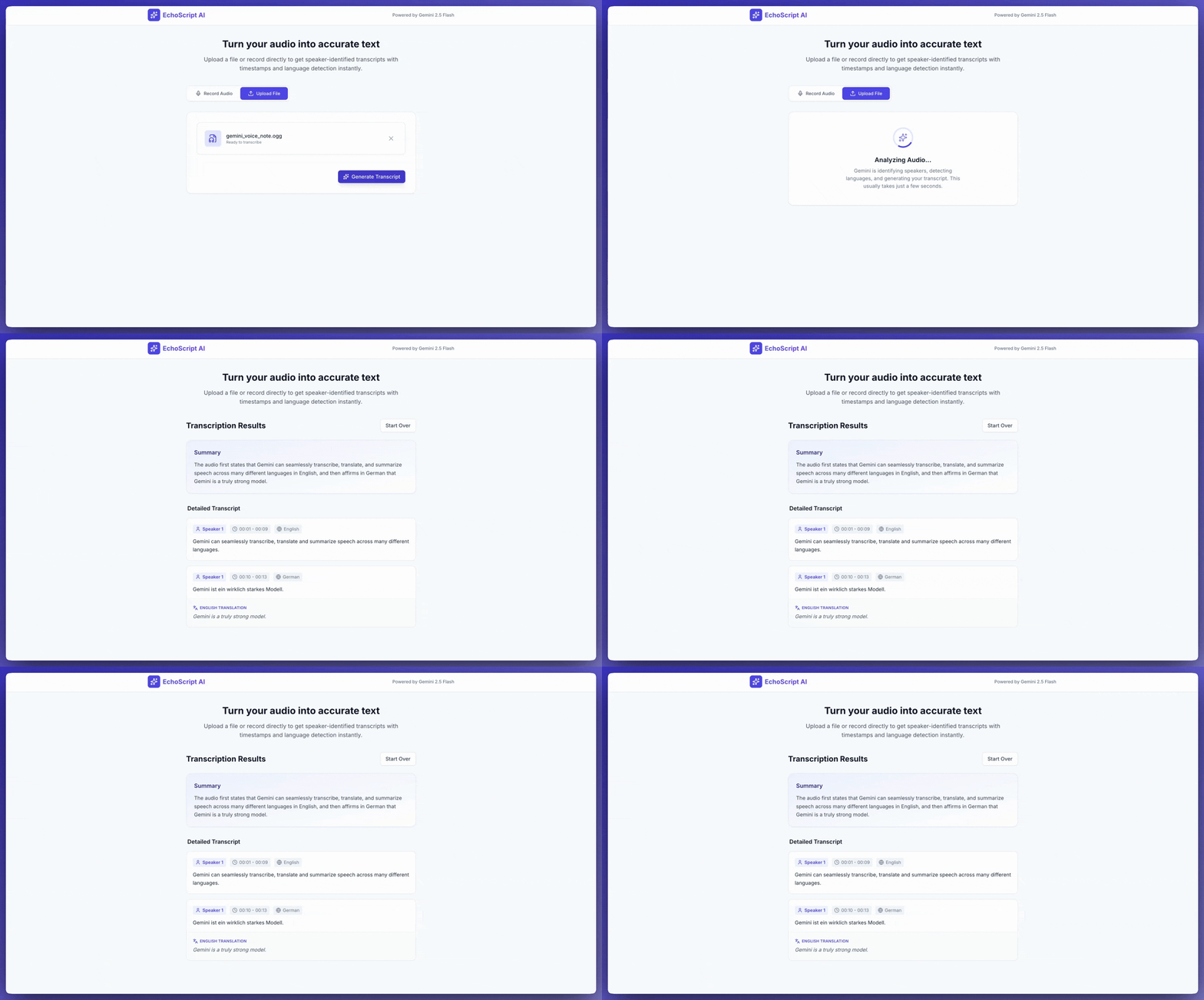
음성을 텍스트로 변환
이 예에서는 타임스탬프, 화자 분할, 감정 감지를 통해 음성을 텍스트로 변환하고 번역하고 요약하는 방법을 구조화된 출력을 사용하여 보여줍니다.
Python
from google import genai

client = genai.Client()

YOUTUBE_URL = "https://www.youtube.com/watch?v=ku-N-eS1lgM"

prompt = """
  Process the audio file and generate a detailed transcription.

  Requirements:
  1. Identify distinct speakers (e.g., Speaker 1, Speaker 2).
  2. Provide accurate timestamps for each segment (Format: MM:SS).
  3. Detect the primary language of each segment.
  4. If not English, provide the English translation.
  5. Identify the primary emotion: Happy, Sad, Angry, or Neutral.
  6. Provide a brief summary at the beginning.
"""

response_schema = {
    "type": "object",
    "properties": {
        "summary": {"type": "string"},
        "segments": {
            "type": "array",
            "items": {
                "type": "object",
                "properties": {
                    "speaker": {"type": "string"},
                    "timestamp": {"type": "string"},
                    "content": {"type": "string"},
                    "language": {"type": "string"},
                    "emotion": {
                        "type": "string",
                        "enum": ["happy", "sad", "angry", "neutral"]
                    }
                },
                "required": ["speaker", "timestamp", "content", "emotion"]
            }
        }
    },
    "required": ["summary", "segments"]
}

interaction = client.interactions.create(
    model="gemini-3.8-flash",
    input=[
        {"type": "video", "uri": YOUTUBE_URL, "mime_type": "video/mp4"},
        {"type": "text", "text": prompt}
    ],
    response_format=response_schema,
)

print(interaction.output_text)
JavaScript
import { GoogleGenAI } from "@google/genai";

const client = new GoogleGenAI({});

const YOUTUBE_URL = "https://www.youtube.com/watch?v=ku-N-eS1lgM";

const prompt = `
  Process the audio file and generate a detailed transcription.

  Requirements:
  1. Identify distinct speakers (e.g., Speaker 1, Speaker 2).
  2. Provide accurate timestamps for each segment (Format: MM:SS).
  3. Detect the primary language of each segment.
  4. If not English, provide the English translation.
  5. Identify the primary emotion: Happy, Sad, Angry, or Neutral.
  6. Provide a brief summary at the beginning.
`;

const responseSchema = {
    type: "object",
    properties: {
        summary: { type: "string" },
        segments: {
            type: "array",
            items: {
                type: "object",
                properties: {
                    speaker: { type: "string" },
                    timestamp: { type: "string" },
                    content: { type: "string" },
                    language: { type: "string" },
                    emotion: {
                        type: "string",
                        enum: ["happy", "sad", "angry", "neutral"]
                    }
                },
                required: ["speaker", "timestamp", "content", "emotion"]
            }
        }
    },
    required: ["summary", "segments"]
};

const interaction = await client.interactions.create({
    model: "gemini-3.8-flash",
    input: [
        { type: "video", uri: YOUTUBE_URL, mime_type: "video/mp4" },
        { type: "text", text: prompt }
    ],
    response_format: responseSchema,
});

console.log(JSON.parse(interaction.output_text));
자바
import com.google.genai.Client;
import com.google.genai.gaos.models.interactions.Content;
import com.google.genai.gaos.models.interactions.CreateModelInteraction;
import com.google.genai.gaos.models.interactions.CreateModelInteractionResponseFormat;
import com.google.genai.gaos.models.interactions.Interaction;
import com.google.genai.gaos.models.interactions.InteractionsInput;
import com.google.genai.gaos.models.interactions.Model;
import com.google.genai.gaos.models.interactions.ResponseFormat;
import com.google.genai.gaos.models.interactions.TextContent;
import com.google.genai.gaos.models.interactions.VideoContent;
import com.google.genai.gaos.models.interactions.VideoContentMimeType;
import com.google.genai.gaos.models.operations.CreateInteractionRequestBody;
import java.util.Arrays;
import java.util.List;
import java.util.HashMap;
import java.util.Map;

Client client = new Client();

String youtubeUrl = "https://www.youtube.com/watch?v=ku-N-eS1lgM";

String prompt =
    "Process the audio file and generate a detailed transcription.\n\n"
        + "Requirements:\n"
        + "1. Identify distinct speakers (e.g., Speaker 1, Speaker 2).\n"
        + "2. Provide accurate timestamps for each segment (Format: MM:SS).\n"
        + "3. Detect the primary language of each segment.\n"
        + "4. If not English, provide the English translation.\n"
        + "5. Identify the primary emotion: Happy, Sad, Angry, or Neutral.\n"
        + "6. Provide a brief summary at the beginning.";

Map<String, Object> emotionProp = new HashMap<>();
emotionProp.put("type", "string");
emotionProp.put("enum", Arrays.asList("happy", "sad", "angry", "neutral"));

Map<String, Object> stringType = new HashMap<>();
stringType.put("type", "string");

Map<String, Object> segmentProps = new HashMap<>();
segmentProps.put("speaker", stringType);
segmentProps.put("timestamp", stringType);
segmentProps.put("content", stringType);
segmentProps.put("language", stringType);
segmentProps.put("emotion", emotionProp);

Map<String, Object> segmentItem = new HashMap<>();
segmentItem.put("type", "object");
segmentItem.put("properties", segmentProps);
segmentItem.put("required", Arrays.asList("speaker", "timestamp", "content", "emotion"));

Map<String, Object> segmentsProp = new HashMap<>();
segmentsProp.put("type", "array");
segmentsProp.put("items", segmentItem);

Map<String, Object> properties = new HashMap<>();
properties.put("summary", stringType);
properties.put("segments", segmentsProp);

Map<String, Object> responseSchema = new HashMap<>();
responseSchema.put("type", "object");
responseSchema.put("properties", properties);
responseSchema.put("required", Arrays.asList("summary", "segments"));

Content videoContent =
    VideoContent.builder()
        .uri(youtubeUrl)
        .mimeType(VideoContentMimeType.VIDEO_MP4)
        .build();
Content textContent = TextContent.builder().text(prompt).build();

List<Content> contents = Arrays.asList(videoContent, textContent);

CreateModelInteraction params =
    CreateModelInteraction.builder()
        .model(Model.of("gemini-3.8-flash"))
        .input(InteractionsInput.ofContent(contents))
        .responseFormat(
            CreateModelInteractionResponseFormat.of(ResponseFormat.of(responseSchema)))
        .build();

Interaction interaction =
    client.interactions.create(CreateInteractionRequestBody.of(params)).interaction().get();

System.out.println(interaction.outputText().orElse(""));
REST
curl -X POST "https://generativelanguage.googleapis.com/v1beta/interactions" \
  -H "x-goog-api-key: $GEMINI_API_KEY" \
  -H 'Content-Type: application/json' \
  -d '{
    "model": "gemini-3.8-flash",
    "input": [
      {
        "type": "video",
        "uri": "https://www.youtube.com/watch?v=ku-N-eS1lgM",
        "mime_type": "video/mp4"
      },
      {
        "type": "text",
        "text": "Transcribe with speaker diarization and emotion detection."
      }
    ],
    "response_format": {
        "type": "object",
        "properties": {
          "summary": {"type": "string"},
          "segments": {
            "type": "array",
            "items": {
              "type": "object",
              "properties": {
                "speaker": {"type": "string"},
                "timestamp": {"type": "string"},
                "content": {"type": "string"},
                "emotion": {"type": "string", "enum": ["happy", "sad", "angry", "neutral"]}
              }
            }
          }
        }
      }
  }'
입력 오디오
다음과 같은 방법으로 오디오 데이터를 제공할 수 있습니다.
- 오디오 파일을 업로드합니다 요청하기 전에.
- 인라인 오디오 데이터를 요청과 함께 전달합니다.
오디오 파일 업로드
20MB보다 큰 파일에는 Files API를 사용합니다.
Python
from google import genai

client = genai.Client()

uploaded_file = client.files.upload(file="path/to/sample.mp3")

interaction = client.interactions.create(
    model="gemini-3.8-flash",
    input=[
        {"type": "text", "text": "Describe this audio clip"},
        {
            "type": "audio",
            "uri": uploaded_file.uri,
            "mime_type": uploaded_file.mime_type
        }
    ]
)
print(interaction.output_text)
JavaScript
import { GoogleGenAI } from "@google/genai";

const client = new GoogleGenAI({});

const uploadedFile = await client.files.upload({
    file: "path/to/sample.mp3",
    config: { mimeType: "audio/mp3" }
});

const interaction = await client.interactions.create({
    model: "gemini-3.8-flash",
    input: [
        {type: "text", text: "Describe this audio clip"},
        {
            type: "audio",
            uri: uploadedFile.uri,
            mime_type: uploadedFile.mimeType
        }
    ]
});
console.log(interaction.output_text);
자바
// Upload an audio file using the Files API (recommended for files > 20 MB)
import com.google.genai.Client;
import com.google.genai.gaos.models.interactions.AudioContent;
import com.google.genai.gaos.models.interactions.AudioContentMimeType;
import com.google.genai.gaos.models.interactions.Content;
import com.google.genai.gaos.models.interactions.CreateModelInteraction;
import com.google.genai.gaos.models.interactions.Interaction;
import com.google.genai.gaos.models.interactions.InteractionsInput;
import com.google.genai.gaos.models.interactions.Model;
import com.google.genai.gaos.models.interactions.TextContent;
import com.google.genai.gaos.models.operations.CreateInteractionRequestBody;
import com.google.genai.types.File;
import com.google.genai.types.UploadFileConfig;
import java.util.Arrays;
import java.util.List;

Client client = new Client();

File uploadedFile =
    client.files.upload(
        "path/to/sample.mp3", UploadFileConfig.builder().mimeType("audio/mp3").build());

Content textContent = TextContent.builder().text("Describe this audio clip").build();
Content audioContent =
    AudioContent.builder()
        .uri(uploadedFile.uri().get())
        .mimeType(AudioContentMimeType.of(uploadedFile.mimeType().get()))
        .build();

List<Content> contents = Arrays.asList(textContent, audioContent);

CreateModelInteraction params =
    CreateModelInteraction.builder()
        .model(Model.of("gemini-3.8-flash"))
        .input(InteractionsInput.ofContent(contents))
        .build();

Interaction interaction =
    client.interactions.create(CreateInteractionRequestBody.of(params)).interaction().get();

System.out.println(interaction.outputText().orElse(""));
REST
# First upload the file using the Files API, then use the URI:
curl -X POST "https://generativelanguage.googleapis.com/v1beta/interactions" \
  -H "x-goog-api-key: $GEMINI_API_KEY" \
  -H 'Content-Type: application/json' \
  -d '{
    "model": "gemini-3.8-flash",
    "input": [
      {"type": "text", "text": "Describe this audio clip"},
      {
        "type": "audio",
        "uri": "YOUR_FILE_URI",
        "mime_type": "audio/mp3"
      }
    ]
  }'
인라인으로 오디오 데이터 전달
총 요청 크기가 20MB 미만인 작은 오디오 파일의 경우:
Python
from google import genai
import base64

client = genai.Client()

with open('path/to/small-sample.mp3', 'rb') as f:
    audio_bytes = f.read()

interaction = client.interactions.create(
    model="gemini-3.8-flash",
    input=[
        {"type": "text", "text": "Describe this audio clip"},
        {
            "type": "audio",
            "data": base64.b64encode(audio_bytes).decode('utf-8'),
            "mime_type": "audio/mp3"
        }
    ]
)
print(interaction.output_text)
JavaScript
import { GoogleGenAI } from "@google/genai";
import * as fs from "node:fs";

const client = new GoogleGenAI({});

const audioData = fs.readFileSync("path/to/small-sample.mp3", {
    encoding: "base64"
});

const interaction = await client.interactions.create({
    model: "gemini-3.8-flash",
    input: [
        {type: "text", text: "Describe this audio clip"},
        {
            type: "audio",
            data: audioData,
            mime_type: "audio/mp3"
        }
    ]
});
console.log(interaction.output_text);
자바
import com.google.genai.Client;
import com.google.genai.gaos.models.interactions.AudioContent;
import com.google.genai.gaos.models.interactions.AudioContentMimeType;
import com.google.genai.gaos.models.interactions.Content;
import com.google.genai.gaos.models.interactions.CreateModelInteraction;
import com.google.genai.gaos.models.interactions.Interaction;
import com.google.genai.gaos.models.interactions.InteractionsInput;
import com.google.genai.gaos.models.interactions.Model;
import com.google.genai.gaos.models.interactions.TextContent;
import com.google.genai.gaos.models.operations.CreateInteractionRequestBody;
import java.nio.file.Files;
import java.nio.file.Paths;
import java.util.Arrays;
import java.util.Base64;
import java.util.List;

Client client = new Client();

byte[] audioBytes = Files.readAllBytes(Paths.get("path/to/small-sample.mp3"));
String base64Audio = Base64.getEncoder().encodeToString(audioBytes);

Content textContent = TextContent.builder().text("Describe this audio clip").build();
Content audioContent =
    AudioContent.builder()
        .data(base64Audio)
        .mimeType(AudioContentMimeType.AUDIO_MP3)
        .build();

List<Content> contents = Arrays.asList(textContent, audioContent);

CreateModelInteraction params =
    CreateModelInteraction.builder()
        .model(Model.of("gemini-3.8-flash"))
        .input(InteractionsInput.ofContent(contents))
        .build();

Interaction interaction =
    client.interactions.create(CreateInteractionRequestBody.of(params)).interaction().get();

System.out.println(interaction.outputText().orElse(""));
REST
AUDIO_PATH="path/to/sample.mp3"

if [[ "$(base64 --version 2>&1)" = *"FreeBSD"* ]]; then
  B64FLAGS="--input"
else
  B64FLAGS="-w0"
fi

curl -X POST "https://generativelanguage.googleapis.com/v1beta/interactions" \
  -H "x-goog-api-key: $GEMINI_API_KEY" \
  -H 'Content-Type: application/json' \
  -d '{
    "model": "gemini-3.8-flash",
    "input": [
      {"type": "text", "text": "Describe this audio clip"},
      {
        "type": "audio",
        "data": "'$(base64 $B64FLAGS $AUDIO_PATH)'",
        "mime_type": "audio/mp3"
      }
    ]
  }'
인라인 오디오 데이터 관련 참고사항: * 최대 요청 크기는 총 20MB (프롬프트 및 모든 파일 포함)입니다. * 재사용하려면 파일 대신 업로드하세요.
스크립트 가져오기
스크립트를 가져오려면 프롬프트에 다음을 입력하여 요청합니다.
Python
interaction = client.interactions.create(
    model="gemini-3.8-flash",
    input=[
        {"type": "text", "text": "Generate a transcript of the speech."},
        {
            "type": "audio",
            "uri": uploaded_file.uri,
            "mime_type": uploaded_file.mime_type
        }
    ]
)
print(interaction.output_text)
JavaScript
const interaction = await client.interactions.create({
    model: "gemini-3.8-flash",
    input: [
        { type: "text", text: "Generate a transcript of the speech." },
        {
            type: "audio",
            uri: uploadedFile.uri,
            mime_type: uploadedFile.mimeType
        }
    ]
});
console.log(interaction.output_text);
자바
import com.google.genai.Client;
import com.google.genai.gaos.models.interactions.AudioContent;
import com.google.genai.gaos.models.interactions.AudioContentMimeType;
import com.google.genai.gaos.models.interactions.Content;
import com.google.genai.gaos.models.interactions.CreateModelInteraction;
import com.google.genai.gaos.models.interactions.Interaction;
import com.google.genai.gaos.models.interactions.InteractionsInput;
import com.google.genai.gaos.models.interactions.Model;
import com.google.genai.gaos.models.interactions.TextContent;
import com.google.genai.gaos.models.operations.CreateInteractionRequestBody;
import com.google.genai.types.File;
import com.google.genai.types.UploadFileConfig;
import java.util.Arrays;
import java.util.List;

Client client = new Client();

File uploadedFile =
    client.files.upload(
        "path/to/sample.mp3", UploadFileConfig.builder().mimeType("audio/mp3").build());

Content textContent = TextContent.builder().text("Generate a transcript of the speech.").build();
Content audioContent =
    AudioContent.builder()
        .uri(uploadedFile.uri().get())
        .mimeType(AudioContentMimeType.of(uploadedFile.mimeType().get()))
        .build();

List<Content> contents = Arrays.asList(textContent, audioContent);

CreateModelInteraction params =
    CreateModelInteraction.builder()
        .model(Model.of("gemini-3.8-flash"))
        .input(InteractionsInput.ofContent(contents))
        .build();

Interaction interaction =
    client.interactions.create(CreateInteractionRequestBody.of(params)).interaction().get();

System.out.println(interaction.outputText().orElse(""));
타임스탬프 참조
MM:SS 형식을 사용하여 특정 섹션을 참조합니다.
Python
interaction = client.interactions.create(
    model="gemini-3.8-flash",
    input=[
        {"type": "text", "text": "Provide a transcript from 02:30 to 03:29."},
        {
            "type": "audio",
            "uri": uploaded_file.uri,
            "mime_type": uploaded_file.mime_type
        }
    ]
)
JavaScript
const interaction = await client.interactions.create({
    model: "gemini-3.8-flash",
    input: [
        { type: "text", text: "Provide a transcript from 02:30 to 03:29." },
        { type: "audio", uri: uploadedFile.uri, mime_type: "audio/mp3" }
    ]
});
자바
import com.google.genai.Client;
import com.google.genai.gaos.models.interactions.AudioContent;
import com.google.genai.gaos.models.interactions.AudioContentMimeType;
import com.google.genai.gaos.models.interactions.Content;
import com.google.genai.gaos.models.interactions.CreateModelInteraction;
import com.google.genai.gaos.models.interactions.Interaction;
import com.google.genai.gaos.models.interactions.InteractionsInput;
import com.google.genai.gaos.models.interactions.Model;
import com.google.genai.gaos.models.interactions.TextContent;
import com.google.genai.gaos.models.operations.CreateInteractionRequestBody;
import com.google.genai.types.File;
import com.google.genai.types.UploadFileConfig;
import java.util.Arrays;
import java.util.List;

Client client = new Client();

File uploadedFile =
    client.files.upload(
        "path/to/sample.mp3", UploadFileConfig.builder().mimeType("audio/mp3").build());

Content textContent =
    TextContent.builder().text("Provide a transcript from 02:30 to 03:29.").build();
Content audioContent =
    AudioContent.builder()
        .uri(uploadedFile.uri().get())
        .mimeType(AudioContentMimeType.of(uploadedFile.mimeType().get()))
        .build();

List<Content> contents = Arrays.asList(textContent, audioContent);

CreateModelInteraction params =
    CreateModelInteraction.builder()
        .model(Model.of("gemini-3.8-flash"))
        .input(InteractionsInput.ofContent(contents))
        .build();

Interaction interaction =
    client.interactions.create(CreateInteractionRequestBody.of(params)).interaction().get();

System.out.println(interaction.outputText().orElse(""));
토큰 집계
오디오 파일의 토큰 수를 집계합니다.
Python
response = client.models.count_tokens(
    model="gemini-3.8-flash",
    contents=[uploaded_file]
)
print(response)
JavaScript
const response = await client.models.countTokens({
    model: "gemini-3.8-flash",
    contents: [
        { fileData: { fileUri: uploadedFile.uri, mimeType: uploadedFile.mimeType } }
    ]
});
console.log(response.totalTokens);
자바
import com.google.genai.Client;
import com.google.genai.types.Content;
import com.google.genai.types.CountTokensResponse;
import com.google.genai.types.File;
import com.google.genai.types.Part;
import com.google.genai.types.UploadFileConfig;
import java.util.Arrays;

Client client = new Client();

File uploadedFile =
    client.files.upload(
        "path/to/sample.mp3", UploadFileConfig.builder().mimeType("audio/mp3").build());

CountTokensResponse response =
    client.models.countTokens(
        "gemini-3.8-flash",
        Arrays.asList(
            Content.fromParts(
                Part.fromUri(uploadedFile.uri().get(), uploadedFile.mimeType().get()))),
        null);

System.out.println(response);
지원되는 오디오 형식
Gemini는 다음과 같은 오디오 형식 MIME 유형을 지원합니다.
- WAV -
audio/wav - MP3 -
audio/mp3 - AIFF -
audio/aiff - AAC -
audio/aac - OGG -
audio/ogg - FLAC -
audio/flac - MPEG -
audio/mpeg - M4A -
audio/m4a - L16 -
audio/l16 - Opus -
audio/opus - ALAW -
audio/alaw - MULAW -
audio/mulaw - WebM -
audio/webm
지원되는 MIME 유형 및 매개변수 스키마의 전체 목록은 Interactions API 참조를 확인하세요.
오디오에 관한 기술 세부정보
- 토큰: 오디오 초당 32개의 토큰 (1분 = 1,920개의 토큰)
- 비언어적 소리: Gemini는 비언어적 소리 (새소리, 사이렌 등)를 이해합니다.
- 최대 길이: 프롬프트당 오디오 9.5시간
- 해결 방법: 16Kbps로 다운샘플링됨
- 채널: 단일 채널로 결합된 멀티채널 오디오