

İşlev çağırma, modelleri harici araçlara ve API'lere bağlamanıza olanak tanır. Model, metin yanıtları oluşturmak yerine belirli işlevlerin ne zaman çağrılacağını belirler ve gerçek dünyadaki işlemleri gerçekleştirmek için gerekli parametreleri sağlar. Bu sayede model, doğal dil ile gerçek dünyadaki işlemler ve veriler arasında köprü görevi görebilir. İşlev çağrısının 3 temel kullanım alanı vardır:
- İşlemler Yapın: API'leri kullanarak harici sistemlerle etkileşim kurun. Örneğin, randevu planlayın, fatura oluşturun, e-posta gönderin veya akıllı ev cihazlarını kontrol edin.
- Bilgileri Artırma: Veritabanları, API'ler ve bilgi tabanları gibi harici kaynaklardaki bilgilere erişin.
- Özellikleri genişletme: Hesaplama yapmak ve modelin sınırlamalarını genişletmek için harici araçlar kullanın (ör. hesap makinesi kullanma veya grafik oluşturma).
Bu kullanım alanlarının örneklerine aşağıdan göz atabilirsiniz:
Toplantı planlama
Bu örnekte, katılımcılarla belirli bir zamanda toplantı planlayan bir işlevin nasıl tanımlanacağı gösterilmektedir. Bu işlev, modelin kullanıcı isteklerini ayrıştırmasına ve harici sistemlerdeki işlemleri tetiklemek için yapılandırılmış bağımsız değişkenler döndürmesine olanak tanır.
Python
from google import genai

schedule_meeting_function = {
    "type": "function",
    "name": "schedule_meeting",
    "description": "Schedules a meeting with specified attendees at a given time and date.",
    "parameters": {
        "type": "object",
        "properties": {
            "attendees": {"type": "array", "items": {"type": "string"}},
            "date": {"type": "string", "description": "Date (e.g., '2024-07-29')"},
            "time": {"type": "string", "description": "Time (e.g., '15:00')"},
            "topic": {"type": "string", "description": "The meeting topic."},
        },
        "required": ["attendees", "date", "time", "topic"],
    },
}

client = genai.Client()

interaction = client.interactions.create(
    model="gemini-3.8-flash",
    input="Schedule a meeting with Bob and Alice for 03/14/2025 at 10:00 AM about Q3 planning.",
    tools=[{"type": "function", **schedule_meeting_function}],
)

for step in interaction.steps:
    if step.type == "function_call":
        print(f"Function to call: {step.name}")
        print(f"Arguments: {step.arguments}")
JavaScript
import { GoogleGenAI } from '@google/genai';

const client = new GoogleGenAI({});

const scheduleMeetingFunction = {
  type: 'function',
  name: 'schedule_meeting',
  description: 'Schedules a meeting with specified attendees at a given time and date.',
  parameters: {
    type: 'object',
    properties: {
      attendees: { type: 'array', items: { type: 'string' } },
      date: { type: 'string', description: 'Date (e.g., "2024-07-29")' },
      time: { type: 'string', description: 'Time (e.g., "15:00")' },
      topic: { type: 'string', description: 'The meeting topic.' },
    },
    required: ['attendees', 'date', 'time', 'topic'],
  },
};

const interaction = await client.interactions.create({
  model: 'gemini-3.8-flash',
  input: 'Schedule a meeting with Bob and Alice for 03/27/2025 at 10:00 AM about Q3 planning.',
  tools: [scheduleMeetingFunction],
});

for (const step of interaction.steps) {
  if (step.type === 'function_call') {
    console.log(`Function to call: ${step.name}`);
    console.log(`Arguments: ${JSON.stringify(step.arguments)}`);
  }
}
Java
import com.google.genai.Client;
import com.google.genai.gaos.models.interactions.CreateModelInteraction;
import com.google.genai.gaos.models.interactions.Function;
import com.google.genai.gaos.models.interactions.FunctionCallStep;
import com.google.genai.gaos.models.interactions.Interaction;
import com.google.genai.gaos.models.interactions.InteractionsInput;
import com.google.genai.gaos.models.interactions.Model;
import com.google.genai.gaos.models.interactions.Step;
import com.google.genai.gaos.models.operations.CreateInteractionRequestBody;
import java.util.Arrays;
import java.util.Collections;
import java.util.HashMap;
import java.util.Map;

Client client = new Client();

Map<String, Object> attendeesProp = new HashMap<>();
attendeesProp.put("type", "array");
attendeesProp.put("items", Collections.singletonMap("type", "string"));

Map<String, Object> dateProp = new HashMap<>();
dateProp.put("type", "string");
dateProp.put("description", "Date (e.g., '2024-07-29')");

Map<String, Object> timeProp = new HashMap<>();
timeProp.put("type", "string");
timeProp.put("description", "Time (e.g., '15:00')");

Map<String, Object> topicProp = new HashMap<>();
topicProp.put("type", "string");
topicProp.put("description", "The meeting topic.");

Map<String, Object> properties = new HashMap<>();
properties.put("attendees", attendeesProp);
properties.put("date", dateProp);
properties.put("time", timeProp);
properties.put("topic", topicProp);

Map<String, Object> parameters = new HashMap<>();
parameters.put("type", "object");
parameters.put("properties", properties);
parameters.put("required", Arrays.asList("attendees", "date", "time", "topic"));

Function scheduleMeetingFunction =
    Function.builder()
        .name("schedule_meeting")
        .description("Schedules a meeting with specified attendees at a given time and date.")
        .parameters(parameters)
        .build();

CreateModelInteraction params =
    CreateModelInteraction.builder()
        .model(Model.of("gemini-3.8-flash"))
        .input(
            InteractionsInput.of(
                "Schedule a meeting with Bob and Alice for 03/14/2025 at 10:00 AM about Q3 planning."))
        .tools(Arrays.asList(scheduleMeetingFunction))
        .build();

Interaction interaction =
    client.interactions.create(CreateInteractionRequestBody.of(params)).interaction().get();

if (interaction.steps().isPresent()) {
  for (Step step : interaction.steps().get()) {
    if (step instanceof FunctionCallStep) {
      FunctionCallStep functionCall = (FunctionCallStep) step;
      System.out.println("Function to call: " + functionCall.name().orElse(""));
      System.out.println("Arguments: " + functionCall.arguments().orElse(null));
    }
  }
}
Go
package main

import (
    "context"
    "fmt"
    "log"

    "google.golang.org/genai"
)

func main() {
    ctx := context.Background()
    client, err := genai.NewClient(ctx, nil)
    if err != nil {
        log.Fatal(err)
    }

    // Define the function declaration for the model
    scheduleMeetingFunc := &genai.FunctionDeclaration{
        Name:        "schedule_meeting",
        Description: "Schedules a meeting with specified attendees at a given time and date.",
        Parameters: &genai.Schema{
            Type: genai.TypeObject,
            Properties: map[string]*genai.Schema{
                "attendees": {
                    Type:        genai.TypeArray,
                    Items:       &genai.Schema{Type: genai.TypeString},
                    Description: "List of people attending the meeting.",
                },
                "date": {
                    Type:        genai.TypeString,
                    Description: "Date (e.g., '2024-07-29')",
                },
                "time": {
                    Type:        genai.TypeString,
                    Description: "Time (e.g., '15:00')",
                },
                "topic": {
                    Type:        genai.TypeString,
                    Description: "The meeting topic.",
                },
            },
            Required: []string{"attendees", "date", "time", "topic"},
        },
    }

    config := &genai.GenerateContentConfig{
        Tools: []*genai.Tool{
            {FunctionDeclarations: []*genai.FunctionDeclaration{scheduleMeetingFunc}},
        },
    }

    // Send request with function declarations
    response, err := client.Models.GenerateContent(
        ctx,
        "gemini-3.8-flash",
        genai.Text("Schedule a meeting with Bob and Alice for 03/14/2025 at 10:00 AM about Q3 planning."),
        config,
    )
    if err != nil {
        log.Fatal(err)
    }

    // Check for a function call
    if len(response.FunctionCalls()) > 0 {
        functionCall := response.FunctionCalls()[0]
        fmt.Printf("Function to call: %s\n", functionCall.Name)
        fmt.Printf("Arguments: %v\n", functionCall.Args)
    } else {
        fmt.Println("No function call found in the response.")
        fmt.Println(response.Text())
    }
}
REST
curl -X POST "https://generativelanguage.googleapis.com/v1beta/interactions" \
  -H "x-goog-api-key: $GEMINI_API_KEY" \
  -H 'Content-Type: application/json' \
  -d '{
    "model": "gemini-3.8-flash",
    "input": "Schedule a meeting with Bob and Alice for 03/27/2025 at 10:00 AM about Q3 planning.",
    "tools": [{
        "type": "function",
        "name": "schedule_meeting",
        "description": "Schedules a meeting with specified attendees at a given time and date.",
        "parameters": {
          "type": "object",
          "properties": {
            "attendees": {"type": "array", "items": {"type": "string"}},
            "date": {"type": "string"},
            "time": {"type": "string"},
            "topic": {"type": "string"}
          },
          "required": ["attendees", "date", "time", "topic"]
        }
    }]
  }'
Hava Durumu'nu alma
Bu örnekte, bir konumun sıcaklık verilerini alan bir işlevin nasıl tanımlanacağı gösterilmektedir. Bu sayede model, gerçek zamanlı veya harici bilgi gerektiren sorgulara yanıt vermek için harici API'leri çağırabilir.
Python
from google import genai

weather_function = {
    "type": "function",
    "name": "get_current_temperature",
    "description": "Gets the current temperature for a given location.",
    "parameters": {
        "type": "object",
        "properties": {
            "location": {
                "type": "string",
                "description": "The city name, e.g. San Francisco",
            },
        },
        "required": ["location"],
    },
}

client = genai.Client()

interaction = client.interactions.create(
    model="gemini-3.8-flash",
    input="What's the temperature in London?",
    tools=[weather_function],
)

for step in interaction.steps:
    if step.type == "function_call":
        print(f"Function to call: {step.name}")
        print(f"Arguments: {step.arguments}")
JavaScript
import { GoogleGenAI } from '@google/genai';

const client = new GoogleGenAI({});

const weatherFunctionDeclaration = {
  type: 'function',
  name: 'get_current_temperature',
  description: 'Gets the current temperature for a given location.',
  parameters: {
    type: 'object',
    properties: {
      location: {
        type: 'string',
        description: 'The city name, e.g. San Francisco',
      },
    },
    required: ['location'],
  },
};

const interaction = await client.interactions.create({
  model: 'gemini-3.8-flash',
  input: "What's the temperature in London?",
  tools: [weatherFunctionDeclaration],
});

for (const step of interaction.steps) {
  if (step.type === 'function_call') {
    console.log(`Function to call: ${step.name}`);
    console.log(`Arguments: ${JSON.stringify(step.arguments)}`);
  }
}
Java
import com.google.genai.Client;
import com.google.genai.gaos.models.interactions.CreateModelInteraction;
import com.google.genai.gaos.models.interactions.Function;
import com.google.genai.gaos.models.interactions.FunctionCallStep;
import com.google.genai.gaos.models.interactions.Interaction;
import com.google.genai.gaos.models.interactions.InteractionsInput;
import com.google.genai.gaos.models.interactions.Model;
import com.google.genai.gaos.models.interactions.Step;
import com.google.genai.gaos.models.operations.CreateInteractionRequestBody;
import java.util.Arrays;
import java.util.HashMap;
import java.util.Map;

Client client = new Client();

Map<String, Object> locationProp = new HashMap<>();
locationProp.put("type", "string");
locationProp.put("description", "The city name, e.g. San Francisco");

Map<String, Object> properties = new HashMap<>();
properties.put("location", locationProp);

Map<String, Object> parameters = new HashMap<>();
parameters.put("type", "object");
parameters.put("properties", properties);
parameters.put("required", Arrays.asList("location"));

Function weatherFunction =
    Function.builder()
        .name("get_current_temperature")
        .description("Gets the current temperature for a given location.")
        .parameters(parameters)
        .build();

CreateModelInteraction params =
    CreateModelInteraction.builder()
        .model(Model.of("gemini-3.8-flash"))
        .input(InteractionsInput.of("What's the temperature in London?"))
        .tools(Arrays.asList(weatherFunction))
        .build();

Interaction interaction =
    client.interactions.create(CreateInteractionRequestBody.of(params)).interaction().get();

if (interaction.steps().isPresent()) {
  for (Step step : interaction.steps().get()) {
    if (step instanceof FunctionCallStep) {
      FunctionCallStep functionCall = (FunctionCallStep) step;
      System.out.println("Function to call: " + functionCall.name().orElse(""));
      System.out.println("Arguments: " + functionCall.arguments().orElse(null));
    }
  }
}
Go
package main

import (
    "context"
    "fmt"
    "log"

    "google.golang.org/genai"
)

func main() {
    ctx := context.Background()
    client, err := genai.NewClient(ctx, nil)
    if err != nil {
        log.Fatal(err)
    }

    // Define the function declaration for the model
    weatherFunc := &genai.FunctionDeclaration{
        Name:        "get_current_temperature",
        Description: "Gets the current temperature for a given location.",
        Parameters: &genai.Schema{
            Type: genai.TypeObject,
            Properties: map[string]*genai.Schema{
                "location": {
                    Type:        genai.TypeString,
                    Description: "The city name, e.g. San Francisco",
                },
            },
            Required: []string{"location"},
        },
    }

    config := &genai.GenerateContentConfig{
        Tools: []*genai.Tool{
            {FunctionDeclarations: []*genai.FunctionDeclaration{weatherFunc}},
        },
    }

    // Send request with function declarations
    response, err := client.Models.GenerateContent(
        ctx,
        "gemini-3.8-flash",
        genai.Text("What's the temperature in London?"),
        config,
    )
    if err != nil {
        log.Fatal(err)
    }

    // Check for a function call
    if len(response.FunctionCalls()) > 0 {
        functionCall := response.FunctionCalls()[0]
        fmt.Printf("Function to call: %s\n", functionCall.Name)
        fmt.Printf("Arguments: %v\n", functionCall.Args)
    } else {
        fmt.Println("No function call found in the response.")
        fmt.Println(response.Text())
    }
}
REST
curl -X POST "https://generativelanguage.googleapis.com/v1beta/interactions" \
  -H "x-goog-api-key: $GEMINI_API_KEY" \
  -H 'Content-Type: application/json' \
  -d '{
    "model": "gemini-3.8-flash",
    "input": "What'\''s the temperature in London?",
    "tools": [{
      "type": "function",
      "name": "get_current_temperature",
      "description": "Gets the current temperature for a given location.",
      "parameters": {
        "type": "object",
        "properties": {
          "location": {"type": "string", "description": "The city name"}
        },
        "required": ["location"]
      }
    }]
  }'
Grafik oluşturma
Bu örnekte, yapılandırılmış verilerden çubuk grafik oluşturan bir işlevin nasıl tanımlanacağı gösterilmektedir. Bu sayede, modelin hesaplama yapmak veya görsel öğeler oluşturmak için harici araçları nasıl kullanabileceği gösterilmektedir:
Python
from google import genai

create_chart_function = {
    "type": "function",
    "name": "create_bar_chart",
    "description": "Creates a bar chart given a title, labels, and values.",
    "parameters": {
        "type": "object",
        "properties": {
            "title": {"type": "string", "description": "The title for the chart."},
            "labels": {"type": "array", "items": {"type": "string"}},
            "values": {"type": "array", "items": {"type": "number"}},
        },
        "required": ["title", "labels", "values"],
    },
}

client = genai.Client()

interaction = client.interactions.create(
    model="gemini-3.8-flash",
    input="Create a bar chart titled 'Quarterly Sales' with Q1: 50000, Q2: 75000, Q3: 60000.",
    tools=[create_chart_function],
)

for step in interaction.steps:
    if step.type == "function_call":
        print(f"Function to call: {step.name}")
        print(f"Arguments: {step.arguments}")
JavaScript
import { GoogleGenAI } from '@google/genai';

const client = new GoogleGenAI({});

const createChartFunctionDeclaration = {
  type: 'function',
  name: 'create_bar_chart',
  description: 'Creates a bar chart given a title, labels, and values.',
  parameters: {
    type: 'object',
    properties: {
      title: { type: 'string', description: 'The title for the chart.' },
      labels: { type: 'array', items: { type: 'string' } },
      values: { type: 'array', items: { type: 'number' } },
    },
    required: ['title', 'labels', 'values'],
  },
};

const interaction = await client.interactions.create({
  model: 'gemini-3.8-flash',
  input: "Create a bar chart titled 'Quarterly Sales' with Q1: 50000, Q2: 75000, Q3: 60000.",
  tools: [createChartFunctionDeclaration],
});

for (const step of interaction.steps) {
  if (step.type === 'function_call') {
    console.log(`${step.name}(${JSON.stringify(step.arguments)})`);
  }
}
Java
import com.google.genai.Client;
import com.google.genai.gaos.models.interactions.CreateModelInteraction;
import com.google.genai.gaos.models.interactions.Function;
import com.google.genai.gaos.models.interactions.FunctionCallStep;
import com.google.genai.gaos.models.interactions.Interaction;
import com.google.genai.gaos.models.interactions.InteractionsInput;
import com.google.genai.gaos.models.interactions.Model;
import com.google.genai.gaos.models.interactions.Step;
import com.google.genai.gaos.models.operations.CreateInteractionRequestBody;
import java.util.Arrays;
import java.util.Collections;
import java.util.HashMap;
import java.util.Map;

Client client = new Client();

Map<String, Object> properties = new HashMap<>();
Map<String, Object> titleMap = new HashMap<>();
titleMap.put("type", "string");
titleMap.put("description", "The title for the chart.");
properties.put("title", titleMap);

Map<String, Object> labelsMap = new HashMap<>();
labelsMap.put("type", "array");
labelsMap.put("items", Collections.singletonMap("type", "string"));
properties.put("labels", labelsMap);

Map<String, Object> valuesMap = new HashMap<>();
valuesMap.put("type", "array");
valuesMap.put("items", Collections.singletonMap("type", "number"));
properties.put("values", valuesMap);

Map<String, Object> parameters = new HashMap<>();
parameters.put("type", "object");
parameters.put("properties", properties);
parameters.put("required", Arrays.asList("title", "labels", "values"));

Function createChartFunction =
    Function.builder()
        .name("create_bar_chart")
        .description("Creates a bar chart given a title, labels, and values.")
        .parameters(parameters)
        .build();

CreateModelInteraction params =
    CreateModelInteraction.builder()
        .model(Model.of("gemini-3.8-flash"))
        .input(
            InteractionsInput.of(
                "Create a bar chart titled 'Quarterly Sales' with Q1: 50000, Q2: 75000, Q3: 60000."))
        .tools(Arrays.asList(createChartFunction))
        .build();

Interaction interaction =
    client.interactions.create(CreateInteractionRequestBody.of(params)).interaction().get();

if (interaction.steps().isPresent()) {
  for (Step step : interaction.steps().get()) {
    if (step instanceof FunctionCallStep) {
      FunctionCallStep functionCall = (FunctionCallStep) step;
      System.out.println("Function to call: " + functionCall.name().orElse(""));
      System.out.println("Arguments: " + functionCall.arguments().orElse(null));
    }
  }
}
Go
package main

import (
    "context"
    "fmt"
    "log"

    "google.golang.org/genai"
)

func main() {
    ctx := context.Background()
    client, err := genai.NewClient(ctx, nil)
    if err != nil {
        log.Fatal(err)
    }

    // Define the function declaration for the model
    createChartFunc := &genai.FunctionDeclaration{
        Name:        "create_bar_chart",
        Description: "Creates a bar chart given a title, labels, and values.",
        Parameters: &genai.Schema{
            Type: genai.TypeObject,
            Properties: map[string]*genai.Schema{
                "title": {
                    Type:        genai.TypeString,
                    Description: "The title for the chart.",
                },
                "labels": {
                    Type:  genai.TypeArray,
                    Items: &genai.Schema{Type: genai.TypeString},
                },
                "values": {
                    Type:  genai.TypeArray,
                    Items: &genai.Schema{Type: genai.TypeNumber},
                },
            },
            Required: []string{"title", "labels", "values"},
        },
    }

    config := &genai.GenerateContentConfig{
        Tools: []*genai.Tool{
            {FunctionDeclarations: []*genai.FunctionDeclaration{createChartFunc}},
        },
    }

    // Send request with function declarations
    response, err := client.Models.GenerateContent(
        ctx,
        "gemini-3.8-flash",
        genai.Text("Create a bar chart titled 'Quarterly Sales' with Q1: 50000, Q2: 75000, Q3: 60000."),
        config,
    )
    if err != nil {
        log.Fatal(err)
    }

    // Check for a function call
    if len(response.FunctionCalls()) > 0 {
        functionCall := response.FunctionCalls()[0]
        fmt.Printf("Function to call: %s\n", functionCall.Name)
        fmt.Printf("Arguments: %v\n", functionCall.Args)
    } else {
        fmt.Println("No function call found in the response.")
        fmt.Println(response.Text())
    }
}
REST
curl -X POST "https://generativelanguage.googleapis.com/v1beta/interactions" \
  -H "x-goog-api-key: $GEMINI_API_KEY" \
  -H 'Content-Type: application/json' \
  -d '{
    "model": "gemini-3.8-flash",
    "input": "Create a bar chart titled '\''Quarterly Sales'\'' with Q1: 50000, Q2: 75000, Q3: 60000.",
    "tools": [{
        "type": "function",
        "name": "create_bar_chart",
        "description": "Creates a bar chart given a title, labels, and values.",
        "parameters": {
          "type": "object",
          "properties": {
            "title": {"type": "string"},
            "labels": {"type": "array", "items": {"type": "string"}},
            "values": {"type": "array", "items": {"type": "number"}}
          },
          "required": ["title", "labels", "values"]
        }
    }]
  }'
İşlev çağrısının işleyiş şekli
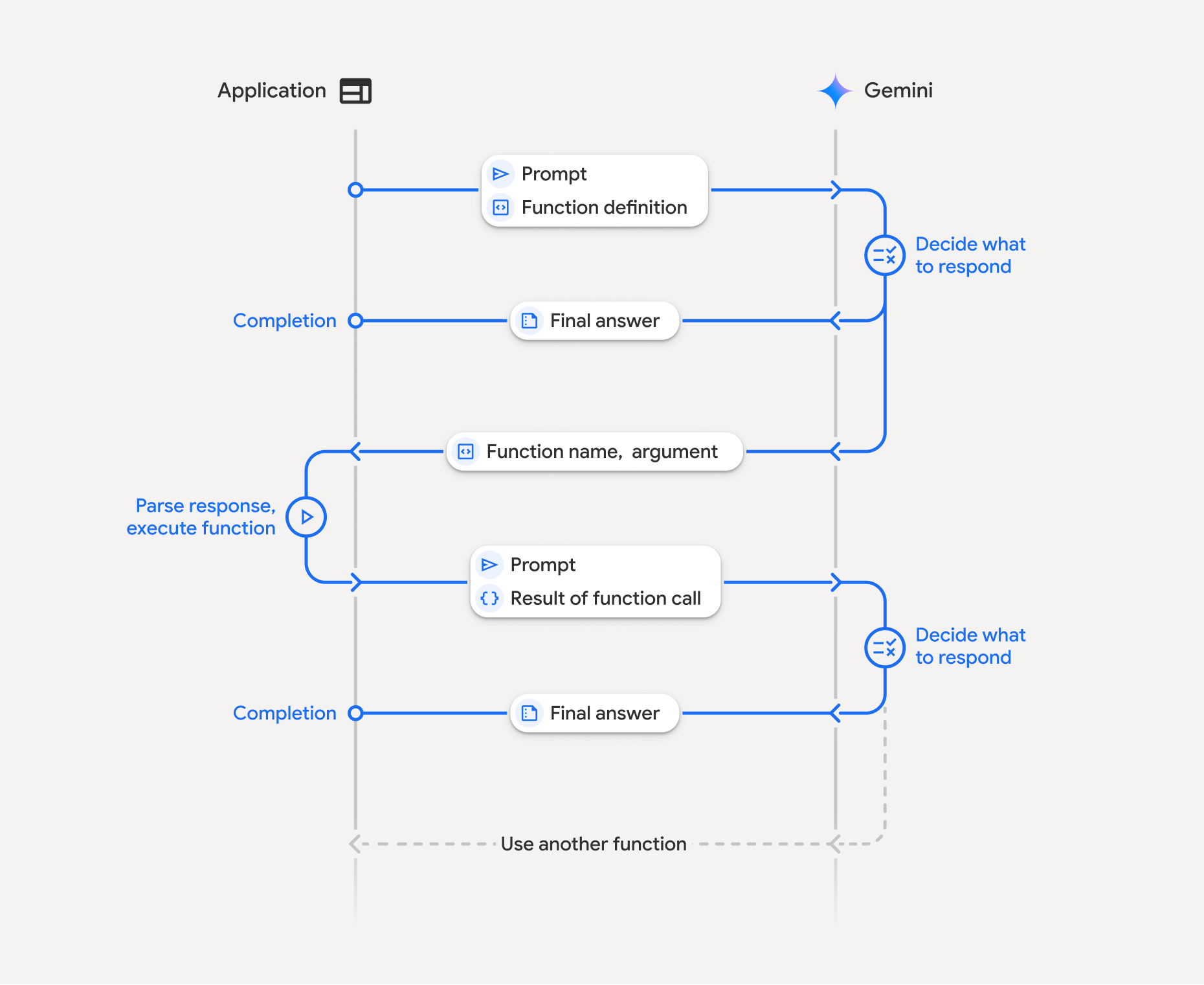
İşlev çağırma, uygulamanız, model ve harici işlevler arasında yapılandırılmış bir etkileşim içerir:
- İşlev Bildirimini Tanımla: İşlevin adını, parametrelerini ve amacını modele tanımlayın.
- İşlev bildirimleriyle LLM'yi çağırma: Kullanıcı istemini, işlev bildirimiyle birlikte modele gönderin.
- İşlev Kodunu Yürütme (Sizin Sorumluluğunuz): Model, işlevi yürütmez. Adı ve bağımsız değişkenleri ayıklayıp uygulamanızda yürütün.
- Kullanıcı dostu yanıt oluşturma: Son ve kullanıcı dostu bir yanıt için sonucu modele geri gönderin.
Bu işlem birden fazla dönüşte tekrarlanabilir. Model, tek bir dönüşte (paralel fonksiyon çağırma) ve sırayla (bileşik fonksiyon çağırma) birden fazla fonksiyon çağırmayı destekler.
1. adım: Bir fonksiyon bildirimi tanımlayın
Python
set_light_values_declaration = {
    "type": "function",
    "name": "set_light_values",
    "description": "Sets the brightness and color temperature of a light.",
    "parameters": {
        "type": "object",
        "properties": {
            "brightness": {
                "type": "integer",
                "description": "Light level from 0 to 100",
            },
            "color_temp": {
                "type": "string",
                "enum": ["daylight", "cool", "warm"],
                "description": "Color temperature",
            },
        },
        "required": ["brightness", "color_temp"],
    },
}

def set_light_values(brightness: int, color_temp: str) -> dict:
    """Set the brightness and color temperature of a room light."""
    return {"brightness": brightness, "colorTemperature": color_temp}
JavaScript
const setLightValuesTool = {
  type: 'function',
  name: 'set_light_values',
  description: 'Sets the brightness and color temperature of a light.',
  parameters: {
    type: 'object',
    properties: {
      brightness: { type: 'number', description: 'Light level from 0 to 100' },
      color_temp: { type: 'string', enum: ['daylight', 'cool', 'warm'] },
    },
    required: ['brightness', 'color_temp'],
  },
};

function setLightValues(brightness, color_temp) {
  return { brightness: brightness, colorTemperature: color_temp };
}
Java
import com.google.genai.gaos.models.interactions.Function;
import java.util.Arrays;
import java.util.HashMap;
import java.util.Map;
import java.util.function.BiFunction;

Map<String, Object> brightnessProp = new HashMap<>();
brightnessProp.put("type", "integer");
brightnessProp.put("description", "Light level from 0 to 100");

Map<String, Object> colorTempProp = new HashMap<>();
colorTempProp.put("type", "string");
colorTempProp.put("enum", Arrays.asList("daylight", "cool", "warm"));
colorTempProp.put("description", "Color temperature");

Map<String, Object> properties = new HashMap<>();
properties.put("brightness", brightnessProp);
properties.put("color_temp", colorTempProp);

Map<String, Object> parameters = new HashMap<>();
parameters.put("type", "object");
parameters.put("properties", properties);
parameters.put("required", Arrays.asList("brightness", "color_temp"));

Function setLightValuesDeclaration =
    Function.builder()
        .name("set_light_values")
        .description("Sets the brightness and color temperature of a light.")
        .parameters(parameters)
        .build();

BiFunction<Integer, String, Map<String, Object>> setLightValues =
    (brightness, colorTemp) -> {
      Map<String, Object> result = new HashMap<>();
      result.put("brightness", brightness);
      result.put("colorTemperature", colorTemp);
      return result;
    };
Go
package main

import "google.golang.org/genai"

var setLightValuesDeclaration = &genai.FunctionDeclaration{
    Name:        "set_light_values",
    Description: "Sets the brightness and color temperature of a light.",
    Parameters: &genai.Schema{
        Type: genai.TypeObject,
        Properties: map[string]*genai.Schema{
            "brightness": {
                Type:        genai.TypeInteger,
                Description: "Light level from 0 to 100",
            },
            "color_temp": {
                Type:        genai.TypeString,
                Enum:        []string{"daylight", "cool", "warm"},
                Description: "Color temperature",
            },
        },
        Required: []string{"brightness", "color_temp"},
    },
}

func setLightValues(brightness int, colorTemp string) map[string]any {
    return map[string]any{"brightness": brightness, "colorTemperature": colorTemp}
}
2. adım: İşlev beyanlarıyla modeli çağırın
Python
from google import genai

client = genai.Client()

interaction = client.interactions.create(
    model="gemini-3.8-flash",
    input="Turn the lights down to a romantic level",
    tools=[set_light_values_declaration],
)

fc_step = next(s for s in interaction.steps if s.type == "function_call")
print(fc_step)
JavaScript
import { GoogleGenAI } from '@google/genai';

const client = new GoogleGenAI({});

const interaction = await client.interactions.create({
  model: 'gemini-3.8-flash',
  input: 'Turn the lights down to a romantic level',
  tools: [setLightValuesTool],
});

const fcStep = interaction.steps.find(s => s.type === 'function_call');
console.log(fcStep);
Java
import com.google.genai.Client;
import com.google.genai.gaos.models.interactions.CreateModelInteraction;
import com.google.genai.gaos.models.interactions.Function;
import com.google.genai.gaos.models.interactions.FunctionCallStep;
import com.google.genai.gaos.models.interactions.Interaction;
import com.google.genai.gaos.models.interactions.InteractionsInput;
import com.google.genai.gaos.models.interactions.Model;
import com.google.genai.gaos.models.interactions.Step;
import com.google.genai.gaos.models.operations.CreateInteractionRequestBody;
import java.util.Arrays;
import java.util.HashMap;
import java.util.Map;

Client client = new Client();

Map<String, Object> brightnessProp = new HashMap<>();
brightnessProp.put("type", "integer");
brightnessProp.put("description", "Light level from 0 to 100");

Map<String, Object> colorTempProp = new HashMap<>();
colorTempProp.put("type", "string");
colorTempProp.put("enum", Arrays.asList("daylight", "cool", "warm"));
colorTempProp.put("description", "Color temperature");

Map<String, Object> properties = new HashMap<>();
properties.put("brightness", brightnessProp);
properties.put("color_temp", colorTempProp);

Map<String, Object> parameters = new HashMap<>();
parameters.put("type", "object");
parameters.put("properties", properties);
parameters.put("required", Arrays.asList("brightness", "color_temp"));

Function setLightValuesDeclaration =
    Function.builder()
        .name("set_light_values")
        .description("Sets the brightness and color temperature of a light.")
        .parameters(parameters)
        .build();

CreateModelInteraction params =
    CreateModelInteraction.builder()
        .model(Model.of("gemini-3.8-flash"))
        .input(InteractionsInput.of("Turn the lights down to a romantic level"))
        .tools(Arrays.asList(setLightValuesDeclaration))
        .build();

Interaction interaction =
    client.interactions.create(CreateInteractionRequestBody.of(params)).interaction().get();

FunctionCallStep fcStep = null;
if (interaction.steps().isPresent()) {
  for (Step step : interaction.steps().get()) {
    if (step instanceof FunctionCallStep) {
      fcStep = (FunctionCallStep) step;
      break;
    }
  }
}
System.out.println(fcStep);
Go
ctx := context.Background()
client, err := genai.NewClient(ctx, nil)
if err != nil {
    log.Fatal(err)
}

config := &genai.GenerateContentConfig{
    Tools: []*genai.Tool{
        {FunctionDeclarations: []*genai.FunctionDeclaration{setLightValuesDeclaration}},
    },
}

contents := []*genai.Content{
    genai.NewContentFromText("Turn the lights down to a romantic level", genai.RoleUser),
}

response, err := client.Models.GenerateContent(ctx, "gemini-3.8-flash", contents, config)
if err != nil {
    log.Fatal(err)
}

fmt.Println(response.FunctionCalls()[0])
Model, type, name ve arguments ile function_call adımını döndürüyor:
type='function_call'
name='set_light_values'
arguments={'color_temp': 'warm', 'brightness': 25}
3. adım: İşlevi yürütün
Python
fc_step = next(s for s in interaction.steps if s.type == "function_call")

if fc_step.name == "set_light_values":
    result = set_light_values(**fc_step.arguments)
    print(f"Function execution result: {result}")
JavaScript
const fcStep = interaction.steps.find(s => s.type === 'function_call');

let result;
if (fcStep.name === 'set_light_values') {
  result = setLightValues(fcStep.arguments.brightness, fcStep.arguments.color_temp);
  console.log(`Function execution result: ${JSON.stringify(result)}`);
}
Java
import com.google.genai.Client;
import com.google.genai.gaos.models.interactions.CreateModelInteraction;
import com.google.genai.gaos.models.interactions.Function;
import com.google.genai.gaos.models.interactions.FunctionCallStep;
import com.google.genai.gaos.models.interactions.Interaction;
import com.google.genai.gaos.models.interactions.InteractionsInput;
import com.google.genai.gaos.models.interactions.Model;
import com.google.genai.gaos.models.interactions.Step;
import com.google.genai.gaos.models.operations.CreateInteractionRequestBody;
import java.util.Arrays;
import java.util.Collections;
import java.util.HashMap;
import java.util.Map;
import java.util.function.BiFunction;

Client client = new Client();

Map<String, Object> brightnessProp = new HashMap<>();
brightnessProp.put("type", "integer");
brightnessProp.put("description", "Light level from 0 to 100");

Map<String, Object> colorTempProp = new HashMap<>();
colorTempProp.put("type", "string");
colorTempProp.put("enum", Arrays.asList("daylight", "cool", "warm"));
colorTempProp.put("description", "Color temperature");

Map<String, Object> properties = new HashMap<>();
properties.put("brightness", brightnessProp);
properties.put("color_temp", colorTempProp);

Map<String, Object> parameters = new HashMap<>();
parameters.put("type", "object");
parameters.put("properties", properties);
parameters.put("required", Arrays.asList("brightness", "color_temp"));

Function setLightValuesDeclaration =
    Function.builder()
        .name("set_light_values")
        .description("Sets the brightness and color temperature of a light.")
        .parameters(parameters)
        .build();

BiFunction<Integer, String, Map<String, Object>> setLightValues =
    (brightness, colorTemp) -> {
      Map<String, Object> result = new HashMap<>();
      result.put("brightness", brightness);
      result.put("colorTemperature", colorTemp);
      return result;
    };

CreateModelInteraction params =
    CreateModelInteraction.builder()
        .model(Model.of("gemini-3.8-flash"))
        .input(InteractionsInput.of("Turn the lights down to a romantic level"))
        .tools(Arrays.asList(setLightValuesDeclaration))
        .build();

Interaction interaction =
    client.interactions.create(CreateInteractionRequestBody.of(params)).interaction().get();

if (interaction.steps().isPresent()) {
  for (Step step : interaction.steps().get()) {
    if (step instanceof FunctionCallStep) {
      FunctionCallStep fcStep = (FunctionCallStep) step;
      if ("set_light_values".equals(fcStep.name().orElse(""))) {
        Map<String, Object> args = fcStep.arguments().orElse(Collections.emptyMap());
        int brightness = ((Number) args.getOrDefault("brightness", 25)).intValue();
        String colorTemp = (String) args.getOrDefault("color_temp", "warm");
        Map<String, Object> result = setLightValues.apply(brightness, colorTemp);
        System.out.println("Function execution result: " + result);
      }
    }
  }
}
Go
toolCall := response.FunctionCalls()[0]

var result map[string]any
if toolCall.Name == "set_light_values" {
    brightness := int(toolCall.Args["brightness"].(float64))
    colorTemp := toolCall.Args["color_temp"].(string)
    result = setLightValues(brightness, colorTemp)
    fmt.Printf("Function execution result: %v\n", result)
}
4. adım: Sonucu modele geri gönderin
Python
final_interaction = client.interactions.create(
    model="gemini-3.8-flash",
    input=[
        {
            "type": "function_result",
            "name": fc_step.name,
            "call_id": fc_step.id,
            "result": [{"type": "text", "text": json.dumps(result)}],
        }
    ],
    tools=[set_light_values_declaration],
    previous_interaction_id=interaction.id,
)

print(final_interaction.output_text)
JavaScript
const finalInteraction = await client.interactions.create({
  model: 'gemini-3.8-flash',
  input: [{
    type: 'function_result',
    name: fcStep.name,
    call_id: fcStep.id,
    result: [{ type: 'text', text: JSON.stringify(result) }]
  }],
  tools: [setLightValuesTool],
  previous_interaction_id: interaction.id,
});

console.log(finalInteraction.output_text);
Java
import com.google.genai.Client;
import com.google.genai.gaos.models.interactions.CreateModelInteraction;
import com.google.genai.gaos.models.interactions.Function;
import com.google.genai.gaos.models.interactions.FunctionCallStep;
import com.google.genai.gaos.models.interactions.FunctionResultStep;
import com.google.genai.gaos.models.interactions.FunctionResultStepResultUnion;
import com.google.genai.gaos.models.interactions.FunctionResultSubcontent;
import com.google.genai.gaos.models.interactions.Interaction;
import com.google.genai.gaos.models.interactions.InteractionsInput;
import com.google.genai.gaos.models.interactions.Model;
import com.google.genai.gaos.models.interactions.Step;
import com.google.genai.gaos.models.interactions.TextContent;
import com.google.genai.gaos.models.operations.CreateInteractionRequestBody;
import java.util.Arrays;
import java.util.HashMap;
import java.util.Map;

Client client = new Client();

Map<String, Object> brightnessProp = new HashMap<>();
brightnessProp.put("type", "integer");
brightnessProp.put("description", "Light level from 0 to 100");

Map<String, Object> colorTempProp = new HashMap<>();
colorTempProp.put("type", "string");
colorTempProp.put("enum", Arrays.asList("daylight", "cool", "warm"));
colorTempProp.put("description", "Color temperature");

Map<String, Object> properties = new HashMap<>();
properties.put("brightness", brightnessProp);
properties.put("color_temp", colorTempProp);

Map<String, Object> parameters = new HashMap<>();
parameters.put("type", "object");
parameters.put("properties", properties);
parameters.put("required", Arrays.asList("brightness", "color_temp"));

Function setLightValuesDeclaration =
    Function.builder()
        .name("set_light_values")
        .description("Sets the brightness and color temperature of a light.")
        .parameters(parameters)
        .build();

CreateModelInteraction params =
    CreateModelInteraction.builder()
        .model(Model.of("gemini-3.8-flash"))
        .input(InteractionsInput.of("Turn the lights down to a romantic level"))
        .tools(Arrays.asList(setLightValuesDeclaration))
        .build();

Interaction interaction =
    client.interactions.create(CreateInteractionRequestBody.of(params)).interaction().get();

FunctionCallStep fcStep = null;
if (interaction.steps().isPresent()) {
  for (Step step : interaction.steps().get()) {
    if (step instanceof FunctionCallStep) {
      fcStep = (FunctionCallStep) step;
      break;
    }
  }
}

if (fcStep != null) {
  String resultJson = "{\"brightness\": 25, \"colorTemperature\": \"warm\"}";
  FunctionResultStep resultStep =
      FunctionResultStep.builder()
          .name(fcStep.name().orElse(""))
          .callId(fcStep.id().orElse(""))
          .result(
              FunctionResultStepResultUnion.of(
                  Arrays.<FunctionResultSubcontent>asList(
                      TextContent.builder().text(resultJson).build())))
          .build();

  CreateModelInteraction finalParams =
      CreateModelInteraction.builder()
          .model(Model.of("gemini-3.8-flash"))
          .previousInteractionId(interaction.id().orElse(""))
          .tools(Arrays.asList(setLightValuesDeclaration))
          .input(InteractionsInput.ofStep(Arrays.<Step>asList(resultStep)))
          .build();

  Interaction finalInteraction =
      client
          .interactions
          .create(CreateInteractionRequestBody.of(finalParams))
          .interaction()
          .get();

  System.out.println(finalInteraction.outputText().orElse(""));
}
Go
functionResponsePart := &genai.Part{
    FunctionResponse: &genai.FunctionResponse{
        ID:       toolCall.ID,
        Name:     toolCall.Name,
        Response: result,
    },
}

contents = append(contents, response.Candidates[0].Content)
contents = append(contents, &genai.Content{
    Role:  genai.RoleUser,
    Parts: []*genai.Part{functionResponsePart},
})

finalResponse, err := client.Models.GenerateContent(ctx, "gemini-3.8-flash", contents, config)
if err != nil {
    log.Fatal(err)
}

fmt.Println(finalResponse.Text())
Durum bilgisiz işlev çağrısı
Ayrıca, istemci tarafında sohbet geçmişini yönetip store=false değerini ayarlayarak işlev çağrısını durumsuz modda da kullanabilirsiniz.
Durumsuz modda, görüşmenin tam geçmişini sonraki her isteğin input alanında iletmeniz gerekir. Bu geçmiş şunları içermelidir:
1. İlk user_input adım.
2. 1. dönüşte döndürülen tüm model tarafından oluşturulan adımlar (thought ve function_call adımları dahil) alındığı gibi.
3. Çalıştırılan işlevinizin çıkışını içeren function_result adımı.
Python
from google import genai
import json

client = genai.Client()

history = [
    {
        "type": "user_input",
        "content": [{"type": "text", "text": "Turn the lights down to a romantic level"}]
    }
]

interaction = client.interactions.create(
    model="gemini-3.8-flash",
    store=False,
    input=history,
    tools=[set_light_values_declaration],
)

for step in interaction.steps:
    history.append(step.model_dump())

fc_step = next(s for s in interaction.steps if s.type == "function_call")
if fc_step.name == "set_light_values":
    result = set_light_values(**fc_step.arguments)

history.append({
    "type": "function_result",
    "name": fc_step.name,
    "call_id": fc_step.id,
    "result": [{"type": "text", "text": json.dumps(result)}],
})

final_interaction = client.interactions.create(
    model="gemini-3.8-flash",
    store=False,
    input=history,
    tools=[set_light_values_declaration],
)

print(final_interaction.output_text)
JavaScript
import { GoogleGenAI } from "@google/genai";

const client = new GoogleGenAI({});

async function main() {
  const history = [
    {
      type: "user_input",
      content: [{ type: "text", text: "Turn the lights down to a romantic level" }]
    }
  ];

  const interaction = await client.interactions.create({
    model: "gemini-3.8-flash",
    store: false,
    input: history,
    tools: [setLightValuesTool],
  });

  history.push(...interaction.steps);

  const fcStep = interaction.steps.find(s => s.type === 'function_call');
  let result;
  if (fcStep.name === 'set_light_values') {
    result = setLightValues(fcStep.arguments.brightness, fcStep.arguments.color_temp);
  }

  history.push({
    type: 'function_result',
    name: fcStep.name,
    call_id: fcStep.id,
    result: [{ type: 'text', text: JSON.stringify(result) }]
  });

  const finalInteraction = await client.interactions.create({
    model: 'gemini-3.8-flash',
    store: false,
    input: history,
    tools: [setLightValuesTool],
  });

  console.log(finalInteraction.output_text);
}

await main();
Java
import com.google.genai.Client;
import com.google.genai.gaos.models.interactions.CreateModelInteraction;
import com.google.genai.gaos.models.interactions.Function;
import com.google.genai.gaos.models.interactions.FunctionCallStep;
import com.google.genai.gaos.models.interactions.FunctionResultStep;
import com.google.genai.gaos.models.interactions.FunctionResultStepResultUnion;
import com.google.genai.gaos.models.interactions.FunctionResultSubcontent;
import com.google.genai.gaos.models.interactions.Interaction;
import com.google.genai.gaos.models.interactions.InteractionsInput;
import com.google.genai.gaos.models.interactions.Model;
import com.google.genai.gaos.models.interactions.Step;
import com.google.genai.gaos.models.interactions.TextContent;
import com.google.genai.gaos.models.interactions.UserInputStep;
import com.google.genai.gaos.models.operations.CreateInteractionRequestBody;
import java.util.ArrayList;
import java.util.Arrays;
import java.util.HashMap;
import java.util.List;
import java.util.Map;

Client client = new Client();

Map<String, Object> brightnessProp = new HashMap<>();
brightnessProp.put("type", "integer");
brightnessProp.put("description", "Light level from 0 to 100");

Map<String, Object> colorTempProp = new HashMap<>();
colorTempProp.put("type", "string");
colorTempProp.put("enum", Arrays.asList("daylight", "cool", "warm"));
colorTempProp.put("description", "Color temperature");

Map<String, Object> properties = new HashMap<>();
properties.put("brightness", brightnessProp);
properties.put("color_temp", colorTempProp);

Map<String, Object> parameters = new HashMap<>();
parameters.put("type", "object");
parameters.put("properties", properties);
parameters.put("required", Arrays.asList("brightness", "color_temp"));

Function setLightValuesDeclaration =
    Function.builder()
        .name("set_light_values")
        .description("Sets the brightness and color temperature of a light.")
        .parameters(parameters)
        .build();

List<Step> history = new ArrayList<>();
history.add(
    UserInputStep.builder()
        .content(
            Arrays.asList(
                TextContent.builder()
                    .text("Turn the lights down to a romantic level")
                    .build()))
        .build());

CreateModelInteraction params =
    CreateModelInteraction.builder()
        .model(Model.of("gemini-3.8-flash"))
        .store(false)
        .input(InteractionsInput.ofStep(history))
        .tools(Arrays.asList(setLightValuesDeclaration))
        .build();

Interaction interaction =
    client.interactions.create(CreateInteractionRequestBody.of(params)).interaction().get();

FunctionCallStep fcStep = null;
if (interaction.steps().isPresent()) {
  history.addAll(interaction.steps().get());
  for (Step step : interaction.steps().get()) {
    if (step instanceof FunctionCallStep) {
      fcStep = (FunctionCallStep) step;
      break;
    }
  }
}

if (fcStep != null) {
  String resultJson = "{\"brightness\": 25, \"colorTemperature\": \"warm\"}";
  history.add(
      FunctionResultStep.builder()
          .name(fcStep.name().orElse(""))
          .callId(fcStep.id().orElse(""))
          .result(
              FunctionResultStepResultUnion.of(
                  Arrays.<FunctionResultSubcontent>asList(
                      TextContent.builder().text(resultJson).build())))
          .build());

  CreateModelInteraction finalParams =
      CreateModelInteraction.builder()
          .model(Model.of("gemini-3.8-flash"))
          .store(false)
          .input(InteractionsInput.ofStep(history))
          .tools(Arrays.asList(setLightValuesDeclaration))
          .build();

  Interaction finalInteraction =
      client
          .interactions
          .create(CreateInteractionRequestBody.of(finalParams))
          .interaction()
          .get();

  System.out.println(finalInteraction.outputText().orElse(""));
}
Go
ctx := context.Background()
client, err := genai.NewClient(ctx, nil)
if err != nil {
    log.Fatal(err)
}

config := &genai.GenerateContentConfig{
    Tools: []*genai.Tool{
        {FunctionDeclarations: []*genai.FunctionDeclaration{setLightValuesDeclaration}},
    },
}

history := []*genai.Content{
    genai.NewContentFromText("Turn the lights down to a romantic level", genai.RoleUser),
}

response, err := client.Models.GenerateContent(ctx, "gemini-3.8-flash", history, config)
if err != nil {
    log.Fatal(err)
}

toolCall := response.FunctionCalls()[0]
brightness := int(toolCall.Args["brightness"].(float64))
colorTemp := toolCall.Args["color_temp"].(string)
result := setLightValues(brightness, colorTemp)

history = append(history, response.Candidates[0].Content)
history = append(history, &genai.Content{
    Role: genai.RoleUser,
    Parts: []*genai.Part{
        {
            FunctionResponse: &genai.FunctionResponse{
                ID:       toolCall.ID,
                Name:     toolCall.Name,
                Response: result,
            },
        },
    },
})

finalResponse, err := client.Models.GenerateContent(ctx, "gemini-3.8-flash", history, config)
if err != nil {
    log.Fatal(err)
}

fmt.Println(finalResponse.Text())
REST
# Turn 1: Send request with tools and store: false
RESPONSE1=$(curl -s -X POST "https://generativelanguage.googleapis.com/v1beta/interactions" \
  -H "x-goog-api-key: $GEMINI_API_KEY" \
  -H 'Content-Type: application/json' \
  -d '{
    "model": "gemini-3.8-flash",
    "store": false,
    "input": [
      {
        "type": "user_input",
        "content": "Turn the lights down to a romantic level"
      }
    ],
    "tools": [{
      "type": "function",
      "name": "set_light_values",
      "description": "Sets the brightness and color temperature of a light.",
      "parameters": {
        "type": "object",
        "properties": {
          "brightness": {"type": "integer", "description": "Light level from 0 to 100"},
          "color_temp": {"type": "string", "enum": ["daylight", "cool", "warm"]}
        },
        "required": ["brightness", "color_temp"]
      }
    }]
  }')

# Extract model steps (thought, function_call)
MODEL_STEPS=$(echo "$RESPONSE1" | jq '.steps')

# Extract function call details to execute
FC_NAME=$(echo "$RESPONSE1" | jq -r '.steps[] | select(.type=="function_call") | .name')
FC_ID=$(echo "$RESPONSE1" | jq -r '.steps[] | select(.type=="function_call") | .id')

# Assume local execution returns: {"brightness": 25, "colorTemperature": "warm"}
RESULT="{\"brightness\": 25, \"colorTemperature\": \"warm\"}"

# Reconstruct history for Turn 2
HISTORY=$(jq -n \
  --argjson first_input '[{"type": "user_input", "content": "Turn the lights down to a romantic level"}]' \
  --argjson model_steps "$MODEL_STEPS" \
  --arg fc_name "$FC_NAME" \
  --arg fc_id "$FC_ID" \
  --arg result "$RESULT" \
  '$first_input + $model_steps + [{"type": "function_result", "name": $fc_name, "call_id": $fc_id, "result": [{"type": "text", "text": $result}]}]')

# Turn 2: Send the full history
curl -X POST "https://generativelanguage.googleapis.com/v1beta/interactions" \
  -H "x-goog-api-key: $GEMINI_API_KEY" \
  -H 'Content-Type: application/json' \
  -d "{
    \"model\": \"gemini-3.8-flash\",
    \"store\": false,
    \"input\": $HISTORY,
    \"tools\": [{
      \"type\": \"function\",
      \"name\": \"set_light_values\",
      \"description\": \"Sets the brightness and color temperature of a light.\",
      \"parameters\": {
        \"type\": \"object\",
        \"properties\": {
          \"brightness\": {\"type\": \"integer\"},
          \"color_temp\": {\"type\": \"string\"}
        },
        \"required\": [\"brightness\", \"color_temp\"]
      }
    }]
  }"
İşlev beyanları
İşlev bildirimi, araç olarak iletilir ve şunları içerir:
type(dize): Özel işlevler için"function"olmalıdır.name(dize): Benzersiz işlev adı (alt çizgi veya camelCase kullanın).description(dize): İşlevin amacının net açıklaması.parameters(nesne): İşlevin beklediği giriş parametreleri.type(dize): Genel veri türü (ör.object).properties(nesne): Tür ve açıklamaya sahip bağımsız parametreler.required(dizi): Zorunlu parametre adları.
Düşünebilen modellerle işlev çağırma
Gemini 3 serisi modeller, işlev çağrısını iyileştiren dahili bir "düşünme" süreci kullanır. SDK'lar, düşünce imzalarını sizin için otomatik olarak işler.
Paralel işlev çağırma
Bağımsız olduklarında aynı anda birden fazla işlevi çağırma:
Python
power_disco_ball = {"type": "function", "name": "power_disco_ball", "description": "Powers the disco ball.",
    "parameters": {"type": "object", "properties": {"power": {"type": "boolean"}}, "required": ["power"]}}
start_music = {"type": "function", "name": "start_music", "description": "Play music.",
    "parameters": {"type": "object", "properties": {"energetic": {"type": "boolean"}, "loud": {"type": "boolean"}}, "required": ["energetic", "loud"]}}
dim_lights = {"type": "function", "name": "dim_lights", "description": "Dim the lights.",
    "parameters": {"type": "object", "properties": {"brightness": {"type": "number"}}, "required": ["brightness"]}}

client = genai.Client()

interaction = client.interactions.create(
    model="gemini-3.8-flash",
    input="Turn this place into a party!",
    tools=[power_disco_ball, start_music, dim_lights],
    generation_config={"tool_choice": "any"},
)

for step in interaction.steps:
    if step.type == "function_call":
        args = ", ".join(f"{key}={val}" for key, val in step.arguments.items())
        print(f"{step.name}({args})")
JavaScript
const powerDiscoBall = { type: 'function', name: 'power_disco_ball', description: 'Powers the disco ball.',
  parameters: { type: 'object', properties: { power: { type: 'boolean' } }, required: ['power'] } };
const startMusic = { type: 'function', name: 'start_music', description: 'Play music.',
  parameters: { type: 'object', properties: { energetic: { type: 'boolean' }, loud: { type: 'boolean' } }, required: ['energetic', 'loud'] } };
const dimLights = { type: 'function', name: 'dim_lights', description: 'Dim the lights.',
  parameters: { type: 'object', properties: { brightness: { type: 'number' } }, required: ['brightness'] } };

const interaction = await client.interactions.create({
  model: 'gemini-3.8-flash',
  input: 'Turn this place into a party!',
  tools: [powerDiscoBall, startMusic, dimLights],
  generation_config: { tool_choice: 'any' },
});

for (const step of interaction.steps) {
  if (step.type === 'function_call') {
    console.log(`${step.name}(${JSON.stringify(step.arguments)})`);
  }
}
Java
import com.google.genai.Client;
import com.google.genai.gaos.models.interactions.CreateModelInteraction;
import com.google.genai.gaos.models.interactions.Function;
import com.google.genai.gaos.models.interactions.FunctionCallStep;
import com.google.genai.gaos.models.interactions.GenerationConfig;
import com.google.genai.gaos.models.interactions.Interaction;
import com.google.genai.gaos.models.interactions.InteractionsInput;
import com.google.genai.gaos.models.interactions.Model;
import com.google.genai.gaos.models.interactions.Step;
import com.google.genai.gaos.models.interactions.ToolChoice;
import com.google.genai.gaos.models.interactions.ToolChoiceType;
import com.google.genai.gaos.models.operations.CreateInteractionRequestBody;
import java.util.Arrays;
import java.util.Collections;
import java.util.HashMap;
import java.util.Map;

Client client = new Client();

Map<String, Object> discoParams = new HashMap<>();
discoParams.put("type", "object");
discoParams.put(
    "properties", Collections.singletonMap("power", Collections.singletonMap("type", "boolean")));
discoParams.put("required", Arrays.asList("power"));

Function powerDiscoBall =
    Function.builder()
        .name("power_disco_ball")
        .description("Powers the disco ball.")
        .parameters(discoParams)
        .build();

Map<String, Object> musicProps = new HashMap<>();
musicProps.put("energetic", Collections.singletonMap("type", "boolean"));
musicProps.put("loud", Collections.singletonMap("type", "boolean"));
Map<String, Object> musicParams = new HashMap<>();
musicParams.put("type", "object");
musicParams.put("properties", musicProps);
musicParams.put("required", Arrays.asList("energetic", "loud"));

Function startMusic =
    Function.builder()
        .name("start_music")
        .description("Play music.")
        .parameters(musicParams)
        .build();

Map<String, Object> lightsParams = new HashMap<>();
lightsParams.put("type", "object");
lightsParams.put(
    "properties",
    Collections.singletonMap("brightness", Collections.singletonMap("type", "number")));
lightsParams.put("required", Arrays.asList("brightness"));

Function dimLights =
    Function.builder()
        .name("dim_lights")
        .description("Dim the lights.")
        .parameters(lightsParams)
        .build();

CreateModelInteraction params =
    CreateModelInteraction.builder()
        .model(Model.of("gemini-3.8-flash"))
        .input(InteractionsInput.of("Turn this place into a party!"))
        .tools(Arrays.asList(powerDiscoBall, startMusic, dimLights))
        .generationConfig(
            GenerationConfig.builder().toolChoice(ToolChoice.of(ToolChoiceType.ANY)).build())
        .build();

Interaction interaction =
    client.interactions.create(CreateInteractionRequestBody.of(params)).interaction().get();

if (interaction.steps().isPresent()) {
  for (Step step : interaction.steps().get()) {
    if (step instanceof FunctionCallStep) {
      FunctionCallStep fc = (FunctionCallStep) step;
      System.out.println(fc.name().orElse("") + "(" + fc.arguments().orElse(null) + ")");
    }
  }
}
Go
package main

import (
    "context"
    "fmt"
    "log"

    "google.golang.org/genai"
)

func main() {
    ctx := context.Background()
    client, err := genai.NewClient(ctx, nil)
    if err != nil {
        log.Fatal(err)
    }

    powerDiscoBall := &genai.FunctionDeclaration{
        Name:        "power_disco_ball",
        Description: "Powers the disco ball.",
        Parameters: &genai.Schema{
            Type: genai.TypeObject,
            Properties: map[string]*genai.Schema{
                "power": {Type: genai.TypeBoolean},
            },
            Required: []string{"power"},
        },
    }
    startMusic := &genai.FunctionDeclaration{
        Name:        "start_music",
        Description: "Play music.",
        Parameters: &genai.Schema{
            Type: genai.TypeObject,
            Properties: map[string]*genai.Schema{
                "energetic": {Type: genai.TypeBoolean},
                "loud":      {Type: genai.TypeBoolean},
            },
            Required: []string{"energetic", "loud"},
        },
    }
    dimLights := &genai.FunctionDeclaration{
        Name:        "dim_lights",
        Description: "Dim the lights.",
        Parameters: &genai.Schema{
            Type: genai.TypeObject,
            Properties: map[string]*genai.Schema{
                "brightness": {Type: genai.TypeNumber},
            },
            Required: []string{"brightness"},
        },
    }

    config := &genai.GenerateContentConfig{
        Tools: []*genai.Tool{
            {FunctionDeclarations: []*genai.FunctionDeclaration{powerDiscoBall, startMusic, dimLights}},
        },
        ToolConfig: &genai.ToolConfig{
            FunctionCallingConfig: &genai.FunctionCallingConfig{
                Mode: genai.FunctionCallingConfigModeAny,
            },
        },
    }

    response, err := client.Models.GenerateContent(
        ctx,
        "gemini-3.8-flash",
        genai.Text("Turn this place into a party!"),
        config,
    )
    if err != nil {
        log.Fatal(err)
    }

    for _, fn := range response.FunctionCalls() {
        fmt.Printf("%s(%v)\n", fn.Name, fn.Args)
    }
}
REST
curl -X POST "https://generativelanguage.googleapis.com/v1beta/interactions" \
  -H "x-goog-api-key: $GEMINI_API_KEY" \
  -H 'Content-Type: application/json' \
  -d '{
    "model": "gemini-3.8-flash",
    "input": "Turn this place into a party!",
    "tools": [
      {
        "type": "function",
        "name": "power_disco_ball",
        "description": "Powers the disco ball.",
        "parameters": {
          "type": "object",
          "properties": {
            "power": {"type": "boolean"}
          },
          "required": ["power"]
        }
      },
      {
        "type": "function",
        "name": "start_music",
        "description": "Play music.",
        "parameters": {
          "type": "object",
          "properties": {
            "energetic": {"type": "boolean"},
            "loud": {"type": "boolean"}
          },
          "required": ["energetic", "loud"]
        }
      },
      {
        "type": "function",
        "name": "dim_lights",
        "description": "Dim the lights.",
        "parameters": {
          "type": "object",
          "properties": {
            "brightness": {"type": "number"}
          },
          "required": ["brightness"]
        }
      }
    ]
  }'
Bileşik işlev çağrısı
Karmaşık istekler için birden fazla işlev çağrısını birlikte zincirleyin (ör. önce konumu alın, ardından bu konumun hava durumunu alın).
Python
get_weather_forecast_declaration = {
    "type": "function",
    "name": "get_weather_forecast",
    "description": "Gets the current weather temperature for a given location.",
    "parameters": {
        "type": "object",
        "properties": {
            "location": {"type": "string", "description": "The location"},
        },
        "required": ["location"],
    },
}

set_thermostat_temperature_declaration = {
    "type": "function",
    "name": "set_thermostat_temperature",
    "description": "Sets the thermostat to a desired temperature.",
    "parameters": {
        "type": "object",
        "properties": {
            "temperature": {
                "type": "integer",
                "description": "The temperature in Celsius",
            },
        },
        "required": ["temperature"],
    },
}

client = genai.Client()

interaction = client.interactions.create(
    model="gemini-3.8-flash",
    input="If it's warmer than 20°C in London, set the thermostat to 20°C, otherwise 18°C.",
    tools=[
        get_weather_forecast_declaration,
        set_thermostat_temperature_declaration,
    ],
)

for step in interaction.steps:
    if step.type == "function_call":
        print(f"Function to call: {step.name}")
        print(f"Arguments: {step.arguments}")
    elif hasattr(step, "content") and step.content:
         for part in step.content:
             if hasattr(part, "text"):
                 print(part.text)
JavaScript
import { GoogleGenAI } from '@google/genai';

const client = new GoogleGenAI({});

const getWeatherForecastTool = {
  type: 'function',
  name: 'get_weather_forecast',
  description: 'Gets the current weather temperature for a given location.',
  parameters: {
    type: 'object',
    properties: {
      location: { type: 'string', description: 'The location' },
    },
    required: ['location'],
  },
};

const setThermostatTemperatureTool = {
  type: 'function',
  name: 'set_thermostat_temperature',
  description: 'Sets the thermostat to a desired temperature.',
  parameters: {
    type: 'object',
    properties: {
      temperature: {
        type: 'integer',
        description: 'The temperature in Celsius',
      },
    },
    required: ['temperature'],
  },
};

const interaction = await client.interactions.create({
  model: 'gemini-3.8-flash',
  input: "If it's warmer than 20°C in London, set the thermostat to 20°C, otherwise 18°C.",
  tools: [
    getWeatherForecastTool,
    setThermostatTemperatureTool,
  ],
});

for (const step of interaction.steps) {
  if (step.type === 'function_call') {
    console.log(`Function to call: ${step.name}`);
    console.log(`Arguments: ${JSON.stringify(step.arguments)}`);
  } else if (step.content) {
    for (const part of step.content) {
      if (part.text) {
        console.log(part.text);
      }
    }
  }
}
Java
import com.google.genai.Client;
import com.google.genai.gaos.models.interactions.Content;
import com.google.genai.gaos.models.interactions.CreateModelInteraction;
import com.google.genai.gaos.models.interactions.Function;
import com.google.genai.gaos.models.interactions.FunctionCallStep;
import com.google.genai.gaos.models.interactions.Interaction;
import com.google.genai.gaos.models.interactions.InteractionsInput;
import com.google.genai.gaos.models.interactions.Model;
import com.google.genai.gaos.models.interactions.ModelOutputStep;
import com.google.genai.gaos.models.interactions.Step;
import com.google.genai.gaos.models.interactions.TextContent;
import com.google.genai.gaos.models.operations.CreateInteractionRequestBody;
import java.util.Arrays;
import java.util.HashMap;
import java.util.Map;

Client client = new Client();

Map<String, Object> locationProp = new HashMap<>();
locationProp.put("type", "string");
locationProp.put("description", "The location");

Map<String, Object> weatherProps = new HashMap<>();
weatherProps.put("location", locationProp);

Map<String, Object> weatherParams = new HashMap<>();
weatherParams.put("type", "object");
weatherParams.put("properties", weatherProps);
weatherParams.put("required", Arrays.asList("location"));

Function getWeatherForecastDeclaration =
    Function.builder()
        .name("get_weather_forecast")
        .description("Gets the current weather temperature for a given location.")
        .parameters(weatherParams)
        .build();

Map<String, Object> tempProp = new HashMap<>();
tempProp.put("type", "integer");
tempProp.put("description", "The temperature in Celsius");

Map<String, Object> thermostatProps = new HashMap<>();
thermostatProps.put("temperature", tempProp);

Map<String, Object> thermostatParams = new HashMap<>();
thermostatParams.put("type", "object");
thermostatParams.put("properties", thermostatProps);
thermostatParams.put("required", Arrays.asList("temperature"));

Function setThermostatTemperatureDeclaration =
    Function.builder()
        .name("set_thermostat_temperature")
        .description("Sets the thermostat to a desired temperature.")
        .parameters(thermostatParams)
        .build();

CreateModelInteraction params =
    CreateModelInteraction.builder()
        .model(Model.of("gemini-3.8-flash"))
        .input(
            InteractionsInput.of(
                "If it's warmer than 20°C in London, set the thermostat to 20°C, otherwise 18°C."))
        .tools(Arrays.asList(getWeatherForecastDeclaration, setThermostatTemperatureDeclaration))
        .build();

Interaction interaction =
    client.interactions.create(CreateInteractionRequestBody.of(params)).interaction().get();

if (interaction.steps().isPresent()) {
  for (Step step : interaction.steps().get()) {
    if (step instanceof FunctionCallStep) {
      FunctionCallStep fc = (FunctionCallStep) step;
      System.out.println("Function to call: " + fc.name().orElse(""));
      System.out.println("Arguments: " + fc.arguments().orElse(null));
    } else if (step instanceof ModelOutputStep) {
      ModelOutputStep outputStep = (ModelOutputStep) step;
      if (outputStep.content().isPresent()) {
        for (Content part : outputStep.content().get()) {
          if (part instanceof TextContent) {
            System.out.println(((TextContent) part).text().orElse(""));
          }
        }
      }
    }
  }
}
Go
package main

import (
    "context"
    "fmt"
    "log"

    "google.golang.org/genai"
)

func main() {
    ctx := context.Background()
    client, err := genai.NewClient(ctx, nil)
    if err != nil {
        log.Fatal(err)
    }

    getWeatherForecastDecl := &genai.FunctionDeclaration{
        Name:        "get_weather_forecast",
        Description: "Gets the current weather temperature for a given location.",
        Parameters: &genai.Schema{
            Type: genai.TypeObject,
            Properties: map[string]*genai.Schema{
                "location": {Type: genai.TypeString, Description: "The location"},
            },
            Required: []string{"location"},
        },
    }

    setThermostatTemperatureDecl := &genai.FunctionDeclaration{
        Name:        "set_thermostat_temperature",
        Description: "Sets the thermostat to a desired temperature.",
        Parameters: &genai.Schema{
            Type: genai.TypeObject,
            Properties: map[string]*genai.Schema{
                "temperature": {Type: genai.TypeInteger, Description: "The temperature in Celsius"},
            },
            Required: []string{"temperature"},
        },
    }

    config := &genai.GenerateContentConfig{
        Tools: []*genai.Tool{
            {FunctionDeclarations: []*genai.FunctionDeclaration{getWeatherForecastDecl, setThermostatTemperatureDecl}},
        },
    }

    response, err := client.Models.GenerateContent(
        ctx,
        "gemini-3.8-flash",
        genai.Text("If it's warmer than 20°C in London, set the thermostat to 20°C, otherwise 18°C."),
        config,
    )
    if err != nil {
        log.Fatal(err)
    }

    for _, fn := range response.FunctionCalls() {
        fmt.Printf("Function to call: %s\n", fn.Name)
        fmt.Printf("Arguments: %v\n", fn.Args)
    }
}
REST
curl -X POST "https://generativelanguage.googleapis.com/v1beta/interactions" \
  -H "x-goog-api-key: $GEMINI_API_KEY" \
  -H 'Content-Type: application/json' \
  -d '{
    "model": "gemini-3.8-flash",
    "input": "If it'\''s warmer than 20°C in London, set the thermostat to 20°C, otherwise 18°C.",
    "tools": [
      {
        "type": "function",
        "name": "get_weather_forecast",
        "description": "Gets the current weather temperature for a given location.",
        "parameters": {
          "type": "object",
          "properties": {
            "location": {"type": "string"}
          },
          "required": ["location"]
        }
      },
      {
        "type": "function",
        "name": "set_thermostat_temperature",
        "description": "Sets the thermostat to a desired temperature.",
        "parameters": {
          "type": "object",
          "properties": {
            "temperature": {"type": "integer"}
          },
          "required": ["temperature"]
        }
      }
    ]
  }'
İşlev çağırma modları
generation_config içindeki tool_choice seçeneğini kullanarak modelin araçları nasıl kullanacağını kontrol edin:
auto(Varsayılan): Model, bir işlevi çağırmaya mı yoksa doğrudan yanıt vermeye mi karar verir.any: Model, her zaman bir işlev çağrısı tahmin edecek şekilde sınırlandırılmıştır.none: Modelin işlev çağrıları yapması yasaktır.validated: Model, işlev şemasına uygunluğu sağlar.
Python
generation_config = {
    "tool_choice": {
        "allowed_tools": {
            "mode": "any",
            "tools": ["get_current_temperature"]
        }
    }
}
JavaScript
const generation_config = {
  tool_choice: {
    allowed_tools: {
      mode: 'any',
      tools: ['get_current_temperature']
    }
  }
};
Java
import com.google.genai.gaos.models.interactions.AllowedTools;
import com.google.genai.gaos.models.interactions.GenerationConfig;
import com.google.genai.gaos.models.interactions.ToolChoice;
import com.google.genai.gaos.models.interactions.ToolChoiceConfig;
import com.google.genai.gaos.models.interactions.ToolChoiceType;
import java.util.Arrays;

GenerationConfig generationConfig =
    GenerationConfig.builder()
        .toolChoice(
            ToolChoice.of(
                ToolChoiceConfig.builder()
                    .allowedTools(
                        AllowedTools.builder()
                            .mode(ToolChoiceType.ANY)
                            .tools(Arrays.asList("get_current_temperature"))
                            .build())
                    .build()))
        .build();
Go
// Configure function calling mode
toolConfig := &genai.ToolConfig{
    FunctionCallingConfig: &genai.FunctionCallingConfig{
        Mode:                 genai.FunctionCallingConfigModeAny,
        AllowedFunctionNames: []string{"get_current_temperature"},
    },
}

// Create the generation config
config := &genai.GenerateContentConfig{
    Tools:      tools, // not defined here.
    ToolConfig: toolConfig,
}
REST
curl -X POST "https://generativelanguage.googleapis.com/v1beta/interactions" \
  -H "x-goog-api-key: $GEMINI_API_KEY" \
  -H 'Content-Type: application/json' \
  -d '{
    "model": "gemini-3.8-flash",
    "input": "What is the temperature in Boston?",
    "tools": [{
      "type": "function",
      "name": "get_current_temperature",
      "description": "Gets the current temperature for a given location.",
      "parameters": {
        "type": "object",
        "properties": {
          "location": {"type": "string"}
        },
        "required": ["location"]
      }
    }],
    "generation_config": {
      "tool_choice": {
        "allowed_tools": {
          "mode": "any",
          "tools": ["get_current_temperature"]
        }
      }
    }
  }'
Çok amaçlı araç kullanımı
Yerleşik araçları işlev çağrısıyla birleştirerek aynı istekte birden fazla aracı etkinleştirebilirsiniz. Gemini 3 modelleri, etkileşimlerde yerleşik araçları kullanıma hazır işlev çağrısıyla birleştirebilir. previous_interaction_id iletildiğinde yerleşik araç bağlamı otomatik olarak dolaşıma girer.
Python
from google import genai
import json

client = genai.Client()

get_weather = {
    "type": "function",
    "name": "get_weather",
    "description": "Gets the weather for a requested city.",
    "parameters": {
        "type": "object",
        "properties": {
            "city": {
                "type": "string",
                "description": "The city and state, e.g. Utqiaġvik, Alaska",
            },
        },
        "required": ["city"],
    },
}

tools = [
    {"type": "google_search"},
    get_weather
]

interaction = client.interactions.create(
    model="gemini-3.8-flash",
    input="What is the northernmost city in the United States? What's the weather like there today?",
    tools=tools
)

for step in interaction.steps:
    if step.type == "function_call":
        print(f"Function call: {step.name} (ID: {step.id})")
        result = {"response": "Very cold. 22 degrees Fahrenheit."}
        interaction_2 = client.interactions.create(
            model="gemini-3.8-flash",
            previous_interaction_id=interaction.id,
            tools=tools,
            input=[{
                "type": "function_result",
                "name": step.name,
                "call_id": step.id,
                "result": [{"type": "text", "text": json.dumps(result)}]
            }]
        )

        print(interaction_2.output_text)
JavaScript
import { GoogleGenAI } from '@google/genai';

const client = new GoogleGenAI({});

const weatherTool = {
  type: 'function',
  name: 'get_weather',
  description: 'Gets the weather for a given location.',
  parameters: {
    type: 'object',
    properties: {
      location: {
        type: 'string',
        description: 'The city and state, e.g. San Francisco, CA',
      },
    },
    required: ['location'],
  },
};

const tools = [
  { type: 'google_search' }, // Built-in tool
  weatherTool,
];

const interaction = await client.interactions.create({
  model: 'gemini-3.8-flash',
  input: "What is the northernmost city in the United States? What's the weather like there today?",
  tools: tools,
});

for (const step of interaction.steps) {
  if (step.type === 'function_call') {
    console.log(`Function call: ${step.name} (ID: ${step.id})`);
    const result = { response: 'Very cold. 22 degrees Fahrenheit.' };
    const interaction_2 = await client.interactions.create({
      model: 'gemini-3.8-flash',
      previous_interaction_id: interaction.id,
      tools: tools,
      input: [
        {
          type: 'function_result',
          name: step.name,
          call_id: step.id,
          result: [{ type: 'text', text: JSON.stringify(result) }],
        },
      ],
    });

    console.log(interaction_2.output_text);
  }
}
Java
import com.google.genai.Client;
import com.google.genai.gaos.models.interactions.CreateModelInteraction;
import com.google.genai.gaos.models.interactions.Function;
import com.google.genai.gaos.models.interactions.FunctionCallStep;
import com.google.genai.gaos.models.interactions.FunctionResultStep;
import com.google.genai.gaos.models.interactions.FunctionResultStepResultUnion;
import com.google.genai.gaos.models.interactions.FunctionResultSubcontent;
import com.google.genai.gaos.models.interactions.GoogleSearch;
import com.google.genai.gaos.models.interactions.Interaction;
import com.google.genai.gaos.models.interactions.InteractionsInput;
import com.google.genai.gaos.models.interactions.Model;
import com.google.genai.gaos.models.interactions.Step;
import com.google.genai.gaos.models.interactions.TextContent;
import com.google.genai.gaos.models.interactions.Tool;
import com.google.genai.gaos.models.operations.CreateInteractionRequestBody;
import java.util.Arrays;
import java.util.HashMap;
import java.util.List;
import java.util.Map;

Client client = new Client();

Map<String, Object> cityProp = new HashMap<>();
cityProp.put("type", "string");
cityProp.put("description", "The city and state, e.g. Utqiaġvik, Alaska");

Map<String, Object> properties = new HashMap<>();
properties.put("city", cityProp);

Map<String, Object> parameters = new HashMap<>();
parameters.put("type", "object");
parameters.put("properties", properties);
parameters.put("required", Arrays.asList("city"));

Function getWeather =
    Function.builder()
        .name("get_weather")
        .description("Gets the weather for a requested city.")
        .parameters(parameters)
        .build();

List<Tool> tools = Arrays.asList(GoogleSearch.builder().build(), getWeather);

CreateModelInteraction params =
    CreateModelInteraction.builder()
        .model(Model.of("gemini-3.8-flash"))
        .input(
            InteractionsInput.of(
                "What is the northernmost city in the United States? What's the weather like there today?"))
        .tools(tools)
        .build();

Interaction interaction =
    client.interactions.create(CreateInteractionRequestBody.of(params)).interaction().get();

if (interaction.steps().isPresent()) {
  for (Step step : interaction.steps().get()) {
    if (step instanceof FunctionCallStep) {
      FunctionCallStep fcStep = (FunctionCallStep) step;
      System.out.printf(
          "Function call: %s (ID: %s)%n", fcStep.name().orElse(""), fcStep.id().orElse(""));
      String resultJson = "{\"response\": \"Very cold. 22 degrees Fahrenheit.\"}";

      FunctionResultStep resultStep =
          FunctionResultStep.builder()
              .name(fcStep.name().orElse(""))
              .callId(fcStep.id().orElse(""))
              .result(
                  FunctionResultStepResultUnion.of(
                      Arrays.<FunctionResultSubcontent>asList(
                          TextContent.builder().text(resultJson).build())))
              .build();

      CreateModelInteraction params2 =
          CreateModelInteraction.builder()
              .model(Model.of("gemini-3.8-flash"))
              .previousInteractionId(interaction.id().orElse(""))
              .tools(tools)
              .input(InteractionsInput.ofStep(Arrays.<Step>asList(resultStep)))
              .build();

      Interaction interaction2 =
          client
              .interactions
              .create(CreateInteractionRequestBody.of(params2))
              .interaction()
              .get();

      System.out.println(interaction2.outputText().orElse(""));
    }
  }
}
Go
package main

import (
    "context"
    "fmt"
    "log"

    "google.golang.org/genai"
)

func main() {
    ctx := context.Background()
    client, err := genai.NewClient(ctx, nil)
    if err != nil {
        log.Fatal(err)
    }

    getWeather := &genai.FunctionDeclaration{
        Name:        "get_weather",
        Description: "Gets the weather for a given location.",
        Parameters: &genai.Schema{
            Type: genai.TypeObject,
            Properties: map[string]*genai.Schema{
                "location": {
                    Type:        genai.TypeString,
                    Description: "The city and state, e.g. San Francisco, CA",
                },
            },
            Required: []string{"location"},
        },
    }

    tools := []*genai.Tool{
        {GoogleSearch: &genai.GoogleSearch{}},
        {FunctionDeclarations: []*genai.FunctionDeclaration{getWeather}},
    }

    config := &genai.GenerateContentConfig{
        Tools: tools,
    }

    prompt := "What is the northernmost city in the United States? What's the weather like there today?"
    response1, err := client.Models.GenerateContent(ctx, "gemini-3.8-flash", genai.Text(prompt), config)
    if err != nil {
        log.Fatal(err)
    }

    toolCall := response1.FunctionCalls()[0]
    fmt.Printf("Function call: %s (ID: %s)\n", toolCall.Name, toolCall.ID)

    history := []*genai.Content{
        genai.NewContentFromText(prompt, genai.RoleUser),
        response1.Candidates[0].Content,
        {
            Role: genai.RoleUser,
            Parts: []*genai.Part{
                {
                    FunctionResponse: &genai.FunctionResponse{
                        ID:       toolCall.ID,
                        Name:     toolCall.Name,
                        Response: map[string]any{"response": "Very cold. 22 degrees Fahrenheit."},
                    },
                },
            },
        },
    }

    response2, err := client.Models.GenerateContent(ctx, "gemini-3.8-flash", history, config)
    if err != nil {
        log.Fatal(err)
    }

    fmt.Println(response2.Text())
}
REST
# Turn 1: Send request with built-in google_search tool and custom weather tool
curl -X POST "https://generativelanguage.googleapis.com/v1beta/interactions" \
  -H "x-goog-api-key: $GEMINI_API_KEY" \
  -H 'Content-Type: application/json' \
  -d '{
    "model": "gemini-3.8-flash",
    "input": "What is the northernmost city in the United States? What'\''s the weather like there today?",
    "tools": [
      {"type": "google_search"},
      {
        "type": "function",
        "name": "get_weather",
        "description": "Gets the weather for a given location.",
        "parameters": {
          "type": "object",
          "properties": {
            "location": {"type": "string", "description": "The city and state, e.g. San Francisco, CA"}
          },
          "required": ["location"]
        }
      }
    ]
  }'

# Turn 2: Provide function result and pass previous_interaction_id
curl -X POST "https://generativelanguage.googleapis.com/v1beta/interactions" \
  -H "x-goog-api-key: $GEMINI_API_KEY" \
  -H 'Content-Type: application/json' \
  -d '{
    "model": "gemini-3.8-flash",
    "previous_interaction_id": "INTERACTION_ID",
    "tools": [
      {"type": "google_search"},
      {
        "type": "function",
        "name": "get_weather",
        "description": "Gets the weather for a given location.",
        "parameters": {
          "type": "object",
          "properties": {
            "location": {"type": "string", "description": "The city and state, e.g. San Francisco, CA"}
          },
          "required": ["location"]
        }
      }
    ],
    "input": [
      {
        "type": "function_result",
        "name": "get_weather",
        "call_id": "call_123",
        "result": [{"type": "text", "text": "{\"response\": \"Very cold. 22 degrees Fahrenheit.\"}"}]
      }
    ]
  }'
Çok formatlı işlev yanıtları
Gemini 3 serisi modellerde, modele gönderdiğiniz işlev yanıtı bölümlerine çok formatlı içerik ekleyebilirsiniz. Model, daha bilinçli bir yanıt üretmek için bu çok formatlı içeriği bir sonraki turda işleyebilir.
Bir işlev yanıtına çok formatlı veriler eklemek için bu verileri function_result adımının result alanına bir veya daha fazla içerik bloğu olarak ekleyin. Her içerik bloğu type değerini belirtmelidir (ör. "text", "image").
Aşağıdaki örnekte, bir etkileşimde görüntü verileri içeren bir işlev yanıtının modele nasıl geri gönderileceği gösterilmektedir:
Python
import base64
from google import genai
import requests

client = genai.Client()

tool_call = next(s for s in interaction.steps if s.type == "function_call")

image_path = "https://goo.gle/instrument-img"
image_bytes = requests.get(image_path).content

base64_image_data = base64.b64encode(image_bytes).decode("utf-8")

final_interaction = client.interactions.create(
    model="gemini-3.8-flash",
    previous_interaction_id=interaction.id,
    input=[
        {
            "type": "function_result",
            "name": tool_call.name,
            "call_id": tool_call.id,
            "result": [
                {"type": "text", "text": "instrument.jpg"},
                {
                    "type": "image",
                    "mime_type": "image/jpeg",
                    "data": base64_image_data,
                },
            ],
        }
    ],
)

print(final_interaction.output_text)
JavaScript
import { GoogleGenAI } from "@google/genai";

const client = new GoogleGenAI({});

const toolCall = interaction.steps.find(s => s.type === 'function_call');

const base64ImageData = "BASE64_IMAGE_DATA";

const finalInteraction = await client.interactions.create({
    model: 'gemini-3.8-flash',
    previous_interaction_id: interaction.id,
    input: [{
        type: 'function_result',
        name: toolCall.name,
        call_id: toolCall.id,
        result: [
            { type: 'text', text: 'instrument.jpg' },
            {
                type: 'image',
                mime_type: 'image/jpeg',
                data: base64ImageData,
            }
        ]
    }]
});

console.log(finalInteraction.output_text);
Java
import com.google.genai.Client;
import com.google.genai.gaos.models.interactions.CreateModelInteraction;
import com.google.genai.gaos.models.interactions.Function;
import com.google.genai.gaos.models.interactions.FunctionCallStep;
import com.google.genai.gaos.models.interactions.FunctionResultStep;
import com.google.genai.gaos.models.interactions.FunctionResultStepResultUnion;
import com.google.genai.gaos.models.interactions.FunctionResultSubcontent;
import com.google.genai.gaos.models.interactions.ImageContent;
import com.google.genai.gaos.models.interactions.ImageContentMimeType;
import com.google.genai.gaos.models.interactions.Interaction;
import com.google.genai.gaos.models.interactions.InteractionsInput;
import com.google.genai.gaos.models.interactions.Model;
import com.google.genai.gaos.models.interactions.Step;
import com.google.genai.gaos.models.interactions.TextContent;
import com.google.genai.gaos.models.operations.CreateInteractionRequestBody;
import java.util.Arrays;
import java.util.HashMap;
import java.util.Map;

Client client = new Client();

Map<String, Object> parameters = new HashMap<>();
parameters.put("type", "object");

Function getInstrumentImage =
    Function.builder()
        .name("get_instrument_image")
        .description("Gets an image of an instrument.")
        .parameters(parameters)
        .build();

CreateModelInteraction params =
    CreateModelInteraction.builder()
        .model(Model.of("gemini-3.8-flash"))
        .input(InteractionsInput.of("Show me the instrument."))
        .tools(Arrays.asList(getInstrumentImage))
        .build();

Interaction interaction =
    client.interactions.create(CreateInteractionRequestBody.of(params)).interaction().get();

FunctionCallStep toolCall = null;
if (interaction.steps().isPresent()) {
  for (Step step : interaction.steps().get()) {
    if (step instanceof FunctionCallStep) {
      toolCall = (FunctionCallStep) step;
      break;
    }
  }
}

if (toolCall != null) {
  String base64ImageData = "BASE64_IMAGE_DATA";

  FunctionResultStep resultStep =
      FunctionResultStep.builder()
          .name(toolCall.name().orElse(""))
          .callId(toolCall.id().orElse(""))
          .result(
              FunctionResultStepResultUnion.of(
                  Arrays.<FunctionResultSubcontent>asList(
                      TextContent.builder().text("instrument.jpg").build(),
                      ImageContent.builder()
                          .mimeType(ImageContentMimeType.IMAGE_JPEG)
                          .data(base64ImageData)
                          .build())))
          .build();

  CreateModelInteraction finalParams =
      CreateModelInteraction.builder()
          .model(Model.of("gemini-3.8-flash"))
          .previousInteractionId(interaction.id().orElse(""))
          .input(InteractionsInput.ofStep(Arrays.<Step>asList(resultStep)))
          .build();

  Interaction finalInteraction =
      client
          .interactions
          .create(CreateInteractionRequestBody.of(finalParams))
          .interaction()
          .get();

  System.out.println(finalInteraction.outputText().orElse(""));
}
Go
package main

import (
    "context"
    "fmt"
    "io"
    "log"
    "net/http"

    "google.golang.org/genai"
)

func main() {
    ctx := context.Background()
    client, err := genai.NewClient(ctx, nil)
    if err != nil {
        log.Fatal(err)
    }

    // 1. Define the function tool
    getImageDeclaration := &genai.FunctionDeclaration{
        Name:        "get_image",
        Description: "Retrieves the image file reference for a specific order item.",
        Parameters: &genai.Schema{
            Type: genai.TypeObject,
            Properties: map[string]*genai.Schema{
                "item_name": {
                    Type:        genai.TypeString,
                    Description: "The name or description of the item ordered (e.g., 'instrument').",
                },
            },
            Required: []string{"item_name"},
        },
    }

    tools := []*genai.Tool{
        {FunctionDeclarations: []*genai.FunctionDeclaration{getImageDeclaration}},
    }

    // 2. Send a message that triggers the tool
    prompt := "Show me the instrument I ordered last month."
    response1, err := client.Models.GenerateContent(ctx, "gemini-3.8-flash", genai.Text(prompt), &genai.GenerateContentConfig{
        Tools: tools,
    })
    if err != nil {
        log.Fatal(err)
    }

    // 3. Handle the function call
    functionCall := response1.FunctionCalls()[0]
    requestedItem := functionCall.Args["item_name"]
    fmt.Printf("Model wants to call: %s\n", functionCall.Name)
    fmt.Printf("Calling external tool for: %v\n", requestedItem)

    resp, err := http.Get("https://goo.gle/instrument-img")
    if err != nil {
        log.Fatal(err)
    }
    defer resp.Body.Close()
    imageBytes, err := io.ReadAll(resp.Body)
    if err != nil {
        log.Fatal(err)
    }

    functionResponseData := map[string]any{
        "image_ref": map[string]any{"$ref": "instrument.jpg"},
    }

    functionResponseMultimodalData := &genai.FunctionResponsePart{
        InlineData: &genai.FunctionResponseBlob{
            MIMEType:    "image/jpeg",
            DisplayName: "instrument.jpg",
            Data:        imageBytes,
        },
    }

    // 4. Send the tool's result back
    history := []*genai.Content{
        genai.NewContentFromText(prompt, genai.RoleUser),
        response1.Candidates[0].Content,
        {
            Role: genai.RoleUser,
            Parts: []*genai.Part{
                {
                    FunctionResponse: &genai.FunctionResponse{
                        ID:       functionCall.ID,
                        Name:     functionCall.Name,
                        Response: functionResponseData,
                        Parts:    []*genai.FunctionResponsePart{functionResponseMultimodalData},
                    },
                },
            },
        },
    }

    response2, err := client.Models.GenerateContent(ctx, "gemini-3.8-flash", history, &genai.GenerateContentConfig{
        Tools: tools,
        ThinkingConfig: &genai.ThinkingConfig{
            IncludeThoughts: true,
        },
    })
    if err != nil {
        log.Fatal(err)
    }

    fmt.Printf("\nFinal model response: %s\n", response2.Text())
}
REST
curl -X POST "https://generativelanguage.googleapis.com/v1beta/interactions" \
  -H "x-goog-api-key: $GEMINI_API_KEY" \
  -H 'Content-Type: application/json' \
  -d '{
    "model": "gemini-3.8-flash",
    "previous_interaction_id": "INTERACTION_ID",
    "input": [
      {
        "type": "function_result",
        "name": "get_image",
        "call_id": "call_123",
        "result": [
          {"type": "text", "text": "instrument.jpg"},
          {
            "type": "image",
            "mime_type": "image/jpeg",
            "data": "BASE64_IMAGE_DATA"
          }
        ]
      }
    ]
  }'
Yapılandırılmış çıkışla işlev çağırma
Gemini 3 serisi modellerde, tutarlı biçimlendirilmiş yanıtlar için işlev çağrısını yapılandırılmış çıkışla birleştirin.
Uzak MCP (Model Context Protocol)
Etkileşimler API'si, modele harici araçlara ve hizmetlere erişim sağlamak için uzak MCP sunucularına bağlanmayı destekler. Araç yapılandırmasında sunucu name ve url bilgilerini siz sağlarsınız.
Uzak MCP'yi kullanırken aşağıdaki kısıtlamalara dikkat edin:
- Sunucu türleri: Uzak MCP yalnızca akışa uygun HTTP sunucularıyla çalışır. SSE (Server-Sent Events) sunucuları desteklenmez.
- Adlandırma: MCP sunucusu adları
-karakterini içermemelidir. Bunun yerinesnake_casesunucu adlarını kullanın.
| Alan | Tür | Zorunlu | Açıklama |
|---|---|---|---|
type |
string |
Evet | "mcp_server" olmalıdır. |
name |
string |
Hayır | MCP sunucusunun görünen adı. |
url |
string |
Hayır | MCP sunucusu uç noktasının tam URL'si. |
headers |
object |
Hayır | Sunucuya yapılan her istekle birlikte HTTP başlıkları olarak gönderilen anahtar/değer çiftleri (örneğin, kimlik doğrulama jetonları). |
allowed_tools |
array |
Hayır | Ajanın sunucudan hangi araçları çağırabileceğini kısıtlayın. |
Örnek
Python
from google import genai

client = genai.Client()

interaction = client.interactions.create(
    model="gemini-3.8-flash",
    input="Check the weather in San Francisco.",
    tools=[
        {
            "type": "mcp_server",
            "name": "weather",
            "url": "https://gemini-api-demos.uc.r.appspot.com/mcp",
        }
    ]
)
JavaScript
import { GoogleGenAI } from '@google/genai';

const client = new GoogleGenAI({});

const interaction = await client.interactions.create({
    model: 'gemini-3.8-flash',
    input: 'Check the weather in San Francisco.',
    tools: [
        {
            type: 'mcp_server',
            name: 'weather',
            url: 'https://gemini-api-demos.uc.r.appspot.com/mcp'
        }
    ]
});
Java
import com.google.genai.Client;
import com.google.genai.gaos.models.interactions.CreateModelInteraction;
import com.google.genai.gaos.models.interactions.Interaction;
import com.google.genai.gaos.models.interactions.InteractionsInput;
import com.google.genai.gaos.models.interactions.MCPServer;
import com.google.genai.gaos.models.interactions.Model;
import com.google.genai.gaos.models.operations.CreateInteractionRequestBody;
import java.util.Arrays;

Client client = new Client();

CreateModelInteraction params =
    CreateModelInteraction.builder()
        .model(Model.of("gemini-3.8-flash"))
        .input(InteractionsInput.of("Check the weather in San Francisco."))
        .tools(
            Arrays.asList(
                MCPServer.builder()
                    .name("weather")
                    .url("https://gemini-api-demos.uc.r.appspot.com/mcp")
                    .build()))
        .build();

Interaction interaction =
    client.interactions.create(CreateInteractionRequestBody.of(params)).interaction().get();
REST
curl -X POST "https://generativelanguage.googleapis.com/v1beta/interactions" \
  -H "Content-Type: application/json" \
  -H "x-goog-api-key: $GEMINI_API_KEY" \
-d '{
    "model": "gemini-3.8-flash",
    "input": "Check the weather in San Francisco.",
    "tools": [
        {
            "type": "mcp_server",
            "name": "weather",
            "url": "https://gemini-api-demos.uc.r.appspot.com/mcp"
        }
    ]
}'
Araç çağrılarını yayınlama
Model, akışla birlikte kullanılan araçlarda akışta step.delta etkinlikleri dizisi olarak işlev çağrıları oluşturur. Araç bağımsız değişkenleri, arguments kullanılarak kısmi bağımsız değişkenler olarak yayınlanabilir. Bu farkları, tam araç çağrılarını yeniden oluşturmak için toplamanız gerekir.
Python
import json
from google import genai

client = genai.Client()

weather_tool = {
    "type": "function",
    "name": "get_weather",
    "description": "Gets the weather for a given location.",
    "parameters": {
        "type": "object",
        "properties": {
            "location": {"type": "string", "description": "The city and state"}
        },
        "required": ["location"]
    }
}

stream = client.interactions.create(
    model="gemini-3.8-flash",
    input="What is the weather in Paris?",
    tools=[weather_tool],
    stream=True
)

current_calls = {}
tool_calls = []

for event in stream:
    if event.event_type == "step.start":
        if event.step.type == "function_call":
            current_calls[event.index] = {
                "id": event.step.id,
                "name": event.step.name,
                "arguments": ""
            }
            if hasattr(event.step, "arguments") and event.step.arguments:
                if isinstance(event.step.arguments, dict):
                    current_calls[event.index]["arguments"] = json.dumps(event.step.arguments)
                else:
                    current_calls[event.index]["arguments"] = event.step.arguments
    elif event.event_type == "step.delta":
        if event.delta.type == "arguments":
            if event.index in current_calls:
                current_calls[event.index]["arguments"] += event.delta.partial_arguments
        elif event.delta.type == "text":
            print(event.delta.text, end="", flush=True)

    elif event.event_type == "interaction.completed":
        for index, call in current_calls.items():
            args = call["arguments"]
            if args:
                args = json.loads(args)
            else:
                args = {}

            tool_calls.append({
                "type": "function_call",
                "id": call["id"],
                "name": call["name"],
                "arguments": args
            })

        print(f"\nFinal tool calls ready to execute:")
        print(json.dumps(tool_calls, indent=2))
JavaScript
import { GoogleGenAI } from '@google/genai';

const client = new GoogleGenAI({});

const weatherTool = {
    type: 'function',
    name: 'get_weather',
    description: 'Gets the weather for a given location.',
    parameters: {
        type: 'object',
        properties: {
            location: { type: 'string', description: 'The city and state' }
        },
        required: ['location']
    }
};

const stream = await client.interactions.create({
    model: 'gemini-3.8-flash',
    input: 'What is the weather in Paris?',
    tools: [weatherTool],
    stream: true,
});

const currentCalls = new Map();
let toolCalls = [];

for await (const event of stream) {
    const evType = event.event_type;
    if (evType === 'step.start') {
        if (event.step.type === 'function_call') {
            currentCalls.set(event.index, {
                id: event.step.id,
                name: event.step.name,
                arguments: ''
            });
            if (event.step.arguments) {
                if (typeof event.step.arguments === 'object') {
                    currentCalls.get(event.index).arguments = JSON.stringify(event.step.arguments);
                } else {
                    currentCalls.get(event.index).arguments = event.step.arguments;
                }
            }
        }
    } else if (evType === 'step.delta') {
        if (event.delta.type === 'arguments') {
            if (currentCalls.has(event.index)) {
                currentCalls.get(event.index).arguments += event.delta.partial_arguments;
            }
        } else if (event.delta.type === 'text') {
            process.stdout.write(event.delta.text);
        }
    } else if (evType === 'interaction.completed' || evType === 'interaction.complete') {
        toolCalls = Array.from(currentCalls.values()).map(call => ({
            type: 'function_call',
            id: call.id,
            name: call.name,
            arguments: call.arguments ? JSON.parse(call.arguments) : {}
        }));
        console.log('\nFinal tool calls ready to execute:');
        console.log(JSON.stringify(toolCalls, null, 2));
    }
}
Java
import com.google.genai.Client;
import com.google.genai.gaos.models.interactions.ArgumentsDelta;
import com.google.genai.gaos.models.interactions.CreateModelInteraction;
import com.google.genai.gaos.models.interactions.Function;
import com.google.genai.gaos.models.interactions.FunctionCallStep;
import com.google.genai.gaos.models.interactions.InteractionCompletedEvent;
import com.google.genai.gaos.models.interactions.InteractionSSEEvent;
import com.google.genai.gaos.models.interactions.InteractionSSEStreamEvent;
import com.google.genai.gaos.models.interactions.InteractionsInput;
import com.google.genai.gaos.models.interactions.Model;
import com.google.genai.gaos.models.interactions.Step;
import com.google.genai.gaos.models.interactions.StepDelta;
import com.google.genai.gaos.models.interactions.StepDeltaData;
import com.google.genai.gaos.models.interactions.StepStart;
import com.google.genai.gaos.models.interactions.TextDelta;
import com.google.genai.gaos.models.operations.CreateInteractionRequestBody;
import com.google.genai.gaos.models.operations.CreateInteractionResponse;
import com.google.genai.gaos.utils.EventStream;
import java.util.ArrayList;
import java.util.Arrays;
import java.util.HashMap;
import java.util.List;
import java.util.Map;

Client client = new Client();

Map<String, Object> locationProp = new HashMap<>();
locationProp.put("type", "string");
locationProp.put("description", "The city and state");

Map<String, Object> properties = new HashMap<>();
properties.put("location", locationProp);

Map<String, Object> parameters = new HashMap<>();
parameters.put("type", "object");
parameters.put("properties", properties);
parameters.put("required", Arrays.asList("location"));

Function weatherTool =
    Function.builder()
        .name("get_weather")
        .description("Gets the weather for a given location.")
        .parameters(parameters)
        .build();

CreateModelInteraction params =
    CreateModelInteraction.builder()
        .model(Model.of("gemini-3.8-flash"))
        .input(InteractionsInput.of("What is the weather in Paris?"))
        .tools(Arrays.asList(weatherTool))
        .stream(true)
        .build();

CreateInteractionResponse response =
    client.interactions.create(CreateInteractionRequestBody.of(params));

Map<Integer, Map<String, Object>> currentCalls = new HashMap<>();
List<Map<String, Object>> toolCalls = new ArrayList<>();

try (EventStream<InteractionSSEStreamEvent> events = response.events()) {
  for (InteractionSSEStreamEvent streamEvent : events) {
    InteractionSSEEvent event = streamEvent.data().orElse(null);
    if (event instanceof StepStart) {
      StepStart stepStart = (StepStart) event;
      Step step = stepStart.step().orElse(null);
      if (step instanceof FunctionCallStep) {
        FunctionCallStep fcStep = (FunctionCallStep) step;
        int idx = stepStart.index().orElse(0);
        Map<String, Object> callInfo = new HashMap<>();
        callInfo.put("id", fcStep.id().orElse(""));
        callInfo.put("name", fcStep.name().orElse(""));
        callInfo.put("arguments", new StringBuilder());
        if (fcStep.arguments().isPresent() && !fcStep.arguments().get().isEmpty()) {
          ((StringBuilder) callInfo.get("arguments")).append(fcStep.arguments().get().toString());
        }
        currentCalls.put(idx, callInfo);
      }
    } else if (event instanceof StepDelta) {
      StepDelta stepDelta = (StepDelta) event;
      StepDeltaData delta = stepDelta.delta().orElse(null);
      int idx = stepDelta.index().orElse(0);
      if (delta instanceof ArgumentsDelta) {
        String partialArgs = ((ArgumentsDelta) delta).arguments().orElse("");
        if (currentCalls.containsKey(idx)) {
          ((StringBuilder) currentCalls.get(idx).get("arguments")).append(partialArgs);
        }
      } else if (delta instanceof TextDelta) {
        ((TextDelta) delta).text().ifPresent(System.out::print);
      }
    } else if (event instanceof InteractionCompletedEvent) {
      for (Map<String, Object> call : currentCalls.values()) {
        Map<String, Object> finishedCall = new HashMap<>();
        finishedCall.put("type", "function_call");
        finishedCall.put("id", call.get("id"));
        finishedCall.put("name", call.get("name"));
        finishedCall.put("arguments", call.get("arguments").toString());
        toolCalls.add(finishedCall);
      }
      System.out.println("\nFinal tool calls ready to execute:");
      System.out.println(toolCalls);
    }
  }
}
Go
package main

import (
    "context"
    "fmt"
    "log"

    "google.golang.org/genai"
)

func main() {
    ctx := context.Background()
    client, err := genai.NewClient(ctx, nil)
    if err != nil {
        log.Fatal(err)
    }

    getWeather := &genai.FunctionDeclaration{
        Name:        "get_weather",
        Description: "Gets the weather for a given location.",
        Parameters: &genai.Schema{
            Type: genai.TypeObject,
            Properties: map[string]*genai.Schema{
                "location": {
                    Type:        genai.TypeString,
                    Description: "The city and state",
                },
            },
            Required: []string{"location"},
        },
    }

    config := &genai.GenerateContentConfig{
        Tools: []*genai.Tool{
            {FunctionDeclarations: []*genai.FunctionDeclaration{getWeather}},
        },
    }

    for resp, err := range client.Models.GenerateContentStream(
        ctx,
        "gemini-3.8-flash",
        genai.Text("What is the weather in Paris?"),
        config,
    ) {
        if err != nil {
            log.Fatal(err)
        }
        for _, fc := range resp.FunctionCalls() {
            fmt.Printf("Function to call: %s\n", fc.Name)
            fmt.Printf("Arguments: %v\n", fc.Args)
        }
    }
}
REST
curl -X POST "https://generativelanguage.googleapis.com/v1beta/interactions?alt=sse" \
  -H "Content-Type: application/json" \
  -H "x-goog-api-key: $GEMINI_API_KEY" \
-d '{
    "model": "gemini-3.8-flash",
    "input": "What is the weather in Paris?",
    "tools": [{
        "type": "function",
        "name": "get_weather",
        "description": "Gets the weather for a given location.",
        "parameters": {
            "type": "object",
            "properties": {
                "location": {"type": "string", "description": "The city and state"}
            },
            "required": ["location"]
        }
    }],
    "stream": true
}'
En iyi uygulamalar
- İşlev ve Parametre Açıklamaları: Net ve spesifik olun.
- Adlandırma: Boşluk veya özel karakter içermeyen açıklayıcı adlar kullanın.
- Güçlü Tür Belirleme: Belirli türleri (tam sayı, dize, enum) kullanın.
- Araç Seçimi: Etkin araç sayısını en fazla 10-20 olarak ayarlayın.
- İstem Mühendisliği: Bağlam ve talimatlar sağlayın.
- Doğrulama: İşlev çağrılarını yürütmeden önce doğrulayın.
- Hata İşleme: Hataların etkili bir şekilde yönetilmesini sağlayın.
- Güvenlik: Harici API'ler için uygun kimlik doğrulama yöntemini kullanın.
Araç öncesi metin şartları için geçici çözümler
Sorun: İsteminizde modelin yapılandırılmış metin (XML, YAML, JSON vb.) çıkışı vermesi gerekiyorsa (ör. <UPDATE>...</UPDATE>) hemen önce yaparsanız araç çağrısı bazen Malformed_Function_Call ile başarısız olabilir.
Çözümler: Aşağıdaki geçici çözümler bu sorunu giderir:
- TERCİH EDİLEN: Modele, araç öncesi notlarını ham metin yerine özel bir
update()işlev çağrısının içine yerleştirmesini söyleyin (ayrıntılar aşağıda). - Modele, notları yapılandırılmış metin yerine Markdown başlıkları (
# UPDATE,## PLAN) olarak yazmasını söyleyin. - Modelin, araç çağrılarından önce metin çıkışı yapmasını gerektirmeyin.
Tercih edilen geçici çözüm: Çalışma notlarını özel bir işlev çağrısına sarmalama
Orijinal talimat yerine:
Before calling a tool, in every response you MUST first output a single `<UPDATE>` part as specified, don't skip this part or any of required sub-tags within `<UPDATE>`.
Güncellenen bu talimatı kullanın:
Before calling any other tool, in every response you MUST first call `update` with all required parameters (previous_step, plan, next_step, external).
Ayrıca, müşteri isteğindeki eski <UPDATE> XML biçimine yapılan tüm referansları güncelleyin. Ardından, güncelleme işlevi için ilgili işlev beyanını ekleyin:
{
  "name": "update",
  "description": "Update working notes (previous step analysis, plan, next step, external note).",
  "parameters": {
    "type": "OBJECT",
    "properties": {
      "previous_step": {
        "type": "STRING",
        "description": "Key findings and outcomes since the previous step."
      },
      "plan": {
        "type": "STRING",
        "description": "The current status of the plan."
      },
      "next_step": {
        "type": "STRING",
        "description": "Brief explanation of the immediate next action according to the plan."
      },
      "external": {
        "type": "STRING",
        "description": "A short, plain-language note shown to the User about what you are ABOUT TO DO next."
      }
    },
    "required": [
      "previous_step",
      "plan",
      "next_step",
      "external"
    ]
  }
}
Ardından model, aynı adımda iki çağrı yapar: yapılandırılmış XML'nin yerini alan update() çağrısı ve yapmak istediği gerçek işlev çağrısı.
Notlar ve sınırlamalar
- Yalnızca OpenAPI şemasının bir alt kümesi desteklenir.
anymodunda API, çok büyük veya derin iç içe yerleştirilmiş şemaları reddedebilir.- Python'da desteklenen parametre türleri sınırlıdır.