

Модели ER от Gemini Robotics могут писать и выполнять код на Python для обработки изображений и применения логики перед ответом. На этой странице представлены примеры выполнения кода: обнаружение объектов с масштабированием и обрезкой, считывание показаний приборов, измерение жидкости, считывание данных с печатных плат и аннотирование изображений.
Чтобы адаптировать эти примеры к вашим задачам, замените текст подсказки и загруженный файл изображения на свои собственные. Вы также можете изменить запрашиваемую схему JSON в подсказке в соответствии со структурой вывода, необходимой вашему приложению, или добавить инструкцию system_instruction для обеспечения заданного формата и точности вывода.
Полный рабочий код можно найти в руководстве по робототехнике .
Уровень мышления
Вы можете регулировать уровень сложности модели, чтобы поменять местами задержку и точность. Пространственные задачи, такие как обнаружение объектов, хорошо решаются при низком уровне сложности. Сложные задачи, такие как подсчет или оценка веса, выигрывают от более высокого уровня сложности.
Следующий пример задает high уровень сложности для решения сложной задачи подсчета:
Python
from google import genai

client = genai.Client()

uploaded_file = client.files.upload(file="scene.jpeg")

interaction = client.interactions.create(
    model="gemini-robotics-er-2-preview",
    input=[
        {
            "type": "image",
            "uri": uploaded_file.uri,
            "mime_type": uploaded_file.mime_type
        },
        {"type": "text", "text": "Identify and count all objects on the table."}
    ],
    generation_config={
        "thinking_level": "high"  # Use "minimal" or "low" for faster spatial tasks
    }
)

print(interaction.output_text)
Подробнее см. раздел «Мышление» .
Обнаружение объектов (масштабирование и обрезка)
В следующем примере используется выполнение кода для масштабирования и обрезки изображения с целью получения более четкого изображения при обнаружении объектов и возврате ограничивающих рамок.
Python
from google import genai

client = genai.Client()

uploaded_file = client.files.upload(file="sorting.jpeg")

prompt = """
Return JSON in the format {label: val, y: val, x: val, y2: val, x2: val} for
the compostable objects in this scene. Please Zoom and crop the image for a
clearer view. Return an annotated image of the final result with the bounding
boxes drawn on it to the API caller as a part of your process.
"""

interaction = client.interactions.create(
    model="gemini-robotics-er-2-preview",
    input=[
        {
            "type": "image",
            "uri": uploaded_file.uri,
            "mime_type": uploaded_file.mime_type
        },
        {"type": "text", "text": prompt}
    ],
    tools=[{"type": "code_execution"}]
)

print(interaction.output_text)
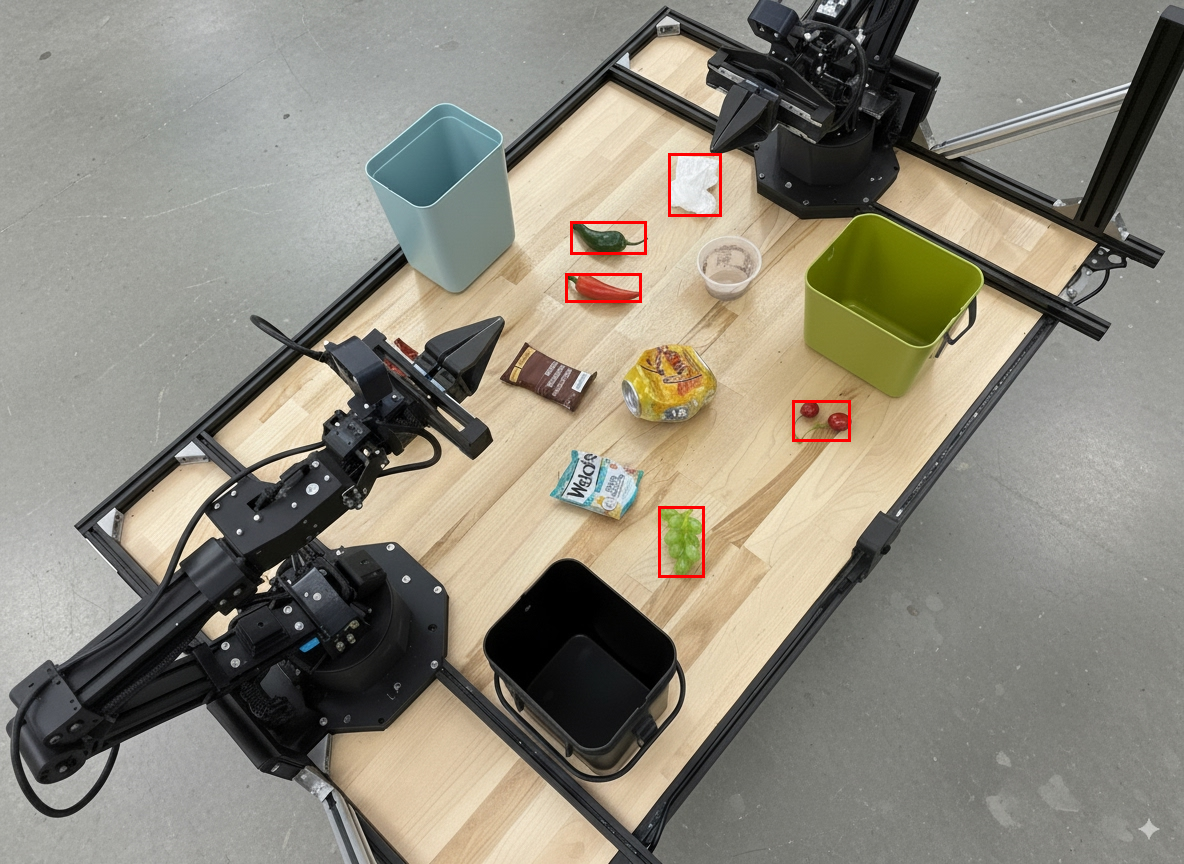
Результат работы модели будет выглядеть примерно так:
[
  {"label": "compostable", "y": 256, "x": 482, "y2": 295, "x2": 546},
  {"label": "compostable", "y": 317, "x": 478, "y2": 350, "x2": 542},
  {"label": "compostable", "y": 586, "x": 556, "y2": 668, "x2": 595},
  {"label": "compostable", "y": 463, "x": 669, "y2": 511, "x2": 718},
  {"label": "compostable", "y": 178, "x": 565, "y2": 250, "x2": 609}
]
На следующем изображении показаны коробки, возвращенные моделью.
Считайте показания аналогового датчика и примените логические вычисления.
В следующем примере показано, как использовать модель для считывания показаний аналогового датчика и выполнения расчетов времени. Для вывода данных в формате JSON используется системная инструкция.
Python
from google import genai

client = genai.Client()

uploaded_file = client.files.upload(file="gauge.jpeg")

interaction = client.interactions.create(
    model="gemini-robotics-er-2-preview",
    system_instruction="Be precise. When JSON is requested, reply with ONLY that JSON (no preface, no code block).",
    input=[
        {
            "type": "image",
            "uri": uploaded_file.uri,
            "mime_type": uploaded_file.mime_type
        },
        {"type": "text", "text": """Read the current value from this gauge. Then, calculate how long
        it will take at the current rate for the value to reach maximum.
        Reply in JSON: {"current_value": val, "max_value": val,
        "time_to_max_minutes": val}"""}
    ],
    tools=[{"type": "code_execution"}]
)

print(interaction.output_text)
Измерьте количество жидкости в емкости.
Следующий пример демонстрирует, как использовать выполнение кода для измерения уровня жидкости в контейнере.
Python
from google import genai

client = genai.Client()

uploaded_file = client.files.upload(file="fluid.jpeg")

interaction = client.interactions.create(
    model="gemini-robotics-er-2-preview",
    system_instruction="Be precise. When JSON is requested, reply with ONLY that JSON (no preface, no code block).",
    input=[
        {
            "type": "image",
            "uri": uploaded_file.uri,
            "mime_type": uploaded_file.mime_type
        },
        {"type": "text", "text": """Measure the amount of fluid in the container. Reply in JSON:
        {"fluid_level_ml": val, "container_capacity_ml": val,
        "percentage_full": val}"""}
    ],
    tools=[{"type": "code_execution"}]
)

print(interaction.output_text)
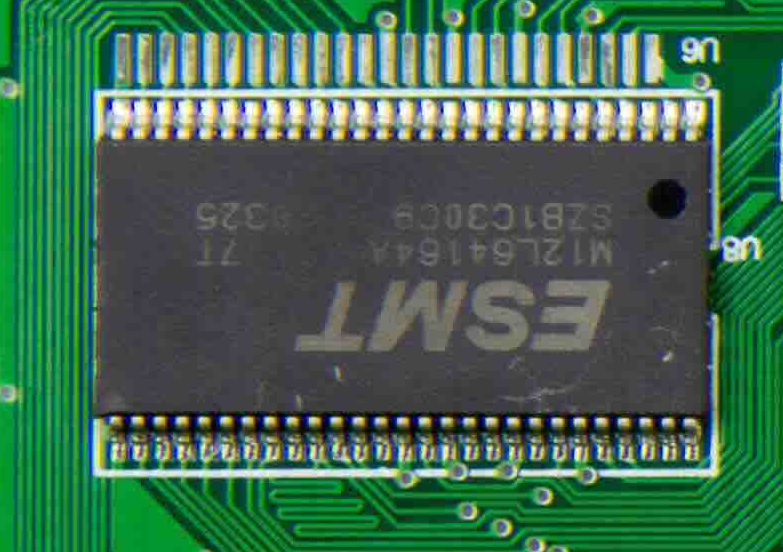
Прочтение маркировки на печатной плате
Следующий пример демонстрирует, как использовать выполнение кода для считывания маркировки на печатной плате.
Python
from google import genai

client = genai.Client()

uploaded_file = client.files.upload(file="circuit_board.jpeg")

interaction = client.interactions.create(
    model="gemini-robotics-er-2-preview",
    system_instruction="Be precise. When JSON is requested, reply with ONLY that JSON (no preface, no code block).",
    input=[
        {
            "type": "image",
            "uri": uploaded_file.uri,
            "mime_type": uploaded_file.mime_type
        },
        {"type": "text", "text": """Read all visible component labels and markings on this circuit
        board. Reply in JSON: {"components": [{"label": val,
        "location": [y, x]}]}"""}
    ],
    tools=[{"type": "code_execution"}]
)

print(interaction.output_text)
Аннотация изображения
В следующем примере показано, как использовать выполнение кода для аннотирования изображения (например, рисования стрелок для инструкций по утилизации) и возврата измененного изображения.
Python
from google import genai

client = genai.Client()

# Load your image
uploaded_file = client.files.upload(file="sorting.jpeg")

prompt = """
Look at this image and return it as an annotated version using arrows of
different colors to represent which items should go in which bins for
disposal. You must return the final image to the API caller.
"""

interaction = client.interactions.create(
    model="gemini-robotics-er-2-preview",
    input=[
        {
            "type": "image",
            "uri": uploaded_file.uri,
            "mime_type": uploaded_file.mime_type
        },
        {"type": "text", "text": prompt}
    ],
    tools=[{"type": "code_execution"}]
)

print(interaction.output_text)
Ниже приведён пример входного изображения.
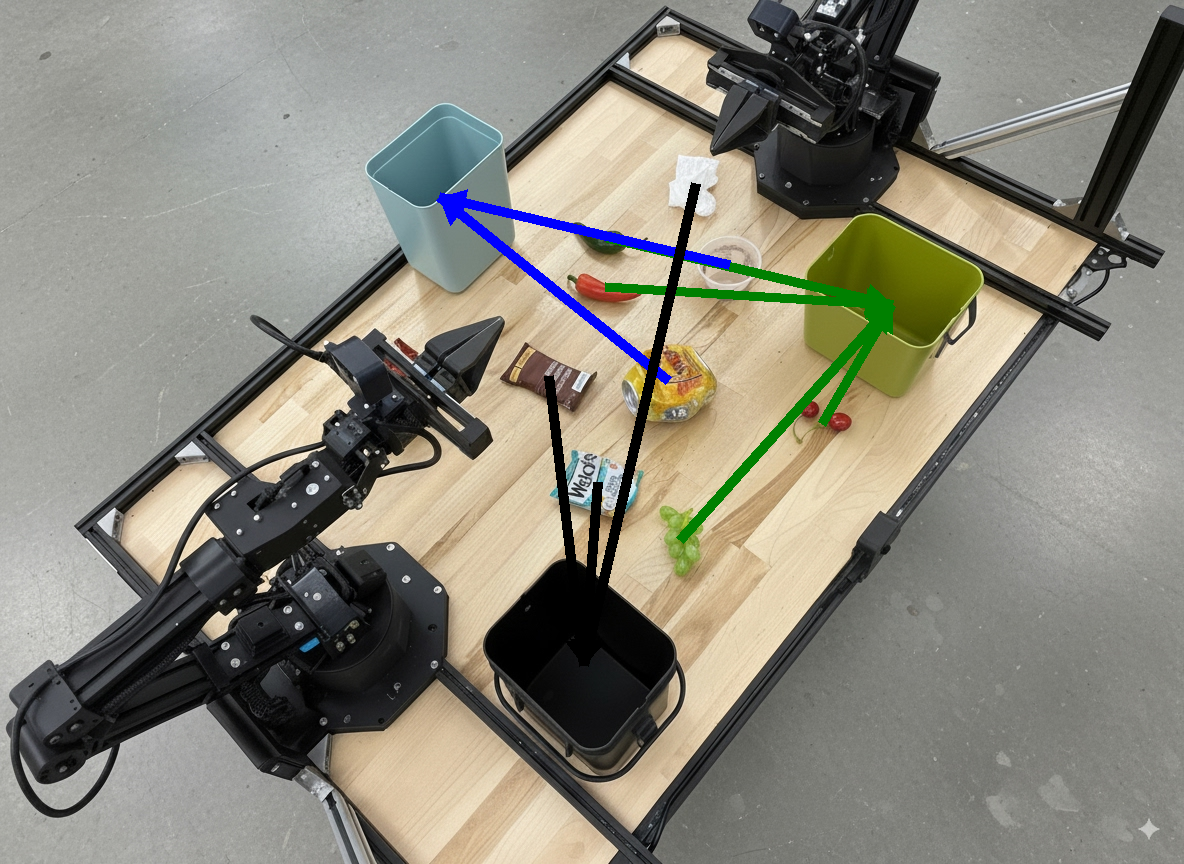
Результаты работы модели будут выглядеть примерно так:
  The annotated image shows the suggested disposal locations for the items on the table:
  - **Green bin (Compost/Organic)**: Green chili, red chili, grapes, and cherries.
  - **Blue bin (Recycling)**: Yellow crushed can and plastic container.
  - **Black bin (Trash)**: Chocolate bar wrapper, Welch's packet, and white tissue.
Что дальше?
- Оркестрация задач — выполнение долгосрочных задач с использованием пользовательских API для роботов.
- Робототехника с потоковой передачей данных — двусторонняя потоковая передача в реальном времени (только для Gemini Robotics ER 2).
- Анализ видеоматериалов — выявление ключевых моментов и классификация хода выполнения (только для Gemini Robotics ER 2).
Модели ER от Gemini Robotics могут писать и выполнять код на Python для обработки изображений и применения логики перед ответом. На этой странице представлены примеры выполнения кода: обнаружение объектов с масштабированием и обрезкой, считывание показаний приборов, измерение жидкости, считывание данных с печатных плат и аннотирование изображений.
Чтобы адаптировать эти примеры к вашим задачам, замените текст подсказки и загруженный файл изображения на свои собственные. Вы также можете изменить запрашиваемую схему JSON в подсказке в соответствии со структурой вывода, необходимой вашему приложению, или добавить инструкцию system_instruction для обеспечения заданного формата и точности вывода.
Полный рабочий код можно найти в руководстве по робототехнике .
Уровень мышления
Вы можете регулировать уровень сложности модели, чтобы поменять местами задержку и точность. Пространственные задачи, такие как обнаружение объектов, хорошо решаются при низком уровне сложности. Сложные задачи, такие как подсчет или оценка веса, выигрывают от более высокого уровня сложности.
Следующий пример задает high уровень сложности для решения сложной задачи подсчета:
Python
from google import genai

client = genai.Client()

uploaded_file = client.files.upload(file="scene.jpeg")

interaction = client.interactions.create(
    model="gemini-robotics-er-2-preview",
    input=[
        {
            "type": "image",
            "uri": uploaded_file.uri,
            "mime_type": uploaded_file.mime_type
        },
        {"type": "text", "text": "Identify and count all objects on the table."}
    ],
    generation_config={
        "thinking_level": "high"  # Use "minimal" or "low" for faster spatial tasks
    }
)

print(interaction.output_text)
Подробнее см. раздел «Мышление» .
Обнаружение объектов (масштабирование и обрезка)
В следующем примере используется выполнение кода для масштабирования и обрезки изображения с целью получения более четкого изображения при обнаружении объектов и возврате ограничивающих рамок.
Python
from google import genai

client = genai.Client()

uploaded_file = client.files.upload(file="sorting.jpeg")

prompt = """
Return JSON in the format {label: val, y: val, x: val, y2: val, x2: val} for
the compostable objects in this scene. Please Zoom and crop the image for a
clearer view. Return an annotated image of the final result with the bounding
boxes drawn on it to the API caller as a part of your process.
"""

interaction = client.interactions.create(
    model="gemini-robotics-er-2-preview",
    input=[
        {
            "type": "image",
            "uri": uploaded_file.uri,
            "mime_type": uploaded_file.mime_type
        },
        {"type": "text", "text": prompt}
    ],
    tools=[{"type": "code_execution"}]
)

print(interaction.output_text)
Результат работы модели будет выглядеть примерно так:
[
  {"label": "compostable", "y": 256, "x": 482, "y2": 295, "x2": 546},
  {"label": "compostable", "y": 317, "x": 478, "y2": 350, "x2": 542},
  {"label": "compostable", "y": 586, "x": 556, "y2": 668, "x2": 595},
  {"label": "compostable", "y": 463, "x": 669, "y2": 511, "x2": 718},
  {"label": "compostable", "y": 178, "x": 565, "y2": 250, "x2": 609}
]
На следующем изображении показаны коробки, возвращенные моделью.
Считайте показания аналогового датчика и примените логические вычисления.
В следующем примере показано, как использовать модель для считывания показаний аналогового датчика и выполнения расчетов времени. Для вывода данных в формате JSON используется системная инструкция.
Python
from google import genai

client = genai.Client()

uploaded_file = client.files.upload(file="gauge.jpeg")

interaction = client.interactions.create(
    model="gemini-robotics-er-2-preview",
    system_instruction="Be precise. When JSON is requested, reply with ONLY that JSON (no preface, no code block).",
    input=[
        {
            "type": "image",
            "uri": uploaded_file.uri,
            "mime_type": uploaded_file.mime_type
        },
        {"type": "text", "text": """Read the current value from this gauge. Then, calculate how long
        it will take at the current rate for the value to reach maximum.
        Reply in JSON: {"current_value": val, "max_value": val,
        "time_to_max_minutes": val}"""}
    ],
    tools=[{"type": "code_execution"}]
)

print(interaction.output_text)
Измерьте количество жидкости в емкости.
Следующий пример демонстрирует, как использовать выполнение кода для измерения уровня жидкости в контейнере.
Python
from google import genai

client = genai.Client()

uploaded_file = client.files.upload(file="fluid.jpeg")

interaction = client.interactions.create(
    model="gemini-robotics-er-2-preview",
    system_instruction="Be precise. When JSON is requested, reply with ONLY that JSON (no preface, no code block).",
    input=[
        {
            "type": "image",
            "uri": uploaded_file.uri,
            "mime_type": uploaded_file.mime_type
        },
        {"type": "text", "text": """Measure the amount of fluid in the container. Reply in JSON:
        {"fluid_level_ml": val, "container_capacity_ml": val,
        "percentage_full": val}"""}
    ],
    tools=[{"type": "code_execution"}]
)

print(interaction.output_text)
Прочтение маркировки на печатной плате
Следующий пример демонстрирует, как использовать выполнение кода для считывания маркировки на печатной плате.
Python
from google import genai

client = genai.Client()

uploaded_file = client.files.upload(file="circuit_board.jpeg")

interaction = client.interactions.create(
    model="gemini-robotics-er-2-preview",
    system_instruction="Be precise. When JSON is requested, reply with ONLY that JSON (no preface, no code block).",
    input=[
        {
            "type": "image",
            "uri": uploaded_file.uri,
            "mime_type": uploaded_file.mime_type
        },
        {"type": "text", "text": """Read all visible component labels and markings on this circuit
        board. Reply in JSON: {"components": [{"label": val,
        "location": [y, x]}]}"""}
    ],
    tools=[{"type": "code_execution"}]
)

print(interaction.output_text)
Аннотация изображения
В следующем примере показано, как использовать выполнение кода для аннотирования изображения (например, рисования стрелок для инструкций по утилизации) и возврата измененного изображения.
Python
from google import genai

client = genai.Client()

# Load your image
uploaded_file = client.files.upload(file="sorting.jpeg")

prompt = """
Look at this image and return it as an annotated version using arrows of
different colors to represent which items should go in which bins for
disposal. You must return the final image to the API caller.
"""

interaction = client.interactions.create(
    model="gemini-robotics-er-2-preview",
    input=[
        {
            "type": "image",
            "uri": uploaded_file.uri,
            "mime_type": uploaded_file.mime_type
        },
        {"type": "text", "text": prompt}
    ],
    tools=[{"type": "code_execution"}]
)

print(interaction.output_text)
Ниже приведён пример входного изображения.
Результаты работы модели будут выглядеть примерно так:
  The annotated image shows the suggested disposal locations for the items on the table:
  - **Green bin (Compost/Organic)**: Green chili, red chili, grapes, and cherries.
  - **Blue bin (Recycling)**: Yellow crushed can and plastic container.
  - **Black bin (Trash)**: Chocolate bar wrapper, Welch's packet, and white tissue.
Что дальше?
- Оркестрация задач — выполнение долгосрочных задач с использованием пользовательских API для роботов.
- Робототехника с потоковой передачей данных — двусторонняя потоковая передача в реальном времени (только для Gemini Robotics ER 2).
- Анализ видеоматериалов — выявление ключевых моментов и классификация хода выполнения (только для Gemini Robotics ER 2).
Модели ER от Gemini Robotics могут писать и выполнять код на Python для обработки изображений и применения логики перед ответом. На этой странице представлены примеры выполнения кода: обнаружение объектов с масштабированием и обрезкой, считывание показаний приборов, измерение жидкости, считывание данных с печатных плат и аннотирование изображений.
Чтобы адаптировать эти примеры к вашим задачам, замените текст подсказки и загруженный файл изображения на свои собственные. Вы также можете изменить запрашиваемую схему JSON в подсказке в соответствии со структурой вывода, необходимой вашему приложению, или добавить инструкцию system_instruction для обеспечения заданного формата и точности вывода.
Полный рабочий код можно найти в руководстве по робототехнике .
Уровень мышления
Вы можете регулировать уровень сложности модели, чтобы поменять местами задержку и точность. Пространственные задачи, такие как обнаружение объектов, хорошо решаются при низком уровне сложности. Сложные задачи, такие как подсчет или оценка веса, выигрывают от более высокого уровня сложности.
Следующий пример задает high уровень сложности для решения сложной задачи подсчета:
Python
from google import genai

client = genai.Client()

uploaded_file = client.files.upload(file="scene.jpeg")

interaction = client.interactions.create(
    model="gemini-robotics-er-2-preview",
    input=[
        {
            "type": "image",
            "uri": uploaded_file.uri,
            "mime_type": uploaded_file.mime_type
        },
        {"type": "text", "text": "Identify and count all objects on the table."}
    ],
    generation_config={
        "thinking_level": "high"  # Use "minimal" or "low" for faster spatial tasks
    }
)

print(interaction.output_text)
Подробнее см. раздел «Мышление» .
Обнаружение объектов (масштабирование и обрезка)
В следующем примере используется выполнение кода для масштабирования и обрезки изображения с целью получения более четкого изображения при обнаружении объектов и возврате ограничивающих рамок.
Python
from google import genai

client = genai.Client()

uploaded_file = client.files.upload(file="sorting.jpeg")

prompt = """
Return JSON in the format {label: val, y: val, x: val, y2: val, x2: val} for
the compostable objects in this scene. Please Zoom and crop the image for a
clearer view. Return an annotated image of the final result with the bounding
boxes drawn on it to the API caller as a part of your process.
"""

interaction = client.interactions.create(
    model="gemini-robotics-er-2-preview",
    input=[
        {
            "type": "image",
            "uri": uploaded_file.uri,
            "mime_type": uploaded_file.mime_type
        },
        {"type": "text", "text": prompt}
    ],
    tools=[{"type": "code_execution"}]
)

print(interaction.output_text)
Результат работы модели будет выглядеть примерно так:
[
  {"label": "compostable", "y": 256, "x": 482, "y2": 295, "x2": 546},
  {"label": "compostable", "y": 317, "x": 478, "y2": 350, "x2": 542},
  {"label": "compostable", "y": 586, "x": 556, "y2": 668, "x2": 595},
  {"label": "compostable", "y": 463, "x": 669, "y2": 511, "x2": 718},
  {"label": "compostable", "y": 178, "x": 565, "y2": 250, "x2": 609}
]
На следующем изображении показаны коробки, возвращенные моделью.
Считайте показания аналогового датчика и примените логические вычисления.
В следующем примере показано, как использовать модель для считывания показаний аналогового датчика и выполнения расчетов времени. Для вывода данных в формате JSON используется системная инструкция.
Python
from google import genai

client = genai.Client()

uploaded_file = client.files.upload(file="gauge.jpeg")

interaction = client.interactions.create(
    model="gemini-robotics-er-2-preview",
    system_instruction="Be precise. When JSON is requested, reply with ONLY that JSON (no preface, no code block).",
    input=[
        {
            "type": "image",
            "uri": uploaded_file.uri,
            "mime_type": uploaded_file.mime_type
        },
        {"type": "text", "text": """Read the current value from this gauge. Then, calculate how long
        it will take at the current rate for the value to reach maximum.
        Reply in JSON: {"current_value": val, "max_value": val,
        "time_to_max_minutes": val}"""}
    ],
    tools=[{"type": "code_execution"}]
)

print(interaction.output_text)
Измерьте количество жидкости в емкости.
Следующий пример демонстрирует, как использовать выполнение кода для измерения уровня жидкости в контейнере.
Python
from google import genai

client = genai.Client()

uploaded_file = client.files.upload(file="fluid.jpeg")

interaction = client.interactions.create(
    model="gemini-robotics-er-2-preview",
    system_instruction="Be precise. When JSON is requested, reply with ONLY that JSON (no preface, no code block).",
    input=[
        {
            "type": "image",
            "uri": uploaded_file.uri,
            "mime_type": uploaded_file.mime_type
        },
        {"type": "text", "text": """Measure the amount of fluid in the container. Reply in JSON:
        {"fluid_level_ml": val, "container_capacity_ml": val,
        "percentage_full": val}"""}
    ],
    tools=[{"type": "code_execution"}]
)

print(interaction.output_text)
Прочтение маркировки на печатной плате
Следующий пример демонстрирует, как использовать выполнение кода для считывания маркировки на печатной плате.
Python
from google import genai

client = genai.Client()

uploaded_file = client.files.upload(file="circuit_board.jpeg")

interaction = client.interactions.create(
    model="gemini-robotics-er-2-preview",
    system_instruction="Be precise. When JSON is requested, reply with ONLY that JSON (no preface, no code block).",
    input=[
        {
            "type": "image",
            "uri": uploaded_file.uri,
            "mime_type": uploaded_file.mime_type
        },
        {"type": "text", "text": """Read all visible component labels and markings on this circuit
        board. Reply in JSON: {"components": [{"label": val,
        "location": [y, x]}]}"""}
    ],
    tools=[{"type": "code_execution"}]
)

print(interaction.output_text)
Аннотация изображения
В следующем примере показано, как использовать выполнение кода для аннотирования изображения (например, рисования стрелок для инструкций по утилизации) и возврата измененного изображения.
Python
from google import genai

client = genai.Client()

# Load your image
uploaded_file = client.files.upload(file="sorting.jpeg")

prompt = """
Look at this image and return it as an annotated version using arrows of
different colors to represent which items should go in which bins for
disposal. You must return the final image to the API caller.
"""

interaction = client.interactions.create(
    model="gemini-robotics-er-2-preview",
    input=[
        {
            "type": "image",
            "uri": uploaded_file.uri,
            "mime_type": uploaded_file.mime_type
        },
        {"type": "text", "text": prompt}
    ],
    tools=[{"type": "code_execution"}]
)

print(interaction.output_text)
Ниже приведён пример входного изображения.
Результаты работы модели будут выглядеть примерно так:
  The annotated image shows the suggested disposal locations for the items on the table:
  - **Green bin (Compost/Organic)**: Green chili, red chili, grapes, and cherries.
  - **Blue bin (Recycling)**: Yellow crushed can and plastic container.
  - **Black bin (Trash)**: Chocolate bar wrapper, Welch's packet, and white tissue.
Что дальше?
- Оркестрация задач — выполнение долгосрочных задач с использованием пользовательских API для роботов.
- Робототехника с потоковой передачей данных — двусторонняя потоковая передача в реальном времени (только для Gemini Robotics ER 2).
- Анализ видеоматериалов — выявление ключевых моментов и классификация хода выполнения (только для Gemini Robotics ER 2).
Модели ER от Gemini Robotics могут писать и выполнять код на Python для обработки изображений и применения логики перед ответом. На этой странице представлены примеры выполнения кода: обнаружение объектов с масштабированием и обрезкой, считывание показаний приборов, измерение жидкости, считывание данных с печатных плат и аннотирование изображений.
Чтобы адаптировать эти примеры к вашим задачам, замените текст подсказки и загруженный файл изображения на свои собственные. Вы также можете изменить запрашиваемую схему JSON в подсказке в соответствии со структурой вывода, необходимой вашему приложению, или добавить инструкцию system_instruction для обеспечения заданного формата и точности вывода.
Полный рабочий код можно найти в руководстве по робототехнике .
Уровень мышления
Вы можете регулировать уровень сложности модели, чтобы поменять местами задержку и точность. Пространственные задачи, такие как обнаружение объектов, хорошо решаются при низком уровне сложности. Сложные задачи, такие как подсчет или оценка веса, выигрывают от более высокого уровня сложности.
Следующий пример задает high уровень сложности для решения сложной задачи подсчета:
Python
from google import genai

client = genai.Client()

uploaded_file = client.files.upload(file="scene.jpeg")

interaction = client.interactions.create(
    model="gemini-robotics-er-2-preview",
    input=[
        {
            "type": "image",
            "uri": uploaded_file.uri,
            "mime_type": uploaded_file.mime_type
        },
        {"type": "text", "text": "Identify and count all objects on the table."}
    ],
    generation_config={
        "thinking_level": "high"  # Use "minimal" or "low" for faster spatial tasks
    }
)

print(interaction.output_text)
Подробнее см. раздел «Мышление» .
Обнаружение объектов (масштабирование и обрезка)
В следующем примере используется выполнение кода для масштабирования и обрезки изображения с целью получения более четкого изображения при обнаружении объектов и возврате ограничивающих рамок.
Python
from google import genai

client = genai.Client()

uploaded_file = client.files.upload(file="sorting.jpeg")

prompt = """
Return JSON in the format {label: val, y: val, x: val, y2: val, x2: val} for
the compostable objects in this scene. Please Zoom and crop the image for a
clearer view. Return an annotated image of the final result with the bounding
boxes drawn on it to the API caller as a part of your process.
"""

interaction = client.interactions.create(
    model="gemini-robotics-er-2-preview",
    input=[
        {
            "type": "image",
            "uri": uploaded_file.uri,
            "mime_type": uploaded_file.mime_type
        },
        {"type": "text", "text": prompt}
    ],
    tools=[{"type": "code_execution"}]
)

print(interaction.output_text)
Результат работы модели будет выглядеть примерно так:
[
  {"label": "compostable", "y": 256, "x": 482, "y2": 295, "x2": 546},
  {"label": "compostable", "y": 317, "x": 478, "y2": 350, "x2": 542},
  {"label": "compostable", "y": 586, "x": 556, "y2": 668, "x2": 595},
  {"label": "compostable", "y": 463, "x": 669, "y2": 511, "x2": 718},
  {"label": "compostable", "y": 178, "x": 565, "y2": 250, "x2": 609}
]
На следующем изображении показаны коробки, возвращенные моделью.
Считайте показания аналогового датчика и примените логические вычисления.
В следующем примере показано, как использовать модель для считывания показаний аналогового датчика и выполнения расчетов времени. Для вывода данных в формате JSON используется системная инструкция.
Python
from google import genai

client = genai.Client()

uploaded_file = client.files.upload(file="gauge.jpeg")

interaction = client.interactions.create(
    model="gemini-robotics-er-2-preview",
    system_instruction="Be precise. When JSON is requested, reply with ONLY that JSON (no preface, no code block).",
    input=[
        {
            "type": "image",
            "uri": uploaded_file.uri,
            "mime_type": uploaded_file.mime_type
        },
        {"type": "text", "text": """Read the current value from this gauge. Then, calculate how long
        it will take at the current rate for the value to reach maximum.
        Reply in JSON: {"current_value": val, "max_value": val,
        "time_to_max_minutes": val}"""}
    ],
    tools=[{"type": "code_execution"}]
)

print(interaction.output_text)
Измерьте количество жидкости в емкости.
Следующий пример демонстрирует, как использовать выполнение кода для измерения уровня жидкости в контейнере.
Python
from google import genai

client = genai.Client()

uploaded_file = client.files.upload(file="fluid.jpeg")

interaction = client.interactions.create(
    model="gemini-robotics-er-2-preview",
    system_instruction="Be precise. When JSON is requested, reply with ONLY that JSON (no preface, no code block).",
    input=[
        {
            "type": "image",
            "uri": uploaded_file.uri,
            "mime_type": uploaded_file.mime_type
        },
        {"type": "text", "text": """Measure the amount of fluid in the container. Reply in JSON:
        {"fluid_level_ml": val, "container_capacity_ml": val,
        "percentage_full": val}"""}
    ],
    tools=[{"type": "code_execution"}]
)

print(interaction.output_text)
Прочтение маркировки на печатной плате
Следующий пример демонстрирует, как использовать выполнение кода для считывания маркировки на печатной плате.
Python
from google import genai

client = genai.Client()

uploaded_file = client.files.upload(file="circuit_board.jpeg")

interaction = client.interactions.create(
    model="gemini-robotics-er-2-preview",
    system_instruction="Be precise. When JSON is requested, reply with ONLY that JSON (no preface, no code block).",
    input=[
        {
            "type": "image",
            "uri": uploaded_file.uri,
            "mime_type": uploaded_file.mime_type
        },
        {"type": "text", "text": """Read all visible component labels and markings on this circuit
        board. Reply in JSON: {"components": [{"label": val,
        "location": [y, x]}]}"""}
    ],
    tools=[{"type": "code_execution"}]
)

print(interaction.output_text)
Аннотация изображения
В следующем примере показано, как использовать выполнение кода для аннотирования изображения (например, рисования стрелок для инструкций по утилизации) и возврата измененного изображения.
Python
from google import genai

client = genai.Client()

# Load your image
uploaded_file = client.files.upload(file="sorting.jpeg")

prompt = """
Look at this image and return it as an annotated version using arrows of
different colors to represent which items should go in which bins for
disposal. You must return the final image to the API caller.
"""

interaction = client.interactions.create(
    model="gemini-robotics-er-2-preview",
    input=[
        {
            "type": "image",
            "uri": uploaded_file.uri,
            "mime_type": uploaded_file.mime_type
        },
        {"type": "text", "text": prompt}
    ],
    tools=[{"type": "code_execution"}]
)

print(interaction.output_text)
Ниже приведён пример входного изображения.
Результаты работы модели будут выглядеть примерно так:
  The annotated image shows the suggested disposal locations for the items on the table:
  - **Green bin (Compost/Organic)**: Green chili, red chili, grapes, and cherries.
  - **Blue bin (Recycling)**: Yellow crushed can and plastic container.
  - **Black bin (Trash)**: Chocolate bar wrapper, Welch's packet, and white tissue.
Что дальше?
- Оркестрация задач — выполнение долгосрочных задач с использованием пользовательских API для роботов.
- Робототехника с потоковой передачей данных — двусторонняя потоковая передача в реальном времени (только для Gemini Robotics ER 2).
- Анализ видеоматериалов — выявление ключевых моментов и классификация хода выполнения (только для Gemini Robotics ER 2).