

Os modelos do Gemini Robotics ER podem planejar tarefas e raciocinar sobre o espaço, inferindo quais ações realizar e quais objetos mover para concluir uma meta. Esta página mostra um exemplo de como conduzir uma operação de coleta e colocação usando uma API de robô personalizada para orquestrar a tarefa de colocar um item em uma tigela. Este exemplo usa o modelo padrão do Gemini ER 2. Para um exemplo de streaming , consulte o guia de streaming do Gemini ER 2.
Para conferir o código executável completo, consulte o livro de receitas de robótica.
Como usar uma API de robô personalizada
Este exemplo demonstra a orquestração de tarefas com uma API de robô personalizada. Ele apresenta uma API simulada projetada para uma operação de coleta e colocação. A tarefa é pegar um bloco azul e colocá-lo em uma tigela laranja:
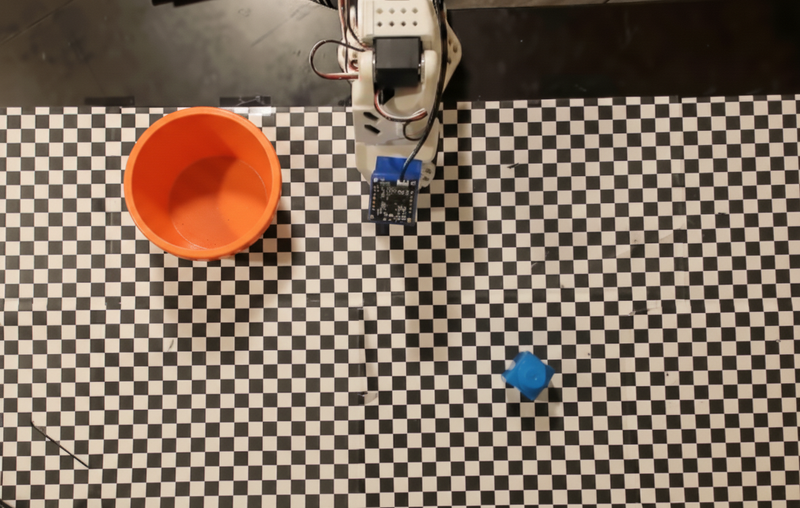
Este exemplo usa a seguinte API de robô simulada:
Python
def move(x, y, high):
  print(f"Mock Robot: Moving to coordinates: {x}, {y}, {'high above table' if high else 'down at table level'}")

def setGripperState(opened):
  print(f"Mock Robot: {'Opening gripper' if opened else 'Closing gripper'}")

robot_origin_y = 300
robot_origin_x = 500

move_function = {
    "type": "function",
    "name": "move",
    "description": "Moves the arm to the given coordinates.",
    "parameters": {
        "type": "object",
        "properties": {
            "x": {"type": "integer", "description": "X coordinate relative to the origin"},
            "y": {"type": "integer", "description": "Y coordinate relative to the origin"},
            "high": {"type": "boolean", "description": "Set to True to lift the robot arm above the scene for avoiding obstacles. Set to False to place the gripper on the surface."}
        },
        "required": ["x", "y", "high"]
    }
}

set_gripper_state_function = {
    "type": "function",
    "name": "setGripperState",
    "description": "Opens or closes the robot's gripper.",
    "parameters": {
        "type": "object",
        "properties": {
            "opened": {"type": "boolean", "description": "True opens the gripper, False closes the gripper."}
        },
        "required": ["opened"]
    }
}
O exemplo a seguir envia o comando e a imagem para o modelo com as definições de ferramenta. Em seguida, ele executa um loop agêntico: após cada resposta do modelo, ele executa todas as chamadas de função solicitadas (move, setGripperState), retorna os resultados para o modelo usando previous_interaction_id e repete até que o modelo pare de chamar funções ou o limite de etapas seja atingido.
Python
prompt = (
    "You are a robotic arm with six degrees-of-freedom. "
    f"The origin point for calculating the moves is at normalized point y={robot_origin_y}, x={robot_origin_x}. "
    "Use this as the new (0,0) for calculating moves, allowing x and y to be negative.\n\n"
    "Find the blue block and the orange bowl. Calculate their coordinates relative to the origin.\n"
    "Perform a pick and place operation where you pick up the blue block and place it into the orange bowl. "
    "Call the appropriate sequence of functions to complete this operation."
)

# 1. Initial Interaction
interaction = client.interactions.create(
    model=MODEL_ID,
    input=[{"type": "user_input", "content": [
        {"type": "image", "data": img_b64, "mime_type": "image/png"},
        {"type": "text", "text": prompt}
    ]}],
    tools=[move_function, set_gripper_state_function],
    generation_config={"thinking_level": "low"}
)

print("\n--- Executing Orchestrated Plan ---")

max_steps = 15 # Safety limit to prevent infinite loops
step_count = 0

# 2. The Agentic Loop
while step_count < max_steps:
    step_count += 1

    # Check if the model wants to call any functions
    tool_calls = [step for step in interaction.steps if step.type == "function_call"]

    if not tool_calls:
        # If no tools were called, the model is finished with the sequence
        print("Sequence complete.")
        if interaction.output_text:
            print(f"Model Summary: {interaction.output_text}")
        break

    function_results = []

    for step in tool_calls:
        function_name = step.name
        arguments = step.arguments

        # Execute the mock function
        if function_name == "move":
            move(**arguments)
        elif function_name == "setGripperState":
            setGripperState(**arguments)
        else:
            print(f"Unknown function: {function_name}")

        # 3. Create a result object to tell the model the function succeeded
        function_results.append({
            "type": "function_result",
            "name": step.name,
            "call_id": step.id,
            "result": [{"type": "text", "text": '{"status": "success"}'}]
        })

    # 4. Send the results back to the model, passing previous_interaction_id
    # so it remembers the conversation history and generates the NEXT step
    interaction = client.interactions.create(
        model=MODEL_ID,
        previous_interaction_id=interaction.id,
        tools=[move_function, set_gripper_state_function],
        input=function_results
    )
A seguir, mostramos uma possível saída do modelo com base no comando e na API de robô simulada. A saída inclui o resultado das chamadas de função do robô que o modelo sequenciou.
--- Executing Orchestrated Plan ---
Mock Robot: Opening gripper
Mock Robot: Moving to coordinates: 160, 440, high above table
Mock Robot: Moving to coordinates: 160, 440, down at table level
Mock Robot: Closing gripper
Mock Robot: Moving to coordinates: 160, 440, high above table
Mock Robot: Moving to coordinates: -250, 60, high above table
Mock Robot: Moving to coordinates: -250, 60, down at table level
Mock Robot: Opening gripper
Mock Robot: Moving to coordinates: -250, 60, high above table
Sequence complete.
Model Summary: I have completed the task of picking up the blue block and placing it into the orange bowl.
A seguir
- Robótica com streaming: streaming em tempo real com chamada de função (somente Gemini Robotics ER 2).
- Entendimento de vídeo: acompanhe o progresso da tarefa no vídeo (somente ER 2).
- Raciocínio espacial: exemplos de apontamento, rastreamento e caixa delimitadora.