Gemini Robotics-ER 1.6

‫Gemini Robotics-ER 1.6 הוא מודל ראייה ושפה (VLM) שמביא את יכולות ה-AI האקטיבי של Gemini לרובוטיקה. הוא מיועד לחשיבה רציונלית משופרת בעולם הפיזי, ומאפשר לרובוטים לפרש נתונים חזותיים מורכבים, לבצע חשיבה רציונלית מרחבית ולתכנן פעולות מפקודות בשפה טבעית.

התכונות והיתרונות העיקריים:

  • אוטונומיה משופרת: רובוטים יכולים להסיק מסקנות, להסתגל ולתת מענה לשינויים בסביבות פתוחות.
  • אינטראקציה בשפה טבעית: מאפשרת להשתמש ברובוטים בקלות רבה יותר על ידי הקצאת משימות מורכבות באמצעות שפה טבעית.
  • תיאום משימות: פירוק פקודות בשפה טבעית למשימות משנה ושילוב עם התנהגויות ובקרי רובוטים קיימים כדי להשלים משימות ארוכות טווח.
  • יכולות מגוונות: איתור וזיהוי של אובייקטים, הבנה של קשרי גומלין בין אובייקטים, תכנון של אחיזות ומסלולים ופרשנות של סצנות דינמיות.

במסמך הזה מוסבר מה המודל עושה ומוצגות כמה דוגמאות שממחישות את יכולות ה-AI האקטיבי של המודל.

אם רוצים להתחיל מיד, אפשר לנסות את המודל ב-Google AI Studio.

לניסיון ב-Google AI Studio

בטיחות

‫Gemini Robotics-ER 1.6 נבנה תוך התחשבות בבטיחות, אבל האחריות לשמירה על סביבה בטוחה סביב הרובוט היא שלכם. מודלים של AI גנרטיבי עלולים לטעות, ורובוטים פיזיים עלולים לגרום נזק. הבטיחות היא בראש סדר העדיפויות שלנו, ואנחנו משקיעים מאמצים רבים במחקר כדי להבטיח שהשימוש במודלים של AI גנרטיבי ברובוטיקה בעולם האמיתי יהיה בטוח. מידע נוסף זמין בדף הבטיחות של Google DeepMind בנושא רובוטיקה.

תחילת העבודה: איתור אובייקטים בסצנה

בדוגמה הבאה מוצג תרחיש שימוש נפוץ ברובוטיקה. הדוגמה מראה איך להעביר תמונה והנחיית טקסט למודל באמצעות השיטה generateContent כדי לקבל רשימה של אובייקטים מזוהים עם הנקודות הדו-ממדיות התואמות שלהם. המודל מחזיר נקודות עבור פריטים שהוא זיהה בתמונה, ומחזיר את הקואורדינטות הדו-ממדיות והתוויות המנורמלות שלהם.

אפשר להשתמש בפלט הזה עם API של רובוטיקה, או להפעיל מודל של ראייה-שפה-פעולה (VLA) או כל פונקציה אחרת שמוגדרת על ידי המשתמש של צד שלישי כדי ליצור פעולות לביצוע על ידי רובוט.

Python

from google import genai
from google.genai import types

PROMPT = """
          Point to no more than 10 items in the image. The label returned
          should be an identifying name for the object detected.
          The answer should follow the json format: [{"point": <point>,
          "label": <label1>}, ...]. The points are in [y, x] format
          normalized to 0-1000.
        """
client = genai.Client()

# Load your image
with open("my-image.png", 'rb') as f:
    image_bytes = f.read()

image_response = client.models.generate_content(
    model="gemini-robotics-er-1.6-preview",
    contents=[
        types.Part.from_bytes(
            data=image_bytes,
            mime_type='image/png',
        ),
        PROMPT
    ],
    config = types.GenerateContentConfig(
        temperature=1.0,
        thinking_config=types.ThinkingConfig(thinking_budget=0)
    )
)

print(image_response.text)

REST

# First, ensure you have the image file locally.
# Encode the image to base64
IMAGE_BASE64=$(base64 -w 0 my-image.png)

curl -X POST \
  "https://generativelanguage.googleapis.com/v1beta/models/gemini-robotics-er-1.6-preview:generateContent \
  -H "x-goog-api-key: $GEMINI_API_KEY" \
  -H "Content-Type: application/json" \
  -d '{
    "contents": [
      {
        "parts": [
          {
            "inlineData": {
              "mimeType": "image/png",
              "data": "'"${IMAGE_BASE64}"'"
            }
          },
          {
            "text": "Point to no more than 10 items in the image. The label returned should be an identifying name for the object detected. The answer should follow the json format: [{\"point\": [y, x], \"label\": <label1>}, ...]. The points are in [y, x] format normalized to 0-1000."
          }
        ]
      }
    ],
    "generationConfig": {
      "temperature": 0.5,
      "thinkingConfig": {
        "thinkingBudget": 0
      }
    }
  }'

הפלט יהיה מערך JSON שמכיל אובייקטים, שלכל אחד מהם יש point (קואורדינטות [y, x] מנורמלות) ו-label שמזהה את האובייקט.

JSON

[
  {"point": [376, 508], "label": "small banana"},
  {"point": [287, 609], "label": "larger banana"},
  {"point": [223, 303], "label": "pink starfruit"},
  {"point": [435, 172], "label": "paper bag"},
  {"point": [270, 786], "label": "green plastic bowl"},
  {"point": [488, 775], "label": "metal measuring cup"},
  {"point": [673, 580], "label": "dark blue bowl"},
  {"point": [471, 353], "label": "light blue bowl"},
  {"point": [492, 497], "label": "bread"},
  {"point": [525, 429], "label": "lime"}
]

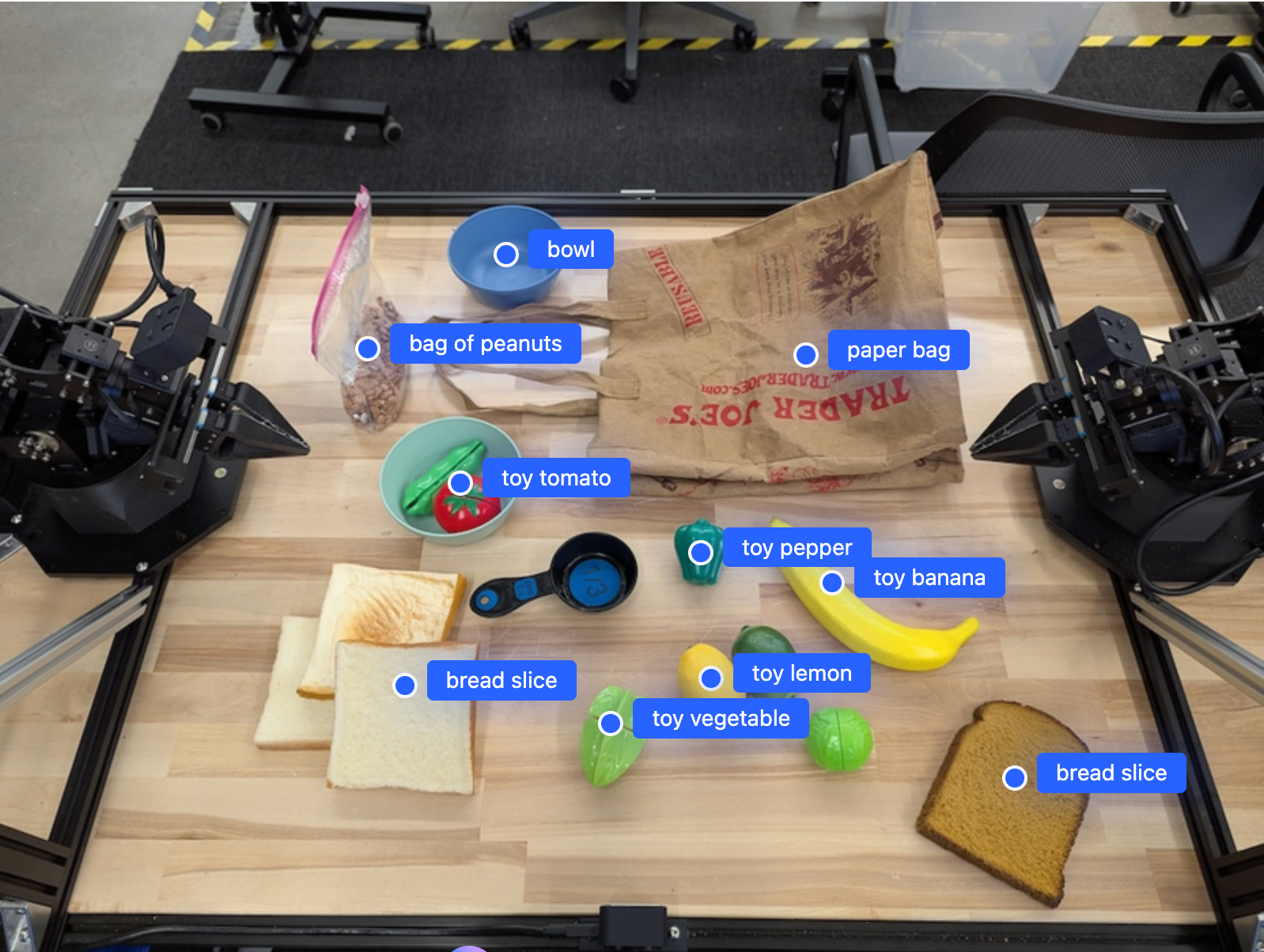
התמונה הבאה היא דוגמה לאופן שבו אפשר להציג את הנקודות האלה:

דוגמה שמציגה את הנקודות של אובייקטים בתמונה

איך זה עובד

‫Gemini Robotics-ER 1.6 מאפשר לרובוטים שלכם להבין את ההקשר ולעבוד בעולם הפיזי באמצעות הבנה מרחבית. הוא מקבל קלט של תמונות, סרטונים ואודיו, וגם הנחיות בשפה טבעית, כדי:

  • הבנת אובייקטים והקשר של סצנה: זיהוי אובייקטים והסבר על הקשר שלהם לסצנה, כולל האפשרויות שהם מציעים.
  • הבנת הוראות למשימות: פירוש משימות שניתנות בשפה טבעית, כמו 'תמצא את הבננה'.
  • הסקת מסקנות מרחבית וזמנית: הבנת רצפים של פעולות ואיך אובייקטים מקיימים אינטראקציה עם סצנה לאורך זמן.
  • יצירת פלט מובנה: מחזירה קואורדינטות (נקודות או תיבות תוחמות) שמייצגות את מיקומי האובייקטים.

כך רובוטים יכולים "לראות" את הסביבה שלהם ו "להבין" אותה באופן פרוגרמטי.

‫Gemini Robotics-ER 1.6 הוא גם סוכן, כלומר הוא יכול לפרק משימות מורכבות (כמו "שים את התפוח בקערה") למשימות משנה כדי לתזמן משימות לטווח ארוך:

  • חלוקת משימות משנה לרצף: פירוק פקודות לרצף לוגי של שלבים.
  • קריאות לפונקציות/ביצוע קוד: ביצוע שלבים באמצעות קריאה לפונקציות/כלים קיימים של הרובוט או ביצוע קוד שנוצר.

מידע נוסף על בקשות להפעלת פונקציות באמצעות Gemini זמין בדף בנושא בקשות להפעלת פונקציות.

שימוש בתקציב החשיבה עם Gemini Robotics-ER 1.6

ל-Gemini Robotics-ER 1.6 יש תקציב גמיש של יכולות חשיבה שמאפשר לכם לשלוט בפשרה בין זמן האחזור לבין הדיוק. במשימות של הבנה מרחבית כמו זיהוי אובייקטים, המודל יכול להשיג ביצועים גבוהים עם תקציב חשיבה קטן. משימות מורכבות יותר של הסקת מסקנות, כמו ספירה ואומדן משקל, נהנות מתקציב חשיבה גדול יותר. כך תוכלו לאזן בין הצורך בתשובות עם זמן אחזור נמוך לבין תוצאות מדויקות מאוד למשימות מורכבות יותר.

מידע נוסף על תקציבים זמין בדף Thinking.

חשיבה מרחבית רגילה

בדוגמאות הבאות מוצגות משימות של תפיסה רובוטית ושל חשיבה מרחבית באמצעות הנחיות בשפה טבעית, החל מהצבעה על אובייקטים בתמונה ומציאת אובייקטים בתמונה ועד לתכנון מסלולים. כדי לפשט את הדברים, קטעי הקוד בדוגמאות האלה צומצמו כך שיוצגו רק ההנחיה והקריאה ל-API של generate_content.

קוד מלא שניתן להפעלה ודוגמאות נוספות זמינים בספר המתכונים בנושא רובוטיקה.

הצבעה על אובייקטים

הצבעה על אובייקטים ומציאת אובייקטים בתמונות או בפריים של סרטונים הם תרחישי שימוש נפוצים במודלים של ראייה ושפה (VLMs) ברובוטיקה. בדוגמה הבאה, המודל מתבקש למצוא אובייקטים ספציפיים בתמונה ולהחזיר את הקואורדינטות שלהם.

Python

from google import genai
from google.genai import types

client = genai.Client()

# Load your image and set up your prompt
with open('path/to/image-with-objects.jpg', 'rb') as f:
    image_bytes = f.read()

queries = [
    "bread",
    "starfruit",
    "banana",
]

prompt = f"""
    Get all points matching the following objects: {', '.join(queries)}. The
    label returned should be an identifying name for the object detected.
    The answer should follow the json format:

    [{{"point": , "label": }}, ...]. The points are in

    [y, x] format normalized to 0-1000.
    """

image_response = client.models.generate_content(
  model="gemini-robotics-er-1.6-preview",
  contents=[
    types.Part.from_bytes(
      data=image_bytes,
      mime_type='image/jpeg',
    ),
    prompt
  ],
  config = types.GenerateContentConfig(
      temperature=1.0,
      thinking_config=types.ThinkingConfig(thinking_budget=0)
  )
)

print(image_response.text)

הפלט יהיה דומה לדוגמה של תחילת העבודה, קובץ JSON שמכיל את הקואורדינטות של האובייקטים שנמצאו ואת התוויות שלהם.

[
  {"point": [671, 317], "label": "bread"},
  {"point": [738, 307], "label": "bread"},
  {"point": [702, 237], "label": "bread"},
  {"point": [629, 307], "label": "bread"},
  {"point": [833, 800], "label": "bread"},
  {"point": [609, 663], "label": "banana"},
  {"point": [770, 483], "label": "starfruit"}
]

דוגמה שבה מוצגות הנקודות של אובייקטים שזוהו בתמונה

משתמשים בהנחיה הבאה כדי לבקש מהמודל לפרש קטגוריות מופשטות כמו 'פרי' במקום אובייקטים ספציפיים, ולאתר את כל המקרים בתמונה.

Python

prompt = f"""
        Get all points for fruit. The label returned should be an identifying
        name for the object detected.
        """ + """The answer should follow the json format:
        [{"point": <point>, "label": <label1>}, ...]. The points are in
        [y, x] format normalized to 0-1000."""

בדף בנושא הבנת תמונות מפורטות טכניקות נוספות לעיבוד תמונות.

מעקב אחרי אובייקטים בסרטון

‫Gemini Robotics-ER 1.6 יכול גם לנתח פריים של סרטונים כדי לעקוב אחרי אובייקטים לאורך זמן. רשימה של פורמטים נתמכים של וידאו זמינה במאמר בנושא קלט וידאו.

זוהי הנחיית הבסיס שמשמשת למציאת אובייקטים ספציפיים בכל פריים שהמודל מנתח:

Python

# Define the objects to find
queries = [
    "pen (on desk)",
    "pen (in robot hand)",
    "laptop (opened)",
    "laptop (closed)",
]

base_prompt = f"""
  Point to the following objects in the provided image: {', '.join(queries)}.
  The answer should follow the json format:

  [{{"point": , "label": }}, ...].

  The points are in [y, x] format normalized to 0-1000.
  If no objects are found, return an empty JSON list [].
  """

הפלט מראה עט ומחשב נייד במעקב לאורך פריים הסרטון.

דוגמה שבה רואים אובייקטים במעקב דרך פריימים בקובץ GIF

קוד מלא שאפשר להריץ מופיע בספר המתכונים בנושא רובוטיקה.

זיהוי אובייקטים ותיבות תוחמות

בנוסף לנקודות בודדות, המודל יכול גם להחזיר תיבות תוחמות דו-ממדיות, שמספקות אזור מלבני שמקיף אובייקט.

בדוגמה הזו מבוקשות תיבות תוחמות דו-ממדיות לאובייקטים שניתן לזהות על שולחן. המודל קיבל הוראה להגביל את הפלט ל-25 אובייקטים ולתת שם ייחודי לכמה מקרים.

Python

from google import genai
from google.genai import types

client = genai.Client()

# Load your image and set up your prompt
with open('path/to/image-with-objects.jpg', 'rb') as f:
    image_bytes = f.read()

prompt = """
      Return bounding boxes as a JSON array with labels. Never return masks
      or code fencing. Limit to 25 objects. Include as many objects as you
      can identify on the table.
      If an object is present multiple times, name them according to their
      unique characteristic (colors, size, position, unique characteristics, etc..).
      The format should be as follows: [{"box_2d": [ymin, xmin, ymax, xmax],
      "label": <label for the object>}] normalized to 0-1000. The values in
      box_2d must only be integers
      """

image_response = client.models.generate_content(
  model="gemini-robotics-er-1.6-preview",
  contents=[
    types.Part.from_bytes(
      data=image_bytes,
      mime_type='image/jpeg',
    ),
    prompt
  ],
  config = types.GenerateContentConfig(
      temperature=1.0,
      thinking_config=types.ThinkingConfig(thinking_budget=0)
  )
)

print(image_response.text)

בתמונה הבאה מוצגות התיבות שהוחזרו מהמודל.

דוגמה להצגת תיבות תוחמות לאובייקטים שנמצאו

קוד מלא שניתן להרצה מופיע בספר המתכונים בנושא רובוטיקה. בדף הבנת תמונות יש גם דוגמאות נוספות למשימות ויזואליות כמו פילוח, זיהוי אובייקטים ודוגמאות של תיבות תוחמות.

מסלולים

‫Gemini Robotics-ER 1.6 יכול ליצור רצפים של נקודות שמגדירות מסלול, וזה שימושי להנחיית תנועת הרובוט.

בדוגמה הזו מבוקשת טרַקְטוֹרְיָה להזזת עט אדום למארגן, כולל נקודת ההתחלה וסדרה של נקודות ביניים.

Python

from google import genai
from google.genai import types

client = genai.Client()

# Load your image and set up your prompt
with open('path/to/image-with-objects.jpg', 'rb') as f:
    image_bytes = f.read()

points_data = []
prompt = """
        Place a point on the red pen, then 15 points for the trajectory of
        moving the red pen to the top of the organizer on the left.
        The points should be labeled by order of the trajectory, from '0'
        (start point at left hand) to <n> (final point)
        The answer should follow the json format:
        [{"point": <point>, "label": <label1>}, ...].
        The points are in [y, x] format normalized to 0-1000.
        """

image_response = client.models.generate_content(
  model="gemini-robotics-er-1.6-preview",
  contents=[
    types.Part.from_bytes(
      data=image_bytes,
      mime_type='image/jpeg',
    ),
    prompt
  ],
  config = types.GenerateContentConfig(
      temperature=1.0,
  )
)

print(image_response.text)

התגובה היא קבוצת קואורדינטות שמתארות את המסלול של הנתיב שבו העט האדום צריך לנוע כדי להשלים את המשימה של העברתו מעל המארגן:

[
  {"point": [550, 610], "label": "0"},
  {"point": [500, 600], "label": "1"},
  {"point": [450, 590], "label": "2"},
  {"point": [400, 580], "label": "3"},
  {"point": [350, 550], "label": "4"},
  {"point": [300, 520], "label": "5"},
  {"point": [250, 490], "label": "6"},
  {"point": [200, 460], "label": "7"},
  {"point": [180, 430], "label": "8"},
  {"point": [160, 400], "label": "9"},
  {"point": [140, 370], "label": "10"},
  {"point": [120, 340], "label": "11"},
  {"point": [110, 320], "label": "12"},
  {"point": [105, 310], "label": "13"},
  {"point": [100, 305], "label": "14"},
  {"point": [100, 300], "label": "15"}
]

דוגמה שמציגה את המסלול המתוכנן

יכולות של AI אקטיבי

בדוגמאות הבאות מוצגות יכולות מתקדמות של חשיבה רובוטית באמצעות יכולות הסוכן של המודל, ובמיוחד הרצת קוד. במקרים כאלה, המודל יכול להחליט לכתוב ולהריץ קוד Python כדי לערוך תמונות (למשל, להגדיל, לחתוך או לסובב אותן) כדי לפתור אי-בהירויות או לשפר את הדיוק לפני שהוא עונה.

זיהוי אובייקטים (שינוי גודל וחיתוך)

בדוגמה הבאה אפשר לראות איך משתמשים בהרצת קוד כדי להגדיל ולחתוך תמונה לתצוגה ברורה יותר כשמזהים אובייקטים ומחזירים תיבות תוחמות.

Python

from google import genai
from google.genai import types

client = genai.Client()

# Load your image
with open('sorting.jpeg', 'rb') as f:
    image_bytes = f.read()

prompt = """
Return JSON in the format {label: val, y: val, x: val, y2: val, x2: val} for
the compostable objects in this scene. Please Zoom and crop the image for a
clearer view. Return an annotated image of the final result with the bounding
boxes drawn on it to the API caller as a part of your process.
"""

response = client.models.generate_content(
    model="gemini-robotics-er-1.6-preview",
    contents=[
        types.Part.from_bytes(
            data=image_bytes,
            mime_type='image/jpeg',
        ),
        prompt
    ],
    config = types.GenerateContentConfig(
        temperature=1.0,
        tools=[types.Tool(code_execution=types.ToolCodeExecution)],
    )
)

print(response.text)

הפלט של המודל ייראה כך:

[
  {"label": "compostable", "y": 256, "x": 482, "y2": 295, "x2": 546},
  {"label": "compostable", "y": 317, "x": 478, "y2": 350, "x2": 542},
  {"label": "compostable", "y": 586, "x": 556, "y2": 668, "x2": 595},
  {"label": "compostable", "y": 463, "x": 669, "y2": 511, "x2": 718},
  {"label": "compostable", "y": 178, "x": 565, "y2": 250, "x2": 609}
]

בתמונה הבאה מוצגות התיבות שהוחזרו מהמודל.

דוגמה להצגת תיבות תוחמות לאובייקטים שנמצאו

קריאת מד אנלוגי ויישום לוגיקה

הדוגמה הבאה מדגימה איך להשתמש במודל כדי לקרוא מד אנלוגי ולבצע חישובי זמן. היא משתמשת בהוראת מערכת כדי לאכוף פלט JSON.

Python

from google import genai
from google.genai import types

client = genai.Client()

# Load your image
with open('clock.jpg', 'rb') as f:
    image_bytes = f.read()

q_time = """
Tell me what the value is. Please respond in the following JSON format:\n {\n "hours": X,\n  "minutes": Y,\n}. Zoom in or crop as necessary to confirm location of the clock hands.
"""

system_instruction = "Be precise. When JSON is requested, reply with ONLY that JSON (no preface, no code block)."

response = client.models.generate_content(
    model="gemini-robotics-er-1.6-preview",
    contents=[
        types.Part.from_bytes(
            data=image_bytes,
            mime_type='image/jpeg',
        ),
        system_instruction + " " + q_time
    ],
    config = types.GenerateContentConfig(
        temperature=1.0,
    )
)

print(response.text)

זוהי דוגמה לקלט של תמונה.

דוגמה שמציגה שעון לקריאה

הפלט של המודל ייראה כך:

Time Response:  {
  "hours": 12,
  "minutes": 46
 }

מדידת נוזל במיכל

בדוגמה הבאה אפשר לראות איך משתמשים בהרצת קוד כדי לקרוא מדד ולחשב את מפלס הנוזל באחוזים.

Python

from google import genai
from google.genai import types

client = genai.Client()

# Load your image
with open('meter.jpeg', 'rb') as f:
    image_bytes = f.read()

prompt = """
How full is the meter of liquid?
To read it,
1) Find the points for the top of the sight window, bottom of the sight window and the liquid level, formatted as [y, x] with values ranging from 0-1000;
2) Use math to determine the liquid level as a percentage;
3) Output "Answer: ??" on a separate line, where ?? is a number without % or unit.
"""

response = client.models.generate_content(
    model="gemini-robotics-er-1.6-preview",
    contents=[
        types.Part.from_bytes(
            data=image_bytes,
            mime_type='image/jpeg',
        ),
        prompt
    ],
    config = types.GenerateContentConfig(
        temperature=1.0,
        tools=[types.Tool(code_execution=types.ToolCodeExecution)],
    )
)

print(response.text)

זוהי תמונה מוגדלת של הקלט.

דוגמה שמציגה שעון לקריאה

קריאת סימונים בלוח מעגלים

בדוגמה הבאה אפשר לראות איך משתמשים בהרצת קוד כדי לקרוא טקסט בשבב של לוח מעגלים, וכך המודל יכול לבצע זום, לחתוך ולסובב את התמונה לפי הצורך.

Python

from google import genai
from google.genai import types

client = genai.Client()

# Load your image
with open('circuit_board.jpeg', 'rb') as f:
    image_bytes = f.read()

prompt = "What is the number on the ESMT chip? Zoom, crop, and rotate if needed."

response = client.models.generate_content(
    model="gemini-robotics-er-1.6-preview",
    contents=[
        types.Part.from_bytes(
            data=image_bytes,
            mime_type='image/jpeg',
        ),
        prompt
    ],
    config = types.GenerateContentConfig(
        temperature=1.0,
        tools=[types.Tool(code_execution=types.ToolCodeExecution)],
    )
)

print(response.text)

זוהי תמונה מוגדלת של הקלט.

דוגמה שמציגה שעון לקריאה

הערה לתמונה

בדוגמה הבאה אפשר לראות איך משתמשים בהרצת קוד כדי להוסיף הערות לתמונה (למשל, ציור של חצים להוראות סילוק) ולהחזיר את התמונה ששונתה.

Python

from google import genai
from google.genai import types

client = genai.Client()

# Load your image
with open('sorting.jpeg', 'rb') as f:
    image_bytes = f.read()

prompt = """
Look at this image and return it as an annotated version using arrows of
different colors to represent which items should go in which bins for
disposal. You must return the final image to the API caller.
"""

response = client.models.generate_content(
    model="gemini-robotics-er-1.6-preview",
    contents=[
        types.Part.from_bytes(
            data=image_bytes,
            mime_type='image/jpeg',
        ),
        prompt
    ],
    config = types.GenerateContentConfig(
        temperature=1.0,
        tools=[types.Tool(code_execution=types.ToolCodeExecution)],
    )
)

print(response.text)

זוהי דוגמה לקלט של תמונה.

דוגמה שמציגה שעון לקריאה

הפלט של המודל ייראה כך:

The annotated image shows the suggested disposal locations for the items on the table:
- **Green bin (Compost/Organic)**: Green chili, red chili, grapes, and cherries.
- **Blue bin (Recycling)**: Yellow crushed can and plastic container.
- **Black bin (Trash)**: Chocolate bar wrapper, Welch's packet, and white tissue.

תזמור

‫Gemini Robotics-ER 1.6 יכול לבצע תכנון משימות וחשיבה רציונלית מרחבית ברמה גבוהה יותר, להסיק פעולות או לזהות מיקומים אופטימליים על סמך הבנה הקשרית כדי לתזמן משימות לטווח ארוך.

מפנים מקום למחשב נייד

בדוגמה הזו אפשר לראות איך Gemini Robotics-ER מנתח מרחב. ההנחיה מבקשת מהמודל לזהות איזה אובייקט צריך להזיז כדי ליצור מקום לפריט אחר.

Python

from google import genai
from google.genai import types

client = genai.Client()

# Load your image and set up your prompt
with open('path/to/image-with-objects.jpg', 'rb') as f:
    image_bytes = f.read()

prompt = """
          Point to the object that I need to remove to make room for my laptop
          The answer should follow the json format: [{"point": <point>,
          "label": <label1>}, ...]. The points are in [y, x] format normalized to 0-1000.
        """

image_response = client.models.generate_content(
  model="gemini-robotics-er-1.6-preview",
  contents=[
    types.Part.from_bytes(
      data=image_bytes,
      mime_type='image/jpeg',
    ),
    prompt
  ],
  config = types.GenerateContentConfig(
      temperature=1.0,
      thinking_config=types.ThinkingConfig(thinking_budget=0)
  )
)

print(image_response.text)

התגובה מכילה קואורדינטה דו-ממדית של האובייקט שנותן מענה לשאלה של המשתמש. במקרה הזה, האובייקט שצריך להזיז כדי לפנות מקום למחשב נייד.

[
  {"point": [672, 301], "label": "The object that I need to remove to make room for my laptop"}
]

דוגמה שמראה איזה אובייקט צריך להעביר כדי שאובייקט אחר

אריזת ארוחת צהריים

המודל יכול גם לספק הוראות למשימות מרובות שלבים ולהצביע על אובייקטים רלוונטיים לכל שלב. בדוגמה הזו אפשר לראות איך המודל מתכנן סדרה של שלבים לאריזת ארוחת צהריים בתיק.

Python

from google import genai
from google.genai import types

client = genai.Client()

# Load your image and set up your prompt
with open('path/to/image-of-lunch.jpg', 'rb') as f:
    image_bytes = f.read()

prompt = """
          Explain how to pack the lunch box and lunch bag. Point to each
          object that you refer to. Each point should be in the format:
          [{"point": [y, x], "label": }], where the coordinates are
          normalized between 0-1000.
        """

image_response = client.models.generate_content(
  model="gemini-robotics-er-1.6-preview",
  contents=[
    types.Part.from_bytes(
      data=image_bytes,
      mime_type='image/jpeg',
    ),
    prompt
  ],
  config = types.GenerateContentConfig(
      temperature=1.0,
      thinking_config=types.ThinkingConfig(thinking_budget=0)
  )
)

print(image_response.text)

התשובה להנחיה הזו היא סדרה של הוראות מפורטות לאריזת תיק לארוחת צהריים על סמך קלט התמונה.

תמונת קלט

תמונה של קופסת אוכל ופריטים שאפשר להכניס לתוכה

פלט המודל

Based on the image, here is a plan to pack the lunch box and lunch bag:

1.  **Pack the fruit into the lunch box.** Place the [apple](apple), [banana](banana), [red grapes](red grapes), and [green grapes](green grapes) into the [blue lunch box](blue lunch box).
2.  **Add the spoon to the lunch box.** Put the [blue spoon](blue spoon) inside the lunch box as well.
3.  **Close the lunch box.** Secure the lid on the [blue lunch box](blue lunch box).
4.  **Place the lunch box inside the lunch bag.** Put the closed [blue lunch box](blue lunch box) into the [brown lunch bag](brown lunch bag).
5.  **Pack the remaining items into the lunch bag.** Place the [blue snack bar](blue snack bar) and the [brown snack bar](brown snack bar) into the [brown lunch bag](brown lunch bag).

Here is the list of objects and their locations:
*   [{"point": [899, 440], "label": "apple"}]
*   [{"point": [814, 363], "label": "banana"}]
*   [{"point": [727, 470], "label": "red grapes"}]
*   [{"point": [675, 608], "label": "green grapes"}]
*   [{"point": [706, 529], "label": "blue lunch box"}]
*   [{"point": [864, 517], "label": "blue spoon"}]
*   [{"point": [499, 401], "label": "blue snack bar"}]
*   [{"point": [614, 705], "label": "brown snack bar"}]
*   [{"point": [448, 501], "label": "brown lunch bag"}]

קריאה ל-API של רובוט מותאם אישית

בדוגמה הזו מוצגת תזמור משימות באמצעות API של רובוט בהתאמה אישית. הוא כולל API מדומה שנועד לפעולת הרמה והנחה. המשימה היא להרים קובייה כחולה ולהניח אותה בקערה בצבע כתום:

תמונה של הבלוק והקערה

בדומה לדוגמאות האחרות בדף הזה, קוד מלא שניתן להפעלה זמין בספר המתכונים בנושא רובוטיקה.

השלב הראשון הוא לאתר את שני הפריטים באמצעות ההנחיה הבאה:

Python

prompt = """
            Locate and point to the blue block and the orange bowl. The label
            returned should be an identifying name for the object detected.
            The answer should follow the json format: [{"point": <point>, "label": <label1>}, ...].
            The points are in [y, x] format normalized to 0-1000.
          """

התשובה של המודל כוללת את הקואורדינטות המנורמלות של הבלוק והקערה:

[
  {"point": [389, 252], "label": "orange bowl"},
  {"point": [727, 659], "label": "blue block"}
]

בדוגמה הזו נעשה שימוש ב-API מדומה של רובוט:

Python

def move(x, y, high):
  print(f"moving to coordinates: {x}, {y}, {15 if high else 5}")

def setGripperState(opened):
  print("Opening gripper" if opened else "Closing gripper")

def returnToOrigin():
  print("Returning to origin pose")

השלב הבא הוא הפעלת רצף של פונקציות API עם הלוגיקה הנדרשת לביצוע הפעולה. ההנחיה הבאה כוללת תיאור של ה-API של הרובוט שבו המודל צריך להשתמש כדי לתזמן את המשימה הזו.

Python

prompt = f"""
    You are a robotic arm with six degrees-of-freedom. You have the
    following functions available to you:

    def move(x, y, high):
      # moves the arm to the given coordinates. The boolean value 'high' set
      to True means the robot arm should be lifted above the scene for
      avoiding obstacles during motion. 'high' set to False means the robot
      arm should have the gripper placed on the surface for interacting with
      objects.

    def setGripperState(opened):
      # Opens the gripper if opened set to true, otherwise closes the gripper

    def returnToOrigin():
      # Returns the robot to an initial state. Should be called as a cleanup
      operation.

    The origin point for calculating the moves is at normalized point
    y={robot_origin_y}, x={robot_origin_x}. Use this as the new (0,0) for
    calculating moves, allowing x and y to be negative.
    Perform a pick and place operation where you pick up the blue block at
    normalized coordinates ({block_x}, {block_y}) (relative coordinates:
    {block_relative_x}, {block_relative_y}) and place it into the orange
    bowl at normalized coordinates ({bowl_x}, {bowl_y})
    (relative coordinates: {bowl_relative_x}, {bowl_relative_y}).
    Provide the sequence of function calls as a JSON list of objects, where
    each object has a "function" key (the function name) and an "args" key
    (a list of arguments for the function).
    Also, include your reasoning before the JSON output.
    For example:
    Reasoning: To pick up the block, I will first move the arm to a high
    position above the block, open the gripper, move down to the block,
    close the gripper, lift the arm, move to a high position above the bowl,
    move down to the bowl, open the gripper, and then lift the arm back to
    a high position.
"""

בדוגמה הבאה מוצג פלט אפשרי של המודל על סמך ההנחיה ו-API של רובוט מדומה. הפלט כולל את תהליך החשיבה של המודל ואת המשימות שהוא תכנן כתוצאה מכך. מוצג גם הפלט של קריאות הפונקציה של הרובוט שהמודל סידר ברצף.

Reasoning: To perform the pick and place operation, I will first move the
robotic arm to a high position above the blue block to ensure clearance. Then, I
will open the gripper in preparation for grasping. Next, I will lower the arm to
the surface level to position the gripper around the block and close the gripper
to secure it. After picking up the block, I will lift the arm to clear the
surface and move towards the orange bowl, maintaining a high position to avoid
collisions. Once positioned above the bowl, I will lower the arm to place the
block inside. I will then open the gripper to release the block. Finally, I will
lift the arm out of the bowl and call `returnToOrigin` to reset the robot's
state.

[
  {
    "function": "move",
    "args": [
      163,
      427,
      true
    ]
  },
  {
    "function": "setGripperState",
    "args": [
      true
    ]
  },
  {
    "function": "move",
    "args": [
      163,
      427,
      false
    ]
  },
  {
    "function": "setGripperState",
    "args": [
      false
    ]
  },
  {
    "function": "move",
    "args": [
      163,
      427,
      true
    ]
  },
  {
    "function": "move",
    "args": [
      -247,
      90,
      true
    ]
  },
  {
    "function": "move",
    "args": [
      -247,
      90,
      false
    ]
  },
  {
    "function": "setGripperState",
    "args": [
      true
    ]
  },
  {
    "function": "move",
    "args": [
      -247,
      90,
      true
    ]
  },
  {
    "function": "returnToOrigin",
    "args": []
  }
]


Executing Function Calls:
moving to coordinates: 163, 427, 15
Opening gripper
moving to coordinates: 163, 427, 5
Closing gripper
moving to coordinates: 163, 427, 15
moving to coordinates: -247, 90, 15
moving to coordinates: -247, 90, 5
Opening gripper
moving to coordinates: -247, 90, 15
Returning to origin pose

שיטות מומלצות

כדי לבצע אופטימיזציה של הביצועים והדיוק של אפליקציות רובוטיקה, חשוב להבין איך ליצור אינטראקציה יעילה עם מודל Gemini. בקטע הזה מפורטות שיטות מומלצות ואסטרטגיות מרכזיות ליצירת הנחיות, לטיפול בנתונים חזותיים ולבניית משימות כדי להשיג את התוצאות הכי אמינות.

  1. הקפידו על שפה ברורה ופשוטה.

    • משתמשים בשפה טבעית: מודל Gemini נועד להבין שפה טבעית, כמו בשיחה רגילה. כדאי לנסח את ההנחיות בצורה ברורה מבחינה סמנטית, שתשקף את האופן שבו אדם נותן הוראות באופן טבעי.

    • שימוש במינוח יומיומי: עדיף להשתמש בשפה יומיומית רגילה ולא בז'רגון טכני או מקצועי. אם המודל לא מגיב למונח מסוים כמו שציפיתם, נסו לנסח אותו מחדש באמצעות מילה נרדפת נפוצה יותר.

  2. אופטימיזציה של הקלט החזותי.

    • הגדלת התצוגה כדי לראות פרטים: כשמדובר באובייקטים קטנים או שקשה להבחין בהם בצילום רחב, אפשר להשתמש בפונקציית תיבת תוחמת כדי לבודד את האובייקט הרצוי. אחר כך אפשר לחתוך את התמונה לפי האזור הזה ולשלוח את התמונה החדשה והממוקדת למודל כדי לקבל ניתוח מפורט יותר.

    • ניסוי עם תאורה וצבעים: תנאי תאורה מאתגרים וניגודיות צבעים נמוכה יכולים להשפיע על התפיסה של המודל.

  3. כדאי לפצל בעיות מורכבות לכמה שלבים. כך תוכלו להנחות את המודל להגיע לתוצאה מדויקת ומוצלחת יותר.

  4. שיפור הדיוק באמצעות קונצנזוס. למשימות שדורשות רמת דיוק גבוהה, אפשר לשלוח שאילתה למודל כמה פעמים עם אותה הנחיה. על ידי חישוב ממוצע של התוצאות שמתקבלות, אפשר להגיע ל "הסכמה" שהיא לרוב מדויקת ואמינה יותר.

מגבלות

כשמפתחים באמצעות Gemini Robotics-ER 1.6, חשוב לקחת בחשבון את המגבלות הבאות:

  • סטטוס התצוגה המקדימה: המודל נמצא כרגע בתצוגה מקדימה. יכול להיות שיהיו שינויים בממשקי ה-API וביכולות, ולכן יכול להיות שהם לא יתאימו לאפליקציות קריטיות לייצור בלי בדיקה יסודית.
  • זמן אחזור: שאילתות מורכבות, קלט ברזולוציה גבוהה או thinking_budget נרחב יכולים להוביל לזמני עיבוד ארוכים יותר.
  • הזיות: כמו כל המודלים הגדולים של שפה, Gemini Robotics-ER 1.6 יכול מדי פעם "להזות" או לספק מידע שגוי, במיוחד כשמזינים לו הנחיות מעורפלות או נתונים שלא תואמים את הנתונים שעליהם הוא אומן.
  • תלות באיכות ההנחיה: איכות הפלט של המודל תלויה מאוד בבהירות ובספציפיות של ההנחיה. הנחיות לא ברורות או לא מובְנות היטב עלולות להוביל לתוצאות לא אופטימליות.
  • עלות החישוב: הפעלת המודל, במיוחד עם קלט של סרטונים או עם thinking_budget גבוה, צורכת משאבי מחשוב וגוררת עלויות. פרטים נוספים מופיעים בדף חשיבה.
  • סוגי קלט: בקישורים הבאים מפורטות המגבלות של כל מצב.

הודעת פרטיות

אתם מאשרים שהמודלים שמצוינים במסמך הזה ('מודלים של רובוטיקה') משתמשים בנתוני וידאו ואודיו כדי לפעול ולהזיז את החומרה בהתאם להוראות שלכם. לכן, יכול להיות שתפעילו את המודלים של הרובוטיקה כך שהם יאספו נתונים של אנשים שאפשר לזהות, כמו נתוני קול, תמונות ודמיון ("מידע אישי"). אם תבחרו להפעיל את מודלי הרובוטיקה באופן שיאסוף מידע אישי, אתם מסכימים שלא תאפשרו לאנשים שניתן לזהות אותם ליצור אינטראקציה עם מודלי הרובוטיקה או להיות נוכחים באזור שמסביבם, אלא אם ועד שאנשים כאלה יקבלו הודעה מספקת על כך שהמידע האישי שלהם עשוי להימסר ל-Google ולשמש אותה כפי שמפורט בתנאים והגבלות נוספים למתן שירות של Gemini API שזמינים בכתובת https://ai.google.dev/gemini-api/terms (התנאים), כולל בהתאם לקטע שכותרתו 'איך Google משתמשת בנתונים שלך'. תדאגו שההודעה תאפשר איסוף ושימוש במידע אישי כפי שמפורט בתנאים, ותפעלו באופן סביר מבחינה מסחרית כדי לצמצם את האיסוף וההפצה של מידע אישי באמצעות טכניקות כמו טשטוש פנים והפעלת מודלים רובוטיים באזורים שלא מכילים אנשים שניתן לזהות, במידת האפשר.

תמחור

מידע מפורט על התמחור והאזורים הזמינים מופיע בדף התמחור.

גרסאות המודלים

גרסת טרום-השקה (Preview) של Robotics-ER 1.6

נכס תיאור
קוד הדגם gemini-robotics-er-1.6-preview
סוגי נתונים נתמכים

קלטים

טקסט, תמונות, סרטונים, אודיו

פלט

טקסט

מגבלות על טוקנים[*]

מגבלת טוקנים של קלט

1,048,576

מגבלת אסימונים בפלט

65,536

יכולות

יצירת אודיו

לא נתמך

Batch API

נתמך

שמירת נתונים במטמון

נתמך

ביצוע קוד

נתמך

שימוש במחשב

נתמך

חיפוש קבצים

נתמך

הסקת מסקנות גמישה

נתמך

בקשה להפעלת פונקציה

נתמך

עיגון בעזרת מפות Google

נתמך

יצירת תמונות

לא נתמך

Live API

לא נתמך

היקש בעדיפות גבוהה

נתמך

חיפוש עם עיגון בנתונים

נתמך

פלטים מובְנים

נתמך

תהליך החשיבה

נתמך

הקשר של כתובת ה-URL

נתמך

גרסאות
פרטים נוספים זמינים במאמר בנושא דפוסי גרסאות של מודלים.
  • תצוגה מקדימה: gemini-robotics-er-1.6-preview
העדכון האחרון דצמבר 2025
תאריך סף הידע ינואר 2025

‫Robotics-ER 1.5 Preview

נכס תיאור
קוד הדגם gemini-robotics-er-1.5-preview
סוגי נתונים נתמכים

קלטים

טקסט, תמונות, סרטונים, אודיו

פלט

טקסט

מגבלות על טוקנים[*]

מגבלת טוקנים של קלט

1,048,576

מגבלת אסימונים בפלט

65,536

יכולות

יצירת אודיו

לא נתמך

Batch API

לא נתמך

שמירת נתונים במטמון

לא נתמך

ביצוע קוד

נתמך

בקשה להפעלת פונקציה

נתמך

עיגון בעזרת מפות Google

לא נתמך

יצירת תמונות

לא נתמך

Live API

לא נתמך

חיפוש עם עיגון בנתונים

נתמך

פלטים מובְנים

נתמך

תהליך החשיבה

נתמך

הקשר של כתובת ה-URL

נתמך

גרסאות
פרטים נוספים זמינים במאמר בנושא דפוסי גרסאות של מודלים.
  • תצוגה מקדימה: gemini-robotics-er-1.5-preview
העדכון האחרון ספטמבר 2025
תאריך סף הידע ינואר 2025

השלבים הבאים