

Gemini Robotics ER 2 可以使用以下两种功能跟踪连续视频馈送中的任务进度:
- 时刻查找:识别关键事件发生的精确时间戳。
- 进度分类:将每个视频分配到五个完成度范围之一(0-20%、20-40%、40-60%、60-80%、80-100%)。
时刻查找
时刻查找功能可以识别关键事件发生的精确视频帧,例如杯子装满或结被系好时。机器人使用此功能来验证成功、按顺序执行步骤和触发更正。
以下示例提示要求模型识别视频中给定任务的完成时刻:
from google import genai

client = genai.Client()

uploaded_file = client.files.upload(file="task_video.mp4")

prompt = """
At what timestamp (in seconds) does the task reach successful completion?
Return a JSON object: {"completion_time_seconds": <float>}.
If the task is not completed, return {"completion_time_seconds": null}.
"""

interaction = client.interactions.create(
    model="gemini-robotics-er-2-preview",
    input=[
        {
            "type": "video",
            "uri": uploaded_file.uri,
            "mime_type": uploaded_file.mime_type
        },
        {"type": "text", "text": prompt}
    ],
)

print(interaction.output_text)
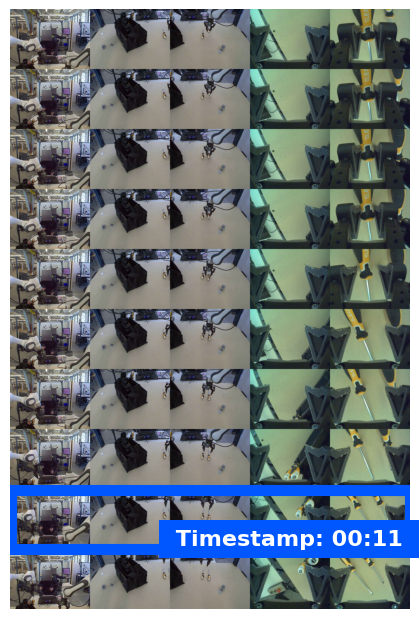
以下示例展示了时刻查找视频中的示例帧,模型识别了任务完成时间戳:
进度分类
进度分类功能会将视频分配到五个完成度范围之一:0-20%、20-40%、40-60%、60-80% 或 80-100%。这使机器人能够实时了解情况,以便调整操作或重试失败的步骤,而无需重启整个工作流。
以下示例提示要求模型对视频中的当前进度级别进行分类:
from google import genai

client = genai.Client()

uploaded_file = client.files.upload(file="task_video.mp4")

prompt = """
Watch this video and classify the task progress level at the final frame.
Return a JSON object with the progress bracket:
{"progress_level": "0-20" | "20-40" | "40-60" | "60-80" | "80-100"}.
"""

interaction = client.interactions.create(
    model="gemini-robotics-er-2-preview",
    input=[
        {
            "type": "video",
            "uri": uploaded_file.uri,
            "mime_type": uploaded_file.mime_type
        },
        {"type": "text", "text": prompt}
    ],
)

print(interaction.output_text)
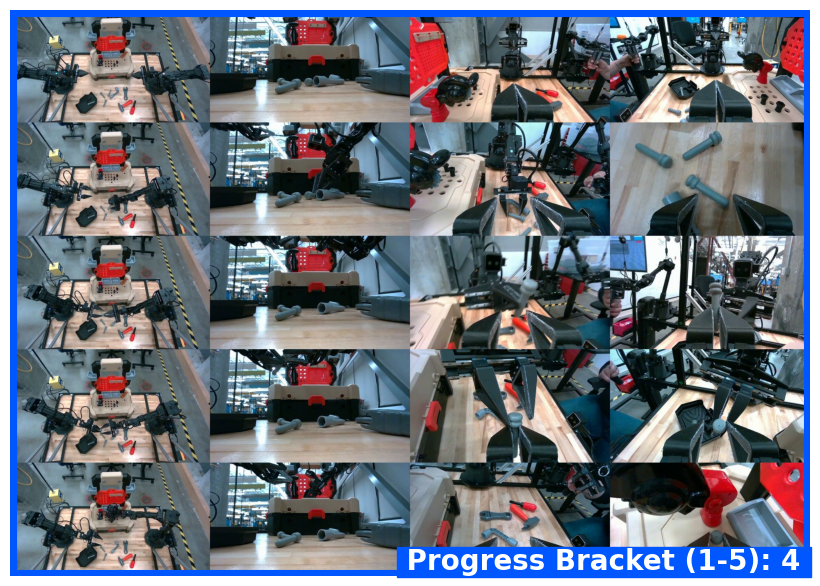
以下示例展示了进度分类视频中的示例帧,模型分配了进度范围:
示例
如需查看包含多步任务跟踪的完整可运行示例,请参阅 机器人技术 Cookbook。
后续步骤
- 机器人技术 Live API - 实时双向流式传输。
- 任务编排 - 具有空间推理的长时程任务。
- Gemini Robotics ER 概览 - 模型比较和功能。