
 View on ai.google.dev View on ai.google.dev
|
 Run in Google Colab Run in Google Colab
|
 Run in Kaggle Run in Kaggle
|
 Open in Vertex AI Open in Vertex AI
|
 View source on GitHub View source on GitHub
|
Generating content, summarizing, and analysing content are just some of the tasks you can accomplish with Gemma open models. This tutorial shows you how to get started running Gemma using Keras, including generating text content with text and image input. Keras provides implementations for running Gemma and other models using JAX, PyTorch, and TensorFlow. If you're new to Keras, you might want to read Getting started with Keras before you begin.
Gemma 3 and later models support text and image input. Earlier versions of Gemma only support text input, except for some variants, including PaliGemma.
Install Keras packages
Install the Keras and KerasHub Python packages.
pip install -q -U keras keras-hub keras-nlpSelect a backend
Keras is a high-level, multi-framework deep learning API designed for simplicity and ease of use. Keras 3 lets you choose the backend: TensorFlow, JAX, or PyTorch. All three will work for this tutorial. For this tutorial, configure the backend for JAX as it typically provides the better performance.
import os

os.environ["KERAS_BACKEND"] = "jax"  # Or "tensorflow" or "torch".
os.environ["XLA_PYTHON_CLIENT_MEM_FRACTION"] = "1.00"
Import packages
Import the Keras and KerasHub packages.
import keras
import keras_hub
Load model
Keras provides implementations of many popular model architectures. Download and configure a Gemma model using the Gemma4CausalLM class to build an end-to-end, causal language modeling implementation for Gemma 4 models. Create the model using the from_preset() method, as shown in the following code example:
gemma_lm = keras_hub.models.Gemma4CausalLM.from_preset(
    "gemma4_instruct_2b",
    dtype="bfloat16",
)
The Gemma4CausalLM.from_preset() method instantiates the model from a preset architecture and weights. In the code above, the string "gemma#_xxxxxxx" specifies a preset version and parameter size for Gemma. You can find the code strings for Gemma models in their Model Variation listings on Kaggle.
Once you have the model downloaded, Use the summary() function to get more info about the model:
gemma_lm.summary()
The output of the summary shows the models total number of trainable parameters. For purposes of naming the model, the embedding layer is not counted against the number of parameters.
Generate text with text
Generate text with a text prompt with using generate() method of the Gemma model object you configured in the previous steps. The optional max_length argument specifies the maximum length of the generated sequence. The following code examples shows a few ways to prompt the model.
output = gemma_lm.generate("what is keras in 3 bullet points?", max_length=64)
print(output)
what is keras in 3 bullet points?

* **A Deep Learning Framework:** Keras is a high-level API that makes it easy to build and train deep learning models by providing a user-friendly interface.
* **User-Friendly and Fast:** It abstracts away complex mathematical details, allowing users to
You can also provide batched prompts using a list as input:
output = gemma_lm.generate(
    ["what is keras in 3 bullet points?",
     "The universe is"],
    max_length=64)
for item in output:
    print(item)
    print("-"*80)
what is keras in 3 bullet points?

* **A Deep Learning Framework:** Keras is a high-level API that makes it easy to build and train deep learning models by providing a user-friendly interface.
* **User-Friendly and Fast:** It abstracts away complex underlying computations, allowing users to
--------------------------------------------------------------------------------
The universe is vast and mysterious. It stretches beyond our comprehension, filled with wonders we are only beginning to uncover. From the swirling galaxies to the silent depths of the ocean, the universe whispers secrets of existence, inviting us to explore, to question, and to marvel at the sheer scale of it all.

This
--------------------------------------------------------------------------------
If you're running on JAX or TensorFlow backends, you should notice that the second generate() call returns an answer more quickly. This performance improvement is because each call to generate() for a given batch size and max_length is compiled with XLA. The first run is expensive, but subsequent runs are faster.
Use a prompt template
When building more complex requests or multi-turn chat interactions use a prompt template to structure your request. The following code creates a standard template for Gemma prompts:
PROMPT_TEMPLATE = """<|turn>user
{question}
<turn|>
<|turn>model
"""
The following code shows how to use the template to format a simple request:
question = """what is keras in 3 bullet points?"""
prompt = PROMPT_TEMPLATE.format(question=question)
output = gemma_lm.generate(prompt)
print(output)
<|turn>user
what is keras in 3 bullet points?
<turn|>
<|turn>model
Here are three bullet points explaining what Keras is:

* **High-Level API for Deep Learning:** Keras is a user-friendly, high-level neural networks API that allows developers to quickly build, train, and evaluate deep learning models with minimal code.
* **Abstraction and Flexibility:** It provides a flexible and modular interface, making it easy to define complex network architectures (like CNNs or RNNs) without getting bogged down in the low-level mathematical details of frameworks like TensorFlow.
* **Backend Agnostic:** Keras acts as a consistent interface that can run on top of various powerful deep learning backends (most commonly TensorFlow, but also others), allowing users to switch frameworks easily.<turn|>
Optional: Try a different sampler
You can control the generation strategy for model object by setting the sampler argument on compile(). By default, "greedy" sampling will be used. As an experiment, try setting a "top_k" strategy:
gemma_lm.compile(sampler="top_k")
output = gemma_lm.generate("The universe is", max_length=64)
print(output)
The universe is vast.

The stars glitter like scattered diamonds on a black velvet canvas. Nebulae swirl in vibrant hues, painting cosmic masterpieces, whispering tales of ancient creation. Galaxies spin in majestic dances, their arms reaching out into the void, a breathtaking spectacle for the eyes.

Everywhere, there, in
While the default greedy algorithm always picks the token with the largest probability, the top-K algorithm randomly picks the next token from the tokens of top K probability. You don't have to specify a sampler, and you can ignore the last code snippet if it's not helpful to your use case. If you'd like learn more about the available samplers, see Samplers.
Generate text with image data
With Gemma 3 and later models, you can use images as part of a prompt to generate output. This capability allows you to use Gemma to interpret visual content or use images as data for content generation.
Create image loader function
The following function loads an image file from a URL and tokenizes it for use in Gemma prompt:
import numpy as np
import PIL

def read_image(url):
    """Reads image from URL as NumPy array."""

    image_path = keras.utils.get_file(origin=url)
    image = PIL.Image.open(image_path)
    image = np.array(image)
    return image
Load image for a prompt
Load the image and format the data so the model can process it. Use read_image() function defined in the previous section, as shown in the example code below:
from matplotlib import pyplot as plt

image = read_image(
    "https://ai.google.dev/gemma/docs/images/thali-indian-plate.jpg"
)
plt.imshow(image)
<matplotlib.image.AxesImage at 0x7ebbf41738f0>
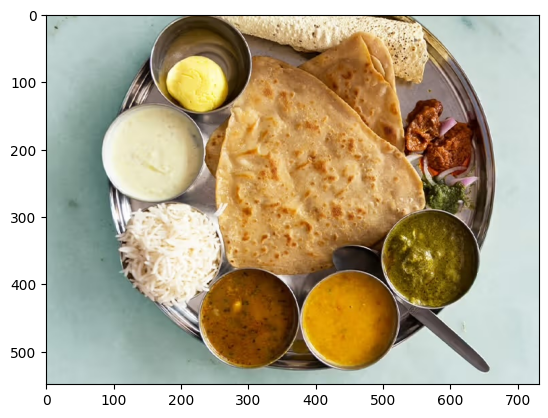

Figure 1. Image of Thali Indian food on a metal plate.
Run request with an image
When prompting the Gemma 4 model with image content, you use a specific string sequence, <|image|>, within your prompt to include the image as part of the prompt. Use a prompt template, such as the PROMPT_TEMPLATE string defined previously, to format your request as shown in the following prompt code:
question = """Which cuisine is this: <|image|>?
Identify the food items present. Which macros is the meal
high and low on? Keep your answer short.
"""

output = gemma_lm.generate(
    {
        "images": image,
        "prompts": PROMPT_TEMPLATE.format(question=question),
    },
)
print(output)
<|turn>user
Which cuisine is this: <|image>?
Identify the food items present. Which macros is the meal
high and low on? Keep your answer short.

<turn|>
<|turn>model
Based on the image, here is the analysis:

**Cuisine:**
The food items strongly suggest **Indian cuisine** or South Asian cuisine.

**Food Items Present:**

*   **Flatbread:** Likely Roti, Chapati, or Naan.
*   **Rice:** Plain steamed white rice.
*   **Dips/Condiments:** A white sauce (like raita or yogurt-based sauce), and several curries/sauces (one appears to be a lentil/vegetable curry, another a tomato/onion-based curry, and others green/spicy sauces).

**Macros Analysis (General Estimate):**

*   **High on:** Carbohydrates (from rice and flatbread) and Fats (depending on how the flatbread was cooked and the richness of the sauces/curries).
*   **Low on:** Protein (unless a significant amount of meat/legumes is present in the unseen curries) and Fiber (unless the curries are vegetable-heavy).<turn|>
If you are using a smaller GPU, and encountering out of memory (OOM) errors, you can set max_images_per_prompt and sequence_length to smaller values. The following code shows how to reduce sequence length to 768.
gemma_lm.preprocessor.max_images_per_prompt = 2
gemma_lm.preprocessor.sequence_length = 768
Run requests with multiple images
When using more than one image in a prompt, use multiple <|image|> tokens for each provided image, as shown in the following example:
photo_a = read_image("https://raw.githubusercontent.com/google-gemma/cookbook/refs/heads/main/apps/sample-data/GoldenGate.png")
photo_b = read_image("https://raw.githubusercontent.com/google-gemma/cookbook/refs/heads/main/apps/sample-data/surprise.png")

question = """I have two images:

Photo A: <|image|>
Photo B: <|image|>

Tell me a bit about these.
Keep it short.
"""

output = gemma_lm.generate(
    {
        "images": [photo_a, photo_b],
        "prompts": PROMPT_TEMPLATE.format(question=question),
    },
)
print(output)
<|turn>user
I have two images:

Photo A: <|image>
Photo B: <|image>

Tell me a bit about these.
Keep it short.

<turn|>
<|turn>model
Photo A is a picture of the **Golden Gate Bridge** in San Francisco, California, with water and hills in the background.

Photo B is a close-up portrait of a **cat** with black and white markings and striking green eyes.<turn|>
What's next
In this tutorial, you learned how to generate text using Keras and Gemma. Here are a few suggestions for what to learn next:
- Learn how to finetune a Gemma model.
- Learn how to perform distributed fine-tuning and inference on a Gemma model.
- Learn about Gemma integration with Vertex AI
- Learn how to use Gemma models with Vertex AI.