
FunctionGemma is a specialized version of the Gemma 3 270M model, trained specifically for function calling (i.e., tool use).
To manage the interaction between natural language instructions and structured, tool-related data, FunctionGemma uses a specific set of formatting control tokens. These tokens are essential for the model to distinguish between conversation and data, and to understand tool definitions, tool calls, and tool results.
Base Prompt Structure
FunctionGemma builds on the Gemma prompt structure, using
<start_of_turn>role and <end_of_turn> to describe conversational turns.
The role is typically user or model (and sometimes developer for
providing initial context, as seen below).
The function-specific tokens are used within these turns to structure the tool-related information.
Control Tokens
FunctionGemma is trained on six special tokens to manage the "tool use" lifecycle.
| Token Pair | Purpose |
|---|---|
<start_function_declaration> <end_function_declaration> |
Defines a tool. |
<start_function_call> <end_function_call> |
Indicates a model's request to use a tool. |
<start_function_response> <end_function_response> |
Provides a tool's result back to the model. |
NOTE:
<start_function_response>is an additional stop sequence for the inference engine.
Delimiter for String Values: <escape>
A single token, <escape>, is used as a delimiter for all string values
within the structured data blocks.
- Purpose: This token ensures that any special characters (like
{,},,, or quotes) inside a string are treated as literal text and not as part of the data structure's syntax. - Usage: All string literals in your function declarations, calls, and
responses must be enclosed, like:
key:<escape>string value<escape>.
Training Scope and Limitations
FunctionGemma is trained for specific types of agentic workflows. It is important to understand the model's training context to ensure reliability in production environments.
Supported Workflows
The model has been explicitly trained on Single Turn and Parallel function calling.
- Single Turn: The user provides a query, and the model selects a single tool to address it.
- Parallel: The user provides a query containing multiple independent requests, and the model generates multiple tool calls simultaneously.
Example: Parallel (Supported)
User: "What is the weather in Tokyo and what is the stock price of Google?"
The model generates calls for get_weather(Tokyo) and
get_stock_price(GOOG) in a single response. These actions don't depend on
each other.
Unsupported Workflows
The model has not been explicitly trained on Multi-Turn or Multi-Step workflows.
Note: We expect the model to be able to generalize a bit to these scenarios, especially if fine-tuned on specific use cases, but it has not been trained to perform these tasks out of the box.
Multi-Step (Chaining): Scenarios where the output of one tool is required as the argument for a subsequent tool.
- Example: "Roll a die with 20 sides and check if the number is prime."
- Complexity: This requires rolling a die first (Tool A), and then using the result to check if the number is prime (Tool B). FunctionGemma is not trained to reason through this dependency chain automatically.
Multi-Turn: Scenarios requiring the model to maintain state or context over a long back-and-forth conversation to determine tool parameters.
User: "Book me a table."
Model: "For how many people?"
User: "Four."
- Complexity: The model is not explicitly trained to aggregate these
separate turns into a final
book_table(people=4)call without external state management.
Semantic Nuances
The model may sometimes miss the relationship between semantically related concepts if the user's prompt is abstract or indirect.
Here's an example function.
def get_current_temperature(location: str, unit: str):
    """
    Get the current temperature at a location.

    Args:
        location: The location to get the temperature for.
        unit: The unit to return the temperature in. (choices: ["celsius", "fahrenheit"])
    """
    return 22.0
For example, concepts like "cold" or "hot" imply temperature, but might not
immediately trigger a specific tool named get_current_temperature if the model
does not make the semantic connection in that specific context.
- Mitigation Strategies:
- Enriched Tool Definition: This is often the most effective fix. Expanding the function's description to include semantic keywords helps the model bridge the gap. For example, adding "This function can be used to determine if the weather is hot or cold in a given location" to the docstring allows FunctionGemma to correctly map those qualitative descriptors to the tool.
- Prompt Engineering: Making the user query more detailed or explicit can help the model trigger the correct tool, though this relies on user behavior.
- Fine-tuning: For production environments where users frequently use highly indirect language (e.g., "is it nice out?" versus "get weather"), we recommend fine-tuning the model on a dataset that explicitly maps these semantic nuances to the correct tool definitions.
Example: Make Semantic Connection
User: "Hey, is it cold in Paris right now?"
Scenario A: Limited Description If the tool description is just Get the
current temperature at a location., the model might fail to associate "cold"
with get_current_temperature and respond that it cannot provide weather
information.
Scenario B: Enriched Description If the tool description is updated to
include: Get the current temperature at a location. This function can be used
to determine if the weather is hot or cold in a given location., the model
successfully makes the connection:
<start_function_call>call:get_current_temperature{location:<escape>Paris<escape>,unit:<escape>celsius<escape>}<end_function_call>
Example: Weather Tool Flow
Here is a complete, step-by-step formatted example demonstrating the flow for
using the get_current_weather tool.
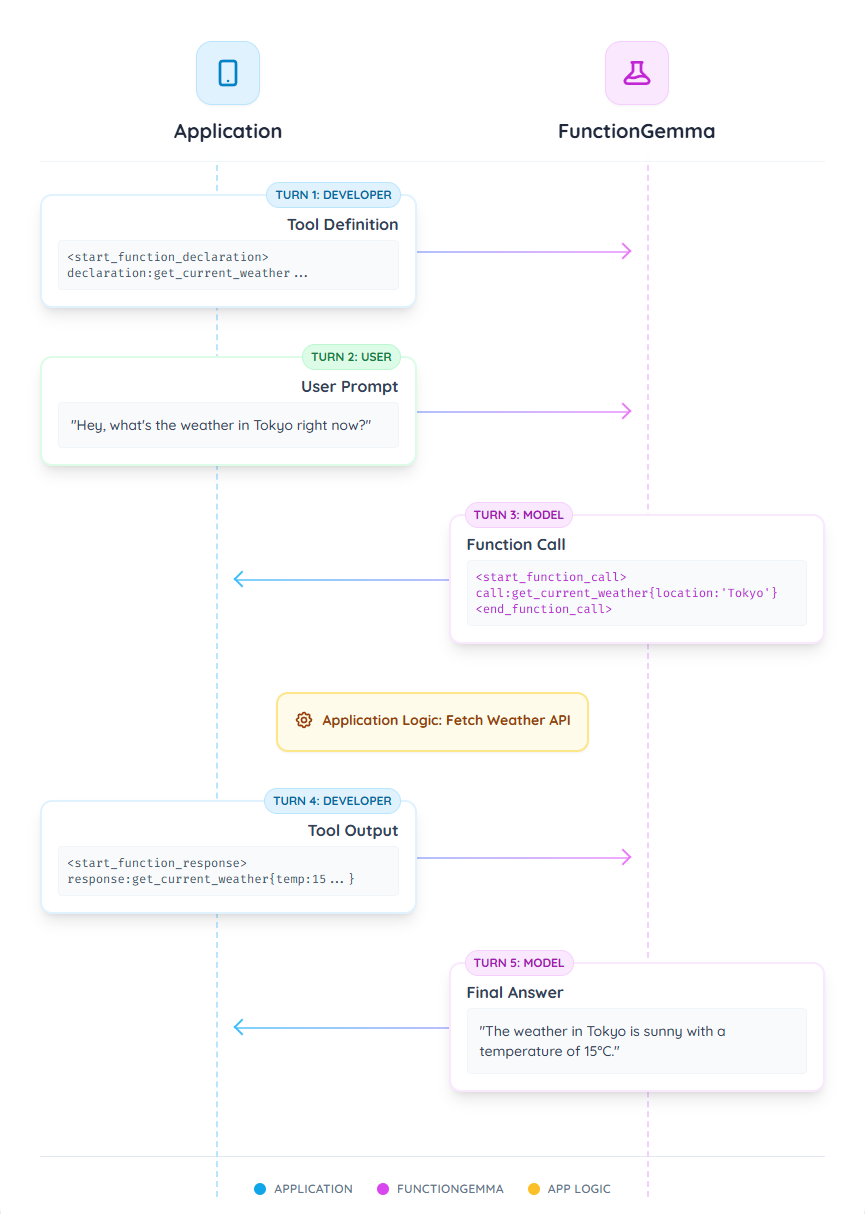
Turn 1: Tool Definition (Developer)
First, you provide the model with the definitions of all available tools. This
is done as the first turn from a developer role. This block is used to provide
the model with the "schema" of an available function, including its name, a
description of what it does, and its parameters.
It is important to include the system prompt You are a model that can do
function calling with the following functions to enable the model to call
tools. This phrase acts as a prompt-based trigger to switch between tooling
capability and general conversation.
<start_of_turn>developer
You are a model that can do function calling with the following functions<start_function_declaration>declaration:get_current_weather{description:<escape>Gets the current weather in a given location.<escape>,parameters:{properties:{location:{description:<escape>The city and state, e.g. "San Francisco, CA" or "Tokyo, JP"<escape>,type:<escape>STRING<escape>},unit:{description:<escape>The unit to return the temperature in.<escape>,enum:[<escape>celsius<escape>,<escape>fahrenheit<escape>],type:<escape>STRING<escape>}},required:[<escape>location<escape>],type:<escape>OBJECT<escape>}}<end_function_declaration><end_of_turn>
Turn 2: User Prompt (User)
Next, the user asks a question that requires the tool you just defined.
<start_of_turn>user
Hey, what's the weather in Tokyo right now?<end_of_turn>
Turn 3: Model Issues Function Call (Model)
The model processes the user's request and the tool definition. It determines it
needs to call the get_current_weather function and outputs the following turn.
<start_function_call>call:get_current_weather{location:<escape>Tokyo, Japan<escape>}<end_function_call>
Application Logic: At this point, your application must intercept this output. Instead of displaying it to the user, you parse the function call (e.g.,
get_current_weather(location="Tokyo, Japan")), execute this function in your own code, and get the result (e.g., a JSON object).
Turn 4: Application Provides Function Response (Developer)
You now send the return value from your function back to the model. This turn uses the function response tokens.
<start_function_response>response:get_current_weather{temperature:15,weather:<escape>sunny<escape>}<end_function_response>
Turn 5: Model Generates Final Answer (Model)
The model receives the function's result from Turn 4. It now has all the information needed to answer the user's original question from Turn 2. It processes this new context and generates the final, natural language response.
The current weather in Tokyo is sunny with a temperature of 15 degrees Celsius.<end_of_turn>
You can see more complete version of this example in the Full function calling sequence with FunctionGemma