

Gemini API מאפשר יצירה משולבת-אחזור (RAG) באמצעות הכלי File Search (חיפוש קבצים). התכונה 'חיפוש קבצים' מייבאת את הנתונים, מחלקת אותם לחלקים קטנים ויוצרת אינדקס כדי לאפשר שליפה מהירה של מידע רלוונטי על סמך הנחיה שסופקה. המידע הזה משמש כהקשר למודל, וכך הוא יכול לספק תשובות מדויקות ורלוונטיות יותר. חיפוש קבצים יכול גם לספק יכולות מולטי-מודאליות עם הטמעות טקסט שנתמכות על ידי gemini-embedding-001, והטמעות תמונות/מולטי-מודאליות שנתמכות על ידי gemini-embedding-2.
אחסון קבצים ויצירת הטמעה בזמן השאילתה הם בחינם, ותשלמו רק על יצירת הטמעות כשמבצעים אינדוקס לקבצים בפעם הראשונה, ועל העלות הרגילה של טוקנים של קלט / פלט במודל Gemini. הפרדיגמה החדשה הזו של חיוב מאפשרת לבנות את הכלי לחיפוש קבצים ולהרחיב אותו בקלות וביעילות מבחינת עלויות. פרטים נוספים מופיעים בקטע תמחור.
העלאה ישירה למאגר של חיפוש קבצים
בדוגמה הזו אפשר לראות איך מעלים קובץ ישירות אל מאגר הקבצים לחיפוש:
Python
from google import genai
from google.genai import types
import time

client = genai.Client()

file_search_store = client.file_search_stores.create(
    config={
        'display_name': 'your-fileSearchStore-name',
        'embedding_model': 'models/gemini-embedding-2'
    }
)

operation = client.file_search_stores.upload_to_file_search_store(
  file='sample.txt',
  file_search_store_name=file_search_store.name,
  config={
      'display_name' : 'display-file-name',
  }
)

while not operation.done:
    time.sleep(5)
    operation = client.operations.get(operation)

interaction = client.interactions.create(
    model="gemini-3.6-flash",
    input="Can you tell me about [insert question]",
    tools=[{
        "type": "file_search",
        "file_search_store_names": [file_search_store.name]
    }]
)

for step in interaction.steps:
    if step.type == "model_output":
        for content_block in step.content:
            if content_block.type == "text":
                print(content_block.text)
                if content_block.annotations:
                    print("\nSources:")
                    for annotation in content_block.annotations:
                        if annotation.type == "file_citation":
                            print(f"  - {annotation.file_name}: {annotation.source}")
JavaScript
import { GoogleGenAI } from '@google/genai';

const ai = new GoogleGenAI({});

async function run() {
  const fileSearchStore = await ai.fileSearchStores.create({
    config: {
      displayName: 'your-fileSearchStore-name',
      embeddingModel: 'models/gemini-embedding-2'
    }
  });

  let operation = await ai.fileSearchStores.uploadToFileSearchStore({
    file: 'file.txt',
    fileSearchStoreName: fileSearchStore.name,
    config: {
      displayName: 'file-name',
    }
  });

  while (!operation.done) {
    await new Promise(resolve => setTimeout(resolve, 5000));
    operation = await ai.operations.get({ operation });
  }

  const interaction = await ai.interactions.create({
    model: "gemini-3.6-flash",
    input: "Can you tell me about [insert question]",
    tools: [{
      type: "file_search",
      file_search_store_names: [fileSearchStore.name]
    }]
  });

  for (const step of interaction.steps) {
    if (step.type === 'model_output') {
      for (const contentBlock of step.content) {
        if (contentBlock.type === 'text') {
          console.log(contentBlock.text);
          if (contentBlock.annotations) {
            console.log("\nSources:");
            for (const annotation of contentBlock.annotations) {
              if (annotation.type === 'file_citation') {
                console.log(`  - ${annotation.file_name}: ${annotation.source}`);
              }
            }
          }
        }
      }
    }
  }
}

run();
REST
# 1. Create a File Search store
curl -X POST "https://generativelanguage.googleapis.com/v1beta/fileSearchStores?key=$GEMINI_API_KEY" \
    -H "Content-Type: application/json" \
    -d '{
      "displayName": "your-file-search-store-name",
      "embeddingModel": "models/gemini-embedding-2"
    }' > store_res.json

FILE_SEARCH_STORE_NAME=$(jq -r ".name" store_res.json)

# 2. Upload directly to File Search store using resumable upload
NUM_BYTES=$(wc -c < "sample.txt")
curl "https://generativelanguage.googleapis.com/upload/v1beta/fileSearchStores/$FILE_SEARCH_STORE_NAME:uploadToFileSearchStore?key=$GEMINI_API_KEY" \
    -D upload-header.tmp \
    -H "X-Goog-Upload-Protocol: resumable" \
    -H "X-Goog-Upload-Command: start" \
    -H "X-Goog-Upload-Header-Content-Length: $NUM_BYTES" \
    -H "X-Goog-Upload-Header-Content-Type: text/plain" \
    -H "Content-Type: application/json" \
    -d '{"displayName": "sample.txt"}' 2> /dev/null

upload_url=$(grep -i "x-goog-upload-url: " upload-header.tmp | cut -d" " -f2 | tr -d "\r")
rm upload-header.tmp

curl "${upload_url}" \
    -H "Content-Length: $NUM_BYTES" \
    -H "X-Goog-Upload-Offset: 0" \
    -H "X-Goog-Upload-Command: upload, finalize" \
    --data-binary "@sample.txt" 2> /dev/null > upload_response.json

cat upload_response.json

# 3. Query using the File Search store
curl -X POST "https://generativelanguage.googleapis.com/v1beta/interactions" \
    -H "x-goog-api-key: $GEMINI_API_KEY" \
    -H "Content-Type: application/json" \
    -d '{
      "model": "gemini-3.6-flash",
      "input": "Can you tell me about [insert question]",
      "tools": [{
        "type": "file_search",
        "file_search_store_names": ["'"$FILE_SEARCH_STORE_NAME"'"]
      }]
    }'
מידע נוסף זמין במאמרי העזרה של ה-API בנושא uploadToFileSearchStore.
ייבוא קבצים
לחלופין, אפשר להעלות קובץ קיים ולייבא אותו למאגר של חיפוש הקבצים:
Python
from google import genai
from google.genai import types
import time

client = genai.Client()

sample_file = client.files.upload(file='sample.txt', config={'display_name': 'display_file_name'})

file_search_store = client.file_search_stores.create(
    config={
        'display_name': 'your-fileSearchStore-name',
        'embedding_model': 'models/gemini-embedding-2'
    }
)

operation = client.file_search_stores.import_file(
    file_search_store_name=file_search_store.name,
    file_name=sample_file.name
)

while not operation.done:
    time.sleep(5)
    operation = client.operations.get(operation)

interaction = client.interactions.create(
    model="gemini-3.6-flash",
    input="Can you tell me about [insert question]",
    tools=[{
        "type": "file_search",
        "file_search_store_names": [file_search_store.name]
    }]
)

for step in interaction.steps:
    if step.type == "model_output":
        for content_block in step.content:
            if content_block.type == "text":
                print(content_block.text)
JavaScript
import { GoogleGenAI } from '@google/genai';

const ai = new GoogleGenAI({});

async function run() {
  const sampleFile = await ai.files.upload({
    file: 'sample.txt',
    config: { displayName: 'file-name' }
  });

  const fileSearchStore = await ai.fileSearchStores.create({
    config: {
      displayName: 'your-fileSearchStore-name',
      embeddingModel: 'models/gemini-embedding-2'
    }
  });

  let operation = await ai.fileSearchStores.importFile({
    fileSearchStoreName: fileSearchStore.name,
    fileName: sampleFile.name
  });

  while (!operation.done) {
    await new Promise(resolve => setTimeout(resolve, 5000));
    operation = await ai.operations.get({ operation: operation });
  }

  const interaction = await ai.interactions.create({
    model: "gemini-3.6-flash",
    input: "Can you tell me about [insert question]",
    tools: [{
      type: "file_search",
      file_search_store_names: [fileSearchStore.name]
    }]
  });

  for (const step of interaction.steps) {
    if (step.type === 'model_output') {
      for (const contentBlock of step.content) {
        if (contentBlock.type === 'text') {
          console.log(contentBlock.text);
        }
      }
    }
  }
}

run();
REST
# 1. Upload file using the Files API
NUM_BYTES=$(wc -c < "sample.txt")
curl "https://generativelanguage.googleapis.com/upload/v1beta/files?key=$GEMINI_API_KEY" \
    -D upload-header.tmp \
    -H "X-Goog-Upload-Protocol: resumable" \
    -H "X-Goog-Upload-Command: start" \
    -H "X-Goog-Upload-Header-Content-Length: $NUM_BYTES" \
    -H "X-Goog-Upload-Header-Content-Type: text/plain" \
    -H "Content-Type: application/json" \
    -d '{"file": {"displayName": "sample.txt"}}' 2> /dev/null

upload_url=$(grep -i "x-goog-upload-url: " upload-header.tmp | cut -d" " -f2 | tr -d "\r")
rm upload-header.tmp

curl "${upload_url}" \
    -H "Content-Length: $NUM_BYTES" \
    -H "X-Goog-Upload-Offset: 0" \
    -H "X-Goog-Upload-Command: upload, finalize" \
    --data-binary "@sample.txt" 2> /dev/null > file_info.json

FILE_NAME=$(jq -r ".file.name" file_info.json)

# 2. Create a File Search store
curl -X POST "https://generativelanguage.googleapis.com/v1beta/fileSearchStores?key=$GEMINI_API_KEY" \
    -H "Content-Type: application/json" \
    -d '{
      "displayName": "your-file-search-store-name",
      "embeddingModel": "models/gemini-embedding-2"
    }' > store_res.json

FILE_SEARCH_STORE_NAME=$(jq -r ".name" store_res.json)

# 3. Import the file into the File Search store
curl -X POST "https://generativelanguage.googleapis.com/v1beta/fileSearchStores/$FILE_SEARCH_STORE_NAME:importFile?key=$GEMINI_API_KEY" \
    -H "Content-Type: application/json" \
    -d '{"fileName": "'"$FILE_NAME"'"}'

# 4. Query using the File Search store
curl -X POST "https://generativelanguage.googleapis.com/v1beta/interactions" \
    -H "x-goog-api-key: $GEMINI_API_KEY" \
    -H "Content-Type: application/json" \
    -d '{
      "model": "gemini-3.6-flash",
      "input": "Can you tell me about [insert question]",
      "tools": [{
        "type": "file_search",
        "file_search_store_names": ["'"$FILE_SEARCH_STORE_NAME"'"]
      }]
    }'
מידע נוסף זמין במאמרי העזרה של ה-API בנושא importFile.
הגדרות חלוקה לחלקים
כשמייבאים קובץ למאגר חיפוש קבצים, הוא מפורק אוטומטית לחלקים, מוטמע, עובר אינדוקס ועולה למאגר חיפוש הקבצים. אם אתם צריכים שליטה רבה יותר באסטרטגיית החלוקה לחלקים, אתם יכולים לציין הגדרה של chunking_config כדי להגדיר מספר מקסימלי של טוקנים לכל חלק ומספר מקסימלי של טוקנים חופפים.
Python
from google import genai
from google.genai import types
import time

client = genai.Client()

operation = client.file_search_stores.upload_to_file_search_store(
    file_search_store_name=file_search_store.name,
    file='sample.txt',
    config={
        'chunking_config': {
          'white_space_config': {
            'max_tokens_per_chunk': 200,
            'max_overlap_tokens': 20
          }
        }
    }
)

while not operation.done:
    time.sleep(5)
    operation = client.operations.get(operation)

print("Custom chunking complete.")
JavaScript
import { GoogleGenAI } from '@google/genai';

const ai = new GoogleGenAI({});

let operation = await ai.fileSearchStores.uploadToFileSearchStore({
  file: 'file.txt',
  fileSearchStoreName: fileSearchStore.name,
  config: {
    displayName: 'file-name',
    chunkingConfig: {
      whiteSpaceConfig: {
        maxTokensPerChunk: 200,
        maxOverlapTokens: 20
      }
    }
  }
});

while (!operation.done) {
  await new Promise(resolve => setTimeout(resolve, 5000));
  operation = await ai.operations.get({ operation });
}
console.log("Custom chunking complete.");
REST
NUM_BYTES=$(wc -c < "sample.txt")
curl "https://generativelanguage.googleapis.com/upload/v1beta/fileSearchStores/$FILE_SEARCH_STORE_NAME:uploadToFileSearchStore?key=$GEMINI_API_KEY" \
    -D upload-header.tmp \
    -H "X-Goog-Upload-Protocol: resumable" \
    -H "X-Goog-Upload-Command: start" \
    -H "X-Goog-Upload-Header-Content-Length: $NUM_BYTES" \
    -H "X-Goog-Upload-Header-Content-Type: text/plain" \
    -H "Content-Type: application/json" \
    -d '{
      "displayName": "sample.txt",
      "chunkingConfig": {
        "whiteSpaceConfig": {
          "maxTokensPerChunk": 200,
          "maxOverlapTokens": 20
        }
      }
    }' 2> /dev/null

upload_url=$(grep -i "x-goog-upload-url: " upload-header.tmp | cut -d" " -f2 | tr -d "\r")
rm upload-header.tmp

curl "${upload_url}" \
    -H "Content-Length: $NUM_BYTES" \
    -H "X-Goog-Upload-Offset: 0" \
    -H "X-Goog-Upload-Command: upload, finalize" \
    --data-binary "@sample.txt" 2> /dev/null > upload_response.json

cat upload_response.json
כדי להשתמש בחנות שלכם לחיפוש קבצים, מעבירים אותה ככלי לשיטה interactions.create, כמו בדוגמאות של העלאה וייבוא.
איך זה עובד
בחיפוש קבצים נעשה שימוש בטכניקה שנקראת חיפוש סמנטי כדי למצוא מידע שרלוונטי להנחיה של המשתמש. בניגוד לחיפוש רגיל שמבוסס על מילות מפתח, חיפוש סמנטי מבין את המשמעות וההקשר של השאילתה.
כשמייבאים קובץ, הוא מומר לייצוגים מספריים שנקראים הטמעות, שמתעדים את המשמעות הסמנטית של התוכן שהועלה. ההטמעות האלה מאוחסנות במסד נתונים ייעודי של חיפוש קבצים. כשמבצעים שאילתה, היא מומרת גם להטמעה. לאחר מכן, המערכת מבצעת חיפוש בקובץ כדי למצוא את חלקי המסמך הדומים והרלוונטיים ביותר ממאגר החיפוש בקובץ.
אין אורך חיים (TTL) להטמעות. הן נשמרות עד למחיקה ידנית או עד שהמודל יוצא משימוש. אבל הקבצים נמחקים אחרי 48 שעות.
פירוט התהליך לשימוש ב-File Search
uploadToFileSearchStore API:
יצירת מאגר חיפוש קבצים: מאגר חיפוש קבצים מכיל את הנתונים המעובדים מהקבצים שלכם. זהו מאגר קבוע של ההטמעות שהחיפוש הסמנטי יפעל עליהן.
העלאת קובץ וייבוא שלו למאגר של חיפוש קבצים: אפשר להעלות קובץ ולייבא את התוצאות למאגר של חיפוש קבצים בו-זמנית. הפעולה הזו יוצרת אובייקט
Fileזמני, שהוא הפניה למסמך הגולמי. הנתונים האלה מחולקים לחלקים, מומרים להטמעות של חיפוש קבצים ומתווספים לאינדקס.Fileהאובייקט נמחק אחרי 48 שעות, אבל הנתונים שיובאו למאגר של חיפוש הקבצים יישמרו ללא הגבלת זמן עד שתבחרו למחוק אותם.שאילתה באמצעות File Search: לבסוף, משתמשים בכלי
FileSearchבשיחה עםgenerateContent. בהגדרת הכלי, מצייניםFileSearchRetrievalResource, שמפנה אלFileSearchStoreשרוצים לחפש. ההוראה הזו אומרת למודל לבצע חיפוש סמנטי במאגר הספציפי הזה של חיפושי קבצים כדי למצוא מידע רלוונטי שיוכל לשמש בסיס לתשובה.
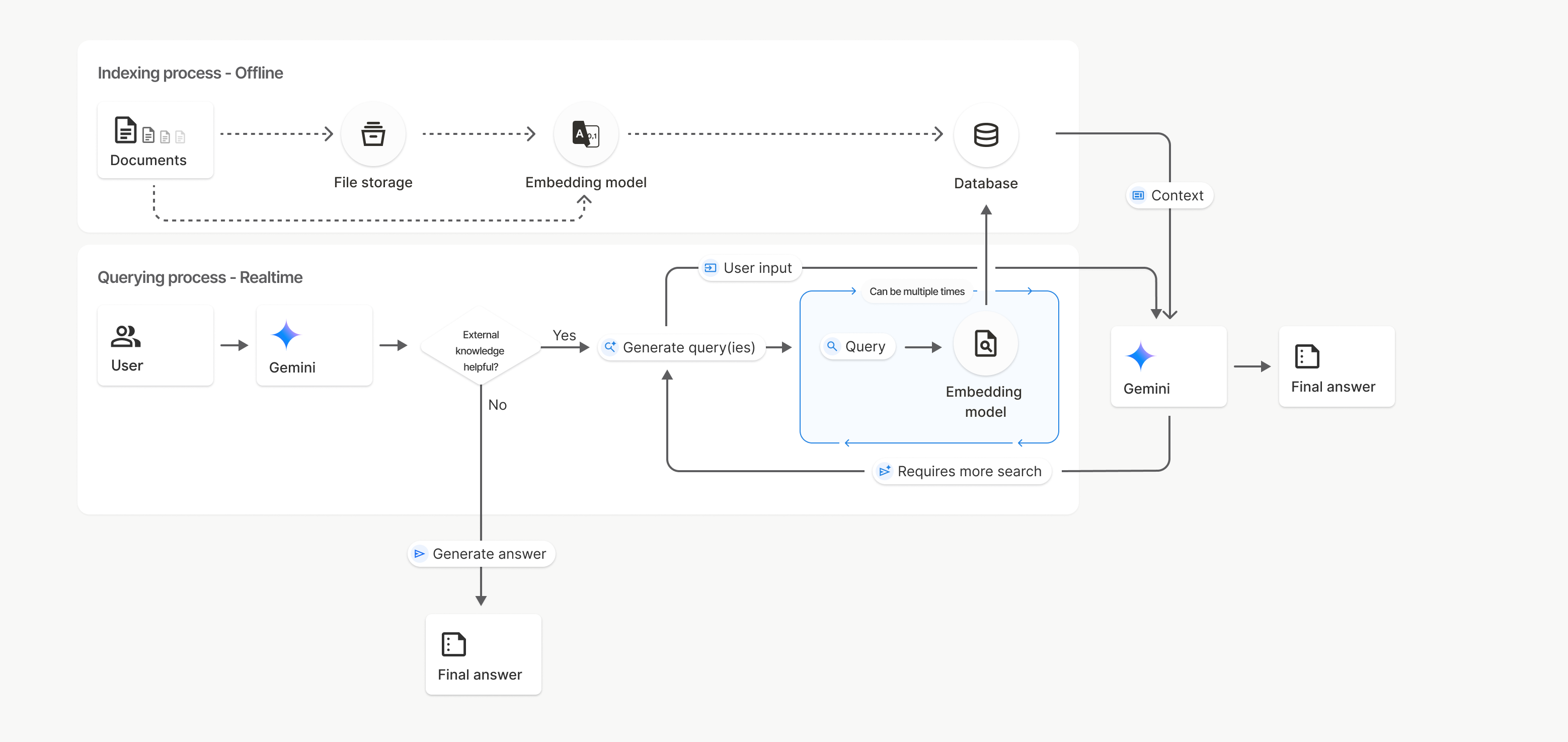
בתרשים הזה, הקו המקווקו ממסמכים אל מודל הטמעה (באמצעות gemini-embedding-001) מייצג את uploadToFileSearchStore API (עוקף את אחסון הקבצים).
אחרת, שימוש ב-Files API כדי ליצור בנפרד ואז לייבא קבצים מעביר את תהליך היצירה של האינדקס ממסמכים אל אחסון קבצים ואז אל מודל ההטמעה.
מאגרי חיפוש קבצים
מאגר חיפוש קבצים הוא מאגר להטמעות של המסמכים שלכם. קובצי RAW שהועלו דרך File API נמחקים אחרי 48 שעות, אבל הנתונים שיובאו למאגר של חיפוש קבצים נשמרים ללא הגבלת זמן עד שמבצעים מחיקה ידנית. אתם יכולים ליצור כמה מאגרי חיפוש קבצים כדי לארגן את המסמכים שלכם. FileSearchStore API מאפשר לכם ליצור, לרשום, לקבל ולמחוק כדי לנהל את חנויות החיפוש של הקבצים. שמות המאגרים של חיפוש הקבצים הם בהיקף גלובלי.
הנה כמה דוגמאות לניהול מאגרי חיפוש קבצים:
Python
file_search_store = client.file_search_stores.create(
    config={
        'display_name': 'myfilesearchstore123',
        'embedding_model': 'models/gemini-embedding-2'
    }
)

for store in client.file_search_stores.list():
    print(store)

my_file_search_store = client.file_search_stores.get(name=file_search_store.name)

client.file_search_stores.delete(name=file_search_store.name, config={'force': True})
JavaScript
const fileSearchStore = await ai.fileSearchStores.create({
  config: {
    displayName: 'myfilesearchstore123',
    embeddingModel: 'models/gemini-embedding-2'
  }
});

const fileSearchStores = await ai.fileSearchStores.list();
for await (const store of fileSearchStores) {
  console.log(store);
}

const myFileSearchStore = await ai.fileSearchStores.get({
  name: fileSearchStore.name
});

await ai.fileSearchStores.delete({
  name: fileSearchStore.name,
  config: { force: true }
});
REST
curl -X POST "https://generativelanguage.googleapis.com/v1beta/fileSearchStores?key=${GEMINI_API_KEY}" \
    -H "Content-Type: application/json" \
    -d '{ "displayName": "My Store", "embedding_model": "models/gemini-embedding-2" }'

curl "https://generativelanguage.googleapis.com/v1beta/fileSearchStores?key=${GEMINI_API_KEY}"

curl "https://generativelanguage.googleapis.com/v1beta/fileSearchStores/myfilesearchstore123?key=${GEMINI_API_KEY}"

curl -X DELETE "https://generativelanguage.googleapis.com/v1beta/fileSearchStores/myfilesearchstore123?key=${GEMINI_API_KEY}"
מסמכים בחיפוש קבצים
אפשר לנהל מסמכים ספציפיים במאגרי הקבצים באמצעות File Search Documents API כדי list כל מסמך במאגר קבצים לחיפוש, get מידע על מסמך וdelete מסמך לפי שם.
Python
for document_in_store in client.file_search_stores.documents.list(parent='fileSearchStores/myfilesearchstore123'):
  print(document_in_store)

file_search_document = client.file_search_stores.documents.get(name='fileSearchStores/myfilesearchstore123/documents/sampletxt123')
print(file_search_document)

client.file_search_stores.documents.delete(name='fileSearchStores/myfilesearchstore123/documents/sampletxt123', config={'force': True})
JavaScript
const documents = await ai.fileSearchStores.documents.list({
  parent: 'fileSearchStores/myfilesearchstore123'
});
for await (const doc of documents) {
  console.log(doc);
}

const fileSearchDocument = await ai.fileSearchStores.documents.get({
  name: 'fileSearchStores/myfilesearchstore123/documents/sampletxt123'
});

await ai.fileSearchStores.documents.delete({
  name: 'fileSearchStores/myfilesearchstore123/documents/sampletxt123',
  config: { force: true }
});
REST
curl "https://generativelanguage.googleapis.com/v1beta/fileSearchStores/myfilesearchstore123/documents?key=${GEMINI_API_KEY}"

curl "https://generativelanguage.googleapis.com/v1beta/fileSearchStores/myfilesearchstore123/documents/sampletxt123?key=${GEMINI_API_KEY}"

curl -X DELETE "https://generativelanguage.googleapis.com/v1beta/fileSearchStores/myfilesearchstore123/documents/sampletxt123?key=${GEMINI_API_KEY}&force=true"
המטא-נתונים של הקבצים
אתם יכולים להוסיף מטא-נתונים מותאמים אישית לקבצים כדי לסנן אותם או לספק הקשר נוסף. מטא-נתונים הם קבוצה של צמדי מפתח/ערך.
Python
op = client.file_search_stores.import_file(
    file_search_store_name=file_search_store.name,
    file_name=sample_file.name,
    config={
        'custom_metadata': [
            {"key": "author", "string_value": "Robert Graves"},
            {"key": "year", "numeric_value": 1934}
        ]
    }
)
JavaScript
let operation = await ai.fileSearchStores.importFile({
  fileSearchStoreName: fileSearchStore.name,
  fileName: sampleFile.name,
  config: {
    customMetadata: [
      { key: "author", stringValue: "Robert Graves" },
      { key: "year", numericValue: 1934 }
    ]
  }
});
האפשרות הזו שימושית אם יש לכם כמה מסמכים במאגר של חיפוש קבצים ואתם רוצים לחפש רק בחלק מהם.
Python
interaction = client.interactions.create(
    model="gemini-3.6-flash",
    input="Tell me about the book 'I, Claudius'",
    tools=[{
        "type": "file_search",
        "file_search_store_names": [file_search_store.name],
        "metadata_filter": 'author="Robert Graves"',
    }]
)

for step in interaction.steps:
    if step.type == "model_output":
        for content_block in step.content:
            if content_block.type == "text":
                print(content_block.text)
JavaScript
const interaction = await ai.interactions.create({
  model: "gemini-3.6-flash",
  input: "Tell me about the book 'I, Claudius'",
  tools: [{
    type: "file_search",
    file_search_store_names: [fileSearchStore.name],
    metadata_filter: 'author="Robert Graves"',
  }]
});

for (const step of interaction.steps) {
  if (step.type === 'model_output') {
    for (const contentBlock of step.content) {
      if (contentBlock.type === 'text') {
        console.log(contentBlock.text);
      }
    }
  }
}
REST
curl "https://generativelanguage.googleapis.com/v1beta/interactions" \
    -H "x-goog-api-key: $GEMINI_API_KEY" \
    -H 'Content-Type: application/json' \
    -X POST \
    -d '{
            "model": "gemini-3.6-flash",
            "input": [{"type": "text", "text": "Tell me about the book I, Claudius"}],
            "tools": [{
                "type": "file_search",
                "file_search_store_names": ["'$STORE_NAME'"],
                "metadata_filter": "author = \"Robert Graves\""
            }]
        }' 2> /dev/null > response.json

cat response.json
הנחיות להטמעה של תחביר מסנן רשימה עבור metadata_filter זמינות בכתובת google.aip.dev/160
חיפוש קבצים מרובה מצבים
חיפוש קבצים מולטימודאלי מאפשר לכם להטמיע ולחפש תמונות באופן מקורי, וכך ליצור אפליקציות RAG עשירות ומולטימודאליות.
הגדרת מודל ההטמעה
כשיוצרים FileSearchStore, צריך להחליף את מודל ברירת המחדל להטמעה של טקסט בלבד במודל multi-modal. משתמשים ב-models/gemini-embedding-2 כדי לעבד טקסט ותמונות.
Python
store = client.file_search_stores.create(
    config={
        "display_name": "Multimodal Catalog",
        "embedding_model": "models/gemini-embedding-2",
    }
)
JavaScript
const fileSearchStore = await ai.fileSearchStores.create({
  config: {
    displayName: "Multimodal Catalog",
    embeddingModel: "models/gemini-embedding-2",
  },
});
REST
curl -X POST "https://generativelanguage.googleapis.com/v1beta/fileSearchStores?key=$GEMINI_API_KEY" \
    -H "Content-Type: application/json" \
    -d '{
      "display_name": "Multimodal Catalog",
      "embedding_model": "models/gemini-embedding-2"
    }'
העלאת תמונות
אחרי שיוצרים את המאגר באמצעות מודל הטמעה מולטימודאלי, אפשר להעלות קובצי תמונות ישירות באמצעות אותם ממשקי API להעלאה שמתוארים במאמרים העלאה ישירה למאגר של חיפוש קבצים או ייבוא קבצים.
הדרישות לגבי קובץ תמונה:
- קבצי התמונות צריכים להיות ברזולוציה של 4K x 4K פיקסלים לכל היותר.
- הפורמטים הנתמכים הם PNG ו-JPEG.
ציטוטים ביבליוגרפיים
כשמשתמשים בחיפוש קבצים, התשובה של המודל עשויה לכלול ציטוטים שמציינים אילו חלקים מהמסמכים שהועלו שימשו ליצירת התשובה. המידע הזה עוזר בבדיקת עובדות ובאימות.
אפשר לגשת לפרטי הציטוט דרך מאפיין annotations בתוך בלוקים content של התגובה בשלב model_output.
Python
for step in interaction.steps:
    if step.type == 'model_output':
        for content in step.content:
            if content.type == 'text' and content.annotations:
                print(content.annotations)
JavaScript
for (const step of interaction.steps) {
  if (step.type === 'model_output') {
    for (const contentBlock of step.content) {
      if (contentBlock.type === 'text' && contentBlock.annotations) {
        console.log(JSON.stringify(contentBlock.annotations, null, 2));
      }
    }
  }
}
REST
{
  "steps": [
    {
      "type": "model_output",
      "content": [
        {
          "type": "text",
          "text": "...",
          "annotations": [
            {
              "type": "file_citation",
              "file_name": "sample.txt",
              "source": "..."
            }
          ]
        }
      ]
    }
  ]
}
מידע מפורט על מבנה הציטוטים זמין במאמר מאמרי העזרה של ה-API לאינטראקציות.
מספרי דפים
כשמשתמשים בחיפוש קבצים עם מסמכים שיש להם דפים (כמו קובצי PDF), התשובה של המודל עשויה לכלול את מספר הדף שבו נמצא המידע.
אפשר לגשת למידע הזה דרך מאפיין page_number של הערה מסוג file_citation.
Python
for step in interaction.steps:
    if step.type == "model_output":
        for content in step.content:
            if content.type == "text" and content.annotations:
                for annotation in content.annotations:
                    if annotation.type == "file_citation" and annotation.page_number:
                        print(f"Cited Page: {annotation.page_number}")
JavaScript
for (const step of interaction.steps) {
  if (step.type === 'model_output') {
    for (const block of step.content) {
      if (block.type === 'text' && block.annotations) {
        for (const annotation of block.annotations) {
          if (annotation.type === 'file_citation' && annotation.pageNumber) {
            console.log(`Cited Page: ${annotation.pageNumber}`);
          }
        }
      }
    }
  }
}
REST
{
  "steps": [
    {
      "type": "model_output",
      "content": [
        {
          "type": "text",
          "text": "...",
          "annotations": [
            {
              "type": "file_citation",
              "file_name": "document.pdf",
              "page_number": 1,
              "source": "..."
            }
          ]
        }
      ]
    }
  ]
}
ציטוטים של מדיה
כשהמודל מפנה לחלק של תמונה במהלך היצירה, ה-API מחזיר הערה מהסוג file_citation בהערות שכוללת media_id. אפשר להשתמש במזהה הזה כדי להוריד את נתח התמונה המדויק שהמודל התייחס אליו. הערך הזה media_id נשמר בין כמה קריאות לחיפוש, כך שאפשר לאחזר את אותה תמונה באופן מהימן או לשמור אותה במטמון באמצעות המזהה.
קטע הקוד הבא הוא דוגמה לשלב של תגובת REST:
{
  "type": "model_output",
  "content": [
    {
      "type": "text",
      "text": "...",
      "annotations": [
        {
          "type": "file_citation",
          "file_name": "product_image",
          "media_id": "fileSearchStores/my-store-123/media/BlobId-456"
        }
      ]
    }
  ]
}
בדוגמאות הקוד הבאות אפשר לראות איך מאחזרים את media_id ומורידים את המדיה:
Python
for step in interaction.steps:
    if step.type == "model_output":
        for content in step.content:
            if content.type == "text" and content.annotations:
                for annotation in content.annotations:
                    if annotation.type == "file_citation" and annotation.media_id:
                        print(f"Cited Media ID: {annotation.media_id}")
                        blob_content = client.file_search_stores.download_media(
                            media_id=annotation.media_id
                        )
JavaScript
for (const step of interaction.steps) {
  if (step.type === 'model_output') {
    for (const block of step.content) {
      if (block.type === 'text' && block.annotations) {
        for (const annotation of block.annotations) {
          if (annotation.type === 'file_citation' && annotation.mediaId) {
            console.log(`Cited Media ID: ${annotation.mediaId}`);
            const blobContent = await ai.fileSearchStores.downloadMedia(annotation.mediaId);
          }
        }
      }
    }
  }
}
REST
curl -X GET "https://generativelanguage.googleapis.com/v1/fileSearchStores/my-store-123/media/BlobId-456" \
  -H "x-goog-api-key: $GEMINI_API_KEY"
מטא-נתונים בהתאמה אישית
אם הוספתם מטא-נתונים מותאמים אישית לקבצים, תוכלו לגשת אליהם בהערות של תשובת המודל. האפשרות הזו שימושית להעברת הקשר נוסף (כמו כתובות URL, מספרי דפים או מחברים) ממסמכי המקור ללוגיקה של האפליקציה. כל הערת ציטוט מסוג file_citation מכילה את המטא-נתונים המותאמים אישית האלה.
Python
interaction = client.interactions.create(
    model="gemini-3.6-flash",
    input="Tell me about [insert question]",
    tools=[{
        "type": "file_search",
        "file_search_store_names": [file_search_store.name]
    }]
)

for step in interaction.steps:
    if step.type == "model_output":
        for content_block in step.content:
            if content_block.annotations:
                for annotation in content_block.annotations:
                    print(annotation)
JavaScript
const interaction = await ai.interactions.create({
  model: "gemini-3.6-flash",
  input: "Tell me about [insert question]",
  tools: [{
    type: "file_search",
    file_search_store_names: [fileSearchStore.name]
  }]
});

for (const step of interaction.steps) {
  if (step.type === 'model_output') {
    for (const contentBlock of step.content) {
      if (contentBlock.annotations) {
        contentBlock.annotations.forEach((annotation) => {
          console.log(annotation);
        });
      }
    }
  }
}
REST
{
  "steps": [
    {
      "type": "model_output",
      "content": [
        {
          "type": "text",
          "text": "...",
          "annotations": [
            {
              "file_name": "...",
              "source": "...",
              "custom_metadata": [
                {
                  "key": "author",
                  "string_value": "Robert Graves"
                },
                {
                  "key": "year",
                  "numeric_value": 1934
                }
              ]
            }
          ]
        }
      ]
    }
  ]
}
פלט מובנה
החל ממודלים של Gemini 3, אפשר לשלב את הכלי לחיפוש קבצים עם פלט מובנה.
Python
from pydantic import BaseModel, Field

class Money(BaseModel):
    amount: str = Field(description="The numerical part of the amount.")
    currency: str = Field(description="The currency of amount.")

interaction = client.interactions.create(
    model="gemini-3.6-flash",
    input="What is the minimum hourly wage in Tokyo right now?",
    tools=[{
        "type": "file_search",
        "file_search_store_names": [file_search_store.name]
    }],
    response_format={
        "type": "text",
        "mime_type": "application/json",
        "schema": Money.model_json_schema()
    },
)
result = Money.model_validate_json(interaction.output_text)
print(result)
JavaScript
import { z } from "zod";

const moneyJsonSchema = {
  type: "object",
  properties: {
    amount: { type: "string", description: "The numerical part of the amount." },
    currency: { type: "string", description: "The currency of amount." }
  },
  required: ["amount", "currency"]
};

const moneySchema = z.fromJSONSchema(moneyJsonSchema);

async function run() {
  const interaction = await ai.interactions.create({
    model: "gemini-3.6-flash",
    input: "What is the minimum hourly wage in Tokyo right now?",
    tools: [{
      type: "file_search",
      file_search_store_names: [fileSearchStore.name],
    }],
    response_format: {
      type: 'text',
      mime_type: 'application/json',
      schema: moneyJsonSchema
    },
  });

  const result = moneySchema.parse(JSON.parse(interaction.output_text));
  console.log(result);
}

run();
REST
curl "https://generativelanguage.googleapis.com/v1beta/interactions" \
  -H "x-goog-api-key: $GEMINI_API_KEY" \
  -H 'Content-Type: application/json' \
  -X POST \
  -d '{
    "model": "gemini-3.6-flash",
    "input": "What is the minimum hourly wage in Tokyo right now?",
    "tools": [{
      "type": "file_search",
      "file_search_store_names": ["$FILE_SEARCH_STORE_NAME"]
    }],
    "response_format": {
      "type": "text",
      "mime_type": "application/json",
      "schema": {
        "type": "object",
        "properties": {
          "amount": {"type": "string", "description": "The numerical part of the amount."},
          "currency": {"type": "string", "description": "The currency of amount."}
        },
        "required": ["amount", "currency"]
      }
    }
  }'
מודלים נתמכים
המודלים הבאים תומכים בחיפוש קבצים:
| מודל | חיפוש קבצים |
|---|---|
| Gemini 3.6 Flash | ✔️ |
| Gemini 3.5 Flash-Lite | ✔️ |
| Gemini 3.5 Flash | ✔️ |
| Gemini 3.1 Pro Preview | ✔️ |
| Gemini 3.1 Flash-Lite | ✔️ |
| תצוגה מקדימה של Gemini 3 Flash | ✔️ |
סוגי קבצים נתמכים
החיפוש בקבצים תומך במגוון רחב של פורמטים של קבצים, שמפורטים בקטעים הבאים.
סוגי קבצים של אפליקציות
application/dartapplication/ecmascriptapplication/jsonapplication/ms-javaapplication/mswordapplication/pdfapplication/sqlapplication/typescriptapplication/vnd.curlapplication/vnd.dartapplication/vnd.ibm.secure-containerapplication/vnd.jupyterapplication/vnd.ms-excelapplication/vnd.oasis.opendocument.textapplication/vnd.openxmlformats-officedocument.presentationml.presentationapplication/vnd.openxmlformats-officedocument.spreadsheetml.sheetapplication/vnd.openxmlformats-officedocument.wordprocessingml.documentapplication/vnd.openxmlformats-officedocument.wordprocessingml.templateapplication/x-cshapplication/x-hwpapplication/x-hwp-v5application/x-latexapplication/x-phpapplication/x-powershellapplication/x-shapplication/x-shellscriptapplication/x-texapplication/x-zshapplication/xmlapplication/zip
סוגים של קובצי טקסט
text/1d-interleaved-parityfectext/REDtext/SGMLtext/cache-manifesttext/calendartext/cqltext/cql-extensiontext/cql-identifiertext/csstext/csvtext/csv-schematext/dnstext/encaprtptext/enrichedtext/exampletext/fhirpathtext/flexfectext/fwdredtext/gff3text/grammar-ref-listtext/hl7v2text/htmltext/javascripttext/jcr-cndtext/jsxtext/markdowntext/mizartext/n3text/parameterstext/parityfectext/phptext/plaintext/provenance-notationtext/prs.fallenstein.rsttext/prs.lines.tagtext/prs.prop.logictext/raptorfectext/rfc822-headerstext/rtftext/rtp-enc-aescm128text/rtploopbacktext/rtxtext/sgmltext/shaclctext/shextext/spdxtext/stringstext/t140text/tab-separated-valuestext/texmacstext/trofftext/tsvtext/tsxtext/turtletext/ulpfectext/uri-listtext/vcardtext/vnd.DMClientScripttext/vnd.IPTC.NITFtext/vnd.IPTC.NewsMLtext/vnd.atext/vnd.abctext/vnd.ascii-arttext/vnd.curltext/vnd.debian.copyrighttext/vnd.dvb.subtitletext/vnd.esmertec.theme-descriptortext/vnd.exchangeabletext/vnd.familysearch.gedcomtext/vnd.ficlab.flttext/vnd.flytext/vnd.fmi.flexstortext/vnd.gmltext/vnd.graphviztext/vnd.hanstext/vnd.hgltext/vnd.in3d.3dmltext/vnd.in3d.spottext/vnd.latex-ztext/vnd.motorola.reflextext/vnd.ms-mediapackagetext/vnd.net2phone.commcenter.commandtext/vnd.radisys.msml-basic-layouttext/vnd.senx.warpscripttext/vnd.sositext/vnd.sun.j2me.app-descriptortext/vnd.trolltech.linguisttext/vnd.wap.sitext/vnd.wap.sltext/vnd.wap.wmltext/vnd.wap.wmlscripttext/vtttext/wgsltext/x-asmtext/x-bibtextext/x-bootext/x-ctext/x-c++hdrtext/x-c++srctext/x-cassandratext/x-chdrtext/x-coffeescripttext/x-componenttext/x-cshtext/x-csharptext/x-csrctext/x-cudatext/x-dtext/x-difftext/x-dsrctext/x-emacs-lisptext/x-erlangtext/x-gff3text/x-gotext/x-haskelltext/x-javatext/x-java-propertiestext/x-java-sourcetext/x-kotlintext/x-lilypondtext/x-lisptext/x-literate-haskelltext/x-luatext/x-moctext/x-objcsrctext/x-pascaltext/x-pcs-gcdtext/x-perltext/x-perl-scripttext/x-pythontext/x-python-scripttext/x-r-markdowntext/x-rsrctext/x-rsttext/x-ruby-scripttext/x-rusttext/x-sasstext/x-scalatext/x-schemetext/x-script.pythontext/x-scsstext/x-setexttext/x-sfvtext/x-shtext/x-siestatext/x-sostext/x-sqltext/x-swifttext/x-tcltext/x-textext/x-vbasictext/x-vcalendartext/xmltext/xml-dtdtext/xml-external-parsed-entitytext/yaml
מגבלות
- API פעיל: חיפוש קבצים לא נתמך בAPI הפעיל.
- אי-תאימות בין כלים: אי אפשר לשלב בין כלי העיגון המובנים. לדוגמה, אי אפשר להשתמש בחיפוש קבצים בו-זמנית עם עיגון באמצעות חיפוש Google או עם URL Context באותה בקשה.
מגבלות קצב
כדי לשמור על יציבות השירות, יש מגבלות על File Search API:
- גודל קובץ מקסימלי / מגבלה לכל מסמך: 100MB
- הגודל הכולל של מאגרי חיפוש הקבצים בפרויקט (על סמך רמת המשתמש):
- בחינם: 1GB
- רמה 1: 10GB
- רמה 2: 100GB
- רמה 3: 1TB
- המלצה: כדי להבטיח חביון אופטימלי של אחזור נתונים, כדאי להגביל את הגודל של כל מאגר של חיפוש קבצים ל-20GB.
תמחור
- החיוב על הטמעות מתבצע בזמן יצירת האינדקס, על סמך תמחור ההטמעות הקיים.
- האחסון הוא בחינם.
- הטמעות בזמן השאילתה הן בחינם.
- האסימונים של המסמך שאוחזר מחויבים בתור אסימוני הקשר רגילים.
המאמרים הבאים
- אפשר לעיין במאמרי העזרה של ה-API בנושא מאגרי חיפוש קבצים ומסמכים של חיפוש קבצים.