

Gemini API, FileSearch aracı aracılığıyla Veriyle Artırılmış Üretim ("RAG") özelliğini etkinleştirir. Dosya Arama, verilerinizi içe aktarır, parçalara ayırır ve dizine ekler. Böylece, sağlanan bir isteme göre ilgili bilgilerin hızlıca alınmasını sağlar. Daha sonra bu bilgiler model için bağlam olarak kullanılır. Böylece model, daha doğru ve alakalı yanıtlar verebilir. Dosya arama özelliği, gemini-embedding-001 tarafından desteklenen metin yerleştirmeleri ve gemini-embedding-2 tarafından desteklenen resim/çok formatlı yerleştirmelerle çok formatlı özellikler de sunabilir.
Sorgu sırasında dosya depolama ve yerleştirme oluşturma ücretsizdir. Yalnızca dosyalarınızı ilk kez indekslediğinizde yerleştirme oluşturma için ve normal Gemini modeli giriş / çıkış jetonları maliyeti için ödeme yaparsınız. Bu yeni faturalandırma paradigması, Dosya Arama Aracı'nın hem daha kolay hem de daha uygun maliyetli bir şekilde oluşturulup ölçeklendirilmesini sağlar. Ayrıntılar için fiyatlandırma bölümüne bakın.
Doğrudan Dosya Arama mağazasına yükleme
Bu örnekte, bir dosyanın doğrudan dosya arama deposuna nasıl yükleneceği gösterilmektedir:
Python
from google import genai
from google.genai import types
import time

client = genai.Client()

file_search_store = client.file_search_stores.create(
    config={
        'display_name': 'your-fileSearchStore-name',
        'embedding_model': 'models/gemini-embedding-2'
    }
)

operation = client.file_search_stores.upload_to_file_search_store(
  file='sample.txt',
  file_search_store_name=file_search_store.name,
  config={
      'display_name' : 'display-file-name',
  }
)

while not operation.done:
    time.sleep(5)
    operation = client.operations.get(operation)

interaction = client.interactions.create(
    model="gemini-3.7-flash",
    input="Can you tell me about [insert question]",
    tools=[{
        "type": "file_search",
        "file_search_store_names": [file_search_store.name]
    }]
)

for step in interaction.steps:
    if step.type == "model_output":
        for content_block in step.content:
            if content_block.type == "text":
                print(content_block.text)
                if content_block.annotations:
                    print("\nSources:")
                    for annotation in content_block.annotations:
                        if annotation.type == "file_citation":
                            print(f"  - {annotation.file_name}: {annotation.source}")
JavaScript
import { GoogleGenAI } from '@google/genai';

const ai = new GoogleGenAI({});

async function run() {
  const fileSearchStore = await ai.fileSearchStores.create({
    config: {
      displayName: 'your-fileSearchStore-name',
      embeddingModel: 'models/gemini-embedding-2'
    }
  });

  let operation = await ai.fileSearchStores.uploadToFileSearchStore({
    file: 'file.txt',
    fileSearchStoreName: fileSearchStore.name,
    config: {
      displayName: 'file-name',
    }
  });

  while (!operation.done) {
    await new Promise(resolve => setTimeout(resolve, 5000));
    operation = await ai.operations.get({ operation });
  }

  const interaction = await ai.interactions.create({
    model: "gemini-3.7-flash",
    input: "Can you tell me about [insert question]",
    tools: [{
      type: "file_search",
      file_search_store_names: [fileSearchStore.name]
    }]
  });

  for (const step of interaction.steps) {
    if (step.type === 'model_output') {
      for (const contentBlock of step.content) {
        if (contentBlock.type === 'text') {
          console.log(contentBlock.text);
          if (contentBlock.annotations) {
            console.log("\nSources:");
            for (const annotation of contentBlock.annotations) {
              if (annotation.type === 'file_citation') {
                console.log(`  - ${annotation.file_name}: ${annotation.source}`);
              }
            }
          }
        }
      }
    }
  }
}

run();
REST
# 1. Create a File Search store
curl -X POST "https://generativelanguage.googleapis.com/v1beta/fileSearchStores?key=$GEMINI_API_KEY" \
    -H "Content-Type: application/json" \
    -d '{
      "displayName": "your-file-search-store-name",
      "embeddingModel": "models/gemini-embedding-2"
    }' > store_res.json

FILE_SEARCH_STORE_NAME=$(jq -r ".name" store_res.json)

# 2. Upload directly to File Search store using resumable upload
NUM_BYTES=$(wc -c < "sample.txt")
curl "https://generativelanguage.googleapis.com/upload/v1beta/fileSearchStores/$FILE_SEARCH_STORE_NAME:uploadToFileSearchStore?key=$GEMINI_API_KEY" \
    -D upload-header.tmp \
    -H "X-Goog-Upload-Protocol: resumable" \
    -H "X-Goog-Upload-Command: start" \
    -H "X-Goog-Upload-Header-Content-Length: $NUM_BYTES" \
    -H "X-Goog-Upload-Header-Content-Type: text/plain" \
    -H "Content-Type: application/json" \
    -d '{"displayName": "sample.txt"}' 2> /dev/null

upload_url=$(grep -i "x-goog-upload-url: " upload-header.tmp | cut -d" " -f2 | tr -d "\r")
rm upload-header.tmp

curl "${upload_url}" \
    -H "Content-Length: $NUM_BYTES" \
    -H "X-Goog-Upload-Offset: 0" \
    -H "X-Goog-Upload-Command: upload, finalize" \
    --data-binary "@sample.txt" 2> /dev/null > upload_response.json

cat upload_response.json

# 3. Query using the File Search store
curl -X POST "https://generativelanguage.googleapis.com/v1beta/interactions" \
    -H "x-goog-api-key: $GEMINI_API_KEY" \
    -H "Content-Type: application/json" \
    -d '{
      "model": "gemini-3.7-flash",
      "input": "Can you tell me about [insert question]",
      "tools": [{
        "type": "file_search",
        "file_search_store_names": ["'"$FILE_SEARCH_STORE_NAME"'"]
      }]
    }'
Daha fazla bilgi için uploadToFileSearchStore API referansına bakın.
Dosyaları içe aktarma
Alternatif olarak, mevcut bir dosyayı yükleyip dosya arama mağazanıza aktarabilirsiniz:
Python
from google import genai
from google.genai import types
import time

client = genai.Client()

sample_file = client.files.upload(file='sample.txt', config={'display_name': 'display_file_name'})

file_search_store = client.file_search_stores.create(
    config={
        'display_name': 'your-fileSearchStore-name',
        'embedding_model': 'models/gemini-embedding-2'
    }
)

operation = client.file_search_stores.import_file(
    file_search_store_name=file_search_store.name,
    file_name=sample_file.name
)

while not operation.done:
    time.sleep(5)
    operation = client.operations.get(operation)

interaction = client.interactions.create(
    model="gemini-3.7-flash",
    input="Can you tell me about [insert question]",
    tools=[{
        "type": "file_search",
        "file_search_store_names": [file_search_store.name]
    }]
)

for step in interaction.steps:
    if step.type == "model_output":
        for content_block in step.content:
            if content_block.type == "text":
                print(content_block.text)
JavaScript
import { GoogleGenAI } from '@google/genai';

const ai = new GoogleGenAI({});

async function run() {
  const sampleFile = await ai.files.upload({
    file: 'sample.txt',
    config: { displayName: 'file-name' }
  });

  const fileSearchStore = await ai.fileSearchStores.create({
    config: {
      displayName: 'your-fileSearchStore-name',
      embeddingModel: 'models/gemini-embedding-2'
    }
  });

  let operation = await ai.fileSearchStores.importFile({
    fileSearchStoreName: fileSearchStore.name,
    fileName: sampleFile.name
  });

  while (!operation.done) {
    await new Promise(resolve => setTimeout(resolve, 5000));
    operation = await ai.operations.get({ operation: operation });
  }

  const interaction = await ai.interactions.create({
    model: "gemini-3.7-flash",
    input: "Can you tell me about [insert question]",
    tools: [{
      type: "file_search",
      file_search_store_names: [fileSearchStore.name]
    }]
  });

  for (const step of interaction.steps) {
    if (step.type === 'model_output') {
      for (const contentBlock of step.content) {
        if (contentBlock.type === 'text') {
          console.log(contentBlock.text);
        }
      }
    }
  }
}

run();
REST
# 1. Upload file using the Files API
NUM_BYTES=$(wc -c < "sample.txt")
curl "https://generativelanguage.googleapis.com/upload/v1beta/files?key=$GEMINI_API_KEY" \
    -D upload-header.tmp \
    -H "X-Goog-Upload-Protocol: resumable" \
    -H "X-Goog-Upload-Command: start" \
    -H "X-Goog-Upload-Header-Content-Length: $NUM_BYTES" \
    -H "X-Goog-Upload-Header-Content-Type: text/plain" \
    -H "Content-Type: application/json" \
    -d '{"file": {"displayName": "sample.txt"}}' 2> /dev/null

upload_url=$(grep -i "x-goog-upload-url: " upload-header.tmp | cut -d" " -f2 | tr -d "\r")
rm upload-header.tmp

curl "${upload_url}" \
    -H "Content-Length: $NUM_BYTES" \
    -H "X-Goog-Upload-Offset: 0" \
    -H "X-Goog-Upload-Command: upload, finalize" \
    --data-binary "@sample.txt" 2> /dev/null > file_info.json

FILE_NAME=$(jq -r ".file.name" file_info.json)

# 2. Create a File Search store
curl -X POST "https://generativelanguage.googleapis.com/v1beta/fileSearchStores?key=$GEMINI_API_KEY" \
    -H "Content-Type: application/json" \
    -d '{
      "displayName": "your-file-search-store-name",
      "embeddingModel": "models/gemini-embedding-2"
    }' > store_res.json

FILE_SEARCH_STORE_NAME=$(jq -r ".name" store_res.json)

# 3. Import the file into the File Search store
curl -X POST "https://generativelanguage.googleapis.com/v1beta/fileSearchStores/$FILE_SEARCH_STORE_NAME:importFile?key=$GEMINI_API_KEY" \
    -H "Content-Type: application/json" \
    -d '{"fileName": "'"$FILE_NAME"'"}'

# 4. Query using the File Search store
curl -X POST "https://generativelanguage.googleapis.com/v1beta/interactions" \
    -H "x-goog-api-key: $GEMINI_API_KEY" \
    -H "Content-Type: application/json" \
    -d '{
      "model": "gemini-3.7-flash",
      "input": "Can you tell me about [insert question]",
      "tools": [{
        "type": "file_search",
        "file_search_store_names": ["'"$FILE_SEARCH_STORE_NAME"'"]
      }]
    }'
Daha fazla bilgi için importFile API referansına bakın.
Parçalara ayırma yapılandırması
Bir dosyayı Dosya Arama mağazasına aktardığınızda dosya otomatik olarak parçalara ayrılır, yerleştirilir, dizine eklenir ve Dosya Arama mağazanıza yüklenir. Parçalama stratejisi üzerinde daha fazla kontrol sahibi olmak istiyorsanız chunking_config ayarını belirterek parça başına maksimum jeton sayısı ve maksimum sayıda çakışan jeton ayarlayabilirsiniz.
Python
from google import genai
from google.genai import types
import time

client = genai.Client()

operation = client.file_search_stores.upload_to_file_search_store(
    file_search_store_name=file_search_store.name,
    file='sample.txt',
    config={
        'chunking_config': {
          'white_space_config': {
            'max_tokens_per_chunk': 200,
            'max_overlap_tokens': 20
          }
        }
    }
)

while not operation.done:
    time.sleep(5)
    operation = client.operations.get(operation)

print("Custom chunking complete.")
JavaScript
import { GoogleGenAI } from '@google/genai';

const ai = new GoogleGenAI({});

let operation = await ai.fileSearchStores.uploadToFileSearchStore({
  file: 'file.txt',
  fileSearchStoreName: fileSearchStore.name,
  config: {
    displayName: 'file-name',
    chunkingConfig: {
      whiteSpaceConfig: {
        maxTokensPerChunk: 200,
        maxOverlapTokens: 20
      }
    }
  }
});

while (!operation.done) {
  await new Promise(resolve => setTimeout(resolve, 5000));
  operation = await ai.operations.get({ operation });
}
console.log("Custom chunking complete.");
REST
NUM_BYTES=$(wc -c < "sample.txt")
curl "https://generativelanguage.googleapis.com/upload/v1beta/fileSearchStores/$FILE_SEARCH_STORE_NAME:uploadToFileSearchStore?key=$GEMINI_API_KEY" \
    -D upload-header.tmp \
    -H "X-Goog-Upload-Protocol: resumable" \
    -H "X-Goog-Upload-Command: start" \
    -H "X-Goog-Upload-Header-Content-Length: $NUM_BYTES" \
    -H "X-Goog-Upload-Header-Content-Type: text/plain" \
    -H "Content-Type: application/json" \
    -d '{
      "displayName": "sample.txt",
      "chunkingConfig": {
        "whiteSpaceConfig": {
          "maxTokensPerChunk": 200,
          "maxOverlapTokens": 20
        }
      }
    }' 2> /dev/null

upload_url=$(grep -i "x-goog-upload-url: " upload-header.tmp | cut -d" " -f2 | tr -d "\r")
rm upload-header.tmp

curl "${upload_url}" \
    -H "Content-Length: $NUM_BYTES" \
    -H "X-Goog-Upload-Offset: 0" \
    -H "X-Goog-Upload-Command: upload, finalize" \
    --data-binary "@sample.txt" 2> /dev/null > upload_response.json

cat upload_response.json
Dosya Arama mağazanızı kullanmak için interactions.create yöntemine araç olarak iletin. Bu işlem, Yükleme ve İçe Aktarma örneklerinde gösterilmiştir.
İşleyiş şekli
Dosya Arama, kullanıcı istemiyle alakalı bilgileri bulmak için semantik arama adı verilen bir teknik kullanır. Standart anahtar kelime tabanlı aramanın aksine, semantik arama sorgunuzun anlamını ve bağlamını anlar.
İçe aktardığınız dosyalar, yüklenen içeriğin semantik anlamını yakalayan yerleştirmeler adı verilen sayısal gösterimlere dönüştürülür. Bu yerleştirmeler, özel bir Dosya Arama veritabanında saklanır. Sorgularınız da yerleştirmeye dönüştürülür. Ardından sistem, Dosya Arama deposundaki en benzer ve alakalı belge parçalarını bulmak için Dosya Arama işlemi gerçekleştirir.
Yerleştirmeler için geçerlilik süresi (TTL) yoktur. Bu öğeler, manuel olarak silinene veya model kullanımdan kaldırılana kadar kalır. Ancak dosyalar 48 saat sonra silinir.
Dosya Arama API'sini kullanma sürecinin dökümünü aşağıda bulabilirsiniz:
uploadToFileSearchStore
Dosya Arama mağazası oluşturma: Dosya Arama mağazası, dosyalarınızdaki işlenmiş verileri içerir. Bu, semantik aramanın üzerinde çalışacağı yerleştirmeler için kalıcı kapsayıcıdır.
Dosya yükleme ve Dosya Arama mağazasına aktarma: Aynı anda dosya yükleyin ve sonuçları Dosya Arama mağazanıza aktarın. Bu işlem, ham belgenize referans veren geçici bir
Filenesne oluşturur. Bu veriler daha sonra parçalara ayrılır, Dosya Arama yerleştirmelerine dönüştürülür ve dizine eklenir.FileNesne 48 saat sonra silinir. Dosya Arama deposuna aktarılan veriler ise siz silmeyi seçene kadar süresiz olarak saklanır.Dosya Arama ile sorgu: Son olarak,
generateContentgörüşmesindeFileSearcharacını kullanırsınız. Araç yapılandırmasında, aramak istediğinizFileSearchStoreöğesini işaret eden birFileSearchRetrievalResourcebelirtirsiniz. Bu, modele yanıtını temellendirmek için ilgili bilgileri bulmak üzere söz konusu dosya arama deposunda anlamsal arama yapmasını söyler.
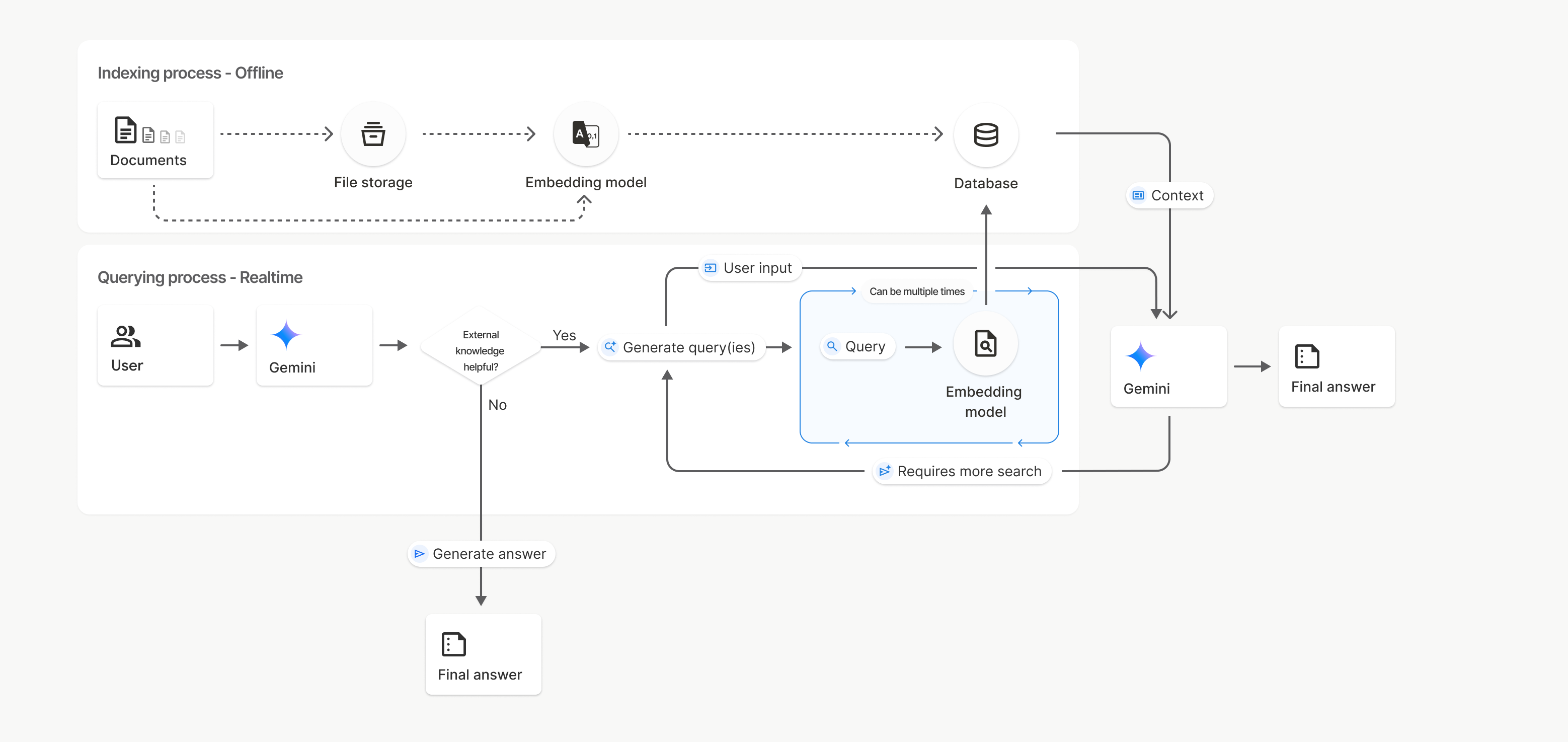
Bu şemada, Belgeler'den Yerleştirme modeli'ne (gemini-embedding-001 kullanılarak) giden noktalı çizgi, uploadToFileSearchStore API'yi (Dosya depolama'yı atlayarak) temsil eder.
Aksi takdirde, dosyaları ayrı ayrı oluşturup içe aktarmak için Files API'yi kullanmak, dizine ekleme sürecini Dokümanlar'dan Dosya depolama'ya ve ardından Yerleştirme modeli'ne taşır.
Dosya Arama'yı saklar
File Search mağazası, doküman yerleştirmelerinizin bulunduğu bir kapsayıcıdır. Dosya API'si aracılığıyla yüklenen ham dosyalar 48 saat sonra silinirken, Dosya Arama mağazasına aktarılan veriler, siz manuel olarak silene kadar süresiz olarak saklanır. Dokümanlarınızı düzenlemek için birden fazla Dosya Arama deposu oluşturabilirsiniz. FileSearchStore API, dosya arama depolarınızı yönetmek için oluşturma, listeleme, alma ve silme işlemlerini yapmanıza olanak tanır. Dosya Arama mağazası adları küresel kapsamlıdır.
Dosya Arama mağazalarınızı nasıl yönetebileceğinize dair bazı örnekleri aşağıda bulabilirsiniz:
Python
file_search_store = client.file_search_stores.create(
    config={
        'display_name': 'myfilesearchstore123',
        'embedding_model': 'models/gemini-embedding-2'
    }
)

for store in client.file_search_stores.list():
    print(store)

my_file_search_store = client.file_search_stores.get(name=file_search_store.name)

client.file_search_stores.delete(name=file_search_store.name, config={'force': True})
JavaScript
const fileSearchStore = await ai.fileSearchStores.create({
  config: {
    displayName: 'myfilesearchstore123',
    embeddingModel: 'models/gemini-embedding-2'
  }
});

const fileSearchStores = await ai.fileSearchStores.list();
for await (const store of fileSearchStores) {
  console.log(store);
}

const myFileSearchStore = await ai.fileSearchStores.get({
  name: fileSearchStore.name
});

await ai.fileSearchStores.delete({
  name: fileSearchStore.name,
  config: { force: true }
});
REST
curl -X POST "https://generativelanguage.googleapis.com/v1beta/fileSearchStores?key=${GEMINI_API_KEY}" \
    -H "Content-Type: application/json" \
    -d '{ "displayName": "My Store", "embedding_model": "models/gemini-embedding-2" }'

curl "https://generativelanguage.googleapis.com/v1beta/fileSearchStores?key=${GEMINI_API_KEY}"

curl "https://generativelanguage.googleapis.com/v1beta/fileSearchStores/myfilesearchstore123?key=${GEMINI_API_KEY}"

curl -X DELETE "https://generativelanguage.googleapis.com/v1beta/fileSearchStores/myfilesearchstore123?key=${GEMINI_API_KEY}"
Dosya Arama belgeleri
Dosya depolarınızdaki dokümanları tek tek yönetmek için list, get ve delete işlemlerini gerçekleştirmek üzere File Search Documents API'yi kullanabilirsiniz.
Python
for document_in_store in client.file_search_stores.documents.list(parent='fileSearchStores/myfilesearchstore123'):
  print(document_in_store)

file_search_document = client.file_search_stores.documents.get(name='fileSearchStores/myfilesearchstore123/documents/sampletxt123')
print(file_search_document)

client.file_search_stores.documents.delete(name='fileSearchStores/myfilesearchstore123/documents/sampletxt123', config={'force': True})
JavaScript
const documents = await ai.fileSearchStores.documents.list({
  parent: 'fileSearchStores/myfilesearchstore123'
});
for await (const doc of documents) {
  console.log(doc);
}

const fileSearchDocument = await ai.fileSearchStores.documents.get({
  name: 'fileSearchStores/myfilesearchstore123/documents/sampletxt123'
});

await ai.fileSearchStores.documents.delete({
  name: 'fileSearchStores/myfilesearchstore123/documents/sampletxt123',
  config: { force: true }
});
REST
curl "https://generativelanguage.googleapis.com/v1beta/fileSearchStores/myfilesearchstore123/documents?key=${GEMINI_API_KEY}"

curl "https://generativelanguage.googleapis.com/v1beta/fileSearchStores/myfilesearchstore123/documents/sampletxt123?key=${GEMINI_API_KEY}"

curl -X DELETE "https://generativelanguage.googleapis.com/v1beta/fileSearchStores/myfilesearchstore123/documents/sampletxt123?key=${GEMINI_API_KEY}&force=true"
Dosya meta verileri
Dosyalarınızı filtrelemenize yardımcı olması veya ek bağlam bilgisi sağlaması için dosyalarınıza özel meta veriler ekleyebilirsiniz. Meta veriler, anahtar/değer çiftlerinden oluşan bir settir.
Python
op = client.file_search_stores.import_file(
    file_search_store_name=file_search_store.name,
    file_name=sample_file.name,
    config={
        'custom_metadata': [
            {"key": "author", "string_value": "Robert Graves"},
            {"key": "year", "numeric_value": 1934}
        ]
    }
)
JavaScript
let operation = await ai.fileSearchStores.importFile({
  fileSearchStoreName: fileSearchStore.name,
  fileName: sampleFile.name,
  config: {
    customMetadata: [
      { key: "author", stringValue: "Robert Graves" },
      { key: "year", numericValue: 1934 }
    ]
  }
});
Bu özellik, Dosya Arama deposunda birden fazla dokümanınız olduğunda ve yalnızca bir alt kümede arama yapmak istediğinizde kullanışlıdır.
Python
interaction = client.interactions.create(
    model="gemini-3.7-flash",
    input="Tell me about the book 'I, Claudius'",
    tools=[{
        "type": "file_search",
        "file_search_store_names": [file_search_store.name],
        "metadata_filter": 'author="Robert Graves"',
    }]
)

for step in interaction.steps:
    if step.type == "model_output":
        for content_block in step.content:
            if content_block.type == "text":
                print(content_block.text)
JavaScript
const interaction = await ai.interactions.create({
  model: "gemini-3.7-flash",
  input: "Tell me about the book 'I, Claudius'",
  tools: [{
    type: "file_search",
    file_search_store_names: [fileSearchStore.name],
    metadata_filter: 'author="Robert Graves"',
  }]
});

for (const step of interaction.steps) {
  if (step.type === 'model_output') {
    for (const contentBlock of step.content) {
      if (contentBlock.type === 'text') {
        console.log(contentBlock.text);
      }
    }
  }
}
REST
curl "https://generativelanguage.googleapis.com/v1beta/interactions" \
    -H "x-goog-api-key: $GEMINI_API_KEY" \
    -H 'Content-Type: application/json' \
    -X POST \
    -d '{
            "model": "gemini-3.7-flash",
            "input": [{"type": "text", "text": "Tell me about the book I, Claudius"}],
            "tools": [{
                "type": "file_search",
                "file_search_store_names": ["'$STORE_NAME'"],
                "metadata_filter": "author = \"Robert Graves\""
            }]
        }' 2> /dev/null > response.json

cat response.json
metadata_filter için liste filtresi söz dizimini uygulama ile ilgili yönergeleri google.aip.dev/160 adresinde bulabilirsiniz.
Çok formatlı dosya arama
Çok formatlı dosya arama özelliği, resimleri yerel olarak yerleştirmenize ve aramanıza olanak tanıyarak zengin ve çok formatlı RAG uygulamaları oluşturmanızı sağlar.
Yerleştirme modelini yapılandırma
FileSearchStore oluşturduğunuzda, çok formatlı bir model kullanmak için varsayılan yalnızca metin içeren yerleştirme modelini geçersiz kılmanız gerekir. Hem metinleri hem de resimleri işlemek için models/gemini-embedding-2 simgesini kullanın.
Python
store = client.file_search_stores.create(
    config={
        "display_name": "Multimodal Catalog",
        "embedding_model": "models/gemini-embedding-2",
    }
)
JavaScript
const fileSearchStore = await ai.fileSearchStores.create({
  config: {
    displayName: "Multimodal Catalog",
    embeddingModel: "models/gemini-embedding-2",
  },
});
REST
curl -X POST "https://generativelanguage.googleapis.com/v1beta/fileSearchStores?key=$GEMINI_API_KEY" \
    -H "Content-Type: application/json" \
    -d '{
      "display_name": "Multimodal Catalog",
      "embedding_model": "models/gemini-embedding-2"
    }'
Resim yükle
Çok formatlı yerleştirme modeliyle mağazayı oluşturduktan sonra, Doğrudan Dosya Arama mağazasına yükleme veya Dosyaları içe aktarma başlıklı makalelerde açıklanan yükleme API'lerini kullanarak doğrudan resim dosyaları yükleyebilirsiniz.
Resim dosyası koşulları:
- Resim dosyalarının çözünürlüğü en fazla 4K x 4K piksel olmalıdır.
- Desteklenen biçimler: PNG, JPEG.
Alıntılar
Dosya Arama'yı kullandığınızda modelin yanıtında, yüklenen dokümanlarınızın hangi bölümlerinin yanıtı oluşturmak için kullanıldığını belirten alıntılar yer alabilir. Bu, doğruluk kontrolü ve doğrulama işlemlerine yardımcı olur.
Alıntı bilgilerine, yanıtın model_output adımındaki content bloklarında yer alan annotations özelliği üzerinden erişebilirsiniz.
Python
for step in interaction.steps:
    if step.type == 'model_output':
        for content in step.content:
            if content.type == 'text' and content.annotations:
                print(content.annotations)
JavaScript
for (const step of interaction.steps) {
  if (step.type === 'model_output') {
    for (const contentBlock of step.content) {
      if (contentBlock.type === 'text' && contentBlock.annotations) {
        console.log(JSON.stringify(contentBlock.annotations, null, 2));
      }
    }
  }
}
REST
{
  "steps": [
    {
      "type": "model_output",
      "content": [
        {
          "type": "text",
          "text": "...",
          "annotations": [
            {
              "type": "file_citation",
              "file_name": "sample.txt",
              "source": "..."
            }
          ]
        }
      ]
    }
  ]
}
Alıntıların yapısı hakkında ayrıntılı bilgi için Etkileşimler için API referansı bölümüne bakın.
Sayfa numaraları
Sayfaları olan belgelerle (ör. PDF'ler) Dosya Arama'yı kullandığınızda modelin yanıtında, bilgilerin bulunduğu sayfa numarası yer alabilir.
Bu bilgilere, page_number özelliğini kullanarak erişebilirsiniz.
file_citation
Python
for step in interaction.steps:
    if step.type == "model_output":
        for content in step.content:
            if content.type == "text" and content.annotations:
                for annotation in content.annotations:
                    if annotation.type == "file_citation" and annotation.page_number:
                        print(f"Cited Page: {annotation.page_number}")
JavaScript
for (const step of interaction.steps) {
  if (step.type === 'model_output') {
    for (const block of step.content) {
      if (block.type === 'text' && block.annotations) {
        for (const annotation of block.annotations) {
          if (annotation.type === 'file_citation' && annotation.pageNumber) {
            console.log(`Cited Page: ${annotation.pageNumber}`);
          }
        }
      }
    }
  }
}
REST
{
  "steps": [
    {
      "type": "model_output",
      "content": [
        {
          "type": "text",
          "text": "...",
          "annotations": [
            {
              "type": "file_citation",
              "file_name": "document.pdf",
              "page_number": 1,
              "source": "..."
            }
          ]
        }
      ]
    }
  ]
}
Medya alıntıları
Model, oluşturma sırasında bir resim parçasına referans verdiğinde API, açıklamalarda file_citation türünde bir açıklama döndürür. Bu açıklama, media_id içerir. Modelin referans verdiği tam görüntü parçasını indirmek için bu<0x0x0A>kimliği kullanabilirsiniz. Bu media_id, birden fazla arama çağrısında kalıcıdır. Bu sayede, aynı resmi güvenilir bir şekilde alabilir veya kimliği kullanarak önbelleğe alabilirsiniz.
Aşağıdaki snippet, örnek bir REST yanıtı adımıdır:
{
  "type": "model_output",
  "content": [
    {
      "type": "text",
      "text": "...",
      "annotations": [
        {
          "type": "file_citation",
          "file_name": "product_image",
          "media_id": "fileSearchStores/my-store-123/media/BlobId-456"
        }
      ]
    }
  ]
}
Aşağıdaki kod snippet'lerinde media_id değerinin nasıl alınacağı ve medyanın nasıl indirileceği gösterilmektedir:
Python
for step in interaction.steps:
    if step.type == "model_output":
        for content in step.content:
            if content.type == "text" and content.annotations:
                for annotation in content.annotations:
                    if annotation.type == "file_citation" and annotation.media_id:
                        print(f"Cited Media ID: {annotation.media_id}")
                        blob_content = client.file_search_stores.download_media(
                            media_id=annotation.media_id
                        )
JavaScript
for (const step of interaction.steps) {
  if (step.type === 'model_output') {
    for (const block of step.content) {
      if (block.type === 'text' && block.annotations) {
        for (const annotation of block.annotations) {
          if (annotation.type === 'file_citation' && annotation.mediaId) {
            console.log(`Cited Media ID: ${annotation.mediaId}`);
            const blobContent = await ai.fileSearchStores.downloadMedia(annotation.mediaId);
          }
        }
      }
    }
  }
}
REST
curl -X GET "https://generativelanguage.googleapis.com/v1/fileSearchStores/my-store-123/media/BlobId-456" \
  -H "x-goog-api-key: $GEMINI_API_KEY"
Özel meta veriler
Dosyalarınıza özel meta veriler eklediyseniz bunlara modelin yanıtındaki açıklamalardan erişebilirsiniz. Bu, kaynak dokümanlarınızdaki ek bağlamı (ör. URL'ler, sayfa numaraları veya yazarlar) uygulama mantığınıza aktarmak için kullanışlıdır. file_citation türündeki her alıntı ek açıklamasında bu özel meta veriler bulunur.
Python
interaction = client.interactions.create(
    model="gemini-3.7-flash",
    input="Tell me about [insert question]",
    tools=[{
        "type": "file_search",
        "file_search_store_names": [file_search_store.name]
    }]
)

for step in interaction.steps:
    if step.type == "model_output":
        for content_block in step.content:
            if content_block.annotations:
                for annotation in content_block.annotations:
                    print(annotation)
JavaScript
const interaction = await ai.interactions.create({
  model: "gemini-3.7-flash",
  input: "Tell me about [insert question]",
  tools: [{
    type: "file_search",
    file_search_store_names: [fileSearchStore.name]
  }]
});

for (const step of interaction.steps) {
  if (step.type === 'model_output') {
    for (const contentBlock of step.content) {
      if (contentBlock.annotations) {
        contentBlock.annotations.forEach((annotation) => {
          console.log(annotation);
        });
      }
    }
  }
}
REST
{
  "steps": [
    {
      "type": "model_output",
      "content": [
        {
          "type": "text",
          "text": "...",
          "annotations": [
            {
              "file_name": "...",
              "source": "...",
              "custom_metadata": [
                {
                  "key": "author",
                  "string_value": "Robert Graves"
                },
                {
                  "key": "year",
                  "numeric_value": 1934
                }
              ]
            }
          ]
        }
      ]
    }
  ]
}
Yapılandırılmış çıkış
Gemini 3 modellerinden itibaren, dosya arama aracını yapılandırılmış çıktılarla birlikte kullanabilirsiniz.
Python
from pydantic import BaseModel, Field

class Money(BaseModel):
    amount: str = Field(description="The numerical part of the amount.")
    currency: str = Field(description="The currency of amount.")

interaction = client.interactions.create(
    model="gemini-3.7-flash",
    input="What is the minimum hourly wage in Tokyo right now?",
    tools=[{
        "type": "file_search",
        "file_search_store_names": [file_search_store.name]
    }],
    response_format={
        "type": "text",
        "mime_type": "application/json",
        "schema": Money.model_json_schema()
    },
)
result = Money.model_validate_json(interaction.output_text)
print(result)
JavaScript
import { z } from "zod";

const moneyJsonSchema = {
  type: "object",
  properties: {
    amount: { type: "string", description: "The numerical part of the amount." },
    currency: { type: "string", description: "The currency of amount." }
  },
  required: ["amount", "currency"]
};

const moneySchema = z.fromJSONSchema(moneyJsonSchema);

async function run() {
  const interaction = await ai.interactions.create({
    model: "gemini-3.7-flash",
    input: "What is the minimum hourly wage in Tokyo right now?",
    tools: [{
      type: "file_search",
      file_search_store_names: [fileSearchStore.name],
    }],
    response_format: {
      type: 'text',
      mime_type: 'application/json',
      schema: moneyJsonSchema
    },
  });

  const result = moneySchema.parse(JSON.parse(interaction.output_text));
  console.log(result);
}

run();
REST
curl "https://generativelanguage.googleapis.com/v1beta/interactions" \
  -H "x-goog-api-key: $GEMINI_API_KEY" \
  -H 'Content-Type: application/json' \
  -X POST \
  -d '{
    "model": "gemini-3.7-flash",
    "input": "What is the minimum hourly wage in Tokyo right now?",
    "tools": [{
      "type": "file_search",
      "file_search_store_names": ["$FILE_SEARCH_STORE_NAME"]
    }],
    "response_format": {
      "type": "text",
      "mime_type": "application/json",
      "schema": {
        "type": "object",
        "properties": {
          "amount": {"type": "string", "description": "The numerical part of the amount."},
          "currency": {"type": "string", "description": "The currency of amount."}
        },
        "required": ["amount", "currency"]
      }
    }
  }'
Desteklenen modeller
Aşağıdaki modellerde Dosya Arama özelliği desteklenir:
| Model | Dosya Arama |
|---|---|
| Gemini 3.7 Flash | ✔️ |
| Gemini 3.6 Flash | ✔️ |
| Gemini 3.5 Flash-Lite | ✔️ |
| Gemini 3.5 Flash | ✔️ |
| Gemini 3.1 Pro Önizlemesi | ✔️ |
| Gemini 3.1 Flash-Lite | ✔️ |
| Gemini 3 Flash Önizlemesi | ✔️ |
Desteklenen dosya türleri
Dosya Arama, aşağıdaki bölümlerde listelenen çok çeşitli dosya biçimlerini destekler.
Uygulama dosyası türleri
application/dartapplication/ecmascriptapplication/jsonapplication/ms-javaapplication/mswordapplication/pdfapplication/sqlapplication/typescriptapplication/vnd.curlapplication/vnd.dartapplication/vnd.ibm.secure-containerapplication/vnd.jupyterapplication/vnd.ms-excelapplication/vnd.oasis.opendocument.textapplication/vnd.openxmlformats-officedocument.presentationml.presentationapplication/vnd.openxmlformats-officedocument.spreadsheetml.sheetapplication/vnd.openxmlformats-officedocument.wordprocessingml.documentapplication/vnd.openxmlformats-officedocument.wordprocessingml.templateapplication/x-cshapplication/x-hwpapplication/x-hwp-v5application/x-latexapplication/x-phpapplication/x-powershellapplication/x-shapplication/x-shellscriptapplication/x-texapplication/x-zshapplication/xmlapplication/zip
Metin dosyası türleri
text/1d-interleaved-parityfectext/REDtext/SGMLtext/cache-manifesttext/calendartext/cqltext/cql-extensiontext/cql-identifiertext/csstext/csvtext/csv-schematext/dnstext/encaprtptext/enrichedtext/exampletext/fhirpathtext/flexfectext/fwdredtext/gff3text/grammar-ref-listtext/hl7v2text/htmltext/javascripttext/jcr-cndtext/jsxtext/markdowntext/mizartext/n3text/parameterstext/parityfectext/phptext/plaintext/provenance-notationtext/prs.fallenstein.rsttext/prs.lines.tagtext/prs.prop.logictext/raptorfectext/rfc822-headerstext/rtftext/rtp-enc-aescm128text/rtploopbacktext/rtxtext/sgmltext/shaclctext/shextext/spdxtext/stringstext/t140text/tab-separated-valuestext/texmacstext/trofftext/tsvtext/tsxtext/turtletext/ulpfectext/uri-listtext/vcardtext/vnd.DMClientScripttext/vnd.IPTC.NITFtext/vnd.IPTC.NewsMLtext/vnd.atext/vnd.abctext/vnd.ascii-arttext/vnd.curltext/vnd.debian.copyrighttext/vnd.dvb.subtitletext/vnd.esmertec.theme-descriptortext/vnd.exchangeabletext/vnd.familysearch.gedcomtext/vnd.ficlab.flttext/vnd.flytext/vnd.fmi.flexstortext/vnd.gmltext/vnd.graphviztext/vnd.hanstext/vnd.hgltext/vnd.in3d.3dmltext/vnd.in3d.spottext/vnd.latex-ztext/vnd.motorola.reflextext/vnd.ms-mediapackagetext/vnd.net2phone.commcenter.commandtext/vnd.radisys.msml-basic-layouttext/vnd.senx.warpscripttext/vnd.sositext/vnd.sun.j2me.app-descriptortext/vnd.trolltech.linguisttext/vnd.wap.sitext/vnd.wap.sltext/vnd.wap.wmltext/vnd.wap.wmlscripttext/vtttext/wgsltext/x-asmtext/x-bibtextext/x-bootext/x-ctext/x-c++hdrtext/x-c++srctext/x-cassandratext/x-chdrtext/x-coffeescripttext/x-componenttext/x-cshtext/x-csharptext/x-csrctext/x-cudatext/x-dtext/x-difftext/x-dsrctext/x-emacs-lisptext/x-erlangtext/x-gff3text/x-gotext/x-haskelltext/x-javatext/x-java-propertiestext/x-java-sourcetext/x-kotlintext/x-lilypondtext/x-lisptext/x-literate-haskelltext/x-luatext/x-moctext/x-objcsrctext/x-pascaltext/x-pcs-gcdtext/x-perltext/x-perl-scripttext/x-pythontext/x-python-scripttext/x-r-markdowntext/x-rsrctext/x-rsttext/x-ruby-scripttext/x-rusttext/x-sasstext/x-scalatext/x-schemetext/x-script.pythontext/x-scsstext/x-setexttext/x-sfvtext/x-shtext/x-siestatext/x-sostext/x-sqltext/x-swifttext/x-tcltext/x-textext/x-vbasictext/x-vcalendartext/xmltext/xml-dtdtext/xml-external-parsed-entitytext/yaml
Sınırlamalar
- Live API: Dosya Arama, Live API'de desteklenmez.
- Araç uyumsuzluğu: Yerleşik temellendirme araçları birbiriyle birlikte kullanılamaz. Örneğin, Dosya Arama, aynı istekte Google Arama ile Temellendirme veya URL Bağlamı ile aynı anda kullanılamaz.
Hız sınırları
File Search API, hizmet kararlılığını sağlamak için aşağıdaki sınırlara sahiptir:
- Maksimum dosya boyutu / belge başına sınır: 100 MB
- Proje Dosya Arama'nın depoladığı toplam boyut (kullanıcı katmanına göre):
- Ücretsiz: 1 GB
- 1. katman: 10 GB
- 2. katman: 100 GB
- 3. katman: 1 TB
- Öneri: Optimal alma gecikmeleri sağlamak için her bir Dosya Arama deposunun boyutunu 20 GB'ın altında tutun.
Fiyatlandırma
- Mevcut yerleştirme fiyatlandırmasına göre, dizine ekleme sırasında yerleştirmeler için ücretlendirilirsiniz.
- Depolama alanı ücretsizdir.
- Sorgu zamanı yerleştirmeleri ücretsizdir.
- Alınan doküman jetonları normal bağlam jetonları olarak ücretlendirilir.
Sırada ne var?
- File Search Stores ve File Search Documents için API referansını ziyaret edin.