

Gemini 3 היא משפחת המודלים הכי חכמה שלנו עד היום, והיא מבוססת על יכולות חשיבה רציונלית המתקדמות ביותר. הוא נועד להפוך כל רעיון למציאות באמצעות שליטה ב-Agentic Workflows, בתכנות אוטונומי ובמשימות מורכבות מרובות-אופנים. במדריך הזה נסביר על התכונות העיקריות של משפחת מודלים Gemini 3 ואיך להפיק ממנה את המרב.
כדאי לעיין באוסף האפליקציות של Gemini 3 כדי לראות איך המודל מתמודד עם חשיבה רציונלית משופרת, תכנות אוטונומי ומשימות מורכבות מרובות-אופנים.
כדי להתחיל, צריך להוסיף כמה שורות קוד:
Python
from google import genai

client = genai.Client()

interaction = client.interactions.create(
    model="gemini-3.1-pro-preview",
    input="Find the race condition in this multi-threaded C++ snippet: [code here]",
)

print(interaction.output_text)
JavaScript
import { GoogleGenAI } from "@google/genai";

const client = new GoogleGenAI({});

async function run() {
  const interaction = await client.interactions.create({
    model: "gemini-3.1-pro-preview",
    input: "Find the race condition in this multi-threaded C++ snippet: [code here]",
  });

  console.log(interaction.output_text);
}

run();
Java
import com.google.genai.Client;
import com.google.genai.gaos.models.interactions.CreateModelInteraction;
import com.google.genai.gaos.models.interactions.Interaction;
import com.google.genai.gaos.models.interactions.InteractionsInput;
import com.google.genai.gaos.models.interactions.Model;
import com.google.genai.gaos.models.operations.CreateInteractionRequestBody;

Client client = new Client();

CreateModelInteraction request =
    CreateModelInteraction.builder()
        .model(Model.of("gemini-3.1-pro-preview"))
        .input(
            InteractionsInput.of(
                "Find the race condition in this multi-threaded C++ snippet: [code here]"))
        .build();

Interaction interaction =
    client.interactions.create(CreateInteractionRequestBody.of(request)).interaction().get();

System.out.println(interaction.outputText().orElse(""));
Go
package main

import (
    "context"
    "fmt"
    "log"

    "google.golang.org/genai"
    "google.golang.org/genai/interactions/models/interactions"
    "google.golang.org/genai/interactions/models/operations"
)

func main() {
    ctx := context.Background()
    client, err := genai.NewClient(ctx, nil)
    if err != nil {
        log.Fatal(err)
    }

    res, err := client.Interactions.Create(ctx, operations.CreateInteractionRequest{
        Body: operations.NewCreateInteractionRequestBody(interactions.CreateModelInteraction{
            Model: interactions.Model("gemini-3.1-pro-preview"),
            Input: interactions.NewInteractionsInput("Find the race condition in this multi-threaded C++ snippet: [code here]"),
        }),
    })
    if err != nil {
        log.Fatal(err)
    }
    if res.Interaction.OutputText != nil {
        fmt.Println(*res.Interaction.OutputText)
    }
}
REST
curl -X POST "https://generativelanguage.googleapis.com/v1beta/interactions" \
  -H "x-goog-api-key: $GEMINI_API_KEY" \
  -H 'Content-Type: application/json' \
  -d '{
    "model": "gemini-3.1-pro-preview",
    "input": "Find the race condition in this multi-threaded C++ snippet: [code here]"
  }'
הכירו את סדרת Gemini 3
Gemini 3.1 Pro הוא המודל הכי טוב למשימות מורכבות שדורשות ידע רחב על העולם וחשיבה רציונלית משופרת במגוון תחומים.
Gemini 3 Flash הוא המודל העדכני ביותר בסדרת 3, עם יכולות AI חכמות ברמת Pro, במהירות ובמחיר של Flash.
Nano Banana Pro (שנקרא גם Gemini 3 Pro Image) הוא המודל שלנו ליצירת תמונות באיכות הכי גבוהה, ו-Nano Banana 2 (שנקרא גם Gemini 3.1 Flash Image) הוא המודל המקביל ליצירת תמונות בכמויות גדולות, ביעילות גבוהה ובמחיר שנקבע נמוך יותר.
Gemini 3.1 Flash-Lite הוא המודל המתקדם שלנו שנועד לבצע משימות בהיקף גדול בצורה חסכונית.
כל המודלים של Gemini 3 נמצאים כרגע בגרסת טרום-השקה.
| מזהה דגם | חלון ההקשר (בתוך / מחוץ) | תאריך סף הידע | תמחור (קלט / פלט)* |
|---|---|---|---|
| gemini-3.1-flash-lite | 1M / 64k | ינואר 2025 | 0.25$ (טקסט, תמונה, סרטון), 0.50$ (אודיו) / 1.50$ |
| gemini-3.1-flash-image-preview | 128k / 32k | ינואר 2025 | 0.25$ (קלט טקסט) / 0.067$ (פלט תמונה)** |
| gemini-3.1-pro-preview | 1M / 64k | ינואר 2025 | 2$ / 12$ (<200k tokens) 4$ / 18$ (>200k tokens) |
| gemini-3-flash-preview | 1M / 64k | ינואר 2025 | 0.50$ / 3$ |
| gemini-3-pro-image-preview | 65,000 / 32,000 | ינואר 2025 | 2$ (הזנת טקסט) / 0.134$ (פלט תמונה)** |
* המחירים הם למיליון טוקנים, אלא אם צוין אחרת. ** המחירים של התמונות משתנים בהתאם לרזולוציה. פרטים נוספים מופיעים בדף התמחור.
מידע נוסף על מגבלות, תמחור ופרטים נוספים זמין בדף המודלים.
תכונות חדשות ב-Gemini 3 API
Gemini 3 כולל פרמטרים חדשים שנועדו לתת למפתחים יותר שליטה בחביון, בעלות ובנאמנות של נתונים מרובי-אופנים.
רמת ההעמקה
מודלים מסדרת Gemini 3 משתמשים כברירת מחדל בחשיבה דינמית כדי להסיק מסקנות מההנחיות. אפשר להשתמש בפרמטר thinking_level, ששולט על העומק המקסימלי של תהליך החשיבה הפנימי של המודל לפני שהוא מפיק תגובה. Gemini 3 מתייחס לרמות האלה כאל הקצאות יחסיות של משאבים לצורך חשיבה, ולא כאל הבטחות מחמירות לגבי טוקנים.
אם לא מציינים את thinking_level, Gemini 3 ישתמש כברירת מחדל ב-high. כדי לקבל תשובות מהירות יותר עם חביון נמוך יותר כשלא נדרש נימוק מורכב, אפשר להגביל את רמת החשיבה של המודל ל-low.
| רמת ההעמקה | Gemini 3.1 Pro | Gemini 3.1 Flash-Lite | Gemini 3 Flash | תיאור |
|---|---|---|---|---|
minimal |
לא נתמך | נתמך (ברירת מחדל) | נתמך | מתאים להגדרה 'ללא חשיבה' ברוב השאילתות. יכול להיות שהמודל יחשוב מעט מאוד כדי לעבוד על משימות מורכבות של כתיבת קוד. מצמצם את זמן האחזור של אפליקציות צ'אט או אפליקציות עם תפוקה גבוהה. הערה: minimal לא מבטיח שהחשיבה מושבתת. |
low |
נתמך | נתמך | נתמך | מצמצם את זמן האחזור ואת העלות. הכי טוב למעקב אחרי הוראות פשוטות, לצ'אט או לאפליקציות עם תפוקה גבוהה. |
medium |
נתמך | נתמך | נתמך | חשיבה מאוזנת לרוב המשימות. |
high |
נתמך (ברירת מחדל, דינמי) | נתמך (דינמי) | נתמך (ברירת מחדל, דינמי) | העומק המקסימלי של החשיבה הרציונלית. יכול להיות שיעבור הרבה יותר זמן עד שהמודל יפיק את הטוקן הראשון של הפלט (לא טוקן חשיבה), אבל הפלט יהיה מנומק יותר. |
Python
from google import genai

client = genai.Client()

interaction = client.interactions.create(
    model="gemini-3.1-pro-preview",
    input="How does AI work?",
    generation_config={"thinking_level": "low"},
)

print(interaction.output_text)
JavaScript
import { GoogleGenAI } from "@google/genai";

const client = new GoogleGenAI({});

const interaction = await client.interactions.create({
    model: "gemini-3.1-pro-preview",
    input: "How does AI work?",
    generation_config: {
      thinking_level: "low",
    },
  });

console.log(interaction.output_text);
Java
import com.google.genai.Client;
import com.google.genai.gaos.models.interactions.CreateModelInteraction;
import com.google.genai.gaos.models.interactions.GenerationConfig;
import com.google.genai.gaos.models.interactions.Interaction;
import com.google.genai.gaos.models.interactions.InteractionsInput;
import com.google.genai.gaos.models.interactions.Model;
import com.google.genai.gaos.models.interactions.ThinkingLevel;
import com.google.genai.gaos.models.operations.CreateInteractionRequestBody;

Client client = new Client();

CreateModelInteraction request =
    CreateModelInteraction.builder()
        .model(Model.of("gemini-3.1-pro-preview"))
        .input(InteractionsInput.of("How does AI work?"))
        .generationConfig(
            GenerationConfig.builder()
                .thinkingLevel(ThinkingLevel.LOW)
                .build())
        .build();

Interaction interaction =
    client.interactions.create(CreateInteractionRequestBody.of(request)).interaction().get();

System.out.println(interaction.outputText().orElse(""));
Go
package main

import (
    "context"
    "fmt"
    "log"

    "google.golang.org/genai"
    "google.golang.org/genai/interactions/models/interactions"
    "google.golang.org/genai/interactions/models/operations"
)

func main() {
    ctx := context.Background()
    client, err := genai.NewClient(ctx, nil)
    if err != nil {
        log.Fatal(err)
    }

    res, err := client.Interactions.Create(ctx, operations.CreateInteractionRequest{
        Body: operations.NewCreateInteractionRequestBody(interactions.CreateModelInteraction{
            Model: interactions.Model("gemini-3.1-pro-preview"),
            Input: interactions.NewInteractionsInput("How does AI work?"),
            GenerationConfig: &interactions.GenerationConfig{
                ThinkingLevel: interactions.ThinkingLevelLow.ToPointer(),
            },
        }),
    })
    if err != nil {
        log.Fatal(err)
    }
    if res.Interaction.OutputText != nil {
        fmt.Println(*res.Interaction.OutputText)
    }
}
REST
curl -X POST "https://generativelanguage.googleapis.com/v1beta/interactions" \
  -H "x-goog-api-key: $GEMINI_API_KEY" \
  -H 'Content-Type: application/json' \
  -d '{
    "model": "gemini-3.1-pro-preview",
    "input": "How does AI work?",
    "generation_config": {
      "thinking_level": "low"
    }
  }'
טמפרטורה
בכל המודלים של Gemini 3, מומלץ מאוד להשאיר את פרמטר הטמפרטורה בערך ברירת המחדל שלו, 1.0.
במודלים קודמים, כדאי היה לשנות את הגדרת הטמפרטורה כדי לשלוט באיזון בין יצירתיות לדטרמיניזם, אבל יכולות ההסקה של Gemini 3 מותאמות להגדרת ברירת המחדל. שינוי הטמפרטורה (הגדרה של ערך מתחת ל-1.0) עלול להוביל להתנהגות לא צפויה, כמו לולאה או ביצועים ירודים, במיוחד במשימות מורכבות שקשורות למתמטיקה או להסקת מסקנות.
חתימות של מחשבות
מודלים של Gemini 3 משתמשים בחתימות מחשבה כדי לשמור על הקשר של הנימוקים בין קריאות ל-API. החתימות האלה הן ייצוגים מוצפנים של תהליך החשיבה הפנימי של המודל.
- מצב עם שמירת נתונים (מומלץ): כשמשתמשים ב-Interactions API במצב עם שמירת נתונים (מספקים
previous_interaction_id), השרת מנהל באופן אוטומטי את היסטוריית השיחות ואת חתימות המחשבה. - מצב בלי שמירת מצב: אם אתם מנהלים את היסטוריית השיחות באופן ידני, אתם צריכים לכלול בבקשות הבאות בלוקים של שלבים בתהליך החשיבה עם החתימות שלהם כדי לאמת את האותנטיות.
מידע מפורט זמין בדף חתימות מחשבה.
פלט מובנה עם כלים
מודלים של Gemini 3 מאפשרים לכם לשלב פלט מובנה עם כלים מובנים, כולל עיגון באמצעות חיפוש Google, URL Context, הרצת קוד וקריאה להפעלת פונקציות.
Python
from google import genai
from pydantic import BaseModel, Field
from typing import List

class MatchResult(BaseModel):
    winner: str = Field(description="The name of the winner.")
    final_match_score: str = Field(description="The final match score.")
    scorers: List[str] = Field(description="The name of the scorer.")

client = genai.Client()

interaction = client.interactions.create(
    model="gemini-3.1-pro-preview",
    input="Search for all details for the latest Euro.",
    tools=[
        {"type": "google_search"},
        {"type": "url_context"}
    ],
    response_format={
        "type": "text",
        "mime_type": "application/json",
        "schema": MatchResult.model_json_schema()
    },
)

result = MatchResult.model_validate_json(interaction.output_text)
print(result)
JavaScript
import { GoogleGenAI } from "@google/genai";
import * as z from "zod";

const matchJsonSchema = {
  type: "object",
  properties: {
    winner: { type: "string", description: "The name of the winner." },
    final_match_score: { type: "string", description: "The final score." },
    scorers: {
      type: "array",
      items: { type: "string" },
      description: "The name of the scorer."
    }
  },
  required: ["winner", "final_match_score", "scorers"]
};

const matchSchema = z.fromJSONSchema(matchJsonSchema);

const client = new GoogleGenAI({});

async function run() {
  const interaction = await client.interactions.create({
    model: "gemini-3.1-pro-preview",
    input: "Search for all details for the latest Euro.",
    tools: [
      { type: "google_search" },
      { type: "url_context" }
    ],
    response_format: {
        type: "text",
        mime_type: "application/json",
        schema: matchJsonSchema
    },
  });

  const match = matchSchema.parse(JSON.parse(interaction.output_text));
  console.log(match);
}

run();
Java
import com.google.genai.Client;
import com.google.genai.gaos.models.interactions.CreateModelInteraction;
import com.google.genai.gaos.models.interactions.CreateModelInteractionResponseFormat;
import com.google.genai.gaos.models.interactions.GoogleSearch;
import com.google.genai.gaos.models.interactions.Interaction;
import com.google.genai.gaos.models.interactions.InteractionsInput;
import com.google.genai.gaos.models.interactions.Model;
import com.google.genai.gaos.models.interactions.ResponseFormat;
import com.google.genai.gaos.models.interactions.TextResponseFormat;
import com.google.genai.gaos.models.interactions.TextResponseFormatMimeType;
import com.google.genai.gaos.models.interactions.URLContext;
import com.google.genai.gaos.models.operations.CreateInteractionRequestBody;
import java.util.Arrays;
import java.util.HashMap;
import java.util.Map;

Client client = new Client();

Map<String, Object> properties = new HashMap<>();
properties.put("winner", Map.of("type", "string", "description", "The name of the winner."));
properties.put(
    "final_match_score", Map.of("type", "string", "description", "The final match score."));
properties.put(
    "scorers",
    Map.of(
        "type", "array",
        "items", Map.of("type", "string"),
        "description", "The name of the scorer."));

Map<String, Object> schema = new HashMap<>();
schema.put("type", "object");
schema.put("properties", properties);
schema.put("required", Arrays.asList("winner", "final_match_score", "scorers"));

CreateModelInteraction request =
    CreateModelInteraction.builder()
        .model(Model.of("gemini-3.1-pro-preview"))
        .input(InteractionsInput.of("Search for all details for the latest Euro."))
        .tools(Arrays.asList(GoogleSearch.builder().build(), URLContext.builder().build()))
        .responseFormat(
            CreateModelInteractionResponseFormat.of(
                ResponseFormat.of(
                    TextResponseFormat.builder()
                        .mimeType(TextResponseFormatMimeType.APPLICATION_JSON)
                        .schema(schema)
                        .build())))
        .build();

Interaction interaction =
    client.interactions.create(CreateInteractionRequestBody.of(request)).interaction().get();

System.out.println(interaction.outputText().orElse(""));
Go
package main

import (
    "context"
    "fmt"
    "log"

    "google.golang.org/genai"
    "google.golang.org/genai/interactions/models/interactions"
    "google.golang.org/genai/interactions/models/operations"
)

func main() {
    ctx := context.Background()
    client, err := genai.NewClient(ctx, nil)
    if err != nil {
        log.Fatal(err)
    }

    schema := map[string]any{
        "type": "object",
        "properties": map[string]any{
            "winner": map[string]any{
                "type":        "string",
                "description": "The name of the winner.",
            },
            "final_match_score": map[string]any{
                "type":        "string",
                "description": "The final match score.",
            },
            "scorers": map[string]any{
                "type":        "array",
                "items":       map[string]any{"type": "string"},
                "description": "The name of the scorer.",
            },
        },
        "required": []string{"winner", "final_match_score", "scorers"},
    }

    res, err := client.Interactions.Create(ctx, operations.CreateInteractionRequest{
        Body: operations.NewCreateInteractionRequestBody(interactions.CreateModelInteraction{
            Model: interactions.Model("gemini-3.1-pro-preview"),
            Input: interactions.NewInteractionsInput("Search for all details for the latest Euro."),
            Tools: []interactions.Tool{
                interactions.NewTool(interactions.GoogleSearch{}),
                interactions.NewTool(interactions.URLContext{}),
            },
            ResponseFormat: genai.Ptr(interactions.NewCreateModelInteractionResponseFormat(
                interactions.NewResponseFormat(interactions.TextResponseFormat{
                    MimeType: interactions.TextResponseFormatMimeType("application/json").ToPointer(),
                    Schema:   schema,
                }),
            )),
        }),
    })
    if err != nil {
        log.Fatal(err)
    }
    if res.Interaction.OutputText != nil {
        fmt.Println(*res.Interaction.OutputText)
    }
}
REST
curl -X POST "https://generativelanguage.googleapis.com/v1beta/interactions" \
  -H "x-goog-api-key: $GEMINI_API_KEY" \
  -H 'Content-Type: application/json' \
  -d '{
    "model": "gemini-3.1-pro-preview",
    "input": "Search for all details for the latest Euro.",
    "tools": [
      {"type": "google_search"},
      {"type": "url_context"}
    ],
    "response_format": {
        "type": "text",
        "mime_type": "application/json",
        "schema": {
            "type": "object",
            "properties": {
                "winner": {"type": "string", "description": "The name of the winner."},
                "final_match_score": {"type": "string", "description": "The final score."},
                "scorers": {
                    "type": "array",
                    "items": {"type": "string"},
                    "description": "The name of the scorer."
                }
            },
            "required": ["winner", "final_match_score", "scorers"]
        }
    }
  }'
יצירת תמונות
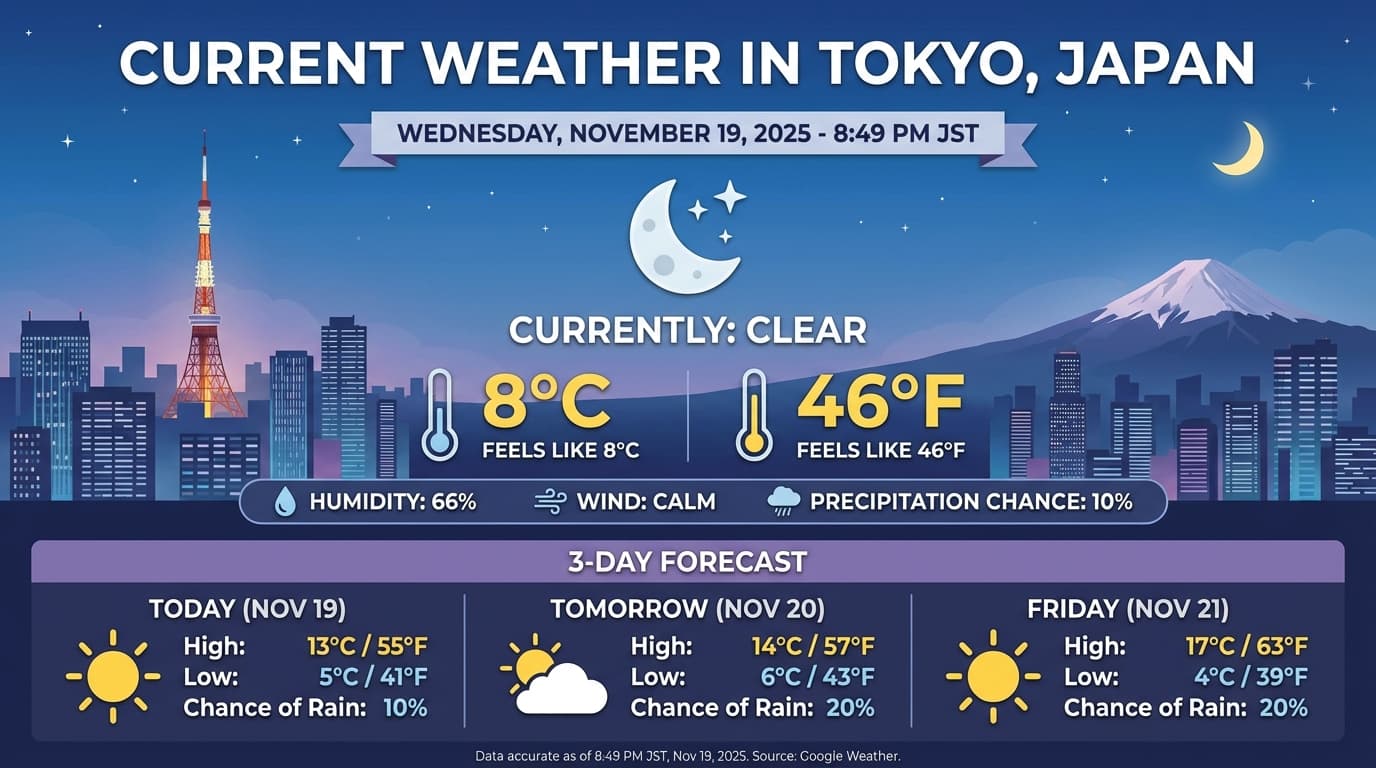
Gemini 3.1 Flash Image ו-Gemini 3 Pro Image מאפשרים ליצור ולערוך תמונות באמצעות פרומפטים טקסטואליים. הוא משתמש בהיגיון כדי 'לחשוב' על הנחיה, ויכול לאחזר נתונים בזמן אמת – כמו תחזיות מזג אוויר או תרשימי מניות – לפני שהוא משתמש בהארקה של חיפוש Google כדי ליצור תמונות באיכות גבוהה.
יכולות חדשות ומשופרות:
- רינדור של טקסט ו-4K: יצירת טקסט ודיאגרמות חדים וקריאים ברזולוציות של עד 2K ו-4K.
- יצירה מבוססת-קרקע: אפשר להשתמש ב
google_searchכלי כדי לאמת עובדות וליצור תמונות על סמך מידע מהעולם האמיתי. Grounding בחיפוש Google תמונות זמין ב-Gemini 3.1 Flash Image. - עריכה באמצעות הנחיות: עריכת תמונות בכמה שלבים באמצעות הנחיות פשוטות (למשל, "הפוך את הרקע לשקיעה"). תהליך העבודה הזה מסתמך על חתימות מחשבה כדי לשמור על ההקשר החזותי בין תורות.
פרטים מלאים על יחסי גובה-רוחב, תהליכי עריכה ואפשרויות הגדרה זמינים במדריך ליצירת תמונות.
Python
from google import genai
import base64

client = genai.Client()

interaction = client.interactions.create(
    model="gemini-3-pro-image-preview",
    input="Generate an infographic of the current weather in Tokyo.",
    tools=[{"type": "google_search"}],
    response_format={
        "type": "image",
        "aspect_ratio": "16:9",
        "image_size": "4K"
    }
)

from PIL import Image
import io

generated_image = interaction.output_image
if generated_image:
    image_data = base64.b64decode(generated_image.data)
    image = Image.open(io.BytesIO(image_data))
    image.save('weather_tokyo.png')
    image.show()
JavaScript
import { GoogleGenAI } from "@google/genai";
import * as fs from "node:fs";

const client = new GoogleGenAI({});

async function run() {
  const interaction = await client.interactions.create({
    model: "gemini-3-pro-image-preview",
    input: "Generate a visualization of the current weather in Tokyo.",
    tools: [{ type: "google_search" }],
    response_format: {
      type: "image",
      aspect_ratio: "16:9",
      image_size: "4K"
    }
  });

  const buffer = Buffer.from(interaction.output_image.data, 'base64');

  fs.writeFileSync('weather_tokyo.png', buffer);
}

run();
Java
import com.google.genai.Client;
import com.google.genai.gaos.models.interactions.CreateModelInteraction;
import com.google.genai.gaos.models.interactions.CreateModelInteractionResponseFormat;
import com.google.genai.gaos.models.interactions.GoogleSearch;
import com.google.genai.gaos.models.interactions.ImageContent;
import com.google.genai.gaos.models.interactions.ImageResponseFormat;
import com.google.genai.gaos.models.interactions.ImageResponseFormatAspectRatio;
import com.google.genai.gaos.models.interactions.ImageResponseFormatImageSize;
import com.google.genai.gaos.models.interactions.Interaction;
import com.google.genai.gaos.models.interactions.InteractionsInput;
import com.google.genai.gaos.models.interactions.Model;
import com.google.genai.gaos.models.interactions.ResponseFormat;
import com.google.genai.gaos.models.operations.CreateInteractionRequestBody;
import java.nio.file.Files;
import java.nio.file.Paths;
import java.util.Arrays;
import java.util.Base64;
import java.util.Optional;

Client client = new Client();

CreateModelInteraction request =
    CreateModelInteraction.builder()
        .model(Model.of("gemini-3-pro-image-preview"))
        .input(InteractionsInput.of("Generate an infographic of the current weather in Tokyo."))
        .tools(Arrays.asList(GoogleSearch.builder().build()))
        .responseFormat(
            CreateModelInteractionResponseFormat.of(
                ResponseFormat.of(
                    ImageResponseFormat.builder()
                        .aspectRatio(ImageResponseFormatAspectRatio.ONE_HUNDRED_AND_SIXTY_NINE)
                        .imageSize(ImageResponseFormatImageSize.FOUR_K)
                        .build())))
        .build();

Interaction interaction =
    client.interactions.create(CreateInteractionRequestBody.of(request)).interaction().get();

Optional<ImageContent> generatedImage = interaction.outputImage();
if (generatedImage.isPresent() && generatedImage.get().data().isPresent()) {
  byte[] imageBytes = Base64.getDecoder().decode(generatedImage.get().data().get());
  Files.write(Paths.get("weather_tokyo.png"), imageBytes);
}
Go
package main

import (
    "context"
    "encoding/base64"
    "log"
    "os"

    "google.golang.org/genai"
    "google.golang.org/genai/interactions/models/interactions"
    "google.golang.org/genai/interactions/models/operations"
)

func main() {
    ctx := context.Background()
    client, err := genai.NewClient(ctx, nil)
    if err != nil {
        log.Fatal(err)
    }

    res, err := client.Interactions.Create(ctx, operations.CreateInteractionRequest{
        Body: operations.NewCreateInteractionRequestBody(interactions.CreateModelInteraction{
            Model: interactions.Model("gemini-3-pro-image-preview"),
            Input: interactions.NewInteractionsInput("Generate an infographic of the current weather in Tokyo."),
            Tools: []interactions.Tool{
                interactions.NewTool(interactions.GoogleSearch{}),
            },
            ResponseFormat: genai.Ptr(interactions.NewCreateModelInteractionResponseFormat(
                interactions.NewResponseFormat(interactions.ImageResponseFormat{
                    AspectRatio: interactions.ImageResponseFormatAspectRatioOneHundredAndSixtyNine.ToPointer(),
                    ImageSize:   interactions.ImageResponseFormatImageSize("4K").ToPointer(),
                }),
            )),
        }),
    })
    if err != nil {
        log.Fatal(err)
    }

    if generatedImage := res.Interaction.GetOutputImage(); generatedImage != nil && generatedImage.Data != nil {
        imageBytes, err := base64.StdEncoding.DecodeString(*generatedImage.Data)
        if err != nil {
            log.Fatal(err)
        }
        if err := os.WriteFile("weather_tokyo.png", imageBytes, 0644); err != nil {
            log.Fatal(err)
        }
    }
}
REST
curl -X POST "https://generativelanguage.googleapis.com/v1beta/interactions" \
  -H "x-goog-api-key: $GEMINI_API_KEY" \
  -H 'Content-Type: application/json' \
  -d '{
    "model": "gemini-3-pro-image-preview",
    "input": "Generate a visualization of the current weather in Tokyo.",
    "tools": [{"type": "google_search"}],
    "response_format": {
        "type": "image",
        "aspect_ratio": "16:9",
        "image_size": "4K"
    }
  }'
דוגמה לתשובה
הרצת קוד עם תמונות
Gemini 3 Flash יכול להתייחס לראייה כאל חקירה פעילה, ולא רק כאל מבט סטטי. באמצעות שילוב של נימוק עם הרצת קוד, המודל מגבש תוכנית, ואז כותב ומריץ קוד Python כדי להגדיל, לחתוך, להוסיף הערות או לבצע מניפולציות אחרות בתמונות, שלב אחר שלב, כדי להמחיש את התשובות שלו.
תרחישים לדוגמה:
- התקרבות ובדיקה: המודל מזהה באופן מובנה מתי הפרטים קטנים מדי (למשל, קריאת מד מרחק או מספר סידורי) וכותב קוד לחיתוך ולבדיקה מחדש של האזור ברזולוציה גבוהה יותר.
- מתמטיקה והצגה חזותית: המודל יכול לבצע חישובים מרובי-שלבים באמצעות קוד (למשל, סיכום פריטים בחשבונית או יצירת תרשים Matplotlib מנתונים שחולצו).
- הערות לתמונות: המודל יכול לצייר חצים, תיבות תוחמות או הערות אחרות ישירות על תמונות כדי לענות על שאלות שקשורות למיקום, כמו "איפה צריך למקם את הפריט הזה?".
כדי להפעיל חשיבה ויזואלית, צריך להגדיר את הרצת קוד ככלי. המודל ישתמש אוטומטית בקוד כדי לערוך תמונות כשצריך.
Python
from google import genai
from google.genai import types
import requests
from PIL import Image
import io
import base64

image_path = "https://goo.gle/instrument-img"
image_bytes = requests.get(image_path).content
image = types.Part.from_bytes(data=image_bytes, mime_type="image/jpeg")

client = genai.Client()

interaction = client.interactions.create(
    model="gemini-3-flash-preview",
    input=[
        image,
        "Zoom into the expression pedals and tell me how many pedals are there?"
    ],
    tools=[{"type": "code_execution"}],
)

from IPython.display import display
from PIL import Image
import io

for step in interaction.steps:
    if step.type == "model_output":
        for content_block in step.content:
            if content_block.type == "text":
                print(content_block.text)
            elif content_block.type == "image":
                 display(Image.open(io.BytesIO(base64.b64decode(content_block.data))))
    elif step.type == "code_execution_call":
        print(step.code)
    elif step.type == "code_execution_result":
        print(step.output)
JavaScript
import { GoogleGenAI } from "@google/genai";

const client = new GoogleGenAI({});

async function main() {
  const imageUrl = "https://goo.gle/instrument-img";
  const response = await fetch(imageUrl);
  const imageArrayBuffer = await response.arrayBuffer();
  const base64ImageData = Buffer.from(imageArrayBuffer).toString("base64");

  const interaction = await client.interactions.create({
    model: "gemini-3-flash-preview",
    input: [
      {
        type: "image",
        mime_type: "image/jpeg",
        data: base64ImageData,
      },
      {
        type: "text",
        text: "Zoom into the expression pedals and tell me how many pedals are there?",
      },
    ],
    tools: [{ type: "code_execution" }],
  });

  for (const step of interaction.steps) {
    if (step.type === "model_output") {
      for (const contentBlock of step.content) {
        if (contentBlock.type === "text") {
          console.log("Text:", contentBlock.text);
        }
      }
    } else if (step.type === "code_execution_call") {
      console.log("Code:", step.code);
    } else if (step.type === "code_execution_result") {
      console.log("Output:", step.output);
    }
  }
}

main();
Java
import com.google.genai.Client;
import com.google.genai.gaos.models.interactions.CodeExecution;
import com.google.genai.gaos.models.interactions.CodeExecutionCallStep;
import com.google.genai.gaos.models.interactions.CodeExecutionResultStep;
import com.google.genai.gaos.models.interactions.Content;
import com.google.genai.gaos.models.interactions.CreateModelInteraction;
import com.google.genai.gaos.models.interactions.ImageContent;
import com.google.genai.gaos.models.interactions.ImageContentMimeType;
import com.google.genai.gaos.models.interactions.Interaction;
import com.google.genai.gaos.models.interactions.InteractionsInput;
import com.google.genai.gaos.models.interactions.Model;
import com.google.genai.gaos.models.interactions.ModelOutputStep;
import com.google.genai.gaos.models.interactions.Step;
import com.google.genai.gaos.models.interactions.TextContent;
import com.google.genai.gaos.models.operations.CreateInteractionRequestBody;
import java.io.InputStream;
import java.net.URL;
import java.util.Arrays;
import java.util.Base64;
import java.util.Collections;

Client client = new Client();

URL url = new URL("https://goo.gle/instrument-img");
byte[] imageBytes;
try (InputStream is = url.openStream()) {
  imageBytes = is.readAllBytes();
}
String base64ImageData = Base64.getEncoder().encodeToString(imageBytes);

CreateModelInteraction request =
    CreateModelInteraction.builder()
        .model(Model.of("gemini-3-flash-preview"))
        .input(
            InteractionsInput.ofContent(
                Arrays.asList(
                    ImageContent.builder()
                        .mimeType(ImageContentMimeType.IMAGE_JPEG)
                        .data(base64ImageData)
                        .build(),
                    TextContent.builder()
                        .text("Zoom into the expression pedals and tell me how many pedals are there?")
                        .build())))
        .tools(Arrays.asList(CodeExecution.builder().build()))
        .build();

Interaction interaction =
    client.interactions.create(CreateInteractionRequestBody.of(request)).interaction().get();

for (Step step : interaction.steps().orElse(Collections.emptyList())) {
  if (step instanceof ModelOutputStep) {
    ModelOutputStep modelOutput = (ModelOutputStep) step;
    for (Content contentBlock : modelOutput.content().orElse(Collections.emptyList())) {
      if (contentBlock instanceof TextContent) {
        System.out.println("Text: " + ((TextContent) contentBlock).text().orElse(""));
      }
    }
  } else if (step instanceof CodeExecutionCallStep) {
    CodeExecutionCallStep callStep = (CodeExecutionCallStep) step;
    callStep.arguments().flatMap(args -> args.code()).ifPresent(code -> System.out.println("Code: " + code));
  } else if (step instanceof CodeExecutionResultStep) {
    CodeExecutionResultStep resultStep = (CodeExecutionResultStep) step;
    System.out.println("Output: " + resultStep.result().orElse(""));
  }
}
Go
package main

import (
    "context"
    "encoding/base64"
    "fmt"
    "io"
    "log"
    "net/http"

    "google.golang.org/genai"
    "google.golang.org/genai/interactions/models/interactions"
    "google.golang.org/genai/interactions/models/operations"
)

func main() {
    ctx := context.Background()
    client, err := genai.NewClient(ctx, nil)
    if err != nil {
        log.Fatal(err)
    }

    httpRes, err := http.Get("https://goo.gle/instrument-img")
    if err != nil {
        log.Fatal(err)
    }
    defer httpRes.Body.Close()
    imageBytes, err := io.ReadAll(httpRes.Body)
    if err != nil {
        log.Fatal(err)
    }
    base64ImageData := base64.StdEncoding.EncodeToString(imageBytes)

    res, err := client.Interactions.Create(ctx, operations.CreateInteractionRequest{
        Body: operations.NewCreateInteractionRequestBody(interactions.CreateModelInteraction{
            Model: interactions.Model("gemini-3-flash-preview"),
            Input: interactions.NewInteractionsInput([]interactions.Content{
                interactions.NewContent(interactions.ImageContent{
                    MimeType: interactions.ImageContentMimeType("image/jpeg").ToPointer(),
                    Data:     genai.Ptr(base64ImageData),
                }),
                interactions.NewContent(interactions.TextContent{
                    Text: "Zoom into the expression pedals and tell me how many pedals are there?",
                }),
            }),
            Tools: []interactions.Tool{
                interactions.NewTool(interactions.CodeExecution{}),
            },
        }),
    })
    if err != nil {
        log.Fatal(err)
    }

    for _, step := range res.Interaction.Steps {
        if modelOutput := step.ModelOutputStep; modelOutput != nil {
            for _, contentBlock := range modelOutput.Content {
                if textContent := contentBlock.TextContent; textContent != nil {
                    fmt.Println("Text:", textContent.Text)
                }
            }
        } else if callStep := step.CodeExecutionCallStep; callStep != nil {
            if callStep.Arguments.Code != nil {
                fmt.Println("Code:", *callStep.Arguments.Code)
            }
        } else if resultStep := step.CodeExecutionResultStep; resultStep != nil {
            fmt.Println("Output:", resultStep.Result)
        }
    }
}
REST
IMG_URL="https://goo.gle/instrument-img"
MODEL="gemini-3-flash-preview"

MIME_TYPE=$(curl -sIL "$IMG_URL" | grep -i '^content-type:' | awk -F ': ' '{print $2}' | sed 's/\r$//' | head -n 1)
if [[ -z "$MIME_TYPE" || ! "$MIME_TYPE" == image/* ]]; then
  MIME_TYPE="image/jpeg"
fi

if [[ "$(uname)" == "Darwin" ]]; then
  IMAGE_B64=$(curl -sL "$IMG_URL" | base64 -b 0)
elif [[ "$(base64 --version 2>&1)" = *"FreeBSD"* ]]; then
  IMAGE_B64=$(curl -sL "$IMG_URL" | base64)
else
  IMAGE_B64=$(curl -sL "$IMG_URL" | base64 -w0)
fi

curl -X POST "https://generativelanguage.googleapis.com/v1beta/interactions" \
    -H "x-goog-api-key: $GEMINI_API_KEY" \
    -H 'Content-Type: application/json' \
    -d '{
      "model": "'$MODEL'",
      "input": [
            {
              "type": "image",
              "mime_type":"'"$MIME_TYPE"'",
              "data": "'"$IMAGE_B64"'"
            },
            {"type": "text", "text": "Zoom into the expression pedals and tell me how many pedals are there?"}
      ],
      "tools": [{"type": "code_execution"}]
    }'
מידע נוסף על הרצת קוד עם תמונות זמין במאמר הרצת קוד.
תשובות של פונקציות מולטי-מודאליות
בקשות להפעלת פונקציות מולטי-מודאליות מאפשרות למשתמשים לקבל תשובות לפונקציות שמכילות אובייקטים מולטי-מודאליים, וכך לשפר את השימוש ביכולות של המודל להפעלת פונקציות. קריאה רגילה לפונקציות תומכת רק בתשובות לפונקציות שמבוססות על טקסט:
Python
# This will only work for SDK newer than 2.0.0
from google import genai
import requests
import base64

client = genai.Client()

# 1. Define the tool
get_image_tool = {
    "type": "function",
    "name": "get_image",
    "description": "Retrieves the image file reference for a specific order item.",
    "parameters": {
        "type": "object",
        "properties": {
            "item_name": {
                "type": "string",
                "description": "The name or description of the item ordered (e.g., 'instrument')."
            }
        },
        "required": ["item_name"],
    },
}

# 2. Send the request with tools
interaction_1 = client.interactions.create(
    model="gemini-3-flash-preview",
    input="Show me the instrument I ordered last month.",
    tools=[get_image_tool],
)

# 3. Find the function call step
fc_step = next(s for s in interaction_1.steps if s.type == "function_call")
print(f"Tool Call: {fc_step.name}({fc_step.arguments})")

# Execute tool (fetch image)
image_path = "https://goo.gle/instrument-img"
image_bytes = requests.get(image_path).content
image_b64 = base64.b64encode(image_bytes).decode("utf-8")

# 4. Send multimodal function result back
interaction_2 = client.interactions.create(
    model="gemini-3-flash-preview",
    previous_interaction_id=interaction_1.id,
    input=[{
        "type": "function_result",
        "name": fc_step.name,
        "call_id": fc_step.id,
        "result": [
            {"type": "text", "text": "instrument.jpg"},
            {
                "type": "image",
                "mime_type": "image/jpeg",
                "data": image_b64,
            }
        ]
    }],
    tools=[get_image_tool]
)

print(f"\nFinal model response: {interaction_2.output_text}")
JavaScript
import { GoogleGenAI } from '@google/genai';

const client = new GoogleGenAI({});

const getImageTool = {
    type: 'function',
    name: 'get_image',
    description: 'Retrieves the image file reference for a specific order item.',
    parameters: {
        type: 'object',
        properties: {
            item_name: {
                type: 'string',
                description: "The name or description of the item ordered (e.g., 'instrument').",
            },
        },
        required: ['item_name'],
    },
};

const interaction1 = await client.interactions.create({
    model: 'gemini-3-flash-preview',
    input: 'Use the get_image tool to show me the instrument I ordered last month.',
    tools: [getImageTool],
});

const fcStep = interaction1.steps.find(s => s.type === 'function_call');
console.log(`Tool Call: ${fcStep.name}(${JSON.stringify(fcStep.arguments)})`);

const imageUrl = 'https://goo.gle/instrument-img';
const response = await fetch(imageUrl);
const imageArrayBuffer = await response.arrayBuffer();
const base64ImageData = Buffer.from(imageArrayBuffer).toString('base64');

const interaction2 = await client.interactions.create({
    model: 'gemini-3-flash-preview',
    previous_interaction_id: interaction1.id,
    input: [{
        type: 'function_result',
        name: fcStep.name,
        call_id: fcStep.id,
        result: [
            { type: 'text', text: 'instrument.jpg' },
            {
                type: 'image',
                mime_type: 'image/jpeg',
                data: base64ImageData,
            }
        ]
    }],
    tools: [getImageTool]
});

console.log(`\nFinal model response: ${interaction2.output_text}`);
Java
import com.google.genai.Client;
import com.google.genai.gaos.models.interactions.CreateModelInteraction;
import com.google.genai.gaos.models.interactions.Function;
import com.google.genai.gaos.models.interactions.FunctionCallStep;
import com.google.genai.gaos.models.interactions.FunctionResultStep;
import com.google.genai.gaos.models.interactions.FunctionResultStepResultUnion;
import com.google.genai.gaos.models.interactions.FunctionResultSubcontent;
import com.google.genai.gaos.models.interactions.ImageContent;
import com.google.genai.gaos.models.interactions.ImageContentMimeType;
import com.google.genai.gaos.models.interactions.Interaction;
import com.google.genai.gaos.models.interactions.InteractionsInput;
import com.google.genai.gaos.models.interactions.Model;
import com.google.genai.gaos.models.interactions.Step;
import com.google.genai.gaos.models.interactions.TextContent;
import com.google.genai.gaos.models.operations.CreateInteractionRequestBody;
import java.io.InputStream;
import java.net.URL;
import java.util.ArrayList;
import java.util.Arrays;
import java.util.Base64;
import java.util.Collections;
import java.util.HashMap;
import java.util.List;
import java.util.Map;

Client client = new Client();

Map<String, Object> itemProp = new HashMap<>();
itemProp.put("type", "string");
itemProp.put("description", "The name or description of the item ordered (e.g., 'instrument').");

Map<String, Object> properties = new HashMap<>();
properties.put("item_name", itemProp);

Map<String, Object> parameters = new HashMap<>();
parameters.put("type", "object");
parameters.put("properties", properties);
parameters.put("required", Arrays.asList("item_name"));

Function getImageTool =
    Function.builder()
        .name("get_image")
        .description("Retrieves the image file reference for a specific order item.")
        .parameters(parameters)
        .build();

CreateModelInteraction req1 =
    CreateModelInteraction.builder()
        .model(Model.of("gemini-3-flash-preview"))
        .input(
            InteractionsInput.of(
                "Use the get_image tool to show me the instrument I ordered last month."))
        .tools(Arrays.asList(getImageTool))
        .build();

Interaction interaction1 =
    client.interactions.create(CreateInteractionRequestBody.of(req1)).interaction().get();

FunctionCallStep fcStep = null;
for (Step step : interaction1.steps().orElse(Collections.emptyList())) {
  if (step instanceof FunctionCallStep) {
    fcStep = (FunctionCallStep) step;
    break;
  }
}

if (fcStep != null) {
  System.out.println("Tool Call: " + fcStep.name().orElse(""));

  URL url = new URL("https://goo.gle/instrument-img");
  byte[] imageBytes;
  try (InputStream is = url.openStream()) {
    imageBytes = is.readAllBytes();
  }
  String base64ImageData = Base64.getEncoder().encodeToString(imageBytes);

  List<FunctionResultSubcontent> subcontents = new ArrayList<>();
  subcontents.add(TextContent.builder().text("instrument.jpg").build());
  subcontents.add(
      ImageContent.builder()
          .mimeType(ImageContentMimeType.IMAGE_JPEG)
          .data(base64ImageData)
          .build());

  FunctionResultStep funcResult =
      FunctionResultStep.builder()
          .name(fcStep.name().orElse(""))
          .callId(fcStep.id().orElse(""))
          .result(FunctionResultStepResultUnion.of(subcontents))
          .build();

  CreateModelInteraction req2 =
      CreateModelInteraction.builder()
          .model(Model.of("gemini-3-flash-preview"))
          .input(InteractionsInput.ofStep(Arrays.asList(funcResult)))
          .tools(Arrays.asList(getImageTool))
          .previousInteractionId(interaction1.id().orElse(""))
          .build();

  Interaction interaction2 =
      client.interactions.create(CreateInteractionRequestBody.of(req2)).interaction().get();
  System.out.println("Final model response: " + interaction2.outputText().orElse(""));
}
Go
package main

import (
    "context"
    "encoding/base64"
    "fmt"
    "io"
    "log"
    "net/http"

    "google.golang.org/genai"
    "google.golang.org/genai/interactions/models/interactions"
    "google.golang.org/genai/interactions/models/operations"
)

func main() {
    ctx := context.Background()
    client, err := genai.NewClient(ctx, nil)
    if err != nil {
        log.Fatal(err)
    }

    getImageTool := interactions.NewTool(interactions.Function{
        Name:        genai.Ptr("get_image"),
        Description: genai.Ptr("Retrieves the image file reference for a specific order item."),
        Parameters: map[string]any{
            "type": "object",
            "properties": map[string]any{
                "item_name": map[string]any{
                    "type":        "string",
                    "description": "The name or description of the item ordered (e.g., 'instrument').",
                },
            },
            "required": []string{"item_name"},
        },
    })

    res1, err := client.Interactions.Create(ctx, operations.CreateInteractionRequest{
        Body: operations.NewCreateInteractionRequestBody(interactions.CreateModelInteraction{
            Model: interactions.Model("gemini-3-flash-preview"),
            Input: interactions.NewInteractionsInput("Use the get_image tool to show me the instrument I ordered last month."),
            Tools: []interactions.Tool{getImageTool},
        }),
    })
    if err != nil {
        log.Fatal(err)
    }

    for _, step := range res1.Interaction.Steps {
        if fcStep := step.FunctionCallStep; fcStep != nil {
            fmt.Println("Tool Call:", fcStep.Name)

            httpRes, err := http.Get("https://goo.gle/instrument-img")
            if err != nil {
                log.Fatal(err)
            }
            defer httpRes.Body.Close()
            imageBytes, err := io.ReadAll(httpRes.Body)
            if err != nil {
                log.Fatal(err)
            }
            base64ImageData := base64.StdEncoding.EncodeToString(imageBytes)

            funcResult := interactions.NewStep(interactions.FunctionResultStep{
                Name:   genai.Ptr(fcStep.Name),
                CallID: fcStep.ID,
                Result: interactions.NewFunctionResultStepResultUnion([]interactions.FunctionResultSubcontent{
                    interactions.NewFunctionResultSubcontent(interactions.TextContent{
                        Text: "instrument.jpg",
                    }),
                    interactions.NewFunctionResultSubcontent(interactions.ImageContent{
                        MimeType: interactions.ImageContentMimeType("image/jpeg").ToPointer(),
                        Data:     genai.Ptr(base64ImageData),
                    }),
                }),
            })

            res2, err := client.Interactions.Create(ctx, operations.CreateInteractionRequest{
                Body: operations.NewCreateInteractionRequestBody(interactions.CreateModelInteraction{
                    Model:                 interactions.Model("gemini-3-flash-preview"),
                    PreviousInteractionID: res1.Interaction.ID,
                    Tools:                 []interactions.Tool{getImageTool},
                    Input:                 interactions.NewInteractionsInput([]interactions.Step{funcResult}),
                }),
            })
            if err != nil {
                log.Fatal(err)
            }
            if res2.Interaction.OutputText != nil {
                fmt.Println("Final model response:", *res2.Interaction.OutputText)
            }
            break
        }
    }
}
REST
IMG_URL="https://goo.gle/instrument-img"

MIME_TYPE=$(curl -sIL "$IMG_URL" | grep -i '^content-type:' | awk -F ': ' '{print $2}' | sed 's/\r$//' | head -n 1)
if [[ -z "$MIME_TYPE" || ! "$MIME_TYPE" == image/* ]]; then
  MIME_TYPE="image/jpeg"
fi

# Check for macOS
if [[ "$(uname)" == "Darwin" ]]; then
  IMAGE_B64=$(curl -sL "$IMG_URL" | base64 -b 0)
elif [[ "$(base64 --version 2>&1)" = *"FreeBSD"* ]]; then
  IMAGE_B64=$(curl -sL "$IMG_URL" | base64)
else
  IMAGE_B64=$(curl -sL "$IMG_URL" | base64 -w0)
fi

# 1. First interaction (triggers function call)
# curl -X POST "https://generativelanguage.googleapis.com/v1beta/interactions" \
#   -H "x-goog-api-key: $GEMINI_API_KEY" \
#   -H 'Content-Type: application/json' \
#   -d '{ "model": "gemini-3-flash-preview", "input": "Show me the instrument I ordered last month.", "tools": [...] }'

# 2. Send multimodal function result back (Replace INTERACTION_ID and CALL_ID)
curl -X POST "https://generativelanguage.googleapis.com/v1beta/interactions" \
  -H "x-goog-api-key: $GEMINI_API_KEY" \
  -H 'Content-Type: application/json' \
  -d '{
    "model": "gemini-3-flash-preview",
    "previous_interaction_id": "INTERACTION_ID",
    "input": [{
      "type": "function_result",
      "name": "get_image",
      "call_id": "CALL_ID",
      "result": [
        { "type": "text", "text": "instrument.jpg" },
        {
          "type": "image",
          "mime_type": "'"$MIME_TYPE"'",
          "data": "'"$IMAGE_B64"'"
        }
      ]
    }]
  }'
שילוב של כלים מובנים וקריאה להפעלת פונקציות
Gemini 3 מאפשר שימוש בכלים מובנים (כמו חיפוש Google, הקשר של כתובת URL ועוד) ובכלים מותאמים אישית של בקשות להפעלת פונקציות באותה קריאה ל-API, וכך מאפשר תהליכי עבודה מורכבים יותר.
Python
from google import genai
from google.genai import types

client = genai.Client()

getWeather = {
    "type": "function",
    "name": "getWeather",
    "description": "Gets the weather for a requested city.",
    "parameters": {
        "type": "object",
        "properties": {
            "city": {
                "type": "string",
                "description": "The city and state, e.g. Utqiaġvik, Alaska",
            },
        },
        "required": ["city"],
    },
}

interaction = client.interactions.create(
    model="gemini-3-flash-preview",
    input="What is the northernmost city in the United States? What's the weather like there today?",
    tools=[
        {"type": "google_search"},
        getWeather
    ],
)

fc_step = next((s for s in interaction.steps if s.type == "function_call"), None)

if fc_step:
    result = {"response": "Very cold. 22 degrees Fahrenheit."}

    final_interaction = client.interactions.create(
        model="gemini-3-flash-preview",
        input=[
            {"type": "function_result", "name": fc_step.name, "call_id": fc_step.id, "result": result}
        ],
        tools=[
            {"type": "google_search"},
            getWeather
        ],
        previous_interaction_id=interaction.id,
    )

    print(final_interaction.output_text)
JavaScript
import { GoogleGenAI, Type } from '@google/genai';

const client = new GoogleGenAI({});

const getWeatherDeclaration = {
  type: 'function',
  name: 'getWeather',
  description: 'Gets the weather for a requested city.',
  parameters: {
    type: Type.OBJECT,
    properties: {
      city: {
        type: Type.STRING,
        description: 'The city and state, e.g. Utqiaġvik, Alaska',
      },
    },
    required: ['city'],
  },
};

const interaction = await client.interactions.create({
  model: 'gemini-3-flash-preview',
  input: "What is the northernmost city in the United States? What's the weather like there today?",
  tools: [
    { type: "google_search" },
    getWeatherDeclaration
  ],
});

const fcStep = interaction.steps.find(s => s.type === 'function_call');

if (fcStep) {
  const result = { response: "Very cold. 22 degrees Fahrenheit." };

  const finalInteraction = await client.interactions.create({
    model: 'gemini-3-flash-preview',
    input: [
      { type: 'function_result', name: fcStep.name, call_id: fcStep.id, result: result }
    ],
    tools: [
      { type: "google_search" },
      getWeatherDeclaration
    ],
    previous_interaction_id: interaction.id,
  });

  console.log(finalInteraction.output_text);
}
Java
import com.google.genai.Client;
import com.google.genai.gaos.models.interactions.CreateModelInteraction;
import com.google.genai.gaos.models.interactions.Function;
import com.google.genai.gaos.models.interactions.FunctionCallStep;
import com.google.genai.gaos.models.interactions.FunctionResultStep;
import com.google.genai.gaos.models.interactions.FunctionResultStepResultUnion;
import com.google.genai.gaos.models.interactions.GoogleSearch;
import com.google.genai.gaos.models.interactions.Interaction;
import com.google.genai.gaos.models.interactions.InteractionsInput;
import com.google.genai.gaos.models.interactions.Model;
import com.google.genai.gaos.models.interactions.Step;
import com.google.genai.gaos.models.operations.CreateInteractionRequestBody;
import java.util.Arrays;
import java.util.Collections;
import java.util.HashMap;
import java.util.Map;

Client client = new Client();

Map<String, Object> cityProp = new HashMap<>();
cityProp.put("type", "string");
cityProp.put("description", "The city and state, e.g. Utqiaġvik, Alaska");

Map<String, Object> properties = new HashMap<>();
properties.put("city", cityProp);

Map<String, Object> parameters = new HashMap<>();
parameters.put("type", "object");
parameters.put("properties", properties);
parameters.put("required", Arrays.asList("city"));

Function getWeather =
    Function.builder()
        .name("getWeather")
        .description("Gets the weather for a requested city.")
        .parameters(parameters)
        .build();

CreateModelInteraction request =
    CreateModelInteraction.builder()
        .model(Model.of("gemini-3-flash-preview"))
        .input(
            InteractionsInput.of(
                "What is the northernmost city in the United States? What's the weather like there today?"))
        .tools(Arrays.asList(GoogleSearch.builder().build(), getWeather))
        .build();

Interaction interaction =
    client.interactions.create(CreateInteractionRequestBody.of(request)).interaction().get();

FunctionCallStep fcStep = null;
for (Step step : interaction.steps().orElse(Collections.emptyList())) {
  if (step instanceof FunctionCallStep) {
    fcStep = (FunctionCallStep) step;
    break;
  }
}

if (fcStep != null) {
  FunctionResultStep funcResult =
      FunctionResultStep.builder()
          .name(fcStep.name().orElse(""))
          .callId(fcStep.id().orElse(""))
          .result(
              FunctionResultStepResultUnion.of(
                  "{\"response\": \"Very cold. 22 degrees Fahrenheit.\"}"))
          .build();

  CreateModelInteraction finalRequest =
      CreateModelInteraction.builder()
          .model(Model.of("gemini-3-flash-preview"))
          .input(InteractionsInput.ofStep(Arrays.asList(funcResult)))
          .tools(Arrays.asList(GoogleSearch.builder().build(), getWeather))
          .previousInteractionId(interaction.id().orElse(""))
          .build();

  Interaction finalInteraction =
      client.interactions.create(CreateInteractionRequestBody.of(finalRequest)).interaction().get();
  System.out.println(finalInteraction.outputText().orElse(""));
}
Go
package main

import (
    "context"
    "fmt"
    "log"

    "google.golang.org/genai"
    "google.golang.org/genai/interactions/models/interactions"
    "google.golang.org/genai/interactions/models/operations"
)

func main() {
    ctx := context.Background()
    client, err := genai.NewClient(ctx, nil)
    if err != nil {
        log.Fatal(err)
    }

    getWeather := interactions.NewTool(interactions.Function{
        Name:        genai.Ptr("getWeather"),
        Description: genai.Ptr("Gets the weather for a requested city."),
        Parameters: map[string]any{
            "type": "object",
            "properties": map[string]any{
                "city": map[string]any{
                    "type":        "string",
                    "description": "The city and state, e.g. Utqiaġvik, Alaska",
                },
            },
            "required": []string{"city"},
        },
    })

    tools := []interactions.Tool{
        interactions.NewTool(interactions.GoogleSearch{}),
        getWeather,
    }

    res, err := client.Interactions.Create(ctx, operations.CreateInteractionRequest{
        Body: operations.NewCreateInteractionRequestBody(interactions.CreateModelInteraction{
            Model: interactions.Model("gemini-3-flash-preview"),
            Input: interactions.NewInteractionsInput("What is the northernmost city in the United States? What's the weather like there today?"),
            Tools: tools,
        }),
    })
    if err != nil {
        log.Fatal(err)
    }

    for _, step := range res.Interaction.Steps {
        if fcStep := step.FunctionCallStep; fcStep != nil {
            funcResult := interactions.NewStep(interactions.FunctionResultStep{
                Name:   genai.Ptr(fcStep.Name),
                CallID: fcStep.ID,
                Result: interactions.NewFunctionResultStepResultUnion(`{"response": "Very cold. 22 degrees Fahrenheit."}`),
            })

            finalRes, err := client.Interactions.Create(ctx, operations.CreateInteractionRequest{
                Body: operations.NewCreateInteractionRequestBody(interactions.CreateModelInteraction{
                    Model:                 interactions.Model("gemini-3-flash-preview"),
                    PreviousInteractionID: res.Interaction.ID,
                    Tools:                 tools,
                    Input:                 interactions.NewInteractionsInput([]interactions.Step{funcResult}),
                }),
            })
            if err != nil {
                log.Fatal(err)
            }
            if finalRes.Interaction.OutputText != nil {
                fmt.Println(*finalRes.Interaction.OutputText)
            }
            break
        }
    }
}
מעבר מ-Gemini 2.5
Gemini 3 היא משפחת המודלים הכי מתקדמת שלנו עד היום, והיא מציעה שיפור הדרגתי בהשוואה ל-Gemini 2.5. כשמבצעים העברה, חשוב לקחת בחשבון את הנקודות הבאות:
- חשיבה: אם השתמשתם בעבר בהנדסת פרומפטים מורכבת (כמו שרשרת מחשבות) כדי לגרום ל-Gemini 2.5 להסיק מסקנות, נסו להשתמש ב-Gemini 3 עם
thinking_level: "high"והנחיות פשוטות יותר. - הגדרות הטמפרטורה: אם הקוד הקיים מגדיר במפורש את הטמפרטורה (במיוחד לערכים נמוכים של פלט דטרמיניסטי), מומלץ להסיר את הפרמטר הזה ולהשתמש בערך ברירת המחדל של Gemini 3, שהוא 1.0, כדי למנוע בעיות פוטנציאליות של לולאות או ירידה בביצועים במשימות מורכבות.
- הבנת מסמכים ו-PDF:
אם הסתמכתם על התנהגות ספציפית של ניתוח מסמכים צפופים, כדאי לבדוק את ההגדרה החדשה
media_resolution_highכדי לוודא שהדיוק נשמר. - צריכת טוקנים: המעבר להגדרות ברירת המחדל של Gemini 3 עשוי להגדיל את השימוש בטוקנים בקובצי PDF, אבל להקטין את השימוש בטוקנים בסרטונים. אם הבקשות חורגות עכשיו מחלון ההקשר בגלל רזולוציות ברירת מחדל גבוהות יותר, מומלץ להקטין את רזולוציית המדיה באופן מפורש.
- חלוקת תמונות למקטעים: יכולות חלוקת תמונות למקטעים (החזרת מסכות ברמת הפיקסל לאובייקטים) לא נתמכות ב-Gemini 3 Pro או ב-Gemini 3 Flash. לגבי עומסי עבודה שדורשים חלוקת תמונות למקטעים מובנית, אנחנו ממליצים להמשיך להשתמש ב-Gemini 2.5 Flash עם השבתת התכונה 'חשיבה'.
- שימוש במחשב: מודלים Gemini 3 Pro ו-Gemini 3 Flash תומכים בשימוש במחשב. בשונה מסדרת 2.5, לא צריך להשתמש במודל נפרד כדי לגשת לכלי 'שימוש במחשב'.
- תמיכה בכלי עזר: שילוב של כלי עזר מובנים עם בקשות להפעלת פונקציות נתמך עכשיו במודלים של Gemini 3. הארקה של מפות נתמכת עכשיו גם במודלים של Gemini 3.
תאימות ל-OpenAI
למשתמשים שמשתמשים בשכבת התאימות ל-OpenAI, פרמטרים רגילים (reasoning_effort של OpenAI) ממופים אוטומטית למקבילים ב-Gemini (thinking_level).
שיטות מומלצות לכתיבת הנחיות
Gemini 3 הוא מודל חשיבה רציונלית, ולכן צריך לשנות את ההנחיות שנותנים לו.
- הוראות מדויקות: כדאי לנסח את ההנחיות בצורה תמציתית. Gemini 3 מגיב הכי טוב להוראות ברורות וישירות. יכול להיות שהיא תנתח יתר על המידה טכניקות מפורטות או מורכבות מדי של הנדסת פרומפטים שמשמשות מודלים ישנים יותר.
- פירוט הפלט: כברירת מחדל, Gemini 3 פחות מפורט ומעדיף לספק תשובות ישירות ויעילות. אם התרחיש לדוגמה שלכם מחייב אישיות יותר שיחתית או "פטפטנית", אתם צריכים להנחות את המודל באופן מפורש בהנחיה (למשל, "תסביר את זה בתור עוזר ידידותי ופטפטן").
- ניהול הקשר: כשעובדים עם מערכי נתונים גדולים (לדוגמה, ספרים שלמים, בסיסי קוד או סרטונים ארוכים), כדאי למקם את ההוראות או השאלות הספציפיות בסוף ההנחיה, אחרי הקשר של הנתונים. כדי להצמיד את ההסבר של המודל לנתונים שסיפקתם, התחילו את השאלה בניסוח כמו "בהתבסס על המידע שלמעלה...".
מידע נוסף על אסטרטגיות לעיצוב פרומפטים זמין במדריך להנדסת פרומפטים.
שאלות נפוצות
מהו תאריך סף הידע של Gemini 3? למודלים של Gemini 3 יש תאריך סף ידע של ינואר 2025. כדי לקבל מידע עדכני יותר, אפשר להשתמש בכלי התאמה לקרקע של חיפוש.
מהן המגבלות של חלון ההקשר? מודלים של Gemini 3 תומכים בחלון הקשר של מיליון טוקנים לקלט ועד 64 אלף טוקנים לפלט.
יש תוכנית בחינם ל-Gemini 3? Gemini 3 Flash
gemini-3-flash-previewכולל תוכנית בחינם ב-Gemini API. אתם יכולים לנסות את Gemini 3.1 Pro ו-3 Flash בחינם ב-Google AI Studio, אבל אין תוכנית בחינם זמינה ל-gemini-3.1-pro-previewב-Gemini API.האם הקוד הישן שלי של
thinking_budgetעדיין יעבוד? כן,thinking_budgetעדיין נתמך לצורך תאימות לדור קודם, אבל מומלץ לעבור ל-thinking_levelכדי לקבל ביצועים צפויים יותר. אל תשתמשו בשניהם באותה בקשה.האם Gemini 3 תומך ב-Batch API? כן, Gemini 3 תומך ב-Batch API.
האם יש תמיכה בשמירת נתונים במטמון לפי הקשר? כן, שמירת נתונים במטמון לפי הקשר נתמכת ב-Gemini 3.
אילו כלים נתמכים ב-Gemini 3? Gemini 3 תומך בחיפוש Google, בהצגת מידע מבוסס-מיקום באמצעות מפות Google, בחיפוש קבצים, בהרצת קוד ובהקשר של כתובת URL. הוא תומך גם בקריאה להפעלת פונקציות סטנדרטית עבור כלים מותאמים אישית משלכם, וגם בשילוב עם כלים מובנים.
מה זה
gemini-3.1-pro-preview-customtools? אם אתם משתמשים ב-gemini-3.1-pro-previewוהמודל מתעלם מהכלים המותאמים אישית שלכם ומעדיף פקודות bash, נסו להשתמש במודלgemini-3.1-pro-preview-customtools. מידע נוסף [כאן][customtools-model].