

Gemini API, modelin Python kodu oluşturup çalıştırmasını sağlayan bir kod yürütme aracı sunar. Model, nihai bir çıkışa ulaşana kadar kod yürütme sonuçlarından yinelemeli olarak öğrenebilir. Kod yürütme özelliğini kullanarak kod tabanlı akıl yürütmeden yararlanan uygulamalar oluşturabilirsiniz. Örneğin, denklemleri çözmek veya metinleri işlemek için kod yürütmeyi kullanabilirsiniz. Daha özel görevleri gerçekleştirmek için kod yürütme ortamında yer alan kütüphaneleri de kullanabilirsiniz.
Gemini yalnızca Python'daki kodları çalıştırabilir. Gemini'dan başka bir dilde kod oluşturmasını isteyebilirsiniz ancak model, kodu çalıştırmak için kod yürütme aracını kullanamaz.
Kod yürütmeyi etkinleştirme
Kod yürütmeyi etkinleştirmek için modelde kod yürütme aracını yapılandırın. Bu, modelin kod oluşturup çalıştırmasına olanak tanır.
Python
from google import genai
from google.genai import types

client = genai.Client()

response = client.models.generate_content(
    model="gemini-3.6-flash",
    contents="What is the sum of the first 50 prime numbers? "
    "Generate and run code for the calculation, and make sure you get all 50.",
    config=types.GenerateContentConfig(
        tools=[types.Tool(code_execution=types.ToolCodeExecution)]
    ),
)

for part in response.candidates[0].content.parts:
    if part.text is not None:
        print(part.text)
    if part.executable_code is not None:
        print(part.executable_code.code)
    if part.code_execution_result is not None:
        print(part.code_execution_result.output)
JavaScript
import { GoogleGenAI } from "@google/genai";

const ai = new GoogleGenAI({});

let response = await ai.models.generateContent({
  model: "gemini-3.6-flash",
  contents: [
    "What is the sum of the first 50 prime numbers? " +
      "Generate and run code for the calculation, and make sure you get all 50.",
  ],
  config: {
    tools: [{ codeExecution: {} }],
  },
});

const parts = response?.candidates?.[0]?.content?.parts || [];
parts.forEach((part) => {
  if (part.text) {
    console.log(part.text);
  }

  if (part.executableCode && part.executableCode.code) {
    console.log(part.executableCode.code);
  }

  if (part.codeExecutionResult && part.codeExecutionResult.output) {
    console.log(part.codeExecutionResult.output);
  }
});
Go
package main

import (
    "context"
    "fmt"
    "os"
    "google.golang.org/genai"
)

func main() {

    ctx := context.Background()
    client, err := genai.NewClient(ctx, nil)
    if err != nil {
        log.Fatal(err)
    }

    config := &genai.GenerateContentConfig{
        Tools: []*genai.Tool{
            {CodeExecution: &genai.ToolCodeExecution{}},
        },
    }

    result, _ := client.Models.GenerateContent(
        ctx,
        "gemini-3.6-flash",
        genai.Text("What is the sum of the first 50 prime numbers? " +
                  "Generate and run code for the calculation, and make sure you get all 50."),
        config,
    )

    fmt.Println(result.Text())
    fmt.Println(result.ExecutableCode())
    fmt.Println(result.CodeExecutionResult())
}
REST
curl "https://generativelanguage.googleapis.com/v1beta/models/gemini-3.6-flash:generateContent" \
-H "x-goog-api-key: $GEMINI_API_KEY" \
-H 'Content-Type: application/json' \
-d ' {"tools": [{"code_execution": {}}],
    "contents": {
      "parts":
        {
            "text": "What is the sum of the first 50 prime numbers? Generate and run code for the calculation, and make sure you get all 50."
        }
    },
}'
Çıktı, okunabilirlik için biçimlendirilmiş aşağıdaki gibi görünebilir:
Okay, I need to calculate the sum of the first 50 prime numbers. Here's how I'll
approach this:

1.  **Generate Prime Numbers:** I'll use an iterative method to find prime
    numbers. I'll start with 2 and check if each subsequent number is divisible
    by any number between 2 and its square root. If not, it's a prime.
2.  **Store Primes:** I'll store the prime numbers in a list until I have 50 of
    them.
3.  **Calculate the Sum:**  Finally, I'll sum the prime numbers in the list.

Here's the Python code to do this:

def is_prime(n):
  """Efficiently checks if a number is prime."""
  if n <= 1:
    return False
  if n <= 3:
    return True
  if n % 2 == 0 or n % 3 == 0:
    return False
  i = 5
  while i * i <= n:
    if n % i == 0 or n % (i + 2) == 0:
      return False
    i += 6
  return True

primes = []
num = 2
while len(primes) < 50:
  if is_prime(num):
    primes.append(num)
  num += 1

sum_of_primes = sum(primes)
print(f'{primes=}')
print(f'{sum_of_primes=}')

primes=[2, 3, 5, 7, 11, 13, 17, 19, 23, 29, 31, 37, 41, 43, 47, 53, 59, 61, 67,
71, 73, 79, 83, 89, 97, 101, 103, 107, 109, 113, 127, 131, 137, 139, 149, 151,
157, 163, 167, 173, 179, 181, 191, 193, 197, 199, 211, 223, 227, 229]
sum_of_primes=5117

The sum of the first 50 prime numbers is 5117.
Bu çıkış, kod yürütme kullanılırken modelin döndürdüğü çeşitli içerik bölümlerini birleştirir:
text: Model tarafından oluşturulan satır içi metinexecutableCode: Model tarafından oluşturulan ve yürütülmesi amaçlanan kodcodeExecutionResult: Yürütülebilir kodun sonucu
Bu bölümlerin adlandırma kuralları, programlama diline göre değişir.
Görüntülerle kod yürütme (Gemini 3)
Gemini 3 Flash modeli artık görüntüleri etkin bir şekilde işlemek ve incelemek için Python kodu yazıp çalıştırabilir.
Kullanım alanları
- Yakınlaştırma ve inceleme: Model, ayrıntıların çok küçük olduğunu (ör. uzaktaki bir ölçüm cihazını okuma) örtülü olarak algılar ve alanı kırpıp daha yüksek çözünürlükte yeniden incelemek için kod yazar.
- Görsel matematik: Model, kod kullanarak çok adımlı hesaplamalar yapabilir (ör. bir makbuzdaki satır öğelerini toplama).
- Görüntü notlandırma: Model, soruları yanıtlamak için görüntüleri notlandırabilir (ör. ilişkileri göstermek için oklar çizebilir).
Görüntülerle kod yürütmeyi etkinleştirme
Görüntülerle kod yürütme, Gemini 3 Flash'te resmi olarak desteklenir. Hem "Araç olarak kod yürütme" hem de "Düşünme"yi etkinleştirerek bu davranışı etkinleştirebilirsiniz.
Python
from google import genai
from google.genai import types
import requests
from PIL import Image
import io

image_path = "https://goo.gle/instrument-img"
image_bytes = requests.get(image_path).content
image = types.Part.from_bytes(
  data=image_bytes, mime_type="image/jpeg"
)

# Ensure you have your API key set
client = genai.Client()

response = client.models.generate_content(
    model="gemini-3.6-flash",
    contents=[image, "Zoom into the expression pedals and tell me how many pedals are there?"],
    config=types.GenerateContentConfig(
        tools=[types.Tool(code_execution=types.ToolCodeExecution)]
    ),
)

for part in response.candidates[0].content.parts:
    if part.text is not None:
        print(part.text)
    if part.executable_code is not None:
        print(part.executable_code.code)
    if part.code_execution_result is not None:
        print(part.code_execution_result.output)
    if part.as_image() is not None:
        # display() is a standard function in Jupyter/Colab notebooks
        display(Image.open(io.BytesIO(part.as_image().image_bytes)))
JavaScript
async function main() {
  const ai = new GoogleGenAI({ });

  // 1. Prepare Image Data
  const imageUrl = "https://goo.gle/instrument-img";
  const response = await fetch(imageUrl);
  const imageArrayBuffer = await response.arrayBuffer();
  const base64ImageData = Buffer.from(imageArrayBuffer).toString('base64');

  // 2. Call the API with Code Execution enabled
  const result = await ai.models.generateContent({
    model: "gemini-3.6-flash",
    contents: [
      {
        inlineData: {
          mimeType: 'image/jpeg',
          data: base64ImageData,
        },
      },
      { text: "Zoom into the expression pedals and tell me how many pedals are there?" }
    ],
    config: {
      tools: [{ codeExecution: {} }],
    },
  });

  // 3. Process the response (Text, Code, and Execution Results)
  const candidates = result.candidates;
  if (candidates && candidates[0].content.parts) {
    for (const part of candidates[0].content.parts) {
      if (part.text) {
        console.log("Text:", part.text);
      }
      if (part.executableCode) {
        console.log(`\nGenerated Code (${part.executableCode.language}):\n`, part.executableCode.code);
      }
      if (part.codeExecutionResult) {
        console.log(`\nExecution Output (${part.codeExecutionResult.outcome}):\n`, part.codeExecutionResult.output);
      }
    }
  }
}

main();
Go
package main

import (
    "context"
    "fmt"
    "io"
    "log"
    "net/http"
    "os"

    "google.golang.org/genai"
)

func main() {
    ctx := context.Background()
    // Initialize Client (Reads GEMINI_API_KEY from env)
    client, err := genai.NewClient(ctx, nil)
    if err != nil {
        log.Fatal(err)
    }

    // 1. Download the image
    imageResp, err := http.Get("https://goo.gle/instrument-img")
    if err != nil {
        log.Fatal(err)
    }
    defer imageResp.Body.Close()

    imageBytes, err := io.ReadAll(imageResp.Body)
    if err != nil {
        log.Fatal(err)
    }

    // 2. Configure Code Execution Tool
    config := &genai.GenerateContentConfig{
        Tools: []*genai.Tool{
            {CodeExecution: &genai.ToolCodeExecution{}},
        },
    }

    // 3. Generate Content
    result, err := client.Models.GenerateContent(
        ctx,
        "gemini-3.6-flash",
        []*genai.Content{
            {
                Parts: []*genai.Part{
                    {InlineData: &genai.Blob{MIMEType: "image/jpeg", Data: imageBytes}},
                    {Text: "Zoom into the expression pedals and tell me how many pedals are there?"},
                },
                Role: "user",
            },
        },
        config,
    )
    if err != nil {
        log.Fatal(err)
    }

    // 4. Parse Response (Text, Code, Output)
    for _, cand := range result.Candidates {
        for _, part := range cand.Content.Parts {
            if part.Text != "" {
                fmt.Println("Text:", part.Text)
            }
            if part.ExecutableCode != nil {
                fmt.Printf("\nGenerated Code (%s):\n%s\n",
                    part.ExecutableCode.Language,
                    part.ExecutableCode.Code)
            }
            if part.CodeExecutionResult != nil {
                fmt.Printf("\nExecution Output (%s):\n%s\n",
                    part.CodeExecutionResult.Outcome,
                    part.CodeExecutionResult.Output)
            }
        }
    }
}
REST
IMG_URL="https://goo.gle/instrument-img"
MODEL="gemini-3.6-flash"

MIME_TYPE=$(curl -sIL "$IMG_URL" | grep -i '^content-type:' | awk -F ': ' '{print $2}' | sed 's/\r$//' | head -n 1)
if [[ -z "$MIME_TYPE" || ! "$MIME_TYPE" == image/* ]]; then
  MIME_TYPE="image/jpeg"
fi

if [[ "$(uname)" == "Darwin" ]]; then
  IMAGE_B64=$(curl -sL "$IMG_URL" | base64 -b 0)
elif [[ "$(base64 --version 2>&1)" = *"FreeBSD"* ]]; then
  IMAGE_B64=$(curl -sL "$IMG_URL" | base64)
else
  IMAGE_B64=$(curl -sL "$IMG_URL" | base64 -w0)
fi

curl "https://generativelanguage.googleapis.com/v1beta/models/$MODEL:generateContent" \
    -H "x-goog-api-key: $GEMINI_API_KEY" \
    -H 'Content-Type: application/json' \
    -X POST \
    -d '{
      "contents": [{
        "parts":[
            {
              "inline_data": {
                "mime_type":"'"$MIME_TYPE"'",
                "data": "'"$IMAGE_B64"'"
              }
            },
            {"text": "Zoom into the expression pedals and tell me how many pedals are there?"}
        ]
      }],
      "tools": [
        {
          "code_execution": {}
        }
      ]
    }'
Sohbette kod yürütme özelliğini kullanma
Kod yürütmeyi sohbetin bir parçası olarak da kullanabilirsiniz.
Python
from google import genai
from google.genai import types

client = genai.Client()

chat = client.chats.create(
    model="gemini-3.6-flash",
    config=types.GenerateContentConfig(
        tools=[types.Tool(code_execution=types.ToolCodeExecution)]
    ),
)

response = chat.send_message("I have a math question for you.")
print(response.text)

response = chat.send_message(
    "What is the sum of the first 50 prime numbers? "
    "Generate and run code for the calculation, and make sure you get all 50."
)

for part in response.candidates[0].content.parts:
    if part.text is not None:
        print(part.text)
    if part.executable_code is not None:
        print(part.executable_code.code)
    if part.code_execution_result is not None:
        print(part.code_execution_result.output)
JavaScript
import {GoogleGenAI} from "@google/genai";

const ai = new GoogleGenAI({});

const chat = ai.chats.create({
  model: "gemini-3.6-flash",
  history: [
    {
      role: "user",
      parts: [{ text: "I have a math question for you:" }],
    },
    {
      role: "model",
      parts: [{ text: "Great! I'm ready for your math question. Please ask away." }],
    },
  ],
  config: {
    tools: [{codeExecution:{}}],
  }
});

const response = await chat.sendMessage({
  message: "What is the sum of the first 50 prime numbers? " +
            "Generate and run code for the calculation, and make sure you get all 50."
});
console.log("Chat response:", response.text);
Go
package main

import (
    "context"
    "fmt"
    "os"
    "google.golang.org/genai"
)

func main() {

    ctx := context.Background()
    client, err := genai.NewClient(ctx, nil)
    if err != nil {
        log.Fatal(err)
    }

    config := &genai.GenerateContentConfig{
        Tools: []*genai.Tool{
            {CodeExecution: &genai.ToolCodeExecution{}},
        },
    }

    chat, _ := client.Chats.Create(
        ctx,
        "gemini-3.6-flash",
        config,
        nil,
    )

    result, _ := chat.SendMessage(
                    ctx,
                    genai.Part{Text: "What is the sum of the first 50 prime numbers? " +
                                          "Generate and run code for the calculation, and " +
                                          "make sure you get all 50.",
                              },
                )

    fmt.Println(result.Text())
    fmt.Println(result.ExecutableCode())
    fmt.Println(result.CodeExecutionResult())
}
REST
curl "https://generativelanguage.googleapis.com/v1beta/models/gemini-3.6-flash:generateContent" \
-H "x-goog-api-key: $GEMINI_API_KEY" \
-H 'Content-Type: application/json' \
-d '{"tools": [{"code_execution": {}}],
    "contents": [
        {
            "role": "user",
            "parts": [{
                "text": "Write code to print \"Hello world!\" and execute it"
            }]
        },{
            "role": "model",
            "parts": [
              {
                "executable_code": {
                  "id": "a1b2c3d4",
                  "language": "PYTHON",
                  "code": "\nprint(\"hello world!\")\n"
                }
                "thought_signature": "..."
              },
              {
                "code_execution_result": {
                  "id": "a1b2c3d4",
                  "outcome": "OUTCOME_OK",
                  "output": "hello world!\n"
                }
              },
              {
                "text": "I have printed \"hello world!\" using the provided python code block. \n",
                "thought_signature": "..."
              }
            ],
        },{
            "role": "user",
            "parts": [{
                "text": "What is the sum of the first 50 prime numbers? Generate and run code for the calculation, and make sure you get all 50."
            }]
        }
    ]
}'
Giriş/çıkış (G/Ç)
Kod yürütme, dosya girişini ve grafik çıkışını destekler. Bu giriş ve çıkış özelliklerini kullanarak CSV ve metin dosyaları yükleyebilir, dosyalarla ilgili sorular sorabilir ve yanıtın bir parçası olarak Matplotlib grafikleri oluşturabilirsiniz. Çıkış dosyaları, yanıttaki satır içi resimler olarak döndürülür.
G/Ç fiyatlandırması
Kod yürütme G/Ç'sini kullanırken giriş jetonları ve çıkış jetonları için ücretlendirilirsiniz:
Giriş jetonu sayısı:
- Kullanıcı istemi
Çıkış jetonları:
- Model tarafından oluşturulan kod
- Kod ortamında kod yürütme çıkışı
- Düşünme jetonları
- Model tarafından oluşturulan özet
G/Ç ayrıntıları
Kod yürütme G/Ç'siyle çalışırken aşağıdaki teknik ayrıntılara dikkat edin:
- Kod ortamının maksimum çalışma süresi 30 saniyedir.
- Kod ortamı hata oluşturursa model, kod çıkışını yeniden oluşturmaya karar verebilir. Bu işlem en fazla 5 kez yapılabilir.
- Maksimum dosya giriş boyutu, model jetonu penceresiyle sınırlıdır. AI Studio'da maksimum giriş dosyası boyutu 1 milyon jetondur (desteklenen giriş türlerindeki metin dosyaları için yaklaşık 2 MB). Çok büyük bir dosya yüklerseniz AI Studio bu dosyayı göndermenize izin vermez.
- Kod yürütme, metin ve CSV dosyalarıyla en iyi şekilde çalışır.
- Giriş dosyası
part.inlineDataveyapart.fileDataolarak iletilebilir (Files API aracılığıyla yüklenir) ve çıkış dosyası her zamanpart.inlineDataolarak döndürülür.
Faturalandırma
Gemini API'den kod yürütmeyi etkinleştirmek için ek ücret alınmaz. Kullandığınız Gemini modeline göre giriş ve çıkış jetonlarının mevcut oranı üzerinden faturalandırılırsınız.
Kod yürütme faturalandırması hakkında bilmeniz gereken diğer noktalar:
- Modele ilettiğiniz giriş jetonları için yalnızca bir kez faturalandırılırsınız ve modelin size döndürdüğü nihai çıkış jetonları için faturalandırılırsınız.
- Oluşturulan kodu temsil eden jetonlar, çıkış jetonları olarak sayılır. Oluşturulan kod, metin ve görüntü gibi çok formatlı çıkışlar içerebilir.
- Kod yürütme sonuçları da çıkış jetonu olarak sayılır.
Faturalandırma modeli aşağıdaki şemada gösterilmektedir:
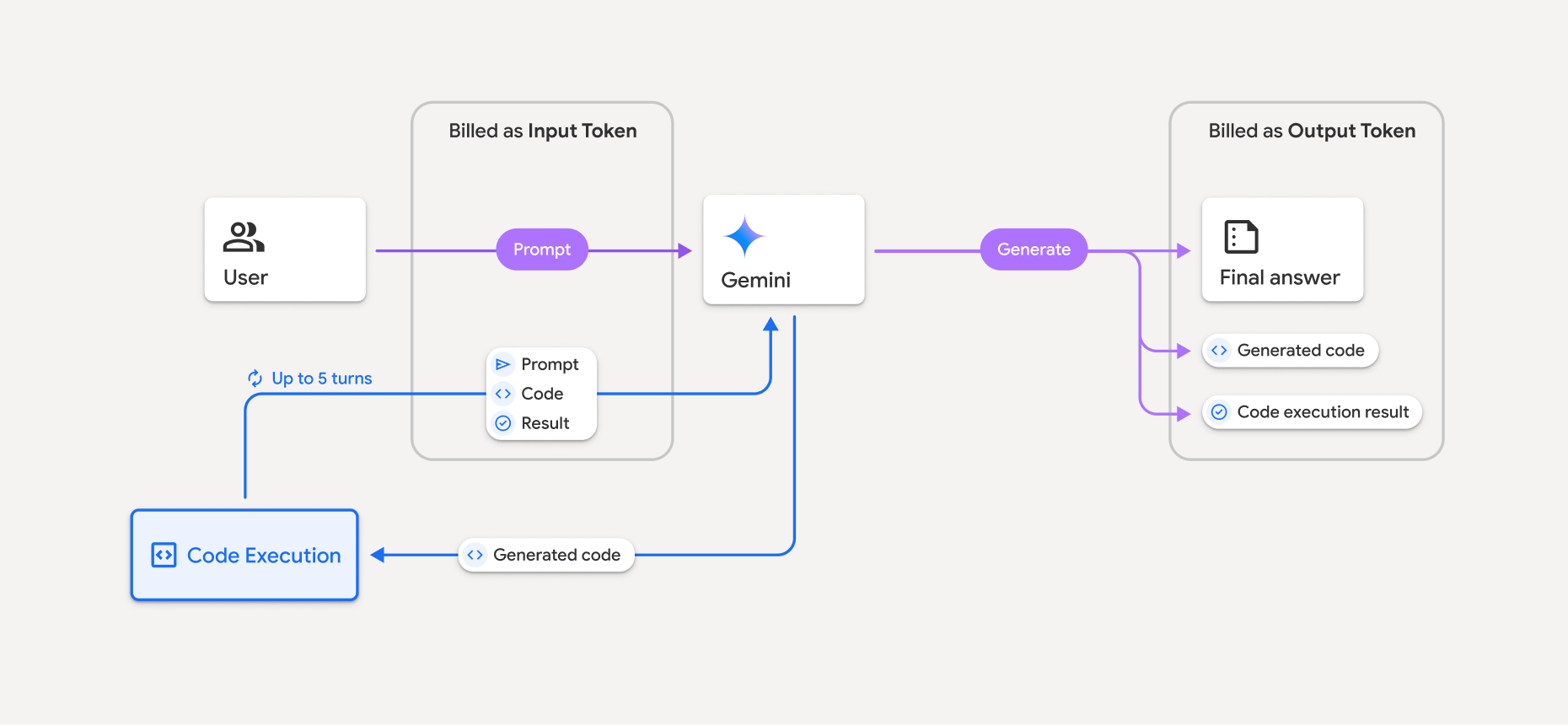
- Kullandığınız Gemini modeline göre giriş ve çıkış jetonlarının mevcut oranı üzerinden faturalandırılırsınız.
- Gemini, yanıtınızı oluştururken kod yürütme özelliğini kullanırsa orijinal istem, oluşturulan kod ve yürütülen kodun sonucu ara jetonları olarak etiketlenir ve giriş jetonları olarak faturalandırılır.
- Ardından Gemini, bir özet oluşturur ve oluşturulan kodu, çalıştırılan kodun sonucunu ve nihai özeti döndürür. Bunlar çıkış jetonları olarak faturalandırılır.
- Gemini API, API yanıtında ara jeton sayısını içerir. Böylece, ilk isteminizin ötesinde neden ek giriş jetonları aldığınızı bilirsiniz.
Sınırlamalar
- Model yalnızca kod oluşturabilir ve yürütebilir. Medya dosyaları gibi diğer öğeler geri döndürülemez.
- Bazı durumlarda, kod yürütmenin etkinleştirilmesi model çıktısının diğer alanlarında (ör. hikaye yazma) gerilemelere yol açabilir.
- Farklı modellerin kod yürütmeyi başarılı bir şekilde kullanma becerisinde bazı farklılıklar vardır.
Desteklenen araç kombinasyonları
Kod yürütme aracı, daha karmaşık kullanım alanlarını desteklemek için Google Arama ile temellendirme ile birleştirilebilir.
Gemini 3 modelleri, yerleşik araçların (ör. kod yürütme) özel araçlarla (işlev çağrısı) birlikte kullanılmasını destekler. Araç kombinasyonunun çalışması için id ve thought_signature alanlarını geri iletmeniz gerekir. Araç kombinasyonları sayfasından daha fazla bilgi edinin.
Desteklenen kitaplıklar
Kod yürütme ortamı aşağıdaki kitaplıkları içerir:
- attrs
- satranç
- contourpy
- fpdf
- geopandas
- imageio
- jinja2
- joblib
- jsonschema
- jsonschema-specifications
- lxml
- matplotlib
- mpmath
- numpy
- opencv-python
- openpyxl
- paketleme
- pandalar
- yastık
- protobuf
- pylatex
- pyparsing
- PyPDF2
- python-dateutil
- python-docx
- python-pptx
- reportlab
- scikit-learn
- scipy
- seaborn
- altı
- striprtf
- sympy
- tablolaştırmak
- tensorflow
- toolz
- xlrd
Kendi kitaplıklarınızı yükleyemezsiniz.
Sırada ne var?
- Kod yürütme Colab'ini deneyin.
- Diğer Gemini API araçları hakkında bilgi edinin: