

התכונה "קריאה להפעלת פונקציות" מאפשרת לחבר מודלים לכלים ולממשקי API חיצוניים. במקום ליצור טקסט דינמי מבוסס-AI, המודל קובע מתי לקרוא לפונקציות ספציפיות ומספק את הפרמטרים הנדרשים כדי לבצע פעולות בעולם האמיתי. כך המודל יכול לשמש כגשר בין שפה טבעית לבין פעולות ונתונים בעולם האמיתי. יש 3 תרחישי שימוש עיקריים לבקשה להפעלת פונקציה:
- ביצוע פעולות: אינטראקציה עם מערכות חיצוניות באמצעות ממשקי API, כמו קביעת פגישות, יצירת חשבוניות, שליחת אימיילים או שליטה במכשירים לבית חכם.
- העשרת הידע: גישה למידע ממקורות חיצוניים כמו מסדי נתונים, ממשקי API ומאגרי ידע.
- הרחבת היכולות: שימוש בכלים חיצוניים כדי לבצע חישובים ולהרחיב את מגבלות המודל, כמו שימוש במחשבון או יצירת תרשימים.
בהמשך מפורטות דוגמאות לתרחישים לדוגמה האלה:
קביעת פגישה
בדוגמה הזו מוסבר איך להגדיר פונקציה שמתזמנת פגישה עם משתתפים בשעה ספציפית, כדי שהמודל יוכל לנתח בקשות של משתמשים ולהחזיר ארגומנטים מובנים להפעלת פעולות במערכות חיצוניות.
Python
from google import genai
from google.genai import types

# Define the function declaration for the model
schedule_meeting_function = {
    "name": "schedule_meeting",
    "description": "Schedules a meeting with specified attendees at a given time and date.",
    "parameters": {
        "type": "object",
        "properties": {
            "attendees": {
                "type": "array",
                "items": {"type": "string"},
                "description": "List of people attending the meeting.",
            },
            "date": {
                "type": "string",
                "description": "Date of the meeting (e.g., '2024-07-29')",
            },
            "time": {
                "type": "string",
                "description": "Time of the meeting (e.g., '15:00')",
            },
            "topic": {
                "type": "string",
                "description": "The subject or topic of the meeting.",
            },
        },
        "required": ["attendees", "date", "time", "topic"],
    },
}

# Configure the client and tools
client = genai.Client()
tools = types.Tool(function_declarations=[schedule_meeting_function])
config = types.GenerateContentConfig(tools=[tools])

# Send request with function declarations
response = client.models.generate_content(
    model="gemini-3.8-flash",
    contents="Schedule a meeting with Bob and Alice for 03/14/2025 at 10:00 AM about the Q3 planning.",
    config=config,
)

# Check for a function call
if response.candidates[0].content.parts[0].function_call:
    function_call = response.candidates[0].content.parts[0].function_call
    print(f"Function to call: {function_call.name}")
    print(f"ID: {function_call.id}")
    print(f"Arguments: {function_call.args}")
    #  In a real app, you would call your function here:
    #  result = schedule_meeting(**function_call.args)
else:
    print("No function call found in the response.")
    print(response.text)
JavaScript
import { GoogleGenAI, Type } from '@google/genai';

// Configure the client
const ai = new GoogleGenAI({});

// Define the function declaration for the model
const scheduleMeetingFunctionDeclaration = {
  name: 'schedule_meeting',
  description: 'Schedules a meeting with specified attendees at a given time and date.',
  parameters: {
    type: Type.OBJECT,
    properties: {
      attendees: {
        type: Type.ARRAY,
        items: { type: Type.STRING },
        description: 'List of people attending the meeting.',
      },
      date: {
        type: Type.STRING,
        description: 'Date of the meeting (e.g., "2024-07-29")',
      },
      time: {
        type: Type.STRING,
        description: 'Time of the meeting (e.g., "15:00")',
      },
      topic: {
        type: Type.STRING,
        description: 'The subject or topic of the meeting.',
      },
    },
    required: ['attendees', 'date', 'time', 'topic'],
  },
};

// Send request with function declarations
const response = await ai.models.generateContent({
  model: 'gemini-3.8-flash',
  contents: 'Schedule a meeting with Bob and Alice for 03/27/2025 at 10:00 AM about the Q3 planning.',
  config: {
    tools: [{
      functionDeclarations: [scheduleMeetingFunctionDeclaration]
    }],
  },
});

// Check for function calls in the response
if (response.functionCalls && response.functionCalls.length > 0) {
  const functionCall = response.functionCalls[0]; // Assuming one function call
  console.log(`Function to call: ${functionCall.name}`);
  console.log(`ID: ${functionCall.id}`);
  console.log(`Arguments: ${JSON.stringify(functionCall.args)}`);
  // In a real app, you would call your actual function here:
  // const result = await scheduleMeeting(functionCall.args);
} else {
  console.log("No function call found in the response.");
  console.log(response.text);
}
Go
package main

import (
    "context"
    "fmt"
    "log"

    "google.golang.org/genai"
)

func main() {
    ctx := context.Background()
    client, err := genai.NewClient(ctx, nil)
    if err != nil {
        log.Fatal(err)
    }

    // Define the function declaration for the model
    scheduleMeetingFunc := &genai.FunctionDeclaration{
        Name:        "schedule_meeting",
        Description: "Schedules a meeting with specified attendees at a given time and date.",
        Parameters: &genai.Schema{
            Type: genai.TypeObject,
            Properties: map[string]*genai.Schema{
                "attendees": {
                    Type:        genai.TypeArray,
                    Items:       &genai.Schema{Type: genai.TypeString},
                    Description: "List of people attending the meeting.",
                },
                "date": {
                    Type:        genai.TypeString,
                    Description: "Date of the meeting (e.g., '2024-07-29')",
                },
                "time": {
                    Type:        genai.TypeString,
                    Description: "Time of the meeting (e.g., '15:00')",
                },
                "topic": {
                    Type:        genai.TypeString,
                    Description: "The subject or topic of the meeting.",
                },
            },
            Required: []string{"attendees", "date", "time", "topic"},
        },
    }

    config := &genai.GenerateContentConfig{
        Tools: []*genai.Tool{
            {FunctionDeclarations: []*genai.FunctionDeclaration{scheduleMeetingFunc}},
        },
    }

    // Send request with function declarations
    response, err := client.Models.GenerateContent(
        ctx,
        "gemini-3.8-flash",
        genai.Text("Schedule a meeting with Bob and Alice for 03/14/2025 at 10:00 AM about the Q3 planning."),
        config,
    )
    if err != nil {
        log.Fatal(err)
    }

    // Check for a function call
    if len(response.FunctionCalls()) > 0 {
        functionCall := response.FunctionCalls()[0]
        fmt.Printf("Function to call: %s\n", functionCall.Name)
        fmt.Printf("ID: %s\n", functionCall.ID)
        fmt.Printf("Arguments: %v\n", functionCall.Args)
        // In a real app, you would call your function here:
        // result := scheduleMeeting(functionCall.Args)
    } else {
        fmt.Println("No function call found in the response.")
        fmt.Println(response.Text())
    }
}
REST
curl "https://generativelanguage.googleapis.com/v1beta/models/gemini-3.8-flash:generateContent" \
  -H "x-goog-api-key: $GEMINI_API_KEY" \
  -H 'Content-Type: application/json' \
  -X POST \
  -d '{
    "contents": [
      {
        "role": "user",
        "parts": [
          {
            "text": "Schedule a meeting with Bob and Alice for 03/27/2025 at 10:00 AM about the Q3 planning."
          }
        ]
      }
    ],
    "tools": [
      {
        "functionDeclarations": [
          {
            "name": "schedule_meeting",
            "description": "Schedules a meeting with specified attendees at a given time and date.",
            "parameters": {
              "type": "object",
              "properties": {
                "attendees": {
                  "type": "array",
                  "items": {"type": "string"},
                  "description": "List of people attending the meeting."
                },
                "date": {
                  "type": "string",
                  "description": "Date of the meeting (e.g., '2024-07-29')"
                },
                "time": {
                  "type": "string",
                  "description": "Time of the meeting (e.g., '15:00')"
                },
                "topic": {
                  "type": "string",
                  "description": "The subject or topic of the meeting."
                }
              },
              "required": ["attendees", "date", "time", "topic"]
            }
          }
        ]
      }
    ]
  }'
קבלת תחזית מזג האוויר
בדוגמה הזו מוסבר איך להגדיר פונקציה שמאחזרת נתוני טמפרטורה של מיקום מסוים, ומאפשרת למודל לקרוא לממשקי API חיצוניים כדי לענות על שאילתות שדורשות מידע בזמן אמת או מידע חיצוני.
Python
from google import genai
from google.genai import types

# Define the function declaration for the model
weather_function = {
    "name": "get_current_temperature",
    "description": "Gets the current temperature for a given location.",
    "parameters": {
        "type": "object",
        "properties": {
            "location": {
                "type": "string",
                "description": "The city name, e.g. San Francisco",
            },
        },
        "required": ["location"],
    },
}

# Configure the client and tools
client = genai.Client()
tools = types.Tool(function_declarations=[weather_function])
config = types.GenerateContentConfig(tools=[tools])

# Send request with function declarations
response = client.models.generate_content(
    model="gemini-3.8-flash",
    contents="What's the temperature in London?",
    config=config,
)

# Check for a function call
if response.candidates[0].content.parts[0].function_call:
    function_call = response.candidates[0].content.parts[0].function_call
    print(f"Function to call: {function_call.name}")
    print(f"ID: {function_call.id}")
    print(f"Arguments: {function_call.args}")
    #  In a real app, you would call your function here:
    #  result = get_current_temperature(**function_call.args)
else:
    print("No function call found in the response.")
    print(response.text)
JavaScript
import { GoogleGenAI, Type } from '@google/genai';

// Configure the client
const ai = new GoogleGenAI({});

// Define the function declaration for the model
const weatherFunctionDeclaration = {
  name: 'get_current_temperature',
  description: 'Gets the current temperature for a given location.',
  parameters: {
    type: Type.OBJECT,
    properties: {
      location: {
        type: Type.STRING,
        description: 'The city name, e.g. San Francisco',
      },
    },
    required: ['location'],
  },
};

// Send request with function declarations
const response = await ai.models.generateContent({
  model: 'gemini-3.8-flash',
  contents: "What's the temperature in London?",
  config: {
    tools: [{
      functionDeclarations: [weatherFunctionDeclaration]
    }],
  },
});

// Check for function calls in the response
if (response.functionCalls && response.functionCalls.length > 0) {
  const functionCall = response.functionCalls[0]; // Assuming one function call
  console.log(`Function to call: ${functionCall.name}`);
  console.log(`ID: ${functionCall.id}`);
  console.log(`Arguments: ${JSON.stringify(functionCall.args)}`);
  // In a real app, you would call your actual function here:
  // const result = await getCurrentTemperature(functionCall.args);
} else {
  console.log("No function call found in the response.");
  console.log(response.text);
}
Go
package main

import (
    "context"
    "fmt"
    "log"

    "google.golang.org/genai"
)

func main() {
    ctx := context.Background()
    client, err := genai.NewClient(ctx, nil)
    if err != nil {
        log.Fatal(err)
    }

    // Define the function declaration for the model
    weatherFunc := &genai.FunctionDeclaration{
        Name:        "get_current_temperature",
        Description: "Gets the current temperature for a given location.",
        Parameters: &genai.Schema{
            Type: genai.TypeObject,
            Properties: map[string]*genai.Schema{
                "location": {
                    Type:        genai.TypeString,
                    Description: "The city name, e.g. San Francisco",
                },
            },
            Required: []string{"location"},
        },
    }

    config := &genai.GenerateContentConfig{
        Tools: []*genai.Tool{
            {FunctionDeclarations: []*genai.FunctionDeclaration{weatherFunc}},
        },
    }

    // Send request with function declarations
    response, err := client.Models.GenerateContent(
        ctx,
        "gemini-3.8-flash",
        genai.Text("What's the temperature in London?"),
        config,
    )
    if err != nil {
        log.Fatal(err)
    }

    // Check for a function call
    if len(response.FunctionCalls()) > 0 {
        functionCall := response.FunctionCalls()[0]
        fmt.Printf("Function to call: %s\n", functionCall.Name)
        fmt.Printf("ID: %s\n", functionCall.ID)
        fmt.Printf("Arguments: %v\n", functionCall.Args)
        // In a real app, you would call your function here:
        // result := getCurrentTemperature(functionCall.Args)
    } else {
        fmt.Println("No function call found in the response.")
        fmt.Println(response.Text())
    }
}
REST
curl "https://generativelanguage.googleapis.com/v1beta/models/gemini-3.8-flash:generateContent" \
  -H "x-goog-api-key: $GEMINI_API_KEY" \
  -H 'Content-Type: application/json' \
  -X POST \
  -d '{
    "contents": [
      {
        "role": "user",
        "parts": [
          {
            "text": "What'\''s the temperature in London?"
          }
        ]
      }
    ],
    "tools": [
      {
        "functionDeclarations": [
          {
            "name": "get_current_temperature",
            "description": "Gets the current temperature for a given location.",
            "parameters": {
              "type": "object",
              "properties": {
                "location": {
                  "type": "string",
                  "description": "The city name, e.g. San Francisco"
                }
              },
              "required": ["location"]
            }
          }
        ]
      }
    ]
  }'
יצירת תרשים
בדוגמה הזו מוסבר איך להגדיר פונקציה שיוצרת תרשים עמודות מנתונים מובְנים, ומודגם איך המודל יכול להשתמש בכלים חיצוניים כדי לבצע חישובים או ליצור נכסים חזותיים:
Python
import os
from google import genai
from google.genai import types

# Define the function declaration for the model
create_chart_function = {
    "name": "create_bar_chart",
    "description": "Creates a bar chart given a title, labels, and corresponding values.",
    "parameters": {
        "type": "object",
        "properties": {
            "title": {
                "type": "string",
                "description": "The title for the chart.",
            },
            "labels": {
                "type": "array",
                "items": {"type": "string"},
                "description": "List of labels for the data points (e.g., ['Q1', 'Q2', 'Q3']).",
            },
            "values": {
                "type": "array",
                "items": {"type": "number"},
                "description": "List of numerical values corresponding to the labels (e.g., [50000, 75000, 60000]).",
            },
        },
        "required": ["title", "labels", "values"],
    },
}

# Configure the client and tools
client = genai.Client()
tools = types.Tool(function_declarations=[create_chart_function])
config = types.GenerateContentConfig(tools=[tools])

# Send request with function declarations
response = client.models.generate_content(
    model="gemini-3.8-flash",
    contents="Create a bar chart titled 'Quarterly Sales' with data: Q1: 50000, Q2: 75000, Q3: 60000.",
    config=config,
)

# Check for a function call
if response.candidates[0].content.parts[0].function_call:
    function_call = response.candidates[0].content.parts[0].function_call
    print(f"Function to call: {function_call.name}")
    print(f"ID: {function_call.id}")
    print(f"Arguments: {function_call.args}")
    #  In a real app, you would call your function here using a charting library:
    #  result = create_bar_chart(**function_call.args)
else:
    print("No function call found in the response.")
    print(response.text)
JavaScript
import { GoogleGenAI, Type } from '@google/genai';

// Configure the client
const ai = new GoogleGenAI({});

// Define the function declaration for the model
const createChartFunctionDeclaration = {
  name: 'create_bar_chart',
  description: 'Creates a bar chart given a title, labels, and corresponding values.',
  parameters: {
    type: Type.OBJECT,
    properties: {
      title: {
        type: Type.STRING,
        description: 'The title for the chart.',
      },
      labels: {
        type: Type.ARRAY,
        items: { type: Type.STRING },
        description: 'List of labels for the data points (e.g., ["Q1", "Q2", "Q3"]).',
      },
      values: {
        type: Type.ARRAY,
        items: { type: Type.NUMBER },
        description: 'List of numerical values corresponding to the labels (e.g., [50000, 75000, 60000]).',
      },
    },
    required: ['title', 'labels', 'values'],
  },
};

// Send request with function declarations
const response = await ai.models.generateContent({
  model: 'gemini-3.8-flash',
  contents: "Create a bar chart titled 'Quarterly Sales' with data: Q1: 50000, Q2: 75000, Q3: 60000.",
  config: {
    tools: [{
      functionDeclarations: [createChartFunctionDeclaration]
    }],
  },
});

// Check for function calls in the response
if (response.functionCalls && response.functionCalls.length > 0) {
  const functionCall = response.functionCalls[0]; // Assuming one function call
  console.log(`Function to call: ${functionCall.name}`);
  console.log(`ID: ${functionCall.id}`);
  console.log(`Arguments: ${JSON.stringify(functionCall.args)}`);
  // In a real app, you would call your actual function here:
  // const result = await createBarChart(functionCall.args);
} else {
  console.log("No function call found in the response.");
  console.log(response.text);
}
Go
package main

import (
    "context"
    "fmt"
    "log"

    "google.golang.org/genai"
)

func main() {
    ctx := context.Background()
    client, err := genai.NewClient(ctx, nil)
    if err != nil {
        log.Fatal(err)
    }

    // Define the function declaration for the model
    createChartFunc := &genai.FunctionDeclaration{
        Name:        "create_bar_chart",
        Description: "Creates a bar chart given a title, labels, and corresponding values.",
        Parameters: &genai.Schema{
            Type: genai.TypeObject,
            Properties: map[string]*genai.Schema{
                "title": {
                    Type:        genai.TypeString,
                    Description: "The title for the chart.",
                },
                "labels": {
                    Type:        genai.TypeArray,
                    Items:       &genai.Schema{Type: genai.TypeString},
                    Description: "List of labels for the data points (e.g., ['Q1', 'Q2', 'Q3']).",
                },
                "values": {
                    Type:        genai.TypeArray,
                    Items:       &genai.Schema{Type: genai.TypeNumber},
                    Description: "List of numerical values corresponding to the labels (e.g., [50000, 75000, 60000]).",
                },
            },
            Required: []string{"title", "labels", "values"},
        },
    }

    config := &genai.GenerateContentConfig{
        Tools: []*genai.Tool{
            {FunctionDeclarations: []*genai.FunctionDeclaration{createChartFunc}},
        },
    }

    // Send request with function declarations
    response, err := client.Models.GenerateContent(
        ctx,
        "gemini-3.8-flash",
        genai.Text("Create a bar chart titled 'Quarterly Sales' with data: Q1: 50000, Q2: 75000, Q3: 60000."),
        config,
    )
    if err != nil {
        log.Fatal(err)
    }

    // Check for a function call
    if len(response.FunctionCalls()) > 0 {
        functionCall := response.FunctionCalls()[0]
        fmt.Printf("Function to call: %s\n", functionCall.Name)
        fmt.Printf("ID: %s\n", functionCall.ID)
        fmt.Printf("Arguments: %v\n", functionCall.Args)
        // In a real app, you would call your function here using a charting library:
        // result := createBarChart(functionCall.Args)
    } else {
        fmt.Println("No function call found in the response.")
        fmt.Println(response.Text())
    }
}
REST
curl "https://generativelanguage.googleapis.com/v1beta/models/gemini-3.8-flash:generateContent" \
  -H "x-goog-api-key: $GEMINI_API_KEY" \
  -H 'Content-Type: application/json' \
  -X POST \
  -d '{
    "contents": [
      {
        "role": "user",
        "parts": [
          {
            "text": "Create a bar chart titled ''Quarterly Sales'' with data: Q1: 50000, Q2: 75000, Q3: 60000."
          }
        ]
      }
    ],
    "tools": [
      {
        "functionDeclarations": [
          {
            "name": "create_bar_chart",
            "description": "Creates a bar chart given a title, labels, and corresponding values.",
            "parameters": {
              "type": "object",
              "properties": {
                "title": {
                  "type": "string",
                  "description": "The title for the chart."
                },
                "labels": {
                  "type": "array",
                  "items": {"type": "string"},
                  "description": "List of labels for the data points (e.g., [''Q1'', ''Q2'', ''Q3''])."
                },
                "values": {
                  "type": "array",
                  "items": {"type": "number"},
                  "description": "List of numerical values corresponding to the labels (e.g., [50000, 75000, 60000])."
                }
              },
              "required": ["title", "labels", "values"]
            }
          }
        ]
      }
    ]
  }'
איך פועלת קריאה להפעלת פונקציות
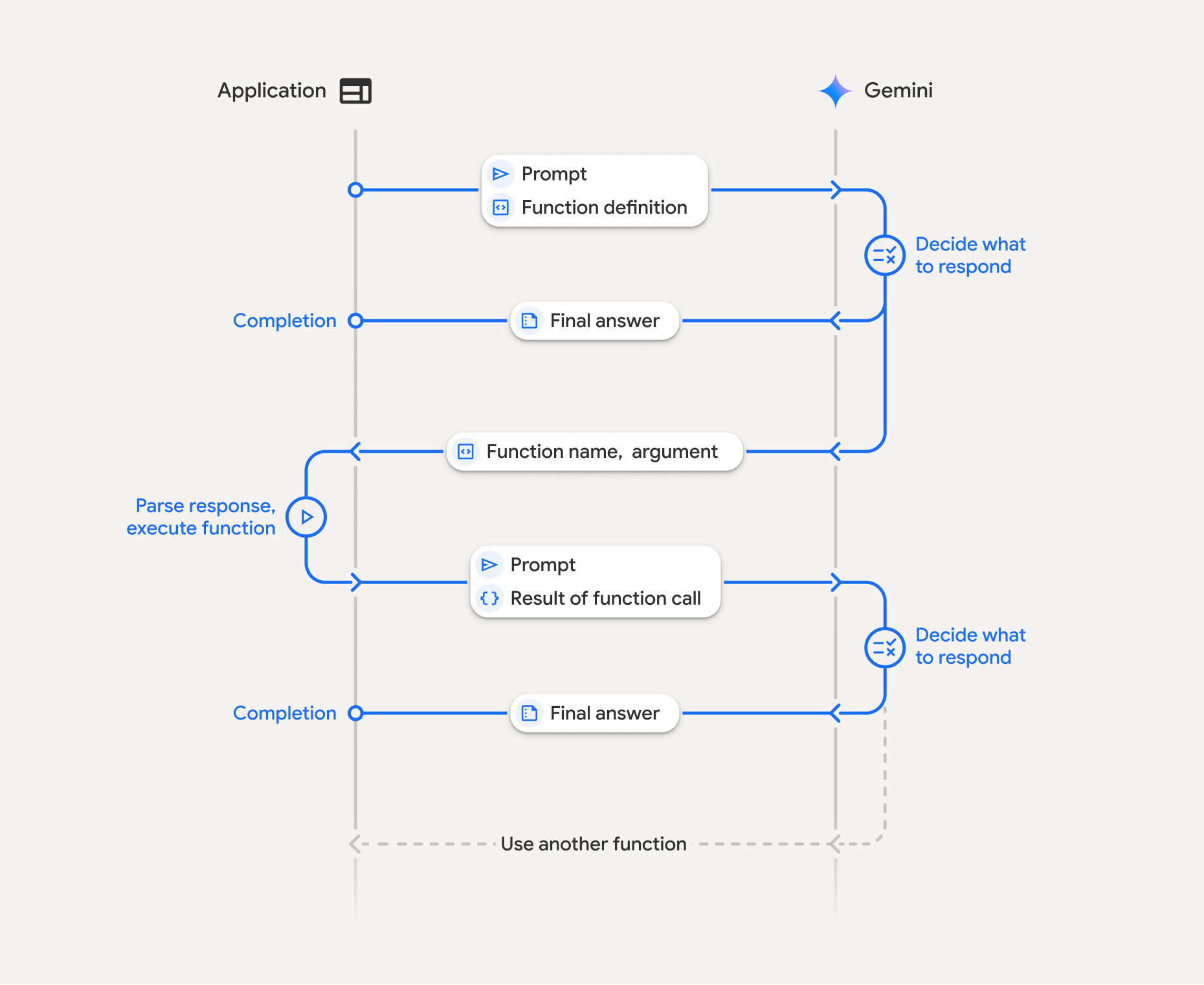
קריאה לפונקציה כוללת אינטראקציה מובנית בין האפליקציה, המודל והפונקציות החיצוניות. פירוט התהליך:
- הגדרת הצהרת פונקציה: מגדירים את הצהרת הפונקציה בקוד האפליקציה. הצהרות על פונקציות מתארות למודל את השם, הפרמטרים והמטרה של הפונקציה.
- קריאה ל-API עם הצהרות על פונקציות: שולחים את ההנחיה למשתמש יחד עם ההצהרות על הפונקציות למודל. הוא מנתח את הבקשה וקובע אם בקשה להפעלת פונקציה תועיל. אם כן, הוא מגיב עם אובייקט JSON מובנה שמכיל את שם הפונקציה, הארגומנטים ומזהה ייחודי
id(המזההidהזה תמיד מוחזר עכשיו על ידי ה-API עבור מודלים של Gemini 3*). - להריץ את קוד הפונקציה (באחריותכם): המודל לא מריץ את הפונקציה בעצמו. האפליקציה שלכם אחראית לעבד את התשובה ולבדוק אם יש בקשה להפעלת פונקציה. אם
- כן: חילוץ השם, הארגומנטים ו-
idשל הפונקציה והפעלת הפונקציה התואמת באפליקציה. - לא: המודל סיפק תשובת טקסט ישירה להנחיה (התהליך הזה פחות מודגש בדוגמה, אבל הוא תוצאה אפשרית).
- כן: חילוץ השם, הארגומנטים ו-
- יצירת תשובה ידידותית למשתמש: אם בוצעה פונקציה, צריך לתעד את התוצאה ולשלוח אותה בחזרה למודל, ולהקפיד לכלול את
idהתואם, בתור הבא של השיחה. הוא ישתמש בתוצאה כדי ליצור תגובה סופית וידידותית למשתמש, שתכלול את המידע מהבקשה להפעלת פונקציה.
אפשר לחזור על התהליך הזה כמה פעמים, וכך ליצור אינטראקציות ותהליכי עבודה מורכבים. המודל תומך גם בקריאה להפעלת כמה פונקציות בתור אחד (קריאה להפעלת פונקציות במקביל), ברצף (קריאה להפעלת פונקציות בהרכבה) ובשימוש בכלים מובנים של Gemini (שימוש בכמה כלים).
* מיפוי תמידי של מזהי פונקציות: Gemini 3 מחזיר עכשיו תמיד id ייחודי עם כל functionCall. צריך לכלול את id המדויק ב-functionResponse כדי שהמודל יוכל למפות במדויק את התוצאה בחזרה לבקשה המקורית.
שלב 1: מגדירים הצהרה על פונקציה
מגדירים פונקציה והצהרה בקוד האפליקציה שמאפשרים למשתמשים להגדיר ערכי תאורה ולשלוח בקשת API. הפונקציה הזו יכולה להפעיל שירותים או ממשקי API חיצוניים.
Python
# Define a function that the model can call to control smart lights
set_light_values_declaration = {
    "name": "set_light_values",
    "description": "Sets the brightness and color temperature of a light.",
    "parameters": {
        "type": "object",
        "properties": {
            "brightness": {
                "type": "integer",
                "description": "Light level from 0 to 100. Zero is off and 100 is full brightness",
            },
            "color_temp": {
                "type": "string",
                "enum": ["daylight", "cool", "warm"],
                "description": "Color temperature of the light fixture, which can be `daylight`, `cool` or `warm`.",
            },
        },
        "required": ["brightness", "color_temp"],
    },
}

# This is the actual function that would be called based on the model's suggestion
def set_light_values(brightness: int, color_temp: str) -> dict[str, int | str]:
    """Set the brightness and color temperature of a room light. (mock API).

    Args:
        brightness: Light level from 0 to 100. Zero is off and 100 is full brightness
        color_temp: Color temperature of the light fixture, which can be `daylight`, `cool` or `warm`.

    Returns:
        A dictionary containing the set brightness and color temperature.
    """
    return {"brightness": brightness, "colorTemperature": color_temp}
JavaScript
import { Type } from '@google/genai';

// Define a function that the model can call to control smart lights
const setLightValuesFunctionDeclaration = {
  name: 'set_light_values',
  description: 'Sets the brightness and color temperature of a light.',
  parameters: {
    type: Type.OBJECT,
    properties: {
      brightness: {
        type: Type.NUMBER,
        description: 'Light level from 0 to 100. Zero is off and 100 is full brightness',
      },
      color_temp: {
        type: Type.STRING,
        enum: ['daylight', 'cool', 'warm'],
        description: 'Color temperature of the light fixture, which can be `daylight`, `cool` or `warm`.',
      },
    },
    required: ['brightness', 'color_temp'],
  },
};

/**

*   Set the brightness and color temperature of a room light. (mock API)
*   @param {number} brightness - Light level from 0 to 100. Zero is off and 100 is full brightness
*   @param {string} color_temp - Color temperature of the light fixture, which can be `daylight`, `cool` or `warm`.
*   @return {Object} A dictionary containing the set brightness and color temperature.
*/
function setLightValues(brightness, color_temp) {
  return {
    brightness: brightness,
    colorTemperature: color_temp
  };
}
Go
package main

import "google.golang.org/genai"

// Define a function declaration that the model can call to control smart lights
var setLightValuesDeclaration = &genai.FunctionDeclaration{
    Name:        "set_light_values",
    Description: "Sets the brightness and color temperature of a light.",
    Parameters: &genai.Schema{
        Type: genai.TypeObject,
        Properties: map[string]*genai.Schema{
            "brightness": {
                Type:        genai.TypeInteger,
                Description: "Light level from 0 to 100. Zero is off and 100 is full brightness",
            },
            "color_temp": {
                Type:        genai.TypeString,
                Enum:        []string{"daylight", "cool", "warm"},
                Description: "Color temperature of the light fixture, which can be `daylight`, `cool` or `warm`.",
            },
        },
        Required: []string{"brightness", "color_temp"},
    },
}

// This is the actual function that would be called based on the model's suggestion
func setLightValues(brightness int, colorTemp string) map[string]any {
    return map[string]any{
        "brightness":       brightness,
        "colorTemperature": colorTemp,
    }
}
שלב 2: קוראים למודל עם הצהרות על פונקציות
אחרי שמגדירים את הצהרות הפונקציות, אפשר להנחות את המודל להשתמש בהן. הוא מנתח את ההנחיה ואת הצהרות הפונקציה ומחליט אם להשיב ישירות או להפעיל פונקציה. אם מתבצעת קריאה לפונקציה, אובייקט התגובה יכיל הצעה לבקשה להפעלת פונקציה.
Python
from google.genai import types

# Configure the client and tools
client = genai.Client()
tools = types.Tool(function_declarations=[set_light_values_declaration])
config = types.GenerateContentConfig(tools=[tools])

# Define user prompt
contents = [
    types.Content(
        role="user", parts=[types.Part(text="Turn the lights down to a romantic level")]
    )
]

# Send request with function declarations
response = client.models.generate_content(
    model="gemini-3.8-flash",
    contents=contents,
    config=config,
)

print(response.candidates[0].content.parts[0].function_call)
JavaScript
import { GoogleGenAI } from '@google/genai';

// Generation config with function declaration
const config = {
  tools: [{
    functionDeclarations: [setLightValuesFunctionDeclaration]
  }]
};

// Configure the client
const ai = new GoogleGenAI({});

// Define user prompt
const contents = [
  {
    role: 'user',
    parts: [{ text: 'Turn the lights down to a romantic level' }]
  }
];

// Send request with function declarations
const response = await ai.models.generateContent({
  model: 'gemini-3.8-flash',
  contents: contents,
  config: config
});

console.log(response.functionCalls[0]);
Go
ctx := context.Background()
client, err := genai.NewClient(ctx, nil)
if err != nil {
    log.Fatal(err)
}

// Generation config with function declaration
config := &genai.GenerateContentConfig{
    Tools: []*genai.Tool{
        {FunctionDeclarations: []*genai.FunctionDeclaration{setLightValuesDeclaration}},
    },
}

// Define user prompt
contents := []*genai.Content{
    genai.NewContentFromText("Turn the lights down to a romantic level", genai.RoleUser),
}

// Send request with function declarations
response, err := client.Models.GenerateContent(ctx, "gemini-3.8-flash", contents, config)
if err != nil {
    log.Fatal(err)
}

fmt.Println(response.FunctionCalls()[0])
לאחר מכן המודל מחזיר אובייקט functionCall בסכימה שתואמת ל-OpenAPI, שמציין איך לקרוא לאחת או יותר מהפונקציות שהוצהרו כדי להשיב על השאלה של המשתמש.
Python
id='8f2b1a3c' args={'color_temp': 'warm', 'brightness': 25} name='set_light_values'
JavaScript
{
  id: '8f2b1a3c',
  name: 'set_light_values',
  args: { brightness: 25, color_temp: 'warm' }
}
Go
&{ID:8f2b1a3c Args:map[brightness:25 color_temp:warm] Name:set_light_values}
שלב 3: מריצים את קוד הפונקציה set_light_values
מחולצים את פרטי בקשת הפעלת הפונקציה מהתשובה של המודל, מנתחים את הארגומנטים ומבצעים את הפונקציה set_light_values.
Python
# Extract tool call details, it may not be in the first part.
tool_call = response.candidates[0].content.parts[0].function_call

if tool_call.name == "set_light_values":
    result = set_light_values(**tool_call.args)
    print(f"Function execution result: {result}")
JavaScript
// Extract tool call details
const tool_call = response.functionCalls[0]

let result;
if (tool_call.name === 'set_light_values') {
  result = setLightValues(tool_call.args.brightness, tool_call.args.color_temp);
  console.log(`Function execution result: ${JSON.stringify(result)}`);
}
Go
// Extract tool call details
toolCall := response.FunctionCalls()[0]

var result map[string]any
if toolCall.Name == "set_light_values" {
    brightness := int(toolCall.Args["brightness"].(float64))
    colorTemp := toolCall.Args["color_temp"].(string)
    result = setLightValues(brightness, colorTemp)
    fmt.Printf("Function execution result: %v\n", result)
}
שלב 4: יוצרים תשובה ידידותית למשתמש עם תוצאת הפונקציה וקוראים למודל שוב
לבסוף, שולחים את תוצאת ההפעלה של הפונקציה בחזרה למודל כדי שהוא יוכל לשלב את המידע הזה בתשובה הסופית למשתמש.
Python
from google import genai
from google.genai import types

# Create a function response part
function_response_part = types.Part.from_function_response(
    name=tool_call.name,
    response={"result": result},
    id=tool_call.id,
)

# Append function call and result of the function execution to contents
contents.append(response.candidates[0].content) # Append the content from the model's response.
contents.append(types.Content(role="user", parts=[function_response_part])) # Append the function response

client = genai.Client()
final_response = client.models.generate_content(
    model="gemini-3.8-flash",
    config=config,
    contents=contents,
)

print(final_response.text)
JavaScript
// Create a function response part
const function_response_part = {
  name: tool_call.name,
  response: { result },
  id: tool_call.id
}

// Append function call and result of the function execution to contents
contents.push(response.candidates[0].content);
contents.push({ role: 'user', parts: [{ functionResponse: function_response_part }] });

// Get the final response from the model
const final_response = await ai.models.generateContent({
  model: 'gemini-3.8-flash',
  contents: contents,
  config: config
});

console.log(final_response.text);
Go
// Create a function response part
functionResponsePart := &genai.Part{
    FunctionResponse: &genai.FunctionResponse{
        ID:       toolCall.ID,
        Name:     toolCall.Name,
        Response: result,
    },
}

// Append function call and result of the function execution to contents
contents = append(contents, response.Candidates[0].Content)
contents = append(contents, &genai.Content{
    Role:  genai.RoleUser,
    Parts: []*genai.Part{functionResponsePart},
})

// Get the final response from the model
finalResponse, err := client.Models.GenerateContent(ctx, "gemini-3.8-flash", contents, config)
if err != nil {
    log.Fatal(err)
}

fmt.Println(finalResponse.Text())
כך מסתיים תהליך קריאה להפעלת פונקציות. המודל השתמש בהצלחה בפונקציה set_light_values כדי לבצע את הפעולה שהמשתמש ביקש.
הצהרות פונקציה
כשמטמיעים קריאה להפעלת פונקציות בפרומפט, יוצרים אובייקט tools שמכיל בקשה להפעלת פונקציה אחת או יותר function declarations. אתם מגדירים פונקציות באמצעות JSON, ובאופן ספציפי באמצעות קבוצת משנה נבחרת של הפורמט OpenAPI schema. הצהרת פונקציה אחת יכולה לכלול את הפרמטרים הבאים:
-
name(מחרוזת): שם ייחודי לפונקציה (get_weather_forecast,send_email). מומלץ להשתמש בשמות תיאוריים ללא רווחים או תווים מיוחדים (אפשר להשתמש בקו תחתון או ב-camelCase). -
description(מחרוזת): הסבר ברור ומפורט על המטרה והיכולות של הפונקציה. השלב הזה חיוני כדי שהמודל יבין מתי להשתמש בפונקציה. צריך להיות ספציפיים ולתת דוגמאות אם זה עוזר ("מוצא בתי קולנוע על סמך המיקום, ואפשר גם על סמך שם הסרט שמוקרן כרגע בבתי הקולנוע"). -
parameters(אובייקט): מגדיר את פרמטרי הקלט שהפונקציה מצפה לקבל.-
type(מחרוזת): מציין את סוג הנתונים הכולל, כמוobject. -
properties(אובייקט): רשימה של פרמטרים נפרדים, שלכל אחד מהם יש:-
type(string): סוג הנתונים של הפרמטר, כמוstring,integer, boolean, array. -
description(מחרוזת): תיאור של מטרת הפרמטר והפורמט שלו. צריך לספק דוגמאות ומגבלות ("העיר והמדינה, למשל 'סן פרנסיסקו, קליפורניה' או מיקוד, למשל '95616'"). -
enum(מערך, אופציונלי): אם ערכי הפרמטרים הם מקבוצה קבועה, משתמשים ב-enum כדי לציין את הערכים המותרים במקום רק לתאר אותם בתיאור. השיטה הזו משפרת את הדיוק ("enum": ["daylight", "cool", "warm"]).
-
-
required(מערך): מערך של מחרוזות שכולל את שמות הפרמטרים שחובה לציין כדי שהפונקציה תפעל.
-
אפשר גם ליצור FunctionDeclarations ישירות מפונקציות של Python באמצעות types.FunctionDeclaration.from_callable(client=client, callable=your_function).
בקשות להפעלת פונקציות במודלים חושבים
המודלים מסדרות Gemini 3 ו-Gemini 2.5 משתמשים בתהליך "חשיבה" פנימי כדי לנתח את הבקשות. השינוי הזה משפר משמעותית את הביצועים של קריאה להפעלת פונקציות, ומאפשר למודל לקבוע בצורה טובה יותר מתי לבצע קריאה להפעלת פונקציה ובאילו פרמטרים להשתמש. Gemini API הוא חסר מצב (stateless), ולכן המודלים משתמשים בחתימות מחשבה כדי לשמור על ההקשר בשיחות עם כמה שלבים.
הקטע הזה עוסק בניהול מתקדם של חתימות מחשבה, והוא רלוונטי רק אם אתם יוצרים בקשות API באופן ידני (למשל, באמצעות REST) או משנים את היסטוריית השיחות.
אם אתם משתמשים ב-Google GenAI SDKs (הספריות הרשמיות שלנו), אתם לא צריכים לנהל את התהליך הזה. ערכות ה-SDK מטפלות אוטומטית בשלבים הנדרשים, כמו שמוצג בדוגמה הקודמת.
ניהול היסטוריית השיחות באופן ידני
אם משנים את היסטוריית השיחות באופן ידני, במקום לשלוח את התשובה הקודמת המלאה, צריך לטפל בצורה נכונה ב-thought_signature שכלול בתור של המודל.
כדי לשמור על ההקשר של המודל, חשוב לפעול לפי הכללים הבאים:
- תמיד שולחים את
thought_signatureבחזרה למודל בתוךPartהמקורי. - תמיד צריך לכלול את הערך המדויק של
idמהשדהfunction_callב-function_response, כדי שה-API יוכל למפות את התוצאה לבקשה הנכונה. - אל תמזגו
Partשמכיל חתימה עם שלא מכיל חתימה. זה פוגע בהקשר של המיקום של המחשבה. - אל תשלבו בין שני קובצי
Partsשמכילים חתימות, כי אי אפשר למזג את מחרוזות החתימות.
חתימות מחשבה ב-Gemini 3
ב-Gemini 3, כל Part של תשובה של מודל יכולה להכיל חתימת מחשבה.
באופן כללי, מומלץ להחזיר חתימות מכל סוגי ה-Part, אבל חובה להעביר חתימות של שלבים בתהליך החשיבה כדי להפעיל קריאה להפעלת פונקציות. אלא אם אתם משנים את היסטוריית השיחות באופן ידני, Google GenAI SDK יטפל בחתימות המחשבה באופן אוטומטי.
אם אתם משנים את היסטוריית השיחות באופן ידני, כדאי לעיין בדף חתימות של מחשבות לקבלת הנחיות מלאות ופרטים על טיפול בחתימות של מחשבות ב-Gemini 3.
בדיקת חתימות של מחשבות
לא חובה להטמיע את זה, אבל אפשר לבדוק את התגובה כדי לראות את ה-thought_signature למטרות ניפוי באגים או למטרות לימודיות.
Python
import base64
# After receiving a response from a model with thinking enabled
# response = client.models.generate_content(...)

# The signature is attached to the response part containing the function call
part = response.candidates[0].content.parts[0]
if part.thought_signature:
  print(base64.b64encode(part.thought_signature).decode("utf-8"))
JavaScript
// After receiving a response from a model with thinking enabled
// const response = await ai.models.generateContent(...)

// The signature is attached to the response part containing the function call
const part = response.candidates[0].content.parts[0];
if (part.thoughtSignature) {
  console.log(part.thoughtSignature);
}
Go
// After receiving a response from a model with thinking enabled
// response, err := client.Models.GenerateContent(...)

// The signature is attached to the response part containing the function call
part := response.Candidates[0].Content.Parts[0]
if len(part.ThoughtSignature) > 0 {
    fmt.Println(string(part.ThoughtSignature))
}
בדף חשיבה מפורט מידע נוסף על המגבלות והשימוש בחתימות חשיבה, ועל מודלים חושבים באופן כללי.
קריאה להפעלת פונקציות במקביל
בנוסף לקריאה להפעלת פונקציות בסבב יחיד, אתם יכולים גם לקרוא לכמה פונקציות בבת אחת. קריאה להפעלת פונקציות במקביל מאפשרת להריץ כמה פונקציות בבת אחת, ומשתמשים בה כשהפונקציות לא תלויות זו בזו. היכולת הזו שימושית בתרחישים כמו איסוף נתונים מכמה מקורות נפרדים, למשל אחזור פרטי לקוחות ממסדי נתונים שונים או בדיקת רמות המלאי במחסנים שונים, או ביצוע כמה פעולות כמו הפיכת הדירה שלכם למועדון.
כשהמודל יוזם כמה בקשות להפעלת פונקציה בסבב אחד, לא צריך להחזיר את האובייקטים של function_result באותו סדר שבו התקבלו האובייקטים של function_call. Gemini API ממפה כל תוצאה בחזרה לקריאה המתאימה באמצעות id מהפלט של המודל. כך אפשר להריץ את הפונקציות באופן אסינכרוני ולהוסיף את התוצאות לרשימה כשהן מסתיימות.
Python
power_disco_ball = {
    "name": "power_disco_ball",
    "description": "Powers the spinning disco ball.",
    "parameters": {
        "type": "object",
        "properties": {
            "power": {
                "type": "boolean",
                "description": "Whether to turn the disco ball on or off.",
            }
        },
        "required": ["power"],
    },
}

start_music = {
    "name": "start_music",
    "description": "Play some music matching the specified parameters.",
    "parameters": {
        "type": "object",
        "properties": {
            "energetic": {
                "type": "boolean",
                "description": "Whether the music is energetic or not.",
            },
            "loud": {
                "type": "boolean",
                "description": "Whether the music is loud or not.",
            },
        },
        "required": ["energetic", "loud"],
    },
}

dim_lights = {
    "name": "dim_lights",
    "description": "Dim the lights.",
    "parameters": {
        "type": "object",
        "properties": {
            "brightness": {
                "type": "number",
                "description": "The brightness of the lights, 0.0 is off, 1.0 is full.",
            }
        },
        "required": ["brightness"],
    },
}
JavaScript
import { Type } from '@google/genai';

const powerDiscoBall = {
  name: 'power_disco_ball',
  description: 'Powers the spinning disco ball.',
  parameters: {
    type: Type.OBJECT,
    properties: {
      power: {
        type: Type.BOOLEAN,
        description: 'Whether to turn the disco ball on or off.'
      }
    },
    required: ['power']
  }
};

const startMusic = {
  name: 'start_music',
  description: 'Play some music matching the specified parameters.',
  parameters: {
    type: Type.OBJECT,
    properties: {
      energetic: {
        type: Type.BOOLEAN,
        description: 'Whether the music is energetic or not.'
      },
      loud: {
        type: Type.BOOLEAN,
        description: 'Whether the music is loud or not.'
      }
    },
    required: ['energetic', 'loud']
  }
};

const dimLights = {
  name: 'dim_lights',
  description: 'Dim the lights.',
  parameters: {
    type: Type.OBJECT,
    properties: {
      brightness: {
        type: Type.NUMBER,
        description: 'The brightness of the lights, 0.0 is off, 1.0 is full.'
      }
    },
    required: ['brightness']
  }
};
Go
package main

import "google.golang.org/genai"

var powerDiscoBall = &genai.FunctionDeclaration{
    Name:        "power_disco_ball",
    Description: "Powers the spinning disco ball.",
    Parameters: &genai.Schema{
        Type: genai.TypeObject,
        Properties: map[string]*genai.Schema{
            "power": {
                Type:        genai.TypeBoolean,
                Description: "Whether to turn the disco ball on or off.",
            },
        },
        Required: []string{"power"},
    },
}

var startMusic = &genai.FunctionDeclaration{
    Name:        "start_music",
    Description: "Play some music matching the specified parameters.",
    Parameters: &genai.Schema{
        Type: genai.TypeObject,
        Properties: map[string]*genai.Schema{
            "energetic": {
                Type:        genai.TypeBoolean,
                Description: "Whether the music is energetic or not.",
            },
            "loud": {
                Type:        genai.TypeBoolean,
                Description: "Whether the music is loud or not.",
            },
        },
        Required: []string{"energetic", "loud"},
    },
}

var dimLights = &genai.FunctionDeclaration{
    Name:        "dim_lights",
    Description: "Dim the lights.",
    Parameters: &genai.Schema{
        Type: genai.TypeObject,
        Properties: map[string]*genai.Schema{
            "brightness": {
                Type:        genai.TypeNumber,
                Description: "The brightness of the lights, 0.0 is off, 1.0 is full.",
            },
        },
        Required: []string{"brightness"},
    },
}
מגדירים את מצב קריאה להפעלת פונקציות כך שיאפשר להשתמש בכל הכלים שצוינו. מידע נוסף זמין במאמר בנושא הגדרת קריאה להפעלת פונקציות.
Python
from google import genai
from google.genai import types

# Configure the client and tools
client = genai.Client()
house_tools = [
    types.Tool(function_declarations=[power_disco_ball, start_music, dim_lights])
]
config = types.GenerateContentConfig(
    tools=house_tools,
    automatic_function_calling=types.AutomaticFunctionCallingConfig(
        disable=True
    ),
    # Force the model to call 'any' function, instead of chatting.
    tool_config=types.ToolConfig(
        function_calling_config=types.FunctionCallingConfig(mode='ANY')
    ),
)

chat = client.chats.create(model="gemini-3.8-flash", config=config)
response = chat.send_message("Turn this place into a party!")

# Print out each of the function calls requested from this single call
print("Example 1: Forced function calling")
for fn in response.function_calls:
    args = ", ".join(f"{key}={val}" for key, val in fn.args.items())
    print(f"{fn.name}({args}) - ID: {fn.id}")
JavaScript
import { GoogleGenAI } from '@google/genai';

// Set up function declarations
const houseFns = [powerDiscoBall, startMusic, dimLights];

const config = {
    tools: [{
        functionDeclarations: houseFns
    }],
    // Force the model to call 'any' function, instead of chatting.
    toolConfig: {
        functionCallingConfig: {
            mode: 'any'
        }
    }
};

// Configure the client
const ai = new GoogleGenAI({});

// Create a chat session
const chat = ai.chats.create({
    model: 'gemini-3.8-flash',
    config: config
});
const response = await chat.sendMessage({message: 'Turn this place into a party!'});

// Print out each of the function calls requested from this single call
console.log("Example 1: Forced function calling");
for (const fn of response.functionCalls) {
    const args = Object.entries(fn.args)
        .map(([key, val]) => `${key}=${val}`)
        .join(', ');
    console.log(`${fn.name}(${args}) - ID: ${fn.id}`);
}
Go
ctx := context.Background()
client, err := genai.NewClient(ctx, nil)
if err != nil {
    log.Fatal(err)
}

houseTools := []*genai.Tool{
    {FunctionDeclarations: []*genai.FunctionDeclaration{powerDiscoBall, startMusic, dimLights}},
}

config := &genai.GenerateContentConfig{
    Tools: houseTools,
    // Force the model to call 'any' function, instead of chatting.
    ToolConfig: &genai.ToolConfig{
        FunctionCallingConfig: &genai.FunctionCallingConfig{
            Mode: genai.FunctionCallingConfigModeAny,
        },
    },
}

response, err := client.Models.GenerateContent(
    ctx,
    "gemini-3.8-flash",
    genai.Text("Turn this place into a party!"),
    config,
)
if err != nil {
    log.Fatal(err)
}

// Print out each of the function calls requested from this single call
fmt.Println("Example 1: Forced function calling")
for _, fn := range response.FunctionCalls() {
    fmt.Printf("%s(%v) - ID: %s\n", fn.Name, fn.Args, fn.ID)
}
כל אחת מהתוצאות המודפסות משקפת בקשה להפעלת פונקציה אחת שהמודל ביקש. כדי לשלוח את התוצאות בחזרה, צריך לכלול את התשובות באותו סדר שבו הן התבקשו.
ערכת ה-Python SDK תומכת בקריאה להפעלת פונקציות אוטומטית, שממירה באופן אוטומטי פונקציות Python להצהרות, ומטפלת במחזור ההרצה והתגובה של בקשה להפעלת פונקציה. הנה דוגמה לתרחיש לדוגמה של דיסקו.
Python
from google import genai
from google.genai import types

# Actual function implementations
def power_disco_ball_impl(power: bool) -> dict:
    """Powers the spinning disco ball.

    Args:
        power: Whether to turn the disco ball on or off.

    Returns:
        A status dictionary indicating the current state.
    """
    return {"status": f"Disco ball powered {'on' if power else 'off'}"}

def start_music_impl(energetic: bool, loud: bool) -> dict:
    """Play some music matching the specified parameters.

    Args:
        energetic: Whether the music is energetic or not.
        loud: Whether the music is loud or not.

    Returns:
        A dictionary containing the music settings.
    """
    music_type = "energetic" if energetic else "chill"
    volume = "loud" if loud else "quiet"
    return {"music_type": music_type, "volume": volume}

def dim_lights_impl(brightness: float) -> dict:
    """Dim the lights.

    Args:
        brightness: The brightness of the lights, 0.0 is off, 1.0 is full.

    Returns:
        A dictionary containing the new brightness setting.
    """
    return {"brightness": brightness}

# Configure the client
client = genai.Client()
config = types.GenerateContentConfig(
    tools=[power_disco_ball_impl, start_music_impl, dim_lights_impl]
)

# Make the request
response = client.models.generate_content(
    model="gemini-3.8-flash",
    contents="Do everything you need to this place into party!",
    config=config,
)

print("\nExample 2: Automatic function calling")
print(response.text)
# I've turned on the disco ball, started playing loud and energetic music, and dimmed the lights to 50% brightness. Let's get this party started!
קריאה להפעלת פונקציות בהרכב
קריאה לפונקציות קומפוזיציוניות או רציפות מאפשרת ל-Gemini לשרשר כמה קריאות לפונקציות כדי למלא בקשה מורכבת. לדוגמה, כדי לענות על השאלה "מה הטמפרטורה במיקום הנוכחי שלי?", Gemini API עשוי להפעיל קודם פונקציית get_current_location() ואחריה פונקציית get_weather() שמקבלת את המיקום כפרמטר.
בדוגמה הבאה מוסבר איך להטמיע קריאה להפעלת פונקציות קומפוזיציונית באמצעות Python SDK וקריאה אוטומטית להפעלת פונקציות.
Python
בדוגמה הזו נעשה שימוש בתכונה של קריאה להפעלת פונקציות אוטומטית של google-genai Python SDK. ה-SDK ממיר באופן אוטומטי את הפונקציות של Python לסכימה הנדרשת, מפעיל את בקשות להפעלת פונקציה כשהמודל מבקש, ושולח את התוצאות בחזרה למודל כדי להשלים את המשימה.
import os
from google import genai
from google.genai import types

# Example Functions
def get_weather_forecast(location: str) -> dict:
    """Gets the current weather temperature for a given location."""
    print(f"Tool Call: get_weather_forecast(location={location})")
    # TODO: Make API call
    print("Tool Response: {'temperature': 25, 'unit': 'celsius'}")
    return {"temperature": 25, "unit": "celsius"}  # Dummy response

def set_thermostat_temperature(temperature: int) -> dict:
    """Sets the thermostat to a desired temperature."""
    print(f"Tool Call: set_thermostat_temperature(temperature={temperature})")
    # TODO: Interact with a thermostat API
    print("Tool Response: {'status': 'success'}")
    return {"status": "success"}

# Configure the client and model
client = genai.Client()
config = types.GenerateContentConfig(
    tools=[get_weather_forecast, set_thermostat_temperature]
)

# Make the request
response = client.models.generate_content(
    model="gemini-3.8-flash",
    contents="If it's warmer than 20°C in London, set the thermostat to 20°C, otherwise set it to 18°C.",
    config=config,
)

# Print the final, user-facing response
print(response.text)
הפלט המצופה
כשמריצים את הקוד, אפשר לראות את ה-SDK מתזמן את הקריאות לפונקציה. המודל קודם קורא לפונקציה get_weather_forecast, מקבל את הטמפרטורה ואז קורא לפונקציה set_thermostat_temperature עם הערך הנכון על סמך הלוגיקה בהנחיה.
Tool Call: get_weather_forecast(location=London)
Tool Response: {'temperature': 25, 'unit': 'celsius'}
Tool Call: set_thermostat_temperature(temperature=20)
Tool Response: {'status': 'success'}
OK. I've set the thermostat to 20°C.
JavaScript
בדוגמה הזו מוסבר איך להשתמש ב-JavaScript/TypeScript SDK כדי לבצע קריאה להפעלת פונקציות משולבת באמצעות לולאת הרצה ידנית.
import { GoogleGenAI, Type } from "@google/genai";

// Configure the client
const ai = new GoogleGenAI({});

// Example Functions
function get_weather_forecast({ location }) {
  console.log(`Tool Call: get_weather_forecast(location=${location})`);
  // TODO: Make API call
  console.log("Tool Response: {'temperature': 25, 'unit': 'celsius'}");
  return { temperature: 25, unit: "celsius" };
}

function set_thermostat_temperature({ temperature }) {
  console.log(
    `Tool Call: set_thermostat_temperature(temperature=${temperature})`,
  );
  // TODO: Make API call
  console.log("Tool Response: {'status': 'success'}");
  return { status: "success" };
}

const toolFunctions = {
  get_weather_forecast,
  set_thermostat_temperature,
};

const tools = [
  {
    functionDeclarations: [
      {
        name: "get_weather_forecast",
        description:
          "Gets the current weather temperature for a given location.",
        parameters: {
          type: Type.OBJECT,
          properties: {
            location: {
              type: Type.STRING,
            },
          },
          required: ["location"],
        },
      },
      {
        name: "set_thermostat_temperature",
        description: "Sets the thermostat to a desired temperature.",
        parameters: {
          type: Type.OBJECT,
          properties: {
            temperature: {
              type: Type.NUMBER,
            },
          },
          required: ["temperature"],
        },
      },
    ],
  },
];

// Prompt for the model
let contents = [
  {
    role: "user",
    parts: [
      {
        text: "If it's warmer than 20°C in London, set the thermostat to 20°C, otherwise set it to 18°C.",
      },
    ],
  },
];

// Loop until the model has no more function calls to make
while (true) {
  const result = await ai.models.generateContent({
    model: "gemini-3.8-flash",
    contents,
    config: { tools },
  });

  if (result.functionCalls && result.functionCalls.length > 0) {
    const functionCall = result.functionCalls[0];

    const { name, args } = functionCall;

    if (!toolFunctions[name]) {
      throw new Error(`Unknown function call: ${name}`);
    }

    // Call the function and get the response.
    const toolResponse = toolFunctions[name](args);

    const functionResponsePart = {
      name: functionCall.name,
      response: {
        result: toolResponse,
      },
      id: functionCall.id,
    };

    // Send the function response back to the model.
    contents.push({
      role: "model",
      parts: [
        {
          functionCall: functionCall,
        },
      ],
    });
    contents.push({
      role: "user",
      parts: [
        {
          functionResponse: functionResponsePart,
        },
      ],
    });
  } else {
    // No more function calls, break the loop.
    console.log(result.text);
    break;
  }
}
הפלט המצופה
כשתריצו את הקוד, תראו את ה-SDK מתזמר את הקריאות לפונקציות. המודל קורא קודם לפונקציה get_weather_forecast, מקבל את הטמפרטורה ואז קורא לפונקציה set_thermostat_temperature עם הערך הנכון על סמך הלוגיקה בהנחיה.
Tool Call: get_weather_forecast(location=London)
Tool Response: {'temperature': 25, 'unit': 'celsius'}
Tool Call: set_thermostat_temperature(temperature=20)
Tool Response: {'status': 'success'}
OK. It's 25°C in London, so I've set the thermostat to 20°C.
Go
בדוגמה הזו מוצג איך להשתמש ב-Go SDK כדי לבצע קריאות לפונקציות מורכבות באמצעות לולאת ביצוע ידנית.
package main

import (
    "context"
    "fmt"
    "log"

    "google.golang.org/genai"
)

func getWeatherForecast(location string) map[string]any {
    fmt.Printf("Tool Call: get_weather_forecast(location=%s)\n", location)
    fmt.Println("Tool Response: map[temperature:25 unit:celsius]")
    return map[string]any{"temperature": 25, "unit": "celsius"}
}

func setThermostatTemperature(temperature float64) map[string]any {
    fmt.Printf("Tool Call: set_thermostat_temperature(temperature=%v)\n", temperature)
    fmt.Println("Tool Response: map[status:success]")
    return map[string]any{"status": "success"}
}

func main() {
    ctx := context.Background()
    client, err := genai.NewClient(ctx, nil)
    if err != nil {
        log.Fatal(err)
    }

    tools := []*genai.Tool{
        {
            FunctionDeclarations: []*genai.FunctionDeclaration{
                {
                    Name:        "get_weather_forecast",
                    Description: "Gets the current weather temperature for a given location.",
                    Parameters: &genai.Schema{
                        Type: genai.TypeObject,
                        Properties: map[string]*genai.Schema{
                            "location": {Type: genai.TypeString},
                        },
                        Required: []string{"location"},
                    },
                },
                {
                    Name:        "set_thermostat_temperature",
                    Description: "Sets the thermostat to a desired temperature.",
                    Parameters: &genai.Schema{
                        Type: genai.TypeObject,
                        Properties: map[string]*genai.Schema{
                            "temperature": {Type: genai.TypeNumber},
                        },
                        Required: []string{"temperature"},
                    },
                },
            },
        },
    }

    config := &genai.GenerateContentConfig{Tools: tools}

    contents := []*genai.Content{
        genai.NewContentFromText("If it's warmer than 20°C in London, set the thermostat to 20°C, otherwise set it to 18°C.", genai.RoleUser),
    }

    for {
        result, err := client.Models.GenerateContent(ctx, "gemini-3.8-flash", contents, config)
        if err != nil {
            log.Fatal(err)
        }

        if len(result.FunctionCalls()) > 0 {
            functionCall := result.FunctionCalls()[0]
            var toolResponse map[string]any

            switch functionCall.Name {
            case "get_weather_forecast":
                location := functionCall.Args["location"].(string)
                toolResponse = getWeatherForecast(location)
            case "set_thermostat_temperature":
                temperature := functionCall.Args["temperature"].(float64)
                toolResponse = setThermostatTemperature(temperature)
            default:
                log.Fatalf("Unknown function call: %s", functionCall.Name)
            }

            contents = append(contents, result.Candidates[0].Content)
            contents = append(contents, &genai.Content{
                Role: genai.RoleUser,
                Parts: []*genai.Part{
                    {
                        FunctionResponse: &genai.FunctionResponse{
                            ID:       functionCall.ID,
                            Name:     functionCall.Name,
                            Response: toolResponse,
                        },
                    },
                },
            })
        } else {
            fmt.Println(result.Text())
            break
        }
    }
}
הפלט המצופה
Tool Call: get_weather_forecast(location=London)
Tool Response: map[temperature:25 unit:celsius]
Tool Call: set_thermostat_temperature(temperature=20)
Tool Response: map[status:success]
OK. It's 25°C in London, so I've set the thermostat to 20°C.
קריאה להפעלת פונקציות מורכבות היא תכונה מקורית של Live API. כלומר, Live API יכול לטפל בקריאה להפעלת פונקציות באופן דומה ל-Python SDK.
Python
# Light control schemas
turn_on_the_lights_schema = {'name': 'turn_on_the_lights'}
turn_off_the_lights_schema = {'name': 'turn_off_the_lights'}

prompt = """
  Hey, can you write run some python code to turn on the lights, wait 10s and then turn off the lights?
  """

tools = [
    {'code_execution': {}},
    {'function_declarations': [turn_on_the_lights_schema, turn_off_the_lights_schema]}
]

await run(prompt, tools=tools, modality="AUDIO")
JavaScript
// Light control schemas
const turnOnTheLightsSchema = { name: 'turn_on_the_lights' };
const turnOffTheLightsSchema = { name: 'turn_off_the_lights' };

const prompt = `
  Hey, can you write run some python code to turn on the lights, wait 10s and then turn off the lights?
`;

const tools = [
  { codeExecution: {} },
  { functionDeclarations: [turnOnTheLightsSchema, turnOffTheLightsSchema] }
];

await run(prompt, tools=tools, modality="AUDIO")
מצבי קריאה להפעלת פונקציות
Gemini API מאפשר לכם לקבוע איך המודל ישתמש בכלים שסיפקתם (הצהרות על פונקציות). באופן ספציפי, אפשר להגדיר את המצב בתוך function_calling_config.
-
VALIDATED: מצב ברירת המחדל לשילוב כלים (כשהכלים המובנים או הפלט המובנה מופעלים). המודל מוגבל לחיזוי של בקשות להפעלת פונקציות או של שפה טבעית, והוא מוודא שהסכימה של הפונקציה תואמת. אם לא מציינים אתallowed_function_names, המודל בוחר מכל הצהרות הפונקציות הזמינות. אם מציינים אתallowed_function_names, המודל בוחר מתוך קבוצת הפונקציות המותרות. המצב הזה מצמצם את מספר הקריאות הפונקציונליות הפגומות (בהשוואה למצבAUTO). -
AUTO: מצב ברירת המחדל כשמופעל רק הכלי function_declarations. המודל מחליט אם ליצור תשובה בשפה טבעית או להציע בקשה להפעלת פונקציה על סמך ההנחיה וההקשר. -
ANY: המודל מוגבל כך שתמיד יחזה בקשה להפעלת פונקציה, ויבטיח עמידה בסכימת הפונקציה. אם לא מציינים אתallowed_function_names, המודל יכול לבחור מכל הצהרות הפונקציות שסופקו. אםallowed_function_namesמסופק כרשימה, המודל יכול לבחור רק מתוך הפונקציות שברשימה הזו. השתמשו במצב הזה כשאתם רוצים לקבל תשובה עם קריאה לפונקציה לכל הנחיה (אם רלוונטי).
NONE: המודל אסור מביצוע בקשות להפעלת פונקציות. זה שווה ערך לשליחת בקשה בלי הצהרות על פונקציות. אפשר להשתמש בזה כדי להשבית זמנית את הקריאה להפעלת פונקציות בלי להסיר את הגדרות הכלים.
Python
from google.genai import types

# Configure function calling mode
tool_config = types.ToolConfig(
    function_calling_config=types.FunctionCallingConfig(
        mode="ANY", allowed_function_names=["get_current_temperature"]
    )
)

# Create the generation config
config = types.GenerateContentConfig(
    tools=[tools],  # not defined here.
    tool_config=tool_config,
)
JavaScript
import { FunctionCallingConfigMode } from '@google/genai';

// Configure function calling mode
const toolConfig = {
  functionCallingConfig: {
    mode: FunctionCallingConfigMode.ANY,
    allowedFunctionNames: ['get_current_temperature']
  }
};

// Create the generation config
const config = {
  tools: tools, // not defined here.
  toolConfig: toolConfig,
};
Go
// Configure function calling mode
toolConfig := &genai.ToolConfig{
    FunctionCallingConfig: &genai.FunctionCallingConfig{
        Mode:                 genai.FunctionCallingConfigModeAny,
        AllowedFunctionNames: []string{"get_current_temperature"},
    },
}

// Create the generation config
config := &genai.GenerateContentConfig{
    Tools:      tools, // not defined here.
    ToolConfig: toolConfig,
}
קריאה אוטומטית לפונקציות (Python בלבד)
כשמשתמשים ב-Python SDK, אפשר לספק פונקציות של Python ישירות ככלים. ה-SDK ממיר את הפונקציות האלה להצהרות, מנהל את ההרצה של בקשה להפעלת פונקציה ומטפל במחזור התגובה בשבילכם. מגדירים את הפונקציה עם רמזים לסוגים ומחרוזת תיעוד. כדי לקבל תוצאות אופטימליות, מומלץ להשתמש במחרוזות תיעוד בסגנון Google. לאחר מכן, ה-SDK יבצע באופן אוטומטי את הפעולות הבאות:
- זיהוי תשובות לבקשות להפעלת פונקציות מהמודל.
- מפעילים את פונקציית Python המתאימה בקוד.
- שולחים את התשובה של הפונקציה בחזרה למודל.
- החזרת התשובה הסופית של המודל בצורת טקסט.
בשלב הזה, ה-SDK לא מנתח תיאורי ארגומנטים לתוך משבצות תיאור המאפיינים של הצהרת הפונקציה שנוצרה. במקום זאת, הוא שולח את כל ה-docstring בתור התיאור של הפונקציה ברמה העליונה.
Python
from google import genai
from google.genai import types

# Define the function with type hints and docstring
def get_current_temperature(location: str) -> dict:
    """Gets the current temperature for a given location.

    Args:
        location: The city and state, e.g. San Francisco, CA

    Returns:
        A dictionary containing the temperature and unit.
    """
    # ... (implementation) ...
    return {"temperature": 25, "unit": "Celsius"}

# Configure the client
client = genai.Client()
config = types.GenerateContentConfig(
    tools=[get_current_temperature]
)  # Pass the function itself

# Make the request
response = client.models.generate_content(
    model="gemini-3.8-flash",
    contents="What's the temperature in Boston?",
    config=config,
)

print(response.text)  # The SDK handles the function call and returns the final text
כדי להשבית את קריאה להפעלת פונקציות אוטומטית, משתמשים בקוד הבא:
Python
config = types.GenerateContentConfig(
    tools=[get_current_temperature],
    automatic_function_calling=types.AutomaticFunctionCallingConfig(disable=True)
)
הצהרה אוטומטית על סכימת פונקציה
ה-API יכול לתאר כל אחד מהסוגים הבאים. Pydantic מותרים, כל עוד השדות שמוגדרים בהם מורכבים גם הם מסוגים מותרים. אין תמיכה טובה בסוגי מילונים (כמו dict[str: int]), לכן לא מומלץ להשתמש בהם.
Python
AllowedType = (
  int | float | bool | str | list['AllowedType'] | pydantic.BaseModel)
כדי לראות איך נראית הסכימה שהוסקה, אפשר להמיר אותה באמצעות from_callable:
Python
from google import genai
from google.genai import types

def multiply(a: float, b: float):
    """Returns a * b."""
    return a * b

client = genai.Client()
fn_decl = types.FunctionDeclaration.from_callable(callable=multiply, client=client)

# to_json_dict() provides a clean JSON representation.
print(fn_decl.to_json_dict())
שימוש בכמה כלים: שילוב של כלים מובנים עם בקשות להפעלת פונקציות
אתם יכולים להפעיל כמה כלים, ולשלב כלים מובנים עם קריאה להפעלת פונקציות באותה בקשה.
בזכות התכונה "העברת הקשר בין כלים", מודלים של Gemini 3 יכולים לשלב כלים מובנים עם קריאה להפעלת פונקציות בלי צורך בהגדרות מיוחדות. מידע נוסף זמין בדף שילוב כלים מובנים וקריאה להפעלת פונקציות.
Python
from google import genai
from google.genai import types

client = genai.Client()

getWeather = {
    "name": "getWeather",
    "description": "Gets the weather for a requested city.",
    "parameters": {
        "type": "object",
        "properties": {
            "city": {
                "type": "string",
                "description": "The city and state, e.g. Utqiaġvik, Alaska",
            },
        },
        "required": ["city"],
    },
}

response = client.models.generate_content(
    model="gemini-3.8-flash",
    contents="What is the northernmost city in the United States? What's the weather like there today?",
    config=types.GenerateContentConfig(
      tools=[
        types.Tool(
          google_search=types.ToolGoogleSearch(),  # Built-in tool
          function_declarations=[getWeather]       # Custom tool
        ),
      ],
      include_server_side_tool_invocations=True
    ),
)

history = [
    types.Content(
        role="user",
        parts=[types.Part(text="What is the northernmost city in the United States? What's the weather like there today?")]
    ),
    response.candidates[0].content,
    types.Content(
        role="user",
        parts=[types.Part(
            function_response=types.FunctionResponse(
                name="getWeather",
                response={"response": "Very cold. 22 degrees Fahrenheit."},
                id=response.candidates[0].content.parts[2].function_call.id
            )
        )]
    )
]

response_2 = client.models.generate_content(
    model="gemini-3.8-flash",
    contents=history,
    config=types.GenerateContentConfig(
      tools=[
        types.Tool(
          google_search=types.ToolGoogleSearch(),
          function_declarations=[getWeather]
        ),
      ],
      include_server_side_tool_invocations=True
    ),
)
JavaScript
import { GoogleGenAI} from '@google/genai';

const client = new GoogleGenAI({});

const getWeather = {
    name: "getWeather",
    description: "Get the weather in a given location",
    parameters: {
        type: "OBJECT",
        properties: {
            location: {
                type: "STRING",
                description: "The city and state, e.g. San Francisco, CA"
            }
        },
        required: ["location"]
    }
};

async function run() {
    const tools = [
      { googleSearch: {} },
      { functionDeclarations: [getWeather] }
    ];
    const toolConfig = { includeServerSideToolInvocations: true };

    const response1 = await client.models.generateContent({
        model: "gemini-3.8-flash",
        contents: [{role: "user", parts: [{text: "What is the northernmost city in the United States? What's the weather like there today?"}]}],
        config: {
            tools: tools,
            toolConfig: toolConfig,
        },
    });

    const functionCallId = response1.candidates[0].content.parts.find(p => p.functionCall)?.functionCall?.id;

    const history = [
        {
            role: "user",
            parts:[{text: "What is the northernmost city in the United States? What's the weather like there today?"}]
        },
        response1.candidates[0].content,
        {
            role: "user",
            parts: [{
                functionResponse: {
                    name: "getWeather",
                    response: {response: "Very cold. 22 degrees Fahrenheit."},
                    id: functionCallId
                }
            }]
        }
    ];

    const response2 = await client.models.generateContent({
        model: "gemini-3.8-flash",
        contents: history,
        config: {
            tools: tools,
            toolConfig: toolConfig,
        },
    });
}

run();
Go
package main

import (
    "context"
    "fmt"
    "log"

    "google.golang.org/genai"
)

func main() {
    ctx := context.Background()
    client, err := genai.NewClient(ctx, nil)
    if err != nil {
        log.Fatal(err)
    }

    getWeather := &genai.FunctionDeclaration{
        Name:        "getWeather",
        Description: "Get the weather in a given location",
        Parameters: &genai.Schema{
            Type: genai.TypeObject,
            Properties: map[string]*genai.Schema{
                "location": {
                    Type:        genai.TypeString,
                    Description: "The city and state, e.g. San Francisco, CA",
                },
            },
            Required: []string{"location"},
        },
    }

    tools := []*genai.Tool{
        {GoogleSearch: &genai.GoogleSearch{}},
        {FunctionDeclarations: []*genai.FunctionDeclaration{getWeather}},
    }

    config := &genai.GenerateContentConfig{
        Tools: tools,
    }

    prompt := "What is the northernmost city in the United States? What's the weather like there today?"
    response1, err := client.Models.GenerateContent(ctx, "gemini-3.8-flash", genai.Text(prompt), config)
    if err != nil {
        log.Fatal(err)
    }

    toolCall := response1.FunctionCalls()[0]

    history := []*genai.Content{
        genai.NewContentFromText(prompt, genai.RoleUser),
        response1.Candidates[0].Content,
        {
            Role: genai.RoleUser,
            Parts: []*genai.Part{
                {
                    FunctionResponse: &genai.FunctionResponse{
                        ID:       toolCall.ID,
                        Name:     toolCall.Name,
                        Response: map[string]any{"response": "Very cold. 22 degrees Fahrenheit."},
                    },
                },
            },
        },
    }

    response2, err := client.Models.GenerateContent(ctx, "gemini-3.8-flash", history, config)
    if err != nil {
        log.Fatal(err)
    }

    fmt.Println(response2.Text())
}
במודלים שקדמו לסדרת Gemini 3, צריך להשתמש ב-Live API.
תשובות מולטי-מודאליות של פונקציות
במודלים מסדרת Gemini 3, אתם יכולים לכלול תוכן מולטימודלי בחלקים של התגובה מהפונקציה שאתם שולחים למודל. המודל יכול לעבד את התוכן המולטי-מודאלי הזה בסבב הבא כדי ליצור תשובה מושכלת יותר. אלה סוגי ה-MIME שנתמכים בתוכן מולטימודלי בתגובות לפונקציות:
- תמונות:
image/png,image/jpeg,image/webp - מסמכים:
application/pdf, text/plain
כדי לכלול נתונים ממספר סוגים בתגובה של פונקציה, צריך לכלול אותם כחלק אחד או יותר שמוטמע בתוך החלק functionResponse. כל חלק מולטימודלי חייב להכיל inlineData. אם אתם מפנים לחלק מולטימודלי מתוך השדה המובנה response, הוא חייב להכיל displayName ייחודי.
אפשר גם להפנות לחלק מולטימודאלי מתוך השדה המובנה response של החלק functionResponse באמצעות פורמט ההפניה ב-JSON {"$ref": "<displayName>"}. המודל מחליף את ההפניה בתוכן מולטימודאלי כשהוא מעבד את התשובה. אפשר להפנות לכל displayName רק פעם אחת בשדה המובנה response.
בדוגמה הבאה מוצגת הודעה שמכילה functionResponse לפונקציה בשם get_image וחלק בתצוגת עץ שמכיל נתוני תמונה עם displayName: "instrument.jpg". השדה response של functionResponse מפנה לחלק הזה בתמונה:
Python
from google import genai
from google.genai import types

import requests

client = genai.Client()

# This is a manual, two turn multimodal function calling workflow:

# 1. Define the function tool
get_image_declaration = types.FunctionDeclaration(
  name="get_image",
  description="Retrieves the image file reference for a specific order item.",
  parameters={
      "type": "object",
      "properties": {
          "item_name": {
              "type": "string",
              "description": "The name or description of the item ordered (e.g., 'instrument')."
          }
      },
      "required": ["item_name"],
  },
)
tool_config = types.Tool(function_declarations=[get_image_declaration])

# 2. Send a message that triggers the tool
prompt = "Show me the instrument I ordered last month."
response_1 = client.models.generate_content(
  model="gemini-3.8-flash",
  contents=[prompt],
  config=types.GenerateContentConfig(
      tools=[tool_config],
  )
)

# 3. Handle the function call
function_call = response_1.function_calls[0]
requested_item = function_call.args["item_name"]
print(f"Model wants to call: {function_call.name}")

# Execute your tool (e.g., call an API)
# (This is a mock response for the example)
print(f"Calling external tool for: {requested_item}")

function_response_data = {
  "image_ref": {"$ref": "instrument.jpg"},
}
image_path = "https://goo.gle/instrument-img"
image_bytes = requests.get(image_path).content
function_response_multimodal_data = types.FunctionResponsePart(
  inline_data=types.FunctionResponseBlob(
    mime_type="image/jpeg",
    display_name="instrument.jpg",
    data=image_bytes,
  )
)

# 4. Send the tool's result back
# Append this turn's messages to history for a final response.
history = [
  types.Content(role="user", parts=[types.Part(text=prompt)]),
  response_1.candidates[0].content,
  types.Content(
    role="user",
    parts=[
        types.Part.from_function_response(
          id=function_call.id,
          name=function_call.name,
          response=function_response_data,
          parts=[function_response_multimodal_data]
        )
    ],
  )
]

response_2 = client.models.generate_content(
  model="gemini-3.8-flash",
  contents=history,
  config=types.GenerateContentConfig(
      tools=[tool_config],
      thinking_config=types.ThinkingConfig(include_thoughts=True)
  ),
)

print(f"\nFinal model response: {response_2.text}")
JavaScript
import { GoogleGenAI, Type } from '@google/genai';

const client = new GoogleGenAI({ apiKey: process.env.GEMINI_API_KEY });

// This is a manual, two turn multimodal function calling workflow:
// 1. Define the function tool
const getImageDeclaration = {
  name: 'get_image',
  description: 'Retrieves the image file reference for a specific order item.',
  parameters: {
    type: Type.OBJECT,
    properties: {
      item_name: {
        type: Type.STRING,
        description: "The name or description of the item ordered (e.g., 'instrument').",
      },
    },
    required: ['item_name'],
  },
};

const toolConfig = {
  functionDeclarations: [getImageDeclaration],
};

// 2. Send a message that triggers the tool
const prompt = 'Show me the instrument I ordered last month.';
const response1 = await client.models.generateContent({
  model: 'gemini-3.8-flash',
  contents: prompt,
  config: {
    tools: [toolConfig],
  },
});

// 3. Handle the function call
const functionCall = response1.functionCalls[0];
const requestedItem = functionCall.args.item_name;
console.log(`Model wants to call: ${functionCall.name}`);

// Execute your tool (e.g., call an API)
// (This is a mock response for the example)
console.log(`Calling external tool for: ${requestedItem}`);

const functionResponseData = {
  image_ref: { $ref: 'instrument.jpg' },
};

const imageUrl = "https://goo.gle/instrument-img";
const response = await fetch(imageUrl);
const imageArrayBuffer = await response.arrayBuffer();
const base64ImageData = Buffer.from(imageArrayBuffer).toString('base64');

const functionResponseMultimodalData = {
  inlineData: {
    mimeType: 'image/jpeg',
    displayName: 'instrument.jpg',
    data: base64ImageData,
  },
};

// 4. Send the tool's result back
// Append this turn's messages to history for a final response.
const history = [
  { role: 'user', parts: [{ text: prompt }] },
  response1.candidates[0].content,
  {
    role: 'user',
    parts: [
      {
        functionResponse: {
          id: functionCall.id,
          name: functionCall.name,
          response: functionResponseData,
          parts: [functionResponseMultimodalData]
        },
      },
    ],
  },
];

const response2 = await client.models.generateContent({
  model: 'gemini-3.8-flash',
  contents: history,
  config: {
    tools: [toolConfig],
    thinkingConfig: { includeThoughts: true },
  },
});

console.log(`\nFinal model response: ${response2.text}`);
Go
package main

import (
    "context"
    "fmt"
    "io"
    "log"
    "net/http"

    "google.golang.org/genai"
)

func main() {
    ctx := context.Background()
    client, err := genai.NewClient(ctx, nil)
    if err != nil {
        log.Fatal(err)
    }

    // 1. Define the function tool
    getImageDeclaration := &genai.FunctionDeclaration{
        Name:        "get_image",
        Description: "Retrieves the image file reference for a specific order item.",
        Parameters: &genai.Schema{
            Type: genai.TypeObject,
            Properties: map[string]*genai.Schema{
                "item_name": {
                    Type:        genai.TypeString,
                    Description: "The name or description of the item ordered (e.g., 'instrument').",
                },
            },
            Required: []string{"item_name"},
        },
    }

    tools := []*genai.Tool{
        {FunctionDeclarations: []*genai.FunctionDeclaration{getImageDeclaration}},
    }

    // 2. Send a message that triggers the tool
    prompt := "Show me the instrument I ordered last month."
    response1, err := client.Models.GenerateContent(ctx, "gemini-3.8-flash", genai.Text(prompt), &genai.GenerateContentConfig{
        Tools: tools,
    })
    if err != nil {
        log.Fatal(err)
    }

    // 3. Handle the function call
    functionCall := response1.FunctionCalls()[0]
    requestedItem := functionCall.Args["item_name"]
    fmt.Printf("Model wants to call: %s\n", functionCall.Name)
    fmt.Printf("Calling external tool for: %v\n", requestedItem)

    resp, err := http.Get("https://goo.gle/instrument-img")
    if err != nil {
        log.Fatal(err)
    }
    defer resp.Body.Close()
    imageBytes, err := io.ReadAll(resp.Body)
    if err != nil {
        log.Fatal(err)
    }

    functionResponseData := map[string]any{
        "image_ref": map[string]any{"$ref": "instrument.jpg"},
    }

    functionResponseMultimodalData := &genai.FunctionResponsePart{
        InlineData: &genai.FunctionResponseBlob{
            MIMEType:    "image/jpeg",
            DisplayName: "instrument.jpg",
            Data:        imageBytes,
        },
    }

    // 4. Send the tool's result back
    history := []*genai.Content{
        genai.NewContentFromText(prompt, genai.RoleUser),
        response1.Candidates[0].Content,
        {
            Role: genai.RoleUser,
            Parts: []*genai.Part{
                {
                    FunctionResponse: &genai.FunctionResponse{
                        ID:       functionCall.ID,
                        Name:     functionCall.Name,
                        Response: functionResponseData,
                        Parts:    []*genai.FunctionResponsePart{functionResponseMultimodalData},
                    },
                },
            },
        },
    }

    response2, err := client.Models.GenerateContent(ctx, "gemini-3.8-flash", history, &genai.GenerateContentConfig{
        Tools: tools,
        ThinkingConfig: &genai.ThinkingConfig{
            IncludeThoughts: true,
        },
    })
    if err != nil {
        log.Fatal(err)
    }

    fmt.Printf("\nFinal model response: %s\n", response2.Text())
}
REST
IMG_URL="https://goo.gle/instrument-img"

MIME_TYPE=$(curl -sIL "$IMG_URL" | grep -i '^content-type:' | awk -F ': ' '{print $2}' | sed 's/\r$//' | head -n 1)
if [[ -z "$MIME_TYPE" || ! "$MIME_TYPE" == image/* ]]; then
  MIME_TYPE="image/jpeg"
fi

# Check for macOS
if [[ "$(uname)" == "Darwin" ]]; then
  IMAGE_B64=$(curl -sL "$IMG_URL" | base64 -b 0)
elif [[ "$(base64 --version 2>&1)" = *"FreeBSD"* ]]; then
  IMAGE_B64=$(curl -sL "$IMG_URL" | base64)
else
  IMAGE_B64=$(curl -sL "$IMG_URL" | base64 -w0)
fi

curl "https://generativelanguage.googleapis.com/v1beta/models/gemini-3.8-flash:generateContent" \
  -H "x-goog-api-key: $GEMINI_API_KEY" \
  -H 'Content-Type: application/json' \
  -X POST \
  -d '{
    "contents": [
      ...,
      {
        "role": "user",
        "parts": [
        {
            "functionResponse": {
              "name": "get_image",
              "id": "UNIQUE_CALL_ID_HERE",
              "response": {
                "image_ref": {
                  "$ref": "instrument.jpg"
                }
              },
              "parts": [
                {
                  "inlineData": {
                    "displayName": "instrument.jpg",
                    "mimeType":"'"$MIME_TYPE"'",
                    "data": "'"$IMAGE_B64"'"
                  }
                }
              ]
            }
          }
        ]
      }
    ]
  }'
בקשה להפעלת פונקציה עם פלט מובנה
במודלים מסדרת Gemini 3, אתם יכולים להשתמש בקריאה להפעלת פונקציות עם פלט מובנה. כך המודל יכול לחזות בקשות להפעלת פונקציות או פלט שתואמים לסכימה ספציפית. כתוצאה מכך, אתם מקבלים תשובות בפורמט עקבי כשהמודל לא יוצר בקשות להפעלת פונקציות.
Model Context Protocol (MCP)
Model Context Protocol (MCP) הוא תקן פתוח לחיבור אפליקציות AI לכלים ולנתונים חיצוניים. MCP מספק פרוטוקול משותף למודלים כדי לגשת להקשר, כמו פונקציות (כלים), מקורות נתונים (משאבים) או הנחיות מוגדרות מראש.
ערכות ה-Gemini SDK כוללות תמיכה מובנית ב-MCP, מה שמפחית את הקוד שחוזר על עצמו (boilerplate) ומאפשר קריאה אוטומטית לפונקציות של כלי MCP. כשהמודל יוצר קריאה לכלי MCP, ערכת ה-SDK של לקוח Python ו-JavaScript יכולה להפעיל את כלי ה-MCP באופן אוטומטי ולשלוח את התגובה בחזרה למודל בבקשה הבאה. התהליך הזה חוזר על עצמו עד שהמודל לא יוצר יותר קריאות לכלי.
כאן תוכלו למצוא דוגמה לשימוש בשרת MCP מקומי עם Gemini ו-mcp SDK.
Python
מוודאים שבפלטפורמה שבחרתם מותקנת הגרסה העדכנית של mcp SDK.
pip install mcp
import os
import asyncio
from datetime import datetime
from mcp import ClientSession, StdioServerParameters
from mcp.client.stdio import stdio_client
from google import genai

client = genai.Client()

# Create server parameters for stdio connection
server_params = StdioServerParameters(
    command="npx",  # Executable
    args=["-y", "@philschmid/weather-mcp"],  # MCP Server
    env=None,  # Optional environment variables
)

async def run():
    async with stdio_client(server_params) as (read, write):
        async with ClientSession(read, write) as session:
            # Prompt to get the weather for the current day in London.
            prompt = f"What is the weather in London in {datetime.now().strftime('%Y-%m-%d')}?"

            # Initialize the connection between client and server
            await session.initialize()

            # Send request to the model with MCP function declarations
            response = await client.aio.models.generate_content(
                model="gemini-3.8-flash",
                contents=prompt,
                config=genai.types.GenerateContentConfig(
                    temperature=0,
                    tools=[session],  # uses the session, will automatically call the tool
                    # Uncomment if you **don't** want the SDK to automatically call the tool
                    # automatic_function_calling=genai.types.AutomaticFunctionCallingConfig(
                    #     disable=True
                    # ),
                ),
            )
            print(response.text)

# Start the asyncio event loop and run the main function
asyncio.run(run())
JavaScript
מוודאים שמותקנת בפלטפורמה שבחרתם הגרסה העדכנית של mcp SDK.
npm install @modelcontextprotocol/sdk
import { GoogleGenAI, FunctionCallingConfigMode , mcpToTool} from '@google/genai';
import { Client } from "@modelcontextprotocol/sdk/client/index.js";
import { StdioClientTransport } from "@modelcontextprotocol/sdk/client/stdio.js";

// Create server parameters for stdio connection
const serverParams = new StdioClientTransport({
  command: "npx", // Executable
  args: ["-y", "@philschmid/weather-mcp"] // MCP Server
});

const client = new Client(
  {
    name: "example-client",
    version: "1.0.0"
  }
);

// Configure the client
const ai = new GoogleGenAI({});

// Initialize the connection between client and server
await client.connect(serverParams);

// Send request to the model with MCP tools
const response = await ai.models.generateContent({
  model: "gemini-3.8-flash",
  contents: `What is the weather in London in ${new Date().toLocaleDateString()}?`,
  config: {
    tools: [mcpToTool(client)],  // uses the session, will automatically call the tool
    // Uncomment if you **don't** want the sdk to automatically call the tool
    // automaticFunctionCalling: {
    //   disable: true,
    // },
  },
});
console.log(response.text)

// Close the connection
await client.close();
מגבלות של התמיכה המובנית ב-MCP
התמיכה המובנית ב-MCP היא תכונה ניסיונית בערכות ה-SDK שלנו, ויש לה את המגבלות הבאות:
- יש תמיכה רק בכלים, לא במשאבים ולא בפרומפטים
- היא זמינה ל-Python ול-JavaScript/TypeScript SDK.
- יכול להיות שיהיו שינויי תוכנה שעלולים לגרום לכשל בגרסאות עתידיות.
אם המגבלות האלה מפריעות לכם, אתם תמיד יכולים לשלב שרתי MCP באופן ידני.
מודלים נתמכים
בקטע הזה מפורטים המודלים והיכולות שלהם להפעלת פונקציות. הם לא כוללים מודלים ניסיוניים. סקירה מקיפה של היכולות זמינה בדף סקירת המודל.
| מודל | בקשה להפעלת פונקציה | קריאה להפעלת פונקציות במקביל | קריאה להפעלת פונקציות משולבות |
|---|---|---|---|
| Gemini 4 Argon | ✔️ | ✔️ | ✔️ |
| Gemini 3.8 Flash | ✔️ | ✔️ | ✔️ |
| Gemini 3.6 Flash | ✔️ | ✔️ | ✔️ |
| Gemini 3.5 Flash-Lite | ✔️ | ✔️ | ✔️ |
| גרסת טרום-השקה של Gemini 3.1 Pro | ✔️ | ✔️ | ✔️ |
| Gemini 3.1 Flash-Lite | ✔️ | ✔️ | ✔️ |
| Gemini 2.5 Pro | ✔️ | ✔️ | ✔️ |
| Gemini 2.5 Flash | ✔️ | ✔️ | ✔️ |
| Gemini 2.5 Flash-Lite | ✔️ | ✔️ | ✔️ |
שיטות מומלצות
- תיאורים של פונקציות ופרמטרים: התיאורים צריכים להיות ברורים וספציפיים מאוד. המודל מסתמך על התיאורים האלה כדי לבחור את הפונקציה הנכונה ולספק ארגומנטים מתאימים.
- שמות: השתמשו בשמות פונקציות תיאוריים (ללא רווחים, נקודות או מקפים).
- הקלדה חזקה: כדי לצמצם את מספר השגיאות, כדאי להשתמש בסוגים ספציפיים (מספר שלם, מחרוזת, enum) לפרמטרים. אם לפרמטר יש קבוצה מוגבלת של ערכים תקינים, צריך להשתמש ב-enum.
- בחירת כלי: המודל יכול להשתמש במספר כלים שרירותי, אבל אם מספקים לו יותר מדי כלים, גדל הסיכון שהוא יבחר כלי לא נכון או לא אופטימלי. כדי להשיג את התוצאות הכי טובות, מומלץ לספק רק את הכלים הרלוונטיים להקשר או למשימה, ובאופן אידיאלי להגביל את הסט הפעיל ל-10 עד 20 כלים לכל היותר. אם יש לכם מספר גדול של כלים, כדאי לשקול בחירת כלים דינמית על סמך ההקשר של השיחה.
- Prompt Engineering:
- לספק הקשר: להגדיר למודל את התפקיד שלו (לדוגמה, "אתה עוזר אישי מועיל בנושא מזג אוויר").
- תנו הוראות: ציינו איך ומתי להשתמש בפונקציות (לדוגמה, "אל תנחש תאריכים, תמיד תשתמש בתאריך עתידי לתחזיות").
- לעודד הבהרות: להנחות את המודל לשאול שאלות הבהרה לפי הצורך.
- במאמר Agentic workflows מפורטות אסטרטגיות נוספות לעיצוב ההנחיות האלה. הנה דוגמה להוראה למערכת שנבדקה.
Temperature: כדי לקבל בקשות להפעלת פונקציות שהן יותר דטרמיניסטיות ואמינות, השתמשו בערך נמוך (למשל, 0).
אימות: אם ל<b>בקשה להפעלת פונקציה</b> יש השלכות משמעותיות (למשל, ביצוע הזמנה), צריך לאמת את הקריאה עם המשתמש לפני שמבצעים אותה.
בודקים את סיבת הסיום: תמיד בודקים את
finishReasonבתשובה של המודל כדי לטפל במקרים שבהם המודל לא הצליח ליצור בקשה להפעלת פונקציה תקינה.טיפול בשגיאות: מטמיעים טיפול יעיל בשגיאות בפונקציות כדי לטפל בצורה חלקה בקלט לא צפוי או בכשלים ב-API. להחזיר הודעות שגיאה אינפורמטיביות שהמודל יכול להשתמש בהן כדי ליצור תשובות מועילות למשתמש.
אבטחה: חשוב לשים לב לאבטחה כשמפעילים ממשקי API חיצוניים. להשתמש במנגנוני אימות והרשאה מתאימים. הימנעו מחשיפת נתונים רגישים בבקשות להפעלת פונקציות.
מגבלות על אסימונים: תיאורי פונקציות ופרמטרים נספרים במגבלת האסימונים של הקלט. אם אתם מגיעים למגבלות הטוקנים, נסו להגביל את מספר הפונקציות או את אורך התיאורים, או לפצל משימות מורכבות לקבוצות קטנות וממוקדות יותר של פונקציות.
שילוב של Bash וכלים בהתאמה אישית אם אתם משתמשים בשילוב של Bash וכלים בהתאמה אישית, גרסת טרום ההשקה של Gemini 3.1 Pro כוללת נקודת קצה נפרדת שזמינה דרך ה-API ונקראת
gemini-3.1-pro-preview-customtools.
פתרונות עקיפים לדרישות הטקסט שלפני הכלי
בעיה: אם ההנחיה שלכם דורשת מהמודל ליצור פלט של טקסט מובנה (XML, YAML, JSON וכו') (לדוגמה, <UPDATE>...</UPDATE>) מיד לפני ביצוע קריאה לכלי, יכול להיות שהקריאה לכלי תיכשל מדי פעם עם Malformed_Function_Call.
פתרונות: הפתרונות הבאים יעזרו לכם לפתור את הבעיה:
- מומלץ: להורות למודל להכניס את ההערות שלפני השימוש בכלי לקריאה ייעודית לפונקציה
update()במקום לטקסט גולמי (פרטים בהמשך). - מנחים את המודל לכתוב הערות ככותרות Markdown (
# UPDATE,## PLAN) במקום טקסט מובנה. - אל תדרשו מהמודל להפיק טקסט לפני קריאות לכלים.
פתרון עדיף: עוטפים את ההערות לעבודה בקריאה ייעודית לפונקציה
במקום ההוראה המקורית:
Before calling a tool, in every response you MUST first output a single `<UPDATE>` part as specified, don't skip this part or any of required sub-tags within `<UPDATE>`.
משתמשים בהוראה המעודכנת הזו:
Before calling any other tool, in every response you MUST first call `update` with all required parameters (previous_step, plan, next_step, external).
ולעדכן את כל ההפניות לפורמט ה-XML הישן של <UPDATE> בבקשת הלקוח. לאחר מכן, מוסיפים את הצהרת הפונקציה המתאימה לפונקציית העדכון:
{
  "name": "update",
  "description": "Update working notes (previous step analysis, plan, next step, external note).",
  "parameters": {
    "type": "OBJECT",
    "properties": {
      "previous_step": {
        "type": "STRING",
        "description": "Key findings and outcomes since the previous step."
      },
      "plan": {
        "type": "STRING",
        "description": "The current status of the plan."
      },
      "next_step": {
        "type": "STRING",
        "description": "Brief explanation of the immediate next action according to the plan."
      },
      "external": {
        "type": "STRING",
        "description": "A short, plain-language note shown to the User about what you are ABOUT TO DO next."
      }
    },
    "required": [
      "previous_step",
      "plan",
      "next_step",
      "external"
    ]
  }
}
לאחר מכן המודל יבצע שתי קריאות באותו שלב: הקריאה ל-update() שמחליפה את ה-XML המובנה, והקריאה בפועל לפונקציה שהוא רוצה לבצע.
הערות ומגבלות
- מיקום החלקים של בקשה להפעלת פונקציה: כשמשתמשים בהצהרות על פונקציות בהתאמה אישית לצד כלים מובנים (כמו חיפוש Google), המודל עשוי להחזיר שילוב של החלקים
functionCall,toolCallו-toolResponseבפנייה אחת. לכן, אל תניחו שfunctionCallתמיד יהיה הפריט האחרון במערך החלקים. אם אתם מנתחים באופן ידני את תגובת ה-JSON, תמיד צריך לעבור על מערך החלקים במקום להסתמך על המיקום. - יש תמיכה רק בקבוצת משנה של הסכימה של OpenAPI.
- במצב
ANY, ה-API עשוי לדחות סכימות גדולות מאוד או סכימות עם קינון עמוק. אם נתקלתם בשגיאות, נסו לפשט את סכמות הפרמטרים והתגובות של הפונקציה על ידי קיצור שמות המאפיינים, צמצום ההתאמה או הגבלת מספר הצהרות הפונקציה. - סוגי הפרמטרים הנתמכים ב-Python מוגבלים.
- התכונה 'הפעלת פונקציות אוטומטית' זמינה רק ב-Python SDK.