

Gemini Robotics ER 模型可以规划任务并进行空间推理,推断出要采取哪些行动以及要移动哪些对象才能完成目标。本页 展示了一个示例,该示例通过自定义机器人 API 来驱动拾放 操作,以编排将物品 放入碗中的任务。
如需查看完整的可运行代码,请参阅 机器人技术 Cookbook。
使用自定义机器人 API
此示例演示了如何使用自定义机器人 API 进行任务编排。它引入了一个专为拾放操作设计的模拟 API。任务是拿起一个蓝色方块,然后将其放入橙色碗中:
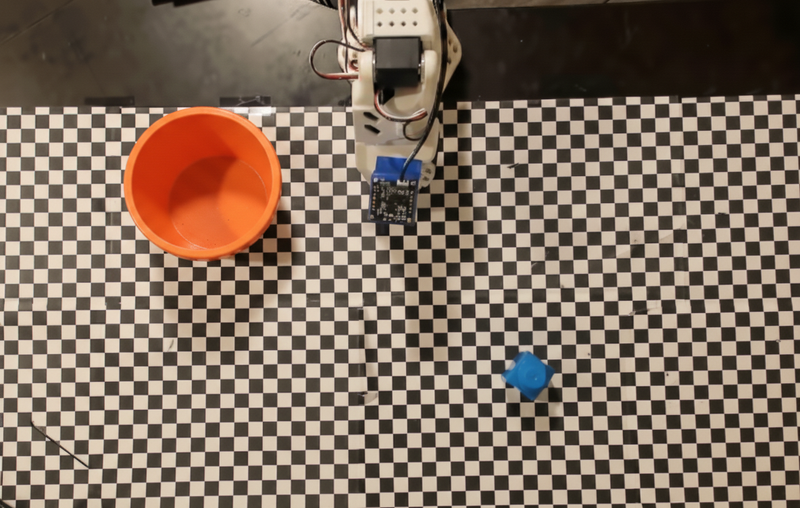
此示例使用以下模拟机器人 API 和工具定义:
Python
from google import genai
from google.genai import types

client = genai.Client()

def move(x, y, high):
    print(f"Mock Robot: Moving to coordinates: {x}, {y}, {'high above table' if high else 'down at table level'}")

def setGripperState(opened):
    print(f"Mock Robot: {'Opening gripper' if opened else 'Closing gripper'}")

robot_origin_y = 300
robot_origin_x = 500

move_declaration = types.FunctionDeclaration(
    name="move",
    description="Moves the arm to the given coordinates.",
    parameters=types.Schema(
        type=types.Type.OBJECT,
        properties={
            "x": types.Schema(type=types.Type.INTEGER, description="X coordinate relative to the origin"),
            "y": types.Schema(type=types.Type.INTEGER, description="Y coordinate relative to the origin"),
            "high": types.Schema(type=types.Type.BOOLEAN, description="Set to True to lift the robot arm above the scene. Set to False to place the gripper on the surface."),
        },
        required=["x", "y", "high"],
    ),
)

set_gripper_state_declaration = types.FunctionDeclaration(
    name="setGripperState",
    description="Opens or closes the robot's gripper.",
    parameters=types.Schema(
        type=types.Type.OBJECT,
        properties={
            "opened": types.Schema(type=types.Type.BOOLEAN, description="True opens the gripper, False closes the gripper."),
        },
        required=["opened"],
    ),
)

robot_tools = types.Tool(function_declarations=[move_declaration, set_gripper_state_declaration])
以下示例使用工具定义将提示和图片发送给模型。然后,它会运行代理循环:在每次模型响应后,它都会执行任何请求的函数调用(move、setGripperState),将结果返回给模型,并重复此过程,直到模型停止调用函数或达到步数限制为止。
Python
with open("robot-api-example.png", "rb") as f:
    img_bytes = f.read()

prompt = (
    "You are a robotic arm with six degrees-of-freedom. "
    f"The origin point for calculating the moves is at normalized point y={robot_origin_y}, x={robot_origin_x}. "
    "Use this as the new (0,0) for calculating moves, allowing x and y to be negative.\n\n"
    "Find the blue block and the orange bowl. Calculate their coordinates relative to the origin.\n"
    "Perform a pick and place operation where you pick up the blue block and place it into the orange bowl. "
    "Call the appropriate sequence of functions to complete this operation."
)

contents = [
    types.Content(role="user", parts=[
        types.Part.from_bytes(data=img_bytes, mime_type="image/png"),
        types.Part(text=prompt),
    ])
]

print("\n--- Executing Orchestrated Plan ---")

max_steps = 15  # Safety limit to prevent infinite loops
step_count = 0

# The Agentic Loop
while step_count < max_steps:
    step_count += 1

    response = client.models.generate_content(
        model="gemini-robotics-er-2-preview",
        contents=contents,
        config=types.GenerateContentConfig(
            tools=[robot_tools],
            thinking_config=types.ThinkingConfig(thinking_level="low"),
        ),
    )

    # Add model response to conversation history
    contents.append(response.candidates[0].content)

    # Check for function calls
    function_calls = [part for part in response.candidates[0].content.parts if part.function_call]

    if not function_calls:
        # Model is done calling functions
        print("Sequence complete.")
        print(f"Model Summary: {response.text}")
        break

    # Execute function calls and collect results
    function_response_parts = []
    for part in function_calls:
        fc = part.function_call
        if fc.name == "move":
            move(**fc.args)
        elif fc.name == "setGripperState":
            setGripperState(**fc.args)

        function_response_parts.append(
            types.Part.from_function_response(
                name=fc.name,
                response={"status": "success"},
            )
        )

    # Send function results back to model
    contents.append(types.Content(role="user", parts=function_response_parts))
以下内容展示了模型基于提示和模拟机器人 API 的可能输出。输出包括模型按顺序排列的机器人函数调用的输出。
--- Executing Orchestrated Plan ---
Mock Robot: Opening gripper
Mock Robot: Moving to coordinates: 160, 440, high above table
Mock Robot: Moving to coordinates: 160, 440, down at table level
Mock Robot: Closing gripper
Mock Robot: Moving to coordinates: 160, 440, high above table
Mock Robot: Moving to coordinates: -250, 60, high above table
Mock Robot: Moving to coordinates: -250, 60, down at table level
Mock Robot: Opening gripper
Mock Robot: Moving to coordinates: -250, 60, high above table
Sequence complete.
Model Summary: I have completed the task of picking up the blue block and placing it into the orange bowl.
后续步骤
- 使用流式传输的机器人技术 - 使用函数调用进行实时流式传输(仅限 Gemini Robotics ER 2)。
- 视频理解 - 通过视频跟踪任务进度(仅限 ER 2)。
- 空间推理 - 指向、跟踪和边界框示例。