

Tính năng Bám sát nguồn bằng Google Tìm kiếm kết nối mô hình Gemini với nội dung trên web theo thời gian thực và hỗ trợ tất cả các ngôn ngữ hiện có. Nhờ đó, Gemini có thể đưa ra câu trả lời chính xác hơn và trích dẫn các nguồn có thể xác minh ngoài điểm cắt kiến thức.
Tính năng này giúp bạn xây dựng các ứng dụng có thể:
- Tăng độ chính xác của thông tin thực tế: Giảm tình trạng ảo tưởng của mô hình bằng cách đưa ra câu trả lời dựa trên thông tin thực tế.
- Truy cập thông tin theo thời gian thực: Trả lời câu hỏi về các sự kiện và chủ đề gần đây.
Cung cấp trích dẫn: Tạo dựng lòng tin của người dùng bằng cách cho thấy nguồn của các tuyên bố mà mô hình đưa ra.
Python
from google import genai

client = genai.Client()

interaction = client.interactions.create(
    model="gemini-3.8-flash",
    input="Who won the euro 2024?",
    tools=[{"type": "google_search"}]
)

print(interaction.output_text)
JavaScript
import { GoogleGenAI } from "@google/genai";

const client = new GoogleGenAI({});

const interaction = await client.interactions.create({
    model: "gemini-3.8-flash",
    input: "Who won the euro 2024?",
    tools: [{ type: "google_search" }]
});

console.log(interaction.output_text);
Java
import com.google.genai.Client;
import com.google.genai.gaos.models.interactions.CreateModelInteraction;
import com.google.genai.gaos.models.interactions.GoogleSearch;
import com.google.genai.gaos.models.interactions.Interaction;
import com.google.genai.gaos.models.interactions.InteractionsInput;
import com.google.genai.gaos.models.interactions.Model;
import com.google.genai.gaos.models.operations.CreateInteractionRequestBody;
import java.util.Arrays;

Client client = new Client();

CreateModelInteraction params =
    CreateModelInteraction.builder()
        .model(Model.of("gemini-3.8-flash"))
        .input(InteractionsInput.of("Who won the euro 2024?"))
        .tools(Arrays.asList(GoogleSearch.builder().build()))
        .build();

Interaction interaction =
    client.interactions.create(CreateInteractionRequestBody.of(params)).interaction().get();

System.out.println(interaction.outputText().orElse(""));
Go
package main

import (
    "context"
    "fmt"
    "log"

    "google.golang.org/genai"
    "google.golang.org/genai/interactions/models/interactions"
    "google.golang.org/genai/interactions/models/operations"
)

func main() {
    ctx := context.Background()
    client, err := genai.NewClient(ctx, nil)
    if err != nil {
        log.Fatal(err)
    }

    resp, err := client.Interactions.Create(ctx, operations.CreateInteractionRequest{
        Body: operations.NewCreateInteractionRequestBody(
            interactions.CreateModelInteraction{
                Model: interactions.Model("gemini-3.8-flash"),
                Input: interactions.NewInteractionsInput("Who won the euro 2024?"),
                Tools: []interactions.Tool{
                    interactions.NewTool(interactions.GoogleSearch{}),
                },
            },
        ),
    })
    if err != nil {
        log.Fatal(err)
    }

    fmt.Println(resp.Interaction.GetOutputText())
}
REST
curl -X POST "https://generativelanguage.googleapis.com/v1beta/interactions" \
  -H "x-goog-api-key: $GEMINI_API_KEY" \
  -H "Content-Type: application/json" \
  -d '{
    "model": "gemini-3.8-flash",
    "input": "Who won the euro 2024?",
    "tools": [{"type": "google_search"}]
  }'
Cách hoạt động của tính năng dựa vào Google Tìm kiếm để xác minh thông tin
Khi bạn bật công cụ google_search, mô hình sẽ tự động xử lý toàn bộ quy trình tìm kiếm, xử lý và trích dẫn thông tin.
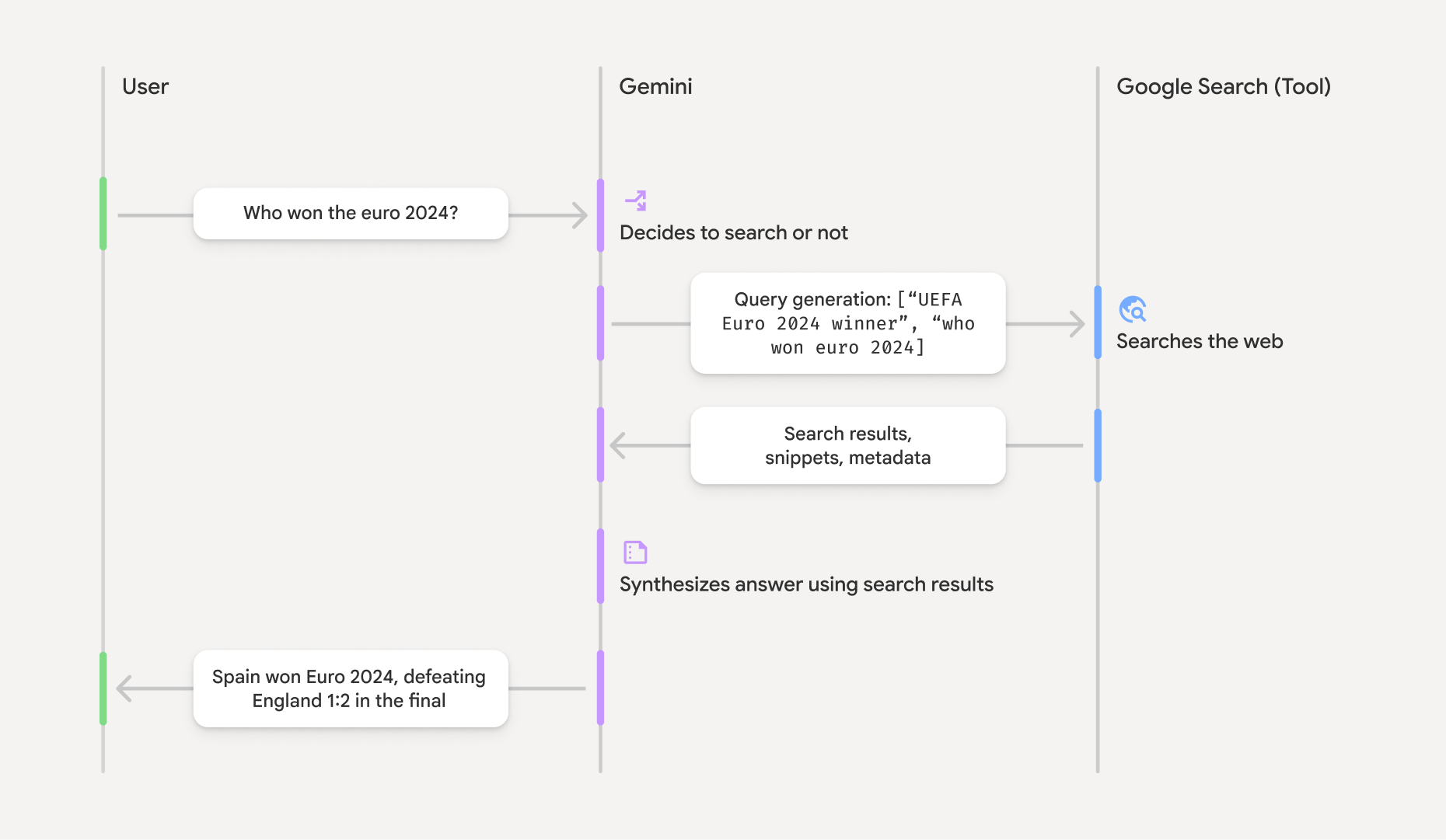
- Câu lệnh của người dùng: Ứng dụng của bạn gửi câu lệnh của người dùng đến Gemini API khi bật công cụ
google_search. - Phân tích câu lệnh: Mô hình sẽ phân tích câu lệnh và xác định xem Google Tìm kiếm có thể cải thiện câu trả lời hay không.
- Google Tìm kiếm: Nếu cần, mô hình sẽ tự động tạo một hoặc nhiều cụm từ tìm kiếm và thực hiện các cụm từ đó.
- Xử lý kết quả tìm kiếm: Mô hình xử lý kết quả tìm kiếm, tổng hợp thông tin và đưa ra câu trả lời.
- Câu trả lời có căn cứ: API trả về một câu trả lời cuối cùng, thân thiện với người dùng và dựa trên kết quả tìm kiếm. Câu trả lời này bao gồm câu trả lời dạng văn bản của mô hình, trong đó có
annotationschứa thông tin trích dẫn cùng dòng, cũng như các bướcgoogle_search_callvàgoogle_search_resultcó chứa cụm từ tìm kiếm và cụm từ tìm kiếm được đề xuất.
Tìm hiểu về câu trả lời dựa trên dữ liệu thực tế
Khi một câu trả lời được căn cứ thành công, đầu ra văn bản của mô hình sẽ bao gồm annotations cùng dòng ngay trên khối nội dung văn bản. Những chú thích này cung cấp thông tin trích dẫn, liên kết các phần của câu trả lời với nguồn của chúng.
{
  "steps": [
    {
      "type": "thought",
      "summary": [
        {
          "type": "text",
          "text": "The user is asking for the winner of Euro 2024. I need to search for the result of the Euro 2024 final."
        }
      ],
      "signature": "CoMDAXLI2nynRYojJIy6B1Jh9os2crpWLfB0..."
    },
    {
      "type": "google_search_call",
      "arguments": {
        "queries": ["UEFA Euro 2024 winner"]
      }
    },
    {
      "type": "google_search_result",
      "call_id": "search_001",
      "result": [
        {
          "search_suggestions": "<!-- HTML and CSS for the search widget -->"
        }
      ]
    },
    {
      "type": "model_output",
      "content": [
        {
          "type": "text",
          "text": "Spain won Euro 2024, defeating England 2-1 in the final. This victory marks Spain's record fourth European Championship title.",
          "annotations": [
            {
              "type": "url_citation",
              "url": "https://www.aljazeera.com/sports/euro-2024-final",
              "title": "aljazeera.com",
              "start_index": 0,
              "end_index": 56
            },
            {
              "type": "url_citation",
              "url": "https://www.uefa.com/euro2024/news/spain-wins-euro-2024",
              "title": "uefa.com",
              "start_index": 57,
              "end_index": 124
            }
          ]
        }
      ]
    }
  ]
}
Các trường khoá trong phản hồi:
google_search_call: Chứa cụm từ tìm kiếmqueriesmà mô hình đã thực thi.google_search_result: Chứasearch_suggestions, một đoạn mã HTML để hiển thị các cụm từ tìm kiếm được đề xuất trong giao diện người dùng của bạn. Toàn bộ yêu cầu về việc sử dụng được nêu chi tiết trong Điều khoản dịch vụ.textcóannotations: Câu trả lời do mô hình tổng hợp kèm theo trích dẫn nội dòng. Mỗi chú thíchurl_citationliên kết một đoạn văn bản (được xác định bằngstart_indexvàend_index) với một URL nguồn. Đây là chìa khoá để tạo trích dẫn cùng dòng.
Bạn cũng có thể kết hợp tính năng Grounding with Google Search với công cụ bối cảnh từ URL để dựa vào cả dữ liệu web công khai và các URL cụ thể mà bạn cung cấp để đưa ra câu trả lời.
Phân bổ nguồn bằng trích dẫn ngay trong văn bản
API này trả về chú thích url_citation cùng dòng trên khối nội dung văn bản, giúp bạn có toàn quyền kiểm soát cách hiển thị nguồn trong giao diện người dùng.
Mỗi chú thích đều có start_index và end_index để xác định phần văn bản mà chú thích đó trích dẫn. Sau đây là cách trích xuất và hiển thị các thông tin này.
Python
for step in interaction.steps:
    if step.type == "model_output":
        for content_block in step.content:
            if content_block.type == "text":
                print(content_block.text)
                if content_block.annotations:
                    print("\nCitations:")
                    for annotation in content_block.annotations:
                        if annotation.type == "url_citation":
                            cited_text = content_block.text[annotation.start_index:annotation.end_index]
                            print(f"  [{annotation.title}]({annotation.url})")
                            print(f"    Cited text: \"{cited_text}\"")
JavaScript
for (const step of interaction.steps) {
  if (step.type === 'model_output') {
    for (const contentBlock of step.content) {
      if (contentBlock.type === 'text') {
        console.log(contentBlock.text);
        if (contentBlock.annotations) {
          console.log("\nCitations:");
          for (const annotation of contentBlock.annotations) {
            if (annotation.type === 'url_citation') {
              const citedText = contentBlock.text.slice(annotation.startIndex, annotation.endIndex);
              console.log(`  [${annotation.title}](${annotation.url})`);
              console.log(`    Cited text: "${citedText}"`);
            }
          }
        }
      }
    }
  }
}
Java
import com.google.genai.Client;
import com.google.genai.gaos.models.interactions.Annotation;
import com.google.genai.gaos.models.interactions.Content;
import com.google.genai.gaos.models.interactions.CreateModelInteraction;
import com.google.genai.gaos.models.interactions.GoogleSearch;
import com.google.genai.gaos.models.interactions.Interaction;
import com.google.genai.gaos.models.interactions.InteractionsInput;
import com.google.genai.gaos.models.interactions.Model;
import com.google.genai.gaos.models.interactions.ModelOutputStep;
import com.google.genai.gaos.models.interactions.Step;
import com.google.genai.gaos.models.interactions.TextContent;
import com.google.genai.gaos.models.interactions.URLCitation;
import com.google.genai.gaos.models.operations.CreateInteractionRequestBody;
import java.util.Arrays;

Client client = new Client();

CreateModelInteraction params =
    CreateModelInteraction.builder()
        .model(Model.of("gemini-3.8-flash"))
        .input(InteractionsInput.of("Who won the euro 2024?"))
        .tools(Arrays.asList(GoogleSearch.builder().build()))
        .build();

Interaction interaction =
    client.interactions.create(CreateInteractionRequestBody.of(params)).interaction().get();

if (interaction.steps().isPresent()) {
  for (Step step : interaction.steps().get()) {
    if (step instanceof ModelOutputStep) {
      ModelOutputStep outputStep = (ModelOutputStep) step;
      if (outputStep.content().isPresent()) {
        for (Content contentBlock : outputStep.content().get()) {
          if (contentBlock instanceof TextContent) {
            TextContent textContent = (TextContent) contentBlock;
            String text = textContent.text().orElse("");
            System.out.println(text);
            if (textContent.annotations().isPresent()
                && !textContent.annotations().get().isEmpty()) {
              System.out.println("\nCitations:");
              for (Annotation annotation : textContent.annotations().get()) {
                if (annotation instanceof URLCitation) {
                  URLCitation citation = (URLCitation) annotation;
                  int start = citation.startIndex().orElse(0);
                  int end = citation.endIndex().orElse(0);
                  String citedText =
                      (start >= 0 && end <= text.length() && start <= end)
                          ? text.substring(start, end)
                          : "";
                  System.out.printf(
                      "  [%s](%s)%n", citation.title().orElse(""), citation.url().orElse(""));
                  System.out.printf("    Cited text: \"%s\"%n", citedText);
                }
              }
            }
          }
        }
      }
    }
  }
}
Go
package main

import (
    "context"
    "fmt"
    "log"

    "google.golang.org/genai"
    "google.golang.org/genai/interactions/models/interactions"
    "google.golang.org/genai/interactions/models/operations"
)

func main() {
    ctx := context.Background()
    client, err := genai.NewClient(ctx, nil)
    if err != nil {
        log.Fatal(err)
    }

    resp, err := client.Interactions.Create(ctx, operations.CreateInteractionRequest{
        Body: operations.NewCreateInteractionRequestBody(
            interactions.CreateModelInteraction{
                Model: interactions.Model("gemini-3.8-flash"),
                Input: interactions.NewInteractionsInput("Who won the euro 2024?"),
                Tools: []interactions.Tool{
                    interactions.NewTool(interactions.GoogleSearch{}),
                },
            },
        ),
    })
    if err != nil {
        log.Fatal(err)
    }

    for _, step := range resp.Interaction.Steps {
        if step.ModelOutputStep != nil {
            for _, content := range step.ModelOutputStep.Content {
                if content.TextContent != nil {
                    text := content.TextContent.Text
                    fmt.Println(text)
                    if len(content.TextContent.Annotations) > 0 {
                        fmt.Println("\nCitations:")
                        for _, annotation := range content.TextContent.Annotations {
                            if annotation.URLCitation != nil {
                                c := annotation.URLCitation
                                start := 0
                                if c.StartIndex != nil {
                                    start = *c.StartIndex
                                }
                                end := 0
                                if c.EndIndex != nil {
                                    end = *c.EndIndex
                                }
                                citedText := ""
                                if start >= 0 && end <= len(text) && start <= end {
                                    citedText = text[start:end]
                                }
                                title := ""
                                if c.Title != nil {
                                    title = *c.Title
                                }
                                url := ""
                                if c.URL != nil {
                                    url = *c.URL
                                }
                                fmt.Printf("  [%s](%s)\n", title, url)
                                fmt.Printf("    Cited text: %q\n", citedText)
                            }
                        }
                    }
                }
            }
        }
    }
}
Kết quả đầu ra sẽ hiển thị văn bản kèm theo các trích dẫn:
Spain won Euro 2024, defeating England 2-1 in the final. This victory marks Spain's record fourth European Championship title.

Citations:
  [aljazeera.com](https://www.aljazeera.com/sports/euro-2024-final)
    Cited text: "Spain won Euro 2024, defeating England 2-1 in the final."
  [uefa.com](https://www.uefa.com/euro2024/news/spain-wins-euro-2024)
    Cited text: "This victory marks Spain's record fourth European Championship title."
Giá
Khi bạn sử dụng tính năng Bám sát nguồn bằng Google Tìm kiếm với Gemini 3 và các mô hình mới hơn, dự án của bạn sẽ được tính phí cho mỗi cụm từ tìm kiếm mà mô hình quyết định thực hiện. Mô hình tính phí theo truy vấn này bao gồm 5.000 yêu cầu tìm kiếm miễn phí mỗi tháng, được chia sẻ cho tất cả các mô hình Gemini 3 trở lên, sau đó có giá 14 USD cho mỗi 1.000 yêu cầu tìm kiếm.
Ví dụ: nếu mô hình quyết định thực thi nhiều cụm từ tìm kiếm để trả lời một câu lệnh (ví dụ: tìm kiếm "UEFA Euro 2024 winner" và "Spain vs
England Euro 2024 final score" trong cùng một lệnh gọi API), thì việc này được tính là hai lần sử dụng công cụ có tính phí cho yêu cầu đó. Để tính phí, chúng tôi bỏ qua
các cụm từ tìm kiếm trống trên web khi tính số cụm từ tìm kiếm riêng biệt.
Khi bạn sử dụng tính năng dựa trên dữ liệu tìm kiếm với Gemini 2.5 trở xuống, dự án của bạn sẽ được tính phí theo từng câu lệnh.
Để biết thông tin chi tiết về giá, hãy xem trang định giá Gemini API.
Mô hình được hỗ trợ
Bạn có thể xem toàn bộ chức năng trên trang tổng quan về mô hình.
| Mô hình | Bám sát nguồn bằng Google Tìm kiếm |
|---|---|
| Gemini 4 Argon | ✔️ |
| Gemini 3.8 Flash | ✔️ |
| Gemini 3.6 Flash | ✔️ |
| Gemini 3.5 Flash-Lite | ✔️ |
| Bản xem trước hình ảnh Gemini 3.1 Flash | ✔️ |
| Gemini 3.1 Pro (Bản xem trước) | ✔️ |
| Bản xem trước hình ảnh của Gemini 3 Pro | ✔️ |
| Bản xem trước Gemini 3 Flash | ✔️ |
| Gemini 2.5 Pro | ✔️ |
| Gemini 2.5 Flash | ✔️ |
| Gemini 2.5 Flash-Lite | ✔️ |
| Gemini 2.0 Flash | ✔️ |
Các kiểu kết hợp công cụ được hỗ trợ
Bạn có thể sử dụng tính năng Neo bám vào Google Tìm kiếm cùng với các công cụ khác như thực thi mã, Bối cảnh từ URL và Neo bám vào Google Maps (được hỗ trợ trên Gemini 3.5 Flash-Lite và các mô hình mới hơn) để hỗ trợ các trường hợp sử dụng phức tạp hơn. Các mô hình Gemini 3 cũng hỗ trợ kết hợp những công cụ tích hợp này với các công cụ tuỳ chỉnh (gọi hàm). Tìm hiểu thêm trên trang các tổ hợp công cụ.
Bước tiếp theo
- Tìm hiểu về các công cụ khác hiện có, chẳng hạn như Gọi hàm.
- Tìm hiểu cách bổ sung các URL cụ thể vào câu lệnh bằng công cụ bối cảnh URL.